
Series 8 8663cc - Razor BRAUN - Free user manual and instructions
Find the device manual for free Series 8 8663cc BRAUN in PDF.


| Product type | Rechargeable electric shaver |
| Brand | Braun |
| Model | Series 8 8663cc |
| Battery life | Up to 60 minutes of cordless shaving |
| Charging time | 1 hour for a full charge |
| Power supply | Rechargeable battery, power unit with secure transformer |
| Usage | Cordless only, washable under running water, can be used in the shower |
| Shaving head | Replaceable shaver cassette (ref. 83M) |
| Trimmer | Integrated precision trimmer with ejection |
| Head lock system | Multi Head Lock (5 positions) |
| Travel lock | Electronic lock to prevent accidental start |
| Display | Battery indicator, remaining minutes, cassette replacement indicator, cleaning indicator |
| Manual cleaning | Washable under running water (non-abrasive liquid soap possible) |
| Clean & Charge station | Automatic cleaning, charging, lubrication and storage (cc model) |
| Cleaning cartridge | Ref. CCR, contains ethanol and isopropanol, replace approximately every 8 weeks |
| Maintenance | Weekly lubrication with one drop of oil if washing with water |
| Warranty | 2 years |
| Recommended charging temperature | 5 °C to 35 °C |
| Recommended operating temperature | 15 °C to 35 °C |
| Safety | Do not use if damaged, do not open, battery not user-replaceable |
| Spare parts available | Shaver cassette 83M, cleaning cartridge CCR |
Frequently Asked Questions - Series 8 8663cc BRAUN
User questions about Series 8 8663cc BRAUN
0 question about this device. Answer the ones you know or ask your own.
Ask a new question about this device
Download the instructions for your Razor in PDF format for free! Find your manual Series 8 8663cc - BRAUN and take your electronic device back in hand. On this page are published all the documents necessary for the use of your device. Series 8 8663cc by BRAUN.
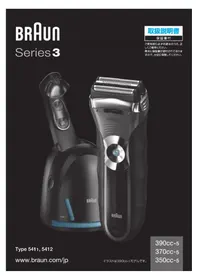
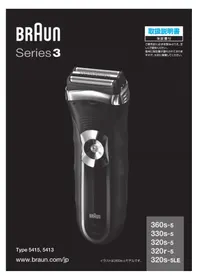
USER MANUAL Series 8 8663cc BRAUN
Deutsch 6
English 11
Français 16
Español 22
Português 28
Italiano 34
Nederlands 40
Dansk 45
Norsk 50
Svenska 55
Suomi 60
Ελληνικά 65
DE / AT 00 800 27 28 64 63
00 800 BRAUNINFOLINE
CH 08 44 - 88 40 10
UK 0800 783 7010
IE 1 800 509 448
FR 0 800 944 802
(service & call free)
BE 0 800 14 592
ES 900 814 208
PT 808 20 00 33
IT 800 440 017
NL 0 800 445 53 88
DK 70 15 00 13
NO 22 63 00 93
SE 020 - 21 33 21
FI 020 377 877
GR 210-9478700
HK (852) 2986 9886
(Customer Service Center)
Braun GmbH
Our products are designed to meet the highest standards of quality, functionality and design. We hope you enjoy your new Braun product.
Read these instructions completely, they contain safety information. Keep them for future reference.
Important
Your appliance is provided with a power supply, which has an integrated transformer (Safety Extra Low Voltage). Do not exchange or tamper with any part of it, otherwise there is risk of an electric shock. Only use the power supply provided with your appliance. If the appliance is marked D-492-C, you can use it with any Braun power supply 492-XXXX.

This appliance is suitable for cleaning under running water and use in a bathtub or shower. For safety reasons, it can only be operated cordless. Detach the shaver from the power supply before using it with water. Do not open the appliance!
The rechargeable batteries included can only be replaced by an authorized Braun Service centre.
Do not use if the appliance, the foil or the power supply are damaged.
This appliance can be used by children aged from 8 years and above and persons with reduced physical, sensory or mental capabilities or lack of experience and knowledge if they have been given supervision or instruction concerning the safe use of the appliance and understand the hazards involved. Children shall not play with the appliance. Cleaning and user maintenance shall not be made by children unless they are older than 8 years and supervised.
Warning
Keep power supply, charging stand* and Clean & Charge Station* dry.
Clean&Charge Station*
To prevent the cleaning fluid from leaking, ensure that the Clean & Charge Station is placed on a flat surface. When a cleaning cartridge is installed, do not tip, move suddenly or transport the station in any way as cleaning fluid might spill out of the cartridge. Do not place the station inside a mirror cabinet, nor place it on a polished or lacquered surface.
The cleaning cartridge contains a highly flammable liquid so keep it away from sources of ignition. Do not expose to direct sunlight and cigarette smoking nor store it over a radiator.
Do not refill the cartridge and use only original Braun refill cartridges.
* not with all models
Shaver
1 Foil & Cutter cassette 2 Cassette release button 3 Multi Head Lock switch 4 On / off button 5 Shaver display** 5a Travel lock 5b Replacement indicator for Foil & Cutter cassette 5c Status segments 5d Minutes left display 5e Cleaning indicator* 5f Plug reminder 5g Battery icon* 6 Precision trimmer 7 Shaver-to-station contacts 8 Release button for precision trimmer 9 Shaver power socket 10 Power supply** 10a Charging stand*/** 11 Travel case * not with all models (see display box) ** design can differ For electric specifications, see printing on the power supply.
Basic operating information
- A full charge takes 1 hour and provides up to 60 minutes of cordless shaving time. This may vary depending on your beard growth and ambient temperature.
- Recommended ambient temperature for charging is 5 °C to 35 °C, for storage and shaving it is 15 °C to 35 °C. The battery may not charge properly or at all under extremely low or high temperatures.
- Do not expose the appliance to temperatures higher than 50°C for extended periods of time.
- When the shaver is connected to an electrical outlet, it may take some minutes until the display illuminates.
Charging
- Connect the shaver to an electrical outlet by plugging the power supply (10) into the power
socket (9) / the charging stand (10a), until it clicks into place. For cc models plug into the station power socket (see chapter «Clean & Charge Station»).
- For first-time charge, charge continuously for at least 1 hour.
- The actual charge status is shown on the display.
Display
- The display information is dependent on the model.
- Some models only show icons during charging or operation. On other models, a series of icons is also shown after the shaver has been turned off.
- The table below shows the icons that can appear on the shaver display.
Battery status
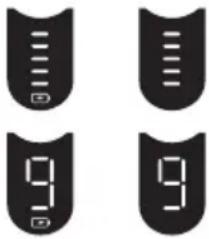 | The battery status is shown with segments and additionally in digits (for some models also with a battery icon).• The status segments appear / disappear gradually with the status of the battery power.• The digital number shows the remaining shaving time in minutes. |
Plug reminder
| (low charge / cordless operation only) | |
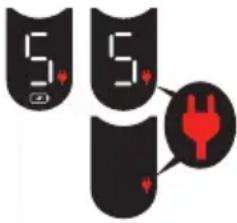 | 1. Flashing: Battery is in low charge, i.e. 5 minutes shaving time are left.2. Fast flashing: This appliance can only be operated cordless. Disconnect the shaver from the power supply before turning it on. |
Travel lock
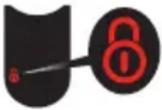 | When the travel lock icon appears on the display, the shaver is locked. |
Replacement indicator for Foil & Cutter cassette
 | The replacement indicator shows the usage of the Foil & Cutter cassette. The status segments disappear gradually with the numbers of shaves*. |
Cleaning indicator
| (with Clean & Charge station usage only) | |
| Thecleaning indicatorlightsup after each shave asa reminder that the shavershould be cleaned in theClean & Charge Station. | |
*not with all models
Usage
Make sure that the shaver is disconnected from the power supply. Press the on/off button (4) to operate the shaver.
Tips for a perfect shave
- Position the shaver at the right angle (90°) to your skin.
- Stretch your skin slightly with your hand.
- Shave against the direction of your beard growth.
Multi Head Lock switch (head lock)
The shaver head can be locked in five positions to shave hard-to-reach areas (e.g. under the nose).
- Slide the Multi Head Lock switch (3) down to lock the shaver head.
- Move the shaver head manually to your desired position.
- For automatic cleaning in the Clean & Charge Station the head lock needs to be released.
Precision trimmer
The trimmer can be used to trim sideburns, moustache or beard.
- Press the release button (8) and slide the trimmer (6) upwards.
Travel lock
The shaver can be locked to avoid unintended starting of the motor (e.g. for storing in a suitcase).
- Press the on / off button (4) for 3 seconds to lock / unlock the shaver. This is confirmed by a beep sound and the lock icon appearing / disappearing on the display.
Foil replacement
To maintain 100% shaving performance, replace the Foil & Cutter cassette (1), when the foil replacement indicator lights up (and no status segments are visible).
- To remove the Foil & Cutter cassette press the release button (2).
- Press the on / off button for 8 seconds to reset the counter.
- Afterwards you need to unlock the shaver (see chapter «Travel lock»).
- On some shaver models the replacement indicator will reset automatically after 7 shaves.
Cleaning
Cleaning under running water
Especially important after foam or gel usage
- Switch on the shaver cordless and rinse the shaver head under hot running water until all residues have been removed. You may use liquid soap without abrasive substances. Rinse off all foam and let the shaver run for a few more seconds.
- Next, switch off the shaver, press the release button (2) to remove the Foil & Cutter cassette (1) and let it dry.
- If you regularly clean the shaver under water, apply a drop of light machine oil on top of the Foil & Cutter cassette once a week.
The shaver needs to be cleaned under running water after each foam or gel usage!
Cleaning with a brush
- Switch off the shaver. Remove the Foil & Cutter cassette (1) and tap it out on a flat surface. Using the brush, clean the inner area of the pivoting head. Do not clean the cassette with the brush as this may damage it!
Clean & Charge Station (C & C)*
The Clean & Charge Station has been developed for cleaning, charging, lubricating and storing your Braun shaver.
12 Station power socket 13 Lift button for cartridge exchange 14 Station-to-shaver contacts 15 Clean & Charge Station display 15a Level indicator 15b Status light 15c Cleaning program indicators* 16 Start button 17 Cleaning cartridge
* not with all models (see display box)
C & C Installation
- Remove the protective film from the C & C display.
- Press the lift button (13) on the rear side of the C & C to raise the housing.
- Place the cleaning cartridge (17) on a flat, stable surface (e.g., a table).
- Carefully remove the lid from the cartridge.
- Slide the cartridge from the rear into the base of the station until it clicks into place.
- Slowly close the housing by pushing it down until it locks.
- Using the power supply (10), connect the station's power socket (12) to an electrical outlet.
C & C Usage
Important: The shaver must be dry and free of any foam, gel, or soap residue.
- Insert the shaver into the C & C upside down, with the front facing you and the head lock (3) released.
- The contacts (7) on the back of the shaver must align with the contacts (14) in the C & C. Push the shaver backward into the correct position. A beep confirms that the shaver is properly seated in the C & C.
- Only for C & C with cleaning program selection: The C & C analyzes the hygiene status. The status is shown by the cleaning program indicators (15c) on the C & C display (15).
Charging the shaver in the C & C
Charging starts automatically once the shaver is properly inserted.
Cleaning the shaver in the C & C
When the cleaning indicator lights up on the shaver display, insert the shaver into the C & C, as described above.
Cleaning programs (not with all models)
short / economical cleaning ▲▲ normal level of cleaning intensive cleaning
Each cleaning program consists of several cycles, where cleaning fluid is flushed through the shaver head.
Automatic cleaning
Start the cleaning process by pressing the start button (16). If status light (15b) does not shine (C & C switches to stand-by after ca. 10 minutes), press start button twice. Otherwise, cleaning will not start.
Depending on your model and / or program selected, the cleaning time takes up to 3 minutes. During this time the status light (15b) blinks.
After cleaning and charging is completed, all indicators turn off.
Leave the shaver in the C & C for drying. It takes several hours until remaining moisture evaporates depending on the climatic conditions.
Removing the shaver from the C & C
Hold the C & C with one hand and tilt the shaver slightly to the front to release it.
Cleaning cartridge / replacement
When the level indicator (15a) lights up permanently red, the remaining fluid in the cartridge is sufficient for about 3 more cycles. When the level indicator blinks red, the cartridge needs to be replaced.
After having pressed the lift button (13) to open the housing, wait for a few seconds before removing the used cartridge to avoid any dripping. Before discarding the used cartridge, make sure to close the openings using the lid of the new cartridge, since the used cartridge will contain contaminated cleaning solution.
The cleaning cartridge contains ethanol or isopropanol (specification see cartridge), which once opened will naturally evaporate slowly. Therefore, each cartridge, if not used daily, should be replaced after approximately 8 weeks. The cleaning cartridge also contains lubricants for the shaving system, which may leave residual marks on the outer foil frame and the cleaning chamber of the C & C. These
marks can be removed easily by wiping gently with a damp cloth and do not impact the shaver and its performance in any way.
Accessories
Braun recommends changing your shaver's
Foil & Cutter cassette every 18 months to maintain your shaver's maximum performance.
Available at your dealer or Braun Service Centres:
- Foil & Cutter cassette: 83M
- Cleaning Cartridge: CCR
- Braun Shaver cleaner spray
Environmental notice
Product contains batteries and / or recyclable electric waste. For environment protection, do not dispose of in household waste, but for recycling take to electric waste collection points provided in your country.
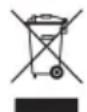
The cleaning cartridge can be disposed of with regular household waste.
Subject to change without notice.
Trouble-Shooting
| Problem: Possible reason: Remedy: | ||
| Shaver | ||
| Shaver does not start when pressing the on / off button. | 1. The shaver can only be operated cordless.2. Travel lock is activated. | 1. Unplug the shaver.2. Press the on / off button for 3 seconds to unlock the shaver. |
| Charging does not start when connected to power socket or put in the Clean & Charge Station. | 1. Sometimes charging starts delayed (e.g. after long storage).2. Ambient temperature is out of valid range.3. Power supply is not plugged into the shaver properly.4. Shaver is not placed properly in the Clean & Charge Station. | 1. Wait a few minutes. Charging will start automatically.2. Recommended ambient temperature for charging is 5 °C to 35 °C.3. Power supply needs to snap in.4. Contacts of the shaver need to align with contacts in the Clean & Charge Station. |
| Shaver does not charge completely and keeps blinking. | Ambient temperature is out of valid range. | Recommended ambient temperature for charging is 5 °C to 35 °C. |
| Unpleasant smell from the shaver head. | 1. Shaver head is cleaned with water.2. Cleaning cartridge is in use for more than 8 weeks. | 1. When cleaning the shaver head with water only use hot water and from time to time some liquid soap (without abrasive substances). Remove Foil & Cutter cassette to let it dry.2. Change cleaning cartridge at least every 8 weeks. |
| Battery performance dropped significantly. | 1. Foil and cutter are worn which requires more power for each shave.2. Shaver head is regularly cleaned with water but not lubricated. | 1. Renew Foil & Cutter cassette.2. If the shaver is regularly cleaned with water, apply a drop of light machine oil on top of the foil once a week for lubrication. |
| Shaving performance dropped significantly. | 1. Foil and cutter are worn.2. Shaving system is clogged. | 1. Renew Foil & Cutter cassette.2. Soak the Foil & Cutter cassette into hot water with a drop of dish liquid. Afterwards rinse it properly and tap it out. Once dry apply a drop of light machine oil on the foil. |
| Shaver head is damp. 1. Drying time after automatic cleaning was too short.2. Drain of the Clean & Charge station is clogged. | 1. Clean directly after shaving to allow enough time for drying.2. Clean the drain with a wooden toothpick. | |
| Clean & Charge Station | ||
| Cleaning does not start when pressing the start button. | 1. Shaver is not placed properly in the Clean & Charge Station.2. Cleaning cartridge does not contain sufficient cleaning fluid (display blinks red).3. Appliance is in stand-by mode. | 1. Insert shaver into the Clean & Charge Station and push it to the rear side of the station (contacts of the shaver need to align with contacts in the station).2. Insert new cleaning cartridge. Press the start button again.3. Press the start button again. |
| Increased consumption of cleaning fluid. | Drain of the Clean & Charge station is clogged. | - Clean the drain with a wooden toothpick.- Regularly wipe the tub clean. |
Guarantee
We grant a 2-year guarantee on the product commencing on the date of purchase. Within the guarantee period we will eliminate any defects in the appliance resulting from faults in materials or workmanship, free of charge either by repairing or replacing the complete appliance at our discretion. Depending on availability replacement might result in a different color or an equivalent model.
This guarantee extends to every country where this appliance is supplied by Braun or its appointed distributor.
This guarantee does not cover: damage due to improper use, normal wear and tear (e.g. shaver foil or cutter block) as well as defects that have a negligible effect on the value or operation of the appliance. The guarantee becomes void if repairs are undertaken by unauthorised persons and if original Braun parts are not used.
To obtain service within the guarantee period, hand in or send the complete appliance with your sales receipt to an authorised Braun Customer Service Centre (address information available online at www.service.braun.com).
For UK only:
This guarantee in no way affects your rights under statutory law.
Clean & Charge Station*
Clean & Charge Station (C&C)*
Clean & Charge Installation
Clean & Charge Station (C&C)*
Clean & Charge Station*
Clean & Charge Station (C & C)*
Clean & Charge Station (C & C)*
Clean & Charge Installation
Clean&Charge station*
Clean&Charge station (C&C)*
Clean&Charge station (C&C)*
Please note down the suggested replacement date (18 months from now) below the replacement part reference number.
83M


- IMPORTANT
- WARNING
- CLEAN&CHARGE STATION
- SHAVER
- BASIC OPERATING INFORMATION
- CHARGING
- DISPLAY
- USAGE
- TIPS FOR A PERFECT SHAVE
- MULTI HEAD LOCK SWITCH (HEAD LOCK)
- PRECISION TRIMMER
- TRAVEL LOCK
- FOIL REPLACEMENT
- CLEANING
- CLEANING UNDER RUNNING WATER
- THE SHAVER NEEDS TO BE CLEANED UNDER RUNNING WATER AFTER EACH FOAM OR GEL USAGE
- CLEANING WITH A BRUSH
- CLEAN & CHARGE STATION (C & C)
- C & C INSTALLATION
- C & C USAGE
- IMPORTANT: THE SHAVER MUST BE DRY AND FREE OF ANY FOAM, GEL, OR SOAP RESIDUE
- CHARGING THE SHAVER IN THE C & C
- CLEANING THE SHAVER IN THE C & C
- CLEANING PROGRAMS (NOT WITH ALL MODELS)
- AUTOMATIC CLEANING
- REMOVING THE SHAVER FROM THE C & C
- CLEANING CARTRIDGE / REPLACEMENT
- ACCESSORIES
- ENVIRONMENTAL NOTICE
- GUARANTEE
- FOR UK ONLY
- CLEAN & CHARGE STATION
- CLEAN & CHARGE STATION (C&C)
- CLEAN & CHARGE INSTALLATION
- CLEAN&CHARGE STATION (C&C)
Brand : BRAUN
Model : Series 8 8663cc
Category : Razor