EasyManual
M5 - Effect machine Antari - Free user manual and instructions
Find the device manual for free M5 Antari in PDF.


User questions about M5 Antari
0 question about this device. Answer the ones you know or ask your own.
Ask a new question about this device
Download the instructions for your Effect machine in PDF format for free! Find your manual M5 - Antari and take your electronic device back in hand. On this page are published all the documents necessary for the use of your device. M5 by Antari.
USER MANUAL M5 Antari
Stage Fog Machine User Manual


RoHS

EAC
Congratulations on the purchase of your new ANTARI FOG MACHINE.
Introduction
Thank you for choosing Antari Fog machine. You now own a rugged and powerful state-of-the-art machine. Prior to use, we suggest that you carefully read all of the instructions. By following the suggestions found in this user manual, you can look forward to the reliable and satisfactory performance of your ANTARI Fog Machine for years to come.
Please follow these operation, safety and maintenance instructions to ensure a long and safe life for your fog machine.
CAUTION:
Risk of electric shock. Disconnect the machine from the electric supply before refilling liquid, cleaning or performing maintenance on the machine.
- Danger of Electric Shock
- Keep this device dry.
- Always use 3-prong grounded electrical outlet for all power voltage. Prior to use take care to determine that the unit is installed at the rated voltage.
- Always unplug your ANTARI Fog Machine before filling its tank.
- Always keep the fog machine in flat position.
- Turn off or unplug the machine when not in use.
- If moisture, water or fog liquid gets inside the machine, immediately unplug the unit and wipe off and keep it dry.
- No user serviceable parts inside. Refer to your ANTARI dealer or other qualified Service personnel.
Danger of Burns
- Structural modification inside the machine is not allowed at anytime, please do not attempt to modify the machine by removing the cover, otherwise burns may result.
- Never leave the unit running unattended.
- Never aim the output nozzle directly at people or animals.
- Fog machine output is very hot. Avoid coming within 60~cm of the output nozzle during operation.
- Locate the fog machine in a well-ventilated area. Never cover the unit's vents. In order to guarantee adequate ventilation, allow a free air space of at least 20cm around the sides and top of the unit.
- Never aim the output nozzle at open flames.
- The output nozzle becomes very hot during operation (200^) . Keep flammable materials at least 50~cm away from the nozzle.
- Always allow your ANTARI Fog Machine to cool down before attempting to clean or service it & transporting.
Danger of Explosion
- Never add flammable liquids of any kind (such as oil, gas, perfume) to the fog liquid.
- Use only high-quality, water-based fog liquid that your dealer recommends. Other fog liquids may cause clogging or damage to internal parts.
- Always make sure there is sufficient liquid in the tank. Operating this unit without liquid will cause damage to the pump as well as over-heating of the heater. If your ANTARI fog machine fails to work properly, discontinue use immediately. Drain all fog liquid from the tank, pack the unit securely (preferably in the original packing material), and return it to your ANTARI dealer for service.
- Always drain tank before mailing or transporting this unit.
- Never drink fog liquid. If it is ingested, call a doctor immediately. If fog liquid comes in Contact with skin or eyes, rinse thoroughly with water.
Note: Pay attention to all warning labels and instructions printed on the exterior of your ANTARI Fog Machine
Unpacking & Inspection
- Open the shipping carton and verify that all equipment necessary to operate the system has arrived intact.
-
The shipping carton should contain the following items:
-
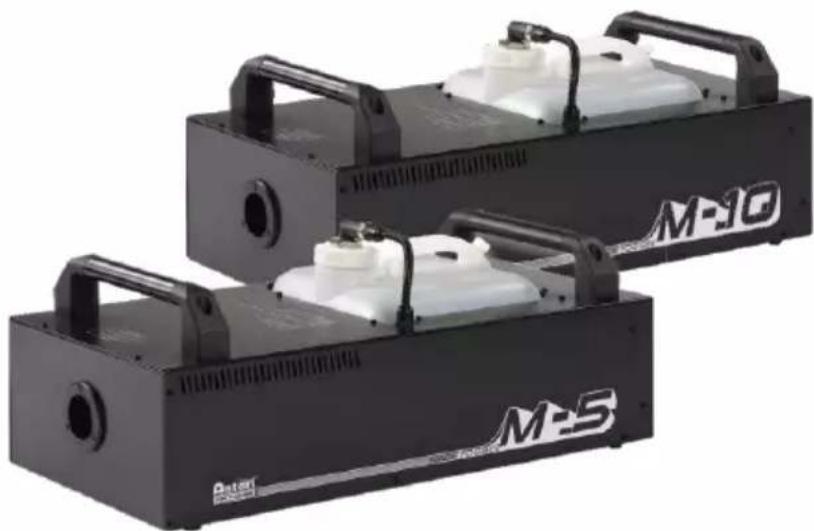
One unit of ANTARI M-Series Fog Machine (M-5 or M-10) with power cord
- M-20 multi-function remote control with attached 2 meter cord
- User Manual
- Optional Accessory: Mounting brackets with screws (for M-5)
- Optional Accessory: Flight case (FM-5 or FM-10)
If any equipment is missing contact your ANTARI dealer immediately.
Before beginning your initial setup on the ANTARI M-5 / M-10 Fog Machine, make sure that there is no evident damage caused by transportation. In the event that the unit's housing or cable is damaged, do not plug it in and do not attempt to use it until after contacting your ANTARI dealer for assistance.
Setup
- Remove all packing materials from shipping box. Check that all foam and plastic padding is removed, especially in the nozzle area.
- Place fog machine on a flat surface and remove fog liquid tank cap.
- Fill with high-quality, water-based fog liquid about 3/4 full recommended by Antari dealer.
- When filled, place cap back on liquid tank.
- Firmly attach the M-20 control module cable to the connector inside the rear chamber of the machine.
Operation
- The Plug should be in a position that is accessible when using the machine.
- Plug power cord into a grounded electrical outlet. Turn the power switch to "ON" on the back of the machine. Warm-up is completed when the display on the control module shows "Ready to Fog"
To emit fog press the appropriate button on the M-20 control module for fogging duration, interval and volume - The control unit display will display "Warming up" and "Ready to fog" as the machine re-heats to the proper operating temperature.
- For further information on operating your M-5 and M-10 Fog Machine, see the section titled "Control Module Operation".
- The limited warranty is based on 8-hour operation per day. Exceeding usage may shorten the lifetime of machines.
Caution:
"Visibility during operation is reduced".
This model can be operated at a floor level or sitting on any regular surface. Whatever installation method you choose, do not allow the unit to have more than 35 degree angle of inclination.
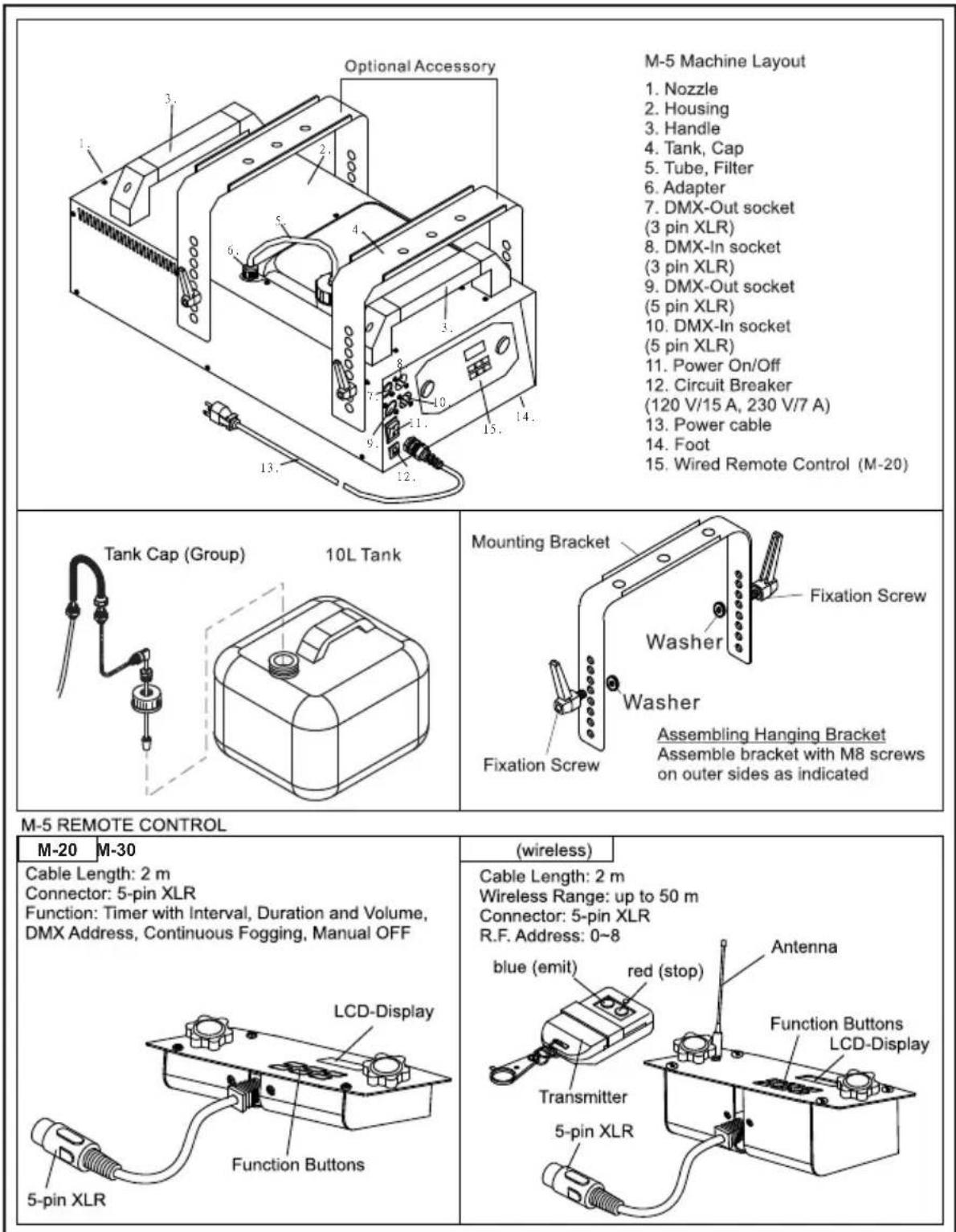
M-5 Description
M-10 Description
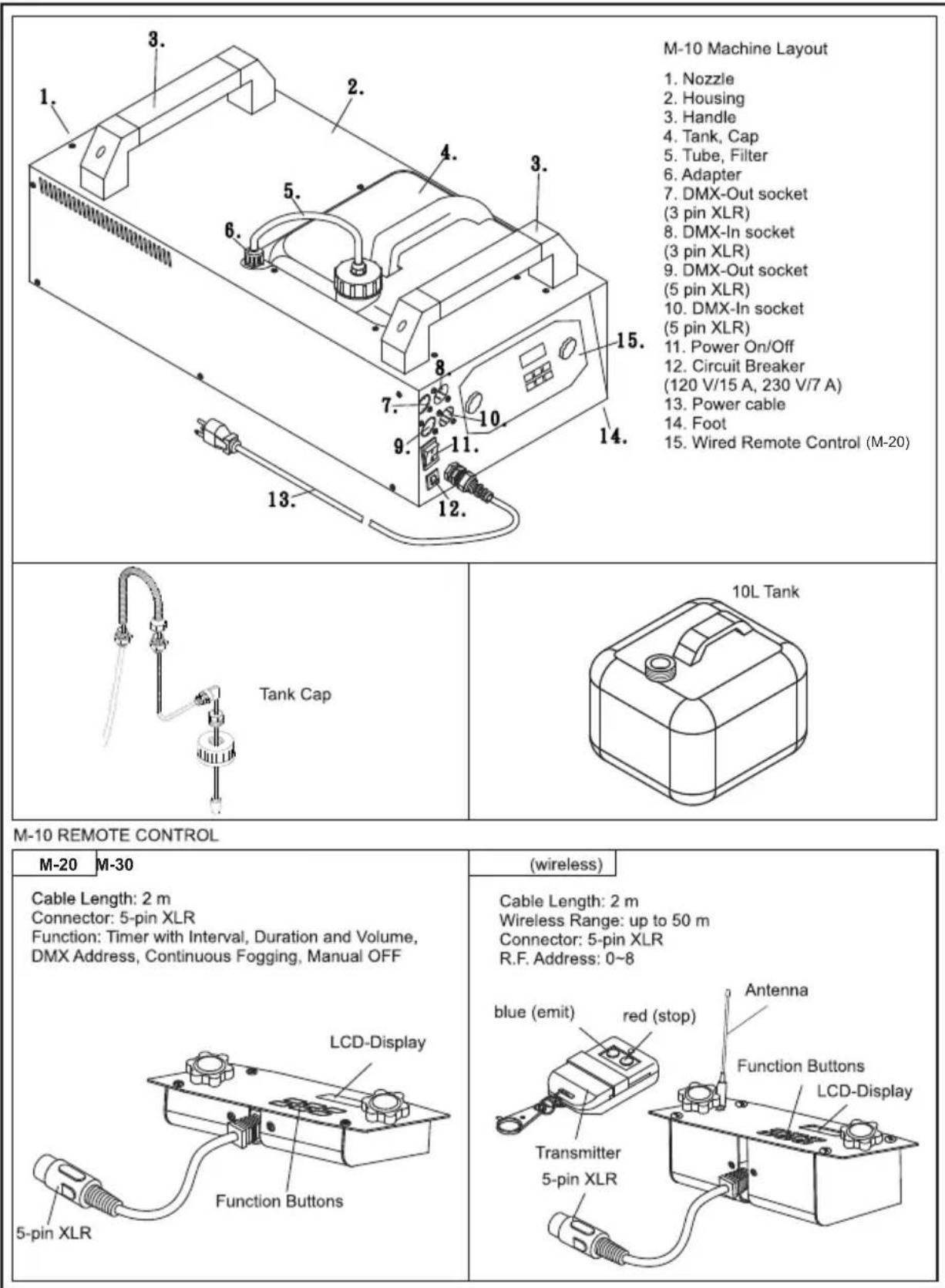
Note: Fluid level sensor is installed on the unit. The machine's pump will automatically stop working if the fluid is lower than usable level. It will re-start when temperature reaches working level Always monitor tank fluid level as you are operating making sure there's sufficient liquid in the tank..
If you experience low output, pump noise or no output at all, unplug immediately. Check fluid level, the external fuse, remote control connection and power from the wall. If all Of the above appears to be O.K., plug the unit again. If fog does not come out, check the hose attached to the tank to make sure there is fluid going through the hose. If you are unable to determine the cause of the problem, do not simply continue pushing the remote button, as this may damage the unit. Return the machine to your Antari dealer.
Technical Specifications
Model
-
Input voltage
-
Rated power
- Warm-up time
- Fluid consumption
- Fluid tank capacity
-
Compatible fluid
-
Ambient temp. range
- Output
-
Control
-
DMX channels
- Connection
-
Optional accessories
-
Dimension
- Weight
M-5
US model: AC 100-120V, 50/60Hz 12.5A
EU model : AC 220-240V, 50 / 60Hz 6.6A
1500W
8 minutes (approx.)
160 ml/min
101 (2.64gal)
Antari FLG-10 Heavy Fog Fluid
Antari FLR-10 Light Fog Fluid
0^ - 40^(32^ - 104^)
25,000 ft/min (708 m/min)
DMX512, Timer, Manual
Wireless (Optional)
1 channel
Neutrik Powercon (Power)
XLR 3-pin and 5-pin (DMX)
M-30 Pro Wireless Control Module
FX-5 Flightcase
M-5-HB Hanging Bracket
L668 W320 H276 mm
(L26.30 W12.60 H10.87 inch)
15.5 kg (34.17 lbs)
M-10
EU model: AC 220-240V, 50/60Hz 13A
3000W
9.5 minutes (approx.)
250 ml/min
101 (2.64gal)
Antari FLG-10 Heavy Fog Fluid
Antari FLR-10 Light Fog Fluid
0^ - 40^(32^ - 104^)
50,000 ft/min (1416 m/min)
DMX512, Timer, Manual,
Wireless (Optional)
1 channel
Neutrik Powercon (Power)
XLR 3-pin and 5-pin (DMX)
M-30 Pro Wireless Control Module
FX-5 Flightcase
L690 W320 H298 mm
(L27.17 W12.60 H11.73 inch)
21 kg (46.30 lbs)
Control Module Operation
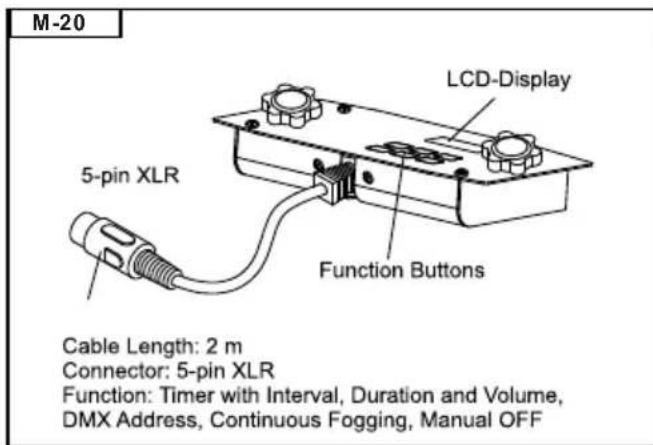
M-20: The M-20 is a 2 meter wired multi-function remote control with 5-pin XLR connector for ANTARI Fog Machine models M-5 and M-10. Its interface allows the operator to customize fog machine functions by adjusting fogging duration, interval and volume. Its LCD displays current operating parameters, which are automatically stored in non-volatile memory, allowing the machine to be powered down without losing function settings.
Instructions below:
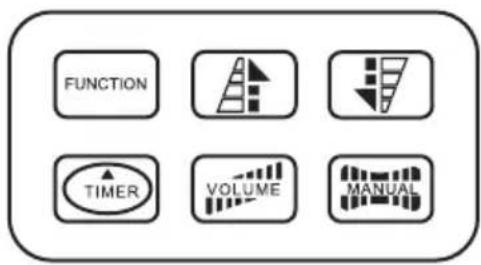
- LCD-Display
- Function-button
Sub-menus:
-->Interval Set
--->Duration Set
--->Timer Out
--->Volume Out
-->Nonstop Burst
-->DMX 512 Add
3.Up-/Down
button
4. Timer-button
5. Volume-button
6. Manual-button
- Via the "Function" button, you can adjust the desired settings in the sub-menus. After pressing the "Function" button once, the display shows "Interval Set". Adjust the interval between each fog emission (within the range of 1 to 255 seconds) with the Up/Down buttons. By pressing the "Function" button twice, the display shows "Duration Set". Adjust the duration of each fog emission (within the range of 1 to 20 seconds) with the Up/Down buttons. Under menu "Timer Out", you can adjust the output volume with the Up/Down buttons. Press "Function" again to enter the next menu, "Volume Out". Under this menu, you can set the fog output in % for the "Volume" function. Additionally, if you press Up at a value of 100% or Down at a value of 1% you can activate continuous fogging with the sub-menu "Non Stop Burst". The menu "DMX 512 Add" refers to adjusting the DMX address for DMX control or synchronization.
Adjust the desired DMX-address with the Up/Down buttons.
- Press the "Timer" button to activate the timer function according to the parameters set in the "Function" sub-menus. The display shows the adjusted interval and the device counts the seconds down to "0". After that, the fog emission is triggered at the volume adjusted under sub-menu "Timer Out". The duration depends on the settings adjusted under menu "Duration Set". If you wish to deactivate the timer function, press the main "Timer" button once more.
- Press the "Volume" button for immediate triggering of the fog emission at the volume adjusted under menu "Volume Out". Press the "Volume" button once more in order to stop the fog emission.
- Keep the "Manual" button pressed for immediate triggering of the fog emission at 100 % volume. This function overrides all other functions. Release the button in order to stop the fog emission.
*Simulation example: To adjust the machine to a fog interval of 5 seconds, a duration of 10 seconds, a output volume of 40% with a DMX address 3, proceed as follows:
button Function--->menu: "Interval Set"-->button Up to 5 seconds-->button Function--->menu: "Duration Set"-->button Up to 10 seconds-->button Function--->menu: "Timer Out"-->button Up to 40% -->button Function--->menu: "DMX 512 Add"-->button Up to 3-->button Function--->button Timer
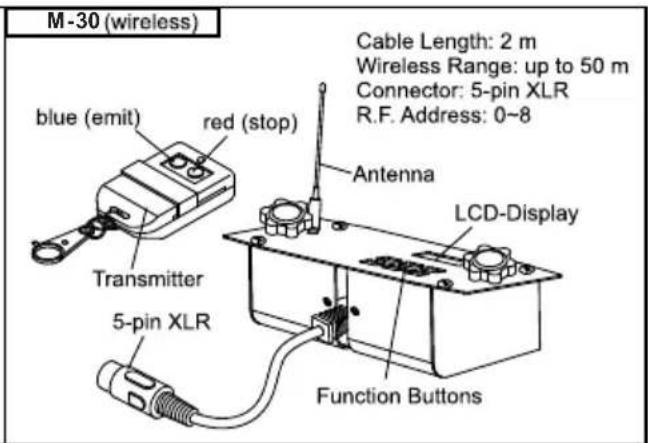
M-30: All M-20 features plus wireless capability. Wireless operation is possible up to a distance of 50 meters. The address can be set from 0 to 8, which means a max. of 9 different units can be controlled separately or in any combination desired. Press Function to cycle to RF mode to select desired address number. Make sure the address setting on the M-30 matches the address setting on the transmitter. There are two buttons on the transmitter. The blue one is to emit fog and red one is to stop the operation.
Performance Note
- All fog machines develop condensation around the output nozzle. This may result in some moisture accumulation on the surface below the output nozzle, gently wipe it clean. If abnormal condensation is detected, please check your choice of fog liquid due to impurity. Kindly stop using to ensure life span of the machine.
Maintenance / Storage
Do not allow the fog liquid to become contaminated. Always replace the caps on the fog liquid container and the fog machine liquid tank immediately after filling. Do not operate the fog machine without liquid at any time.
Clean with a dry cloth only. Store dry. Cleaning your fog machine regularly will help reduce costly replacement and repair charges.
Note: All fog machines are prone to clogging due to the thick consistency of fog liquid and the high temperature at which it vaporizes. It is strongly recommended that to do regular maintenance and services. A properly maintained fog machine should provide years of reliable use.
It is strongly recommended to test-run the machine on a monthly basis in order to achieve its best fogging condition. A test-run consists of warming up the machine followed by a few minutes of emission. Then please cool down the machine.
DMX Connector Pin Assignment
The machine provide 3 or 5 pin XLR connector for DMX connection. Diagram below indicate pin assignment information
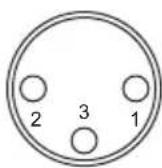
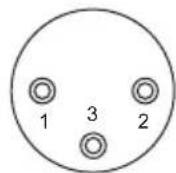
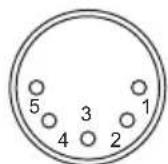
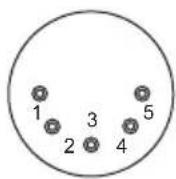
3 pin XLR 5 pin XLR
| Pin | Function |
| 1 | Ground |
| 2 | Data - |
| 3 | Data + |
Please read and save these instructions.
Antari M-5 & M-10 on-board DMX settings
Channel A Channel B

6-255
Volume Control
(5% - 100%; 255 is the
maximum output)
0-5 OFF

251-255
Nonstop Burst
0-250 OFF
The fog machines M-5 & M-10 have on-board DMX control. They use 2 channels to control volume output operation. Channel A has a value range of 0 to 255 and Channel B has a range of 251 to 255. Timer functions such as duration and interval can be programmed via the DMX controller or the DMX control software used by the lighting and effects operator.
Channel A (Volume Control)
If Channel A has a value from 0 to 5, the unit is OF F.
Between the values 6 to 255, the output will be linear. With 6 being the minimum volume of fog produced and 255 approaching the maximum. The volume output rises as the DM X value is increased.
Channel B (Nonstop Burst)
If Channel B has a value from 251 to 255, the machine will operate with Nonstop Burst (Continuous fogging). In this mode, the unit automatically adjusts itself and produces a large amount of fog. It requires no reheating period and produces fog continuously.
Function Priority
When Channel A is set to a value between 6 to 255 and Channel B is set between 251 to 255 at the same time, Channel B will override Channel A and the unit is in Nonstop Burst mode.
Addressing Example
If the unit is assigned to DMX address 124 e.g., Channel A corresponds to DMX address 124 and DMX address 125 will automatically be selected for Channel B.
The Antari fog machines M-5 & M-10 with on-board DM X conform to the following performance specifications:
1.Average Operating temperature = 250^
2. Continuous fog output is available by selecting "Nonstop Burst" under the Function sub-menu "Volume Out" or by setting the DMX address between 251-255 in channel B.
Bedienungsanleitung
Deballage & inspection
(L27.17 I12.60 H11.73 inch)
21 kg (46.30 lbs)
XLR 3-pin 及 5-pin (DMX512)
M-30 Pro 無線控制模組
FX-5 飞行箱
長690寬320高298mm
(長27.17寬12.60高11.73inch)
21公斤(46.30 lbs)
DMX連接PIN的接點說明
M-5 & M-10 Accessories
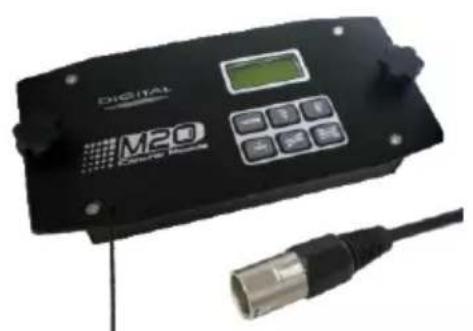
M-20 (Standard Remote)
- Cable Length: 2 m
- Connector : 5 Pin XLR
- Function : Timer with interval, duration and volume; set DMX address; continuous fogging; manual ON/OFF. (All above functions are displayed on a LCD screen and can be set precisely in seconds or percentage)
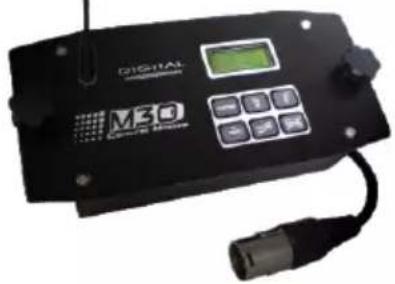
M-30(Optional Accessories)
Cable Length: 2 m
Wireless Range: Up to 50m
R.F. Address: 0~8
- Compatible With : Full M-Series Range
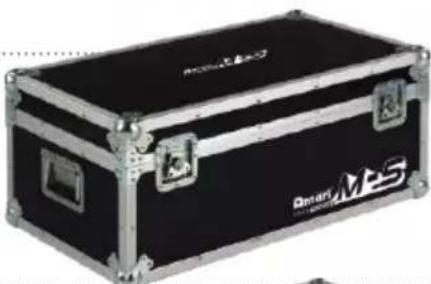
FM-5 (Optional Flightcases)
Dimensions (mm): L805 W433 H310
Weight:13kg
Compatible With : M-5
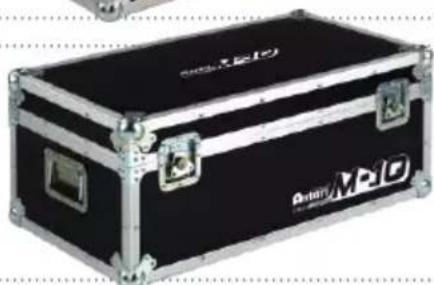
FM-10 (Optional Flighcases)
Dimensions (mm): L824 W433 H332
Weight: 14.2kg
Compatible With : M-10
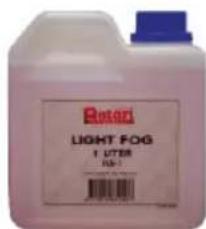
FL R-5 Light Fog Liquid
FL G-5 Heavy Fog Liquid
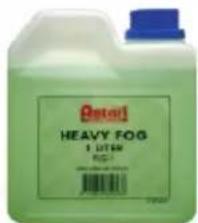
When only the best will do! Optimized for use with all Antari fog machines. High quality and performance, environmental and friendly fog liquid with no oily residue and pernicious materials.

For current product information visit Antari at:www.antari.com For information requests please contact us at:sales@antari.com