OTROLIG - Cooker IKEA - Free user manual and instructions
Find the device manual for free OTROLIG IKEA in PDF.



Frequently Asked Questions - OTROLIG IKEA
User questions about OTROLIG IKEA
0 question about this device. Answer the ones you know or ask your own.
Ask a new question about this device
Download the instructions for your Cooker in PDF format for free! Find your manual OTROLIG - IKEA and take your electronic device back in hand. On this page are published all the documents necessary for the use of your device. OTROLIG by IKEA.
USER MANUAL OTROLIG IKEA
Please refer to the last page of this manual for the full list of IKEA appointed Authorized Service Centre and relative national phone numbers.
ENGLISH 4 DEUTSCH 18 FRANÇAIS 36 ITALIANO 60
Maintenance and cleaning 11
What to do if ... 12
Technical data 13
Installation and electrical connection 14
Environmental concerns 15
IKEA GUARANTEE
16
Safety Information
These instructions shall also be available on website: www. ikea.com
Your safety and that of others is very important.
This manual and the appliance itself provide important safety messages, to be read and always observed.
This is the danger symbol, regarding safety, warning of potential risks to users and others.
All safety messages will be preceded by the danger symbol and the following words:
DANGER Indicates a hazardous situation which, if not avoided, will result in serious injury.
WARNING Indicates a hazardous situation which, if not avoided, could cause serious injury.
All messages relevant to safety specify the potential risk to which they refer and indicate how to
reduce the risk of injury, damage and electric shocks due to incorrect use of the appliance. Make sure to comply with the following:
- Use protective gloves to perform all unpacking and installation operations.
- The appliance must be disconnected from the power supply before carrying out any installation operation.
- Installation and maintenance must be carried out by a specialised technician, in compliance with the manufacturer's instructions and the local safety regulations in force. Do not repair or replace any part of the appliance unless specifically stated in the user manual.
- The appliance must be earthed.
- The power cable must be long enough for connecting
ENGLISH 5
the appliance, fitted in the cabinet, to the power supply.
- For installation to comply with the current safety regulations, an omnipolar switch with minimum contact gap of 3mm is required.
- Do not use multi-sockets or extension cords.
- Do not pull the appliance's power cable.
- The electrical parts must not be accessible to the user after installation.
- The appliance is designed solely for domestic use for cooking food. No other use is permitted (e.g. heating rooms).
The Manufacturer declines any liability for inappropriate use or incorrect setting of the controls. - The appliance and its accessible parts become hot during use. Care should be taken to avoid touching heating elements. Very young (0-3 years) and young children (3-8 years) shall be kept away unless continuously supervised.
- Children from 8 years and above and persons with reduced physical, sensory or
mental capabilities or lack of experience and knowledge can use this appliance only if they are supervised or have been given instructions on safe appliance use and if they understand the hazards involved. Children shall not play with the appliance. Cleaning and user maintenance shall not be made by children without supervision.
- Do not touch the appliance heating elements during and after use. Do not allow the appliance to come into contact with cloths or other flammable materials until all the components have cooled down completely.
- Do not place flammable materials on or near the appliance.
Overheated oils and fats catch fire easily. Pay attention when cooking food products rich in fat and oil. - A separator panel (not supplied) must be installed in the compartment under the appliance.
- If the surface is cracked, switch off the appliance to avoid the
ENGLISH 6
possibility of electric shock (only for appliances with glass surface).
- The appliance is not intended to be operated by means of an external timer or separate remote control system.
- Unattended cooking on a hob with fat or oil can be dangerous and may result in fire. NEVER try to extinguish a fire with water, but switch off the appliance and then cover flame e.g. with a lid or a fire
blanket.
Danger of fire: do not store items on the cooking surfaces.
- Do not use steam cleaners.
- Metallic objects such as knives, forks, spoons and lids should not be placed on the hob surface since they can get hot.
- After use, switch off the hob element by its control and do not rely on the pan detector (only for induction appliances).
Product description
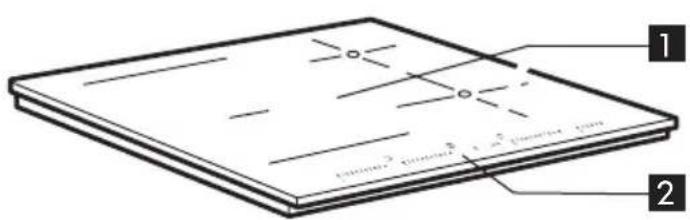
1 Induction cooking zone
2 Control panel
Control panel
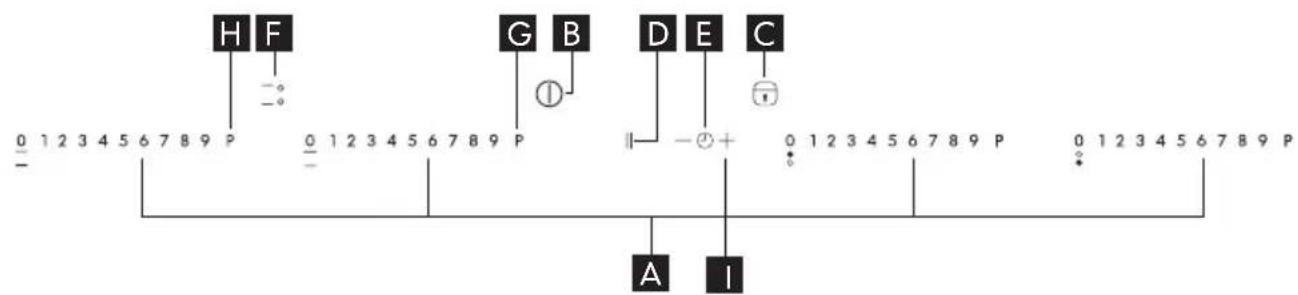
A Cooking zone controls and corresponding display
B On/Off
Child Lock/Cooktop lock/Power Management step 2 and 4
D Pause
E Timer/Power Management step 3
F Flexi mode
G Booster
Booster/Acoustic Signal
Power Management step 1
Daily use
Switching the hob ON/OFF
To switch the hob on, press the ① B button for approx. 2 seconds until the cooking zone displays light up. To switch off, press the same button until the displays switch off. All the cooking zones are deactivated. If the hob has been in use, the residual heat indicator "H" remains lit until the cooking zones have cooled down. If within 10 seconds of switching on, no function is selected, the hob switches off automatically without press ON/OFF button.
Before use
Important: The induction cooking zones will not switch on if pots and pans are not of the correct dimensions.
Only use pots bearing the symbol "INDUCTION SYSTEM".
Before switching the hob on, position the pot on the desired cooking zone.
Existing pots and pans:
Use a magnet to check whether pots or pans are suitable for use on the induction hob: pots are unsuitable if they cannot be magnetically detected.
- Ensure pots have a smooth bottom, otherwise they may scratch the hob's glass ceramic surface. Check dishes.
- Do not use empty pots on the hob. This could result in damage to both the glass ceramic surface and the bottom of the pots.
- Never place hot pots or pans on the hob's control panel. This could result in damage.
Recommended pot bottom widths
| Ø Zone Ø Pot | |
| 210 mm 150 - 210 mm | |
| Flexi 120 - 230x380 | mm |
| 145 mm 100 - 145 mm |
Switching on and adjusting cooking zones
Power indicator display Selected cooking zone indication
Cooking zone positioning
Once the hob is switched on and the pan is positioned on the chosen cooking zone, select the zone using the corresponding button A (corresponding one slider position) the display will show the selected level.
With the Slider it is possible to select the required power level, from min. 0 to max. 9, or booster "P". To increase the power level, select the level of power pressing the slider area and adjusting to have a right level.
Each cooking zone has various power levels, adjustable with the dedicated slider, going from "1": min. power, to "9": max. power. All cooking zones have a fast boil function (Booster), shown on the display with the letter "P".
Fast boil function (Booster)
This function makes it possible to exploit the hob's maximum power (for example to bring water to the boil very quickly).
To activate the function, press the button "P". "P" appears on the display. After 10 minutes' use of the booster function, the appliance automatically sets the zone to level 9.
Timer


The timer can be used to set cooking time for a maximum of 99 minutes for all cooking zones.
Select the cooking zone to be used with the timer (an illuminated dot appears to the bottom right hand side of the heat setting indicator on the display), press the button + or - button E with the clock symbol then set the desired cooking time using the buttons "+" and "- of the timer function (see figure). After 3 seconds, the timer begins the countdown (an illuminated dot is visible next to the zone for which the timer has been activated).
Once the set time has elapsed, an acoustic signal sounds and the cooking zone switches off automatically.
To deactivate the timer, press the " - " button until the display shows "0:0" or hold the + or - button E for at least 3 seconds.
To set the timer for another zone, repeat the points above. The timer display always shows the timer for the selected zone or the shortest timer.
To change or switch off the timer, press the zone selection button for the timer in question.
Pause
This function allows you to temporarily hold and then resume cooking processes maintaining previous settings). Press the key
D ① :11 flashes on the display in place of the power levels. To resume cooking, press
the key and touch the slider of an active zone again.
Activation/deactivation of the acoustic signal
Keep the H (Acoustic signal) button for at least 3 seconds. To deactivate the function repeat the same procedure.
Deactivation of cooking zones
Select the cooking zone you wish to switch off. Press the "0" on the slider area to set the level to "0".
The cooking zone switches off and the residual heat indicator "H" lights up.
Flexi mode
This function allows the cooking zone to be used as two separate zones or as a single extra large zone.
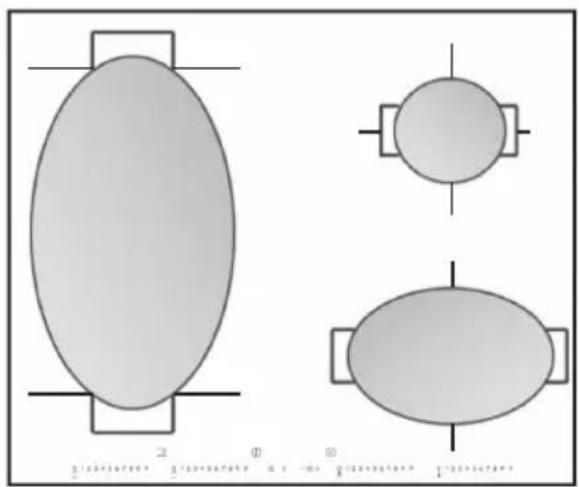
It is perfect for oval, rectangular and elongated pans (with maximum base dimensions of 38 × 23 ~cm ) or more than one standard pan in the same time. In order to activate the flexi mode function, switch on the hob, press F (Flexi mode) button: the two cooking zone displays show level "0"; both dots next to the level number are lit, indicating that the Flexi mode is activated. To change the power level (from 1 to max. 9 or P) press one of the two slider related to Flexi mode zone. To deactivate the Flexi mode function, press F (Flexi mode) button.
The message "no pot" will appear on the display of the zone that is not able to detect any pot (because of missing pot, or misplaced or not suitable for induction hob). This message remains active for 60 seconds: in this time you can add or slide pots within the flexi mode area as you prefer.
After 60 seconds if no pan is placed on the zone, the system stops "searching" pots on that zone, the symbol remains visible on the display to remind that the zone is disabled.
To reactivate the Flexi mode function, press F (Flexi mode) button.
The Flexi mode function is also able to detect when a pot is moved from one zone to the other one within the flexi mode area keeping the same power level of the zone where the pan originally was placed (see the example in the figure below: if the pot is moved from the front heater to the rear heater, the power level will be shown on the display corresponding to the zone where the pot is placed).
It is also possible to operate the Flexi mode area as two independent cooking zones, using the corresponding button of the single
ENGLISH 9
zone. Place the pot in the center of the single zone and adjust the power level with the slide touchscreen.
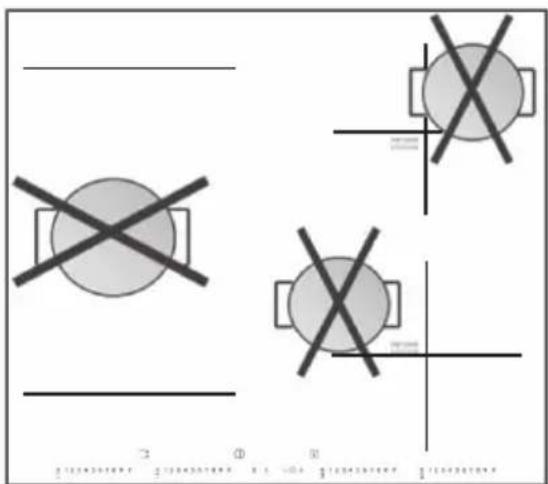
i Important: make sure to place the pans centered on the cooking zone in the way to
Control panel lock
This function locks the controls to prevent accidental switching on of the hob. To activate the control panel lock function, hold button C for 3 seconds.
The control panel is locked except for the deactivation function. To deactivate the control panel lock, repeat the activation procedure.
The luminous dot goes off and the hob is active again.
The presence of water, liquid spilled from pots or any objects resting on the button below the symbol can accidentally activate or deactivate the control panel lock function.
Control panel warnings Residual heat indicator.
The hob is fitted with a residual heat indicator for each cooking zone. These indicators alert the user when cooking zones are still hot. If the display shows H, the cooking zone is still hot. If the residual heat indicator of a given cooking zone is lit, that zone can be used, for example, to keep a
cover the center of the single cooking zone. In case of big pot, oval, rectangular and elongated pans make sure to place the pans centered on the cooking zone.
Examples of good pot placement and bad pot placement:
dish warm or to melt butter.
When the cooking zone cools down, the display goes off.
Incorrect or missing pot indicator.
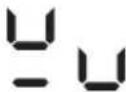
If you are using a pot that is not suitable, not correctly positioned or not of the correct dimensions for your induction hob, the message "no pot" will appear in the display (see figure). If no pot is detected within 60 seconds, the hob switches off.
Power management
Thanks to the "Power management" function, the user can set the maximum power the hob can reach, as required.
This setting is possible at any time and is maintained until the next change.
By setting the required maximum power, the hob automatically adjusts distribution in the various cooking zones, ensuring that this limit is never exceeded; with the advantage of also being able to manage all the
zones simultaneously, but without overload problems.
4 maximum power levels are available and showed on display: 2.5 - 4.0 - 6.0 - 7.2
kW (7.2 kW is considered as max power of cooktop).
At the time of purchase, the hob is set to maximum power.
After plugging the appliance into the electrical socket, in the first 60 seconds it is possible to set the required power level by running the following points:
| Points | Control panel Display | |
| 1 Unp | ug and after 1 minute plug the appliance again into the electrical socket, in the first 60 seconds it is possible to set the required power level. Press for approximately 5 seconds (Power management step 1) button | The display related to the first and the second cooking zone shows |
| 2 | Press the button (Power management step 2) to confirm the previous step | The display shows last level set previously |
| 3 | Press E - + button (Power management step 3) to set the chosen level amongst the different options available (2.5 - 4.0 - 6.0 - 7.2 kW). | The display related to the first and the second cooking zone shows the set level. |
| 4 | Press the button (Power management step 4) to confirm the previous step | The display related to the first and the second cooking zone shows the set level which flashes for approximately 2 seconds; after which the hob emits an acoustic signal and then turns itself off; it is now ready for use |
In case of an error when setting the power,
the symbol appears and the display related to the first and the second cooking zone shows the set level and an acoustic signal sounds for about 5 seconds. In this case repeat the configuration procedure from the beginning. If the error occurs again, contact the Authorized Service Centre. During normal use, if the user tries to increase the maximum available power level when reached, the level of the zone in use flashes twice and an acoustic signal sounds.
To obtain a higher power in that zone, it is necessary to manually decrease the power level of one or more already active cooking zones.
Maintenance and cleaning
Clean the hob after each use in order to avoid damaging the surface and to prevent the formation of baked-on deposits which are difficult to remove. Before cleaning, make sure the cooking zones are switched off and that the residual heat indicator ("H") is not displayed.
Steam cleaner is not to be used! Periodically check for dust under the appliance, near the cooling air inlet or the outlet openings.
This could hinder the ventilation and cooling of the electronic module and decrease the effectiveness of the hob.
To clean the hob, proceed as follows:
- use a soft clean cloth, absorbent kitchen wipes or a proprietary cleaner for glass
ceramic hobs. Do not use abrasive sponges and/or metal scouring pads.
- Food spills should be cleaned off before they bake onto the glass ceramic surface. Sugar and foods with a high sugar content damage the glass ceramic surface and must be immediately removed using a scraper for glass. Caution! Glass scrapers have a very sharp blade and must be handled with care.
- Remove any stubborn food residues with a scraper or proprietary detergents.
- Salt, sugar and sand can scratch the glass ceramic hob: clean up any such spills on the hob immediately.
What to do if ...
| Error code Problem | Possible cause Solution | ||
| The hob switches off and after 30 seconds emits an acoustic signal every 4 seconds | Continuous pressure on control panel area | Water or utensils on control panel | Clean the control panel |
| C81, C82 The control | panel switches off because of excessively high temperatures | The internal temperature of electronic parts is too high | Wait for the hob to cool down before using it again |
| F42 or F43 The connection voltage is wrong | The sensor detects a discrepancy between the appliance voltage and that of the mains supply | Disconnect the hob from the mains and check the electrical connection | |
| F12, F21, F25, F36, F37, F40, F41, F47, F56, F58, F60, | Call the Authorized Service Centre and specify the error code | ||
Before calling the Authorized Service
Centre:
- Check "What to do if..." to see if you can eliminate the problem yourself
- Turn the hob on again to check if correct operation has been restored.
- If the problem persists, contact the Authorized Service Centre.
Give the following information:
type of fault:
- hob model:
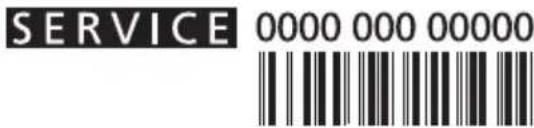
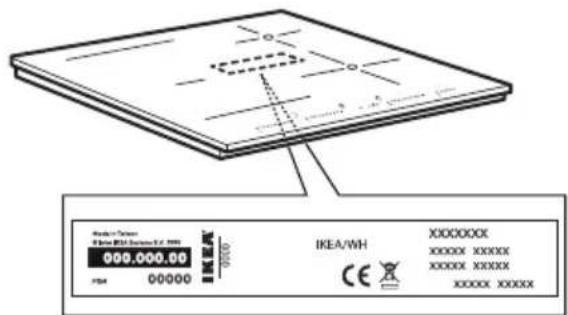
- service number (i.e. the number after the word SERVICE on the dataplate under the hob and on the warranty certificate);
- your full address;
- your telephone number.
If any repairs are required, contact an authorised service centre, indicated in the warranty.
In the unlikely event that an operation or repair is carried out by an unauthorised technician, always request certification of the work carried out and insist on the use of original spare parts.
Failure to comply with these instructions may compromise the safety and quality of the product.
Technical data
| Dimensions | |
| Width (mm) 580 | |
| Height (mm) 56 | |
| Depth (mm) 510 | |
| Voltage (V) See Installation and electrical connection | |
The technical information are situated in the rating plate on the bottom side of the appliance.
Installation and electrical connection
WARNING. Disconnect the appliance from the mains power supply.
- The appliance must be installed by a qualified technician who is fully aware of current safety and installation regulations.
- The manufacturer declines all liability for injury to persons or animals and for damage to property resulting from failure to observe the regulations provided in this chapter.
- The power supply cable must be long enough to allow the hob to be removed from the worktop.
- Make sure the voltage specified on the appliance rating plate is the same as that of the domestic power supply voltage.
- Do not use extension cables.
Connecting to the terminal board
For electrical connection, use an H05RR-F cable as specified in the table below.
| Conductors Amount x | size |
| 220-240 V ~ + ½ | 3 × 4 mm² |
| 220-240 V 3 ~ + ½ | 4 × 1.5 mm² |
| 380-415 V 3N ~ + ½ | 5 × 1.5 mm² |
| 380-415 V 2N ~ + ½ | 4 × 1.5 mm² |
Important:
-
Keep or remove the metallic bridges between the the screws L1-L2 and N1-N2 of the terminal block accordingly to the wiring diagram (see figure)
-
Make sure to fasten all the six screws of the terminal block after the cable connection
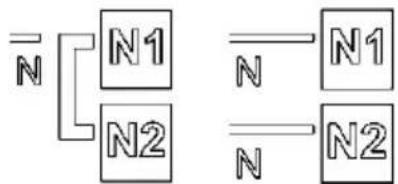
Example of bridge present (left) or absent (right) between N1 and N2 (check L1-L2 and N1-N2 bridges in the wiring diagram)
Connect the yellow/green earth wire to the terminal with the symbol 12
This wire must be longer than the other wires.
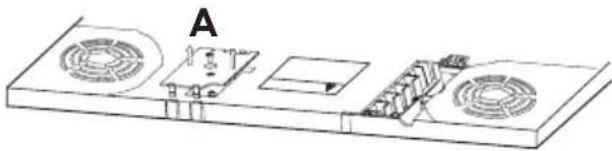
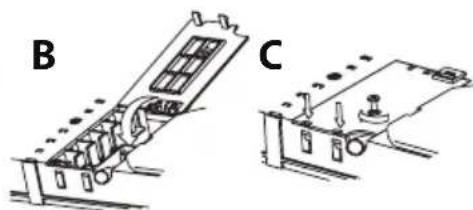
- Remove the terminal block cover (A), undoing the screw and put the cover in the terminal block hinge (B).
- Insert the power supply cable into the cable clamp and connect the wires to the terminal board as indicated in the diagram next to the terminal board itself.
- Secure the power cable with the cable clamp.
- Close the cover (C) and screw it on the terminal block with the removed screw - point (1).
Each time the cooktop is connected to the mains it carries out an automatic check which lasts several seconds.
Connect the appliance to the electricity supply by means of an all-pole disconnect switch with minimum contact gap of 3mm
| 380-415 V 3N ~ the voltage between phase and neutral is 230 V | 220-240 V ~ | 220-240 V ~ (AU and UK) | 380-415 V 2N ~ the voltage between phase and neutral is 230 V | 220-240 V 3 ~ (Belgium only) | 380-415 V 2N ~ (NL only) the voltage between phase and neutral is 230 V |
Environmental concerns
Disposal of packaging materials
The packaging material is entirely recyclable and marked with the recycling symbol (a). Do not dispose of the various packaging materials carelessly, but do so responsibly and in full compliance with local authority regulations governing waste disposal.
Scrapping
This appliance is marked in conformity with European Directive 2012/19/EU on Waste Electrical and Electronic Equipment (WEEE). By ensuring that this appliance is scrapped suitably, you can help prevent potentially damaging consequences for the environment and health.

The symbol the appliance or accompanying documentation indicates that this product should not be disposed of as unsorted municipal waste but must be taken to a collection point for the treatment of WEEE.
Energy saving tips
For optimum results, observe the following advice:
- Use pots and pans whose bottom diameter is equal to that of the cooking zone.
- Only use flat-bottomed pots and pans.
- If possible, keep pot lids on when cooking.
- Make sure you place the pot or pan in the centre of the cooking zone outlined on the hob.
Declaration of Conformity
- This appliance has been designed, constructed and marketed in compliance with the safety requirements of "Low Voltage" Directive 2006/95/EC (replacing 73/23/EEC as amended) and protection requirements of "EMC" Directive 2004/108/EC.
- This appliance meets the eco design requirements of European Regulation n° 66/2014 in conformity to the European standard EN 60350-2
IKEA GUARANTEE
How long is the IKEA guarantee valid?
This guarantee is valid for five (5) years from the original date of purchase of your appliance at IKEA, unless the appliance is named LAGAN in which case two (2) years of guarantee apply. The original sales receipt, is required as proof of purchase. If service work is carried out under guarantee, this will not extend the guarantee period for the appliance.
Which appliances are not covered by the IKEA five (5) years guarantee?
The range of appliances named LAGAN and all appliances purchased in IKEA before 1st of August 2007.
Who will execute the service?
IKEA service provider will provide the service through its own service operations or authorized service partner network.
What does this guarantee cover?
The guarantee covers faults of the appliance, which have been caused by faulty construction or material faults from the date of purchase from IKEA. This guarantee applies to domestic use only. The exceptions are specified under the headline "What is not covered under this guarantee?" Within the guarantee period, the costs to remedy the fault e.g. repairs, parts, labour and travel will be covered, provided that the appliance is accessible for repair without special expenditure. On these conditions the EU guidelines (Nr. 99/44/EG) and the respective local regulations are applicable. Replaced parts become the property of IKEA.
What will IKEA do to correct the problem?
IKEA appointed Service Provider will examine the product and decide, at its sole discretion, if it is covered under this guarantee. If considered covered, IKEA Service Provider or its authorized service partner through its own service operations, will then, at its sole discretion, either repair the defective product or replace it with the same or a comparable product.
What is not covered under this guarantee?
Normal wear and tear.
- Deliberate or negligent damage, damage caused by failure to observe operating instructions, incorrect installation or by connection to the wrong voltage, damage caused by chemical or electrochemical reaction, rust, corrosion or water damage including but not limited to damage caused by excessive lime in the water supply, damage caused by abnormal environmental conditions.
- Consumable parts including batteries and lamps.
- Non-functional and decorative parts which do not affect normal use of the appliance, including any scratches and possible color differences.
- Accidental damage caused by foreign objects or substances and cleaning or unblocking of filters, drainage systems or soap drawers.
- Damage to the following parts: ceramic glass, accessories, crockery and cutlery baskets, feed and drainage pipes, seals, lamps and lamp covers, screens, knobs, casings and parts of casings. Unless such damages can be proved to have been caused by production faults.
- Cases where no fault could be found during a technician's visit.
- Repairs not carried out by our appointed service providers and/or an authorized service contractual partner or where nonoriginal parts have been used.
- Repairs caused by installation which is faulty or not according to specification.
- The use of the appliance in a non-domestic environment i.e. professional use.
- Transportation damages. If a customer transports the product to his home or another address, IKEA is not liable for any damage that may occur during transport. However, if IKEA delivers the product to the
customer's delivery address, then damage to the product that occurs during this delivery will be covered by IKEA.
- Cost for carrying out the initial installation of the IKEA appliance. However, if an IKEA appointed Service Provider or its authorized service partner repairs or replaces the appliance under the terms of this guarantee, the appointed Service Provider or its authorized service partner will reinstall the repaired appliance or install the replacement, if necessary.
- This does not apply within Ireland, customer should contact the local IKEA dedicated after sales line or the appointed Service Provider for further information. (just for GB)
These restrictions do not apply to fault-free work carried out by a qualified specialist using our original parts in order to adapt the appliance to the technical safety specifications of another EU country.
How country law applies
The IKEA guarantee gives you specific legal rights, which cover or exceed all the local legal demands. However these conditions do not limit in any way consumer rights described in the local legislation.
Area of validity
For appliances which are purchased in one EU country and taken to another EU country, the services will be provided in the framework of the guarantee conditions normal in the new country. An obligation to carry out services in the framework of the guarantee exists only if the appliance complies and is installed in accordance with:
- the technical specifications of the country in which the guarantee claim is made;
- the Assembly Instructions and User Manual Safety Information.
The dedicated AFTER SALES for IKEA appliances
Please don't hesitate to contact IKEA appointed
Authorized Service Centre to:
make a service request under this guarantee;
- ask for clarifications on installation of the IKEA appliance in the dedicated IKEA kitchen furniture;
- ask for clarification on functions of IKEA appliances.
To ensure that we provide you with the best assistance, please read carefully the Assembly Instructions and/or the User Manual before contacting us.
How to reach us if you need our service
Please refer to the last page of this manual for the full list of IKEA appointed Authorized Service Centre and relative national phone numbers.
In order to provide you a quicker service, we recommend to use the specific phone numbers listed on this manual. Always refer to the numbers listed in the booklet of the specific appliance you need an assistance for.
Please also always refer to the IKEA article number (8 digit code) and 12 digit service number placed on the rating plate of your appliance.
SAVE THE SALES RECEIPT!
It is your proof of purchase and required for the guarantee to apply. The sales receipt also reports the IKEA name and article number (8 digit code) for each of the appliances you have purchased.
Do you need extra help?
For any additional questions not related to After Sales of your appliances please contact your nearest IKEA store call centre. We recommend you read the appliance documentation carefully before contacting us.
Inhaltsverzeichnis
Specifications techniques 45
Specifications techniques
GARANTIE IKEA (FRANCE)
CONTRAT DE GARANTIE ET DE SERVICE APRES-VENTE IKEA
Sieldom, a certain article is equivalent to the same article.
Opening hours: Monday - Friday 8.00 - 20.00
ROMÁNIA
Numar de telefon: 021 2044888
Tarif: Tarif local
Orar: Luni - Vineri 8.00 - 20.00
POCCN
TeneboHHbH HOMep:84957059426
CTOUMOCTb 3BOHKA: MECTHA CTOMOCTb 3BOHKA
Bpempa60tbI: HnHeEnbHnK - PTHNu9.00-21.00
(MockOBCKOE BpeM)
Opening hours: Monday - Friday 9.00 - 21.00