Ayden - Baby monitors Levana - Free user manual and instructions
Find the device manual for free Ayden Levana in PDF.



Frequently Asked Questions - Ayden Levana
User questions about Ayden Levana
0 question about this device. Answer the ones you know or ask your own.
Ask a new question about this device
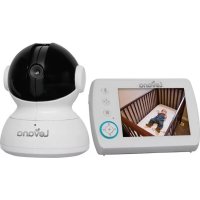
Download the instructions for your Baby monitors in PDF format for free! Find your manual Ayden - Levana and take your electronic device back in hand. On this page are published all the documents necessary for the use of your device. Ayden by Levana.
USER MANUAL Ayden Levana
CAUTION: Keep small parts away from children.
Strangulation Hazard: Children can become entangled in cords. Power cords should be kept more than 3 feet away from the crib and baby's reach at all times. Baby monitors with power cords should never be hung on or near the crib.
This product is not a toy and should be kept out of children's reach.
This product contains small parts. Exercise care when unpacking and assembling the product.
Read and Keep Instructions: All the safety and operating instructions should be read before the baby monitor is operated.
Water and Moisture: This product is designed for indoor use only. The unit should not be exposed to rain, moisture, dripping or splashing. No objects filled with liquid should be placed on top of, or beside the product, such as a glass or vase. This item should not be used near water.
Non-Use Periods: Always unplug the AC adapters from the wall outlets during long periods of non-use. Ventilation: This baby monitor should not be used on a bed, sofa, rug or similar surface that may block the ventilation openings, or be placed in an enclosed area, such as a bookcase or drawer that may impede air flow.
Keep Away from Sources of Heat: This unit should not be exposed to direct heat sources such as a candle, fi replace, radiator, heat register, stove or other appliance that emits heat. The unit should not be left in direct sunlight.
Power Source: This unit should only be used with the power adapters included in this package (rated 6V \~ 800mA)
Damage Requiring Service: This unit should be serviced by qualified personnel only when:
a. Objects have fallen or liquid has been spilled into the product
b. The units have been exposed to rain
c. The units do not appear to operate normally or exhibits a distinct change in performance
d. The units have been dropped or the enclosure damaged
IC STATEMENT / DÉCLARATION IC / CAN ICES-3 (B)/NMB-3(B):
Operation is subject to the following two conditions: (1) This device may not cause interference, and (2) This device must accept any interference, including interference that may cause undesired operation of the device.
Changes or modifications not expressly approved by the party responsible for compliance could void the user's authority to operate the equipment.

This device complies with part 15 of the FCC Rules. Operation is subject to the following two conditions:
(1) This device may not cause harmful interference.
(2) This device must accept any interference received, including interference that may cause undesired operation.
FCC WARNING
This equipment has been tested and found to comply with the limits for a Class B digital device, pursuant to Part 15 of the FCC Rules. These limits are designed to provide reasonable protection against harmful interference in a residential installation.
This equipment generates, uses and can radiate radio frequency energy and, if not installed and used in accordance with the instructions, may cause harmful interference to radio communications. However, there is no guarantee that interference will not occur in a particular installation. If this equipment does cause harmful interference to radio or television reception, which can be determined by turning the equipment off and on, the user is encouraged to try to correct the interference by one or more of the following measures:
- Reorient or relocate the receiving antenna.
- Increase the separation between the equipment and the receiver.
- Connect the equipment into an outlet different from that to which the receiver is connected.
- Consult the dealer or an experienced radio/TV technician for help.

This marking indicates that this product should not be disposed with other household wastes throughout North America. To prevent possible harm to the environment or human health from uncontrolled waste disposal, recycle it responsibly to promote the sustainable reuse of material resources. To return your used device, please use the return and collection systems or contact the retailer where the product was purchased. They can take this product for environmental safe recycling.
DISCLAIMERS
Strangulation Hazard: Children can become entangled in cords. Power cords should be kept more than 3 feet away from the crib and baby's reach at all times. Baby monitors/cameras with power cords should never be hung on or near the crib. This product is not a toy.
This product contains small parts. Exercise care when unpacking and assembling the product.
Optimum range is 200 feet when signal is passing through walls or floors. Microwave ovens (when in use) may cause signal disruption at close range. Buildings with metal frames may also cause signal disruption. Maximum transmission range is 750 feet.
Battery life of 48 hours based on 10 audio activations while in power save (PEEP) mode. Battery lasts an average of 8 hours with continuous audio/video usage.
Night vision range up to 15ft under ideal conditions. Objects at or beyond this range may be partially or completely obscured, depending on the camera application.
This product does not replace responsible adult supervision. Check on your child at regular intervals and make sure
WARRANTY
Please visit our website at www.mylevana.com for information about your product's warranty
We take quality very seriously. This is why all of our products come with a one-year warranty from the original purchase date against defects in workmanship and materials. If you have warranty or support issues please contact us using any of the following methods:
Web: www.mylevana.com
Support: www.mylevana.com/support
LEVANA Canada
4080 Montrose Road
Niagara Falls, ON
Canada L2H 1J9
LEVANA USA
60 Industrial Parkway #Z64
Cheektowaga NY
USA 14227
Warranty Terms
- LEVANA ^® products are guaranteed for a period of one year from the date of purchase against defects in workmanship and materials. This warranty is limited to the repair, replacement or refund of the purchase price at LEVANA's option.
- This warranty becomes void if the product shows evidence of having been misused, mishandled or tampered with contrary to the applicable instruction manual.
-
Routine cleaning, normal cosmetic and mechanical wear and tear are not covered under the terms of this warranty.
-
The warranty expressly provided for herein is the sole warranty provided in connection with the product itself and no other warranty, expressed or implied is provided. LEVANA assumes no responsibilities for any other claims not specifically mentioned in this warranty.
-
This warranty does not cover the shipping cost, insurance or any other incidental charges.
-
You MUST contact LEVANA at www.mylevana.com/support before sending any product back for repair. You will be sent a Return Authorization form with return instructions. When returning the product for warranty service, please pack it carefully in the original box with all supplied accessories, and enclose your original receipt or copy, and a brief explanation of the problem (include RA #).
-
This warranty is valid only in Canada and the continental U.S.
-
This warranty cannot be re-issued.
TABLE OF CONTENTS
Safety Warnings 2
FCC Statement 3
Disclaimers....3
Warranty 4
What's Included 5
Buttons and Connections 6
Setup 7
Battery installation - monitor 7
Battery Installation - camera (optional) 8
Connecting the Power Adapters 8
Charging the Monitor 8
Get the Most Out of Your Rechargeable Battery....9
Screen Icons 9
Pairing the Monitor and the Camera(s) 10
Mounting the Camera on a Tabletop Safely 11
Placement of the Monitor 11
Mounting the Camera on a Wall Safely 12
Night Vision....12
Operation....13
Using the Zoom / Pan & Tilt functions 13
Adjusting the volume 13
Using the Talk to Baby™ Two-Way Intercom....14
Turning the Nightlight On/OFF 14
Setting a Lullaby 14
Using the PEEP Mode function 15
Changing the Camera View 15
Setting the Brightness....16
Sound Sensitivity Settings 16
Temperature Settings....17
Troubleshooting....17
Specifications 18
WHAT'S INCLUDED
• Baby Video Monitor
- Night Vision Camera
• 2 Power Adapters
• Rechargeable Battery
- Quick Start Guide
• 1 year warranty
• Lifetime Customer Support
BUTTONS AND CONNECTIONS
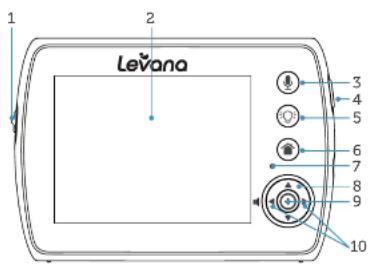
text_image
LeVana 1 2 3 4 5 6 7 8 9 10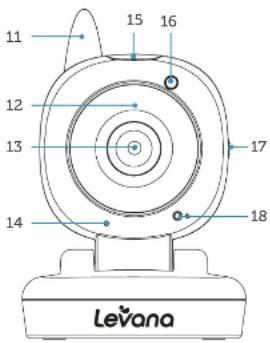
text_image
11 12 13 14 15 16 17 18 Levana1 Lock / Unlock Button
Disables ALL function buttons in the LOCK position
2 LCD Screen
3 Talk To Baby™
Press and hold to talk, release to listen
4 Power & Screen ON/OFF
Press and hold to turn monitor ON/OFF; Press once to turn screen ON/OFF
5 Nightlight
6 Menu & Exit-Close
7 Microphone
8 Navigation Buttons
9 Select
10 Volume -◀ Down / ▶ Up
11 Antenna
12 Night Vision LEDs
13 Camera Lens
14 Microphone
15 Nightlight
16 Night Vision Light Sensor
17 On/OFF Button
18 Power LED
BUTTONS AND CONNECTIONS

text_image
1 2 3 4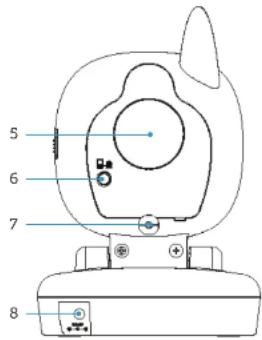
text_image
5 6 7 81 Battery Compartment
2 Table Stand
3 Antenna
4 Speaker
5 Speaker
6 Pairing Button
7 Antenna
8 Power Input
SETUP
Battery Installation - Monitor
-
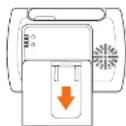
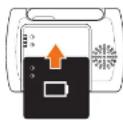
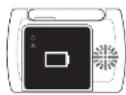
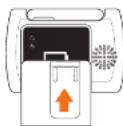
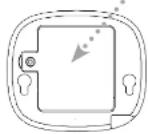
Slide Battery Compartment Cover down to remove.
-
Insert the included rechargeable battery. Ensure the battery connectors on the battery line up with the connectors inside the battery compartment.
-
Slide the Battery Cover back into place.
-
Remove battery during periods of non-use.
SETUP
Battery Installation - Camera (optional)
The camera unit can be powered using 4 AAA batteries instead of the included adapter.
- Gently remove the Battery Compartment Cover on the bottom of the camera base, using a small phillips (cross) head screwdriver.
- Insert 4 AAA batteries in the compartment (not included), paying close attention to the labelled polarity markings.
- Replace the battery compartment cover using the small screwdriver.
- The Power LED will flash when the battery charge is low.
Battery
Compartment cover
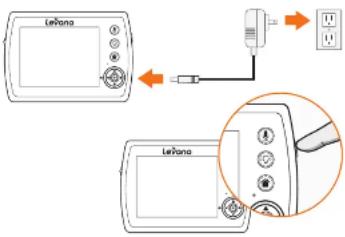
Connecting the Power Adapters
- Connect the Power Adapter marked Monitor ☐ to the Power Input on the side of the Monitor.
- Press and hold the Power ⏻ button on the side of the monitor to turn the monitor ON.
text_image
Leifano LeifanoCharging the Monitor
There are two ways to determine the battery power status:
- The LED Ring on the front of the monitor
- The icon in the top right corner of the main screen
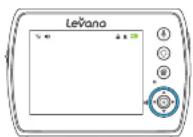

SOLID BLUE = BATTERY FULLY CHARGED QUICK FLASHING BLUE = BATTERY LOW FLASHING PINK = PAIRING UNSUCCESSFUL
SETUP
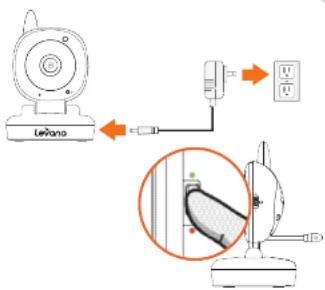
- Connect the Power Adapter marked Camera ☐ to the Power Input on the back of the Camera.
- Slide the ON/OFF switch on the side of the camera to the ON position. Power LED will be a solid red.
text_image
Leviano →Get the Most Out of Your Rechargeable Battery
Fully charge your battery before first use
Charge battery before battery is fully drained.
Avoid extreme heat or cold as this will affect the battery life.
Turn LCD screen OFF. Press POWER ⏻ button on side of monitor ONCE.
PEEP Mode: After 1 minute of inactivity, monitor enters standby/sleep mode (when activated)
Adjustable Brightness: Decrease screen brightness
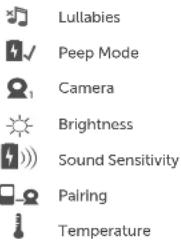
Screen Icons
text_image
Lullabies Peep Mode Camera Brightness Sound Sensitivity Pairing Temperature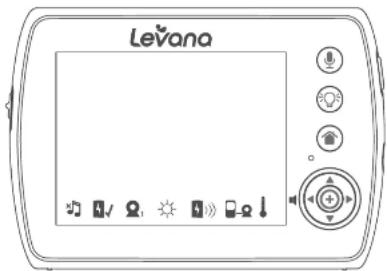
text_image
LevanaSETUP
Pairing the Monitor and the Camera(s)
The camera and monitor come paired (connected) to each other automatically. However, if upon opening this package the devices do not automatically connect and transmit, you may do so manually.
To pair additional cameras, repeat steps below and be sure to assign a different camera number to each additional camera.
Note: Before you begin pairing, be sure to have the monitor and the camera(s) side by side.
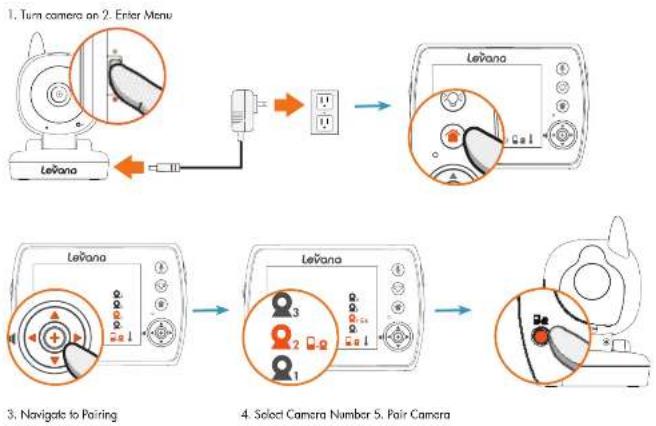
flowchart
graph TD
    A["Leñana"] --> B["Turn camera on 2. Enter Menu"]
    B --> C["Leñana with a switch"]
    C --> D["Select Camera Number 5. Pair Camera"]
    D --> E["Leñana with three buttons labeled 1, 2, 3"]
    E --> F["Leñana with a switch labeled 4"]
    F --> G["Leñana with a switch labeled 5"]
SETUP
Mounting the Camera on a Tabletop Safely
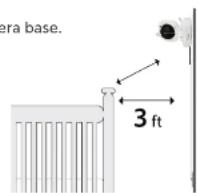
- Place the Camera on a tabletop no less than 3 feet away from your baby's crib.
- Feed the power cord down the back of the table or use wall clips (not included) to secure the cord away so the baby cannot reach it.
- Plug in the power cord, check the monitor to ensure that you can see and hear your child.
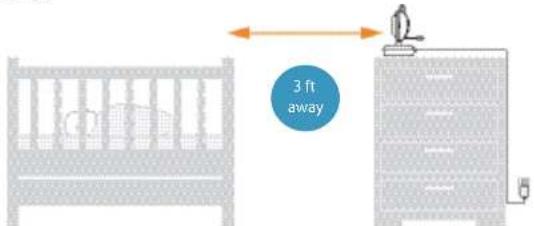
text_image
3 ft awayNote: Baby monitors with power cords should never be hung on or near the crib as it is a strangulation hazard. Power cords should be kept no less than 3 feet away from the crib and the baby's reach at all times.
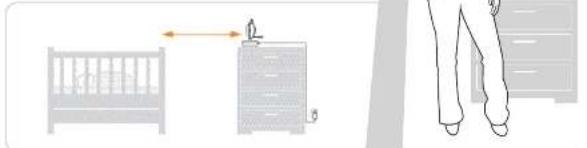
Placement of the Monitor
You can place the monitor on a tabletop by using the retractable table stand on the back of the monitor. When not in use, simply tuck the table stand away into the back of the monitor until you hear a "click".
natural_image
Illustration showing a furniture arrangement with a ladder, a chair, and legs (no text or symbols)SETUP
Mounting the Camera on a Wall Safely
Before drilling the holes, it is important to check the reception and camera positioning in the intended location on the wall. Ensure you are hanging the camera no less than 3 feet away from baby's crib.
Note: Baby monitors with power cords should never be hung on or near the crib as it is a strangulation hazard. Power cords should be kept no less than 3 feet away from the crib and the baby's reach at all times.
- Pre-drill two holes in the wall using a 3/16", 4.8mm drill bit.
- Insert wall anchors (not included) into each hole and tap gently with a hammer until the anchor is flush with the wall.
- Insert a screw (not included) into each wall anchor and tighten until the screws only stick out about a 1/2 inch.
- Plug the power cord into the power input of the camera.
- Locate the wall mounting holes on the bottom of the camera base.
- Slide the holes over the screws sticking out of the wall.
- Confirm that the camera is secure, if it is loose you may have to tighten the screws more.
- Use wall clips (not included) to secure the power cord away from the crib or the baby's reach.
- Connect the other end of the adapter into an available wall outlet.
Night Vision
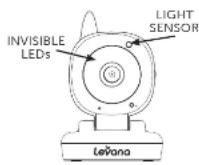
The camera is equipped with Invisible IR (infrared) LEDs which keep the nursery dark. The LEDs are located on the front of the camera and allow you to see up to 15 feet in complete darkness so you can check on your baby at any time of night. The night vision LEDs will activate automatically when the Light Sensor on the front of the camera detects that the light levels are too low.
OPERATION
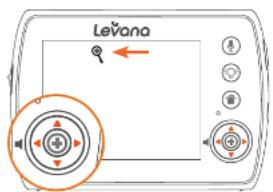
Using the Zoom / Pan & Tilt functions
text_image
Levana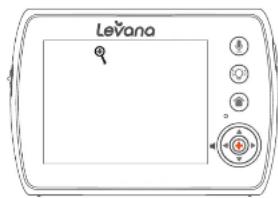
text_image
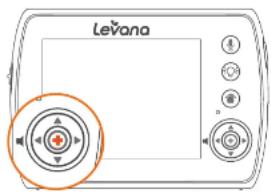
LevanoWhile in Zoom, the screen allows you to Pan/Tilt the image up, down, left and right on the screen (not the camera angle). Press Select + to exit the Zoom / Pan & Tilt function.
text_image
Levano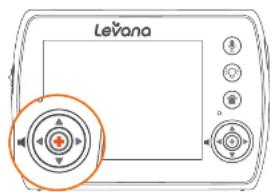
text_image
LevanaAdjusting the volume

text_image
Levana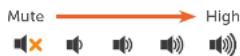
Note: Placing the monitor and camera too close together will create feedback. DECREASE or MUTE the volume and move the camera away from the monitor.
OPERATION
Using the Talk to Baby™ Two-Way Intercom
With the simple press of a button you can talk to your child at any time without entering the nursery.
- To talk, press and hold the ⏻ (Talk) button on the front of the monitor and release to listen.
- To talk when using multiple cameras, select the camera view (see "Changing the Camera View") and press the ⏻ (Talk) button, release to listen.
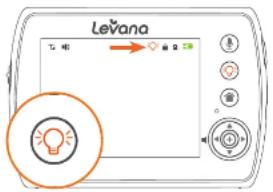
Turning the Nightlight On/OFF
When using multiple cameras, select the desired camera (see "Changing the Camera View") and press the Nightlight button 🔒 to turn the Nightlight ON/OFF.
text_image
Levana 飞啦 晕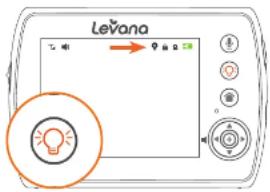
text_image
Levana 乙卯 → 甲午日 ① ② ③ ④ ⑤ ⑥ ⑦ ⑧ ⑨ ⑩ ⑪ ⑫ ⑬ ⑭ ⑮ ⑯ ⑰ ⑱ ⑲ ⑳ ㉑ ㉒ ㉓ ㉔ ㉕ ㉖ ㉗ ㉘ ㉙ ㉚ ㉛ ㉜ ㉝ ㉞ ㉟ ㉟a ㉟b ㉟c ㉟d ㉟e ㉟f ㉟g ㉟h ㉟i ㉟j ㉟k ㉟l ㉟m ㉟n ㉟o ㉟p ㉟q ㉟r ㉟s ㉟t ㉟u ㉟v ㉟w ㉟x ㉟y ㉟z ㉟a ㉟b ㉟c ㉟d ㉟e ㉟f ㉟g ㉟h ㉟i ㉟j ㉟k ㉟l ㉟m ㉟n ㉟o ㉟p ㉟q ㉟r ㉟s ㉟t ㉟u ㉟v ㉟w ㉟xSetting a Lullaby
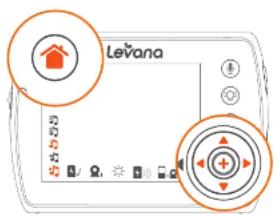
Choose from three different lullables to soothe your baby to sleep.
- Press the Menu / Exit button ⏻ and use the Navigational arrow keys to navigate the different lullabies.
- Press Select + to confirm your choice.
- Press Menu / Exit button 📋 save your selection and return to main menu.
text_image
LevanaOPERATION
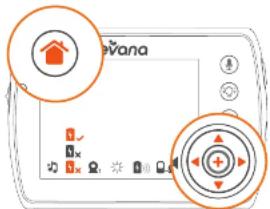
Using the PEEP Mode function
Voice activated technology helps conserve battery life by putting the system into hibernation mode when sounds are not detected for 1 minute. If your child starts to cry or make noise, the unit will automatically detect it. The preset noise level is set to a level comparable to a casual conversation. To increase sound sensitivity to noise level in the room, see "Sound Sensitivity Settings".
- Press the Menu / Exit button ⚙ and use the Navigational arrow keys to navigate the Power Save options.
- Press Select + to confirm your choice.
- Press Menu / Exit button 📋 save your selection and return to main menu.
• To access live view manually when screen if off, press the Power button ONCE.
- PEEP Mode extends the battery life up to 48 hours.
text_image
Diagram of a device interface with orange circles highlighting home control buttons and a central display screen.Changing the Camera View
- Press the Menu / Exit button ⚙ and use the Navigational arrow keys to navigate the Camera View options.
- Press Select + to confirm your choice.
- Press Menu / Exit button 📋 save your selection and return to main menu.
- Repeat the steps above to return to any other camera view.
- Selecting Scan View cycles through cameras 1 to 4. Each camera view will appear for 6 seconds per camera. (If more than one camera is paired).
text_image
LeVanaOPERATION
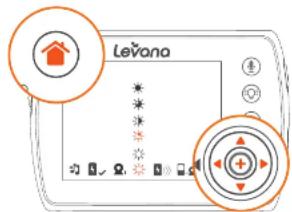
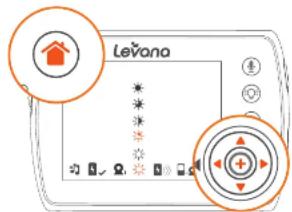
Setting the Brightness
Brightness Mode sets the brightness of the the screen. A dimmer screen will extend the battery life.
- Press the Menu / Exit button ⏻ and use the Navigational arrow keys to navigate the different Brightness Settings.
- Press Select + to confirm your choice.
- Press Menu / Exit button 📋 save your selection and return to main menu.
text_image
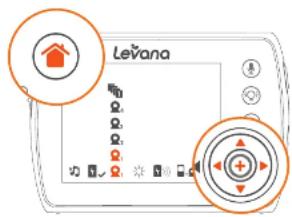
LevanoSound Sensitivity Settings
Sensitivity Mode allows you to adjust the sensitivity of the sound the camera picks up. The LED Ring on the front of the monitor also indicates how loud the sound in the room is with colors.
- Press the Menu / Exit button and use the Navigational arrow keys to navigate the different Sound Sensitivity Settings.
- Press Select + to confirm your choice.
- Press Menu / Exit button 🏠 save your selection and return to main menu.

whisper, murmer

Yelling

Disconnected

Chatter

text_image
LevanoOPERATION
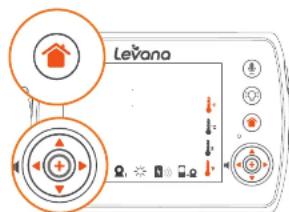
Temperature Settings
Studies indicate your baby's room should be between 68-71°F (20-21°C). This camera includes a temperature monitor for your baby's room. The temperature of the nursery can be shown with your video monitor's on-screen display in your choice of Fahrenheit or Celsius so you will always know that your baby is comfortable.
- Press the Menu / Exit button ⚙ and use the Navigational arrow keys to navigate the different Temperature Settings.
- Press Select + to confirm your choice.
- Press Menu / Exit button 📋 save your selection and return to main menu.
text_image
LeVanaTROUBLESHOOTING
| ISSUE POSSIBLE SOLUTION | |
| Equipment does not function | Confirm that the Camera and Monitor are ONThe battery may be depleted; charge batteryThe power adapter(s) may not be properly connected |
| No reception | Camera and monitor may not be properly paired; move the Camera and Monitor closer together |
| Reception Interference (static) | The Camera and Monitor may be too far apartThe battery power may be too lowOther electronic devices may be interfering with the signalThe Camera and Monitor may be placed too close to many metal objects |
| Noise (static, beeping) • Battery | power may be too low |
| The rechargeable battery will not charge | The power adapter may not be connectedBattery pack may not be properly connected inside the battery compartment |
SPECIFICATIONS
| MONITOR | |
| Monitor Type TFT LCD | |
| Screen Size 3.5" | |
| Resolution 320x240 | |
| Frame Rate 25 FPS | |
| LCD Brightness Adjustable: 0,1,2,3,4 | |
| Frequency 2.4GHz | |
| Private Signal Yes | |
| Technology Digital FHSS | |
| No. of hop/sec 300 | |
| No. of hopping channels 19 | |
| Channel bandwidth 3.375 MHz | |
| Data Rate 3 Mbps | |
| Transmission Power | +19 dBm |
| Max Transmission Range | 750ft |
| Optimum Transmission Range | 200ft |
| Expandable | Up to 4 Cameras |
| Zoom | 2x |
| Scan View | Yes, 8 seconds/camera |
| Speaker | Yes |
| Microphone | Yes |
| Talk to Baby | Yes |
| Lullabies | Yes |
| Battery Type | Li-Ion |
| Battery Capacity | 1,700 mAH |
| Battery Connection | Charging Contact |
| Battery Life (video + audio on) | 8 hours |
| Battery Life (LCD Off) | 10 |
| Battery Life (PEEP Mode) | 48 hours |
| Battery Low - Visual Warning | Yes |
| Battery Low - Audible Warning | Yes |
| PEEP Mode (Power Save) | Yes |
| Key Lock | Yes |
| Housing Material | ABS Plastic |
| Power Adapter Input | 100~240VAC |
| Power Adapter | 6V 800mA DC |
| Operating Temperature | 32 °F to 122 °F (0 °C to 50 °C) |
| Dimensions 4.5" x 1" x 3.75" (11.43cm x 2.54cm x 9 52cm) | |
| Weight | 0.35 lbs |
SPECIFICATIONS
| CAMERA | |
| Image Sensor | CMOS |
| Resolution 640 x 480 | |
| Viewing Angle 73° | |
| Focal Length | 4.95mm |
| Focus Type 2G2P | |
| Optimal Focus Distance | 2-10 feet |
| Frequency 2.4GHz | |
| Private Signal Yes | |
| Max Transmission Range | 750ft |
| Optimum Transmission Range | 200ft |
| Number if IR LEDs | 4 |
| Night Vision Distance | 15ft |
| Battery Operable | Yes (4 x AAA, not included) |
| Speaker | Yes |
| Microphone | Yes |
| Housing Material | ABS Plastic |
| Housing Color White | |
| Wall Mountable | Yes |
| Power Adapter Input | 6 V DC |
| Operating Temperature | 32 °F to 122 °F (10 °C to 50 °C) |
| Dimensions | 5.5" x 3.3" x 3" (13.97cm x 8.38cm x 7.62cm) |
| Weight | 0.3 lbs |
AVERTISSEMENTS DE SÉCURITÉ
60 Industrial Parkway #Z64
Cheektowaga NY
USA 14227
Conditions de la garantie
text_image
Leviano →text_image
Levana T: 40 → ← ← ← ← ← ← ← ← ← ← ← ← ← ← ← ← ← ← ← ← ← ← ← ← ← ← ← ← ← ← ← ← ← ← ← ← ← ← ← ← ← ← ← ← ← ← ← ← ← ← →Régler une berceuse

text_image
Levana 飞啦 → 9 音轨 10 11 20 30 40 50 60 70 80 90 100text_image
Diagram of a device interface with labeled icons and control buttons, featuring a house icon and circular annotations.Brightness Mode sets the brightness of the the screen. A dimmer screen will extend the battery life.
- Press the Menu / Exit button 📋 and use the Navigational arrow keys to navigate the different Brightness Settings.
- Press Select + to confirm your choice.
- Press Menu / Exit button 📋 save your selection and return to main menu.
text_image
Levano60 Industrial Parkway #Z64
Cheektowaga NY
USA 14227
text_image
LeVone leVone
AZUL CONSTANTE = BATERÍA TOTALMENTE CARGADA AZUL QUE DESTELLA RÁPIDO = BATERÍA BAJA ROSA QUE DESTELLA = EMPAREJAMIENTO INCORRECTO
text_image
Leviano →