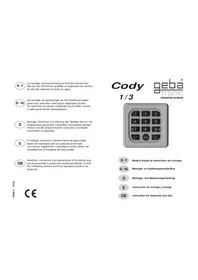
Cody 13 - Garage door Geba Tronic - Free user manual and instructions
Find the device manual for free Cody 13 Geba Tronic in PDF.


| Product type | Keypad for garage door |
| Brand | Geba Tronic |
| Model | Cody 13 (TCS-Cody 1/3) |
| Power supply | 24 V ac/dc or 230 V ac (depending on version) |
| Output contact | 3 dry contacts without potential, 8 A / 250 V |
| Number of user codes | 50 (4 or 5 digits) |
| Master code | 8 digits, programmable |
| TIPTOMATIC function | Yes, with programmable duration (default 60 s) |
| Keyboard lock | After incorrect code (10 s, dynamic possible) |
| Non-volatile memory | Yes, data remains in case of power failure |
| Protection rating of decoder | Epoxy sealed housing |
| Protection rating of keypad | Aluminum housing |
| Operating temperature | -20 °C to +60 °C |
| Max. power cable cross-section | 2.5 mm² |
| Max. keypad cable length | 5 m |
| Max. number of keypads in parallel | 4 |
| Warranty | 2 years |
| Maintenance and cleaning | Clean with a soft, dry cloth |
| Installation | Keypad outdoors, decoder indoors |
| Applicable standard | NFP 25362 |
Frequently Asked Questions - Cody 13 Geba Tronic
User questions about Cody 13 Geba Tronic
0 question about this device. Answer the ones you know or ask your own.
Ask a new question about this device
Download the instructions for your Garage door in PDF format for free! Find your manual Cody 13 - Geba Tronic and take your electronic device back in hand. On this page are published all the documents necessary for the use of your device. Cody 13 by Geba Tronic.
USER MANUAL Cody 13 Geba Tronic
Assembly, connection and maintenance of the device may only be executed by personnel trained accordingly. At this the underlying national and local regulations have to be observed.
Cody 1/3

B/F
Instruction for Assembly and Use

Adaptation of the TCS-Cody 1/3 to special requirements:
The TCS-Cody 1/3 is provided with a series of flexible time settings which allow the adaptation to special cases of application. For programming these special operating modes please ask for our flow chart for the TCS-Cody series, if required!
Technical Data:
| 24 V series 230 V series | ||
| Supply voltage | 12 - 24 V AC / DC 230 V AC 50 Hz | |
| Output 3x NO, NC relay contacts, 3x NO, NC relay contacts,isolated, 8 A 250 V isolated, 8 A 250 V | ||
| Connections 2.5 mm2 max.. | 2.52 max.., mm | |
| Ambient- -20 °C to +60 °C -20 °C to +60 °CTemperature | ||
geba GmbH is released of its obligations regarding guarantee and product liability it - without prior permission - the unit has been modified, or if the installation is improper or not in accordance with our instruction manual. The installer has to take care that the EMC-regulations are respected.

Instructions for Assembly and Use TCS-Cody 1/3
Electronic encoder-type lock for garage door drives
The TCS-Cody is a modern and safe alternative to traditional key switches. The TCS-Cody can safely be used after two simple programming steps (master code and pass code). For opening or closing of the door only a four- or five-digit numeral code (pass code) has to be entered, which has been previously programmed via the master code by an authorized person.
After correct input of the pass code and pushing the key button the drive is triggered by the corresponding potential free relay contact.
The high flexibility of the encoder is achieved by extensive programmability of the individual operating functions. All sections required for operation are, however, preprogrammed and thus immediately ready for use.
The most important characteristics of the TCS-Cody are: Simple operation, programming and assembly. Water-protected enclosure.
A maximum of safety: The electronic decoder is separately installed in the protected area
Up to 50 different pass codes can be stored Up to 100 million different coding possibilities Variable lock-out function Nearly unlimited data security, even with power failure
Special TIPTOMATIC-function for garage doors: After input of the pass code the door can be stopped within the TIPTOMATIC time adjusted by actuation of any key, and be closed or opened by repeated actuation of any key.
Three potential-free relay outputs
High switching capacity for direct control of appliances

industrial controls
Dear customer,
The Cody which you have purchased is one of our highest quality technical products. We have taken the greatest care in its manufacture to ensure that this microprocessor controlled encoder reaches you in faultless condition. However in the unusual event of suspected equipment failure please return the appliance together with the enclosed warranty document to your dealer or direct to our factory.
The extent of warranty exclusively refers to the free repair of malfunctions of the appliance, which demonstrably are caused by faults in production or defective material, inclusive of spare parts required for this purpose.
Therefore please first read the instructions of use carefully before you start programming!!!
WARRANTY-DOCUMENT
On the below described encoder we grant a warranty of 2 years
Type: TCS - Cody 1/3
Serial number: see label on logic PCB
Serial master code: All appliances are supplied with master code 12345678
Pass code: All appliances are supplied with pass code 1234 on memory location 01
Production date:
Sales date:
Dealers adress:

Program 2
Clearing of a pass code
A pass code is cancelled by clearing of the corresponding memory location (00-49)
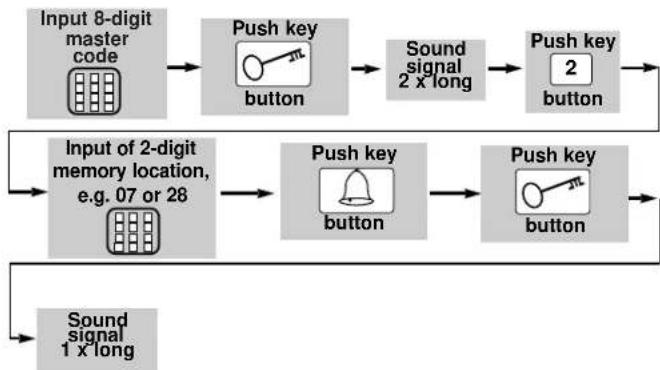
The memory location chosen is now cleared
In case of loss of the master code:
In case you forget the master code or the appliance has been accidently interfered with, there is the possibility to reset the appliance by means of pressing the general reset button. This means the appliance is brought back into the state preset by the factory.
Now the master code 12345678 preset by the factory as well as the pass code 1234 are valid again. The appliance must now be re-programmed again.
Reset to factory-settings:
Hold the GENERAL RESET BUTTON - after several short sound signals a long sound signal can be heard (~ 5 sec.).

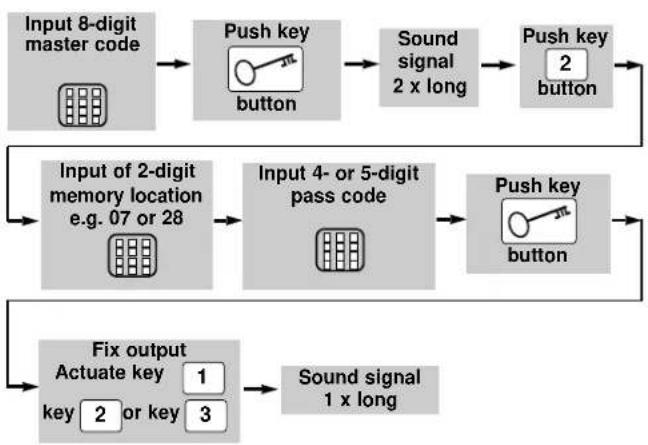
Program 2 Input / Clearing of a pass code
The pass code entered is now stored at the memory location selected and connected to the fixed output!
With this procedure you can allocate 50 different pass codes to the memory locations 00 - 49 !!

Description of the appliance
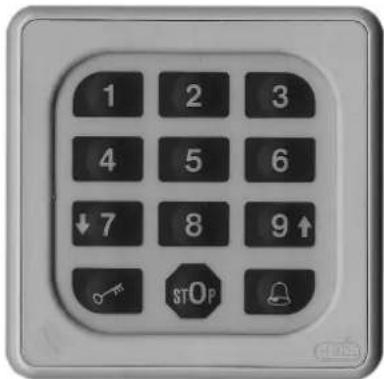
The TCS-Cody consists of a decoder and a keyboard. The units are connected by a simple double-wire cable without a special plug. Programming of the TCS-Cody is possible with the keyboard and the master code.
Master code:
The master code is an 8-digit numeral code necessary for all programming procedures. Only after the input of this code the appliance can be programmed according to your personal needs. TCS-Cody is preset by the company with the master code 12345678.
Pass code:
The pass code is either a four- or five-digit numeral code, by which you operate your door drive unit. You have the possibility to store up to 50 different pass codes, which means that up to 50 different persons with different pass codes can open the door. If you are accompanied by another person when entering your pass code you can at first press as many keys as you like before you finally enter your code. This ensures that no other person can notice your pass code, but the TCS-Cody recognizes your pass code as correct!
The TCS-Cody is preset by the company with the pass code 1234 on memory location 01. The input of a new code has always to be finished by pressing
ATTENTION!!!
After you have made yourself familiar with the functions of the appli- ance, please program your personal master code as well as a pass code with which you replace the pass code which is located on the memory place 01. Only by this your TCS-Cody is protected against manipulation!
TIPTOMATIC
Especially for garage doors the TCS-Cody is designed with TIPTOMATIC-timing. After input of a pass code and within a period of 60 seconds (adjustable) this function allows to control the door with any key, except for the button, and without the need to enter the pass code once again. This isolating facility can, however, be interrupted prior to the expiration of the 60 seconds, by pressing the button.
Lock-out function:
For reasons of safety during attempts of manipulation the TCS-Cody automatically blocks for 10 seconds after the input of a wrong pass code which is signalled with a double sound signal. By choice, you can arrange that the lock-out time can be doubled after any wrong input until a correct pass- or master code is entered. The end of the blocking time is signalled by a long sound signal.

industrial controls
Assembly Instructions
Assembly of the CODY keyboard:
- By slightly pushing the two latches at the right and left side of the keyboard from behind to the edge, remove the small frame from the keyboard.
- Now you see two fixingholes (diam. = 4mm ) at the front of the keyboard. By means of these you can fix the keyboard onto the wall.
- Connect the keyboard to the logic unit by means of a twin-cable (up to 5m long). There is no particular polarity for the twin wires.
- Now re-fix the small frame.
- It is possible to connect in parallel up to four keyboards if a thin connection cable, max. total line cross-section 1.5mm^2 , is used.
Keyboards connected in this way must not be operated simultaneously.
Assembly of the logic unit (inside area):
- Put the screw-driver into the gap of the enclosure front, push the screw-driver up and open the enclosure.
- Remove the control PCB (which is force fitted to the inside of the enclosure).
- Locate the screwed glands supplied (sealing nipple left side) in the enclosure and replace the PCB. (Please ensure PCB is firmly in position
- Bore the fastening holes and fix the enclosure bracket at the wall.
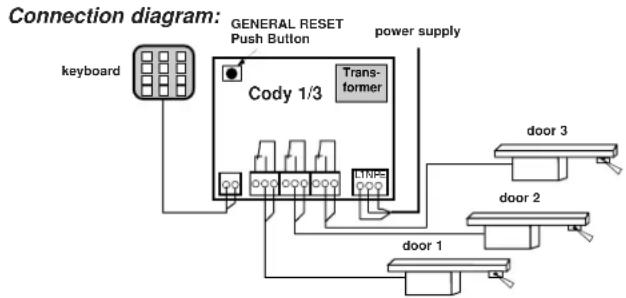
- The wires for the keyboard ensure through the left cable entry (sealing nipple), the wires for the relay contacts through the three middle cable entries and the wires for the supply voltage ensure through the right cable entry. Ensure tight seating of sealing nipple and cable gland, otherwise the water-protection of the appliance cannot be assured.
- According to connection diagram connect the wires to the corresponding terminals;
Connections:
Keyboard, door 1 (e.g. garage door drive), door 2 (e.g. garage door drive) door 3 (e.g. garage door drive), supply voltage

Programming Instructions
Please read first - then do programming!!!
Before programming your TCS-Cody with your personal codes, please check the faultless function of the appliance with the help of the factory's pass code 1234 and the key-operated pushbutton.
Normally, any programming is made via your personal master code. In order to get familiar with that kind of programming, you start with the input of a new pass code, which replaces the one preset by the factory (1234). The procedure is explained under item
Programme 2
After that please change the master code to the string of digits you choose.
ATTENTION
In case you made a mistake on programming, you can start again by actuation of the key-operated pushbutton (^*)
Program 1
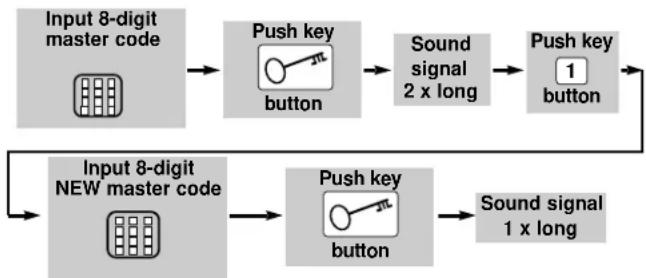
Input of a new master code
The new master code is now stored!

industrial controls