OPC 200CA - Cassette tape OK - Free user manual and instructions
Find the device manual for free OPC 200CA OK in PDF.


Frequently Asked Questions - OPC 200CA OK
User questions about OPC 200CA OK
0 question about this device. Answer the ones you know or ask your own.
Ask a new question about this device
Download the instructions for your Cassette tape in PDF format for free! Find your manual OPC 200CA - OK and take your electronic device back in hand. On this page are published all the documents necessary for the use of your device. OPC 200CA by OK.
USER MANUAL OPC 200CA OK
AnevpyoioiOn Tou kipovou(wv): BaTe to diakointn otn theon OFF.
AEIOTOYPRIA KAPAOKE
20 Evpyooin: Tupot Ta puthetaiké xEyxou OFF -VOL+ npoc ta 8Eia. Oa avayi n qwTeivn evdeltaqn tnc POWER.
21 IatnoTe to nKtpo STOP/EJECT yia va avoiEeTe To KAeToqwvo. TonoTheote mia npOnxoypaqnevnaeTa oTo KAeToqwvo.Kaeiote To KAeToqwvo.
EvapEn avanapaywnc: Pntnoe PLAY
23 Evpyoioinogikpovou(wv):BaTTo diaKoTTn Otn ΘeON ON.
Pouan evtaon nxou kipowov: Ppiotpeyte to puoiotikó evtaong nou -MIC VOL+ otny evtaon nou eimuite. Tpañéte eva n kal ta doo miropowva ano tic thkec touc kal ekivnoTE va μlata/tpayoudate oupwva me tn mouokn nou naiel ano tvkaoeta.
PpOaipEtKO EeWTePiKo
Tpoosodtiko.6V1A


O eEwTepiKoc mTaoxnuaTioTnc npEni va fepei uXavioo aospaiaic katalnnlo yia naixviia.
ANOPPIPH
O anoppiuatw kado c anoppiuatw onaivei oti anaitei t n xwpiotn oulloyn twv anoBntw v naektpkoou kai naktpovikou eonlioou (odnyia WEEE). O nektpikooc kai o naktpovikoc eonliooc mnpei va nepiexei enikivduce ouoec. Mny anoppiinete tn oukeun maiz me ta oikiaka anopipmuata. Eniotpepte to oe eva kaobopiueo oneio ualloync yia avakukawon oupwva me tnv odnyia nepi Anopipns c nektpkoou kai naktpovikou eonlioou. Me autov tov tpno, Bonate otnv diatnpon tow npowkai tnv npootaia tou pbetaalovtoc. Enikovwnote me tov npouneutn oc n tic tonikec apxec yia nepiosotepec nlpopopiec.
CONGRATULATIONS
Thanks for your purchase of this ok. product.
IMPORTANT SAFETY INSTRUCTIONS. READ CAREFULLY AND KEEP FOR FUTURE REFERENCE.
- Observe all safety instructions to avoid damage through improper use! Follow all safety warnings on the appliance and in this instruction manual.
- Keep this instruction manual for future use. Should this appliance be passed on to a third party, then this instruction manual must be included.
- No liability will be accepted for damage resulting from improper use or non-compliance with these instructions.
- Only use this appliance for its intended use. The appliance is not suitable for commercial use. This appliance is only suitable for indoor and household use.
- Do not attempt to repair the appliance yourself. In case of malfunction, repairs are to be conducted by qualified personnel only.
- Warning! Do not immerse the electrical parts of the appliance in water or other liquids. Never hold the appliance under running water.
- Do not open the appliance casing under any circumstances. Do not insert any foreign objects into the inside of the casing.
- Never use accessories which are not recommended by the manufacturer. They could pose a safety risk to the user and might damage the appliance. Only use original parts and accessories.
- Do not place heavy objects on top of the appliance. Do not place objects with open flames (e.g. candles) on top of or beside the appliance. Do not place objects filled with water (e.g. vases) on or near the appliance.
- Keep the appliance away from any hot surfaces and open flames. Always operate the appliance on a level, stable, clean and dry surface. Protect the appliance against heat and cold, dust, direct sunlight, moisture, dripping and splashing water.
- The appliance is only suitable for use at moderate degrees of latitude. Do not use it in the tropics or in particularly humid climates.
- Attention! In the event of a malfunction as a result of electrostatic discharge and momentary electrical surges, unplug the appliance and plug it in again.
Children
-
The product is not intended for children under 3 years old because following hazards, among others, may be present:
-
Electrical shock,
- Choking hazard,
-Strangulation hazard,
Suffocation hazard.
Battery safety advice
- Caution! Danger of explosion if battery is incorrectly replaced. Replace batteries only with the same or equivalent type.
- Batteries shall not be exposed to excessive heat such as sunshine, fire or the like.
- Always insert batteries correctly with regard to the polarities (+ and -) marked on the battery and the battery compartment.
- Do not mix old and new batteries.
- The supply terminals of the batteries are not to be short-circuited.
- Do not allow children to replace batteries without adult supervision.
- Remove the batteries if you will not be using the appliance for an extended period of time.
- Exhausted batteries should be immediately removed from equipment and properly disposed of.
- Refer to the safety instructions provided by the battery manufacturer.
EN
Use with an external transformer
- An external transformer used with the toy is to be regularly examined for damage to the cord, plug, enclosure and other parts. In the event of such damage, it must not be used until the damage has been repaired.
- The product is to be connected to the external transformer, or supplied by battery. It cannot be powered by battery and transformer at the same time.
- The used external transformer must be a safety isolated transformer for toys.
- Transformers are not toys.
Headphones
- Warning! Excessive sound pressure from earphones and headphones can cause hearing loss. Ensure that children do not turn the volume too high.
INTENDED USE
This appliance is only intended for audio entertainment and is not intended for children under 3 years. This appliance is only suitable for private household use and it is not designed for commercial purpose. Every other type of use can lead to damage to the appliance or injury.
BEFORE FIRST TIME USE
- Remove all packaging materials.
- Check for completeness and transport damage. In case of damages or incomplete delivery please contact your dealer.
Clean the appliance Cleaning and care).
COMPONENTS
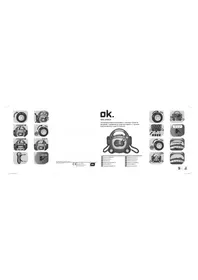
Fold out front and rear page for product illustrations.
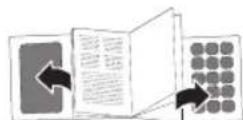
Front:
A. Handle
B. Applause button
C. POWER indicator
D. On/off, volume control (OFF-VOL+)
E. Cassette compartment door
F. Microphone volume control (-MIC VOL+)
G. Microphone (one on each side of the appliance)
H. Microphone on/off switch (for each microphone)
1. Recording indicator (REC)
J. Laughter button
K. Pause playback (PAUSE) II
L. Stop playback/Eject cassette (STOP/EJECT
M. Fast forward (F.FWD)
N. Fast rewind (REW)
O. Playback (PLAY)
P. Recording (REC)
Q. Loudspeaker
R. Battery compartment
S. Headphone socket (PHONE)
T. Power socket for external transformer (6V---1A-3-4)
POWER SUPPLY
Switch the appliance off by rotating the OFF-VOL+ control in a counter-clockwise direction until a click sound is heard. Only then connect/disconnect the adaptor's power cable or remove/install batteries.
2 Remove the battery compartment cover with a Phillips screwdriver.
3 Insert 4 batteries (type C / LR14, 1.5V = - not included) in the battery compartment. Match the polarities ^+ and - as indicated on the batteries. Close the battery compartment cover.
or
4 Connect a suitable power adaptor (not included, see Technical data) to the power socket. Connect the adaptor plug to a suitable electrical outlet.
TAPE (CASSETTE) PLAYBACK
Switching on: Rotate the OFF -VOL+ control in a clockwise direction. The POWER indicator lights up. The music volume can be adjusted anytime using this control.
6 Press the STOP/EJECT button to open the cassette deck.
7 Insert a pre-recorded cassette inside the deck. Close the cassette deck.
| Action | Cassette buttons |
| Start playback | PLAY |
| Pause playback | PAUSEI |
| Resume paused playback | PAUSEI |
| Fast rewind tape | REW |
| Fast forward tape | F.FWD |
| Stop playback | STOP/EJECT (1x) |
| Eject cassette | STOP/EJECT (2x) |
EN
MICROPHONE
Switching on: Rotate the OFF -VOL+ control in a clockwise direction. The POWER indicator lights up.
Switching on microphone(s): Set the switch to the ON position.
Adjusting microphone volume: Rotate the -MIC VOL+ control to the desired volume.
Pull one or both of the microphones from their holders and start speaking/singing.
Notes:
- Do not hold the microphone too close to your mouth to achieve a clear sound.
- Pointing the microphone towards the appliance or towards each other will lead to sound distortions.
Switching off microphone(s): Set the switch to the OFF position.
RECORDING FUNCTION
Switching on: Rotate the OFF -VOL+ control in a clockwise direction. The POWER indicator lights up.
15 Press the STOP/EJECT button to open the cassette deck. Insert a blank cassette inside the deck. Close the cassette deck.
Switching on microphone(s): Set the switch to the ON position.
Adjusting microphone volume: Rotate the -MIC VOL+ control to the desired volume. Pull one or both of the microphones from their holders
18 Start recording: Press REC. The REC indicator lights up and the recording starts. Begin speaking/singing into the microphone(s).
Hint:
- Pressing the laughter and applause buttons at the right moment will add greatly to the performance's success!


19 Stop recording: Press STOP/EJECT. The recording can also be briefly interrupted by pressing the PAUSEll button.
Switching off microphone(s): Set the switch to the OFF position.
SING-ALONG FUNCTION
Switching on: Rotate the OFF -VOL+ control in a clockwise direction. The POWER indicator lights up.
Press the STOP/EJECT button to open the cassette deck. Insert a pre-recorded cassette inside the deck. Close the cassette deck.
22 Start playback: Press PLAY
Switching on microphone(s): Set the switch to the ON position.
Adjusting microphone volume: Rotate the -MIC VOL+ control to the desired volume. Pull one or both of the microphones from their holders and start speaking/singing to the music of the cassette.
Stop playback: Press STOP/EJECT
Switching off microphone(s): Set the switch to the OFF position.
CONNECTING HEADPHONES

Connect headphones with a 3.5mm plug to the PHONE socket. The loudspeakers are muted whilst the headphones are connected to the appliance.
CLEANING AND CARE
- WARNING! Before cleaning, always switch off the appliance and remove the batteries. If an external power adaptor is used, disconnect the plug from power.
We recommend using a cleaning cassette to clean the appliance's tape head once a month or whenever required. - Never immerse the appliance in water or other liquids.
- Clean the appliance with a soft, slightly damp cloth. Make sure that no moisture is entering the appliance during cleaning.
- Never use corrosive detergents, wire brushes, abrasive scourers, metal or sharp implements to clean your appliance.
Dry the appliance thoroughly after cleaning. - Store the appliance in a cool, dry location.
SPECIFICATIONS
Power supply: Batteries: 4 × 1.5 ~V (type C / LR14) (not included)
Optional external
power supply: 6V 1A
The used external transformer must be a safety isolated transformer for toys.
DISPOSAL
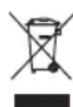
The crossed-out wheeled bin logo requires the separate collection of waste electric and electronic equipment (WEEE). Electric and electronic equipment may contain dangerous and hazardous substances. Do not dispose of this appliance as unsorted municipal waste. Return it to a designated collection point for the recycling of WEEE. By doing so, you will help to conserve resources and protect the environment. Contact your retailer or local authorities for more information.