Live LP - Turntable ION - Free user manual and instructions
Find the device manual for free Live LP ION in PDF.



| Brand | ION |
| Model | Live LP |
| Product Type | Vinyl turntable with built-in speakers |
| Power Supply | AC adapter 12 V, 1 A (included) |
| Playback Speeds | 33, 45 and 78 RPM |
| Audio Output | Line-level RCA output (do not connect to phono input) |
| Speakers | Internal speakers for listening without external speakers |
| Autostop Function | Automatic platter stop at end of record (switchable) |
| Tone arm | Tone arm with cueing lever for lifting/lowering |
| 45 RPM Adapter | 45 RPM adapter stored in a designated slot |
| Slipmat | Pre-mounted on the platter |
| Volume Control | Volume knob on the unit |
| Power Switch | On/Off at the back |
| Maintenance and Cleaning | Clean with a soft cloth; replace the stylus if worn |
| Safety | Read safety instructions before use; do not connect RCA output to a phono input |
| Spare Parts | Stylus ICT05RS (standard) and ICT06RS (78 RPM) |
| General Information | Warranty and support at ionaudio.com; manual available in multiple languages |
Frequently Asked Questions - Live LP ION
User questions about Live LP ION
0 question about this device. Answer the ones you know or ask your own.
Ask a new question about this device
Download the instructions for your Turntable in PDF format for free! Find your manual Live LP - ION and take your electronic device back in hand. On this page are published all the documents necessary for the use of your device. Live LP by ION.
USER MANUAL Live LP ION
Make sure that the items listed below are included in the box:
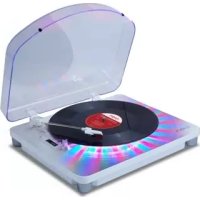
Live LP
Power Adapter
Pre-Mounted Slipmat
45 RPM Adapter
- Quickstart Guide
- Safety & Warranty Manual
READ SAFETY INSTRUCTION BOOKLET BEFORE USING THE PRODUCT
Support
For product registration, visit the ION website: ionaudio.com
For the latest information about this product, visit ionaudio.com/livelp
For additional product support, visit ionaudio.com/support
For safety/warranty information, visit ionaudio.com/warranty
Connection Diagram
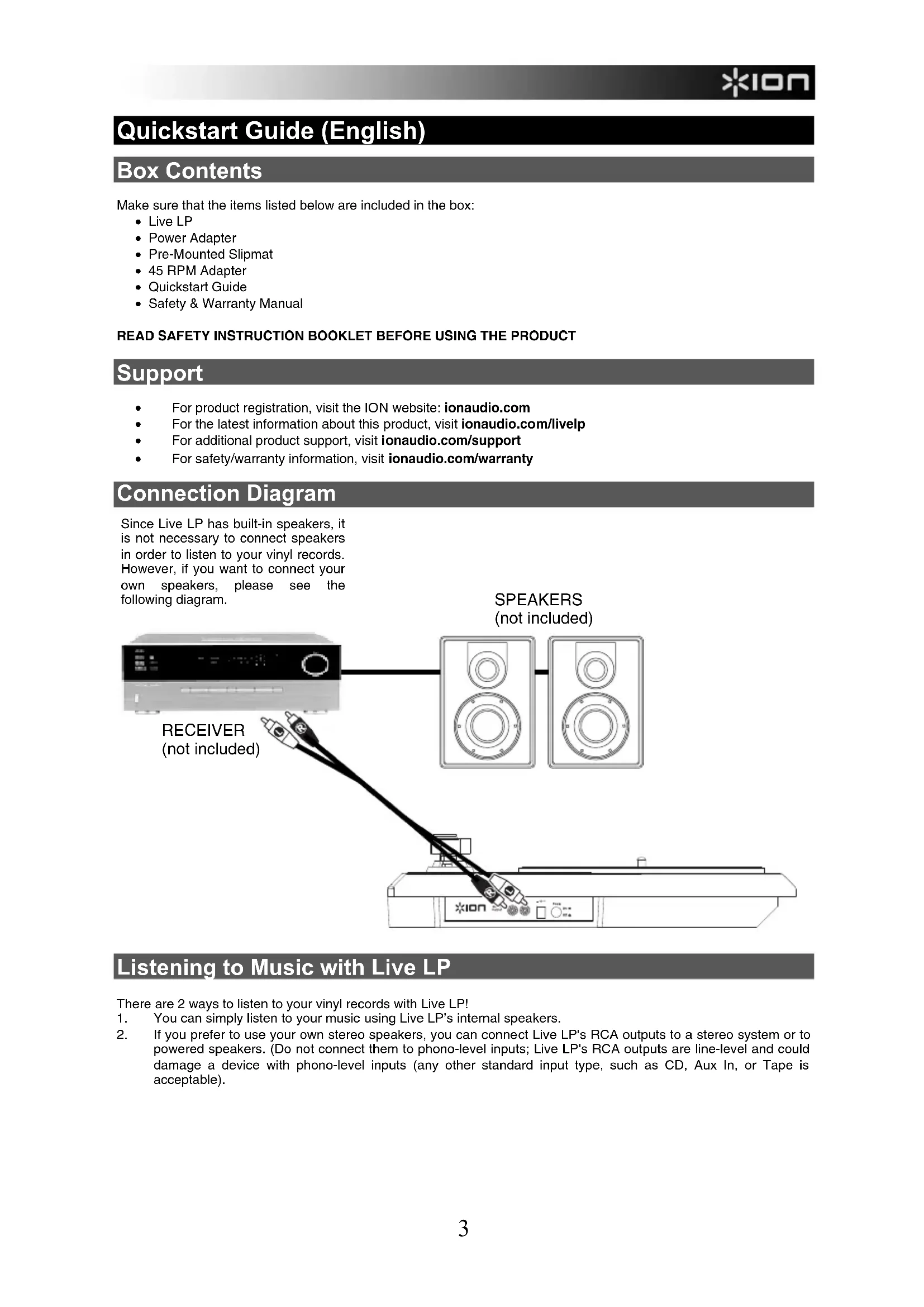
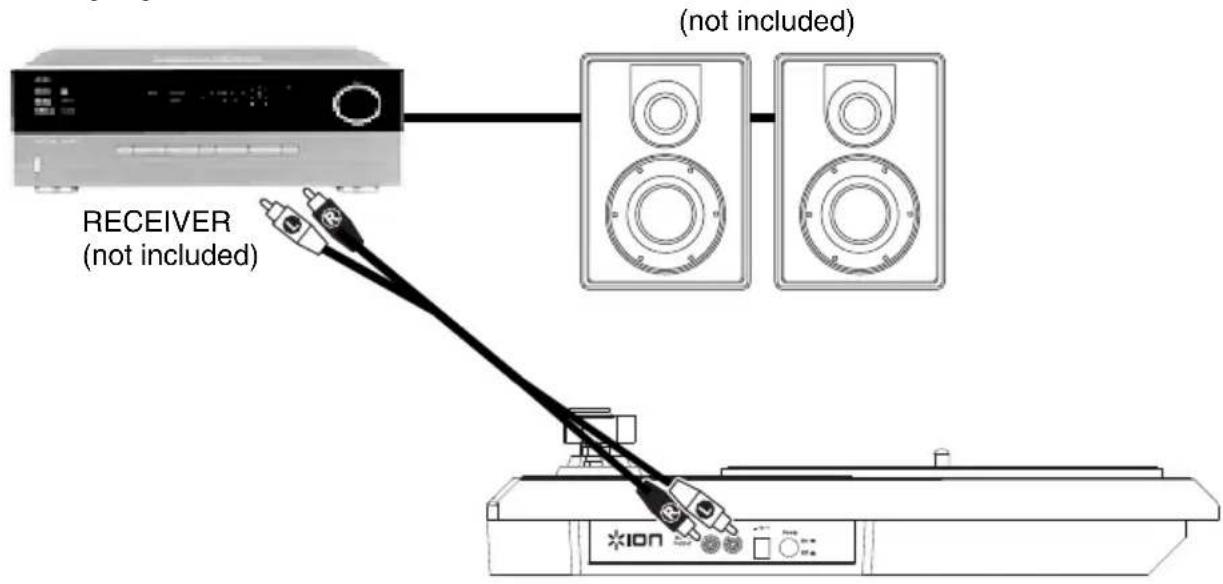
Since Live LP has built-in speakers, it is not necessary to connect speakers in order to listen to your vinyl records. However, if you want to connect your own speakers, please see the following diagram.
Listening to Music with Live LP
There are 2 ways to listen to your vinyl records with Live LP!
- You can simply listen to your music using Live LP's internal speakers.
- If you prefer to use your own stereo speakers, you can connect Live LP's RCA outputs to a stereo system or to powered speakers. (Do not connect them to phono-level inputs; Live LP's RCA outputs are line-level and could damage a device with phono-level inputs (any other standard input type, such as CD, Aux In, or Tape is acceptable).
Features
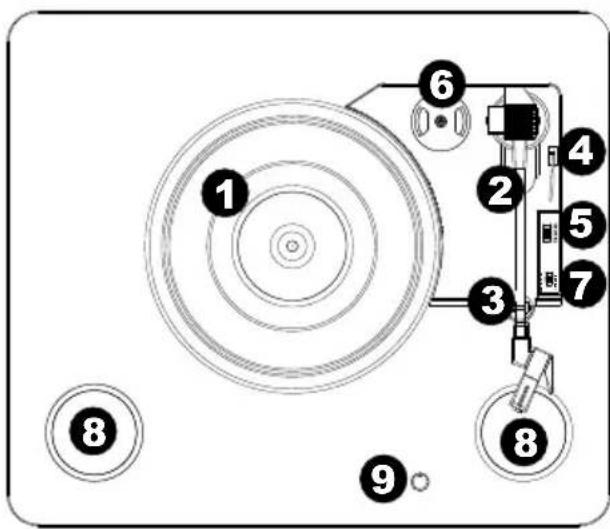
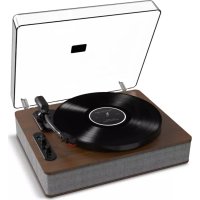
- Platter - Place your record here.
- Tonearm* - The tonearm can be raised and lowered by hand, or by pressing the raise / lower lever. Please note that the tonearm needs to be moved away from resting position (on the arm clip) for the turntable motor to activate. When the tonearm is placed back in its resting position, the turntable motor will deactivate if Autostop has been turned on.
- Arm Clip - This specially designed arm clip secures the tonearm while at rest or when not in use. The arm clip has been designed to remain in the up position while unlocked.
- Raise / Lower Lever - Raises and lowers the tonearm.
- 33/45/78 Switch - This switch controls the RPM of the turntable platter.
- 45 RPM Adapter Holder - Holds the included 45 RPM adapter. When not using the adapter, please place it in this holder.
- Autostop Switch - This switch turns autopost on or off. When autopost is on, the platter will start spinning when the tonearm is
placed over the record and stop spinning when the record has reached the end. (When autostop is off, the platter will always spin regardless of the position of the tonearm.)
Note: If your vinyl record stops before it reaches the end of the music, turn Autostop to the off position for this particular record. This is generally recommended for 45 RPM records.
- Speakers - Listen to the audio from your playing vinyl record.
- Volume - Controls the audio output from your speakers.
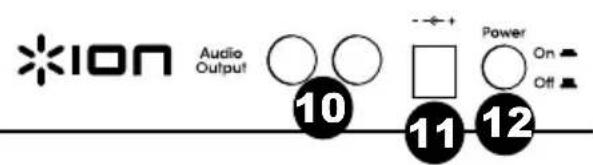
- RCA Output** - The audio from a playing vinyl record is sent to this line-level coaxial audio output. This must not be connected to phono level devices. (If you do not already have an RCA cable, this can be found at a local electronics retailer.)
- Power - Use the included adapter to connect to wall power.
- Power Button - Press this button to turn Live LP on/off.
IMPORTANT: Remove the plastic cartridge cover (needle cover) before operating the turntable.
- IMPORTANT: If the turntable's stylus becomes worn, purchase a replacement at ionaudio.com/ict09rs. If you play 78 RPM records, we recommend using a 78 RPM stylus, which you can purchase at ionaudio.com/ict06rs.
**WARNING: The RCA outputs are LINE level. Please only connect these to LINE level inputs. You may damage your receiver if you plug in a LINE level device into a PHONO level input.
Troubleshooting
If you experience any difficulties, please refer to the troubleshooting steps below.
I'm not hearing any audio when playing music:
If you are playing music from vinyl:
o Make sure that Live LP is powered on and that the needle is on the record.
o Connect Live LP's RCA outputs to a stereo system or powered speakers. (Do not connect them to phono-level inputs; Live LP's RCA outputs are line-level and could damage a device with phono-level inputs.)
o Make sure to adjust the volume knob on the turntable in order to hear your vinyl record playing through the built-in speakers.
I am hearing a hum through my speaker when using the turntable:
- If you are playing through a speaker:
Ensure you are using the 12V 1A power adapter that was included with your product.
If your volume is on max, try turning it down until the hum stops.
My turntable is not making any sound, or music is muffled:
Take the cover off the stylus.
The turntable belt fell off:
o Please re-attach the belt to the turntable. For details on how to do this, see the guide located at ionaudio.com/turntablebelt.
My turntable is not spinning:
- Ensure the turntable is powered on (power switch in the back).
- Ensure autopost is turned on and the tonearm is placed over record (if auto stop is off it should always be spinning when power is on).
If the above steps do not help, you may need to re-attach your turntable belt. For details on how to do this, see the guide located at ionaudio.com/turntablebelt.
My record is not playing at the correct speed; its pitch is too high or too low:
○ Ensure the 33/45/78 switch is set to the correct speed for your record.
If the 33 / 45 / 78 switch is set correctly and the speed it still slightly off, do the following:
- On the underside of Live LP, find the rubber pad with the RPM speed you want to adjust, and gently lift up the rubber pad to remove it.
- Push through the rubber seal, and tighten/loosen the screw using a Phillips-head screwdriver to fine-tune the RPM speed.
BEFORE RETURNING THE PRODUCT, please contact ION Audio for technical support at ionaudio.com/support.
Assistance technique
Power: 12V DC, 1A, center pin-positive, tip-negative
Dimensions: 14.17" x 16.14" x 3.46"; 360 mm x 410 mm x 88 mm
Weight: 5.7 lbs; 2.6 kg
Cartridge Type: Ceramic cartridge
Stylus Tip: Diamond tip
Track Force: 5 grams nominal (4-6 grams)
Output Voltage: (at 1 kHz=3.54 cm/sec) 200-300 mV
Channel Balance: (at 1 kHz) < = 3dB
Channel Separation: (at 1 kHz) >=15dB
Frequency Response: 80-10,000Hz (+-7dB)
Stylus: iCT09RS (diamond-tipped) included, also available at ionaudio.com/ict09rs
78 RPM stylus sold separately at ionaudio.com/ict06rs
To convert your vinyl to digital files using Live LP, purchase a Vinyl Live turntable-to-computer interface at ionaudio.com/vinyllive
Trademarks and Licenses
Phillips is a registered trademark of the Phillips Screw Company in the United States and other countries.
All other product or company names are trademarks or registered trademarks of their respective owners.
www.ionaudio.com
Brand : ION
Model : Live LP
Category : Turntable