
DEH1700UBA - Car stereo PIONEER - Free user manual and instructions
Find the device manual for free DEH1700UBA PIONEER in PDF.


Frequently Asked Questions - DEH1700UBA PIONEER
User questions about DEH1700UBA PIONEER
0 question about this device. Answer the ones you know or ask your own.
Ask a new question about this device
Download the instructions for your Car stereo in PDF format for free! Find your manual DEH1700UBA - PIONEER and take your electronic device back in hand. On this page are published all the documents necessary for the use of your device. DEH1700UBA by PIONEER.
USER MANUAL DEH1700UBA PIONEER
REPRODUCTOR DE CD CON RECEPTOR RDS
CD RDS-EMPFÄNGER
CD RDS-ONTVANGER
CD RDS PPNEMHVK
DEH-1700UB
DEH-1700UBG
DEH-1700UBA
DEH-1700UBB

Owner's Manual
Mode d'emploi
PykoBoOCTBO NOIb3OBaTeJIa
Table of Contents
Before You Start 3
Getting Started. 4
Radio. 5
CD/USB/AUX. 6
Settings 7
FUNCTION settings 7
AUDIO settings 8
SYSTEM settings 9
ILLUMINATION settings. 9
Connections/Installation 10
Additional Information. 12
About this manual:
- In the following instructions, a USB memory or USB audio player are referred to as "USB device".
Before You Start
Thank you for purchasing this PIONEER product
To ensure proper use, please read through this manual before using this product. It is especially important that you read and observe WARNINGS and CAUTIONs in this manual. Please keep the manual in a safe and accessible place for future reference.
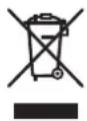
If you want to dispose this product, do not mix it with general household waste. There is a separate collection system for used electronic products in accordance with legislation that requires proper treatment, recovery and recycling.
Private households in the member states of the EU, in Switzerland and Norway may return their used electronic products free of charge to designated collection facilities or to a retailer (if you purchase a similar new one).
For countries not mentioned above, please contact your local authorities for the correct method of disposal.
By doing so you will ensure that your disposed product undergoes the necessary treatment, recovery and recycling and thus prevent potential negative effects on the environment and human health.

WARNING
-
Do not attempt to install or service this product by yourself. Installation or servicing of this product by persons without training and experience in electronic equipment and automotive accessories may be dangerous and could expose you to the risk of electric shock, injury or other hazards.
-
Do not attempt to operate the unit while driving. Make sure to pull off the road and park your vehicle in a safe location before attempting to use the controls on the device.

CAUTION
- Do not allow this unit to come into contact with moisture and/or liquids. Electrical shock could result.
Also, damage to this unit, smoke, and overheating could result from contact with liquids.
Always keep the volume low enough to hear outside sounds.
The Pioneer CarStereo-Pass is for use only in Germany.
CAUTION
This product is a class 1 laser product classified under the Safety of laser products, IEC 60825-1:2007
CLASS 1 LASER PRODUCT
If you experience problems
Should this unit fail to work properly, please contact your dealer or nearest authorized PIONEER Service Station.

Getting Started
Basic operation
DEH-1700UB/1700UBG/1700UBA/1700UBB
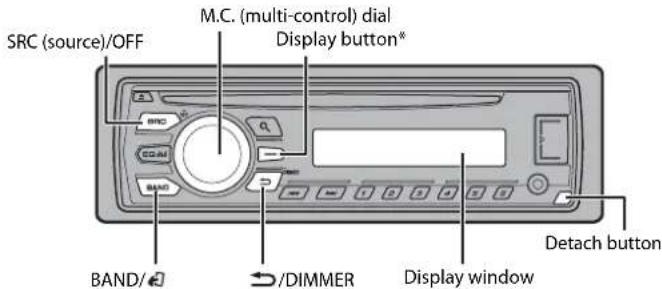
* This button is referred to as DISP in the manual.
Frequently used operations
The available buttons vary depending on the unit.
| Purpose Operation | |
| Turn on the power* | Press SRC/OFF to turn on the power.Press and hold SRC/OFF to turn off the power. |
| Adjust the volume Turn the M.C. dial. | |
| Select a source Press SRC/OFF repeatedly. | |
| Change the display information Press DISP repeatedly. | |
| Return to the previous display/list Press /DIMMER. | |
| Return to the normal display from the menu Press BAND/ | |
- When this unit's blue/white lead is connected to the vehicle's auto-antenna relay control terminal, the vehicle's antenna extends when this unit's source is turned on. To retract the antenna, turn the source off.
Display indication
Indication Description
| Appears when a lower tier of the menu or folder exists. | |
| P | Appears when the button is pressed. |
| LOC | Appears when the local seek tuning function is set (page 8). |
| TP | Appears when a traffic program is received. |
| TA | Appears when traffic announcements are received (page 8). |
| S.RTV | Appears when the sound retriever function is set (page 8). |
| XX | Appears when random play is set. |
| ← | Appears when repeat play is set. |
Detaching the front panel
Detach the front panel to prevent theft. Remove any cables and devices attached to the front panel and turn off the unit before detaching it.
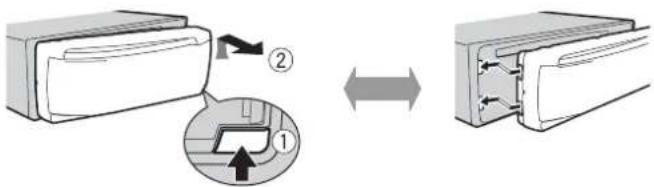
Detach

Important
- Avoid subjecting the front panel to excessive shock.
- Keep the front panel out of direct sunlight and high temperatures.
Always store the detached front panel in a protective case or bag
Setup menu
When you turn the ignition switch to ON after installation, [SET UP:YES] appears in the display.
Press the M.C. dial.
The setup menu disappears after 30 seconds of no operation. If you prefer not to set at this time, turn the M.C. dial to select [NO], then press to confirm.
2 Turn the M.C. dial to select the options, then press to confirm. To proceed to the next menu option, you need to confirm your selection.
| Menu Item Description | |
| LANGUAGE Select the [ENG](English), [PVC](Russian), [TUR](Turkish) | language to display the text information from a compressed audio file. |
| CLOCK SET Set the clock. | |
| FM STEP Select the F [100], [50] | M tuning step from 100 kHz or 50 kHz. |
3[QUIT:YES] appears when all the settings have been made. To return to the first item of the setup menu, turn the M.C. dial to select [QUIT:NO], then press to confirm.
4 Press the M.C. dial to confirm the settings.
NOTES
- You can cancel the menu setting by pressing SRC/OFF.
- These settings can be made at any time from the SYSTEM settings (page 9) and INITIAL settings (page 5).
Canceling the demonstration display (DEMO OFF)
1 Press the M.C. dial to display the main menu.
2 Turn the M.C. dial to select [SYSTEM], then press to confirm.
3 Turn the M.C. dial to select [DEMO OFF], then press to confirm.
4 Turn the M.C. dial to select [YES], then press to confirm.
INITIAL settings
1 Press and hold SRC/OFF until the unit turns off.
2 Press and hold SRC/OFF to display the main menu.
3 Turn the M.C. dial to select [INITIAL], then press to confirm.
4 Turn the M.C. dial to select an option, then press to confirm.
NOTE
The options vary depending on the unit.
| Menu Item Description | |
| FM STEP Select the FM t[100], [50] | uning step from 100 kHz or 50 kHz. |
| SP-P/O MODE Select wh[REAR/SUB.W] | en there is a full-range speaker connected to the rear speaker output leads and there is a subwoofer connected to the RCA output. |
| [SUB.W/SUB.W] Select | ect when there is a passive subwoofer connected directly to the rear speaker output leads and there is a subwoofer connected to the RCA output. |
| [REAR/REAR] | Select when there are full-range speakers connected to the rear speaker output leads and RCA output. If there is a full-range speaker connected to the rear speaker output leads, and the RCA output is not used, you may select either [REAR/SUB.W] or [REAR/REAR]. |
| SYSTEM RESET[YES], [CANCEL] | Select [YES] to initialize the unit settings. The unit will be restarted automatically.(Some of the settings may be retained even after resetting the unit.) |
Radio
The timer frequencies on this unit are allocated for use in Western Europe, Asia, the Middle East, Africa and Oceania. Use in other areas may result in poor reception. The RDS (radio data system) function only works in areas that broadcast RDS signals for FM stations.
Receiving preset stations
1 Press SRC/OFF to select [RADIO].
2 Press BAND to select the band from [FM1], [FM2], [FM3], [MW] or [LW].
3 Press a number button (1 / to 6 / 一
TIP
The function can be also used to select a preset station when [SEEK] is set to [PCH] in the FUNCTION settings (page 8).
Best stations memory (BSM)
The six strongest stations are stored on the number buttons (1/ 一 to 6/
1 After selecting the band, press the M.C. dial to display the main menu.
2 Turn the M.C. dial to select [FUNCTION], then press to confirm.
3 Turn the M.C. dial to select [BSM], then press to confirm.
To seek a station manually
1 After selecting the band, press to select a station. Press and hold the release to seek an available station. Scanning stops when the unit receives a station. To cancel seek tuning, press
NOTE
[SEEK] needs to be set to [MAN] in the FUNCTION settings (page 8).
To store stations manually
1 While receiving the station you want to store, press and hold one of the number buttons (1/∧ to 6/←) until it stops flashing.
Using PTY functions
The unit searches for a station by PTY (program type) information.
1Press dQing FM reception.
2 Turn the M.C. dial to select a program type from [NEWS/INFO], [POPULAR], [CLASSICS] or [OTHERS].
3 Press the M.C. dial. The unit begins to search for a station. When it is found, its program service name is displayed.
NOTES
To cancel the search, press the M.C. dial.
The program of some stations may differ from that indicated by the transmitted PTY.
- If no station is broadcasting the type of program you searched for, [NOT FOUND] is displayed for about two seconds and then the tuner returns to the original station.
PTY list
For more details about PTY list, visit the following site: http://www.pioneer.eu/eur/products/25/121/tech/CarAudio/PTY.html
CD/USB/AUX
Playing back
Disconnect headphones from the device before connecting it to the unit.
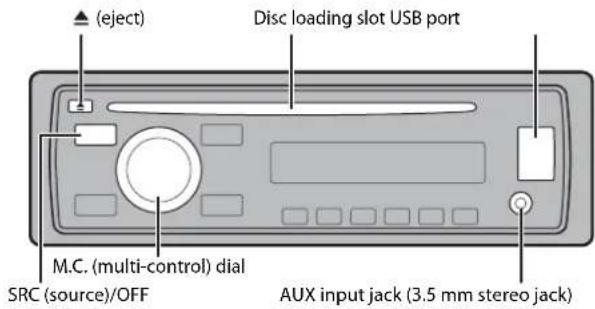
CD
1 Insert a disc into the disc loading slot with the label side up.
To eject a disc, stop playback first then press
USB device
1 Open the USB port cover.
2 Plug in the USB device using an appropriate cable.
CAUTION
Use an optional Pioneer USB cable (CD-U50E) to connect the USB device as any device connected directly to the unit will protrude out from the unit, which could be dangerous.
Before removing the device, stop playback.
MTP connection
A device installed with Android OS 4.0 or later can be connected to the unit via MTP, using the cable supplied with the device. However, depending on the connected device and the numbers of the files in the device, audio files/songs may not be able to be played back via MTP. Note that MTP connection is not compatible with WAV and FLAC file formats.
AUX
1 Insert the stereo mini plug into the AUX input jack.
2 Press SRC/OFF to select [AUX] as the source.
NOTE
If [AUX] is set to [OFF] in the SYSTEM settings, [AUX] cannot be selected as a source (page 9).
Operations
You can make various adjustments in the FUNCTION settings (page 7).
Note that the following operations do not work for an AUX device. To operate an AUX device, use the device itself.
| Purpose Operation | |
| Select a folder/album* | Press 1/ ▲ or 2/ √ . |
| Select a track/song (chapter) Press or . | | | | | | |
| Fast forward or reverse Press and hold or . | | | | | | |
| Search for a file from a list | 1 Press to display the list.2 Turn the M.C. dial to select the desired file (folder) name or category, then press to confirm.3 Turn the M.C. dial to select the desired file, then press to confirm.Playback starts. |
| View a list of the files in the selected folder/category* | Press the M.C. dial when a folder/category is selected. |
| Play a song in the selected folder/category* | Press and hold the M.C. dial when a folder/category is selected. |
| Repeat play | Press 6/ ▼ . |
| Random play | Press 5/ ▼ . |
| Pause/resume playback | Press 4/ PAUSE. |
| Sound retriever | Press 3/S.Rtrv. [1]: Effective for low compression rates [2]: Effective for high compression rates |
| Return to root folder (USB only)* | Press and hold BAND/ □ . |
| Switch between compressed audio and CD-DA (CD only) | Press BAND/ □ . |
| Purpose Operation | |
| Change drives in USB device(Devices that support the USB mass storage device class protocol only) | Press BAND/ ☐. |
- Compressed audio files only
Settings
You can adjust various settings in the main menu.
1 Press the M.C. dial to display the main menu.
2 Turn the M.C. dial to select one of the categories below, then press to confirm.
FUNCTION settings (page 7)
- AUDIO settings (page 8)
SYSTEM settings (page 9)
ILLUMINATION settings (page 9)
3 Turn the M.C. dial to select the options, then press to confirm.
FUNCTION settings
The menu items vary according to the source.
| Menu Item | Description |
| FM SETTING RADIO [TALK], [STANDARD], [MUSIC] | Match the sound quality level with the broadcast signal conditions of the FM band signal. (Available only when FM band is selected.) |
| BSM RADIO | Store the six strongest stations on the number buttons (1/▲ to 6/▼) automatically. |
| REGIONAL RADIO [ON], [OFF] | Limit the reception to the specific regional programs when AF (alternative frequencies search) is selected. (Available only when FM band is selected.) |
| Menu Item Description |
| LOCAL RADIOFM: [OFF], [LV1], [LV2], [LV3], [LV4] Restrict the tuning station according to the MW/LW: [OFF], [LV1], [LV2] signal strength. |
| TA RADIO[ON], [OFF] Receive current traffic information if available.(Available only when FM band is selected.) |
| AF RADIO[ON], [OFF] Allow the unit to retune to a different frequencyproviding the same station. (Available only when FM band is selected.) |
| NEWS RADIO[ON], [OFF] Interrupt the currently selected source withnews programs. (Available only when FM band is selected.) |
| SEEK RADIO[MAN], [PCH] Assign or buttons to seek the station▶one by one (manual tuning) or select a stationfrom the preset channels. |
| S.RTRV CD USR[1] (effective for low compression rates), [2] (effective for high compression rates), [OFF] Enhance compressed audio and restore rich sound. (Not available when the FLAC file is played back.) |
| AUDIO settings |
| Menu Item Description |
| FADER*1Adjust the front and rear speaker balance. |
| BALANCEAdjust the left and right speaker balance. |
| Menu Item Description | |
| EQ SETTING | |
| [SUPER BASS], [POWERFUL], [NATURAL], [VOCAL], [CUSTOM1], [CUSTOM2], [FLAT] | Select or customize the equalizer curve. [CUSTOM1] can be set separately for each source. However, each of the below combinations are set to the same setting automatically. |
| Select an equalizer band and level for further customizing. Equalizer band: [80HZ], [250HZ], [800HZ], [2.5KHZ], [8KHZ] Equalizer level: [+6] to [-6] | [CUSTOM2] is a shared setting used for all sources. You can also switch the equalizer by pressing EQ. |
| LOUDNESS | |
| [OFF], [LOW], [MID], [HI] Compensate for clear sound at low volume. | |
| SUB.W*2 | |
| [NOR], [REV], [OFF] Select the subwoofer phase. | |
| SUB.W CTRL*2*3 | |
| Cut-off frequency: [50HZ], [63HZ], [80HZ], [100HZ], [125HZ], [160HZ], [200HZ] Output level: [-24] to [+6] Slope level: [-12], [-24] | Only frequencies lower than those in the selected range are output from the subwoofer. |
| BASS BOOST | |
| [0] to [+6] Select the bass boost level. | |
| HPF SETTING | |
| Cut-off frequency: [OFF], [50HZ], [63HZ], [80HZ], [100HZ], [125HZ], [160HZ], [200HZ] Slope level: [-12], [-24] | Only frequencies higher than the high-pass filter (HPF) cutoff are output from the speakers. |
| SLA | |
| [+4] to [-4] Adjust the volume level for each source except FM. | |
| *1 Not available when [SUB.W/SUB.W] is selected in [SP-P/O MODE] in the INITIAL settings (page 5). | |
| *2 Not available when [REAR/REAR] is selected in [SP-P/O MODE] in the INITIAL settings (page 5). | |
| *3 Not available when [OFF] is selected in [SUB.W]. | |
SYSTEM settings
You can also access to these menus when the unit is turned off.
Menu Item Description
LANGUAGE
Select the language to display the text information from a compressed audio file.
CLOCK SET
Set the clock (page 5).
12H/24H
[12H], [24H] Select the time notation.
AUTOPI
[ON], [OFF] Search for a different station with the same programming, even if using a preset station.
AUX
[ON], [OFF] Set to [ON] when using an auxiliary device connected to the unit.
MUTE MODE (Not available for DEH-1700UBA)
[MUTE], [20dB ATT], [10dB ATT] Mute or attenuate sound automatically when a signal from equipment with a mute function is received.
PW SAVE*
[ON], [OFF] Reduce the battery power consumption.
Turning on the source is the only operation allowed when this function is on.
- [PW SAVE] is canceled if the vehicle battery is disconnected and will need to be turned back on once the battery is reconnected. When [PW SAVE] is off, depending on connection methods, the unit may continue to draw power from the battery if your vehicle's ignition does not have an ACC (accessory) position.
ILLUMINATION settings
Menu Item Description
DIM SETTING
[SYNC CLOCK], [MANUAL] Change the display brightness.
BRIGHTNESS
[1] to [10] Change the display brightness. The available setting ranges differ depending on [DIM SETTING].
Connections/Installation
Connections

Important
- When installing this unit in a vehicle without an ACC (accessory) position on the ignition switch, failure to connect the red cable to the terminal that detects operation of the ignition key may result in battery drain.


ACC position No ACC position
- Use of this unit in conditions other than the following could result in fire or malfunction.
Vehicles with a 12-volt battery and negative grounding.
-Speakers with 50 W (output value) and 4 to 8 impedance value).
To prevent a short-circuit, overheating or malfunction, be sure to follow the directions below.
- Disconnect the negative terminal of the battery before installation.
- Secure the wiring with cable clamps or adhesive tape. Wrap adhesive tape around wiring that comes into contact with metal parts to protect the wiring.
- Place all cables away from moving parts, such as the shift lever and seat rails.
-Place all cables away from hot places, such as near the heater outlet.
-Do not connect the yellow cable to the battery by passing it through the hole to the engine compartment.
- Cover any disconnected cable connectors with insulating tape.
-
Do not shorten any cables.
-
Never cut the insulation of the power cable of this unit in order to share the power with other devices. The current capacity of the cable is limited.
-Use a fuse of the rating prescribed.
-Never wire the negative speaker cable directly to ground. - Never band together negative cables of multiple speakers.
- When this unit is on, control signals are sent through the blue/white cable. Connect this cable to the system remote control of an external power amp or the vehicle's auto-antenna relay control terminal (max. 300mA 12 V DC). If the vehicle is equipped with a glass antenna, connect it to the antenna booster power supply terminal.
- Never connect the blue/white cable to the power terminal of an external power amp. Also, never connect it to the power terminal of the auto antenna. Doing so may result in battery drain or a malfunction.
- The black cable is ground. Ground cables for this unit and other equipment (especially, high-current products such as power amps) must be wired separately, if they are not, an accidental detachment may result in a fire or malfunction.
This unit
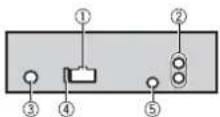
① Power cord input
Rear output or subwoofer output
Antenna input
④Fuse(10A)
Wired remote input (Not available for DEH-1700UBA) Hard-wired remote control adapter can be connected (sold separately).
Power cord
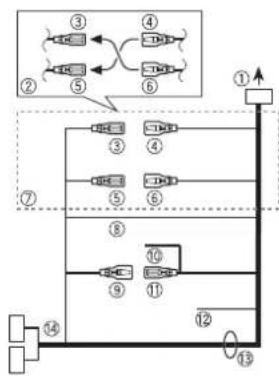
① To power cord input
② Depending on the kind of vehicle, the function of and may be different. In this case, be sure to connect to 5 and 6
Yellow Back-up (or accessory)
4 Yellow Connect to the constant 12 V supply terminal.
Red Accessory (or back-up)
Red Connect to terminal controlled by the ignition switch (12 V DC).
⑦ Connect leads of the same color to each other.
Black (chassis ground)
Blue/white
The pin position of the ISO connector will differ depending on the type of vehicle. Connect and when Pin 5 is an antenna control type. In another type of vehicle, never connect and
Blue/white
Connect to the system control terminal of the power amp (max. 300 mA 12 V DC).
Blue/white
Connect to the auto-antenna relay control terminal (max. 300mA12VDC
12 Yellow/black (Not available for DEH-1700UBA)
If you use equipment with a Mute function, wire this lead to the Audio Mute lead on that equipment. If not, keep the Audio Mute lead free of any connections.
Speaker leads
White:Front left
White/black:Frontleft Gray:Front right
Gray/black: Front right
Green: Rear left or subwoofer
Green/black:Rear left or subwoofer
Violet: Rear right or subwoofer
Violet/black:Rear right @ subwoofer
ISO connector
In some vehicles, the ISO connector may be divided into two. In this case, be sure to connect to both connectors.
NOTES
-
Change the initial menu of this unit. Refer to [SP-P/O MODE] (page 5). The subwoofer output of this unit is monaural.
-
When using a subwoofer of 70W(2) , be sure to connect the subwoofer to the violet and violet/black leads of this unit. Do not connect anything to the green and green/black leads.
Power amp (sold separately)
Perform these connections when using the optional amplifier.
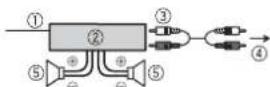
① System remote control Connect to blue/white
② Power amp (sold separately)
③ Connect with RCA cables (sold separately)
To rear output or subwoofer output
Rear speaker or subwoofer
Installation

Important
- Check all connections and systems before final installation.
- Do not use unauthorized parts as this may cause malfunctions.
- Consult your dealer if installation requires drilling of holes or other modifications to the vehicle.
- Do not install this unit where: it may interfere with operation of the vehicle.
-it may cause injury to a passenger as a result of a sudden stop.
-
The semiconductor laser will be damaged if it overheats. Install this unit away from hot places such as near the heater outlet.
Optimum performance is obtained when the unit is installed at an angle of less than 60^ . -
When installing, to ensure proper heat dispersal when using this unit, make sure you leave ample space behind the rear panel and wrap any loose cables so they are not blocking the vents.
Leave ample space
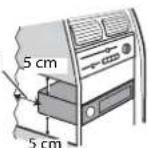
DIN front/rear mount
This unit can be properly installed using either front-mount or rear-mount installation.
Use commercially available parts when installing.
DIN Front-mount
1 Insert the mounting sleeve into the dashboard. For installation in shallow spaces, use the supplied mounting sleeve. If there enough space, use the mounting sleeve that came with the vehicle.
2 Secure the mounting sleeve by using a screwdriver to bend the metal tabs (90^) into place.
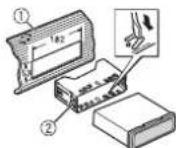
① Dashboard
② Mounting sleeve
Make sure that the unit is installed securely in place. An unstable installation may cause skipping or other malfunctions.
DIN Rear-mount
1 Determine the appropriate position where the holes on the bracket and the side of the unit match.
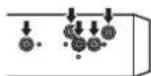
2 Tighten two screws on each side.
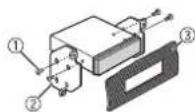
① Tapping screw (5mm× 8mm)
② Mounting bracket
③ Dashboard or console
Removing the unit
1 Remove the trim ring.
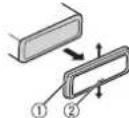
① Trimming
Notched tab
- Releasing the front panel allows easier access to the trim ring.
- When reattaching the trim ring, point the side with the notched tab down.
2 Insert the supplied extraction keys into both sides of the unit until they click into place.
3 Pull the unit out of the dashboard.
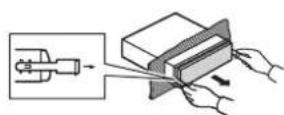
Additional Information
Troubleshooting
The display automatically returns to the normal display.
- No operations have been made for about 30 seconds.
Perform an operation.
The repeat play range changes unexpectedly.
Depending on the repeat play range, the selected range may change when another folder or track is being selected or during fast forwarding/reversing.
- Select the repeat play range again
A subfolder is not played back.
Subfolder cannot be played when [FLD] (folder repeat) is selected.
- Select another repeat play range.
The sound is intermittent.
→You are using a device, such as a cellular phone, that may cause audible interference.
- Move electrical devices that may be causing the interference away from the unit.
Error messages
Common
AMP ERROR
This unit fails to operate or the speaker connection is incorrect.
The protective circuit is activated. Check the speaker connection.
Turn the ignition switch OFF and back to ON again. If the message remains, contact your dealer or an authorized Pioneer Service Station for assistance.
NO XXXX (NO TITLE, for example)
There is no embedded text information. Switch the display or play another track/file.
CD player
ERROR-07,11,12,17,30
→The disc is dirty.
Clean the disc.
→The disc is scratched.
Replace the disc.
ERROR-07,10,11,12,15,17,30,A0
There is an electrical or mechanical error.
Turn the ignition switch OFF and back to ON, or switch to a different source, then back to the CD player.
ERROR-15
→The inserted disc is blank. Replace the disc.
ERROR-23
Unsupported CD format.
Replace the disc.
FORMATREAD
→Sometimes there is a delay between the start of playback and when you start to hear any sound.
- Wait until the message disappears and you hear sound.
NO AUDIO
→The inserted disc does not contain any playable files.
Replace the disc.
SKIPPED
→The inserted disc contains DRM protected files.
- The protected files are skipped.
PROTECT
All the files on the inserted disc are embedded with DRM. Replace the disc.
USB device
FORMATREAD
Sometimes there is a delay between the start of playback and when you start to hear any sound.
Wait until the message disappears and you hear sound.
NO AUDIO
→There are no songs.
- Transfer the audio files to the USB device and connect.
The connected USB device has security enabled.
- Follow the USB device instructions to disable the security.
SKIPPED
→The connected USB device contains DRM protected files.
- The protected files are skipped.
PROTECT
All the files on the connected USB device are embedded with DRM. Replace the USB device.
N/A USB
-
The connected USB device is not supported by this unit.
-
Disconnect your device and replace it with a compatible USB device.
CHECK USB
→The USB connector or USB cable has short-circuited.
- Check that the USB connector or USB cable is not caught in something or damaged.
The connected USB device consumes more than maximum allowable current.
- Disconnect the USB device and do not use it. Turn the ignition switch OFF and back to ACC or ON. Connect only compliant USB devices.
ERROR-19
→Communication failed.
Perform one of the following operations, then return to the USB source.
-
Turn the ignition switch OFF and back to ON.
-
Disconnect the USB device.
-
Change to a different source.
ERROR-23
USB device was not formatted properly.
- Format the USB device with FAT12, FAT16 or FAT32.
STOP
There are no songs in the current list.
- Select a list that contains songs.
Handling guidelines
Discs and player
- Use only discs that feature either of the following two logos.


-
Use 12-cm discs.
-
Use only conventional, fully circular discs.
-
The following types of discs cannot be used with this unit:
-DualDiscs
8-cm discs: Attempts to use such discs with an adaptor may cause the unit to malfunction.
Oddly shaped discs
-Discs other than CDs
-Damaged discs, including discs that are cracked, chipped or warped
-CD-R/RW discs that have not been finalized
- Do not write on or apply chemicals to the surface of the discs.
- To clean a CD, wipe the disc with a soft cloth outward from the center.
- Condensation may temporarily impair the player's performance. Let it rest for about one hour to adjust to a warmer temperature. Also, wipe any damp discs off with a soft cloth.
- When using discs that can be printed on label surfaces, check the instructions and the warnings of the discs. Depending on the discs, inserting and ejecting may not be possible. Using such discs may result in damage to this equipment.
- Do not attach commercially available labels or other materials to the discs.
The discs may warp making the disc unplayable.
The labels may come off during playback and prevent ejection of the discs, which may result in damage to the equipment.
USB storage device
- Connections via USB hubs are not supported.
- Firmly secure the USB storage device before driving. Do not let the USB storage device fall onto the floor, where it may become jammed under the brake or accelerator pedal.
- Depending on the USB storage device, the following problems may occur.
-Operations may vary.
-The storage device may not be recognized. - Files may not be played back properly.
- The device may cause audible interference when you are listening to the radio.
Compressed audio compatibility
- Only the first 32 characters can be displayed as a file name (including the file extension) or a folder name.
- The unit may not work properly depending on the application used to encode WMA files.
- There may be a slight delay at the start of the playback of audio files embedded with image data, or audio files stored on a USB device with numerous folder hierarchies.
- Russian text to be displayed on this unit should be encoded in one of the following character sets:
-Unicode (UTF-8, UTF-16)
A character set other than Unicode that is used in a Windows environment and is set to Russian in the multi-language setting
CAUTION
- Pioneer cannot guarantee compatibility with all USB mass storage devices, and assumes no responsibility for any loss of data on media players, smartphones, or other devices while using this product.
- Do not leave discs or a USB storage device in any place that is subject to high temperatures.
WMA files
| File extension .wma | |
| Bit rate 48 kbps to 320 | kbps (CBR), 48 kbps to 384 kbps (VBR) |
| Sampling frequency 32 | kHz, 44.1 kHz, 48 kHz |
| Windows MediaTM Audio Professional, Lossless, Voice/DRM Stream/Stream with video | Not compatible |
MP3 files
| File extension.mp3 | |
| Bit rate 8 kbps to 320 kbps | ps(GBR), VBR |
| Sampling frequency 8 kHz to 48 kHz (32 kHz, 44.1 kHz, 48 kHz for emphasis) | |
| Compatible ID3 tag version | 1.0, 1.1, 2.2, 2.3, 2.4 (ID3 tag Version 2.x is given priority over Version 1.x.) |
| M3u playlist Not compatible | |
| MP3i (MP3 interactive), mp3 PRO | Not compatible |
WAV files
WAV file formats cannot be connected via MTP.
| File extension .wav | |
| Quantization bits 8 and | 16 (LPCM), 4 (MSADPCM) |
| Sampling frequency 16 | kHz to 48 kHz (LPCM), 22.05 kHz and 44.1 kHz (MS ADPCM) |
FLAC files
- FLAC file formats cannot be connected via MTP.
- FLAC files may not be playable, depending on the encoder.
| File extension .flac | |
| Sampling frequency 8/ | 11.025/12/16/22.05/24/3 2/44.1/48kHz |
| Quantization bit rate | 16 bit |
| Channel mode | 1/2 ch |
Disc
- Regardless of the length of the blank section between the songs from the original recording, compressed audio discs play with a short pause between songs.
| Payable folder hierarchy | Up to eight tiers (A practical hierarchy is less than two tiers.) |
| Payable folders | Up to 99 |
| Payable files | Up to 999 |
| File system | ISO 9660 Level 1 and 2, Romeo, Joliet |
| Multi-session playback | Compatible |
| Packet write data transfer | Not compatible |
USB device
- There may be a slight delay when starting playback of audio files on a USB storage device with numerous folder hierarchies.
| Playable folder hierarchy | Up to eight tiers (A practical hierarchy is less than two tiers.) |
| Playable folders | Up to 500 |
| Playable files | Up to 15 000 |
| Playback of copyright-protected files | Not compatible |
| Partitioned USB device | Only the first partition can be played. |
Sequence of audio files
The user cannot assign folder numbers and specify playback sequences with this unit. Sequence of audio file depends on the connected device. Note that the hidden files in a USB device cannot be played back.
Example of a hierarchy
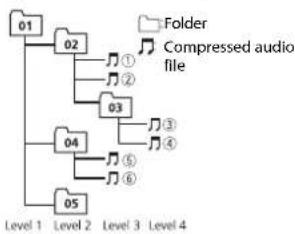
01 to 05: Folder number
① to :Playback sequence
Russian character chart
D:Display C:Character
| D: C | D: C | D: C |
| A:A | B:B | B:B |
| F:F | J:D | E:E,E |
| Z:X | J:3 | H:N, N |
| K:K | A:N | H:M |
| H:H | Q:O | N:N |
| P:P | C:C | T:T |
| Y:Y | Φ:Φ | X:X |
| U:U | Y:Y | W:W, W |
| ::b | H:bI | b:b |
| J:J | H:IO | J:J |
Copyright and trademark
Windows Media is either a registered trademark or trademark of Microsoft Corporation in the United States and/or other countries. This product includes technology owned by Microsoft Corporation and cannot be used or distributed without a license from Microsoft Licensing, Inc.
FLAC
Copyright © 2000-2009 Josh Coalson
Copyright © 2011-2013 Xiph.Org
Foundation
Redistribution and use in source and binary forms, with or without modification, are permitted provided that the following conditions are met:
- Redistributions of source code must retain the above copyright notice, this list of conditions and the following disclaimer.
- Redistributions in binary form must reproduce the above copyright notice, this list of conditions and the following disclaimer in the documentation and/or other materials provided with the distribution.
Neither the name of the Xiph.org Foundation nor the names of its contributors may be used to endorse or promote products derived from this software without specific prior written permission.
THIS SOFTWARE IS PROVIDED BY THE
COPYRIGHT HOLDERS AND
CONTRIBUTORS "AS IS" AND ANY EXPRESS
OR IMPLIED WARRANTY, INCLUDING, BUT
NOT LIMITED TO, THE IMPLIED
WARRANTIES OF MERCHANTABILITY AND
FITNESS FOR A PARTICULAR PURPOSE ARE
DISCLAIMED. IN NO EVENT SHALL THE
FOUNDATION OR CONTRIBUTORS BE
LIABLE FOR ANY DIRECT, INDIRECT,
INCIDENTAL, SPECIAL, EXEMPLARY, OR CONSEQUENTIAL DAMAGES (INCLUDING, BUT NOT LIMITED TO, PROCEDURE OF SUBSTITUTE GOODS OR SERVICES;LOSS OF USE, DATA, OR PROFITS;OR BUSINESS INTERRUPTION) HOWEVER CAUSED AND ON ANY THEORY OF LIABILITY, WHETHER IN CONTRACT,STRICT LIABILITY,OR TORT (INCLUDING NEGLIGENCE OR OTHERWISE) ASING IN ANY WAY OUT OF THE USE OF THIS SOFTWARE, EVEN IF ADVISED OF THE POSSIBILITY OF SUCH DAMAGE.
AndroidTM
Android is a trademark of Google Inc.
Specifications
General
Power source: 14.4 V DC (10.8 V to 15.1 V allowable)
Grounding system: Negative type
Maximum current consumption: 10.0 A
Dimensions (W× H× D)
DIN
Chassis: 178mm× 50mm× 165mm
Nose: 188mm × 58mm × 17mm
D
Chassis: 178mm× 50mm× 165mm
Nose: 170mm× 46mm× 17mm
Weight: 1 kg
Audio
Maximum power output:
50W×4
70 W × 1/2 Ω (for subwoofer)
Continuous power output:
22W×4(50Hz to 15000Hz,5%
THD, 4Ω load, both channels driven)
Load impedance: 4 (4Ω to 8Ω allowable)
Preout maximum output level: 2.0 V
Loudness contour: +10 dB (100 Hz), +6.5
dB (10 kHz) (volume: -30 dB)
Equalizer (5-Band Graphic Equalizer):
Frequency: 80 Hz/250 Hz/800 Hz/2.5
kHz/8 kHz
Equalization range: ±12 dB (2 dB step)
Subwoofer (mono):
Frequency: 50 Hz/63 Hz/80 Hz/100
Hz/125 Hz/160 Hz/200 Hz
Slope: -12 dB/oct, -24 dB/oct
Gain: +6 dB to -24 dB
Phase: Normal/Reverse
CD player
System: Compact disc audio system
Usable discs: Compact disc
Signal-to-noise ratio: 94 dB (1 kHz) (IEC-A)
network)
Number of channels: 2 (stereo)
MP3 decoding format: MPEG-1 & 2 Audio
Layer 3
WMA decoding format:Ver.7,7.1,8,9,10
11, 12 (2 ch audio) (Windows Media
Player)
WAV signal format: Linear PCM & MS
ADPCM (Non-compressed)
USB
USB standard specification: USB 2.0 full speed
Maximum current supply: 1 A
USB Class: MSC (Mass Storage Class)
File system: FAT12, FAT16, FAT32
MP3 decoding format: MPEG-1 & 2 Audio Layer 3
WMA decoding format:Ver.7,7.1,8,9,10
11, 12 (2 ch audio) (Windows Media
Player)
FLAC decoding format: v1.3.0 (Free
Lossless Audio Codec)
WAV signal format: Linear PCM & MS
ADPCM (Non-compressed)
FMtuner
Frequency range: 87.5 MHz to 108.0 MHz
Usable sensitivity: 11 dBf (1.0 μV/75 Ω,
mono,S/N:30 dB)
Signal-to-noise ratio: 72 dB (IEC-A network)
MWtuner
Frequency range: 531 kHz to 1602 kHz
Usable sensitivity: 25 V (S/N: 20 dB)
Signal-to-noise ratio: 62 dB (IEC-A network)
LWTuner
Frequency range: 153 kHz to 281 kHz
Usable sensitivity: 28 V( S/N : 20 d B)
Signal-to-noise ratio: 62 dB (IEC-A network)
NOTE
Specifications and the design are subject to modifications without notice.
Table des matieres
Raccordements/Installation 11
Indication Description
Retirer
Mémoire des favorables stations (BSM)
Raccordements/Installation
Raccordements
Important
| D: C | D: C | D: C |
| A: A | B: B | B: B |
| F: F | J: D | E: E, E |
| J: J | J: 3 | H: H, H |
| K: K | I: N | M: M |
| H: H | O: O | N: N |
| P: P | C: C | T: T |
| Y: Y | Φ: Φ | X: X |
| U: U | Y: Y | W: W, W |
| '': 'b' | H: b1 | b: b |
| J: J | H: J0 | J: J |
D: Affichage C: Caractere
Best stations memory (BSM)
Solo file audio compressi
Impostazioni
| D: C | D: C | D: C |
| A: A | B: B | B: B |
| F: F | J: D | E: E, E |
| Z: Z | Z: 3 | H: H, N |
| K: K | I: N | M: M |
| H: H | O: O | N: N |
| P: P | C: C | T: T |
| Y: Y | Φ: Φ | X: X |
| U: U | Y: Y | W: W, W |
| '': 'b' | H: b1 | b: b |
| J: J | H: I0 | J: J |
Copyright © 2000-2009 Josh Coalson
Copyright © 2011-2013 Xiph.Org
Foundation
Pendenza: -12 dB/oct, -24 dB/oct
Guadagno:da +6 dB a-24dB
Fase:normale/inversa
Lettore CD
Sistema: Sistema audio compact disc
Specifica standard USB: USB 2.0 full speed
| D: C | D: C | D: C |
| A: A | B: B | B: B |
| F: F | J: D | E: E, E |
| J: J | J: 3 | H: H, H |
| K: K | I: N | H: M |
| H: H | O: O | N: N |
| P: P | C: C | T: T |
| Y: Y | Φ: Φ | X: X |
| U: U | Y: Y | W: W, W |
| V: b | H: b1 | b: b |
| J: J | H: I0 | J: J |
D: visor C: caracté
Copyright y marcas registradas
WMA
Copyright © 2000-2009 Josh Coalson
Copyright © 2011-2013 Xiph.Org
Foundation
(Windows Media Player)
Formato de senal WAV:PCM lineal y MS
ADPCM (sin comprimir)
USB
(Windows Media Player)
| D: C | D: C | D: C |
| A: A | B: B | B: B |
| F: F | J: J | E: E, E |
| J: JX | J: 3 | H: H, H |
| K: K | I: I | M: M |
| H: H | O: O | N: N |
| P: P | C: C | T: T |
| Y: Y | Φ: Φ | X: X |
| U: U | Y: Y | U: U, U |
| '': 'b' | H: b1 | b: b |
| J: J | H: J0 | J: J |
D:Anzeige C:Zeichen
KLASSE 1 LASERPRODUCT
Bij problemen
Best stations memory (BSM)
Reserve (of accessoire)
④ Geel
⑤ Rood
Acessoire(of reserve)
⑥ Rood
ERROR-07, 10, 11, 12, 15, 17, 30, A0
Copyright © 2000-2009 Josh Coalson
Copyright © 2011-2013 Xiph.Org Foundation
Helling: -12 dB/occt, -24 dB/occt
Gain: +6 dB tot -24 dB
Fase: Normaal/tegengesteld
Cd-speler
System: Compact Disc Audio
(Windows Media Player)
WAV-signaalformaat:Lineaire PCM & MS
(Windows Media Player)
FLAC-decoderingsformaat:v1.3.0(Free
Lossless Audio Codec)
JI3EPHbI IPODyKT KJIACC1
PpB03HMKHOBeHN npo6nem
Pirn HenoIaKx a pabok 3TO rAIDENBcIINBIXeBC TOpRbIM npedctABinEM KOMAnHInpOIOIAOHTeTNE INC BcIIaIKAHm CepBcIBHM PnyHKTM OPIEER.
Hauano pa60tbl
OchOBhble onepaum
DEH-1700UB/1700UBG/1700UBA/1700UBB
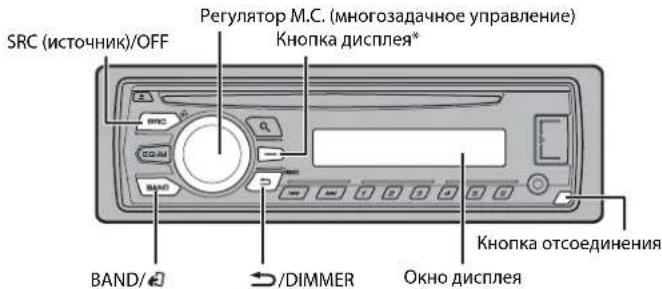
B DAHHOM pyKOBOCTBE DAHHA KONKA TAKKe HAsBaTeCH DISP.
YacTo nCnoIb3yEmble onepaunu
DocyHbIe KONKMOrYOTOnuAcb83aBcIMOCnO t yCTPOINCTBa
KoJrdo rony6/6enbI npOBo 3TOO yCTPOBTA NOkNOeH K TepmHany peneHOrO nypaBHeH NABOMATINHECKOH AHTEHHH, AHTEHHA ABOTMOBue BIDBnRAeTc PnB KBIIOyHnHt COTNHKA CIRHANA 3TOO YCTPOBTRA. YoBoB 3RTHYbAHTEHNY, BIKIOKHYTE UCHNHK CIRHANA.
HnkaaHa dncnnee
HdkauzaΦncacnHe
Charne
PpneMpdeBapuTeIbHO yCTaHOBnHHbIX CTaHcN
1 Haxmnte SRC/OFF pna Bb6opa [RADI].
2 Haxmte BAND/4 nIy Bb6opa noocb [FM1], [FM2], [FM3], [MW] wH [LW].
3 Haxmte YncIOyIO KhoNkO (ot 1/An do 6/
COBET
KHOKNK KNOKNOK Xe MCNIOBAOBaTb DnB B6oPpnpaepaipentbHo yCTAHOBHeHcH O TcAHH,ecnI dna npametpa [SEEK] yCTAHOBHe 3HaueHme [PCH] B HacpoiKaX FUnction (ctp.8).
3anomnHaHne lyuux x taHcun (BSM)
3aKaKdoNcIOBOKNHKnOKeCOxpaHeHa OHa NsIeCTn paIIOCTaHm C HAnlyuMMAKeCTBOM npEma (c1/ A no 6/)。
1 Nocne Bb6opa noocbi haxmnTe perynTOp M.C. nra OTO6paXeHna TnaBHoro MEHIO.
2 NobeprHnTe M.C. nIy Bb6opa [FUNCTION], 3aTeM hakmnte nIy noITBepKdHnIe.
3ПовернITEМ.C.дЯьбopa[BSM],Затем нажмerte полтевжdenи.
Ponck cTanuBpyHy
1 Nocre Bb6opa nonocb haxmte 4oppa ctaunn. Haxmite n yepexhnae TcTne TpytnoH CTaunn. PONCK octaHOBNTCA, KOrda yctpoiCTBO BbINOHIT npHem CTaunn. DnA OTMehbN NOCka HAXmTE
ПРИМЕЧАНЕ
Длараметра [SEEK] Heo6xOdmo yctaHOBuTb 3aueHne [MAN ] bHaCTpoiKaX FUnction (cTp.8).
CoxpaHHeHcTahnBpyHyu
1 Bo Bpemn pnpema cTAnu, KOTOpy Tpe6yeTc CoxpaHtB, HAKMITE uDepKmBaTe OndHy n3 YncNoBbIX KhoNok (c 1/ A no 6/), Noka MrraHme He npekpantTcA.
IcnoIb3OBAHnE yHKnI PTY
YcTPOCTBO BbINONHReT NOnCK CTaHcNn No HhOpMaun PTY (TNn pOrpaMMbl).
1HaKMTe BepemFM-npHema.
2 NobeprHne M.C. JnB Bb6opa Tnna nporpaMmbu n3 [NEWS/INFO], [POPULAR], [CLASSICS] nn [OTHERS].
3 HaxMMte perynIaTOp M.C.. UcpoiCTBO HauHET NOnCK CTaHcN. Iocne HaxOxKeHnA CTaHcN OTo6pa3ntCa HaBaHHe IpOrpaMHO CnyKbI.
ПРИМЕЧАЦА
-TO6blOTMeHHTbNouCK,HAKMNTeM.C.
I'PpRpAMMbHEKOTOpBxPAADIOCTAHmM MOrT OTNIuHTbCH ONIPOrPAM, Yka3AHHbx B nepeBaDAEMo KOM PDE TY.
EINH N0H3N3 CTAHNIHE NEpeaETnpORpAMMn HNYKHO TINA,TO HA JIKCIINEB TEEHHE pIMMEPO Dxyb CekyHb 6detyeNOKA3aHO [NOT FOUND],N3ATEM TOHEppeIeIET B PEXMMI pMeMa tAHNIc,K cKOTOP6bl HAAT NOCK.
Cnncok PTY
DnanyonyueneHNOONHTeBHOHnHOpMaunOcnmckePTYnocTeCneyouu
http://www.pioneer.eu/eur/products/25/121/tech/CarAudio/PTY.html
KomnakT-ДиСК/USB/AUX
Bocnpon3BeHne
OTKIOHTeOTyCTPOINCTBaHAYSHNIpeep NOIKIQUEHnEM KOBOpdyOBAHHIO.
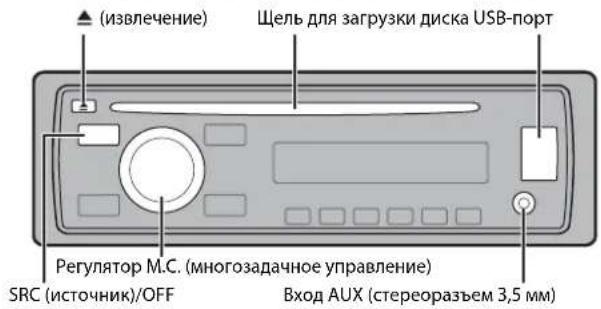
Komnakt-Duick
1 Bctabte Dnck B 3aepy3k Dnck Ma MapKnpoBaHHO CTopoHOB BBepx.
YTO6bI 3BNEyDACKOCTAHOBITE BOCPON3BedeHHe,3ATEM HAXMNTE
USB-ycptpoinctBO
1 OtkpoTe KpbuKny nopTa USB.
2 PnKIOHTe yCTPOBTO USB c nmooucooTbETcByuOero Ka6en.
BHUMAHNE
Ncnonbnyte dononnneBthnb KabeNB Pioneur USB (CD-UsOE) nro npknoeHn yctpoaTBA USB, NOckOBNy NIOoe yctpoACTBO, noKNOIeOHHe HnncOpECTBEHO K TAAHOMy yctpoAChTB, 6ydt BtCytTb, NTMOKETPNEPTCTABNTBIOACCHOT.
Ipeepn3BleueHem yCtpoNCTBA ocTaHOBnTE BOCpOm3BeJeHne.
Iopknouyne no MTP
YcptOCTBO ConePAHHOH NCTeMOI Android 4.0 HNI 60BNE ONDHE MOH NOKIOHTB NO IPOTOKHOI MTP C NOMUH KABENI, PnNAAEMORA KYCPTOBCTy. QJHAKO B AANINMCTOTN ONDKIOCHENO YcPTOCTBA INONCCTBA faaioN ayIDoAoiMb/KOMIOHN MOrT yBbT BEOCTCYHb INOBCPNOB3EHNH cpez3 MTP. O6pATITE BHMHMAIE, qTO NOkIOHIOE MTP HECOBTEMTC oFOPMATAM PAIOW BAV WAF nFLAC.
AUX
1 BCTaBbTe MmHn-CTepeopazbem B BXoHoh pa3bem AUX.
2 Haxmnte SRC/OFF nIy Bb60pa[AUX]BkaueCTBe mToHnKa.
ПРМЕЧАНЕ
Ecnn I naPametra [AUX] yctaHOBHeIO 3aHene [OFF] a HcTPOKxS YSTEM, 6yTeHbeO3MOKO Bb6pTa[BAX] kKeAeTRE hCtOHNkA (ctp.9).
Onepaum
BbMOKETe HAcPToHTb pa3nHHe npaMeTp b HAcTPOIkX FUnTION (ctp.8). 06paTte BnHMaHne,TO cnyuOme onepaHn he paoTaHO HAcyTPOIcTB AUX. Jn paOToBcY cTPOIcTB OAM XN cnoB3yte YcTPOIcTBHO NocpeCTBeHHO.
UpoBHeB kBaIaIepe: oT [+6] Do [-6]
LOUDNESS
[OFF], [LOW], [MID], [HI] KomnehcauaЯ ДуЕТКOrо 3БУЧАня рп.
H3KOM yPOBHe rPOMKOCTN.
SUB.W*2
[NOR],[REV],[OFF]Bb6op a3blca6Byepa.
SUB.W CTRL*2*3
Yactora cpea:[50HZ],[63HZ],[80HZ],[100HZ],[125HZ],[160HZ],[200HZ]
HbBxOJe Ca6Byoepa 6dyT BoCnp03B0DnTbCay TOnbKO Te TaCTBoT, KOtOpBe HNKe yKa3aHHOrO dIaHaONa YaCTOT.
YpOBeHbBbIXoHOro CmHnHa:
ot[-24]no[+6]
Kpytm3ha xapaKtepeuTkn: [-12], [-24]
BASS BOOST
OT[0]do[+6]BbIbOp yCmHnHn HmKmX 3ByKObbx qACTOT.
3JMeHT MeHIO OnncaHne
HPF SETTING
Yactota cpe3a:[OFF],[50HZ], [63HZ],[80HZ],[100HZ],[125HZ], [160HZ],[200HZ]
HaDnHAMKINbdyT bbyBOIDNbTcTOIbKO TaCTOTblBbIE,YEMyCTAHOBNEHbEΦNtPOM BbICOKIXNaCTOT(HPF).
Kpytna hxaapanktepnctnkn: [-12],[-24]
SLA
ot [+4]do[-4]HaCtpoKa ypoBn rPoMkoCTn nKaaJdOrO nctOChNkA Kpome FM.
*HEdOCTyHNo,ecnBb6paH npaMeTp [SUB.W/SUB.W] B[SP-P/O MODE] BHaCtpoKax INITIAL (ctp.5).
^2 HeNoctynho, ecnn Bb6paH npapameTp [REAR/REAR] b [SP-P/O MODE] b HacptpoKkax INITIAL (ctp.5).
3 Heioctynho, ecn Bb6paH npaMeTp [OFF] B [SUB.W].
HactpoynkSySTEM
Bb moke Te noyunTb doctyn K 3TNM MEHIO daJe e cIn yCTpoIcTO BvIKIOUeHO.
3JMeHT MeHIO OnncaHne
LANGUAGE
[ENG]Ahnliukmckn [PVC], (Pycckmckn), TUR
Bb6op 3bkaI daItoOBpaKHeN TcKTOBOH NnΦoPMAU CCKATORO AyDNOAaJIa.
CLOCK SET
yctpOCTBy BCNOMORAtehBHOYcTPOIcTBA.
MUTE MODE (Heoctynno DEH-1700UBA)
[MUTE], [20dB ATT], [10dB ATT] ABTomatnueckoe OTKnoucheHne NIN nprrnyeHne 3bYaKa pni nolnyeHne CnHaJa c oobpyOnDaBHc FyHKnueOtKKnUoHeHHN 3bYaKa.
3nemt MeHIO OnncAHne
PW SAVE*
[ON],[OFF]Pexm3Hepc6pekeHnA.
PnBkIOueHHNfHKUH6yTeDIOCTyHNO
TOLBKO BKJIOUOHeHNE ICTOUYHnKa.
*PekIM [PW SAVE] otKIOUaTcR npn oTOcoJIHHeHH aKKyMnyTOpHoi 6batape nABTOMO6NIA; npn nIOJOeJHHeHH 6batapeEro OTnOTope6yTCH KIKIOHTH CHOBIA. PnB bIKIOYHeHH peKEMME [PW SAVE] BO3MOxHO, VTO, B 8AabeHmCOnOT mTeOJAIOKIOHcH, yCTPOCTHO 6yETOTp6bnIbhe AKKyMnyTOpA, eCN 3aKIRrHHe ABTOMO6NIA He IMeET nONoKeHHN ACC (aKecccypar).
Hactpoikn ILLUMINATION
3nememMeHOOnmcaHne
DIM SETTING
UctpaHHeH HeCnpaBHOCTe
Iaennnnn abotomatmueckn BO38paauetcB BWCdoD peKHM.
→B Tiehenhe 30 cekyhd He bblno BbInlHHe NkAkknx Oonepaui. -BbIOnnHte onepaui.
DuaaONOBTOPOHO BOCPONBDEHNAcmONPOUNbHO NmAHHeTcA.
→B3aBNCMOCTNOT Bb6paHHORO
Dnana3oHa NOBtOPHOrO
BOcPON3BeDEHn OH MOKET
N3MeHNbTcH pRn Bb6pe DpyrTo nAkn
NNDOPOXKN, a TAKKe pRn NepcMoTe
BnepeJ/na3d.
-Bb6BePeT dNaan3OH NoBtOPHOrO
BOcPON3BeDEHn eEe pa3.
BloxenHHa nanka He Bocnpo3BodnTcH. BloxenHeNb nnKHe BOCpOa3BODATC, cEnn Bb6paH duana3OH [FLD] (noBtOpoe BOCpOa3BedeHne nanKn). -Bb6epHe npyro duana3OH noBTOPHORo BOCpOa3BEdHnH.
MNEOTCA NOMEX 38yka.
UcnoBb3yeTcA yctpoCTBO, HAnpMep, COtOBbI TenePcH, KOTOpoe MoKET Bb3bBaTb UyMOBbIE NOMEXH. -Y6ePte npHbOpH, Bb3HBAouHe NOMEX, O t 3TOF OyCTCbTA.
Coo6ueHn8 o6 ow6kax
067ne
AMP ERROR
→YcpoiCTBO He paOtaETnnn HENPAHbHO NOCoEOHNHEINHAMNK. →CpaOtana ZeB TaHTB. -PpOBepTe,NOKIOUeHN nnHnAMHK. -PpOBEPHTe KIOUc 3aJnAraN B noJooKeHe OFF n BEpHIne B noJooKeHe ON.Ecm coo6ueHe He NcHc3aE, CBAJKTeCb C dIaJIepCKIM ueHTPOM Hn ABTOPNAOHBm cepBNbM PyhKtOM PioneR.
NO XXXX (NO TITLE, Hanpimep)
→HeTBCPTPOeHHoTHeKCTOBHnHΦOPMaunu.
-NepeKIOUHTe DnCnneuBocnpOu3BeDnte DpyyHO DpOxKy/phiN.
Ipnurpbibateb KOMnakT- DnCKOB
ERROR-07,11,12,17,30
→Dnck 3aqrpa3HEn. OunCTne Dnck →Dnck nouapapanah -3aamenche Dnck
ERROR-07,10,11,12,15,17,30,A0
→3NeKtpnueckaHmMexAHuecka HcNpRaBHOCTb. -YcTaHOBnTe KIOU 3aJINrAHH B nonOKeHne OFF, a 3aTEM-B nonOKeHne ON nHn nepeKIOuHTecb Ha npTyOn IVTOCH NcHnA, a 3aTEM o6paTHo HA npOurPbIaTeB kOMnakT DICKOB.
ERROR-15
→BctabniennyctoIINCK.
-3aMeHNTe INCK.
ERROR-23 ФОМАТДИСКА He NOДЕРХИБAeTc. 3AMEHITNEJIMK
FORMATREAD
→HOrda npOnCXoNT 3aepKgMa
HauHAmo BocPON3BeEHn IN
NoBHeHMe 3ByKa.
-3yK NoBHTC NOCTO K a
cNpIeM cUe3HET COoBHeHnE.
NO AUDIO
→HaДСКЕ OТСТСТВИТ Φайны, KOTOPБМоКнHO BOCNРОЗВECTH.
-3AmEHNTe DICK.
SKIPPED
→ДиСК COpeRgKHT faaHbI, 3aunuEHHbIe texHONOrMe DRM. -3aunuENHbIe faaHbI nponyCkaIOrTcN.
PROTECT
→Bce fainbHa nDCke 3aunuienbI texHONrOmei DRM. -3AMENHTeDMK.
USB-yctpoNCTBO
FORMAT READ
→HOrda npOcXoNt 3aepKka Me
HaHaiOM BOCpNOB3BeDHeNHa
NORBHeHMe 3ByKa.
-3Byk NoBnTcNoCte TORa Kc
dUcnIe NueChET COObUHeMe.
NO AUDIO
→KOMNo3uHmOTCYCTBYOT.
-PerpeHcTe AymoHoaJbHa 3aONMOHaUoJe yCtpoHCTBO USN noKnIOuHTe erO.
→Ha NoDkNOHeHOM yCtpoHCTBE USB BKNIOHcHs3aunHa.
-CnEyIe NnCHpKuHNM yCtpoHCTBa USB DnA CHTIN3aunltB.
SKIPPED NpdknoeHnoe yctpoCTBO USB
codepknt faaiNb, 3auiuueHHbte
TexhONrneDRM.
-3auiuueHHbte faaiNb nponyckaIOTcR.
PROTECT
→Bce faaihna noiknioeHHOM
ycTrooCTBe USB 3aunuHbI no
TexHoHrDMR.
-3aMeHHTe ycTrooCTBO USB.
N/A USB
→ПОДКИЧЕNHOOуCTpoIcTBOUSB He NOДДЕРКIBAeTcR DAHHbIM YCTPOIcTBOM. -OTKIOHHTeYCTpoIcTBOиЗAMeHITe erO COBEMTmMbIM YCTpoIcTBOM USB
CHECK USB
→KopoTkoe 3aMbKaHne Ha pa3beMe USB
n nn Ka6Be USB.
- Y6eNITecb, YTO pa3be USB n nn Ka6Be USB He 3auemn Hn He
nOBpeKeJen.
→IIOKIIHOHHeO 3aONMHaIOoee yctpoCTBO USB notpe6nHET 60bnue MAKcIMAmBo DOyNTCMOn Cnbl TOKa. -OTcoeINHTe 3aONMHaIOoee yctpoCTBO USB n He nONb3ynt er.o.TCTAOBITE KIOU 3aXKJARHnB N noJoxHeNt OFF,3aTeM-B nONOXHeNCE ACC nn ON. IIOKIIouaTne ToIbKO CoMeCTHMble 3aONMHaIOoee yctpoCTBa USB
ERROR-19
C60Bc83N. BbINOHNITE cneIyIOHNE onepaun, 3ATEM CHOBa BBepHTE USB KaueCTBE NtOCHNA. IIOBEPHTHE KNOU 3aXnIraHHN B nOIOJKeHNE OFF IN BEpHTE B nOIOJKeHNE ON. OTKIOHNTYECPoINCTBO USB. BbINOHNITE nepeKIOUeHNE Ha DpyTOn NtOCHNK.
ERROR-23
YcTpoICTBOUSBOTOpMaTIPOBAAHOHebePHO.
-OTOpMaTIpyTeYcTpoICTBOUSBFAT12,FAT16NNFAT32
STOP
→B TEKUJEM CINCKE OTCYCTBYOT KOMN03MUN. -Bb6epnre CINCKO,COepejkaun My3bikalbHne KOMN03MUN.
PekomeHdaunno 06paueHHcN3dennem
Dnckn nponrpbBaTeB
IcnofB3yte ToIbKO dNCK, NMeOuoue OaHn I cIeDyooNHO rONTOHOB.


-Ⅲcnonb3ynte12-cmDnCKn.
IcnoJIbByteToIbIKoObIyHHeKpyrIbMe dIckn.
Cneyuouine TNbI dNcKOB HEnb3A nCIObnB3ObaTb Ha daHHOM yctpoCTBE: -Dnckf oopmata DualDisc
-8-CM DICKN: NOBtIKN HCNoNb30BaTb
TAKNE DICKN C NOMOuBIO aANTEpa
MOYr TpINBECTN K HEINCPaBHOCTN
yCTPOIcTBa.
- DUNCKI HEOBHbNHbXf OPOM
- DINCKI DpyTRXf OPOMATOB, KPOM
-NotpeckdHHbIeNcKn,BT.HTpeunHAMcCOTKOLOTbIMnKpaJIMnINnDeΦopMPOBaHHme
-DncKnCD/RW,3aNNcbHaKoTObxHe6bIna3abeepueHa
He nHnWite Hn HcNpOb3yIte XmMnueckne BeueCtBa HnOBepxHOCTn DICKOB.
ДУ OЧИстКУМСТК-ДИСКА ПОТРITEДИСКМФКОНТКАБОЛTO经HTPKAКТРAO
KoHKeHaCaMooKTeBpeMeHHO yxuHmthpaoty npOnHpbateHn. Octabse erno daanTnK6oebe Bbocok TEmepaType pnnmcpho Ha cac.Takke ydaunite banyC nckocB C NOMoubIO MRKO KTHAI.
- Пи ИСПОЛБОВАМИД NДСКOB,Н
- NOBEPXHOCBJ KOTOPBIX MORYT
- HAHOCNTBc3A THTKETKI,ЗИЧУТЕ
- INCHPTYKUMI IN PpeDyPnPEZDEHINIA ДЯ
- TmIX NДСКOB. YCTaHOBKA IN N3BNeueHIne
- NEKOTOPBIX NДСКOB MORYT 6bITb
- HEBO3MOXKhbl.NCNOB3OBAHINE TAKIN
- NDCKOB MOKET pINBECTN K
- NOBPEZDEHINIO O6OpDyOBAHIN.
- He npriKIIeBaiTe Na IaCKN 3IaNKeTkn N dApYrmeMatpeNaIa.
-ETOMOKET DEOpMPOBAtbMNCKN, B pe3yblTaTe Cero IN BCOpnOB3eDeHHe 6ydtetHEBO3MOXHBmI.
3TNIKETKMOYRTOKNTBCHBO BPEMBOCNPONBDCOBHIN 3aTPDHNbNIBLNEHENIE DNCOB, a TAKKENOBPEDNtobO6OpDBoHAne.
3anomnhaiooee yctpoiCTBO USB
-
PloKIOKHeNHe CEpe3 USB-KoHcEHTpAToP he NOIdepKeHHaETCn.
He npoknoyate npytnye yctpoinCTBA Kpome 3anommaohuaXyctpoiCtB USB He npockaite naenHmYyctpoiCTBA USB Ha non, rne OHOKeT 3aCptbT noD neaIbIO rasa INIIN TopMO3a.
B 3abuHcMoCTOn OT Tnla 3anOMHHaUoero yctOcbTa USBMOyBo3NHNKHyb cnduyoue npo6neMby.
-Уразаленец ФуннкцuarMu MOKETOTNUWATCbH.
-3anOMINHAIOUeee yctpoNTBO MOKET He paon3HABtBa.
-Фаны могут БEOСРОПЗВОДТСК KOPKEKTHO. -
UCTPOICTBO MOKET COZdABatbU shMOBbIe NOMEXI BO BpEMn pOcLuyuWbAHINa PAduN.
IopdeepkKa cKaTbIX ayuiofoaiIOB
B KauchteB HauBaHnIa FaiJIa IINI nAI KInK MOnyT OTo6paKaTbC TaNBo KepBbE 32 CmBuJbA (BKnIOUaar PaXuWpeHne)
-3To yctpoCTBO MOxET pa6OtaTb HekOppeKTH B 3ABcIMMOCTM OT npnIOKeHm, hCNOb3oBaHHbIX pIa KoiPiOBaHm WMA.
-Пин hauahe Bocpon3BedeHnaynoaHaiNoB,coepkauxinNbO6paKeHHIn,HaiooA83anomHaoujoero yctpoiCTBa USB,coepkaueero paabetblenHhneie mepapxnnnanok, moKet npovcxOoiNb He6bIbuaa3aedpckk.
- Pycckn TeKCT dnn OTObpaKeHnHa
daHHOM YcTPOIcTB DoJXeH 6bltB
3aUHΦpOBAH B OHM N3 CJIeDyHOxN X
ΦopMaTob:
- Unicode (UTF-8, UTF-16)
01 02 05: Homep nankn
1 Do NocneboBteBbOCTb Bocnpn03BeHenn
Ta6nua cmmboJOB dny pycckoro 3bika
| D: C | D: C | D: C |
| A: A | B: B | B: B |
| F: F | J: J | E: E, E |
| J: JX | J: 3 | H: H, J |
| K: K | I: I | M: M |
| H: H | J: O | J: J |
| P: P | L: C | T: T |
| Y: Y | Φ: Φ | :: X |
| U: U | Y: Y | U: U, U |
| :: b | H: bI | b: b |
| J: J | H: I0 | J: J |
D:ДиспнейС:Буква
Abtopckoe npabo n TOBaphble 3HaKn
WMA
Windows Media -3to
3aperntpmbobhaT TopboraMapka WnI
TopboraMapka Microsoft Corporation B
CUA WnIpyrnx CtpaHax.
B daHOM 3eJInn IcNoB3yOToC
TexHONor, pNHaJNeXaJaU
kopnpaun Microsoft, KOTOpBe He
pa3peuaETCA NcNoB3oBaT bNn
pacIpocTparnbTbe ZE IuJeHEnmOn IT
Microsoft Licensing, Inc.
FLAC
© 2000-2009 Josh Coalson
© 2011-2013 Xiph.Org Foundation
Pacnonopranehne mncnolnbaohe B
Bnnde mxcoxdhykkoobm nnn 6mhapbix
faiobn, cmoaikkaiaaamn nn 6e3,
paepseaatc npn co6bnjdeenn
cnnyuoyxucyocbnn
BpaNIOPOCTPAHREMOMXOXDMOHKOdeDJIHObBTcoxPAHEyBEOMOJIeHNE6abTOPCKOMIpabe,HACToONiCNICOKUCYBOINM yCIOBNI 06orpaHueHINOTBTCTBEHHOCT.
- Ppi paicnpocptpaen HnnapbHix
AIOB 063aTeIbHO BOCpOu3BeDHeH N
BbweyEynOMaHToYBEoDMeHNiO6 ABTOPCKM pAbe, HACTOJIero CnNcKa
ycNoBn I NpWBeDEHHbIX HNKe YcNoBn O6 ORPAHmEHNI OTBETCTBEHHOct B
DOKyMentAunn H/nn dpytnx
COPPOBDTeNbHbIX MaTEpMaAnX.
-HaMeHOBaHne Xiph.org Foundation
IMHeHa yUacTHNKOB He IOnJXhB
ICNoJIbO8aTbCnI DnI NOpeKKn NIN
npOBeNKeHnTO TabOpB, COzADHbXc
npMHeHnEM DaHnHO npOrpaMMHoro
oBeCeNeuHn, 6e3 npEdBaPntEnbHO
nMcBmHoHrO pArpeHnra
npabo0bNaTaTeNa.
DAHHOE NO NPEIOCTABJETCA
PAPBOO6JIADATEJIMN COABTOPAMN
"KAK ECTb" IN HE IPEIOCTABJRET
HNAKNXRBHbIXNIN
IIOPA3yMEBAEMbIX TAPAHIN
PnFOHOCTN DIA NPODAKINII
KOHKPETHOFO NCIONb3OBAHN.HN
PNI KAKNXOBCTOATENBCTBAX
YIPABJIIOUINE I COABTOPI HE HECYT
OTBETCTBEHHOCTN3AIPRMBIE,
KOCBEHHbIE, CNYAHHbIE, LTPAΦHbIE
BO3MOXHOCTNNCNOJIb3OBAHIN
NOTEPEN DAHHbIX, YNUEHHHOI
BbIIODbI INIOBbIMN YbITKAMN B
PE3yblTATE NPNOCTAHOBKN
DAETIELbHOCTN),BO3HNAIOUUEHA
OCHOBE COFNAWEHIN,HECEHN
OTBETCTBEHHOCTN NIM HAPYSEHNA
OB3ATEJIbCTB(BKIOUAR
HE6PEXHOCTb) PNUNCNOLb3OBAHIN
DAHHOTIPOPTPAMMMHOTO
OBECNEUHNAJAXE ECINKOMPAHNA
BbINA NPEyNPEKDEHA O
BO3MOXHOCTN TAKOTO UUEP5A.
Android™
Android RAANETCA TOBAPHBIM 3HAKOM
KOMnAnmGooGInc.
CepnHbI Homep
Ha 30m pncyHke nokazha HnOopmaun O mecaue ngroe nrotoBneHH yctpoiCTBa.

Data n3rotobneHnO6OpydoBaHH
P1-ΓoIuIaIroTOBHeHH
| Год 2001 2002 | 2003 2004 2005 | 2006 2007 | 2008 | 2009 2010 | |||
| Симв养老金 | ABCDEF | FGHIJ |

P2-Mecu3rOToBnHn
| Месац | 1 | 2 | 3 | 4 | 5 | 6 | 7 | 8 | 9 | 10 | 11 | 12 |
| Симбол | A | B | C | D | E | F | G | H | I | J | K | L |
Texnueckne
XapakTepncTNK
067ne
VICTHNIK NITAHIN:14,4B NOCT. TOKA (DonyctMbIy dNnana3oHOT 10,8B DO 15,1B)
CnTeMa 3a3eMmHn: 3a3eMnHeNc OTPuataBHoT noIOkca
MaKcIMaJIbHbI NtPe6JIhEmbIy TOK: 10.0 A
Pa3MePb (LI× B× ) DIN
178MM×50MM×165MM
188MM×58MM× 17MM
D 178MM×50MM×165MM
PepenHna nahelb:17 MMx46 MMx 17MM
Macca:1Kr
Aydno
MaKcMaJIbHaBbIXOHaMaOuHOCb:
50Br×4
Icnonb3yembe DNCKK: KOMnakT-DNCK
OTOHENHE CINHAN/SHYM: 94 MB (1 KU) (cETB IEC-A)
Hcno KaHaNoB:2 (CTepeo)
Ponelaany HycbCTBnBcHbCTb:28MKB (OTHOwENHe CmTHAn/WMU:20ds)
OTHOWENHE CUNHAN/uym:62 dB (ce TB IEC-A)
PtpmeyaHne:
B COOTBECTBUN CO CTaTbeN 5 aKaHoa
RocnsckoKΦepeaOnOuAaepnI npaa ntopeb6tienHeN o nocTaNHOBENHm
papitBtBCTbPocnckDedepaunN 720 ot 16.06.90kmAnaHwIeon Pioneert Europe N
ororapbaet Cnepyioioun cpok cnkyk6bl H3deJI, ophiIaIIbHO IOCTABJIEMHX H pOcssIKMki pbIOK.
ABTOMO6nIbHAn 3neKTPoHnKa:6net
POnuye 3nEJIy (HauNtIIN, MInKpOfoHy n T.n.) 5
IPUMMEAHNE
XapakTepeNCTKIN KOHCTpyKUHMOT
6bItn3MeHeHb6e3 npEaBapntbHorO
yBeDOMnEHHa.
JaanHoe yCTPOIeTBO IPOIN3BeHDo B TaunAnHe.
http://www.pioneer.eu
Visit www.pioneer.co.uk (or www.pioneer.eu) to register your product.
Pioneer CarStereo-Pass
Please fill out immediately after purchase.
© 2014 PIONEER CORPORATION. All rights reserved.
PIONEER CORPORATION, 2014. Bce npaba 3aunueHb.
PIONEER CORPORATION
1-1, Shin-ogura, Saiwai-ku, Kawasaki-shi,
Kanagawa 212-0031, JAPAN
Kopnpaunna NaiOnn
1-1,CnH-Orypa, CaBaaN-Ky, r Kabacakn
npedeektpa Kaharaba,
212-0031,Anonn
Mmnprep OOO "TMOHEP PYC"
125040, Pocca, r. MockBa, yr. PpaBbl, 26
Ten.:+7(495)956-89-01
PIONEER EUROPE NY
Haven 1087, Keetberlaan 1, B-9120 Melsele, Belgium/Belgique
TEL: (0) 3/570.05.11
PIONEER ELECTRONICS (USA) INC.
P.O.Box 1540, Long Beach, California 90801-1540,U.S.A.
TEL: (800) 421-1404
PIONEER ELECTRONICS OF CANADA, INC.
340 Ferrier Street, Unit 2, Markham, Ontario L3R 2Z5, Canada
TEL:1-877-283-5901
TEL:905-479-4411
PIONEER ELECTRONICS ASIACENTRE PTE. LTD.
253 Alexandra Road, #04-01, Singapore 159936
TEL:65-6472-7555
PIONEER ELECTRONICS AUSTRALIA PTY. LTD.
5 Arco Lane, Heatherton, Victoria, 3202 Australia
TEL: (03) 9586-6300
PIONEER ELECTRONICS DE MEXICO, S.A. de C.V.
Blvd.Manuel Avila Camacho 138 10 piso
Col.Lomas de Chapultepec, Mexico, D.F. 11000
TEL:55-9178-4270
先锋股份有限公司
台北市内湖国瑞光路407號8樓
