DWM48F1A1 - TV WESTINGHOUSE - Free user manual and instructions
Find the device manual for free DWM48F1A1 WESTINGHOUSE in PDF.



| Product Type | LED TV 48 inches (47.6") |
| Resolution | 1920 x 1080 pixels (Full HD) |
| Aspect Ratio | 16:9 |
| Power Supply | AC 100-240V, 50/60Hz |
| Power Consumption | 120 W (standby <0.5 W) |
| Dimensions with stand (WxHxD) | 1097 x 711 x 257 mm |
| Dimensions without stand (WxHxD) | 1097 x 644 x 90 mm |
| Net Weight | 13 kg |
| Gross Weight | 19.5 kg |
| TV System | ATSC/NTSC |
| Video Inputs | HDMI (x3), VGA, YPbPr, AV (composite), USB |
| Audio Outputs | Coaxial, line audio (RCA), headphone jack |
| Audio Power | 2 x 8 W |
| Main Features | Parental control (V-Chip), closed captioning, sleep timer, source locking, Energy Saving mode |
| Care and Cleaning | Unplug the device, clean with a soft dry cloth. Do not use solvents. |
| Safety | Do not expose to moisture, do not open the casing, refer repairs to qualified personnel. |
| Spare parts and repairability | Use only parts specified by the manufacturer. Consult a professional for any repairs. |
| Certification | ENERGY STAR |
Frequently Asked Questions - DWM48F1A1 WESTINGHOUSE
User questions about DWM48F1A1 WESTINGHOUSE
0 question about this device. Answer the ones you know or ask your own.
Ask a new question about this device
Download the instructions for your TV in PDF format for free! Find your manual DWM48F1A1 - WESTINGHOUSE and take your electronic device back in hand. On this page are published all the documents necessary for the use of your device. DWM48F1A1 by WESTINGHOUSE.
USER MANUAL DWM48F1A1 WESTINGHOUSE
The lightning flash with arrowhead symbol, within an equilateral triangle, is intended to alert the user to the presence of un-insulated dangerous voltage within the products enclosure that may be of sufficient magnitude to constitute a risk of electric to persons.

The exclamation point within an equilateral triangle is intended to alert the user to the presence of important operating and maintenance (servicing) instruction the literature accompanying the appliance.
CAUTION: USE OF ANY CONTROLS, ADJUSTMENTS, OR PROCEDURES OTHER THAN THOSE SPECIFIED HEREIN MAY RESULT IN HAZARDOUS RADIATION EXPOSURE.
CAUTION: These servicing instructions are for use by qualified service personnel only. To reduce the risk of electric shock, do not perform any servicing other than that contained in the operating instructions unless you are qualified to do so.
Refer to service manual for servicing instructions.
Important Safety Instructions
Note:
- Read these instructions.
- Keep these instructions.
- Heed all warnings.
4.Follow all instructions.
5.Do not use near water.
6.Clean only with dry cloth. - Do not block any ventilation openings. Install in accordance with the manufacturer's instructions.
- Do not install near any heat sources such as radiators, heat registers, stoves, or other apparatus (including amplifiers) that produce heat.
-
Do not defeat the safety purpose of the polarized or grounding-type plug. A polarized plug has two blades with one wider than the other. A grounding type plug has two blades and a third grounding prong. The wide blade or the third prong are provided for your safety. If the provided plug does not fit into your outlet, consult an electrician for replacement of the obsolete outlet.
-
Protect the power cord from being walked on or pinched particularly at plugs, convenience receptacles, and the point where they exit from the apparatus.
- Only use attachments / accessories specified by the manufacturer.
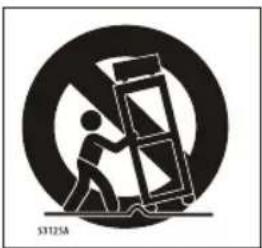
- Use only with the cart, stand, tripod, bracket, or table specified by the manufacturer, or sold with the apparatus. When a cart is used, use caution when moving the cart / apparatus combination to avoid injury from lip-over.
natural_image
Symbolic illustration of a person pushing a large object under a circular background (no text or symbols)- Unplug this apparatus during lightning storms or when unused for long periods of time.
- Refer all servicing to qualified service personnel. Servicing is required when the apparatus has been damaged in any way, such as power-supply cord or plug is damaged, liquid has been spilled or objects have fallen into the apparatus, the apparatus has been exposed to rain or moisture, does not operate normally, or has been dropped.
- Apparatus shall not be exposed to dripping or splashing and that no objects filled with liquids, such as vases, shall be placed on the apparatus.
16.WARNING:To reduce the risk of fire or electric shock, do not expose this apparatus to rain or moisture. - Mains plug or appliance coupler is used as the disconnect device, shall be readily operable.
- The apparatus shall be connected to a MAINS socket outlet with a protective earthing connection.
- WARNING: The batteries shall not be exposed to excessive heat such as sunshine, fire or the like.
- The ON-MODE Power under Home Mode should be less than 75W.
- The Sleep Mode power should be less than 0.5W.
- This equipment is a Class II or double insulated electrical appliance. It has been designed in such a way that it does not require a safety connection to electrical earth.
This Westinghouse product has earned the Energy Star ^® for meeting U.S. Federal energy efficiency guidelines as set by the Department of Energy and Environmental Protection agency. The Energy Star ^® program exists to provide energy saving guidelines and help promote energy efficient products and practices. Changes to certain features, settings and functions of this TV can change and/or increase its power consumption. Depending on how settings are changed, power consumption may exceed the limits required for Energy Star ^® qualification. This Westinghouse TV will operate at optimal energy efficiency in “Home” mode.
Licensing and Patent Information
This WESTINGHOUSE product may be covered by one or more U.S. and foreign patents and patent applications. See http://westinghousedigital.com/compliance/ for details.
How to install the stand!
Follow instructions below to install the base of the TV, reverse the instructions to remove the base.
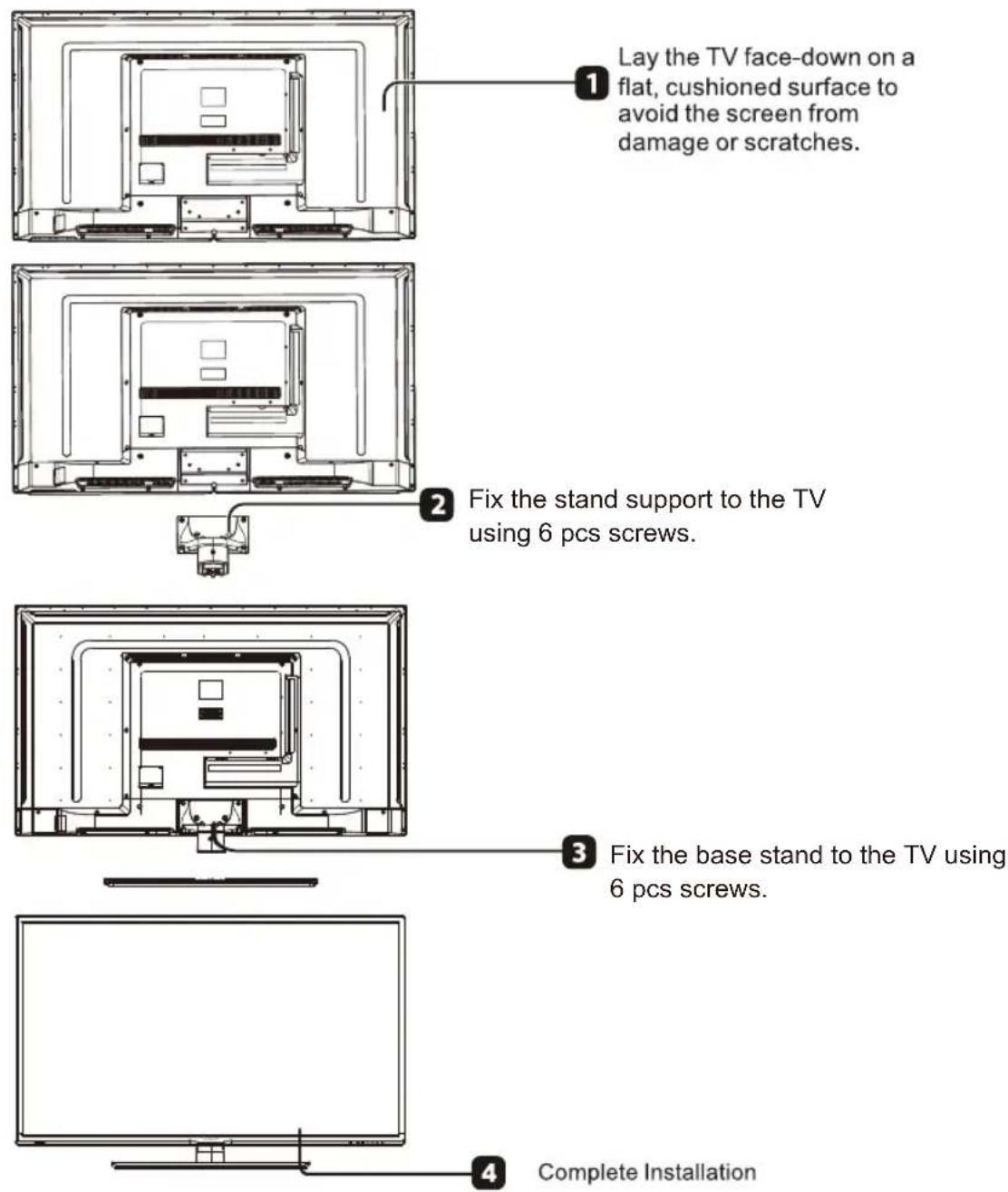
text_image
Lay the TV face-down on a flat, cushioned surface to avoid the screen from damage or scratches. Fix the stand support to the TV using 6 pcs screws. Fix the base stand to the TV using 6 pcs screws. Complete Installation3. PREFACE
Thank you for buying this TV! Please read this manual thoroughly before operating the TV. Make sure the TV was not damaged in transit. Should the TV be damaged, do not install it and contact your dealer. Check that you have all the accessories according to the model.
4. SAFETY PRECAUTIONS

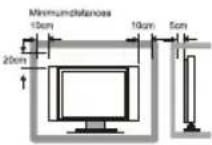
Put the TV on a stable surface.

Do not place any material on the TV.
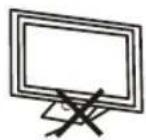
Do not use the TV with fixtures other than those provided or suggested by the manufacturer.
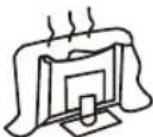
Do not block or cover the ventilation openings on the TV. If you have a wall mount, check that it is steady.
Power cord and cables must be properly routed and protected to prevent people from stepping on them and causing the TV to fall.
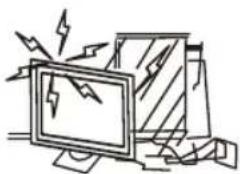
natural_image
Illustration of a computer monitor with broken-out fragments and lightning bolts (no text or symbols)Keep the TV dry and away from humidity.
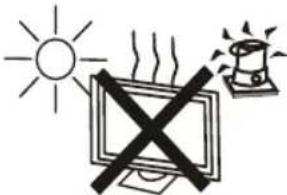
text_image
Diagram showing a computer monitor with a 'X' symbol crossed out, indicating no heat or absence, and a warning light icon above.Keep the TV away from heat sources.
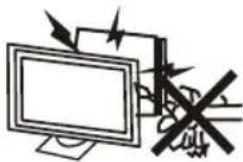
Unplug the TV before cleaning it. Do not use solvent or liquid to clean the TV.
Only clean the TV with a soft and dry cloth.

In case of troubleshooting, do not use spare parts other than those suggested by the manufacturer. Using inadequate spare parts can lead to electric shocks, short-circuits, fire or other incidents.
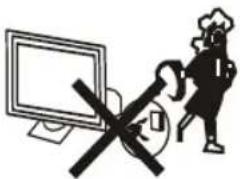
text_image
Warning symbol with crossed-out 'No' sign and computer monitor, indicating no protection or disapprovalUnplug the TV during lightning storms or when unused for long periods of time.
5. CONTENTS
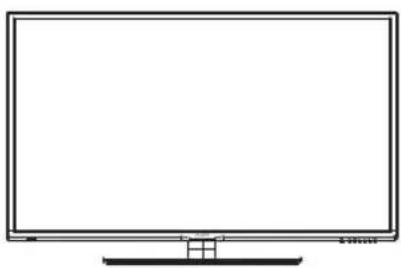
natural_image
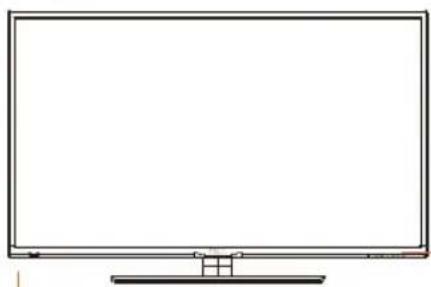
Line drawing of a flat-screen monitor with no text or symbols on the screen or sideLED TV SET
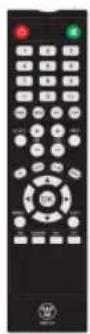
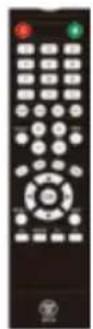
Remote Control
text_image
USER'S MANUALUSER'S MANUAL
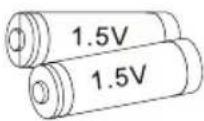
AAA Batteries
text_image
Warranty CardWarranty Card
text_image
Quick Connect GuideQuick Connect Guide
text_image
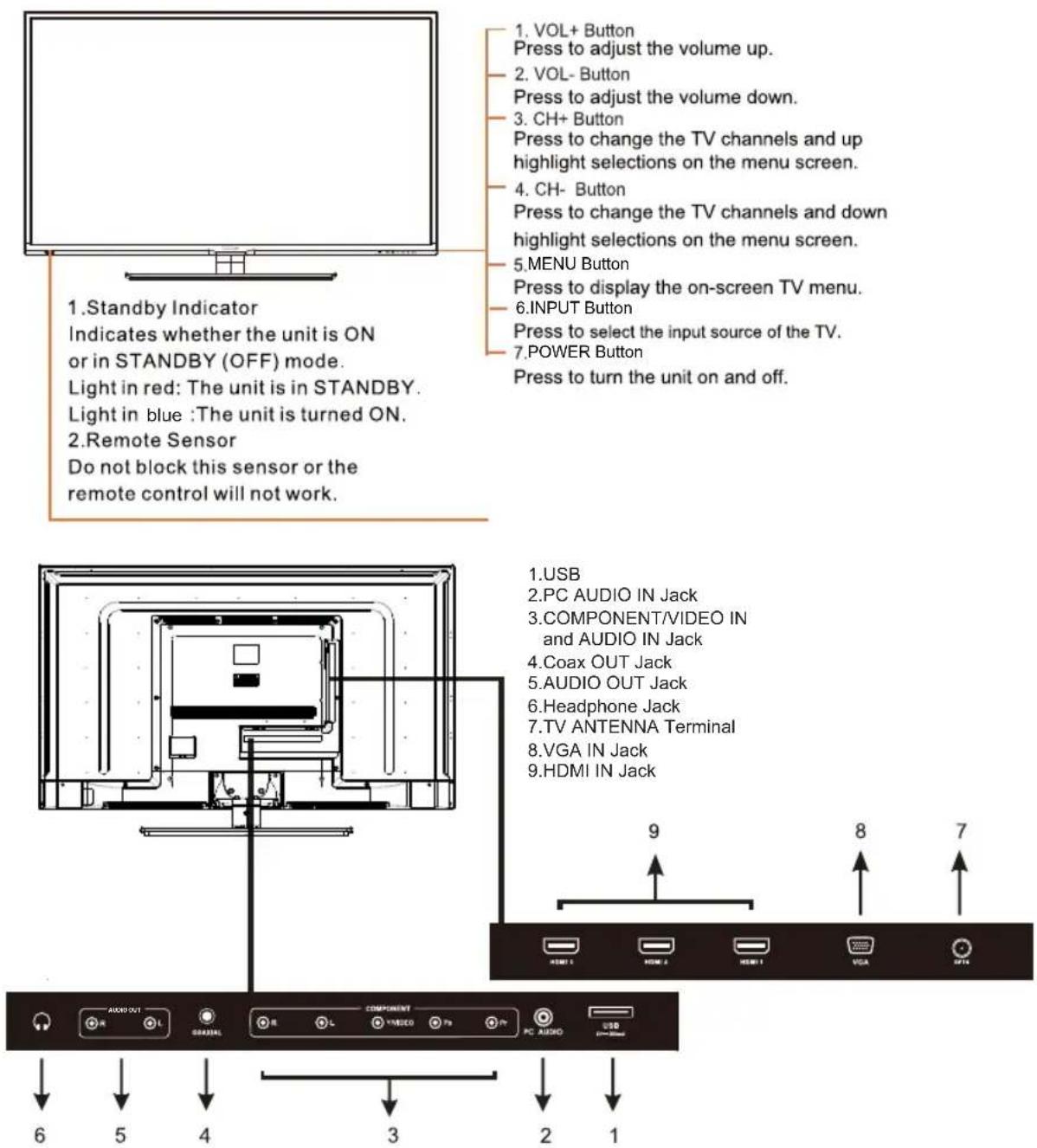
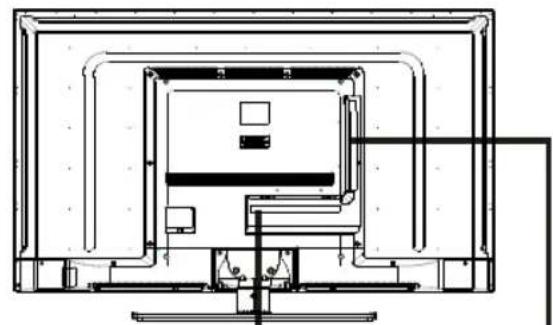
1. Standby Indicator Indicates whether the unit is ON or in STANDBY (OFF) mode. Light in red: The unit is in STANDBY. Light in blue :The unit is turned ON. 2. Remote Sensor Do not block this sensor or the remote control will not work. 1. VOL+ Button Press to adjust the volume up. 2. VOL- Button Press to adjust the volume down. 3. CH+ Button Press to change the TV channels and up highlight selections on the menu screen. 4. CH- Button Press to change the TV channels and down highlight selections on the menu screen. 5. MENU Button Press to display the on-screen TV menu. 6. INPUT Button Press to select the input source of the TV. 7. POWER Button Press to turn the unit on and off. 1. USB 2. PC AUDIO IN Jack 3. COMPONENT/VIDEO IN and AUDIO IN Jack 4. Coax OUT Jack 5. AUDIO OUT Jack 6. Headphone Jack 7. TV ANTENNA Terminal 8. VGA IN Jack 9. HDMI IN Jack AUDIO OUT COMPONENT PC AUDIO USB 6 5 4 3 2 17. TV INSTALLATION
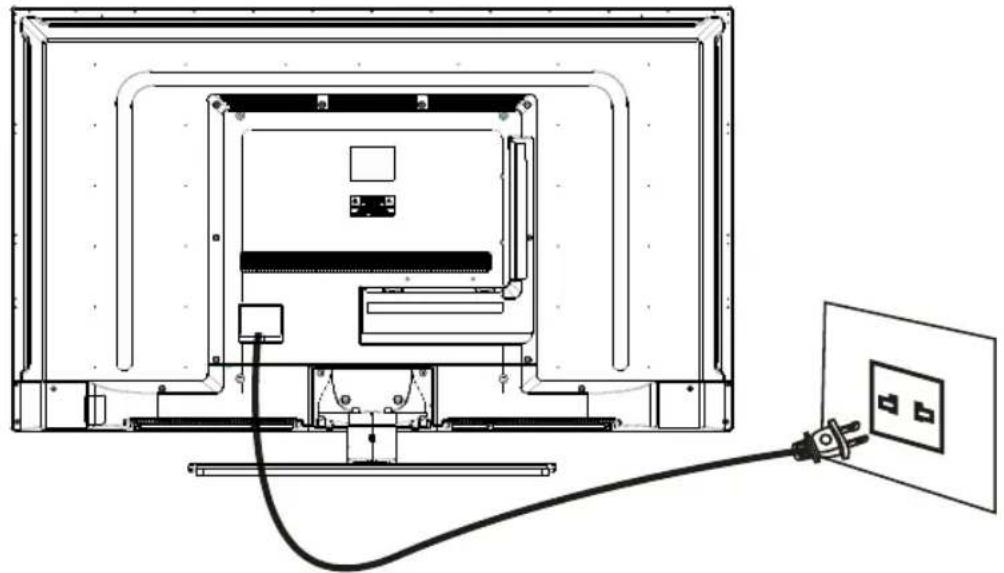
Power Cord Connection
- Connect the power cord correctly as shown.
natural_image
Technical line drawing of a TV mounted device with cable and power outlet, no text or symbols presentAntenna Connection
To ensure good picture and sound, TV antenna system needs to be installed. The antenna system as shown can be sourced from TV equipment shops, which will provide service for correct installation and connection. After installation, insert the 75-ohm antenna plug into the antenna jack as shown.
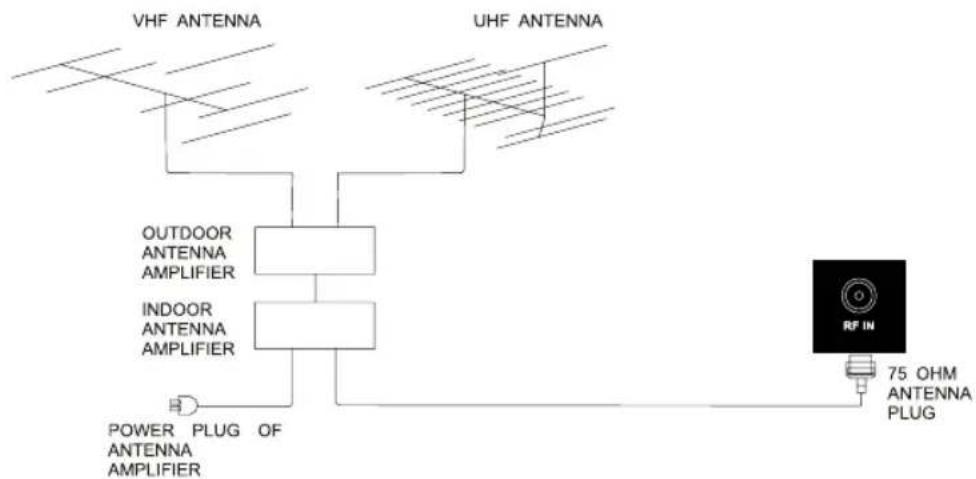
flowchart
graph TD
    A["VHF ANTENNA"] --> B["OUTDOOR ANTENNA AMPLIFIER"]
    C["UHF ANTENNA"] --> D["INDOOR ANTENNA AMPLIFIER"]
    B --> E["POWER PLUG OF ANTENNA AMPLIFIER"]
    D --> E
    E --> F["75 OHM ANTENNA PLUG"]
    G["RF IN"] --> F
AV Connection
Connect the VIDEO and AUDIO output jack of the DVD or VCR to the VIDEO jacks on the set using the RCA cable. Match the jack colors: Video is yellow, Audio left is white, and Audio right is red. Select the AV input source using the SOURCE button on the remote control.
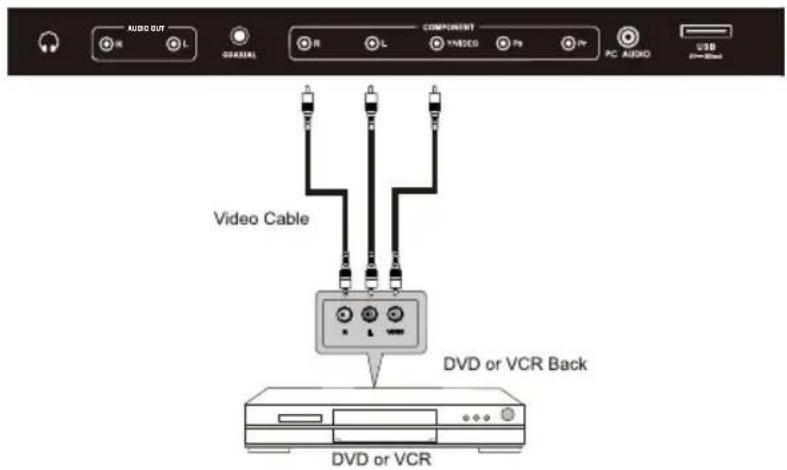
text_image
AUDIO OUT R L GARIAL COMPONENT R L YNVIDEO F9 F7 PC AUDIO USB Video Cable DVD or VCR Back DVD or VCRYPbPr (Component) Connection
Connect the YPbPr output of the DVD or VCR to the YPbPr input on the set. The picture quality is improved; compared to connecting a regular VCR to the video input. Connect the Audio output of the DVD or VCR to the Audio input jacks on the set using the RCA cable.
Match the jacks colors :Y is green,Pb is blue,Pr is red, Audio left is white,and Audio right is red. Select component input source using the SOURCE button on the remote control.
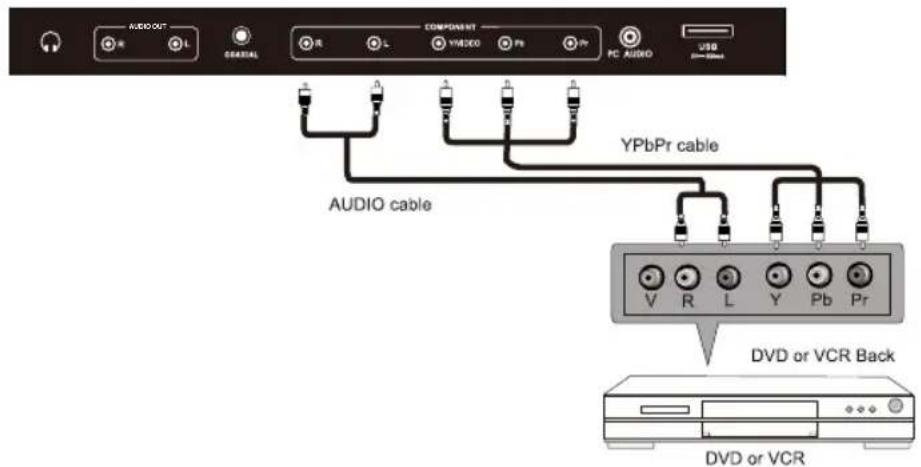
text_image
AUDIO OUT L GENERAL L COMPONENT L YVIDEO Pb Pb PC AUDIO USB AUDIO cable YPbPr cable V R L Y Pb Pr DVD or VCR Back DVD or VCRVGA(PC) Connection
Connect the RGB output of the PC to the VGA(PC) jack on the set. Connect the AUDIO output of The PC to the PC AUDIO jack on the set. Select the VGA input source with using SOURCE button on the remote control.
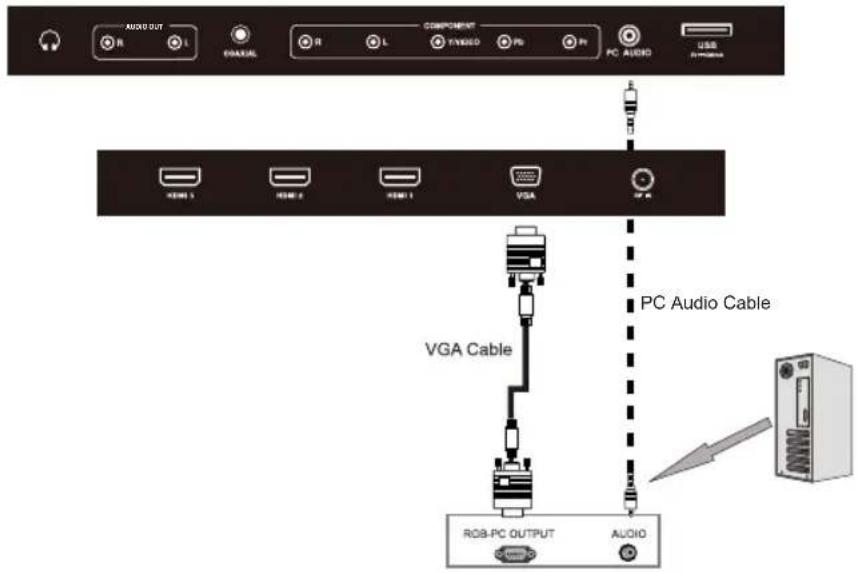
text_image
AUDIO OUT R L PANUEL COMPONENT R L Y/VIDEO PD P N PC AUDIO USB HDMI 3 HDMI 2 HDMI 1 VGA VGA VGA Cable PC Audio Cable RGB-PC OUTPUT AUDIOUSB Port Function
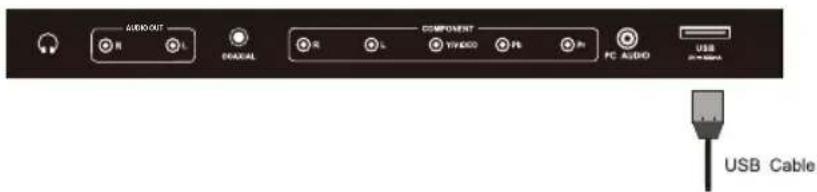
text_image
AUDIO W L DIAAAL COMPONENT WYKDDO Ps Ps PC AUDIO USB USB CableHDMI Connection
HDMI plug which replaces the HDMI connection allows transfer of all audio/video control signals through one cable only. These signals are transferred in digital.
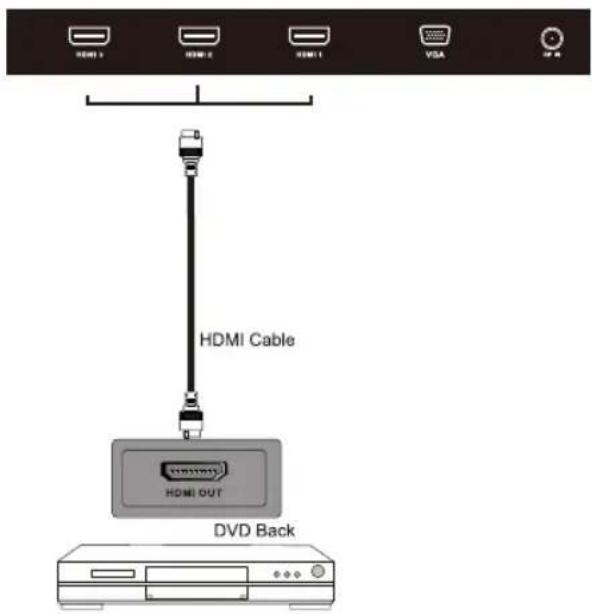
text_image
HDMI Cable HDMI OUT DVD BackCOAXIAL and AUDIO OUT Connection
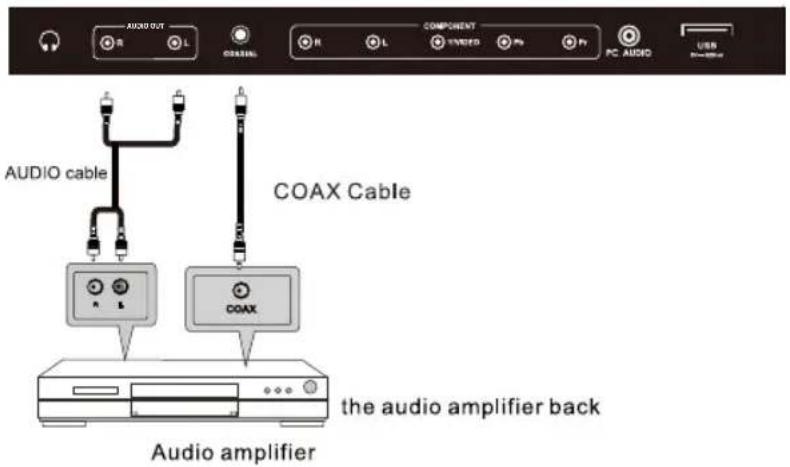
text_image
AUDIO OUT R L COMPONENT L VOUTED Pn Pf PC AUDIO USB AudiO cable COAX Cable COAX the audio amplifier back Audio amplifier8. REMOTE CONTROL
Remote control instructions in TV mode
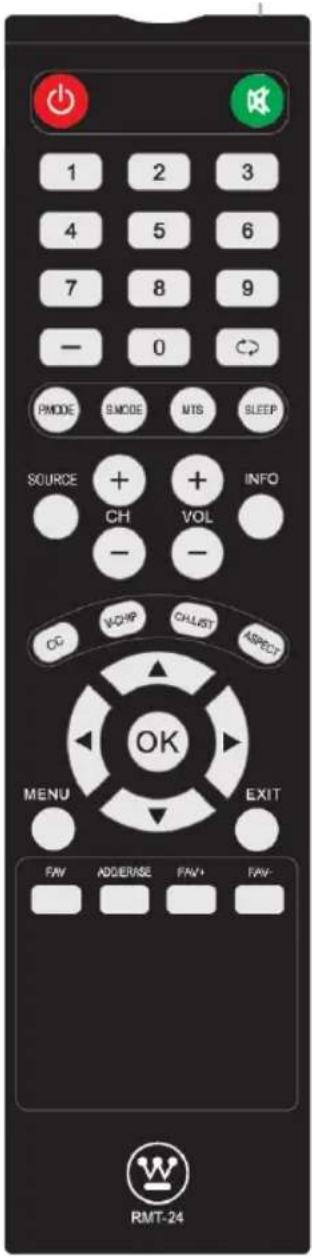
text_image
1 2 3 4 5 6 7 8 9 - 0 PNMODE SMODE MTS SLEEP SOURCE + + INFO CH VOL - - CC VCHIP CALLIST ASPECT OK MENU EXIT FAN ADJERASE FAN+ FAN- RMT-24POWER Turn the LED TV on or off.
MUTE Press once to disable the audio and press again to enable the audio.
NUMBER BUTTONS Press 0-9 to directly change the TV channel.
— Press this button to enter a program number for multiple program channel such as 2-1, etc.
Return to the previous channel viewed.
P.MODE Select the picture mode.
S.MODE Select the sound mode.
MTS Press to adjust between available audio channel.
SLEEP Set the Sleep Timer
SOURCE Press Source to display the OSD input source, press ▲▼ to select an input source, and then press OK to confirm
CH+/CH- Press to scan through channels.
VOL+/VOL- Press to increase / decrease the sound level.
INFO Displays the source and channel information
cc Press to set the closed caption.
V-CHIP Switch to V-CHIP input.
CH.LIST Press to display the TV program list.
ASPECT Press to select Aspect Ratio.
THUMBSTICK(▲/▼/◄/►/OK)
Allows you to navigate the on-screen menus and adjust the system settings to your preference.
MENU Displa ys the main TV menu.
EXIT Exit the main TV menu.
FAV Press to display the favourite program list.
ADD/ERASE Add/Erase channel to favourite program list.
FAV+FAV-
Press these two keys to switch to your favourite programs.
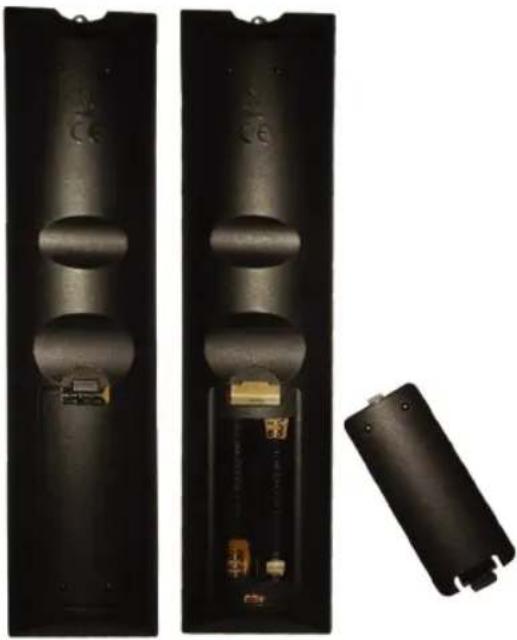
Remote control setup
- Open the cover.
- Uses AAA size batteries. When inserting the batteries, make sure correct polarities "+" and "-" marks on the batteries line up correctly with compartment markings.
- Replace the battery cover.
To prevent battery leakage which may result in bodily injury or damage to the remote:
- Install all batteries correctly, and as marked on the remote control.
- Do not mix batteries:(OLD and NEW or CARBON and ALKALINE, etc) Remove batteries when the remote is not used for a long period of time
natural_image
Two black rectangular devices with internal components, one showing a battery and the other a separate external casing (no visible text or symbols)9.Menu Operation
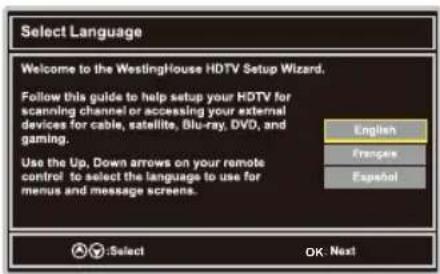
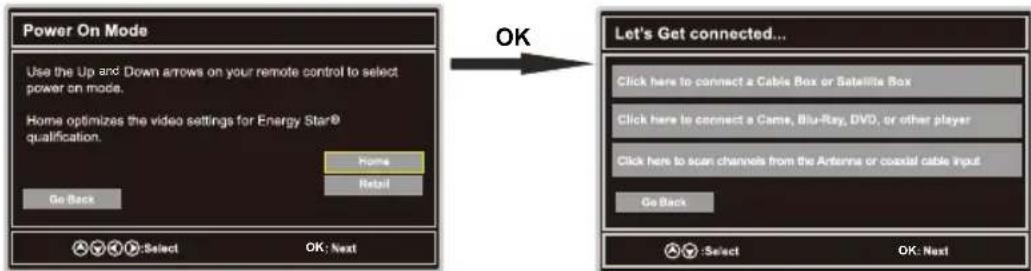
SETUP WIZARD
Select Language
text_image
Select Language Welcome to the WestingHouse HDTV Setup Wizard. Follow this guide to help setup your HDTV for scanning channel or accessing your external devices for cable, satellite, Blu-ray, DVD, and gaming. Use the Up, Down arrows on your remote control to select the language to use for menus and message screens. English French Spanish :Select OK: NextPower On Mode
text_image
Power On Mode Use the Up and Down arrows on your remote control to select power on mode. Home optimizes the video settings for Energy Star® qualification. Home Retail Go Back OK Let's Get connected... Click here to connect a Cable Box or Satellite Box Click here to connect a Came, Blu-Ray, DVD, or other player Click here to scan channels from the Antenna or coastal cable input Go Back Select OK: Next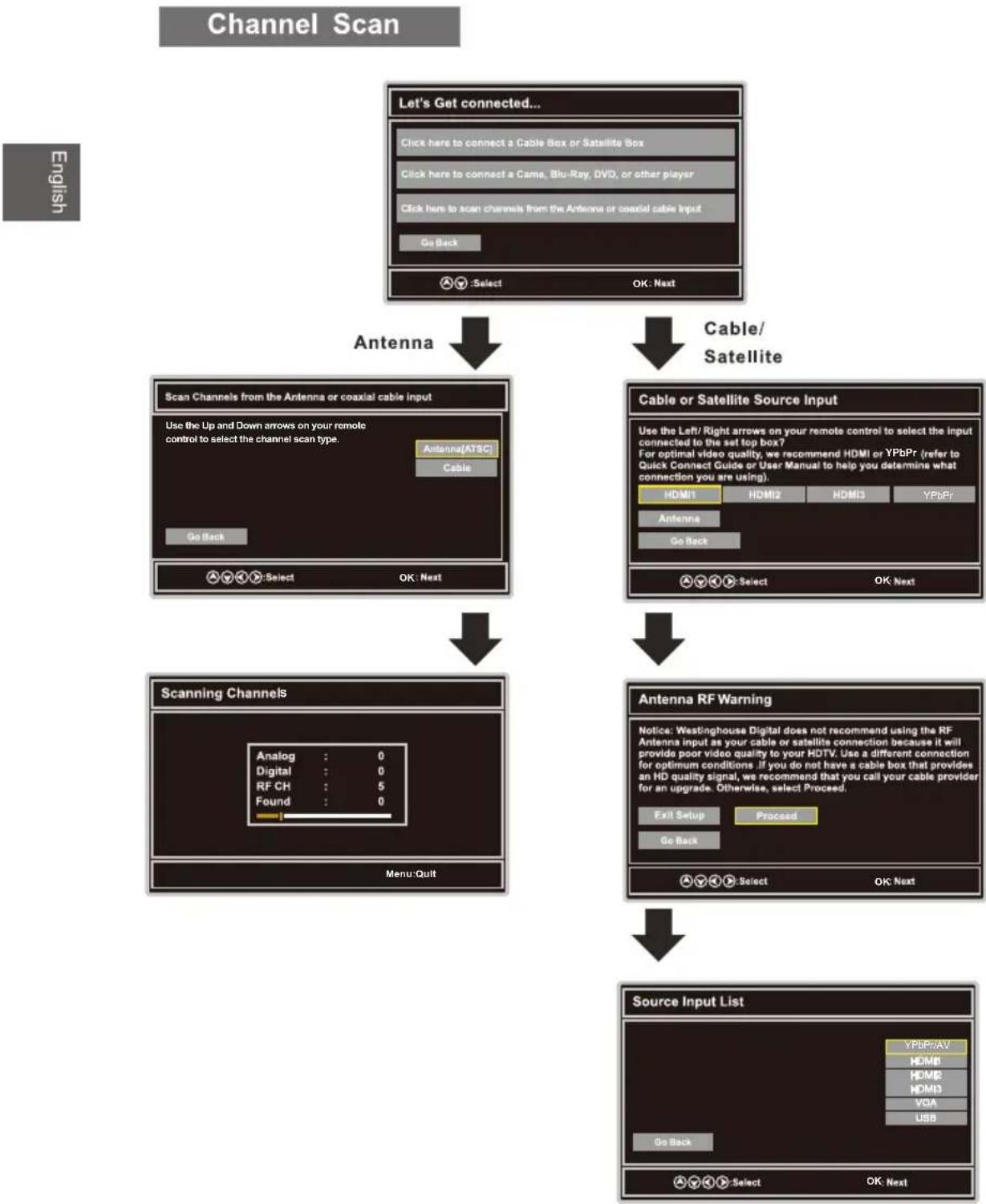
flowchart
graph TD
    A["Let's Get connected..."] --> B["Cable/Satellite"]
    B --> C["Scan Channels from the Antenna or coaxial cable Input"]
    C --> D["Scanning Channels"]
    D --> E["Source Input List"]
    A --> F["Cable or Satellite Source Input"]
    F --> G["Antenna RF Warning"]
    G --> H["Source Input List"]
    style A fill:#f9f,stroke:#333
    style B fill:#ccf,stroke:#333
    style C fill:#cfc,stroke:#333
    style D fill:#fcc,stroke:#333
    style E fill:#cff,stroke:#333
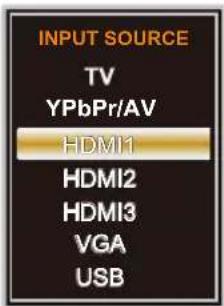
Select Input Source
text_image
INPUT SOURCE TV YPbPr/AV HDMI1 HDMI2 HDMI3 VGA USB- Press SOURCE button to display the input source list.
- Press ▼/▲ button to select the input source you want to watch.
- Press OK button to enter the selected source.
Basic Operation

text_image
Picture Audio Time Setup Lock Channel- Press MENU button to display the MAIN OSD MENU.
- Press ◀/▶ button to select the MENU you want.
- Press OK button to enter the sub menu.
- Press ▼/▲ button to select the option and then press ◀/▶ to adjust the value in the sub menu.
- You can press MENU button to go back to the upper menu or EXIT button to close the OSD.
For TV Mode:
PICTURE Menu
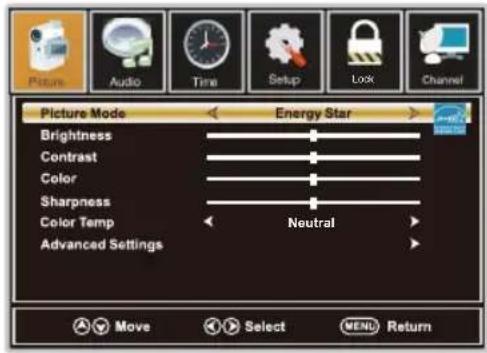
text_image
Picture Mode Brightness Contrast Color Sharpness Color Temp Advanced Settings Energy Star Neutral Move Select MENU Return- Press ◀/▶ button to select Picture in the main menu.
- Press ▼/▲ button to select the option that you want to adjust in the Picture menu.
- Press ◀/▶ button to desired level.
- When you have changed the settings, you can exit from the menu by pressing MENU.
Picture Mode
Press ▼/▲ button to select Picture Mode, then press ◀/▶ button to adjust.
Available picture mode: Energy Star, Retail, Movie, User.
Brightness
Press ▼/▲ button to select Brightness, then press ◀/▶ button to adjust.
Contrast
Press ▼/▲ button to select Contrast, then press ◀/▶ button to adjust.
Color
Press ▼/▲ button to select Color, then press ◀/▶ button to adjust.
Sharpness
Press ▼/▲ button to select Sharpness, then press ◀/▶ button to adjust.
Color Temp
Press ▼/▲ button to select Color Temp. ,then press ◀/▶ button to adjust.
Available color Temp. mode:Warm,Cool,Neutral.
Advanced Settings
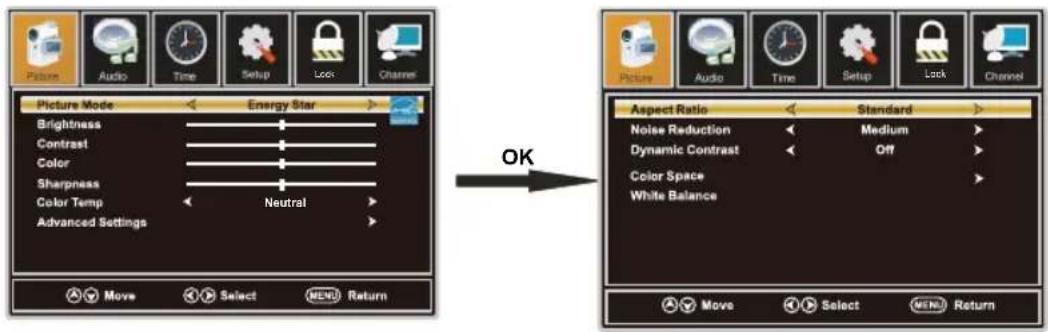
Press ▼/▲ button to select Advanced Settings, then press OK button to enter. Adjust advanced video features to fine tune the picture.
text_image
Picture Audio Time Setup Lock Channel Picture Mode Energy Star Brightness Contrast Color Sharpness Color Temp Neutral Advanced Settings Move Select MENU Return OK Aspect Ratio Standard Noise Reduction Medium Dynamic Contrast Off Color Space White Balance Move Select MENU ReturnAspect Ratio
Press ▼/▲ button to select Aspect Ratio, then press ◀/▶ button to adjust. Available Aspect Ratio: Standard, Fill, Over Scan.
Noise Reduction
Press ▼/▲ button to select the item Noise Reduction, then press ◀/▶ button to adjust. Available Noise Reduction: Off, Weak, Medium, Strong.
Dynamic Contrast
Press ▼/▲ button to select Dynamic Contrast, then press ◀/▶ button to adjust On or Off. It can adjust the contrast corresponding to the input signal in order to improve the picture quality displayed.
Color Space
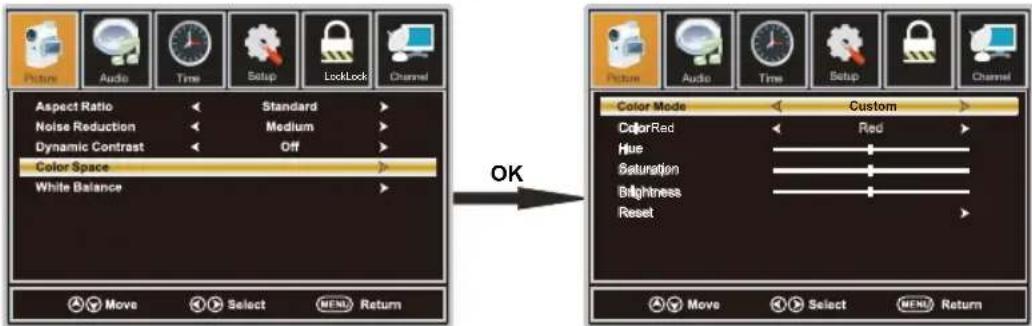
Press ▼/▲ button to select Color Space, then press OK button to enter.
text_image
Picture Audio Time Setup LockLock Channel Aspect Ratio Standard Noise Reduction Medium Dynamic Contrast Off Color Space White Balance OK Picture Audio Time Setup Lock Channel Color Mode Custom ColorRed Red Hue Saturation Brightness Reset Move Select MENU Return Move Select MENU ReturnColor Mode
Press ▼/▲ button to select Color Mode, then press ◀/▶ button to adjust. Available Color Mode: Auto, Native, Custom.
Color
Press ▼/▲ button to select Color, then press ◀/▶ button to adjust. Available Color Mode: Red, Green, Blue, Yellow, Cyan, Magenta.(It is available in Custom mode.)
Hue
Press ▼/▲ button to select Hue, then press ◀/▶ button to adjust.(It is available in Custom mode.)
Saturation
Press ▼/▲ button to select Saturation, then press ◀/▶ button to adjust.(It is available in Custom mode.)
Brightness
Press ▼/▲ button to select Brightness, then press ◀/▶ button to adjust.(It is available in Custom mode.)
Reset
Press ▼/▲ button to select Reset, Press OK to enter, then press ◀/▶ button to select No or Yes.
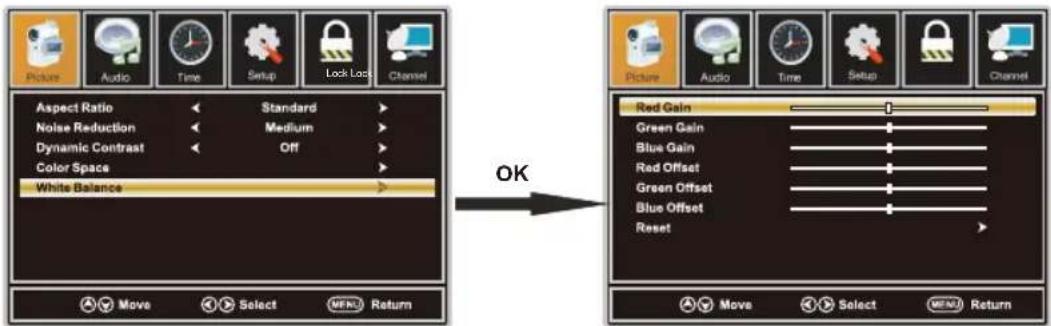
White Balance
Press ▼/▲ button to select White Balance, then press OK button to enter.
Press ▼/▲ button to select the option you want press ◀/▶ button to adjust.
text_image
Picture Audio Time Setup Lock Lock Channel Aspect Ratio Standard Noise Reduction Medium Dynamic Contrast Off Color Space White Balance Move Select WERT Return OK Picture Audio Time Setup Channel Red Gain Green Gain Blue Gain Red Offset Green Offset Blue Offset Reset Move Select WERT ReturnAUDIO Menu
text_image
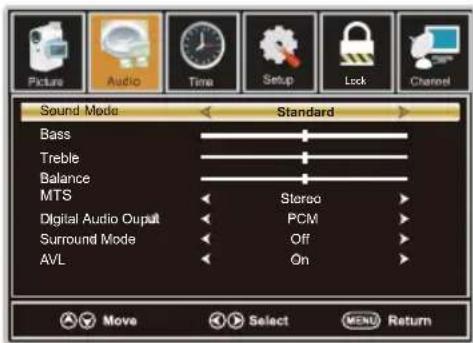
Sound Mode Standard Bass Treble Balance MTS Stereo Digital Audio Output PCM Surround Mode Off AVL On Move Select MENU Return- Press ◀/▶ button to select Audio in the main menu.
- Press ▼/▲ button to select the option that you want to adjust in the Audio menu.
- Press ◀/▶ button to desired level.
- When you have changed the settings, you can exit from the menu by pressing MENU.
Sound Mode
Press ▼/▲ button to select the item Sound Mode, then press ◀/▶ button to select the desired mode. Available Sound Mode: Sports, User, Standard, Music, Movie. Select a sound mode to achieve ideal sound.
Bass
Press ▼/▲ button to select Bass, then press ◀/▶ button to adjust.
Treble
Press ▼/▲ button to select Treble, then press ◀/▶ button to adjust.
Balance
Press ▼/▲ button to select Balance, then press ◀/▶ button to adjust.
MTS
Press ▼/▲ button to select MTS, then press ◀/▶ button to adjust.
Digital Audio Output
Press ▼/▲ button to select the item Digital Audio Output, then press ◀/▶ button to select the desired digital audio output. Available digital audio output: PCM, Raw and Off.
Surround Mode
Press ▼/▲ button to select the item Surround Mode, then press ◀/▶ button to select On or Off.
AVL
Press ▼/▲ button to select the item AVL, then press ◀/▶ button to select On or Off. Auto Volume Level can set the volume automatically adjust corresponding to the input audio.
TIME Menu
text_image
Picture Audio Time Setup Lock Channel Steep Timer Off Move Select MENU Return- Press ◀/▶ button to select Time in the main menu.
- Press ▼/▲ button to select the option that you want to adjust in the Time menu.
- Press ◀/▶ button to desired level.
- When you have changed the settings, you can exit from the menu by pressing MENU.
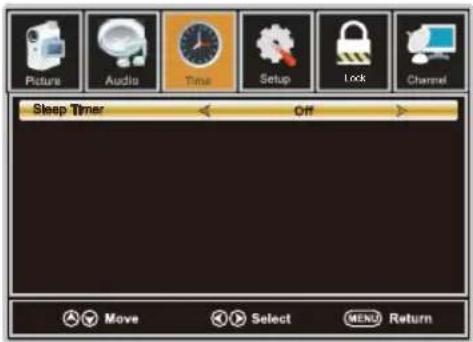
Sleep Timer
Press ▼/▲ button to select Sleep Timer, then press ◀/▶ button to set. Available Sleep Timer: Off, 5Min, 10Min, 15Min, 30Min, 60Min, 90Min, 120Min, 180Min, 240Min.
SETUP Menu
text_image
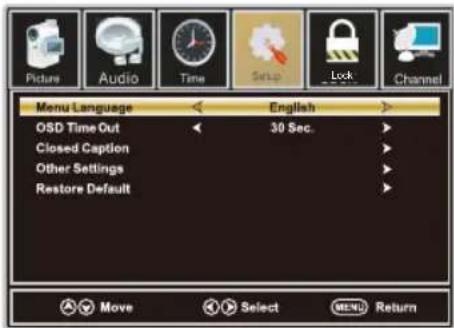
Picture Audio Time Setup Lock Channel Menu Language English OSD Time Out 30 Sec. Closed Caption Other Settings Restore Default Move Select MENU Return- Press ◀/▶ button to select Setup in the main menu.
- Press ▼/▲ button to select the option that you want to adjust in the Setup menu.
- Press ◀/▶ button to desired level.
- When you have changed the settings, you can exit from the menu by pressing MENU.
Menu Language
Press ▼/▲ button to select the item Menu Language, then press ◀/▶ button to adjust. Available Language: English, French, Spanish.
OSD Time Out
Press ▼/▲ button to select OSDTimeOut, then press ◀/▶ button to set.
Available OSD Timeout: 5Sec., 15Sec., 30Sec., 45Sec., 60Sec..
Closed Caption
Press ▼/▲ button to select Closed Caption, then press OK button to enter.
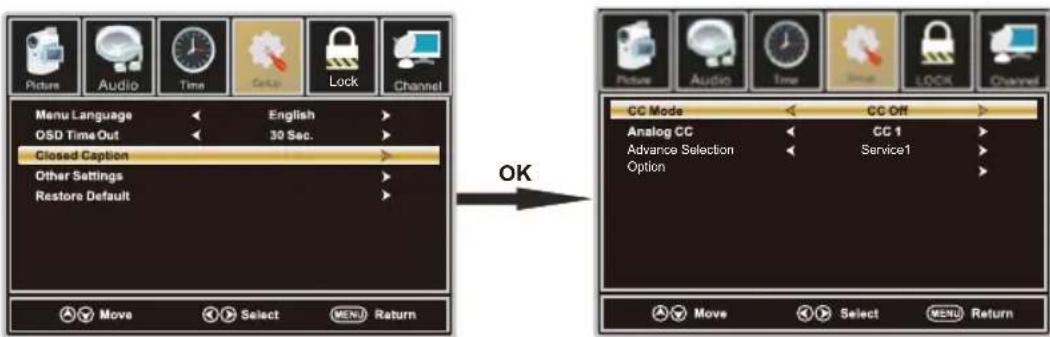
text_image
Picture Audio Time Group Lock Channel Menu Language English OSD Time Out 30 Sec. Closed Caption Other Settings Restore Default OK Move Select MENU Return CC Mode CC Off Analog CC CC 1 Advance Selection Service1 Option Move Select MENU ReturnCC Mode
Press ▼/▲ button to select CC Mode, then press ◀/▶ button to select CC Off, CC On, CC on Mute.
Analog CC
Press ▼/▲ button to select Analog CC, then press ◀/▶ button to select.
Available Analog CC: CC1, CC2, CC3, CC4, Text1, Text2, Text3, Text4.
Advance Selection
Press▼/▲ button to select Advance Selection, then press ◀/► button to select Service1, Service2 Service3, Service4, Service5, Service6.
Option
Press ▼/▲ button to select Option, then press ▶ button enter submenu.
Other Settings
Press ▼/▲ button to select Other Settings, then press OK button to enter.
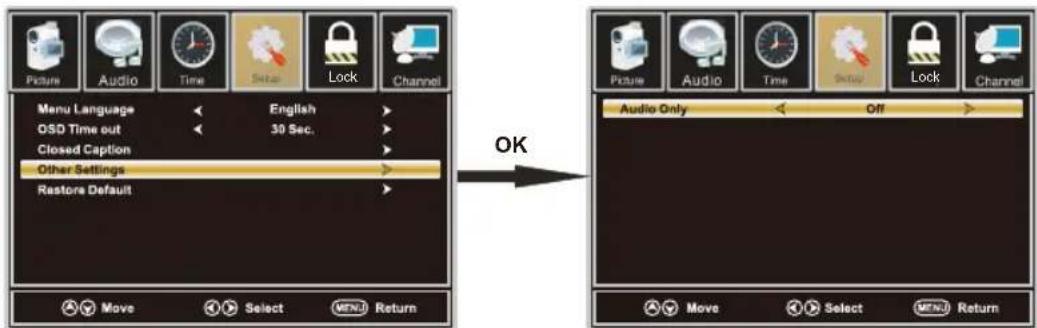
text_image
Picture Audio Time Setup Lock Channel Menu Language English QSD Time out 30 Sec. Closed Caption Other Settings Restore Default OK Picture Audio Time Setup Lock Channel Audio Only Off Move Select MENU Return Move Select MENU ReturnAudio Only
Press ▼/▲ button to select Audio Only, then press ◀/▶ button to set On or Off.
Restore Default
Press ▼/▲ button to select Restore Default, then press OK button to select No or Yes.
Change power on options or reset TV to factory default.(0000)
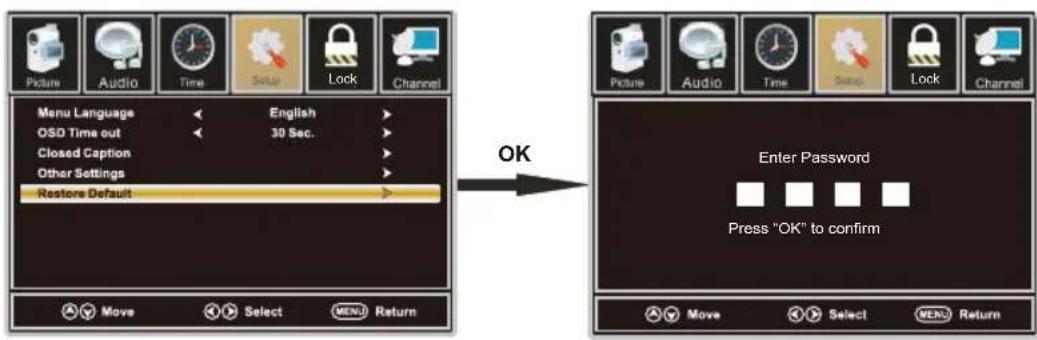
text_image
Picture Audio Time Setup Lock Channel Menu Language << English OSD Time out << 30 Sec. Closed Caption > Other Settings > Restore Default OK Move Select MENU Return Enter Password Press "OK" to confirm Move Select MENU ReturnLOCK Menu
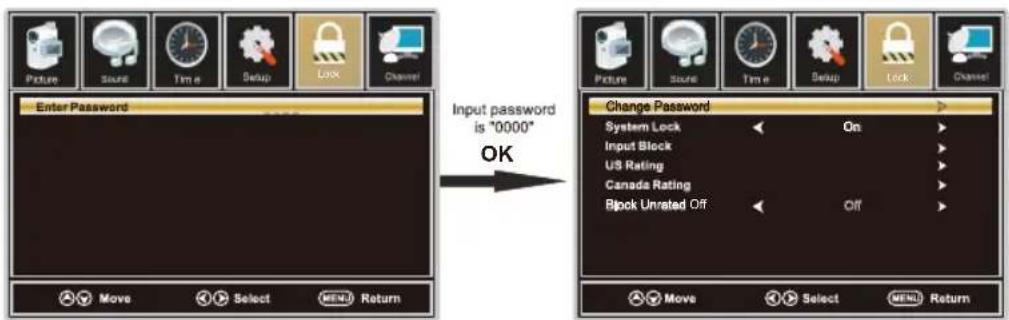
text_image
Picture Sound Time Setup Lock Channel Enter Password Move Select MEND Return Input password is "0000" OK Change Password System Lock On Input Block US Rating Canada Rating Block Unrated Off Off Move Select MEND Return- Press ◀/▶ button to select Lock in the main menu.
- Press ▼/▲ button to select the option that you want to adjust in the Lock menu.
- Press ◀/▶ button to desired level.
- When you have changed the settings, you can exit from the menu by pressing MENU.
Input password to enter, default password is "0000".
Change Password
Press ▼/▲ button to select Change Password, then press OK button to adjust the value.
a sub menu will appear as below. If the password is changed, all of the passwords in the menu will be changed at the same time.
Note: If you forget your password, you can use "8899" to enter any menu locked.
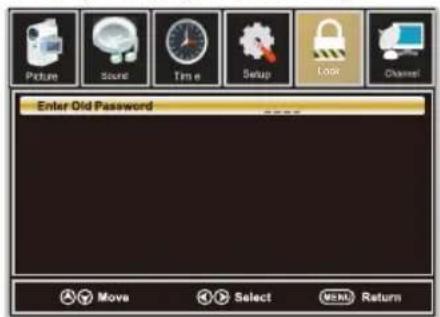
text_image
Picture Sound Time Setup Look Channel Enter Old Password Move Select Next Return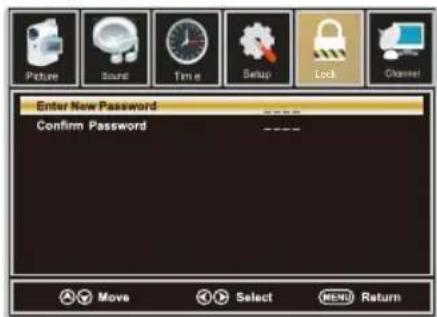
text_image
Picture Sound Time Setup Lock Channel Enter New Password Confirm Password Move Select MENU ReturnSystem Lock
Press ▼/▲ button to select System Lock, then press ◀/▶ button to set On or Off.
Only available when "System Lock" is "On".
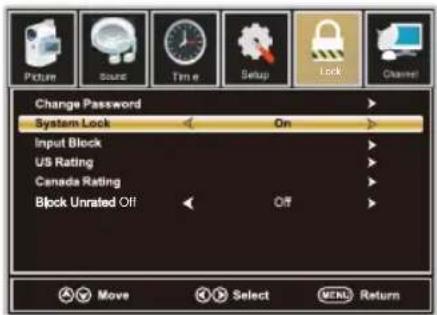
text_image
Change Password System Lock On Input Block US Rating Canada Rating Block Unrated Off Off Move Select MENU ReturnInput Block
Press ▼/▲ button to select Input Block, then press ◀/▶ button to enter. Press ◀/▶ button to select Unblock or Block the input sources.
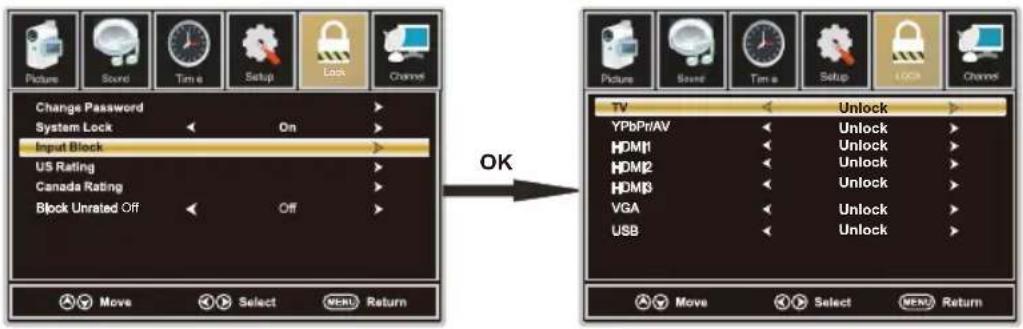
text_image
Picture Sound Time Setup Lock Channel Change Password System Lock On Input Block US Rating Canada Rating Block Unrated Off Off OK Picture Sound Time Setup LOCK Channel TV Unlock YPBPrAV Unlock HDMI1 Unlock HDMI2 Unlock HDMI3 Unlock VGA Unlock USB Unlock Move Select MENU ReturnUS Rating
Press ▼/▲ button to select US Rating, then press ◀/▶ button to enter. A sub menu will appear as below. The TV rating composes of two aspects: age-based and content -based. This system defines the rating control which comes from MPAA rules.
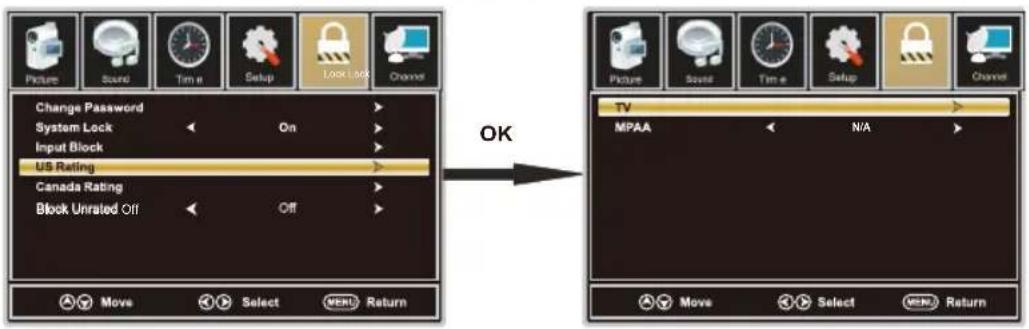
text_image
Picture Sound Time Setup Lock Lock Channel Change Password System Lock On Input Block US Rating Canada Rating Block Unrated Off Off OK Move Select MENU Return TV MPAA N/A Move Select MENU ReturnCanada Rating
Press ▼/▲ button to select Canada Rating, then press ◀/▶ button to enter. Press ◀/▶ button to select.
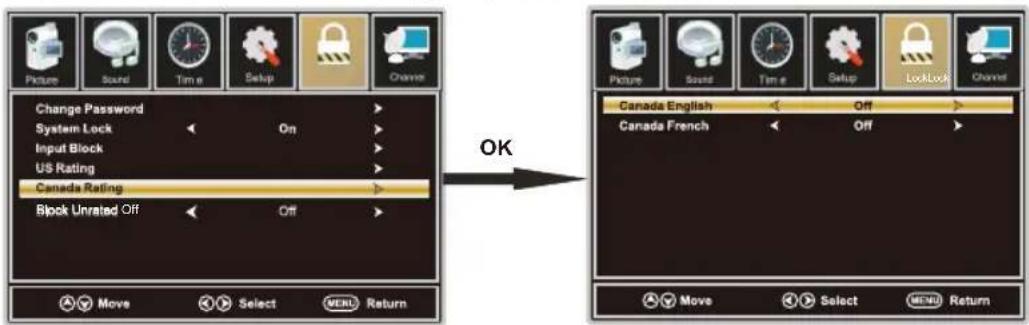
text_image
Picture Sound Time Setup Change Change Password System Lock On Input Block US Rating Canada Rating Block Unrated Off Off OK → → → → → → → → → → → → → → → → → → Move Select MENU ReturnCanada English
Press ▼/▲ button to select Canada English, then press ◀/▶ button to set. Available Canada English: Off, C, C8+, G, PG, 14+, 18+.
Canada French
Press ▼/▲ button to select Canada French, then press ◀/▶ button to set. Available Canada French: Off, G, 8ans+, 13ans+, 16ans+, 18ans+.
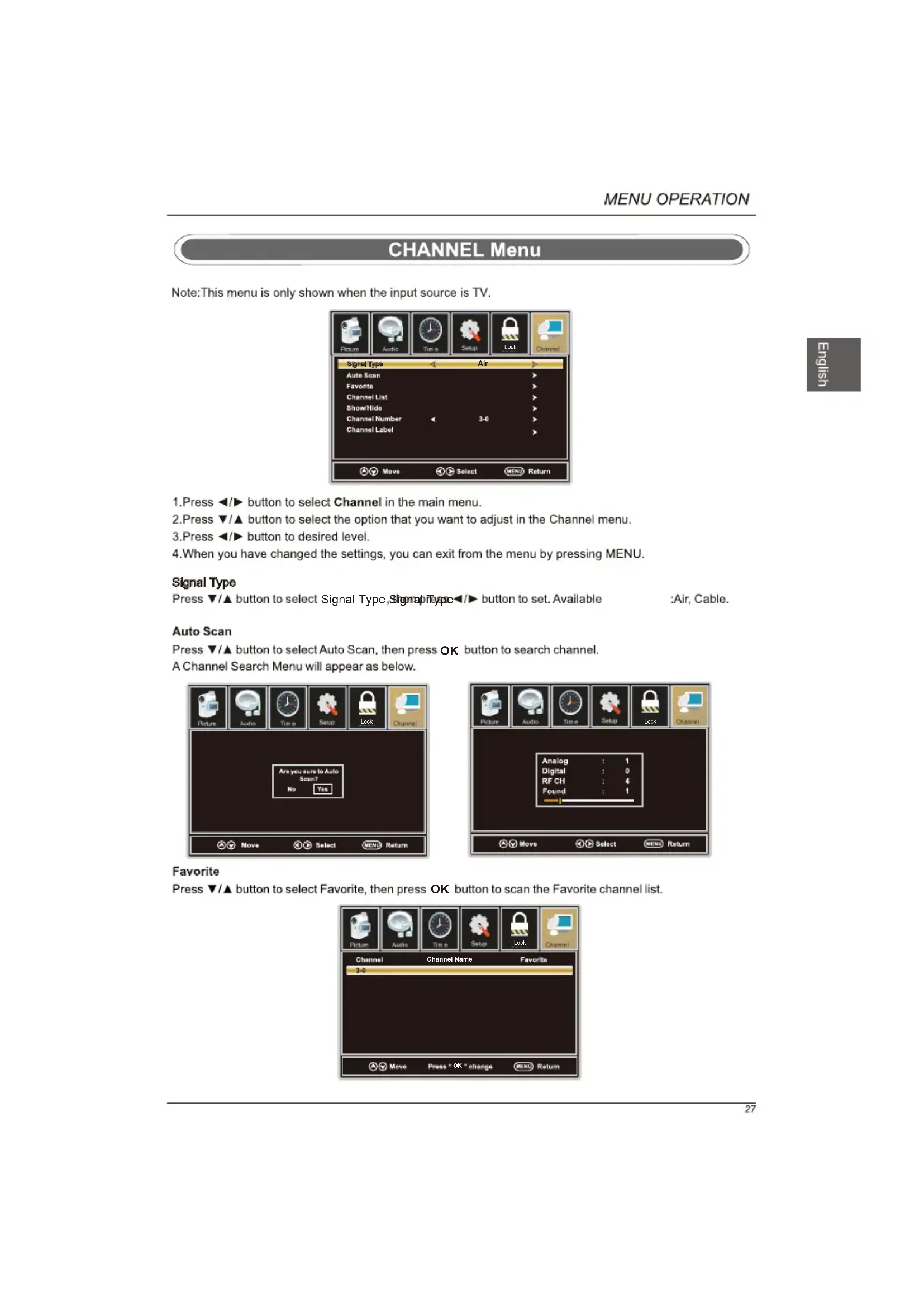
CHANNEL Menu
Note: This menu is only shown when the input source is TV.
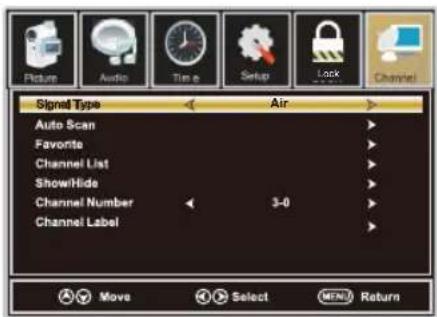
text_image
Picture Audio Timer Setup Lock Channel Signal Type Air Auto Scan Favorite Channel List ShowHide Channel Number 3-0 Channel Label Move Select MENU Return- Press ◀/▶ button to select Channel in the main menu.
- Press ▼/▲ button to select the option that you want to adjust in the Channel menu.
- Press ◀/▶ button to desired level.
- When you have changed the settings, you can exit from the menu by pressing MENU.
Signal Type
Press ▼/▲ button to select Signal Type, Signal Type ◀/▶ button to set. Available
:Air, Cable.
Auto Scan
Press ▼/▲ button to select Auto Scan, then press OK button to search channel.
A Channel Search Menu will appear as below.
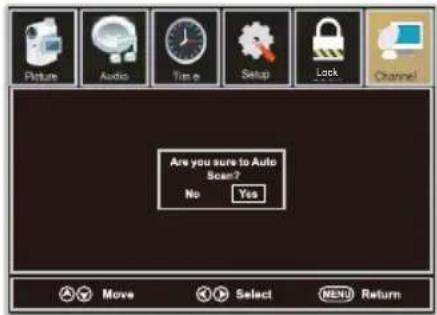
text_image
Are you sure to Auto Scan? No Yes Move Select MENU Return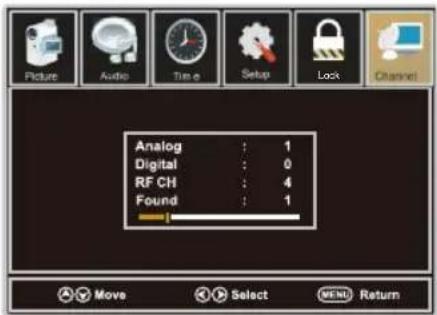
Press ▼/▲ button to select Favorite, then press OK button to scan the Favorite channel list.
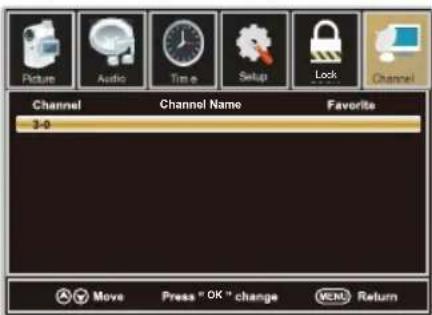
text_image
Picture Audio Time Setup Lock Channel Channel Name Favorite 3-0 Move Press "OK" change VCHN ReturnChannel List
Press ▼/▲ button to select Channel List, then press OK button to scan the Channel List.

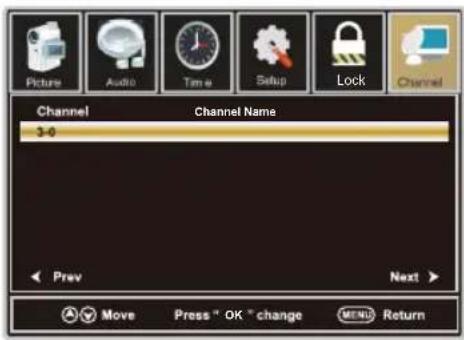
text_image
Picture Audio Time Setup Lock Channel Channel Name 3-0 Prev Next > Move Press " OK " change MENU ReturnShow/Hide
Press ▼/▲ button to select Show, then press OK button to enter.
Show or hide the channels in your program list.
Channel Number
Press ▼/▲ button to select Channel Number, then press ◀/▶ button to adjust.
Channel Label
Press ▼/▲ button to select Channel Label, then press OK button to enter.
Create labels for channels, up to 7 characters.
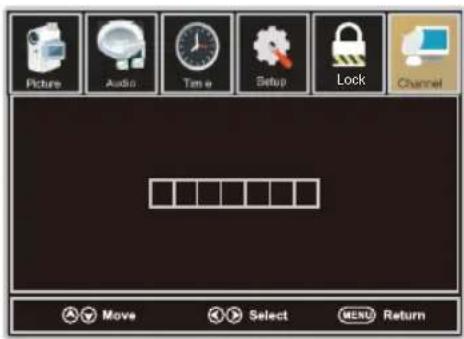
text_image
Picture Audio Time Setup Lock Channel Move Select MENU ReturnSETUP Menu
For VGA Mode:
- Press ◀/▶ button to select Setup in the main menu.
- Press ▼/▲ button to select VGA Settings, then press OK button to enter.
A sub menu will appear as below.
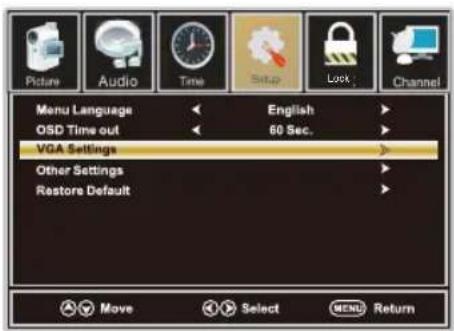
text_image
Picture Audio Time Setup Lock Channel Menu Language << English OSD Time out << 60 Sec. VGA Settings Other Settings Restore Default Move Select MENU Return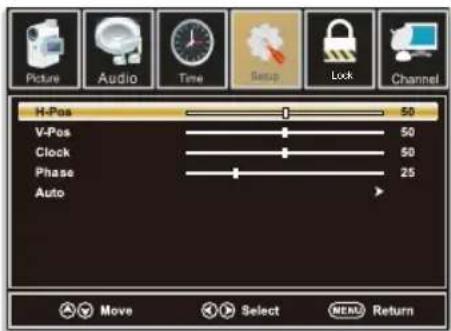
text_image
Picture Audio Time Setup Lock Channel H-Pos 50 V-Pos 50 Clock 50 Phase 25 Auto Move Select MENU ReturnH-Pos
Press ▼/▲ button to select H-Pos, then press ◀/▶ button to adjust.
V-Pos
Press ▼/▲ button to select V-Pos, then press ◀/▶ button to adjust.
Clock
Press ▼/▲ button to select Clock, then press ◀/▶ button to adjust.
Phase
Press ▼/▲ button to select Phase, then press ◀/▶ button to adjust.
Auto
Press ▼/▲ button to select Auto, then press OK button to enter. Adjust to the PC signal timing automatically.
- PICTURE menu and description are the same as that for TV mode.
- Audio Language in AUDIO menu is invalid.
- TIME menu and description are the same as that for TV mode.
- Close Caption in SETUP menu is invalid.
5.US, Canada, RRT Setting and Reset RRT in LOCK menu is invalid
6.PC mode has no CHANNEL menu.
Note: The operation and description of the hot key are programmable on your remote control.
USB Menu
Note: Before operating Media menu, Plug in USB device, then press SOURCE button to set the Input Source to USB.
Press ▲/▼ button to select USB in the Source menu, then press OK button to enter.
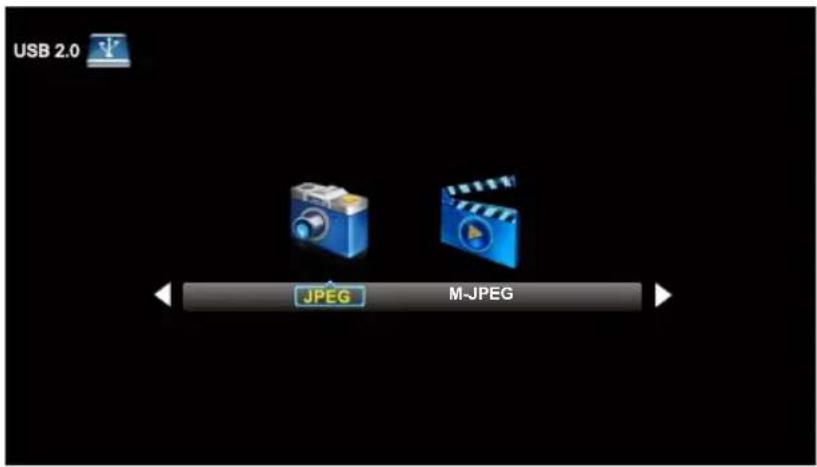
text_image
USB 2.0 JPEG M-JPEGPress ◀ / ▶ button to select the option you want to adjust in the main Media menu, then press OK button to enter.
JPEG Menu
Press ◀ / ▶ button to select JPEG in the main menu, then press OK button to enter. Press Exit button to return back to the previous menu.
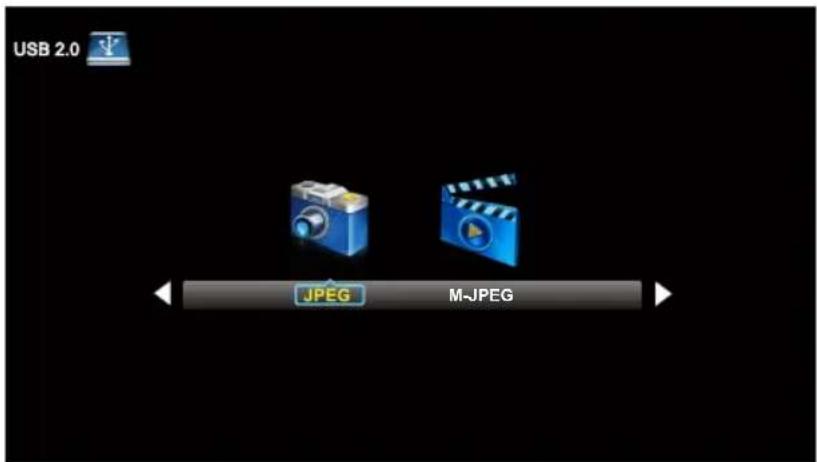
text_image
USB 2.0 JPEG M-JPEGPress ◀ / ▶ button to select drive disk you want to watch, then press OK button to enter. Press ◀ / ▶ button to select Return option to go back to the previous menu.
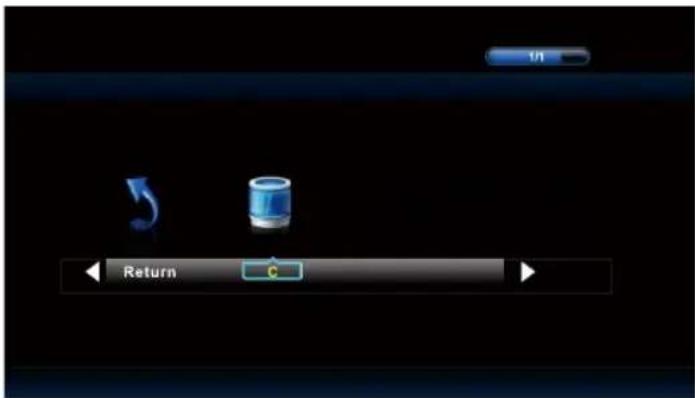
text_image
Return CPress ◀ / ▶ button to select the file you want to watch in the file selecting menu, then press OK button to display picture.
When highlighting the option you select, the file information will appear on the right and Picture will be previewed in the center.
M-JPEG Menu
Press ◀ / ▶ button to select M-JPEG in the main menu, then press OK button to enter. Press EXIT button to return back to the previous menu.
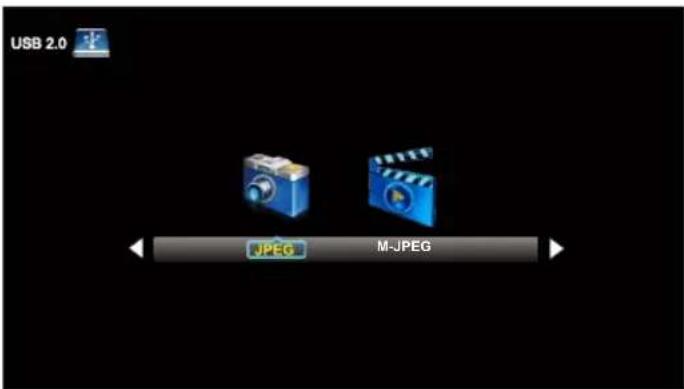
text_image
USB 2.0 JPEG M-JPEGPress ◀ / ▶ button to select drive disk you want to watch, then press OK button to enter. Press ◀ / ▶ button to select Return option to go back to the previous menu.
When highlighting the option you select, the file information will appear on the right and Movie will be previewed in the center.
Press OK button to play the selected movie.
Press display button to show select menu in the bottom.
Press ◀ / ▶ button to select menu in the bottom you want to run, then press OK button to operate.
10. Troubleshooting
Please check if you can solve problems by troubleshooting yourself.
| Troubleshooting | Control |
| No signal | Please check that all cables are correctly plugged in. |
| No color shades | Adjust the contrast, the color and the brightness. |
| Stain on the screen | May be the result from a lighting signal from car, motor, neon light and other electrical devices or appliances. |
| Double or multiple display image | May be the result of an electrical wave disturb from other TV, Computer and Game machine or Radio. |
| Snow on the screen | The cables of the antenna are not correctly plugged in. |
| The remote control does not work | Please check the batteries order and alignment. Check that the IR of the remote control is not hidden by something. |
| "Zip" made noise on TV cover | Even if the display image is correct, the noise may come from an unsteady fixation of the panel. |
| No sound | Make sure that you have not press the MUTE button of the remote control. |
11. SPECIFICATIONS
This manual is only for your reference, any change to the design and specification will not be advised.
| Screen Size | 47.6 Inch | |
| Display Type | TFT LED | |
| Resolution(Pixel) | 1920x1080 | |
| Aspect Ratio | 16:9 | |
| Power Supply | AC100-240V 50/60Hz | |
| Power Consumption | 120 W | |
| TV System | ATSC/NTSC | |
| Video Input Format | PAL/NTSC | |
| Audio Output Power | L/R 2X8W | |
| SUPPORT | ANTENNA | YES |
| AV-IN | YES | |
| YPbPr - IN | YES | |
| HDMI - IN | YES | |
| VGA(PC) - IN | YES | |
| VGA(PC) AUDIO - IN | YES | |
| SCART - IN | -- | |
| SCART - OUT | -- | |
| HEADPHONE - OUT | YES | |
| S-VIDEO - IN | -- | |
| COAXIAL - OUT | YES | |
| AUDIO - OUT | YES | |
| COMMON INTERFACE | -- | |
| USB | JPEG, M-JPEG | |
| IPOD | -- | |
| DVD | Disc Physical Format | -- |
| DVDVideoOutputFormat | -- | |
| Dimensions | Inc Stand (LxWxHmm) | 1097 x 711 x 257 mm |
| Exc Sand (LxWxHmm) | 1097 x 644 x 90 mm | |
| Weight | Net (Kgs) | 13 |
| Gross (Kgs) | 19.5 | |
TABLE DES MATIÈRES
natural_image
Silhouette of a person climbing a ladder inside a circle with a diagonal line, no text or symbols present.How to install the stand!
Follow instructions below to install the base of the TV, reverse the instructions to remove the base.
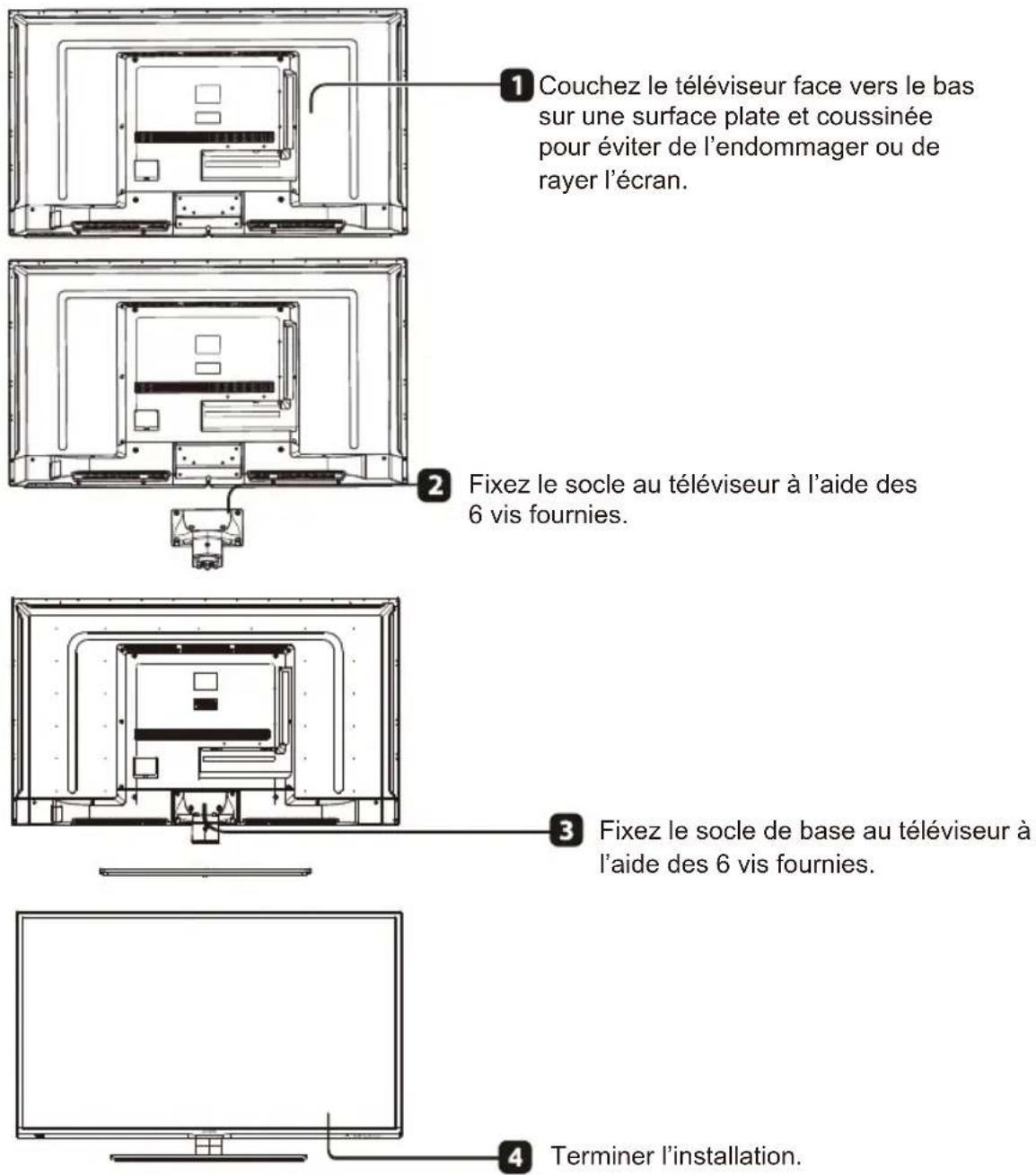
natural_image
Illustration of a computer monitor with broken-out fragments and lightning bolts (no text or symbols)text_image
Warning symbol with sun, monitor, and alarm clock iconsnatural_image
Illustration of a computer monitor with arrows indicating motion and a crossed-out hand gesture (no text or symbols)natural_image
Illustration of a crossed-out monitor and a person wearing a mask, symbolizing no change or suppression (no text present)natural_image
Front view of a flat-screen monitor with a stand at the bottom (no text or symbols visible)text_image
USER'S MANUALMANUEL D'UTILISATION
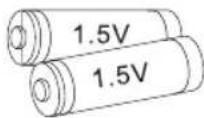
Piles AAA
text_image
Warranty CardCarte de garantie
text_image
Quick Connect GuideGuide de connexion rapide
6.CONNEXIONS FRONT / ARRIERE DU TELEVISEUR LED
Vue Frontale
natural_image
Line drawing of a flat-screen monitor with blank screen (no text or symbols)natural_image
Technical line drawing of a TV mounted device with cable and socket, connected to an electrical outlet (no text or symbols)natural_image
Two black rectangular devices with internal components, one open and one partially filled (no visible text or symbols)9. Menu d'Opération
natural_image
Symbolic illustration of a person using a tool to lift a block, enclosed in a circle (no text or symbols)natural_image
Illustration of a computer monitor with lightning bolts and scattered papers (no text or symbols)text_image
Warning symbol with sun, monitor, and alarm clock iconsnatural_image
Illustration of a computer monitor with arrows indicating motion and a crossed-out hand symbol (no text or labels)text_image
Warning symbol with crossed-out 'X' and exclamation mark, next to a computer monitor and person wearing a masknatural_image
Line drawing of a flat-screen monitor with blank screen and stand (no text or symbols)LED TV SET
Mando a distancia
text_image
USER'S MANUALManual de usuario
Pila AAA
text_image
Warranty CardTarjeta de garantía
text_image
Quick Connect Guidenatural_image
Line drawing of a flat-screen monitor with no text or symbols on the screen or sideBack View and Control Connections
natural_image
Technical line drawing of a monitor layout with no visible text or symbolsnatural_image
Line drawing of a TV mounted on an appliance, showing cable and socket connection (no text or symbols)Conexión de Antena
THUMBSTICK ▲/▼/◄/►/OK
FAV+/FAV- Canal favorite+/canal favorite