
LD-3255AR - Television WESTINGHOUSE - Free user manual and instructions
Find the device manual for free LD-3255AR WESTINGHOUSE in PDF.


| Product Type | 32-inch LED TV |
| Model | LD-3255AR |
| Display Resolution | 1366 x 768 pixels |
| Brightness | 250 cd/m² (typical) |
| Contrast Ratio | 3000:1 (typical) |
| Response Time | 6.5 ms (gray-to-gray) |
| Aspect Ratio | 16:9 |
| Display Colors | 16.7 million |
| Audio Output | 10W (2 channels) |
| Input/Output Ports | HDMI x2, AV (composite with R/L audio), VGA with 3.5mm audio, SPDIF out, USB (service only), RF tuner, Audio line out (R/L) |
| Dimensions (with stand) | 769 x 534 x 197 mm (30.3 x 21.0 x 7.8 in) |
| Dimensions (without stand) | 769 x 500 x 39 mm (30.3 x 19.7 x 1.5 in) |
| Net Weight | 7.25 kg (16.04 lb) |
| Power Consumption (on) | ≤ 90 W |
| Power Consumption (standby) | < 1 W |
| Tuner Type | ATSC (digital) / NTSC (analog) - requires activation for ATSC |
| Supported Video Formats | 480i/p, 720p, 1080i/p (HDMI/Component) |
| VESA Mount Pattern | 200 x 100 mm (M4 x L10 screws) |
| Remote Control | Included with AAA batteries |
| Included Accessories | AC adapter, base with screws, power cord, user manual, warranty card |
| Cleaning Instructions | Use dry cloth; for stubborn dirt, use non-ammonia glass cleaner on cloth |
| Safety Features | Overload protection, power cord management, ventilation slots, anti-tip stability |
| Repairability | No user-serviceable parts; refer to qualified service personnel |
Frequently Asked Questions - LD-3255AR WESTINGHOUSE
User questions about LD-3255AR WESTINGHOUSE
0 question about this device. Answer the ones you know or ask your own.
Ask a new question about this device
Download the instructions for your Television in PDF format for free! Find your manual LD-3255AR - WESTINGHOUSE and take your electronic device back in hand. On this page are published all the documents necessary for the use of your device. LD-3255AR by WESTINGHOUSE.
USER MANUAL LD-3255AR WESTINGHOUSE





TABLE OF CONTENTS
TABLE OF CONTENTS...... i
DIGITAL TELEVISION TRANSITION NOTICE 1
IMPORTANT INFORMATION 2
Warnings.... 2
NOTICES 3
FCC COMPLIANCE STATEMENT 4
IMPORTANT SAFETY INSTRUCTIONS 5
Circuit Overload 6
Power Cord Protection 6
Ventilation 6
WARNINGS AND PRECAUTIONS 7
ANTENNA INSTALLATION SAFETY 8
Lightning 8
Power lines 8
CLEANING THE LED TV 9
Dolby-Digital Notice 9
SRS Trademark Information: 9
PACKAGE CONTENTS 10
CONTROL PANEL 11
TERMINALS 12
REMOTE CONTROL.... 13
REMOVING THE LED TV BASE 16
ANTENNA CONNECTION 17
OUTDOOR ANTENNA CONNECTION 17
CABLE TV (CTV/DTV) CONNECTION 17
EXTERNAL DEVICE CONNECTIONS 18
POWER CONNECTION 20
CONNECTING AC POWER 20
INITIAL SETUP 20
WESTINGHOUSE HDTV SETUP 21
WESTINGHOUSE HDTV SETUP - THROUGH CABLE/ SATELLITE BOX ...... 22
WESTINGHOUSE HDTV SETUP - NOT THROUGH CABLE/ SATELLITE BOX ...... 25
BASIC OPERATIONS 28
TURNING THE POWER ON AND OFF.... 28
ADJUSTING THE VOLUME.... 28
CHANGING CHANNELS 29
SELECTING THE INPUT SOURCE.... 29
ADJUSTING THE DISPLAY FORMAT 30
ADJUSTING THE LED BACKLIGHT 30
SETUP MENUS 31
WALL MOUNT OPTION 57
WALL MOUNT INSTALLATION REMINDERS...... 57
TROUBLESHOOTING.... 58
SPECIFICATIONS 61
DIGITAL TELEVISION TRANSITION NOTICE
This device contains a digital television tuner, so it should receive digital over the air TV programming, with a suitable antenna, after the end of full-power analog TV broadcasting in the United States on June 12, 2009. The nationwide switch to digital television broadcasting will be complete on June 12, 2009, but your local television stations may switch sooner. After the switch, analog-only television sets that receive TV programming through an antenna will need a converter box to continue to receive over-the-air TV. Watch your local stations to find out when they will turn off their analog signal and switch to digital-only broadcasting.
For more information, call the FCC at 1-888-CALL-FCC (1-888-225-5322) or see www.DTV.gov. For information on the TV Converter program, and on government coupons that may be used toward the purchase of one, see www.dtv2009.gov, or call the NTIA at 1-888-DTV-2009.
IMPORTANT INFORMATION
Warnings
To reduce the risk of fire or electric shock:
- Do not expose this product to rain or moisture.
- Do not remove the rear cover. There are no user-serviceable parts inside. Refer all servicing requirements to qualified service personnel.
- The plug should be connected to a mains socket outlet with a protective earthing connection.

The lightning flash with arrowhead inside an equilateral triangle symbol is intended to alert the user to the presence of uninsulated dangerous voltage within the product's enclosure that may be of sufficient magnitude to constitute a risk of electric shock.

The exclamation inside an equilateral triangle symbol is intended to alert the user to related operating and maintenance instructions in the user documentation accompanying the product.
WARNING!
This device must be operated with the original power supply.
WARNING!
To prevent injury, this apparatus must be securely attached to the floor/wall in accordance with the installation instructions.
CAUTION:
The power supply outlet should be located near the LED TV and should be easily accessible.
Always use the appropriate AC cord that is certified for your specific country. Some examples are listed below:
• U S A - U L
- Canada – CSA
- Japan – Electric Appliance Control Act
NOTICES
Important Notices Concerning Power Cord Selection
The specific power cord for this LED TV is enclosed and has been selected according to the country of destination. Use the enclosed power cord to prevent electric shock. Observe the following guidelines if it is necessary to replace the original cord set, or if there is no cord set enclosed. The female receptacle of the cord set must meet IEC-60320 requirements and should look like Figure A1 below:
Figure A1


Figure A2
For the United States and Canada
In the United States and Canada the male plug is a NEMA5-15 style (Figure A2), UL-listed, and CSA-labeled. For LED TVs that are to be placed on a desk or table, type SVT or SJT cord sets may be used. For LED TVs that are to be placed directly on the floor, only SJT type cord sets may be used. The cord set must be selected according to the current rating for the LED TV. Consult the table below for the selection criteria of power cords used in the United States and Canada.
| Cord Type | Size of Conductor in Cord | Maximum Unit Current Rating |
| SJT | 18 AWG | 10 Amps |
| 16 AWG | 12 Amps | |
| 14 AWG | 12 Amps | |
| SVT | 18 AWG | 10 Amps |
| 17 AWG | 12 Amps |
FCC COMPLIANCE STATEMENT
This equipment has been tested and complies with the limits for a Class B digital device, pursuant to part 15 of the FCC Rules. These limits are designed to provide reasonable protection against harmful interference in a residential installation. This equipment generates, uses, and can radiate radio frequency energy, and may cause harmful interference to radio communications if not installed and used in accordance with the instructions. However, there is no guarantee that interference will not occur in a particular installation. If this equipment does cause harmful interference to radio or television reception, which can be determined by turning the equipment off and on, the user is encouraged to try to correct the interference by one or more of the following measures:
- Reorient or relocate the receiving antenna.
- Increase the distance between the LED TV and the receiver.
- Connect the LED TV to an outlet on a circuit separate from to which the receiver is connected.
- If the interference persists even after performing the above measures, consult the Westinghouse Service Center or an experienced radio/TV technician for assistance.
FCC Warning
To assure continued FCC compliance, use a grounded power supply cord and the provided shielded video interface cable with bonded ferrite cores. If a BNC cable is used, use only a shielded BNC (5) cable. Also, any unauthorized changes or modifications not expressly approved by the manufacturer will void the user's authority to operate this device.
IMPORTANT SAFETY INSTRUCTIONS
Make sure to note and follow all warnings and instructions marked on the LED TV. Observe the following safety instructions.
- Read these instructions.
- Keep these instructions.
- Heed all warnings.
- Follow all instructions.
- Do not use this apparatus near water.
- Clean only with dry cloth.
- Do not block any ventilation openings. Install in accordance with the manufacturer's instructions.
- Do not install near any heat sources such as radiators, heat registers, stoves, or other apparatus (including amplifiers) that produce heat.
- Do not defeat the safety purpose of the polarized or grounding-type plug. A polarized plug has two blades with one wider than the other. A grounding type plug has two blades and a third grounding prong. The wide blade or the third prong are provided for your safety. If the provided plug does not fit into your outlet, consult an electrician for replacement of the obsolete outlet.
- Protect the power cord from being walked on or pinched particularly at plugs, convenience receptacles, and the point where they exit from the apparatus.
- Only use attachments/accessories specified by the manufacturer.
- Use only with the cart, stand, tripod, bracket, or table specified by the manufacturer, or sold with the apparatus. When a cart is used, use caution when moving the cart/apparatus combination to avoid injury from tip-over.

- Unplug this apparatus during lightning storms or when unused for long periods of time.
- Refer all servicing to qualified service personnel. Servicing is required when the apparatus has been damaged in any way, such as power-supply cord or plug is damaged, liquid has been spilled or objects have fallen into the apparatus, the apparatus has been exposed to rain or moisture, does not operate normally, or has been dropped.
Circuit Overload
Do not overload wall outlets, extension cords, or power strips. This can result in a fire or electronic shock.
Power Cord Protection
Power supply cords should be routed so that they are not likely to be walked on or pinched by items placed upon or against them. Periodically inspect the cords for damage. Install the LED TV near a wall socket outlet where the power cord can be readily accessed.
Ventilation
The slots and openings on the cabinet are provided for necessary ventilation. To ensure reliable operation of the LED TV and to protect it from overheating, these slots and openings must never be blocked or covered.

Never cover the slots and openings with a cloth or other materials.
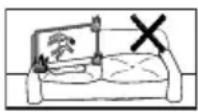
Do not block the openings by placing the LED TV on a bed, sofa, rug or other similar surface.

Do not place the LED TV in a built-in installation such as a bookcase or a rack unless proper ventilation is provided or the manufacturer's instructions have been adhered to.
WARNINGS AND PRECAUTIONS
- Do not orient the LED TV towards direct sunlight to reduce glare.
- If the LED TV will not be used for a long period of time, unplug the unit and remove the batteries from the remote control.
- Avoid touching the display screen by hand or any object.
- Never remove the rear cover. The LED TV interior contains high-voltage parts. You may be seriously injured if you touch them.
• Always handle the LED TV with caution when moving it. - Do not install the LED TV in airtight compartments, or in areas where it can be exposed to water or high temperature.
- Ensure that the area around the LED TV is clean and free of moisture.
- Do not place anything on the LED TV that can hinder heat dissipation.
- Do not place naked flame sources, such as lighted candles, on or near the LED TV.
- Do not place anything on the LED TV that can cause liquid to splash on it (e.g. flower vase).
- Do not place heavy objects on the LED TV, audio/video cables, or power cord.
- If the LED TV emits smoke, abnormal noise, or a strange odor, immediately turn it off and contact the Westinghouse Service Center by:
- Logging on to www.wde.com.
- Contacting the Westinghouse Customer Service at (800) 701-0680.
– E-mailing us at service@wde.com.
ANTENNA INSTALLATION SAFETY
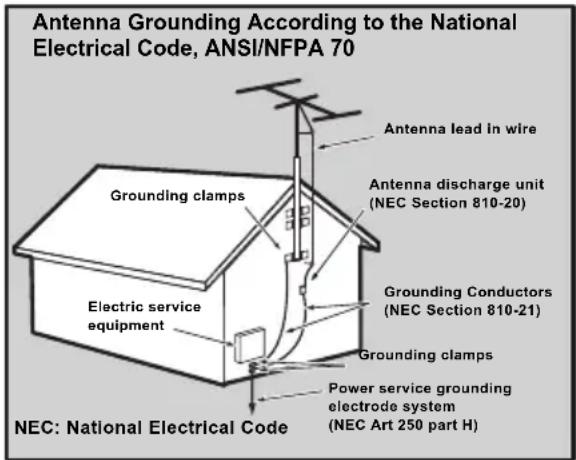
Outdoor Antenna Grounding
If an outside antenna or cable system is connected to the LED TV, be sure the antenna or cable system is grounded to prevent voltage surges and built-up static charges. Article 810 of the National Electrical Code, ANS/NFPA 70, provides information on proper grounding of the mast and supporting structure, grounding of the lead-in wire to an antenna discharge unit, connection to grounding electrodes, and requirements for the grounding electrode.
Lightning
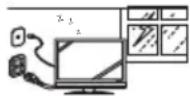 | For added protection for the LED TV during a lightning storm, or when it is left unattended and unused for long periods of time, unplug it from the wall outlet and disconnect the antenna or cable system. DO NOT disconnect the antenna or the power cord during a heavy storm—lightning may strike while you are holding the cable cord, causing serious injury. Turn off the LED TV and wait for the weather to improve. |
Power lines
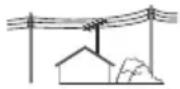 | An outside antenna system should not be located in the vicinity of overhead power lines or other electric light or power circuits, or where it can fall into such power lines or circuits. When installing an outside antenna system, extreme care should be taken to keep from touching such power lines or circuits as contact with them might be fatal. |
CLEANING THE LED TV
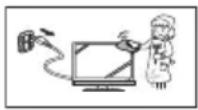
- Make sure the LED TV is turned off and the power cord is disconnected from the power outlet.
- Never spray or pour any liquid directly onto the screen or the case.
To clean the screen:
1 Wipe the screen with a clean, soft, lint-free cloth. This removes dust and other particles.
2 If it is still not clean, apply a small amount of non-ammonia, non-alcohol based glass cleaner onto a clean, soft, lint-free cloth, and wipe the screen.
To clean the case:
1 Wipe the case with a soft, dry cloth.
2 If it is still not clean, apply a small amount of non-ammonia, non-alcohol based, mild non-abrasive detergent onto a clean, soft, lint-free cloth, then wipe the surface.
Dolby-Digital Notice

Manufactured under license from Dolby Laboratories. Dolby and the double-D symbol are registered trademarks of Dolby Laboratories.
SRS Trademark Information:
- TruSurround HD, SRS and the symbol are trademarks of SRS Labs, Inc.
- TruSurround HD technology is incorporated under license from SRS Labs, Inc.
SRS TruSurround HD ™ creates a truly immersive surround sound experience with rich bass and clear dialog from only two speakers.

PACKAGE CONTENTS
| 32" LED TV Unit | Remote Control (with 2x AAA batteries) |
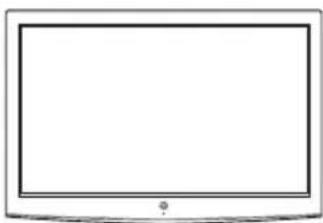 |  |
| LED TV Base User Manual | |
 |  |
| Power Cord Warranty Card | |
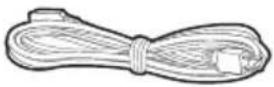 |  |
| AC Adapter Screws for Base | |
 | M4x18 *4pcs M5x16 *1pc  Cover neck Base Cover neck Base |
CONTROL PANEL
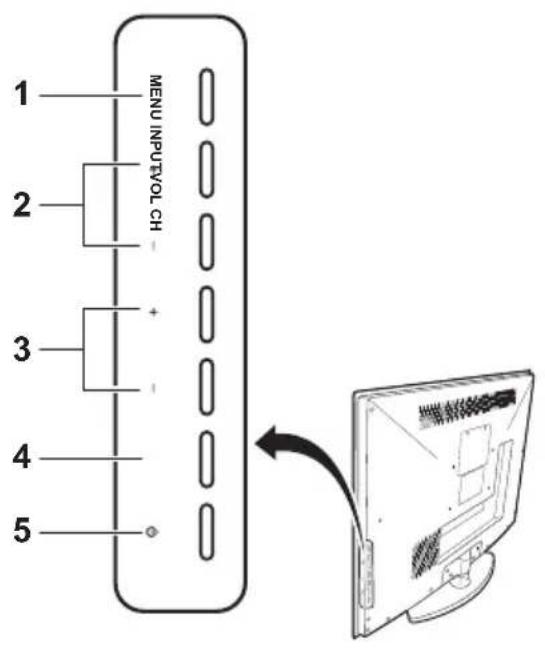
| Item Description | |
| 1. MENU Displays the LED TV setup screen. | |
| 2. Volume +/- | • Adjusts the volume during playback.• Selects an item on a menu screen. |
| 3. Channel +/- | • Switches the channel during TV viewing.• Selects an item on a menu screen. |
| 4. INPUT | • Selects the video input source.• Executes a command on a menu screen. |
| 5. Power Toggles the power on and off. | |
TERMINALS
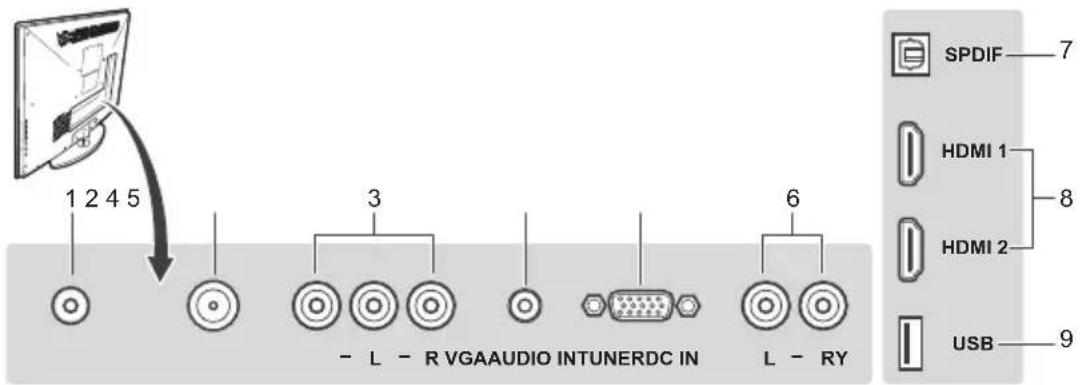
| Item Function | |
| 1. DC in | Connects the AC adapter from this outlet to a power source. |
| 2. TV tuner | Connects the LED TV to an antenna or cable service. |
| 3. Composite AV input | Connect to an external AV device such as a VCR, DVD player, set-top box, or game system. |
| 4. Audio in Connects to the audio out port of a computer. | |
| 5. VGA | Connects to a computer or other device with a VGA output using a 15-pin VGA cable. |
| 6. Audio out | Connect to an audio output device. |
| 7. SPDIF audio out Connects to an external digital audio receiver. | |
| 8. HDMI 1/2 | Connects to an external AV device such as a VCR, DVD player, set-top box, or game system. |
| 9. USB Service port For service only. | |
REMOTE CONTROL

| Item Description | |
| 1. Mute ⚠️ | Mutes the sound. Press again to toggle the sound back on. |
| 2. Power ⏻ | Toggles the TV power on or off. |
| 3. Backlight ⏻ | Adjusts the LED screen backlight. |
| 4. MTS | Toggles the Multichannel Television Sound options. |
| 5. CC | Toggles the closed caption display on or off. |
| 6. Sleep zzz | Sets the sleep timer for the LED TV to turn off automatically. |
| 7. Channel keys Use | to key in the channel number. |
| 8. Favorite | Switches to the favorite channels (for details on how to save a new favorite channel, see page 29). |
| 9. Enter ENT Executes a channel entry. | |
| 10. Menu ⚠️ | Accesses the LED TV setup menus. |
| 11. Return ⚡️ | Switches to the last selected channel. |
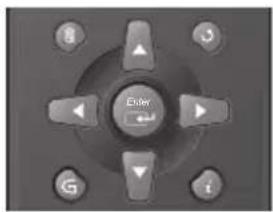
| 12. Arrow keys Navigate through the on-screen menus. | |
| 13. Enter ⚠️ | Executes a command. |
| 14. G ⚙️ | Displays the Electronic Program Guide (EPG). It contains the program information for the channel you’re watching. |
| 15. Info i | Displays the input source or channel information as well as the system date and time. |
| 16. Input Selects the | video input source. |
| 17. Vol +/- Ajusts the | system volume. |
| 18. Ch ▲ ▼ | Switches to other TV channels. |
| 19. Aspect ratio ⚠️ | Selects the video display format. |
| 20. YPbPr1 | Selects VGA-Component as the input source. |
| 21. TV | Selects TV or HDTV as the input source. |
| 22. HDMI1 Selects HDMI1 as the input source. | |
| 23. Video1 | Selects the Composite AV device as the input source. |
| 24. YPbPr2 Not supported. | |
| 25. PC Selects VGA | as the input source. |
| 26. HDMI2 Selects HDMI2 as the input source | |
| 27. Video2 Not supported. | |
- Only use AAA batteries.
- Do not mix new and old batteries. This may result in cracking or leakage, which may pose a fire risk or lead to personal injury.
- Insert batteries according to the (+) and (-) markings. Inserting the batteries incorrectly may result in cracking or leakage, which may pose a risk of fire or lead to physical injury.
- Dispose of used batteries in accordance with local laws and regulations.
- Keep batteries away from children and pets.
- When the remote control will not be used for an extended period, remove the batteries.
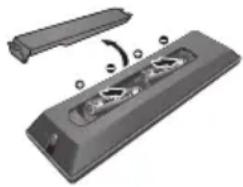
1 Remove the battery cover.
2 Insert the batteries. Make sure the (+) and (−) marks on the batteries match those inside the compartment.
3 Re-attach the battery cover.
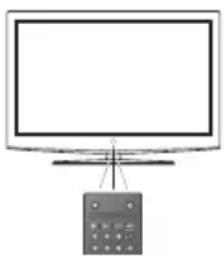
REMOTE CONTROL TRANSMISSION RANGE
Transmission range depends upon the reception angle. The range of coverage is 20° horizontal/vertical at a distance of 10 feet from the LED TV.
LED TV BASE
CAUTION:
The LED TV unit may be too heavy for one person to lift. If this is the case, make sure to ask for assistance in handling the LED TV to prevent physical injury and/or damage to the unit.
INSTALLING THE LED TV BASE
1 Open the LED TV carton box.
2 Remove the LED TV base.
3 Remove the plastic bag.
4 Remove the two top carton stabilizers from the LED TV.
5 Remove the protective plastic covering the LED TV.
6 Grasp the two sides of the LED TV and then pull it out of the carton box.
7 Remove the two bottom carton stabilizers from the LED TV.
8 Lay the LED TV on a clear, flat, and stable surface.
9 Align the base to the bottom side of the LED TV and use four M4 x 18 screws to secure it.
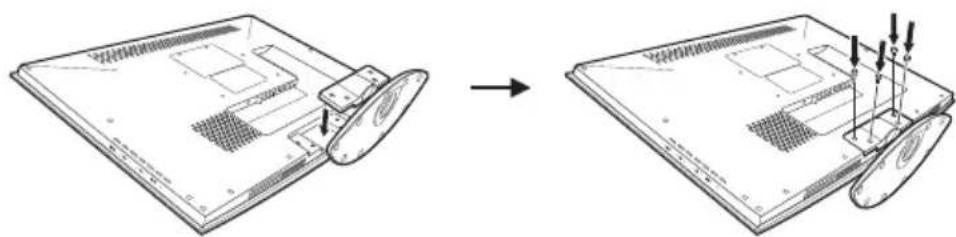
10 Carefully orient the LED TV in an upright position.
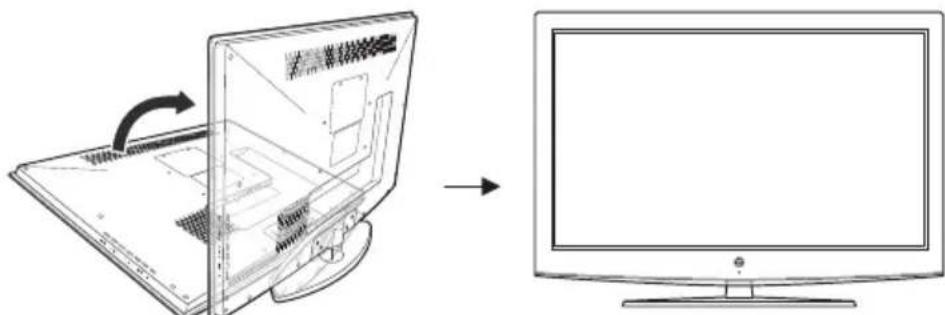
11 Use one M5 x 16 screw to fix the stand base and LED TV on the desk.
REMOVING THE LED TV BASE
If you intend to repack the LED TV unit (for shipping or storage) or you want to change the installation to a wall mount option, you must first remove the LED TV base.
1 Turn off the LED TV and all connected devices.
2 Disconnect the power cord from the LED TV.
3 Disconnect all signal cables from the I/O port terminals.
4 Remove the M5 x 16 screw securing the base to the desk.
5 Lay the LED TV on a clear, flat, and stable surface.

6 Remove the screws securing the base to the LED TV.
7 Detach the base from LED TV.
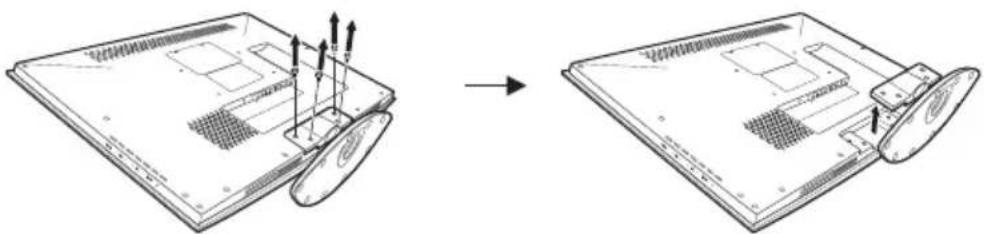
8 Pack the screws you removed in step 5 together with the LED TV base for future reassembly.
ANTENNA CONNECTION
OUTDOOR ANTENNA CONNECTION
![graph TD A["Cable TV lead in"] --> B["VHF, UHF or VHF/UHF combination antenna"] B --> C["75 ohm coaxial cable (round)"] C --> D["300 ohm twin-lead (flat)"] D --> E["300-75 ohm ADAPTER (Not supplied)"] E --> F["Separate VHF/UHF Antenna"] F --> G["VHF Antenna UHF Antenna"] G --> H["300 ohm twin-lead"]…](/content/2026/06/1204353/images/bb10520e3b2456a45a7605830a963d014dcd6d9ad9b6b847dca5672d8b68272c.jpg)
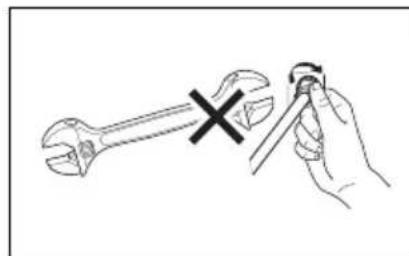
NOTE: The F-type connector should be finger-tightened only. When connecting the RF cable to the LED TV, do not tighten F-type connector with any tool. If tools are used, it may cause damage to the LED TV (e.g. breaking of internal circuit).
CABLE TV (CTV/DTV) CONNECTION
The unit has a TV tuner (75 ohm coaxial cable connector) located on the rear I/O panel for easy cable hookup. When connecting the 75 ohm coaxial cable to the unit, screw the 75 ohm cable to the TV tuner. Some cable TV companies offer premium pay channels. Since the signals of these channels are scrambled, a cable TV converter/descrambler is usually provided to the subscriber by the cable TV company. This converter/descrambler is necessary for normal viewing of the scrambled channels. (Set your TV to channel 3 or 4. Typically one of these channels is used. If a channel is unknown, consult your cable TV company.) For more specific instructions on installing cable TV, consult your cable TV company. One possible method of utilizing the converter/descrambler provided by your cable TV company is explained below.
- A position on the RF switch (not supplied) – You can view all unscrambled channels by using the TV's channel keys.
- B position on the RF switch (not supplied) – You can view the scrambled channels via the converter/descrambler by using the converter's channel keys.
![graph LR A["RF switch (not supplied)"] --> B["A IN B"] B --> C["Two-set signal splitter (Not supplied)"] C --> D["Cable TV line"] E["Cable TV converter/descrambler (Not supplied)"] --> C](/content/2026/06/1204353/images/1ce99056b6822a9ca869a4c57928d07f7d8fa3f6e2bb35adeb2937d977e13ea6.jpg)
EXTERNAL DEVICE CONNECTIONS
IMPORTANT:
- Turn off the LED TV first before connecting an external device to prevent any possible damage or physical injury.
- For more information about external device connections, see the operation manual of the external device you wish to connect to the LED TV.
- Make sure that the correct cables are connected to each terminal. Improper cable connections may cause damage to the LED TV.
You can enjoy picture and sound by connecting various audio-video devices to the terminals located on the rear and side I/O panels of the LED TV.
- TV cable input – You can use a commercially available audio/video cable.
- Component (YPbPr) input – Picture can be displayed only when a 480i, 480P, 720P or 1080i signal is received.
- HDMI input – Picture can be displayed only when a 640 x 480, 480P, 720P or 1080i signal is received. When you connect to the HDMI terminal with a DVI-HDMI conversion cable, there is a possibility that the picture may not display correctly.
- Audio output – You can output audio signals from the LED TV set through the analog audio out and SPDIF terminals.
The following diagram shows the external device connections.
![graph TD A["PC Audio amplifier"] --> B["PC Cable system"] A --> C["SpDI F"] A --> D["HDMI 1"] A --> E["HDMI 2"] A --> F["USB"] B --> G["Antenna / Cable TV line"] C --> H["AUDIO OUT AUDIO OUT"] D --> I["3.5 mm stereo mini jack cable"] E --> J["Audio cable"] F --> K["SPDIF cable"] G --> L["- L - R VGA…](/content/2026/06/1204353/images/5bdf1465b47d0cfa1f8172c8a848ad2f5328fa46e9b1c5bbb839136971e2791f.jpg)
POWER CONNECTION
CONNECTING AC POWER
IMPORTANT:
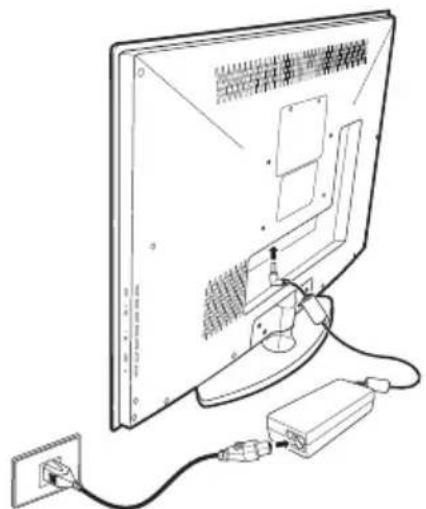
The LED TV is designed to be powered via an AC adapter. Use ONLY the AC adapter included in the package. Turn off all connected devices before plugging the AC adapter into the power outlet.
Connect the power cord of the AC adapter to the LED TV then to a proper AC outlet.
INITIAL SETUP
Press on the control panel or on the remote control to turn on the LED TV. Select the desired language and select Yes to use the SetupWizard. The SetupWizard will guide you on how to set up the LED TV's operational settings.

WESTINGHOUSE HDTV SETUP
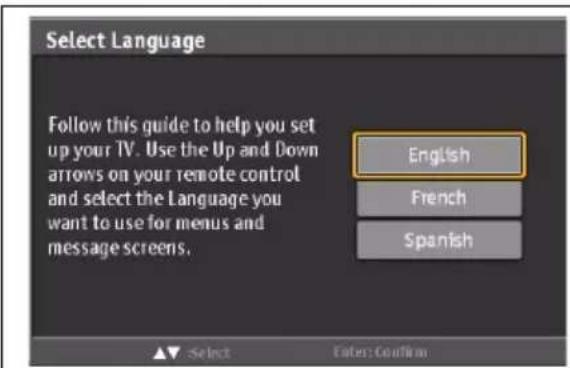
Select Language
Use the up and down arrows on your HDTV control panel or remote control to select the language to be used for menus and messages. Press Enter to continue.
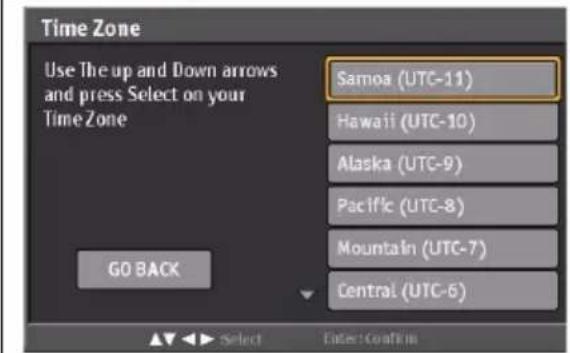
Time Zone
Use the up and down arrows on your HDTV control panel or remote control to select your local time zone. Press Enter to continue. Press Go Back to return to the previous screen.

Setup Wizard
The Setup Wizard will help guide you through scanning channels or accessing your connected set-top-box. Press Enter to start the Setup Wizard or Skip to exit to the source list with available input options. Press Go Back to return to the previous screen.
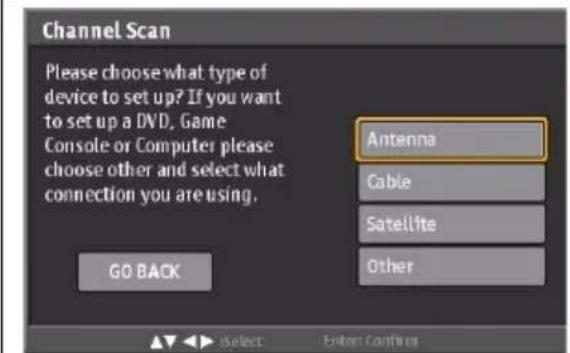
Channel Scan - Antenna
Select Antenna and press enter on your remote control to activate the ATSC tuner and scan over-the-air ATSC channels. This LCD HDTV is not capable of converting an ATSC signal until activated by the owner. Press Go Back to return to the previous screen.
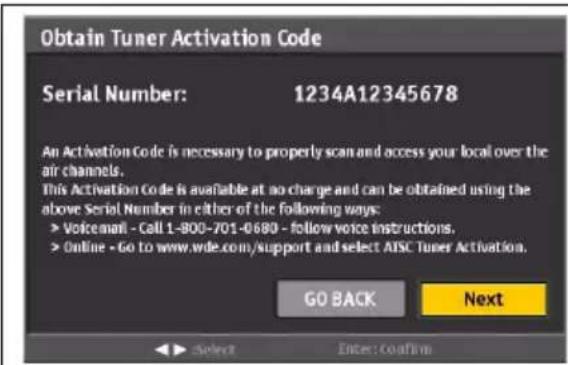
Obtain ATSC Tuner Activation Code
It is only necessary to activate the ATSC Tuner if you plan to scan for and view over-the-air ATSC broadcast content. To obtain code and activate the ATSC tuner chose an activation method from the options listed on your screen. Options will be from one to all of the following methods: Toll Free Phone Number, Website, or Text Message. Provide the activation service the Serial Number shown on your screen. Press Next to continue activation. Press Go Back to return to the previous screen.
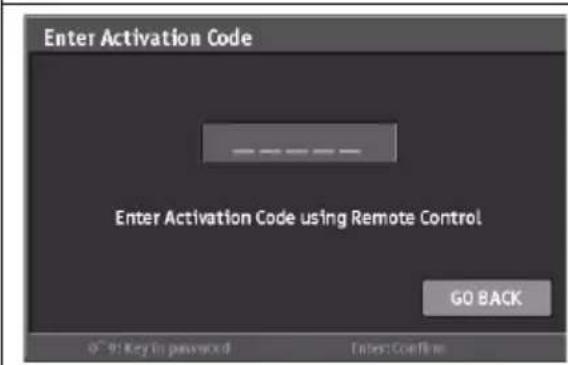
Enter Activation Code
Using the remote control keypad enter the activation code provided by the ATSC Tuner Activation service. Press Go Back to return to the previous screen.
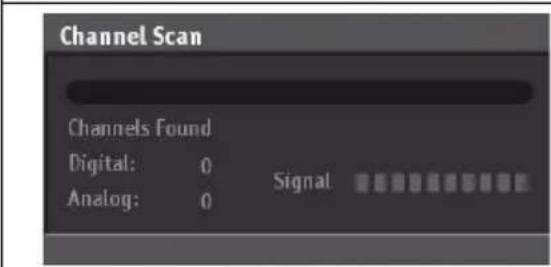
Channel Scan in progress
After successful ATSC Tuner Activation you will see a channel scan progress bar. This will show all analog and digital channels found during the scan as well as the signal strength of each. When the scan is complete you will be able to watch your local TV programming.
WESTINGHOUSE HDTV SETUP - THROUGH CABLE/SATELLITE BOX

Select Language
Use the up and down arrows on your HDTV control panel or remote control to select the language to be used for menus and messages. Press Enter to continue.
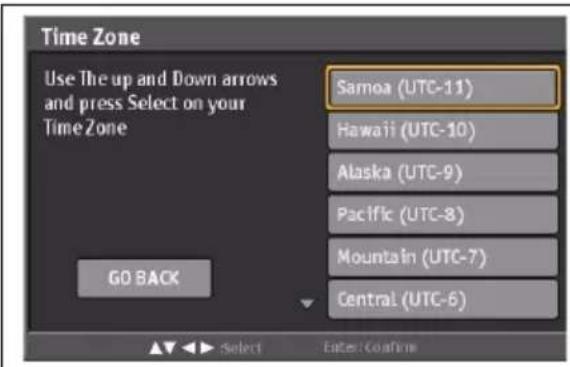
Time Zone
Use the up and down arrows on your HDTV control panel or remote control to select your local time zone. Press Enter to continue. Press Go Back to return to the previous screen.
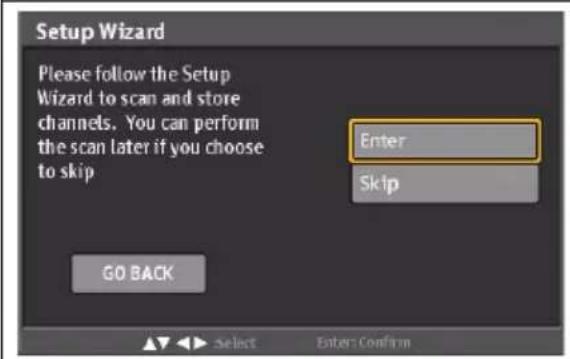
Setup Wizard
The Setup Wizard will help guide you through scanning channels or accessing your connected set-top-box. Press Enter to start the Setup Wizard or Skip to exit to the source list with available input options. Press Go Back to return to the previous screen.

Channel Scan - Cable/Satellite
Select Cable/Satellite and press enter on your remote control to activate the ATSC tuner and scan cable/satellite ATSC channels. This LCD HDTV is not capable of converting an ATSC signal until activated by the owner. Press Go Back to return to the previous screen.


Cable/Satellite Select
Select "Yes" and then press Enter to continue. Press Go Back to return to the previous screen.

Cable/Satellite Box Input
Select "Coaxial" and then press Enter to continue. Press Go Back to return to the previous screen.
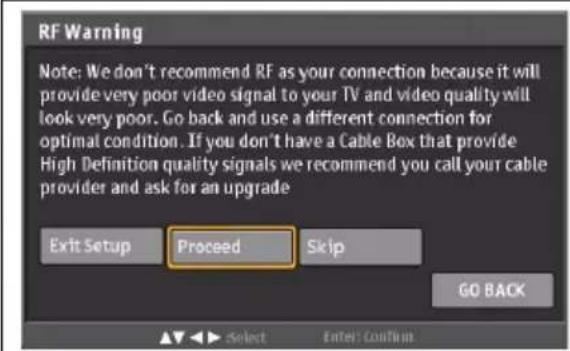
RF Warning
Select "Proceed" and then press Enter to continue. Press Go Back to return to the previous screen.
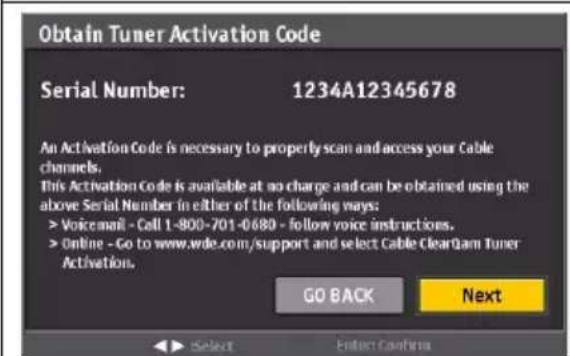
Obtain ATSC Tuner Activation Code
It is only necessary to activate the ATSC Tuner if you plan to scan for and view cable/satellite ATSC content. To obtain code and activate the ATSC tuner chose an activation method from the options listed on your screen. Options will be from one to all of the following methods: Toll Free Phone Number, Website, or Text Message. Provide the activation service the Serial Number shown on your screen. Press Next to continue activation. Press Go Back to return to the previous screen.

Enter Activation Code
Using the remote control keypad enter the activation code provided by the ATSC Tuner Activation service.
Press Go Back to return to the previous screen.
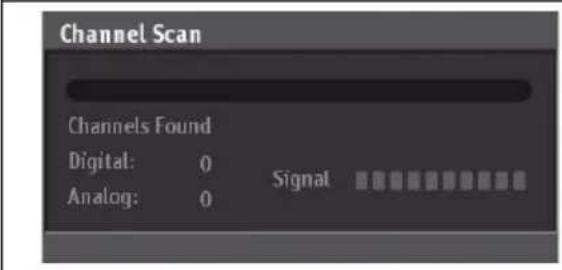
Channel Scan in progress
After successful ATSC Tuner Activation you will see a channel scan progress bar. This will show all analog and digital channels found during the scan as well as the signal strength of each. When the scan is complete you will be able to watch your local TV programming.
WESTINGHOUSE HDTV SETUP - NOT THROUGH CABLE/SATELLITE BOX
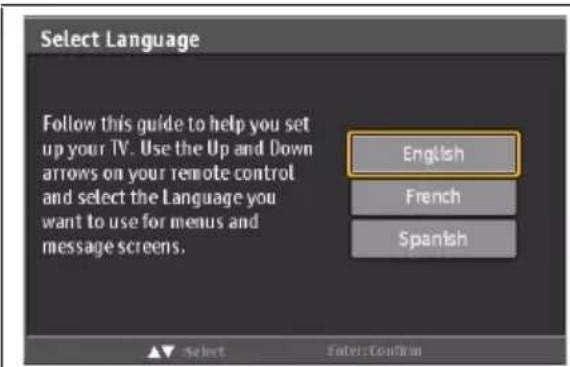
Select Language
Use the up and down arrows on your HDTV control panel or remote control to select the language to be used for menus and messages. Press Enter to continue.

Time Zone
Use the up and down arrows on your HDTV control panel or remote control to select your local time zone. Press Enter to continue. Press Go Back to return to the previous screen.
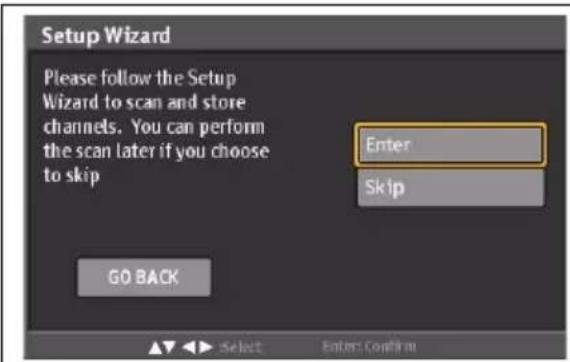
Setup Wizard
The Setup Wizard will help guide you through scanning channels or accessing your connected set-top-box. Press Enter to start the Setup Wizard or Skip to exit to the source list with available input options.
Press Go Back to return to the previous screen.

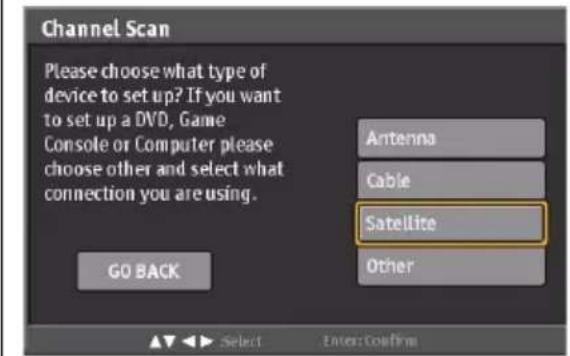
Channel Scan - Cable/Satellite
Select Cable and press enter on your remote control to activate the ATSC tuner and scan cable/satellite ATSC channels. This LCD HDTV is not capable of converting an ATSC signal until activated by the owner.
Press Go Back to return to the previous screen.
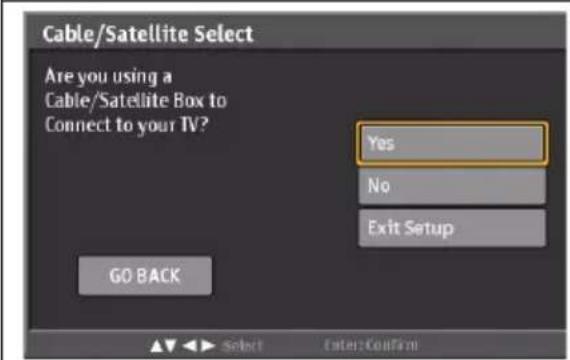
Cable/Satellite Select
Select "No" and then press Enter to continue. Press Go Back to return to the previous screen.

Obtain ATSC Tuner Activation Code
It is only necessary to activate the ATSC Tuner if you plan to scan for and view cable/satellite ATSC content. To obtain code and activate the ATSC tuner chose an activation method from the options listed on your screen. Options will be from one to all of the following methods: Toll Free Phone Number, Website, or Text Message.
Provide the activation service the Serial Number shown on your screen. Press Next to continue activation. Press Go Back to return to the previous screen.
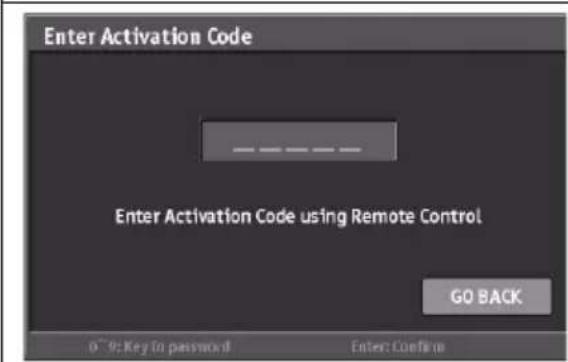
Enter Activation Code
Using the remote control keypad enter the activation code provided by the ATSC Tuner Activation service. Press Go Back to return to the previous screen.

Channel Scan in progress
After successful ATSC Tuner Activation you will see a channel scan progress bar. This will show all analog and digital channels found during the scan as well as the signal strength of each. When the scan is complete you will be able to watch your local TV programming.
BASIC OPERATIONS
Turning on the power
Press ☑ on the control panel or on the remote control to turn on the LED TV.
Turning off the power
Press ☑ on the control panel or on the remote control to turn off the LED TV. The LED behavior will depend on the enabled Power settings.

| LED indicator Operation | |
| Turns from none to red. Turn the power on. | |
| Turns from red to none. Turn the power off. | |
NOTES:
- If you are not going to use the TV for a long time, be sure to disconnect the power cord from the wall outlet and remove the batteries from the remote control.
- In standby mode, a small amount of electricity is still consumed even when the power is turned off.
ADJUSTING THE VOLUME

Volume
Press Vol+ to increase the volume; press Vol- to decrease the volume.
Mute
Press no turn off the sound. The mute icon appears on the screen. Press again to turn on the sound.
CHANGING CHANNELS
Follow the instructions below to change channels.
Using the Ch ▲ Buttons
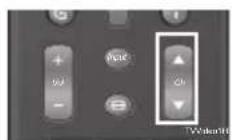
Browse channels
To browse through the available channels, press Ch ▲ / ▼ on the remote control or on the control panel.
Using the Channel Keys
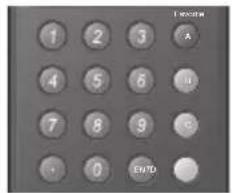
Selecting channel
To change to a certain channel, key in the channel number using the channel keys and press ENT.
Selecting digital channel
To select a digital channel, key in the digital channel number using the channel keys and the • key, then press ENT.
Using the Favorite Keys
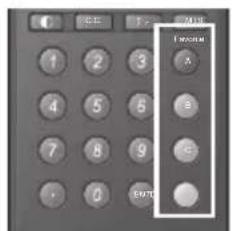
Selecting favorite channels
To select a favorite channel, press the Favorite button (A, B, C, or D) corresponding to the preferred channel.
Saving a channel as a favorite
1 Switch to the channel you want to add as a favorite.
2 Press and hold the Favorite button which you want to add the current channel to for 3 seconds.
3 The Channel Saved message appears to confirm the new favorite channel item.
SELECTING THE INPUT SOURCE
There are two ways to select the video input source.
Using the Individual Input Keys
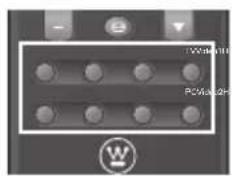
TV, PC, Video, YPbPr, HDMI Keys
Press any of the following remote control keys to change the input source: TV, PC, Video1, Video 2, YPbPr1, YPbPr2, HDMI1, or HDMI2.
Using the Input Key

Select source using Input Key
1 Press Input.
2 A list of supported video sources is displayed.
3 Press ◀ / ▶ to select the preferred source.
4 Press to switch to the selected input source.
ADJUSTING THE DISPLAY FORMAT
The input source can sometimes affect the way images are displayed on-screen. You can adjust the display format to view the image properly.

Format Options
Press repeatedly to toggle the display format. As you toggle each option on, the actual display will change accordingly. The available options are:
- Standard: Picture is displayed in its original size.
- Fill: Picture is displayed to cover the entire screen.
- Overscan: Picture is scaled down to fit the display area.
• 1:1 Mode: Matches the incoming resolution exactly to the pixels without any scaling.
Different viewing conditions can affect the quality of the display. You can adjust the LED backlight to suit the current viewing condition.
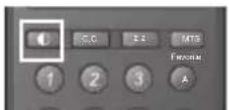
Backlight options
Press repeatedly to toggle the Backlight mode. The available options are: Bright Room, Medium Room, and Dark Room.
SETUP MENUS
Use the setup menus to configure the various operational settings of the LED TV.
Displaying the setup menu screen
Press 📋 on the remote control or MENU on the control panel to display the setup menu screen.
Navigating the setup menu screen
Use the buttons on the remote control or on the control panel to navigate through the menu screens.
![graph TD A["Server"] --> B["Data Bus"] B --> C["Monitor"] C --> D["Internal Components"] D --> E["Database"] style A fill:#f9f,stroke:#333 style B fill:#ccf,stroke:#333 style C fill:#cfc,stroke:#333 style D fill:#fcc,stroke:#333 style E fill:#ffc,stroke:#333](/content/2026/06/1204353/images/74d338b0fff877487209350fd7b39a0b35350058a2bec687f3bf24bcdc13df30.jpg)
| Action Remote Control Control Panel | ||
| Displays or closes the menu bar. MENU | ||
| Select and display a primary menu.Adjust sub-menu options. |  | Volume +/- then INPUT |
| Select and display a sub-menu.Select a sub-menu or a sub-menu option. |  | Channel +/- then INPUT |
| Returns to the primary menu tab from a sub-menu screen.Returns to the previous screen. | [AAA3] | MENU |
| Applies the selected menu setting. INPUT | ||
PICTURE
Use the Picture sub-menus to configure the display quality.
Press 📋 on the remote control or MENU on the control panel to display the setup menu screen then select Picture to display the Picture sub-menu. The following options are available: Brightness, Contrast, Saturation, Video Presets, Sharpness, Color temperature, Hue, and Reset.
Brightness
Use Brightness to adjust the luminance level.

Adjusting Brightness
1 Use the ◀ keys to select Brightness and-press.
2 Press the ◀ / ▶ keys on the remote control to adjust the brightness level.
3 Press ☐ to save and exit the screen.
Contrast
Use Contrast to adjust the brightness to darkness ratio.

Adjusting Contrast
1 Use the ◀ keys to select Contrast and-press.
2 Press the ◀ / ▶ keys on the remote control to adjust the contrast level.
3 Press ☐ to save and exit the screen.
Saturation
Use Saturation to adjust the color intensity.

Adjusting Saturation
1 Use the ◀ keys to select Saturation and-press.
2 Press the ◀ / ▶ keys on the remote control to adjust the saturation level.
3 Press ☐ to save and exit the screen.
Video Presets
Use this sub-menu to select one of four preset view options optimized for different viewing conditions.

The following options are available:
• Showroom: Uses increased color and sharpness for a vibrant picture display.
• Movie: Images are displayed as accurately near to its original recording condition.
• Game: Uses increased brightness and response time level for enjoying video games.
- Sports: Uses high contrast display for clear-cut images ideal for viewing sports events.
- Custom: Uses the customized settings.
Adjusting Video Presets
1 Use the ◀ / ▶ keys to select Video Presets and press
2 Press the ◀ / ▶ keys on the remote control to select the desired option.
3 Press ☐ to save and exit the screen.
Sharpness
Use Sharpness to adjust the sharpness or softness of the display.

Adjusting Sharpness
1 Use the ◀ keys to select Sharpness and press.
2 Press the ◀ / ▶ keys on the remote control to adjust the sharpness level.
3 Press ☐ to save and exit the screen.
Color Temperature
Use Color temperature to adjust the level of white balance in the display.
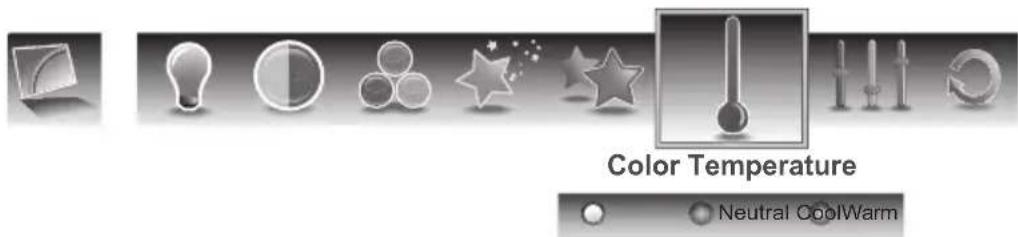
Three settings are available:
- Warm: Pictures appear more reddish.
• Neutral: Pictures appear more white.
• Cool: Pictures appear with a bluish tint.
Adjusting Color Temperature
1 Use the ◀ / ▶ keys to select Color temperature and press
2 Press the ◀ / ▶ keys on the remote control to select the desired option.
3 Press ☐ to save and exit the screen.
Hue
Use Hue to adjust the balance of the red, green, and blue colors in the display.

Adjusting Hue
1 Use the ◀ keys to select Hue and press.
2 Press the ◀ / ▶ keys on the remote control to adjust the hue level.
3 Press ☐ to save and exit the screen.
Reset
Select Yes on this sub-menu to reset all display-related settings.

NOTE:
The configuration settings for the Picture sub-menus will only be applied to the current input source.
AUDIO
Use the Audio sub-menus to configure the audio quality. These settings apply to the LED TV speakers only. Any connected audio devices are not affected.
Press 📄 on the remote control or MENU on the control panel to display the setup menu screen then select Audio to display the Audio sub-menu. The following options are available: Bass, Treble, Balance, TV Speaker, Audio Presets, and Reset.
Bass
Use Bass to calibrate low-pitched sounds.

Adjusting Bass
1 Use the ◀ keys to select Bass and press.
2 Press the ◀ / ▶ keys on the remote control to adjust the bass level.
3 Press ☐ to save and exit the screen.
Treble
Use Treble to calibrate high-pitched sounds.

Adjusting Treble
1 Use the ◀ keys to select Treble and press.
2 Press the ◀ / ▶ keys on the remote control to adjust the treble level.
3 Press ☐ to save and exit the screen.
Balance
Use Balance to adjust the sound balance between the L/R speakers.

Adjusting Balance
1 Use the ◀ keys to select Balance and press.
2 Press the ◀ / ▶ keys on the remote control to adjust the balance level.
3 Press ☐ to save and exit the screen.
TV Speaker
Use this sub-menu to toggle the LED TV speakers on and off.

Adjusting TV Speaker
1 Use the ◀ keys to select TV Speaker and press.
2 Press the ◀ / ▶ keys on the remote control to select ON or OFF.
3 Press ☐ to save and exit the screen.
Audio Preset
Use this sub-menu to select one of four preset audio options optimized for different sounding conditions.

The following options are available:
- Rock: Sets the equalizer to the Rock mode.
- Pop: Sets the equalizer to the Pop mode.
• Classical: Sets the equalizer to the Classical mode. - Flat: Sets the equalizer to the Flat mode.
- Custom: Uses the customized settings.
Adjusting Audio Preset
1 Use the ◀ / ▶ keys to select Audio Preset and press
2 Press the ◀ / ▶ keys on the remote control to select the desired option.
3 Press ☐ to save and exit the screen.
TruSurround HD
Use this sub-menu to toggle the TruSurround HD on and off.
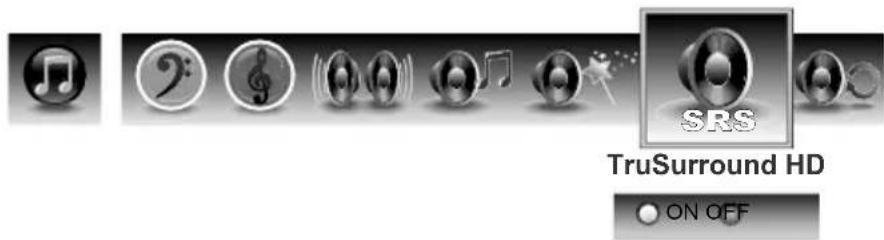
Adjusting TruSurround HD
1 Use the ◀ / ▶ keys to select TruSurround HD and press
2 Press the ◀ / ▶ keys on the remote control to select On or OFF.
3 Press ☐ to save and exit the screen.
Reset
Select Yes on this sub-menu to reset all audio-related settings.

Reset
VIEW MODE
Use the View Mode sub-menu to select the aspect ratio of the display.
Press 📄 on the remote control or MENU on the control panel to display the setup menu screen then select View Mode to display the View Mode sub-menu. The following options are available: Standard, Fill, Overscan, and 1:1 Mode.

Standard
Picture is displayed in its original size.
Fill
Picture is displayed to cover the entire screen.
Overscan
Picture is scaled down to fit the display area.
1:1 Mode
Matches the incoming resolution exactly to the pixels without any scaling.
Adjusting View Mode
1 Press the ◀ / ▶ keys on the remote control to select the desired option.
2 Press for to save and exit the screen.
VIEW MODE (VGA)
Select VGA as your input source and use the View Mode sub-menu to adjust the display in VGA mode.
Press 📋 on the remote control or MENU on the control panel to display the setup menu screen then select View Mode to display the View Mode sub-menu. The following options are available: Aspect Ratio, H. Position, V. Position, Fine Tune, and Auto Sync.
Aspect Ratio
Use this sub-menu to select the display's aspect ratio in the following options:
• 1 : 1 M o d e : Matches the incoming resolution exactly to the pixels with scaling.
- Standard: Picture is displayed in its original size.
- Fill: Picture is displayed to cover the entire screen.

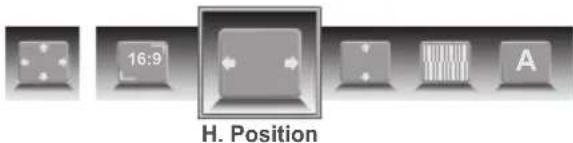
H. Position
Use this sub-menu to adjust the horizontal position of the display.
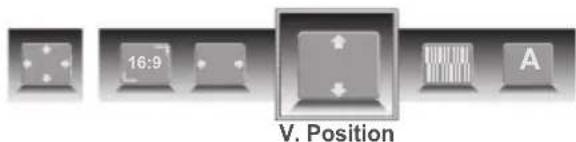
V. Position
Use this sub-menu to adjust the vertical position of the display.
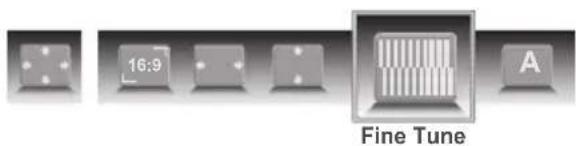
Fine Tune
Use this sub-menu to fine tune the display.
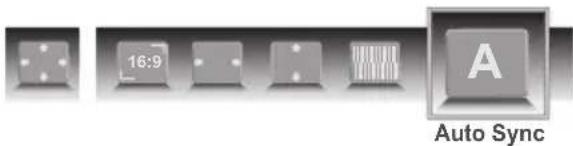
Auto Sync
Use this sub-menu to synchronize the display automatically.
TV PROGRAM
Use the TV Program sub-menus to manage the channel list, language sound, and to scan for available TV channels in your area.
Press 📋 on the remote control or MENU on the control panel to display the setup menu screen then select TV Program to display the TV Program sub-menu. The following options are available: Skip List, Channel Edit, MTS, Auto Search, and Manual Add.
Skip List
Use Skip List to select the channels you want to skip.

Adding Channels to Skip List
1 Use the ◀ / ▶ keys to select Skip List and press ☐ The Channel Skip List screen appears.
2 Use the ▲ / ▼ keys to select the desired channel.
3 Press 📊 repeatedly to check (add to the Skip list) or uncheck (clear to the Skip list) the channels.
4 Repeat steps 2 and 3 to add more channels.
5 Press ☐ to save and exit the screen.
Channel Edit
Use Channel Edit to assign a name to a channel.
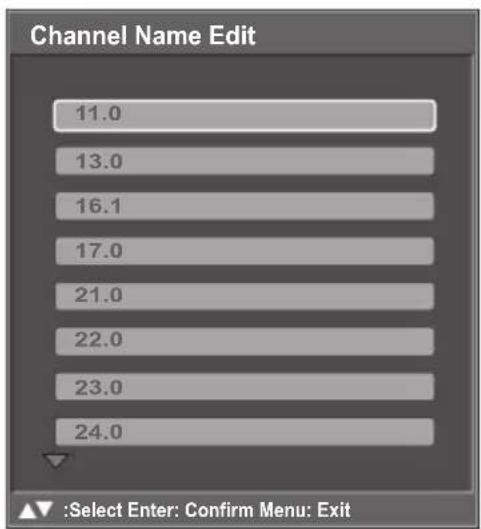
Editing Channel Names
1 Use the ◀ / ▶ keys to select Channel Edit and press □ The Channel Name Edit screen appears.
2 Use the ▲ / ▼ keys to select the desired channel and press to open the Edit Name screen.
3 Use the ▲ / ▼ / ◀ / ▶ keys to move the cursor to the desired symbol and press the □ button to enter.
- Select Shift to toggle different symbol tables: uppercase and lowercase letters, numerals, and special symbols.
- Select Back to backspace.
- Select Clear to delete all typed text.
4 Select Accept when finished.
5 Repeat steps 2, 3, and 4 to add more channels.
6 Press ☐ to save and exit the screen.
MTS
Use MTS to select multichannel television sound.
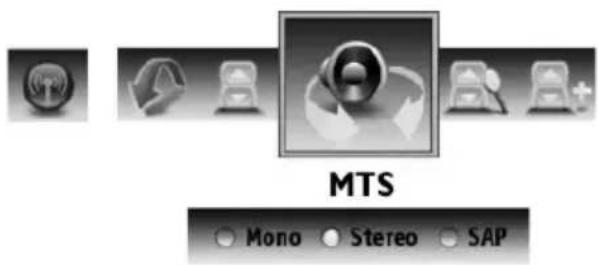
The following options are available:
- Mono: Allows mono output (useful when stereo is noisy or inconsistent).
- Stereo: Allows stereo sound for superior TV viewing experience.
- SAP: Allows second audio program from the speakers while watching a scene in the original program.
Adjusting MTS
1 Use the ◀ / ▶ keys to select MTS and press 📄
2 Press the ◀ / ▶ keys on the remote control to select the desired option.
3 Press ☐ to save and exit the screen.
Auto Search
Select Auto Search and press ↻. Two options are available:
- Cable: Choose this setting if you are receiving TV channels with a CATV (cable TV).
• AIR: Choose this setting if you are receiving TV channels with an antenna (over the air).
Auto Search automatically creates a list of receivable channels for the selected source.
Manual Add
Use Manual Add to add channels manually.

Adding Channels Manually
1 Use the ◀ / ▶ keys to select Manual Search and press □ The Channel Add screen appears.
2 Use the Channel keys on the remote control to enter the channel number and select Enter. Wait a few moment for the TV to search for the channel.
3 When the channel is found, you can select Add to add to channel.
SETTINGS
Use the Settings sub-menus to configure the LED TV operational setup and view the current firmware version.
Press 📋 on the remote control or MENU on the control panel to display the setup menu screen then select Settings to display the Settings sub-menu. The following options are available: Date and Time, Closed Captions, Parental Control, OSD Timeout, OSD Language, Power settings, Reset All, and Version.
Date and Time
Use Date and Time to adjust the current date and time.

Adjusting Auto Calibration
1 Use the ◀ / ▶ keys to select Date and Time and press ↻
2 Press 📋 repeatedly to check (enable) or uncheck (disable) Auto Calibration.
3 Press ☐ to save and exit the screen.
- Enable this option to view the system's current time.
- Both Date and Current Time are unavailable for adjustments when Auto Calibration is enabled.
Adjusting Time Zone
1 Use the ◀ / ▶ keys to select Date and Time and press
2 Use the ▲ / ▼ keys to select Time Zone and press
3 Use the ▲ / ▼ keys to select the desired Time Zone: Samoa, Hawaii, Alaska, Pacific, Mountain, Central, Eastern, Atlantic, or Newfoundland.
4 Press ☐ to save and exit the screen.
Adjusting Date and Time
1 Use the ◀ / ▶ keys to select Date and Time and press
2 Use the ▲ / ▼ keys to select Date or Current Time and press ↩.
3 Use the ◀ / ▶ keys to select a date or time segment.
4 Use the ▲ / ▼ keys to adjust the value.
5 Press ☐ to save and exit the screen.
Adjusting Daylight Saving
1 Use the ◀ / ▶ keys to select Date and Time and press ↻
2 Press 📋 repeatedly to check (enable) or uncheck (disable) Adjust for Daylight Saving Time.
3 Press ☐ to save and exit the screen.
Closed Captions
Use Closed Captions to configure the settings for closed captioning in TV programs.
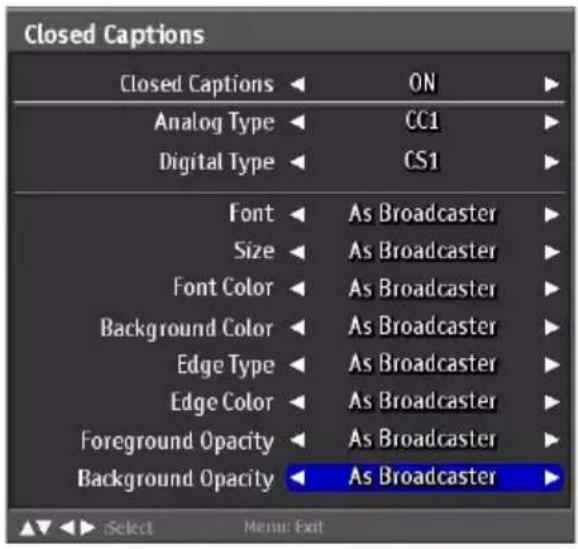
The following options are available:
-
Closed Captions: Can be set to ON or OFF.
• Analog Type: Can be set to CC1, CC2, CC3, CC4, T1, T2, T3, or T4.
• Digital Type: Can be set to CS1, CS2, CS3, CS4, CS5, or CS6. -
Font: Can be set to As Broadcaster, Style 1, Style 2, Style 3, Style 4, Style 5, Style 6, or Style 7.
• Size: Can be set to As Broadcaster, Small, Medium, or Large. - Font Color: Can be set to As Broadcaster, Black, White, Green, Blue, Red, Cyan, Yellow, or Magenta.
- Background Color: Can be set to As Broadcaster, Black, White, Green, Blue, Red, Cyan, Yellow, or Magenta.
- Edge Type: Can be set to As Broadcaster, None, Raised, Depressed, Uniform, Shadow Left, or Shadow Right.
- Edge Color: Can be set to As Broadcaster, Black, White, Green, Blue, Red, Cyan, Yellow, or Magenta.
• Foreground Opacity: Can be set to As Broadcaster, Solid, Translucent, Transparent, or Flashing. - Background Opacity: Can be set to As Broadcaster, Solid, Translucent, Transparent, or Flashing.
Adjusting Closed Captions Settings
1 Use the ◀ / ▶ keys to select Closed Captions and press ↙
2 Use the ▲ / ▼ keys to select the desired Closed Captions option.
3 Use the ◀ / ▶ keys to adjust the value.
4 Press ☐ to save and exit the screen.
Parental Control
Use Parental Control to block channels and change the password. You must enter a six-digit password to use the Parental Control. The factory password is 999999.
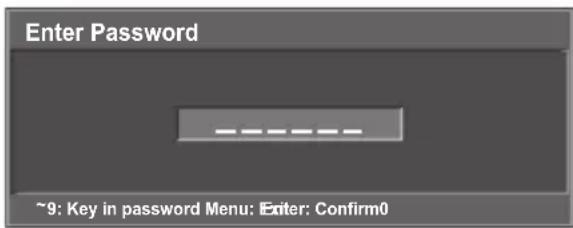
After you enter the correct password, the Parental Control menu is shown. By default, only the Rating and Change Password submenu are displayed. To display the hidden submenu, set Rating to ON.
The following options are available:
• Rating: Select ON/OFF to hide or display the hidden submenu.
• Block Unrated: Select ON/OFF to block/unlock all unrated programs.
Adjusting Rating and Block Unrated
1 Use the ◀ / ▶ keys to select Rating or Block Unrated and press
2 Use the ◀ / ▶ keys to select ON or OFF.
3 Press to save and exit the screen.
• TV Rating: Use this sub-menu to customize US TV Rating programs.
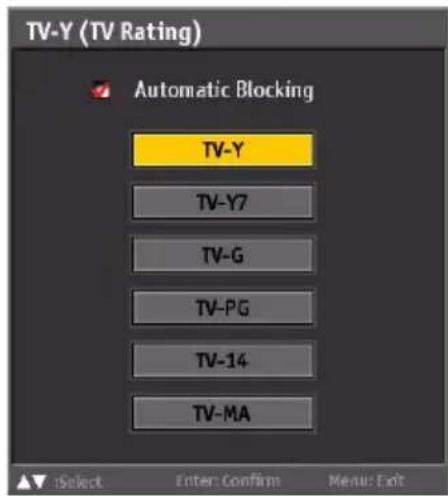

| Rating Description | |
| TV-Y Suitable for young children. | |
| TV-Y7 May not be suitable for children under 7. | |
| TV-G Suitable for all audiences. | |
| TV-PG Parental guidance suggested. | |
| TV-14 | Parental guidance suggested for children under 14. |
| TV-MA | Suitable for mature audiences only; may be unsuitable for children under 17. |
| FV Fantasy violence, combative situations. | |
| D Suggestive dialogue. | |
| L L Coarse language. | |
| S Sexual situations. | |
| V Violence. | |
Adjusting TV Rating
1 Use the ◀ / ▶ keys to select TV Rating and press
2 Use the ▲ / ▼ / ◀ / ▶ keys to select the desired rating and press repeatedly to block or unblock. You can also select Lock All to block all or Unlock All to unblock all.
3 Press ☐ to save and exit the screen.
• MPAA Rating: Use this sub-menu to select the ratings of allowable movies.
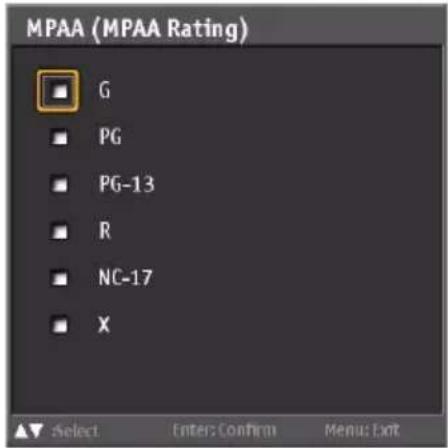
| Rating Description | |
| G | Contains nothing most parents will consider offensive for even their youngest children to see or hear; suitable for young children. |
| PG | May contain some material parents might not like to expose to their young children-material that will clearly need to be examined or inquired about before children are allowed to view the film. |
| PG-13 | May contain some scenes of drug use; use of one of the harsher sexually-derived words may be heard. May be inappropriate for preteens. |
| R | May contain some adult material. Parents are urged to learn more about the film before letting their children view it. |
| NC-17 | May contain explicit sex scenes, an accumulation of sexually-oriented language, and/or scenes of excessive violence. Suitable for adult audiences only. Rating does not signify that the film is obscene or pornographic. |
| X | Contains extreme violence or explicit sex; suitable for adult audiences only. |
Adjusting MPAA Rating
1 Use the ◀ / ▶ keys to select MPAA Rating and press
2 Use the ▲ / ▼ / ◀ / ▶ keys to select the desired rating and press repeatedly to block or unblock.
3 Press ☐ to save and exit the screen.
- Canada English: Use this sub-menu to select the classification categories (based on Canadian ratings) of allowable TV programs and movies.

| Rating Description | |
| E Exempt shows | |
| C | Suitable for viewing by children of all ages. |
| C8+ | Not suitable for children under 8 years of age. |
| G Suitable for general audiences. | |
| PG Parental guidance advised. | |
| 14+ | Suitable for people 14 years of age or older. |
| 18+ | Suitable for people 18 years of age or older. |
Adjusting Canada English Rating
1 Use the ◀ / ▶ keys to select Canada English Rating and press
2 Use the ▲ / ▼ / ◀ / ▶ keys to select the desired rating and press □ repeatedly to block or unblock.
3 Press to save and exit the screen.
- Canada French: Use this sub-menu to select the ratings of allowable TV programs and movies. These ratings are based on the classification categories determined by La Régie du cinéma du Québec.
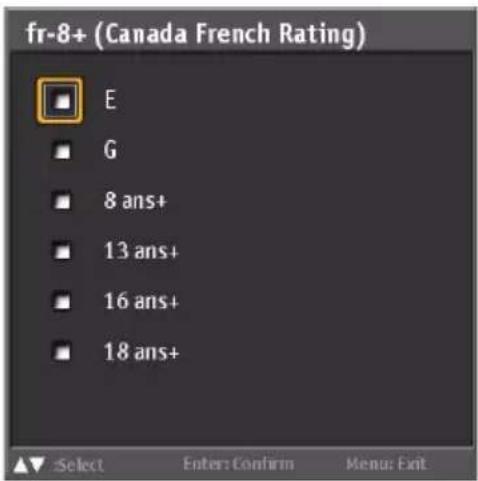
| Rating Description | |
| E Exempt shows | |
| G For general audiences. | |
| 8 ans + | Not suitable for children under 8 years of age. |
| 13 ans+ | Not suitable for persons under 13 years of age. |
| 16 ans+ | Not suitable for persons under 16 years of age. |
| 18 ans+ | Not suitable for persons under 18 years of age. |
Adjusting Canada French Rating
1 Use the ◀ / ▶ keys to select Canada French Rating and press ↻
2 Use the ▲ / ▼ / ◀ / ▶ keys to select the desired rating and press repeatedly to block or unblock.
3 Press to save and exit the screen.
• Channel Block: Channel Block allows you to block channels.
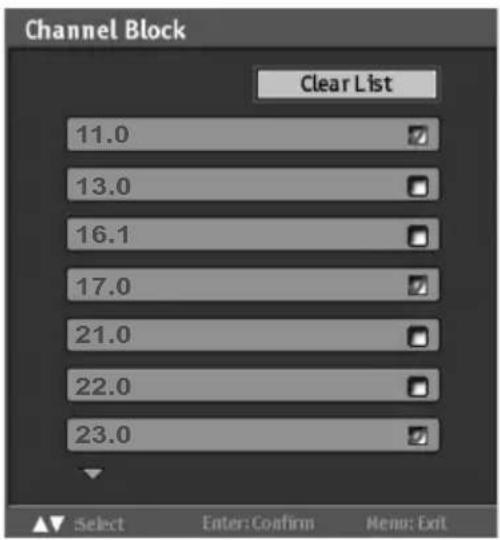
Adjusting Channel Block
1 Use the ◀ / ▶ keys to select Channel Block and press
2 Use the ▲ / ▼ keys to select the desired channel and press repeatedly to block or unblock.
3 Press ☐ to save and exit the screen.
- Change Password: Change Password allows you to change your current password.
Changing Password
1 Use the ◀ / ▶ keys to select Change Password and press
2 Use the Channel keys to enter the current password and press ↩.
3 Use the Channel keys to enter the new password and press 📄.
4 Use the Channel keys to enter the new password again for confirmation and press ☐.
5 Press ☐ to save and exit the screen.
OSD Timeout
Use OSD Timeout to adjust the OSD duration on the screen: 10 sec, 20 sec, or 30 sec.
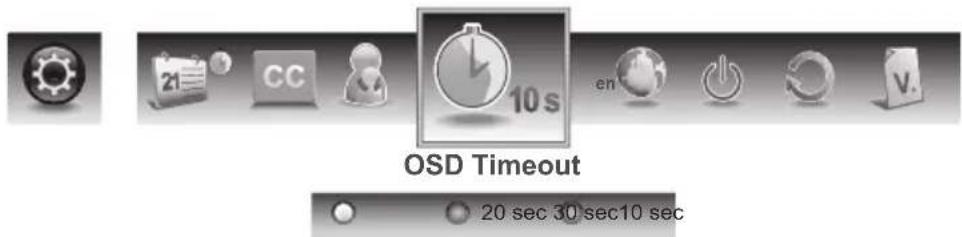
Adjusting OSD Timeout
1 Use the ◀ / ▶ keys to select OSD Timeout and press
2 Press the ◀ / ▶ keys on the remote control to select 10 sec, 20 sec, or 30 sec.
3 Press ☐ to save and exit the screen.
OSD Language
Use OSD Language to select the language to display on the screen: English, French, or Spanish.
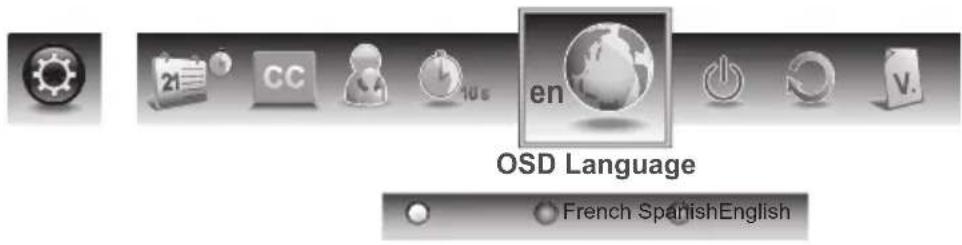
Adjusting OSD Language
1 Use the ◀ / ▶ keys to select OSD Language and press
2 Press the ◀ / ▶ keys on the remote control to select English, French or Spanish.
3 Press ☐ to save and exit the screen.
Power Settings
Use this sub-menu to configure power-related settings for the LED TV.
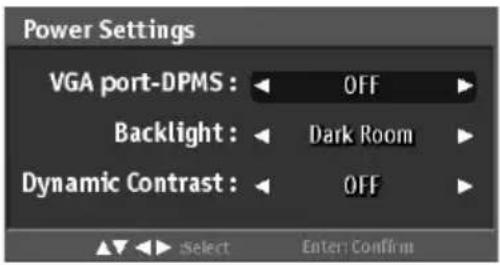
The following options are available:
• VGA port -DPMS: Use this setting to enable or disable VGA port -DPMS.
- Backlight: Use this setting to select the backlight mode: Bright Room, Medium Room, or Dark Room.
- Dynamic Contrast: Use this setting to enable or disable Dynamic Contrast.
Adjusting Power Settings
1 Use the ◀ / ▶ keys to select Power Settings and press
2 Use the ▲ / ▼ keys to select a desired option.
3 Use the ◀ / ▶ keys to adjust the value.
4 Press ☐ to save and exit the screen.
Reset All
Select Yes on this sub-menu to reset all LED TV operational settings. Do this only if any of the following conditions occurs:
- The system fails to respond to the remote control (ensure that the remote control batteries are still working and you are within the transmission range).
- The new configuration settings cause unexpected results.
- You forget the system PIN.

Version
Use this sub-menu to view the LED TV's serial number and firmware version.

WALL MOUNT OPTION
The LED TV has been fitted with VESA FPMPMI compliant mounting holes. These 200 x 100 mm mounting holes allow the unit to be mounted on a wall. Use the four M4 x L10 mm screws to wall mount the LED TV.
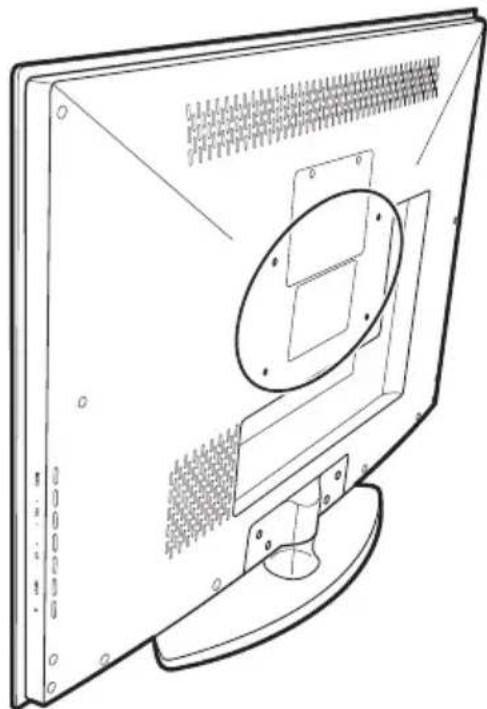
WALL MOUNT INSTALLATION REMINDERS
- Remove the LED TV base first before mounting the unit on a wall.
- It is the user's responsibility to use a UL listed wall mount unit rated to support the weight of this LED TV.
- Please consult qualified contractors for wall mount installation.
CAUTION:
The incomplete or improper mounting of this unit to a wall may cause it to fall down resulting to property damage and/or potentially serious injury.
TROUBLESHOOTING
| Problem Corrective Action | |
| No power | Make sure the power indicator is illuminated blue.Make sure the power cord is securely connected to the AC-in jack and is plugged into a functional AC outlet. You may want to plug in another electrical device to the power outlet to verify that it is supplying the proper voltage. |
| Power is suddenly turned off. | Make sure the sleep timer is turned off. |
| Forgotten PIN | Use Reset All in Settings menu to reset your password. |
| Remote control does not work. | Press only one button at a time.Make sure the batteries are properly inserted.The batteries may already be drained out.Replace batteries with new ones. |
| Remote control code cannot be detected by a universal remote. | Purchase a separate learning remote control.Go to www.wde.com for a list of remote codes. |
| No picture | Make sure the video input cable is properly connected to the correct terminal, and that the correct input mode is enabled. To illustrate, when a VGA cable is connected to display a computer screen, the PC input mode must be enabled.Verify that the antenna is properly connected and that the preferred channel is enabled in the channel list. Press and select Channels/Channel List.Adjust the display settings. |
| No picture or the No Signal message appears when a VGA cable is connected. | Make sure the VGA cable is properly connected to the LED TV's VGA port.Decrease the video resolution setting on the computer and try again.Adjust the display settings. |
| Picture is cut off or appear in a sidebar screen. | Presstoadjust the Aspect ratio. |
| Poor image quality in TV mode (cutoff picture, snowy images). | Check your antenna connection. If necessary, rotate the antenna and wait up to ten seconds for a signal.Reduce signal splitters and excessively long cables.Replace poor antenna cables and/or connectors to improve signal quality.Prss to adjust the Aspect ratio.Adjust the Noise Reduction setting in Picture menu.In HDMI mode, make sure the external device is compatible with the LED TV. |
| Wrong, abnormal or missing colors | If any colors (red, green or blue) are missing, check the video cable to make sure it is securely connected. Loose or broken pins in the cable connector could cause an improper connection.Adjust the Hue, Saturation and Color Temperature settings in Picture menu.Connect the TV to another computer and check if the problem is with the computer screen. |
| No sound | Make sure the audio input cable is properly connected to the correct terminal, and that the correct input mode is enabled.The volume may be muted, press or Vol+ key to turn on the volume.Adjust the Bass, Treble, and Balance settings in Audio menu.If you are using the TV speakers, make sure the TV Speakers option is set to On in Audio menu.If you are using an external audio device, press and select Audio to make sure the TV Speakers option is set to Off in Audio menu. |
| NOTES:If the problem condition persists even after performing the recommended corrective actions, contact us by:Logging on to www.wde.comContacting the Westinghouse Customer Service at (800) 701-0680 or e-mail us at service@wde.com | |
SPECIFICATIONS
| Item Specification | ||
| Model Name LD-325 | Series | |
| Panel | Active Area (Diagonal, mm) | 697.685 (H) x 392.256 (V) |
| Resolution 1366 | (H) x 768 (V) | |
| Brightness (Nits, typ) | 250 | |
| Contrast Ratio (min) | 3000:1 | |
| Response Time (min) | 6.5ms(g-g) | |
| Aspect Ratio 1.7 | (16:9) | |
| Display color 16. | 7M | |
| Audio/Video Input/Output Terminals | H D M I x 2AV with R/L Audio x1VGA with 3.5 mm mini jack x1SPDIF Out x1USB for service x1Tuner x1R/L Audio Line Out X1 | |
| Speaker Out 10W (2 channels) | ||
| AV Timing 480i/p, 720p, 1080i/p | ||
| PC Timing | 640 x 400 @ 85Hz,640 x 480 @ 60Hz/75Hz,800 x 600 @ 56Hz/60Hz/75Hz,1024 x 768 @ 60Hz/70Hz/75Hz/85Hz,1280 x 768 @ 60Hz,1360 x 768 @ 60Hz,1440 x 900 @ 60Hz,1366 x 768 @ 60Hz | |
| Power Consumption (Watts) | ≤ 90W | |
| Power Consumption(Standby, Watts) | <1W | |
| PhysicalSpecifications | Dimensions(WxHxD) | With stand: 769 x 534 x 197 mm30.3 x 21.0 x 7.8 inchWithout stand: 769 x 500 x 39 mm30.3 x 19.7 x 1.5 inch |
| Weight (Net) 7.25 kg (16.04 lb) | ||
| Weight (Gross) 9.8 kg (21.68 lb) | ||
NOTES:
- These product specifications are subject to change without user notification.
- Do not set your computer graphics card to exceed the unit's refresh rates; doing so may cause damage to the LED TV.

www.wde.com
- TABLE OF CONTENTS
- DIGITAL TELEVISION TRANSITION NOTICE
- IMPORTANT INFORMATION
- WARNINGS
- WARNING
- CAUTION
- NOTICES
- FCC COMPLIANCE STATEMENT
- FCC WARNING
- IMPORTANT SAFETY INSTRUCTIONS
- CIRCUIT OVERLOAD
- POWER CORD PROTECTION
- VENTILATION
- WARNINGS AND PRECAUTIONS
- ANTENNA INSTALLATION SAFETY
- OUTDOOR ANTENNA GROUNDING
- LIGHTNING
- POWER LINES
- CLEANING THE LED TV
- TO CLEAN THE SCREEN
- TO CLEAN THE CASE
- DOLBY-DIGITAL NOTICE
- SRS TRADEMARK INFORMATION
- PACKAGE CONTENTS
- CONTROL PANEL
- TERMINALS
- REMOTE CONTROL
- REMOTE CONTROL TRANSMISSION RANGE
- LED TV BASE
- INSTALLING THE LED TV BASE
- REMOVING THE LED TV BASE
- ANTENNA CONNECTION
- OUTDOOR ANTENNA CONNECTION
- CABLE TV (CTV/DTV) CONNECTION
- EXTERNAL DEVICE CONNECTIONS
- IMPORTANT
- POWER CONNECTION
- CONNECTING AC POWER
- INITIAL SETUP
- WESTINGHOUSE HDTV SETUP
- SELECT LANGUAGE
- TIME ZONE
- SETUP WIZARD
- CHANNEL SCAN - ANTENNA
- OBTAIN ATSC TUNER ACTIVATION CODE
- ENTER ACTIVATION CODE
- CHANNEL SCAN IN PROGRESS
- WESTINGHOUSE HDTV SETUP - THROUGH CABLE/SATELLITE BOX
- CHANNEL SCAN - CABLE/SATELLITE
- CABLE/SATELLITE SELECT
- CABLE/SATELLITE BOX INPUT
- RF WARNING
- WESTINGHOUSE HDTV SETUP - NOT THROUGH CABLE/SATELLITE BOX
- BASIC OPERATIONS
- TURNING ON THE POWER
- TURNING OFF THE POWER
- NOTES
- ADJUSTING THE VOLUME
- VOLUME
- MUTE
- CHANGING CHANNELS
- USING THE CH ▲ BUTTONS
- BROWSE CHANNELS
- USING THE CHANNEL KEYS
- SELECTING CHANNEL
- SELECTING DIGITAL CHANNEL
- USING THE FAVORITE KEYS
- SELECTING FAVORITE CHANNELS
- SAVING A CHANNEL AS A FAVORITE
- SELECTING THE INPUT SOURCE
- USING THE INDIVIDUAL INPUT KEYS
- TV, PC, VIDEO, YPBPR, HDMI KEYS
- USING THE INPUT KEY
- SELECT SOURCE USING INPUT KEY
- ADJUSTING THE DISPLAY FORMAT
- FORMAT OPTIONS
- BACKLIGHT OPTIONS
- SETUP MENUS
- DISPLAYING THE SETUP MENU SCREEN
- NAVIGATING THE SETUP MENU SCREEN
- PICTURE
- BRIGHTNESS
- ADJUSTING BRIGHTNESS
- CONTRAST
- ADJUSTING CONTRAST
- SATURATION
- ADJUSTING SATURATION
- VIDEO PRESETS
- ADJUSTING VIDEO PRESETS
- SHARPNESS
- ADJUSTING SHARPNESS
- COLOR TEMPERATURE
- ADJUSTING COLOR TEMPERATURE
- HUE
- ADJUSTING HUE
- RESET
- NOTE
- AUDIO
- BASS
- ADJUSTING BASS
- TREBLE
- ADJUSTING TREBLE
- BALANCE
- ADJUSTING BALANCE
- TV SPEAKER
- ADJUSTING TV SPEAKER
- AUDIO PRESET
- ADJUSTING AUDIO PRESET
- TRUSURROUND HD
- ADJUSTING TRUSURROUND HD
- VIEW MODE
- STANDARD
- FILL
- OVERSCAN
- 1:1 MODE
- ADJUSTING VIEW MODE
- VIEW MODE (VGA)
- ASPECT RATIO
- POSITION
- FINE TUNE
- AUTO SYNC
- TV PROGRAM
- SKIP LIST
- ADDING CHANNELS TO SKIP LIST
- CHANNEL EDIT
- EDITING CHANNEL NAMES
- MTS
- ADJUSTING MTS
- AUTO SEARCH
- MANUAL ADD
- ADDING CHANNELS MANUALLY
- SETTINGS
- DATE AND TIME
- ADJUSTING AUTO CALIBRATION
- ADJUSTING TIME ZONE
- ADJUSTING DATE AND TIME
- ADJUSTING DAYLIGHT SAVING
- CLOSED CAPTIONS
- ADJUSTING CLOSED CAPTIONS SETTINGS
- PARENTAL CONTROL
- ADJUSTING RATING AND BLOCK UNRATED
- ADJUSTING TV RATING
- ADJUSTING MPAA RATING
- ADJUSTING CANADA ENGLISH RATING
- ADJUSTING CANADA FRENCH RATING
- ADJUSTING CHANNEL BLOCK
- CHANGING PASSWORD
- OSD TIMEOUT
- ADJUSTING OSD TIMEOUT
- OSD LANGUAGE
- ADJUSTING OSD LANGUAGE
- POWER SETTINGS
- ADJUSTING POWER SETTINGS
- RESET ALL
- VERSION
- WALL MOUNT OPTION
- WALL MOUNT INSTALLATION REMINDERS
- TROUBLESHOOTING
Brand : WESTINGHOUSE
Model : LD-3255AR
Category : Television