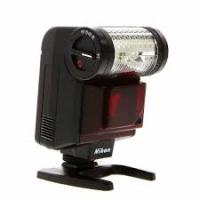
SB-20 - External Flash NIKON - Free user manual and instructions
Find the device manual for free SB-20 NIKON in PDF.


| Product type | External flash |
| Brand | Nikon |
| Model | SB-20 |
| Compatibility | Nikon F4/F4s, F-801/N8008 cameras |
| Guide number (ISO 100, m) | 20 |
| Flash modes | TTL auto, non-TTL auto, manual |
| Metering modes | Matrix, center-weighted, spot |
| Autofocus assist | Built-in AF assist lamp (range approx. 8 m with 50 mm f/1.8 lens) |
| AF assist distance range | 24–105 mm (AF Nikkor lenses); 15–58 mm (with TC-16A) |
| Coverage angle | Approx. 60° x 45° (for 35 mm lens) |
| Tilt / rotation | Vertical rotation -7° to +90°, horizontal rotation 180° left and right |
| Power source | 4 AA batteries (alkaline or Ni-MH rechargeable) |
| Recycling time | Approx. 4 s with fresh alkaline batteries |
| Number of flashes | Approx. 100 per set of batteries (alkaline) |
| Sync | Up to 1/250 s (depending on camera) |
| Dimensions (W x H x D) | Approx. 70 x 115 x 85 mm |
| Weight | Approx. 260 g (without batteries) |
| Material | ABS plastic |
| Maintenance and cleaning | Clean with a soft, dry cloth; avoid moisture and solvents |
| Safety | Do not disassemble; use only recommended batteries; avoid shocks |
| Spare parts and repairability | Contact Nikon customer service; parts available through authorized network |
Frequently Asked Questions - SB-20 NIKON
User questions about SB-20 NIKON
0 question about this device. Answer the ones you know or ask your own.
Ask a new question about this device
Download the instructions for your External Flash in PDF format for free! Find your manual SB-20 - NIKON and take your electronic device back in hand. On this page are published all the documents necessary for the use of your device. SB-20 by NIKON.
USER MANUAL SB-20 NIKON
Autofocus Speedlight
SB20
INSTRUCTION MANUAL
CONTENTS
FOREWORD 3
NOMENCLATURE 4-6
Installing Batteries 7
Attaching Flash Unit to Camera Accessory Shoe 8
Adjusting Flash Head 9
Programmed TTL Auto Flash Shooting
(with Nikon F-501/N2020, F-401/N4004 or
F-301/N2000) 10-11
Flash Shooting. 12-13
AUTOFOCUS FLASH PHOTO
(with Nikon F-501/N2020 or F-401/N4004).... 14-16
SETTING CAMERA SHUTTER SPEED 17
DETERMINING APERTURE 18-32
TTL Mode
(for TTL Automatic Flash Exposure Control) 18-22
A Mode (for Non-TTL Automatic Flash
Exposure Control) 23-27
M Mode (for Manual Flash Exposure Control) ... 28-31
Guide Number 32
SETTING POWER SWITCH 33
STBY (STANDBY) Position 33
ON Position 33
OFF Position 33
READY-LIGHT INDICATIONS 34-35
Ready-Light Warning Functions 35
SYNCHRO-SUNLIGHT FILL-IN
FLASH PHOTOGRAPHY 36-38
In TTL Mode 37
In A Mode 37
In M Mode 38
DIFFUSING THE LIGHT 39-41
Bounce Flash Photography Procedure 40-41
Using A Diffuser 41
SYNCHRONIZATION WITH MOTOR-DRIVEN
CAMERA 42
MULTIPLE FLASH EXPOSURES 42
MULTIPLE FLASH PHOTOGRAPHY 43-46
TTL Multiple Flash Photography 43-45
Manual Multiple Flash Photography 46
AVOIDING "RED EYE" 46
CLOSE-UP FLASH PHOTOGRAPHY IN TTL MODE 47
TIPS ON SPEEDLIGHT CARE 48-49
ABOUT BATTERIES 50
ACCESSIONS 51-52
Sync Cords SC-11 and SC-15 51
TTL Remote Cord SC-17 51
TTL Multi-Flash Adapter AS-10 51
TTL Multi-Flash Sync Cords SC-18 and SC-19 52
Flash Unit Couplers AS-4 and AS-7 52
DC Unit SD-7 52
SPECIFICATIONS 53-55
Nikon
For Nikon F4/F4s, F-801/N8008*
camera users
The Nikon Autofocus Speedlight SB-20 makes it possible to perform Matrix Balanced Fill-Flash and Center-Weighted Fill-Flash in addition to standard TTL Automatic Flash Exposure Control and Non-TTL Automatic Flash Exposure Control. Matrix Balanced Fill-Flash creates a pleasing, natural effect by filling in harsh shadows and bringing out subject detail—without losing the correct background exposure. For details, be sure to read the SB-20 instruction manual and your camera instruction manual. Refer to the tables below for usable flash modes in each camera/ SB-20 combination.
*The Nikon N8008 is sold exclusively in the U.S.A.
Matrix Balanced Fill-Flash
Center-Weighted Fill-Flash
Standard TTL flash
* Exposure mode automatically shifts to A. Select aperture manually.
- TTL Remote Cord SC-24 is required when using DW-20 or DW-21.
F-801/N8008+SB-20
- When using the SB-20's AF illuminator with AF Nikkor lenses, the focal length is from 24 to 105mm . This range shifts to 15 to 58mm when using AF Teleconverter TC-16A. The focusing range is approx. 1 to 8 meters (with AF Nikkor 50mm f/1.8 at normal temperatures, for a standard subject with 35% reflectance).
- For bounce flash photography, set the camera's exposure mode to A or M and select one of the larger apertures.
- When the SB-20 is used in Manual Flash Exposure Control, set the camera's exposure mode to A or M and manually select lens aperture.
Matrix Balanced Fill-Flash
Center-Weighted Fill-Flash
Standard TTL flash
* Exposure mode automatically shifts to A. Select aperture manually.
- Includes AF Teleconverters, AI-type Nikkor lenses (including AI-S), Bellows Focusing Attachment PB-6, Auto Extension Rings, etc.
Thank you for purchasing the Nikon Autofocus Speedlight SB-20. We hope the SB-20 will make photography a much bigger part of your life. Get to know your SB-20, but before using it, be sure to read both your camera instruction manual and this manual. Nikon cannot be held responsible for malfunctions resulting from use of the SB-20 other than as specified in this manual, or from use of the SB-20 with a camera made by a manufacturer other than Nikon.
For Nikon F-401/N4004 camera users
Read the following instructions carefully when using the SB-20 with F-401/N4004 camera.
- Nikon F-401/N4004 camera is designed for use with AF Nikkor lenses, except AF-Nikkor 80mm f/2.8, 200mm f/3.5 IF-ED and Autofocus Converter TC-16/TC-16A.
For most photos in this manual, aperture is set by rotating the lens aperture ring. With the F-401/N4004, however, aperture is set using camera's aperture dial. Do not forget to set and lock the lens at its smallest aperture.
For limited use of non-AF Nikkor lenses, see the F-401/N4004 instruction manual.
- Most of the explanations in this manual dealing with Programmed TTL Auto Flash, TTL Auto Flash, etc., apply to shooting dark subjects. However, by setting the F-401/N4004 to program, aperture-priority or shutter-priority auto exposure mode, with the SB-20 set to TTL, automatic balanced fill-flash is possible in situations where fill-flash is effective, even with a bright subject. For details, see the F-401/N4004 instruction manual. (In manual exposure mode, ordinary TTL fill-flash is possible.)
NOMENCLATURE
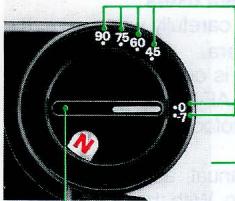
Bounce angle set knob
Rotates from -7^ to 90^ . For bounce flash shooting see page 40.
Battery cover index
Autofocus assist illuminator LED
See pages 14 to 16.
Battery chamber cover
Mounting foot
Bounce angle scale
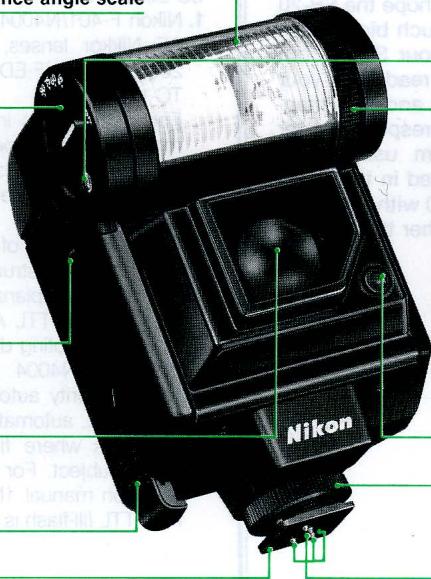
Flash head
Zoom indicator window
Zoom set ring

W (wide) for lenses 28mm or longer

N (normal) for lenses 35mm or longer

T (telephoto) for lenses 85mm or longer
Light sensor for non-TTL auto flash operation
Mounting foot lock nut
Hot-shoe contacts
Reflector slot
For bounce flash (see page 41).
Sync/multiple flash terminal
For (1) off-camera operation with a sync cord and (2) multiple flash photography in manual flash operation (page 46)
External power source terminal
Accepts power cord from Nikon DC Unit SD-7.
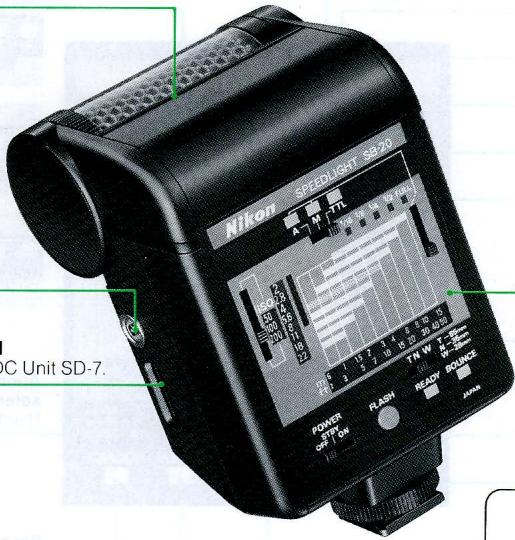
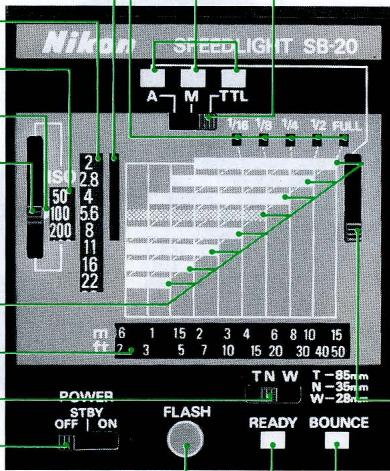
Aperture selection/shooting distance range panel
See pages 18 to 31.
Before using the SB-20, peel off the protective paper covering the panel.
Light output index windows
Used in M mode
Aperture index window
Used in A mode
Aperture scale window
Film speed scale window
Film speed index
Film speed knob
Flash shooting distance range indicators
The patterned bar (fourth bar from the top) shows programmed TTL auto flash information.
Distance scale window
Distance scale selector
Power switch
See page 33.
Open-flash button
For (1) test firing in A mode, (2) multiple flash exposures (page 42) and (3) to turn on SB-20 after it is automatically turned off (page 33).
Flash mode indicators
Flash mode selector
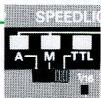
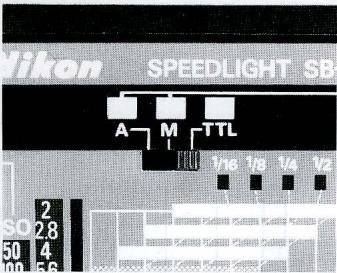
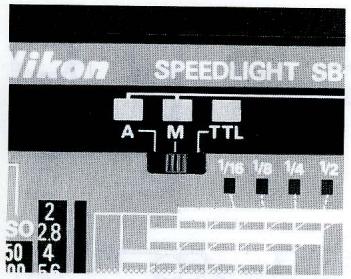
TTL mode—for programmed TTL auto flash/TTL auto flash operation
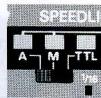
A mode-for nonTTL auto flash operation
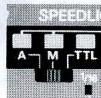
M mode-for manual flash operation.
Aperture index knob/light output selector knob
Used in A and M modes
Bounce set indicator
Lights up when flash head is rotated.
Ready-light
See page 34.
BASIC OPERATION
Installing Batteries
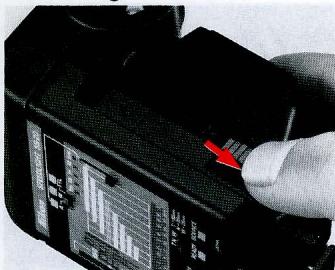
- Remove battery chamber cover.
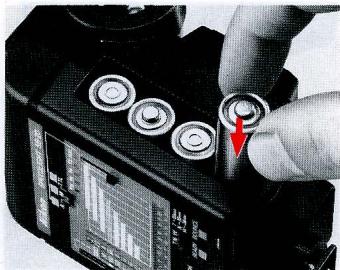
- Load four 1.5V AA-type penlight alkaline-manganese batteries or 1.2V NiCd batteries into the battery chamber.
For battery information, see page 50.
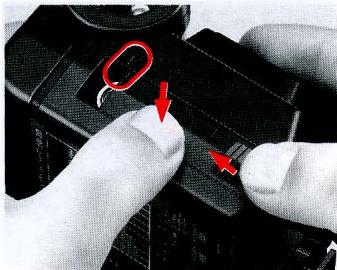
- To reattach battery chamber cover, align front edge of the cover with battery cover index on the flash unit, then push cover down and slide as far as it goes.
Attaching Flash Unit to Camera Accessory Shoe
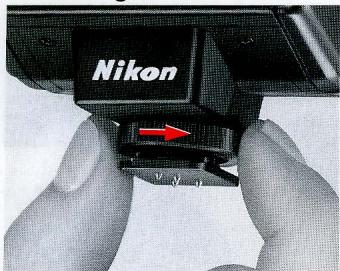
- Turn the mounting foot lock nut clockwise as far as it goes.
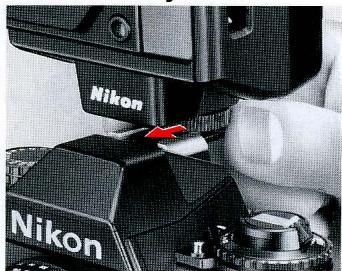
- Slide mounting foot forward into the camera's accessory shoe as far as it goes.
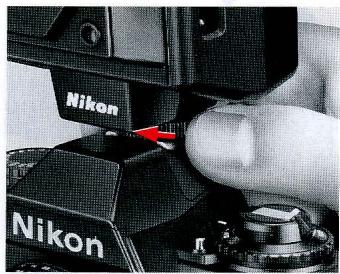
- Tighten lock nut firmly.
With Nikon F3-series cameras with DE-2 or
DE-3 finder: Attach Flash Unit Coupler AS-4 or AS-7 to camera's accessory shoe before mounting the SB-20. The SB-20 cannot be mounted on F3-series camera with the other finders.
Adjusting Flash Head
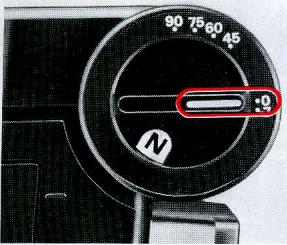
- Make sure bounce angle set knob is set at 0^ .



W (Wide)
For 28mm or longer lenses
N (Normal)
For 35mm or longer lenses
T (Telephoto)
For 85mm or longer lenses
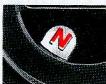
- Rotate zoom set ring until desired zoom setting appears in the window.
Make sure zoom set ring is properly set at its click-stop position.
Programmed TTL Auto Flash Shooting (with Nikon F-501/N2020, F-401/N4004 or
F-301/N2000)
Steps 9 through 11 provide instructions for programmed TTL auto flash shooting with the Nikon F-501/N2020, F-401/N4004 or F-301/N2000 camera. For other flash exposure operations (TTL auto, non-TTL auto and manual flash exposure operations) see "SETTING CAMERA SHUTTER SPEED" on page 17 and "DETERMINING APERTURE," pages 18 to 32.
- The Nikon N2020 and N2000 are sold exclusively in the U.S.A. and Canadian markets.
** The Nikon N4004 is sold exclusively in the U.S.A. market.
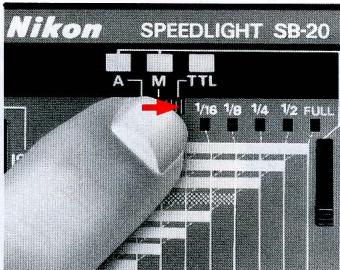
For programmed TTL automatic flash operation, note the following:
- Use Al-S type lenses only. With Nikon F-401/ N4004, use only AF-Nikkor lenses, except AF-Nikkor 80mm f/2.8, 200mm f/3.5 IF-ED and Autofocus Converter TC-16/TC-16A.
For autofocus operation, set the Nikon F-501/N2020's focus mode selector to S for Single Servo Autofocus mode, or set the Nikon F-401/N4004 to A for autofocus mode. For details, see pages 14 to 16.
9. Set the SB-20's flash mode selector to TTL.
For the flash shooting range in programmed TTL automatic operation, see table on page 21.
The shooting distance range panel at the back of the SB-20 also helps you to see the flash shooting range. To read a proper distance range, set the film speed knob and distance scale selector (see page 19.) A patterned bar among the flash shooting distance range indicators shows the shooting distance range in programmed TTL auto operation.
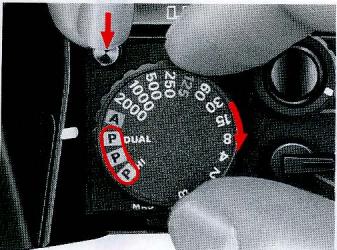
With F-501/N2020
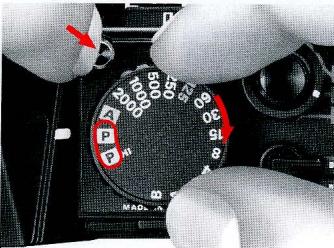
With F-301/N2000
10. Set camera to a programmed exposure mode (P DUAL, P or P HI for F-501/N2020; P or P HI for F-301/N2000).
With the Nikon F-401/N4004, set the camera to either program auto (aperture dial to S, shutter speed dial to A) or shutter-priority auto (aperture dial to S, shutter speed dial to desired speed) exposure mode.
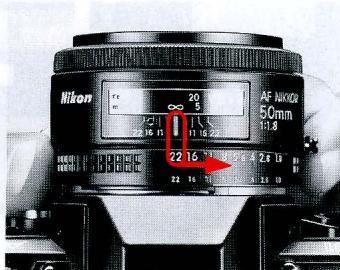
11. Set lens to minimum aperture (largest f-number).
With AF Nikkor lenses, lock lens aperture at minimum setting. (See the lens instruction manual).
With the Nikon F-401/N4004, this procedure is unnecessary because the lens is always locked at the smallest aperture.
Flash Shooting
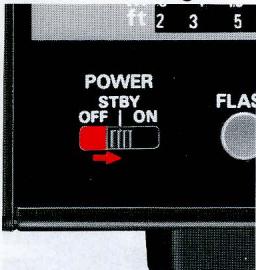
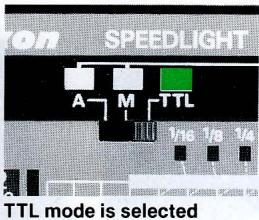
12. Set power switch to STBY (standby position) to turn on SB-20.
LED indicating selected flash mode immediately lights up.
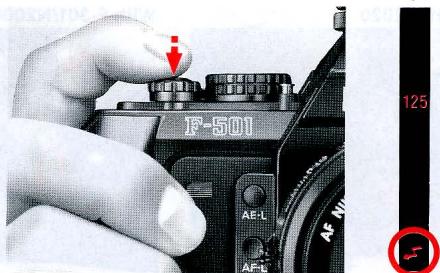
- Lightly press shutter release button and viewfinder ready-light comes on to indicate flash is ready to fire.
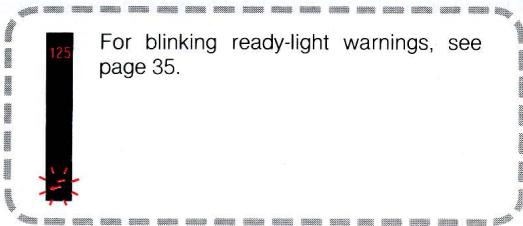
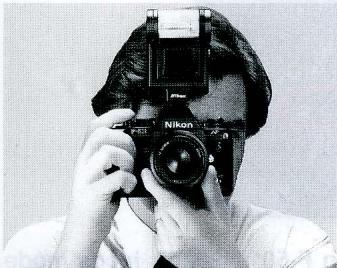
14. Fully depress shutter release button to take picture.
Unless viewfinder ready-light blinks after the shot, your flash exposure will be perfect; if it does blink, picture may be underexposed—move closer to subject.
Do not fire flash toward or near the eyes; it may damage the retina.
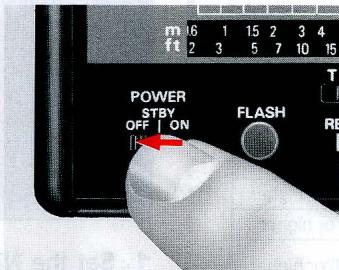
15. Turn off the SB-20.
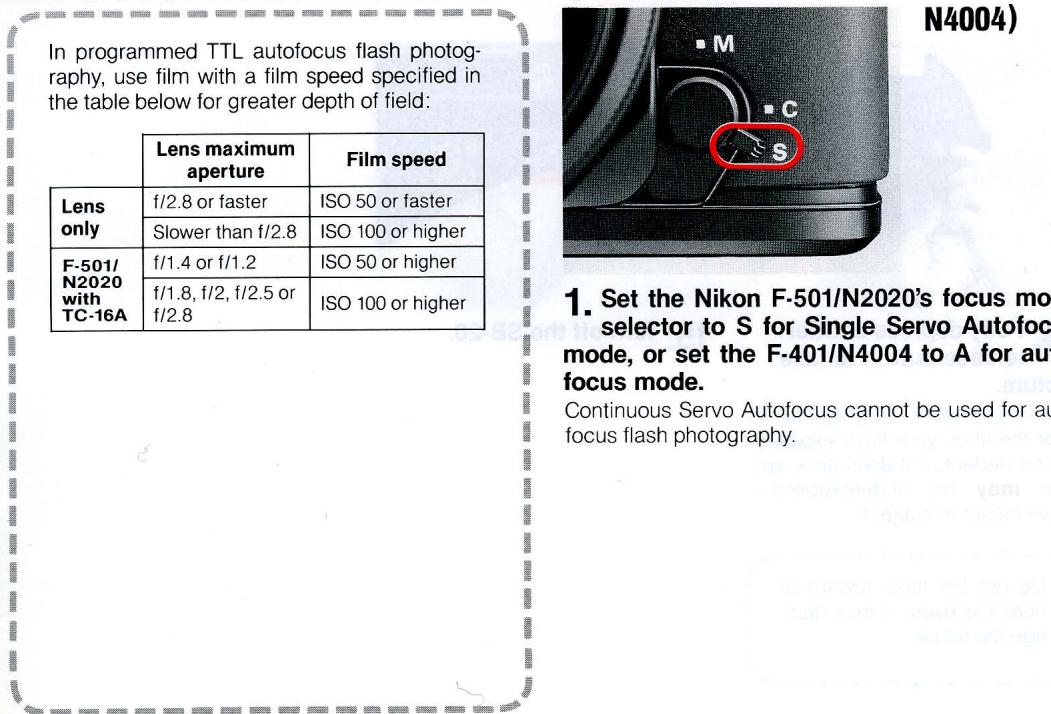
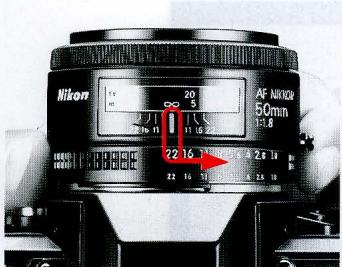
2. Set aperture.
With Nikon F-401/N4004, use camera's aperture dial. Don't forget to lock lens at minimum position.
For programmed TTL operation, set to smallest lens aperture (largest f-number) and lock the lens aperture. (For details, see the lens instruction manual).
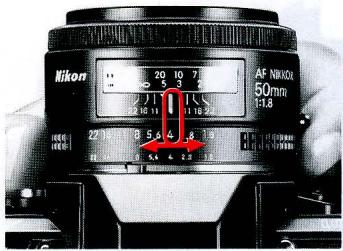
For other flash operations, set as follows:
| Lens maximum aperture | Aperture setting | |
| Lens only | f/2.8 or faster | f/2.8 or larger f-number (f/2.8, f/4, f/5.6, etc.) |
| Slower than f/2.8 | f/5.6 or larger f-number (f/5.6, f/8, f/11, etc.) | |
| F-501/N2020 with TC-16A | f/1.4 or f/1.2 | f/2 or larger f-number (f/2, f/2.8, f/4, etc.) |
| f/1.8, f/2, f/2.5 or f/2.8 | f/4 or larger f-number (f/4, f/5.6, f/8, etc.) |
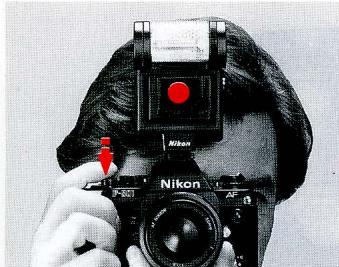
3. Lightly press camera shutter release button.
When ready-light comes on but ambient light is insufficient for autofocus operation, AF illuminator fires to start autofocus operation.
If ambient light is sufficient, the AF illuminator does not fire.
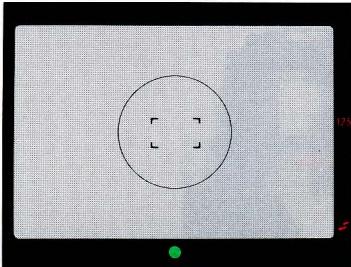
4. Confirm whether the green in-focus indicator LED lights up, then fully depress the shutter release button.
If focus-not-possible indicator LED (×) remains lit when using the Nikon F-501/N2020, or if focus indicator LED () blinks with Nikon F-401/N4004, autofocus flash photography is impossible. Focus manually on the clear matte field.
SETTING CAMERA SHUTTER SPEED
Set camera's shutter speed, referring to the table below.
As shown in the table, automatic sync speed setting is available with most Nikon cameras.
| Nikon camera | Synchronization speed (sec.) | Camera setting | Running shutter speed (sec.) | Viewfinder shutter speed indication | |
| F-501/N2020* F-301/N2000* | 1/125 or slower | P DUAL (F-501/N2020 only), P, P HI | 1/125 | 125 lights up | |
| A, 1/2000 ~ 1/250 sec. | 1/125 | 125 lights up and LED for proper non-flash shutter speed blinks | |||
| 1/125 ~ 1 sec. and B | as set | LED for manually set shutter speed lights up and LED for proper non-flash shutter speed blinks: no indication at B | |||
| F-401/N4004 | 1/100 or slower | Shutter dial | Aperture dial | ||
| A | S | 1/100 | — | ||
| A | 1.4~32 | — | |||
| 1/2000 ~ 1/125 sec. | S | — | |||
| 1/60 ~ 1 sec. | S | as set | — | ||
| 1/2000 ~ 1/125 sec. | 1.4~32 | 1/100 | — | ||
| 1/60 ~ 1 sec. and B | 1.4~32 | as set | — | ||
| FA | 1/250 or slower | All shutter speed settings except M250 and B in P, S and A modes | 1/250 | LCD shows 250 | |
| 1/4000 ~ 1/500 sec. in M mode | 1/250 | LCD shows M250 | |||
| 1/250 ~ 1 sec. in M mode | as set | LCD shows manually set shutter speed | |||
| M250 and B in P, S, A and M modes** | as set | No indication | |||
| FE2 | 1/250 or slower | A, 1/4000 ~ 1/500 sec. | 1/250 | — | |
| 1/250 ~ 8 sec. | as set | — | |||
| M250 and B** | as set | — | |||
| FG | 1/90 or slower | P, A, 1/1000 ~ 1/125 sec. | 1/90 | Two LEDs representing 1/90 sec. light up | |
| 1/60 ~ 1 sec | as set | LED for manually set shutter speed lights up | |||
| M90 and B** | as set | No indication | |||
| F3-series (via AS-4 or AS-7 coupler) | 1/80 or slower | A | 1/80 | LCD shows 80 | |
| 1/2000 ~ 1/125 sec. | 1/80 | LCD shows M80 | |||
| 1/60 ~ 8 sec. X, B and T | as set | LCD shows manually set shutter speed, no indication at B or T | |||
| FM2 | 1/250 or slower | 1/250 ~ 1 sec. and B | as set | — | |
| FG-20 | 1/90 or slower | A, (•), 1/1000 ~ 1/125 sec. | 1/90 | — | |
| 1/60 ~ 1 sec., M90 and B | as set | — | |||
*In TTL mode, programmed TTL auto flash operation will be performed with the AI-S type lens and F-501/N2020 or F-301/N2000 set at programmed auto exposure mode.
**Improper for programmed TTL auto flash operation and TTL auto flash operation.
DETERMINING APERTURE
TTL Mode
(for TTL Automatic Flash Exposure Control)
TTL mode is for exclusive use with Nikon F-501/N2020, F-401/N4004, F-301/N2000, FA, FE2, and FG cameras only.
For TTL auto flash operation with the Nikon F-501/N2020, F-401/N4004, or F-301/N2000, be sure to set the camera to aperture priority auto or manual exposure mode.
For correct exposure in TTL mode, use film with a film speed specified in the table below:
| Camera | Film speed |
| F-501/N2020 and F-301/N2000 | ISO 25 to 1000 |
| F-401/N4004, FA, FE2 and FG | ISO 25 to 400 |
To determine aperture with the SB-20's aperture selection/shooting distance range panel for TTL auto flash operation, read the following: (For programmed TTL auto flash operation, see pages 10 to 11.)
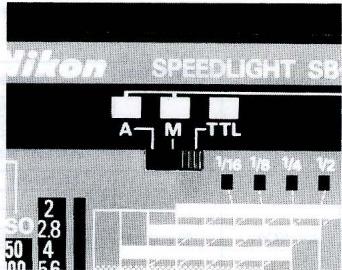
1. Set SB-20's mode selector to TTL.
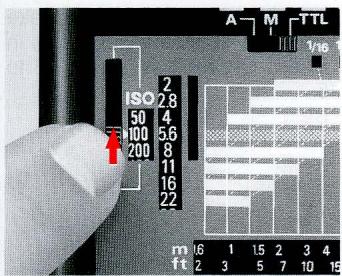
2. Align film speed in use with the film speed index.
For intermediate film speeds, use figure nearest the film speed in use. With ISO 32 film, for example, set to ISO 25. With film speeds not listed on the scale, be sure subjects are sufficiently within the shooting distance range indicated on the back of the SB-20.
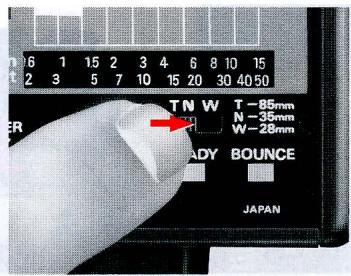
- To read proper shooting distance range, set distance scale selector to letter shown in zoom indicator window.
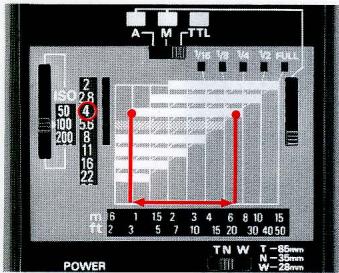
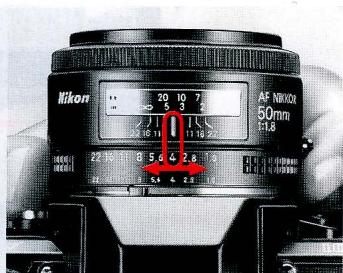
4. Select and set aperture.
The aperture scale window shows usable apertures. (Depending on film speed in use, all usable apertures may not be shown in the aperture scale window; for usable apertures, see table on next page.)
For example, with the film speed index at ISO 100, you can select any aperture from f/2 to f/22. With the zoom set ring at N, selecting f/4 lets you take pictures of subjects 1m to 7.5m (approx. 3.3ft. to 25 ft.) away.
With Nikon F-401/N4004, use camera's aperture dial.
Next, turn on flash unit and take shot in the same manner shown in "BASIC OPERATION," steps 12 to 15.
Unit: m (ft)
Usable apertures/shooting distance range in TTL mode
| ISO film speed | Shooting distance range | |||||||||
| 1000* | 800* | 400 | 200 | 100 | 50 | 25 | With zoom set at W | With zoom set at N | With zoom set at T | |
| f/stop | 2.8+1/3 | 2.8 | 2 | - | - | - | - | 2.8~20(9.2~66) | 3.8~20(12~66) | 4.5~20(15~66) |
| 4+1/3 | 4 | 2.8 | 2 | - | - | - | 2.0~15(6.6~49) | 2.7~20(8.9~66) | 3.2~20(10~66) | |
| 5.6+1/3 | 5.6 | 4 | 2.8 | 2 | - | - | 1.4~11(4.6~36) | 1.9~15(6.2~49) | 2.3~18(7.5~59) | |
| 8+1/3 | 8 | 5.6 | 4 | 2.8 | 2 | - | 1.0~7.8(3.3~25) | 1.3~10(4.3~33) | 1.6~12(5.2~39) | |
| 11+1/3 | 11 | 8 | 5.6 | 4 | 2.8 | 2 | 0.7~5.5(2.3~18) | 1.0~7.5(3.3~25) | 1.2~9.0(3.9~30) | |
| 16+1/3 | 16 | 11 | 8 | 5.6 | 4 | 2.8 | 0.6~3.9(2.0~13) | 0.7~5.3(2.3~17) | 0.8~6.3(2.6~21) | |
| 22+1/3 | 22 | 16 | 11 | 8 | 5.6 | 4 | 0.6~2.7(2.0~8.9) | 0.6~3.7(2.0~12) | 0.6~4.5(2.0~15) | |
| - | - | 22 | 16 | 11 | 8 | 5.6 | 0.6~1.9(2.0~6.2) | 0.6~2.6(2.0~8.5) | 0.6~3.2(2.0~10) | |
| - | - | - | 22 | 16 | 11 | 8 | 0.6~1.4(2.0~4.6) | 0.6~1.9(2.0~6.2) | 0.6~2.2(2.0~7.2) | |
| - | - | - | - | 22 | 16 | 11 | 0.6~1.0(2.0~3.3) | 0.6~1.3(2.0~4.3) | 0.6~1.5(2.0~5.0) | |
- For Nikon F-501/N2020 and F-301/N2000 only.
= Programmed TTL auto flash information.
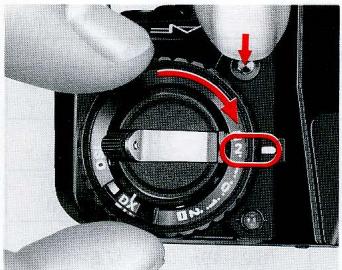
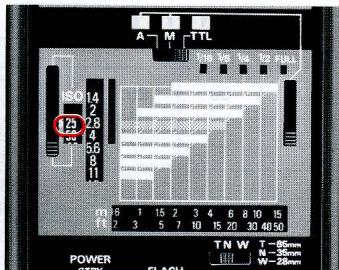
Exposure compensation in TTL mode
With a dark subject (with low reflectivity) or one that is light in tone (having high reflectivity), over- or under-exposure may occur. To prevent this, compensate exposure by rotating camera's exposure compensation dial. With the FG, push the exposure compensation button. (For details, see camera instruction manual.)
The shooting distance range for TTL automatic flash operation varies with the amount of exposure compensation. For compensated distance range, see table at right, then reset film speed setting on the back of SB-20.
For example, with ISO 100 film and camera's exposure compensation dial set at +2 , read 25 on the table and reset the SB-20's film speed index to 25.
With the zoom set ring at N and an aperture of f/4, the flash shooting distance range—which is 1m to 7.5m at
ISO 100—shifts to 0.6m to 3.7m at ISO 25.
The Nikon F-401/N4004 has no exposure compensation dial, and compensates exposure with automatic balanced fill-flash.
| Film speed in use\Exposure compen-sation value | +2 | +1 | 0 | -1 | -2 |
| 25 | 25 | 50 | 100 | ||
| 50 | 25 | 50 | 100 | 200 | |
| 100 | 25 | 50 | 100 | 200 | 400 |
| 200 | 50 | 100 | 200 | 400 | 800* |
| 400 | 100 | 200 | 400 | 800* | |
| 800*/1000* | 200 | 400 | 800* |
*For Nikon F-501/N2020 and F-301/N2000 only.
Not possible; make the necessary compensation in the non-TTL automatic mode (see the following) or shoot on manual.
A Mode (for Non-TTL Automatic Flash Exposure Control)
Use the SB-20 on A mode for automatic operation with Nikon cameras other than Nikon F-501/N2020, F-401/N4004*, F-301/N2000, FA, FE2, and FG.
The following procedure lets you select aperture with the SB-20's aperture selection/shooting distance range panel for non-TTL auto flash operation.
*Non-TTL automatic operation is not possible when Nikon F-401/N4004 is set to either program or shutter-priority auto exposure mode.
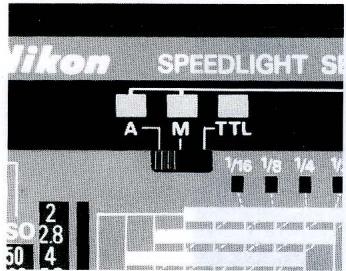
- Set SB-20's mode selector to A.
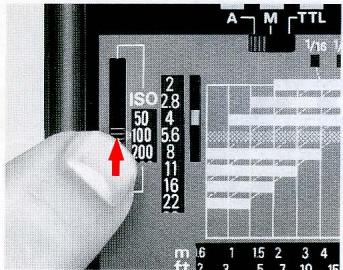
2. Align film speed in use with film speed index.
For intermediate film speeds, use the figure nearest the film speed in use. With ISO 32 film, for example, set to ISO 25. With film speeds not listed on the scale, be sure subjects are sufficiently within the shooting distance range indicated on the back of the SB-20.
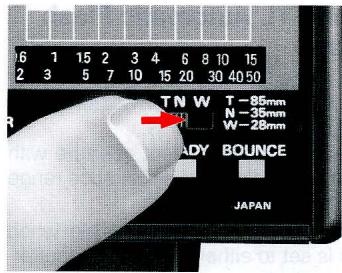
- To read proper shooting distance range, set distance scale selector to letter shown in zoom indicator window.
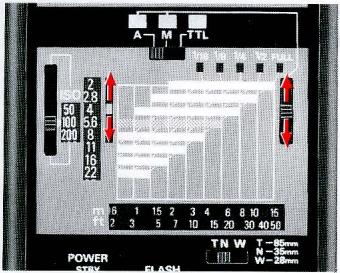
4. Select appropriate aperture and set aperture index knob.
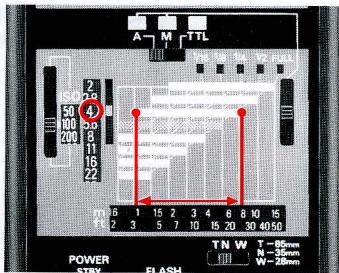
The aperture index window shows usable apertures. With the film speed index at ISO 100, for example, you can select any aperture from f/2 to f/8.
With the zoom set ring at N, if you select f/4, you can take pictures of subjects 1m to 7.5m (approx. 3.3ft. to 25 ft.) away.
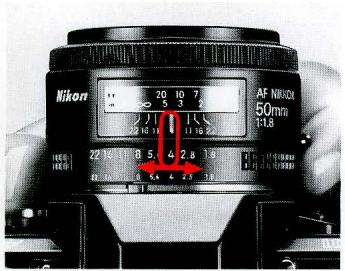
Next, turn on flash unit and take shot in the same manner shown in "BASIC OPERATION," steps 12 to 15.
5. Set your chosen aperture.
With Nikon F-401/N4004, use camera's aperture dial.
Usable apertures/shooting distance range in A mode Unit: m (ft)
| ISO film speed | Shooting distance range | |||||||||
| 1600 | 800 | 400 | 200 | 100 | 50 | 25 | Zoom set at W | Zoom set at N | Zoom set at T | |
| fstop | 8 | 5.6 | 4 | 2.8 | 2 | 1.4 | - | 1.4~11(4.6~36) | 1.9~15(6.2~49) | 2.3~18(7.5~59) |
| 11 | 8 | 5.6 | 4 | 2.8 | 2 | 1.4 | 1.0~7.8(3.3~26) | 1.3~10(4.3~33) | 1.6~12(5.2~39) | |
| 16 | 11 | 8 | 5.6 | 4 | 2.8 | 2 | 0.7~5.5(2.3~18) | 1~7.5(3.3~25) | 1.2~9(3.9~30) | |
| 22 | 16 | 11 | 8 | 5.6 | 4 | 2.8 | 0.6~3.9(2.0~13) | 0.7~5.3(2.3~17) | 0.8~6.3(2.6~21) | |
| 32 | 22 | 16 | 11 | 8 | 5.6 | 4 | 0.6~2.7(2.0~8.9) | 0.6~3.7(2.0~12) | 0.6~4.5(2.0~15) | |
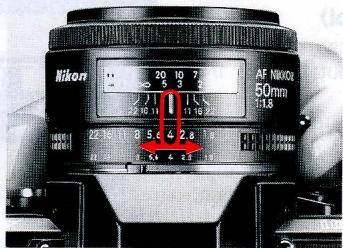
Exposure compensation in A mode
With a dark background (one with low reflectivity) or one that is light in tone (having high reflectivity), over- or underexposure may occur. To prevent this, compensate exposure by stopping down or opening aperture. With a dark background, stop down the aperture 1/2 to one full f/stop; when the background is light in tone, open the aperture 1/2 to one full f/stop.
With the Nikon F-401/N4004, set aperture using the camera's aperture dial.
M Mode (for Manual Flash Exposure Control)
In M mode, you can choose the amount of light output: full, 1/2, 1/4, 1/8 or 1/16.
To determine aperture and/or light output with the SB-20's aperture selection/shooting distance range panel for manual flash operation, read the following.
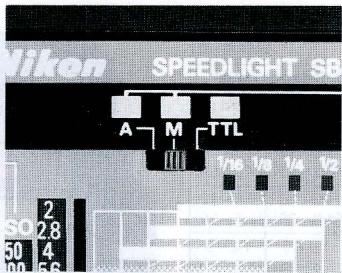
1. Set the SB-20's flash mode selector to M.
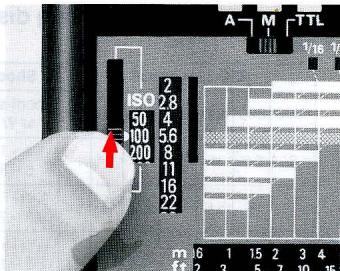
2. Align film speed in use with the film speed index.
For intermediate film speeds, use the figure on the scale nearest the film speed in use. With ISO 32 film, for example, set to ISO 25.
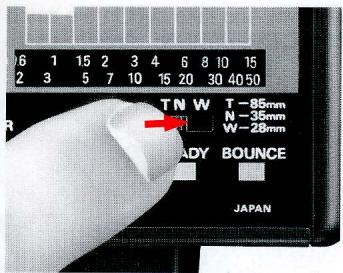
- To read proper shooting distance, set distance scale selector to letter shown in zoom indicator window.
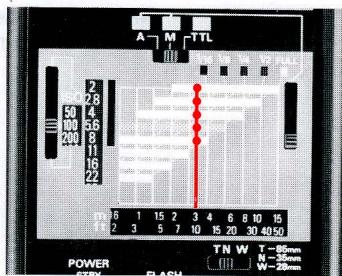
- Choose and set aperture.
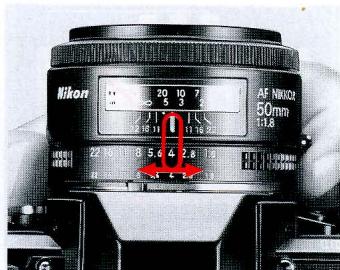
The aperture index window shows usable apertures. For example, with film speed index set at ISO 100 and the zoom set ring at N, and if you want to shoot a subject 3m away, you can select any aperture from f/2 to f/8. You can also determine aperture using the SB-20's guide number (GN). For details, see page 32.
With Nikon F-401/N4004, use camera's aperture dial.
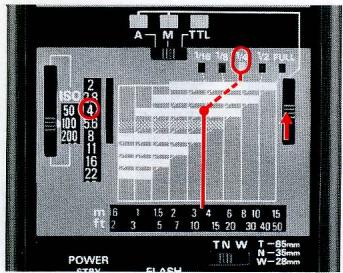
Next, turn on the flash unit and take shot in the same manner shown in "BASIC OPERATION," steps 12 to 15.
5. Set light output selector to appropriate setting.
Follow the appropriate vertical line upward from the distance scale window until it intersects with the horizontal distance scale indicator line for the selected aperture. Then follow the diagonal dotted line upward to determine the correct light output for the aperture selected. For example, with the film speed set at ISO 100 and the zoom set ring at N, to shoot a subject 3.7m away at f/4, fire the flash at 1/4 light output. Set the light output selector so the yellow output index shows "1/4" in the window below.
To determine light output before selecting aperture
Use the following procedure instead of steps 4 and 5 to determine light output before selecting aperture:
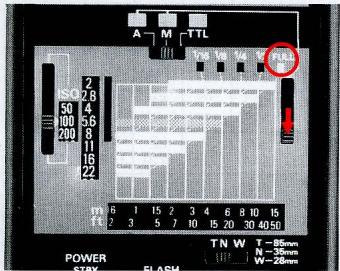
1. Set the light output selector so the yellow light output index indicates the desired light output.
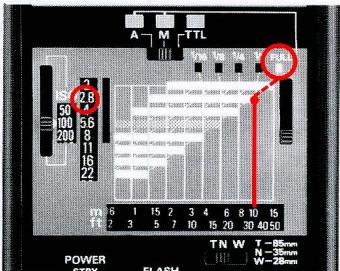
In the example photo, full light output is selected.
2. Determine and set proper lens aperture.
To determine correct aperture, follow both the vertical line from the distance scale window and the dotted line from the light output window to the point of intersection. If the lines do not intersect, move closer to subject or reset light output selector for more light output.
For example, with the film speed index at ISO 100 and zoom set ring at N, to shoot a subject 10m away at full light output, follow both the vertical line from figure 10 in the distance scale window and the dotted line from the light output window to FULL. The two lines intersect at distance range indicators for f/2.8—you must set your lens to f/2.8.
To take intentionally over- or underexposed pictures, open or stop-down the lens aperture.
Guide Number
See the table at right for guide numbers of the film speeds and zoom settings.
In M mode, use the following equation to determine aperture:
$$ f / s t o p = \frac {\text {g u i d e n u m b e r}}{\text {f l a s h - t o - s u b j e c t d i s t a n c e}} $$
With ISO 400 film and the zoom set knob at N, the SB-20's guide number is 60(m) for full output. If the subject is 15m away, divide 60 by 15 to get f/4.
Unit: m (ft.)
| Light output | Zoom setting | ISO film speed | ||||||
| 1600 | 800 | 400 | 200 | 100 | 50 | 25 | ||
| Full | W | 88(289) | 62(203) | 44(144) | 31(102) | 22(72) | 15(49) | 11(36) |
| N | 120(394) | 85(279) | 60(197) | 42(138) | 30(98) | 21(69) | 15(49) | |
| T | 144(472) | 102(335) | 72(236) | 51(167) | 36(118) | 25(82) | 18(59) | |
| 1/2 | W | 62(203) | 44(144) | 31(102) | 22(72) | 15(49) | 11(36) | 7.8(25) |
| N | 85(279) | 60(197) | 42(138) | 30(98) | 21(69) | 15(49) | 11(36) | |
| T | 102(335) | 72(236) | 51(167) | 36(118) | 25(82) | 18(59) | 13(43) | |
| 1/4 | W | 44(144) | 31(102) | 22(72) | 15(49) | 11(36) | 7.8(25) | 5.5(18) |
| N | 60(197) | 42(138) | 30(98) | 21(69) | 15(49) | 11(36) | 7.5(25) | |
| T | 72(236) | 51(167) | 36(118) | 25(82) | 18(59) | 13(43) | 9(30) | |
| 1/8 | W | 31(102) | 22(72) | 15(49) | 11(36) | 7.8(25) | 5.5(18) | 3.9(13) |
| N | 42(138) | 30(98) | 21(69) | 15(49) | 11(36) | 7.5(25) | 5.3(17) | |
| T | 51(167) | 36(118) | 25(82) | 18(59) | 13(43) | 9(30) | 6.3(21) | |
| 1/16 | W | 22(72) | 15(49) | 11(36) | 7.8(25) | 5.5(18) | 3.9(13) | 2.7(8.8) |
| N | 30(98) | 21(69) | 15(49) | 11(36) | 7.5(25) | 5.3(17) | 3.7(12) | |
| T | 36(118) | 25(82) | 18(59) | 13(43) | 9(30) | 6.3(21) | 4.5(15) | |
SETTING POWER SWITCH
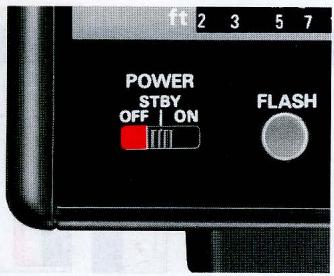
STBY (STANDBY) Position
Use to conserve energy and shorten recycling time.
With Nikon F-501/N2020, F-401/N4004, F-301/ N2000, FA, FE2, and FG:
Use the SB-20's STBY position to turn on the SB-20. In STBY position, when the camera's meter turns off, in one or two minutes the SB-20 turns off automatically. To turn the SB-20 on again, lightly press the camera's shutter release button.
Note: When the Nikon FA or FE2 is connected to Nikon Motor Drive MD-12 via a remote cord, the camera's meter stays on and the SB-20 remains on at STBY position.
With other cameras:
Though the ON position is normally recommended for turning on the flash unit, STBY can also be used.
With other Nikon cameras, even if the camera's exposure meter stays on, the SB-20 automatically turns off when not used for one or two minutes. To turn on again, set power switch to ON or OFF position, then reset to STBY. For convenience, you may also push the open-flash button to turn on the SB-20.
ON Position
With cameras other than the Nikon F-501/N2020, F-401/N4004, F-301/N2000, FA, FE2, and FG:
This position is normally used to turn on the SB-20.
With the Nikon FA, FE2, and FG:
To turn on the SB-20 when using mechanical shutter settings (M250, M90 or B), set power switch to ON.
OFF Position
When not using the flash unit, always set the power switch to OFF position.
READY-LIGHT INDICATIONS
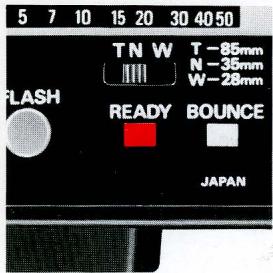
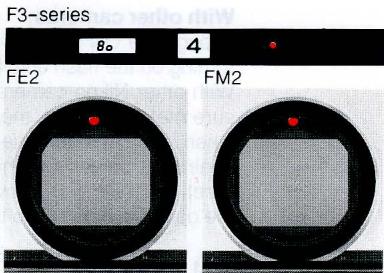
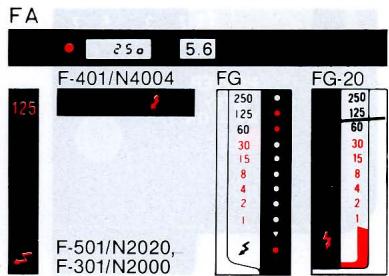
When the flash unit is turned on, the SB-20's ready-light lights up to indicate the flash is ready to fire.
To activate the viewfinder ready-light function when using the Nikon FA, FE2, F-501/N2020, F-401/N4004, F-301/N2000, FG, or FG-20, first turn on the camera's meter by lightly pressing the shutter release button.
With alkaline-manganese batteries, if the ready-light takes more than 30sec. to light up, replace the batteries with a fresh set.
Ready-Light Warning Functions
To prevent errors, the ready-light inside the camera's viewfinder blinks in the cases listed below. When blinking occurs, check the SB-20's flash mode selector setting, the camera's shutter speed/mode selector setting or film speed setting and adjust as necessary.
1) When SB-20 is set at TTL with cameras other than Nikon F-501/N2020, F-401/N4004, F-301/N2000, FA, FE2, or FG. Reset SB-20's flash mode selector to A or M.
2) When using the FA, FE2, or FG to perform TTL automatic flash photography with the camera's shutter speed dial set at a mechanical setting (M250, M90 or B). Reset shutter speed dial to another shutter speed setting. For M250, M90 or B setting, reset SB-20's flash mode selector to A or M.
3) When performing programmed TTL auto or TTL auto flash operation with a camera film speed setting beyond the usable range. Use film within the appropriate range for TTL auto flash photography (ISO 25 to 400 with the F-401/N4004, FA, FE2 or FG; ISO 25 to 1000 with the F-501/N2020 or F-301/N2000). With the FA, ready-light also blinks when the film speed setting on the camera is near ISO 12.
4) When shutter speed set on the FE or FM2 is faster than the flash sync speed. Set the shutter speed to the flash sync speed or slower one.
5) With the Nikon F-401/N4004, when the built-in flash and SB-20 are OFF, and when the camera detects flash is effective, the ready-light in the camera's viewfinder blinks when the shutter release button is lightly pressed.
With the SB-20 in TTL or A mode, if both viewfinder ready-light and SB-20 ready-light blink after taking pictures (to warn that lighting might have been insufficient for correct exposure), confirm subject is within the flash shooting distance range and, if necessary, use a wider aperture or move closer to the subject.
With the Nikon F-401/N4004, for scenes where the background is extremely bright, the ready-light may not blink after the shot, even if flash is insufficient for correct exposure.
With weak batteries, ready-lights blink to indicate insufficient flash power, even if the subject is within the shooting distance range; replace batteries with a fresh set.
SYNCHRO-SUNLIGHT FILL-IN FLASH PHOTOY
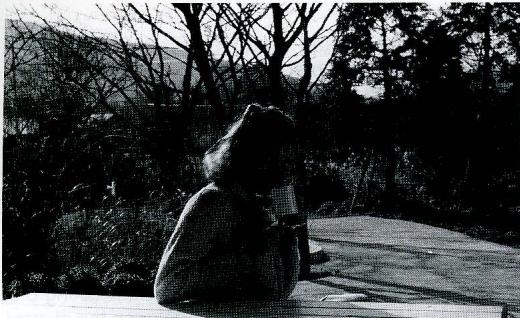
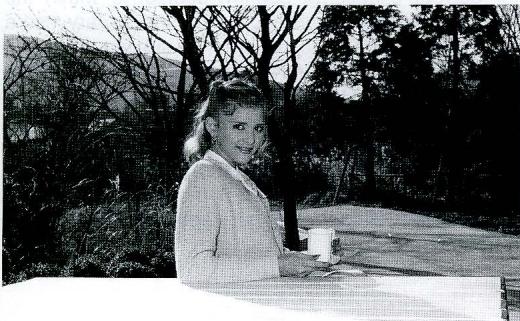
For backlit subjects, to fill in shadows and balance lighting, use the SB-20 even in daytime.
In the following, use a slower shutter speed to avoid a dark background.
Without flash:
The backlit subject comes out too dark.
With flash:
Both the subject and the background come out properly exposed.
By setting the F-401/ N4004 to program, aperture-priority or shutter-priority auto exposure mode, with the SB-20 set to TTL, automatic balanced fill-flash is possible in situations where fill-flash is effective, even with a bright subject. For details, see the F-401/N4004 instruction manual. (In manual exposure mode, ordinary TTL fill-flash is possible.)
In TTL Mode
- Set the camera shutter speed manually to a flash synchronization speed or slower speed.
- Frame the background in the camera viewfinder, turn on the camera's exposure meter to determine aperture for a correct background exposure, then set the aperture on the lens.
- Set the flash mode selector to TTL, turn on the SB-20 and take the shot.
With a strongly backlit subject (e.g., scene which includes the sun), it may be difficult to obtain desired exposure balance. In this case, use the SB-20 in M mode.
Note: Do not use programmed TTL flash operation for fill-in flash photography.
In A Mode
- Determine correct aperture for the backlit subject (according to method on page 25) by referring to the SB-20's aperture selection/distance range panel, then set both the aperture index and the aperture on the lens.
- Frame the background in the camera viewfinder and turn on camera meter to determine proper shutter speed for the aperture set on the lens. The shutter speed must be equal to or slower than the flash sync speed—without a proper shutter speed you cannot perform fill-in flash photography in A mode.
- Set the shutter speed from step 2 on camera's shutter speed dial.
- Set the flash mode selector to A, turn on the flash unit and take the shot.
With a strongly backlit subject, perform fill-in flash photography in M mode.
In M Mode
- Manually set the camera shutter speed to a flash synchronization speed or slower speed.
- Frame the background in the camera's viewfinder, then turn on the camera's exposure meter to read proper aperture for correct background exposure, and set the aperture on the lens.
- Calculate the flash-to-subject distance using the equation below and set the SB-20 at the calculated distance.
$$ f l a s h - t o - s u b j e c t = \frac {g u i d e n u m b e r ^ {\star}}{f / s t o p} $$
- For guide number, see page 32.
- Set the SB-20's flash mode selector to M, turn on the flash unit and take the shot.
To eliminate harsh shadows caused by ambient daylight, decrease flash illumination by one or two f/stops using one of the methods below.
- Use an aperture one or two f/stops smaller than that determined in step 2 in combination with a shutter speed slower by one or two steps.
- Reduce the amount of light output by one or two steps by resetting the light output selector knob.
- Use a flash-to-subject distance from 1.4 to two times longer than that determined using the equation in step 3.
DIFFUSING THE LIGHT

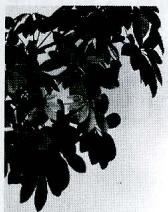
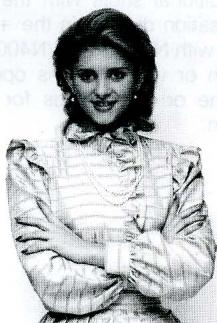
Diffused light eliminates harsh shadows and creates attractive portraits. There are two ways to diffuse light:
- Bounce light off a broad reflective surface such as the ceiling;
- Use a diffuser between the flash and the subject.
Direct flash: Harsh, unflattering lighting.
Bounce flash: Soft, natural-looking lighting.
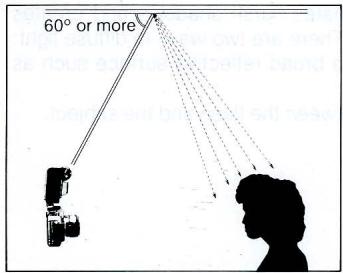
Bounce Flash Photography Procedure
- Select a ceiling to bounce the flash from. In color photography, select a white or silver ceiling—otherwise, color photographs come out with an unnatural color cast similar to that of the reflecting surface.
- Rotate the flash head upwards, towards the ceiling. To avoid uneven illumination, rotate flash head back 60^ or more.
- Set flash mode selector to TTL for TTL auto flash operation or A for non-TTL auto flash operation, then turn on the flash unit. The bounce indicator lights up.
-
Choose an aperture and perform a test firing. If the ready-light blinks after test firing, indicating underexposure may occur at the aperture set on the lens, use a wider aperture or reduce the bounce distance and test fire the flash again.
-
Bracket your exposures. You are recommended to take additional shots with the camera's exposure compensation dial set in the + or - direction (not possible with Nikon F-401/N4004) for TTL auto flash operation or with the lens opened up or stopped down one or two f/stops for non-TTL auto flash operation.
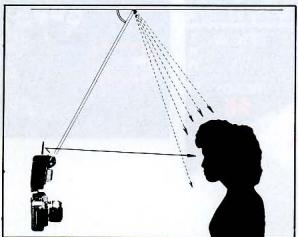
To create a catchlight for the subject's eyes: Insert white paper into the SB-20's reflector slot so a small amount of direct illumination fills in unflattering shadows around the eyes.
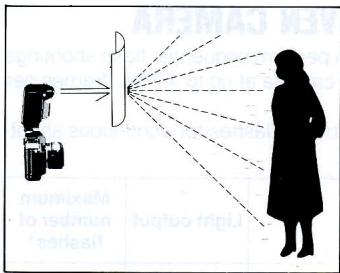
Using A Diffuser
Place a translucent material, such as one or more sheets of tracing paper, between the flash and subject to diffuse light. It is recommended that you experiment with different flash-to-diffuser distances and/or more than one diffuser.
Use the SB-20 on TTL or M mode when using a diffuser.
SYNCHRONIZATION WITH MOTOR-DRIVEN CAMERA
In M mode, you can perform sequential flash shootings with a motor driven camera at up to 4.2 fps (frames per second).
The maximum number of flashes for continuous shooting are listed below.
| Batteries | Light output | Maximum number of flashes* |
| AA-type alkaline-manganese batteries inside SB-20 | 1/4 | 2 |
| 1/8 | 4 | |
| 1/16 | 8 | |
| AA-type alkaline-manganese batteries inside SB-20 plus C-type alkaline-manganese batteries inside optional DC Unit SD-7** | 1/4 | 4 |
| 1/8 | 10 | |
| 1/16 | 40*** |
- When the SB-20 is charged for 30 sec. after the ready-light lights up; at 4.2 fps with fresh batteries; at 20^ C (68°F)
** For details about the SD-7, see page 52.
*** More flashes possible, but never fire the flash more than 40 times. Before firing the flash again, stop using for more than 10 minutes.
MULTIPLE FLASH EXPOSURES
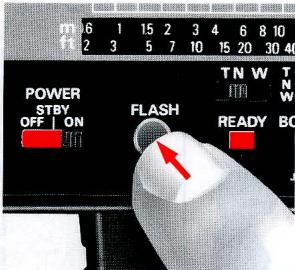
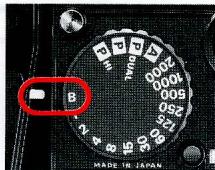
To create multiple-exposure "stroboscopic" effects or paint the scene with light, use the following procedure:
- Disconnect the flash unit from the camera body.
- Set the camera at B (bulb).
- Push the open-flash button repeatedly—as many times as desired.
MULTIPLE FLASH PHOTO
TTL Multiple Flash Photography
Use the Nikon Speedlight SB-22, SB-20, SB-18, SB-16B or SB-15 connected to an F-501/N2020, F-401/N4004, F-301/N2000, FA, FE2, or FG camera as a master flash unit; and use either the SB-22, SB-21B, SB-20, SB-18, SB-17, SB-16A, SB-16B and/or SB-15 as slave flash unit(s). Up to five flash units can be used.
For TTL multiple flash photography, use the optional TTL Multi-Flash Sync Cord SC-18 (1.5m) and/or SC-19 (3m) to connect the flash units via the TTL multiple
flash terminal. Because the SB-22, SB-21B, SB-20, SB-18 and SB-15 are not provided with a TTL multiple flash terminal, it is necessary to use TTL Remote Cord SC-17 when using these flash units as a master flash unit. To use the SB-22, SB-20, SB-18 and/or SB-15 as slave flash units, use the AS-10. When using the SB-140, SB-14 and/or SB-11 for TTL multiple flash photography, you should also use TTL Remote Cord SC-23. With the Nikon F-401/N4004, programmed TTL auto flash and TTL auto flash are not possible with the SB-11/14/140 (even with the SC-23) or SB-21. They cannot be used for TTL multi-flash either, even as a slave flash unit.
See the system chart on the next page.
System chart for TTL multiple flash operation
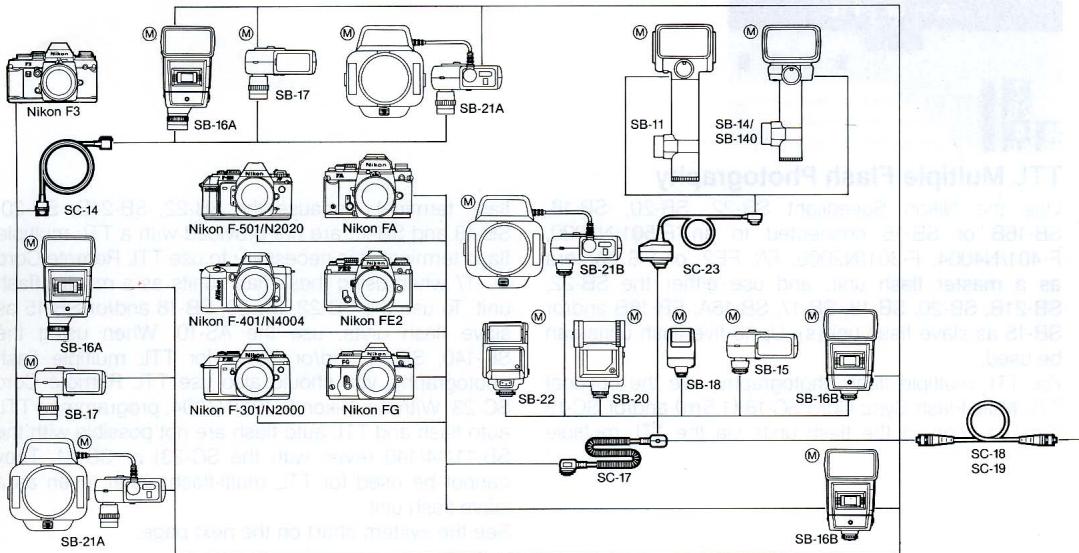
M indicates the "master" flash unit.
*The SB-11, SB-14, SB-140 and SB-21B cannot be used with Nikon F-401/N4004 either as a master or slave flash unit.
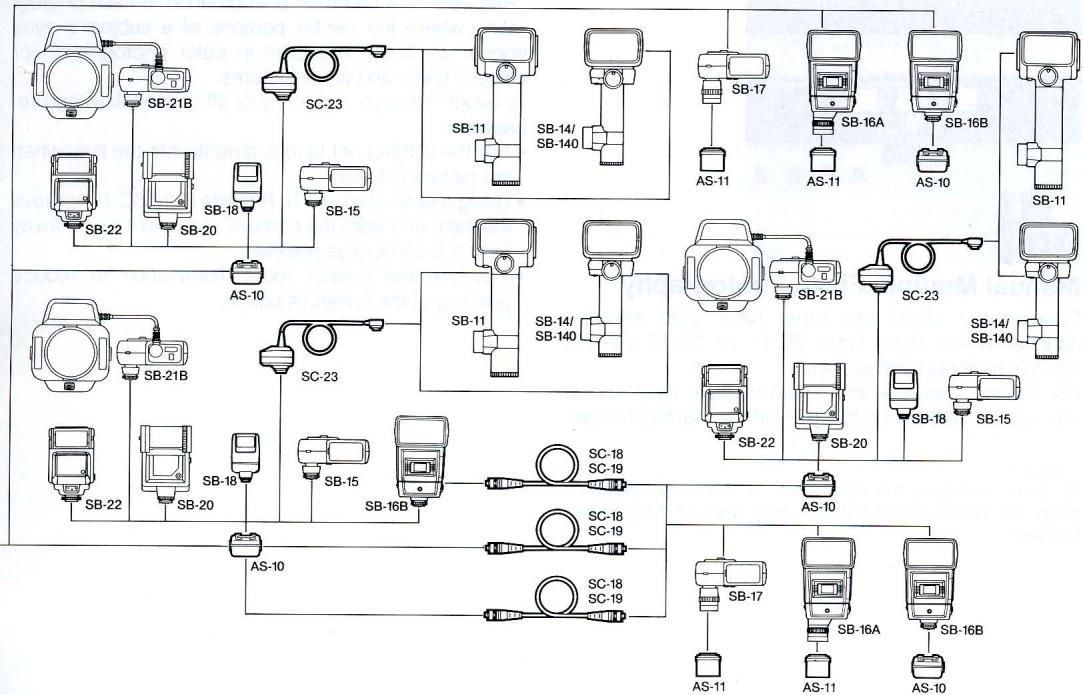
Manual Multiple Flash Photography
Connect the SB-20 and other flash units with the optional Nikon Sync Cord SC-11 or SC-15 via the SB-20's multiple flash terminal.
For correct exposure in manual multiple flash operation, be sure all flash units are set at manual flash mode.
Caution
To avoid damaging the flash units or incorrect operation, never mix Nikon Speedlight with flash units of other manufacturers.
AVOIDING "RED EYE"
"Red eye" is a common phenomenon in flash photography where the center portions of a subject's eyes appear as bright red orbs in color photographs, or white in black-and-white pictures.
To avoid "red eye," take any or all of the following precautions:
- Ask the subject not to look directly into the lens when the picture is taken.
- Using a sync cord or TTL Remote Cord SC-17, remove the flash unit from the camera and hold it as far away from the camera as possible.
- Increase the overall room illumination to reduce opening of the subject's pupils.
CLOSE-UP FLASH PHOTOPHY IN TTL MODE
When used with the Nikon F-501/N2020, F-401/N4004, F-301/N2000, FA, FE2 or FG camera, the optional TTL Remote Cord SC-17 lets you perform flash shooting with a subject closer than 0.6m.
- Use the SC-17 to connect the SB-20 and camera. (See SC-17 instruction manual.)
- Position the SB-20 and rotate the flash head so light from the flash head covers the subject.
- Regardless of the lens in use, set the zoom set ring so "W" appears in the zoom indicator window.
- To determine aperture, use the following equation:
$$ f / s t o p \geq \frac {A}{\text {f l a s h - t o - s u b j e c t d i s t a n c e}} $$
where A corresponds to the film in use according to the table below:
If you are using ISO 100 film for example, and the flash-to-subject distance is 0.5m divide 4 by 0.5 to get f/8. That means you can use an aperture of f/8 or smaller. Use as small an aperture as possible.
- Set the flash mode selector to TTL, turn on the SB-20 and take the shot.
With very light- or dark-toned subjects, make exposure compensation with the camera's exposure compensation dial.
| ISO film speed | 25 | 32 | 40 | 50 | 64 | 80 | 100 | 125 | 160 | 200 | 250 | 320 | 400 | 500* | 640* | 800* | 1000* |
| A | 2 | 2.2 | 2.5 | 2.8 | 3.2 | 3.5 | 4 | 4.4 | 5 | 5.6 | 6.3 | 7.1 | 8 | 8.9 | 10.1 | 11 | 13 |
*For F-501/N2020 and F-301/N2000 only.
TIPS ON SPEEDLIGHT CARE
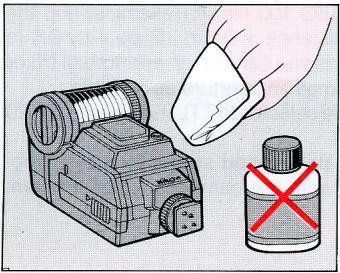
- To remove smudges, wipe with a dry soft or silicon-treated cloth. Never use thinner, benzine or alcohol—they might damage plastic parts.
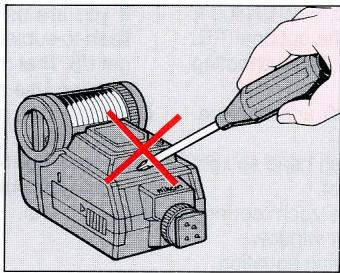
- Never disassemble or repair the flash unit; if the SB-20 malfunctions, take it immediately to an authorized Nikon dealer or service center.
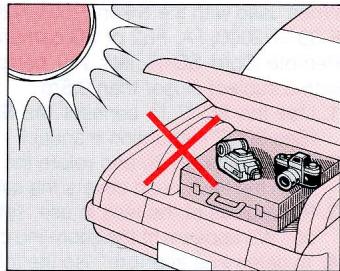
- Keep the SB-20 away from places where temperature is higher than 50^ , and do not store in damp places. Use within the range of -10^ +50^ .
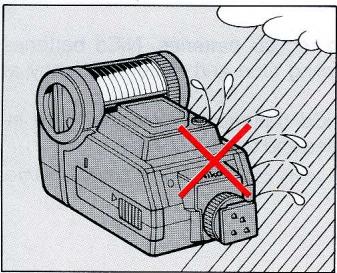
- Keep the SB-20 away from salt water and out of the rain.
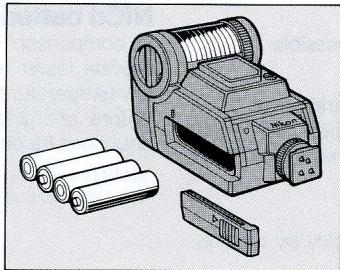
- When not using the SB-20, remove batteries to avoid damage due to battery leakage. If leakage occurs, take the SB-20 to your nearest Nikon authorized service facility.
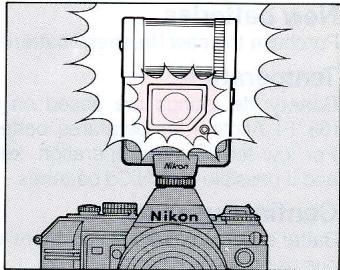
-
When the SB-20 is not used, perform the following once a month:
-
Install batteries, turn on the SB-20 and fire flash a few times.
- Wait until the ready-light comes on.
- Turn off the SB-20, and remove the batteries.
ABOUT BATTERIES
New batteries
Purchase the new (freshest) batteries possible.
Temperature
Battery life ratings are based on operation at 20^ (68^) . At other temperatures, battery life is shortened. For low temperature operation, keep spare batteries and if possible, use NiCd batteries.
Continuous use
Batteries are drained much more quickly by continuous use than by intermittent use.
Storage
Store batteries in a cool, dry place below 20^ (68^) .
Battery brand
Do not mix battery brands or model numbers, or new and old batteries.
Disposal
Do not dispose of batteries by burning, and never disassemble batteries.
NiCd batteries
In comparison with regular batteries, NiCd batteries provide faster recycling time and better efficiency at low temperatures.
Before charging NiCd batteries, thoroughly read instructions for batteries and battery charger.
- Batteries with a "+" terminal that exceeds 6mm in diameter cannot be used.
ACCESSORIES
Sync Cords SC-11 and SC-15
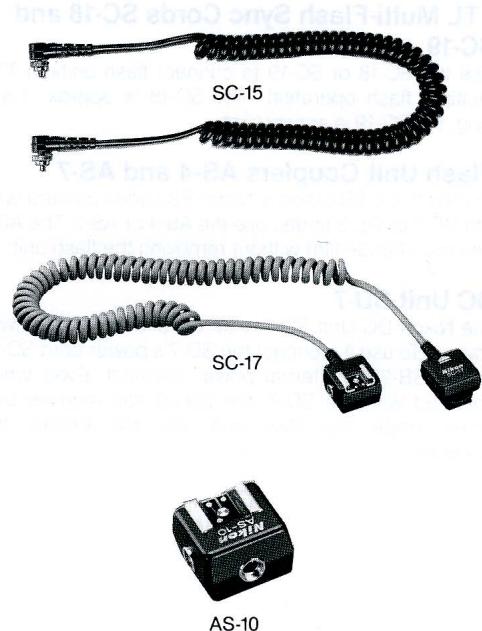
For off-camera or manual multiple lighting setups or to connect the SB-20 to a camera without a hot shoe use sync cord SC-11 (25cm long) or coiled sync cord SC-15 (one meter long).
TTL Remote Cord SC-17
For programmed TTL auto flash operation or TTL auto flash operation when using the SB-20 off the Nikon F-501/N2020, F-401/N4004, F-301/N2000, FA, FE2 or FG camera, use coiled cord SC-17. The SC-17 ensures automatic sync speed setting and ready-light veiwinder indication just as if the flash unit were directly mounted on the camera. Comes with two TTL multiple flash terminals and one tripod socket.
TTL Multi-Flash Adapter AS-10
When using the SB-20, SB-18 or SB-15 as a slave flash unit or when using more than three flash units, use the AS-10. Comes with three multiple flash terminals and one tripod socket.
TTL Multi-Flash Sync Cords SC-18 and SC-19
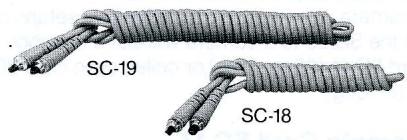
Use the SC-18 or SC-19 to connect flash units in TTL multiple flash operation. The SC-18 is approx. 1.5m long; the SC-19 is approx. 3m
Flash Unit Couplers AS-4 and AS-7
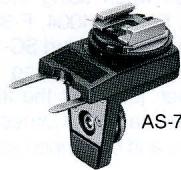
To mount the SB-20 on a Nikon F3-series camera with the DE-2 or DE-3 finder, use the AS-4 or AS-7. The AS-7 lets you change film without removing the flash unit.
DC Unit SD-7
The Nikon DC Unit SD-7 is an optional external power source. To use it, connect the SD-7's power cord SC-16 to the SB-20's external power terminal. Even when powered with the SD-7, the SB-20 still requires batteries inside the flash unit—do not remove the batteries.

AS-4
SD-7
SPECIFICATIONS
All performance data are for normal-temperature operation [20°C (68°F)]
| Electronic construction Guide number (at manual full light output) Zoom capability | Automatic silicon-controlled rectifier and series circuitry 30 (ISO 100 and meters) or 49 (ISO 25 and feet) with the zoom set ring at N - Three settings: W for wideangle, N for normal and T for telephoto | Power switch | optional Battery Pack SD-7 holding six C-type batteries is available as an external power source Three positions are pro- vided-OFF, STBY (for standby) and ON; at STBY position with the Nikon F-501/ |
Angle of coverage
| Zoom set ring position | Horizontal | Vertical | Usable lens |
| W (wideangle) | 53° | 70° | 28mm or longer |
| N (normal) | 45° | 60° | 35mm or longer |
| T (telephoto) | 23° | 31° | 85mm or longer |
Bounce capability
Flash head can be rotated down to -7^ or up to 90^
Flash duration
| Light output (approx.) | Flash duration (approx.) |
| Full | 1/1200sec. |
| 1/2 | 1/1500sec. |
| 1/4 | 1/3700sec. |
| 1/8 | 1/7400sec. |
| 1/16 | 1/15000 sec. |
Power source
Power switch
Four 1.5V AA-type alkaline-manganese or NiCd batteries; optional Battery Pack SD-7 holding six C-type batteries is available as an external power source
Three positions are provided—OFF, STBY (for standby) and ON; at STBY position with the Nikon F-501/N2020, F-401/N4004, F-301/N2000, FA, FE2 or FG, SB-20 turns off automatically when flash unit is not used for one or two minutes and turns on when camera exposure meter is on
Number of flashes and recycling time at manual full light output
| Battery type | Number of flashes (approx.)* | Recycling time (approx.) |
| AA-type alkaline-manganese | 160 times | 6sec. |
| AA-type NiCd | 60 times | 4sec. |
| C-type alkaline-manganese inside the optional SD-7** | Up to 40 times | 3sec. |
| Up to 200 times | 5sec. | |
| Up to 400 times | 10 sec. | |
| Up to 450 times | 30 sec. |
For autofocus operation assisted by the AF illuminator, less number of flashes available.
*With four AA-type alkaline-manganese batteries installed in the SB-20
Flash exposure control TTL mode
Three flash modes are provided: TTL, A and M Used only with Nikon F-501/ N2020,F-401/N4004,F-301/ N2000,FA,FE2 or FG;for programmed TTL auto flash operation (with F-501/N2020,F-401/ N4004 or F-301/N2000 only) or TTL auto flash operation; light is measured through the lens
Useable film speed range in TTL mode
ISO 25 to 1000 with Nikon F-501/N2020 and F-301/ N2000 or ISO 25 to 400 with Nikon F-401/N4004, FA, FE2, and FG f/2 to f/22 (at ISO 100)
Useable aperture range in TTL mode A mode
For non-TTL auto flash operation; light is measured via light sensor in front of the flash unit f/2,f/2.8,f/4,f/5.6 and f/8 (at ISO 100)
Usable apertures in A mode
Unit: m (ft.)
Shooting distance range in A mode
| Aperture | Shooting distance range at ISO 100 and zoom set ring set at N |
| f/2 | 1.9~15 (6.2~49) |
| f/2.8 | 1.3~10 (4.3~33) |
| f/4 | 1.0~7.5 (3.3~25) |
| f/5.6 | 0.7~5.3 (2.3~17) |
| f/8 | 0.6~3.7 (2.0~12) |
M mode
For manual flash operation; amount of light output can be varied in five steps
| AF assist LED | Automatically fires LED beam toward the subject when performing autofocus with the Nikon F-501/N2020 (Single Servo) or F-401/N4004 camera in insufficient light |
| Dimensions | Approx. 71(W)×110(H)× 70(D)mm (2.7×4.3×2.7 in) |
| Weight | Approx. 260g (9.1oz) (without batteries) |
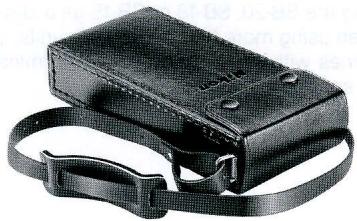
| Accessories provided | Soft Case SS-20 |
| Specifications and designs are subject to change without notice. | |
No reproduction in any form of this manual, in whole or in part (except for brief quotation in critical articles or reviews), may be made without written authorization from NIKON CORPORATION.
Nikon
NIKON CORPORATION

- Autofocus Speedlight
- SB20
- CONTENTS
- Nikon
- For Nikon F4/F4s, F-801/N8008*
- camera users
- For Nikon F-401/N4004 camera users
- NOMENCLATURE
- Battery cover index
- Reflector slot
- Sync/multiple flash terminal
- External power source terminal
- Aperture selection/shooting distance range panel
- Light output index windows
- Aperture index window
- Flash mode indicators
- Flash mode selector
- BASIC OPERATION
- Attaching Flash Unit to Camera Accessory Shoe
- With Nikon F3-series cameras with DE-2 or
- Adjusting Flash Head
- Programmed TTL Auto Flash Shooting (with Nikon F-501/N2020, F-401/N4004 or
- F-301/N2000)
- Set the SB-20's flash mode selector to TTL.
- Set camera to a programmed exposure mode (P DUAL, P or P HI for F-501/N2020; P or P HI for F-301/N2000).
- Set lens to minimum aperture (largest f-number).
- Flash Shooting
- Set power switch to STBY (standby position) to turn on SB-20.
- Fully depress shutter release button to take picture.
- Turn off the SB-20.
- Set aperture.
- Lightly press camera shutter release button.
- Confirm whether the green in-focus indicator LED lights up, then fully depress the shutter release button.
- SETTING CAMERA SHUTTER SPEED
- DETERMINING APERTURE
- TTL Mode
- (for TTL Automatic Flash Exposure Control)
- Align film speed in use with the film speed index.
- Select and set aperture.
- Exposure compensation in TTL mode
- A Mode (for Non-TTL Automatic Flash Exposure Control)
- Align film speed in use with film speed index.
- Select appropriate aperture and set aperture index knob.
- Set your chosen aperture.
- Usable apertures/shooting distance range in A mode Unit: m (ft)
- Exposure compensation in A mode
- M Mode (for Manual Flash Exposure Control)
- Set light output selector to appropriate setting.
- To determine light output before selecting aperture
- Set the light output selector so the yellow light output index indicates the desired light output.
- Determine and set proper lens aperture.
- Guide Number
- SETTING POWER SWITCH
- STBY (STANDBY) Position
- With Nikon F-501/N2020, F-401/N4004, F-301/ N2000, FA, FE2, and FG:
- With other cameras:
- ON Position
- With cameras other than the Nikon F-501/N2020, F-401/N4004, F-301/N2000, FA, FE2, and FG:
- With the Nikon FA, FE2, and FG:
- OFF Position
- READY-LIGHT INDICATIONS
- Ready-Light Warning Functions
- SYNCHRO-SUNLIGHT FILL-IN FLASH PHOTOY
- Without flash:
- With flash:
- In TTL Mode
- In A Mode
- In M Mode
- DIFFUSING THE LIGHT
- Bounce Flash Photography Procedure
- Using A Diffuser
- SYNCHRONIZATION WITH MOTOR-DRIVEN CAMERA
- MULTIPLE FLASH EXPOSURES
- MULTIPLE FLASH PHOTO
- TTL Multiple Flash Photography
- System chart for TTL multiple flash operation
- Manual Multiple Flash Photography
- Caution
- AVOIDING "RED EYE"
- CLOSE-UP FLASH PHOTOPHY IN TTL MODE
- TIPS ON SPEEDLIGHT CARE
- ABOUT BATTERIES
- New batteries
- Temperature
- Continuous use
- Storage
- Battery brand
- Disposal
- NiCd batteries
- ACCESSORIES
- Sync Cords SC-11 and SC-15
- TTL Remote Cord SC-17
- TTL Multi-Flash Adapter AS-10
- TTL Multi-Flash Sync Cords SC-18 and SC-19
- Flash Unit Couplers AS-4 and AS-7
- DC Unit SD-7
- SPECIFICATIONS
- Bounce capability
- Power source
- Power switch
- Flash exposure control TTL mode
- Useable film speed range in TTL mode
- Useable aperture range in TTL mode A mode
- Usable apertures in A mode
- M mode
- NIKON CORPORATION
Brand : NIKON
Model : SB-20
Category : External Flash