Powerbank 10400 - Battery charger INTENSO - Free user manual and instructions
Find the device manual for free Powerbank 10400 INTENSO in PDF.



User questions about Powerbank 10400 INTENSO
0 question about this device. Answer the ones you know or ask your own.
Ask a new question about this device
Download the instructions for your Battery charger in PDF format for free! Find your manual Powerbank 10400 - INTENSO and take your electronic device back in hand. On this page are published all the documents necessary for the use of your device. Powerbank 10400 by INTENSO.
USER MANUAL Powerbank 10400 INTENSO
| Dimensions: | 89 x 44 x 44 mm |
| Max power consumpon (Input): | 5V 0.5A / 1 A / 2.1 A |
| Max charging current output (Output): | 1 A / 2.1 A |
| Internal Baery: | 10.400 mAh lithium-ion baery |
| Status display: | 4 LED lights |
| Built-in overcharge/discharge protecon | Yes |
| Simultaneous charging of the Powerbank and a connected device: | Yes |
| Standby me: | Up to 3 months |
Device Overview
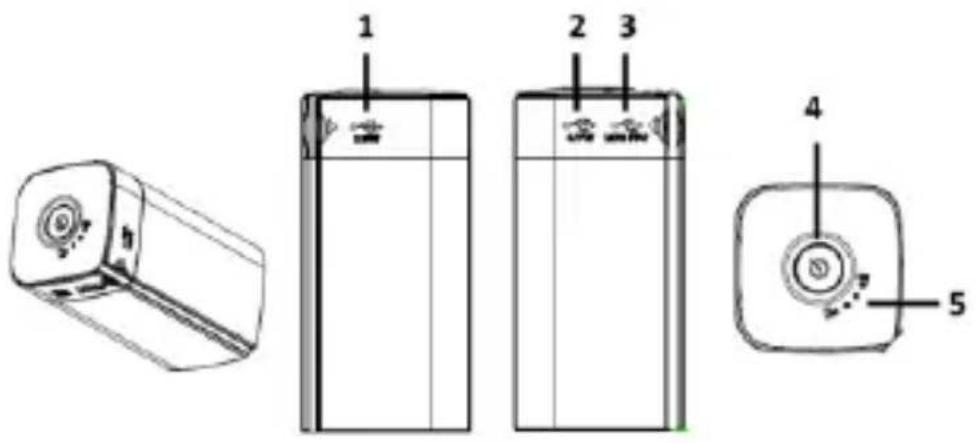
1 USB OUT 2.1A 2 USB OUT 1 A
3 Micro USB IN 4 Funcon keys
5 Status LEDs
Operaon
1. Funcon keys
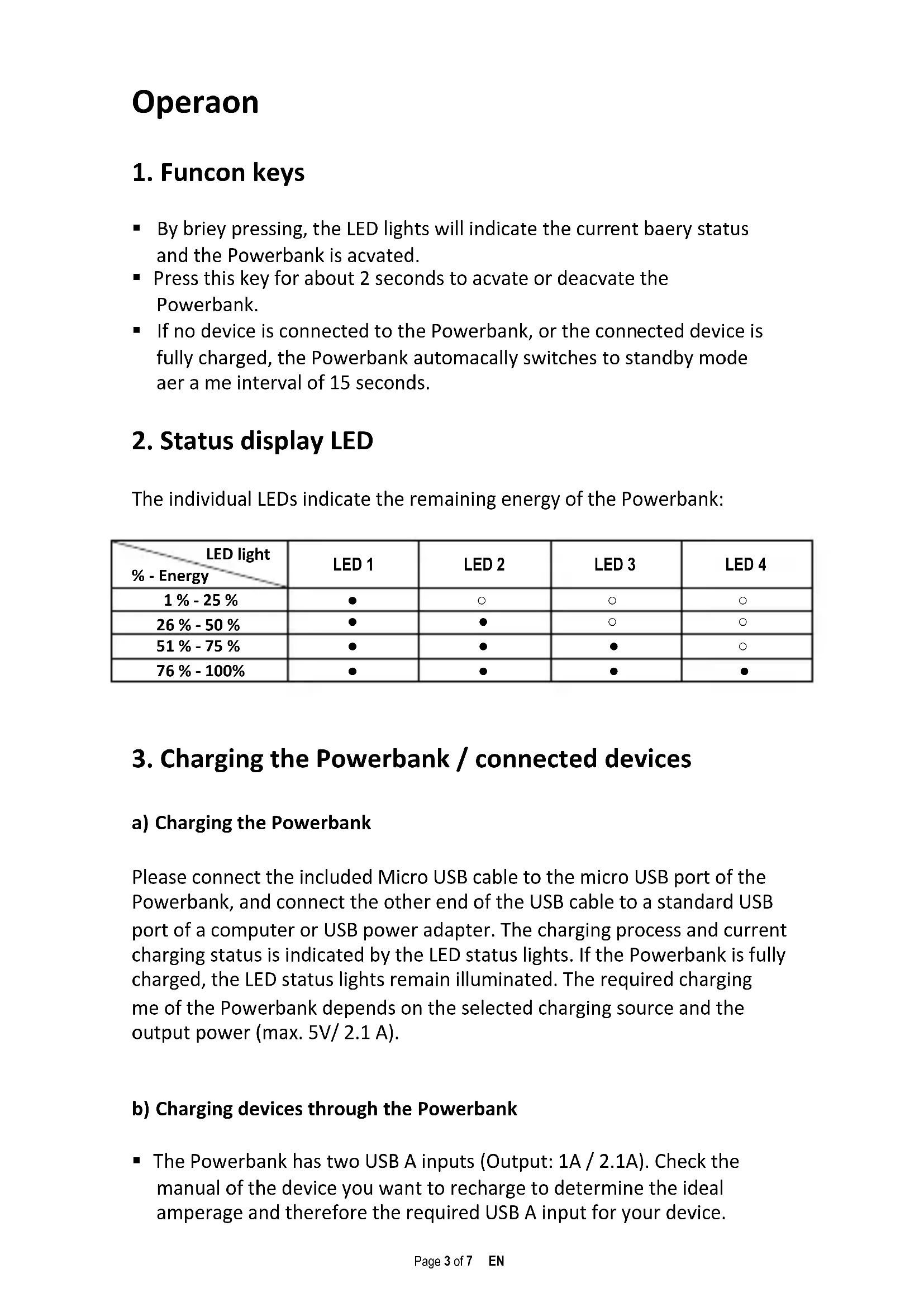
- By briey pressing, the LED lights will indicate the current baery status and the Powerbank is acvated.
- Press this key for about 2 seconds to acvate or deacvate the Powerbank.
- If no device is connected to the Powerbank, or the connected device is fully charged, the Powerbank automatically switches to standby mode afer a me interval of 15 seconds.
2. Status display LED
The individual LEDs indicate the remaining energy of the Powerbank:
| LED light % - Energy | LED 1 | LED 2 | LED 3 | LED 4 |
| 1 % - 25 % | ● | ○ | ○ | ○ |
| 26 % - 50 % | ● | ● | ○ | ○ |
| 51 % - 75 % | ● | ● | ● | ○ |
| 76 % - 100 % | ● | ● | ● | ● |
3. Charging the Powerbank / connected devices
a) Charging the Powerbank
Please connect the included Micro USB cable to the micro USB port of the Powerbank, and connect the other end of the USB cable to a standard USB port of a computer or USB power adapter. The charging process and current charging status is indicated by the LED status lights. If the Powerbank is fully charged, the LED status lights remain illuminated. The required charging me of the Powerbank depends on the selected charging source and the output power (max. 5V/ 2.1 A).
b) Charging devices through the Powerbank
-
The Powerbank has two USB A inputs (Output: 1A / 2.1A). Check the manual of the device you want to recharge to determine the ideal amperage and therefore the required USB A input for your device.
-
The Powerbank also allows you to charge two devices simultaneously, for example, a tablet with a 2.1 A input and a smart phone with an 1 A input.
- Please connect the included USB cable to the USB A port on the Powerbank and the other end of the USB cable to the micro USB port of the device to be charged. Press the funcon buon to start the charging process.
- Of course, you can also use your own USB charging cable to connect the Powerbank with your device. Please note, however, that devices can be charged only through the USB A port of the Powerbank.
- If a device is charged with the Powerbank and the Powerbank has almost reached its capacity limits, this is signalled by ashing of the last status LED. Please charge the Powerbank again.
- Please note that, when charging a device with a Powerbank nearly 30% of total capacity is consumed by the charging process alone. This is caused for example by the loss of power from circuit heat and voltage conversion.
- For opmal performance, the Powerbank must be used regularly. If this is not the case, fully charge the Powerbank at least every three months.
Intended use
This Powerbank is meant solely for the purpose of power supply to devices with an operang voltage of 5V DC (mobile phones, MP3 player etc.). Any other use is considered as unintended use and may lead to damages and injuries. Claims of any type resulting from unintended use are ruled out.
Operating instructions

Operating conditions:
Operate the device at 0 to 40 degree Celsius at max. 90% relative humidity. If you do not use Mobypack for long periods of time, store the device at a temperature range of -10 to 45 degree Celsius at max. 90% relative humidity (for short period) and charge the device every three months to maintain the total performance of the device.

Do not use the device in extremely cold, hot, humid or dusty areas; also do not expose to direct sunlight. Avoid contact with open flame. Risk of Explosion!
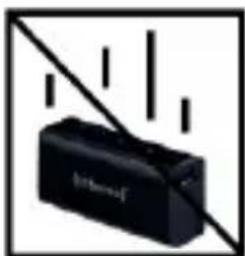
Shock, drop:
Please protect the device against shock and drops in all operating modes.

Electrostatic discharge:
This device is sensitive to electrostatic discharge. Please protect the device against any possible electrostatic discharge.
Disposal of old batteries
The devices marked with this symbol are subject to the European Directive 2006/66/EG. All the old batteries must be disposed separated from household garbage through the government agencies designated for that purpose.
By disposing the batteries in this prescribed manner, you can avoid environmental damages.
Disposal of Used Electronic Equipment
Equipment marked with this symbol is subject to the European Directive 2012/19/EG.
All electrical devices and used electrical equipment must be disposed of separately from household waste over the appropriate government agencies.
Proper disposal of old electronic equipment helps avoid environmental damage.
Limited warranty conditions
The warranty only covers the replacement of this Intenso product. The warranty is not applicable for normal wear & tear resulting from erroneous, improper use of the device, negligence, accident or incompatibility.
There are no warranty claims if the Intenso user manual is not followed and if the device is damaged through improper use or defects caused by other devices.
There are no warranty claims if the product is exposed to shocks, electrostatic discharges, heat or humidity effects beyond the product specifications.
Intenso is not liable for any collateral damages or consequential losses, for violation of warranty conditions or any other losses irrespective of the cause.
Important note:
Please note that any warranty claim shall expire if the housing of the Powerbank 5200 has been opened.
This product is not meant for a commercial use or for medical and special applications, where the failure of the product may cause injuries, death or significant material damages.
Intenso Warranty conditions
Dear Intenso customer,
Thank you for opting for a high-quality Intenso product. All Intenso products are subject to constant quality inspections and the legal warranty period applies, of course, from the date of purchase. Please be sure therefore to save the sales receipt as proof of purchase.
Warranty conditions
The warranty only covers material and production defects. Intenso GmbH is not liable for the loss of data in units sent to us. The free of charge warranty service covers the repair or replacement of defective parts. Please understand that we cannot render any warranty services, e.g. in case of:
- Misuse or improper handling, installation or use
- Damages, scratches or wear
- Modifications, manipulation or repairs by third parties
- Damages through force majeure or transport
Your Intenso GmbH
CLAIM PROCEDURE
In case of a claim, please proceed as follows:
- Only returns accompanied with all accessories and sales receipt are accepted.
- In addition, a RMA number is absolutely required for return shipments. You can request this RMA number via e-mail or through the service hotline.
- Please package the product including all accessories and the sales receipt safe for transport. Please stamp the package.
- Please affix the RMA number clearly visible on the outside of the package.
Please send to the following service address:
INTENSO GMBH Service Hotline: +49 (0) 900 -1504030
Service Center (your RMA-No.) (0.39 €/min. from the landline in Germany.
Service Center (Votre referrerce RMA)
Service Hotline: +49 (0) 900 -1 50 40 30
49377 Vechna Germany
www.interac.de


Pagina 6 de 7 ES
Intenso CONDICIONES DE LA GARANTÍA
-
USB OUT 2.1 A
-
USB OUT 1 A
-
Micro USB IN
5 CBeToDnOdHbIe HndNkATOpbl COCTOHHN
3Kcnpnyatazaia
1.Функционьнble KHONKn
- После коротко нажатя сбетоюньи Ндikatopbl OTPаOT Tekyшee coctoHne aKKyMylTopa n Powerbank aktubnpyetc.
- Haxmte n ydepxnBaTe daHHyIO KhoNky B TeueHne 2 ceKyHd, YTO6bBkIIOHTb IIN BBIKIOHTb Powerbank.
- Ecnn yctpoiCTBO He noDkIIOyeHO K Powerbank nnn noDkIIOyeHHoe ycTPOIcTBo noHocTBIO 3apJKeHo, To Powerbank aBtOMaTHueCKn nepeKJIIOuAeTCB B peKIM OxNJaHna Yepe3 15 cekyHd.
2. CBeToIHOdHbI INHdNKaTOP COCTOHNIA
OTdJIbHbIe INDnKaTOpbl yka3bIBaHT ypoBeHb ocTaToUHOJ 3Heprn Powerbank:
CepBnchbIeHTp (BaW No RMA)
MNH. B HemeKoN CtaCNoHApHOcTeN.