SL20151 - Kitchen scales SALTER - Free user manual and instructions
Find the device manual for free SL20151 SALTER in PDF.


User questions about SL20151 SALTER
0 question about this device. Answer the ones you know or ask your own.
Ask a new question about this device
Download the instructions for your Kitchen scales in PDF format for free! Find your manual SL20151 - SALTER and take your electronic device back in hand. On this page are published all the documents necessary for the use of your device. SL20151 by SALTER.
USER MANUAL SL20151 SALTER
with detachable display, clock & thermometer
instructions for use
BALANCES DE CUISINE ÉLECTRONIQUE
HOW DOES THIS SCALE WORK?
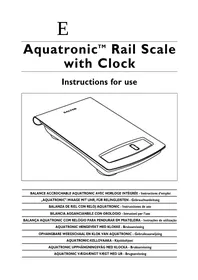
This scale is made up of two main parts - the weighing platform and the display panel. The display panel is designed to be wall mounted above the worksurface where you intend to use the scale. This keeps the display at a convenient eye-height where it is easiest to read and the weighing platform within arms reach for easy access. The weighing platform sits separately on the worksurface from where it transmits a weight signal to the display panel using Infrared (IR) technology. When not in use, the weighing platform clips onto the display panel and functions as a stylish kitchen clock and room thermometer.
INSERT THE BATTERIES
Insert 3 AAA batteries in the display panel and 4 AAA batteries in the weighing platform (2 in each compartment). Ensure +/- terminals are the correct way round.
FIXING THE DISPLAY PANEL TOTHE WALL
- Choose a suitable position for the display panel, directly above a worksurface where you intend to use the scale:
× Avoid placing directly next to an electrical appliance (eg microwave oven) that may emit electrical interference and possibly disrupt the products display.
Allow sufficient room around the display panel for storing the weighing platform.
IF IN DOUBT,TEST THE PRODUCT IN POSITION BEFORE FIXING
- Drill holes for suitable wall plugs, 72mm apart.
(The wall plugs supplied are suitable for use in most solid walls).
- Adjust the screws until the display panel is held firmly in place against the wall.
SETTING THE CLOCK
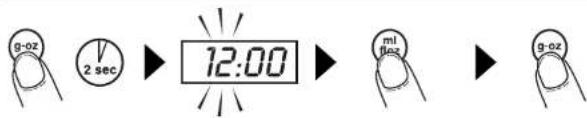
To enter the clock setting The hour digits model: press and hold g- will flash. oz for 2 sec.
To advance the hour: press ml-floz.
To confirm the hour setting, press g-oz.
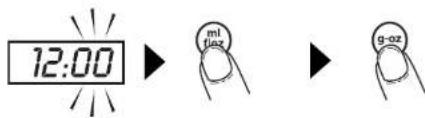
Now the minute digits will flash.
To advance the minutes: press ml-foz.
To confirm the minute setting: press g-oz. The correct time will now be displayed.
ADDITIONAL DISPLAY FUNCTIONS IN CLOCK MODE
When display is showing time and temperature:
To change between 12 hour and 24 hour display, press g-oz briefly.
To change between ^ C and ^ F display, press ml-floz briefly.
To illuminate the display for 10 seconds, press zero briefly.
USING THE SCALE
For correct operation a clear path is required between the red lens on the weighing platform and the red lens on the display panel. To help achieve this, ensure that the IR sections on both the display panel and weighing platform are aligned with each other.
Note: Avoid placing large 'overhanging' items on the platform as this may obstruct the IR signal. Should the IR signal become obstructed during weighing, the display will return to 'clock mode'. Removing the obstruction promptly will restore the signal.
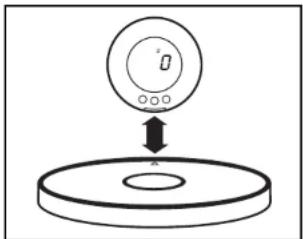
TO SWITCH TO 'SCALE MODE'
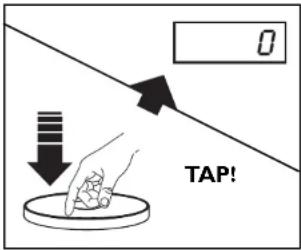
TO MEASURE SOLIDS & LIQUIDS
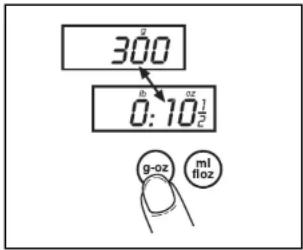
a) Place the weighing platform on the worksurface, below the display panel, with the IR sections aligned and unobstructed.
b) If using a bowl, place it on the weighing platform.
c) The action of placing the weighing platform on the worksurface will usually be sufficient to switch the display to 'scale mode' automatically. If not, just tap the front edge of the platform to activate 'scale mode' on the display.
d) Always check that the display shows 0 before weighing. If necessary, press the zero key to reset the display to 0.
- To convert between grams (g) and ounces (oz): press g-oz.
To measure liquids: press ml-floz. - To convert between millilitres (ml) and fluid ounces (fl. oz): press ml-flox again
- To switch back to solid (dry) measurement: press g-oz.
TO ADD AND WEIGH
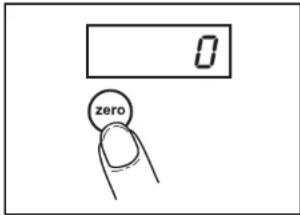
To weigh several different ingredients into one bowl: press zero to reset the display between each ingredient.
AUTO SWITCH OFF
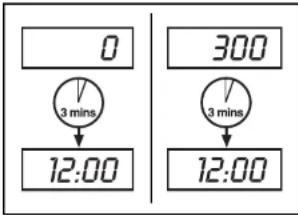
Automatic switch off occurs if the display shows either '0' or the same weight reading for 3 minutes. (The backlight switches off after 1 minute).
When the scale switches off, the display will automatically return to clock mode.
ADVICE & CARE
MORE ABOUT LIQUID MEASURES
The aquatronic™ is programmed to measure all water based liquids. In practical terms this covers almost every liquid used in domestic cookery including wine, milk, cream etc.
The exception is oil, which is not water based and would therefore not give such an accurate measure. (The error would be approx. +10% ).
CLEANING
Clean the scale with a slightly damp cloth. DO NOT immerse the scale in water or use chemical / abrasive cleaning agents.
All plastic parts should be cleaned immediately after contact with fats, spices, vinegar and strongly flavoured / coloured foods. Avoid contact with acids such as citrus fruits.
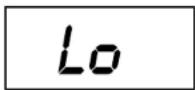
LOW BATTERY WARNING
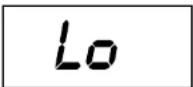
Replace batteries in display module (3 x AAA).
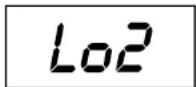
Replace batteries in scale (4× AAA)
Always remove 'low' batteries promptly
Never mix old and new batteries or different battery types.
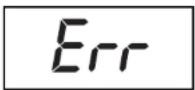
OVERLOAD WARNING

Total load applied exceeds max. capacity of scale.
Remove excess load.
COMMENT LA BALANCE FONCTIONNE-T-ELLE?
BATTERIJ LEEG WAARSCHUWING
WAERSCHUWING OYEBER ALSTING
KELLOTILAN LISATOIMINNOT
GUARANTEE - This product is intended for domestic use only. Salter will repair or replace the product, or any part of this product, (excluding batteries) free of charge if within 15 years of the date of purchase, it can be shown to have failed through defective workmanship or materials. This guarantee covers working parts that affect the function of the scale. It does not cover cosmetic deterioration caused by fair wear and tear or damage caused by accident or misuse. Opening or taking apart the scale or its components will void the guarantee. Claims under guarantee must be supported by proof of purchase and be returned carriage paid to Salter (or local Salter appointed agent if outside the UK). Care should be taken in packing the scale so that it is not damaged while in transit. This undertaking is in addition to a consumer's statutory rights and does not affect those rights in any way. For UK Sales and Service contact HoMedics Group Ltd, PO Box 460, Tonbridge, Kent, TN9 9EW, UK. Helpline Tel No: (01732) 360783. Outside the UK contact your local Salter appointed agent.