USB 7338 - DJ Equipment US Blaster - Free user manual and instructions
Find the device manual for free USB 7338 US Blaster in PDF.



| Product type | DJ CD player with built-in mixer (dual player) |
| Brand | US Blaster |
| Model | USB 7338 |
| Power supply | AC mains, selectable voltage (110-240V) |
| Operating temperature range | 5°C to 35°C |
| Main functions | Dual CD player, 2-channel mixer, crossfader, pitch control, jog/shuttle, looping, track programming, headphone outputs, microphone |
| Maintenance and cleaning | Use a dry or slightly damp cloth; avoid chemical products |
| Safety | Avoid exposure to heat, humidity, dust; do not open the casing; unplug before maintenance |
| Repairability | Contact the seller; do not repair yourself or warranty will be voided |
| Connections | Stereo RCA outputs, line/phono inputs, XLR and 6.35mm jack microphone, headphone output, ground terminal |
| Controls | Pitch, jog, shuttle, faders, crossfader, looping buttons, programming, cue |
| Included accessories | Power cable |
Frequently Asked Questions - USB 7338 US Blaster
User questions about USB 7338 US Blaster
0 question about this device. Answer the ones you know or ask your own.
Ask a new question about this device
Download the instructions for your DJ Equipment in PDF format for free! Find your manual USB 7338 - US Blaster and take your electronic device back in hand. On this page are published all the documents necessary for the use of your device. USB 7338 by US Blaster.
USER MANUAL USB 7338 US Blaster
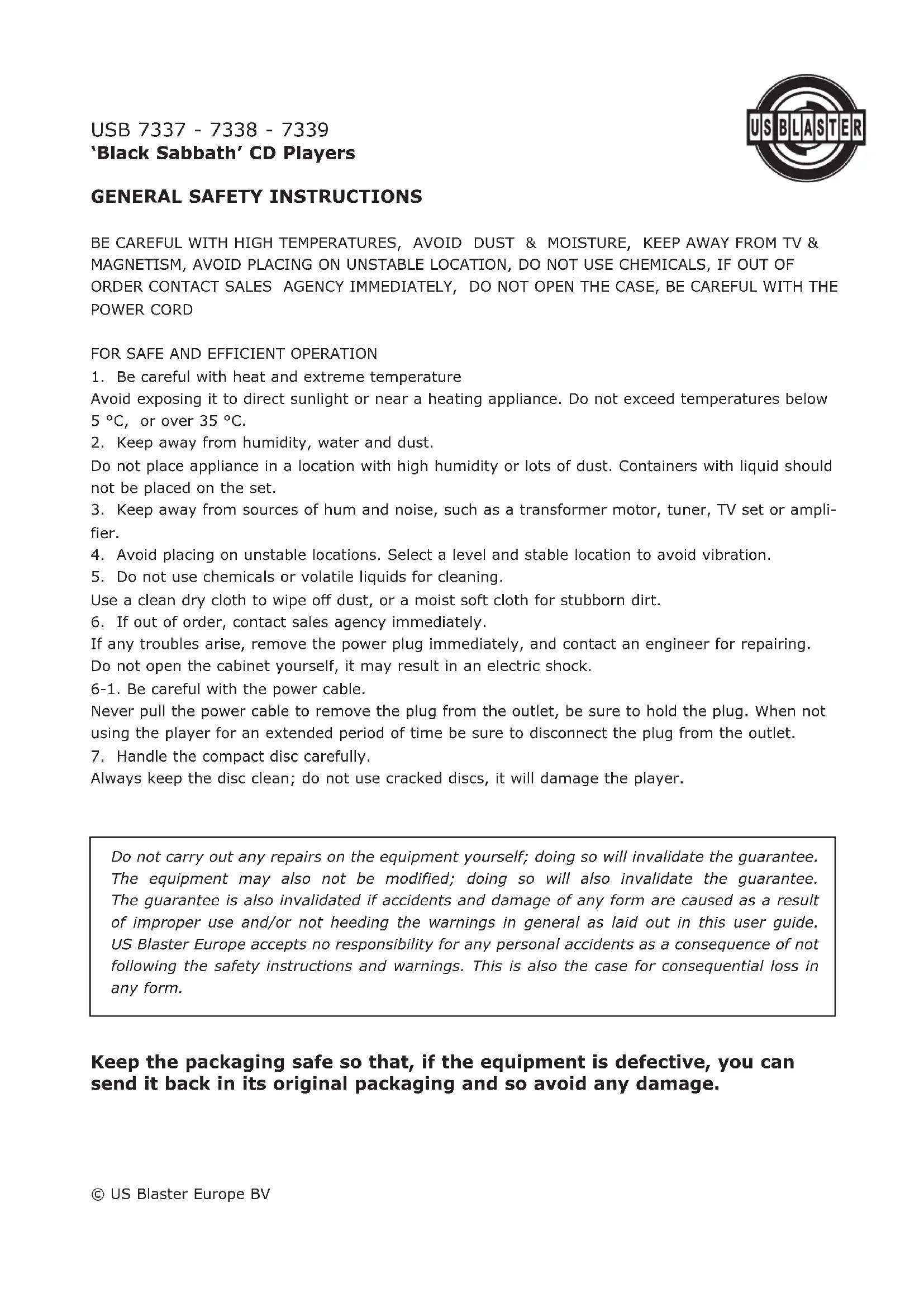
GENERAL SAFETY INSTRUCTIONS
BE CAREFUL WITH HIGH TEMPERATURES, AVOID DUST & MOISTURE, KEEP AWAY FROM TV & MAGNETISM, AVOID PLACING ON UNSTABLE LOCATION, DO NOT USE CHEMICALS, IF OUT OF ORDER CONTACT SALES AGENCY IMMEDIATELY, DO NOT OPEN THE CASE, BE CAREFUL WITH THE POWER CORD
- Be careful with heat and extreme temperature
Avoid exposing it to direct sunlight or near a heating appliance. Do not exceed temperatures below 5^ , or over 35^ . - Keep away from humidity, water and dust.
Do not place appliance in a location with high humidity or lots of dust. Containers with liquid should not be placed on the set. - Keep away from sources of hum and noise, such as a transformer motor, tuner, TV set or amplifier.
- Avoid placing on unstable locations. Select a level and stable location to avoid vibration.
- Do not use chemicals or volatile liquids for cleaning.
Use a clean dry cloth to wipe off dust, or a moist soft cloth for stubborn dirt.
- If out of order, contact sales agency immediately.
If any troubles arise, remove the power plug immediately, and contact an engineer for repairing. Do not open the cabinet yourself, it may result in an electric shock.
6-1. Be careful with the power cable.
Never pull the power cable to remove the plug from the outlet, be sure to hold the plug. When not using the player for an extended period of time be sure to disconnect the plug from the outlet.
- Handle the compact disc carefully.
Always keep the disc clean; do not use cracked discs, it will damage the player.
Do not carry out any repairs on the equipment yourself; doing so will invalidate the guarantee. The equipment may also not be modified; doing so will also invalidate the guarantee. The guarantee is also invalidated if accidents and damage of any form are caused as a result of improper use and/or not heeding the warnings in general as laid out in this user guide. US Blaster Europe accepts no responsibility for any personal accidents as a consequence of not following the safety instructions and warnings. This is also the case for consequential loss in any form.
Keep the packaging safe so that, if the equipment is defective, you can send it back in its original packaging and so avoid any damage.
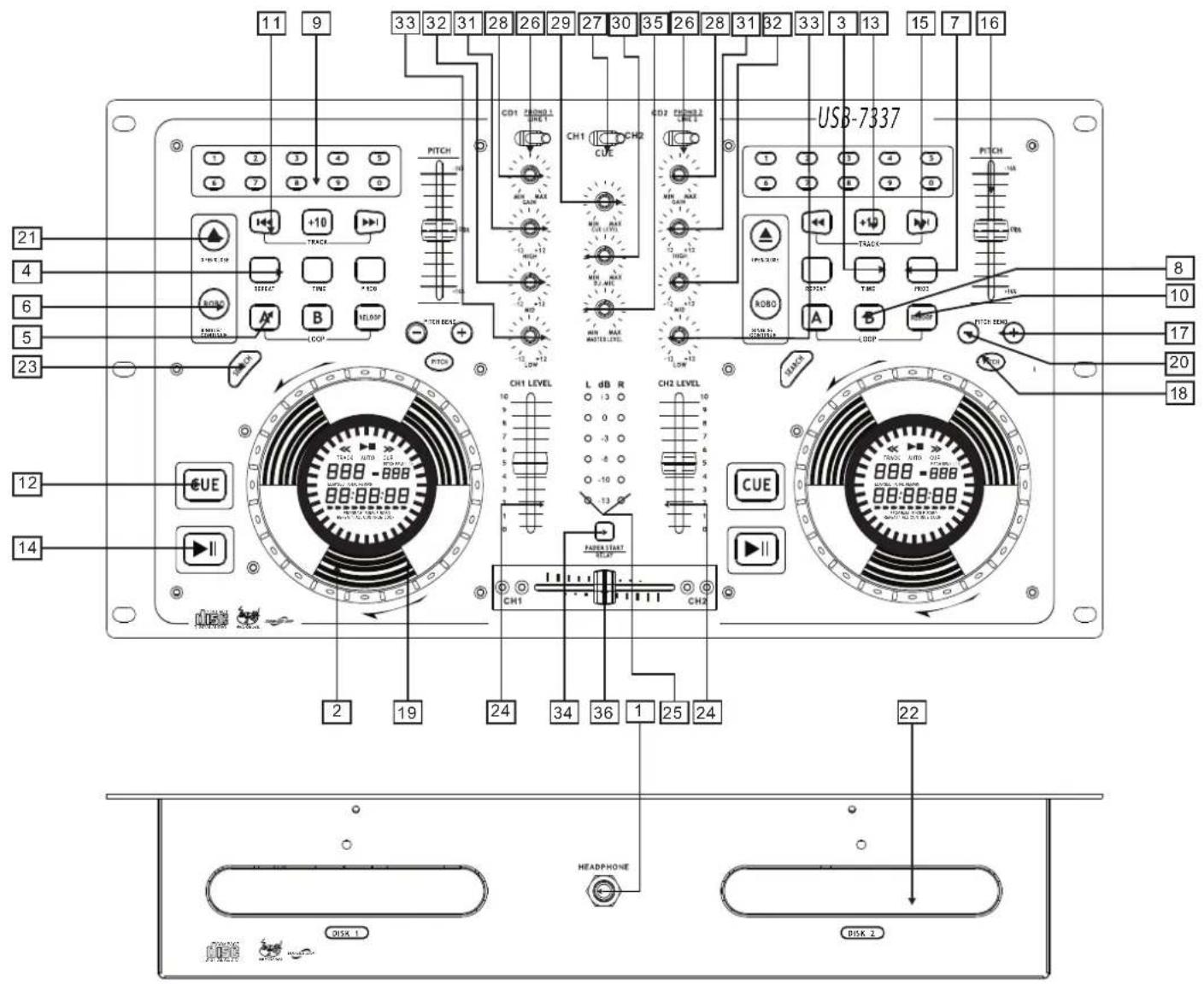
- HEADPHONE JACKS Used for connecting headphones.
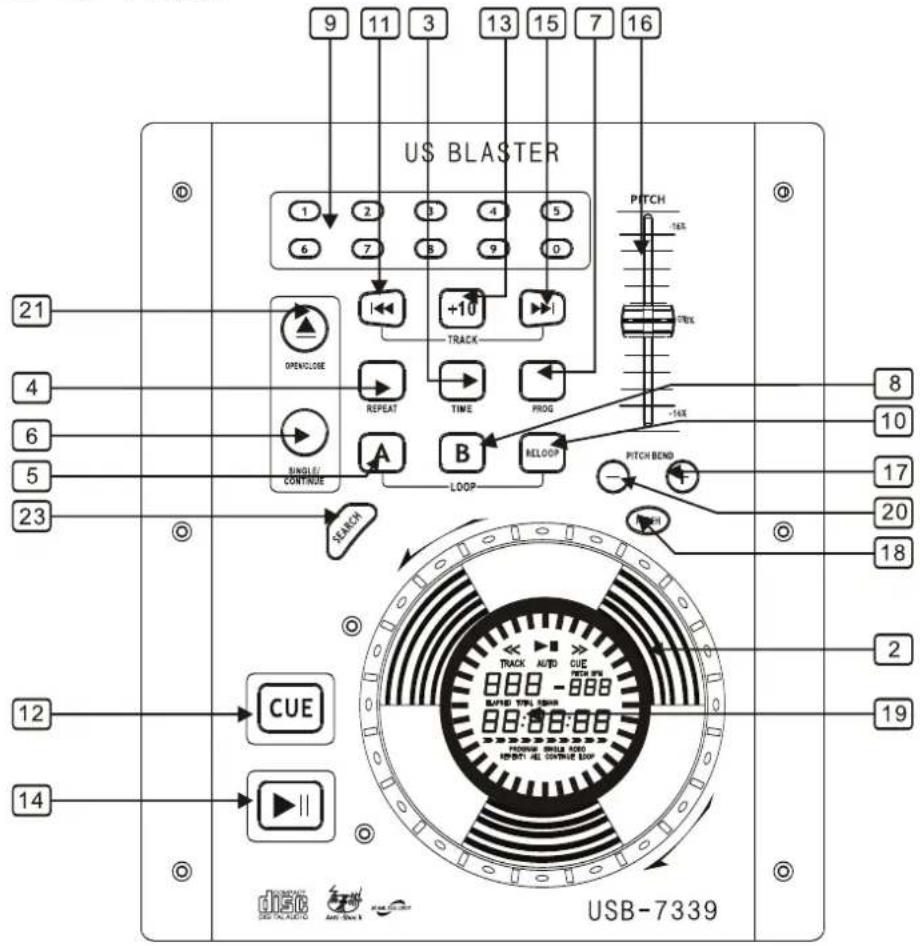
2. JOG & SHUTTLE WHEELS
Shuttle: Use the dial to select the scanning direction and speed. The disc is scanned in forward direction when the shuttle dial is turned clockwise from the neutral position and in the reverse direction when the shuttle dial is turned counter-clockwise. The scanning speeds up when the shuttle dial is turned faster.
Jog: In pause mode, if you turn the jog, the point at which the sound is being produced moves by a number of frames corresponding to the number of clicks. Clockwise moves the point forward, counterclockwise moves the point backward.
In play mode, the jog increases or decreases the speed of the song. (clockwise: increase, counter-clockwise: decrease).
3. TIME BUTTON
Use this button to choose the time mode: Elapsed time, remaining time or total remaining time.
4. REPEAT BUTTON
Use this button to repeat one track or all the tracks of the CD.
5. IN BUTTON (LOOP SYSTEM)
This button sets the beginning of the loop. The loop indicator flashes on the display.
6. ROBO/SINGLE/CONTINUE
Press these to switch between the SINGLE and CONTINUOUS play mode. The selected mode is indicated on the LCD screen. In SINGLE mode the unit stops after each track. In CONTINUE mode, the unit reads all track and stops.
7.PROG BUTTON
You can program several tracks (20 tracks max.):
- Press the PGM button to enter the program mode.
- Use the skip track buttons to choose the track you want, then press the PGM button
- Repeat the operation to select all the tracks you want.
- Press the play / pause button to start the playback.
8. OUT BUTTON (LOOP SYSTEM)
When you press this button, you set the end point of the seamless loop and you start the loop. To finish the loop, press this button again.
9. TRACK SELECT BUTTONS
Pressing 0-9 buttons, allows you to select tracks directly.
10. RELOOP BUTTON (LOOP SYSTEM)
This button is used to start the last saved loop.
11. SKIP I<< BUTTON
Use this button to re-start the track or to select the previous track.
12.CUE BUTTON
Pressing the CUE button during play provides a return to the position at which play was started.
13. +10 BUTTON
Use this button to jump 10 tracks.
14. PLAY / PAUSE BUTTON
The pitch will automatically rise when the + button is pressed and return to the original pitch when it is released.
15. SKIP >> BUTTON
Use this button to select the next track.
16. PITCH CONTROL
Use this fader to increase or decrease the speed of the track.
17. PITCH BEND + BUTTON
The pitch will automatically rise when the + button is pressed and return to the original pitch when it is released.
18. PITCH BUTTON
If you push this button, the adjustment of the pitch potentiometer is available.
19. DISPLAY
20. PITCH BEND BUTTON
The pitch will drop while the button is pressed and return to the original pitch when it is released.
21. EJECT BUTTON
Press to load or eject disk.
NOTE: disc holder will not open unless stop or pause button has been pushed first.
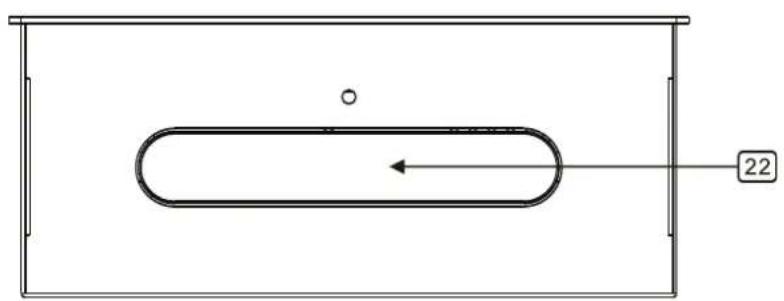
22.DISCHOLDER
Place the discs in the holder, press the OPEN/CLOSE button to open and close the disc holder.
23.SEARCH BUTTON
When the indicator LED is lit, dial the jog for quick search forward and backward,
When the jog is unmoved for 8 seconds, the indicator turns off.
24. INPUT FADER
Controls individual source levels for CH1-2 in the mix
25. LED METER
Indicates the master output level
26. INPUT TOGGLE SWITCH
Selects which source will be live to that channel based on what you have connected to the rear panel input section. In CD1-2 position the internal CD units are active.
27. CUE FOR CH1-2
Selects which source will be live to that channel for CH1 &CH2
28. CH1 & CH2 GAIN CONTROL
Adjusts CH1&CH2 levels
29. CUE LEVEL CONTROL
Adjusts cue volume
30. DJ MIC
Adjusts microphone level
31. HIGH FADER 1-2
Adjusts CH1&CH2 equalization of high tones
32. MID FADER 1-2
Adjust CH1&CH2 equalization of mid tones
33. LOW FADER 1-2
Adjust CH1&CH2 equalization of low tones
34. FADER START
Activation allows you to start the CD players from you crossfader.Travel from left to right will start the right CD player and pause the left CD player.
35. MASTER LEVEL
Adjust master level output.
36. REPLACEABLE CROSSFADER
Achieves clean segues between the two input channels. 'Hard left' selects channel 1. 'Hard right' selects channel 2. With the crossfader centered, both assigned channels are live. Use the crossfader for fast and seamless segues from one selected channel to the other.
Rear Connection:
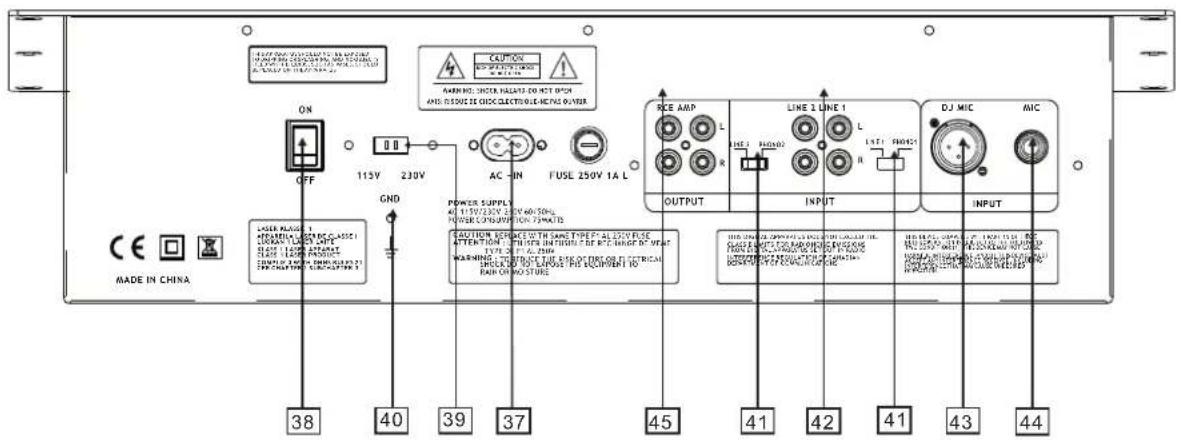
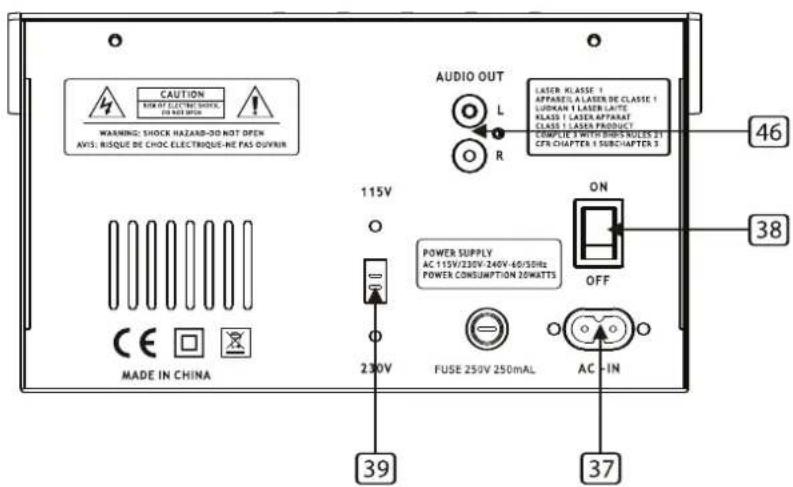
37. AC CORD
Used this cable to connect the AC mains power to the unit.
38. POWER BUTTON
Press the power switch to turn the unit on. To switch the POWER off, press the POWER switch again.
39. POWER SUPPLY SWITCH
Used this selector to choose the correct power supply.
40. GND
Grounding lug for turntable connection. Always use this connection when using turntables.(your turntable cable should have a grounding wire)
41. LINE/PHONO INPUT SWITCH
Use this to allow either line level or phono level equipment to be plugged into your channel inputs. When phono input is selected, your signal is fed directly to the high-quality RIAA phono pre-amplifiers. Line level sources will overload the sensitive phono pre-amps and will sound very bad, so always be sure to toggle the line/phono switch over to line before connection of line sources.
42. INPUT
Plug in the line level device such as tape deck or additional CD player here.
43. DJ MIC
For XLR type microphones.
44. MIC INPUT
For 1/4" microphone plugs.
45. STEREO MAIN OUTPUT
Unbalanced RCA connectors controlled by the master fader.
46. LINE OUT
Connect to the line input of a mixer.
USB 7337 - USB 7338
USB 7339
ALGEMENE VOORSCHRIFTEN
WEEES VOORZICTIG MET HOGE TEMPERATUREEN, VERMIJD STOF EN VOCHT, HOUD WEG BIJ TV EN MAGNETISME, PLAATS HET TOESTEL OP EEN STABIELE ONDERGROND, GEBRUIK GEEN CHEMICALIEN, INDIEN DEFECT DIRECT CONTACT OPNEMEN MET FABRIKANT, MAAK DE KAST NIET OPEN, VOORZICTIG MET HET NETSNOER