SS45003 - Hi-fi system HOMEDICS - Free user manual and instructions
Find the device manual for free SS45003 HOMEDICS in PDF.



| Product Type | Radio alarm clock with projection and nature sounds |
| Brand | Homedics |
| Model | SS45003 |
| Main Power Supply | DC 230V adapter (included) |
| Memory Backup Power Supply | 9V battery (not included) |
| Radio Bands | AM and FM (rear selector) |
| Built-in Nature Sounds | 6 sounds: Ocean, Storm, Rainforest, Summer Night, Rain, Waterfall |
| Alarm Modes | Radio, Nature Sound, Beep |
| Snooze Function | Yes, 9 extra minutes |
| Auto Off Timer | 15, 30, 45 or 60 minutes |
| Time Projection | Yes, adjustable and focusable |
| Display Backlight | 2 levels (High/Low) |
| 12-hour display with AM/PM indicator | Yes |
| Dimensions (approximate) | 20 × 15 × 10 cm (estimated) |
| Weight (approximate) | 0.8 kg (estimated) |
| Care and Cleaning | Clean with a damp cloth; do not use liquid or abrasive cleaners |
| Safety Precautions | Unplug after use; do not use near water; do not cover while operating; keep out of reach of unsupervised children |
| After-Sales Service | Contact HoMedics Service Center if any issue occurs |
| Intended Use | Indoor use only |
Frequently Asked Questions - SS45003 HOMEDICS
User questions about SS45003 HOMEDICS
0 question about this device. Answer the ones you know or ask your own.
Ask a new question about this device
Download the instructions for your Hi-fi system in PDF format for free! Find your manual SS45003 - HOMEDICS and take your electronic device back in hand. On this page are published all the documents necessary for the use of your device. SS45003 by HOMEDICS.
USER MANUAL SS45003 HOMEDICS
natural_image
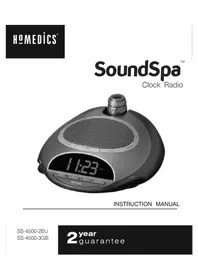
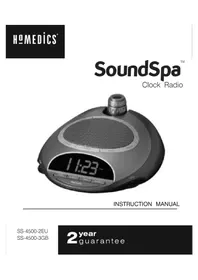
Digital nightstand-style device with a digital display showing 11:23, no visible text or symbols on the device itself.INSTRUCTION MANUAL
SS-4500-2EU
SS-4500-3GB
2year guarantee
READ ALL INSTRUCTIONS BEFORE USE AND SAVE THESE INSTRUCTIONS FOR FUTURE REFERENCE.
IMPORTANT SAFEGUARDS :
WHEN USING ELECTRICAL PRODUCTS, ESPECIALLYWHEN CHILDREN ARE PRESENT, BASIC SAFETY PRECAUTIONS SHOULD ALWAYS BE FOLLOWED, INCLUDING THE FOLLOWING:
- Always unplug the appliance from the electrical outlet immediately after using and before cleaning.
- Do not reach for an appliance that has fallen into water. Unplug it immediately.
- Do not place or store appliance where it can fall or be pulled into a bath or sink. Do not place in or drop into water or other liquid.
WARNING
To reduce the risk of burns, fire, electric shock or injury to persons:
- Close supervision is necessary when this appliance is used by or near children, invalids or disabled persons.
- Use this appliance only for its intended use as described in this manual. Do not use attachments not recommended by HoMedics; specifically any attachments not provided with the unit.
- Never operate this appliance if it has a damaged cord, plug, cable or housing. If it is not working properly, if it has been dropped or damaged, return it to Homedics Service Centre for examination and repair.
- Keep cord away from heated surfaces.
- Never drop or insert any object into any opening.
- Do not operate where aerosol (spray) products are being used or where oxygen is being administered.
- Do not carry this appliance by supply cord or use cord as handle.
• To disconnect, remove plug from outlet.
- This appliance is designed for indoor use only. Do not use outdoors.
- Only set on dry surfaces. Do not place on surface wet from water or cleaning solvents.
SAFETY CAUTIONS :
- Never cover the appliance when it is in operation.
• This unit should not be used by children without adult supervision.
• Always keep the cord away from high temperature and fire. - Do not lift, carry, hang, or pull the product by the power cord.
- If the adaptor sustains damage, you must stop using this product immediately and contact the HoMedics Service Centre.
INSTRUCTIONS FOR USE :
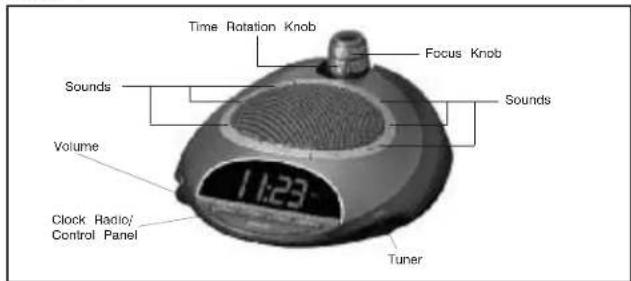
- Unpack the product and check to make sure everything is included (Fig 1).
- This unit is powered by a DC adaptor, which is included.
- The battery power is designed only to provide MEMORY BACK-UP for the clock and alarm settings. One 9V battery (not included) should be inserted into the battery compartment if memory back-up is desired (in the event of power outages or if the unit is unplugged). However, the time will not be illuminated on the clock display. As soon as the power supply returns, the display will indicate the correct time. Note: Battery must be installed in order for clock memory back-up to operate in the event of a power failure or disconnection, if the battery is not installed, the clock and alarm will need to be re-set when power is restored.
- To install battery, remove compartment cover. Insert one 9V battery into the compartment on the bottom of the unit following the diagram. Replace cover and snap into place.
- Attach the DC adaptor to the jack located on the back of the unit (Fig 4) and insert the cord into a 230V power supply.
Figure 1
Setting the clock
- Press and hold the HOUR button for 5 seconds (Fig. 5). The time will begin to flash
- While the time is flashing, press the HOUR button until you reach the correct hour.
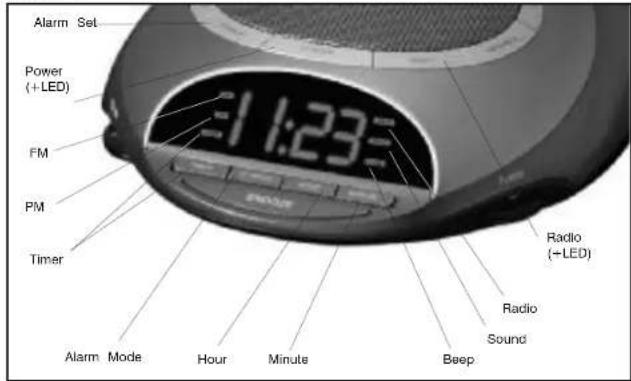
Then press the MINUTE button (Fig. 5) until you reach the correct minute. Note: PM indicator will appear on the left side of the clock face for evening hours (Fig. 5). If the PM indicator is not illuminated, the hour is set to AM. sure to set the time for the correct 12-hour period – AM (morning) or PM (evening). After 5 seconds, the time will stop flashing and it will be set. - Press the BACKLIGHT HIGH/LOW button (Fig. 4) to choose between high and low clock brightness.
Listening to Nature Sounds
- Select the sound you wish to listen to and press the corresponding button (Fig 2).
- To adjust the volume, turn the VOLUME knob (Fig 1) to your desired level.
- When finished listening to the sounds you may turn them off by pressing the POWER button, or switch to the radio by pressing RADIO (Fig 5).
Note: When the unit is turned on it will always default to the last mode used
Figure 2
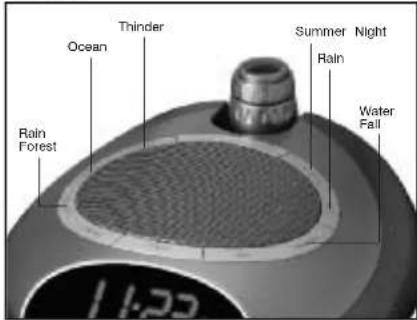
Figure 3
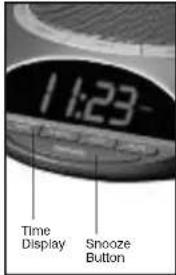
Figure 4
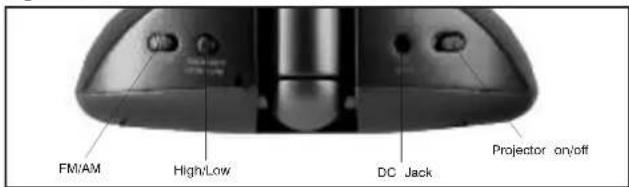
Figure 5
Listening to the radio
- Press the RADIO button (Fig 5).
- Rotate the TUNER (Fig 1) to select a radio station.
- To adjust the volume, turn the VOLUME knob (Fig 1) to your desired level.
- When finished listening to the radio you may turn it off by pressing the POWER button, or switch to a nature sound by pressing the corresponding button (Fig 2). Note: To change between bands there is an AM/FM switch located on the band of the unit (Fig 4). When FM band is selected, a FM Indicator will appear or left side of the clock face (Fig. 5). If the FM indicator is not illuminated, the is set to AM.
Using the Auto-Timer
- When the power is on and you are listening to a nature sound or the radio you may set a timer so the unit will automatically turn off.
- Toggle through the TIMER button (Fig 5) until the time of your choice, 15, 30, 45 or 60 minutes, shows on the clock face. The TIMER indicator will appear on the left side of the clock face to confirm that the timer is set.
Setting and using the alarm
- Press the ALARM SET button (Fig 5). The time will flash.
- While the time is flashing press the HOUR button (Fig 5) until you reach the correct hour. Then press the MINUTE button (Fig 5) until you reach the desired minute.
- After 5 seconds the alarm set time will stop flashing and it will be programmed, or you may press the ALARM SET button.
Note: The PM indicator also applies to the alarm. You can review the alarm setting any time by pressing the ALARM SET button.
- To activate the alarm you may choose one of 3 wake options:
a. To wake to RADIO (Fig. 5) press the AL MODE button (Fig. 5) once. You may leave it on the current station or adjust the TUNER.
b. To wake to a SOUND, press the AL MODE button a second time. It will set to the last sound you listened to. If you wish to change it, press the sound you wish to wake to and then press the POWER button (Fig 5).
c. To wake to BEEP, press the AL MODE button a third time.
Note: The ALARM MODE indicator (RADIO/SOUND/BEEP) will appear on the right side of the clock face (Fig. 5), and will indicate that the alarm is set.
- When the alarm sounds, the corresponding ALARM indicator (RADIO/SOUND/BEEP) blinks. You may either:
a. SNOOZE: Press the SNOOZE button (Fig 3). Your sleep time will be extended by 9 minutes. You may use this feature until you turn the alarm off.
b. RESET: Turn the alarm off by pressing ANY button on the unit, except for the SNOOZE button (Fig 1). The alarm clock will automatically reset for the next day in its current mode. The corresponding ALARM indicator (RADIO/SOUND/BEEP) will indicate this. If you wish to change the wake mode follow step 1 under Setting and Using the Alarm.
c. OFF: To completely turn off the alarm so it is not set for the next day, continue to press the AL MODE button until all the ALARM indicators (RADIO/SOUND/BEEP) are all off.
Note: If the alarm sounds for 30 minutes continuously it will automatically turn off and reset for the next day.
Using the projection feature
- To turn the projection feature on, slide the switch on the back of the unit (Fig 4) ON position. The time is now projected on the ceiling. Note: If the projection feature is off you may press the SNOOZE button (Fig 3) to trigger 5 seconds of projection.
- To turn the angle of the time that appears on the ceiling, rotate the TIME ROTATION KNOB (Fig.1) until you have reached your desired result.
Note: The TIME ROTATION KNOB will rotate up to 350 degrees.
- To focus the time on the ceiling, rotate the FOCUS KNOB (Fig 1.) until you have reached your desired result.
- The angle of the projector can be adjusted by angling forward or backward.
MAINTENANCE :
Storage
You may leave the unit on display, or you can store it in its box or a cool, dry place.
Cleaning
Wipe off dust with a damp cloth. NEVER use liquids or abrasive cleaner to clean. Note: Modifications not authorized by the manufacturer may void users authority to operate this device.
LIRE ATTENTIVEMENT LES INSTRUCTIONS AVANT EMPLOI ET LES CONSERVER POUR TOUTE CONSULTATION ULTÉRIEURE.