THD72A - Talkie Walkie KENWOOD - Free user manual and instructions
Find the device manual for free THD72A KENWOOD in PDF.


User questions about THD72A KENWOOD
0 question about this device. Answer the ones you know or ask your own.
Ask a new question about this device
Download the instructions for your Talkie Walkie in PDF format for free! Find your manual THD72A - KENWOOD and take your electronic device back in hand. On this page are published all the documents necessary for the use of your device. THD72A by KENWOOD.
USER MANUAL THD72A KENWOOD
text_image
KENWOOD DATA TM DUAL RANGER AND TNC Special OFF: 100 MOS: 5 POME: 2 TOMS: 3 MINI: 4 MINI: 5 MINI: 6 MINI: 7 MINI: 8 MINI: 9 MINI: 10 MINI: 11 MINI: 12 MINI: 13 MINI: 14 MINI: 15 MINI: 16 MINI: 17 MINI: 18 MINI: 19 MINI: 20 MINI: 21 MINI: 22 MINI: 23 MINI: 24 MINI: 25 MINI: 26 MINI: 27 MINI: 28 MINI: 29 MINI: 30 MINI: 31 MINI: 32 MINI: 33 MINI: 34 MINI: 35 MINI: 36 MINI: 37 MINI: 38 MINI: 39 MINI: 40 MINI: 41 MINI: 42 MINI: 43 MINI: 44 MINI: 45 MINI: 46 MINI: 47 MINI: 48 MINI: 49 MINI: 50 MINI: 51 MINI: 52 MINI: 53 MINI: 54 MINI: 55 MINI: 56 MINI: 57 MINI: 58 MINI: 59 MINI: 60 MINI: 61 MINI: 62 MINI: 63 MINI: 64 MINI: 65 MINI: 66 MINI: 67 MINI: 68 MINI: 69 MINI: 70 MINI: 71 MINI: 72 MINI: 73 MINI: 74 MINI: 75 MINI: 76 MINI: 77 MINI: 78 MINI: 79 MINI: 80 MINI: 81 MINI: 82 MINI: 83 MINI: 84 MINI: 85 MINI: 86 MINI: 87 MINI: 88 MINI: 89 MINI: 90 MINI: 91 MINI: 92 MINI: 93 MINI: 94 MINI: 95 MINI: 96 MINI: 97 MINI: 98 MINI: 99 MINI: 100144/440 MHz FM DUAL BANDER/
144/430 MHz FM DUAL BANDER
INSTRUCTION MANUAL
144/440 MHz FM DOUBLE BANDE/
144/430 MHz FM DOUBLE BANDE
MODE D'EMPLOI
DOBLE BANDA DE 144/440 MHz EN FM/
DOBLE BANDA DE 144/430 MHz EN FM
Only basic operations are explained in this instruction manual.
For a detailed explanation on the operations, refer to the PDF file supplied on the CD-ROM.
This equipment complies with the essential requirements of Directive 1999/5/EC.
The use of the warning symbol means the equipment is subject to restrictions of use in certain countries.
This equipment requires a licence and is intended for use in the countries as below.
| AT BE DK FI FR DE GR IS IE | |||||||
| IT LI LU NL NO PT ES SE CH | |||||||
| GB CY CZ EE HU LV LT MT PL | |||||||
| SK SI BG RO HR | |||||||
ISO3166
Firmware Copyrights
The title to and ownership of copyrights for fi rmware embedded in KENWOOD product memories are reserved for JVC KENWOOD Corporation.
THANK YOU
We are grateful you decided to purchase this KENWOOD FM transceiver.
KENWOOD always provides Amateur Radio products which surprise and excite serious hobbyists. This transceiver is no exception. KENWOOD believes that this product will satisfy your requirements for both voice and data communications.
The models listed below are covered by this manual.
TH-D72A: 144/440 MHz FM Dual Bander (The Americas)
TH-D72E: 144/430 MHz FM Dual Bander (Europe)
FEATURES
This transceiver has the following main features:
• A built-in GPS receiver unit.
• A built-in 5000 point GPS Logger.
- A built-in TNC which conforms to the AX.25 protocol. With a portable computer, it allows you to easily enjoy Packet operation.
- Includes a program for dealing with data formats supported by Automatic Packet Reporting System (APRS®).
- Contains a total of 1000 Memory channels to program frequencies and other various data. Each Memory channel can be named using up to 8 alphanumeric characters.
- Continuous Tone Coded Squelch System (CTCSS) or Digital Coded Squelch (DCS) rejects unwanted calls from other stations.
WRITING CONVENTIONS FOLLOWED IN THIS MANUAL
The writing conventions described below have been followed to simplify instructions and avoid unnecessary repetition.
| Instruction Action | |
| Press [KEY]. Momentarily press KEY. | |
| Press [KEY] (1s). Press and hold KEY for 1 second or longer. | |
| Press [KEY1], [KEY2]. | Press KEY1 momentarily, release KEY1, then press KEY2. |
| Press [F], [KEY]. | Press the F key to enter Function mode, then press KEY to access its secondary function. |
| Press [KEY] + Power ON. | With the transceiver power OFF, press and hold KEY while turning the transceiver power ON. |
Information on Disposal of Old Electrical and Electronic Equipment and Batteries (applicable for countries that have adopted separate waste collection systems)
Products and batteries with the symbol (crossed-out wheeled bin) cannot be disposed as household waste.
Old electrical and electronic equipment and batteries should be recycled at a facility capable of handling these items and their waste byproducts. Contact your local authority for details in locating a recycle facility nearest to you. Proper recycling and waste disposal will help conserve resources whilst preventing detrimental effects on our health and the environment.
NOTICES TO THE USER
One or more of the following statements may be applicable:
FCC WARNING
This equipment generates or uses radio frequency energy. Changes or modifi cations to this equipment may cause harmful interference unless the modifi cations are expressly approved in the instruction manual. The user could lose the authority to operate this equipment if an unauthorized change or modifi cation is made.
INFORMATION TO THE DIGITAL DEVICE USER REQUIRED BY THE FCC
This equipment has been tested and found to comply with the limits for a Class B digital device, pursuant to Part 15 of the FCC Rules. These limits are designed to provide reasonable protection against harmful interference in a residential installation.
This equipment generates, uses and can generate radio frequency energy and, if not installed and used in accordance with the instructions, may cause harmful interference to radio communications. However, there is no guarantee that the interference will not occur in a particular installation. If this equipment does cause harmful interference to radio or television reception, which can be determined by turning the equipment off and on, the user is encouraged to try to correct the interference by one or more of the following measures:
- Reorient or relocate the receiving antenna.
- Increase the separation between the equipment and receiver.
- Connect the equipment to an outlet on a circuit different from that to which the receiver is connected.
- Consult the dealer for technical assistance.
WHEN CONDENSATION OCCURS INSIDE THE TRANSCEIVER
Condensation may occur inside the transceiver in such a case where the room is warmed using a heater on cold days or where the transceiver is quickly moved from a cold room to a warm room. When condensation occurs, the microcomputer and/or the transmit/receive circuits may become unstable, resulting in transceiver malfunction. If this happens, turn OFF the transceiver and just wait for a while. When the condensation droplets disappear, the transceiver will function normally.

text_image
RECYCLE RBRC Li-ion™ 7.800.822.8837ATTENTION: (USA and CANADA only)
The RBRC Recycle seal found on KENWOOD lithium-ion (Li-ion) battery packs indicates KENWOOD's voluntary participation in an industry program to collect and recycle Li-ion batteries after their operating life has expired. The RBRC program is an alternative to disposing Li-ion batteries with your regular refuse or in municipal waste streams, which is illegal in some areas.
For information on Li-ion battery recycling in your area, call (toll free)
1-800-8-BATTERY (1-800-822-8837).
KENWOOD's involvement in this program is part of our commitment to preserve our environment and conserve our natural resources.
This product contains a CR Coin Cell Lithium Battery which contains Perchlorate Material – special handling may apply.
See www.dtsc.ca.gov/hazardouswaste/perchlorate
PRECAUTIONS
- Do not charge the transceiver and battery pack when they are wet.
- Ensure that there are no metallic items located between the transceiver and the battery pack.
- Do not use options not specified by KENWOOD.
- If the die-cast chassis or other transceiver part is damaged, do not touch the damaged parts.
- If a headset or headphone is connected to the transceiver, reduce the transceiver volume. Pay attention to the volume level when turning the squelch off.
- Do not place the microphone cable around your neck while near machinery that may catch the cable.
- Do not place the transceiver on unstable surfaces.
- Ensure that the end of the antenna does not touch your eyes.
- When the transceiver is used for transmission for many hours, the radiator and chassis will become hot. Do not touch these locations when replacing the battery pack.
- Do not immerse the transceiver in water.
- Always switch the transceiver power off before installing optional accessories.
- For safety reasons, we recommend that the battery charger be connected to an easily accessible AC socket.

WARNING
Turn the transceiver power off in the following locations:
- In explosive atmospheres (infl ammable gas, dust particles, metallic powders, grain powders, etc.).
- While taking on fuel or while parked at gasoline service stations.
- Near explosives or blasting sites.
- In aircrafts. (Any use of the transceiver must follow the instructions and regulations provided by the airline crew.)
- Where restrictions or warnings are posted regarding the use of radio devices, including but not limited to medical facilities.
- Near persons using pacemakers.

CAUTION
- Do not disassemble or modify the transceiver for any reason.
- Do not place the transceiver on or near airbag equipment while the vehicle is running. When the airbag inflates, the transceiver may be ejected and strike the driver or passengers.
- Do not transmit while touching the antenna terminal or if any metallic parts are exposed from the antenna covering. Transmitting at such a time may result in a high-frequency burn.
- If an abnormal odor or smoke is detected coming from the transceiver, switch the transceiver power off immediately, remove the battery pack from the transceiver, and contact your KENWOOD dealer.
- Use of the transceiver while you are driving may be against traffic laws. Please check and observe the vehicle regulations in your area.
- Do not expose the transceiver to extremely hot or cold conditions.

CAUTION
- Do not carry the battery pack (or battery case) with metal objects, as they may short the battery terminals.
- When operating the transceiver in areas where the air is dry, it is easy to build up an electric charge (static electricity). When using a earphone accessory in such conditions, it is possible for the transceiver to send an electric shock through the earphone and to your ear. We recommend you use only a speaker/microphone in these conditions, to avoid electric shocks.
- When attaching a commercial strap to the transceiver, ensure that the strap is durable. In addition, do not swing the transceiver around by the strap; you may inadvertently strike and injure another person with the transceiver.
Information concerning the battery pack:
The battery pack includes fl ammable objects such as organic solvent.
Mishandling may cause the battery to rupture producing flames or extreme heat, deteriorate, or cause other forms of damage to the battery. Please observe the following prohibitive matters.

DANGER
- Do not disassemble or reconstruct battery!
The battery pack has a safety function and protection circuit to avoid danger. If they suffer serious damage, the battery may generate heat or smoke, rupture, or burst into flame.
- Do not short-circuit the battery!
Do not join the + and – terminals using any form of metal (such as a paper clip or wire). Do not carry or store the battery pack in containers holding metal objects (such as wires, chain-necklace or hairpins). If the battery pack is short-circuited, excessive current will flow and the battery may generate heat or smoke, rupture, or burst into flame. It will also cause metal objects to heat up.
- Do not incinerate or apply heat to the battery!
If the insulator is melted, the gas release vent or safety function is damaged, or the electrolyte is ignited, the battery may generate heat or smoke, rupture, or burst into flame.
- Do not leave the battery near fire, stoves, or other heat generators (areas reaching over 80°C/176°F)!
If the polymer separator is melted due to high temperature, an internal short-circuit may occur in the individual cells and the battery may generate heat or smoke, rupture, or burst into flame.
- Avoid immersing the battery in water or getting it wet by other means!
If the battery becomes wet, wipe it off with a dry towel before use. If the battery's protection circuit is damaged, the battery may charge at extreme current (or voltage) and an abnormal chemical reaction may occur. The battery may generate heat or smoke, rupture, or burst into flame.
- Do not charge the battery near fi re or under direct sunlight!
If the battery's protection circuit is damaged, the battery may charge at extreme current (or voltage) and an abnormal chemical reaction may occur. The battery may generate heat or smoke, rupture, or burst into flame.
- Use only the specified charger and observe charging requirements!
If the battery is charged in unspecified conditions (under high temperature over the regulated value, excessive high voltage or current over regulated value, or with a remodeled charger), it may overcharge or an abnormal chemical reaction may occur. The battery may generate heat or smoke, rupture, or burst into flame.

DANGER
- Do not pierce the battery with any object, strike it with an instrument, or step on it!
This may break or deform the battery, causing a short-circuit. The battery may generate heat or smoke, rupture, or burst into flame.
- Do not jar or throw the battery!
An impact may cause the battery to leak, generate heat or smoke, rupture, and/or burst into flame. If the battery's protection circuit is damaged, the battery may charge at an abnormal current (or voltage), and an abnormal chemical reaction may occur. The battery may generate heat or smoke, rupture, or burst into flame.
- Do not use the battery pack if it is damaged in any way!
The battery may generate heat or smoke, rupture, or burst into flame.
- Do not solder directly onto the battery!
If the insulator is melted or the gas release vent or safety function is damaged, the battery may generate heat or smoke, rupture, or burst into flame.
- Do not reverse the battery polarity (and terminals)!
When charging a reversed battery, an abnormal chemical reaction may occur. In some cases, an unexpected large amount of current may flow upon discharging. The battery may generate heat or smoke, rupture, or burst into flame.
- Do not reverse-charge or reverse-connect the battery!
The battery pack has positive and negative poles. If the battery pack does not smoothly connect with a charger or operating equipment, do not force it; check the polarity of the battery. If the battery pack is reverse-connected to the charger, it will be reverse-charged and an abnormal chemical reaction may occur. The battery may generate heat or smoke, rupture, or burst into flame.
- Do not touch a ruptured and leaking battery!
If the electrolyte liquid from the battery gets into your eyes, wash your eyes with fresh water as soon as possible, without rubbing your eyes. Go to the hospital immediately. If left untreated, it may cause eye-problems.

WARNING
- Do not charge the battery for longer than the specified time!
If the battery pack has not finished charging even after the regulated time has passed, stop it. The battery may generate heat or smoke, rupture, or burst into flame.
- Do not place the battery pack into a microwave or high pressure container!
The battery may generate heat or smoke, rupture, or burst into flame.
- Keep ruptured and leaking battery packs away from fire!
If the battery pack is leaking (or the battery emits a bad odor), immediately remove it from fl ammable areas. Electrolyte leaking from battery can easily catch on fire and may cause the battery to generate smoke or burst into flame.
- Do not use an abnormal battery!
If the battery pack emits a bad odour, appears to have different coloring, is deformed, or seems abnormal for any other reason, remove it from the charger or operating equipment and do not use it. The battery may generate heat or smoke, rupture, or burst into flame.
PREPARATION 1
SUPPLIED ACCESSORIES 1
INSTALLING THE ANTENNA 1
INSTALLING THE BATTERY PACK 2
INSTALLING ALKALINE BATTERIES 2
INSTALLING THE BELT CLIP 3
CHARGING THE PB-45L BATTERY PACK 4
BATTERY LIFE 5
CONNECTING TO A CIGARETTE LIGHTER SOCKET 6
CONNECTING TO A REGULATED POWER SUPPLY 7
CONNECTING TO A PC 7
GETTING ACQUAINTED 8
KEY AND CONTROL KNOB OPERATIONS 8
DISPLAY 12
BASIC OPERATIONS 14
SWITCHING THE POWER ON/ OFF 14
ADJUSTING THE VOLUME 14
ADJUSTING THE SQUELCH 15
TROUBLESHOOTING....37
SPECIFICATIONS 41
For a detailed explanation on transceiver operation, refer to the PDF file supplied on the CD-ROM.
| Operation | File name (TH-D72_) |
| CONTENTS | 00_CONTENS_E.pdf |
| OPERATING THROUGH REPEATERS | 01_REPEATER_E.pdf |
| MEMORY CHANNELS | 02_MEMORY CHANNEL_E.pdf |
| SCAN 03_SCAN_E.pdf | |
| CTSSS/ DCS/ CROSS TONE | 04_CTCSS_DCS_CROSS TONE_E.pdf |
| DUAL TONE MULTI-FREQUENCY (DTMF) | 05_DTMF_E.pdf |
| EchoLink® | 06_EchoLink_E.pdf |
| OTHER OPERATIONS 07_OTHER OPERATIONS_E.pdf | |
| GPS | 08_GPS_E.pdf |
| PACKET | 09_PACKET_E.pdf |
| APRS® | 10_APRS_E.pdf |
| TRANSCEIVER RESET | 11_RESET_E.pdf |
| SKY COMMAND SYSTEM II | 12_SKY COMMAND_E.pdf |
| WEATHER ALERT (TH-D72A ONLY) 13_WEATHER ALERT_TH-D72A_E.pdf | |
| WIRELESS REMOTE (TH-D72A ONLY) 14_WIRELESS_TH-D72A_E.pdf | |
Note: The Operations fi le is available in PDF fi le format. To read the fi le, you must use Adobe® Reader®.
SUPPLIED ACCESSORIES
After carefully unpacking the transceiver, identify the items listed in the table below. We recommend you keep the box and packaging for shipping.
| Item Comments | Quantity | ||
| TH-D72A | TH-D72E | ||
| Antenna 1 1 | |||
| Li-ion battery pack PB-45L: 1800 mAh 1 1 | |||
| Wall charger 1 1 | |||
| AC power cable for the wall charger - 2 | |||
| Belt hook 1 1 | |||
| USB cable A - Mini B type 1 1 | |||
| Warranty card | 1 1 | ||
| Instruction manual | English/ French/ Spanish | 1 1 | |
| Italian/ German/ Dutch | - 1 | ||
| CD-ROM | For a detailed explanation on transceiver operations | 1 | 1 |
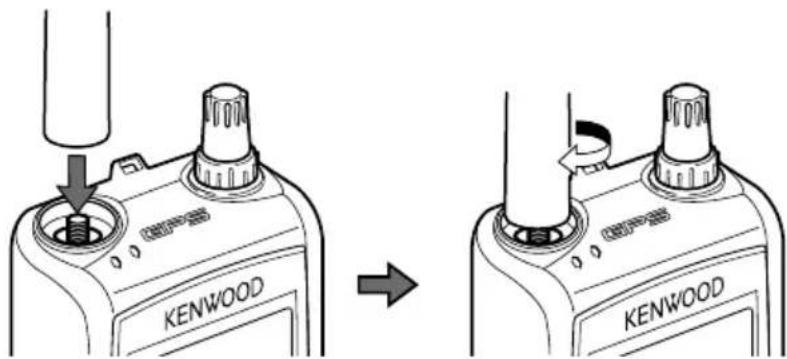
INSTALLING THE ANTENNA
Hold the supplied antenna by its base, then screw it into the connector on the top panel of the transceiver until secure.
text_image
KENWOOD KENWOODNote: Because the battery pack is provided uncharged, you must charge the battery pack before using it with the transceiver. To charge the battery pack, refer to "CHARGING THE PB-45L BATTERY PACK" {page 4}.
1 Unlock (open) the safety catch located at the bottom of the battery pack.
2 Match the guides of the battery pack with the corresponding grooves on the upper rear of the transceiver, then firmly press the battery case to lock it in place.
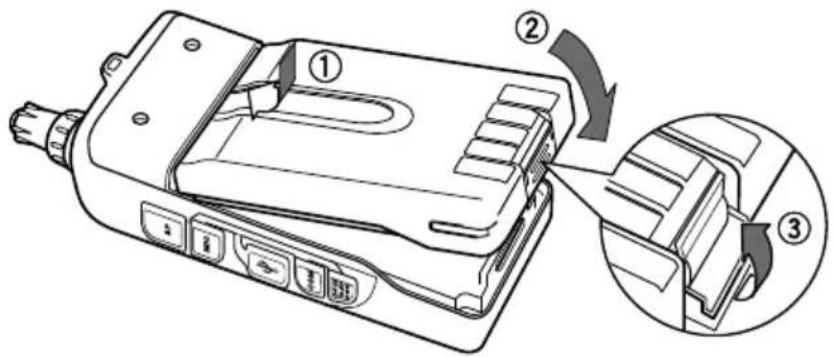
text_image
Technical diagram of a device with numbered components and directional arrows indicating assembly or operation3 Flip the safety catch into place to prevent accidentally pressing the release latch and removing the battery pack.
4 To remove the battery pack, lift the safety catch, then press the release latch to unlock the battery pack. Lift the battery pack away from the transceiver.
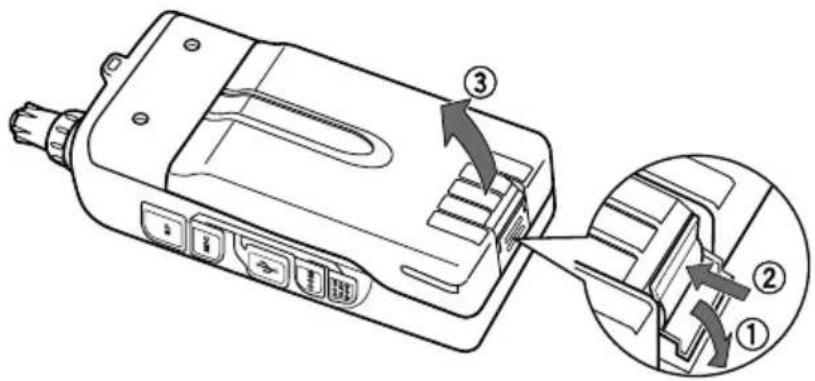
text_image
Technical diagram of a device with numbered components and directional arrows indicating assembly or operationINSTALLING ALKALINE BATTERIES
1 To open the optional BT-15 battery case lid, press the release lever on the top of the battery case, then pull the cover up.
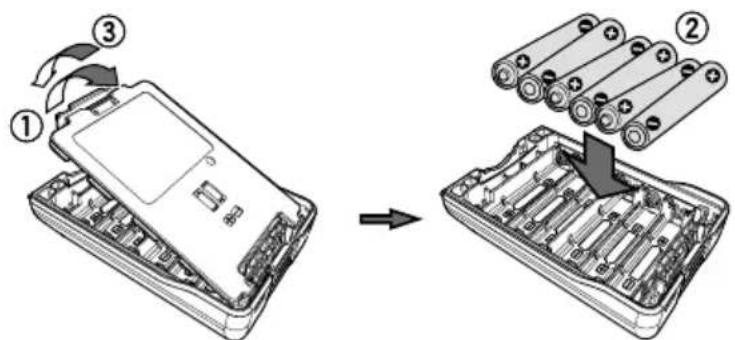
text_image
Diagram showing a device being processed into a multi-well battery pack, with numbered components and directional arrows indicating process flow.2 Insert (or remove) six AAA (LR03) Alkaline batteries.
- When removing the Alkaline batteries from the battery case, pull up on the batteries from the positive (+) terminal.
- Be sure to match the battery polarities with those marked in the bottom of the battery case.
3 Align the two tabs at the bottom of battery case, then close the cover until the locking tabs on top click.
4 To install the battery case onto (or remove it from) the transceiver, follow steps 1 to 3 of "INSTALLING THE BATTERY PACK".
- When using the BT-15, set the "Battery Type" to "Alkaline", in Menu No. 112 (page 24). If it is set to "Lithium", the battery capacity indicator (page 22) will not show the correct initial value. When using the battery pack, return the setting to "Lithium".
Note:
When carrying the battery case while using a battery pack, place the battery case in the BT-15 carrying pouch.
◆ Do not use Manganese batteries or Rechargeable batteries in place of Alkaline batteries.
◆ Remove all batteries from the case when it is not expected to be in use for several months.
◆ To lift the battery pack safety catch, use a piece of hardened plastic or metal, such as a screwdriver, that is no more than 6 mm wide and 1 mm thick. It is imperative that you place the implement under only the lip of the safety catch so that you do not damage the release latch.
INSTALLING THE BELT CLIP
If desired, you can install the supplied belt clip to the transceiver.
1 Loosely insert the two supplied screws into the holes on the back panel of the transceiver.
2 Slide the belt hook into position, under the screws.
3 Tighten the screws until secure.
Note: When the belt hook is not attached to the transceiver, remove the screws from the transceiver to avoid scratching other materials.
The battery pack can be charged after it has been installed onto the transceiver. (The battery pack is provided uncharged for safety purposes.)
1 Confir rm that the transceiver power is OFF.
- While charging the battery pack, leave the transceiver power OFF.
2 Insert the charger plug into the DC IN jack of the transceiver.
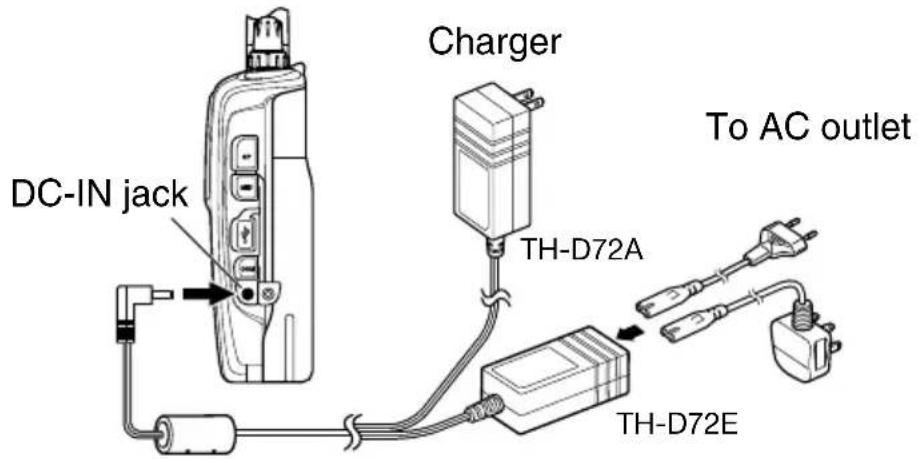
text_image
DC-IN jack Charger TH-D72A To AC outlet TH-D72E3 Plug the charger into an AC wall outlet.
- Charging starts and the two TX-RX LEDs on the top panel light orange. < Until Firmware version 1.06 >
- Charging starts and "Charging" appears on the display. < From Firmware version 1.07 >
4 It takes approximately 8 hours to charge an empty PB-45L Li-ion battery pack. After 8 hours, remove the charger plug from the transceiver DC-IN jack.
- When charging completes, the LEDs turn off. < Until Firmware version 1.06 >
- When charging completes, "Charging" disappears. < From Firmware version 1.07 >
5 Unplug the charger from the AC wall outlet.
Note:
◆ Never leave the battery pack in direct sunlight.
◆ The transceiver becomes warm while charging the battery pack.
◆ While the battery pack is charged, the ambient temperature must be within 0^ C \~ 40^ C ( 32^ F \~ 104^ F). Otherwise, charging does not start. If the transceiver senses that the temperature is more than 60^ C ( 140^ F) during charging, the transceiver stops charging.
◆ Before recharging the battery pack, use the battery pack until the transceiver stops receiving.
◆ Do not plug the charger into the DC IN jack for more than 24 hours.
◆ Unplug the charger as soon as possible after the charging period is over.
◆ After the battery pack is charged, do not unplug and plug the charger into the AC outlet again. Unplugging the charger will reset the charging timer and the battery pack will be charged again. This could result in over-charging.
If the battery pack is recharged repeatedly before the battery pack is not fully used, the memory effect (the battery pack will not allow the charger to recharge the battery to more than a certain voltage level) may occur. In this case, turn the transceiver ON until it stops receiving in order to discharge the battery pack, then recharge the battery pack as normal.
When the battery is installed on the transceiver and you are using an optional rapid battery charger, do not charge the battery from the DC-IN Jack. Charging the battery from the DC-IN Jack may result in overcharging the battery which can result in the shortening of the battery life cycle.
If the battery pack is not used for a long time, the battery pack capacity temporarily decreases. In this case, charge the battery and use the battery pack until the transceiver stops receiving.
Repeat this procedure several times. The battery pack should recover its capacity.
◆ If the charger is plugged into the DC IN jack before the battery pack is attached, turn the transceiver power ON and then OFF again to initiate charging.
Exceeding the specified charge period shortens the useful life of the PB-45L battery pack.
◆ The provided charger is designed to charge only the PB-45L battery pack. Charging other models of battery packs may damage the charger and battery pack.
◆ Do not transmit while charging.
◆ When not in use, store the battery pack in a cool and dry place.
◆ Before charging the battery pack, ensure that the safety catch is firmly closed.
◆ Attention should be drawn to the environmental aspects of battery disposal.
- It takes approximately 3 hours to charge the PB-45L with the optional KSC-32.
Charger Error
- While charging, if a problem is detected in the battery, the LED will light or a beep will sound, to indicate the problem.
- If a charging error occurs when the power is turned on, charging is cancelled, a beep sounds, and "Charge Error" appears on the display.
- If a charging error occurs when the power is turned off, charging is cancelled and the TX-RX LED fl ashes orange.
• The following conditions create charging errors:
• A short in the battery is detected.
• Overvoltage in the battery is detected. - The charge timer is exceeded (the battery has deteriorated).
- When a charge error occurs, no key other than [⏻] will function.
BATTERY LIFE
Before you operate the transceiver outside using a battery pack, it is important to know how long the battery pack will last. The operating times listed in the table below are measured under the following cyclic conditions:
TX: 6 seconds, RX: 6 seconds, Stand-by: 48 seconds
We recommend you carry extra battery packs with you, in case the battery pack becomes depleted.
| Battery Type Output Power Operating Time/ Hours (Approx.) | ||
| PB-45L(7.4 V) | H | 6 |
| L | 12 | |
| EL 15 | ||
| BT-15(9 V) | H 1.5 | |
| L | 6 | |
| EL | 8 | |
Note: Internal resistance levels differ, depending on the battery, so when using Alkaline batteries there are times when the actual operating time may be shorter than normal.
CONNECTING TO A CIGARETTE LIGHTER SOCKET
To connect the transceiver to the cigarette lighter socket in your vehicle, use an optional PG-3J Cigarette Lighter cable.
When the PG-3J is connected to the cigarette lighter plug, the transceiver automatically starts charging the PB-45L battery pack. While you operate the transceiver, it charges the PB-45L battery pack in the background.
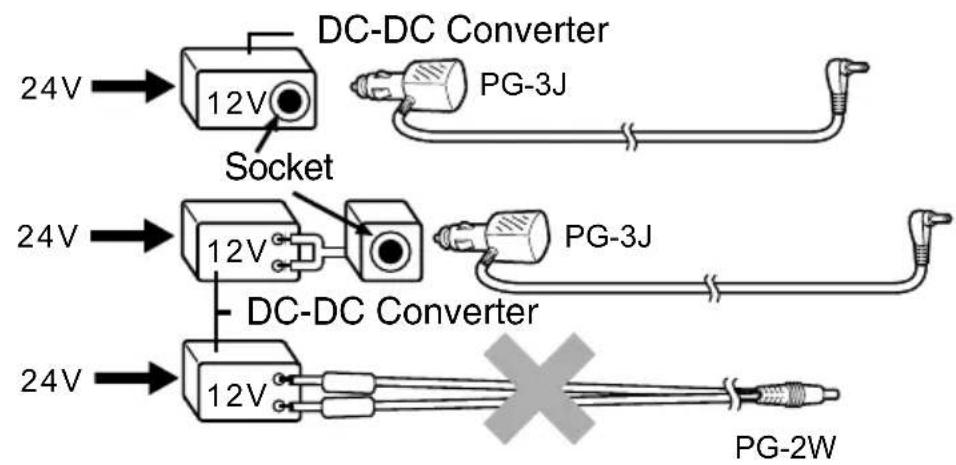
To connect with an external 24 V power source via a DC-DC converter, only use the optional PG-3J Cigarette Lighter cable.
Using the PG-2W DC cable in this situation may cause a fire.
text_image
24V 12V Socket DC-DC Converter PG-3J 24V 12V PG-3J 24V 12V DC-DC Converter PG-2WNote:
Do not use the PG-2W to connect directly to a vehicle battery (12 V). Extensive voltage could result in damaging the transceiver.
◆ If the input voltage exceeds approximately 17.5 V, the transceiver automatically turns OFF.
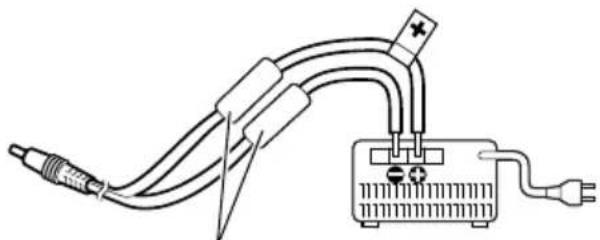
To connect the transceiver to an appropriate regulated DC power supply, use an optional PG-2W DC cable.
1 Confirm that the power of both the transceiver and the DC power supply is OFF.
2 Connect the optional PG-2W DC cable to the DC power supply; the red lead to the positive (+) terminal, and the black lead to the negative (−) terminal.
natural_image
Pure electrical circuit lines without any symbolsFuses (3 A)
3 Connect the barrel plug on the DC cable to the DC IN jack of the transceiver.
- While a DC power supply is connected with the DC IN jack, the transceiver automatically initiates charging the PB-45L battery pack.
Note:
◆ If the DC power supply voltage is below 12.0 V DC, you may not be able to charge the PB-45L battery pack.
◆ The supply voltage must be between 12.0 V and 16.0 V to prevent damaging the transceiver. If the input voltage exceeds approximately 17.5 V, the transceiver automatically turns OFF.
CONNECTING TO A PC
The USB connector allows you to directly connect to a computer by using a supplied USB cable.
- Download the virtual COM port driver from the URL listed below.
http://www.kenwood.com/i/products/info/amateur/software_download.html
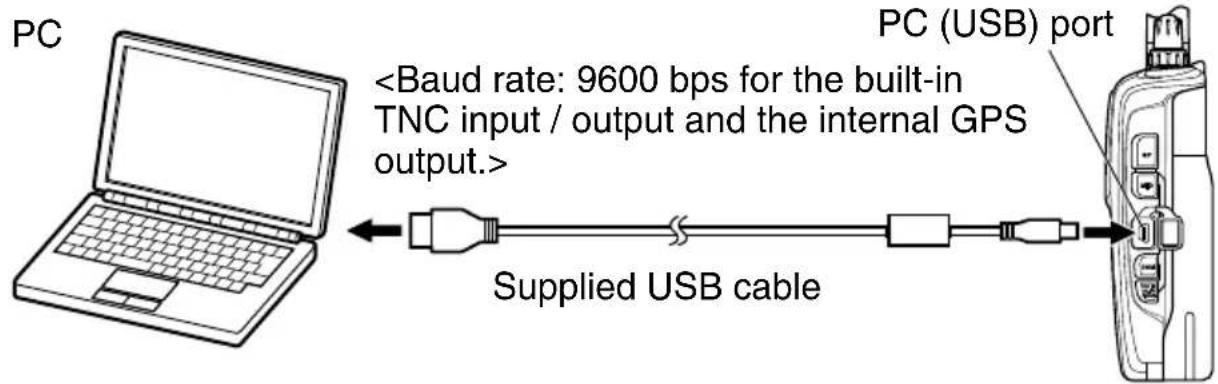
text_image
PCDepending on the usage condition of the USB apparatus, saved content may be lost. JVC KENWOOD does not take responsibility for damages or lost content.
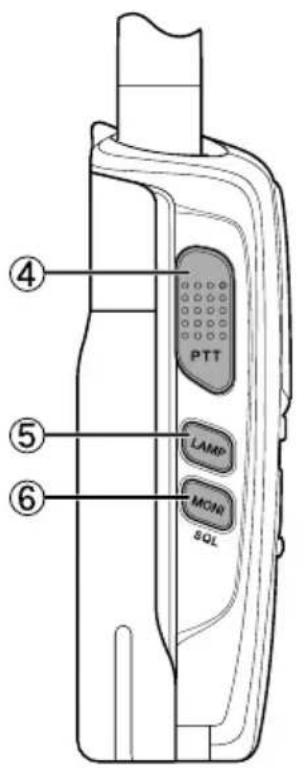
KEY AND CONTROL KNOB OPERATIONS
text_image
PTT LAMP MON SQL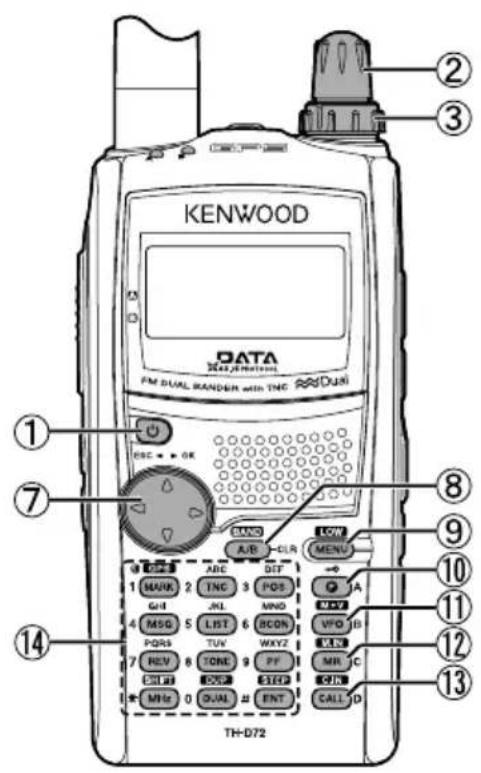
text_image
KENWOOD DATA FM DUAL RANDER with TNC DUAL ① ② ③ ⑦ ⑧ ⑨ ⑩ ⑪ ⑫ TH-D72 A/B CLR TWO MENU 1 MUK 2 TNC 3 POS GHI JL MNO 4 MSG 5 LIST 6 BCON PQRS TUV WKYZ 7 REV TONE PF MR C 0 SEL 1 SET QIN MHe 0 DUAL # ENT CALL D① [⏻]
Press [☐] to turn the transceiver power ON and OFF.
② Tuning Control
Rotate the Tuning control to select an operating frequency, Memory channel, Menu number, setting value and change the scan direction, etc.
③ VOL Control
Rotate the VOL control to adjust the speaker volume.
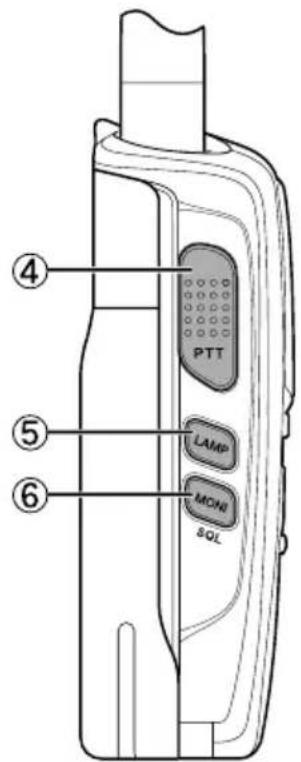
④ [PTT]
Press and hold [PTT], then speak into the microphone to transmit.
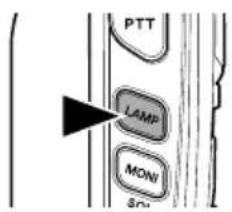
⑤ [LAMP]
Press [LAMP] to illuminate the display and keys.
Press [F], [LAMP] to keep the light ON continuously.
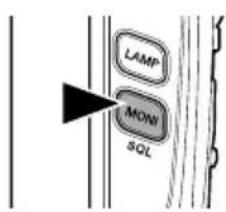
⑥ [MONI]
Press and hold [MONI] to unmute the speaker in order to monitor signals. Release [MONI] to return to normal operation.
Press [F], [MONI] to enter the Squelch level adjustment mode.
⑦ [▲], [▼]
Press [▲] or [▼] to select an operating frequency, Memory channel, Menu number, setting value or to change the scan direction, etc.
The [▲]/[▼] keys function in the exact same way as the Tuning control. These keys change frequencies, memory channels, or other selections, depending on the current transceiver mode.
[OK]
Press [OK] to move to the next step or to complete the setting in various selection modes such as Function Select or Menu mode.
[ESC]
Press [ESC] to move back to the previous step or to quit the setting in various selection modes such as Function Select or Menu mode.
⑧ [A/B]
Press [A/B] to select operation band A or B.
Press [F], [A/B] to select a frequency band.
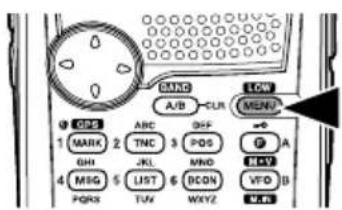
⑨ [MENU]
Press [MENU] to enter Menu mode.
Press [F], [MENU] to cycle the transmit output power between: High Power -> Low Power -> Economic Low Power.
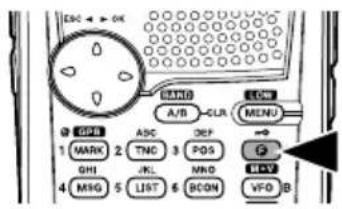
⑩ [F]
Press [F] to enter Function mode.
Press [F] (1s) to turn the transceiver key lock function ON and OFF.
⑪ [VFO]
Press [VFO] to enter VFO mode, then press [▲]/[▼] or rotate the Tuning control to select an operating frequency.
Press [F], [VFO] to copy the current Memory channel or Call channel to the VFO (memory shift).
⑫ [MR]
Press [MR] to enter Memory Channel mode, then press [▲]/[▼] or rotate the Tuning control to select a Memory channel.
Select a Memory channel, then press [F], [MR] to store the current operating frequency in the Memory channel.
⑬ [CALL]
Press [CALL] to select the Call channel.
Press [F], [CALL] to store the current operating frequency to the Call channel.
text_image
PTT LAMP MONI SQL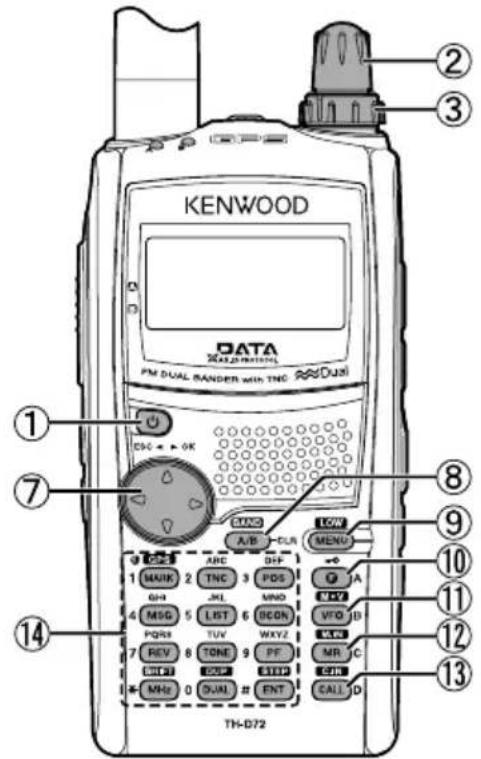
text_image
KENWOOD DATA FM DUAL BANDER with TNC Dual DSC + OK A/B CUR MENU 1 MAIN 2 TNC 3 PDS GH JKL MNO 4 MSG 5 LIST 6 BCON VTO ID PQRS TUV WXYZ 7 REV 8 TONE 9 FF MR C CTRL QST SITC MHz 0 DUAL # ENT CALL D TH-D72⑭ 12 Keypad
[MARK] (1)
Press [MARK] to display the Mark Way point list.
Press [MARK] (1s) to enter the Mark Way point registration mode.
Press [F], [MARK] to turn the internal GPS function ON or OFF.
[TNC] (2)
Press [TNC] to turn the built-in TNC ON and the APRS (or NAVITRA) mode ON.
• Each time you press [TNC], the mode cycles through the following: APRS (or NAVITRA) mode ON → PACKET mode ON → TNC OFF.
- When the built-in TNC turns on, "OPENING TNC" appears on the display.
- During "OPENING TNC" appears on the display, the mode cannot be changed.
Press [F], [TNC] to turn the Tracking Log function ON or OFF.
[POS] (3)
Press [POS] to display your "My position" (using the internal GPS) or to enter the Position registration mode (not using the internal GPS)
Press [F], [POS] to enter the My Weather mode
[MSG] (4)
Press [MSG] to display the Message list.
Press [F], [MSG] to enter the New Message input mode
[LIST] (5)
Press [LIST] to display the Station list.
Press [F], [LIST] to display the DX Cluster list
[BCON] (6)
Press [BCON] to enter the Beacon Transmit mode (When TX Beacon method is Manual) or turn the Beacon function ON or OFF (When TX Beacon method is other than Manual)
Press [F], [BCON] to enter the Quick Beacon mode
[REV] (7)
Press [REV] to turn the Reverse function ON or OFF.
Press [REV] (1s) to turn the Automatic Simplex Checker ON.
Press [F], [REV] to enter the Voice Alert function setup mode
[TONE] (8)
Press [TONE] to turn the Tone function ON.
- Each time you press [TONE], the function cycles through the following: Tone ON → CTCSS ON → DCS ON → Cross Tone ON → OFF.
- Additionally, when APRS is ON and Voice Alert is configured, Voice Alert ON is added to the above cycle.
Press [F], [TONE] to enter the Tone frequency, CTCSS frequency, DCS code, or Cross Tone setup mode.
Press [F], [TONE] (1s) to start the Tone frequency ID, CTCSS frequency ID, or DCS code ID scan.
[PF] (9)
Press [PF] to activate its programmed function. The default function is "Weather Channel" (TH-D72A)/ "Memory Name <> Frequency" (TH-D72E).
[MHz] (\*)
Press [MHz] to enter the MHz mode.
Press [MHz] (1s) to start the MHz scan.
Press [F], [MHz] to enter Offset Direction setup mode.
- Each time you press [F], [MHz], the offset direction cycles through the following: plus (+) direction minus (−) direction -7.6 MHz (TH-D72E only) OFF.
[DUAL] (0)
Press [DUAL] to switch the Single band mode and Dual band mode.
Press [F], [DUAL] to turn the Full duplex function ON or OFF.
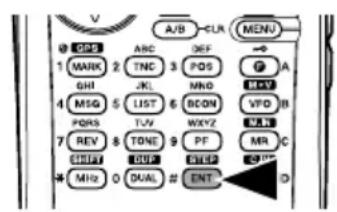
[ENT] (#)
Press [ENT] to enter Frequency or Channel number entry mode.
Press [F], [ENT] to enter Frequency step setup mode.
![KENWOOD THD72A - [ENT] (#) - 1](/content/2026/02/393023/images/a5b0832abc6ed12256da51edb42437ef3460b12119834bc8c7c0bccc7f71330d.jpg)
text_image
EL APRS12 BSTA BCON iGPS VAR +R DUP AM| Indicator Description | ||
| 1 | EL | Appears while using Economic low output power. |
| L | Appears while using Low output power. | |
| H | Appears while using High output power. | |
| 2 | APRS | Appears when the Beacon type is set to “APRS”. |
| NAVITRA | Appears when the Beacon type is set to “NAVITRA”. | |
| PACKET | Appears while using Packet mode. | |
| 3 | 12 | Appears when the packet transfer rate is set to 1200 bps. |
| 96 | Appears when the packet transfer rate is set to 9600 bps. | |
| 4 | 0 | Appears when a message is received. |
| 5 | STA | Appears while in Stand-by (Packet mode) |
| 6 | CON | Appears while Connected (Packet mode) |
| BCON | Appears when the Beacon function is ON. | |
| 7 | GPS | Appears when the external GPS is ON.Blinks while positioning. |
| iGPS | Appears when the internal GPS is ON.Blinks while positioning. | |
| i xzz | Appears while the internal GPS save mode is activated. | |
| iLOG | Appears when the Track Log is ON. | |
| WXI | Appears when the Weather Instrument is ON. | |
| iG&W | Appears when the internal GPS and Weather Instrument is ON. | |
| 8 | ||||||| | Performs as an S meter when receiving a signal and displays the selected power level while transmitting. |
| 9 | ![KENWOOD THD72A - [ENT] (#) - 2](/content/2026/02/393023/images/db7f3d9bff52b4a65b8d1a903c131fdb229845d079da1b4fae70a517231cd161.jpg) | Appears when the Tone function is ON. |
| [KZKG] | Appears when the CTCSS function is ON. | |
![KENWOOD THD72A - [ENT] (#) - 3](/content/2026/02/393023/images/a326d7587a739fd5ec6d2061d9d49f6a40164e7e3c9060d964e03749fabc88f9.jpg) | Appears when the DCS function is ON. | |
![KENWOOD THD72A - [ENT] (#) - 4](/content/2026/02/393023/images/531e07a47f972a02c66236230cb2bb62fd456375d1499d11ad034d44fb64d47e.jpg) | Appears when the Cross tone setting is “TONE/CTCSS”. | |
![KENWOOD THD72A - [ENT] (#) - 5](/content/2026/02/393023/images/6b7e3603fb41549d127819b19eac76ca7ae7bf8b73498a44d22762f8e1f309fc.jpg) | Appears when the Cross tone setting is “DCS/CTCSS”. | |
| [WAWYI] | Appears when the Cross tone setting is “TONE/DCS”. | |
![KENWOOD THD72A - [ENT] (#) - 6](/content/2026/02/393023/images/b26783d996996d9580e1d6b21bb9c0a93cfcc65a00e8c1906eaf12455b8ec163.jpg) | Appears when the Cross tone setting is “DCS/Off”. | |
![KENWOOD THD72A - [ENT] (#) - 7](/content/2026/02/393023/images/705752b2a9d272e45ba3d091fc5f3dcf36df5aedc158e3572fbae8170f8e7290.jpg) | Appears when Voice Alert is set to “On”. | |
![KENWOOD THD72A - [ENT] (#) - 8](/content/2026/02/393023/images/799e52617c9d1c855182c4fabd330dfc9f5b9c47aae47efc6106f78e4a89f061.jpg) | Appears when Voice Alert is set to “RX Only”. | |
| 10 | [2266] | Appears when the Shift function is set to plus. |
![KENWOOD THD72A - [ENT] (#) - 9](/content/2026/02/393023/images/28c8229c1e8a6365e86ab6866a37162b065b0fa5a0a317bc316ccc7c403ef738.jpg) | Appears when the Shift function is set to minus. | |
| [24YA] | Appears when the Shift function is set to -7.6 MHz. | |
| 11 | ![KENWOOD THD72A - [ENT] (#) - 10](/content/2026/02/393023/images/0ec8a01524172ec2812836598dda0a257c0e22f33e85a6508ce077f737ce6d68.jpg) | Appears when the Reverse function is ON. |
![KENWOOD THD72A - [ENT] (#) - 11](/content/2026/02/393023/images/910099f007b11361db864d4392fc0ac6c78905323136f80a3b128f0a715b6356.jpg) | Appears when the ASC function is ON.Blinks when the ASC function is performing an OK check. | |
| 12 | ![KENWOOD THD72A - [ENT] (#) - 12](/content/2026/02/393023/images/5008ea29947714f2de373443012794bc8cc464b40e765bceb902211bd0bc729e.jpg) | Appears while in Full Duplex mode. |
| 13 | [BA32] | Appears while in AM mode. |
![KENWOOD THD72A - [ENT] (#) - 13](/content/2026/02/393023/images/ed4f28e4a399e059038d1549745349395042a7e6f4923fc0ac73058eccb319d6.jpg) | Appears while in Narrow FM mode. | |
| 14 | [22C3] | Appears when the VOX function is ON. |
| 15 | ![KENWOOD THD72A - [ENT] (#) - 14](/content/2026/02/393023/images/5971ee4df70f3d478178ffeceb60123129c3426888b10f50a034d8aa06162f75.jpg) | Appears when the Key Lock function is ON. |
| 16 | 144 ![KENWOOD THD72A - [ENT] (#) - 15](/content/2026/02/393023/images/6e67e80e3922326ac4f352ff548de47de0299e0b940a03f8554b49cbbd9699b0.jpg) 10625 10625 | Displays the operating frequency. |
| 17 | ![KENWOOD THD72A - [ENT] (#) - 16](/content/2026/02/393023/images/de1a43896c550cd9f67e43c37b82fc7ddbe9d59781885bd18ab8f053053c0c1c.jpg) | Appears while using the Internal data band. |
| 18 | ![KENWOOD THD72A - [ENT] (#) - 17](/content/2026/02/393023/images/76f99f2c5b28c01ae7d14542b9c37296cbac4213a09c3e472816b0206d39f443.jpg) | Appears when the selected channel is not registered while in Memory Input mode. |
![KENWOOD THD72A - [ENT] (#) - 18](/content/2026/02/393023/images/49d6f388e389013bf376aee06d30190781b246436adee7c2c071acf28b8bde6f.jpg) | Appears when the selected channel is registered while in Memory Input mode. | |
| 19 | ![KENWOOD THD72A - [ENT] (#) - 19](/content/2026/02/393023/images/e66a9b8ac625681eb57b0cf3a292790d8f367ace7aea8316eca4977d0eac3d35.jpg) | Displays the Memory channel number. |
| 20 | ![KENWOOD THD72A - [ENT] (#) - 20](/content/2026/02/393023/images/ae703d273d03b7a83d46e86cb679259bec94cc4e779e6963288930ce60983644.jpg) | Appears when the Memory Channel Lockout function is ON. |
| 21 | ![KENWOOD THD72A - [ENT] (#) - 21](/content/2026/02/393023/images/7f644d5b4a715f5d58015de53eaee45cf43d9646bb1b3ca57b45aed25e77beb5.jpg) | Appears when Weather Alert is ON.Blinks when receiving a signal. (TH-D72A only) |
SWITCHING THE POWER ON/ OFF
Press the [(1s) to switch the transceiver ON.
- The power on message momentarily appears on the display.
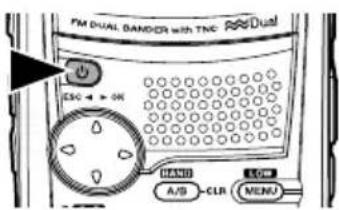
text_image
FM DUAL DAMPER with TNC ESC 4 > 06 MENU A/S CLR MENU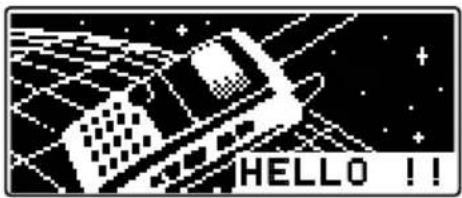
text_image
HELLO !!- If the transceiver power on password has been activated {Menu No.100}, you must first enter your password before you can operate the transceiver.
Press the [(1s) again to switch the transceiver OFF.
Note: While using APRS, in order to prevent Packet miss-decoding, access Menu No. 110 and set the Battery Saver to "Off" or "0.03".
ADJUSTING THE VOLUME
Rotate the VOL control to increase the volume and counterclockwise to decrease the volume.
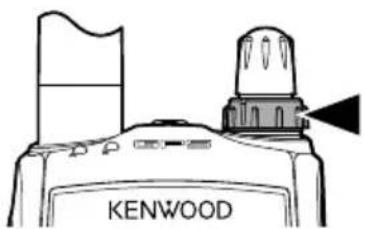
text_image
KENWOODNote:
- Some functions of this transceiver, such as the beep, have their own volume settings. Adjust those settings to your desired values.
◆ Access Menu No. 121 to set the volume balance between Band A and B.
ADJUSTING THE SQUELCH
Squelch is used to mute the speaker when no signals are present. With the squelch level set correctly, you will hear sound only while actually receiving a signal. The higher the squelch level selected, the stronger the signals must be in order to hear them. You can set the squelch level separately for Band A and B.
1 Press [F], [MONI].
• The squelch level appears on the display.
![KENWOOD THD72A - Press [F], [MONI]. - 1](/content/2026/02/393023/images/f675ff647bc01d23c14718b0010c1dfa02ec96af57fbdcfce3921b531a234cb4.jpg)
text_image
ESC → 6K MANO A/3 CLR TNC MENU 1 MARK 2 TNC 3 POS SQL LAMP MONI SQL SQL : IIII---- ►144.000 440.0002 Press [▲]/[▼] or rotate the Tuning control of your selected band, when no signals are present, and select the squelch level at which the background noise is just eliminated.
![KENWOOD THD72A - Press [F], [MONI]. - 2](/content/2026/02/393023/images/1113bda1eb9891969a55d43a5a2b61516383a2ad3ea77467a5c8a4a0d8a45bf4.jpg)
text_image
PM DUAL BANDER with TNC DUSI ESC 0K CAND LOW A/B CUR MENU KENWOODPress [A/B] to select operating band A or B.
![KENWOOD THD72A - Press [F], [MONI]. - 3](/content/2026/02/393023/images/b81ba17f1fcc132e6b118f0f179c48de64c556e7130d58056f66280f1e84ea33.jpg)
text_image
ESC ← OK A/B CLR ABC DEF MENUYou can switch the transceiver between dual band operation and single band operation.
1 Select your desired band (A or B).
2 Press [DUAL].
• Each time you press [DUAL], the transceiver switches between Single band mode and Dual band mode.
![KENWOOD THD72A - Press [F], [MONI]. - 4](/content/2026/02/393023/images/a6a82cd8e9352b3bec826848252c61eb45340fbfdef75d6b6c0f0678d8f813ae.jpg)
text_image
A/B CUR MENU 1 MARK 2 TNC 3 POS GH 4 MSG 5 LIST 6 BCON PGRs 7 REV 8 TONE 9 PF TUE 10 DSP 11 STEP 12 CIN + 13 SNUL # ENT CALL D ABC DEF A B VFD V B MR C CALLDual band mode:
![KENWOOD THD72A - Press [F], [MONI]. - 5](/content/2026/02/393023/images/0858c311707b5de3dc8d57353af8ab6828a415cfce1407a3d3b8df6784d91f10.jpg)
text_image
H ►144.000 440.000Single band mode (band A only): Single band mode (band B only):
![KENWOOD THD72A - Press [F], [MONI]. - 6](/content/2026/02/393023/images/c97a874fa4f4c75242f1b4248c9474ffa536ede050898c6cb6fb32666546a275.jpg)
text_image
H ►144.000 01/01 12:00![KENWOOD THD72A - Press [F], [MONI]. - 7](/content/2026/02/393023/images/cffbeb584ee935027fb744f4ad4ff6f0b3b9063932fdeba412bee23e3d988bce.jpg)
text_image
H 01/01 12:00 440.000SELECTING A FREQUENCY BAND
You can change the frequency bands for bands A and B.
1 Select your desired band (A or B).
2 Press [F], [A/B].
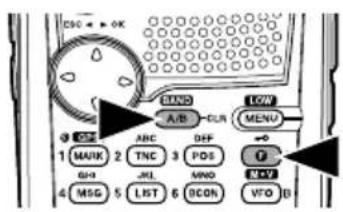
text_image
ESC ← OK MIND A/B CUR LOW MENU 3 OFF ABC DIFF 1 MARK 2 TNC 3 PDS G+0 JKL MNO 4 MSG 5 LIST 6 ICON VTO B• Each time you press [F], [A/B], you cycle to the next frequency band.
• Band A: 144 → 430/440 → 144 (MHz).
• Band B: 118 → 144 → 300 → 430/440 → 118 (MHz).
Note: The TH-D72E uses the 430 MHz band and the TH-D72A uses the 440 MHz band.
- When masking a band, you are restricted to using only the selectable band.
- When receiving 2 signals on the same band, the image interference, sensitivity, etc., performance will decrease.
Frequency ranges:
• 118 MHz: Band B 118 \~ 135.995 MHz
• 144 MHz: 136 \~ 173.995 MHz
• 300 MHz: Band B 320 \~ 399.995 MHz
- 430/440 MHz: Band A 410 \~ 470 MHz, Band B 400 \~ 523.995 MHz
SELECTING AN OPERATING MODE
There are 3 operating modes available to choose from: VFO mode, Memory Channel mode, and Call Channel mode.
VFO Mode
VFO mode allows you to manually change the operating frequency.
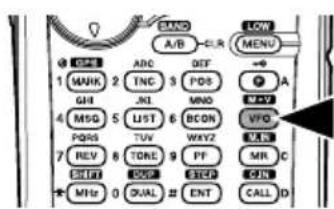
1 Press [VFO] to enter VFO mode.
2 Rotate the Tuning control to select your desired operating frequency.
text_image
BAND A/B CLR MENU + 1 MARK 2 ADC DEF TNC 3 PDS JL 4 MNS 5 PQRS 6 LJST 7 BCON TVV 8 WXYZ TONE 9 PF GND 10 SFP MHz 0 DUAL # ENT CALL D A A VFO VCC MR C ON CALL D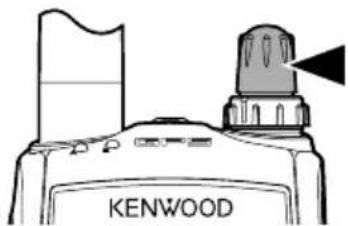
text_image
KENWOOD- You can also select a frequency by using the [1] keys.
- The default step frequency for the Tuning control varies according to the model and operating band:
| Model 144 MHz 430/440 MHz | |
| TH-D72A 5 kHz 25 kHz | |
| TH-D72E 12.5 kHz 25 kHz |
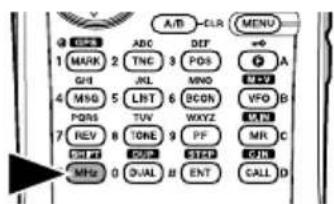
- To adjust the frequency by a larger amount, press [MHz] to enter MHz mode, then rotate the Tuning control to adjust the frequency in steps of 1 MHz. Press [MHz] again to exit MHz mode and adjust the frequency using the normal step frequency.
text_image
A/B CLR MENU 1 MARK 2 TNC 3 PDS GH 4 MNG 5 LBT 6 BCON PDS 7 TUV 8 WXYZ REV 9 TONE 10 PF MR C CH# 11 DSS 12 SLEP 13 QTL MHz 0 DUAL 14 ENT CALL DMemory Channel Mode
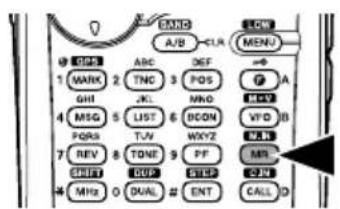
Memory Channel mode allows you to quickly select a frequently used frequency and related data which you have stored in the memory channel.
1 Press [MR] to enter Memory Channel mode.
- The Memory channel number appears on the display.
text_image
BAND A/B CLR MENU MEN 1 MARK 2 TNC 3 POS A GHI JL MND MV FOS LIST 6 DCOM VFD B TJN WXYZ REV 8 TONE 9 PF SHIFT DUP CREEP CUN MHz O DUAL # ENT CALL D 4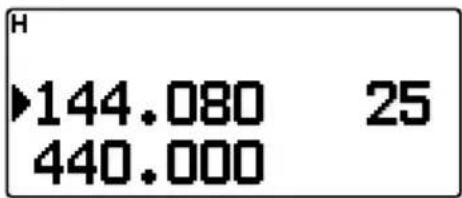
text_image
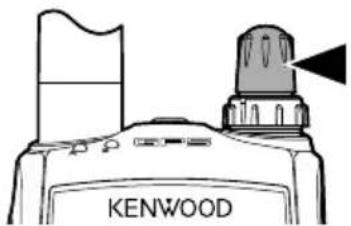
H ►144.080 25 440.0002 Rotate the Tuning control to select your desired Memory channel.
natural_image
Line drawing of a Kenwood industrial machine with a flag and warning symbol (no text or labels on the main diagram)- You can also select a Memory channel by using the [ ] keys.
Call Channel Mode
Call Channel mode allows you to quickly select a preset channel to allow immediate calls on that frequency. The Call channel can be conveniently used as an emergency channel within your group.
Note: The [CALL] key of the TH-D72E is set to transmit the "1750Hz" tone as default. When using Call Channel mode, set Menu 162 [Repeater] – [CALL Key] to "Call".
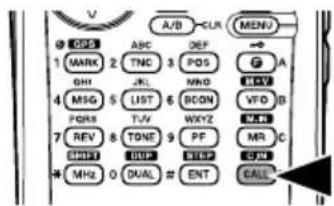
1 Press [CALL] to enter Call Channel mode.
- "C" appears on the display.
- If the frequency of the operating band is less than 300 MHz, the VHF CALL channel is used for recall. If the frequency is over 300 MHz, the UHF CALL channel is used for recall.
text_image
A/B CUR MENU OFF ABC DEF MARK 2 TNC POS A GHI JL MHD V MSG LIST BCON VFD B PGRS TV WXYZ MR C REV TONE PF MR C SHIFT DUP SLEEP CIN MHz O DUAL ≈ ENT CALL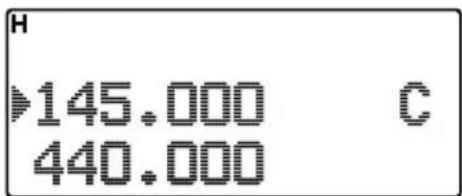
text_image
H 145.000 C 440.0002 Press [CALL] again, the transceiver will return to the previous status (VFO mode or Memory Channel mode) before entering CALL mode.
If the desired operating frequency is far from the current frequency, using the keypad is the quickest way to change the frequency.
1 Press [A/B] to select band A or B, then press [VFO] or [CALL].
2 Press [ENT].
- The Direct Frequency Entry display appears.
text_image
V A/B CLR MENU GDS ABC DEF 1 MARK 2 TNC 3 POS GHI JL MHD 4 MSG LIST BCON VFD B PORS TV WXYZ 7 REV TONE PF MR C CHTF OUT NHD 4 MHz 0 DUAL # ENT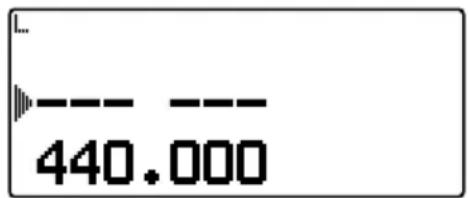
text_image
440.0003 Press the numeric keys ([0] \~ [9]) to enter your desired frequency.
4 To set the entered frequency, press [ENT] or [VFO].
- Pressing [ENT] before entering all of the digits will set the remaining digits to 0.
- Pressing [VFO] before entering all of the digits will leave the remaining digits at their previous values.
- Entering all digits for a frequency will automatically set the frequency without pressing [ENT] or [VFO].
- In step 3, after entering 1 \~ 3 digits, pressing [MHz] will set the digits above the MHz value.
For example, when the displayed current frequency is 432.250:
1 Press [ENT] → --- ---
2 Press [4] → 4 --- ---
3 Press [MHz] → 4 3 4. -- -
TRANSMITTING
1 Select your desired band and frequency/channel.
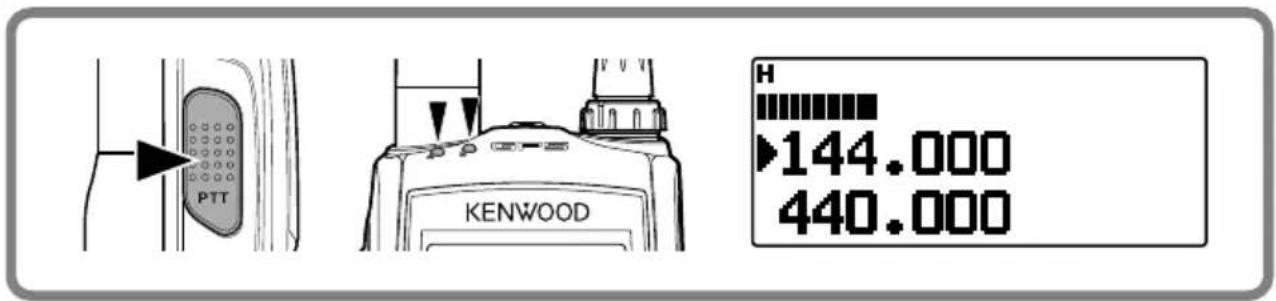
2 Press and hold the microphone [PTT] switch and speak into the microphone to transmit.
- The TX-RX LED lights red for the selected transmit band and the RF power meter appears on the display. The RF power meter shows the relative transmission output power you selected.
text_image
PTT KENWOOD H 144.000 440.000- “H”, “L”, or “EL” appear on the display, depending on the output power you have selected.
- Speak into the microphone in your normal voice, while keeping the microphone approximately 5 cm (2 inches) from your mouth. Speaking too close to the microphone or too loudly may increase distortion and reduce intelligibility of your signal at the receiving station.
- Your station's transmit signal can be received when the receive frequency is 3 times the transmit frequency.
Example: Transmit frequency is 146.000 MHz and receive frequency is 438.000 MHz.
3 When you fi nish speaking, release the [PTT] switch.
Note: When the transceiver overheats because of ambient high temperature or continuous transmission, the protective circuit may function to lower the transmit output power.
Selecting an Output Power
Selecting a low transmit power is a wise method to reduce battery consumption, if communication is still reliable. You can program separate transmit power settings for band A and B.
Press [F], [MENU] to select high (default), low, or economic low power (lowest).

text_image
OK SAND A/R CLR MENZ 1 MARK 2 ADC DEF GHI TNC 3 POS JKL MNO 4 MSG 5 LIST 6 SCDR VFO B- “H”, “L”, or “EL” appears to show the current selection.
- When the RF power meter is H, all 9 points are displayed. When it is L, 5 points are displayed, and when it is EL, 2 points are displayed.
Press [LAMP] to illuminate the display and keys.
text_image
PTT LAMP MONI SON- If no other key is pressed, the light turns OFF approximately 5 seconds after releasing [LAMP].
- Press any key (including [PTT]) other than [LAMP] while the display and keys are lit to restart the 5-second timer.
- Press [LAMP] while the display and keys are lit to immediately turn the light OFF.
Press [F], [LAMP] to keep the light ON continuously.
- The light remains ON until you press [F], [LAMP] again.
Note:
◆ You can set the Display lighting time in Menu No. 101.
◆ Press any key other than [LAMP] to change the lighting setting (Menu No. 102).
MONITOR
When you are receiving while the squelch function is ON, weak signals may become intermittent.
If the CTCSS or DCS function is ON, you may want to disable the squelch function temporarily to monitor the current channel activities.
1 Press and hold [MONI].
text_image
LAMP MONI SQL- The speaker is unmuted and you can monitor the signals.
2 Release [MONI] to return to normal operation.
Function Select Mode
Press [F] to enter Function Select mode. In this mode you can scroll F-0 through F-# by pressing [▲]/[▼] or rotate the Tuning control. After accessing the desired function, press [▶OK], then press [▲]/[▼] or rotate the Tuning control to select the desired parameter.
text_image
ESC → OK 0 MANU A/B CLR MENU GPR ASC DEF 1 MARK 2 TNC 3 POS GHI .KL MNO 4 MIS 5 LIST 6 BCOM VFD B P Q PLAY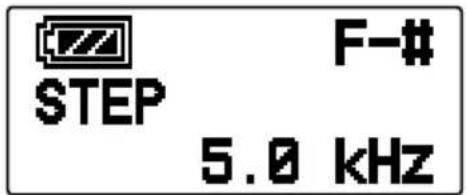
text_image
STEP F-# 5.0 kHzPressing [F], [0] \~ [9] or [*], [#] is a much simpler method. For example, pressing [F], [*] switches the Shift function ON or OFF. (Refer to the keypad explanations on pages 10 \~ 11.)
Note: You can verify the battery capacity while in Function Select mode.


Full Medium Low Very Low (recharge)
Menu Mode
Press [MENU] to enter Menu mode. In this mode you can access the desired menu item by pressing [▲]/[▼] or rotate the Tuning control and [▶OK] or entering digits directly from the keypad (0 \~9, A, B, C, D, E (*), and F (#) only). For further information, refer to “MENU MODE” {page 23}.
text_image
MASC A/B CUR MENU 1 GSP 2 ABC 3 OFF 4 MARK 2 TNC 3 POS 5 BL 6 MNO 7 VLD 8 MSG LIST BCON 9 PQRS TVW WXYZ WKB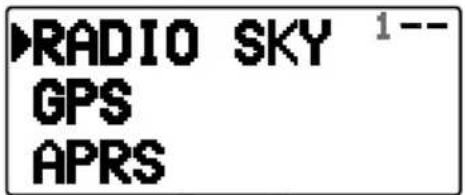
text_image
RADIO SKY 1-- GPS APRS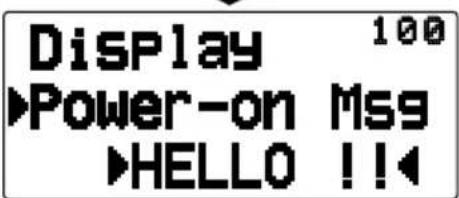
text_image
Display 100 ▶Power-on Msg ▶HELLO !!Many functions on this transceiver are selected or configured through the Menu instead of physical controls. Once you become familiar with the Menu system, you will appreciate the versatility it offers.
MENU ACCESS
1 Press [MENU] to access the Menu.
- The setup category name appears on the display.
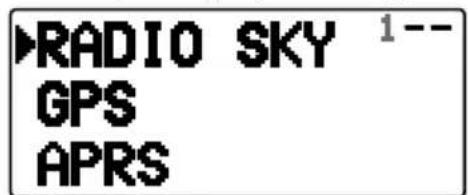
text_image
RADIO SKY 1-- GPS APRS2 Press [▲]/[▼] or rotate the Tuning control to select your desired category.
3 Press [OK] to set the category.
- The Menu name and number appear on the display.
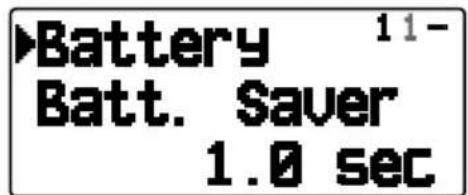
text_image
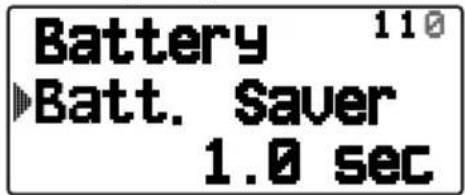
Battery 11- Batt. Saver 1.0 sec4 Press [▲]/[▼] or rotate the Tuning control to select your desired Menu.
5 Press ▶OK] to set the Menu.
text_image
Battery 110 ▶Batt. Saver 1.0 sec6 Press [▲]/[▼] or rotate the Tuning control to select your desired value for the Menu.
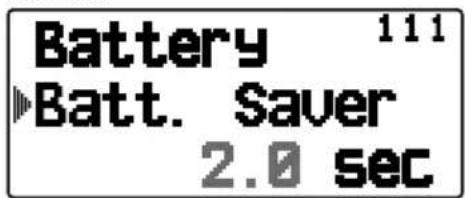
text_image
Battery 111 ▶Batt. Saver 2.0 sec7 Press [▶OK] to set the selected value.
8 Repeat steps 2 to 7 to set up additional Menus.
9 Press [MENU] to exit Menu mode.
| RADIO - Display | |||
| No. | Display Description | Setting Values | |
| 100 | Power-on Msg | Power-on message edit Up to 8 characters | |
| 101 | Lamp timer | Display lighting time 2 ~ 5 ~ 10 sec | |
| 102 | Lamp Control | Display lighting control Manual/ Auto | |
| 103 | Contrast | Display contrast Level 1 ~ 8 ~ 16 | |
| RADIO - Battery | |||
| No. | Display Description | Setting Values | |
| 110 | Batt. Saver | Battery saver time | Off/ 0.03/ 0.2/ 0.4/ 0.6/ 0.8/ 1.0/ 2.0/ 3.0/ 4.0/ 5.0 sec |
| 111 | APO | Auto power off time Off/ 15/ 30/ 60 min | |
| 112 | Battery Type | Battery type select Lithium/ Alkaline | |
| RADIO - Audio | |||
| No. | Display Description | Setting Values | |
| 120 | Balance | Band A/B volume balance 5 step | |
| 121 | Key Beep | Key Beep sound | RADIO & GPS/ RADIO Only/GPS Only/ Off |
| RADIO - TX/RX | |||
| No. | Display Description | Setting Values | |
| 130 | Prog. VFO | Programmable VFO setup | Varies with the selected frequency band |
| 131 | Modulation | Modulation/demodulation mode | AM/ FM/ NFM |
| 132 | VHF AIP | VHF band AIP Off/ On | |
| 133 | UHF AIP | UHF band AIP | Off/ On |
| 134 | VOX | VOX on/off | Off/ On |
| 135 | VOX Gain | VOX gain level | Gain 0 ~ 4 ~ 9 |
| 136 | VOX Delay | VOX delay time | 250/ 500/ 750/ 1000/ 1500/ 2000/ 3000 ms |
| 137 | VOX on Busy | VOX on busy | Off/ On |
| 138 | Beat Shift | Beat shift | Type 1 ~ 8 |
| 139 | TX Inhibit | TX inhibit | Off/ On |
| 13A | TOT | Time-out timer | 0.5/ 1.0/ 1.5/ 2.0/ 2.5/ 3.0/ 3.5/ 4.0/ 10.0 min |
| 13B^1 | WX Alert | Weather alert | Off/ On |
| 13C^1 | Auto WX Scan | Auto weather channel scan time | Off/ 15/ 30 / 60 min |
| RADIO - Memory | |||
| No. | Display Description | Setting Values | |
| 140 | Name | Memory channel name input Up to 8 | characters |
| 141 | Name <> Freq | Name display select Name/ Freq | |
| 142 | Lockout | Memory channel lockout Off/ On | |
| 143 | Recall Method | Memory channel recall method All Bands/ Current Band | |
| 144 | Group Name | Memory group name input Up to 8 characters | |
| 145 | Group Link | Memory group link registration Up to | 10 digits (0 ~ 9) |
| 146 | EchoLink Mem | EchoLink memory setup | Up to 8 characters for EchoLink memory name Up to 8 digits for DTMF code |
| RADIO - Scan | |||
| No. | Display Description | Setting Values | |
| 150 | Scan Resume | Scan resume method Time/ Carrier/ | Seek |
| 151 | Time Restart | Time operate restart time 1 ~ 5 ~ 10 | (sec) |
| 152 | Car. Restart | Carrier operate restart time 1 ~ 2 ~ 10 | (sec) |
| RADIO - Repeater | |||
| No. | Display Description | Setting Values | |
| 160 | Offset Freq | Offset frequency 0.00 ~ 0.60 ~ 29.95 | (MHz) |
| 161 | Auto Offset | Auto repeater offset | Off/ On |
| 162 | CALL Key | CALL key function | Call/ 1750Hz |
| 163 | 1750Hz Hold | 1750Hz Hold | Off/ On |
| RADIO - DTMF | |||
| No. | Display Description | Setting Values | |
| 170 | Memory | DTMF memory | Up to 8 characters for DTMF memory nameUp to 16 digits for DTMF code |
| 171 | Speed | DTMF memory transmission speed | 50/ 100/ 150 ms |
| 172 | Pause | DTMF pause code time | 100/ 250/ 500/ 750/ 1000/ 1500/ 2000 ms |
| 173 | Hold | Hold | Off/ On |
| RADIO - Lock | |||
| No. | Display Description | Setting Values | |
| 180 | Keys & Freq. | Key lock type | Key Lock/ F.Lock/ Key & F.Lock |
| 181 | DTMF Keys | DTMF key lock | Off/ On |
| 182 | Mic PF Keys | Mic PF key | Off/ On |
| RADIO - Auxiliary | |||
| No. | Display Description | Setting Values | |
| 190 | PF Key | PF key programmable function value | See explanation |
| 191 | PF1 (Mic) | Microphone PF1 key programmable function value | |
| 192 | PF2 (Mic) | Microphone PF2 key programmable function value | |
| 193 | PF3 (Mic) | Microphone PF3 key programmable function value | |
| 194 | Date | Date | See explanation |
| 195 | Time | Clock time | |
| 196 | Time Zone | Time zone + 14:00 ~ UTC ~ - 14:00 | |
| 197 | Packet Band | Internal TNC data band type (PACKET) | A-Band/ B-Band/A:TX B:RX/ A:RX B:TX |
| 198 | Cursor Shift | Cursor Shift Off/ 1/ 1.5/ 2 sec | |
| 199 | Reset | Reset | VFO Reset/ Partial Reset/ Full Reset |
| 19A | Power-on PWD | Power on password Off/ On | |
| GPS - Int. GPS | |||
| No. | Display Description | Setting Values | |
| 200 | Operating Mode | Internal GPS operating mode Normal/ GPS Only | |
| 201 | Batt. Saver | Battery saver time Off/ 1/ 2/ 4/ 8 min/ Auto | |
| 202 | PC Output | GPS data output to PC Off/ On | |
| GPS - Setup | |||
| No. | Display Description | Setting Values | |
| 210 | Datum | Datum WGS-84/ TOKYO | |
| 211 | Sentence | Sentence | GPGGA/GPGLL/GPRMC/GPVTG/GPZDA/GPGSA/ $GPGSV |
| 212 | SBAS | Satellite base augmentation system | Off/ On |
| GPS - Track Log | |||
| No. | Display Description | Setting Values | |
| 220 | Clear All Data | Clear all data Yes/ No | |
| 221 | Wrap When Full | Wrap when memory full Off/ On | |
| GPS - Log Setup | |||
| No. | Display Description | Setting Values | |
| 230 | Record Method | Record method Time/ Distance/ Beacon | |
| 231 | Interval | Interval time 2 ~ 10 ~ 1800 sec | |
| 232 | Distance | Distance 0.01 ~ 9.99 (mi/ km/ nm) | |
| GPS - Target Pt. | |||
| No. | Display Description | Setting Values | |
| 240 | *1 | Number select 1 ~ 5 | |
| 241 | Name | Name entry Up to 9 characters | |
| 242 | N (S) | Latitude entry | - |
| 243 | E (W) | Longitude entry | - |
| APRS - Basic Set | |||
| No. | Display Description | Setting Values | |
| 300 | My Callsign | Callsign entry Up to 9 characters | |
| 301 | Beacon Type | Beacon type APRS/ NAVITRA | |
| 302 | APRS Lock | APRS lock | Off/ On/ On & PTT/ On & TNC/ On & PTT& TNC |
| APRS - Int. TNC | |||
| No. | Display Description | Setting Values | |
| 310 | Data Band | Internal data band type | A-Band/ B-Band/A:TX B:RX/ A:RX B:TX |
| 311 | Data Speed | Data communications speed 1200/ 9 | 600 bps |
| APRS - Int. TNC2 | |||
| No. | Display Description | Setting Values | |
| 320 | DCD Sense | DCD sense type | D or RxD Band/ Both Bands/ Ignore DCD |
| 321 | TX Delay | TX delay time | 100/ 150/ 200/ 300/ 400/ 500/ 750/ 1000 ms |
| APRS - COM Port | |||
| No. | Display Description | Setting Values | |
| 330 | Baud Rate | COM port Baud rate speed 2400/ 4800/ 9600 bps | |
| 331 | Input | COM port input type | Off/ GPS/ Weather (PeetBros) / Weather (Davis) |
| 332 | Output | COM port output | Off/ Waypoint |
| APRS - Waypoint | |||
| No. | Display Description | Setting Values | |
| 340 | Format | Way point format | NMEA/ MAGELLAN/ KENWOOD |
| 341 | Length | Way point name length 6-Char ~ 9-Char | |
| 342 | Output | Way point output type All/ Local/ Filtered | |
| APRS - PC Port | |||
| No. | Display Description | Setting Values | |
| 350 | Output | COM port output Off/ On | |
| APRS - MyPosition | |||
| No. | Display Description | Setting Values | |
| 360 | *1 | Number select 1 ~ 5 | |
| 361 | Name | Name entry Up to 8 characters | |
| 362 | N (S) | Latitude entry | - |
| 363 | E (W) | Longitude entry | - |
| APRS - BeaconInfo | |||
| No. | Display Description | Setting Values | |
| 370 | Speed | Speed information Off/ On | |
| 371 | Altitude | Altitude information Off/ On | |
| 372 | Pos. Ambiguity | Position ambiguity mode Off/ 1-Digit | ~ 4-Digit |
| APRS - Comment | |||
| No. | Display Description | Setting Values | |
| 380 | Position Comment | Position Comment | Off Duty/ Enroute/ In Service/ Returning/ Committed/ Special/ PRIORITY/ CUSTOM 0 ~ CUSTOM 6/ EMERGENCY! |
| APRS - StatusText | |||
| No. | Display Description | Setting Values | |
| 390 | *1 | Number select 1 ~ 5 | |
| TX Rate | Status text TX rate Off/ 1/1 ~ 1/8 | ||
| Text | Text | Up to 42 characters | |
| APRS - QSY(FREQ) | |||
| No. | Display Description | Setting Values | |
| 3A0 | QSY in Status | QSY in Status Off/ On | |
| 3A1 | Tone/Narrow | Tone/ Narrow Off/ On | |
| 3A2 | Shift/Offset | Shift/ Offset Off/ On | |
| APRS - Pkt.Filter | |||
| No. | Display Description | Setting Values | |
| 3B0 | Position Limit | Position limit Off/ 10 ~ 2500 (mile/ km) | |
| 3B1 | Filter Type | Filter Type See explanation | |
| APRS - Icon | |||
| No. | Display Description | Setting Values | |
| 3C0 | KENWOOD | Icon | See explanation3C1 |
| Symbol | Symbol | ||
| 3C2 | Table | Table | |
| APRS - TX Beacon | |||
| No. | Display Description | Setting Values | |
| 3D0 | Method | Method | Manual/ PTT/ Auto/SmartBeaconing |
| 3D1 | Initial Interval | Initial interval time | 0.2/ 0.5/ 1/ 2/ 3/ 5/ 10/ 20/ 30/60 min |
| APRS - Algorithm | |||
| No. | Display Description | Setting Values | |
| 3E0 | Decay Algorithm | Decay algorithm Off/ On | |
| 3E1 | Prop.Pathing | Proportional pathing Off/ On | |
| APRS - SmartBcon1 | |||
| No. | Display Description | Setting Values | |
| 3F0 | Low/High Speed | Low speed/ High speed setting | Low speed: 2 ~ 5 ~ 30High speed: 2 ~ 70 ~ 90 |
| 3F1 | Slow Rate | Low speed transmission interval time | 1 ~ 30 ~ 100 min |
| 3F2 | Fast Rate | High speed transmission interval time | 10 ~ 120 ~ 180 sec |
| APRS - SmartBcon2 | |||
| No. | Display Description | Setting Values | |
| 3G0 | Turn Angle | Driving direction change, minimum value setting | 5 ~ 28 ~ 90 deg |
| 3G1 | Turn Slope | Driving direction change, additional value setting | 1 ~ 26 ~ 255 (10deg/speed) |
| 3G2 | Turn Time | Minimum time delay between each beacon transmission | 5 ~ 30 ~ 180 sec |
| APRS - PacketPath | |||
| No. | Display Description | Setting Values | |
| 3H0 | Type | Packet path type | New-N/ Relay/ Region/Others |
| 3H1 | Wide1-1 /Relay / ABBR /Others | Wide1-1 / Relay / ABBR / Others | Off/ On (Wide1-1,Relay),Up to 5 characters (ABBR),Up to 79 characters (Others) |
| 3H2 | Total Hops | Total Hops 0 ~ 2 ~7 | |
| APRS - Network | |||
| No. | Display Description | Setting Values | |
| 3I0 | APRS [APK003] | APRS (APK003) check | |
| 3I1 | Altnet | Altnet Up to 6 characters | |
| APRS - WX Station | |||
| No. | Display Description | Setting Values | |
| 3J0 | TX | Weather TX Off/ On | |
| 3J1 | TX Interval | Weather TX interval time 5/ 10/ 30/ 60 min | |
| APRS - Digipeat | |||
| No. | Display Description | Setting Values | |
| 3K0 | Digipeat(MyCall) | Digipeat function Off/ On | |
| APRS - Ulcheck | |||
| No. | Display Description | Setting Values | |
| 3L0 | Time | UI check time 0 ~ 28 ~ 250 sec | |
| APRS - Uldigipeat | |||
| No. | Display Description | Setting Values | |
| 3M0 | Uldigi | Uldigi Off/ On | |
| 3M1 | Aliases | Aliases Up to 9 characters x 4 | |
| APRS - Ulfl ood | |||
| No. | Display Description | Setting Values | |
| 3N0 | Ulfl ood | Ulfl ood Off/ On | |
| 3N1 | Alias | Alias Up to 5 characters | |
| 3N2 | Substitution | Substitution ID/ NOID/ FIRST | |
| APRS - Ultrace | |||
| No. | Display Description | Setting Values | |
| 3O0 | Ultrace | Uitrace Off/ On | |
| 3O1 | Alias | Alias Up to 5 characters | |
| APRS - Phrases | |||
| No. | Display Description | Setting Values | |
| 3P0 | User Phrase | User phrases | Up to 32 characters x 8 phrases |
| APRS - Auto-Reply | |||
| No. | Display Description | Setting Values | |
| 3Q0 | Reply | Auto message reply Off/ On | |
| 3Q1 | Reply To | Reply to Up to 9 characters | |
| 3Q2 | Delay Time | Reply delay time | 0/ 10/ 30/ sec |
| APRS - Reply MSG | |||
| No. | Display Description | Setting Values | |
| 3R0 | Text | Auto message reply text Up to 50 characters | |
| APRS - Group Fltr | |||
| No. | Display Description | Setting Values | |
| 3S0 | Message | Message group | ALL,QST,CQ,KWD/ Up to 9 characters x 6 codes |
| 3S1 | Bulletin (BLN) | Bulletin (BLN) group Up to 4 characters x 6 groups | |
| APRS - Sound | |||
| No. | Display Description | Setting Values | |
| 3T0 | RX Beep | RX Beep | All/ All New/ Mine/ Message Only/ Off |
| 3T1 | TX Beep | TX Beep Off/ On | |
| 3T2 | Special Call | Special call Up to 9 characters | |
| APRS - Display | |||
| No. | Display Description | Setting Values | |
| 3U0 | Display Area | Display Area | Entire Disp/ Entire Always/ One Line |
| 3U1 | Interrupt Time | Interrupt Time 3/ 5/ 10 sec/ Infinite | |
| 3U2 | Cursor Control | Cursor Control Followed/ Fixed | |
| APRS - Units 1 | |||
| No. | Display Description | Setting Values | |
| 3V0 | Speed, Distance | Speed/ Distance | mi/h, mile/ km/h, km/ knots, nm |
| 3V1 | Altitude, Rain | Altitude/ Rain feet, inch/ m, mm | |
| 3V2 | Temperature | Temperature °F/ °C | |
| APRS - Units 2 | |||
| No. | Display Description | Setting Values | |
| 3W0 | Position | Position format dd^ mm. mm’/ dd^ mm’ ss. s” | |
| 3W1 | Grid format | Grid format | Maidenhead Grid/ SAR Grid (CONV)/ SAR Grid (CELL) |
| APRS - NAVITRA GP | |||
| No. | Display Description | Setting Values | |
| 3X0 | Group Mode | Group mode Off/ On | |
| 3X1 | Group Code | Group code 000/ 3 characters | |
| APRS - NAVITRA MS | |||
| No. | Display Description | Setting Values | |
| 3Y0 | message 1 ~ 5 | Message text | Up to 20 characters |
| SKY - SkyCommand | |||
| No. | Display Description | Setting Values | |
| 500 | CMD Callsign | Commander callsign | Up to 9 characters |
| 501 | TRP Callsign | Transporter callsign Up to 9 characters | |
| 502 | Tone Freq. | Tone frequency | Frequency |
| 503 | Sky Command | SKY command | Off/ Commander/ Transporter |
^1 Available only for the TH-D72A.
Note: Default settings are subject to change.
Certain menus require you to enter characters, such as the power on message and memory names. When character entry is required, a cursor will appear on the display.
1 Press [▶OK].
- The cursor will blink.
![KENWOOD THD72A - Press [▶OK]. - 1](/content/2026/02/393023/images/0c63db720430a7d3bfcdf8795a288b97f719d47f228a1ccc613b05531ba4a27b.jpg)
text_image
Memory Name 1402 Press [ ▲/[ ▼ or rotate the Tuning control to select your desired character.
3 Press [OK] to set the selected character.
- The cursor will move to the next digit.
![KENWOOD THD72A - Press [▶OK]. - 2](/content/2026/02/393023/images/81f10ab170c60f6fad6ecbe0b0fee95391b8cfa6d321386f2298eafe58e58bec.jpg)
- You can move the cursor to the left or right by pressing [ESC] or OK.
- You can delete the selected character by pressing [A/B (CLR)].
- Press and hold [LAMP] and then press [▲]/[▼] or rotate the Tuning control to select your desired letter type.
4 Repeat steps 2 and 3 to enter the remaining characters.
- Press [MENU] to register the entered characters.
Auto Cursor Shift
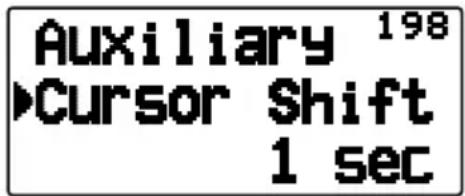
Auto Cursor Shift will automatically shift the cursor to the next character after a character has been entered. This function lets you set up the time delay after character entry for the automatic cursor shift. If this function is set to OFF, you must manually shift the cursor by pressing [OK].
1 Enter Menu mode and access Menu 198.
text_image
Auxiliary 198 ►Cursor Shift 1 sec2 Set the desired shift time to Off (manual shift), 1, 1.5, or 2 sec.
Keypad Character Entry
The keypad can also be used to enter characters. Refer to the table below for characters corresponding to keypad.
- When using a character selection method (such as with the keypad or encoder), the characters will differ depending on the character entry type (for example, callsign entry and memory name entry, etc).
| Key Character Display (with each press of the key) | |||||||||
| 1 | @ | / | . | - | - | : | |||
| 2 | a | b | c | 2 | A | B | C | ||
| 3 | d | e | f | 3 | D | E | F | ||
| 4 | g | h | i | 4 | G | H | I | ||
| 5 | j | k | l | 5 | J | K | L | ||
| 6 | m | n | o | 6 | M | N | O | ||
| 7 | p | q | r | s | 7 | P | Q | R | |
| 8 | t | u | v | 8 | T | U | V | ||
| 9 | w | x | y | z | 9 | W | X | Y | Z |
| 0 | Space 0 | ||||||||
| * | Not used | ||||||||
| # | ? | ! | , | . | , | - | / | ||
| % | ( | ) | < | > | ; | ||||
The following options are available for use with this transceiver:
• PB-45L Li-ion battery pack
• BT-15 Battery case
• KSC-32 Rapid charger
• SMC-32 Speaker microphone
• SMC-34 Speaker microphone
• EMC-3 Clip microphone with earphone
• EMC-11 Clip microphone with earphone
• EMC-12 Clip microphone with earphone
- HMC-3 Headset
• KHS-21 Headset
• KHS-35F Headset
• PG-3J Cigarette lighter cord
- PG-2W DC cable
• PS-60 DC Power Supply
Note: Optional accessories for use with this transceiver may change, post-production. (New options may become available and/or current options may be discontinued.) Please refer to the options catalog(s) for applicable transceivers.
MEMORY CONTROL PROGRAM MCP-4A
The following functions can be set only by using the MCP-4A software:
• Power on password value
- Bitmap setting of the Power ON graphic
Using the MCP-4A software, you can:
• View memory channel groups
- Save/load settings
- Read exported TravelPlus for Repeaters™ files issued from the ARRL™ (There are some version restrictions; refer to the help text of the MCP-4A.)
- Export memory and various settings in html
(TravelPlus for Repeaters is a trademark of ARRL.)
To download the MCP-4A software, go to: http://www.kenwood.com/i/products/info/amateur/software_download.html
Note: This URL may change without notice.
Using the MCP-4A Software
1 Follow the directions of the installer to install the software.
2 Set up the PC COM port.
3 The transceiver data is read from the MCP-4A software.
4 Select your desired settings, then write the data to the transceiver.
GENERAL INFORMATION
This product has been factory aligned and tested to specifi cation before shipment. Attempting service or alignment without factory authorization can void the product warranty.
SERVICE
When returning this product to your dealer or service center for repair, pack it in its original box and packing material. Include a full description of the problem(s) experienced. Include your telephone number along with your name and address in case the service technician needs to contact you; if available, also include your fax number and e-mail address. Don't return accessory items unless you feel they are directly related to the service problem.
You may return this product for service to the authorized KENWOOD dealer from whom you purchased it, or any authorized KENWOOD service center. Please do not send subassemblies or printed circuit boards; send the complete product. A copy of the service report will be returned with the product.
SERVICE NOTE
If you desire to correspond on a technical or operational problem, please make your note legible, short, complete, and to the point. Help us help you by providing the following:
- Model and serial number of equipment
• Question or problem you are having - Other equipment in your station pertaining to the problem

CAUTION
Do not pack the equipment in crushed newspapers for shipment! Extensive damage may result during rough handling or shipping.
Note:
◆ Record the date of purchase, serial number and dealer from whom this product was purchased.
◆ For your own information, retain a written record of any maintenance performed on this product.
When claiming warranty service, please include a photocopy of the bill of sale or other proof-of-purchase showing the date of sale.
CLEANING
To clean the case of this product, use a neutral detergent (no strong chemicals) and a damp cloth.
The problems described in this table are commonly encountered operational malfunctions and are usually not caused by circuit failure.
| Problem Probable Cause Corrective Action | ||
| Nothing appears on the display when the transceiver is switched ON, or the display is blinking ON and OFF. | 1 The battery pack is discharged.2 The DC cable or connection is bad.3 The power supply fuse is open (blown). | 1 Recharge the battery pack or replace the battery.2 Replace the cable.3 Investigate the cause for the open fuse and replace the fuse. |
| Most keys and the Tuning control do not function. | 1 One of the Lock functions is ON.2 The transceiver is in Channel Display mode. | 1 Unlock all of the Lock functions.2 With the transceiver power OFF, press [PTT] + [A/B] + Power ON to exit Channel Display mode. |
| You cannot select the exact desired frequency using the Tuning control. | Programmable VFO frequency range is too narrow. | Expand the frequency range in Menu No. 130 (Prog.VFO). |
| Memory channels cannot be selected by turning the Tuning control or by pressing [A[ ]▼. | No data has been stored in any Memory channel. | Store data in some Memory channels. |
| The receiving sound volume is weak even if the signal is strong. | The receiving station may be operating in narrow band FM bandwidth. | Access Menu No. 131 (Modulation) to select “NFM”. |
| Turning the VOL control does not allow you to hear audio. | The selective call function (CTCSS or DCS) is ON. | Turn OFF the selective call function. |
| You cannot transmit by pressing the PTT switch. | 1 You selected a frequency outside the allowable range.2 You selected a transmit offset that places the transmit frequency outside the limit.3 TX inhibit is ON.4 The battery pack voltage is too low to transmit. | 1 Select a frequency within the allowable transmit frequency range.2 Select a proper offset direction or offset frequency.3 Access Menu No. 139 (TX inhibit) and select “Off”.4 Charge or replace the battery pack. |
| Repeater cannot be accessed. | 1 Wrong tone frequency is selected.2 Wrong offset frequency is selected.3 Wrong shift direction is selected. | 1 Select a proper repeater access tone.2 Access Menu No. 160 (Offset Freq) and select an appropriate offset frequency.3 Try other shift directions. |
| DTMF tone cannot be transmitted. | DTMF Lock is ON. Access | Menu No. 181 (DTMF Keys) and select “Off”. |
| Repeater does not accept your DTMF tones. | DTMF tone transmission duration is too short. | Access Menu No. 171 (Speed) and select “150 ms”. |
| You cannot transmit by pressing [PTT]. | 1 You selected a frequency outside the allowable range.2 You selected a transmit offset that places the transmit frequency outside the limit.3 TX inhibit is ON.4 The battery pack voltage is too low to transmit. | 1 Select a frequency within the allowable transmit frequency range.2 Select a proper offset direction or offset frequency.3 Access Menu No. 139 (TX inhibit) and select “Off”.4 Change or replace the battery pack. |
| Transceiver transmits without pressing [PTT]. | VOX function is ON. Access Menu No. 134 (VOX) and select “Off”. | |
| The transceiver switches OFF for no apparent reason. | The Automatic Power OFF (APO) function is ON. | Access Menu No. 111 (APO) and select your desired time length or “Off”. |
| The Scan function does not resume scanning after the transceiver detects a signal. | You have selected “Seek” for Menu No. 150 (Scan Resume). | Select either “Time” (Time-Operated) or “Carrier” (Carrier-Operated) for Menu No. 150 (Scan Resume). |
| Packet operation results in no connects with other stations. | 1 The squelch is open.2 You did not select the same transfer rate as the target station. | 1 Select the correct squelch level so that the squelch is opened only when signals are present.2 Use HBAUD command to select the appropriate transfer rate. |
| When transmitting in full duplex mode, another signal is being received at the same time. | You are receiving the transmitted signal of your station. | Change your settings to a transmit frequency that does not receive the signal, or change the receive frequency.Example frequency setting : Transmit frequency of 146.000 MHz and receive frequency of 439.600 MHz |
| You cannot transmit any APRS data. | 1 Beacon is OFF.2 The squelch is open.3 The data band is inactive.4 The built-in TNC is OFF.5 You selected Packet mode. | 1 Press [BCON] to switch Beacon ON.2 Select the correct squelch level so that the squelch is opened only when signals are present.3 If you have blanked the data band, press [A/B] or [DUAL] to active it.4 Press [TNC] to switch ON the TNC.5 Press [TNC] twice so that only “APRS” appears. |
| When using a GPS receiver, you cannot correctly transmit position data. | The GPS receiver did not yet start correct measurement. | Before starting correct measurement, the GPS receiver generates a low-pitch tone every 10 seconds. When starting correct measurement, it generates a high-pitch tone. (If not using the internal GPS receiver, press [F], [MARK] and select “OFF”). |
| You cannot receive any APRS data. | You did not correctly program a group code. | Access Menu 3S0 and program “APK003”. |
| “MCP ERR” appears on the display. (MCP-4A communications error) | 1 Loose cable connection.2 Your PC may be trying to process too much at once.3 There are other reasons as to why communications was not possible. | 1 Ensure that the connection between the TH-D72 and the PC is correct.2 Shut down other software that you may be running.3 Turn the TH-D72 power source OFF and ON, one time. |
Concerning the received frequency display, an unmodulated signal may be received. This is according to the set intrinsic frequency form.
| VxU reception | (144 MHz + 49.95 MHz) x 2 | -(430 MHz - 45.05 MHz) = | 45.05 MHz, 49.95 MHz | |
| (144 MHz + 49.95 MHz) x 4 | -(430 MHz - 45.05 MHz) x 2 | = | 45.05 MHz, 49.95 MHz | |
| UxV reception | (430 MHz - 49.95 MHz) - | (144 MHz + 45.05 MHz) x 2 | = 45.05 MHz, 49.95 MHz | |
| (430 MHz - 49.95 MHz) x 2 | -(144 MHz + 45.05 MHz) x 4 | = | 45.05 MHz, 49.95 MHz |
GPS setting: 16.369 MHz x n (n = multiple)
| General | ||||
| Frequency range | Band A & B | TH-D72A | TX | 144 ~ 148 MHz |
| TX | 430 ~ 450 MHz | |||
| TH-D72E | TX | 144 ~ 146 MHz | ||
| TX | 430 ~ 440 MHz | |||
| Band A | RX | 136 ~ 174 MHz | ||
| RX | 410 ~ 470 MHz | |||
| Band B | RX | 118 ~ 174 MHz | ||
| RX | 320 ~ 524 MHz | |||
| Mode F1D/ F2D/ F3E | ||||
| Antenna impedance 50 Ω | ||||
| Operating temperature range | -20°C ~ +60°C (-4°F ~ +140°F) | |||
| with PB-45L -10°C ~ +50°C (+14°F ~ +122°F) | ||||
| Rated voltage | External power supply (DC IN) DC | 12.0 ~ 16.0 V (13.8 V nominal) | ||
| Battery terminals DC 5.5 ~ 9.0 V (7.4 V nominal) | ||||
| Ground method Negative | ||||
| Frequency stability Within ±5 ppm (-10°C ~ +50°C) | ||||
| Current | Receive with no signals | Single band Approx. 100 mA | ||
| Dual band Approx. 150 mA | ||||
| Battery Saver ON (Single band) Approx. 30 mA | ||||
| TNC ON with no signals (Single band) Approx. 135 mA | ||||
| Transmit with H, 13.8 V (DC IN) Approx. 1.6 A | ||||
| Transmit with H, 7.4 V (PB-45L) Approx. 2.0 A | ||||
| Transmit with L, 7.4 V (PB-45L) Approx. 800 mA | ||||
| Transmit with EL, 7.4 V (PB-45L) | Approx. 500 mA | |||
| GPS only mode | Approx. 60 mA | |||
| Dimensions (W x H x D)1 | Projections not included | 58 x 121.3 x 33.2 mm (2.28 x 4.78 x 1.31 in) | ||
| Projections included. | 58 x 140 x 39.8 mm (2.28 x 5.51 x 1.57 in) | |||
| Weight2 | Approx. 370 g (13.1 oz) | |||
^1 With Battery pack (PB-45L)
^2 Antenna, Battery pack (PB-45L) and Belt hook included.
Note:
◆ All specifications (General, Transmitter and Receiver) are guaranteed within the amateur radio band.
◆ Specifications are subject to change without notice, due to advancements in technology.
| Transmitter | ||
| RF power output | H 5 W/ Approx. 2 W (with BT-15) | |
| L Approx. 0.5 W | ||
| EL Approx. 0.05 W | ||
| Modulation Reactance | ||
| Maximum frequency deviation FM: ±5 kHz, N-FM: ±2.5 kHz | ||
| Spurious radiation (at high transmit power) Less than -60 dB | ||
| Modulation distortion (300 Hz ~ 3 kHz) Less than 3 % | ||
| Microphone impedance 2 kΩ | ||
| Receiver | ||
| Circuitry Double super heterodyne | ||
| Intermediate Frequency (IF) | 1st IF (Band A/ Band B) 49. | 95 MHz/ 45.05 MHz |
| 2nd IF (Band A/ Band B) 45 | 0 kHz/ 455 kHz | |
| Sensitivity (12 dB SINAD) | Band A/ Band B Less than 0.18 μV/ 0.22 μV | |
| Squelch sensitivity | Less than 0.13 μV | |
| Selectivity | -6 dB | More than 11 kHz |
| -50 dB | Less than 30 kHz | |
| Audio output (at 8 Ω/ 10% distortion) | More than 300 mW (at 7.4 V) | |
Sensitivity (approx.)
| Frequency range | Band A | Band B | |
| FM: 12 dB SINAD | FM: 12 dB SINAD | AM: 10 dB S/N | |
| 118 ~ 135.995 MHz | — | 0.28 μV | 0.4 μV |
| 136 ~ 143.995 MHz | 0.28 μV | 0.28 μV | — |
| TH-D72A: 148 ~ 173.995 MHzTH-D72E: 146 ~ 173.995 MHz | 0.22 μV | 0.22 μV | — |
| 320 ~ 339.995 MHz | — | 1.26 μV | 2.24 μV |
| 340 ~ 379.995 MHz | — | 0.56 μV | 1.0 μV |
| 380 ~ 399.995 MHz | — | 0.4 μV | 0.4 μV |
| 400 ~ 409.995 MHz | — | 0.22 μV | — |
| 410 ~ 429.995 MHz | 0.22 μV | 0.22 μV | — |
| TH-D72A: 450 ~ 469.995 MHzTH-D72E: 440 ~ 469.995 MHz | 0.22 μV | 0.22 μV | — |
| 470 ~ 499.995 MHz | — | 0.4 μV | — |
| 500 ~ 523.995 MHz | — | 1.0 μV | — |
TH-D72A/ TH-D72E
MODE D'EMPLOI
JVCKENWOOD Corporation
NOTIFICATION
ACCESSOIRES FOURNIS .... 1
INSTALLATION DE L'ANTENNE .... 1
INSTALLATION DU BLOC-PILES, BATTERIE 2
INSTALLATION DE PILES ALCALINES 2
INSTALLATION DU CROCHET DE CEINTURE 3
CHARGEMENT DU BLOC-PILES, BATTERIE PB-45L 4
DURÉE DE BATTERIE .... 5
RACCORDEMENT À LA PRISE D'UN ALLUME-CIGARE 6
RACCORDEMENT À UNE ALIMENTATION STABILISÉE ...... 7
RACCORDEMENT À UN PC 7
FAMILIARISATION AVEC L'APPAREIL 8
TOUCHE ET OPÉRATIONS DE BOUTON DE COMMANDE 8
AFFICHEUR 12
FONCTIONNEMENT DE BASE 14
MISE SOUS / HORS TENSION 14
RÉGLAGE DU VOLUME....14
RÉGLAGE DU SILENCIEUX 15
SÉLECTION D'UNE BANDE DE FONCTIONNEMENT .... 15
SÉLECTION DU MODE BI-BANDE/ SIMPLE BANDE 16
SÉLECTION D'UNE BANDE DE FRÉQUENCE 16
SÉLECTION D'UN MODE DE FONCTIONNEMENT .... 17
ENTRÉE DIRECTE DE FRÉQUENCE 19
TRANSMISSION 20
RÉTROÉCLAIRAGE....21
SURVEILLANCE....21
FONCTIONNEMENT DE CONFIGURATION 22
MODE MENU 23
ACCÈS MENU 23
CONFIGURATION DE MENU 24
ENTRÉE DE CARACTÈRE 33
OPTIONS 35
PROGRAMME DE COMMANDE DE MÉMOIRE MCP-4A 35
ENTRETIEN 36
INFORMATIONS GÉNÉRALES 36
ENTRETIEN 36
NOTE D'ENTRETIEN 36
NETTOYAGE 36
GUIDE DE DÉPANNAGE 37
SPÉCIFICATIONS....41
text_image
KENWOOD KENWOODtext_image
Technical diagram of a device with numbered components and directional arrows indicating assembly or operationtext_image
Technical diagram of a device with numbered parts and directional arrows indicating assembly or operationINSTALLATION DE PILES ALCALINES
text_image
Diagram showing battery pack installation process with labeled components and directional arrow2 Insérez (ou retirez) six piles alcalines AAA (LR03).
text_image
Technical diagram of a handheld device with numbered components and labeled partsnatural_image
Pure electrical circuit lines without any symbolsFusibles (3 A)
text_image
PTT LAMP MONI SQL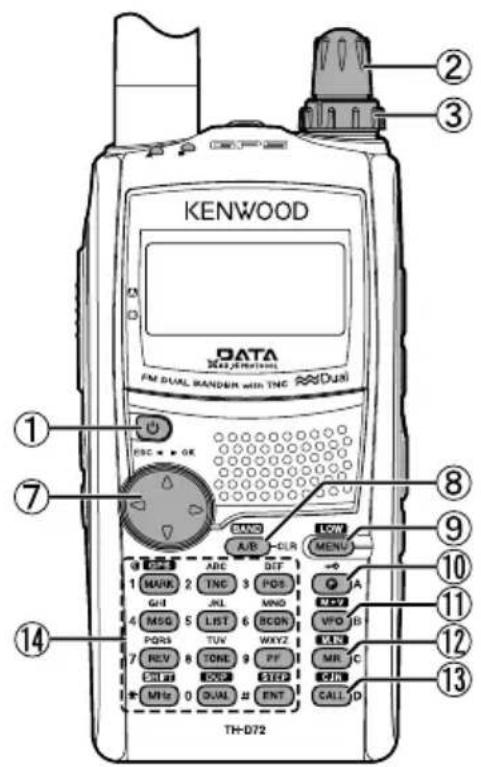
text_image
KENWOOD DATA FM DUAL RANDER with TNC DUAL PSC • • GE A/B ABC DIFF POS MINO MSG LIST BCON VFO B REV TONE PF MR C GND INT OUT MHS 0 DUAL #ENT CALL D TH-D72① [⏻]
text_image
PTT LAMP MONI SQL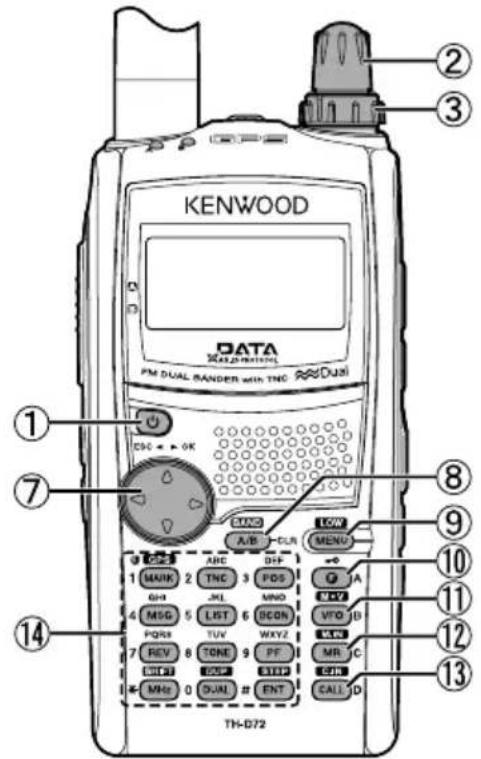
text_image
KENWOOD DATA PM DUAL BANDER with TNC Dual DSC + OK A/B CUN MENU 1 MAIN 2 TNC 3 PDS GND JL MNO 4 MSG 5 LIST 6 BCON VTO B PQRS TUV WXYZ 7 REV 8 TONE 9 PF MR C CHTR QST QTR MHz 0 DUAL # ENT CALL D TH-D72⑭ 12 Clavier
[MARK] (1)
text_image
FM DUAL BANDER with TNC Dual OK SAND A/B CUR LOW MENU KENWOODSÉLECTION D'UNE BANDE DE FONCTIONNEMENT
text_image
H 01/01 12:00 ▶440.000SÉLECTION D'UNE BANDE DE FRÉQUENCE
natural_image
Line drawing of a Kenwood industrial vessel with a flag and warning light (no text or symbols on the diagram itself)text_image
KENWOOD KENWOODtext_image
Technical diagram of a device with numbered components and directional arrows indicating assembly or operationtext_image
Technical diagram of a device with numbered components and directional arrows indicating assembly or operationtext_image
Diagram showing battery pack installation process with numbered components and directional arrow indicating assemblytext_image
Technical diagram of a handheld device with numbered components and labeled partsnatural_image
Pure electrical circuit lines without any symbolsFusibles (3 A)
3 Conecte la clavija cilíndrica del cable de CC al jack DC-IN del transceptor.
text_image
PTT LAMP MONI SQL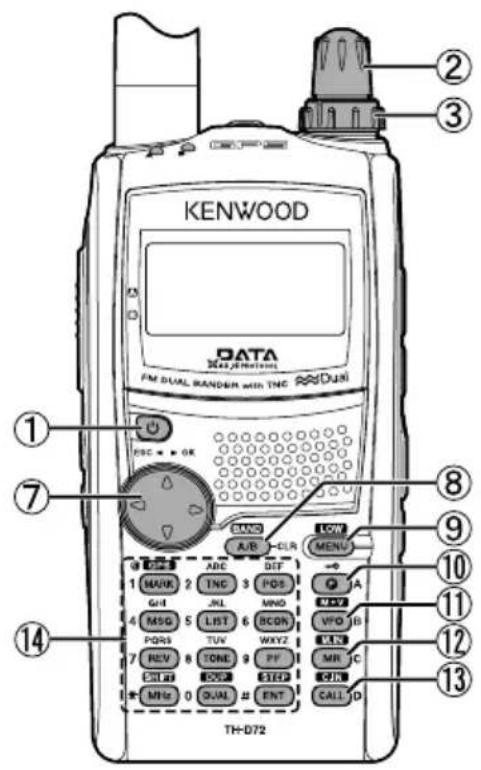
text_image
KENWOOD DATA 3Max Wireless FM DUAL RANDEN with TNC Dual 1 2 3 7 8 9 10 11 12 13 TH-D72 14 MWR 2 TNC 3 POS 4 JL 5 MINO 6 VPO 7 PDR 8 TUE 9 WXYZ 10 REV 11 CRL 12 SOS 13 INT 14 MRS 0 QUAL 15 CALL 16 A/B 17 CLR 18 A/B 19 MENU 20 DIF 21 DIF 22 DIF 23 DIF 24 DIF 25 DIF 26 DIF 27 DIF 28 DIF 29 DIF 30① [⏻]
text_image
PTT LAMP MONI SQL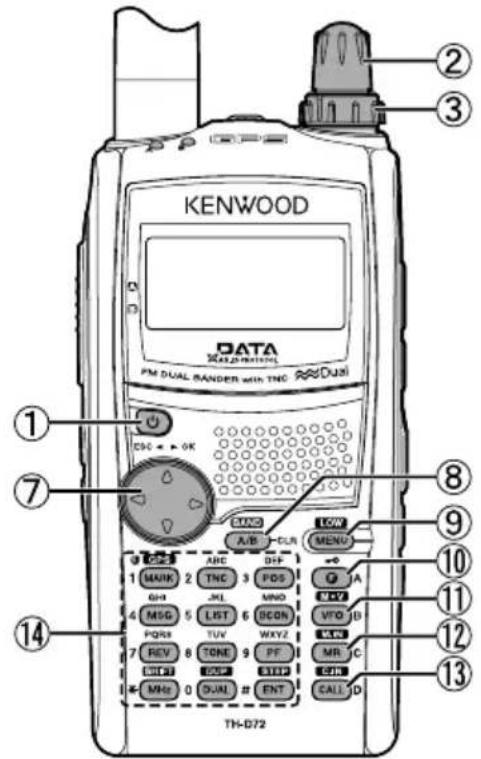
text_image
KENWOOD DATA PM DUAL BANDER with TNC Dual DSC + OK A/B CUN MENU 1 MAIN 2 TNC 3 PDS GND JL MNO 4 MSG 5 LIST 6 BCON VTO B PQRS TUV WXYZ 7 REV 8 TONE 9 PF MR C CHTR QST QTR MHz 0 DUAL # ENT CALL D TH-D72text_image
H 01/01 12:00 ▶440.000natural_image
Line drawing of a Kenwood industrial machine with a flag and warning symbol (no text or labels beyond the brand name)text_image
PTT LAMP MONI SODThis product complies with Directive, Number 26891 regarding "REGULATION ON THE RESTRICTION OF THE USE OF CERTAIN HAZARDOUS SUBSTANCES IN ELECTRICAL AND ELECTRONIC EQUIPMENT".