EasyManual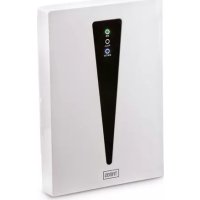
Comfortair 99294 - Dehumidifier TREBS - Free user manual and instructions
Find the device manual for free Comfortair 99294 TREBS in PDF.


User questions about Comfortair 99294 TREBS
0 question about this device. Answer the ones you know or ask your own.
Ask a new question about this device
Download the instructions for your Dehumidifier in PDF format for free! Find your manual Comfortair 99294 - TREBS and take your electronic device back in hand. On this page are published all the documents necessary for the use of your device. Comfortair 99294 by TREBS.
USER MANUAL Comfortair 99294 TREBS
natural_image
White TRES device with black warning triangle and three indicator lights (ON, FULL, ANION) on its side, labeled 'TREBS' at bottom (no other text or symbols visible)text_image
Diagram of a device with labeled parts including a base, cable, and a vertical component with numbered parts.- Aan-uit knop
- Elektriciteitskabel
- Waterreservoir
- Indicaelampje
- "Reservoir vol" lampje
text_image
Diagram of a device with labeled parts including a power adapter, cable, and a vertical device with internal components.Please read the informaon contained herein so that you can become familiar with your device quickly and take advantage of the full scope of its funcons.
1.1 Instrucons
This user manual contains important informaon concerning starng to use the device, safety, purpose and cleaning of the device. This manual should always be present and must be read carefully by all persons who intend to use this device. Always keep the manual in a safe place, and give it together with the device in case of a new user.
2 Safety
This chapter provides you with important safety noces when handling the device. The device corresponds with the required safety regulaons. Improper use can result in personal or property damages.
2.1 Intended use
This device is only intended for use in households in enclosed spaces for
- Dehumidifying air
Uses for a dierent purpose or for a purpose which exceeds this descripon are considered incompatible with the intended or designated use.
WARNING
Danger due to unintended use!
Dangers can emanate from the device if it is used for an unintended use and/or a dierent kind of use.
- Use the device exclusively for its intended use.
- Observe the procedural methods described in this Operang Manual.
Claims of all kinds due to damages resulting from unintended uses are excluded.
The User bears the sole risk.
2.2 General Safety informaon
- If the supply cord is damaged, it must be replaced by the manufacturer, its service agent or similarly qualified persons in order to avoid a hazard.
- This appliance is not intended for use by persons (including children with reduced physical, sensory or mental capabilities, or lack of experience and knowledge unless they have been given supervision or instrucons concerning the use of the appliance by a person responsible for their safety.
-
Children should be supervised to ensure that they do not play with the appliance. The appliance is not to be used by children or persons with reduced physical, sensory or mental capabilities, or lack of experience and knowledge, unless they have been given supervision or instrucon concerning use of the appliance by a person responsible for their safety; children should be supervised to ensure that they do not play with the appliance.
-
Never leave the product connected to the power source without supervision. Even when use is interrupted for a short me, turn it o from the network and unplug the power.
- Do not dismantle the main base for repair or debug by yourself.
- Do not replace the power cord by yourself. Always remember to gently remove the plug from the power outlet holding the outlet with you hand. Never pull the power cable.
- Any modicaon or reng to this unit without denite permission of our factory may cause inconvenience and hazard to the user. The manufacturer is not responsible for any damages due to any misuse.
- Before cleaning or moving the unit, shut the device down or disconnect the plug.
- When the unit is operang, do not touch the water in the water bath or any part in the water.
- Periodically check the power cable condion. If the power cable is damaged the product should be turned to a professional service locaon to be replaced in order to avoid hazardous situations.
- Do not let water ow or splash into the base to avoid damaging the internal parts.
- Pay aenon to the environment of installaon:
- Put the unit at a rm and at place, avoid inclinaon and keep it steady.
- Place the unit away from any heat source, such as a furnace, avoid direct sunlight.
- Place the unit in normal room temperatures. Avoid operang the unit in chilly environments to avoid damage to the unit. If there is freezing inside, do not start unit unl the ice has been cleared or melted.
2.3 Operang Precauons
- Do not let water ow into the body of the air outlet. Wipe o any water outside of the body with a dry cloth.
- Do not place metals, chemicals and detergents into the water bath.
- If there is much water in the water bath, do not move it about, otherwise water might overow and ow into the body.
- Do not put the unit at a place with strong light or direct hot air radiaon.
- If the unit is not to be used for a long me, please cut o the power and unplug the plug (this unit does not have to be grounded).
- If the unit makes an abnormal sound or odor when in operaon, please shut it down immediately and disconnect the power plug. Any repair must be done by a professional repairman.
- Always empty the container with water before restarng the unit.
2.4 Safety Precauons
- Do not turn on the plug with a wet hand, there might be a risk of an electric shock.
- If the body is inclined, please handle this with the power cut o.
- Do not disassemble the unit without cung o the power to avoid an electric shock.
- Do not replace the power cord without authorizaon.
- Never put the power cable, the plug or the whole device into the water. Never expose the product to the atmospheric conditions such as direct sun light or rain, etc.
- Do not cover the venlaon openings
3 Commissioning
This chapter provides you with important safety noces during the initial commissioning of the device. Observe the following noces to avoid dangers and damages.
3.1 Safety informaon
WARNING
Personal and property damages can occur during commissioning of the device!
Observe the following safety noces to avoid such dangers:
• Packaging materials may not be used for playing. There is a danger of suocaon.
3.2 Delivery scope and transport inspecon
As a rule, the dehumidier is delivered with the following components:
- Dehumidier
- Operang Instrucons
PLEASE NOTE
- Examine the shipment for its completeness and for any visible damages.
- Immediately nofy the supplier about any incomplete shipment or damages as a result of inadequate packaging or due to transportaon.
3.3 Unpacking
Unpack your device as follows:
• Take out the device from the box and remove the interior and exterior packaging.
3.4 Disposal of the packaging
The packaging protects the device against damages during transportaon. The packaging materials are selected in accordance with environmentally compatible and recycling-related points of view and can therefore be recycled.
Returning the packaging back to the material loop saves raw materials and reduces the quanes of accumulated waste. Take any packaging materials that are no longer required to “Green Dot” recycling collecon points for disposal.
PLEASE NOTE
- If possible, keep the original packaging for the device for the duraon of the guarantee period of the device, in order that the device can be re-packaged properly in the event of a guarantee claim.
3.5 Setup locaon requirements:
In order to ensure the safe and trouble-free operaon of the device, the setup locaon must full the following prerequisites:
- The device must be set up on a rm, at, horizontal surface with sucient load-bearing capacity.
- Choose the setup locaon in such a way that children cannot reach the device.
• The device is not intended to be installed in a wall or a built-in cupboard. - Do not set up the device in a hot environment or near ammable material.
- The electrical socket must be easily accessible so that the power lead can be disconnected easily, in the case of an emergency.
4 Funcon
In this chapter, you will nd important informaon on the funcons of the device.
4.1 Overview
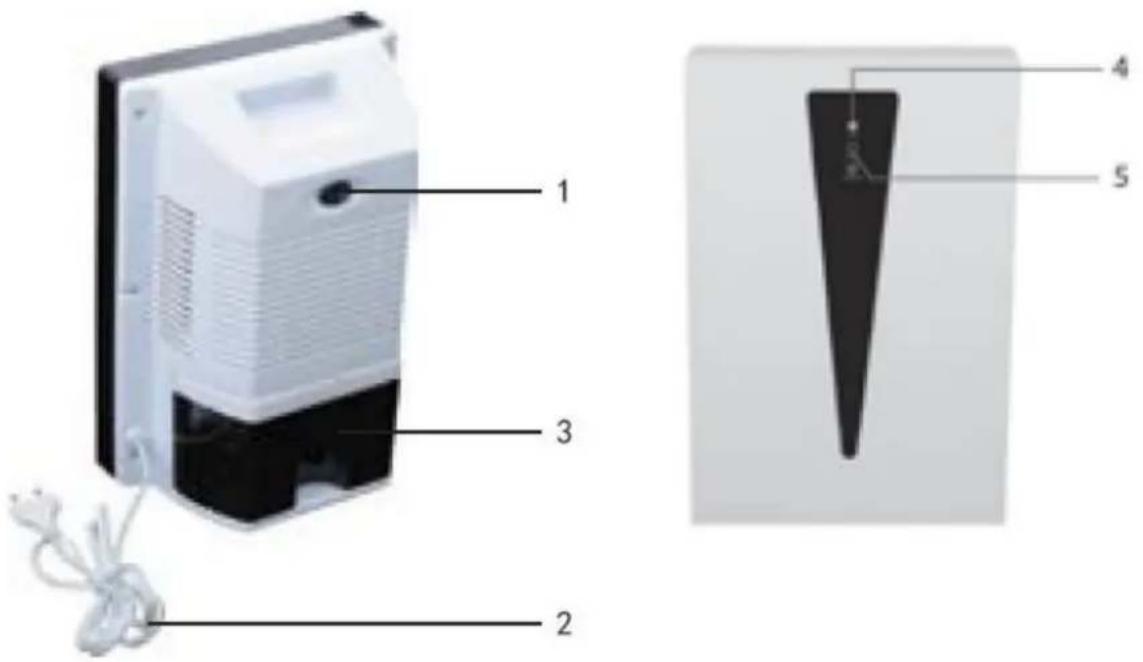
text_image
Diagram of a device with labeled parts including a power adapter, cable, and a vertical component with numbered parts.- On-o buon
- Power cable
- Water tank
- Indicator light
- Light "Tank full"
5 Operaon and Handing
This chapter provides you with important noces with regard to operang the device. Observe the following noces to avoid dangers and damages:
5.1 Operaon
To start the unit, connect the power cable (2) to the power supply and switch the on-o buon (1). The indicator light (4) will switch ON. If the water tank is completely lled, the "tank full" light (5) will light up. Before emptying the water tank the device should be disconnected from the power supply. Before replacing the water tank, make sure the tank is wiped dry with a so cloth.
6 Cleaning and Maintenance
Aer using the product, wipe it with a damp cloth and then wipe dry. Do not use any detergent.
7 Disposal of the Old Device

Old electric and electronic devices frequently sll contain valuable materials. However, they also contain damaging substances, which were necessary for their funconality and safety. If these were put in the non-recyclable waste or were handled incorrectly, they could be detrimental to human health and the environment. Therefore, do not put your old device
into the non-recyclable waste under any circumstances.
PLEASE NOTE
- Uulize the collecon point, established in your town, to return and recycle old electric and
- electronic devices. If necessary, contact your town hall, local refuse collecon service or your dealer for informaon.
- Ensure that your old device is stored safely away from children until it is taken away.
8 Guarantee
- We provide a 24 month guarantee for this product, commencing from the date of sale, for faults which are aributable to producon or material faults.
- Your legal guarantee entitlements in accordance with § 439. BGB-E remain unaacted by this.
- The guarantee does not include damages, which were incurred as a result of improper handling or use, as well as malfuncons which only have a minor eect on the funcon or the value of the device. Consumables, transit damages, inasmuch as we are not responsible for these, as well as damages, which were incurred as a result of any repairs that were not performed by us, are also excluded from the guarantee entlements.
- This device is designed for use in domesc situaons and has the appropriate performance levels.
- Any use in commercial situaons is only covered under the guarantee to the extent that it would be comparable with the stresses of being used in a domesc situaon. It is not intended for any additional, commercial use.
- In the event of jused complaints, we will repair the faulty device at our discretion or replace it with a trouble-free device.
To enforce a guarantee claim, please contact us prior to returning the device (always provide us with proof of purchase).
9 Technical Data
| Device | Dehumidier |
| Model | 99294 |
| Voltage | 220-240V; 50Hz |
| Power consumpon | 85 W |
| Max. mist volume | 1.500 ml |
| Avarage mist volume | 750 ml/ 24 h |
10 Service
If you have any further quesons about the product aer reading this manual, please contact the Trebs customer service: info@trebs.nl.
Trebs BV, Thermiekstraat 1a, 6361 HB, Nuth, The Netherlands, Email: info@trebs.nl, Internet: www.trebs.nl
CE
Français
Manuel d'instrucons