EasyManual
828LM Internet Gateway - Garage door LIFT-MASTER - Free user manual and instructions
Find the device manual for free 828LM Internet Gateway LIFT-MASTER in PDF.


User questions about 828LM Internet Gateway LIFT-MASTER
0 question about this device. Answer the ones you know or ask your own.
Ask a new question about this device
Download the instructions for your Garage door in PDF format for free! Find your manual 828LM Internet Gateway - LIFT-MASTER and take your electronic device back in hand. On this page are published all the documents necessary for the use of your device. 828LM Internet Gateway by LIFT-MASTER.
USER MANUAL 828LM Internet Gateway LIFT-MASTER
Thank you for purchasing a LiftMaster® Internet Gateway enabled with MyQ® technology. Once you have created your account and added your MyQ® devices, you will be able to monitor and control your LiftMaster® MyQ® garage door openers, commercial door operators, gate operators and lights from your smartphone anytime, anywhere. Greater freedom, control and peace of mind than you have ever imagined possible.
With the 828LM Internet Gateway you can add up to 16 MyQ® devices including LiftMaster® MyQ® garage door openers, commercial door operators, gate operators, remote light switches (model 823LM), and remote lamp controls (model 825LM).
WARNING
To prevent possible SERIOUS INJURY or DEATH:
- When the LiftMaster® Internet Gateway is used with a residential garage door opener, the opener MUST ONLY be installed with sectional doors.
Before starting…
YOU MUST HAVE:
- Router
- Broadband Internet Connection
- Internet Gateway Serial Number (located on the bottom of the Internet Gateway)
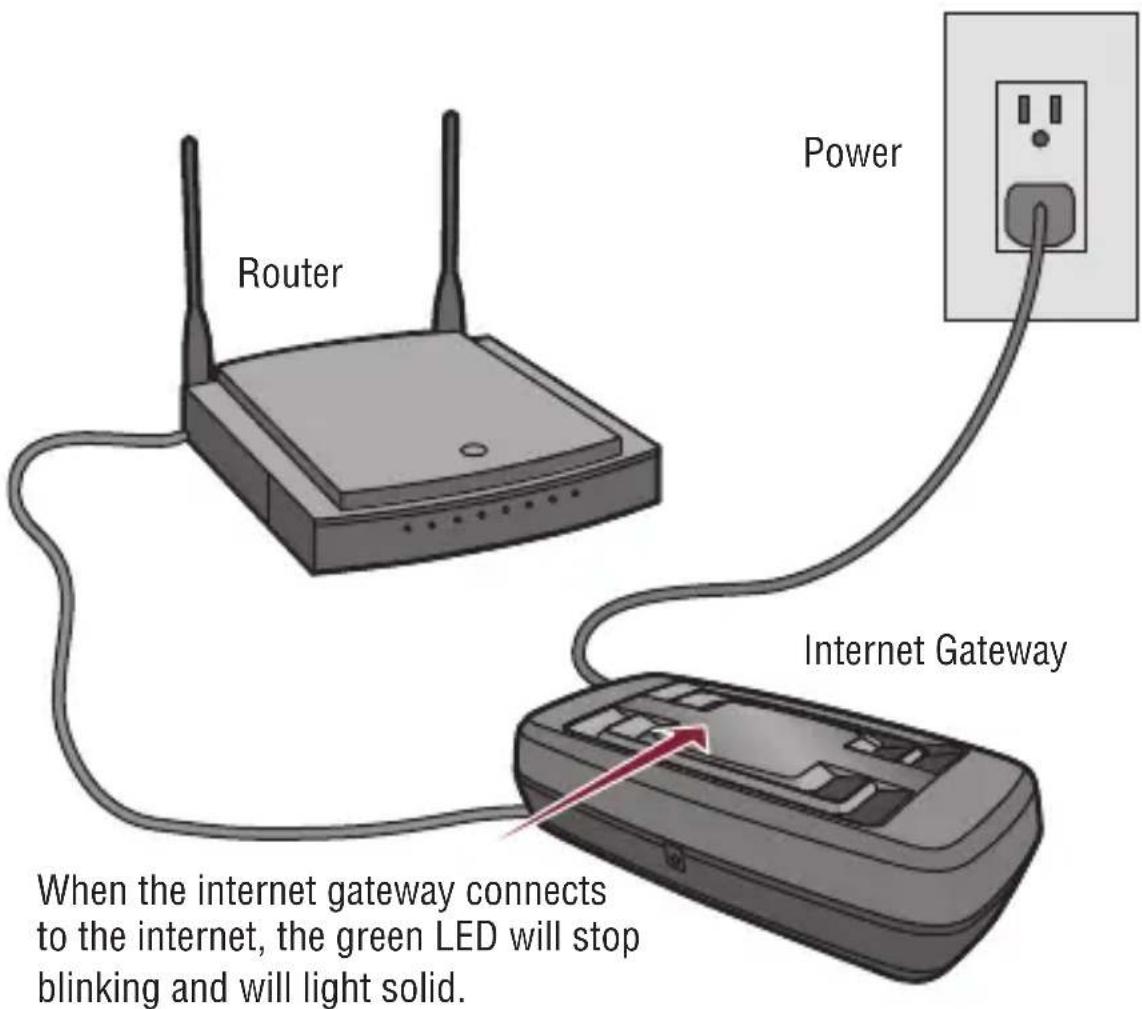
STEP 1 Connect to router and power.
sTep
2
Visit www.myliftmaster.com to create an account and register.
s
3
Download the LiftMaster MyQ® Home Control App from the App Store™ or Google Play™ Store.
s
4
Add MyQ® device(s) such as a remote light control for a garage door opener, commercial door operator, or gate operator; or garage door monitor with the LiftMaster MyQ® Home Control App or log in to www.myliftmaster.com.
s
5
Use your computer or smartphone to control your device.
Need help?
Go to the Help section at www.myliftmaster.com, or call LiftMaster Technical Support at 1-800-528-9131.
ONE YEAR LIMITED WARRANTY
The Chamberlain Group, Inc. warrants to the first retail purchaser of this product that is free from defect in materials and/or workmanship for a period of 1 year from the date of purchase.
NOTICE: To comply with FCC and/or Industry Canada (IC) rules, adjustment or modifications of this transceiver are prohibited. THERE ARE NO USER SERVICEABLE PARTS.
This device complies with Part 15 of the FCC rules and IC RSS-210. Operation is subject to the following two conditions: (1) this device may not cause harmful interference, and (2) this device must accept any interference received, including interference that may cause undesired operation.
The Chamberlain Group, Inc.
845 Larch Avenue
Elmhurst, Illinois 60126-1196
App Store is a service mark of Apple Inc.
Google Play is a trademark of Google Inc.
LiftMaster
PASSERELLE INTERNET
DÉMARRAGE RAPIDE
MODELE 828LM
The Chamberlain Group, Inc.
845 Larch Avenue
Elmhurst, Illinois 60126-1196
©2014 The Chamberlain Group, Inc.
All Rights Reserved