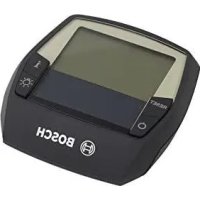
BOSCH Intuvia - Bike

Intuvia - Bike BOSCH - Free user manual and instructions

Find the device manual for free Intuvia BOSCH in PDF.

English EN Download 💬 AI Question 10 questions ⚙️ Specs
📄

Document temporarily unavailable

The manual is currently being transferred to our new server. It will be accessible again in a few hours. Thank you for your patience.

Pick your language and provide your email: we'll send you a specifically translated version.
Product type On-board computer for Bosch eBike system
Brand Bosch
Model Intuvia
Category Electric bike (eBike)
Weight Approx. 0.15 kg
Power supply Internal Li-ion battery 3.7 V, 230 mAh; powered by eBike battery when mounted on the holder
Operating temperature -5 °C to +40 °C
Storage temperature -10 °C to +50 °C
Charging temperature 0 °C to +40 °C
Protection rating IP 54 (dust-tight and splash-proof, with USB cap closed)
Display Screen showing speed, distance, range, assistance level, lighting, battery charge indicator
Connectivity USB port (Micro A - Micro B) for charging external devices (max. 500 mA, 5 V)
Assistance levels OFF, ECO, TOUR, SPORT/eMTB, TURBO (depending on configuration)
Main functions Control of eBike system, display of trip data, adjustment of assistance, lighting, push assistance, eShift (optional)
Mounting Removable holder on handlebar, insertion and removal by sliding, can be locked with a locking screw (M3, 8 mm)
Maintenance and cleaning Clean with a soft, slightly damp cloth without cleaning agents; do not immerse or use a pressure washer
Safety Do not use as a handle; do not get distracted while riding; follow the safety instructions of the eBike system
Repairability Repairs by authorized dealer; on-board computer not user-serviceable
Disposal Do not dispose of with household waste; recycle via an authorized dealer

Frequently Asked Questions - Intuvia BOSCH

How to turn the eBike system on and off?
To turn on, briefly press the On/Off button 5 on the on-board computer or the button on the eBike battery. To turn off, press the same button again or remove the on-board computer from its holder. The system also turns off automatically after 10 minutes of inactivity.
How to change the assistance level?
Use the + (12) and - (11) buttons on the control unit to increase or decrease assistance. Available levels are OFF, ECO, TOUR, SPORT/eMTB and TURBO (depending on configuration).
How to activate push assistance (WALK)?
Briefly press the WALK button (13) on the on-board computer, then within 3 seconds, hold down the + button (12). The assistance deactivates as soon as you release the button or if the speed exceeds 6 km/h.
How to reset trip data?
Display the desired function (distance traveled, travel time, average speed) with the i button (1 or 10), then press the RESET button (6) until the display returns to zero.
What to do in case of an error code?
Error codes appear on the screen. For example, code 410 indicates a stuck button, 430 an empty internal battery. Consult the code table in the manual. If the problem persists, contact an authorized Bosch dealer.
How to charge the on-board computer?
The on-board computer recharges automatically when mounted on the holder and the eBike battery is on. You can also charge it via the USB port with a Micro A - Micro B cable (5 V charger, max. 500 mA).
Can I use the on-board computer without the eBike battery?
Yes, the on-board computer can be turned on without being mounted on the holder thanks to its internal battery, but it will turn off automatically after 1 minute of inactivity if the battery is low.
How to set the time and language?
Access the Basic Configuration menu by pressing the RESET (6) and i (1) buttons simultaneously until Configuration appears. Use the + and - buttons to adjust the time, language, units, etc. Press RESET for 3 seconds to save.
How to use the USB port to charge a phone?
Open the protective cap (8) of the USB port. Plug your compatible USB cable (Micro A - Micro B) between the on-board computer and your device. Make sure the eBike battery is sufficiently charged. Do not use in rain.
How to clean the on-board computer?
Use a soft, slightly damp cloth, with water only. Do not use cleaning agents, do not immerse the device, and do not use a pressure washer. Keep the USB cap closed when cleaning.

User questions about Intuvia BOSCH

0 question about this device. Answer the ones you know or ask your own.

Ask a new question about this device

The email remains private: it is only used to notify you if someone responds to your question.

No questions yet. Be the first to ask one.

Download the instructions for your Bike in PDF format for free! Find your manual Intuvia - BOSCH and take your electronic device back in hand. On this page are published all the documents necessary for the use of your device. Intuvia by BOSCH.
USER MANUAL Intuvia BOSCH

Manual assistant
Powered by Anthropic
Waiting for your message
Product information

Brand : BOSCH

Model : Intuvia

Category : Bike