ATHS700BT - Earphones AUDIO TECHNICA - Free user manual and instructions
Find the device manual for free ATHS700BT AUDIO TECHNICA in PDF.



| Brand | Audio-Technica |
| Model | ATH-S700BT |
| Product type | Wireless stereo headphones |
| Weight | Approx. 195 g (without cable) |
| Power supply | Rechargeable lithium polymer battery 3.7 V DC |
| Charging time | Approx. 3 hours |
| Battery life (playback) | Approx. 6 hours |
| Battery life (standby) | Up to 200 hours |
| Bluetooth version | Bluetooth 3.0 |
| Bluetooth profiles | A2DP, AVRCP, HFP, HSP |
| Supported codec | SBC |
| Transducer | Closed dynamic, 40 mm |
| Frequency response | 20 – 24,000 Hz |
| Impedance | 34 Ω |
| Sound pressure level | 100 dB/mW |
| Microphone | Omnidirectional electret condenser microphone, sensitivity -44 dB (1 V/Pa at 1 kHz) |
| Connector | 3.5 mm stereo mini jack |
| Included accessories | Cable with controller and microphone (1.2 m), USB cable (1.0 m), pouch |
| Spare parts | Earpads sold separately |
| Cleaning | Wipe with a dry cloth; do not use alcohol or solvents |
| Auto power off | Yes, after 10 minutes without connection |
| Reset function | Yes, via reset button with a thin tip |
| Playback function | Can be used even when flat via audio cable |
| Operating temperature | 5 °C to 40 °C |
Frequently Asked Questions - ATHS700BT AUDIO TECHNICA
User questions about ATHS700BT AUDIO TECHNICA
0 question about this device. Answer the ones you know or ask your own.
Ask a new question about this device
Download the instructions for your Earphones in PDF format for free! Find your manual ATHS700BT - AUDIO TECHNICA and take your electronic device back in hand. On this page are published all the documents necessary for the use of your device. ATHS700BT by AUDIO TECHNICA.
USER MANUAL ATHS700BT AUDIO TECHNICA
Thank you for purchasing these wireless stereo headphones. Please keep this manual handy so they are always available for reference.
Please read these cautions before using your headphones. To ensure safety, observe all cautions while using this equipment.
For customers in the USA
FCC Notice
Warning
This device complies with Part 15 of the FCC Rules. Operation is subject to the following two conditions: (1) This device may not cause harmful interference, and (2) this device must accept any interference received, including interference that may cause undesired operation.
Caution
You are cautioned that any changes or modifications not expressly approved in this manual could void your authority to operate this equipment.
Note: This equipment has been tested and found to comply with the limits for a Class B digital device, pursuant to part 15 of the FCC Rules. These limits are designed to provide reasonable protection against harmful interference in a residential installation. This equipment generates, uses and can radiate radio frequency energy and, if not installed and used in accordance with the instructions, may cause harmful interference to radio communications. However, there is no guarantee that interference will not occur in a particular installation. If this equipment does cause harmful interference to radio or television reception, which can be determined by turning the equipment off and on, the user is encouraged to try to correct the interference by one or more of the following measures:
- Reorient or relocate the receiving antenna.
- Increase the separation between the equipment and receiver.
- Connect the equipment into an outlet on a circuit different from that to which the receiver is connected.
- Consult the dealer or an experienced radio/TV technician for help.
For customers in Canada
IC statement
This device complies with INDUSTRY CANADA R.S.S. 210, en conformité avec IC: RSS-210/CNR210. Operation is subject to the following conditions: (1) This device may not cause harmful interference and (2) this device must accept any interference received, including interference which may cause undesired operation.
CANICES-3(B)/NMB-3(B)
Under Industry Canada regulations, this radio transmitter may only operate using an antenna of a type and maximum (or lesser) gain approved for the transmitter by Industry Canada. To reduce potential radio interference to other users, the antenna type and its gain should be so chosen that the equivalent isotropically radiated power (e.i.r.p.) is not more than that necessary for successful communication.
CAUTIONS
- Do not use the headphones within 22cm of where a cardiac pacemaker is installed. Pacemakers may be affected by radio waves of the headphones.
- Do not use the headphones near medical equipment. Radio waves may affect cardiac pacemakers and medical electronic equipment. Do not use the product inside medical facilities.
- Do not use the headphones in aircrafts. Radio waves may affect electronic equipment and cause accidents due to malfunction.
- Do not use the headphones near automatic control devices such as automatic doors and fire alarms. Radio waves may affect electronic equipment and cause accidents due to malfunction.
- Do not disassemble, modify or attempt to repair the headphones.
- Do not subject the headphones to strong impact.
- Do not expose this apparatus to drips or splashes, and do not handle with wet hands to avoid electric shock or malfunction.
- Disconnect this product from the computer if you encounter any malfunction like noise, smoke, smell, heat or damage with the product. In such case, contact your local Audio-Technica dealer or service center.
- This apparatus should be located close enough to the AC outlet so that you can easily grasp the power cable plug at any time.
- Do not expose this apparatus to drips or splashes.
- Do not cover with a cloth.
- Follow applicable laws regarding mobile phone and headphone use if using headphones while driving.
- Do not use the headphones in places where the inability to hear ambient sound presents a serious risk (such as at railroad crossings, train stations, and construction sites).
- To prevent damage to your hearing, do not raise the volume too high. Listening to loud sound for an extended period may cause temporary or permanent hearing loss.
- Discontinue use if skin irritation results from direct contact with the product.
- Be careful to avoid pinching yourself between the housing and yoke of the product.
Caution for rechargeable battery
If battery fluid gets into eyes, do not rub them. Rinse thoroughly with clean water such as tap water and consult a doctor immediately.
If battery fluid leaks, do not touch fluid with bare hands.
- If fluid remains inside this product, it may cause malfunction. If battery fluid leaks, please contact our service center.
- If fluid gets in your mouth, gargle thoroughly with clean water such as tap water and consult a doctor immediately.
-
If your skin or clothing comes in contact with fluid, immediately wash the affected skin or clothing with water. If you experience skin irritation, consult a doctor.
-
Never heat, disassemble or modify the battery, nor dispose of it in a fire. Failure to observe this caution could cause leakage, generation of heat or explosion.
CAUTIONS
- Do not attempt to pierce with a nail, hit with a hammer or step on the battery.
Failure to observe this caution could cause generation of heat, damage or ignition.
- Do not drop the battery or subject it to strong impact.
Failure to observe this caution could cause leakage, generation of heat or explosion.
- Do not use, leave or store the battery in the following places:
Area exposed to direct sunlight or high temperatures and humidity
Inside of a car under the blazing sun
Near heat sources such as heat registers
Failure to observe this caution could cause leakage, generation of heat, explosion or performance degradation.
- Do not get the battery wet.
Failure to observe this caution could cause generation of heat, explosion or ignition. - Charge only with the included (specified) USB cable.
Failure to observe this caution could cause malfunction or fire.
After using the device, be sure to switch it off.
Leakage often occurs due to battery drain that results from a failure to switch off device.
PRECAUTIONS
- Be sure to read the operation manual for the Bluetooth device before use.
- Audio-Technica will not be liable in any way for any loss of data in the unlikely event that such losses should occur while using this product.
- On public transport systems or in other public places, keep the volume low so as not to disturb other people.
- Please minimize the volume on your audio device before connecting the headphones in order to avoid hearing damage from sudden exposure to excessive volume.
- When using this product in a dry environment, you may feel a tingling sensation in your ears. This is caused by static electricity accumulated on your body, not by a headphone malfunction.
- Do not store the headphones under direct sunlight, near heating devices or in a hot, humid or dusty place. Do not allow the headphones to get wet.
- When this product is used for a long time, the headphones may become discolored due to ultraviolet light (especially direct sunlight) or wear.
- The cable may become caught or severed if product is placed in a bag or pocket without adequate protection. Always store the product in the included pouch.
- Connect/disconnect the cable by holding the plug. Pulling directly on the cable can result in a broken wire and the risk of electric shock. Be sure to disconnect the USB cable from the headphones and store it in the attached pouch.
- Reception on the headphones is available only through the mobile telephone network. Please note that performance of other types of phone reception (phones using other wireless applications) cannot be guaranteed.
- If you use the headphones close to an electronic device or transmitter (such as a mobile phone), a noise may be generated in the headphones. In this case, keep headphones away from the electronic device or transmitter.
- If you use the headphones near a TV or radio antenna, noise may be generated in the television or radio. In this case, keep headphones away from the TV or radio antenna.
PRECAUTIONS
- To protect the built-in rechargeable battery, charge it at least once every half year.
If you leave it too long, you will have less rechargeable battery life or the battery may not recharge at all. - Do not use cords and cables other than the supplied one. Doing so can result in malfunction.
Simultaneous use with other devices
Failure, such as the interruption of sound, may be caused by radio wave interference from devices that use the same frequency band (2.4GHz) as the headphones, including Bluetooth-enabled devices, devices using wireless LAN, digital cordless phones and microwaves. Similarly, because radio waves of the headphones may affect these devices, take the following precautions:
- Install the devices using the same frequency band (2.4GHz) away from the headphones.
- Do not use the product in hospitals, trains and aircrafts.
Instructions for Use
Any device which is connected to the headphones needs to meet the Bluetooth standards established by Bluetooth SIG and be certified.
Even if the device meets the Bluetooth standards, it might not connect to the headphones or the operation method and behavior may differ depending on the device's characteristics and specification.
Cleaning
Get into the habit of regularly cleaning your headphones to ensure that they will last for a long time. Do not use alcohol, paint thinners or other solvents for cleaning purposes.
- Cleaning the headphones/remote control with microphone.
Wipe the main unit with a dry cloth.
About cables.
Wipe your cables with a dry cloth after use if there is sweat or other dirt present. Using an unclean cable continuously will deteriorate and harden the cable, resulting in headphone malfunction.
- About plugs on cables.
Wipe your plug with a dry cloth if dirty. Using the plug without cleaning it can cause sound skipping on distortion.
- Cleaning the earpads and headband.
To clean, wipe with a dry cloth. Earpads and headband may fade if sweat or water dries on them. If the earpads and headband get wet, we recommend wiping them with a dry cloth and allowing them to dry in the shade.
- For long-time storage, keep the headphones in a well-ventilated place without high temperatures and humidity.
The earpads deteriorate over time due to use or storage. For information about replacing headband pads or other parts, or for information about other serviceable parts, contact your Audio-Technicals dealer or service center.
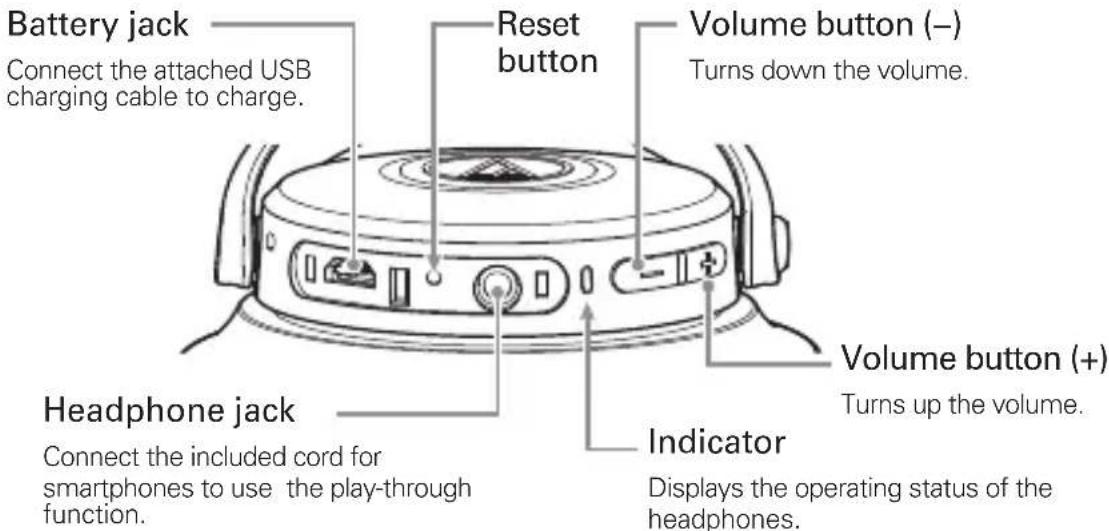
Part names and functions
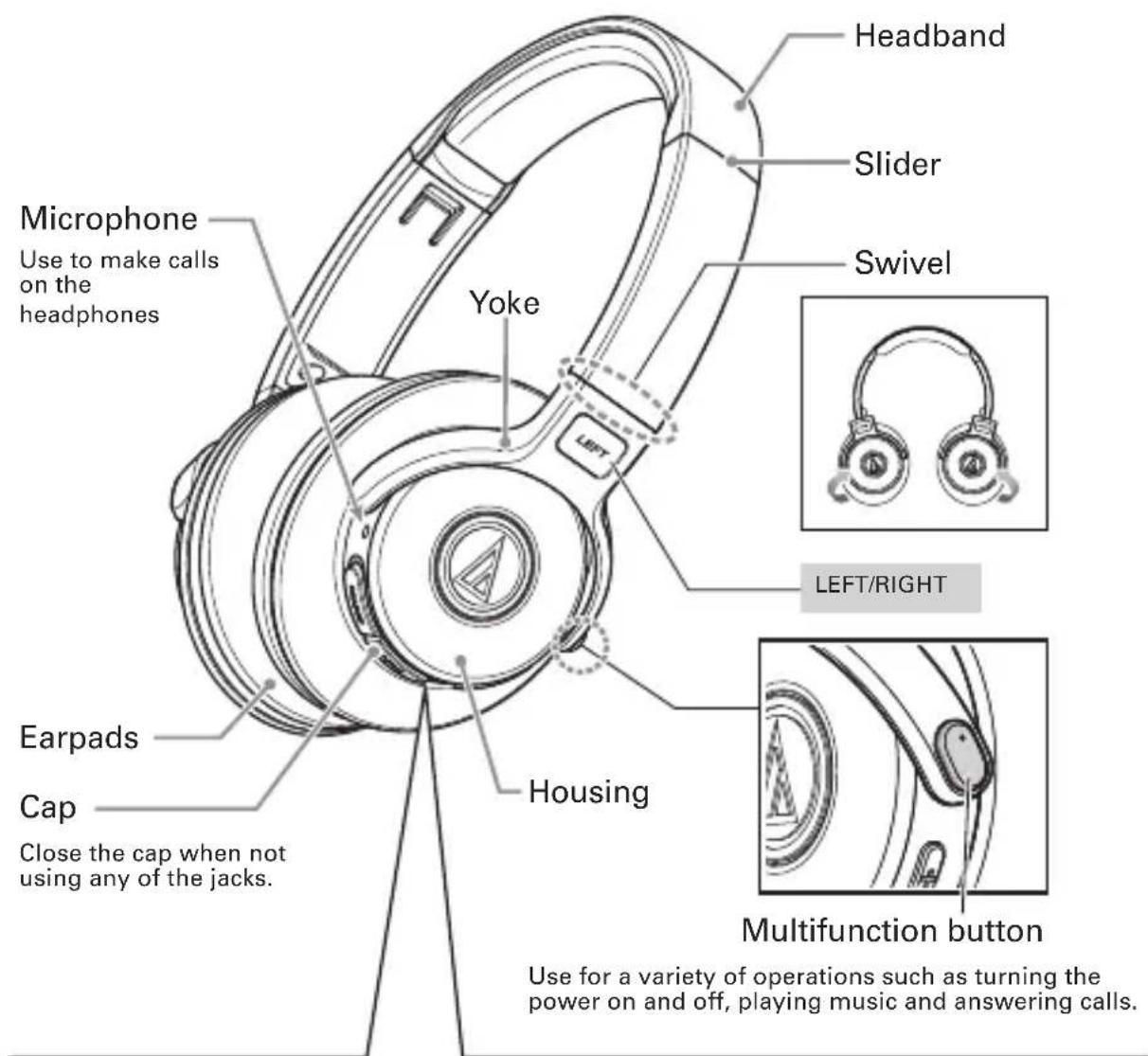

With the cap open (left-side housing)
*The cap cannot be fully removed.
How to Charge
Fully charge the battery when using for the first time.
When the rechargeable battery power runs low, you will hear a short beep and the indicator will flash red. When you hear the beep, charge the battery.
It takes about 3 hours to charge the battery fully. (It varies depending on service conditions.)
- The headphones cannot be used during charging because Bluetooth is disconnected.
1 Connect the included USB cable (the micro USB terminal side) to the headphone battery jack.
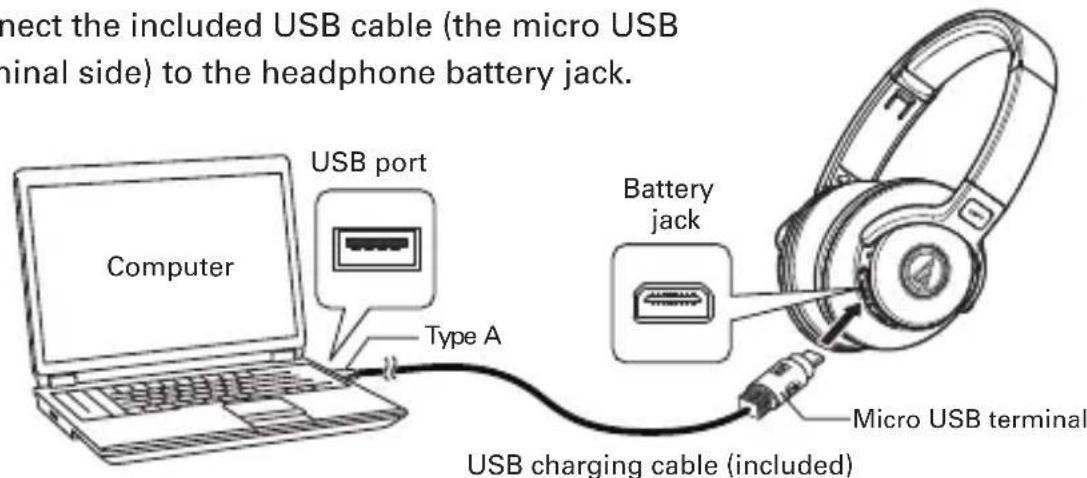
* The included USB cable is specifically designed to charge the headphones. Data cannot be transferred to and from computer.
2 Connect the USB cable (the Type A side) to the computer and start charging.
3 During charging, the indicator turns on/flashes as follows:
Flashes blue twice: Charging just started
Lit red: Charging
Off: Charging complete
How to Connect
About Pairing
To connect the headphones to a Bluetooth device, the headphones need to pair (register) with the device. Once they are paired, you don't need to pair them again.
However, you will need to pair again in the following cases:
-If the headphones are deleted from the Bluetooth device connection history,
If the headphones are sent out for repair,
If the headphones are paired with 9 devices or more.
(The headphones can be paired with up to 8 devices. When you pair with a new device after pairing with 8 devices, pairing information for the device with the oldest connection date will be overwritten by information for the new device.)
How to Connect
How to Perform Pairing
- Read the user manual for the Bluetooth device.
- Place the Bluetooth device within 1 meter of the headphones to perform pairing correctly.
- Wear the headphones to confirm pairing by listening for sound.
1 Starting with the headphones turned off, press and hold the Multifunction button for about 4 seconds, and then release when the indicator flashes red and blue.
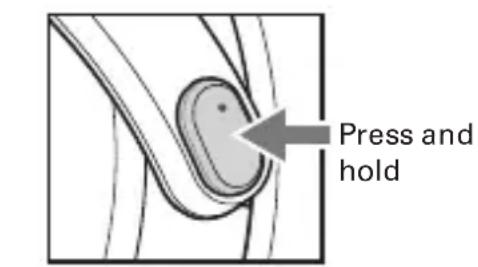
Beep sound
2 Pairing process will begin and the Bluetooth device will search for the headphones.
- For more information on how to use the Bluetooth device, read the operation manual for the device.
3 When the headphones are searched for, "ATH-S700BT" will display on the Bluetooth device. Select "ATH-S700BT" and register the device to be connected.
Some devices may ask for passkey*. In this case, enter "0000".
- The passkey is also called passcode, PIN code, PIN number or password.
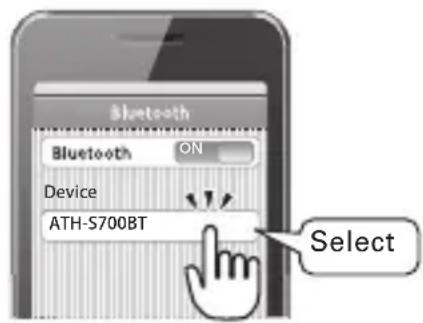
4 When the headphones ring, the pairing has performed normally and been successfully completed.
Shortbeep
About Indicator Display
The indicator of the headphones displays the following operating status by flashing or turning on.
| Operating status | LED display patterns | ● BlueRed | |
| Pairing | Searching for device | ● ● ● ● ● ● ● ● ● ● ● ● ● ● ● ● ● ● ● ● ● ● ● ● ● ● ● ● ● ● ● ● ● ● ● ● ● ● ● ● ● ● ● ● ● ● ● ● ● ● ● ● ● ● ● ● ● ● ● ● ● ● ● ● ● ● ● ● ● ● ● ● ● ● ● ● ● ● ● ● ● ● ● ● ● ● ● ● ● ● ● ● ● ● ● ● ● ● ● ● ●● | Flashing |
| Connect | Waiting to be connected | ● — — — — — — — — — — — — — — — — — — — — — — — — — — — — — — — — — — — — — — — — — — — — — — — — — — — — — — — — — — — — — — — — — — — — — — — — — — — — — — — — — — — — — — — — — — — — — — — — — — — — | Flashing |
| A2DP/AVRCP link or HFP/HSP link is connected | ● — — — — — — — — — — — — — — — — — — — — — — — — — — — — — — — — — — — — — — — — — — — — — — — — — — — — — — — — — — — — — — — — — — — — — — — — — — — — — — — — — — — — — — — — — — — — — — — — | ||
| Remaining battery level | Remaining battery level low | ● — — — — — — — — — — — — — — — — — — — — — — — — — — — — — — — — — — — — — — — — — — — — — — — — — — — — — — — — — — — — — — — — — — — — — — — — — — — — — — — — — — — — — — — — — — — — — — — — — | |
| Charge | Charging | ● ● ● ● ● ● ● ● ● ● ● ● ● ● ● ● ● ● ● ● ● ● ● ● ● ● ● ● ● ● ● ● ● ● ● ● ● ● ● ● ● ● ● ● ● ● ● ● ● ● ● ● ● ● ● ● ● ● ● ● ● ● ● ● ● ● ● ● ● ● ● ● ● ● ● ● ● ● ● ● ● ● ● ● ● ● ● ● ● ● ● ● ● ● ● ● ● ●● | Lit |
| Full charge | Off | ||
| Charging error | ● — — — — — — — — — — — — — — — — — — — — — — — — — — — — — — — — — — — — — — — — — — — — — — — — — — — — — — — — — — — — — — — — — — — — — — — — — — — — — — — — — — — — — — — — — — — — — — — — —— | Flashing | |
How to Use
The headphones are capable of making Bluetooth connections, playing music and receiving incoming calls. Please use the headphones in accordance with applications. Please note that we cannot guarantee the operation of applications of the Bluetooth device.
Power supply
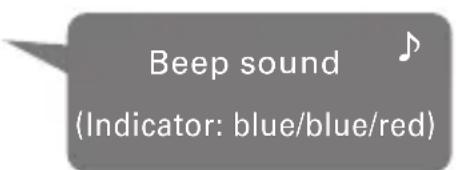
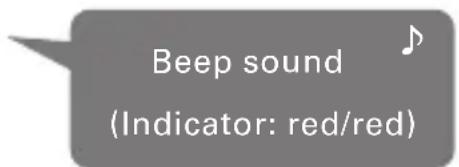
ON: Press and hold the Multifunction button (for about 2 seconds) to turn on the power.
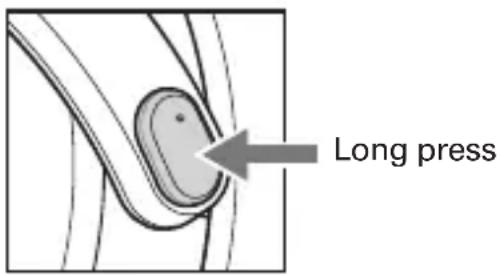
OFF: When the power is on, press and hold the Multifunction button (for about 2 seconds) to shut off the power.
How to Use
How to Wear
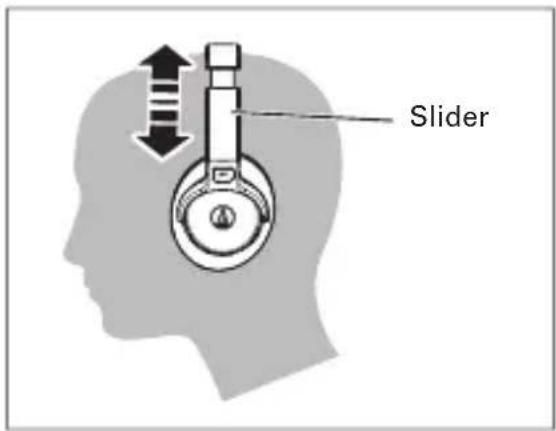
Place the headphones on your head so that the "LEFT" side is on your left ear and "RIGHT" side is on your right ear, and adjust them so that the earpads cover your ears completely.
Listening to Music
1 To connect for the first time, refer to "How to Connect" and pair the headphones with a Bluetooth device and connect.
Once pairing has been performed, turn on the headphones and turn on the Bluetooth connection of the Bluetooth device.
2 Play and enjoy music according to the operation manual of the Bluetooth device connected. The following operations are available on the headphones:
Multifunction button
| Short press | Play/Pause Plays or pauses music |
| 2 consecutive short presses | Forward Forwards to the next track. |
| 3 consecutive short presses | Rewind Returns to the previous track. |
| Short press, long press (2nd press is a long press) | Fast-forward The currently playing track is fast- forwarded while the button is held down. |
| 2 consecutive short presses, long press (3rd press is a long press) | Fast-rewind The currently playing track is rewound while the button is held down. |
Volume button
| + button | Volume Up | You will hear a beep when the volume reaches its maximum. |
| - button | Volume Down | You will hear a beep when the volume reaches its minimum. *Audio is not muted even if it is reduced to the minimum volume. |
How to Use
Taking a Call
If telephone function is incorporated in the Bluetooth device, you can make a call using the headphones.
When the Bluetooth device receives a call, you will hear the headphones ring.
When you get a call while listening to music, the music will stop.
When you end the call, the music will resume.
- There are some Bluetooth devices on which audio playback cannot be restarted.
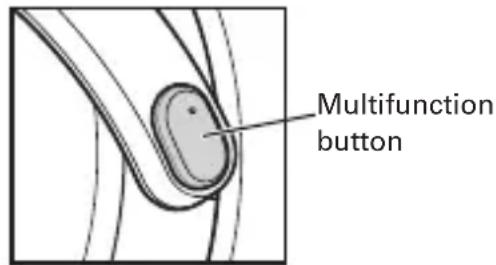
Taking a call
When you hear the ringtone, briefly press the Multifunction button and take the call.
Ending a call
During the call, briefly press the Multifunction button to end the call.
Switching a call between the headphones and mobile phone
Every time you press and hold the Multifunction button (for about 2 seconds*) during a call, you will toggle between accessing the call via the mobile phone and accessing it via the headphones.
- When you hear the sound of a short beep, release the button.
Changing call volume
During the call, you can turn the volume up or down by pressing the Volume button (+ / - )
Blocking communications
During an incoming call, press and hold the Multifunction button (for about 2 seconds) to reject the incoming call.
Other functions
Play-through function
This product features the play-through function that allows it to operate like portable headphones and play music from a portable device even if the headphones are not charged.
Connect the straight plug on the included smartphone cable to the headphones' headphone jack and connect the L-type plug to the portable device.
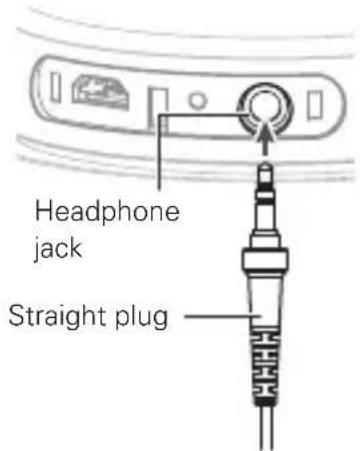
Using the remote controller with mic for smartphones
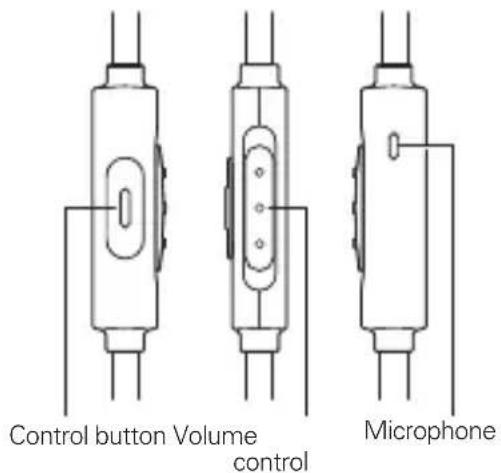
Front Side Back
| Playback/pause for music/movies or Answering/ending calls | Press the control button once. |
| Adjusting volume | Adjust with the volume control. |
- Some smartphones do not support playback and pause functionality for music/movie files.
- Volume of the connected device itself cannot be adjusted.
- As the battery power of the playback device decreases, volume may decrease. Playback will not be muted, even on the lowest setting.
Auto Power Off function
The headphones will automatically turn off after 10 minutes of not being connected to a device with the power turned on.
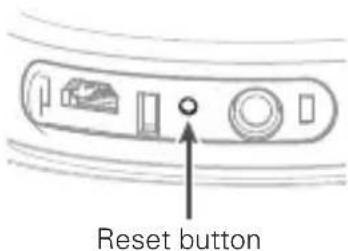
Reset function
If this product does not work or other malfunctions occur, press the reset button using a thin stick.
Once the headphones are reset, they will need to be paired again with Bluetooth devices.
Troubleshooting
Power is not supplied
Charge the headphones.
Unable to pair
Pairing is available on version 2.1+EDR or later of the communication system of the Bluetooth device.
Bring the headphones and the Bluetooth device closer together - within the range of 1 meter.
Set profiles for the Bluetooth device. For procedures on how to set, refer to the operation manual for the Bluetooth device.
No sound comes out / a faint sound
Turn on the power of the headphones and the Bluetooth device.
Turn up the volume of the headphones and the Bluetooth device.
For the HFP/HSP connection, switch to the A2DP connection.
Switch the output of the Bluetooth device to the Bluetooth connection.
Sound flutters / noise is caused / sound is interrupted
Turn down the volume of the headphones and the Bluetooth device.
Keep the microwave and other devices such as wireless LAN away from the headphones.
Keep TV, radio and devices with built-in tuners away from the headphones.
Turn off the equalizer settings of the Bluetooth device.
Remove obstacles between the headphones and the Bluetooth device and bring them closer together.
Troubleshooting
Cannot hear the person on the other end / voice of the person on the other end sounds too quiet
Turn on the power of the headphones and the Bluetooth device.
Turn up the volume of the headphones and the Bluetooth device.
For the A2DP connection, switch to the HFP/HSP connection.
Switch the voice output of the Bluetooth device to the Bluetooth connection.
The headphones cannot be charged
Securely connect the USB charging cable and charge.
For operation of the Bluetooth device, refer to the device's operation manual.
If the problem still remains, reset the headphones. For the procedure for resetting the device, refer to "Reset function".
Specifications
Communication System:Bluetooth Version 3.0
Output:Bluetooth Specification Power Class 2
Maximum communication range: Line of sight - approx. 10 m
Frequency band : 2.402 GHz to 2.480 GHz
Modulation method : FHSS
Compatible Bluetooth Profiles : A2DP AVRCP HFP HSP
Support Codec : SBC
Supported content protection method : SCMS-T
Headphones
Driver:Closed-back dynamic 40mm
Output sound pressure level : 100 dB/mW
Frequency Response : 20 to 24,000 Hz
Transmission band : 20 to 20,000 Hz
Impedance : 34 Ω
Directional characteristic:Omnidirectional
Sensitivity : - 44 dB (1V/Pa at 1 kHz)
Effective frequency range : 50 to 4,000 Hz
Power source : DC3.7V lithium polymer battery
Charging time: Approx. 3 hours*
Operating time: Approx. 6 hours (Continuous transmission time including music playback time), Max. 200 hours (Continuous standby time)
Weight: Approx. 195 g (Without cord)
Operating temperature: 5^ to 40^
Accessory: Cable with smartphone control and mic (1.2 m), USB cable for charge (1.0 m), Pouch
Optional : Sold separately earpieces
- The above figures depend on operating conditions.
(For product improvement, this product is subject to modification without notice.)
- The Bluetooth word mark and logos are owned by the Bluetooth SIG, Inc. and any use of such marks by Audio-Technica Corporation is under license. All other trademarks are property of their respective owners.
MISES EN GARDE
© 2015 Audio-Technicals Corp.