 ManualGo.com
 SB 8310 TV - Haut-parleur Trevi - Free user manual and instructions
Find the device manual for free SB 8310 TV Trevi in PDF.



Download the instructions for your Haut-parleur in PDF format for free! Find your manual SB 8310 TV - Trevi and take your electronic device back in hand. On this page are published all the documents necessary for the use of your device. SB 8310 TV by Trevi.
USER MANUAL SB 8310 TV Trevi
WITH BLUETOOTH Connection and Operation Manual
then blue color Bluetooth LED indicator light on, with notification sound: do do do de.
3. BLUETOOTH LED light flash by 100ms speed, use your mobile phone sourcing
SB 8310 TV name, then connect and pairing it. If need password, then type”0000”. After connected,the blue LED indicator light on and the notification sound : do Then play music by bluetooh mode, the blue LED indicator light flash slowly by a 1000ms speed. When smartphone paired this machine again, it will connect automatically.
4. When play music by Bluetooth mode, there is phone call, speaker will stop play music and
enter into voice call mode automatically.
5. When you disconnect the Bluetooth, there is notification sound indicate” do do do do ”, and
the speaker will enter into detective mode.6.Rotate the volume knob to make the volume up and down.二. LINE IN MODE
1. Connect the speaker by stereo cable, speaker will enter into Line in mode, and notification
sound” do do do ”. Then use your smartphond or other connected device to play music.
2. Aux mode, Blue LED light on
3. Disconnected the stereo cable, speaker enter Bluetooth mode automatically.
4. Rotate the volume knob to make the volume up and down.三. TF CARD MODE
1.Turn on the speaker, speaker enter Bluetooth mode automatically, then insert TF card, speaker will enter TF card play mode. But before Turn on the speaker, insert the TF card, then power on, speaker will enter into TF CARD mode 2.When play the music, blue LED light on and flash slowly by 1000ms speed, when pause the speaker, LED light will stop flash, just keep on.NO.123NAME
then blue color Bluetooth LED indicator light on, with notification sound: do do do de.
3. BLUETOOTH LED light flash by 100ms speed, use your mobile phone sourcing
SB 8310 TV name, then connect and pairing it. If need password, then type”0000”. After connected,the blue LED indicator light on and the notification sound : do Then play music by bluetooh mode, the blue LED indicator light flash slowly by a 1000ms speed. When smartphone paired this machine again, it will connect automatically.
4. When play music by Bluetooth mode, there is phone call, speaker will stop play music and
enter into voice call mode automatically.
5. When you disconnect the Bluetooth, there is notification sound indicate” do do do do ”, and
the speaker will enter into detective mode.6.Rotate the volume knob to make the volume up and down.二. LINE IN MODE
1. Connect the speaker by stereo cable, speaker will enter into Line in mode, and notification
sound” do do do ”. Then use your smartphond or other connected device to play music.
2. Aux mode, Blue LED light on
3. Disconnected the stereo cable, speaker enter Bluetooth mode automatically.
4. Rotate the volume knob to make the volume up and down.三. TF CARD MODE
1.Turn on the speaker, speaker enter Bluetooth mode automatically, then insert TF card, speaker will enter TF card play mode. But before Turn on the speaker, insert the TF card, then power on, speaker will enter into TF CARD mode 2.When play the music, blue LED light on and flash slowly by 1000ms speed, when pause the speaker, LED light will stop flash, just keep on.NO.123NAME
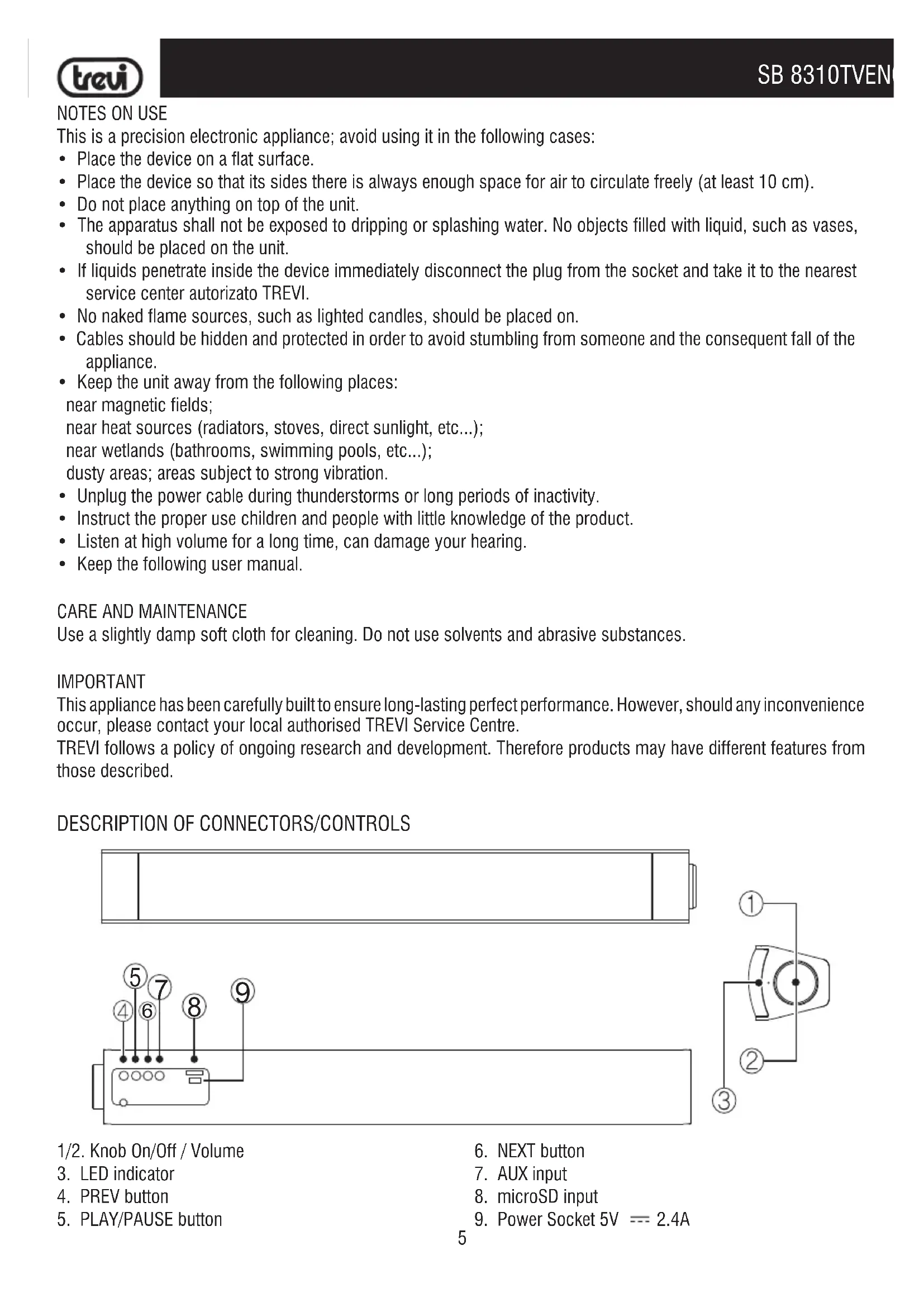
SB 8310 TV6 SB 8310TV INSTALLATION NOTE When installing the SB 8310TV with TV under 24" in size, you may need to lift up the TV so that the sound bar doesn't stand between the TV infrared receiver and the remote control signal. POWER SUPPLY Connect the DC plug of the supplied AC adapter to the 5V socket (9) located at the back of the appliance. Connect the supplied power adapter to an electrical outlet.
POWER ON/OFF AND VOLUME ADJUSTMENT
1. Turn the on/off knob (1) clockwise until you hear a click to switch on the appliance.
2. Turn the on/off knob (1) counterclockwise until you hear a click to switch off the appliance.
3. Rotate the knob of volume (2) clockwise/anticlockwise to increase/decrease the volume.
Note: - Some audio outputs which you connect the Soundbar (like headphone output) can have its own volume control: make sure you have set on the source device an adequate level audio output otherwise the Soundbar will sound even at maximum volume. - If the sound played by the Soundbar be distorted means that the input signal is too strong: lower the volume of the Soundbar or paid on a level audio source device output more low. - When connecting to a TV via headphone out, sometimes the sound reproduced from the Soundbar is low even at maximum volume; in this case connect the Soundbar to the audio output of the TV-scart adapter (not supplied). AUX
1. Use a jack cable 3.5mm stereo to connect the AUX input on the rear to the headphones / audio of the TV or other
3. Press the PLAY/PAUSE (5) button to mute the sound temporarily. Press again to restore it.
4. In case you want to switch the AUX input from another source, press and hold the PLAY/PAUSE (5) button until
2. Switch on the appliance. Playback will start automatically.
3. In case you want to switch the microSD Card input from another source, press and hold the PLAY/PAUSE (5)
button until the voice guide does not indicate TF PLAYING.
4. Press the PLAY/PAUSE button (5) to stop playback temporarily . Press again to resume.
5. Press the NEXT (6) or PREV (4) button to move to the next or previous track.
6. Press and hold down NEXT (6) or PREV (4) button to flinch or fast forward the track.
BLUETOOTH OPERATION ENGLISH7 SB 8310TV
1. Switch on the appliance and press and hold the PLAY/PAUSE button (5) until the voice guide does not indicate
ENTER THE BLUETOOTH. The system will automatically looking for Bluetooth external devices to pair. 2. Activate the Bluetooth feature on the external device and initiate a search for devices. After select the "SB 8310TV".
3. Enter the password "0000" if required.
4. When the external device is paired, the voice guide indicates CONNECTION SUCCESFUL.
5. Press the PLAY/PAUSE button (5) to start playback.
6. Press the PLAY/PAUSE button (5) to stop playback temporarily . Press again to resume.
7. Press the NEXT (6) or PREV (4) button to move to the next or previous track.
8. Quickly press twice the PLAY/PAUSE button (5) to disconnect the external device. The voice guide indicates
DISCONNECT. PHONE CALL When you receive a call you will hear a warning sound.
1. Click once on the PLAY/PAUSE button (5) to open the call and activate the speakerphone feature, press again to
2. Press and hold the PLAY/PAUSE button (5) to reject the call.
then blue color Bluetooth LED indicator light on, with notification sound: do do do de.
3. BLUETOOTH LED light flash by 100ms speed, use your mobile phone sourcing
SB 8310 TV name, then connect and pairing it. If need password, then type”0000”. After connected,the blue LED indicator light on and the notification sound : do Then play music by bluetooh mode, the blue LED indicator light flash slowly by a 1000ms speed. When smartphone paired this machine again, it will connect automatically.
4. When play music by Bluetooth mode, there is phone call, speaker will stop play music and
enter into voice call mode automatically.
5. When you disconnect the Bluetooth, there is notification sound indicate” do do do do ”, and
the speaker will enter into detective mode.6.Rotate the volume knob to make the volume up and down.二. LINE IN MODE
1. Connect the speaker by stereo cable, speaker will enter into Line in mode, and notification
sound” do do do ”. Then use your smartphond or other connected device to play music.
2. Aux mode, Blue LED light on
3. Disconnected the stereo cable, speaker enter Bluetooth mode automatically.
4. Rotate the volume knob to make the volume up and down.三. TF CARD MODE
1.Turn on the speaker, speaker enter Bluetooth mode automatically, then insert TF card, speaker will enter TF card play mode. But before Turn on the speaker, insert the TF card, then power on, speaker will enter into TF CARD mode 2.When play the music, blue LED light on and flash slowly by 1000ms speed, when pause the speaker, LED light will stop flash, just keep on.NO.123NAME
then blue color Bluetooth LED indicator light on, with notification sound: do do do de.
3. BLUETOOTH LED light flash by 100ms speed, use your mobile phone sourcing
SB 8310 TV name, then connect and pairing it. If need password, then type”0000”. After connected,the blue LED indicator light on and the notification sound : do Then play music by bluetooh mode, the blue LED indicator light flash slowly by a 1000ms speed. When smartphone paired this machine again, it will connect automatically.
4. When play music by Bluetooth mode, there is phone call, speaker will stop play music and
enter into voice call mode automatically.
5. When you disconnect the Bluetooth, there is notification sound indicate” do do do do ”, and
the speaker will enter into detective mode.6.Rotate the volume knob to make the volume up and down.二. LINE IN MODE
1. Connect the speaker by stereo cable, speaker will enter into Line in mode, and notification
sound” do do do ”. Then use your smartphond or other connected device to play music.
2. Aux mode, Blue LED light on
3. Disconnected the stereo cable, speaker enter Bluetooth mode automatically.
4. Rotate the volume knob to make the volume up and down.三. TF CARD MODE
1.Turn on the speaker, speaker enter Bluetooth mode automatically, then insert TF card, speaker will enter TF card play mode. But before Turn on the speaker, insert the TF card, then power on, speaker will enter into TF CARD mode 2.When play the music, blue LED light on and flash slowly by 1000ms speed, when pause the speaker, LED light will stop flash, just keep on.NO.123NAME
then blue color Bluetooth LED indicator light on, with notification sound: do do do de.
3. BLUETOOTH LED light flash by 100ms speed, use your mobile phone sourcing
SB 8310 TV name, then connect and pairing it. If need password, then type”0000”. After connected,the blue LED indicator light on and the notification sound : do Then play music by bluetooh mode, the blue LED indicator light flash slowly by a 1000ms speed. When smartphone paired this machine again, it will connect automatically.
4. When play music by Bluetooth mode, there is phone call, speaker will stop play music and
enter into voice call mode automatically.
5. When you disconnect the Bluetooth, there is notification sound indicate” do do do do ”, and
the speaker will enter into detective mode.6.Rotate the volume knob to make the volume up and down.二. LINE IN MODE
1. Connect the speaker by stereo cable, speaker will enter into Line in mode, and notification
sound” do do do ”. Then use your smartphond or other connected device to play music.
2. Aux mode, Blue LED light on
3. Disconnected the stereo cable, speaker enter Bluetooth mode automatically.
4. Rotate the volume knob to make the volume up and down.三. TF CARD MODE
1.Turn on the speaker, speaker enter Bluetooth mode automatically, then insert TF card, speaker will enter TF card play mode. But before Turn on the speaker, insert the TF card, then power on, speaker will enter into TF CARD mode 2.When play the music, blue LED light on and flash slowly by 1000ms speed, when pause the speaker, LED light will stop flash, just keep on.NO.123NAME