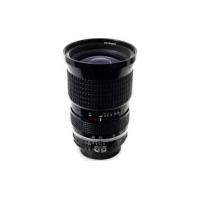
AI-S ZOOM-NIKKOR 25-50MM F/4 - Camera lens NIKON - Free user manual and instructions
Find the device manual for free AI-S ZOOM-NIKKOR 25-50MM F/4 NIKON in PDF.


User questions about AI-S ZOOM-NIKKOR 25-50MM F/4 NIKON
0 question about this device. Answer the ones you know or ask your own.
Ask a new question about this device
Download the instructions for your Camera lens in PDF format for free! Find your manual AI-S ZOOM-NIKKOR 25-50MM F/4 - NIKON and take your electronic device back in hand. On this page are published all the documents necessary for the use of your device. AI-S ZOOM-NIKKOR 25-50MM F/4 by NIKON.
USER MANUAL AI-S ZOOM-NIKKOR 25-50MM F/4 NIKON
Depth-of-field scale
Deutsch
Scharfentiefeskala
Français Page 16
| ス克莱ーナ カメラ | A/L | B | C | D | E | G1 | G2 | G3 | G4 | H1 | H2 | H3 | H4 | J | K/P | M | R | T |
| F 3 | ● | ◎ | ◎ | ● | ● | ● | ● | |||||||||||
| F 2 | ● | ◎ | ◎ | ● | ● | ● |
1 Focal Length/Aperture Index
2 Distance Scale
3 Distance Scale Index Line
4 Infrared Compensation Scale
5 Focusing Ring
6 Focal Length Scale
7 Zooming Ring
8 EE Servo Coupling Post
9 Meter Coupling Shoe
10 Aperture-Direct-Readout Scale
11 Aperture Indexing Post for Nikon SB-E Speedlight
12 Aperture Scale
13 Meter Coupling Ridge
14 Aperture Ring
FOREWORD
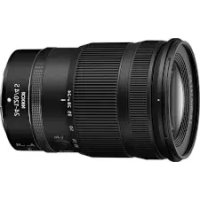
This 25-50mm f/4 lens is a retro-focus zoom lens featuring 11 elements in 10 groups. It offers the benefits of a wide-angle 25mm lens with continuous zooming up to 50mm . It is well constructed and designed to correct all aberrations, especially barrel distortion which is a common problem in wide-angle zoom lenses. Although a zoom lens, its optical performance will challenge that of fixed focal length lenses for sharpness and image clarity throughout its entire focal range. Both zooming and focusing are accomplished through two independent rings—minimum focusing distance is 0.6m . Multilayer Nikon Integrated Coating on all air-exposed lens surfaces helps reduce reflection, thus minimizing flare and ghost to insure greater image contrast and color rendition. Among the applications best suited for this lens are press photography and general subject shots.
MOUNTING
Position the lens in the camera's bayonet mount, aligning the aperture index of the lens with the mounting index of the camera. Twist the lens counterclockwise until it clicks into place. To remove, depress the lens release button on the camera body and twist the lens clockwise.
When mounting the lens on the camera with a meter coupling lever (Al type), make sure that the camera's meter coupling lever is correctly positioned; when mounting on a camera without this lever (non-Al type), "manual" maximum aperture indexing is required. In both cases, refer to the camera's instruction manual.
FOCUSING
To focus, rotate the focusing ring until the image in the viewfinder appears sharp and crisp. Once your subject is in focus, you are then ready to zoom. The subject will remain in focus throughout the entire zoom range. For pinpoint focusing, use the maximum focal length and then reduce the focal length for the desired picture composition.
You can prefocus the lens by using the distance scale markings which are engraved, both in meters and feet, on the focusing ring. Turn the focusing ring
until the black dot is opposite the number which corresponds with your estimated or measured camera-to-subject distance.
Recommended Focusing Screens
Various interchangeable focusing screens are available for F2 and F3 Nikon cameras to suit any type of lens or picture-taking situation. Those which are recommended for use with this Zoom-Nikkor 25-50mm f/4 lens are listed below.
| Camera\Screen | A/L | B | C | D | E | G1 | G2 | G3 | G4 | H1 | H2 | H3 | H4 | J | K/P | M | R | T |
| F 3 | ◎ | ◎ | ◎ | ◎ | ◎ | ◎ | ◎ | ◎ | ||||||||||
| F 2 | ◎ | ◎ | ◎ | ◎ | ◎ | ◎ | ◎ |
- When the Teleconverter TC-200 is attached to this lens, use the following table:
| Camera\Screen | A/L | B | C | D | E | G1 | G2 | G3 | G4 | H1 | H2 | H3 | H4 | J | K/P | M | R | T |
| F 3 | ● | ◎ | ◎ | ● | ● | ● | ● | |||||||||||
| F 2 | ● | ◎ | ◎ | ● | ● | ● |
Teleconverters TC-14 and TC-300 can't be used with this lens.
= Excellent focusing
= Acceptable focusing
The split-image rangefinder, microprism or cross-hair area is dim. Focus on the surrounding matte area.
= Acceptable focusing
Slight vignetting (or moiré phenomenon in the case of the microprism) affects the screen image. The image on the film, however, shows no trace of this.
Blank means not usable.
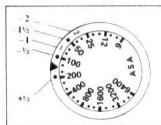
With Photomic-series finders, -1 / 2 in the table above means that the film speed (ASA/ISO) should be set against the proper compensating mark as shown in the diagram. When no exposure correction is indicated, the film speed (ASA/ISO) in use should be opposite the index.
ZOOMING
C
To zoom in or out, simply turn the zoom ring until the desired composition is framed on the focusing screen. The ring has a four-position scale showing which of five focal lengths—25mm, 28mm, 35mm, 40mm and 50mm—is in use in case you want to preset the lens to any of these focal lengths.
Caution: Slight vignetting will occur when you shoot with the lens at a small aperture, at its closest focusing distance and at a wide angle focal length.
DEPTH-OF-FIELD SCALE
Unlike other Nikkor lenses, the Zoom-Nikkor 25-50mm f/4 has no color-coded depth-of-field indicators engraved on the lens barrel. However, you can still determine the depth of field by using the scales provided with this pamphlet. To use, first cut out the scales along the lines indicated. Then, place the subject-distance scale (B) over the depth-of-field scale (A) with the top edge of the (B) scale lined up with the focal length in use and the focused distance aligned with the (A) scale's central indicator line. Now read off the numbers (on the B scale) which appear opposite the pair of depth-of-field lines (on the A scale) corresponding to the aperture in use; these numbers express the depth of field for the settings in use.
For example, if the lens is focused at 1.5m (5 ft) with the focal length set at 35mm and the aperture at f/16, the numbers on the distance scale opposite the depth-of-field lines for the f/16 setting show that the depth of field extends from 1m (3.5 ft) to 3m (10 ft). You can also observe the depth of field through the viewfinder by pressing the depth-of-field preview button on the camera.
INFRAREDPHOTOGRAPHY
D
The plane of sharpest focus for infrared light is slightly more distant than its counterpart for visible light as seen through the camera viewfinder. Thus, for the sharpest focus in infrared photography, adjustments must be made. The scales provided can be used for determining the amount of adjustment via the dotted infrared compensation line included
In the same manner as described in the "depth-of-field scale" section, match the prefocused subject distance (using the B scale) with the focal length and aperture scale central indicator line (on the A scale). The distance from the central indicator line to the dotted compensation line represents the amount of adjustment required. Now, turn the lens' focusing ring counterclockwise until the prefocused distance is shifted as prescribed on the scales.
SPECIFICATIONS
Focal length: 25 50mm
Maximum aperture: f/4
Lens construction: 11 elements in 10 groups
Picture angle: 80^40^ 47^50^
Distance scale: Graduated in meters and feet from 0.6m (2 ft) to infinity ()
Zooming control: By independent zooming control ring with rotation of 83^ ; reference marks provided for focal length settings of 25mm, 28mm, 35mm, 40mm and 50mm
Focusing control: Independent focusing ring with total rotation of 73^30'
Aperture scale: 1 / 4 1 / 22 on both standard and aperture-direct-readout (ADR) scales
Diaphragm: Fully automatic
Exposure measurement: Full-aperture method adopted; meter coupling ridge provided for coupling with Al-type cameras, and meter coupling shoe for non-Al cameras
Attachment size: 72mm (P = 0.75mm)
Mount:Nikon bayonet type
Dimensions: 75mm dia. x 112mm (overall); 104mm extension from flange
Weight: Approx. 600g
Accessories
72mm screw-in lens cap
Rear lens cap LF-1
Slip-on lens hood HK-7
Flexible lens pouch No. 62
Hard lens case CL-15S
72mm filters
Teleconverter TC-200
NOMENKLATUR
| Kamera | Mattscheibe | A/L | B | C | D | E | G1 | G2 | G3 | G4 | H1 | H2 | H3 | H4 | J | K/P | M | R | T |
| F 3 | ◎ | ◎ | ◎ | ○ | ◎ | ◎ | ◎ | ◎ | |||||||||||
| F 2 | ◎ | ◎ | ◎ | ○ | ◎ | ◎ | ◎ |
| Kamera | Mattscheibe | A/L | B | C | D | E | G1 | G2 | G3 | G4 | H1 | H2 | H3 | H4 | J | K/P | M | R | T |
| F 3 | ● | ◎ | ◎ | ● | ● | ● | ● | ||||||||||||
| F 2 | ● | ◎ | ◎ | ● | ● | ● | ● |
| Boitier\Verre | A/L | B | C | D | E | G1 | G2 | G3 | G4 | H1 | H2 | H3 | H4 | J | K/P | M | R | T |
| F 3 | ◎ | ◎ | ◎ | ◎ | ◎ | ◎ | ◎ | ◎ | ||||||||||
| F 2 | ◎ | ◎ | ◎ | ◎ | ◎ | ◎ | ◎ |
| Boillier Verre | A/L | B | C | D | E | G1 | G2 | G3 | G4 | H1 | H2 | H3 | H4 | J | K/P | M | R | T |
| F 3 | ● | ◎ | ● | ○ | ◎ | ● | ● | ● | ● | ● | ||||||||
| F 2 | ● | ◎ | ● | ○ | ◎ | ● | ● | ● | ● | ● |
| Camara\Pantalla | A/L | B | C | D | E | G1 | G2 | G3 | G4 | H1 | H2 | H3 | H4 | J | K/P | M | R | T |
| F 3 | ◎ | ◎ | ◎ | ◎ | ◎ | ◎ | ◎ | ◎ | ||||||||||
| F 2 | ◎ | ◎ | ◎ | -1/2 | ◎ | ◎ | ◎ |
| Camara\Pantalla | A/L | B | C | D | E | G1 | G2 | G3 | G4 | H1 | H2 | H3 | H4 | J | K/P | M | R | T |
| F 3 | ● | ◎ | ◎ | ● | ● | ● | ● | |||||||||||
| F 2 | ● | ◎ | ◎ | ● | ● | ● |
= Enfoque acceptable
Subject distance scale
Aufnahmedistanzkala
No reproduction in any form of this booklet, in whole or in part (except for brief quotation in critical articles or reviews), may be made without written authorization from the publishers.