BPK45 - Coffee machine BORETTI - Free user manual and instructions
Find the device manual for free BPK45 BORETTI in PDF.

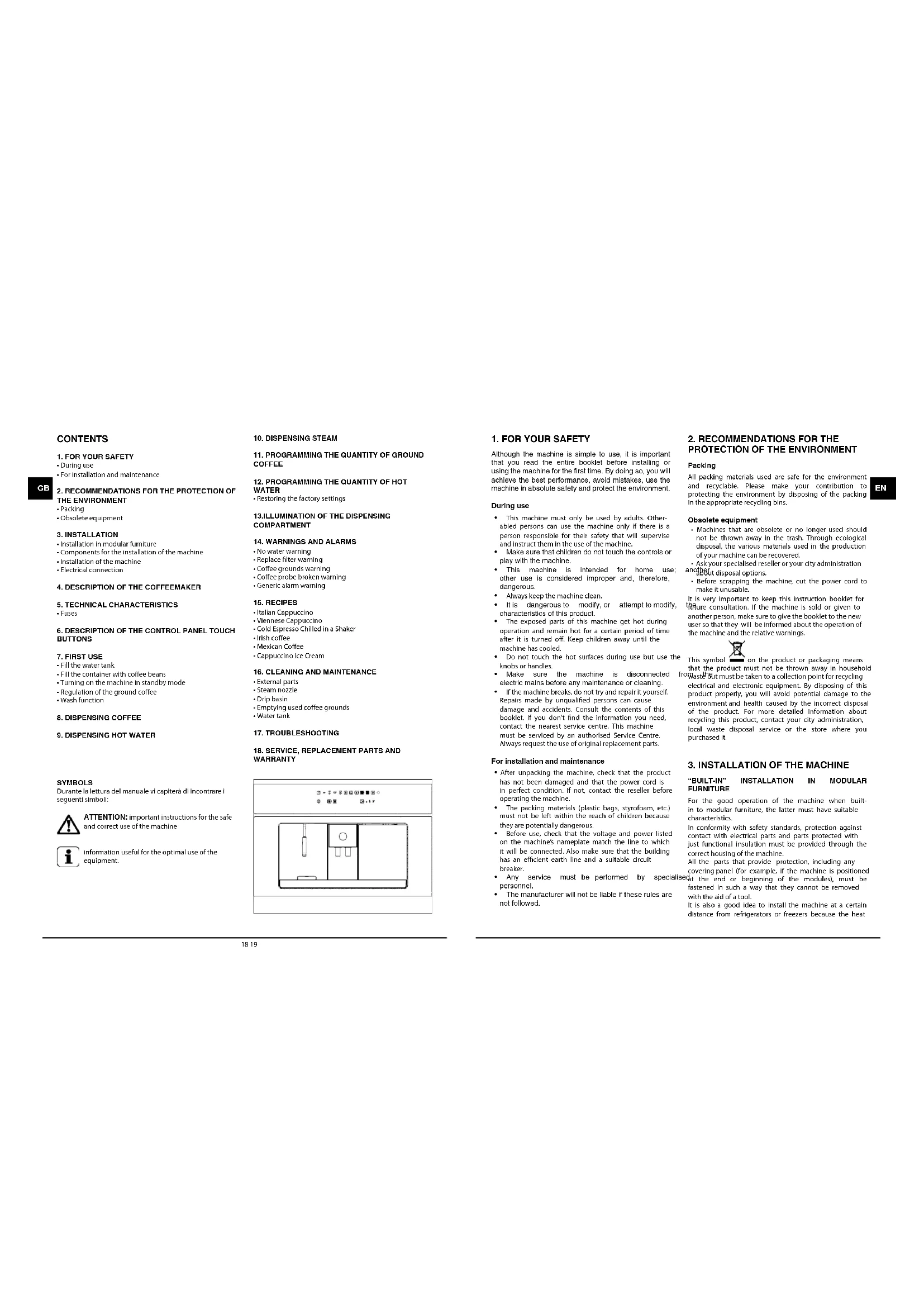


| Product Type | Built-in coffee machine |
| Brand | Boretti |
| Model | BPK45 |
| Dimensions (W x D x H) | 594 x 475 x 445 mm |
| Net weight | 26 kg |
| Gross weight | 31 kg |
| Water tank capacity | 2.5 liters |
| Coffee bean container capacity | 200 g of beans |
| Electrical supply | 230 V ~ 50/60 Hz |
| Rated power | 2000 W |
| Heating element power | 1700 W |
| Pump power | 50 W |
| Pump pressure | 12 bar |
| Functions | Espresso coffee, diluted coffee, double coffee, hot water, steam |
| Control type | Touch buttons with indicator lights |
| Grind adjustment | Rotary knob with 5 levels (from fine to coarse) |
| Programming | Ground coffee quantity (light, medium, strong) and water volume in the cup |
| Descaling filter | Integrated, to be submerged before use |
| Compartment lighting | Yes, controlled by button |
| Alarms | Water shortage, coffee grounds full, filter to change, coffee probe, generic |
| Cleaning | Drip tray and water tank dishwasher-safe; steam wand removable |
| Installation | Built-in in cabinet (min height 460 mm, width 560-568 mm) |
| Included accessories | Fixed bracket, slides, screws, compensation plates, descaling filter |
| Warranty | Technical assistance and original spare parts recommended |
Frequently Asked Questions - BPK45 BORETTI
User questions about BPK45 BORETTI
0 question about this device. Answer the ones you know or ask your own.
Ask a new question about this device
Download the instructions for your Coffee machine in PDF format for free! Find your manual BPK45 - BORETTI and take your electronic device back in hand. On this page are published all the documents necessary for the use of your device. BPK45 by BORETTI.
USER MANUAL BPK45 BORETTI
- WAARSCHUWINGEN EN ALARMEN
3. INSTALLALATIE VAN DIT APPARAAT
"BUILT-IN" INSTALLATIE IN MODULARE MEUBELS
text_image
Technical diagram of a mechanical assembly with numbered components for identificationnatural_image
Technical line drawing of two structural frame components with no visible text or symbolstext_image
Toolbar with icons representing various function keys or symbols, including 'START STOP' and various operators.Bedieningspaneel
natural_image
Isometric line drawing of a monitor displaying a small screen with a pencil, next to a keyboard (no text or symbols)natural_image
Simple line drawing of a room interior with furniture and fixtures (no text or symbols)natural_image
Technical line drawing of a mechanical device with internal components and mounting holes (no text or symbols)natural_image
Technical line drawing of a mechanical assembly with a housing, casing, and component (no text or symbols)natural_image
Technical line drawing of a mechanical assembly with no visible text or symbolsnatural_image
Technical line drawing of a mechanical or electrical enclosure with no visible text or symbolsnatural_image
Isometric line drawing of a cabinet or enclosure with no visible text, numbers, or symbolsFig. 7.8 Duw de machine terug in de behuizing, tot u 'klik'hoort.
natural_image
Isometric line drawing of a server rack with an attached cable and a separate inset showing a grid connection (no text or symbols)text_image
START STOPnatural_image
Technical line drawing of a mechanical device with a circular dial and directional arrows (no text or symbols)text_image
Collection of icons and symbols including a vase, bowls, and directional arrows with labels like 'START STOP' and a numbered symbol.text_image
START STOP
9. HEET WATERAFGIFTE
natural_image
Technical line drawing of a mechanical assembly with no visible text or symbolstext_image
Icon set for a bathroom or bathroom fixture with labeled buttons and symbolsFig. 11.1
text_image
Row of icons representing various basic concepts or symbols, including bowls, arrows, pie, grid, and circles.
ALLEEN VOOR GEVORDERDEN:
PROGRAMMEREN VAN DE MALING-TUD
text_image
Diagram showing various icons including battery, switch, and directional arrows with a 'START STOP' buttonFig. 12.2
text_image
Diagram showing various lighting and warning symbols with icons for lighting, lighting, and stop controlstext_image
Row of eight icons including crossed-out, lock, warning, grid, and circle symbols with plus signsFig. 14.1
text_image
Electrical circuit symbols and component labels including power, neutral, diode, switch, and ground symbolsFig. 14.2
text_image
Toolbar with icons for menu, refresh, and start button functionsFig. 14.3
text_image
Diagram showing various icons including bowls, arrows, and a sunburst with symbols like plus, minus, and butterfly.Fig. 14.4
text_image
Electrical circuit symbols and component labels including power source, motor, diode, and various switches or relaysFig. 14.5
text_image
Row of icons representing weather, lighting, and solar symbols with corresponding labels belowFig. 14.6
ALS HET ALGEMENE ALARM AFGAAT:
natural_image
Two technical line drawings of a mechanical component or assembly, showing internal components and alignment lines (no text or symbols)natural_image
Isometric line drawing of two room layouts with furniture and fixtures (no text or symbols)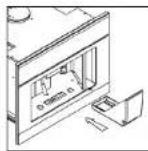
Fig.16.3
we would like to thank you and congratulate you on your choice.
This new product has been carefully designed and built using top quality materials, and meticulously tested to ensure that it meets all your culinary requirements.
Please read and observe these simple instructions, which will enable you to achieve excellent results from the very first time you use it. This state-of-the-art appliance comes to you with our very best wishes.
THE MANUFACTURER

Nederlands

English

Italiano

Français

Deutsch
THIS PRODUCT IS DESIGNED FOR DOMESTIC USE. THE MANUFACTURER DECLINES ALL RESPONSIBILITY FOR DAMAGES TO THINGS OR PEOPLE DERIVING FROM INCORRECT INSTALLATION OR IMPROPER, ERRONEOUS OR UNSUITABLE USE. THE APPLIANCE MUST NOT BE USED BY PEOPLE (INCLUDING CHILDREN) WITH PHYSICAL, SENSORIAL OR MENTAL IMPAIRMENTS, OR BY PEOPLE WITHOUT THE NECESSARY EXPERIENCE OR KNOWLEDGE, UNLESS THEY ARE SUPERVISED OR INSTRUCTED IN THE USE OF THE APPLIANCE BY A PERSON RESPONSIBLE FOR THEIR SAFETY.
CHILDREN MUST BE SUPERVISED TO ENSURE THAT THEY DO NOT PLAY WITH THE APPLIANCE.
CONTENTS
- FOR YOUR SAFETY
• During use
- For installation and maintenance
- RECOMMENDATIONS FOR THE PROTECTION OF
THE ENVIRONMENT
- Packing
- Obsolete equipment
- INSTALLATION
• Installation in modular furniture
- Components for the installation of the machine
• Installation of the machine
• Electrical connection
-
DESCRIPTION OF THE COFFEEMAKER
-
TECHNICAL CHARACTERISTICS
• Fuses
-
DESCRIPTION OF THE CONTROL PANEL TOUCH BUTTONS
-
FIRST USE
- Fill the water tank
• Fill the container with coffee beans
• Turning on the machine in standby mode
• Regulation of the ground coffee
- Wash function
-
DISPENSING COFFEE
-
DISPENSING HOT WATER
SYMBOLS
ATTENTION: important instructions for the safe and correct use of the machine

information useful for the optimal use of the equipment.
-
DISPENSING STEAM
-
PROGRAMMING THE QUANTITY OF GROUND COFFEE
-
PROGRAMMING THE QUANTITY OF HOT WATER
-
ILLUMINATION OF THE DISPENSING COMPARTMENT
-
WARNINGS AND ALARMS
- No water warning
- Replace filter warning
• Coffee grounds warning
• Coffee probe broken warning
- Generic alarm warning
- RECIPES
• Italian Cappuccino
• Viennese Cappuccino
• Cold Espresso Chilled in a Shaker
• Irish coffee
• Mexican Coffee
• Cappuccino Ice Cream
- CLEANING AND MAINTENANCE
- External parts
- Steam nozzle
• Drip Basin
• Emptying used coffee grounds
- Water tank
-
TROUBLESHOOTING
-
SERVICE, REPLACEMENT PARTS AND WARRANTY
Although the machine is simple to use, it is important that you read the entire booklet before installing or using the machine for the first time. By doing so, you will achieve the best performance, avoid mistakes, use the machine in absolute safety and protect the environment.
During use
- This machine must only be used by adults. Other-abled persons can use the machine only if there is a person responsible for their safety that will supervise and instruct them in the use of the machine.
• Make sure that children do not touch the controls or play with the machine. - This machine is intended for home use; other use is considered improper and, therefore, dangerous.
• Always keep the machine clean.
- It is dangerous to modify, or attempt to modify, characteristics of this product.
- The exposed parts of this machine get hot during operation and remain hot for a certain period of time after it is turned off. Keep children away until the machine has cooled.
- Do not touch the hot surfaces during use but use the knobs or handles.
• Make sure the machine is disconnected electric mains before any maintenance or cleaning.
- If the machine breaks, do not try and repair it yourself. Repairs made by unqualified persons can cause damage and accidents. Consult the contents of this booklet. If you don't find the information you need, contact the nearest service centre. This machine must be serviced by an authorised Service Centre. Always request the use of original replacement parts.
For installation and maintenance
• After unpacking the machine, check that the product has not been damaged and that the power cord is in perfect condition. If not, contact the reseller before operating the machine.
- The packing materials (plastic bags, styrofoam, etc.) must not be left within the reach of children because they are potentially dangerous.
- Before use, check that the voltage and power listed on the machine's nameplate match the line to which it will be connected. Also make sure that the building has an efficient earth line and a suitable circuit breaker.
- Any service must be performed by specialised personnel.
• The manufacturer will not be liable if these rules are not followed.
2. RECOMMENDATIONS FOR THE PROTECTION OF THE ENVIRONMENT
Packing
All packing materials used are safe for the environment and recyclable. Please make your contribution to protecting the environment by disposing of the packing in the appropriate recycling bins.
Obsolete equipment
- Machines that are obsolete or no longer used should not be thrown away in the trash. Through ecological disposal, the various materials used in the production of your machine can be recovered.
- Ask your specialised reseller or your city administration another about disposal options.
- Before scrapping the machine, cut the power cord to make it unusable.
It is very important to keep this instruction booklet for the future consultation. If the machine is sold or given to another person, make sure to give the booklet to the new user so that they will be informed about the operation of the machine and the relative warnings.

This symbol ■ on the product or packaging means that the product must not be thrown away in household from waste but must be taken to a collection point for recycling electrical and electronic equipment. By disposing of this product properly, you will avoid potential damage to the environment and health caused by the incorrect disposal of the product. For more detailed information about recycling this product, contact your city administration, local waste disposal service or the store where you purchased it.
3. INSTALLATION OF THE MACHINE
"BUILT-IN" INSTALLATION IN MODULAR FURNITURE
For the good operation of the machine when built-in to modular furniture, the latter must have suitable characteristics.
In conformity with safety standards, protection against contact with electrical parts and parts protected with just functional insulation must be provided through the correct housing of the machine.
All the parts that provide protection, including any covering panel (for example, if the machine is positioned at the end or beginning of the modules), must be fastened in such a way that they cannot be removed with the aid of a tool.
It is also a good idea to install the machine at a certain distance from refrigerators or freezers because the heat
It emits could affect their operation.
Components for the installation of the machine
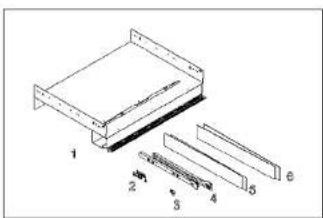
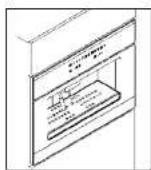
The machine must be installed in compartments that are 460 mm high and between 560 and 568 mm wide. The following installation components are supplied with the machine.
text_image
Technical diagram of a mechanical assembly with numbered components labeled 1 through 6- Fixed support of the machine.
- N°13 self-threading screws 3.9X19
- N°1 fixed power cord
- N°2 lateral guides
- N°2 lateral 1-mm plates
- N°2 lateral 2-mm plates
Installation of the machine
Position the fixed part provided by resting it on the surface of the furniture
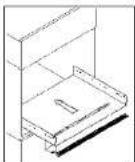
Insert the side plates needed to compensate for any empty spaces. The width of the compartment that houses the machine is determined by the thickness of the sides of the furniture. Four plates are supplied to compensate for the different measures obtainable, two that are 2 mm thick and two that are 1 mm thick. They are used to compensate for the internal width of the compartment to obtain an measurement of 562-560 mm.
natural_image
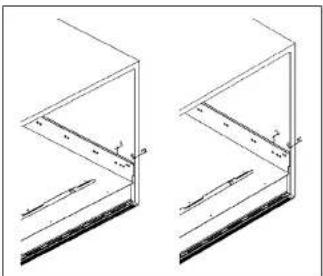
Technical line drawing of two structural frame components with dimension annotations (no text or symbols)Then mount the 2 guides using the remaining 8 self-threading screws.
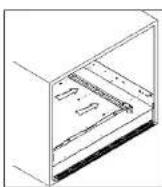
Insert the machine by matching up the guides with the supports already mounted in the compartment.
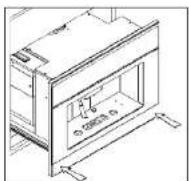
Slide it all the way in until the safety stops click.
Electrical connection
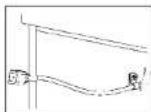
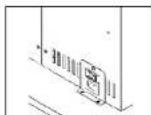
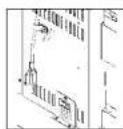
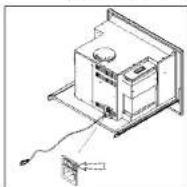
Fasten the power to the left side of the compartment using one of the self-threading wood screws provided and the fixed cord as indicated in the figure.
Loosen the fixed cord mounted on the machine.
Tighten the power cord on the machine, as shown in the figure.
Connect the power cord as shown in the figure.
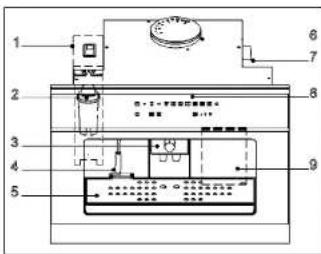
- DESCRIPTION OF THE COFFEEMAKER
text_image
1 2 3 4 5 6 7 8 9- Water tank
- Decalcifying filter
- Dispenser
- Water/steam dispensing nozzle
- Drip basin
- Coffee container
- Grind regulation knob
- Control panel
-
Door/tray for emptying the coffee grounds
-
TECHNICAL CHARACTERISTICS
| Width | 594 mm |
| Depth | 475 mm |
| Height | 445 mm |
| Tank capacity | 2.5 l |
| Net weight | 26 kg |
| Gross weight | 31 kg |
| Power supply voltage | 230 V |
| Rated power | 2000 W |
| Power absorbed by the heating elements | 1700 W |
| Power absorbed by the pump | 50 W |
| Operating pressure | 12 bar |
6. DESCRIPTION OF THE CONTROL PANEL: TOUCH BUTTONS
text_image
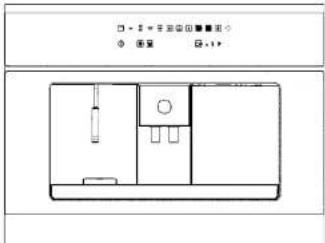
Toolbar with icons representing various function keys or symbols, including 'START STOP' and various operators.Control panel
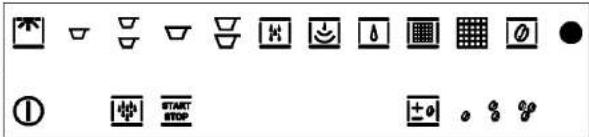
Description of the buttons and Indicator lights on the control panel.
| ON/OFF button | |
| START/STOP button | |
| COFFEE button | |
| STRETCHED COFFEE button | |
| WATER button | |
| NO WATER alarm | |
| GROUNDS PRESENT alarm | |
| GENERIC ALARM | |
| WASH button |
| LIGHT button | |
| DOUBLE COFFEE button | |
| DOUBLE STRETCHED COFFEE button | |
| STEAM button | |
| REPLACE FILTER alarm | |
| COFFEE probe broken alarm | |
| COFFEE regulation | |
| LIGHT COFFEE | |
| MEDIUM COFFEE | |
| STRONG COFFEE |
The exclusive feature of this model is the use of touch-control technology. Just touch the area of the symbol and the machine will perform the corresponding function. However, you will notice that you must exert slight pressure to activate the controls, just like a normal button; this is to avoid accidental commands.
7. FIRST USE
Fill the water tank
text_image
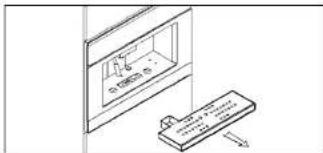
Technical diagram showing a device with a screen displaying a small object and a pencil inserted into it, connected to a control panel.Fig. 7.1 Remove the drip basin from its seat
natural_image
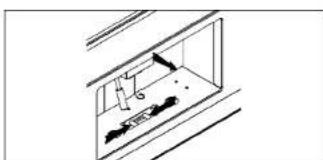
Simple line drawing of a window with a door and wall-mounted objects (no text or symbols)Fig. 7.2 Press the unlocking lever under the drip basin and pull the machine towards you as shown in the figure.
natural_image
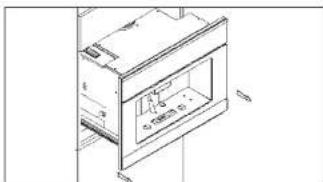
Technical line drawing of a cabinet or oven with internal components and mounting holes (no text or symbols)Fig. 7.3 Pull the coffeemaker out of the furniture by sliding it on its guides.
natural_image
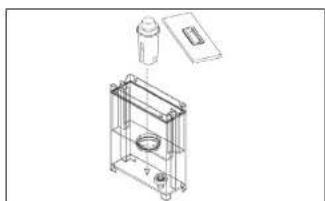
Technical line drawing of a mechanical assembly with a housing, casing, and component (no text or symbols)Fig.7.4 Insert the decalcifying filler in its seal. Before filling the water tank, make sure that the decalcifying filter was soaked in cold water for at least 20 minutes (in any case, follow the instructions on the filter package). After soaking, insert it in its seat inside the tank, as shown in the figure, until you hear a click. If the machine has not been used in a long time, we recommend changing the water in the tank. The filter can be purchased at an appliance store, our Service Centres or at authorised replacement parts stores.
natural_image
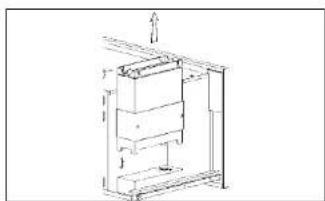
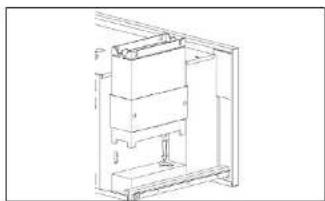
Technical line drawing of a mechanical assembly with no visible text or symbolsFig. 7.5 Remove the water tank as shown in the figure and fill it with drinking water (about 2.5 litres).
natural_image
Technical line drawing of a mechanical assembly or enclosure with no visible text or symbolsFig. 7.6 Put the tank back in its seat, taking care to match up the two connections on the bottom.
Fill the container with coffee beans
text_image
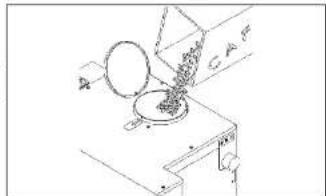
A B C D FFig. 7.7 Pour about 200 g of coffee beans in the coffee container.
natural_image
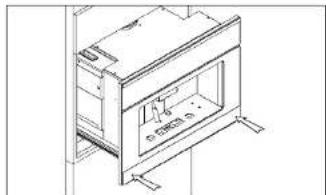
Technical line drawing of a cabinet or enclosure with mounting brackets and a door, no visible text or symbolsFig. 7.8 Push the machine back into the compartment until you hear a "CLICK!", which means it's locked into place.

ATTENTION: before pouring beans into the grinder, make sure that there are no foreign bodies in the coffee.
Turning on the machine in standby mode
natural_image
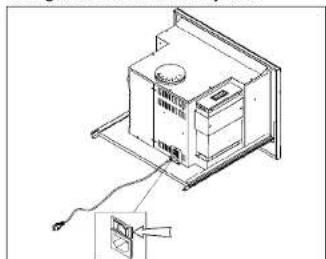
Isometric line drawing of a mechanical or electrical assembly with a component and wiring, no text or symbols present.Fig. 7.9 Pull out the machine.
Turn the main switch, located on the back of the machine, to position "1".
After you push the machine back into the furniture, it is ready to use.
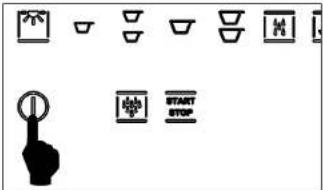
text_image
Diagram showing various icons including a hand gesture, a switch, and a battery with 'START STOP' labelFig. 7.10
To exit standby mode, you must press the on/off button, as shown in Fig. 8.10. The LED will begin to flash until the machine is "ready". At this point, all the LEDs for the various services will be lit.
NOTE: If the machine is not used for 45 minutes, it returns to standby mode.
REGULATION OF THE GROUND COFFEE
ATTENTION: The fineness of the coffee grind is calibrated at the factory.
This fineness has a strong influence on producing good coffee. Too "coarse" a grind produces coffee that flows quickly without creaminess and body. On the other hand, too fine a grind produces coffee that "drips" with a very intense taste and a "burned" smell. Keep in mind that producing a cup of espresso coffee takes from 20 to 30 seconds.
To regulate the grind, you must pull out the machine as shown in figures 8.1 to 8.3. Turn the regulation knob on the right side, as shown in Fig. 8.11.
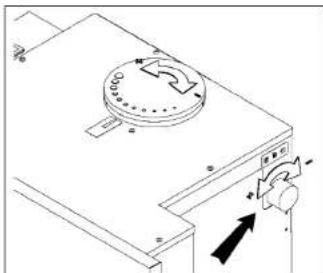
natural_image
Technical line drawing of a mechanical device with a circular component and directional arrows (no text or symbols)Turning the knob clockwise produces a finer grind and stronger coffee. Turning the knob counter clockwise produces a coarser grind and lighter coffee. The grinding fineness can be read on the cover of the container.
Wash function
The wash function is enabled after the machine is powered on, or comes out of standby mode, and warms up. The wash button lights. When you press the WASH button and then the START button, the machine performs a wash cycle.
If a beverage dispensing button is pressed, the wash LED turns off.
8. DISPENSING COFFEE
Place a cup under the dispenser, adjust the height of the dispenser nozzle with the handle: turning it raises or lowers the nozzles, as shown in Fig. 9.1.
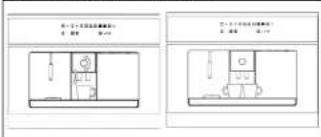
When you want a double coffee, you can place two cups under the dispenser at the same time.
The rest of the paragraph explains how to dispense one coffee. The procedure is similar for double coffee, stretched coffee and two stretched coffees.
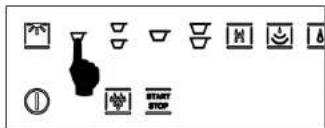
text_image
Collection of icons representing various kitchen utensils and cleaning symbols, including a vase, cups, and stop controls.Press the button for the selection you want (in Fig. 7.1 it is espresso coffee).
text_image
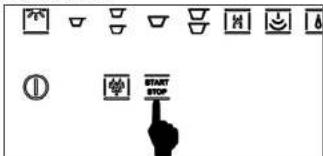
START STOPPress the START/STOP button within 10 seconds of your selection and wait for the coffee to be dispensed. Dispensing ends automatically when the quantity of coffee for the selection has been reached. This quantity is preset in the machine but can be changed, see paragraph 13.
You can stop dispensing at any time by pressing the START/STOP button.
ATTENTION: if the START button is not pressed within 10 seconds, the function is disabled. If you wish to dispense a beverage, you will have to repeat the procedure.

USEFUL TIPS FOR PREPARING AN EXCELLENT ESPRESSO
- The dispensing time for an excellent espresso is about 15-25 seconds. The factors that influence the dispensing time are the fineness of the grind and the quantity of ground coffee. If necessary, the fineness of the grind and dose of ground coffee can be changed. (See chapter 8, First use).
Coffee is a hygroscopic substance, which means that its characteristics are closely linked to the climate (humidity). So, remember to grind the coffee coarser when the air is very humid and finer when the air is drier.
9. DISPENSING HOT WATER
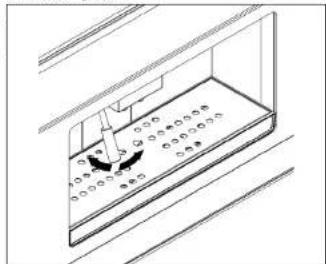
To dispense hot water, suitably position the water/steam nozzles, see Fig. 10.1
natural_image
Technical line drawing of a mechanical assembly with no visible text or symbols- Position a container below the water/steam nozzle
- Press the hot water button.
- Press the START button with 10 seconds from making your selection. The water will be dispensed as long as the button is pressed; to stop dispensing, release the button.
ATTENTION: if the start button is not pressed within 10 seconds, the function is disabled. If you wish to dispense a beverage, you will have to repeat the procedure.
We recommend that you do not dispense hot water immediately after dispensing steam.
10. DISPENSING STEAM
To dispense steam, press the steam button. The corresponding indicator light will flash for 15 seconds. As soon as the indicator light stops flashing and remains steady on, the machine is ready to dispense steam.
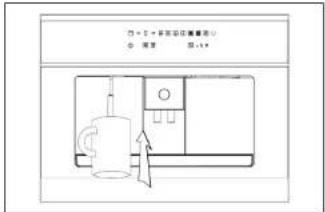
- Place the container with the liquid to be heated below the steam nozzle.
• Completely immerse the nozzle in the liquid to be heated. - Press the START button within 10 seconds from making your selection and wait for the steam to come out.
ATTENTION: if the start button is not pressed within 10 seconds, the function is disabled. If you wish to dispense a beverage, you will have to repeat the procedure.
The steam will continue to flow until you release the START button.
If you are preparing milk for a cappuccino, we suggest that you agitate the milk container for better results.
11. PROGRAMMING THE qANTITY OF GROUND COFFEE
You can choose from three strengths of coffee:
• light;
• medium
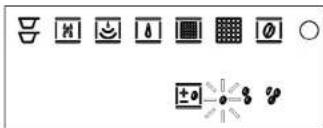
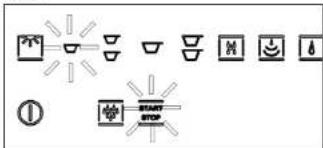
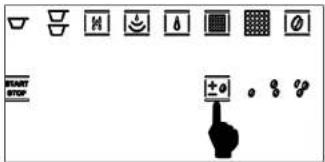
To change from one type of coffee to the other, just press the button as shown in Fig. 12.1. The LED for the selected coffee will light (in Fig. 12.2, light coffee).
text_image
User interface toolbar with icons for menu, battery, and control buttons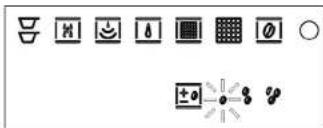
text_image
Row of eight icons including bowls, lights, maps, grid, and symbols with plus signs and arrowsFOR EXPERT USERS ONLY: PROGRAMMING THE GRINDING TIME
The grinding time for strong coffee is programmable and medium and light coffee are calibrated accordingly.
To enter programming mode, when the machine is in standby mode:
- press the START/STOP button for 5 seconds; the LED s on the upper left line light up to indicate the grinding time;
- to increase the time, press the coffee regulation button and to, decrease it, the START/STOP button. At the end of the operation, just press the on/off button to exit and confirm the changes.
12. PROGRAMMING THE QUANTITY OF COFFEE IN THE CUP
All the cycles have a preset quantity, except for water and steam.
The machine is already calibrated at the factory to dispense the ideal quantity of coffee for an espresso cup.
While dispensing the beverage, you can stop dispensing before the preset time by pressing the START/STOP button.
In addition, while dispensing the beverage, you can obtain a greater quantity than the preset by holding down the START key continuously within 3 seconds from the end. This activates the dispensing of additional beverage until the button is released, up to a maximum of 20 seconds.
The procedure for programming the quantity of coffee, and other beverages, in the cup is as follows:
- press the coffee key for 5 seconds until the LED flashes.
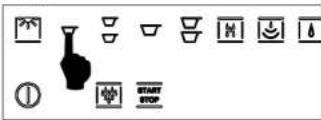
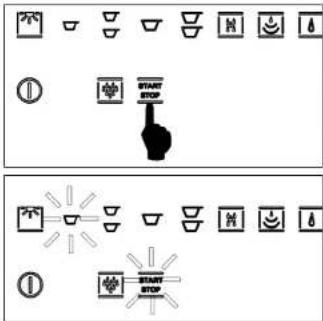
- press the START/STOP key to start dispensing. The
two LEDs flash for its duration.
text_image
Diagram showing two sets of icons representing start stop controls, with one pointing at a hand and the other emitting light rays.- press the START/STOP button again when the desired quantity is reached.
Restoring the factory settings
When it leaves the factory, the machine is calibrated for Italian-style espresso coffee and German-style stretched coffee.
- If you need to restore these standard values, you must place the machine in standby and press the coffee regulation button for 6 seconds.
- You will see all the LEDs, except on/off, flash for 5 seconds; after that time, the board has stored the default values.
- Press the on button and the selections will now use the factory values.
The standard values are only relative to the quantity of water necessary for each single dose.
13. ILLUMINATION OF THE DISPENSING COMPARTMENT
The machine has LEDs for illuminating the dispensing compartment. To activate this function, just press the light button as shown in Fig. 13.1.
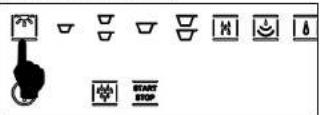
The light function is only available when the machine is on and not during standby mode.
RISK GROUP 2
CAUTION: do not stare at the lamp while it is on. It could damage your eyesight
14. SIGNALLING AND ALARMS
No water warnin
text_image
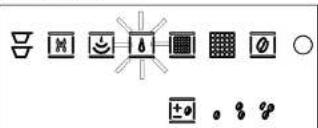
Toolbar with icons for lighting, battery, alarm, grid, and display symbolsThe machine has a sensor that checks for water in the tank. If there is no water, the machine turns on the indicator light and will not work until the tank is filled.
Replace filter warning
text_image
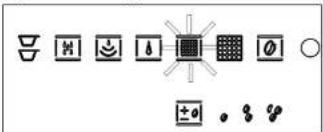
Row of icons representing various basic symbols and objects, including crossed-out shapes, arrows, and a central grid with a sunburst.After the machine has dispensed 80 litres of water, the LED for the filter symbol begins to flash (pre-alarm), Fig. 14.2.
If the quantity of dispensed water reaches 100 litres, the LED will turn steady on (alarm).
The replacement of the filter is recommended within 3 months from when the LED remains steady on.
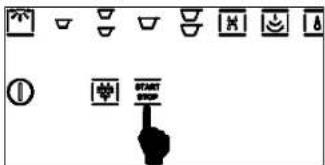
To switch-off the alarm (or the pre-alarm), put the appliance in stand-by condition, hold the START/STOP button for 5 seconds; the alarm led will switch-off and the counter of dispensed water will reset.
text_image
Icon set with various symbols and labels including battery, switch, and directional arrowsCoffee grounds warning
text_image
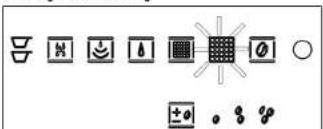
Row of icons including recycling symbols, weather icons, water drop, grid, and radio buttons with plus/minus signsAfter dispensing 10 cups of coffee, the wabs light turns on steady red, while the grounds drower LED flashes with a red light. This condition persists even when the machine is turned off and on. To reuse the machine, you must wash the coffee unit by pressing the START/STOP button with a container under the coffee dispensing nozzles to hold the water. After washing, the START/STOP icon flashes red and then turns off after washing.
For emptying the tray of "used" coffee grounds see Chapter 16 "CLEANING".
Coffee probe broken warning
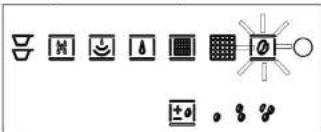
text_image
Row of icons representing various symbols and functions, including crossed-out shapes, battery, alarm, and camera controls.The machine has a function that warns you when the coffee unit probe is broken.
When the coffee probe is not working correctly, the relative LED flashes.
Try to turn the machine off and on.
ATTENTION: if the alarm persists, contact the service centre.
Generic alarm warning
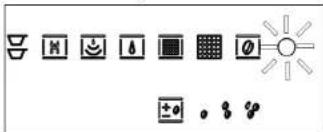
text_image
Weather and weather icons with standard symbols for solar, wind, sun, and various weather conditionsThe generic alarm indicator lights up (Fig. 15.5) for a variety of possible reasons:
• The automatic coffee dispensing unit is blocked;
- The movement of the automatic coffee dispensing unit did not occur correctly:
• The door for removing the coffee grounds is open;
- The volumetric counter did not detect the passage of water;
• The temperature probe is not working correctly.
If the generic alarm light turns on:
- Check that the grounds emptying door is closed.
- Check that there is water in the tank.
Turn the machine off and on. If the problem persists, contact service.
15. RECIPES
Italian cappuccino
This is a normal espresso with the addition of milk heated by steam, which softens the taste of the coffee and creates a consistent and pleasant surface foam. It is served in a large cup. Place the cold milk in a tall pitcher and use the steam jet, if available. Add just the foam to the espresso coffee by tilting and shaking the pitcher or use a spoon. You can dust the top of the foam with cocoa.
Viennese cappuccino
This variant is the product of the age-old Austrian tradition. Prepare a stretched espresso (extracted for 30-35 seconds), add warm milk and put whipped cream on top. It is served in a cup of intermediate size between an espresso cup and a cappuccino cup.
Garnish with chocolate flakes.
Cold espresso chilled in a shaker
Frothy and very refreshing, it a real pleasure on hot days. Prepare an espresso, add sugar, immediately pour it in a shaker with large cubes of ice and shake for several seconds. It is served in a tumbler or flute glass.
Irish coffee
An energising pick-me-up. In a tall, heated glass, mix eight parts hot coffee, one part of whiskey and cane sugar. Add freshly whipped cream by sliding it on the lower part of a spoon: this creates a light layer of cool cream on top of the hot coffee.
Mexican coffee
Intense and exotic.
In a small cup, mix one dose of double cream, a teaspoon of cinnamon, a pinch of nutmeg, sugar and whip.
Pour a teaspoon of chocolate syrup in a medium cup, add a little more cinnamon and the coffee and mix well. Garnish with a teaspoon of vanilla flavoured cream.
Cappuccino ice cream
In a pan, heat two cups of espresso, 14 cup of whipping cream and 12 cup of sugar; bring to a boil.
When the compound is lukewarm, place it in the refrigerator for 4-5 hours.
Put two or three scoops in a bowl and garnish to toasted coffee beans.
Let cool in the refrigerator for 1/3 hour before serving.
16. CLEANING
ATTENTION: do not immerse the machine in water for cleaning.
External parts
The external parts of the machine must be cleaned with a soft cloth and without the use of aggressive detergents. Do not clean steel parts of scouring pads or abrasive sponges. Dry well with a soft cloth
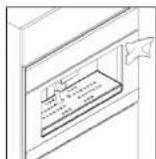
Steam nozzle
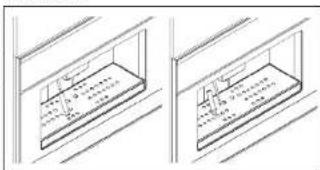
natural_image
Two technical line drawings of a mechanical or architectural component with grid lines, no text or symbols present.In addition, periodically clean the steam nozzle, which can get dirty inside when you warm milk for cappuccino. To do this, just disassemble it as shown in the figure and wash it together with its hood with a sponge and hot water.

ATTENTION: when cleaning the nozzle, always turn off the machine and remember to wait at least 20 minutes before using it to allow it to cool, avoiding possible burns.
Drip basin
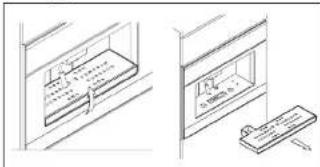
Remove the drip basin from the machine as shown in the following figures.
natural_image
Line drawing of two window compartments with a door and shelf, no text or symbols presentMake sure to periodically empty the basin to avoid liquid spills that could dirty and ruin the furniture below. The basin and relative metal grill can be washed in the dishwasher.
Emptying used coffee grounds
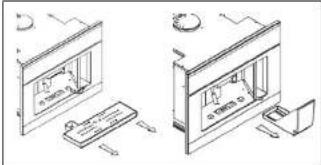
To open the door of the compartment with the tray, you must first remove the drip basin as described in Figures 17.4, 17.5 and 17.6.
natural_image
Isometric line drawing of two kitchen appliances with no visible text or symbols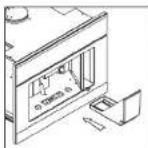
Remove the tray, empty the coffee grounds and wash it with hot water or in the dishwasher.
Put the "used" coffee ground tray back in its compartment.

ATTENTION: avoid emptying the grounds collection tray with the machine on to avoid accidental contact with hot parts.
Water tank
• If the machine has not been used in a long time, we recommend changing the water in the tank.
• Periodically clean the water tank of any lime
• The tank can be washed in the dishwasher.
- If using the Brita decalcifying filter, we recommend replacing the filter every 2000 espresso coffees or at least every six months.
17. TROUBLESHOOTING
The operator should make sure that the problem is not caused by:
- No electricity
- No water in the tank
- No coffee in the machine
- Incorrect closure of the access door to the coffee ground tray.
For any other causes, have the machine checked by a service centre.
Cher Client.
text_image
Technical diagram of a mechanical assembly with numbered components, likely for engineering or manufacturing documentation.natural_image
Technical line drawing of two structural frame components (no text or symbols)natural_image
Technical line drawing of a mechanical or architectural component with no visible text or symbolstext_image
Toolbar with various icons representing basic process functions like 'Start', 'STOP', and control symbolsBandeau de commande
text_image
Technical diagram showing a door panel with a control panel and a ruler, labeled in Chinese.natural_image
Line drawing of a room interior with furniture and fixtures (no text or symbols)natural_image
Isometric line drawing of a cabinet or oven with internal components and a door (no text or symbols)natural_image
Technical line drawing of a mechanical assembly with a housing and component (no text or symbols)natural_image
Technical line drawing of a mechanical assembly with no visible text or symbolsnatural_image
Technical line drawing of a mechanical assembly or enclosure with internal components (no text or symbols)text_image
A C C A Fnatural_image
Technical line drawing of a cabinet or enclosure with mounting brackets and a door (no text or symbols)natural_image
Isometric line drawing of a server rack with an attached cable and a separate inset showing a device (no text or symbols)text_image
Diagram showing various icons including a hand, battery, and stop controls with labels like 'START STOP'natural_image
Technical line drawing of a mechanical device with a circular component and directional arrows (no text or symbols)text_image
Diagram showing various icons including a vase, bowls, and directional symbols with labels like 'START STOP' and a copyright symbol.text_image
START STOPnatural_image
Technical line drawing of a mechanical assembly with no visible text or symbolstext_image
START STOP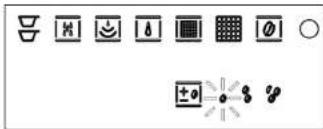
text_image
Row of nine icons including crossed-out, lock, battery, grid, and magnifying glass symbols with plus signs and circlesUNIQUEMENT POUR LES UTILISATEURS CHEVRONNES : PROGRAMMATION DU TEMPS DE MOUTURE
text_image
Diagram showing various icons representing start/stop buttons and control symbols, with a hand cursor pointing to the stop button.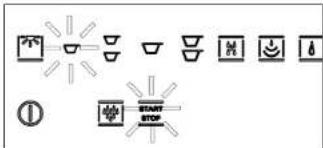
text_image
Diagram showing various directional icons and symbols, including lights, bowls, and a START/STOP buttontext_image
Row of eight icons including crossed-out, magnifying glass, warning symbol, grid, and circle with plus/minus symbolstext_image
Row of eight icons including crossed-out, lock, alarm, warning, and blank symbols with a central icontext_image
Toolbar with icons for menu, refresh, and zoom functions, plus a hand cursor pointing to a 'BUTTER' button.text_image
Row of icons including crossed-out, magnifying glass, smiley face, alarm, grid, and speech bubble with symbolstext_image
Collection of icons and symbols including crossed-out box, magnifying glass, alarm, water drop, grid, and various symbols with a central cross symbol.text_image
Row of icons representing weather, lighting, water, solar panels, and symbols like sun, moon, and gearnatural_image
Two technical line drawings of a window frame with internal grid lines (no text or symbols)text_image
Technical diagram showing two views of a window with labeled components and a close-up view of a device.natural_image
Isometric line drawing of two kitchen appliances with no visible text or symbols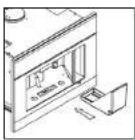
Apparecchiature in disuso
natural_image
Technical line drawing of two structural frame components with dimension annotations (no text or symbols)natural_image
Isometric line drawing of a mechanical or architectural component with no visible text or symbolstext_image
Toolbar with icons and labels including symbols like 'NOT', 'BEET', 'STOP', and a black circle with a plus symbol.Pannello comandi
natural_image
Isometric line drawing of a computer monitor and keyboard (no text or symbols)natural_image
Simple line drawing of a window with a door and ceiling fixture (no text or symbols)natural_image
Isometric line drawing of a cabinet or enclosure with internal compartments and doorways (no text or symbols)natural_image
Technical line drawing of a mechanical assembly with a housing and component (no text or symbols)natural_image
Technical line drawing of a mechanical assembly with no visible text or symbolsnatural_image
Technical line drawing of a mechanical assembly or enclosure with no visible text or symbolsnatural_image
Technical line drawing of a cabinet or enclosure with mounting brackets and a door panel (no text or symbols)natural_image
Isometric line drawing of a server rack with an attached cable and a separate inset showing a device (no text or symbols)text_image
Diagram showing various icons including a hand, lock, and start/stop labels with corresponding symbolsnatural_image
Technical line drawing of a mechanical device with a rotary knob and directional arrow (no text or symbols)text_image
Collection of icons representing various food and beverage symbols, including containers, cups, bottles, and stop controls.text_image
START STOPnatural_image
Diagram of a device inside a transparent enclosure with circular components, showing internal structure and directional arrows (no text or symbols)text_image
START STOP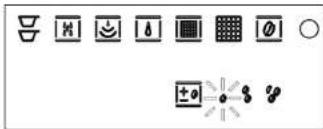
text_image
Row of nine icons including crossed-out, lock, battery, grid, and magnifying glass symbols with plus signs and symbolsSOLO PER UTENTI ESPERTI: PROGRAMMAZIONE DEL TEMPO DI MACINATURE
text_image
Diagram showing various icons representing menu or control symbols, including battery, switch, and refresh controls.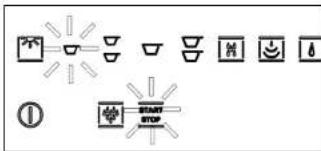
text_image
Diagram showing various lighting and warning symbols with icons for light source, mirror, lamp, and stop buttontext_image
Row of icons representing various symbols and colors, including crossed-out bars, magnifying glass, radiation, grid, and circle.text_image
Row of icons representing various symbols and concepts, including crossed-out leaves, magnifying glass, water drop, solar panel, and plus signs.text_image
Toolbar with icons for menu, refresh, and start button functionstext_image
Toolbar with icons for weather, lighting, water drop, solar panel, and various symbols including sun, moon, and gear.text_image
Collection of icons representing various basic electrical symbols and components, including diode, meter, battery, warning symbol, grid, sunburst, and various symbols.text_image
Row of icons representing weather, lighting, and solar symbols with corresponding icons belownatural_image
Two technical line drawings of a mechanical or architectural component with grid lines, no text or symbols present.natural_image
Two technical line drawings showing a door panel and a mechanical component (no text or symbols)natural_image
Isometric line drawing of two room layouts with furniture and tools, no text or symbols present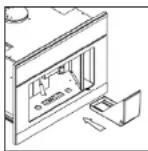
text_image
Technical diagram of a mechanical assembly with numbered components for identificationnatural_image
Pure technical line drawing of two mechanical components without any text, numbers, or symbolsnatural_image
Technical line drawing of a mechanical or electrical component with no visible text or symbolstext_image
Toolbar with various function icons and symbols, including arrows, bowls, and operators like START STOP and +0Bedienfeld
natural_image
Isometric line drawing of a monitor displaying a small screen with a pencil, next to a handheld device (no text or symbols)natural_image
Simple line drawing of a window with a door and ceiling fixture (no text or symbols)natural_image
Technical line drawing of a cabinet or oven with internal components and no visible text or symbolsnatural_image
Technical line drawing of a mechanical assembly with a housing and component (no text or symbols)natural_image
Technical line drawing of a mechanical assembly with no visible text or symbolsnatural_image
Technical line drawing of a mechanical assembly with internal components (no text or symbols)natural_image
Isometric line drawing of a cabinet or enclosure with a door and window (no text or symbols)natural_image
Isometric line drawing of a server rack with a cable and a separate inset showing a device (no text or symbols)text_image
Diagram showing various icons including a hand, battery, and start/stop labels with corresponding symbolsnatural_image
Technical line drawing of a mechanical device with a circular component and directional arrows (no text or symbols)text_image
Diagram showing various icons including a vase, cups, teapot, and stop controls with labels like 'START STOP' and a circled symbol.text_image
START STOPnatural_image
Technical line drawing of a mechanical assembly with no visible text or symbolstext_image
START STOP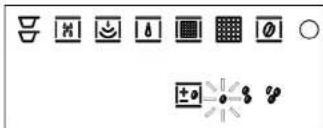
text_image
Row of icons including battery, switch, magnifying glass, grid, camera, and radio buttons with plus/minus symbols
text_image
Diagram showing various icons representing basic computer control symbols and a hand cursor pointing to a button labeled 'START STOP'.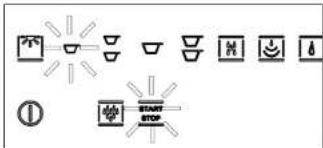
text_image
START STOPtext_image
Row of icons representing various basic symbols and objects, including crossed-out leaves, battery, smiley face, sunburst, grid, magnifying glass, and plus signs.text_image
Diagram showing various symbols and icons including crossed-out, magnifying glass, lightning bolt, grid, and circle with plus/minus signstext_image
Toolbar with icons and a hand cursor pointing to a 'START STOP' buttontext_image
Toolbar with icons representing various function keys or symbols, including symbols like 'Di', 'M', 'S', 'T', and a central icon with a grid.text_image
Row of icons including crossed-out, basic symbols, warning signs, and a central grid with a sunburst symboltext_image
Row of icons representing weather and lighting symbols including sun, moon, thermometer, and alarm clocknatural_image
Two technical line drawings of a rectangular enclosure or storage unit with internal compartments and mounting brackets (no text or symbols)text_image
Technical diagram showing two views of a device with labeled components and a magnified view of the screen.natural_image
Isometric line drawing of two kitchen appliances with no visible text or symbols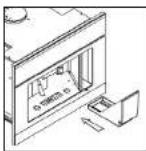
S +31(0)20-4363525 (service)
E info@boretti.com
The Netherlands
N.V. BORETTI S.A.
Rupelweg 16
2850 Boom
T +32(0)3-4508180
F +32(0)3-4586847
E info.be@boretti.com
Belgium