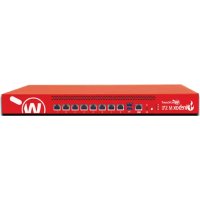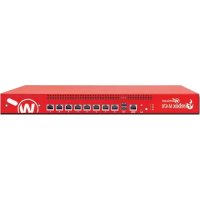
Firebox M470 - Firewall WatchGuard - Free user manual and instructions
Find the device manual for free Firebox M470 WatchGuard in PDF.



User questions about Firebox M470 WatchGuard
0 question about this device. Answer the ones you know or ask your own.
Ask a new question about this device
Download the instructions for your Firewall in PDF format for free! Find your manual Firebox M470 - WatchGuard and take your electronic device back in hand. On this page are published all the documents necessary for the use of your device. Firebox M470 by WatchGuard.
USER MANUAL Firebox M470 WatchGuard
WatchGuard® Technologies, Inc.
Activate Your Firebox
- Go to www.watchguard.com/activate
- Log in to your WatchGuard account, or create a new account*.
*If you create a new account, return to www.watchguard.com/activate after you finish the account creation process.
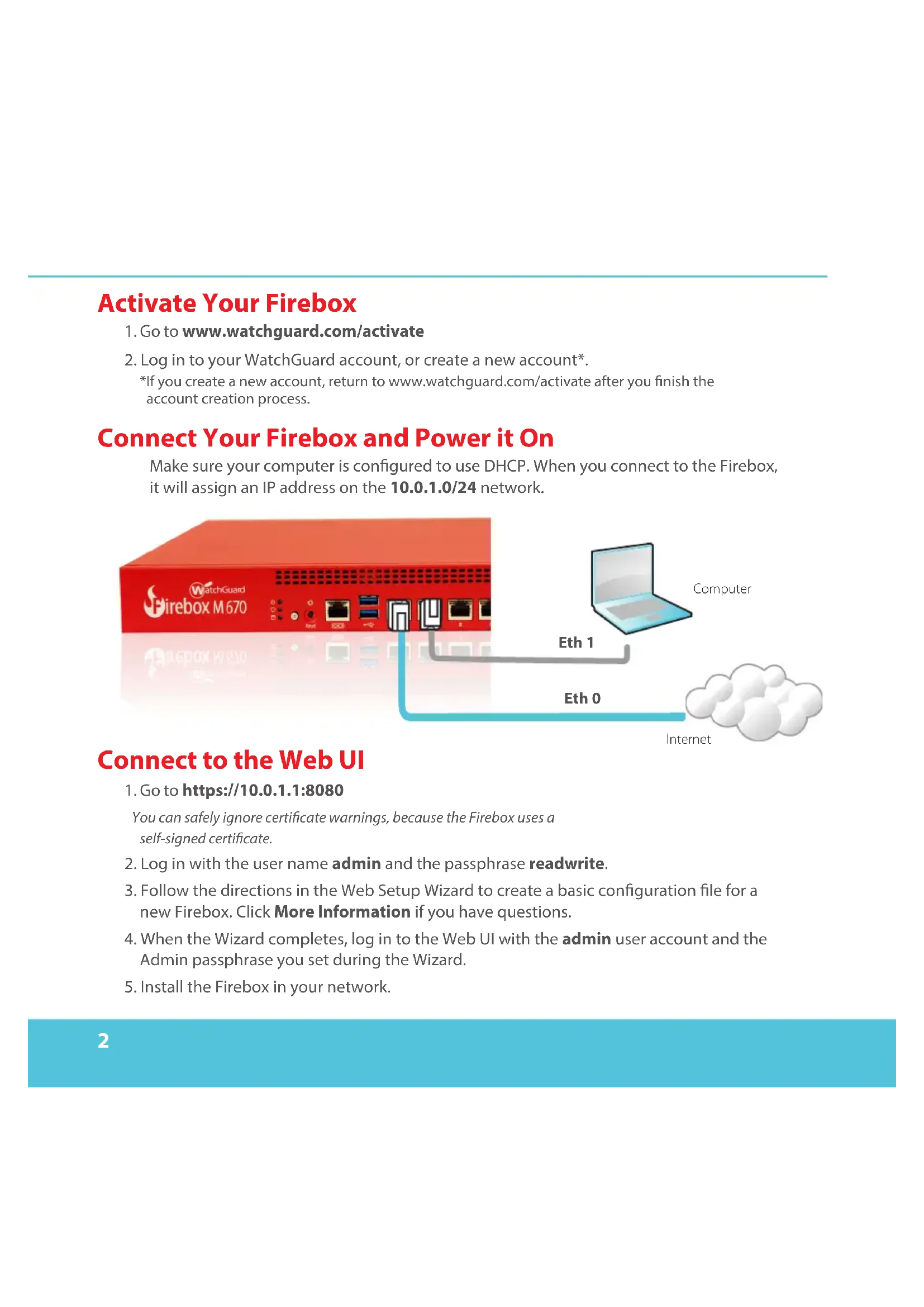
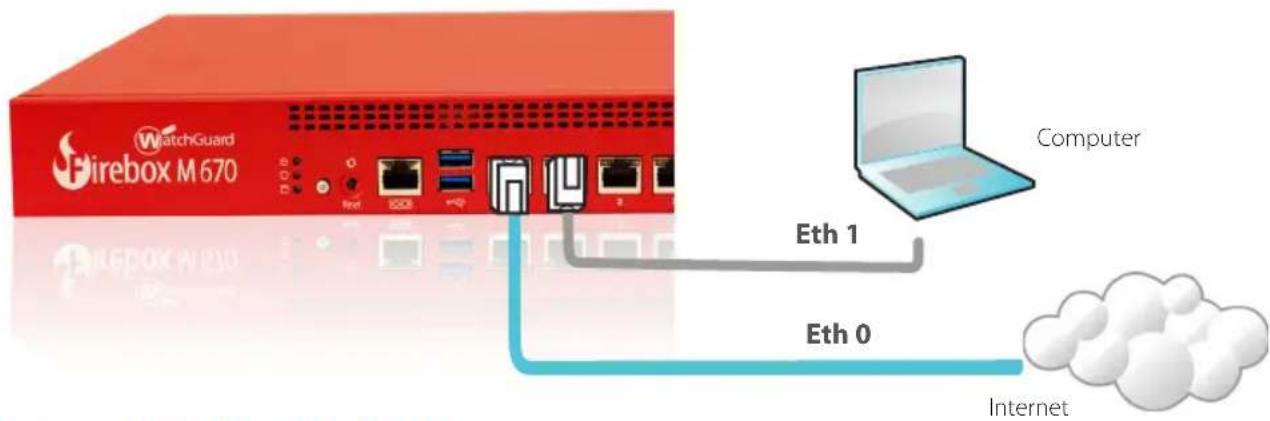
Connect Your Firebox and Power it On
Make sure your computer is configured to use DHCP. When you connect to the Firebox, it will assign an IP address on the 10.0.1.0/24 network.
Connect to the Web UI
- Go to https://10.0.1.1:8080
You can safely ignore certificate warnings, because the Firebox uses a self-signed certificate. - Log in with the user name admin and the passphrase readwrite.
- Follow the directions in the Web Setup Wizard to create a basic configuration file for a new Firefox. Click More Information if you have questions.
- When the Wizard completes, log in to the Web UI with the admin user account and the Admin passphrase you set during the Wizard.
- Install the Firebox in your network.
After you run the Web Setup Wizard your Firefox has a basic configuration:
- Allows outbound FTP, Ping, DNS, TCP, and UDP connections
- Blocks all unrequested traffic from the external network
- Inspects outgoing FTP, HTTP, and HTTPS traffic
- Uses licensed security services to protect the trusted and optional networks
Next Steps
Congratulations! You have finished basic setup of your Firebox. You can use the Web UI to view and edit your configuration and to manage and monitor your Firebox. Or, you can download and install WatchGuard System Manager (WSM) and use Policy Manager and the WSM suite of management and monitoring tools. Here are some recommendations to help you get started:
Verify your Internet connectivity
- With your Firebox installed in your network, make sure that your users can successfully browse the Internet.
Get the latest software
To upgrade the Firefox OS:
- Log in to Fireware Web UI.
- Select System > Upgrade OS.
To get the latest version of WSM, WatchGuard Dimension, VPN clients, and other software for your Firebox:
- Go to www.watchguard.com/support and click Download Software.
- Find the software downloads page for the Firebox M370/470/570/670 and select the software you want to install.
Explore the Features and Functions of Your Firebox
Browse the Web UI or the tools in WatchGuard System Manager and click Help on any page or dialog box to learn more about the management, monitoring, and security features of your Firebox.
About the Firebox Status Lights
Indicators for RJ45 interfaces
Interfaces 0 - 7 each have two indicators. The right indicator shows the interface connection status.
The left indicator shows interface activity.
| Indicator Indicator color Interface Status | ||
| Connection (right) Yellow Link at 1000 Mbps | ||
| Green Link at 100 Mbps | ||
| Not lit Link at 10 Mbps or no link | ||
| Activity (left) Yellow, blinks Power on, network activity | ||
| Not lit Power off, no connections | ||
Storage ( 日 ) - When there is activity on the mSATA card or hard disk, the storage indicator is yellow.
Arm/Disarm (O) - When the Firebox is armed and ready to pass traffic, this indicator is green.
When the Firebox is powered on, but not ready to pass traffic, this indicator is red.
Power (O) - The power indicator on the left front of the Firebox is green when the Firebox is powered on.
Power Button ( ) - The Power button on the front of the Firebox is lit to indicate power status. It is green when the Firebox is powered on, and red when power is available, but the Firebox is powered off. When the Power button is red, press this button to power on the Firebox. When the Power button is green, press and hold it for five seconds to power off the Firebox.
Install Interface Modules
For the Firebox M470, M570 and M670 you can install any supported interface module. You must install the interface modules before you can enable the interfaces in the Firebox configuration. The supported interfaces modules are:
- WatchGuard Firebox M 8 Port 1Gb Copper Module
- WatchGuard Firebox M 8 Port SFP Fiber Module
- WatchGuard Firebox M 4 Port 10 Gb SFP+ Fiber Module
Important: You must power off the Firebox before you install or remove an interface module.
For details about available interface modules and installation instructions, see the Hardware Guide available at: www.watchguard.com/help/documentation/hardware.asp
Install Your Firebox
For instructions to install your Firebox in a network rack, see the Firebox M370/470/570/670 Hardware Guide.
Reset the Firebox to Factory-Default Settings
If you ever need to, you can restore your Firebox to its factory-default settings. For example, if you do not know the administrator account passphrase or you want to start over with a new configuration, you can reset your Firebox. Make sure you back up your Firebox configuration before you reset your Firebox in case you want to restore it in the future.
For information about how to reset your Firebox, see the Firebox M370/470/570/670 Hardware Guide, available at: www.watchguard.com/help/documentation/hardware.asp
激活您的 Firebox
网址为:www.watchguard.com/help/documentation/hardware.asp
www.watchguard.com/help/documentation/hardware.asp
- 啊岡巴ound FTP, Ping, DNS, TCP 及 UDP 連接 耶用
·外部NeTlWJK3eH - .☆ハはFTP, HTTP フT HTTPS ヒリ仄きな
- Laii'sh has been found in the sea.
다울단제
- www.watchguard.com/supportro Myndohg Download Softwaree
- Firebox M370/470/570/670のスフ트ウェア differentiated mode of the SFOFTE WEAR to be able to be able to be able to be able to be able to be able to be able to be able to be able to be able to be able to be able to be able to be able to be able to be able to be able to be able to be able to be able to be able to be able to be able to be able to be able to be able to be able to be able to be able to be able to be able to be able to be able to be able
1.Visithttps://10.0.1.1:8080
- Acesse https://10.0.1.1:8080
É seguro ignorar os avisos de certificado porque o disposítivo usa umCERTificado autoassinado.
www.watchguard.com/help/documentation/hardware.asp
安装您的 Firebox
All WatchGuard products are designed and tested to meet strict safety requirements. These requirements include product safety approvals and other global compliance standards. Please read the following instructions carefully before operating the product, and refer to them as needed to ensure the continued safe operation of your product. Additional information can be found in the Hardware Guide located on the WatchGuard website: http://www.watchguard.com/help/documentation/hardware.asp
Product Safety Certification
The WatchGuard product is safety certified under the following standards:
CAN/CSA C 22.2 No.60950-1-07+A1:2011+A2:2014
- UL 60950-1:2007 R10.14
IEC 60950-1:2005 (Second Edition) + Am 1:2009 + Am 2:2013
EN 60950-1:2006+A11:2009+A1:2010+A12:2011+A2:2013
Safety Warning
- Do not place objects on the power cord.
- Do not obstruct the ventilation openings. These openings prevent overheating of the machine.
- Never push objects of any kind into slots or openings on this equipment. Making a contact with a voltage point or shorting out a part may result in fire or electrical shock.
- When removing or installing an appliance, follow the general installation safety instructions.
- You must disconnect the AC power cord from the Firebox before you remove the cover of the Firebox for any reason.
- There is risk of explosion if the battery is replaced by an incorrect type. Dispose of used batteries according to the manufacturer's instructions.
Disclaimer
WatchGuard shall not be held liable if the end user alters, modifies, or repairs any WatchGuard hardware appliance.
The CE symbol on your WatchGuard Technologies equipment indicates that it is in compliance with the Electromagnetic Compatibility (EMC) directive and the Low Voltage Directive (LVD) of the European Union (EU).

Federal Communication Commission Interference Statement
This equipment has been tested and found to comply with the limits for a Class A digital Firebox, pursuant to part 15 of the FCC Rules. These limits are designed to provide reasonable protection against harmful interference when the equipment is operated in a commercial environment. This equipment generates, uses, and can radiate radio frequency energy and, if not installed and used in accordance with the instruction manual, may cause harmful interference to radio communications. Operation of this equipment in a residential area is likely to cause harmful interference in which case the user will be required to correct the interference at his own expense.)
This equipment complies with Part 15 of the FCC Rules. Operation is subject to the following two conditions:
(1) This Firebox may not cause harmful interference, and
(2) This Firebox must accept any interference received, including interference that may cause undesired operation.
RoHS Statement
The member states of the European Union approved directive 2002/95/EC, Restrictions of Hazardous Substances ("RoHS directive") that became valid on July 1, 2006. It states that all new electrical and electronic equipment put on the market within the member states must not contain certain hazardous materials. This Firebox complies with the European Union's ROHS directive 2002/95/EC and similar regulations that may be adopted by other countries for European Sales.
WEEE Statement
WEEE is a general set of requirements dictated in the EU Directive 2002/96/EC. This Directive mandated that member EU countries enact regulations governing the Waste of Electrical and Electronic Equipment (WEEE). The Directive, and its individual transpositions into specific country laws and legislation, is aimed at the reduction of WEEE through reuse, recovery, and recycling of WEEE.
WatchGuard is working in partnership with our European Union (EU) distribution partners to ensure that our products are in compliance with the WEEE statutes, and that the recovery of our product per the specific EU country legislative requirements is seamless for our product's end users. If you have a WatchGuard product that is at its end of life and needs to be disposed of, please contact WatchGuard Customer Care Department at:
U.S. Customers: 877.232.3531 International Customers: +1.206.613.0456
WatchGuard is reasonably confident that our products do not contain any substances or hazardous materials presently banned by any legislation, and do not present a risk due to hazardous materials. WEEE recovery professionals should also note that these products do not have any materials that are of particular high value in their individual form.
REACH
The new EU chemicals policy REACH (Registration, Evaluation, Authorization and restriction of Chemicals) came into effect on June 1, 2007. REACH is Europe's new chemicals legislation, which is applicable in all 27 EU Member States as well as the EFTA European Economic Area (EEA). REACH creates a new system for gathering information, assessing risks to human health and the environment, and authorizing or restricting the marketing and use of chemicals produced or supplied in the EEA. REACH has an impact on EEA producers and importers of finished products and users of chemicals in the course of industrial or professional activities.
WatchGuard supports the overall REACH objective of improving the protection of human health and the environment and will meet all applicable REACH requirements. WatchGuard is strongly committed to working with our customers and supply chain to define and implement the REACH requirements and ensure a smooth transition to compliance.
One of the REACH requirements is that manufacturers and importers have the duty to register substances they are producing or importing. In accordance with the regulations, the products of WatchGuard do not need to be registered for the following reasons:
- WatchGuard does not import more than 1 metric ton per year of a substance as defined by REACH.
- WatchGuard products are non-chemical products that are not designed to release any substance under normal and reasonably predictable application.
- Our products do not contain the listed substances at more than 0.1% by weight of the whole product/part.
Industry Canada statement:
This Firebox complies with RSS-210 of the Industry Canada Rules. Operation is subject to the following two conditions: (1) This Firebox may not cause harmful interference, and (2) this Firebox must accept any interference received, including interference that may cause undesired operation. CAN ICES- 3(A)/NMB-3(A)
Taiwan Class A Notice:
Declaration of the Presence Condition of the Restricted Substances Marking
| 設備名稱:網路伺服器,型號(型式):WG-M370/WG-M470/WG-M570/WG-M670 equipment name Type designation (Type) | |||||||
| 單元Unit | 限用物質及其化學符號 Restricted substances and its chemical symbols | ||||||
| 鉛Lead(Pb) | 汞Mercury(Hg) | 鎘Cadmium(Cd) | 六價鉻Hexavalent chromium(Cr⁺⁶) | 多溴聯苯Polybrominated biphenyls(PBB) | 多溴二苯醚Polybrominated diphenyl ethers(PBDE) | 相對應排除項目依據(D1~D37) | |
| 印刷電路板元件 | - | O O O | O O D14, | D16 | |||
| 風扇 | - | O O O | O O D13 | ||||
| 內部電源供應器 | - | O O O | O O D14, | D16 | |||
| 固態硬碟 | - | O O O | O O D16 | ||||
| 備考1. “超出0.1 wt %”及“超出0.01 wt %”係指限用物質之百分比含量超出百分比含量基準值。 Note 1: “Exceeding 0.1 wt %” and “exceeding 0.01 wt %” indicate that the percentage content of the restricted substance exceeds the reference percentage value of presence condition. 備考2. “O”係指該項限用物質之百分比含量未超出百分比含量基準值。 Note 2: “O” indicates that the percentage content of the restricted substance does not exceed the percentage of reference value of presence. 備考3. “-”係指該項限用物質為排除項目。 Note 3: The “-” indicates that the restricted substance corresponds to the exemption. | |||||||
Mexico Notice:
DECLARATION OF CONFORMITY
WatchGuard Technologies, Inc.
505 Fifth Ave. S., Suite 500
Seattle, WA 98104-3892 USA
WatchGuard Technologies Inc. hereby declares that the product(s) listed below conform to the European Union directives and standards identified in this declaration.
Product(s):
WatchGuard Models: Firebox M370/M470/M570/M670
Hardware Model: WL6AE8
EU Directive(s):
Low Voltage (2014/35/EC)
Electromagnetic Compatibility (2014/30/EC)
RoHS(2011/65/EC)
WEEE Directive 2012/19/EU
REACH EC 1907/2006
Standard(s):
Safety: EN60950-1:2006+A11:2009+A1+A12:2011+A2:2013
Emission: EN 55032:2012+AC:2013 ClassA
EN 61000-3-2:2014
EN 61000-3-3:2013
FCC Part 15 Subpart B ClassA
ANSIC63.4-2014
ICES-003:Issue 6:2016
CISPR 22:2008
VCCI V-3/2016.11
AS/NZSCISPR32:2015
Immunity: EN 55024: 2010
EN 61000-4-2:2009
EN 61000-4-3:2006+A1:2008+A2:2010
EN 61000-4-4:2012
EN 61000-4-5:2014
EN 61000-4-6:2014+AC:2015
EN 61000-4-8:2010
EN 61000-4-11:2004
Laurence Huang

Signature:
Full Name: Laurence Huang
Position: Manufacturing Program Manager
Date: 25 Feb 2017
Limited Hardware Warranty
This Limited Hardware Warranty (the "Warranty") applies to the enclosed hardware product, not including any associated software, which is licensed pursuant to a separate end-user license agreement and warranty (the "Product"). BY USING THE PRODUCT, YOU (either an individual or a single entity) AGREE TO THE TERMS HEREOF. If you do not agree to these terms, please return this package, along with proof of purchase, to the authorized dealer from which you purchased it for a full refund. WatchGuard Technologies, Inc. ("WatchGuard") and you agree as set forth below or on the reverse side of this card, as applicable.
- LIMITED WARRANTY. WatchGuard warrants that upon delivery and for one (1) year thereafter (the "Warranty Period"): (a) the Product will be free from material defects in materials and workmanship, and (b) the Product, when properly installed and used for its intended purpose and in its intended operating environment, will perform substantially in accordance with WatchGuard applicable specifications.
This warranty does not apply to any Product that has been: (i) altered, repaired or modified by any party other than WatchGuard except for the replacement or inclusion of specified components authorized in, and performed in strict accordance with, documentation provided by WatchGuard; or (ii) damaged or destroyed by force majeure events, accidents, power spikes or similar events or by any intentional, reckless or negligent acts or omissions of any party. You may have additional warranties with respect to the Product from the manufacturers of Product components. However, you agree not to look to WatchGuard for, and hereby release WatchGuard from any liability for, performance of, enforcement of, or damages or other relief on account of, any such warranties or any breach thereof.
- REMEDIES. If any Product does not comply with the WatchGuard warranties set forth in Section 1 above, WatchGuard will, following the receipt of the product you claim is defective and at its option, either (a) repair the Product, or (b) replace the Product with a like or similar product; provided, that you will be responsible for returning the Product and for all costs of shipping and handling. Repair or replacement of the Product shall not extend the Warranty Period. Any Product, component, part or other item replaced by WatchGuard becomes the property of WatchGuard. WatchGuard shall not be responsible for return of or damage to any software, firmware, information or data contained in, stored on, or integrated with any returned Products.
- DISCLAIMER AND RELEASE. THE WARRANTY, OBLIGATIONS AND LIABILITIES OF WATCHGUARD, AND YOUR REMEDIES, SET FORTH IN PARAGRAPS 1 AND 2 ABOVE ARE EXCLUSIVE AND IN SUBSTITUTION FOR, AND YOU HEREBY WAIVE, DISCLAIMER AND RELEASE ANY AND ALL OTHER WARRANTY, OBLIGATIONS AND LIABILITIES OF WATCHGUARD AND ALL OTHER RIGHTS, CLAIMS AND REMEDIES YOU MAY HAVE AGAINST WATCHGUARD, EXPRESS OR IMPLIED, ARISING BY LAW OR OTHERWISE, WITH RESPECT TO ANY NONCONFORMANCE OR DEFECT IN THE PRODUCT (INCLUDING, BUT NOT LIMITED TO, ANY IMPLIED WARRANTY OF MERCHANTABILITY OR FITNESS FOR A PARTICULAR PURPOSE, ANY IMPLIED WARRANTY Arising FROM COURSE OF
PERFORMANCE, COURSE OF DEALING, OR USAGE OF TRADE, ANY WARRANTY OF NONINFRINGEMENT, ANY WARRANTY OF UNINTERRUPTED OR ERROR-FREE OPERATION, ANY OBLIGATION, LIABILITY, RIGHT, CLAIM OR REMEDY IN TORT, WHETHER OR NOT ARISING FROM THE NEGLIGENCE (WHETHER ACTIVE, PASSIVE OR IMPUTED) OR FAULT OF WATCHGUARD OR FROM PRODUCT LIABILITY, STRICT LIABILITY OR OTHER THEORY, AND ANY OBLIGATION, LIABILITY, RIGHT, CLAIM OR REMEDY FOR LOSS OR DAMAGE TO, OR CAUSED BY OR CONTRIBUTED TO BY, THE PRODUCT).
- LIMITATION AND LIABILITY. WATCHGUARD'S LIABILITY (WHETHER ARISING IN CONTRACT (INCLUDING WARRANTY), TORT (INCLUDING ACTIVE, PASSIVE OR IMPUTED NEGLIGENCE AND STRICT LIABILITY AND FAULT) OR OTHER THEORY) WITH REGARD TO ANY PRODUCT WILL IN NO EVENT EXCEED THE PURCHASE PRICE PAID BY YOU FOR SUCH PRODUCT. THIS SHALL BE TRUE EVEN IN THE EVENT OF THE FAILURE OF ANY AGREED REMEDY. IN NO EVENT WILL WATCHGUARD BE LIABLE TO YOU OR ANY THIRD PARTY (WHETHER ARISING IN CONTRACT (INCLUDING WARRANTY), TORT (INCLUDING ACTIVE, PASSIVE OR IMPUTED NEGLIGENCE AND STRICT LIABILITY AND FAULT) OR OTHER THEORY) FOR COST OF COVER OR FOR ANY INDIRECT, SPECIAL, INCIDENTAL, OR CONSEQUENTIAL DAMAGES (INCLUDING WITHOUT LIMITATION LOSS OF PROFITS, BUSINESS, OR DATA) ARISING OUT OF OR IN CONNECTION WITH THIS WARRANTY OR THE USE OF OR INABILITY TO USE THE PRODUCT, EVEN IF WATCHGUARD HAS BEEN ADVISED OF THE POSSIBILITY OF SUCH DAMAGES. THIS SHALL BE TRUE EVEN IN THE EVENT OF THE FAILURE OF ANY AGREED REMEDY.
- MISCELLANEOUS PROVISIONS. This Warranty will be governed by the laws of the state of Washington, U.S.A., without reference to its choice of law rules. The provisions of the 1980 United Nations Convention on Contracts for the International Sales of Goods, as amended, shall not apply. You agree not to directly or indirectly transfer the Product or use of the product or associated documentation to any country to which such transfer would be prohibited by the U.S. Export laws and regulations. If any provision of this Warranty is found to be invalid or unenforceable, then the remainder shall have full force and effect and the invalid provision shall be modified or partially enforced to the maximum extent permitted by law to effectuate the purpose of this Warranty. This is the entire agreement between WatchGuard and you relating to the Product, and supersedes any prior purchase order, communications, advertising or representations concerning the Product AND BY USING THE PRODUCT YOU AGREE TO THESE TERMS. IF THE PRODUCT IS BEING USED BY AN ENTITY, THE INDIVIDUAL INDICATING AGREEMENT TO THESE TERMS BY USING THE PRODUCT REPRESENTS AND WARRANTY THAT (A) SUCH INDIVIDUAL IS DULY AUTHORIZED TO ACCEPT THE WARRANTY ON BEHALF OF THE ENTITY AND TO BIND THE ENTITY TO THE TERMS OF THIS WARRANTY; (B) THE ENTITY HAS THE FULL POWER, CORPORATE OR OTHERWISE, TO ENTER INTO THE WARRANTY AND PERFORM ITS OBLIGATIONS UNDER THE WARRANTY AND; (C) THE WARRANTY AND THE PERFORMANCE OF THE ENTITY'S OBLIGATIONS UNDER THE WARRANTY DO NOT VIOLATE ANY THIRD-PARTY AGREEMENT TO WHICH THE ENTITY IS A PARTY. No change or modification of the Warranty will be valid unless it is in writing and is signed by WatchGuard.
WATCHGUARD TECHNICAL SUPPORT
1.877.232.3531
(U.S. and Canada)
+1.206.613.0456
(all other countries)
www.watchguard.com/support
ADDRESS: 505 Fifth Avenue South, Suite 500, Seattle, WA 98104
WEB: www.watchguard.com • U.S. SALES: 1,800,734,9905 • INTERNATIONAL SALES: +1,206,613,0895
© 2017 WatchGuard Technologies, Inc. All rights reserved. WatchGuard, the WatchGuard Logo, Firmware, and LiveSecurity are registered trademarks of WatchGuard Technologies, Inc. in the United States and/or other countries. All other trademarks and tradenames are the property of their respective owners. P.N. WGCE66997 041817

atchGuard