SIKP 3400 A - Frying Pan SILVERCREST - Free user manual and instructions
Find the device manual for free SIKP 3400 A SILVERCREST in PDF.



User questions about SIKP 3400 A SILVERCREST
0 question about this device. Answer the ones you know or ask your own.
Ask a new question about this device
Download the instructions for your Frying Pan in PDF format for free! Find your manual SIKP 3400 A - SILVERCREST and take your electronic device back in hand. On this page are published all the documents necessary for the use of your device. SIKP 3400 A by SILVERCREST.
USER MANUAL SIKP 3400 A SILVERCREST
INDICATION: Patent application
()
INDUCTIEKOOKPLAAT
Gebinnscorwng
答:
INDUCTION HOB
Operating nomenclature

Before reading, we find the page containing the illustrations and families you will with all functions of the device.
GB Operating Instructions
Sommaire
WAARSCHUWING! LETSELGEVAAR!
WAARSCHUWING! LETSELGEVAAR!

WAARSCHUWING! BRANDGEVAAR!
WAARSCHUWING! BRANDGEVAAR!
WAARSCHUWING - GEVAAR VOOR STROOMSCHOKKEN!
WAARSCHUWING - LETSELGEVAAR!
Introduction 62
Intended use 62
Items supplied 63
Disposal of the packaging. 63
Description of appliance / attachments 64
Technical data 64
Safety instructions 65
Manner of operation 69
Suitable cookware 69
Setup 70
Electrical connection 70
Operation 71
The induction cooking areas 71
Operation 72
Safety switch off 73
Timer 74
Child protection system 75
Cleaning 76
Troubleshooting 77
Disposal of the appliance 78
Notes on the EC Declaration of Conformity 78
Importer 79
Warranty 79
Service 79
Introduction
Congratulations on the purchase of your new appliance!
You have clearly decided in favour of a modern and high quality product. These operating instructions are a component of this product. They contain important information about the safety, operation and disposal of the appliance. Before using this product familiarise yourself with all of these operating and safety instructions. Use this appliance only as described and only for the specified areas of application. Also, pass them on to whoever might acquire the appliance at a future date.
GB
Intended use
This appliance is intended exclusively for the heating up and keeping warm of foods. This appliance is intended exclusively for use in domestic households. Do not use it for commercial purposes.
Use the appliance only in dry rooms and NEVER use it outdoors.
WARNING
Risks from unintended use!
Risks can be engendered by the appliance if it is used for purposes not intended for it and / or for other types of use.
Use the appliance exclusively for its intended purposes.
Observe the procedures described in these operating instructions.
NOTICE
Risks can be engendered by the appliance if it is used for purposes not intended for it and / or for other types of use. Use the appliance exclusively for its intended purposes. Observe the procedures described in these operating instructions. Claims of any kind for damage resulting from unintended use, incompetent repairs, unauthorised modification or the use of unauthorised spare parts will not be accepted. The operator alone bears liability.
Items supplied
The appliance is delivered with the following components as standard:
- Induction Hob
- Magnet
- Operating Instructions
1) Remove all parts of the appliance and the operating instructions from the carton.
2) Remove all packing material.
NOTICE
Check the contents to make sure everything is there and for visible damage.
If the delivery is not complete, or is damaged due to defective packaging or through transportation, contact the Service Hotline (see chapter Service).
Disposal of the packaging
The packaging protects the appliance from transport damage. The packaging materials are selected from the point of view of their environmental friendliness and disposal technology and are therefore recyclable.

The recirculation of packaging into the material circuit saves on raw material and reduces generated waste. Dispos of packaging material that is no longer needed according to the regionally established regulations.
NOTICE
If possible, preserve the appliance's original packaging during the warranty period so that, in the event of a warranty claim, you can repackage the appliance ideally for its return.
Description of appliance/attachments
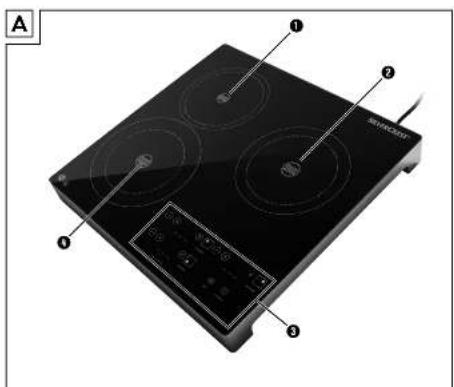
Illustration A:
Cooking area, rear (1000 W)
Cooking area, right (1400 W)
3 Control panel
4 Cooking area, front (2000 W)
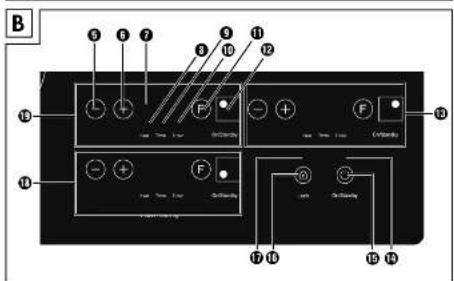
Illustration B:
5 Button "."
6 Button " ^+ "
7 Display
Control lamp power mode ("Heat")
Control lamp temperature mode ("Temp.")
10 Control Lamp Timer
13 Button "F" (English: "FUNCTION")
12 Button "On / Standby" with cooking plate marking
16 Operating elements for the right cooking area
16 Control lamp On / Standby
15 Button "On/Standby"
16 Button "Lock" (child safety)
17 Control lamp child safety
18 Operating elements for the front cooking area
16 Operating elements for the rear cooking area
Technical data
| Voltage 220 - 240 V | ~, 50 / 60 Hz |
| Nominal power 3200 - 3400 W | |
| Protection class | II ☑ |
| Noise emission level < 70 dB (A) |

Safety instructions

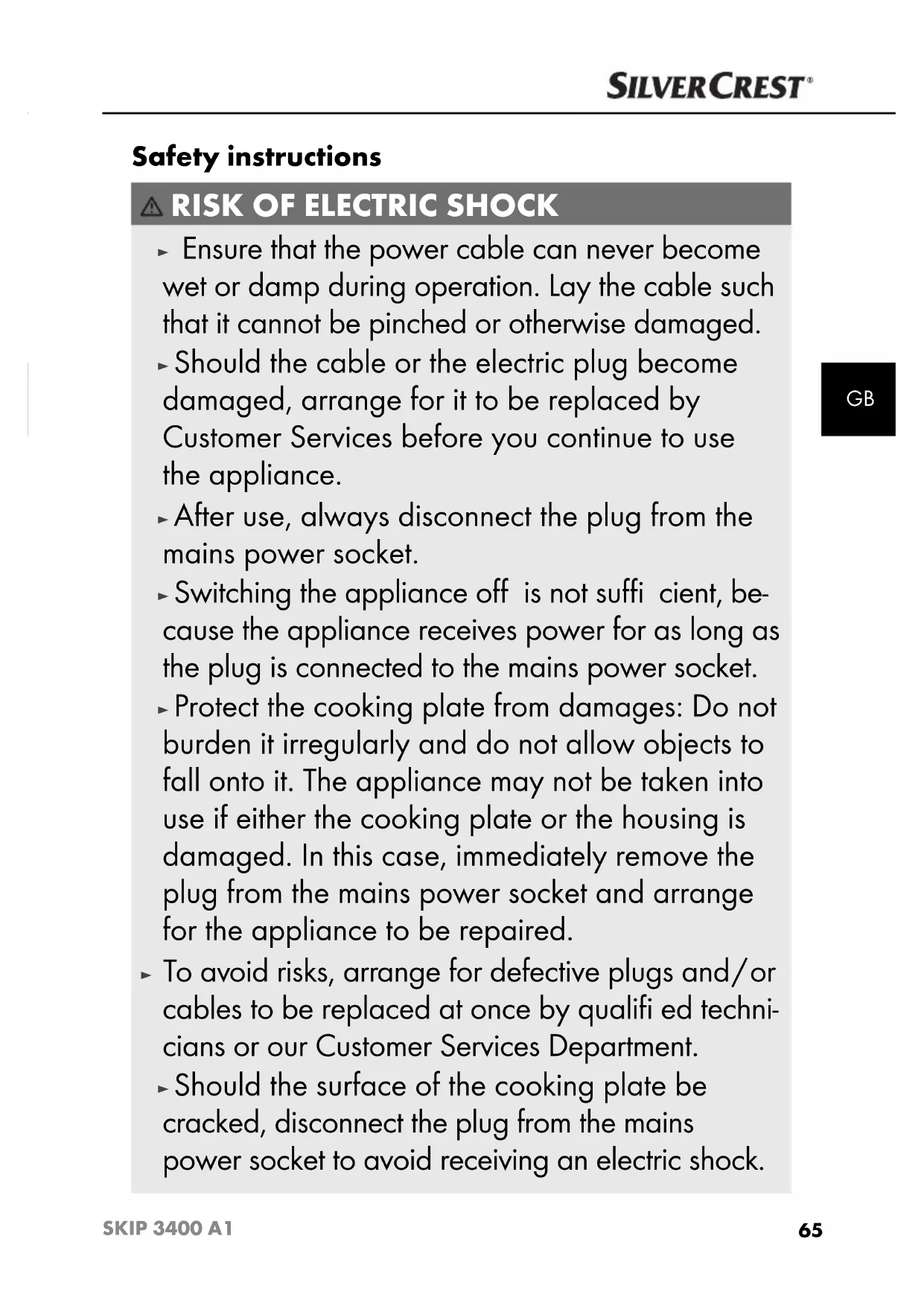
RISK OF ELECTRIC SHOCK
- Ensure that the power cable can never become wet or damp during operation. Lay the cable such that it cannot be pinched or otherwise damaged.
- Should the cable or the electric plug become damaged, arrange for it to be replaced by Customer Services before you continue to use the appliance.
After use, always disconnect the plug from the mains power socket. - Switching the appliance off is not sufficient, because the appliance receives power for as long as the plug is connected to the mains power socket.
- Protect the cooking plate from damages: Do not burden it irregularly and do not allow objects to fall onto it. The appliance may not be taken into use if either the cooking plate or the housing is damaged. In this case, immediately remove the plug from the mains power socket and arrange for the appliance to be repaired.
- To avoid risks, arrange for defective plugs and/or cables to be replaced at once by qualified technicians or our Customer Services Department.
- Should the surface of the cooking plate be cracked, disconnect the plug from the mains power socket to avoid receiving an electric shock.

RISK OF ELECTRIC SHOCK

Ensure that the appliance, the cable and the plug are NEVER submersed in water or other fluids.
WARNING! RISK OF INJURY!
- Do not touch the area on which hot cookware has just been standing. Directly after cooking, this area could be very hot.
- This appliance may be used by children of at least 8 years of age and persons with reduced physical, sensory or mental capabilities or lack of experience and/or knowledge if they are supervised by a person responsible for their safety or receive from this person instruction in how the appliance is to be used, and they have understood the potential risks.
Children should not play with the appliance. - Cleaning and user maintenance should not be performed by children, unless they are older than 8 years of age and are supervised.
Children younger than 8 years of age are to be kept away from the appliance and the power cable.
- Do not heat sealed tins or other sealed containers.
WARNING! RISK OF INJURY!

Caution! Hot surfaces!

This symbol warns you not to touch the cooking area directly after use.
Risk of Burns!
WARNING! RISK OF FIRE!
- Overheated foodstuff s could begin to burn! Never let the appliance be in use without supervision.
- Additionally, NEVER position the appliance below infl ammable objects, especially not below curtains or drapes.
- NEVER heat up a securely closed container. Through heat expansion it could quickly cause an explosion.
- NEVER heat up an empty container. This would very quickly overheat - presenting both the risk of fire and of serious damage to the cooking areas.
- Do not place any metallic objects on the cooking area, such as kitchen utensils or items of cutlery. They can become very hot in the energy area.
Be careful when heating small amounts of oil - do not set a high performance or temperature level. If you do, the oil could ignite and catch fire!
WARNING! RISK OF FIRE!
- NEVER operate the appliance on a metal table or other metallic surface. This may heat up and thus cause a fire. Or, the appliance could become irreparably damaged.
- Do not operate the appliance via an external time-switch or a separate remote control system.
To avoid the risks and dangers presented by electromagnetic fi elds:
- Maintain a minimum distance of 1 meter to appliances that are sensitive to electromagnetic fields (e.g. computer screens, clocks, magnetic storage media, electronic devices etc.).
Medical-technical devices such as heart pacemakers, hearing aids and other appliances may possibly need to be kept at a greater distance. If in doubt, consult the manufacturer of the appliance!
Manner of operation
Whilst standard hotplates become warm themselves, in an induction cooker the heat is created in the base of the cookware. The cooking area itself does not heat up - it becomes hot itself only insofar as, when a pan is heated up on it, then some heat radiates back onto the cooking area. (Reverse heating).
For this, an energy fi eld generates heat which can only be created in magnetically conductible materials, for example, pans made of ferric materials. In other materials, for example porcelain, glass or ceramic, the energy fi eld cannot create any heating effect.
Suitable cookware
Use only cookware that is suitable for induction cookers:
Suitable are pots and pans with a base made of steel or cast iron. These are recognisable either through the markings on the pan or if the supplied magnet clings to the base of the pan.
■ Unsuitable are all types of cookware made of metals to which a magnet does not cling, for example aluminium, copper and stainless steel, as well as non-metallic cookware made of porcelain, glass, ceramics and plastics etc.
Thin pan bottoms are better suited for induction cookers than thick sandwich bottoms. The very short reaction times to setting adjustments (short pre-warm time; fast metered roasting) are not possible with thick pan bases.
Only use cookware that is suitable for the size of the respective cooking area 1 2 4. Only then can the induction cooker function perfectly. The base of the pan may not be uneven, rather, it must sit fl at.
For the rear cooking area 1:
- The diameter must not be less than 16cm , so that the energy field has an effect. We recommend a pan with a maximum diameter of 18cm so as to optimally use the power of the cooking area.
For the right 2 and rear cooking areas 4
- The diameter must be no larger than 26 cm , so that the pan does not overextend, and not less than 16 cm , so that the energy fi eld can have an effect.
Setup
So as not to overheat, the appliance requires unrestricted ventilation. Therefore, position the appliance such that ...
- there is an all-round free space of minimum 10 cm, e.g. to the nearest wall.
- a free space directly above of minimum 60 cm , e.g. to a suspended wall cabinet.
GB
For cooling, the appliance draws in air through openings on the underside. Do not place it on fabrics or plush surfaces, such as table cloths. Operate it only on smooth surfaces.
- Do not place it adjacent to curtains, drapes or other textiles which, due to the airflow, could press themselves against the appliance.
- Do not place it on surfaces which may contain ferric or steel materials underneath. These may become very hot.
- Maintain a minimum distance of 1 meter to appliances that are sensitive to electromagnetic fields (e.g. computer screens, clocks, magnetic storage media, electronic devices etc.).
Electrical connection
When you have unpacked and set up the appliance as described, connect the plug into a mains power socket.
Before you connect the appliance, ensure that the connection data (voltage and frequency) given on the data plate tallies with your mains power supply.
The mains power socket must be protected by a 16A fuse.
- Do not use an extension cable when connecting the appliance. In the event of an emergency, the plug must be quickly accessible.
- Do not route the power cable over the appliance or over hot and / or sharp surfaces.
■ Ensure that the power cable cannot be trapped.
The electrical safety of the appliance is only assured when it is connected to a correctly installed protective conductor system. Operation on a mains power socket without a protective conductor is prohibited. If in doubt, arrange for the house wiring to be checked by a qualified electrician.
The manufacturer is not liable for damage caused by a missing or interrupted protective conductor.
Operation
The induction cooking areas
The front 4 and the right cooking areas 2 each have 10 power levels. The right 2 cooking area runs independently of the other cooking areas, i.e. you can always set an output power level up of to level 10.
The rear cooking area 1 has 5 power levels.
The front 4 and the rear 1 cooking areas function with so-called "power sharing". Which means that an overall power level of up to 10 (2000 W) can be set. If, for example, the front cooking area 4 is set at the power level 6, the rear cooking area 1 can be set to a maximum of power level of 4. Thereby, a total wattage of 2000 W is not exceeded. If you want to use the front 4 and the rear 1 cooking areas simultaneously, then orientate yourself on the following table:
| Power levels of the front cooking areas 4 | 109 | 887 | 65 | 43 | 21 | ||||||
| Power levels of the rear cooking areas 1 | Off | Off | 1 | 2 | 3 | 4 | 5 | 5 | 5 | 5 | 5 |
NOTICE
On the rear cooking area (1000 W), the maximum power level that can be set is 5.
On the front cooking area (2000 W), the maximum power level that can be set is 10 (in dependence of the rear cooking area 1).
On the right cooking area 2 (1400 W), the maximum power level that can be set is 10.
NOTICE
The front cooking area 4 is the most powerful of the three cooking areas
1 2 4 because it has the highest rated power (2000 W)
NOTICE
In temperature mode every cooking area can also be simultaneously set to its maximum temperature (240°C)
Operation
The operation of the individual cooking areas 1 2 4 is explained here by using the rear cooking area 1 as the example. The buttons and control lamps for the rear cooking area 1 are numbered on the fold-out page. However, the operation of all 3 cooking areas is identical with the respective operating elements 13 18 19.
1) Place the cookware with contents in the middle of the rear cooking area ①.
WARNING - PROPERTY DAMAGE!
In total, the cookware which is placed on the 3 cooking areas may not weigh more than 10kg (together with the contents). Otherwise, the appliance could be damaged.
2) Press the button "On/Standby" ⑤. The control lamp On/Standby ⑧ blinks.
NOTICE
If you do not activate a cooking area 1 2 4 within 30 seconds, the appliance switches back to standby-mode.
INFORMATION
You may select between cooking with power levels or cooking with temperature settings:
- When you are cooking in the temperature mode, the appliance heats the cookware to the set temperature. If the set temperature should fall, the appliance heats it up again. The temperature is maintained.
- With setting of the "Power level", the cookware is heated at different speeds. The higher the selected power level, the faster the cookware is heated.
3) Select the rear cooking area ① by pressing the button "On/Standby" ⑫. In the display ⑦ appears the always preset power level 5 and the cooking process begins.
You can now use the button "F" ① to select which operating mode you want to use:
The power mode (power level 5) is the default setting.
If you want to change to the temperature mode, press the button "F" ① repeatedly until the control lamp Temperature Mode ⑨ glows. "120" appears in the display ⑦, indicating that there is a default temperature setting of 120°C .
4) When you have selected the desired operating mode, use the buttons "-" 5 and "+" to select the desired power level or temperature. The temperature level can be adjusted in 20°C increments.
5) To switch the cooking area ① off, press the button "On/Standby" ⑫.
To switch all cooking areas 1 2 4 off at the same time, press the button
"On/Standby" 15.
NOTICE
- When all 3 cooking areas 1 2 4 are off, after usage or adjustment, you must first press the button "On/Standby" 5 to carry out new settings.
NOTICE
After switching on or off, an "- L" or a "- H-" appears in the display.
This heat indicator means:
- " - L - " = "Low" - Temperature of the cooking areas ① ② ④ < 60°C
or
- " - H - " = "High" - Temperature the cooking areas 1 2 4 > 60°C
NOTICE
After switching off, in the standby mode the fans of the appliance continue
to run on for some time, so as to dissipate the heat.
NOTICE
The appliance switches itself into the standby mode automatically after
120 minutes.
Safety switch off
For safety reasons, the cookware identifi cation automatically switches the appliance off (in standby mode) when you ...
remove the cookware from the cooking areas 1 2 4 for longer than 15 seconds, or do not place anything there..
- Although the energy field is immediately switched off with short-term cookware removals - the selected function remains, however, active. Around every 3 seconds a signal tone issues a reminder that, in roughly 15 seconds, the appliance will switch itself off automatically. If you replace the cookware back onto the cooking areas ① ② ④ within 15 seconds, the selected function will continue on the same settings.
NOTICE
As soon as you take the cookware from the cooking area, "---" blinks in the display.
NOTICE
The appliance switches itself into the standby mode automatically after 120 minutes.
Timer
You can pre-select a time period from 0 - 180 mins., after the expiry of which the respective cooking area ① ② ④ should switch itself off. If you press the button "+" ⑥, the time is increased by 5 minutes. If you press the button "-" ⑤ the time is decreased by 1 minute.
The operation of the timers of the cooking areas 1 2 4 is explained here by using the rear cooking area 1 as the example. The buttons and control lamps for the rear cooking area 1 are numbered on the fold-out page. However, the operation of all 3 cooking areas is identical with the respective operating elements 13 18 19.
Timer in the Power Mode
1) First, start the heating in the power mode as previously described.
2) Then press the button "F" ① repeatedly until the control lamp Power Mode ③ and the control lamp Timer ⑩ glow simultaneously.
3) Use the buttons "-" 5 and "+" 6 to set the required time, at the lapse of which the cooking area 1 should switch itself off.
The display now indicates alternately the set power level and the time remaining until switch off.
After the expiration of the time, the cooking area ① switches off automatically.
NOTICE
If, while the timer is already running, you use the button "F" 1 to select the temperature setting (control lamp "Temperature Mode" 9 glows) and set a temperature, the timer setting remains active and the appliance switches only from the power mode to the temperature mode.
Timer in the Temperature Mode
1) First, start the heating in the temperature mode as previously described.
2) Then press the button "F" ① repeatedly until the control lamp Temperature Mode ⑨ and the control lamp Timer ⑩ glow simultaneously.
3) Use the buttons "-" 5 and "+" 6 to set the required time, at the lapse of which the cooking area 1 should switch itself off.
The display now indicates alternately the set temperature level and the time remaining until switch off.
After the expiration of the time, the cooking area ① switches off automatically.
NOTICE
If, while the timer is already running, you use the button "F" to select the power setting (control lamp Power Mode 8 glows) and set a power level, the timer setting remains active and the appliance switches only from the temperature mode to the power mode.
Child protection system
To prevent unauthorised switching on or a changing of the settings, by children for example, this appliance is fitted with a childproof lock.
Press and hold the button "Lock" until a signal tone sounds and the control lamp Child Safety lights up. Now all of the buttons, except the buttons "Lock" and "On/Standby", are blocked.
To release the child safety block, once again press and hold the button "Lock" until a signal tone is heard and the control lamp Child Safety extinguishes. The buttons are now released.
NOTICE
- Should the child safety block be enabled during operation, the button "On/Standby" for switching off and the button "Lock" can still be activated.
NOTICE
- Use the child safety feature also as a wiping safety function: before you wipe over the buttons with a damp cloth, activate the child safety feature. This helps avoid an inadvertent actuation of buttons.
Cleaning
WARNING - RISK OF ELECTRIC SHOCK!
Always remove the plug from the mains power socket before you clean the appliance.
UNDER NO CIRCUMSTANCES may the appliance or parts of it be submersed in liquids! This could result in you receiving a fatal electric shock and the appliance being damaged.
- NEVER open the appliance housing. You could receive a potentially fatal electric shock.
WARNING - RISK OF INJURY!
Let the appliance cool down before cleaning it. Risk of Burns!
WARNING - PROPERTY DAMAGE!
- Do not use solvents or abrasive cleaners. These could damage the cooking areas 1 2 4 of the appliance.
- Do not use abrasive, aggressive or chemical cleaning agents! They could irreparably damage the upper surfaces!
Clean all outer surfaces and the power cable only with a lightly moistened cloth.
In all cases, dry the appliance well before using it again. - Burnt-on soiling on the cooking area ① ② ④ can be removed with a scraper suitable for glass hobs, available in most household equipment shops.
Should soiling be visible in the area of the ventilation slots, you can attempt to remove this from outside with a vacuum cleaner.
Troubleshooting
| PROBLEM POSSIBLE CAUSE | POSSIBLE SOLUTIONS | |
| The appliance does not function. The control lamp On / Standby 14 does not glow. | The plug is not connected. | Connect the appliance to a mains power socket. |
| The appliance is damaged. | In this case, contact Customer Services. | |
| The appliance does not start the cooking process. | There is no cookware on the respective cooking area 1 2 4. | Place suitable cookware on the cooking area 1 2 4. |
| The cookware is not suitable for induction cooking areas. | Use suitable cookware (see chapter "Suitable Cookware"). | |
| E01 appears in one of the displays. | The appliance is not being supplied with enough voltage (< 160 V). | Check to ensure that the appliance is connected to a properly installed mains power socket supplying 220 - 240 V ~, 50 Hz. |
| E02 appears in one of the displays. | The appliance is being supplied with too much voltage (> 270 V). | Check to ensure that the appliance is connected to a properly installed mains power socket supplying 220 - 240 V ~, 50 Hz. |
| E03 appears in one of the displays. | There is a short circuit inside the appliance! | Immediately disconnect the plug from the mains power socket and contact the Cus-tomer Services department! |
| E05 appears in one of the displays. | The appliance is too hot (in power levels mode)! | Disconnect the plug from the mains power socket and wait until the appliance has cooled down. |
| E06 appears in one of the displays. | The temperature sensor under-neath the cooking area 1 2 4 is defective or there is a short circuit.. | Disconnect the plug from the mains power socket and contact the Customer Services department. |
| E07 appears in one of the displays. | The appliance is too hot (in Temperature-Mode)! | Disconnect the plug from the mains power socket and wait until the appliance has cooled down. |

| E08 appears in one of the displays. | The temperature sensor is defective. | Disconnect the plug from the mains power socket and contact the Customer Services department. |
| --- appears in one of the displays. | There is no cookware on the respective cooking area ① ② ④. | Place suitable cookware on the cooking area ① ② ④. |
| There is unsuitable cookware on the cooking area ① ② ④. | Place suitable cookware on the cooking area ① ② ④. | |
| The cookware is not centred on the cooking area ① ② ④. | Place the cookware centrally on the cooking area ① ② ④. |
Disposal of the appliance
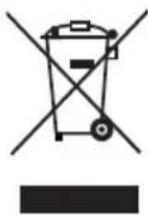
Do not dispose of this appliance in your normal domestic waste. This product is subject to the provisions of European Directive 2002/96/EC.
Dispose of the appliance through an approved disposal centre or at your community waste facility. Pay heed to the currently applicable regulations. In case of doubt, please contact your waste disposal centre.
Notes on the EC Declaration of Conformity
With regard to compliance with essential requirements and other relevant provisions, this appliance complies with the European Electromagnetic Compatibility Directive 2004/108/EC, the Low Voltage Directive 2006/95/EC as well as the ErP Directive 2009/125/EC, Regulation 1275/2008 Annex 1, No. 1.
The complete original Declaration of Conformity can be obtained from the importer.

Importer
KOMPERNASS GMBH
BURGSTRASSE 21
44867 BOCHUM, GERMANY
www.kompernass.com
Warranty
With this appliance you receive a warranty of 3 years from the date of purchase. This appliance has been manufactured with care and meticulously examined before delivery.
Please retain your receipt as proof of purchase. In the case of a warranty claim please make contact by telephone with our Customer Service department. Only in this way can a post-free despatch for your goods be assured.
NOTICE
The warranty is valid for material or manufacturing faults only, not for transport damage, parts subject to wear or damage to fragile parts.
This product is for domestic use only and is not intended for commercial applications. In the event of misuse and improper handling, use of force and interference not carried out by our authorized service branch, the warranty will become void.
Your statutory rights are not restricted in any way by this warranty.
The warranty period is not extended by repairs made under the warranty. This applies also to replaced and repaired parts.
Damages and defects extant at the time of purchase must be reported immediately after unpacking, resp. no later than two days after the date of purchase.
Repairs carried out after lapse of the warranty period are subject to charge.
Service

Service Great Britain
Tel.: 0871 5000 720 (£ 0.10/Min.)
E-Mail: kompernass@lidl.co.uk
IAN75467


- SOMMAIRE
- WAARSCHUWING! LETSELGEVAAR
- WAARSCHUWING! BRANDGEVAAR
- WAARSCHUWING - GEVAAR VOOR STROOMSCHOKKEN
- WAARSCHUWING - LETSELGEVAAR
- INTRODUCTION
- INTENDED USE
- WARNING
- RISKS FROM UNINTENDED USE
- NOTICE
- ITEMS SUPPLIED
- DISPOSAL OF THE PACKAGING
- DESCRIPTION OF APPLIANCE/ATTACHMENTS
- TECHNICAL DATA
- SAFETY INSTRUCTIONS
- RISK OF ELECTRIC SHOCK
- WARNING! RISK OF INJURY
- WARNING! RISK OF FIRE
- TO AVOID THE RISKS AND DANGERS PRESENTED BY ELECTROMAGNETIC FI ELDS
- MANNER OF OPERATION
- SUITABLE COOKWARE
- SETUP
- ELECTRICAL CONNECTION
- OPERATION
- THE INDUCTION COOKING AREAS
- WARNING - PROPERTY DAMAGE
- INFORMATION
- SAFETY SWITCH OFF
- TIMER
- TIMER IN THE POWER MODE
- TIMER IN THE TEMPERATURE MODE
- CHILD PROTECTION SYSTEM
- CLEANING
- WARNING - RISK OF ELECTRIC SHOCK
- WARNING - RISK OF INJURY
- DISPOSAL OF THE APPLIANCE
- NOTES ON THE EC DECLARATION OF CONFORMITY
- IMPORTER
- WARRANTY
- SERVICE
Brand : SILVERCREST
Model : SIKP 3400 A
Category : Frying Pan