D711 - Phone MOTOROLA - Free user manual and instructions
Find the device manual for free D711 MOTOROLA in PDF.



| Product type | Digital cordless telephone with answering machine |
| Brand | Motorola |
| Model | D711 |
| Number of handsets | Up to 5 registrable handsets |
| Range | 300 meters outdoors without obstacles, 50 meters with obstacles |
| Power supply | Mains adapter (base: transparent connector, charger: red connector); 2 rechargeable AAA NiMH batteries per handset |
| Battery life | Approximately 10 hours talk time or 100 hours standby |
| Directory | 100 names and numbers |
| Answering machine | 12 minutes digital recording, up to 59 messages of 3 minutes each |
| Caller ID | Yes (requires subscription to caller ID service) |
| Call log | Last 50 calls (missed, received, dialed) |
| Telephone features | Internal call, call transfer, three-party conference, call hold |
| Speed dial | Keys 1 to 9 |
| Call blocking | Up to 4 prefixes of 4 digits |
| Baby mode | Yes (remote monitoring via another handset) |
| ECO mode | Reduced transmission power |
| Care and cleaning | Clean with a damp or antistatic cloth; do not use household products |
| Safety | Use only the supplied power supply and cables; do not immerse or use in a bathroom |
| Spare parts and repairability | Rechargeable AAA NiMH batteries, mains adapters, telephone cord; contact a Motorola authorized dealer |
Frequently Asked Questions - D711 MOTOROLA
User questions about D711 MOTOROLA
0 question about this device. Answer the ones you know or ask your own.
Ask a new question about this device
Download the instructions for your Phone in PDF format for free! Find your manual D711 - MOTOROLA and take your electronic device back in hand. On this page are published all the documents necessary for the use of your device. D711 by MOTOROLA.
USER MANUAL D711 MOTOROLA
D11IPLuMollinguai_lcover.fm Page 0 Friday, August 24, 2007 6:57 PM





MOTOROLA
Motorola D710 series
Digital Cordless Phone with Answering Machine EN
. Use only rechargeable batteries .Charge the handsafe for 24 hours before use
D71LIPUINforELbookPageFriday,August 24,20073:58PM
Welcome...
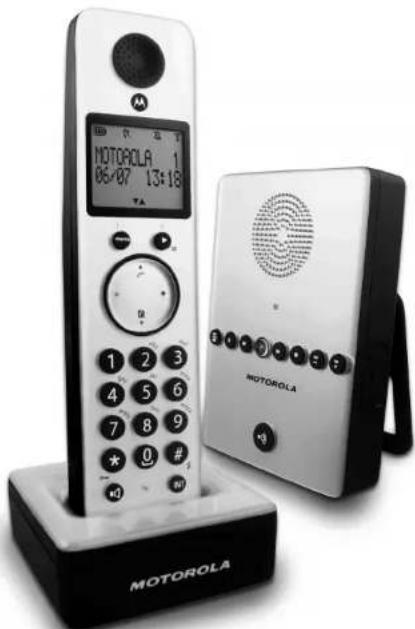
to your new Motorola D711 Digital Cordless Phone!
All handsets fully cordless for locating anywhere within range.
100 Name and number phonebook
- Copy phonebook entries between other handsets.
- Answering machine with 12 minutes digital recording time.
- Caller Display shows you who's calling and see details of the last 50 callers in a Calls list.1
- Register up to 5 handsets to a single base and register each
handset with up to 4 different bases.
- Make internal calls, transfer external calls, hold 3-way conversation between two internal callers and an external caller.
- You must subscribe to your network provider's Caliber Display or Call Waiting service for these features to work. A quarterly fee may be payable.
Please note that this equipment is not designed for making emergency telephone calls when the power fails. Alternative arrangements should be made for access to emergency.
Alternatively, you may find the answer in the Help section at the book of this guide.
This User Guide provides you with all the information you need to get the most from your phone.
Before you make your first call you will need to set up your phone.
Follow the simple instructions in 'Getting Started', on the next few pages.
IMPORTANT
Only use the telephone line cord supplied
This equipment is not designed for making emergency telephone calls when the power fails. Alternative arrangements should be made for access to emergency services.
Got everything?
D711 handset & charger
D711 base
Quick start guide
Battery door
^ 念 2 x AAA NIMH rechargeable batteries
- Mains power adapter for the base
- Mains power adapter for the charger
- Telephone line cord
If you have purchased a D711 multiple pack you will also have the following additional items:
D711 handset & charger
- 2 x AAA NIMH rechargeable batteries
- Mains power adaptor for the charger


D711_1PU_1N_for_EU.book Page 3 Friday, August 24, 2007 3:58 PM


MOTOROLA
| 1. | Getting started | 5 |
| Location | 5 | |
| Setting up | 5 | |
| Connecting up the large base | 5 | |
| Connecting the handset and charger | 5 | |
| Setting up your D7 11 | 5 | |
| Went to a new phone | 5 | |
| Set date and time manually | 5 | |
| 2. | Getting to know your phone | 6 |
| Overview of your handset | 8 | |
| Handset display | 7 | |
| Overview of the base | 8 | |
| Navigating the menu | 8 | |
| 3. | Using the phone | 9 |
| Calls | 9 | |
| Make a call | 9 | |
| Pre-dial | 9 | |
| Dial one touch numbers 1 to 9 | 9 | |
| Call from the phonebook | 9 | |
| Call from the calls list | 9 | |
| Answer a call | 8 | |
| Adjust volume | 9 | |
| Mute | 9 | |
| End a call | 9 | |
| Switch handset off/off | 9 | |
| Call a second external number | 9 | |
| Internet | 9 | |
| Call another handset | 9 | |
| Transfer an external call to another handset | 10 | |
| Switch between an internal and external call | 10 | |
| Three-party conference call | 10 | |
| Voicemail | 10 | |
| Dial your network Voicemail service | 10 | |
| 4. | Phonebook | 11 |
| View and dial phonebook entries | 11 | |
| Store an email | 11 | |
| Entering names | 11 | |
| Charater map | 11 | |
| Enter a pause | 11 | |
| View all entry | 11 | |
| Build an entry | 11 | |
| Delete entry | 12 | |
| Delete all entries | 12 | |
| Copy phonebook to another handset | 12 | |
| One touch keys | 12 | |
| Dial a one touch number | 12 | |
| Store a phonebook entry as a one touch number | 12 | |
| Delete a one touch number | 12 | |
| 5. | Caller display and Calls list | 13 |
| Calls list | 13 | |
| View the calls list | 13 |
| Dial from the calls list: | 13 | |
| Save a number from the calls list to the phonebook | 13 | |
| Delete a calls list entry | 13 | |
| Delete entire calls list | 13 | |
| Redial | 13 | |
| Redial the last number | 13 | |
| View and dial a number in the radial list | 13 | |
| Copy a radial number to the phonebook | 13 | |
| Delete a radial list entry | 13 | |
| Delete entire radial list | 13 | |
| 6. | Clock & Alarm | 14 |
| Set date and time | 14 | |
| Set alarm | 14 | |
| Set alarm melody | 14 | |
| 7. | Personal settings... | 15 |
| Handset tones | 15 | |
| Ring volume | 15 | |
| Pulse repetition | 15 | |
| Group melody | 15 | |
| Key tones on/off | 15 | |
| First ring | 15 | |
| Handset name... | 15 | |
| Auto铃 out... | 15 | |
| Auto hang up... | 15 | |
| Display language... | 15 | |
| Bassist mode on/off... | 16 | |
| Beep... | 16 | |
| Beckfast on/off... | 16 | |
| Keypad lock... | 16 | |
| 8. | Advanced settings... | 16 |
| Recall time... | 16 | |
| Dial mode... | 16 | |
| Temporary switch from Pulse to Tone dialing | 16 | |
| Call turned... | 16 | |
| Switch call barring on/off... | 16 | |
| Set a number to be barred... | 17 | |
| Baxy call... | 17 | |
| Switch baby call on/off... | 17 | |
| Set the baby call number... | 17 | |
| Dial a busy number... | 17 | |
| Registration... | 17 | |
| Register a handset... | 17 | |
| Send a text... | 17 | |
| Unregister a handset... | 17 | |
| PIN... | 17 | |
| Reset... | 18 | |
| Default settings... | 18 | |
| Auto prefix... | 18 | |
| Contents... | 18 | |
| Intrusion... | 18 | |
| ECO mode... | 18 |




D711_INU_IN_for_EU.book Page 4 Friday, August 24, 2007 3:58 PM

MOTOROLA
- Using your Answering machine 19
D711 Base Answer Machine Control Keys 19
Switch on/off 19
Play messages 19
Dolitis all mssages 19
Baeed a rme 10
Record a mho 19
Outoing messages.. 19
Answer & Record 19
Anew 19
Set answer mode 18
Recor, play or delete your own outgoing mesege 20
Anssing mng hings 20
Bng dey 20
Remote access 20
Remote Access onVoff 20
Call screening 20
Switch handset call screening on/off 20
Switch base station call screening on/off 20
Access answering capabilities via the Eiffel list 76
Access answering machine (Hence via the Cane list.. 21
Memory full.. 21 - Help 21
- General Information 22
Safetv information 22
Cloning 23
Gc 22
Eeynpnnd. 22
Product disposal instructions 23
Warranty intemaid 23
Inserting a pause 23
Recall 23


D711_1PU_1N_for_EU.book Page 5 Friday, August 24, 2007 3:58 PM

1. Getting started
WARNING
Do not place your D711 in the bathroom or other humid areas.
Location
You need to place your D711 base within 2 metres of the main power socket and telephone socket so that the cables will reson.
Make sure it is at least 1 metre away from other electrical appliances to avoid interference. Your D711 works by sending radio signals between the handset and base. The strength of the signal depends on where you sit the base. Putting it as high as possible ensures the best signal. HANDSET RANGE
The D'11 has a range of 300 metres outdoors when there is a clear line of sight between the base and handrail. Any obstruction between the base and handrail will reduce the range significantly. With the base indoors and handrail either indoors or outdoors, the range will normally be up to 50 metres. Thick stones walls can severely affect the range.
SIGNAL STRENGTH
The ton on your handed indicates when you are in range. Wher out of range of the basc, the scon shows searing the fleses and the handed gives an out of range warning tone every minute. This tone is repeated until you move back into range
if you are on a call, the line will hang up. Move back within in range. The handshi will automatically re-connected to the base.
Setting up
IMPORTANT
The base station must be plugged into the main power at all sites. Do not connect the telephone to the base station, or the handset is fully charged. Orly use the corner and telephone cables supplied with the product.
WHICH POWER ADAPTOR?
The power adaptor with a clear connector is for the base unit and the power adaptor with a red colour connector is for the charger unit.

MOTOROLA
Connecting up the large base
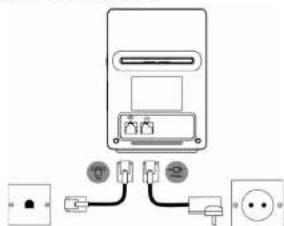
Plug the large mains power cable into the socket marked: 0 the underside of the base and plug the other end into the mains power wall socket and switch the power on.
Connecting the handset and charger
If you have purchased a multiple pack, this process will need to be carried out for all handsets and chargers:
- Plug the small mains power cable into the socket marked—line underside of the chener.
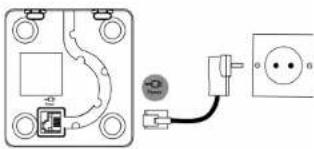
- Insert the 2 x AAA NIMH batteries supplied into the handset. Then slide the compartment cover into place.
- Place the handse on the charger to charge for at least 24 hours.When the handset is fully charged the Fink will indicate that it is fully charged.
- After 24 hours, plug the telephone line cord from the large base into the telephone wall socket.
Getting started 5




D711_1U_DN_for_EJ book Page 6 Friday, August 24, 2007 3:58 PM

MOTOROLA
BATTERY LOW WARNING
If the icon flashes in the display, you will need to recharge the handout before you can use it again.
During charging, the will scroll in the display.
BATTERYPERFORMANCE
In June conditions, fully charged penalties should give about 10 hours talk time or 100 hours abandoy time on a single charge.
Note that new batteries do not reach full capacity until they have been in normal use for several days.
To keep your batterkes in the best condition, leave the hands off the base for a few hours at a time.
Running the betteries night down at least once a week will help them get as long as possible.
The charge capacity of rechargeable batteries will reduce with time as they wear out, giving the hundreds less talk/standby time. Eventually they will need to be replaced.
After charging your handset for the first time, subsequent charging time is about 6-8 hours a day. Batteries and handset may become warm during charging. This is normal.
Setting up your D711
Welcome screen
-
WE COLO is displayed and scoria in different languages. Press The country name is shown on the display.
-
Scroll (or to your country and press 3 CONFRN is displayed.
-
The handout and base will reset to load the correct settings. The standby screen is then displayed, and your phone is ready to use.
You can still make and receive calls without first selecting your country and network operator; however the Welcome screen will reappear until you have configured your phone country setting.
Date and time
Providing you have subscribed to your network's Caller Display service, the date and time is set automatically for all handsets every time a call is received.
The date and time is recorded with each answering machine message you receive.
If you do not have a Caller Display service you can set the date and time manually.
Set date and time manually
-
Press and scroll to CLOCKLARM. Press Display shows DATE & TIME, then press 2. Extract the data using the formatted PRINT file for 1000 rows
-
Press and enter the time using the 24 hour format.
e.g. 14:45 for 2.45pn
- Press to confirm or to return to standby
Your D711 is now ready for use.
6 Getting to know your phone
2. Getting to know your phone
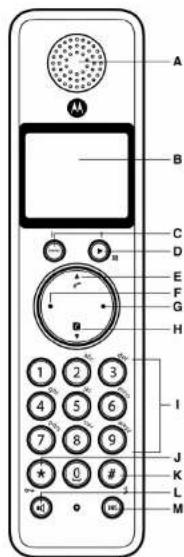
Overview of your handset

D71L_1PU_1N. in Page 7 F:/day, Augus 24, 2007 4:20 PM

A. Farpiess
B Display
See page 7 for an overview of the display icons.
C. Menu key
Enter the main menu. Select the option displayed on screen. Gornfim menu option -0% is
displayed on screen.
D. Redial / Scroll right / Clear / Mute
Open the redial list. Scroll to the right.
Delete characters on screen when entering names and numbers.
Mule / unmuule the microphone during a call. Go back to previous menulevel-BACK displayed on screen.
E Call log/Scroll Up/Volume up
Open the call log.
Scroll up through lists and settings.
Increase the carpiee volume during a call
F Talk/Recall
Make or answer a call
Use recall (R) functions.
G End/Exit/Switchhandseton/off
End a call.
When in a men, go bark in stardby mogs. Press and hold to switch handset off (when in
standby) or cn.
H Phonebook / Scroll Down / Volume down
Open the phonebook.
Scroll down through tests and menus.
Decrease the carpioc volume
#
Press to dial number in during a call or in predial
Press and hold a key 1-9 for one touch dialing of an-set numbers.
J* /Keypad lock
Press and hold to lock/unlock the keypad.
During a call, press and hold to switch from pulse dialling to tone dialling.
Dial a star.
K / Ringer off / Pause
Press and hold to switch handset ringer on or off.
When dialing or storing a number, press and hold to enter a pause (P).
Dial a 0.
L Loudspeaker key
Activate and deactivate the loudspeaker during a call.
WARNING
Handisfree activation can suddenly increase the volume in the carpiere to a very high level. Make
sure the handset is not too close to your ear.
M Intercom (at least 2 handsets needed)
Instandby marks, unless in mass an internal roll.
During a call, use to transfer an external call to another handset.

MOTOROLA
Handset display
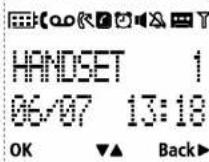
A Display icons
On when the line is in use.
Flashes when there is an incoming call.

Flashes when you have new voicemail messages.

On when you have missed calls and new number(s) in the Calls list

Phonebook is open.

The alarm clock has been set.

Herdstree mode

Handset ringer is off.

Answering machine On. Off when answering machine is off. Flashes when you have new

Steady when the handset is registered and within range of the base. Flashes when the
handset is out of range or searching for base.

roximate power levels of your battery are indicated as below:

Battery is fully charged

Battery is partially charged.

Battery is running low
Getting to know your phone 7


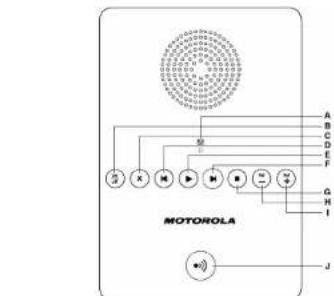
Overview of the base
D711_IN_IN_for_IN book Page 8 Friday, August 24, 2007 3:58 PM
MOTOROLA
OK displayed
Press the key to select and validate a setting
C▲▼displayed
Press (or to) to scroll through the options in a menu, to open the phonebook or calls list when in standby.
D Back displayed
Press to go back to the previous menu option, to cancel an action or to delete a character.
A LED
Indicates when the answering machine is on or off, and when you have messages.
Status Action
On Answer machine on.
Off
Long then short flashes New message(s)
Flashes evenly
Flashbas quickly
A
Recording
Memory Full
B Answering machine On/Off
C Delete
D Skip back
E Play 5
F SKI p 10 r W a r d
G Stop HVolume Down
Volume I
- Pacing key
Paging is a useful way of finding lost handsets.
- Press on the base
All bandsees too.
- Press again to cancel the paging call or press any key on the handset to stop the paging call.
Navigating the menus
The basic steps of navigating through the menu and on-screen options.
1.From the standby screen,press
The main menu is opened.
-
Use the (出) or (出) keys to scroll through the menu.
-
Soll key options ok and BRK are displayed. Press to select OK and open a sub-menur or
Vallable 10 option.
a
- Press to return to standby.
If you do not press any button on the handpaet for 15 seconds the display will automatically return
to standby. It will also return to standby when the handset is placed on the base or charger.
8 Getting to know your phone


machine
off.





MOTOROLA


C.▲■displays


D Back displayed

to go back to the previous menu option, to cancel an action or to delete a character.
Overview of the base









D711_1PU_IN_for_EU.book Page 9 Friday, August 24, 2007 3:58 PM
3. Using the phone
Calls
Make a call
- Press 2. Dialt
Prodiect
-
Enter the phone number (maximum 24 digits). If you make a mistake press
-
Press to dial the phone number entered.
Dial one touch numbers 1 to 9
- Press and hold a key from 0 to 9 until the number is displayed and dialed. If no number is entered, you hear a o h o
Call from the phonebook
-
Press 1. The first only in the phonebook is displayed.
-
Soro 3 to the unity y 1. Prove to find the numbers
TIP
Instead of scrolling to browse the phonebook entries, press the numeric key corresponding to the first letter of the entry you wish to locate. For example, pressing · 2 will show the entries starting with 1 . The first two letters in the table are the same as in the first column.
Call from the calls list
NOTE
You need to subscribe to your network's Caller Line Identification service to be able to see the caller's number in the calls list. See "Calls list" on page 13 for more details.
- Press to enter SLLL menu. You have the options in accessCALLIST or ANEW VACHME.
Press to enter CALL LIST. The first entry in the call list is displayed.
-
Scroll to the entry you want.
-
Press to dial the number.
Answer a call
- When the phone rings and flashes in the display, press or press to answer the call
WARNING
When the phone is ringing, avoid holding the earpiece too close to your ear as it may damage your hearing. Handfless activation can suddenly increase the volume in the earpiece to a very high level of intensity. This will cause the sound to be heard at a much higher rate.
NOTE
If you have subscribed to your Network's Caller Identity service and assigned a VIP Group to the caller's number, the caller's details are displayed before the phone starts ringing (see "Store an entity" on page 11 and "Group melody" on page 15). You can set your phone to give the default voice. The caller will be able to access the caller's identity is displayed, the assigned ringsigns will start. See "First ring" on page 15.

MOTOROLA
TIP
If Auto Pick up mode (see page 15) is on, simply lift up the handset from its base to answer the
NO
An inopening call has priority over other purposes. Wherewever there is an inoposing
operations in progress such as phone settings, menu navigation, etc. will be ended
Adjust volume
- During a call, press 品 or 0 to adjust the earpiece or loudspeaker volume.
The level is shown in the handoset display.
Muto
Mute the microphone so that you can talk to someone else in the room without your caller hearing
you.
1.During a call,press
The microphane is mated.
- Press again to turn the microphone back on.
End a call
- F
After you hang up, the duration of your call is displayed for 5 seconds.
NOTE
If auto hang-up is on (see page 15) simply replace the handset on the base to end the call. The
cn
Switch handset on/off
-
Press and hold until the handset switches off.
-
Press and hold 3 again to switch the handset back on.
Call a second external number
Put an external caller on hold to make a second external call. You can then switch between both callers or hold a 3-way conference card.
-
During your call, press . Scroll to INTENDCALL.
-
Press
DisplayshowALLNO
-
Enter the second number.
-
When your second caller answers, press to open the option menu
CONFERENCE - press to initiate a 3-way with an external caller and internal caller.
SWITCH CALLS - prese to switch between the two callers
- Press to hang up
Intercom
This feature is only available when there are at least 2 registered handsets. It allows you to make
Using the phone 8







D71IPLENforELbookPage 10 FridayAugust 24,20073:58PM

MOTOROLA
Call another handset
- Press
If you have two hands, the other hand is called automatically.
If more than two handos are registered to the base, their numbers are displayed, e.g. 246. Enter the number of the handed you want to call or press to ring all handeds.
2 Press to heng up.
NOTE
IF the handse does not belong to D709710 range, this function may not be available.
Transfer an external call to another handset
using an external call, press
-Your callar is put on hold.
-
Enter the number of hands you want to call or press 10 to ring all hands
-
Wher the sliny hondred surns, wouwne the cater hore pree ( * in hawking hn coil 10
other handed does not answer press to talk to your caller again.
Switch between an internal and external call
Your call is put so hold.
- Enter the number of the handset you want to call or press to ring all handsets
If there are only two handseets, the other handser is called automatically.
-
When the other handset answers you can speak privately to your internal caller
-
Press to switch between both callers.
-
Press to hang up
Three-party conference call
- During an extreme cell process (E)
Your caller is out on both.
- Enter the number of the handset you want to call or press to ring all handsets
If there are only two handsets, the other handset is called automatically.
- When the other handset answers, announce the call then press and hold to connect both
calls. If the other handseel does not answer, press to talk to your caller again.
- Press to hang up.
Voic
If you have subscribed to your network's voicemail service (if available), your D711 displays 0.0
when you have a new message. Depending on your country and network services, the voicemail
number may be pre-star
NOTE
The voicall number is pre-stored only if the country where the phone was purchased offers a voicall service. If the voicall number is not pre-stored you can add a number, or overwrite it with a number that would be used in the VoIC service.
Dial your network voicemail service
Press and hold 1
The number is displayed and dialled. Follow the voice prompts to play, save and delete
you mssagc
10 Using the phone


D711_INU_INfor EU book Page 1 Friday, August 24, 2007 5:58 PM

MOTOROLA
4. Phonebook
The D711 handset phonebook can store up to 100 names and numbers
NOTE
Numbers can be up to 24 digits long and names up to 12 characters long. Entries are stored in alphabetical order.
View and dial phonebook entries
-
Press 4. Display shows the first entry
-
Scrol 2 or 1 to the entery you want
0
To search alphabetically press , then press the key with the first letter of the name, e.g.
the
The display shows the first only beginning with N. If required, press 4 or 5 to scroll to the exact color.
- Press to dial the entry displayed.
Store an entry
-
Press 念 . PHONEBOOK is displayed.
-
Press NEWMENTRIs displayed.
-
Press ENTER NAVE is dsolved.
-
Enter s name and press
-
Enter a number. Press to save. Press or to select 10 GROUP, GROUP A, B or C and press to confirm
-
Press to return to standby.
NOTE
You can assign individual contacts to specific groups of your choice. For example, Group A contains phone numbers of all your co-workers. You can also assign a specific ring melody to that group (see "Group melody" on page 13). You can benefit from this feature only if you have enough time to work with the group. The group is also limited to one person at a time. Every time someone from that group calls you, you will hear the designated ringtone for that group.
NOTE
Cancel storing an entry by pressing at any time during the process.
Entering names
Use the alphanumeric keys to enter names in the phonebook.
For instance to enter the name Paul
Press 7 once
1
m = 311 ;
L
To enter a space press
Press to delete a character or press and hold to delete all characters.
Character map
Use the keypad to enter names and characters.
(1)
A
2
(2)E
4 6 H
(5)
(6) N N
①
6 T 1
(9) W X Y 2
Enter a pause
If your D711 is connected to a switchboard, you may need to enter a pause in a stored number. This gives the switchboard time to get an outside line. A Pause is normally stored after the
switchboard access code (e.g. 9)
- When storing a number, press and hold until the display shows P. You can then continue storing the phone number.
View an entry
in standard
1.
1.
-
Enter the number of rows in the table
-
Puys (1) to diny the yonh if there are more than 12 digits, aenin no nee
r
- Pere (1)
DURING'S CAH
- Press twice to open the phonebook menu
- Enter the first letter of the name you want then scroll 已 or if necessary to the exact name Press: to display the number. If there are more than 12 digits, press: again to see the
- Press to cancel the phonebook display.
- Press again to end the call

Phonebook 11


D711_1RULINforEJ. book Page 12 Friday, August 24, 2007 3:58 PM

MOTOROLA
Edit an entry
- Press (2)
- Copy or to the entry you want to edit and press. EDIT ENTRY is displayed. Press grain
- Edit the name and press to confirm. Use to delete characters.
- Press and edit the number
- Press to confirm.
- Scroll or to select NO GROUP, GROUP A, B or C and press to confirm.
- Press to return to standby.
Delete an entry
- Press 0.
2 Scroll to the entire text you want to delete. 3. Click OK to save text.
3.Seril 4. Rreouh h 5. - Display SNOW COFFIN? PRES
Delete all entries
- Press twice.
- Scroll to DELETE ALL and press
- Display shows COFFAM' Press
- Press to return to standby.
Copy phonebook to another handset
- Press twice
2 Scroll to PnTnSFR and prcess -
Scroll or to the number of the handset you want the phonebook copied to. Press
-
Press to return to standby.
NOTE
If an entry with the same name and number is already stored in the receiving handset, it will not be coded across.
One touch keys
The keys 1 to 2 enable one touch dialing of entries stored in the phonebook.
Dial a one touch number
- Press and hold a number key 1 to 2.
The number is disclosed and dialg. - Press to cancel the dialing and return to standby.
- Press and hold a number key 1 to 2.
The number is disclosed and dialg. - Press to cancel the dialing and return to standby.
Store a phonebook entry as a one touch number
- Press twice
- Scroll to DRECT MEN and press
- Press or to select Key 1-9 and press . The current entry, if any, is displayed.
- Press again to open the options menu.
-
Press to 400 an entry from the phonebook.
-
Scrol 2 or 1 to the enry you want. Press to confirm or to return to standby.
Delete a one touch number
- Press twice then scroll 2 or to PECT VEN and press
- Scroll or to select NE1:
- Press to display the current entry. Press again to open the options menu.
- Scroll to DELETE and press
- Display shows CONFIRM? Press
- Press to return to standby

One touch keys
The keys 1 to 2 enable one touch dialing of entries stored in the phonebook.
Dial a one touch number
12 Phonebook
D711_INU_INfor EU book Page 13 Friday, August 24, 2007 5:58 PM

5. Caller display and Calls list
If you have subscribed to Caller Line Identification (CLI), and provided the identity of the caller is available, the caller will be displayed together with the date and time of the call (if provided by the network).
NOTE
If the caller's number is stored in your phonebook along with a name, the name will also be displayed.
- If the telephone number is not available for incoming calls, the handset will display AVAILABLE information about incoming calls will vary by country and network operator. Some operators may charge a subscription for their Caller Line Identification service.
Calls list
The calls list contains details of missed and received call. Details include the date and time of the call. Entries are displayed in chronological order with the most recent call at the top of the list.
NOTE
When the calls list is full, a new call replaces the oldest in the list.
The received and missed calls log holds details of up to 50 calls. If you see a call that one cell for the same number and the
If you receive more than one call from the same number, only the most recent call is kept in the calls list.
When you have missed calls (incoring calls that you haven't answered) the will be displayed in the display on all handsets registered to the base.
If one handset is used to view the calls log, the icon on the other handsets continue to flash (Multipack user only).
View the calls list
-
Press 已 to enter CALL LOG option menu, then press 已 to enter CALL LIST - The most recent number or name 3 stored in the phonebook is displayed. New osis are
-
Scroll or through the calls log.
At the end of the log, you will hear a beep.
Press to see the number. If the number has more than 12 digits, press to see the rest of the number.
- Press to return to standlay

In store flashing once all new calls have been viewed.
Dial from the calls list
-
Press to enter the CALL LOG option menu, then press to enter CALL LIST. The most recent call is displayed.
-
Scroll (A) or (B) to the entry you want.
-
Press or .to die
Save a number from the calls list to the phonebook
-
Press then The most recent call is displayed.
-
Scroll or to the number you want.
-
Press SAVE NUMBER is displayed.
-
Press ENHANCED is displayed. Use the Keypad to enter the name.
must press to save the number (even if has not been edited).
-
Press or to select NC GROUP, GRCUP A, B or C and press to confirm.
-
Press to confirm.
-
Press to return to standby.
Delete a callist entry
-
Press then The most recent call is displayed
-
Scroll or to the number you want 3. Page for more than small on SEET and on
-
Display above (CBBN) Error in the form
-
Pass (to return to school)
Prrnre rnrnnrnnnne
Deleterentirecalislist 1
-
Press # . The #h #e#d can is displayed
-
Display stores COBREV2 Press to confirm Press to return to staply
Redial
The D711 lets you redial any of the last 10 numbers called. Numbers can be up to 24 digits long.
Redial the last number
- Press The last number dialled is displayed.
If the number has more than 12 digits, the display shows and the cursor blinks. Press OK to display the text. If the number is stored in the Filesystem, the same is displayed on all
display the rest if the number is stored in the Phonebook, the name is displayed as well.
1
View and dial a number in the radial list
-
Press . The sai nroed taied is disobyed
-
Press to dial the number
Carve a radial number to the above box:
Copy a radial number to the phonebook 1. Copy (A) and recall (B) of (C) in the entire you want
-
Press
-
Dispays shows save numser Pross
-
Enter the name and press OK
-
Edit the number required and press
-
Press or to select WCGROUPGROUPA, B or C and press to confirm
-
Press to return to standb
Delete a radial list entry
-
Press Scroll or to display the number you want.
-
Press and scroll to DELETE then press
-
Display shows COMHRV? Press to confirm then to return to standby



D711_INU_IN_for_EJ.Hook Page 14 Friday, August 24, 2007 5:58 PM

MOTOROLA
Delete entire radial list
- Press then press
- Scroll to DELETE ALL and press
- Display show CONFRM. Press to confirm. Press to return to standby.
6. Clock & Alarm
If you subscribe to your network's Caller Identification service, the time on your D711 may be set automatically each time you receive a call, depending on your network provider.
You can also set or adjust the time using the Clock & Alarm menu.
Set date and time
- Press and scroll to CLOCKLYARv. Press Display shows DATE & TIME, then press
- Enter the date using the format COVN e.g. 10 for 4th August
3.Pies and enter the
e.g. 14.45 for 2.43psi - Press to return to standby
NOTE
Set alarm
- Press to DOCKALARY end press
- Scroll to SET ALARM and press
- Scroll or to OFF, ON, ORCE or ON/DAY and press
- If you select ON/OFF or ON/Daily enter the time using the 24 hour format HH-VM e g 14:45 for
- Press to return to standby. When the alarm goes off, press any key to stop the ring.
NOTE
Once the alarm is set to on, the non is displayed.
The alarm will ring at the medium level. ALARM ON and the flash on the display
Set alarm melody
There are three alarm rings.
1. Press and scroll to CLOSSLARY
Press
2. Scroll to ALARM TONE and press.
Meodies are pioy 3.4
14Clock & Alarm


D711_INU_INfor EU book Page 15 Friday, August 24, 2007 3:58 PM
7. Personal settings
Handset tones
WARNING
When the phone is ringing, avoid holding the espioc too close to your ear as it may damage your hearing.
Ring volume
Choose from: Ringer Off, Low, Medium, High, Boost and Progressive (increasing ring volume).
The default setting is High.
-
Press OK to fill in the PERSONAL SET and press OK
-
HANDSEET TONE is displayed. Press
-
RING VOLUME is displayed. Press
-
Scroll (or to adjust the ringer volume level)
-
Press to save the settings
Ring melody
Choose from 10 ringer melodies
-
Press, scroll to PERSONAL SET and press
-
HANDSET TONE is displayed. Press and scroll to RING MELCOY. Press
-
Press or to select the ringtone.
A sample of the ringtone is played.
-
Press to confirm.
-
Press to return to standard
Group melody
To benefit from this feature, you must subscribe to the Caller Line Identification service. This menu
enables you to select and set the mleodies to be played when there is an external incoming call
rrom a contact whose name is stored in your phonebook and is part of a group. You can associate
ring melody to each group . There are three phonebook groups ( Group A ,to organize your contacts . Each group can be assigned a unique melody ,
1.700000000000000000000000000000
- ANOESTONE is displayed, Prrn 10 and olls (to CROUVE HPE) Bpse
2.1000000000000000000000000000000000000000000000000000
-
Press 2 or 1 to select the photorey you want for use
-
Press: to return to syntax
Key toros on/off
Key Terms On/
-
Process: 10 to 50% of total net and gross
-
HANDSETONE is displayed. Press ( ) and scroll to KEY TONE. Press
-
Scroll (↑) or (↓) in respect to or off
4.Pressa to confirm
- Press to return to standby

MOTOROLA
First ring
Your D711 will automatically detect the Caller identification (Subscription dependent). If you de
not wish to hear the ring before the caller identification is displayed you can manually set FIRs1 RING to OFF. The default setting is ON.
1. Press, scroll to PERSONAL SET and press
2. HACSET TONE is displayed. Press end scrol1 to FIRST RING. Press
3. Scroll or to select ON or OFF.
4. Press to confirm.
5. Press to return to standby.
Handset name
Personalise your handset, with a name or location for example Peter or Bedroom. Maximum 10
1. Press to scroll to PERSONAL SET and press
2. Scoll HANSDT NANE and press The current name is displayed
3. Press to delete the current name.
4. Enter the name you want - maximum 10 characters and press
to save.
5. Press to return to standby.
Auto pick up
With Auto pick up switched on, you can answer a call just by filling the handset off the base or charger. If switched off, you will have to press * to answer a call. The default setting is On.
- Press to PERSONAL SET and press
- Scroll to AUTO PICK UP. Press
3.Scrollor or to selecton oroff - Press to confirm.
- Press to return to standby.
Auto hang up
With Auto hang up switched on, you can end a call just by replacing the handset on the base or charger. If switched off, you have to press " 念 to hang up. The default setting is On.
- Press , scroll to PERSONAL SET and press
- Scroll to AUTO HANG UP, Press
- Scall or to seleclion or Off
- Press to confirm.
- Press to return to standby.
Display language
You can change the display language.
1. Press to scroll to PERSONAL SET and press
2. Scroll Language Press
3. Scroll or to select the language you want
4. Press to confirm
5. Press to return to standby.
Personal sellings 15


D71IPLENforELbookPage 16 FridayAugust 24,20073:58PM

MOTOROLA
Babysit mode on/off
Leave one handset in a room and use another handset to hear sounds in that room.
1. Press to PERSONAL SET and press
2. Scroll to BABYSIT VCDPE Press
3. Press or to select OR or OFF
4. Press to confirm.
When switched On, you can leave this handset in the room you wish to monitor. Only the microphone is on. Anyone in the room cannot near you.
Babysit
-
Switch a handset's babysit mode setting On and place that handset in the room.
-
At a second handset, press 0 and enter the number of the handses you are using as a room monitor. You can now hear sounds coming from the room.
TIP
To stop room monitoring at any time, press
Backlight on/off
- Press, scroll to PERSONAL SET and press
- Scroll to BACKLIGHT Press
- Press 2: or 0 to select DM cr CF.
- Press to confirm
Keypa
Prevent accidental dialling while carrying the handset by locking the keypad.
- Press and hold
The display shows KEsLOcED - To unlock the handset, press and hold again.
NOTE
While the keypad is locked, you can answer incoming calls as normal.
8. Advanced settings
This setting is useful to access certain network and PABX-switchboard services.
Recall time
The default D711 recall time is suitable for your country and network operator. It is unlikely that you should need to change this setting unless advised to do so.
- Press , scroll to ADVANCED SET and press
- RECALL THE IS displayed. Press
- Press or to select the setting you want: SHORT, MEDUUM LONG
- Press to confirm
- Press to return to standard
NOTE
The use of your D711 cannot be guaranteed on all PABX.
Dial mode
The default D711 dialling mode is suitable for your country and network operator. It is unlikely that you should need to change this setting unless advised to do so.
- Press , scroll to ADVANCED SET and press (
- Scroll to DUAL MODE Press
- Press or to select TONEOR PULSE
- Press to confirm.
- Press to return to standby
Temporarily switch from Pulse to Tone dialling
- Press and hold 2. Hold
The dai mode will change from Pulse to Tone for the duration of the call.
Call barring
Prevent certain numbers from being dialed from your D711. Store up to four specific numbers,
each up to 4 digits - for example, international or local prefixes.
Bypass call barring by switching the setting Off or On.
NOTE
If you switch Call baring on, BARR VOCE ON will be displayed on your screen in standby mode.
Switch call barring on/off
- Press , scroll to ADVANCED SET and press
- Scroll to Call SBIRPG Press
- Enter the master PIN (default setting 9000) and press
- NODE is displayed. Press
- Press or to select ON or OFF. Press to confirm.
- Press to return to standby. You can now set the number
(See below)
16 Advanced sellings


D711_INU_INfor EU book Page 17 Friday, August 24, 2007 5:58 PM

Set a number to be barred
7. Press to return to standby.
- Press to Advanced Set and press
- Scrol to CALL BARRING. Press
- Eple the master PIN (defaul setting 0000) and press
4.5001 to NUVER Press
5.2023年1月1日(星期一) - Puys and wiph the mumber of uynr you want to be Puys
0
10 commm.
Baby call
When activated, this feature allows you to dial a number by pressing any key on your handset (except ± ). This feature is very useful for access in emergency services.
Switch baby call on/off
-
Press, scroll to ADVANCED SET and press
-
Scrlpl 10 Baby Call, Press
-
Enter the master PIN (default setting 0000) and press
4.NOPE is disclosed. Press on pess or to select OR Off Press to confirm
- Process to return to smoking
NOTE
NOVE
If you switch Baby Tal on, say
To switch Baby call off again:
1.
1.限售期:2年
2. OFFLINE DISPLAYED. Press to close
Set the baby call number
-
Press , scroll ( ) to ADVANCED SET and press
-
Scroll to BASYCALL. Press
-
Enter the master PIN (Default setting 000) and press
-
Scroll to NUvBER.Press
-
Ener Ibs nurnber Press 1
-
Press to return to main
Dial a baby number
- When a baby call number has been stored and the baby call setting switched on, press any key (part from ) to dial a number.
NOTE
When baby call is switched on, you can still answer any incoming call as normal.
Registration

MOTOROLA
The Master PIN is required before you can register or unregister handseels. The default PIN is 0000.
Register a handset
At the oseae
- Press and hold the 34 button on the base station for at least 3 seconds. The base station emits a beep when it is ready to accept registration. You have 90 seconds in which to register.
At the handset:
- Press and scroll to AVANCED SET and press
- Scill 3 to RERITATION and stress
- If necessary, scroll or to display REGIST. BASE and press , BASE 1214 is displayed and the registered base number is flashing. Enter the number of the base on which you wish to register your handset.
If you have only 1 base station, press ① you have 2 base stations, press ① or ② , etc. - When the display shows PIN, enter the case PIN.
- When the handest registers with the base, it is assigned a handest number.
Select a base
You can register your D711 handset with up to 4 bases. Once registered, you can switch between bases, for example, bases at home and at work.
1. Proess and Complis to/iv/iv/iv/iv and Proess
2.1008-100800
2. Schon 已 Rednach and pres 3. Schon
3. SETTLE STATE IS DISPLAYED. PRESS
The available bases are displayed with the current base number flashing
4. Enter the number of the base you want - 1,2,3 or 4 and press (F). - When the base is found you hear a beep. if not found, the display shows unregistered
Unregister a handset
- Bress and scoll in 600000 and pess
2.Scrol 2 to INFERST and CONs t - Ester the 4dnt pcrter Binod prce
- Enter the 4-digit master PIN and press OK.
- Smal to 1000
4.3.10.25.26.27.28.29.30.31.32.33.34.35.36.37.38.39.40.41.42.43.44.45.46.47.48.49.50.51.52.53.54.55.56.57.58.59.60.61.62.63.64.65.66.67.68.69.70.71.72.73.74.75.76.77.78.79.80.81.82.83.84.85.86.87.88.89.90.91.92.93.94.95.96.97.98.99.
PIN
The .digg master PIN is used when registering or unregistering a handset and when changing the settings on your D711. The default settings is 0030. You can change this PIN for more security.
- Brrr rccn 1
- Scaal to Fw Spore
- Enter the current 4-digit master PIN and press (Default setting 0000)
- Enter the new PIN and press OK.
Registration
Up to 5 handsets can be registered to one base station. Additional handsets must be registered
to the base before you can use them.
The information described below is only an initial list of 1711 hospitals. If you wish to
e
regster another manufacturer's handset, the instructions may vary. In this case, please refer to the manufacturer of the additional handset.
Up to 5 handsets can be registered to one base station. Additional handsets must be registered
to the base before you can use them.
The intuigser depoioh holln ayk eoviflly to uys P711 bndr. If uys wish to
- This includes the following requirements to be satisfied by the following: If you're registered as a manufacturer's handout, the instructions may vary. In this case, please refer to the manufacturer's additional handout.
Advanced settings 17


D71_IN_EN_for_EJ.book Page 18 Friday, August 24, 2007 3:58 PM

MOTOROLA
NOTE
Make a note of your PIN. If you forget your PIN you will need to reset your product.
Reset
This will reset your D711 to its default settings.
-
Press, scroll to ADVANCED SET and press
-
Scroll to RESET UNIT. Press
-
CONFIRM! is displayed. Press OK
NOTE The color bar in the phonebook and new answering machine messages are retained. After reset, depending on your country, the welcome mode setting may be shown on the handset display.
Default settings
Handset name Handset
Key jane On
First line On:
F111
Auto pick up On
Auto hang up On
Ringer melody Ring 1
Ringer volume
Earpiece volume 3
Phonebook
Unchanged
Celllog Empty
Redis list Empty
Master PIN: S000
Keypad lock.Off
Clock
Alarm
Dial code
Answer Machine
Answer Mode
Outgoing message:
Cingling tingshe.
King dissy
Remote Access
Handset screening
Base screening
01
Aner & Rrcord
Pre-defined
15 seconds
On
01
2
Auto prefix
You can set the D711 to detect a dialing number and replace it with another number. The number to be entered can be up to 5 digits long. It can be replaced with a number up to 10 digits.
1. Press → scroll → to N/WDEDsT and press →
1.Press 已 ,scrch 已 5.Advances
3.DETEcTIOIN is displayed.
4. Enter the number you want to be detected and press
5. Scroll to PREFM.MN and press OK
6. Enter the number you want it replaced with and press OK. 7. Paste to return to your
1. Press OK to return to statuiry.
Country
If you move to another country you can set your phone to be compatible with the network settings of that country.
NOTE
NOTE If you make a mistake during welcome mode country selection, you can also reset your country.
Depending on your country, this option may be displayed as NOT AVAILABLE or you country may not be
displayed.
- Press, scroll to ADVANCED SET and press
- Scroll to SEL COUNTRY Press
- Enter the 4-digit master PIN and press OK.
- sclro 2 or to display the required country.
- Press to confirm.
Intrusion
When an external call is taking place, another handset registered to the base can join in, making the call a very successful one.
To enable this intrusion must be switched On.
1. Process 2: process (3) to "A"WAN'5E5ET and process (4)
2.Scroll to INTR/SOW.Press.
3. Scoll 2 or 1 to ON or OFF
4. Press to confirm.
5. Press to return to sterlty
ECO mode
To reduce the level of power emissions, you can select low power or ECO mode. When the ECO
mode is set to OK, the base transmission power will be reduced.
Ta tum ECO Made IbON or OFF
1. Press, scroll to ADVANCED SET and press
2. Scroll to ECO WOCE and press
3. Press or to highlight on or off then press to confirm
A confirmation beap is emlled and the handsc display will switch between the handsc's
Name and ECO NDU
NOTE When EcoMice is set to 0, the handset range will be reduced.
18 Advanced settings




D711_INU_INfor EU book Page 19 Friday, August 24, 2007 5:58 PM

MOTOROLA
9. Using your Answering machine
Your O711 answering machine records unanswered calls when it is activated. It can store up to 59 messages within the maximum recording time of 12 minutes. Each message can be up to 3 minutes long. Your personal outgoing messages can be up to 1 minute long.
D711 Base Answer Machine Control Keys

Press to turn the answering machine on/off

Play new messages

Press to stop playback

Skip to the next message during message playback

Replay current message
Press twice to skip back to previous message

Delete current message during message playback
Long press to delete all messages when TAM is in standby mode

Increase speaker volume during message playback

Decrease speaker volume during message playback
Switch on/off
-
Press 念 scroll or to ANM WACHNE and press
-
Scrl 1 to ANSWC OFF and press
-
Scrol 9 or 10 display on B or C.
-
PEG8 160000H
-
Press to return to standard
Play messages
-
Press and scroll or to AUGMENTHE and press PLAY is displayed
-
Press to play new messages.
The display shows the number of new messages, if there are no new messages, all stored
meeasaaare played
- Press to display the callers identification. Press again to see the date and time of the call.
NO.1 We have not subscribed to the Caller Line Identification this option is not available. This also applies for memo recordings. - During playback press to display a list of options. Use the and keys to change the options:
REPEAL-press inrepeal current messages
-NEXTYES64E-press- to play next pressure
PREVMESSAGE-press to play previa message - SAVE NUMBER - press to store the number, if available, in the pheretox.
NOTE
If you have not subscribed to the Caller Line Identification this option is not available.
- Press to stop playback and return to standby.
Delete all messages
- Press to scroll to ANSW MACHINE and press
- Scroll to DELETE ALL and press
- Display shows COMRR? Press to confirm
Record a memo
You can record a memo which is stored on your answering machine and played back like a normal
- Press to scmp() or to assign the file and press
- Sorn to REGEND NAME and press F1. Display shows RECEIONG
- Speak your message. Press to end recording.
Outgoing messages
This is the message your calers hear on the answering machine. There are two pre-recorded
Ougong mssages, or you can record your own.
Answer & Record
The caller can leave a message. The pre-recorded message is 'Hello, your call cannot be taken
at the moment, so please leave your message after the lone.
Answer Only
The caller can listen to your announcement but cannot leave a message. The pre-recorded
message is "Hello, your call cannot be taken at the moment, and you cannot leave a message, so please call for."
Set answer mode
Sel your machine to Answer & Record or Answer Only.
1. Pass in sepal ( ) to ( ) and
1. Plo8 2. Small in WSNER VOCE and xeran (2)
-This current answer mode is displayed
Using your Answering machine 19






D711_INU_INfor EU book Page 20 Friday, August 24, 2007 5:58 PM

MOTOROLA
-
Soroi or to select AXSNER &REC or AXSNER ONLY and press
-
Press to portm
If you select PERSONALIZED, see following paragraph.
Record, play or delete your own outgoing message
An er & Rrcd r t you clls to leave a message. Averl Only tels calers h your
-
Press script in AVIN WACHNE and press
-
Scrol 1 to AYSMEYVCE and press
-
Scroll or to select ANSWER & REC or ANSWER ONLY and press . Use the or key to
select PERSONALISED then pre 4. A in standard Purns
-
FOWD IS displayed. Press OK.
-
Scroll to select RECORD WES3 - press. Display shows RECORD and a beep is emitted.
Speak your message. Press to end recording.
-
DELETE - press The pre-recorded message will be automatically reinstated.
-
Ptees to confirm
Answering machine settings
Ring delay
Select the duration of rings before your answering machine picks up the call. Choose from 5/10/15/20/26/30 seconds to Tall Tall.
1520230860018 or 104 SAAV
NOTE
If Toll Saver is selected, then
If you have new messages your phone answers after 10 seconds.
If there are no new messages it will answer after 20 seconds. So you have the option to hang up, saving the time and cost of a call.
If the memory is full, it will answer after 30 seconds in Answer Only mode.
-
Press to spin to select the data and press
-
Scroll to ASSETTING and press OK.
-
RING DELAY is displayed. Press
-
Scroll or to select 5/10/15/20/25/30 seconds or TOLL SVER.
-
Press to confirm.
Remote access
Remote access allows you to operate your answering machine and listen to your messages by
calling your D71 from another phone
The default setting is on.
1. Call your D711. When you hear your customer's praise, press OK
2. Enter your 4-digit PIN. The default code is 0000
-You besy a corgiation hese
1.0000000000000000000000000000000
Fig. 10.
11. When you load your subpaing message, press it
digit P/N The default code is (999)
a
The following is an
1.2.3.1.1.1.1.1.1.1.1.1.1.1.1.1.1.1.1.1.1.1.1.1.1.1.1.1.1.1.1.1.1.1.1.1.1.1.1.1.1.1.1.1.1.1.1.1.1.1.1.1.1.
1. Call your D711. When you hear your doping message, press it.
2. Enter your 4 digit PIN. The default code is 0000
You hser a
NOTE
Change this code for increased security, see PIN on page 17.
3. After entering your PIN as stated above, use the keypad to operate your D711 answering
machine
Play messages 2
Play previous message 1
Play next message 3
Delete message playing 6
Switch answer machine on:
Schnitzler 1984
Stop playback 8
Switch answer machine off 9
Remote Access on/off
- Press, scroll to ANS NCHNE and press
- Scroll to ANSW SETTINGS and press
- Scroll to RENDEEACC and press
- Srlal 0r to selent AINATID OF DEAUTNATEU
3. Press to confirm
Call screening
Use your handset or base speaker to hear a caller leaving a message. You can then choose to
ignore the caller or pick up the call.
The default settings are:
1.Hardset cell screening: CTT
- Base call screening: On
1
A
1. If you want to interrupt and take the call press or
At the base:
- When a caller is leaving a message, press or to adjust the volume to listen to your
- To interrupt and take the call on the handset, press or (4)
Switch handset call screening on/off
- Press, scroll or to ANSW NACHME and press
2 Scroll to RWMS SETTINGS and press - Pn 100000000000000000000000000000000000000
-
Gens of 107
Switch boea cation cell corming on/off
Switch base station can screening on 1. Puses e rve to ANM PACHE and pones -
Piss 5, sclal 10 Aow Wnne and pss
20 Using your Answering machine


Our Answering Machine
12
or
PREDI conf
PERH
y in but in roll a ASM AUSE yed, ass sell sas CC conf
g n liangond selcc
swn 0 neo t tinn 181 roll 1 ASR dgad 1 cont
Ccll 11 fn ing i 11.1 dig a cc
UF
10
0122.1ook 14g0 201111y, Aog3, 24, 2017 9.25 19
(1)


- Scroll or to display the message type you want PERSONALISED to set your own recorded messages or PRSEPUKE for the pre recorded messages
to display the message type you want PERSONALISED to set your own recorded
PHEDEFINED FOR THE PRE-RECORDED MEGAS
confirm.
PERSONALIZED, see following paragraph.
TAPL
By or delete your own outgoing message.
and invites your callers to leave a message. Answer Only 1
but they cannot leave a message.
p in 15W NADHNE and o
1
N
to select ANSWER & REC or ANSWER ONLY and press. Use the 出 or key to
yed. Press
mssage is played back.
solecRECORDWES - press . Display shows RECDONG and a beep is emitted.
essap. Press to end recording.
The pre-recorded message will be automatically reinstated.
cosim
A
g m
tion of rings before your answering machine picks up the cat. Choose from 5104
conds or Toll Saver.
m = 311 ;
1
1
ay mssages your phone anewers after 10 seconds.
To new messages it will answer after 20 seconds. So you have the option to hang
time and cost of a call.
1911, it will answer 30 seconds in Answer Only Mode.
1
F
10
CONT.
特此公告。
C
is allows you to operate your answering machine and listen to your messages by
11 from another phane
m - 1 0 ;
图1
12


Record, play or delete your own outgoing message
Aes
announcement but they cannot leave
-
Press script in 6xW VACHME and press
-
Scoll 1 to 50000000000000000000
-
Scroll or to select ANSWER & REC or ANSWER ONLY and press . Use the or key to
select PERSONALUSED then press
4.P1 is displayed.
1
- Scroll to select RECORD WESS - press Display shows RECORD and a beep is omitted.
Sueh your mssrpe. Press to end rccding
-
DELETE - cress. The pre-recorded message will be automatically reinstated.
-
Press to confirm
·
Answering n
Bing delay
Select the duration of rings before your answering machine picks up the call. Choose from S104
15/20/25/30 seconds or Toll Saver.
NO5
NOV
108
- If you have new messages your phone answers after 10 seconds.
If there are no new messages it will answer after 20 seconds. So you have the option to hang
up, saving the time and cost of a call.
-
If the memory is full, it will answer after 30 seconds in Answer Only Mode.
-
Pass
-
Scenl to 1000000000000000
2018年4月26日
3.10.2017年1月1日
-
SETTLE
-
Press to confirm
Remote access
Remote access allows you to operate your answering machine and listen to your messages by
calng your D711 from another phone
1 + u7 = 4.8
20.Using you
2018年/4月1日
m - 1 0 ;
1 1 1 1 1 1 1 1 1 1 1 1 1 1 1 1 1 1 1 1 1 1 1 1 1 1 1 1 1 1 1 1 1 1 1 1 1 1 1 1
m = 311
特此公告。
图4
1
but they report leave a message.
rolip ARSM VACHKE and press
AASMEVCCEOHGE
1155
1
155
8815
C
等。
cont
A. P
与
m = 311 ;
ian
。
续表
1.50%
1
(15)

D711_INU_INfor EU book Page 2 Friday, August 24, 2007 5:58 PM

2.ScriltoHNSWSETTNGsandpress
- Scrol to B5 SFEENNG and press
- From 1 to select the
- Press OK to see
Access answering machine menu via the Calls list
When the is a n to go to AWN WADINE to play new messages.
1
1. Press OK, CALL LIST is displayed.
2. Press OK ARMACHINE displayed.
3. Presa 一 PLN is displayed
4. Press the handse will start the new message playback. Once all messages are played,
the hndset will return to standby.
NOTE
During message playback, press anytime to return to standby.
Memory full
The memory is full if there is less than 15 seconds of recording time left or if the maximum total of
39 Messages has been reached
When the memory becomes full:
The LED will flash quickly.
+the quickx on the parsdset display
The machine will automatically switch to (any) only.
- The following will be included in the survey: A. Name of the household
If the memory becomes full while a caller is leaving a message, they will hear a beep and the call is ended.
10. Help
Charging
The is not scrolling when the handset is placed on the base
Bad battery contact - move the handset slightly
- Dirty contact - Clean the battery contact with a cloth moistened with alcohol
Battery is full - no need to charge
Calls
No dialling tone.
- No power - check the connections. Reset the phone, unplug and plug back in the mains
Batteries are empty - charge the batteries for at least 24 hours
You are too far from the base - move closer to the base. - Wearing line cable - use the line cable provided
1 - Line adaptor (when released) is not connected to the
P
The hae is to close to eclilical capianoe reinfired epeale wlls or metel dctioe
The case is too close to electrical applications, Remnforced concrete wall
#
The icon is blinking.
Handset is not registered to the base - register the handset to the base
- You are too far from the base - move closer to the base
No ring tone.
The ring lane is deactivated.
- Increase the volume.
Caller Line Identification (CLI) service does not work
Check your subscription with your network operator
Phonebook
A phonebook entry cannot be stored
The phonebook is full. Delete an entry to free memory
Display
Try recharging or replacing the balleries.
Try disconnecting and connecting the base power supply.
- if LED is not lit up, then try disconnecting and connecting the base power supply.
Registration
Unable to register another handset
Maximum number of 5 handels has been marred.
The display showSEARCH. You must unregister a handse in order to register a new one
Help 21







D711_INU_IN_for_EU.hook Page 22 Friday, August 24, 2007 5:58 PM

MOTOROLA
Interference
Noise Interference on your radio or television
Your base or charger may be too close. Move it as far away as possible.
Answering machine
Answering machine does not record messages
- Switch the answering machine on.
- The memory may be full. If so, you will need to delete some messages.
- Answer mode may be set to ANEWS CHLY.
Change the mode to ANSWER & REC
Cannot access messages remotely
If wrong PIN is entered a beep is played.You can enter the PIN once again.
Cannot record outgoing message
The memory may be full. If so, you will need to delete some messages.
Answering machine stops automatically
The memory may be full. If so, you will need to delete some messages.
- The maximum message length is 300 bytes.
11. General information
IMPORTANT
This equipment is not designed for making emergency telephones call when the power fails. Alternative arrangements should be made for access to emergency services.
This product is intended for connection to analogue public switched telephone network private switchboards in the United Kingdom.
Safety information
Only use the power supply suitable for the D711 range. Using an unauthored power supply will invalidate your guarantee and may damage the telephone.
Use only the approved recasements batteries supplied.
Do not open the handseel (except to replace the handset batteries) or the base. This could
Expeoe you to high vongee or other hks.
- Radio signal transmitted between the handover and base may cause interference to hearing aids
It is recommended that advice from a qualified expert be sought before using this product in
the Vicidity of emergency intensive care medical equipment.
it is recommended that if you have a pacemaker fitted you check with a medical expert before using this product.
- Your product may interfere with other electrical equipment, e.g. TV and radio sets, dock!
alams and computers if placed too close.
In i
- Never dispose of batteries in a fire. There is a serious risk of explosion and/or the release of
highly toxic cl
Cleaning
- Clean the handset and base (or charger) with a damp (not wet) cloth, or an anti-static wipe.
- Nails were household polish as this will damage the product. Nails were used to de-reflect as little powder
caue a stao sbck
Environmental
Do not expose to direct sunlight.
The handset may become warn when the batteries are being charged or during prolonged
pehns of use. The is normal. However, we recircumfird that is avoid damage you be not close the product on your home used.
Do not stand your product on carpets or other surfaces which generate fibres, or place it in
kcalions preventing the free flow of air over its surfaces
Do not submerge any part of your product in water and do not use it in damp or humid
1
- Ds fexpey yprdte the, expesive or selr h/sds cainlions.
that you unplug the power and telephone line cord during an electrical storm.
22 General Information


D711_INU_INfor EU book Page 23 Friday, August 24, 2007 5:58 PM

Product disposal instructions
The symbol shown here and on the product means that the product is classed as a commercial or a public service product. The word can be disposed with other household or commercial waste at the end of its working life.
The Waste of Electrical and Electronic Equipment (WEEE), Directive (2002/96/DEC), has been put in place to recycle products using best available recovery and recycling techniques to minimize the impact on the environment, treat any hazardous substances and avoid the increasing landfill.
Product disposal instructions for residential users
When you have no further use for it, please remove any batteries and dispose of them and the product per your local authority's recycling processes. For more information please contact your local authority or a similar service provider.
Product disposal instructions for business users
Business users should contact their suppliers and check the terms and conditions of the purchase contract and ensure that this product is not mixed with other commercial waste for disposal.
Warranty Information
The authorized Motorola dealer or retailer where you purchased your Motorola product will honour a warranty claim and/or provide warranty service.
Please return your radio to your dealer or retailer to claim your warranty service. Do not return your telephone to Motorola. In order to be eligible to receive warranty service, you must present your receipt of purchase or a comparable substitute proof of purchase bearing the date of purchase. The telephone should also clearly display the serial number. The warranty will not apply if the type or serial numbers on the product have been altered, deleted, removed, or made ineligible.
What Is Not Covered By The Warranty
Defects or damage resulting from use of the Product in other than its normal and customary manner or by not following the instructions in this user manual.
Defects or damage from misuse, accident or neglect.
Defects of damage from Improper testing, operation, maintenance, adjustment, or any alteration or modification of any kind
- Breakage or damage to serials unless caused directly by defects in material or workmanship.
Products disassembled or repaired in such a manner as to adversely affect performance or removal adequate incinerator and testers to warts any unreasonably claim
proven adnolat inspcion and wiling to verify any tonary claim. - Defects or damage due to range.
Defects or damage due to moisture, liquid or spills.
All plastic surfaces and all other externally exposed parts that are scratched or damaged due
- Products rented on a temporary basis.
Periodic maintenance and repair or replacement of parts due to normal usage, wear and tear.


MOTOROLA
Technical Information
How many telephones can I have?
All items of telephone equipment have a Ringer Equivalence Number (REN), which is used to calculate the number of items which may be connected to any one telephone line. Your D71 has a REN of 1. A total REN of 4 is allowed. If the total REN of 4 is exceeded, the telephones may not be able to display different telephone types there is no guarantee of ringing, even when the REN is less than 4.
Any additional handsets and chargers that you register have a REN of 0.
Declaration of Conformance
Hereby, Motorola declares that this D711 is in compliance with the essential requirements and other relevant provisions of Directive 1999/5EC.
The Declaration of Conformance for the D711 is published on the website: http://
www.moscola.com/reuradps/technicaDocumentation
Inserting a pause
With some switchboards, after distilling the access code you may have to wait for a moment while the switchboard picks up an outside line, so you will need to enter a pause in the dialing sequence.
Braas and poin ( to insert a course ( ) before entering the telephone number
You may also need to enter a pause when storing international numbers or charge card numbers.
Recall
You may need to use the recall function if you are connected to a switchboardPBX (Private
Branch Exchange); contact your PEX supplier for further information.
General information 23




Bienvenue...
D711_1PU_1R.book Page 3 Friday, August 24, 2007 S:24 PM


MOTOROLA
- Pour commencer
Emploement 5
Installation 5
Alumni (degrde in combination
Effectuar un second sopoel exteme 0
Interphene 10
Activier i desactiver in mode babyis
Mode Babyst.
D711_1PU_1R.book Page 5 Friday, August 24, 2007 S:24 PM
1. Pour commencer
ATTENTION
D711_1PU_1R.book Page 6 Friday, August 24, 2007 S:24 PM

MOTOROLA
ALERTE DE BATTERIE FAIBLE
D711_1PfR.book Page 7 Friday, August 24, 2007 S:24 PM


A Ecouteur
B E C r a n
Prnval on rupl, yur hankers on uayr nner is unuwr cbrish
+
Balletie complelement charges
Batteries partlement chanc

Batterie fault.





D711_1PU_1R.book Page 8 Friday, August 24, 2007 S:24 PM

MOTOROLA
B OK
D711_1PU_1R.book Page 9 Friday, August 24, 2007 S:24 PM

MOTOROLA
D711_PU_PR.book Page 10 Friday, August 24, 2007 5:24 PM

MOTOROLA
Interphone
D71LJPUFRbook Page 11 Friday, August 24, 2007 5:24 PM
4. Répertoire
D71LJPUFR.book Page 12 Friday, August 24, 2007 5:24 PM

MOTOROLA
D71L JPU PR. book Page 13 Friday, August 24, 2007 5:24 PM

D71L JPU PR. book Page 14 Friday, August 24, 2007 5:24 PM

MOTOROLA
D71L JPU PR. book Page 15 Friday, August 24, 2007 5:24 PM

MOTOROLA
D71LJPUFR.book Page 16 Friday, August 24, 2007 5:24 PM

MOTOROLA
Langued'affichage
D71L JPU PR book Page 17 Friday, August 24, 2007 5:24 PM

Entrer un numero a bloquer
D71L JPU PR. book Page 18 Friday, August 24, 2007 5:24 PM

MOTOROLA
REMARQUE
Melodic sonicic Ring
Volume sarnneie Fort
Volat
Recerto Incompae
Vermuillage clayier Disactive
Horloge
B
Mode de numerotation
Recordeur
Mode response
M
Nnre
Accs distance Aslyed
Fllage sorbine
Filtage case
00:00
Descriptive
Frequences vocies
ACTG
Bepnds & copsiistre
Pristefini
15
Denscly
Active
Prefixe auto
D71LJPUFR.book Page 19 Friday, August 24, 2007 5:24 PM
D71L JPU PR. book Page 20 Friday, August 24, 2007 5:24 PM

MOTOROLA
D71L JPU PR book Page 21 Friday, August 24, 2007 5:24 PM

D71IIPFRbook Page 22 Friday, August 24, 2007 5:24 PM

MOTOROLA
Interférences
D711_HU_DE_for_EU.book Page 3 Friday, August 24, 2007 2:37 AM

1.基础知识
D711_PU_DE_for_EU.book Page 4 Friday, August 24, 2007 2:37 AM

MOTOROLA
D71LIPU DE. in Page 5 F:/day.August 24,2007 4:37 PM
1. Inbetriebnahme
ACHTUNG
D711_HU_DE_for_EU.book Page 6 Friday, August 24, 2007 2:37 AM

MOTOROLA
WARNHINWEIS BEIGERNGER AKKUKAPAZITA
D711_HU_DE_for_EU.book Page 7 Friday, August 24, 2007 2:37 AM

2. Erste Schritte
D711_1F10.DE.fn Page 8 Friday, August 24, 2007 4:33 PM

MOTOROLA
ACHTUNG
D711_HU_DE_for_EU.book Page 9 Friday, August 24, 2007 2:37 AM


MOTOROLA
A LED
D711_100_DE_for_EU. book Page 10 Friday, August 24, 2007 2:37 AM

MOTOROLA
HINWEIS
D711 IPU DE for EU book Page 1 Friday, August 24, 2007 2:37 AM


D711_100_DE_for_EU. book Page 12 Friday, August 24, 2007 2:37 AM

MOTOROLA
D711_INU_DIE_for_EU.hook Page 13 Friday, August 24, 2007 2:37 AM


MOTOROLA
D711_1PU DE_for EU book Page 14 Friday, August 24, 2007 2:37 AM

MOTOROLA
D711_PU_DE_for_EU.hook Page 15 Friday, August 24, 2007 2:37 AM

MOTOROLA
6. Uhr & Wecker
D711_1PU DE_for EU book Page 16 Friday, August 24, 2007 2:37 AM

MOTOROLA
D711_INU_DIE_for_EU.hook Page 17 Friday, August 24, 2007 2:37 AM
D711_PU_DE_for_EU Book Page 18 Friday, August 24, 2007 2:37 AM

MOTOROLA
Anmelden
D711_PU_DE_for_EU.hook Page 19 Friday, August 24, 2007 2:37 AM

MOTOROLA
Horebnutstärke 3
Telefonbuch
Annuliste
D711_INU_DIE_for_EU.hook Page 20 Friday, August 24, 2007 2:37 AM

MOTOROLA
9. Anrufbeantworter
DreAraIaepeNneepnncnneonrnnnne nnnnne nee
Aeae aee eae aeae aeae aeae aeae aeae aeae aeae aeae aeae aeae aeae aeae aeae aeae aeae aeae aeae aeae aeae aeae aeae aeae aeae aeae aeae aeae aeae aeae aeae aeae aeae aeae aeae aeae aeae aeae aeae aeae aeae aeae aeae aeae aeae aeae aeae aeae aeae aeae aeae aeae aaee
D711_INU_DIE_for_EUBook Page 2 Friday, August 24, 2007 2:37 AM

Anrufbeantworter-Modus "ANTW+AUFNEHM"
D71IUPU DE-for EJ.hook Page 22 Friday, August 24, 2007 2:37 AM

MOTOROLA
D71IPLDEforELbook Page 23 Friday, August 24, 2007 2:37 AM

MOTOROLA
D711_1PU DE_for EU book Page 24 Friday, August 24, 2007 2:37 AM

MOTOROLA
D711_INU_DIE_for_EUBook Page 25 Friday, August 24, 2007 2:37 AM

MOTOROLA
D71IPIIITforELbookPage1 Friday, August 24, 2007 6:12 PM
Benvenuti...
D711_HU_IT_for_EU.book Page 3 Friday, August 24, 2007 6:12 PM

MOTOROLA
- Periniziars
Ubicazione 5
Cnngnnae 5
Visualizing a list of the chamew
D711_101_101_for_EU.book Page 4 Friday, August 24, 2007 6:12 PM

MOTOROLA
D711_HU_IT_for_EU.book Page 5 Friday, August 24, 2007 6:12 PM

MOTOROLA
1. Per iniziare
AWERTENZA
Ubicazione
D711_10I_1t_for_EuBook Page 6 Friday, August 24, 2007 6:12 PM

MOTOROLA
D711_HU_IT_for_EU.book Page 7 Friday, August 24, 2007 6:12 PM

A Auricola
B Display
D711_HU_IT_for_EU.book Page 9 Friday, August 24, 2007 6:12 PM
3. Uso del Telefono
Chiamate
D711_INU_IT_for_EUBook Page 10 Friday, August 24, 2007 6:12 PM

MOTOROLA
Inte
D711_INU_IT_for_EUBook Page 1 Friday, August 24, 2007 6:12 PM
4. Rubrica
D711_INU_IT_for_EUBook Page 12 Friday, August 24, 2007 6:12 PM

MOTOROLA
- Premere due yote
- Premere: 1 per tomane in standcy
1000000000000000000000000000000000000000000000
m = 311 ;
D711_INU_IT_for_EUBook Page 13 Friday, August 24, 2007 6:12 PM

D711_INU_IT_for_EUBook Page 14 Friday, August 24, 2007 6:12 PM

MOTOROLA
D711_INU_IT_for_EUBook Page 15 Friday, August 24, 2007 6:12 PM

MOTOROLA
- Premare 3 perfonare in standcy
Suoneria di gruppo
D711_INU_IT_for_EUBook Page 16 Friday, August 24, 2007 6:12 PM

MOTOROLA
D711_INU_IT_for_EUBook Page 17 Friday, August 24, 2007 6:12 PM

D711_INU_IT_for_EUBook Page 18 Friday, August 24, 2007 6:12 PM

MOTOROLA
Reimposta
Cio npstinera D711 alle sue impocetaszioni predefinite.
- Premere scorene fina a NP ANZATE e premere
2 Scomere per RENPOSTA Premere
3. COMFE
71IIRITforEitbookPage 18 Friday, August 24, 2007 6:12 PM


Reimposte
Pirarary charrinxtxurina (
Chromium chloride automation
一、交易概述
- 实验原理
Volume 106
Volume del auncolo
Bubrica
D711_INU_IT_for_EUBook Page 19 Friday, August 24, 2007 6:12 PM
D711_INU_IT_for_EUBook Page 20 Friday, August 24, 2007 6:12 PM

MOTOROLA
D711_INU_IT_for_EUBook Page 2 Friday, August 24, 2007 6:12 PM

D711_1FU_1F_for_EJ.hook Page 22 Friday, August 24, 2007 6:12 PM

MOTOROLA
Interferenza
D711_INU_IT_for_EUBook Page 23 Friday, August 24, 2007 6:12 PM

D711_1PU_ES.book Page 3 Friday, August 24, 2007 6:49 PM

- 估值模型
Ubicacion
Cangzheng Chen
Taeerar aorr tneral Taeeraruna Larned
Transfertion 1700000000000000000000000000000000000000000000000000000000000000000000000000
Igmda de confemps in tne partes
10
D711_1PU_ES.book Page 5 Friday, August 24, 2007 6:49 PM
1. Introduccion
ADVERTENCIA
D711_INU_ES.book Page 6 Friday, August 24, 2007 6:49 PM

MOTOROLA
D711_1PU_ES.book Page 7 Friday, August 24, 2007 6:49 PM


A Auricular
B Pantalla
D711_1PU_ES.book Page 8 Friday, August 24, 2007 6:49 PM

MOTOROLA
B Se muestra OK
Expenditure: E. cost hantstur autmatisn o 11 ariy
D711_1PU_ES.book Page 9 Friday, August 24, 2007 6:49 PM

MOTOROLA
3. Utilizacion del Telefono
Llamadas
Realizar una llama
D711_PU_ES.book Page 10 Friday, August 24, 2007 6:49 PM

MOTOROLA
This function will always be applicable to any registered entity (hereinafter "Terminals"). In general, the terminals may be either names or names of entities, transfer指令或命令等。In addition, it may also be used for a conjunction of conventions.
D71L JPU Ls. book Page 11 Friday, August 24, 2007 6:49 PM

MOTOROLA
4.Agenda
D71L1FUSLSbook Page 12 Friday, August 24, 2007 6:49 PM

MOTOROLA
Editar una entrada
D71L_1FUS. book Page 13 Friday, August 24, 2007 6:49 PM

MOTOROLA

D71L IPU Ls. book Page 14 Friday, August 24, 2007 6:49 PM

MOTOROLA
D71L_1FUS. book Page 15 Friday, August 24, 2007 6:49 PM

MOTOROLA
7. Ajustes personales
Tonos del terminal
ADVERTENCIA
D71IIPLES. book Page 16 Friday, August 24, 2007 6:49 PM

MOTOROLA
Idioma en pantalla
Podra cambiar elidioma en pantala.
1. Pulse (2) desplase (3) nasta 45TESPEBx oupe
2. Deaneace 3:bests100% Pulae
3. Despace o cara selec tionar idiema que deee
4. Pulse para confirmar.
5. Pulse parvver al estado en espera.
D71L IPU Ls. book Page 17 Friday, August 24, 2007 6:49 PM

D71IIPLES. book Page 18 Friday, August 24, 2007 6:49 PM

MOTOROLA
D71L IPU Ls. book Page 19 Friday, August 24, 2007 6:49 PM
D711_1PU_ES.book Page 20 Friday, August 24, 2007 6:49 PM

MOTOROLA
D71L JPU Ls. book Page 21 Friday, August 24, 2007 6:49 PM

D71LJFUS. book Page 22 Friday, August 24, 2007 6:49 PM

MOTOROLA
D71L IPU Ls. book Page 23 Friday, August 24, 2007 6:49 PM
