TSeries WindTunnel - Vacuum Cleaner HOOVER - Free user manual and instructions
Find the device manual for free TSeries WindTunnel HOOVER in PDF.


User questions about TSeries WindTunnel HOOVER
0 question about this device. Answer the ones you know or ask your own.
Ask a new question about this device
Download the instructions for your Vacuum Cleaner in PDF format for free! Find your manual TSeries WindTunnel - HOOVER and take your electronic device back in hand. On this page are published all the documents necessary for the use of your device. TSeries WindTunnel by HOOVER.
USER MANUAL TSeries WindTunnel HOOVER
Questions or concerns? For assistance, please call Customer Service at 1-800-944-9200 Mon-Fri 8am-7pm EST. PLEASE DO NOT RETURN THIS PRODUCT TO THE STORE.
THIS PRODUCT IS INTENDED FOR HOUSEHOLD USE ONLY. IF USED COMMERCIAALLY WARRANTY IS VOID.
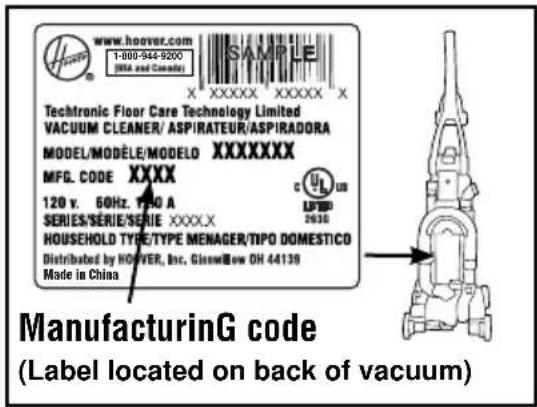
Please enter the complete model and Manufacturing Code in the spaces provided.
MODEL
MFG.CODE
Hint: Attach your sales receipt to this owner's manual. Verification of date of purchase may be required for warranty service of your HOOVER® product.
Be sure to register your product online at Hoover.com or call 1-800-944-9200 to register by phone. Visit Hoover.com for additional video instructions for assembly and maintenance.
contents
Important Safety Instructions. 3
Vacuum Assembly 5
Carton Contents 5
Attach Handle 5
AttachDirtCup .5
Position Tools 5
How To Use 6
Vacuum Description 6
On-Off Switch 6
Suction Only Mode 6
Cord Rewind and Storage 6
Folding Handle 6
Carpet Height Adjustment 7
Tools 7
Select Proper Tool 7
Removing Hose 7
7
Stair Cleaning 8
How To Clean Tools 8
Maintenance 8
Dirt Cup 9
Filters 9
Brushroll 11
Hose. 11
Powered Hand Tool 11
Headlight 12
Belt. 13
Troubleshooting 14
Service 15
Warranty 16
If you need assistance:
Visit our website at hoover.com. Follow the authorized dealer locator link to find the Hoover® authorized dealer nearest you or call 1-800-944-9200 for an automated referral of Hoover® authorized dealer locations (U.S. only) or to speak with a customer service representative; Mon- Fri 8am- 7pm EST.
PLEASE DO NOT RETURN THIS PRODUCT TO THE STORE.
IMPORTANT SAFETY INSTRUCTIONS SAVE THESE INSTRUCTIONS
When using an electrical appliance, basic precautions should always be followed, including the following:
READ ALL INSTRUCTIONS BEFORE USING THIS APPLIANCE.
WARNING: TO REDUCE THE RISK OF FIRE, ELECTRIC SHOCK OR INJURY:
- Fully assemble before operating.
- Operate vacuum only at voltage specified on data label on back of cleaner.
- Do not leave appliance when plugged in. Unplug from outlet when not in use and before cleaning or servicing.
- Do not use outdoors or on wet surfaces.
- Do not allow to be used as a toy. Not intended for use by children age 12 and under. Close supervision is necessary when used near children. To avoid injury or damage, keep children away from product, and do not allow children to place fingers or other objects into any openings.
- Use only as described in this manual. Use only manufacturer's recommended attachments and products.
- Do not use with damaged cord or plug. If appliance is not working as it should, has been dropped, damaged, left outdoors, or dropped into water, take it to a service center prior to continuing use.
- Do not pull or carry by cord, use cord as a handle, close a door on cord, or pull cord around sharp edges or corners. Do not place product on cord. Do not run appliance over cord. Keep cord away from heated surfaces.
- Do not unplug by pulling on cord. To unplug, grasp the plug, not the cord.
- Do not handle plug or appliance with wet hands.
- Do not put any object into openings. Do not use with any opening blocked; keep free of dust, lint, hair, and anything that may reduce air flow.
- Keep hair, loose clothing, fingers, and all parts of body away from openings and moving parts. Brushroll continues to rotate when in the upright position, unless the cleaner is in "Suction Only Mode" (Available on select models only).
- Turn off all controls before unplugging.
- Use extra care when cleaning on stairs. To avoid personal injury or damage, and to prevent the cleaner from falling, always place cleaner at bottom of stairs on floor. Do not place cleaner on stairs or furniture, as it may result in injury or damage.
- Do not use to pick up flammable or combustible liquids, such as gasoline, or fine wood sandings, or use in areas where they may be present.
- Hold plug when rewinding onto cord reel. Do not allow plug to whip when rewinding (cord rewind available on select models only).
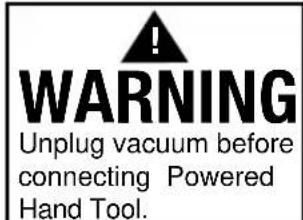
- Unplug before connecting Powered Hand Tool.
- Do not pick up anything that is burning or smoking, such as cigarettes, matches, or hot ashes.
- Do not use without Dirt Cup and/or Filters in place.
- WARNING: This product contains chemicals known to the State of California to cause cancer, birth defects or reproductive harm. WASH HANDS AFTER HANDLING.
CAUTION: TO REDUCE THE RISK OF DAMAGE:
- Avoid picking up hard, sharp objects with this product, as they may cause damage.
- Store in a dry place. Do not expose machine to freezing temperatures.
- Brushroll continues to turn while product is turned on and handle is in upright position. To avoid damage to carpet, rugs, furniture and flooring, avoid tipping cleaner or setting it on furniture, fringed area rugs, or carpeted stairs during tool use. Always put the cleaner in "Suction Only Mode" (Available on select models only) during tool use.
- Do not use sharp objects to clean out hose as they can cause damage.
WARNING:
- To reduce the risk of electric shock, this appliance has a polarized plug (one blade is wider than the other). This plug will fit in a polarized outlet only one way. If the plug does not fit fully in the outlet, reverse the plug. If it still does not fit, contact a qualified electrician to install the proper outlet. Do not change the plug in any way.
IMPORTANT: READ CAREFULLY BEFORE ASSEMBLY AND USE.
Questions or concerns? For assistance, please call Customer Service at 1-800-944-9200 Mon-Fri 8am-7pm EST. PLEASE DO NOT RETURN THIS PRODUCT TO THE STORE.
1. vacuuM asseMbIY
carton contents
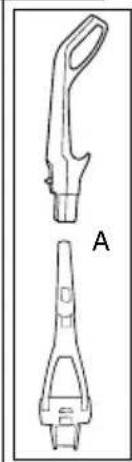
A. Handle
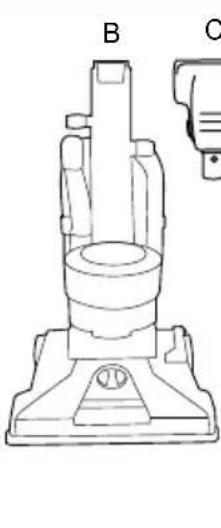
B. Vacuum Base
C. Powered Hand Tool
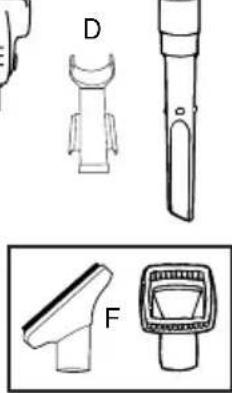
D. Powered Hand Tool Clip
E. Crevice Tool
F. Dusting/Upholstery Tool*
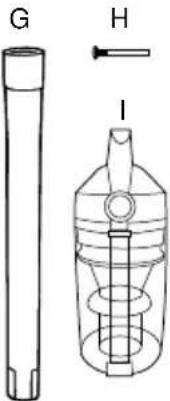
G. Wand
H. Screw (for assembly)
I. Dirt Cup
*Varies per model
Remove all parts from carton and identify each item shown.
Make sure all parts are located before disposing of packing materials.
1.1
E
attach handle
(varies per model)
Note: Remove the screw located in the vacuum base and set aside until instruction 1.3
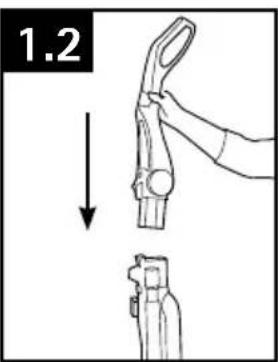
1.2 Insert handle section into vacuum base. Push down firmly.
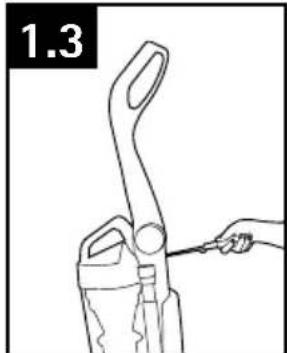
1.3 Using a Phillips screwdriver, fasten (1) screw behind handle into vacuum base.
attach dirt cup
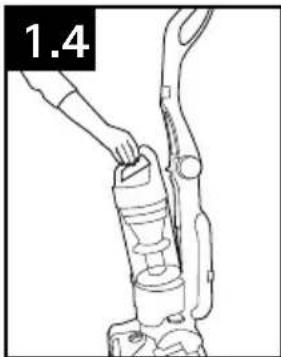
1.4 Place bottom of dirt cup into vacuum body first. Pivot cup into vacuum. Dirt cup is secure when you hear a click.
position tools
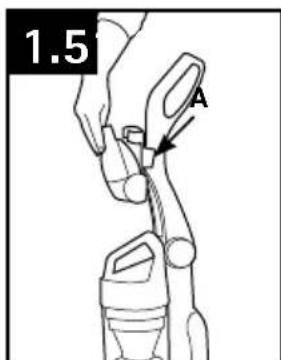
1.5 Secure Powered Hand Tool Clip (A) over ridges on side of handle. Attach bottom of Powered Hand Tool and pivot into clip until secure.
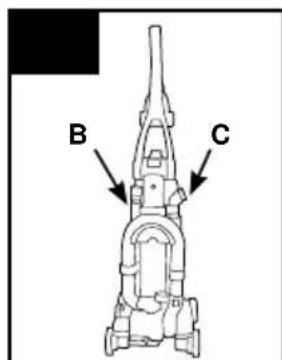
1.6 Place Crevice Tool into Wand and slide into tool storage area on left back side (B) of vacuum and place Upholstery Tool on right back side (C) of vacuum as shown.
2. how to use
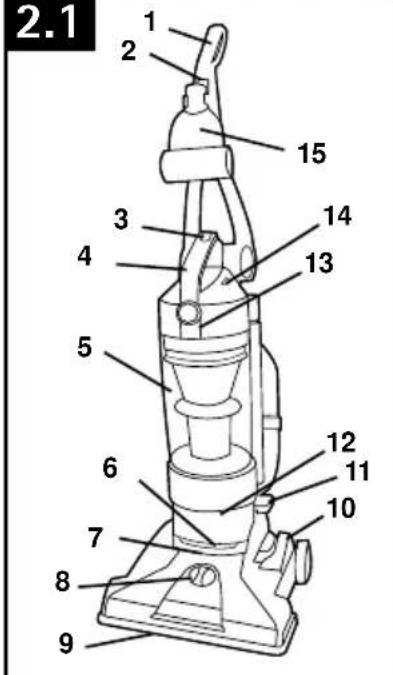
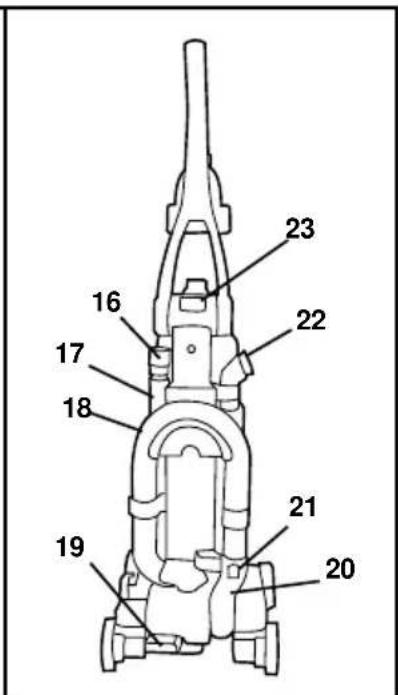
vacuum description
- Handle**
- ON/OFF Switch
- Dirt Cup Release Button
- Carry Handle
- Dirt Cup
- Stair Cleaning Handle
- Headlight*
- Height Adjustment
- Furniture Guard
- Brushroll On/Off Pedal* (Suction Only Mode)
- Cord Rewind Pedal*
- Filter made with HEPA media and Carbon Filter* Access
- Rinsable Filter Access
- System Check Indicator
- Powered Hand Tool**
- Crevice Tool
- Wand
18.Hose - Handle Release Pedal
- Hose Tube
- Hose Release Button
- Dusting/ Upholstery Tool**
- Folding Handle Release*
2.1
*Available on select models only
**Varies per model
on-off switch
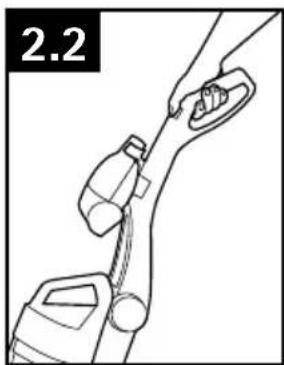
2.2 Plug cord into electrical outlet.
To turn vacuum ON, push ON/OFF switch once.
To turn vacuum OFF, push switch again.
suction only Mode
for bare floors and tool use. (Available on select models only)
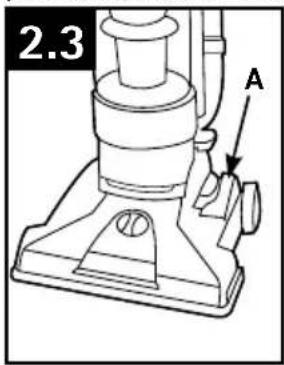
2.3 For optimal cleaning performance on bare floors, brushroll should be turned off.
The vacuum is shipped with the brushroll in the ON position. To turn brushroll OFF for Suction Only Mode, step on pedal (A).
cord rewind and storaGe
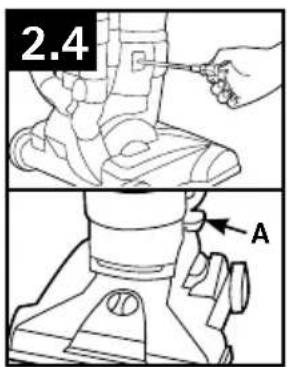
(Available on select models only)
2.4 Grasp the end of the plug and pull to release cord from cord reel until red tape is reached.
To return cord for storage, hold plug and press down Cord Release Pedal (A) on side of cord reel. Hold plug when rewinding onto cord reel. Do not allow plug to whip when rewinding.
foldinG handle
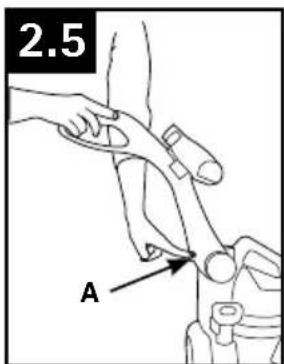
(Available on select models only)
for storage.
2.5 Press Handle Release (A) to fold the handle to storage position.
IMPORTANT
When pulling on the cord, yellow tape will
identify when the cord is almost fully extended. When red tape is visible on the cord, the cord has reached its allowable extended length. Do not pull the cord out any further.
carpetheiGht adJustMent
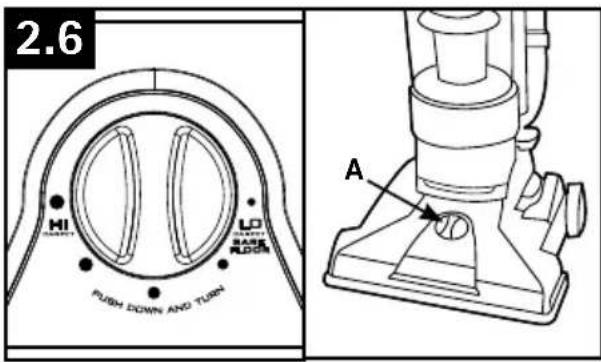
2.6 To adjust height setting, PUSH DOWN and TURN knob (A) to desired height setting.
For maximum cleaning performance, the following carpet height settings are recommended:
-
Lowest setting: for all types of carpet bare floors.
-
Higher settings: for very deep pile can where easier pushing effort is desired, while maintaining good cleaning performance.
- IMPORTANT
If the vacuum is difficult to push, push down and turn knob to the next higher setting.
3. tools
Tools allow for cleaning surfaces above the floor and for reaching hard to clean areas.
The vacuum is ready for tool use when handle is in upright position.
On models with "Suction Only Mode", always place vacuum in "Suction Only Mode" for tool use.
- IMPORTANT
Brushroll continues to turn while product is turned on and handle is in upright position unless vacuum is in "Suction Only Mode" (available on select models only). To avoid damage to carpet, rugs, furniture and flooring, avoid tipping cleaner or setting it on furniture, fringed area rugs, or carpeted stairs during tool use.
select proper tool
(Tools may vary per model)
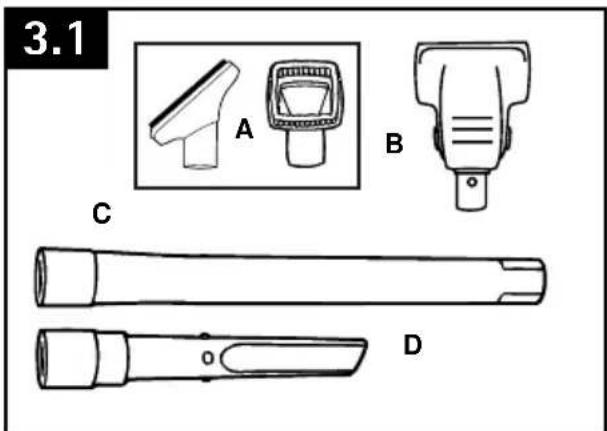
A. Use Upholstery Tool to clean upholstered furniture, draperies, mattresses, clothing, and carpeted stairs. (Tool varies per model)
B. Powered Hand Tool may be used for upholstered furniture, draperies, mattresses, clothing, automobile interiors, and carpeted stairs. (Tool varies per model)
C. Wand is used to give extra length to your hose. Use it with any of the above tools.
D. Crevice Tool may be used in tight spaces, corners and along edges in such places as dresser drawers, upholstered furniture, stairs and baseboards.
reMoving hose
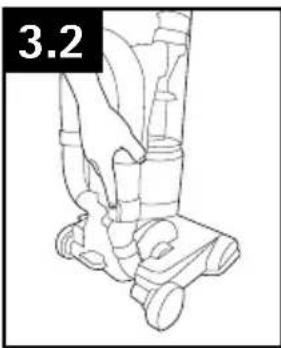
To remove hose for tool use, press the hose release button and pull hose end out.
To lock back into place, push hose into hose tube until you hear a click.
attach wand and tools
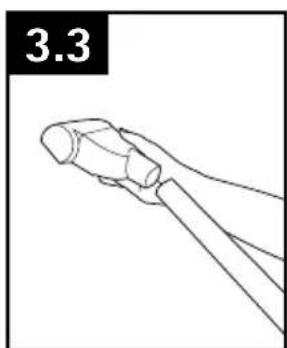
To attach tool or wand to hose, push firmly into place.
stair cleaningG
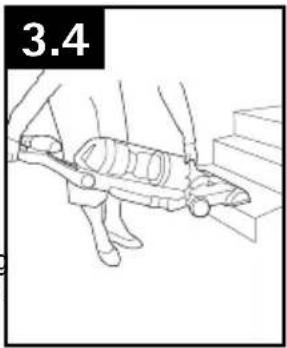
3.4 Lift vacuum by Stair Cleaning Handle and position on stairs. Clean forward to back. Never leave the vacuum standing on stairs when not cleaning.
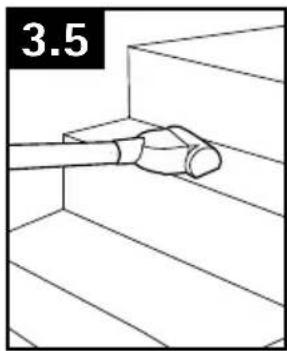
3.5 Use the Hose and Powered Hand Tool (Tool varies per model) for stair cleaning. When using tools, always turn the brushroll off by stepping on the "Suction Only Mode" pedal (available on select models only) as shown in diagram 2.3.
CAUTION
Use extra care when cleaning on stairs. To avoid personal injury or damage, and to prevent the cleaner from falling, always place cleaner at bottom of stairs on floor. Do not place cleaner on stairs or furniture, as it may result in injury or damage. When using tools, always turn the brushroll off by stepping on the "Suction Only Mode" pedal (available on select models only) as shown in diagram 2.3.
how to clean tools
To clean Hose and Powered Hand Tool, wipe with a damp cloth. DO NOT submerge in water.
Other cleaning tools may be washed in warm water with a detergent. Rinse and air dry 24 hours before using.
4. Maintenance
Familiarize yourself with these home maintenance tasks as proper use and care of your vacuum will ensure continued cleaning effectiveness.
The System Check Indicator located at (A), alerts you to possible system performance issues.
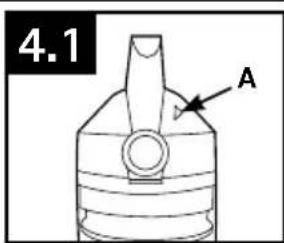
| problem | possible cause | possible solution |
| If System Check Indicator is red: | 1. Rinsable filter and/or filter made with HEPA media is dirty. | 1. Clean rinsable filter and/or filter made with HEPA media - reference pg. 9 |
| 2. Dirt cup is full and/or clogged. | 2. Empty dirt cup - reference pg. 9 | |
| 3. Brushroll and/or hose is clogged. | 3. Check hose for clogging - reference pg 11. Check brushroll for clogging - reference pg. 11. |
Any other servicing should be done by an authorized service representative.
▲NOTICE▲
A Thermal Protector has been designed into your cleaner to protect it from overheating. When the thermal protector activates the cleaner will stop running.
If this happens proceed as follows:
- Turn cleaner OFF and unplug it from the electrical outlet.
- Empty dirt cup.
-
Inspect and remove blockage along the dirt path. This blockage may occur at the: nozzle inlet, hose connector, hose, dirt cup inlet, cyclonic filter, Rinsable filter, and HEPA filter.
-
When cleaner is unplugged and motor cools for 30 minutes, the thermal protector will deactivate and cleaning may continue.
If the thermal protector continues to activate after following the above steps, your cleaner needs servicing.
DIRT CUP
When to Empty
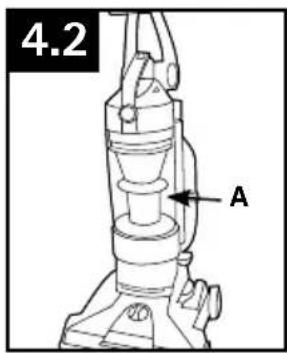
4.2 To maintain optimal performance, empty the dirt cup before the dirt cup reaches the max line (A). Place the vacuum in the upright position before removing the dirt cup.
CAUTION
To reduce the risk of injury from moving parts, unplug vacuum before servicing. Do not use vacuum without dirt cup or filters in place.
Very fine materials, such as face powder or cornstarch, may seal the filter and cause a reduction in performance. When using the vacuum for this type of dust, empty the cup and clean the filters often.
How to Empty
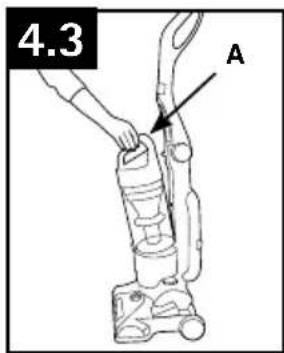
4.3 Press dirt cup release button (A) and pivot cup out.
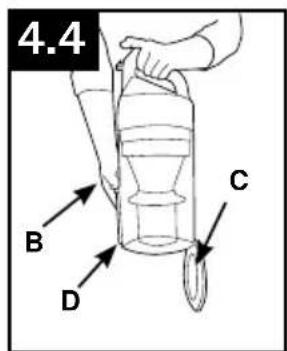
4.4 Hold dirt cup over trash receptacle, push dirt cup door release lever (B) to open dirt cup door (C).
Close dirt cup door (C). Press firmly to secure at front (D).
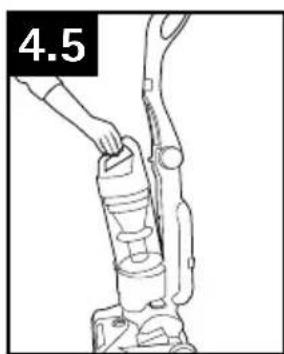
4.5 Place bottom of dirt cup into vacuum body first. Pivot dirt cup into vacuum body and press firmly until it locks into place.
FILTERS: When to Clean
To maintain optimal performance, filters should be cleaned at least every two months under normal use.
Rinsable Filter: How to Clean
Remove dirt cup as described in Fig. 4.3.
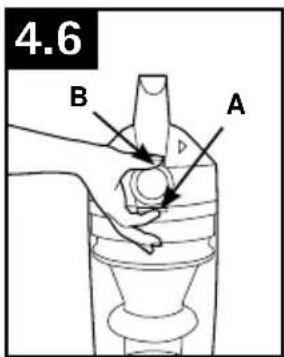
4.6 Pull up on dirt cup latch (A) to open.
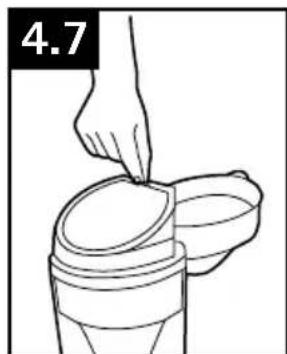
4.7 Pull on the filter to remove Rinsable Filter.
Hold filter under running water for two minutes to remove dirt and debris. Squeeze filter twice while underwater. Remove from water and squeeze a final time to remove excess water.
- IMPORTANT
Allow filter to dry completely before replacing. Dry filter on edge so air circulates on both sides of filter. This may take up to 24 hours.
Replace filter, tab side out.
Close lid securely by pushing at (B) until it clicks as shown in Fig. 4.6.
Replace dirt cup as described in Fig 4.5.
CAUTION
To reduce the risk of injury from moving parts, unplug vacuum before servicing. Do not use vacuum without dirt cup or filters in place.
What to Buy: Rinsable Filter
When used and maintained properly, your Rinsable Filter should not need replacement within the warranty period. If desired, additional filter is available at Hoover.com or call 1-800-944-9200. Ask for Hoover® Part No.303173001.
Filter Made With HEPA Media: How to Clean
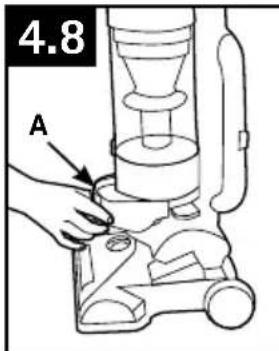
4.8 With fingers in slots, pull filter frame (A) straight out. Hold filter over a trash receptacle and tap out dirt and debris.
Slide back into position on vacuum.
CAUTION
To reduce the risk of injury from moving parts, unplug vacuum before servicing. Do not use vacuum without dirt cup or filters in place.
- IMPORTANT
DO NOT RINSE OR WASH THE FILTER MADE WITH HEPA MEDIA.
What to Buy: Filter Made With HEPA Media
When used and maintained properly, your Filter should not need replacement within the warranty period. If desired, additional filter is available at Hoover. com or call 1-800-944-9200. Ask for Hoover® Part No. 303172001.
Carbon Filter : How to Clean
(Available on select models only).
Your Carbon Filter is located on the underside of the Filter made with HEPA media.
- IMPORTANT
DO NOT RINSE OR WASH the Carbon Filter.
What to Buy: Carbon Filter
Carbon Filter may need to be replaced more often to maintain optimal odor absorbing effectiveness. Additional filter is available at Hoover.com or call 1-800-944-9200. Ask for Hoover® Part No. 902404001.
Cyclonic Filter Assembly: How to Clean
CAUTION
To reduce the risk of injury from moving parts, unplug vacuum before servicing.
Do not use vacuum without dirt cup or filters in place.
4.9
4.10
Remove dirt cup as described in Fig. 4.3.
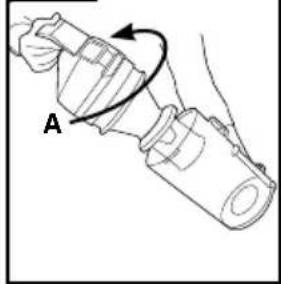
4.9 Twist filter assembly (A) counterclockwise. Remove assembly from dirt cup.
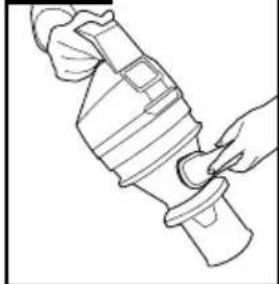
4.10 Dirt and debris can be cleaned from the filter assembly with the Dusting/ Upholstery Tool.
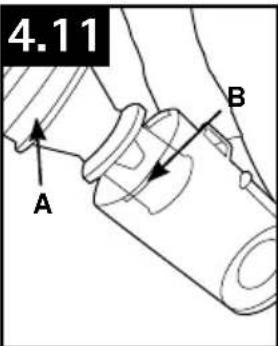
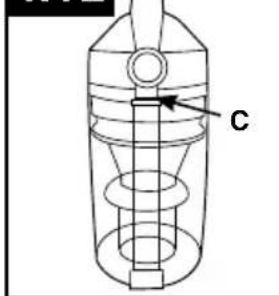
4.11 Place the filter assembly on the dirt cup, aligning (3) tabs (A) on filter with (3) slots on dirt cup (B) and twist it clockwise to secure into position.
4.12 The Hoover emblem and center lines on the dirt cup should align on the front of the dirt cup (C) if assembled correctly.
4.12
Replace dirt cup as described in Fig. 4.5.
BRUSHROLL: How to Clean
CAUTION
To reduce the risk of injury from moving parts, unplug vacuum before servicing.
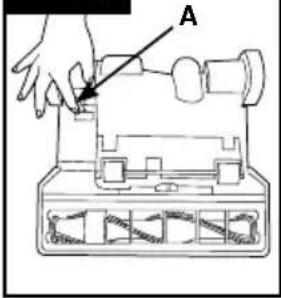
4.13 Turn vacuum over so bottom side is facing up. Rotate red upper latch (A) counterclockwise.
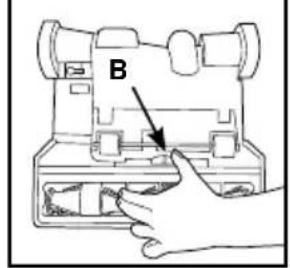
4.14 Slide red lower latch (B) to the unlock position.
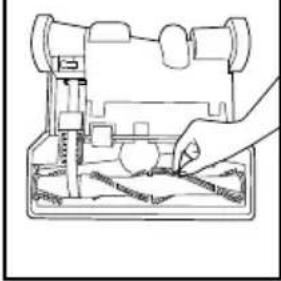
4.15 Pivot out bottom plate and remove any debris and/or hair from brushroll.
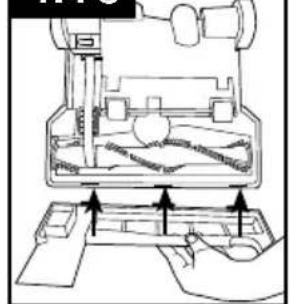
4.16 Reposition bottom plate, aligning the three tabs along front edge of nozzle guard with the three slots in nozzle. Rotate back into position. Slide red lower latch to Lock position, and rotate red upper latch clockwise.
4.13
4.14
4.15
4.16
HOSE: How to Clean
CAUTION
To reduce the risk of injury from moving parts, unplug vacuum before servicing.
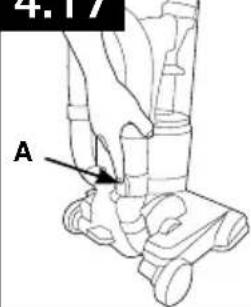
4.17 To remove hose for tool use, press the hose release button (A) and pull hose end out.
Clear away debris or obstructions from hose. Do not use sharp objects to clean out hose as they can cause damage. To lock back into place, push hose into hose tube until you hear a click.
4.17
POWERED HAND TOOL: How to Clean
(Tool varies per model)
CAUTION
To reduce the risk of injury from moving parts, unplug vacuum before servicing.
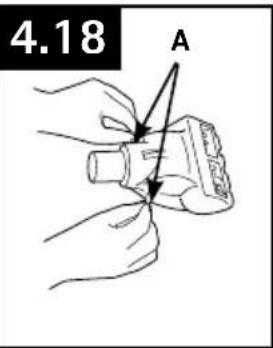
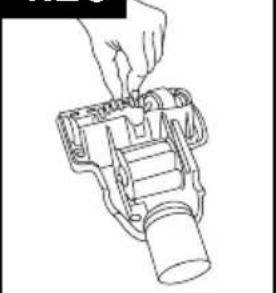
4.18 Turn tool so bottom faces up. Rotate the latches (A) on either side of tool.
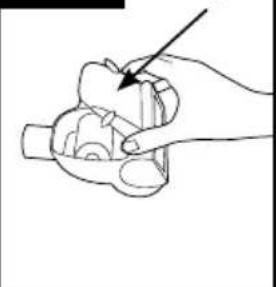
4.19 Remove bottom plate (B).
4.20 Remove any debris and/ or hair from brushroll.
Replace bottom plate by aligning tabs along front edge of tool. Rotate latches back into locked position.
4.19
4.20
HEADLIGHT: How to Replace
(available on select models only)
WARNING
To reduce the risk of electrical shock, unplug vacuum before cleaning or servicing.
Removing Lens
Press Handle Release Pedal and place handle in low position.
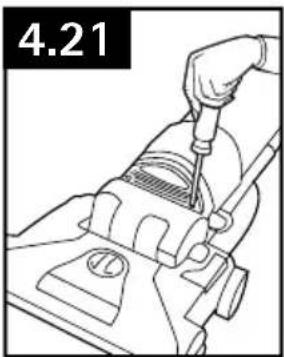
4.21 Using a Phillips screwdriver, remove (2) screws as shown and lift off lens.
Installing Bulb
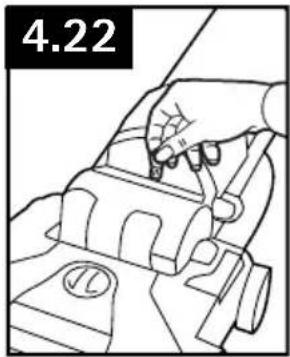
4.22 Pull old bulb straight out of socket. Push new bulb straight into socket until locked in place.
Excessive force is not required.
Twisting or turning bulb not required.
Replacing Lens
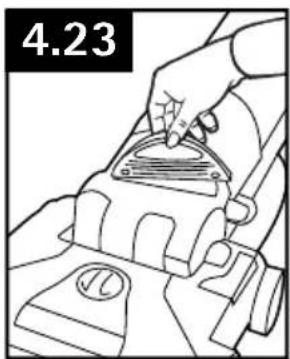
4.23 Reposition lens and secure with screws.
What to Buy: Headlight
Additional bulbs may be ordered at Hoover. com or call 1-800- 944-9200. Ask for Hoover Part No. 27313-107.
BELT
CAUTION
To reduce the risk of injury from moving parts, unplug vacuum before servicing.
The belt is located under the bottom plate of the vacuum and should be checked from time to time to be sure it is in good condition.
When To Replace
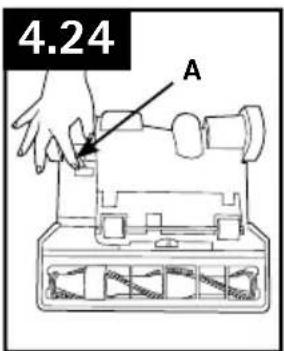
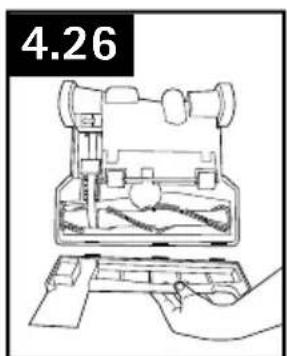
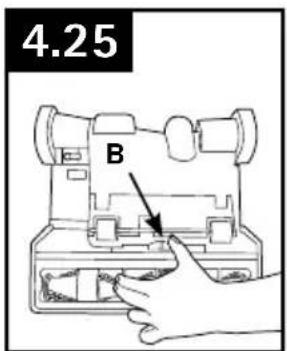
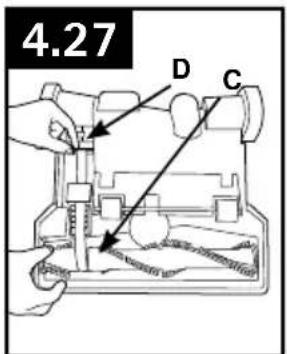
Replace belt if it is stretched, cut or broken. To check the belt, refer to Fig. 4.24 - 4.26.
How To Replace
4.24 Turn vacuum over so bottom side is facing up.
Rotate red upper latch (A) counter clockwise.
4.25 Slide red lower latch (B) to the unlock position.
4.26 Lift off bottom plate.
4.27 Remove used belt from brushroll (C) then from motor shaft (metal rod) (D) and discard.
BELT (continued)
What to Buy: Belt
Use only genuine HOOVER® belts with your vacuum.
When purchasing a new belt for models with Brushroll On/Off (Suction Only Mode), ask for Flat Belt - HOOVER® part No. 562289001 or AH20065.
When purchasing a new belt for models without Brushroll On/Off (Suction Only Mode), ask for Stretch Belt - HOOVER® part No. 38528058 or AH20080.
If desired, additional belts can be purchased at Hoover.com or 1-800-944-9200
- IMPORTANT
Rotate brushroll manually to make sure belt is not twisted.
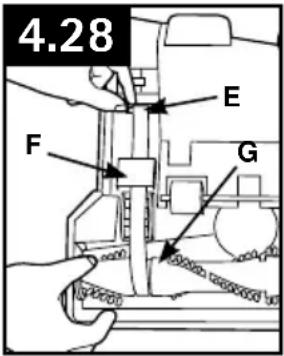
4.28 With lettering on outside of belt, slide new belt over motor shaft (metal rod) (E).
Push other end of belt through belt guide (F) and over metal pulley*, then slip around area of brushroll without bristles (G).
With belt in place, pull and slide brushroll into nozzle making sure that the brushroll end caps are in the correct orientation.
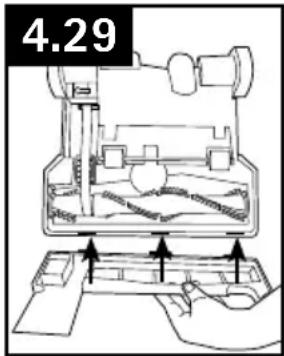
4.29 Reposition bottom plate, aligning the three tabs along front edge of nozzle guard with the three slots in nozzle. Rotate back into position. Slide red lower latch to Lock position, and rotate red upper latch clockwise to secure bottom plate.
*Models without "Suction Only Mode" do not have the metal pulley
5. troubleshootingG
If a minor problem occurs, it usually can be solved quite easily when the cause is found by using the checklist below.
Any other servicing should be done by an authorized service representative.
WARNING
To reduce risk of personal injury - unplug vacuum before servicing.
| probleM possible cause possible solution | ||
| Vacuum won't run | 1. Power cord not firmly plugged into outlet. | 1. Plug unit in firmly. |
| 2. Blown fuse or tripped breaker. 2 | Check fuse or breaker in home. Replace fuse/reset breaker in home. | |
| 3. Thermal Protector activated. | 3. Unplug and allow vacuum to cool for 30min. (This will reset the thermal protector) | |
| System Check Indicator has turned red or Vacuum won't pick up or Low suction | 1.Rinsable Filter and/ or Filter made with HEPA media is dirty. | 1. Clean Rinsable Filter and or Filter made with HEPA media - Pg. 9 and 10. |
| 2. Dirt cup full and/ or clogged. 2. Empty dirt cup - Pg. 9. | ||
| 3. Broken or worn belt. 3. Replace belt - Pg.12. | ||
| 4. Brushroll and/ or Hose clogged. | 4. Check Hose - Pg. 11. Check Brushroll - Pg. 11. | |
| 5. Carpet height setting is incorrect. | 5. Set Carpet Height Adjustment to appropriate setting for carpet being cleaned - Pg.7. | |
| 6. Suction Only Mode is ON. 6. Step on Brushroll ON/OFF Pedal to turn Suction Only Mode OFF - Pg. 6. | ||
| Cord Rewind does not work | 1. Cord reel does not retract. 1. Call 1-800-944-9200 for the nearest authorized service representative | |
| Dust escaping from vacuum | 1. Dirt cup full. 1. Empty dirt cup - Pg. 9. | |
| 2. Dirt cup not installed correctly. 2. Review Dirt Cup removal & replacement - Pg. 9. | ||
| 3. Hose not installed correctly. 3. Review Hose installation - Pg. 7. | ||
| 4. Rinsable and/ or Filter made with HEPA media not installed completely. | 4. Review Filter Removal and Cleaning - Pg. 9 and 10. | |
| Headlight not working | 1. Bulb burnt out. | 1. Replace bulb - Pg. 12. |
| 2. Loose electrical wires. | 2. Call 1-800-944-9200 for nearest authorized Hoover® dealer. | |
| Vacuum is difficult to push or won't move forward | 1. Carpet height setting is incorrect. | 1. Set Carpet Height Adjustment knob to appropriate setting for carpet being cleaned - Pg. 7. |
| Powered Hand Tool brushroll won't turn | 1. Too much pressure being applied to tool. | 1. Continue using tool applying light pressure. |
| 2. Blockage. | 2. Remove blockage - Pg. 11 | |
| 3. Low vacuum suction. | 3. Check items under "Vacuum won't pick or Low suction." | |
| Smoky/burning smell detected | 1. Belt broken or stretched. | 1. Replace brushroll belt - Pg. 13. |
| 2. Brushroll is clogged. 2. Clear/ remove debris from brushroll - Pg. 11. | ||
6. service
To obtain approved Hoover service and genuine Hoover parts, locate the nearest Authorized Hoover Warranty Service Dealer (Depot) by:
- Checking the Yellow Pages under "Vacuum Cleaners" or "Household".
- Visit our website at hoover.com (U.S. Customers) or hoover.ca (Canadian customers).
Follow the service center link to find the service outlet nearest you.
- For an automated referral of authorized service outlet locations call 1-800-944-9200.
Do not send your vacuum to Hoover, Inc., Company in Glenwillow for service. This will only result in delay.
If you need further assistance:
To speak with a customer service representative call 1-800-944-9200; Mon-Fri 8am-7pm EST. Always identify your vacuum by the complete model number when requesting information or ordering parts. (The model number appears on the bottom of the vacuum.)
PLEASE DO NOT RETURN THIS PRODUCT TO THE STORE.
7.warrantY
Limited two Year warrantY
(Domestic Use)
WHAT THIS WARRANTY COVERS
When used and maintained in normal household use and in accordance with the Owner's Manual, your HOOVER® product is warranted against original defects in material and workmanship for a full two year from date of purchase (the "Warranty Period"). During the Warranty Period, Hoove will provide labor and parts, at no cost to you, to correct any such defect in products purchased in the United States, U.S. Military Exchanges and Canada.
HOW TO MAKE A WARRANTY CLAIM
If this product is not as warranted, take or send the product to either a Hoover® Authorized Warranty Service Dealer along with proof of purchase. For an automated referral to authorized service outlets in the U.S.A., phone: 1-800-944-9200 OR visit Hoover® online at www.hoover.com. For additional assistance or information concerning this Warranty or the availability of warranty service outlets, phone the Hoover® Consumer Response Center, Phone 1-800-944-9200, Mon-Fri 8am-7pm EST.
WHAT THIS WARRANTY DOES NOT COVER
This Warranty does not cover: use of the product in a commercial operation (such as maid, janitorial and equipment rental services), brushroll, belt, improper maintenance of the product, damage due to misuse, acts of God, nature, vandalism or other acts beyond the control of Hoover, owner's acts or omissions, use outside the country in which the product was initially purchased and resales of the product by the original owner. This warranty does not cover pick up, delivery, transportation or house calls. However, if you mail your product to a Hoover Authorized Warranty
Service Dealer, cost of shipping will be paid one way.
This warranty does not apply to products purchased outside the United States, including its territories and possessions, outside a U.S. Military Exchange and outside of Canada. This warranty does not cover products purchased from a party that is not an authorized retailer, dealer, or distributor of Hoover® products.
OTHER IMPORTANT TERMS
This Warranty is not transferable and may not be assigned. This Warranty shall be governed and construed under the laws of the state of Ohio. The Warranty Period will not be extended by any replacement or repair performed under this Warranty.
THIS WARRANTY IS THE EXCLUSIVE WARRANTY AND REMEDY PROVIDED BY HOOVER. ALL OTHER WARRANTYES, EXPRESSED OR IMPLIED, INCLUDING WARRANTY OF MERCHANTABILITY OR FITNESS FOR PARTICULAR PURPOSE, ARE DISCLAIMED. IN NO EVENT WILL HOOVER BE LIABLE FOR ANY SPECIAL, INDIRECT, INCIDENTAL OR CONSEQUENTIAL DAMAGES OF ANY KIND OR NATURE TO OWNER OR ANY PARTY CLAIMING THROUGH OWNER, WHETHER BASED IN CONTRACT, NEGLIGENCE, TORT OR STRICT PRODUCTS LIABILITY OR ARISING FROM ANY CAUSE WHATSOEVER. Some states do not allow the exclusion of consequential damages, so the above exclusion may not apply to you. This warranty gives you specific rights; you may also have others that vary from state to state.
WINDTUNNEL
SERIES
IMPORTANTE: LEA ATENTAMENTE ANTES DE ENSAMBLAR Y USAR.
Any other servicing should be done by an authorized service representative.
AVISO
For maximum cleaning performance, the following carpet height settings are recommended:
Replacing the filter in the language of the extérieur.