 ManualGo.com
HFX10H 011 - Vacuum Cleaner HOOVER - Free user manual and instructions
Find the device manual for free HFX10H 011 HOOVER in PDF.



Download the instructions for your Vacuum Cleaner in PDF format for free! Find your manual HFX10H 011 - HOOVER and take your electronic device back in hand. On this page are published all the documents necessary for the use of your device. HFX10H 011 by HOOVER.
USER MANUAL HFX10H 011 HOOVER
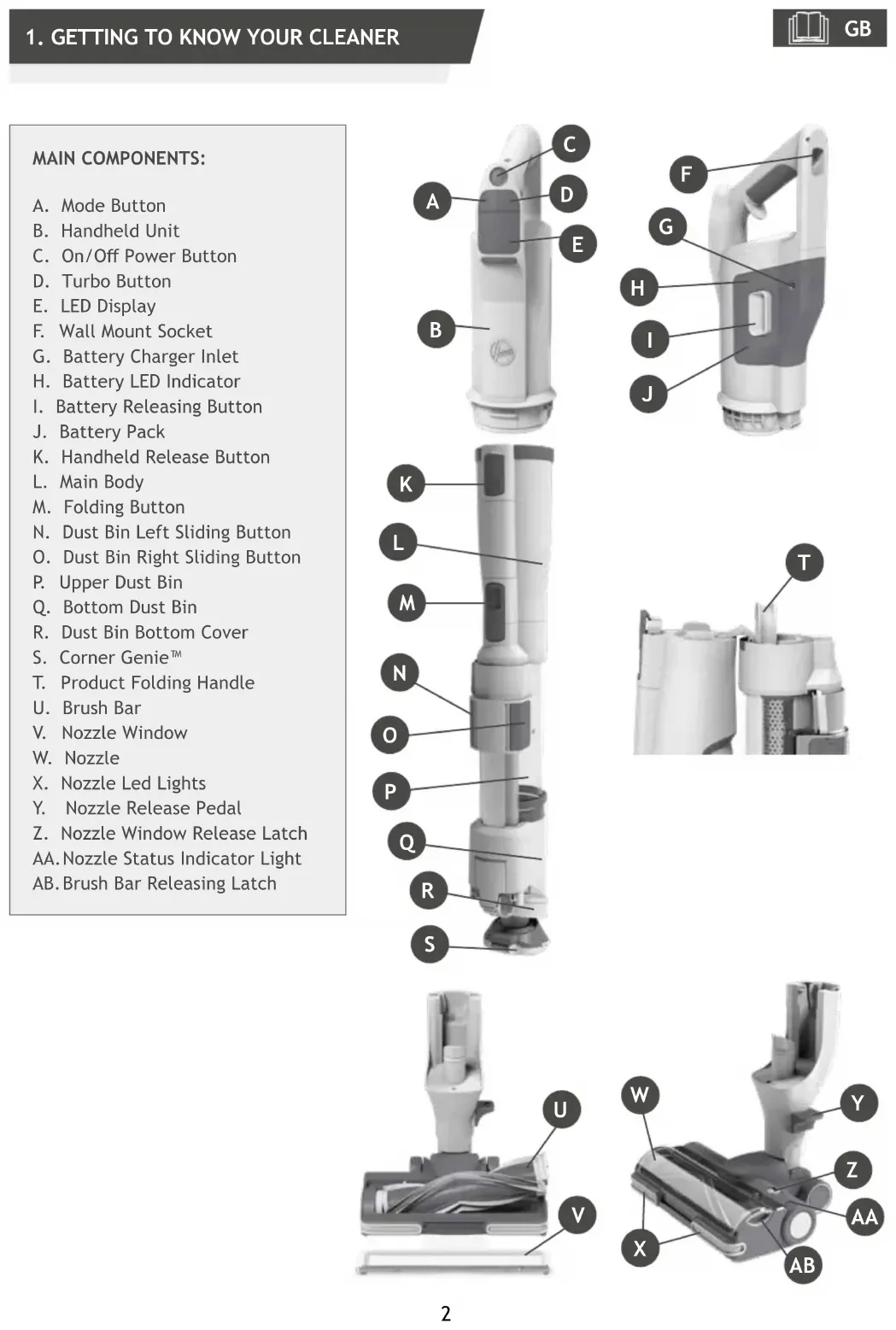
MAIN COMPONENTS: A. Mode Button B. Handheld Unit C. On/O Power Button D. Turbo Button E. LED Display F. Wall Mount Socket G. Battery Charger Inlet H. Battery LED Indicator
I. Battery Releasing Button
Carefully remove all products part from the packaging and assemble your cleaner.
1. Unfold the main body until you hear the “click” sound from the main body releasing button which
indicate that the main body is in the correct location.
2. Lift the product and assemble it into the nozzle until you hear ‘click’.
3. We provide a wall mount for optional storage. Fix the Wall Mount to your wall using the screws and
xings provided. Then hang the product on the wall mount.
LED DISPLAY This cleaner is equipped with a LED display. When the product is ON, the LED display shows working mode, maintenance, error, battery status information. BATTERY LEVEL: When using your product, the real time charge level of your battery is indicated on the LED display located on the handheld. When the remaining run time is reduced to 2 mins, the battery icon on the LED display will begin to blink. It is recommended you switch o your product and recharge the battery. The battery in your product does not come fully charged. Before rst use, please charge it completely: this should take around 3.5 hours. NOTE: Use only the charger supplied with your cleaner to recharge. It is normal for the charger to become warm to touch when charging. For your convenience, the battery can be charged in 2 dierent conditions.
1. With the product fully assembled in stick mode or located in the wall mount, the battery status will
be indicated on the LED display.
2. Remove the battery from the product by pressing the battery release buttons and taking out the
battery package in parallel. With the battery removed from the product, the battery pack LED will ash white when charging and turn WHITE when fully charged. GB1 2
To use your product in Stick mode:
1. Place your foot on the nozzle and pull back
to recline the main body.
2. Press the On/O power button to begin
cleaning. NOTE: The nozzle LED lights are always on and the brush bar is always rotating. Controls settings: Press the MODE button to select your desired oor surface, the LED display icon of HARD FLOOR or CARPET will illuminate to conrm your setting. If you require a deeper clean when using your product in Stick mode, press the turbo button to increase the power. The turbo icon will illuminate on the LED display to conrm your selection. Pls note this will reduce your battery runtime. To return to standard mode, press the turbo button, the icon on the display will turn o.
There are 3 dierent working modes for your cleaner.
4.3 ABOVE FLOOR/HANDHELD MODE
To use your product in Above oor/Handheld mode:
1. Press handheld release button to pull away
3. Press the On/O power button to begin cleaning.
Controls settings: If you require a deeper clean when using your product in Above oor/Handheld mode, press the turbo button to increase the power. The turbo icon will illuminate on the LED display to conrm your selection. Please note this will reduce your battery runtime. To return to standard mode, press the turbo button, the icon on the display will turn o. Please note the Mode button is unavailable for your selection in Above oor/Handheld mode. Accessories included Long exible crevice tool - ideal for accessing deep tight Spaces up above and down below the furniture. Crevice Tools - ideal for accessing tight spaces. 2IN1 Dust Brush - ideal for cleaning surfaces without damaging or scratching. Mini power Nozzle* - ideal for deep cleaning textile surfaces (i.e. sofas) and pet hair removal. To use your product in Corner Genie mode:
1. Remove the nozzle from the main body by pressing the nozzle release pedal and pulling away.
2. Press the On/O power button to begin cleaning.
Controls settings: If you require a deeper clean when using your product in Corner Genie mode, press the turbo button to increase the power. The turbo icon will illuminate on the LED display to conrm your selection. Pls note this will reduce your battery runtime. To return to standard mode, press the turbo button, the icon on the display will turn o. Please note the Mode button is unavailable for your selection in Corner Genie mode.
After use, your cleaner has 2 convenient storage methods.
1. WALL MOUNT STORAGE
Your product is supplied with a wall mount for convenient easy storage. Using the screws provided, x the Wall mount to your wall. After product use, simply place your cleaner into location.
Your products can be folded when you nished the cleaning job to be stored in small spaces. Push the main body releasing button and rotate the main body until the handheld touches the dust bin. Your product can be carried using the folding handle. Grab the folding handle, lift the product. Emptying the Dust Bin
1. Switch o your product.
2. Remove the nozzle from the main body by pressing the nozzle release pedal and pulling away.
3. Hold the product over a trash bin. Press the Dust bin sliding Buttons and slide them to the end. The
dust bin bottom cover will release automatically.
4. Slide the dust bin sliding button back into original position.
5. Close the dust cup ap by pressing it onto the oor, you will hear a click when fully locked.
NOTE: It is recommended to empty the dust cup after each use or when dust is up to the max ll line.
It is recommended to wash your lters after every 5 bin empties.
1. Ensure your product is switched o. Press the handheld release button and remove the handheld unit from the
2. Pull out the 2in1 lter assembly from the main body.
3. Remove the external sponge and wash separately the two parts in lukewarm water and leave to dry for 24
4. Reassemble once completely dry and ret to the product.
5. Ret the handheld unit into the main body, inserting front rst then the back.
NOTE: Do not use hot water or detergents when cleaning the lter. In the unlikely event of the lter becoming damaged, t a genuine Hoover replacement.
5.1 CLEANING THE FLOOR NOZZLE
Thanks to ANTI-TWIST feature, your Hoover vacuum features an integrated comb which radically reduces hair wrapping around the brushbar. However, if your cleaner is not picking up eciently your brushbar may need to be cleaned. IMPORTANT: Always switch o the cleaner before changing and cleaning the agitator.
1. Unlock the nozzle window sliding the nozzle window release latch and remove.
2. Using the brushbar release latch, remove the brushbar from the nozzle.
3. Remove any excess debris from the brushbar. Check for and remove any large debris from inside the
nozzle. Carefully check for and remove any tangled debris from the comb.
4. Ret the brushbar to the nozzle ensuring the latch is fully in place. The brush bar can only t in one
direction. Press the end slightly to make sure the brush bar is in place.
5. Close the window by pressing gently on the middle area until you hear it “click” into place. Check
the window is completely locked by pressing on both sides. IMPORTANT: Ensure the window is fully closed. If the nozzle window is not correctly reassembled, the nozzle LED lights will ash and the brushbar status light will turn red. GB2 3 4 51
5.3 CLEANING THE MINI BIN AND ITS FILTER
4. Wash the lter in lukewarm water and leave to dry for 24 hours.
5. Reassemble once completely dry and ret to the product.
NOTE: Do not use hot water or detergents when cleaning the lter. In the unlikely event of the lter becoming damaged, t a genuine Hoover replacement. IMPORTANT: For optimum performance, always keep your lters clean. We recommend that the lters should be washed at least once a month.
1. Switch o your product.
2. Remove the mini power nozzle from your product and turn over.
3. Using a coin, open the brushbar release lock and remove the brush bar.
6. Ret the brushbar into the nozzle and using a coin, lock into position.
If your product is still working but has low or no suction, you may have a blockage. Carry out all maintenance instructions included in sections, 7.1, 7.2 & 7.3. The following additional areas of your product should also checked for any debris or blockages:
1. Switch o your product.
2. Separate the oor nozzle, the main body and the handheld unit as per previous instructions.
3. Remove the nozzle window and brushbar from the nozzle as per previous instructions.
4. Position the nozzle neck vertically and visually check for any debris or obstructions and clear.
5. Visually check the handheld inlet connection area for any debris or obstructions and clear.
6. Visually check both ends of the main body, metal mesh and air inlet, and remove any debris or
obstructions. Re-Assemble your product. Hoover Spares and Consumables Always replace parts with genuine Hoover spares. These are available from your local Hoover dealer or direct from Hoover. When ordering parts always quote your model number. Quality Hoover’s factories have been independently assessed for quality. Our products are made using a quality system which meets the requirements of ISO 9001. Your Guarantee The guarantee conditions for this appliance are as dened by our representative in the country in which it is sold. Details regarding these conditions can be obtained from the dealer from whom the appliance was purchased. The bill of sale or receipt must be produced when making any claim under the terms of this guarantee.
2 YEAR BATTERY WARRANTY
IMPORTANT: The battery in this cleaner is guaranteed for 2 year from the date of purchase. After 2 year the customer is liable for the cost of a new battery. Subject to change without notice. GB11
7. ERROR CODES & TROUBLE SHOOTING
The following is a list of error codes & solutions that your product will identify and indicate on your LED display should you product encounter problems: ERROR CODE FAULT & SOLUTION E0 indicates handheld or main body is not in the right postion. Check if the handheld and the main body are assebled correctly. Check if there is any obstruction in the nozzle. Go to section 7.1 and carry out ALL maintenance requirements. Switch o your product and wait for 20 mins, then restart it. If the problem persists there is a technical issue on the motor, please contact your local Hoover service centre. There is a technical issue in the battery pack. Remove the battery from your product and contact your local Hoover service centre. Check if nozzle window is correctly assembled, or main body is in the right position. Make sure the nozzle window is in place correctly. Press the window down gently to click it in securely. Switch o your product and wait for 20 mins, then restart it. Check if the main body is assebled correctly. There is a technical issue in the main nozzle. Switch o your product and wait for 20mins. If the product still does not work, contact your local Hoover service centre. E5 indicates there is a blockage in your product. Go to section 7 and carry out ALL maintenance requirements. Empty the bin, clean the lters, clean the nozzle and brushbar and check for blockages. There is a technical issue in the main vacuum. Stop using your product and contact your local Hoover service centre. There is a technical issue in the charger. Please ensure you are using a genuine HOOVER charger. If the problem persists, stop using your product and contact your local Hoover service centre. There is a technical issue in the main vacuum. Switch o your product and wait for 20mins. If the problem persists, stop using your product and contact your local Hoover service centre. E9 indicates there is a blockage in the mini power nozzle. Go to section 7.4 and perform the indicated maintenance task. GBA
101, Workshop 1, No. 5, Jingye Road, Yanchaun Community, Yanlo Street, Bao’an District, 518105, Shenzen, Guangdong, (PRC) E-TEK Electronics Manufactory Co.LTD