WT 465 - Alarm bell TECHNOLINE - Free user manual and instructions
Find the device manual for free WT 465 TECHNOLINE in PDF.



| Product type | Digital alarm clock radio with alarm sound |
| Brand | TECHNOLINE |
| Model | WT 465 |
| Power supply | Mains 100-240 V~ 50/60 Hz, 5 W |
| Backup batteries | 2 x 1.5 V LR6/AA batteries (not included) for settings backup |
| FM range | 87.5 - 108.0 MHz |
| Station memory | 20 preset stations (auto or manual) |
| Alarms | 2 independent alarms (AL1 and AL2) with radio or buzzer option |
| Snooze | Alarm snooze after 9 minutes |
| Sleep / Nap | Adjustable timer: 120, 90, 60, 45, 30, 15, 5 minutes or OFF |
| Display | Digital with adjustable backlight (high/low) |
| Dimensions (approx.) | 200 x 100 x 100 mm |
| Weight (approx.) | 0.5 kg |
| Care and cleaning | Soft dry cloth; do not use solvents or moisture |
| Safety | Indoor use; do not expose to water, extreme heat, or open the housing |
| Batteries - Precautions | Use only alkaline batteries, observe polarity, do not mix types or states |
| Repairability | No user-repairable parts; contact customer service |
| Included accessories | Mains adapter, built-in FM antenna, battery cover |
Frequently Asked Questions - WT 465 TECHNOLINE
User questions about WT 465 TECHNOLINE
0 question about this device. Answer the ones you know or ask your own.
Ask a new question about this device
Download the instructions for your Alarm bell in PDF format for free! Find your manual WT 465 - TECHNOLINE and take your electronic device back in hand. On this page are published all the documents necessary for the use of your device. WT 465 by TECHNOLINE.
USER MANUAL WT 465 TECHNOLINE
Read this manual carefully to get the best performance from this unit.
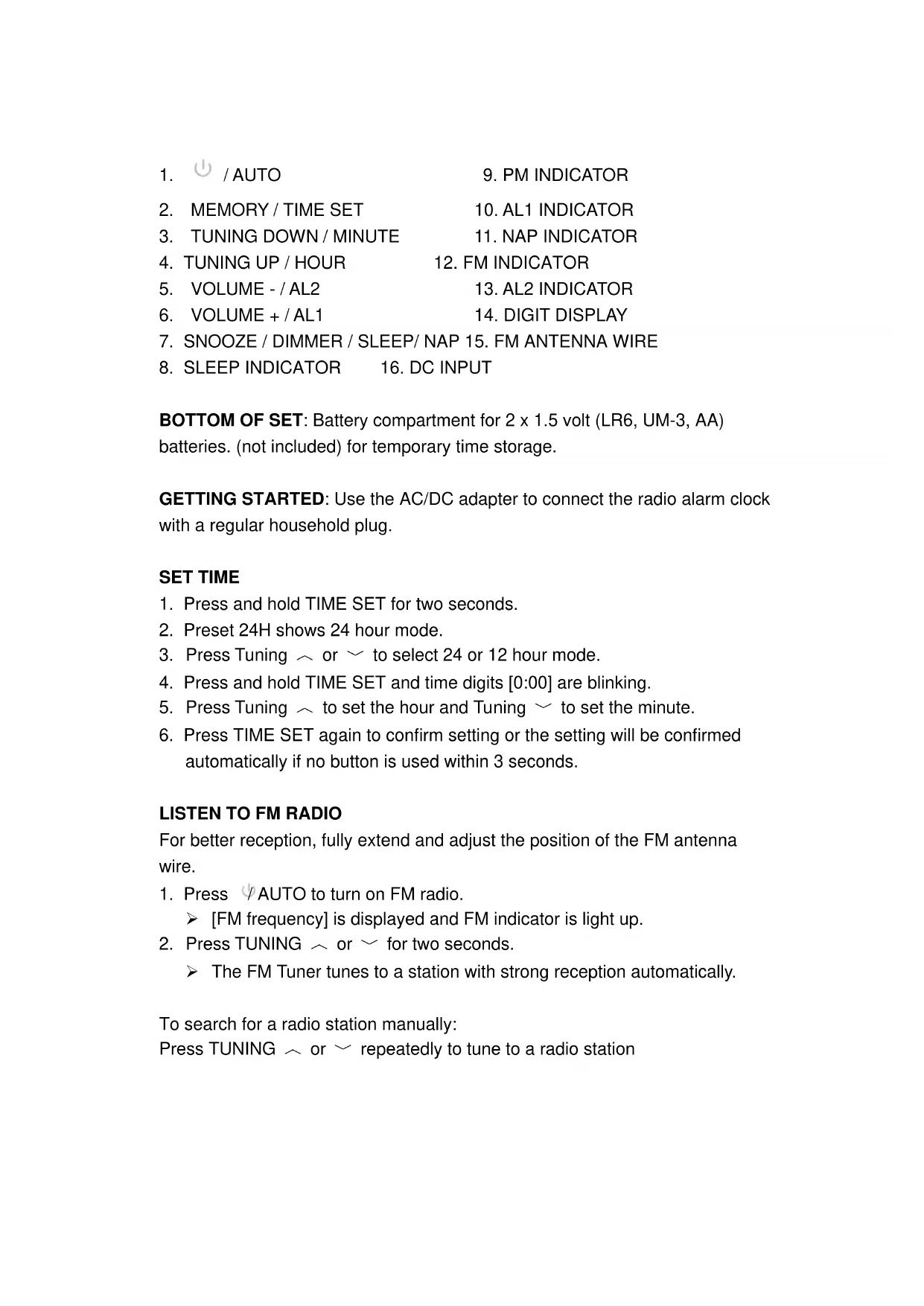
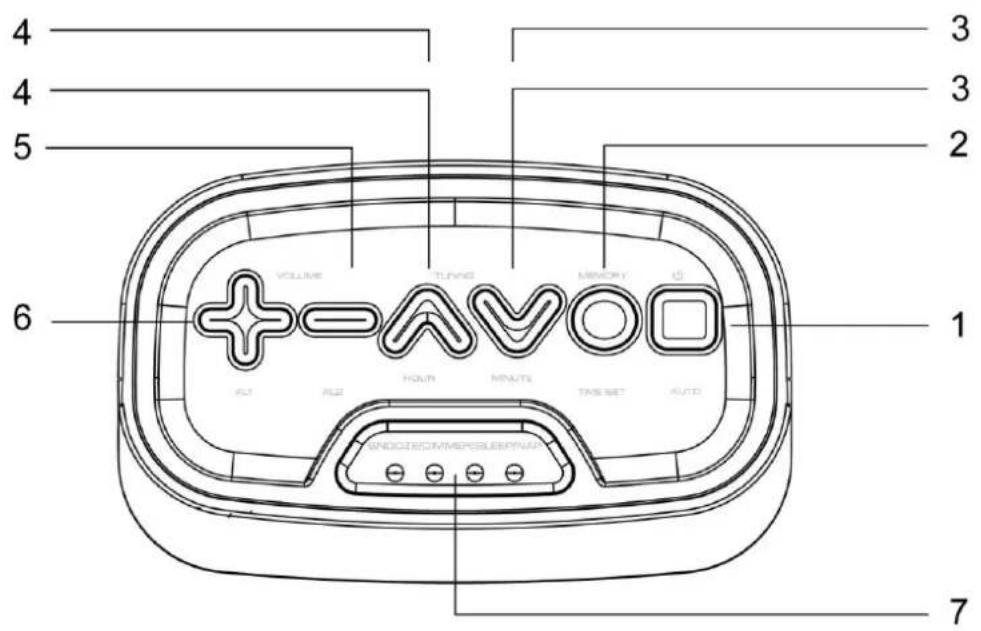
LOCATION OF CONTROL
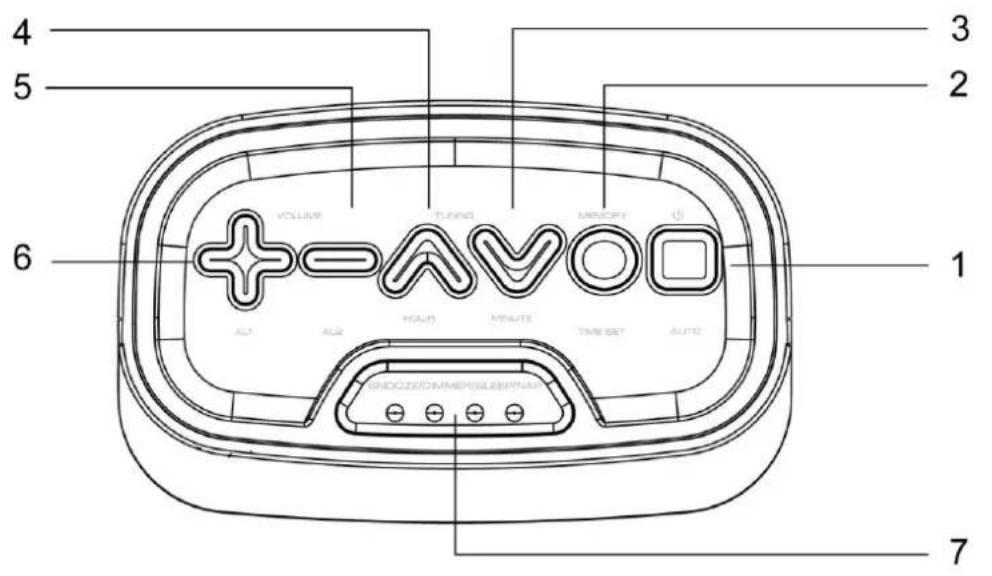
text_image
4 5 3 2 6 + = AVO 1 VOLUME Tuning MEMORY AUTO AUTO AUTO AUTO AUTO AUTO AUTO AUTO AUTO AUTO AUTO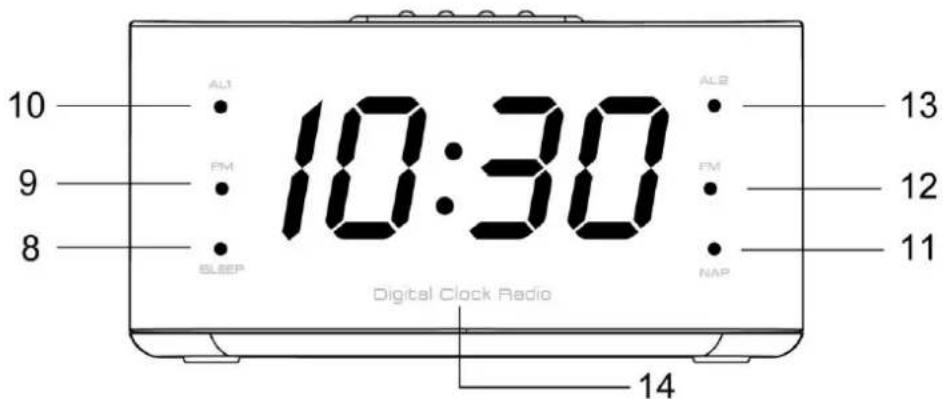
text_image
10 9 8 AL1 PM SLEEP 10:30 AL2 PM NAP 13 12 11 Digital Clock Radio 14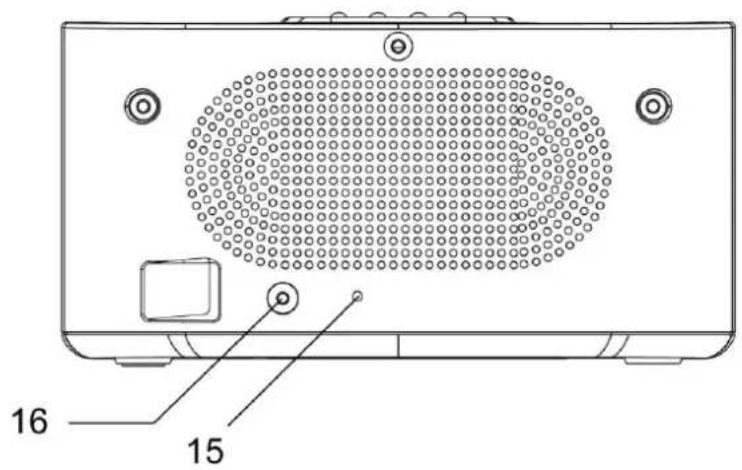
text_image
16 15- ⏻ / AUTO
- PM INDICATOR
- MEMORY / TIME SET
- AL1 INDICATOR
- TUNING DOWN / MINUTE
- NAP INDICATOR
- TUNING UP / HOUR
- FM INDICATOR
- VOLUME - / AL2
- AL2 INDICATOR
- VOLUME + / AL1
- DIGIT DISPLAY
- SNOOZE / DIMMER / SLEEP/ NAP 15. FM ANTENNA WIRE
- SLEEP INDICATOR
- DC INPUT
BOTTOM OF SET: Battery compartment for 2 x 1.5 volt (LR6, UM-3, AA) batteries. (not included) for temporary time storage.
GETTING STARTED: Use the AC/DC adapter to connect the radio alarm clock with a regular household plug.
SET TIME
- Press and hold TIME SET for two seconds.
- Preset 24H shows 24 hour mode.
- Press Tuning ∧ or ∨ to select 24 or 12 hour mode.
- Press and hold TIME SET and time digits [0:00] are blinking.
- Press Tuning to set the hour and Tuning to set the minute.
- Press TIME SET again to confirm setting or the setting will be confirmed automatically if no button is used within 3 seconds.
LISTEN TO FM RADIO
For better reception, fully extend and adjust the position of the FM antenna wire.
- Press / AUTO to turn on FM radio.
➢ [FM frequency] is displayed and FM indicator is light up.
- Press TUNING ∧ or ∨ for two seconds.
The FM Tuner tunes to a station with strong reception automatically.
To search for a radio station manually:
Press TUNING ∼ or ∼ repeatedly to tune to a radio station
STORE FM RADIO STATIONS
You can store up to 20 FM radio stations in preset channel automatically or manually.
STORE FM RADIO STATIONS AUTOMATICALLY (AUTO SCAN)
-
Press / AUTO to turn on FM radio.
-
Press ⏻ AUTO and hold for 2 seconds.
The received stations are automatically stored to preset numbers.
STORE FM RADIO STATIONS MANUALLY.
-
Tune to an FM radio station.
-
Press MEMORY to activate the storing mode. The display is blinking.
-
Press TUNING ∧ or ∨ to select the preset number.
➢ [P 01 \~ P 20] is preset station numbers.
- Press MEMORY to select a number for the selected station.
LISTEN TO A PRESET FM RADIO STATION
In FM mode, press MEMORY to select a preset number.
Note
The digit display return to clock display if no buttons is pressed for 10 seconds
SET ALARM TIMER
Make sure that you have set the clock correctly.
You can set two separate alarm timers. For the alarm sound, you can select the FM radio or the buzzer.
-
Press / AUTO to Clock mode.
-
Press and hold AL1 or AL2 for two seconds and alarm digits [0:00] are blinking.
-
Press Tuning to set the alarm hour and Tuning to set the alarm minute.
-
Press TIME SET again to confirm setting or the setting will be confirmed automatically if no button is used within 3 seconds.
-
Press AL1 or AL2 again to select a sound source. FM radio or alarm sound. The options can be selected in following order:
Alarm off (OFF) > alarm sound (bb) > radio alarm
Note
The selected radio volume is the alarm volume.
SNOOZE ALARM
When alarm sounds, press SNOOZE to activate the snooze time 9 minutes.
The AL1 or AL2 indicator keeps blinking.
SET SLEEP TIMER
This radio clock can switch to standby mode automatically after a preset period.
- Press / AUTO to radio mode.
- Press SNOOZE/DIMMER/SLEEP multi-function button repeatedly to select the sleep timer period (in minutes).
To deactivate the sleep timer, press SNOOZE/DIMMER/SLEEP multi-function button repeatedly until back to radio frequency.
SET NAP TIMER
- Press / AUTO to clock mode.
- Press SNOOZE/DIMMER/SLEEP multi-function button repeatedly to select the sleep timer period (in minutes).
To deactivate the nap timer, press SNOOZE/DIMMER/SLEEP multi-function button repeatedly until sleep indicator is off.
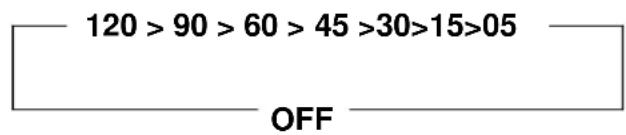
Sleep / Nap Timer period circle as follow:
text_image
120 > 90 > 60 > 45 >30 >15 >05 OFFADJUST VOLUME
While listening, press VOLUME + or - to adjust volume.
Press and hold DIMMER for 2 seconds repeatedly to select a high or low brightness level.
BATTERY BACK-UP
Slide open the battery cover at the back of your clock, then 2 x 1.5 volt (LR6, UM-3, AA) batteries to the battery compartment. Make sure +/- polarity of the battery are facing in the right directions. Then replace the battery cover.
The battery is for back-up only and just helps to save your settings in cases of missing power. There is no display in back-up mode.
TROUBLE SHOOTING
If your clock displays irrelevant time or does not function properly, which maybe caused by electro-static discharge or other interference, unplug the DC jack to disconnect the AC power (and remove the backup battery). The clock will be reset to default settings and you need to set it again.
SPECIFICATIONS
Power Source : 100-240V \~50/60Hz,
Tuner Range : FM 87.5-108.0MHz
Power Consumption : 5W
Precautions
- This main unit is intended to be used only indoors.
- Do not subject the unit to excessive force or shock.
- Do not expose the unit to extreme temperatures, direct sunlight, dust or humidity.
- Do not immerse in water.
- Avoid contact with any corrosive materials.
- Do not dispose this unit in a fire as it may explode.
- Do not open the inner back case or tamper with any components of this unit.
Batteries safety warnings
- Use only alkaline batteries, not rechargeable batteries.
• Install batteries correctly by matching the polarities (+/-).
• Always replace a complete set of batteries. - Never mix used and new batteries.
- Remove exhausted batteries immediately.
- Remove batteries when not in use.
- Do not recharge and do not dispose of batteries in fire as the batteries may explode.
- Ensure batteries are stored away from metal objects as contact may cause a short circuit.
- Avoid exposing batteries to extreme temperature or humidity or direct sunlight.
- Keep all batteries out of reach from children. They are a choking hazard.
Consideration of duty according to the battery law

Old batteries do not belong to domestic waste because they could cause damages of health and environment. You can return used batteries free of charge to your dealer and collection points. As end-user you are committed by law to bring back needed batteries to distributors and other collecting points!
Consideration of duty according to the law of electrical devices
This symbol means that you must dispose of electrical devices separated from the General household waste when it reaches the end of its useful life. Take your unit to your local waste collection point or recycling centre. This applies to all countries of the European Union, and to other European countries with a separate waste collection system.
Technoline
WT-465
RADIO-REVEIL NUMERIQUE
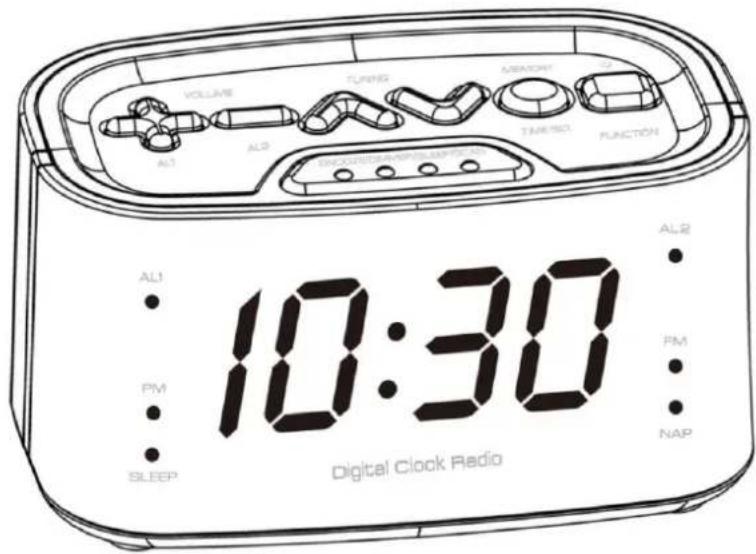
text_image
VOLUME AL1 AL2 TURING ASIGN TAREND FUNCTION 10:30 AL1 PM SLEEP PM NAP Digital Clock RadioNOTICE D'UTILISATION
EMPLACEMENT DES TOUCHES
text_image
4 3 4 3 5 2 6 1 +—AVO VOLUME TUNG MEMORY A ALL ALL HOUR MOUTL TIME SET AUTO ENDOCRIMMEPSLEEP/NAV 7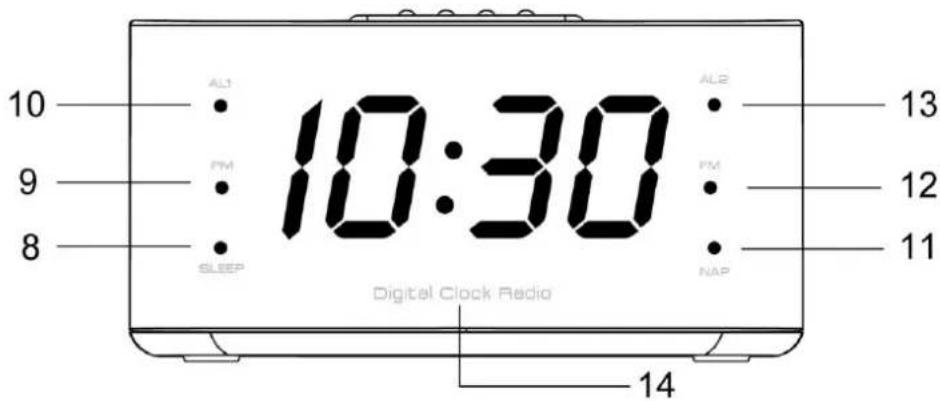
text_image
10 AL1 PM SLEEP 10:30 AL2 PM NAP 13 12 11 Digital Clock Radio 14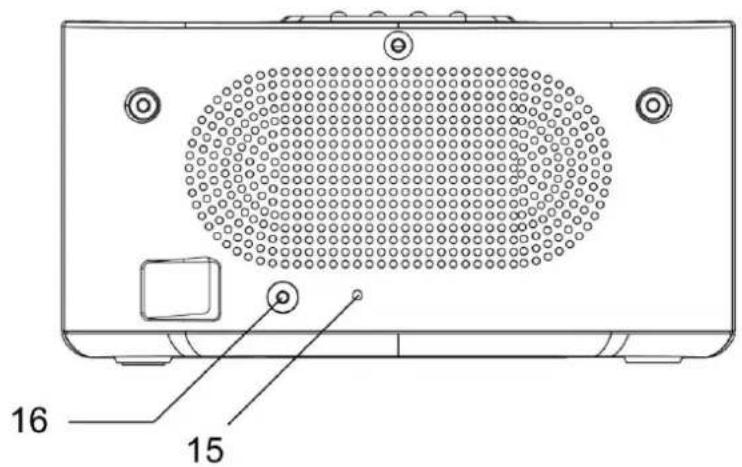
text_image
16 15- /AUTO
- MEMOIRE / REGLER L'HEURE
- RECHERCHE ARRIÈRE / MINUTE
- RECHERCHE AVANT / HEURE
- VOLUME- / AL2
- VOLUME+ / AL1
- RAPPEL ALARME / RÉTROÉCLAIRAGE / VEILLE AUTOMATIQUE / SIESTE
- TEMOIN VEILLE AUTOMATIQUE
- TEMOIN PM
- TEMOIN AL1
- TEMOIN SIESTE
- TEMOIN FM
- TEMOIN AL2
- AFFICHEUR NUMERIQUE
- CABLE D'ANTENNE FM
- ENTREE CC
Alarm off (OFF) > alarm sound (bb) > radio alarm
Remarque
Alarm off (OFF) > alarm sound (bb) > radio alarm
Nota
text_image
VOLUME TUNIO NAGGY ALI ALI TIME SET FUNCTION ALI PM SLEEP 10:30 AL2 PM NAP Digital Clock RadioGEBRUIKSHANDLEIDING
FM RADIOSTATIONS OPSLAAN
U kunt automatisch of handmatig tot op 20 FM radiostations als geheugenkanalen opslaan.
FM RADIOSTATIONS AUTOMATISCH OPSLAAN (AUTO SCAN)
text_image
VOLUME TUNING MEMORY AL ALS TIME SET FUNCTION SLEEP ALI FM SLEEP 10:30 AL2 FM NAP Digital Clock Radiotext_image
VOLUME AL1 AL2 TUNING MEMORY TIME SET FUNCTION INDIVIDUAL/INNOVATION AL1 PM SLEEP 10:30 AL2 PM NAP Digital Clock RadioNÁVOD K OBSLUZE
Alarm off (OFF) > alarm sound (bb) > radio alarm