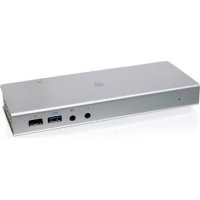
GTD720 - Other computer accessories IOGEAR - Free user manual and instructions
Find the device manual for free GTD720 IOGEAR in PDF.


| Product type | Thunderbolt 2 Docking Station |
| Brand | IOGEAR |
| Model | GTD720 |
| Connectivity | 2 Thunderbolt 2 ports, 3 USB 3.0 ports, 1 HDMI port, 1 Gigabit Ethernet port, mini-TOSLINK optical audio input/output |
| Front ports | 1 USB 3.0 port, 1 USB fast charging port, optical audio output, optical audio input |
| Rear ports | 2 Thunderbolt 2 ports, 2 USB 3.0 ports, 1 HDMI, 1 Gigabit LAN, power input, power switch |
| Transfer rate | Up to 20 Gbps (Thunderbolt 2) |
| Power supply | External power adapter included (input on dock) |
| Compatibility | Mac and PC with Thunderbolt 2 (MacBook Pro Retina late 2013+, Mac Pro late 2013, iMac 5K late 2014, Mac mini late 2014) |
| Multiple display | Supports 1 Thunderbolt display + 1 HDMI or Mini DisplayPort display; 4K resolution |
| Audio | Digital optical audio input and output (compatible with optical or self-powered devices) |
| Fast charging | Dedicated USB charging port for tablets and smartphones |
| Box contents | GTD720 dock, 1 m Thunderbolt cable, power adapter, quick start guide, warranty card |
| Warranty | 1 year limited |
| Certifications | FCC Class B, CE, IC |
| Maintenance | Wipe with a soft dry cloth; do not use chemicals |
| Safety | Use only the provided adapter; do not expose to water or excessive heat |
| Operating systems | macOS, Windows (not specified but compatible with PC with Thunderbolt) |
Frequently Asked Questions - GTD720 IOGEAR
User questions about GTD720 IOGEAR
0 question about this device. Answer the ones you know or ask your own.
Ask a new question about this device
Download the instructions for your Other computer accessories in PDF format for free! Find your manual GTD720 - IOGEAR and take your electronic device back in hand. On this page are published all the documents necessary for the use of your device. GTD720 by IOGEAR.
USER MANUAL GTD720 IOGEAR
Thunderbolt™ 2 Docking Station
1 x GTD720 Thunderbolt 2 Docking Station
1 x 1m (3ft) Thunderbolt Cable
1 x AC Power Adapter
1 x Quick Start Guide
1 x Warranty Card
System Requirements
Thunderbolt enabled computers/systems that include Thunderbolt 2 can take advantage of the 20Gbps transfer speed. The following Mac models are Thunderbolt 2 capable:
MacBook Pro (Retina, Late 2013 and later)
Mac Pro (Late 2013)
iMac (Retina 5K, 27-inch, Late 2014)
Mac mini (Late 2014)
Overview
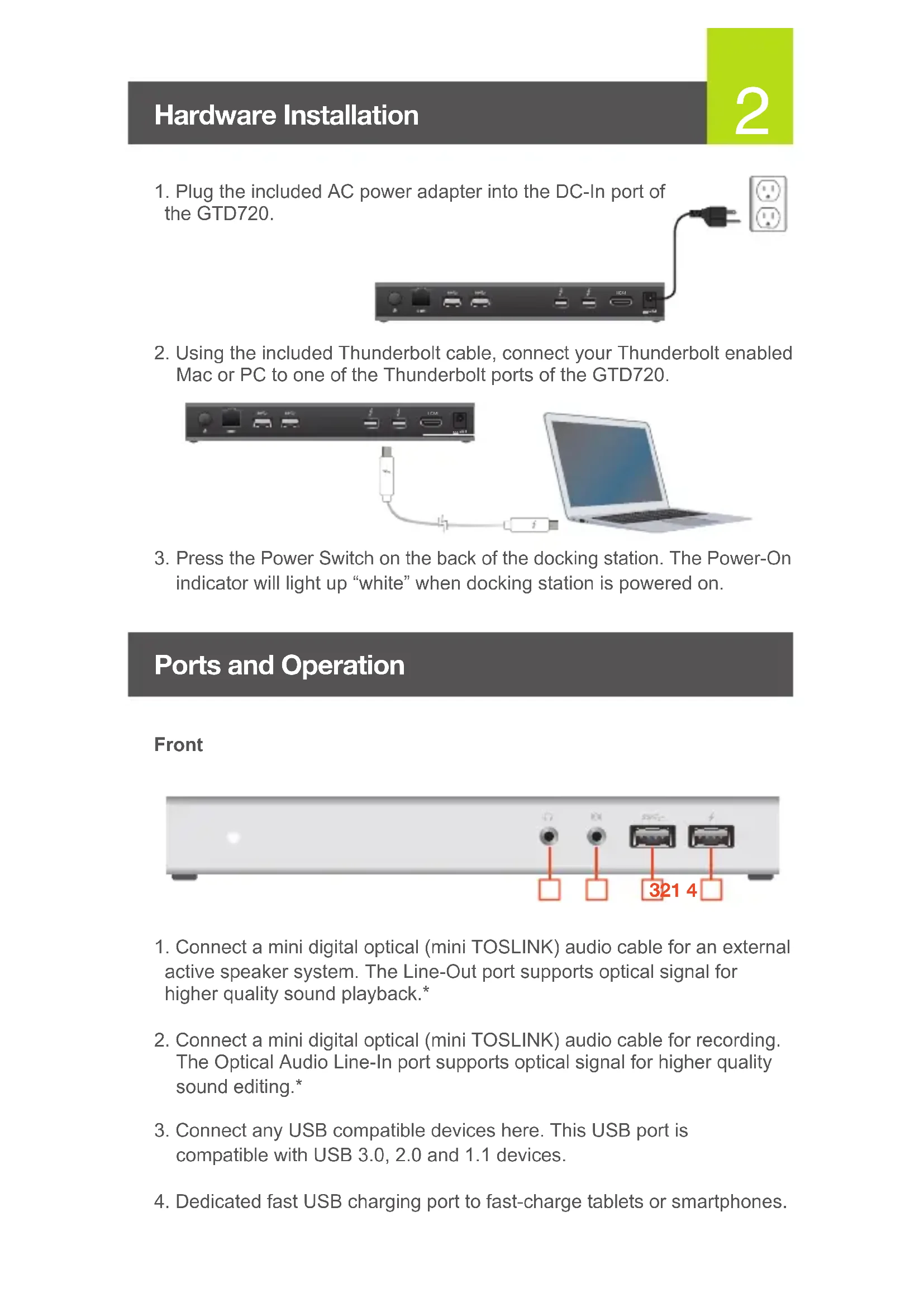
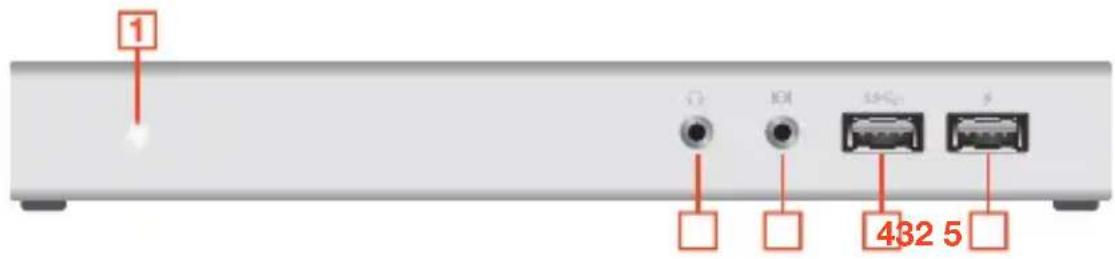
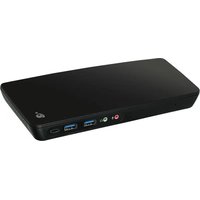
Front
-
Power-On Indicator
-
USB 3.0 Port
-
Optical Audio Line-Out
-
USB Fast Charging Port
-
Optical Audio Line-In
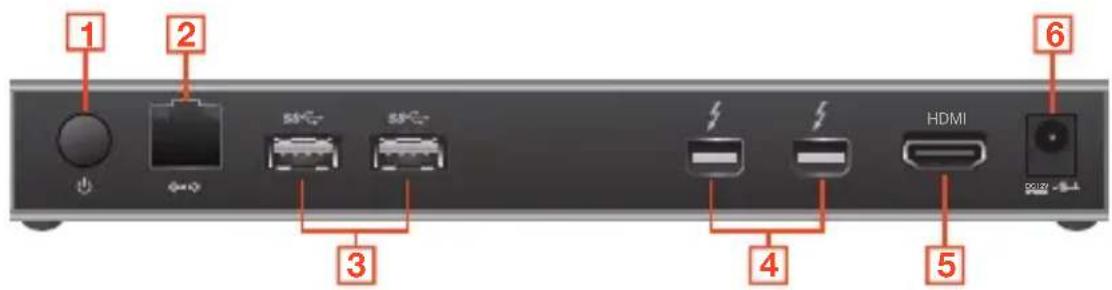
Back
-
Power Switch
-
Thunderbolt Ports
-
Gigabit LAN Port
-
HDMI Out
-
USB 3.0 Ports
-
DC-In Port
Hardware Installation
2
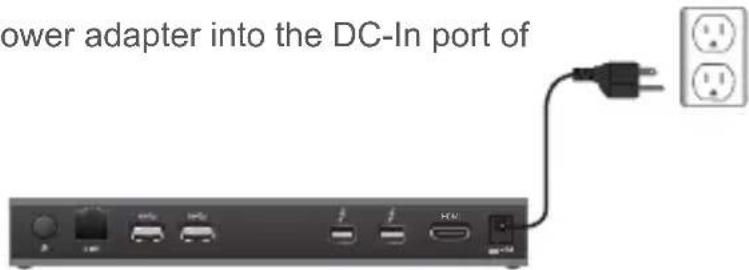
- Plug the included AC power adapter into the DC-In port of the GTD720.
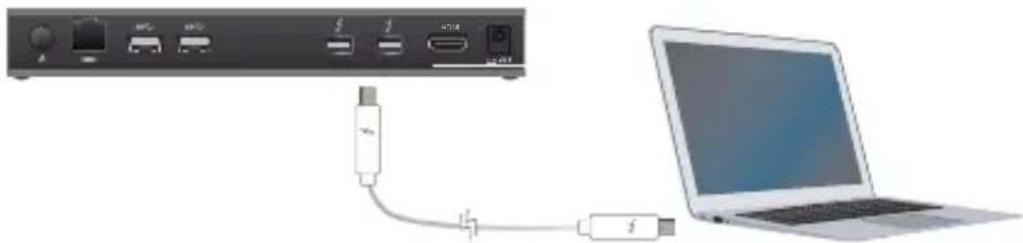
- Using the included Thunderbolt cable, connect your Thunderbolt enabled Mac or PC to one of the Thunderbolt ports of the GTD720.
- Press the Power Switch on the back of the docking station. The Power-On indicator will light up "white" when docking station is powered on.
Ports and Operation
Front

- Connect a mini digital optical (mini TOSLINK) audio cable for an external active speaker system. The Line-Out port supports optical signal for higher quality sound playback.*
- Connect a mini digital optical (mini TOSLINK) audio cable for recording. The Optical Audio Line-In port supports optical signal for higher quality sound editing.*
- Connect any USB compatible devices here. This USB port is compatible with USB 3.0, 2.0 and 1.1 devices.
- Dedicated fast USB charging port to fast-charge tablets or smartphones.
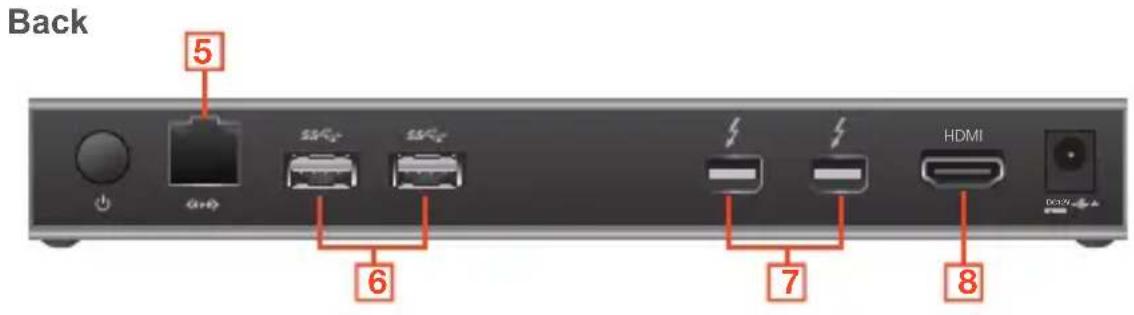
- Connect an Ethernet cable to the Gigabit LAN port for high speed internet connection.
- Connect any USB compatible devices here. These USB ports are compatible with USB 3.0, 2.0 and 1.1 devices.
- The GTD720 can support an additional Thunderbolt monitor. Connect the monitor to the docking station and your computer will automatically detect the additional display.**
- The GTD720 can support an additional HDMI monitor. Connect the monitor to the docking station and your computer will automatically detect the additional display.**
*Note about Audio Line-in/Line-out: Audio Line-in/Line-out ports only support optical or self-powered sound devices (Ex. active speakers or mini sound system). To use passive headphones on the dock, please use an additional digital headphone amplifier.
**Note about dual displays: At least one display has to be Thunderbolt or Thunderbolt 2 technology-ready. For displays that are not Thunderbolt technology-ready, the Thunderbolt port is backwards compatible with Mini DisplayPort. The dock supports either HDMI or Mini DisplayPort, but not both. The dock supports only one display at 4K cinema resolution.
For additional GTD720 Thunderbolt Gateway file transfer software, please visit: www.iogear.com/product/GTD720
Monitor and Sound Settings
External Monitor Settings: Mac OS X
Option 1: Extend Mode
- Open System Preferences and click Displays.
- Click on Arrangement to change the position of the displays currently connected.
Option 2: Mirror Mode
- Open System Preferences and click Displays.
- Click on Arrangement.
- Click the box marked Mirror Displays.
External Sound Settings: Mac OS X
- Open System Preferences and click Sound.
- Click on Arrangement to change the sound-output device to currently connected USB DAC.
Compliance Information
FCC Statement
This equipment has been tested and found to comply with the limits for a Class B digital device, pursuant to Part 15 of the FCC Rules. These limits are designed to provide reasonable protection against harmful interference in a residential setting. This product generates, uses, and can radiate radio frequency energy and, if not installed and used as directed, it may cause harmful interference to radio communications. Although this product complies with the limits for a Class B digital device, there is no guarantee that interference will not occur in a particular installation.
CE Compliance
This device has been tested and found to comply with the following European Union directives: Electromagnetic Capability (2004/108/EC), Low Voltage (2006/95/EC) and R&TTED (1999/5/EC).
Canada, Industry Canada (IC) Notices
Complies with the Canadian ICES-003 Class B specifications.
Declaration of Conformity and related documents can be downloaded directly from our website:
http://www.iogear.com/product/GTD720/certifications
Limited Warranty
WE'RE HERE TO HELP YOU! NEED ASSISTANCE SETTING UP THIS PRODUCT?
Make sure you:
- Visit www.iogear.com for more product information
- Visit www.iogear.com/support for live help and product support
Warranty Information
This product carries a 1 Year Limited Warranty. For the terms and conditions of this warranty, please go to http://www.iogear.com/support/warranty
Register online at
http://www.iogear.com/register
Important Product Information
Product Model
Serial Number
Contact
iogear.custhelp.com
support@iogear.com
www.iogear.com
19641 Da Vinci, Foothill Ranch, CA 92610
www.iogear.com/product/GTD720
http://www.iogear.com/product/GTD720/certifications
Garantie limitée
NOUS SOMMES LA POUR VOUS AIDER! BESOIN D'AIDE POUR LA CONFIGURATION DE CE PRODUIT?
Assurez-vous de:
http://www.iogear.com/register
Declaration of Conformity and related documents can be downloaded directly from our website:
http://www.iogear.com/product/GTD720/certifications
Garantía limitada
http://www.iogear.com/support/warranty
http://www.iogear.com/register
- System Requirements
- Overview
- Front
- Back
- Hardware Installation
- Ports and Operation
- Monitor and Sound Settings
- External Monitor Settings: Mac OS X
- External Sound Settings: Mac OS X
- Compliance Information
- FCC Statement
- CE Compliance
- Canada, Industry Canada (IC) Notices
- Limited Warranty
- WE'RE HERE TO HELP YOU! NEED ASSISTANCE SETTING UP THIS PRODUCT?
- Warranty Information
- Contact
- Garantie limitée
- NOUS SOMMES LA POUR VOUS AIDER! BESOIN D'AIDE POUR LA CONFIGURATION DE CE PRODUIT?
- Garantía limitada
Brand : IOGEAR
Model : GTD720
Category : Other computer accessories