M62 - Heart rate monitor POLAR - Free user manual and instructions
Find the device manual for free M62 POLAR in PDF.



User questions about M62 POLAR
0 question about this device. Answer the ones you know or ask your own.
Ask a new question about this device
Download the instructions for your Heart rate monitor in PDF format for free! Find your manual M62 - POLAR and take your electronic device back in hand. On this page are published all the documents necessary for the use of your device. M62 by POLAR.
USER MANUAL M62 POLAR
Darmstädter Straße 59
D-64572 Büttelborn
GERMANY
Donaufelder Straße 101
A-1210 Wien
AUSTRIA
Polar Electro France S.A.S
Zi les Pontôts
FR-64 600 Anglet
FRANCE
natural_image
Close-up of a person's face with visible teeth and jawbone (no text or symbols)Material: Polyurethan, Polyester,
Alaim Ads (Off) Alter 0
Gewicht 00 (kg)
Polar Fitness-Test Aus (OFF)
Benutzer 1
Körpergröße 00 (cm)
Grenzwerte
Support Hershey
Kcal
Tot. kcal 999999 kcal
Tot. time
23 Std. 59 Min. 59 Sek. 30 - 240 Schläge/Minute 99999 kcal
9999 Std. 59 Min. 59 Sek.
How the Polar Heart Rate Monitor works ..... 38
Buttons and their functions 40
Modes and their functions 40
settings
User information settings 41
Setting user 1 or 2 42
Setting weight 42
Setting height 42
Setting age 42
Setting sex 43
Setting activity level
Measurement options settings 43
OwnZone on/off
Setting heart rate limits manually 44
OwnCal calorie counter on/off 44
Polar Fitness Test on/off 4
Watch settings 46
Setting the 12/24 h time mode 46
Setting the alarm 46
Setting the time of day 47
Setting the date 47
Starting the heart rate measurement 48
OwnZone 49
How to determine your OwnZone 49
How to determine your OwnZone .... 49
OwnZone method 50
Ownzone methods .... 50
How to be previously determined Our7-90.... 54
How to use previously determined OwnZone .... 51 Functions during heart rate measurement.... 51
Functions during heart rate measurement ..... 51
See your heart rate 51
Illuminate the display 51
Turn the sound signal on/off 52
Swap the user 52
Start/stop the stopwatch
Check exercise information 53
Check your heart rate limits 53
See your progress bullets during exercise 53
See your progress banets during exercise ..... 53
Swan the heart rate limits 53
Swap the heart rate index
Stop the heart rate measurement 54
Recalling training information 54
Date 54
Exercise time 54
Exercise time in the target zone 54
Target heart rate limits 55
Average heart rate 55
Average heart rate 53
Calories expended during the exercise 55
calories expended during the exercise .... 53
Total caloric count 55
Total calorie count 53
Total exercise time 55
Total exercise time .... 55
Latest Ovindex.... 56
Latest Owhindex 56
OwIndex 57
OWHINDEX 56
Fitness test settings 57
Carrying out the test 57
Fitness test result 58
Care and maintenance 59
Taking care 59
Batteries 60
Service 60
Precautions 60
In a water environment 60
Interference 60
Minimizing possible risks in exercising
with a heart rate monitor 61
with a heart rate monitor .... 51
Frequently asked questions .... 67
Frequently asked questions 62 Polar glossary 64
Polar glossary 64
Technical specifications 65
Technical specifications 65 Limited Sales International waverages 50
Limited Polar International guarantee .... 66
Disclaimer 66 Index 57
Index 57
VISUAL CUES TO READ THIS GUIDE

Indicates important issues. Please, pay attention!

Indicates a useful tip. It is good to know these things.

Indicates a tip to do things faster.

See also.
Text with colored background indicates features only available in models M61 and M62.
IMPORTANT TO REMEMBER!
- Adjust the strap length snug enough and wet the Polar transmitter electrodes to ensure flawless heart rate measurement.
- Do not bend or stretch the transmitter.
- Do not operate the buttons of the wrist receiver under water.
- Wash and dry your transmitter regularly after use; never store it wet.
- Keep the Polar Heart Rate Monitor out of extreme cold and heat.
- Do not expose the Polar Heart Rate Monitor to direct sunlight for extended periods.
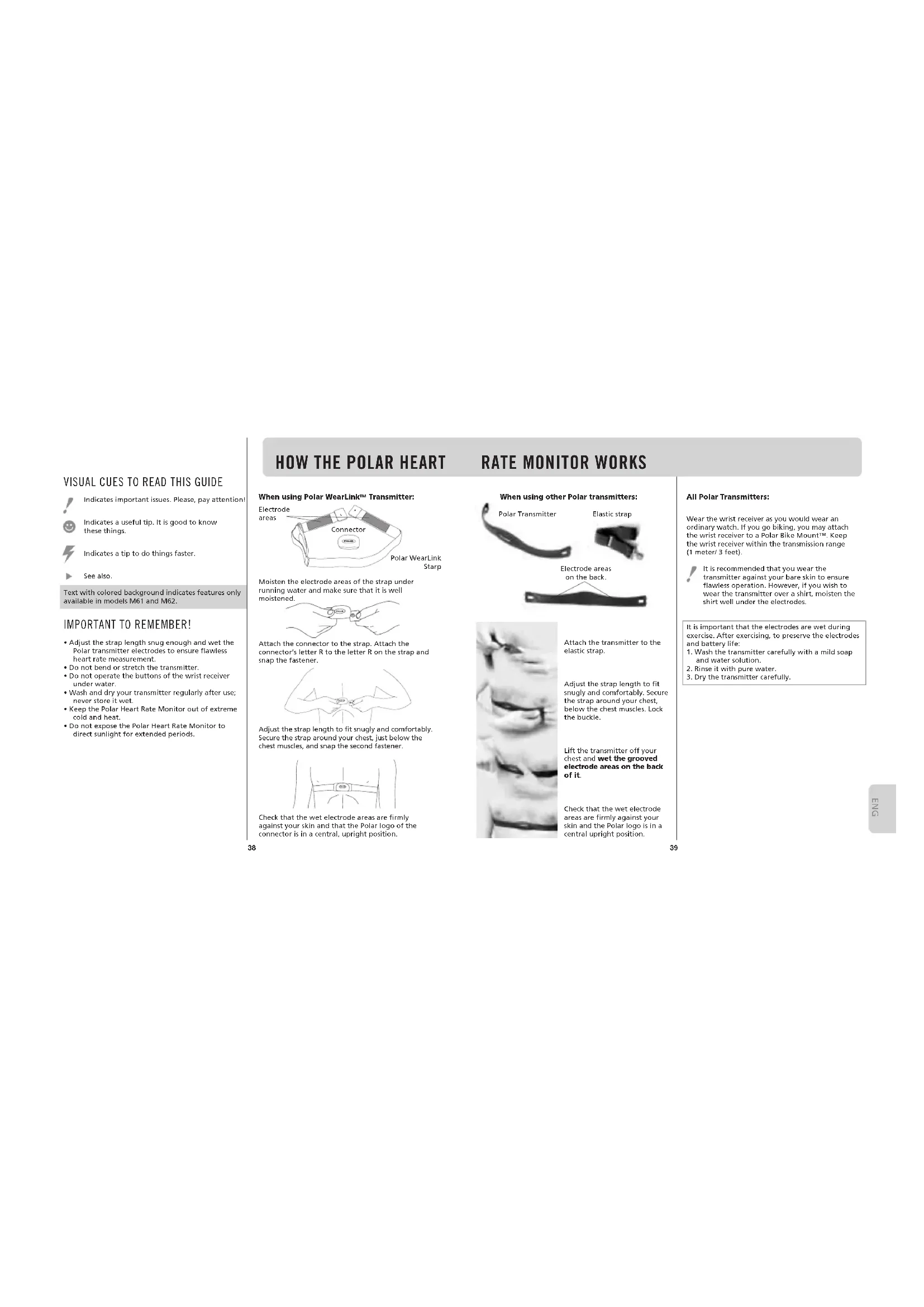
When using Polar WearLink™ Transmitter:
Electrode areas
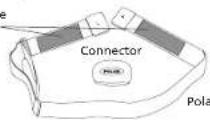
Polar WearLink Starp
Moisten the electrode areas of the strap under running water and make sure that it is well moistened.
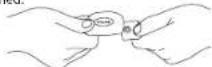
Attach the connector to the strap. Attach the connector's letter R to the letter R on the strap and snap the fastener.
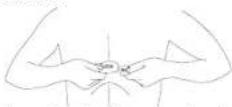
Adjust the strap length to fit snugly and comfortably. Secure the strap around your chest, just below the chest muscles, and snap the second fastener.
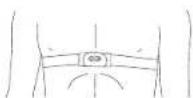
Check that the wet electrode areas are firmly against your skin and that the Polar logo of the connector is in a central, upright position.
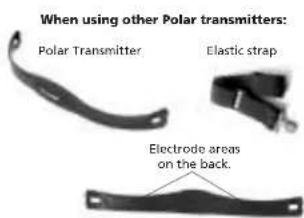
Polar Transmitter
Elastic strap
Electrode areas on the back.
natural_image
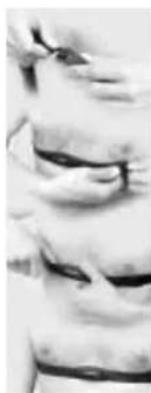
Close-up of a person's face with visible bandages and banding (no text or symbols)Attach the transmitter to the elastic strap.
Adjust the strap length to fit snugly and comfortably. Secure the strap around your chest, below the chest muscles. Lock the buckle.
Lift the transmitter off your chest and wet the grooved electrode areas on the back of it.
Check that the wet electrode areas are firmly against your skin and the Polar logo is in a central upright position.
All Polar Transmitters:
Wear the wrist receiver as you would wear an ordinary watch. If you go biking, you may attach the wrist receiver to a Polar Bike Mount™. Keep the wrist receiver within the transmission range (1 meter/3 feet).

It is recommended that you wear the transmitter against your bare skin to ensure flawless operation. However, if you wish to wear the transmitter over a shirt, moisten the shirt well under the electrodes.
It is important that the electrodes are wet during exercise. After exercising, to preserve the electrodes and battery life:
- Wash the transmitter carefully with a mild soap and water solution.
- Rinse it with pure water.
- Dry the transmitter carefully.
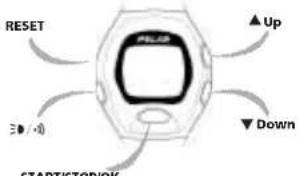
BUTTONS AND THEIR FUNCTIONS
text_image
RESET Up Down START/STOP/OKSTART/STOP/OK
START/STOP/OK
• Start heart rate measurement
• Start the stopwatch
- Stop the stopwatch
• Activate the displayed mode
- Lock your selection
Up
• Move forward to the next mode
- Select the desired value (up)
▼ Down
- Move backward to the previous mode
- Select the desired value (down)
三●/·
- Backlight on
• Signal sound on or off
RESET
Briefly pressing a button (approximately 1 second) will do different things than pressing and holding button for a longer period of time (approximately 2 to 5 seconds).
MODES AND THEIR FUNCTIONS
Your Polar Heart Rate Monitor has four main modes:
- TIME OF DAY
You can use the Polar Heart Rate Monitor as an ordinary watch with date, weekday indicator and alarm function.

Press and hold START/STOP/OK to return to the Time of day display, wherever you are in the Options setting or File recalling cycle.

Your Polar Heart Rate Monitor starts reminding you at full hours if more than three days has passed since your last recorded exercise. Keep exercising regularly!
- EXERCISE
In the Exercise mode you measure the heart rate.
In this mode you can
• see your heart rate reading
- record the exercise data
• use the stopwatch
• determine your OwnZone®
• see your exercising limits
- say the time of day
• see the time you have exercised within your target
zone so far
- see the OwnCal® calorie count of your exercise
session
- In models M61 and M62: swap heart rate limits
- In models M61 and M62: swap user (before stopwatch is on)
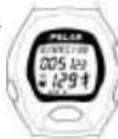
- FILE
Polar Heart Rate Monitor saves information on your latest exercise session. In the File mode you can see the following information:
- date of the exercise
• total exercising time
• exercising time spent in your target zone
• heart rate limits used during exercise
• average heart rate
- OwnCal calorie count and fat percentage of the energy expenditure during the exercise session
• total calorie expenditure starting from the moment you have reset the counter
• total exercising time starting from the moment you have reset the counter
- In models M61 and M62: your latest OwnIndex™ based on Polar Fitness Test™
- OPTIONS
In the Options mode you can define the following information:
- User specific information; weight, age and sex. In models M61 and M62 you can also define height and your activity level for Polar Fitness Test. You have two users and can set the preferences for both user 1 and user 2.
- OwnZone ON/OFF select whether you want to use your personal OwnZone or determine the values for the Target Zone manually.
In models M61 and M62 you can choose between three OwnZone levels: OwnZone basic, low and high.
• OwnCal calorie counter ON/OFF - In models M61 and M62: Polar Fitness Test ON/OFF
- Watch settings; alarm, 12h/24h mode, time of day, date
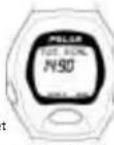
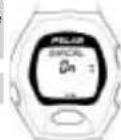
SETTINGS
In the Options mode you can set
- your personal user information which is a prerequisite for using OwnZone and OwnCal functions
• measurement options which are used during Exercise mode
- watch functions
- In models M61 and M62: Polar Fitness Test function ON or OFF.
At any time during the settings you can return to the Time of day display by pressing and holding START/STOP/OK.
The digits run faster if you press and hold the ▲ Up or ▼ Down. Release the button at the desired value.
USER INFORMATION
Begin with the display showing the time of day.
1. Press ▲ Up or ▼ Down until OPTIONS is displayed.
2. Press START/STOP/OK to enter the Options mode. USER SET is displayed.
3. Press START/STOP/OK to enter the user information loop.
Begin with the display showing the time of day.
1. Press ▲ Up or ▼ Down until OPTIONS is displayed.
2. Press START/STOP/OK to enter the Options mode. USER SET is displayed.
3. Press START/STOP/OK to enter the user information loop.
Begin with the display showing the time of day.
1. Press ▲ Up or ▼ Down until OPTIONS is displayed.
2. Press START/STOP/OK to enter the Options mode. USER SET is displayed.
Begin with the display showing the time of day.
1. Press ▲ Up or ▼ Down until OPTIONS is displayed.
2. Press START/STOP/OK to enter the Options mode. USER SET is displayed.
Press START/STOP/OK to enter the user
information loop.
Begin with the display showing the time of day.
1. Press ▲ Up or ▼ Down until OPTIONS is displayed.
2. Press START/STOP/OK to enter the Options mode. USER SET is displayed.
3. Press START/STOP/OK to enter the user information loop.
SETTING USER 1 or 2
If you are in the Time of day display start from User information.
In models M61 and M62 you can set two users' preference. This function is practical e.g. for another family member. Make the settings ready for both users: when you start exercising, just select your personal user id 1 or 2.
USER appears, 1 or 2 is flashing.
- Press ▲ Up or ▼ Down to
select USER 1 or USER 2.
- Press START/STOP/OK to lock your selection. You have now selected the user id. All settings are made to the selected user.

In File, Measure, Options and Fitness test main modes you can change the user id by pressing and holding ▲Up.
If you want to disable the user id 2, set the weight of the user 2 to zero.
Continue by setting your weight or return to the Time of day display by pressing and holding START/STOP/OK.
SETTING WEIGHT
If you are in the Time of day display start from User information. Press START/STOP/OK until
KG or LBS appears and the digits of kilograms/pounds are flashing.
- Press Up or Down to adjust your weight.
- Press START/STOP/OK to lock your selection. You have now set your weight.
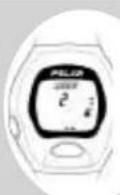

You can change the weight unit between kg and lbs in watch settings.
24 h time mode -> kg
12 h time mode -> lbs
Continue the user settings or return to the Time of day display by pressing and holding START/STOP/OK.
SETTING HEIGHT
In models M61 and M62 you need to set your height.
If you are in the Time of day display start from User information. Press START/STOP/OK until
CM or FT/INCH appears and the digits of centimeters/ feet are flashing.

ess ▲ Up or ▼ Down to adjust your height.
ess START/STOP/OK to lock your selection.
You have now set your height.

You can change the height unit between cm and ft/inch in watch settings.
24 h time mode > cm
12 h time mode -> ft
Continue by setting your age or return to the Time of day display by pressing and holding START/STOP/OK.
SETTING AGE
If you are in the Time of day display start from User Information. Press START/STOP/OK until
AGE appears and the digits for years are flashing.
- Press ▲ Up or ▼ Down to adjust your age.
- Press START/STOP/OK to lock your selection. You have now set your age.
Continue by setting your gender or return to the Time of day display by pressing and holding START/STOP/OK.
SETTING SEX
If you are in the Time of day display start from User information. Press START/STOP/OK until SEX appears and FEMALE/MALE is flashing.
- Press ▲ Up or ▼ Down to select the right gender.
- Press START/STOP/OK to lock your selection. You have now set your gender.
SETTING ACTIVITY LEVEL
In models M61 and M62 you need to set a suitable activity level for Polar Fitness Test. ▶ OwnIndex
If you are in the Time of day display start from User information. Press START/STOP/OK until
ACTIVITY appears and LOW/MIDDLE/HIGH/TOP is flashing.
- Press ▲ Up or ▼ Down to select the right activity level.
- Press START/STOP/OK to lock your selection.
You have now set all necessary user information. USER SET is displayed.
Choose from the following two alternatives to continue:
- To set OwnZone function ON or OFF, press ▲ Up.
- To return to the Time of day display, press ▲ Up or ▼ Down until you come to the Time of day display or simply press and hold START/STOP/OK.
MEASUREMENT OPTIONS SETTING
TURNING OWNZONE ON/OFF
Select whether you want to use the OwnZone option. Alternatively, you can set the target zone limits manually yourself.
If you choose to use OwnZone, Polar Heart Rate Monitor asks your user information, if you haven't set them earlier in the USER SET mode.
Begin with the display showing the time of day. 1. Press ▲p or ▼ Down until OPTIONS is displayed. 2. Press START/STOP/OK to enter the setting loop. USER SET is displayed.
- Press ▲Up once. OWNZONE ON or OFF is displayed.
- Press START/STOP/OK to enter the setting loop. OWNZONE is displayed. ON or OFF is flashing.
- Press ▲Up or ▼Down to select OwnZone ON or OFF.
ON - You can determine your OwnZone each time you start exercising and use the OwnZone limits to guide your intensity level. OFF - The OwnZone function is off and you can set the target zone limits manually.
- Press START/STOP/OK to lock your selection.
In models M61 and M62 you select between three different OwnZones: - OwnZone BASIC for allround exercising - OwnZone LOW for light intensity exercising - OwnZone HIGH for moderate intensity exercising
- Press ▲ Up once.
OWNZONE OFF or BASIC or LOW or HIGH is displayed. - Press START/STOP/OK to enter the setting loop.
OWNZONE is displayed.
OFF or BASIC or LOW or HIGH is flashing - Press ▲ Up or ▼ Down to select a suitable OwnZone for your exercise or OwnZone OFF.
- Press START/STOP/OK to lock your selection.
Choose from the following alternatives to continue:
- If you selected OwnZone OFF continue directly from Setting heart rate limits manually.
。
- If you selected OwnZone ON continue from Turning the OwnCal calorie counter ON/OFF by pressing ▲Up once.
。
- Return to the Time of day display by pressing and holding START/STOP/OK.
SETTING HEART RATE LIMITS MANUALLY
If you choose not to use the OwnZone function, you may manually enter a target zone. When you start the manual target zone settings for the first time:
- Polar Heart Rate Monitor automatically calculates you heart rate limits based on age, if you have set your user information.
- If you haven't done the user settings, default settings 80/160 are shown on the display.
You can start exercising with these limits right away.
Begin with the display showing the time of day.
-
Press ▲ Up or ▼ Down until you enter the Options mode.
-
Press START/STOP/OK to enter the setting loop. USER SET is displayed.
-
Press ▲ Up once. OWNZONE OFF is displayed.
-
Press START/STOP/OK to enter the setting loop. OWNZONE is displayed. OFF is flashing.
- Press START/STOP/OK to lock OwnZone OFF.
LIMITS is displayed.
The upper limit is flashing
- Press ▲ Up or ▼ Down to adjust the value.
The digits run faster if you press and hold the ▲ Up or ▼ Down button. Release the button at the desired value.
- Press START/STOP/OK to lock your selection.
The lower limit reading starts to flash.
-
Press ▲ Up or ▼ Down to adjust the correct value
-
Press START/STOP/OK to lock your selection. OWNZONE OFF is displayed.
The highest possible value for the upper limit is 240 and the lowest possible value for the lower limit is 30. The lower limit cannot be set above the upper limit.
Choose from the following two alternatives to continue:
-
To continue setting the OwnCal function ON or OFF, press ▲ Up.
-
To return to the Time of day display, press ▲ Up or ▼ Down until you come to the Time of day display or simply press and hold START/STOP/OK.
TURNING THE OWNCAL CALORIE COUNTER ON/OFF
Begin with the display showing the time of day. 1. Press ▲ Up or ▼ Down until OPTIONS is displayed.
-
Press START/STOP/OK to enter the setting loop. USER SET is displayed.
-
Press ▲ Up or ▼ Down until OWNCAL is displayed.
OWNCAL ON or OFF is displayed.
4. Press START/STOP/OK to enter the setting loop.
OWNCAL is displayed.
ON or OFF is flashing.
-
Press ▲p or ▼Down to select whether you want the calorie expenditure count to be ON or OFF.
-
Press START/STOP/OK to lock your selection.
Choose from the following two alternatives to continue:
- To continue settings, press ▲ Up.
- To return to the Time of day display, press ▲ Up or ▼ Down until you come to the Time of day display or simply press and hold START/STOP/OK.
The OwnCal calorie calculation starts when your heart rate reaches 100 bpm. The higher the heart rate, the faster the energy expenditure accumulation. Energy expenditure depends on body weight; the heavier the weight the higher the energy expenditure. Men's calorie expenditure is more intense than women's at the same heart rate.
The energy expenditure measurement with Polar Heart Rate Monitor is most accurate in continuous activities such as walking, cycling and jogging. Polar Heart Rate Monitor shows the energy expenditure in kilocalories (kcal). 1 kilocalorie (kcal or Calorie) = 1000 calories (cal).
When you expend calories, your body actually uses fat and carbohydrates as energy resources. The amount of fat from the total calorie expenditure varies between 10% - 60%. The rest (40% - 90%) is mostly carbohydrates.
The lower the heart rate, the bigger the fat percentage is of the total energy expenditure. If you want to control weight by exercising, it is recommended to aim at as big a fat percentage of total energy expenditure as possible. Exercise at the lower limit of your OwnZone.
In models M61 and M62, exercise with OwnZone Low.
TURNING POLAR FITNESS TEST ON/OFF
In models M61 and M62 you have the Polar Fitness Test function.
Begin with the display showing the time of day.
-
Press ▲ Up or ▼ Down until OPTIONS is displayed.
-
Press START/STOP/OK to enter the setting loop. USER SET is displayed.
-
Press ▲ Up or ▼ Down until FIT. TEST is displayed.
FIT. TEST ON or OFF is displayed.
- Press START/STOP/OK to enter the setting loop. FIT TEST is displayed
FTT. TEST is displayed.
- Press ▲ Up or ▼ Down to select whether you
want the Polar Fitness Test to be ON or OFF.
- Press START/STOP/OK to lock your selection.
If you select Polar Fitness Test ON, the Fitness test mode appears in the main mode loop. The Polar Fitness Test is carried out in the Fitness test mode.
Choose from the following two alternatives to continue:
- To continue settings, press ▲ Up
- To return to the Time of day display, press ▲ Up
or ▼ Down until you come to the Time of day display or simply press and hold START/STOP/OK.
SETTING THE WATCH
SETTING THE 12/24 H TIME MODE
- In the Time of day display press ▲ Up or ▼ Down until OPTIONS is displayed
- Press START/STOP/OK to enter the Options mode. USER SET is displayed.
-
Press ▲ Up or ▼ Down until WATCH SET is displayed.
-
Press START/STOP/OK to start the watch settings. ALARM is displayed. ON or OFF is flashing.
-
Press START/STOP/OK until TIME and the time of day is displayed. 12h or 24h is flashing.
-
Press ▲ Up or ▼ Down to select 12h or 24h mode.
-
Press START/STOP/OK to lock your selection.
- Press and hold START/STOP/OK to return to the Time of day display.

Quick enter to the Watch setting loop: In the Time of day display press and hold 📋/A the button for a couple of seconds.
If you want to skip some parts and go directly to set a particular watch function, press START/STOP/OK until the desired watch function is displayed.

To return to the Time of day display at any stage of watch settings, press and hold START/STOP/OK.

The digits run faster if you press and hold the ▲Up or ▼Down. Release the button at the desired value.
SETTING THE ALARM
- In the Time of day display press ▲ Up or ▼ Down until OPTIONS is displayed.
- Press START/STOP/OK to enter the Options mode. USER SET is displayed.
- Press ▲ Up or ▼ Down until WATCH SET is displayed.
-
Press START/STOP/OK to start the watch settings. ALARM is displayed.
ON or OFF is flashing -
Press ▲ Up or ▼ Down to set the alarm ON or OFF.
When the alarm is turned on 🌐appears on the display.
- Press START/STOP/OK to lock your selection. If you have 12h time mode, AM or PM starts to flash.
- Press ▲ Up or ▼ Down to select AM or PM.
-
Press START/STOP/OK to lock your selection. The hours start to flash.
-
Press ▲ Up or ▼ Down to adjust the desired hour.
- Press START/STOP/OK to lock your selection.
The minutes start to flash.
-
Press ▲ Up or ▼ Down to adjust the desired minutes
-
Press START/STOP/OK to lock your selection.
Choose from the following two alternatives to continue:
- To set the time of day continue in chapter Setting the time of day
- To return to the Time of day display, press and hold START/STOP/OK.
When the alarm comes on, it will sound for one minute or you can turn it off by pressing any of the four buttons.
SETTING THE TIME OF DAY
- In the Time of day display press ▲ Up or ▼ Down until OPTIONS is displayed.
- Press START/STOP/OK to enter the Options mode. USER SET is displayed.
- Press ▲ Up or ▼ Down until WATCH SET is displayed.
- Press START/STOP/OK to start the watch settings.
ALARM is displayed.
ON or OFF is flashing. - Press START/STOP/OK until TIME and the time of day are displayed.
TIME and the time of day are displayed. 12h or 24h is flashing.
-
Press ▲p or Down to select 12h or 24h mode.
-
Press START/STOP/OK to lock your selection. If you chose 12h time mode,
TIME AM or TIME PM is displayed.
- Press ▲p or Down to select AM or PM.
- Press START/STOP/OK to lock your selecti
The hours start to flash.
- Press Up or Down to adjust the desired hour.
- Press START/STOP/OK to lock your selection.
The minutes start to flash.
- Press ▲ Up or ▼ Down to adjust the desired minutes.
The seconds go to zero.
- Press START/STOP/OK to lock your selection. The seconds start running.
Choose from the following two alternatives to continue:
- To set the date continue in chapter Setting the date.
- To return to the Time of day display, press and hold START/STOP/OK.
SETTING THE DATE
- In the Time of day display press ▲lp or ▼Down until OPTIONS is displayed.
- Press START/STOP/OK to enter the Options mode. USER SET is displayed.
- Press ▲p or Down until WATCH SET is displayed.
- Press START/STOP/OK to start the watch settings. ALARM is displayed.
ON or OFF is flashing. - Press START/STOP/OK until DAY or MONTH is displayed.
DAY or MONTU
is
displayed
The first
digits start
to flash.
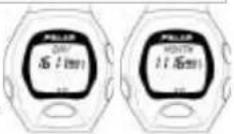
The date is displayed differently depending on which time mode (12h or 24h) has been chosen.
24h time mode: 12h time mode:
DAY - MONTH - YEAR MONTH - DAY - YEAR
-
Press ▲p or Down to adjust the desired value for the day/month.
-
Press START/STOP/OK to lock your selection. MONTH or DAY is displayed.
The middle digits start to flash.
-
Press Up or Down to adjust the desired value for the month/day.
-
Press START/STOP/OK to lock your selection. YEAR is displayed.
The digits for the year start to flash.
-
Press Up or Down to adjust the desired value for the year.
-
Press START/STOP/OK to lock your selection. WATCH SET is displayed.
Choose from the following two alternatives to continue:
-
Press START/STOP/OK to continue from the alarm setting.
-
To return to the Time of day display, press ▲ Up or ▼ Down until you come to the Time of day display or simply press and hold START/STOP/OK.
START THE HEART RATE MEASUREMENT
-
Wear the transmitter and the wrist receiver as described in the chapter How the Polar Heart Rate Monitor works.
-
To make sure that the code search will be successful:
- Keep the wrist receiver within 1 meter/3 feet of your transmitter.
-
Check that you are not near to other people with heart rate monitors, high voltage power lines, televisions, mobile phones, cars, exercise equipment etc.
-
Begin with display showing time of day.
-
Press START/STOP/OK.
MEASURE appears in the display. A heart shaped frame appears. The wrist receiver starts searching for heart rate transmission for max. 15 seconds.
Heart rate measurement commences and the heart symbol inside the frame starts flashing. Your heart rate reading (in beats per minute) appears in the display.
If the code search was not successful, the frame around the heart symbol will disappear after 15 seconds. Go back to step 2 to repeat the code search.
If you still do not succeed in code searching, but your heart rate is displayed and the heart symbol without a frame is flashing, you can start exercising
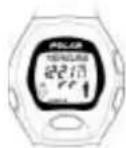
but your wrist receiver may become disturbed by other heart rate monitors.
In models M61 and M62 check that your personal user id is active (USER 1 or USER 2). You can change the user before starting the stopwatch by pressing and holding ▲ Up. To be able to swap the user you need to set preferences for two users.
- Start the stopwatch by pressing START/STOP/OK.
Stopwatch starts running. Automatic recording begins. If you set OwnZone on: OZ ▶____ appears in the display and OwnZone determination begins. If you set heart rate limits manually: EXERCISE appears in the disp
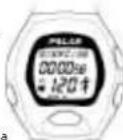
- You can now start warmup with your Polar Heart Rate Monitor.

Quick start: In the Time of day display, press and hold START/STOP/OK for a couple of seconds.
To stop the heart rate measurement: Press START/STOP/OK to stop the stopwatch. If you want to QUIT the heart rate measurement mode, press ▲ Up or ▼ Down to enter the Time of day display,
OWNZONE
Polar Heart Rate Monitor is able to determine the individual training heart rate zone for you. This exercise zone is called your OwnZone (OZ).
For most adults, OwnZone corresponds to 65-85 % of the maximum heart rate. OwnZone is suitable for cardiovascular training either for health-related or fitness improvement purposes.
OwnZone works well for those whose goal is weight control via physical activity and exercise, because the OwnZone corresponds to intensity from "light to moderate" to "moderate". Exercise of this intensity level can be conducted even for extended periods safely and often yields the best results for weight loss.
The OwnZone can be found during a warmup period of an exercise session lasting 1-5 minutes.
HOW TO DETERMINE YOUR OWNZONE
OwnZone is easily determined by walking and jogging as instructed below. However, you are able to find your OwnZone with other exercise modes as well, e.g. exercising with a stationary bike. The principle is that you start exercising very slowly with light intensity and gradually increase your heart rate.
- Check that you have set your personal user information correctly.
- Because OwnZone determination needs every heart beat to be picked up properly, make sure that the transmitter belt is tight enough and the electrodes well moistened.
- Check that you have set the OwnZone function on.
-
Start the heart rate measurement as described earlier.
-
Start the stopwatch.
OZ appears in the display. Stopwatch starts running.
- There are five stages in finding your OwnZone. OwnZone appears typically on the 3 ^rd or 4 ^th stage (in 3-4 minutes). Keep your heart rate below 100 bpm during the first stage. After each stage you should increase your heart rate 10-20 bpm. The display shows which stage you are in:
Walking at very slow pace for 1 min. Walking at brisk pace for 1 min. Walking at very brisk pace for 1 min. Jogging at slow pace for 1 min. Running for 1 min.
- At some point during the stages 1 – 5 you hear two beeps. This indicates that Polar Heart Rate Monitor has determined your exercising limits and you can continue your exercising.
The determined heart rate limits are displayed for a few seconds. EXERCISE appears in the display.
You can recall the limits onto the display by bringing the receiver close to the transmitter.
You can turn the OwnZone timing signals off by pressing and holding ≡0.4 for two seconds before starting the OwnZone determination.
Reset the stopwatch:
If needed you can reset the stopwatch to zero and restart OwnZone determination:
-
Stop the OwnZone determination by pressing START/STOP/OK. Heart rate limits for your previously determined OwnZone appear on the display.
-
Stop the stopwatch by pressing START/STOP/OK. QUIT? appears in the display.
-
To reset the stopwatch press and hold ▼ Down. The stopwatch will start blinking and RESET? text appears in the display. To reset the stopwatch keep pressing ▼ Down.
- To restart the stopwatch press START/STOP/OK.
OWNZONE METHODS
Polar Heart Rate Monitor uses multiple methods for determining your OwnZone. The primary method is based on measuring and analysing the heart rate variability during graded exercise (OZ.V).
If your heart rate exceeds the safety limit during the determination, Polar Heart Rate Monitor picks up your latest OwnZone definition based on heart rate variability (OZ.L). Alternatively, if there is no previous determination in memory, OwnZone limits, which are based on your age predicted maximum heart rate (OZ.A), will be used. These methods ensure that the safest possible exercise zone is determined for you.
The method used in defining the OwnZone is indicated after the two beeps as follows:
-
OZ.V (OwnZone Variability) and the currently determined OwnZone limits appear on the illuminated display.
-
OZ.L (OwnZone Latest) and your previously determined OwnZone limits appear on the illuminated display.
-
OZ.A (OwnZone Age) and your age-predicted heart rate limits appear on the illuminated display.
In models M61 and M62 you will also see which OwnZone level you have selected to use: BASIC (OwnZone Basic for allround exercising) HIGH (OwnZone High for exercising at moderate intensity) LOW (OwnZone Low for exercising at light to moderate intensity)
HOW TO USE PREVIOUSLY DETERMINED OWNZONE
Every time you start the stopwatch and have the OwnZone option on, the Polar Heart Rate Monitor starts finding your OwnZone. You can determine your OwnZone for every exercise session separately. At least it should always be performed when changing exercise environment, exercise mode or if you have abnormal feelings about your physiological state when starting the exercise.
However, you can choose to exercise with the latest OwnZone limits in case you are not willing to start the process of redefining your OwnZone.
- Start the heart rate measurement and stopwatch as usual.
OZ▶ appears on the display. 2. Press START/STOP/OK. Polar Heart Rate Monitor starts using your latest determined OwnZone. OZ.L and the values for your previously determined OwnZone appear momentarily on the illuminated display.
In case there is no previously determined OwnZone in memory, Polar Heart Rate Monitor starts using your age predicted exercising limits.
OZ.A and your age-predicted heart rate limits appear on the illuminated display.
FUNCTIONS DURING HEART RATE MEASUREMENT
MEASURE
SEE YOUR HEART RATE
You can see your heart rate in beats per minute. A flashing heart symbol indicates an ongoing heart rate measurement. The inner heart symbol flashes at the pace of your heart. The outline indicates that the heart rate reception is coded.
If there is -- reading on the display, there has not been heart rate reception for at least 5 minutes. Bring the wrist receiver up to your chest near the transmitter's Polar logo. The receiver starts looking for the heart rate again.
ILLUMINATE THE DISPLAY
Press ≧/0 Backlight is activated for a few seconds.
TURN THE SOUND SIGNAL AND THE BUTTON SOUND ON/OFF
When •Appears in the display, you will hear an alarm sound with each heart beat if you go above the upper limit or below the lower limit of your Target Zone. You will hear a beep when pressing the buttons. The sound signal will be on in OwnZone determination.
In models M61 and M62 the sound signal will also alarm you at the end of the Fitness test.
Press and hold 📋/ 🔊 for 2 seconds to turn the sound signal and the button sound on and off. ● Sound signal is on.
A flashing heart rate reading also informs you of being outside your target zone.
The sound signal setting is saved i.e. the next time you start heart rate measurement the previous setting will be used.
SWAP THE USER
In models M61 and M62 you can swap the user in the beginning of an exercise when the stopwatch is not running yet.
To be able to swap the user you need to set preferences for two users.
Press and hold ▲ Up or 🧑 is displayed to indicate which one of the user settings are activated.
The following exercise will be recorded in the selected user's file.
START/STOP THE STOPWATCH
Press START/STOP/OK to start/stop the stopwatch.
Exercise information will be stored in an exercise file only when the stopwatch is running.
You can pause the stopwatch by pressing START/STOP/OK. Repressing it will restart the stopwatch and the above calculations.
To reset the stopwatch to zero: 1. Stop the stopwatch. 2. Press and hold ▼ Down.
CHECK EXERCISE INFORMATION
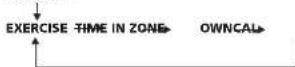
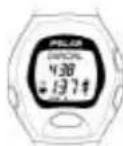
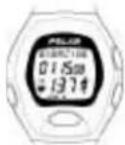
When the stopwatch is running press ▲Up or ▼Down to see the following information during the exercise:
Time of day (TIME)

Time spent in target zone (IN ZONE)
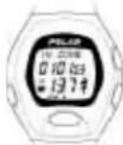
Calorie expenditure (OWNCAL)
The calorie counting feature must be set on to be able to see the OWNCAL display.
CHECK YOUR HEART RATE LIMITS
While exercising you don't have to press any button to check the heart rate limits you are using. Just bring the wrist receiver up to your chest near the transmitter's Polar logo.
The current exercising zone values and backlight will be on for a few seconds.
SEE YOUR PROGRESS BULLETS DURING EXERCISE

In models M31 and M32 a bullet appears for every 100 kcal energy expenditure.
In models M61 and M62 a bullet appears for every 10 minutes exercise in Target Zone.
SWAP THE HEART RATE LIMITS
In models M61 and M62 you can swap heart rate limits during the exercise while the stopwatch is running and you have set OwnZone on. You can select between OwnZone Basic, OwnZone High, OwnZone Low and manually set limits.
Press and hold ▲Up or ▼Down.

If you swap heart rate limits during exercise, the latest ones in use will be saved as measurement option settings and your next exercise will start with these limits.
STOP THE HEART RATE MEASUREMENT
- Press START/STOP/OK to stop the stopwatch.
The stopwatch stops.
QUIT? Appears in the display.
Heart rate measurement without exercising limits or calorie calculation continues.
- Press ▲p or ▼ Down to leave the Measure
ode.
Heart rate measurement stops.
If you press and hold ▼ Down for 1,5 seconds, the stopwatch will start blinking and RESET? text appears in the display. You can restart the stopwatch by pressing START/STOP/OK. Or, if you want to reset the stopwatch keep pressing ▼ Down. The stopwatch will be reset and the current exercise information will be deleted.
The Heart Rate Monitor receiver turns itself into Time of day mode within 5 minutes in case you forget to quit the heart rate measuring mode after having stopped the stopwatch and taken the transmitter off your chest.
RECALLING TRAINING INFORMATION
Your latest training information is in the memory of the Polar Heart Rate Monitor until the next time you start the stopwatch. Then your previous training information will be replaced by the new one. Polar Heart Rate Monitor saves only one training file at a time. The training information is saved, if the stopwatch has been on more than one minute.
- In the Time of day display, press ▲p or
▼ Down until you enter the FILE mode. FILE is displayed. - Press START/STOP/OK to enter the training information recalling loop.
- Press Up or Down to recall the training information.
DATE
The date of your last exercise session.
EXERCISE TIME (EXE. TIME)
The exercise time is the time which you have exercised with the stopwatch running.
EXERCISE TIME IN THE TARGET ZONE (IN ZONE)
The exercise time, which you have spent within your OwnZone or your self-defined target zone.
TARGET HEART RATE LIMITS (LIMITS)
You will see the target heart rate limits of your exercise.
AVERAGE HEART RATE (AVERAGE Hr)
You will see the average heart rate of your exercise session.
CALORIES EXPENDED DURING THE EXERCISE (KCAL / FAT)
You will see how many kilocalories you have expended during the exercise and the fat percentage of the total energy expenditure.
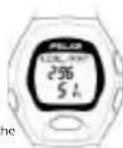
TOTAL CALORIE COUNT (Tot. KCAL)
The total calorie counter is a function, which memorises information for more than one exercise session. You will have a count for cumulative calories expended during several exercise sessions. This function allows you to follow the calorie count as a gauge of effective exercise e.g. during one week.
You can subtract the total calorie amount.
The kilocalories are subtracted by 10-kcal decrement.
- Start with the display showing Tot. KCAL.
- Press START/STOP/OK to enter the Tot. KCAL mode. The amount of total kilocalories starts flashing.
- You can now subtract the calories by pressing ▼ Down.
- Press START/STOP/OK to lock the desired amount.
! Once you have subtracted the Tot. KCAL value, you cannot return it.
This function is useful in weight management, if you want to follow the combined effects of exercise and nutrition.
To reset the total calorie expenditure
count to zero:
- Start with the display showing Tot. KCAL.
- Press START/STOP/OK to enter the Tot. KCAL mode.
The amount of total calories starts flashing. 3. Press and hold ▼ down for a couple of seconds. RESET starts to flash. 0 appears.
If you release the ▼ Down button, when RESET is flashing, the value is not reset.
TOTAL EXERCISE TIME (Tot. TIME)
The cumulative exercise time counter is a function, which memorizes information for more than one exercise session. You will have a count for the cumulative time of several exercise sessions. This function can be used as a gauge of exercise time e.g. during one week.
To reset the cumulative exercise time count to zero:
- Start with the display showing Tot. TIME.
- Press START/STOP/OK to enter the Tot. TIME mode. The amount of cumulative exercise time starts flashing.
- Press and hold ▼ SCROLL DOWN for a couple of seconds.
RESET starts to flash.
00:0000 appears.
If you release the ▼ Down button, when RESET is flashing, the value is not reset.
LATEST OWNINDEX
In models M61 and M62 you can see your OwnIndex based on your latest Polar Fitness Test and the date when it was carried out.
For more details about carrying out the Polar Fitness Test and interpreting the OwnIndex ▶ OwnIndex
OWNINDEX
OwnIndex is a score which is comparable to VO_max , a commonly used descriptor of aerobic fitness. OwnIndex is a result of the Polar Fitness Test, which is an easy, safe and quick way to estimate maximal aerobic power. The OwnIndex is based on heart rate, heart rate variability at rest, body structure and self-assessed physical activity.
Cardiovascular or aerobic fitness relates to how well your cardiovascular system works to transport oxygen to your body. The better the cardiovascular fitness, the stronger and more efficient your heart is.
Having good cardiovascular fitness has many health benefits. For example, it decreases your risk of cardiovascular diseases, stroke and high blood pressure.
If you want to improve your cardiovascular fitness, it takes a minimum of 6 weeks of regular training to see a noticeable change. Less fit individuals see progress even more rapidly and for more active individuals more time is needed.
Cardiovascular fitness is best improved by exercise types which use large muscle groups. Such activities include e.g. walking, jogging, swimming, rowing, skating, cross-country skiing and cycling.
To be able to follow your fitness progress start with measuring your OwnIndex a couple of times during the first two weeks to get a reliable baseline value. Thereafter repeat the test approximately once a month.
OwnIndex can be measured with Polar M61 and M62 Heart Rate Monitors. Polar Fitness Test is targeted to healthy adults.
FITNESS TEST SETTINGS
To be able to carry out the Polar Fitness Test you need to do the following settings:
- Select your long-term physical activity level. - Set the Fitness test mode on.
SET THE ACTIVITY LEVEL
Begin with the display showing the time of day.
1. Press ▲p or ▼Down until you enter the Options mode.
2. Press START/STOP/OK to enter the setting loop.
USER SET is displayed.
3. Press START/STOP/OK to enter the user information loop.
4. Press START/STOP/OK until ACTIVITY appears.
ACTIVITY is displayed and LOW/MIDDLE/HIGH/TOP
is flashing.
5. Press ▲p or ▼Down to select the right activity level.
6. Press START/STOP/OK to lock your selection.
USER SET is displayed.
7. To return to the Time of day display, press and hold START/STOP/OK.
Activity Level
Assess your long-term physical activity level. Do not change your activity level description if your regular exercise habits have changed less than six months ago.
Low Exercise is not a regular part of your life. You walk only for pleasure or occasionally exercise sufficiently to cause heavy breathing or perspiration.
Middle You participate regularly in recreational sports. For example, you run 5 miles/8km a week or spend 30 – 60 minutes a week in comparable physical activity. Or, your work requires modest physical activity.
High Exercise is an inseparable part of your life. You exercise regularly at least 3 times a week with heavy paced intensity. Exercise causes clear breathlessness and sweating. For example, you run regularly more than 5 miles/8 km a week or spend more than 1.5 - 2 hours in comparable physical activity.
Top You participate regularly in heavy physical exercise at least 5 times a week. E.g. you exercise to improve performance for competitive purposes.
SET THE FITNESS TEST MODE ON
- In the Time of day display press ▲p or ▼ Down until you enter the Options mode. OPTIONS is displayed.
- Press START/STOP/OK to enter the setting loop. USER SET is displayed.
- Press ▲p or ▼ Down until you come to the Fitness test setting mode. FIT. TEST ON/OFF is displayed.
- Press START/STOP/OK to enter the Fitness test setting loop. FIT. TEST is displayed.
- Press ▲ up or ▼ Down to select the test on.
- Press START/STOP/OK to lock your selection.
- To return to the Time of day display, press and hold START/STOP/OK.
CARRYING OUT THE TEST
To get reliable test results, there are the following basic requirements:
- You should be relaxed and calm. - The test can take place anywhere – home, office, health club – as long as the testing environment is peaceful. No disturbing noises (e.g. television, radio or telephone), no other people talking to you.
- Keep the testing place, time of day and environment the same every time the test is repeated.
- Avoid eating a heavy meal or smoking 2-3 hours prior to testing.
- Avoid heavy physical effort, alcoholic beverages or pharmacological stimulants on the test day and the day before.
PREPARE THE WRIST RECEIVER
- In the Time of day display press ▲p or ▼ Down until you come to the Fitness test mode. FIT. TEST is displayed.
RELAX YOURSELF FOR 1-3 MINUTES
- Lay down, relax your muscles and mind.
START THE TEST
- Press START/STOP/OK to start the test.
The wrist receiver starts searching for your heart rate.
_TEST ON and your heart rate are displayed. The test begins.
If you want to have the sound signal on during the Fitness test, check there is in the display. Press and hold to have sound signal on. The sound signal will alarm you at the end of the test.
-
It takes 3-5 minutes to carry out the test. Lie relaxed, don't raise arms or legs, avoid body movements during the test. Don't communicate with other people. Your current OwnIndex interpretation and the testing date are displayed.
-
To return to the Time of day display after the test, press and hold START/STOP/OK.
You can stop the test anytime during the test by pressing START/STOP/OK. The latest OwnIndex will not be replaced. FAILED TEST is displayed for a moment. Your latest OwnIndex interpretation and the test date are displayed.
If the wrist receiver does not succeed to receive your heart rate at the beginning or during the test, the test will fail. Check that the transmitter electrodes are wet and the elastic strap is snug enough. Restart the procedure.
FITNESS TEST RESULT
The test result, your OwnIndex, is most meaningful when comparing your individual values and changes in it. OwnIndex can also be interpreted according to your gender and age. Locate your OwnIndex on the following table to find out your current cardiovascular fitness classification, compared to those who are of same age and gender.
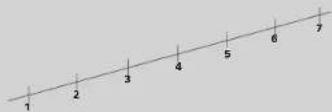
1-3 Increase exercise for health benefits and fitness.
4 Maintain current exercise habits to ensure better health. Exercise increase recommended for fitness improvements. 5-7 Maintain current exercise habits for good health and fitness.
FITNESS CLASSES
| Age (years) | 1.Very. poor | 2.Poor | 3.Fair | 4.Average: 5.Good | 6.Very | 7.Excellent | |
| MEN | 20-24 | <22 | 32-37 | 38-43 | 44-50 | 51-56 | 57-62 >62 |
| 25-29 | <31 | 31-35 | 36-42 | 43-48 | 49-53 | 54-59 >59 | |
| 30-34 | <29 | 29-34 | 35-40 | 41-45 | 46-51 | 52-56 >56 | |
| 35-39 | 28 | 28-32 | 33-38 | 39-43 | 44-48 | 49-54 >54 | |
| 40-44 | 26 | 26-31 | 32-35 | 36-41 | 42-46 | 47-51 >51 | |
| 45-49 | 25 | 25-29 | 30-34 | 35-39 | 40-43 | 44-48 >48 | |
| 50-54 | 24 | 24-27 | 28-32 | 33-36 | 37-41 | 42-46 >46 | |
| 55-59 | 22 | 22-26 | 27-30 | 31-34 | 35-39 | 40-43 >43 | |
| 60-65 | 21 | 21-24 | 25-28 | 29-32 | 33-36 | 37-40 >40 | |
| WOMEN | 20-24 | <27 | 27-31 | 32-36 | 37-41 | 42-46 | 47-51 >51 |
| 25-29 | <26 | 26-30 | 31-35 | 36-40 | 41-44 | 45-49 >49 | |
| 30-34 | <25 | 25-29 | 30-33 | 34-37 | 38-42 | 43-46 >46 | |
| 35-39 | 24 | 24-27 | 28-31 | 32-35 | 36-40 | 41-44 >44 | |
| 40-44 | <22 | 22-25 | 26-29 | 30-33 | 34-37 | 38-41 >41 | |
| 45-49 | <21 | 21-22 | 24-27 | 28-31 | 32-35 | 36-38 >38 | |
| 50-54 | <19 | 19-22 | 23-25 | 26-29 | 30-32 | 33-36 >36 | |
| 55-59 | <18 | 18-20 | 21-23 | 24-27 | 28-30 | 31-33 >33 | |
| 60-65 | <16 | 16-18 | 19-21 | 22-24 | 25-27 | 28-30 >30 |
CARE AND MAINTENANCE
Your Polar Heart Rate Monitor is a high-tech instrument of superior design and workmanship and should be treated with care. The suggestions below will help you fulfill the warranty obligations and enjoy this product for many years to come.
TAKING CARE OF YOUR POLAR HEART RATE MONITOR
- Wash the transmitter regularly after use with a mild soap and water solution. Dry it carefully after washing.
- Never store the transmitter wet. Sweat and moisture can keep its electrodes wet and the transmitter activated, which shortens the battery life.
- Store your Polar Heart Rate Monitor in a cool and dry place. Do not store it in any kind of non-breathing material, such as a plastic bag or a sports bag if it is wet.
- Do not bend or stretch the transmitter. This may damage it.
- Don't dry the transmitter in any other way than with a towel. Hard-handed handling may damage the electrodes.
- Keep your Polar Heart Rate Monitor out of extreme cold (below -10 °C / 14 °F) and heat (above 50 °C / 122 °F).
- Do not expose the Polar Heart Rate Monitor to direct sunlight for extended periods, such as by leaving it in a car.
- You can wash the Polar WearLink strap in a washing machine at +40°C / 104°F. We recommend that you can wash your
• We recommend that you wash the strap after
each time you have used it in pool water with a high chlorine content. - Do not spin-dry the strap!
- Do not put the strap in a dryer!
- Do not iron the strap!
BATTERIES
TRANSMITTER
The estimated average battery life of Polar WearLink Transmitter is 2 years (1 h/day, 7 days/week) and other Polar transmitters 2,500 hours of use. If your transmitter stops working, it might be due to the battery running out. We recommend that you have the battery replaced by an authorized Polar Service Center only.
You can, however, change the battery of the Polar WearLink Transmitter yourself by following the instructions below. To change the battery, you need a coin.
- Open the connector's battery cover by turning it
counterclockwise with the coin from the CLOSE position to the OPEN position. The cover pops out a little from its niche. - Remove the battery cover from the connector, lift the battery from the niche with your fingers and replace it with a new battery.
- Place the negative (-) side of the battery against the
- Put the battery in the connector's niche and put the cover on so that the arrow points to the OPEN position. Make sure that the cover's sealing ring is placed correctly in its groove.
- Gently press the cover deep enough so that its exterior surface is on the same level as the connector's surface
Surface is on the same level as the connector's surface. - Turn the cover with the coin clockwise so that the arrow on the cover turns from OPEN to CLOSE. Make sure that the cover is closed properly!
In order to ensure the maximum life span of the connector's battery cover, open it only when you need to change the battery. We recommend that you change the sealing ring of the battery cover every time you change the battery. You can get these sealing rings from authorized Polar Service Centers.
POLAR WRIST RECEIVER
The estimated average battery life of the Polar wrist receiver is 2 years in normal use (1 h / day, 7 days a week). Note also that excessive use of the backlight and the alarm signals will use the battery more rapidly.
Do not open the Polar wrist receiver yourself. To ensure the water resistance properties and the use of qualified components, the wrist receiver battery should be replaced only by an authorised Polar Service Centre. At the same time a full periodic check of the Polar Heart Rate Monitor will be done.
SERVICE
We recommend that you have all service done by an authorized Polar Service Center only.
Water resistance cannot be guaranteed after unauthorized service.
PRECAUTIONS
USING A POLAR HEART RATE MONITOR IN A WATER ENVIRONMENT
Your Polar Heart Rate Monitor is water resistant to 30 meters/100 feet. To maintain the water resistance, do not operate the buttons of the wrist receiver under water.
Heart rate measurement in a water environment is technically demanding for the following reasons:
- Pool water with a high chlorine content and seawater are very conductive. The electrodes of a transmitter may short-circuit, which prevents EKG signals from being detected by the transmitter.
- Jumping into the water or strenuous muscle movement during competitive swimming may cause water resistance that shifts the transmitter on the body to a location where it is not possible to pick up EKG signal.
- The EKG signal strength varies depending on the individual's tissue composition and the percentage of people who have problems in heart rate measuring is considerably higher in a water environment than in other use.
POLAR HEART RATE MONITOR AND INTERFERENCE
ELECTROMAGNETIC INTERFERENCE
Disturbances may occur near high voltage power lines, traffic lights, overhead lines of electric railways, electric bus lines or trams, televisions, car motors, bike computers, some motor driven exercise equipment, cellular phones or when you walk through electric security gates.
CROSSTALK
The Polar wrist receiver in non-coded mode of operation picks up transmitter signals within 1 meter/3 feet. Non-coded signals from more than one transmitter picked up simultaneously can cause an incorrect readout.
EXERCISE EQUIPMENT
Several pieces of exercise equipment with electronic or electrical components such as LED displays, motors and electrical brakes may cause interfering stray signals. To try to tackle these problems, relocate the Polar wrist receiver as follows:
- Remove the transmitter from your chest and use the exercise equipment as you would normally.
- Move the wrist receiver around until you find an area in which it displays no stray reading or flashing of the heart symbol. Interference is often worst right in front of the display panel of the equipment, while the left or right side of the display is relatively free of disturbance.
- Put the transmitter back on the chest and keep the wrist receiver in this interference-free area as far as it is possible.
- If the Polar Heart Rate Monitor still does not work with the exercise equipment, this piece of equipment may be electrically too noisy for wireless heart rate measurement.
MINIMIZING POSSIBLE RISKS IN EXERCISING WITH A HEART RATE MONITOR
Exercise may include some risk, especially for those who have been sedentary.
Before starting a regular exercise program you are recommended to answer to the following questions for health status checking. If the answer is yes to any of the questions, we recommend to consult a doctor before starting an exercise program.
- Have you not exercised for the past 5 years?
• Do you have high blood pressure?
• Do you have high blood cholesterol?
• Do you have symptoms of any disease? - Are you taking any blood pressure or heart
medication?
• Do you have a history of breathing problems? - Are you recovering from a serious illness or
medical treatment? - Do you use a pacemaker or another implanted
electronic device? - Do you smoke?
• Are you pregnant?
Note that in addition to exercise intensity, medications for heart, blood pressure, psyche, asthma, breathing etc as well as some energy drinks, alcohol and nicotine, can affect heart rate.
It is important to be sensitive to your body's
reactions during exercise. If you feel unexpected pain or excessive fatigue when exercising, it is recommended to stop the exercise or continue at a lighter intensity.
Notice to persons with pacemakers, defibrillator or other implanted electronic device. Persons who have a pacemaker use the Polar Heart Rate Monitor at their own risk. Before starting use, we always recommend an exercise test under doctor's supervision. The test is to ensure the safety and reliability of the simultaneous use of the pacemaker and the heart rate monitor.
If you are allergic to any substance that comes into contact with the skin or if you suspect an allergic reaction due to using the product, check the listed materials in the "Technical Specifications" chapter. To avoid any skin reaction risk with the transmitter, wear it over a shirt. However, moisten the shirt well under the electrodes to ensure flawless operation.
The combined impact of moisture and intense abrasion may cause a black color, which might stain light-colored clothes especially, to come off the transmitter's surface.
FREQUENTLY ASKED QUESTIONS
WHAT SHOULD I DO IF...
... OWNZONE DETERMINATION ONLY SELDOM GIVES ME HEART RATE LIMITS WHICH ARE BASED ON HEART RATE VARIABILITY (OZ.V)?
-
Check that the elastic strap is snug enough.
-
Make sure that the electrodes of the transmitter are moistened against your skin.
-
Put on the transmitter 15-20 minutes prior to the start of your exercise to ensure good adaptation between the electrodes and your skin.
-
Start the first stage of determining your OwnZone sufficiently slowly. If you obtain the heart rate limits based on age (OZ.A) within the first 2 minutes you have raised your heart rate too quickly. The heart rate reading should not rise over 20 beats minute from the starting level. During the first stage you can, for example, put on your sports clothing.
-
If you reach the OwnZone limits based on age (02.A) or the previously determined OwnZone limits based on your heart rate variability (02.L) only after 5 minutes from starting specification you have not raised your heart rate sufficiently rapidly. Raise your heart rate more quickly during the OwnZone determination.
-
If you have always used walking and running to determine your OwnZone, walking uphill, cycling or using an ergometer may work better for you.
-
Stress or heavy mental loading may reduce your heart rate variability so that the needed point where the heart rate variability vanishes cannot be measured. Relax for 5 - 10 minutes before exercising by sitting down and decreasing your heart rate.
-
For a small percentage of people the heart rate variability will not totally disappear with increasing workload. In this case the age-predicted limits are the best estimation for the exercising zone.
...THE OWNZONE LIMITS BASED ON HEART RATE
VARIABILITY (OZ.V) VARY CONSIDERABLY?
Heart rate variability reacts sensitively to all changes taking place in the body and environment. The OZ.V heart rate limits are affected by, amongst others, your daily state of fitness, the time of OwnZone determination, the type of exercise and state of mind. The lower limit of the OZ.V heart rate limits can change for the same person by as much as 30 beats.
However it is important that the feeling of exercise carried out in the OwnZone is light or moderate. For example if you raise your heart rate too rapidly after the first stage, you may get too high OwnZone heart rate limits. If the OwnZone limits seem to be too high we recommend that the OwnZone determination is done again.
... SOME OTHER PERSON USES MY POLAR M31 OR POLAR M32 HEART RATE MONITOR?
Polar Heart Rate Monitor determines the OwnZone heart rate limits on the basis of heart rate and age. If someone else uses your Polar M31 or Polar M32 it is necessary to zero the OZL heart rate limits which are in the memory. Reset the age in the USER mode.
Even though the user is the same age as you the age must still be reset in order that the OZL heart rate limits are zeroed. If this is not done the Polar M31 or Polar M32 may give the following user OwnZone heart rate limits based on your heart rate variability which is stored in the memory of the equipment.
Note that changing the user also affects the calculation of the total calorie expenditure (Tot. KCAL) and cumulative exercise time (Tot. TIME). If these readings are not zeroed when the user changes, the Polar M31 or Polar M32 adds new exercise periods into its memory, even though the user information is changed. Cumulative exercise information can not be returned after resetting.
In models M61 and M62 you can set two users' preferences in the memory. Select the correct user in the beginning of an exercise.
... THERE IS NO HEART RATE READING (- -)?
-
Check that the electrodes of the transmitter are moistened and that you are wearing it as instru
-
Check that you have kept the transmitter clean. ▶ Care and maintenance
-
Check that there are no sources of electromagnetic radiation in the close vicinity of the Polar wrist receiver, such as TV sets, mobile phones, CRT monitors etc. ▶ Precautions
-
Have you had a cardiac event which may have altered your EKG waveform? In this case consult your physician.
...HEART SYMBOL FLASHES IRREGULARLY?
-
Check that your Polar wrist receiver is inside the transmission range and not further that 1 meter/3 foot from the Polar Transmitter you are wearing.
-
Check that the elastic strap has not become loose during exercise.
-
Make sure that the electrodes of the transmitter are moistened.
-
Make sure that there is no other heart rate transmitter within the reception range (1 meter/3 feet). Precautions/Crosstalk
-
Cardiac arrhythmia may cause irregular readings. In this case consult your physician.
...OTHER PERSON WITH HEART RATE MONITOR IS CAUSING INTERFERENCE?
Your training partner may have coincidentally activated exactly the same code as you. In this case keep distance to your training partner or proceed as follows:
-
Stop the stopwatch and heart rate measurement.
-
Take the transmitter on your chest for 10 seconds.
- Put the transmitter back and start the heart rate measurement again.
... HEART RATE READING BECOMES ERRATIC OR EXTREMELY HIGH?
You may have come within range of strong electromagnetic signals which cause erratic readings on the wrist receiver display. Check your surroundings and move further away from the source of disturbance.
Precautions
... THERE ARE NO REACTIONS TO ANY BUTTONS?
Reset the Polar Heart Rate Monitor. Resetting clears watch settings which will return to the default settings. User
information and measurement options settings will be saved. 1. Press the RESET button with a pen tip.
Display becomes full of digits.
- Press any of the four button once.
The Polar Heart Rate Monitor enters the Time of day display.
If you don't press any button after reset within one minute the wrist receiver goes to the battery saving mode.
... THE DISPLAY IS BLANK OR FADING?
The Polar Heart Rate Monitor is in battery saving mode when it leaves the factory. Wake up by pressing START/STOP/OK button twice.
The Polar Heart Rate Monitor enters the Time of day display.
Usually the first sign of a discharged battery is fading of the digits when using the backlight. Have the batteries checked.
... THE BATTERY OF THE WRIST RECEIVER MUST BE REPLACED?
We recommend having all service done by an authorized Polar Service Centre. This is especially necessary to ensure the warranty remains valid and is not affected by incorrect repair procedures done by an unauthorized agent. Polar Service will test your wrist receiver for water resistance after battery replacement and make a full periodic check of the complete Polar Heart Rate Monitor.
Care and maintenance/Batteries
POLAR GLOSSARY
♥ Indicates coded transmission of heart rate. The inner heart flashes to the beat of your hear
• In the Time of day mode indicates that the alarm is on. In the measure mode indicates that the sound signal will alarm if you are exercising outside your Target Zone.
Progress bullets in the measure mode. In models M31 and M32 one bullet= 100 kcal energy expenditure. In models M61 and M62 one bullet= 10 minutes in target zone.
AGE: Insert your age in User settings.
ALARM: Indicates the alarm clock in watch settings.
AM/PM: 12 hour mode of time.
AVERAGE Hr: Average heart rate of the exercise.
Electrodes: The grooved areas of the transmitter,
against the skin. Pick up the heart's electrical impulses.
EXERCISE: Heart rate measurement mode,
stopwatch is on and the exercise information is recorded.
RECORDED.
EXE. TIME: Total exercise time.
FAT: Indicates the fat percentage of the total calorie expenditure.
FILE: File mode to recall training information.
Heart rate: The number of heart beats per minute
(bpm)
Heart rate variability: Fluctuations of interbeat intervals. Heart rate variability of a healthy subject is in general large in resting conditions and during light exercise. Heart rate variability gradually disappears when exercise becomes more intense and heart rate increases.
HRmax: Maximum heart rate.
IN ZONE: Exercising time in Target Zone.
KCAL: Indicates the energy expenditure of your exercise session.
LIMITS: Manually set target zone limits are determined as percentages of age predicted or measured maximum heart rate. The percentages are converted into heart rate beats per minute.
MEASURE: Heart rate measurement mode, stopwatch is off.
OPTIONS: Setting mode for user information, heart
rate measurement options and watch functions.
OWNCAL: Calorie expenditure during exercise.
OWNINDEX: OwnIndex is a score which is comparable to VO_2max . OwnIndex is a result of the Polar Fitness Test and can be measured with Polar M61 and M62 Heart Rate Monitors.
OWNZONE, OZ.: Target zone which Polar Heart Rate Monitor determines for you. OwnZone is an individual guide for light to moderate exercise intensity.
OZ ▶____ Indicates OwnZone determination procedure.
OZ.A: Indicates OwnZone limits which are
determined according to your age.
OZ.L: Your latest OwnZone limits.
OZ.V: Indicates currently measured OwnZone limits
which are based on your heart rate variability.
Coded heart rate transmission: Polar coded transmitter automatically locks in a code to transmit your heart rate to your wrist receiver. In coded transmission the receiver accepts heart rate from your Polar coded transmitter only. Coding significantly reduces crosstalk caused by other users of heart rate monitors. However, it does not necessarily reduce all environmental interference.
SEX: Indicates the gender (Male or Female) in User settings.
Target zone, TZ: The area between the upper and lower target zone limits. Can be defined automatically by Polar Heart Rate Monitor or manually by yourself.
TIME: Indicates the time of day in the watch settings.
Time of day mode: Display showing time of day.
Tot. KCAL: Cumulative total calorie expenditure of your exercise.
Tot. TIME: Cumulative total exercise time of your exercise sessions.
USER SET: Indicates the setting loop for your personal information.
TECHNICAL SPECIFICATIONS
Polar Heart Rate Monitor is designed to indicate the level of physiological strain and intensity in sports and exercise. No other use is intended or implied. Heart rate is displayed as number of heart beats per minute (bpm).
POLAR CONNECTOR
Battery type: CR 2025
Battery sealing ring: O-ring 20.0 x 1.0
Material FPM
Battery life: Average 1300 hours of use
Operating temperature: 14 °F to 122 °F / -10 °C to +50 °C
Material: Polyamide
Water resistance: Waterproof up to 30 meter/100 feet
OTHER POLAR TRANSMITTERS
Battery type: Built-in Lithium Cell
Battery life: Average 2500 hours of use
Operating temperature: -10 °C to +50 °C / 14 °F to 122 °F
Waterproof
STRAP
Material: Polyurethane, nylon, polyamide,
polyester and natural rubber
including a small amount
of latex
WRIST RECEIVER
Battery type: CR 2032
Battery life: Average 2 years
(1h / day, 7 days / week)
Operating temperature: -10 °C to +50 °C / 14 °F to 122 °F
Water resistance: to 30 meters / 100 feet
Accuracy of formula for
age based OwnZone
heart rate limits (OZ.A): 1bpm
Accuracy of heart rate
measurement:
1% or 1 bpm, whichever
larger, definition applies to
steady state conditions
Backcover and wrist
strap buckle: Stainless steel complying with
the EU Directive 94/27/EU and its
amendment 1999/C 205/05 on
the release of nickel from
products intended to come into
direct and prolonged contact
with the skin.
DEFAULT SETTINGS
Time of day 24h
Alarm OFF
Age 0
Weight 00 (kg)
Sex Male
OwnZone
Upper Limit (manual) 160
Lower Limit (manual)
OwnCal
In models M61 and M62:
| Polar Fitness Test | OFF |
| Activity | Low |
| User id | 1 |
| Height | O (c) |
LIMIT VALUES
Chronometer
Heart rate limits
Kcal 99999 kcal
Tot. kcal
Tot. time
23 h 59 min 59 s
30 - 240 bpm
The Ground Truth image displays a single, solid horizontal line. According to Rule 2 (UNDERSCORE & LINE RULES), this is a stylistic or background line, not a placeholder underscore. Therefore, the OCR result must ignore it and output nothing or only meaningful text. The provided OCR content is "____", which consists of four underscores. This is an incorrect interpretation of the line as a placeholder, violating the rule that stylistic lines must be ignored. The OCR has hallucinated underscores where none should exist based on the GT's visual context. Hence, the OCR result is inconsistent with the Ground Truth.
999999 kcal
9999 h 59 min 59 s
LIMITED POLAR INTERNATIONAL GUARANTEE
• This limited Polar international guarantee is issued by Polar Electro Inc. for the consumers who have purchased this product in the USA or Canada. This limited Polar international guarantee is issued by Polar Electro Oy for the consumers who have purchased this product in other countries.
- Polar Electro Inc. / Polar Electro Oy guarantees to the original consumer/ purchaser of this product that the product will be free from defects in material or workmanship for two years from the date of purchase.
- Please keep the receipt or International Guarantee Card, which is your proof of purchase!
• The guarantee does not cover the battery, damage due to misuse, abuse, accidents or non-compliance with the precautions; improper maintenance, commercial use, cracked or broken cases.
- Guarantee does not cover any damage/s, losses, costs or expenses, direct, indirect or incidental, consequential or special, arising out of, or related to the product. During the guarantee period the product will be either repaired or replaced at an authorized service center free of charge.
- This guarantee does not affect the consumer's statutory rights under applicable national or state laws in force, or the consumer's rights against the dealer arising from their sales/purchase contract.
Copyright © 2003
Polar Electro Oy, FIN-90440 KEMPELE, Finland
All rights reserved. No part of this manual may be used or reproduced in any form or by any means without prior written permission of Polar Electro Oy.
The names and logos marked with a ^TM symbol in this user's manual or in the package of this product are trademarks of Polar Electro Oy. The names and logos marked with a symbol in this user's manual or in the package of this product are registered trademarks of Polar Electro Oy.

This CE marking shows compliance of this product with Directive 93/42/EEC.
This product is protected by one or several of the following patents: FI 88223, DE 4215548, FR 9206120, GR 2257523, HK 1131996, SG 95916714, US 5491474, FI 888712, DE 9215139.8, FR 9209150, GB 2258587, HK 3061996, SG 5502117-7, US 5486818, FI 965380, US 5611346, FP 665947, DE 69414362, FI 68734, DE 3429238, GB 2149514, HK 8121988, US 4625733, FI 100524, FI 100452, US 5840039, FI 4150, DE 200088873. IN 40006504, FI 4069, US 6272365, FR 9907823, GB 2339833, DE 29910633, FI 104463, US 6183422, FI 4157, DE 200098831. IN 40006778, WC 9733517, GR 2326240. Other patents pending.
DISCLAIMER
The material in this manual is for informational purposes only. The products it describes are subject to change without prior notice, due to the manufacturer's continuous development program.
Polar Electro Inc. / Polar Electro Oy makes no representations or warranties with respect to this manual or with respect to the products described herein. Polar Electro Inc. / Polar Electro Oy shall not be liable for any damages, losses, costs or expenses, direct, indirect or incidental, consequential or special, arising out of, or related to the use of this material or the products described herein.
INDEX
Bullets in the display during exercise .... 53
Button sound ON/OFF .... 52
Buttons and their functions 40
Care and maintenance 59
Check exercise information 53
Check your heart rate limits 53
Disclaimer 65
Exercise reminder at full hours 40
Fitness test settings 57
Frequently asked questions 6.2
Frequencies during heart rate measurement 51
Functions during heart rate measurement ..... 51
Glossary. 64
Illuminate the display 51
luminate the display 51
Latest OwnIndex 56
Modes and their functions 40
OwnCal calorie consumption 45
OwnCal calorie counter ON/OFF 44
OwnIndex 56
OwnZone 49
OwnZone ON/OFF 43
Polar Fitness Test ON/OFF 45
Precautions 60
Recalling training information 54
Reset stopwatch 50.52
Reset the total calorie consumption count 55
Reset the total exercising time 5.5
Reset the total exercising time .... 5 Return to Time of day display.
Return to time of day display 4
See your heart rate.
See your heart rate .... 51
See your progress during exercise .... 52
see your progress during exercise .... 53
Setting activity level 43
Setting age 42
Setting heart rate limits manually 44
Setting height 42
Setting measurement options 43
Setting sex 43
Setting the 12/24h time mode 46
Setting the alarm 46
Setting the date 47
Setting the time of day 47
Setting user 1 or 2 42
Setting user information 41
Setting user information 41
Setting weight 42
Setting weight 42
Sound signal ON/OFF 53
Sound signal ON/OFF 32
Start the heart rate measurement 40
Start the heart rate measurement 48
Start/stop the stopwatch 52
Stop the heart rate measurement 54
Subtract the total calorie expenditure amount ..... 55
Swap the heart rate limits 53
Swap the user 52
Technical specifications 65
Guarantee 66
FRANÇAIS
TABLE DES MATIÈRES
Specifications techniques 97 Geographic limiting Delay 80
natural_image
Close-up of a person's face with visible teeth and jaw (no text or symbols)Polar Fitness Test ON/OFF
OFF, BASIC, LOW ou HIGH diagonate
TEMPS PASSÉ DANS LA ZONE CIBLE (IN ZONE)
• Activez le mode Fitness test.
RÉGLAGE DU NIVEAU D'ACTIVITÉ
natural_image
Close-up of a person's face with visible teeth and jawbone (no text or symbols)CALCOLO CALORICO TOTALE (Tot. KCAL)
RICEVITORE DA POLSO POLAR
Batteria: O-ring 20,0 x 1,0.
Materiale: FPM
dellaOwnZone in base
all'eta (OZ.A):
Ora (Time of day) 24h
Peso (Weight) 00 (kg)
Copyright © 2003 Polar Electro Oy, FIN-90440 KEMPELE, Finland
natural_image
Close-up of a person's face and upper torso, showing minimal variation (no text or symbols visible)twice others beginnen to