R2I DAB - Radio Ruark Audio - Free user manual and instructions
Find the device manual for free R2I DAB Ruark Audio in PDF.



| Product type | DAB+/FM radio alarm clock with iPod docking station |
| Brand and model | Ruark Audio R2I DAB |
| Dimensions (H x W x D) | 120 x 340 x 185 mm |
| Weight | 3.5 kg |
| Power supply | AC adapter 100-240 V AC, 50-60 Hz, 0.5 A; output 12 V DC, 2 A |
| Radio tuner | DAB/DAB+ and FM stereo 87.5-108 MHz with RDS |
| iPod docking station | Universal (30-pin connector) for iPod from January 2004, with universal adapter included |
| Auxiliary inputs | 2 x AUX inputs (front and rear) for MP3 player, computer, etc. |
| Headphone output | 3.5 mm jack on front panel |
| Audio output | Fixed RCA phono outputs on rear panel |
| Speakers | 2 x custom extended range 3.5" speakers (5 x 9 cm) |
| Output power | 2 x 10 W nominal |
| Antenna | Removable telescopic with F-type connector |
| Main functions | DAB/FM radio, iPod docking, alarm, sleep timer, manual clock setting, 5 DAB presets and 5 FM, equalizer (3D Sound, Loudness, EQ), information display |
| Remote control | Included, lithium battery with pull-tab |
| Care and cleaning | Clean with a soft, lint-free cloth slightly dampened; do not use spray or abrasive products |
| Safety | Do not expose to water, naked flames, excessive heat; listen at moderate volume; keep away from children; do not obstruct ventilation |
| Warranty | 2 years from date of purchase, subject to proper use and maintenance |
Frequently Asked Questions - R2I DAB Ruark Audio
User questions about R2I DAB Ruark Audio
0 question about this device. Answer the ones you know or ask your own.
Ask a new question about this device
Download the instructions for your Radio in PDF format for free! Find your manual R2I DAB - Ruark Audio and take your electronic device back in hand. On this page are published all the documents necessary for the use of your device. R2I DAB by Ruark Audio.
USER MANUAL R2I DAB Ruark Audio
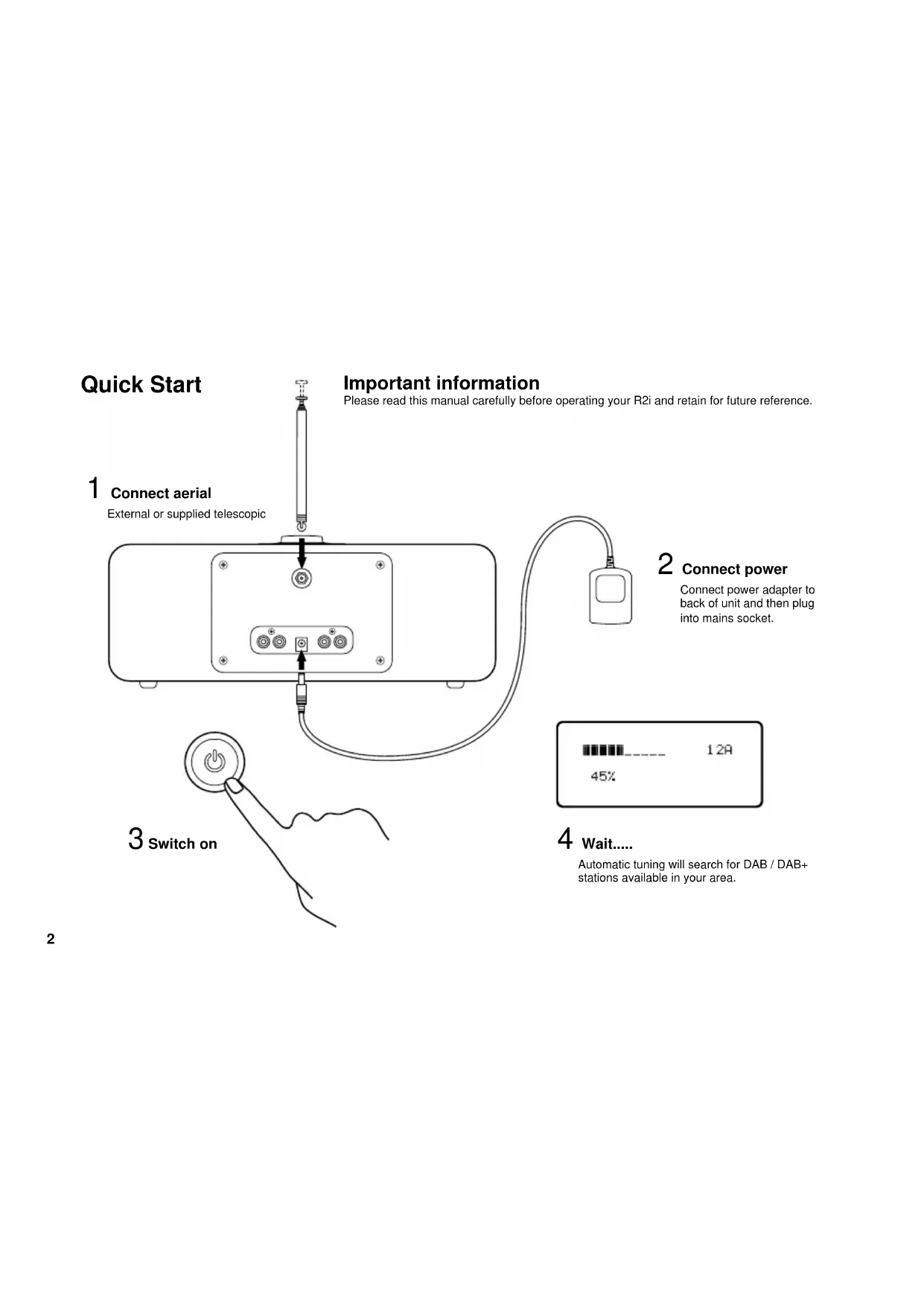
Please read this manual carefully before operating your R2i and retain for future reference.
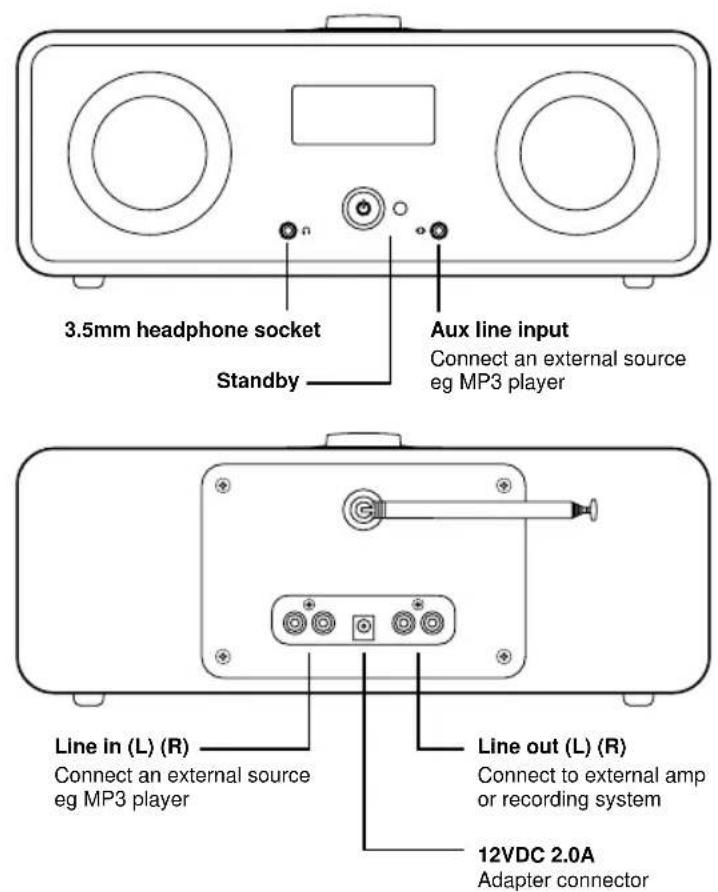
1 Connect aerial
External or supplied telescopic
3 switch on
2 connect power
Connect power adapter to back of unit and then plug into mains socket.
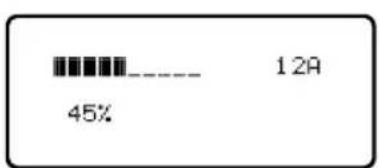
4 wait....
Automatic tuning will search for DAB / DAB+ stations available in your area.
5
Activate remote
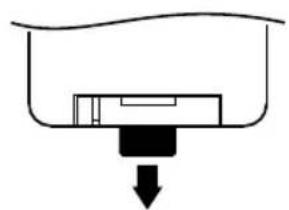
Remove plastic tab to activate battery
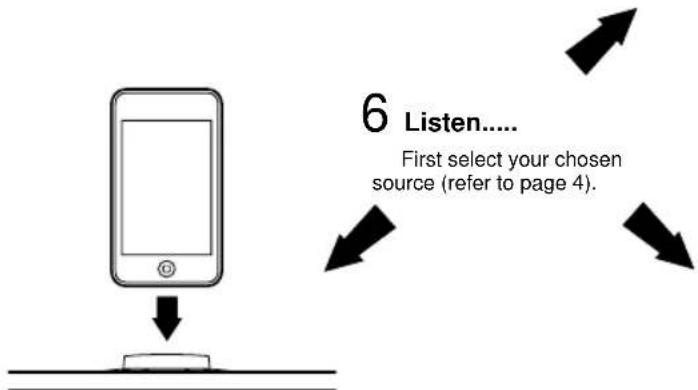
...to iPod
Remove dust cover and insert the correct universal dock adaptor for your model. The adaptor provides correct alignment, avoiding strain on the connector, and is available from Apple online and Apple retailers. iPod/iPhone models can be used without an adaptor but care should be taken when inserting and removing as sprain damage is not covered by your guarantee.
...to MP3 and other audio devices
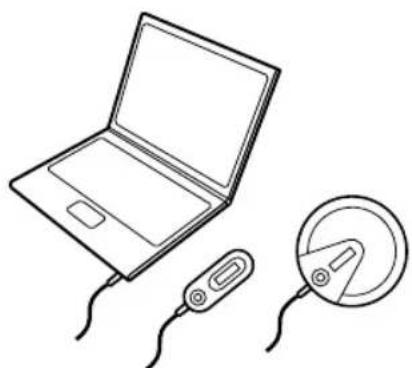
Connect the analogue audio output from an external audio device such as an MP3, laptop or portable CD player to the auxiliary inputs on front or rear of R2i.
to Radio
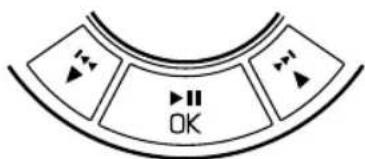
DAB: press to scroll through available stations. OK to select station.
FM: press and hold to scan for next available station.
Audio
Press AUDIO to cycle through settings (3D Sound, Loudness, EQ).
Editable options will flash.
Use keys to change.
OK to confirm.
Clock
Press CLOCK to cycle through Alarm, Sleep and Manual Clock Set.
To set alarm
Select Alarm, press OK - ON/OFF will flash. Use and OK to set alarm time, source and volume. Once set, screen will 'time-out' after 5 seconds.
on display indicates that alarm is set.
To set sleep
Select Sleep, press OK. ON/OFF will flash. Use and OK to set timer.
Once set, screen will 'time-out' after 5 seconds. An 'S' indicates sleep is active.
Manual clock set
Use this utility to set time if you are in an area where R2i cannot automatically collect time data from DAB or FM with RDS services.
To view alarm settings Short press CLOCK
Alarm ON/OFF
Short press CLOCK
Press and hold OK
Radio Presets
Store 5 DAB and 5 FM stations
Select preset station - press 1-5.
Store station - press and hold 1-5.
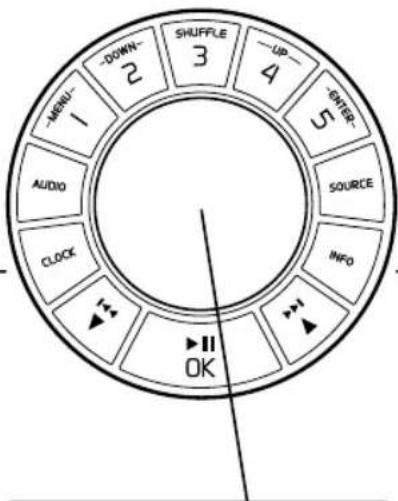

Volume - rotate left or right.

Snoopze - press when the alarm sounds to activate 5 minute timer.

Cancel alarm - press and hold.
Basic controls
Source
Press SOURCE (current source will flash) and then use keys to cycle through DAB, FM, iPod, AUX1, AUX2. Press OK to select.
Info
Press INFO to cycle through on-screen information.
DAB Mode
- Program details / artist / track name
Signal strength
Band and frequency - Program type - eg Classic, Pop
- Broadcast type and data rate
- Multiplex name
FM Mode
- RadioText - programme details
Signal strength
Music type -eg classic, pop - Audio mode - auto (stereo) / mono
- Station name
iPod controls
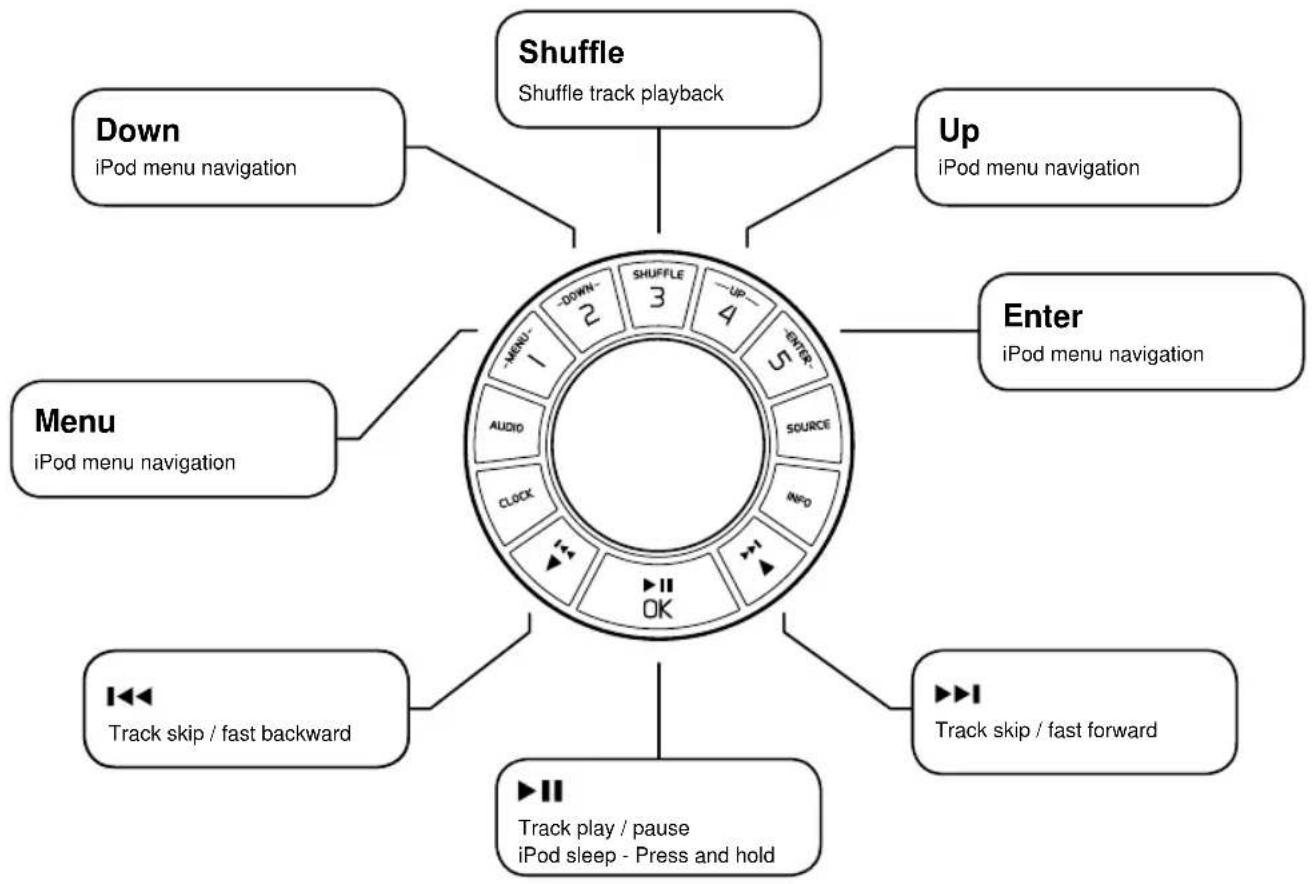

Remote control Getting to know your R2i
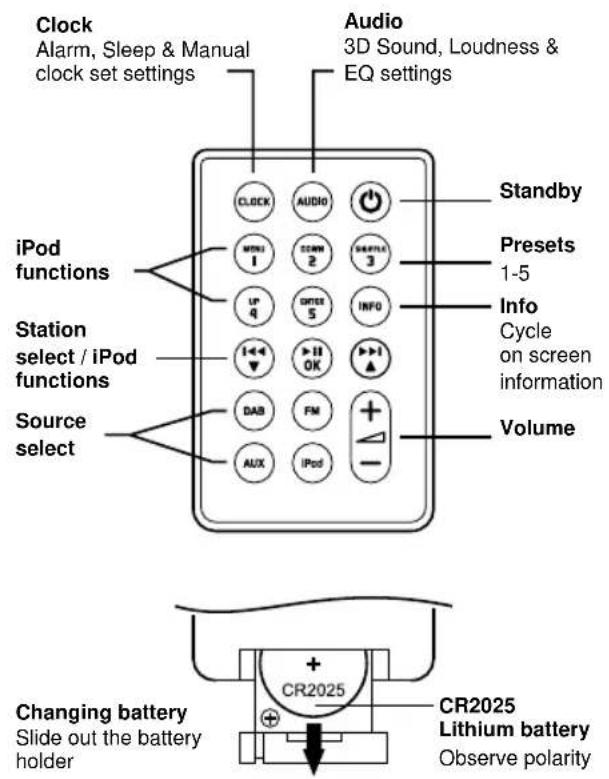
Other functions
Secondary stations
Some DAB stations have secondary services available. This is shown by a > sign after the station name. Press OK to toggle between the main station and secondary service.
FM Mode - Auto (Stereo) / Mono
In FM mode the R2i will adopt stereo as its default setting however for weak stations it is possible to reduce background noise by switching to Mono. Press and hold OK to switch between Auto (Stereo) and Mono.
Manual Tune, AutoScan and System Reset
By pressing and holding the INFO key you can cycle through sub-functions. Press OK to enter each.
- Manual Tune (DAB Mode)
If you know the channel and frequency of a DAB station you can use this feature to access stations directly.
- AutoScan (DAB Mode)
This performs a new DAB scan and will add new stations as they become available.
- System Reset (DAB & FM Mode)
This restores default factory settings and will initiate a new DAB station scan. If you move to a new location it is likely that the DAB services you will receive may change. Running system reset will clear stations that are no longer available and replace with those that are.
A detailed explanation on how to perform AutoScan and System Reset can be found on the FAQs section of our website.
Cautions
- Listening through headphones or earphones at high volume can cause hearing loss.
- The unit should not be exposed to dripping or splashing and no objects containing liquids, such as vases, should be placed on the unit.
- Ensure that the power adapter, mains plug or mains connector into the unit is readily accessible in case disconnection from the mains is required.
- Remote control batteries must not be exposed to excessive heat, such as from sunshine or fire, and used batteries must be disposed of responsibly.
- The normal function of this product may be affected by strong Electromagnetic Interference. If you experience problems, simply reset the product to resume normal operation. If, after resetting, the product still fails to operate correctly, try using it in a different location.
- Keep the unit away from naked flames such as lighted candles and heat sources such as radiators.
- The unit should be positioned at least 10cm away from adjacent objects to ensure adequate ventilation.
General care
- Clean with a soft, lint-free duster or slightly dampened cloth. Do not use wax sprays or other substances as these may damage the surface finish or impair performance.
- Do not expose your unit to direct sunlight, high humidity, dust, excessive vibration or extreme temperatures, all of which can affect the finish, performance and reliability of the unit.
- The recommended operating temperature range is 5^ to 40^ .
- Natural wood finish cabinets will vary and lighten or darken with age, particularly when exposed to sunlight.
Guarantee Information
We guarantee this product to be free from defects for a period of two years from date of purchase, providing due care and attention has been paid. Product failure through accidental damage (however caused), excessive wear and tear, negligence or unauthorised modification will void your guarantee.
Should you experience a problem please contact us either by sending an email to info@ruark.co.uk or calling us directly on 01702 601410 where we will advise the course of action. If your product needs to be returned it should be packaged in its original packing along with proof of purchase. If it is not possible to return the product by hand, then it should be sent carriage prepaid by a reputable parcel carrier. If the original packing is not available, replacement packing can be purchased from us.
Guarantee for Overseas Sales
The distributor in the country of purchase guarantees products purchased outside the UK. For details, please contact your local Ruark distributor or outlet.
THIS GUARANTEE IN NO WAY VARIOUS OR REMOSES THE PURCHASER'S STATUTORY RIGHTS. E&OE
Specifications
- DAB & DAB+ compatible stereo tuner
FM Stereo Tuner 87.5 - 108 MHz with RDS
Universal iPod Dock supports all current iPod (30-pin) models produced from January 2004 onwards
3.5mm headphone output on front panel - RCA fixed phono outputs on rear panel
- 2 × 3.5^ custom full range speaker units
- 2x10w nominal power output
- Aerial: removable telescopic with F-type connector
- Dimensions: H120 x W340 x D185mm (4.75 x 13.5 x 7.25 ins)
Weight: 3.5kg (7.7 lbs)
R2i Power supply
- Input power 100V to 240VAC 50-60Hz 0.5A
Output power 12VDC 2.0A
20130329.1

ruarkaudio
59 Tailors Court - Temple Farm Industrial Estate - Southend on Sea - Essex - SS2 5TH - UK +44 (0) 1702 601 410 info@ruark.co.uk www.ruarkaudio.com
User guide
EN
59 Tailors Court - Temple Farm Industrial Estate - Southend on Sea - Essex - SS2 5TH - UK
+44 (0) 1702 601 410 info@ruark.co.uk www.ruarkaudio.com