
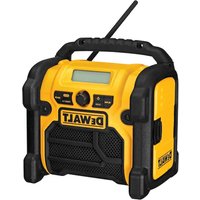
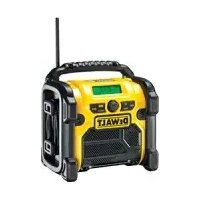
DCR017 T 1 - Radio DEWALT - Free user manual and instructions
Find the device manual for free DCR017 T 1 DEWALT in PDF.



| Product type | Radio / Battery charger |
| Brand | DeWalt |
| Model | DCR017 T1 |
| Mains input voltage | 230 V AC |
| Compatible battery voltage | 10.8 - 18 V DC |
| Battery type | Li-Ion |
| Charge current | 2.0 A |
| Battery charging time (depending on capacity) | 45 min (1.5 Ah) / 60 min (2.0 Ah) / 90 min (3.0 Ah) / 120 min (4.0 Ah) |
| Weight | 5.7 kg |
| Fuses (Europe 230 V) | 16 A |
| Radio modes | DAB/DAB+, FM, AM |
| Auxiliary port (audio input) | Yes (3.5 mm jack) |
| USB port (power output) | Yes |
| Display | LCD |
| Station memory | 10 DAB stations + 10 FM stations (via buttons 1-5) |
| Clock | Manual setting or automatic synchronization via DAB |
| Equalizer | Bass and treble adjustment |
| Battery life (with 4.0 Ah battery) | Up to 8 hours |
| Battery protection | Electronic system against overcharge, overheating and deep discharge |
| Recommended charge temperature | 4 °C to 40 °C |
| Protection class | Earth connection (class I) |
| Warranty | 1 year (with possible extension via 1-year free maintenance contract) |
| Maintenance | Clean with a damp cloth and mild soap; do not use solvents |
| Repairability | Have it repaired only by an authorized DeWalt service center |
Frequently Asked Questions - DCR017 T 1 DEWALT
User questions about DCR017 T 1 DEWALT
0 question about this device. Answer the ones you know or ask your own.
Ask a new question about this device
Download the instructions for your Radio in PDF format for free! Find your manual DCR017 T 1 - DEWALT and take your electronic device back in hand. On this page are published all the documents necessary for the use of your device. DCR017 T 1 by DEWALT.
USER MANUAL DCR017 T 1 DEWALT
English (original instructions) 24
natural_image
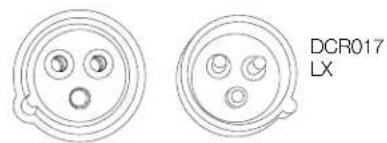
Two identical circular electronic component diagrams with three internal holes, labeled DCR017 LX (no text or symbols on the diagrams themselves)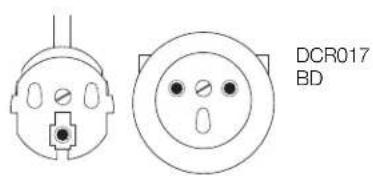
natural_image
Technical line drawing of two electrical connectors (DCR017 BD) with no text or symbols on the diagrams themselves.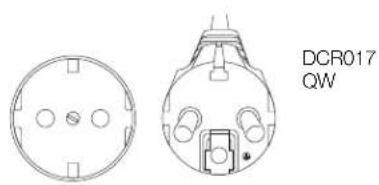
natural_image
Technical line drawing of a circular component with mounting holes and a labeled part (DCR017 QW), no readable text or symbols beyond the label.OPLADER/RADIO
DCR017
Tillykke!
FORSIGTIG: Fare for forbraending.
You have chosen a DEWALT product. Years of experience, thorough product development and innovation make DEWALT one of the most reliable partners for professional power tool users.
Technical Data
| DCR017 | ||
| Power source AC/DC | ||
| Mains voltage V(U.K. & Ireland only) V | AC | 230 |
| AC | 230/110 | |
| Battery voltage V | DC | 10.8–18 |
| Battery type Li-Ion | ||
| Approx. charging time | min | 45 –120 |
| Charge current | A | 2.0 |
| Weight | kg 5.7 | |
| Fuses: | ||
| Europe 230 V | 16 Amperes, mains | |
| U.K. & Ireland 230/110 V | 13 Amperes, in plugs | |
Definitions: Safety Guidelines
The definitions below describe the level of severity for each signal word. Please read the manual and pay attention to these symbols.

R: Indicates an imminently hazardous situation which, if not avoided, will result in death or serious injury.

IG: Indicates a potentially hazardous situation which, if not avoided, could result in death or serious injury.

N: Indicates a potentially hazardous situation which, if not avoided, may result in minor or moderate injury.
NOTICE: Indicates a practice not related to personal injury which, if not avoided, may result in property damage.

risk of electric shock.

risk of fire.
| Battery pack | DCB121 | DCB123 | DCB140 | DCB141 | DCB142 | DCB180 | DCB181 | DCB182 | DCB183 | |
| Battery type | LI-Ion | LI-Ion | LI-Ion | LI-Ion | LI-Ion | LI-Ion | LI-Ion | LI-Ion | LI-Ion | |
| Voltage | V_DC | 10.8 | 10.8 | 14.4 | 14.4 | 14.4 | 18 | 18 | 18 | 18 |
| Capacity | A_th | 1.3 | 1.5 | 3.0 | 1.5 | 4.0 | 3.0 | 1.5 | 4.0 | 2.0 |
| Weight | kg | 0.2 | 0.2 | 0.53 | 0.30 | 0.54 | 0.64 | 0.35 | 0.61 | 0.40 |
| Charger | DCR017 | ||||
| Mains voltage | V_AC | 230 V | |||
| Battery type | Li-Ion | ||||
| Approx. charging time | min | 45(1.5 Ahbattery packs) | 60(2.0 Ahbattery packs) | 90(3.0 Ahbattery packs) | 120(4.0 Ahbattery packs) |
Safety Instructions for Charger/Radios
- Do not abuse cord. Never carry the charger/radio by its cord. Never pull the cord to disconnect from the socket. Keep the cord away from heat, oil and sharp edges.
- Remove the battery pack. Switch off before leaving it unattended. Remove the battery pack when not in use, before changing accessories or attachments and before servicing.
- This appliance is intended to be used in moderate climates.
- This appliance is not intended for use by persons (including children) with reduced physical, sensory or mental capabilities, or lack of experience and knowledge, unless they have been given supervision or instruction concerning use of the appliance by a person responsible for their safety.
- Charger/radio shall not be exposed to dripping or splashing; no objects filled with liquids, such as vases, shall be placed on it.
- No exposed flame sources, such as lighted candles, should be placed on the radio/charger.
- Mains plug is used as the disconnect device; the disconnect device (plug) shall remain readily operable.
Markings on Charger/Radio
The following pictograms are shown on the charger/radio:

Read instruction manual.
Important Safety Instructions for Charger/Radios
SAVE THESE INSTRUCTIONS: This manual contains important safety and operating instructions for the DCR017 charger/radio.
- Before using charger/radio, read all instructions and cautionary markings on charger, battery pack, and product using battery pack.

WARNING: Shock hazard. Do not allow any liquid to get inside charger. Electric shock may result.
CAUTION: Burn hazard. To reduce
the risk of injury, charge only DEWALT rechargeable batteries. Other types of batteries may burst causing personal injury and damage.

CAUTION: Children should be supervised to ensure that they do not play with the appliance.
CAUTION: Danger of explosion if internal battery is incorrectly replaced. Replace only with the same or equivalent type.
NOTICE: Under certain conditions, with the charger plugged in to the power supply, the exposed charging contacts inside the charger can be shorted by foreign material. Foreign materials of a conductive nature such as, but not
limited to, steel wool, aluminum foil, or any buildup of metallic particles should be kept away from charger cavities. Always unplug the charger from the power supply when there is no battery pack in the cavity. Unplug charger before attempting to clean.
- DO NOT attempt to charge the battery pack with any charger/radio other than the one in this manual. The charger and battery pack are specifically designed to work together.
- These charger/radios are not intended for any uses other than charging DEWALT rechargeable batteries. Any other uses may result in risk of fire, electric shock or electrocution.
- Do not expose charger/radio to rain or snow.
- Pull by plug rather than cord when disconnecting charger. This will reduce risk of damage to electric plug and cord.
- Make sure that cord is located so that it will not be stepped on, tripped over, or otherwise subjected to damage or stress.
- Do not use an extension cord unless it is absolutely necessary. Use of improper extension cord could result in risk of fire, electric shock, or electrocution.
- Do not place any object on top of charger/radio or place the charger/radio on a soft surface that might block the ventilation slots and result in excessive internal heat. Place the charger/radio in a position away from any heat source.
- Do not operate charger/radio with damaged cord or plug — have them replaced immediately.
- Do not operate charger/radio if it has received a sharp blow, been dropped, or otherwise damaged in any way. Take it to an authorised service centre.
- Do not disassemble charger/radio; take it to an authorised service centre when service or repair is required. Incorrect reassembly may result in a risk of electric shock, electrocution or fire.
- Disconnect the charger from the outlet before attempting any cleaning. This will reduce the risk of electric shock. Removing the battery pack will not reduce this risk.
- NEVER attempt to connect 2 chargers together.
ENGLISH
- The DCR017 charger/radio is designed to operate on standard 230 V household electrical power. Do not attempt to use it on any other voltage. This does not apply to the vehicular charger.
SAVE THESE INSTRUCTIONS
Grounding Instructions
The DCR017 (230 V) charger/radio must be grounded. In the event of malfunction or breakdown, grounding provides a path of least resistance for electric current to reduce the risk of electric shock. The charger/radio is equipped with a cord having an equipment-grounding conductor and a grounding plug. The plug must be plugged into an appropriate outlet that is properly installed and grounded in accordance with all local codes and ordinances.

DANGER: Improper connection of the equipment-grounding conductor can result in a risk of electric shock. The conductor with insulation having an outer surface that is green with yellow stripes is the equipment-grounding conductor. If repair or replacement of the cord or plug is necessary, do not connect the equipment-grounding conductor to a live terminal. Repairs shall only be performed by a DEWALT service agent. Do not modify the plug provided with the charger/radio – if it will not fit the outlet, have a proper outlet installed by a DEWALT repair agent.
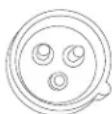
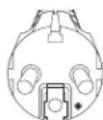
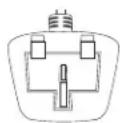
FOR GROUNDED, CORD-CONNECTED CHARGER/RADIO RATED 16A AND LOWER AND INTENDED FOR USE ON A NOMINAL 230 V SUPPLY CIRCUIT
The charger/radio is for use on a nominal 230 V circuit, and has a grounding plug that looks like the plug in the following illustration.
DCR017-LX
DCR017-BD, -QW
DCR017-GB
Chargers
The DCR017 charger/radio accepts 10.8–18 V Li-Ion batteries.
This radio/charger requires no adjustment and is designed to be as easy as possible to operate.
Charging Procedure (fi g. 3)
- Plug the charger into an appropriate 230 V outlet before inserting the battery pack.
- Insert the battery pack (s) into the charger, making sure the pack is fully seated in the charger. The red (charging) light will blink continuously indicating that the charging process has started.
- The completion of charge will be indicated by the red light remaining ON continuously. The pack is fully charged and may be used at this time or left in the charger.
NOTE: To ensure maximum performance and life of Li-Ion batteries, charge the battery pack fully before first use.
Charging Process (Fig. 1)
Refer to the table below for the state of charge of the battery pack.
The charge indicator light (o) will indicate the state of charge of the battery pack, when a battery is being charged.
State of charge Light indicator pattern
| charging | — | — | — | — |
| ly charged | ____ | |||
| hot/cold pack delay | — | ● | — | ● — ● — ● — ● |
| problem pack or charger | ● | ● | ● | ● ● ● ● ● ● ● ● ● ● |
This charger will not charge a faulty battery pack. The charger will indicate faulty battery by refusing to light or by displaying problem pack or charger blink pattern.
NOTE: This could also mean a problem with a charger.
If the charger indicates a problem, take the charger and battery pack to be tested at an authorised service centre.
Hot/Cold Pack Delay
When the charger detects a battery that is too hot or too cold, it automatically starts a hot/cold pack delay, suspending charging until the battery has reached an appropriate temperature. The charger then automatically switches to the pack charging mode. This feature ensures maximum battery life.
XR Li-Ion tools are designed with an Electronic Protection System that will protect the battery against overloading, overheating or deep discharge.
The tool will automatically turn off if the Electronic Protection System engages. If this occurs, place the Li-Ion battery on the charger until it is fully charged.
A cold battery pack will charge at about half the rate of a warm battery pack. The battery pack will charge at that slower rate throughout the entire charging cycle and will not return to maximum charge rate even if the battery warms.
Important Safety Instructions for All Battery Packs
When ordering replacement battery packs, be sure to include the catalog number and voltage.
The battery pack is not fully charged out of the carton. Before using the battery pack and charger, read the safety instructions below and then follow the charging procedures outlined.
READ ALL INSTRUCTIONS
- Do not charge or use the battery pack in explosive atmospheres, such as in the presence of flammable liquids, gases or dust. Inserting or removing the battery pack from the charger may ignite the dust or fumes.
- Never force the battery pack into charger. Do not modify the battery pack in any way to fit into a non-compatible charger as battery pack may rupture causing serious personal injury.
- Charge the battery packs only in designated DEWALT chargers.
- DO NOT splash or immerse in water or other liquids.
- Do not store or use the tool and battery pack in locations where the temperature may reach or exceed 40 °C (105 °F) (such as outside sheds or metal buildings in summer).
- Batteries shall not be exposed to excessive heat such as sunshine, fire or the like.
- For best results, make sure the battery pack is fully charged before use.

VG: Never attempt to open the battery pack for any reason. If the battery pack case is cracked or damaged, do not insert it into the charger. Do not crush, drop or damage battery pack. Do not use a battery pack or charger that has received a sharp blow, been dropped, run over or damaged in any way (e.g., pierced with a nail, hit with a hammer, stepped on). Electric shock or electrocution may result. Damaged battery packs should
be returned to the service centre for recycling.

N: When not in use, place tool on its side on a stable surface where it will not cause a tripping or falling hazard. Some tools with large battery packs will stand upright on the battery pack but may be easily knocked over.
SPECIFIC SAFETY INSTRUCTIONS FOR LITHIUM ION (Li-Ion)
- Do not incinerate the battery pack even if it is severely damaged or is completely worn out. The battery pack can explode in a fire. Toxic fumes and materials are created when lithium ion battery packs are burned.
- If battery contents come into contact with the skin, immediately wash the area with mild soap and water. If the battery liquid gets into the eye, rinse water over the open eye for 15 minutes or until irritation ceases. If medical attention is needed, the battery electrolyte is composed of a mixture of liquid organic carbonates and lithium salts.
- Contents of opened battery cells may cause respiratory irritation. Provide fresh air. If symptoms persist, seek medical attention.

WARNING: Burn hazard. Battery liquid may be flammable if exposed to spark or flame.
Battery Pack
BATTERY TYPE
The DCR017 operates on 10.8 volt, 14.4 volt and 18 volt XR Li-Ion battery packs.
The DCB121, DCB123, DCB140, DCB141, DCB142, DCB180, DCB181, DCB182 and DCB183 battery packs may be used. Refer to Technical Data for more information.
Storage Recommendations
- The best storage place is one that is cool and dry away from direct sunlight and excess heat or cold. For optimum battery performance and life, store battery packs at room temperature when not in use.
- For long storage, it is recommended to store a fully charged battery pack in a cool, dry place out of the charger for optimal results.
NOTE: Battery packs should not be stored completely depleted of charge. The battery pack will need to be recharged before use.
ENGLISH
Labels on Charger and Battery Pack
In addition to the pictographs used in this manual, the labels on the charger and the battery pack show the following pictographs:


DCR017√
Read instruction manual before use.
Charging.
Fully charged.
Hot/cold pack delay.
Problem pack or charger.
Do not probe with conductive objects.
Do not charge damaged battery packs.
Use only with DEWALT battery packs. Others may burst, causing personal injury and damage.
Do not expose to water.


LI-ION
Have defective cords replaced immediately.
Charge only between 4 °C and 40 °C.
Discard the battery pack with due care for the environment.


Li Ion
Do not incinerate the battery pack.

Charges Li-Ion battery packs.
See Technical Data for charging time.
Package Contents
The package contains:
1 Charger/radio
1 Instruction manual
1 Exploded drawing
- Check for damage to the radio, parts or accessories which may have occurred during transport.
• Take the time to thoroughly read and understand this manual prior to operation.
Description (fi g. 1–3)

WARNING: Never modify the radio or any part of it. Damage or personal injury could result.
a. Power button
b. Volume dial
c. Arrow buttons
d. Mode button
e. Menu button
f. Memory buttons
g. Enter/Display button
h. LCD display
i. Battery compartment latch
j. Battery receptacle
k. Auxiliary port
I. Coin cell battery door
m. Coin cell battery
n. Outlets
o. Charging light
p. USB power output port
Electrical Safety
Always check that the battery pack voltage corresponds to the voltage on the rating plate. Also make sure that the voltage of your charger corresponds to that of your mains.

WARNING: Risk of electric shock. Use in dry locations only.
If the supply cord is damaged, it must be replaced by a specially prepared cord available through the DEWALT service organisation.
Mains Plug Replacement (U.K. & Ireland Only)
If a new mains plug needs to be fitted:
• Safely dispose of the old plug.
- Connect the brown lead to the live terminal in the plug.
- Connect the blue lead to the neutral terminal.

WARNING: No connection is to be made to the earth terminal.
Follow the fitting instructions supplied with good quality plugs. Recommended fuse: 13 A.
Using an Extension Cable
If an extension cable is required, use an approved 3-core extension cable suitable for the power input of this tool (see Technical Data). The minimum conductor size is 1.5 mm ^2 ; the maximum length is 30 m.
When using a cable reel, always unwind the cable completely.
ASSEMBLY AND ADJUSTMENTS
Inserting a Battery Pack (fi g. 1, 3)

WARNING: Use only DEWALT battery packs and chargers.
NOTE: Make sure your battery pack is fully charged. If the battery pack does not produce sufficient power, charge the battery pack following the instructions in the manual of the charger.
NOTE: To ensure maximum performance and life of Li-Ion batteries, charge the battery for a minimum of 10 hours before first use.
- Release the latch (i) to open the battery compartment cover.
- Insert the battery pack (s) into the receptacle (j) until it is fully seated.
- Close and latch the battery compartment cover.
FUEL GAUGE BATTERY PACKS (FIG. 3)
Some DEWALT battery packs include a fuel gauge which consists of three green LED lights that indicate the level of charge remaining in the battery pack.
To actuate the fuel gauge, press and hold the fuel gauge button (t). A combination of the three green LED lights will illuminate designating the level of charge left. When the level of charge in the battery is below the usable limit, the fuel gauge will not illuminate and the battery will need to be recharged.
NOTE: The fuel gauge is only an indication of the charge left on the battery pack. It does not indicate tool functionality and is subject to variation based on product components, temperature and end-user application.
To Install the Coin Cell Battery (fi g. 1, 2)

IG: When replacing battery, replace it with the same brand and type. Observe correct polarity (+ and −) when replacing batteries. Do not store or carry batteries so that metal objects can contact exposed battery terminals.
Your radio is equipped with memory capacity in order to store the time and your selected memory channels. When the radio is OFF, this memory capacity is powered by one coin cell battery that is included with the radio.
- Turn the charger/radio off and unplug from the power source.
- Open the battery compartment by lifting the battery compartment latch (i).
- Unscrew the screw (r) on the battery door (l).
- Press down on the battery door latch and pull to open.
- Install the coin cell battery (m) according to the diagram inside the coin cell battery area.
- Replace the battery door, insert screw and tighten.
- Securely close the battery compartment.
NOTE: To reset the LCD display, clock and presets, remove the coin cell battery and re-install it. Follow this procedure if the screen seems to lock in place.
OPERATION
Instructions for Use

IG: Always observe the safety instructions and applicable regulations.

WARNING: Do not place the charger/radio in locations where it may be exposed to dripping or splashing.
AC Operation (fi g. 4)
Unwrap power cord and plug into 110 or 230 V AC wall outlet.
ENGLISH
Operating the Radio (fi g. 1)
POWER/VOLUME ADJUSTMENT
- To turn the radio on, press the power button (a).
NOTE: When the radio is first used it will enter DAB mode and automatically scan for stations. It will then set the time and start playing the first station it finds. If there is no time signal available please refer to Programming The Clock to manually set the time. - Turn the dial (b) clockwise to increase the volume. To decrease the volume, turn anti-clockwise.
MODE SELECTION
To choose one of the mode functions (DAB, FM, or AUX) push the mode button (d) until the desired function is found. For example, if the radio is on DAB, seen in upper left portion of LCD display (h), push the mode button twice to change to AUX.
DAB MODE - TUNING
When the unit is first switched on in DAB/DAB+ mode the radio will auto scan to find broadcast stations in the local area.
Use the left or right arrow buttons (c) to scroll through the stations.
NOTE: When moving locations or if reception was poor in the original scan (possible if the antenna was not up), this may result in an empty or incomplete list of available stations. Manually running an Auto Scan will find all available broadcast stations.
To Perform an Auto Scan:
- Press the menu button (e), scroll through the options by pressing the right arrow button (c) until you reach Auto Scan and select this option by pressing the Enter/Display button (g).
- Press the right arrow button to select the Yes option.
- Press the Enter/Display button (g) to perform the Auto Scan.
Once Auto Scan is complete the radio will play the first station it finds.
To use presets please reference To Program the Memory Buttons.
DAB MODE - STATION PRUNE
Some stations once received by your radio which are no longer available may display with a ? after the station name.
To remove these stations from the station list, use the Prune function:
- Press Menu (e) and scroll right to the Prune option.
- Press Enter/Display (g) to select.
- Scroll right to the Yes option, then press the Enter/Display (g) button to prune stations.
DAB MODE - DYNAMIC RANGE COMPRESSION (DRC)
This function reduces the difference between the loudest and quietest audio being broadcast. Effectively, this makes quiet sounds comparatively louder, and loud sounds comparatively quieter.
The following options are available:
- 0 - broadcast DRC will be ignored
• 1/2 - sets DRC at half the level transmitted
• 1 - uses the DRC level transmitted
• 2 - doubles the DRC level transmitted
NOTE: DRC only works if it is enabled by the broadcaster.
FM/AM MODE - TUNING
To Tune: Push the right arrow to move the tuner up the frequency band, push the left arrow to move the tuner down the frequency band.
To Seek: Press and hold the right arrow button (c) once and release. The tuner frequency will increase to seek the first radio station with acceptable clarity and stop at that station. The right arrow button may be pressed again to continue seeking a radio station at higher frequencies. The left arrow button may be pressed to seek radio stations at lower frequencies. The seek function is available in AM and FM modes.
PROGRAMMING THE MEMORY BUTTONS
Ten DAB and ten FM radio stations may be independently set. After programming the buttons, pressing 1, 2, 3, 4 or 5 will instantly change the frequency to the preset station.
- Set the radio to desired station (see Tuning).
- Press and hold one of the desired memory buttons (f) until the preset number begins flashing in the LCD display (h). Release the button and wait for the preset display to stop flashing.
- Each memory button can store two preset stations. To store a second preset repeat step 1.
- Press and hold one of the desired memory buttons (f) until the preset number begins flashing in the LCD display (h). Press the preset button a second time so that the next preset number displays. Release the button and wait for the preset display to stop flashing.
PROGRAMMING THE CLOCK
The time and date can be updated manually or automatically synchronised with national time signals broadcast over DAB (where available).
To Synchronise the Clock Automatically: (DAB mode ONLY)
NOTE: When the radio is first used it will enter DAB mode and automatically scan for stations.
- Press the Menu button (e).
- Use the arrow buttons (c) to scroll to Clock Adjust and press the Enter/Display button (g).
- Scroll to Sync Time Now press the Enter/Display button to select. This automatically synchronises clock with national time signals.
To Adjust the Clock Manually: (FM and DAB mode)
- Press the Menu button (e).
- Use the arrow buttons (c) to scroll to Clock Adjust on the LCD display and press the Enter/Display button (g).
- Scroll to Date & Time and press the Enter/Display button (g).
- Set the date and time using left and right arrow buttons (c).
- Once the desired time is set press the Enter/Display (g) button to commit.
Other Clock Adjust menu options:
- Time format: Select a 12h or 24h time display format
- Date format: Select the date display format, MM/DD/YYYY, YYYY/MM/DD or DD/MM/YYYY.
TO ADJUST THE EQ
Sound can be adjusted by changing the equalization of the bass or treble of the radio.
- Press the Menu button (e) and scroll using the left or right arrow buttons (c) to select Sound EQ. Select by pressing the Enter/Display button (g).
- Press the right arrow button to increase the bass or the left arrow button to decrease it.
- Once desired adjustment is achieved, press the Enter/Display button (g).
- Repeat steps 2 and 3 for treble adjustment.
Important Radio Notes
- The radio will run up to 8 hours on a fully charged 4.0 amp hour battery. Using batteries of lower voltage or capacity will result in less run time.
- Reception will vary depending on location and strength of radio signal.
- Certain generators may cause background noise.
- AM reception will most likely be clearer when powered by a battery pack.
- To use the auxiliary port (k), plug the output jack from a CD or iPod ^38 /MP3 player into the port (fig. 1). The sound from the external source plays through the speakers of the DCR017.
- The USB power output port (p) is a connection port for powering low power devices such as mobile phones, CD and MP3 players.
* iPod is a registered trademark of Apple Inc.
MAINTENANCE
Your DEWALT radio has been designed to operate over a long period of time with a minimum of maintenance. Continuous satisfactory operation depends upon proper care.
Service Notes
This product is not user serviceable. There are no user serviceable parts inside the charger/radio. Servicing at an authorised service centre is required to avoid damage to static sensitive internal components.

Cleaning

IG: Never use solvents or other harsh chemicals for cleaning the non-metallic parts of the charger/radio. These chemicals may weaken the materials used in these parts. Use a cloth dampened only with water and mild soap. Never let any liquid get inside the charger/radio; never immerse any part of the charger/radio into a liquid.
ENGLISH
CHARGER/RADIO CLEANING INSTRUCTIONS

WARNING: Shock hazard. Disconnect the charger from the AC outlet before cleaning. Dirt and grease may be removed from the exterior of the charger/radio using a cloth or soft non-metallic brush. Do not use water or any cleaning solutions.
Optional Accessories

WARNING: Since accessories, other than those offered by DEWALT, have not been tested with this product, use of such accessories with this charger/radio could be hazardous. To reduce the risk of injury, only DEWALT recommended accessories should be used with this product.
Consult your dealer for further information on the appropriate accessories.
Protecting the Environment
Separate collection. This product must not be disposed of with normal household waste.
Should you find one day that your DEWALT product needs replacement, or if it is of no further use to you, do not dispose of it with household waste. Make this product available for separate collection.

Separate collection of used products and packaging allows materials to be recycled and used again. Re-use of recycled materials helps prevent environmental pollution and reduces the demand for raw materials.
Local regulations may provide for separate collection of electrical products from the household, at municipal waste sites or by the retailer when you purchase a new product.
DEWALT provides a facility for the collection and recycling of DEWALT products once they have reached the end of their working life. To take advantage of this service please return your product to any authorised repair agent who will collect them on our behalf.
You can check the location of your nearest authorised repair agent by contacting your local DEWALT office at the address indicated in this manual. Alternatively, a list of authorised DEWALT repair agents and full details of our after-sales service and contacts are available on the Internet at:
www.2helpU.com

Rechargeable Battery Pack
This long life battery pack must be recharged when it fails to produce sufficient power on jobs which were easily done before. At the end of its technical life, discard it with due care for our environment:
- Run the battery pack down completely, then remove it from the charger/radio.
- Li-Ion, NiCd and NiMH cells are recyclable. Take them to your dealer or a local recycling station. The collected battery packs will be recycled or disposed of properly.
GUARANTEE
DEWALT is confident of the quality of its products and offers an outstanding guarantee for professional users of the product. This guarantee statement is in addition to and in no way prejudices your contractual rights as a professional user or your statutory rights as a private non-professional user. The guarantee is valid within the territories of the Member States of the European Union and the European Free Trade Area.
• 30 DAY NO RISK SATISFACTION GUARANTEE •
If you are not completely satisfied with the performance of your DEWALT tool, simply return it within 30 days, complete with all original components, as purchased, to the point of purchase, for a full refund or exchange. The product must have been subject to fair wear and tear and proof of purchase must be produced.
• ONE YEAR FREE SERVICE CONTRACT •
If you need maintenance or service for your DEWALT tool, in the 12 months following purchase, you are entitled to one service free of charge. It will be undertaken free of charge at an authorised DEWALT repair agent. Proof of purchase must be produced. Includes labour. Excludes accessories and spare parts unless failed under warranty.
• ONE YEAR FULL WARRANTY •
If your DEWALT product becomes defective due to faulty materials or workmanship within 12 months from the date of purchase, DEWALT guarantees to replace all defective parts free of charge or – at our discretion – replace the unit free of charge provided that:
• The product has not been misused;
- The product has been subject to fair wear and tear;
• Repairs have not been attempted by unauthorised persons;
• Proof of purchase is produced;
- The product is returned complete with all original components.
If you wish to make a claim, contact your seller or check the location of your nearest authorised DEWALT repair agent in the DEWALT catalogue or contact your DEWALT office at the address indicated in this manual. A list of authorised DEWALT repair agents and full details of our after-sales service is available on the Internet at: www.2helpU.com.
ESPAÑOL
RADIO/CARGADOR
DCR017
¡Enhorabuena!
Suspension de charge.

Batterie rechargeable
ACCU'S MET VERMOGENMETER (AFB. 3)
STAND DAB - AFSTEMMING
WAARSCHUWING: Aangezien
PROGRAMMERE MINNEKNAPPENE
FM/AM-TILA - VIRITYS
Virittäminen:
PROGRAMMERING AV MINNES-KNAPPARNA
FM/AM MODU - AYARLAMA
Ayarlamak için:
ΦΟΡΤΙΣΤΗΣ/ΡΑΔΙΟΦΩΝΟ DCR017
Συγχαρητήρια!
natural_image
Pure horizontal line with endpoints and no text or symbols| Belgique et Luxembourg | Black & Decker - DEWALTNieuwlandlaan 7, IZ Aarschot B156 | Dutch Tel: 32 70 220 063French Tel:32 70 220 062 | Fax: 32 70 225 585Fax: 32 70 222 441 |
| België en Luxembourg | B-3200 Aarschot www.dewalt.be | ||
| Danmark | DEWALTSluseholmen 2-42450 København SV | www.dewalt.dk | Tlf: 70201511Fax: 70224910 |
| Deutschland | DEWALTRichard Klinger Str. 1165510 Idstein | Fax: 06126-21-2770 | Tel: 06126-21-1www.dewalt.de |
| Ελλάς | Black & Decker (Ελλάς) A.E.Στράβωνος 7 & Βουλιαγμένης 159Γλυφάδα 16674, Αθήνα | Τηλ: 30 210 8981-616Service: 30 210 8981-616Φαξ: 30 210 8983-570 | www.dewalt.gr |
| España | DEWALTParque de Negocios "Mas Blau"Edificio Muntadas, c/Bergada, 1, Of. A608820 El Prat de Llobregat (Barcelona) | Tel: 934 797 400Fax: 934 797 419www.dewalt.es | |
| France | DEWALT5, allée des hêtresBP 30084, 69579 Limonest Cedex | Tel: 04 72 20 39 20Fax: 04 72 20 39 00www.dewalt.fr | |
| SchweizSuisseSvizzera | DEWALTIn der Luberzen 428902 Urdorf | Tel: 044 - 755 60 70Fax: 044 - 730 70 67www.dewalt.ch | |
| Ireland | DEWALTCalpe House Rock HillBlack Rock, Co. Dublin | Fax: 00353-2781811www.dewalt.ie | Tel: 00353-2781800 |
| Italia | DEWALTc/o Energypark Building 03 sud, Via Monza 7/A,20871 Virnercate (MB), IT | www.dewalt.it | Tel: 800-014353Fax: 39 039 9590 317 |
| Nederlands | Black & Decker - DEWALT Tel: 31 164 283 063Joulehof 124600 AB Bergen Op Zoom | Fax: 31 164 283 200www.dewalt.nl | |
| Norge | DEWALTPostboks 4613, Nydalen0405 Oslo | Tel: 45 25 13 00Fax: 45 25 08 00 | www.dewalt.no |
| Österreich | DEWALTWerkzeug Vertriebsges m.b.HOberlaaerstrasse 248A-1230 Wien | Tel: 01 - 66116 - 0Fax: 01 - 66116 - 14www.dewalt.at | |
| Portugal | DEWALTCentro de Escritórios de Sintra Avenida AlmiranteGago Coutinho, 132/134, Edificio 142710-418 Sintra2710-418 Lisboa | Tel: 214 66 75 00 | Fax: 214 66 75 75www.dewalt.pt |
| Suomi | DEWALTTeknikantie 1202150 Espoo, Finland | Puh: 010 400 430Faksi: 0800 411 340www.dewalt.fi | |
| Sverige | DEWALTBox 94431 22 Mölndal | Tel: 031 68 61 00Fax: 031 68 60 08www.dewalt.se | |
| Türkiye | KALE Hírdavat ve Makina A.Ş.Defterdar Mah. Savaklar Cad. No:15Edirnekapi / Eyüp / İSTANBUL 34050 TÜRKİYE | Tel: 0212 533 52 55Faks: 0212 533 10 05www.dewalt.com.tr | |
| UnitedKingdom | DEWALT210 Bath Road; Slough, Berks SL1 3YD | Tel: 01753-56 70 55Fax: 01753-57 21 12 | www.dewalt.co.uk |
| Middle EastAfrica | DEWALTP.O. Box - 17164,Jebel Ali (South Zone), Dubai, UAE | Tel: 971 4 8863030www.dewalt.ae | Fax: 971 4 8863333 |
| N326939 | 07/13 |

- OPLADER/RADIO
- DCR017
- Tillykke!
- Definitions: Safety Guidelines
- Safety Instructions for Charger/Radios
- Markings on Charger/Radio
- Important Safety Instructions for Charger/Radios
- ENGLISH
- SAVE THESE INSTRUCTIONS
- Grounding Instructions
- FOR GROUNDED, CORD-CONNECTED CHARGER/RADIO RATED 16A AND LOWER AND INTENDED FOR USE ON A NOMINAL 230 V SUPPLY CIRCUIT
- Chargers
- Charging Procedure (fi g. 3)
- Charging Process (Fig. 1)
- Hot/Cold Pack Delay
- Important Safety Instructions for All Battery Packs
- READ ALL INSTRUCTIONS
- SPECIFIC SAFETY INSTRUCTIONS FOR LITHIUM ION (Li-Ion)
- Battery Pack
- BATTERY TYPE
- Storage Recommendations
- Labels on Charger and Battery Pack
- Package Contents
- Description (fi g. 1–3)
- Electrical Safety
- Mains Plug Replacement (U.K. & Ireland Only)
- Using an Extension Cable
- ASSEMBLY AND ADJUSTMENTS
- Inserting a Battery Pack (fi g. 1, 3)
- FUEL GAUGE BATTERY PACKS (FIG. 3)
- To Install the Coin Cell Battery (fi g. 1, 2)
- OPERATION
- Instructions for Use
- AC Operation (fi g. 4)
- Operating the Radio (fi g. 1)
- POWER/VOLUME ADJUSTMENT
- MODE SELECTION
- DAB MODE - TUNING
- To Perform an Auto Scan:
- DAB MODE - STATION PRUNE
- DAB MODE - DYNAMIC RANGE COMPRESSION (DRC)
- FM/AM MODE - TUNING
- PROGRAMMING THE MEMORY BUTTONS
- PROGRAMMING THE CLOCK
- To Synchronise the Clock Automatically: (DAB mode ONLY)
- To Adjust the Clock Manually: (FM and DAB mode)
- TO ADJUST THE EQ
- Important Radio Notes
- MAINTENANCE
- Service Notes
- Cleaning
- CHARGER/RADIO CLEANING INSTRUCTIONS
- Optional Accessories
- Protecting the Environment
- Rechargeable Battery Pack
- GUARANTEE
- • 30 DAY NO RISK SATISFACTION GUARANTEE •
- • ONE YEAR FREE SERVICE CONTRACT •
- • ONE YEAR FULL WARRANTY •
- ESPAÑOL
- RADIO/CARGADOR
- ¡Enhorabuena!
- Batterie rechargeable
- ACCU'S MET VERMOGENMETER (AFB. 3)
- STAND DAB - AFSTEMMING
- PROGRAMMERE MINNEKNAPPENE
- FM/AM-TILA - VIRITYS
- Virittäminen:
- PROGRAMMERING AV MINNES-KNAPPARNA
- FM/AM MODU - AYARLAMA
- Ayarlamak için:
- ΦΟΡΤΙΣΤΗΣ/ΡΑΔΙΟΦΩΝΟ DCR017
- Συγχαρητήρια!
Brand : DEWALT
Model : DCR017 T 1
Category : Radio