Jane BL500A - Sewing machine BABY LOCK - Free user manual and instructions
Find the device manual for free Jane BL500A BABY LOCK in PDF.


User questions about Jane BL500A BABY LOCK
0 question about this device. Answer the ones you know or ask your own.
Ask a new question about this device
Download the instructions for your Sewing machine in PDF format for free! Find your manual Jane BL500A - BABY LOCK and take your electronic device back in hand. On this page are published all the documents necessary for the use of your device. Jane BL500A by BABY LOCK.
USER MANUAL Jane BL500A BABY LOCK
text_image
A-LINE SERIESJane
A-LINE SERIES Model BL500A
Instruction and Reference Guide

text_image
baby lock®FOR THE LOVE OF SEWING
To register your machine warranty and receive Baby Lock product updates and offers, go to www.babylock.com/profile. If you have questions with registration, visit your Authorized Baby Lock Retailer.
Baby Lock Consumer Helpline: 800-313-4110
www.babylock.com
"IMPORTANT SAFETY INSTRUCTIONS"
"Read all instructions before using."
When using a sewing machine, basic safety precautions should always be taken,
including the following:
DANGER — To reduce the risk of electric shock:
- The sewing machine should never be left unattended while plugged in. Always unplug the sewing machine from the electrical outlet immediately after using and before cleaning.
● Always unplug before changing the light bulb. Replace bulb with same type rated 120V 15 watts for 120V model or rated 240V 15 watts for 220-240V model.
WARNING — To reduce the risk of burns, fire, electric shock, or injury:
- Do not allow this sewing machine to be used as a toy. Close attention is necessary when the sewing machine is used by or near children.
● Use this sewing machine only for its intended use as described in this manual. Use only accessories recommended by the manufacturer as contained in this manual.
● Never operate this sewing machine if it has a damaged cord or plug, if it is not working properly, if it has been dropped or damaged, or dropped into water. Return the sewing machine to the nearest authorized dealer or service center for examination, repair, electrical or mechanical adjustment. - Never operate the sewing machine with any air openings blocked. Keep ventilation openings of the sewing machine and foot control free from the accumulation of lint, dust, and loose cloth.
●Never drop or insert any object into any opening.
●Do not use outdoors. - Do not operate where aerosol (spray) products are being used or where oxygen is being administered.
- To disconnect, turn the main switch to the symbol "O" position which represents off, then remove plug from outlet.
- Do not unplug by pulling on cord. To unplug, grasp the plug, not the cord.
- Keep fingers away from all moving parts. Special care is required around the sewing machine needle.
●Always use the proper needle plate. The wrong plate can cause the needle to break.
●Do not use bent needles. - Do not pull or push fabric while stitching. It may deflect the needle causing it to break.
- Turn off power to the machine by flipping the ON/OFF switch to the symbol "O" before making any adjustments in the needle area, such as threading the needle, changing the needle, threading the bobbin or changing the presser foot etc.
● Always unplug the sewing machine from the electrical outlet when removing covers, lubricating, or when making any other user servicing adjustments mentioned in the instruction manual.
● This sewing machine is not intended for use by young children or infirm persons without supervision.
● Young children should be supervised to ensure that they do not play with this sewing machine.
CAUTION For U.S.A. only—This appliance has a polarized plug (one blade wider than the other) to reduce the risk of electric shock, this plug is intended to fit in a polarized outlet only one way.
If the plug does not fit fully in the outlet, reverse the plug.
If it still does not fit, contact a qualified electrician to install the proper outlet.
Do not modify the plug in any way.
"SAVE THESE INSTRUCTIONS"
"This sewing machine is intended for household use."
FOR USERS IN THE UK, EIRE, MALTA AND CYPRUS ONLY
IMPORTANT
- In the event of replacing the plug fuse, use a fuse approved by ASTA to BS 1362, i.e. carrying the MPA mark, rating as marked on plug.
●Always replace the fuse cover. Never use plugs with the fuse cover omitted. - If the available electrical outlet is not suitable for the plug supplied with this equipment, you should contact your authorized retailer to obtain the correct lead.
FOR USERS IN AC INPUT 220-240V COUNTRIES AND MEXICO
This appliance is not intended for use by persons (including children) with reduced physical, sensory or mental capabilities, or lack of experience and knowledge, unless they have been given supervision or instruction concerning use of the appliance by a person responsible for their safety. Children should be supervised to ensure that they do not play with the appliance.
CONGRATULATIONS ON CHOOSING
A BABY LOCK SEWING MACHINE
Your machine is one of the finest sewing machines available for home use.
To fully enjoy all the features incorporated into it, we suggest that you study this booklet.
PLEASE READ BEFORE USING YOUR SEWING MACHINE
For safe operation
- Be sure to watch the placement of your hands in relation to the needle while sewing. Do not touch moving parts such as the balance wheel, thread take-up or needle while the machine is operating.
●Remember to turn off the power switch and unplug the cord when:
• Operation is completed
- Replacing or removing the needle or any other parts
● A power failure occurs during use
- Maintaining the machine
- Leaving the machine unattended
●Do not place anything on the foot controller.
●Plug the machine directly into the wall outlet. Do not use extension cords.
For a longer service life
- When storing your sewing machine, avoid direct sunlight and high humidity locations. Do not store the sewing machine beside a space heater, iron, or other hot objects.
- Use only neutral soaps or detergents to clean the case. Benzene, thinner, and scouring powders can damage the case and machine, and should never be used.
●Do not drop or hit the machine.
● Always consult the operation manual when replacing any accessories, including: the presser feet, needle or other parts to assure correct installation.
For repair or adjustment
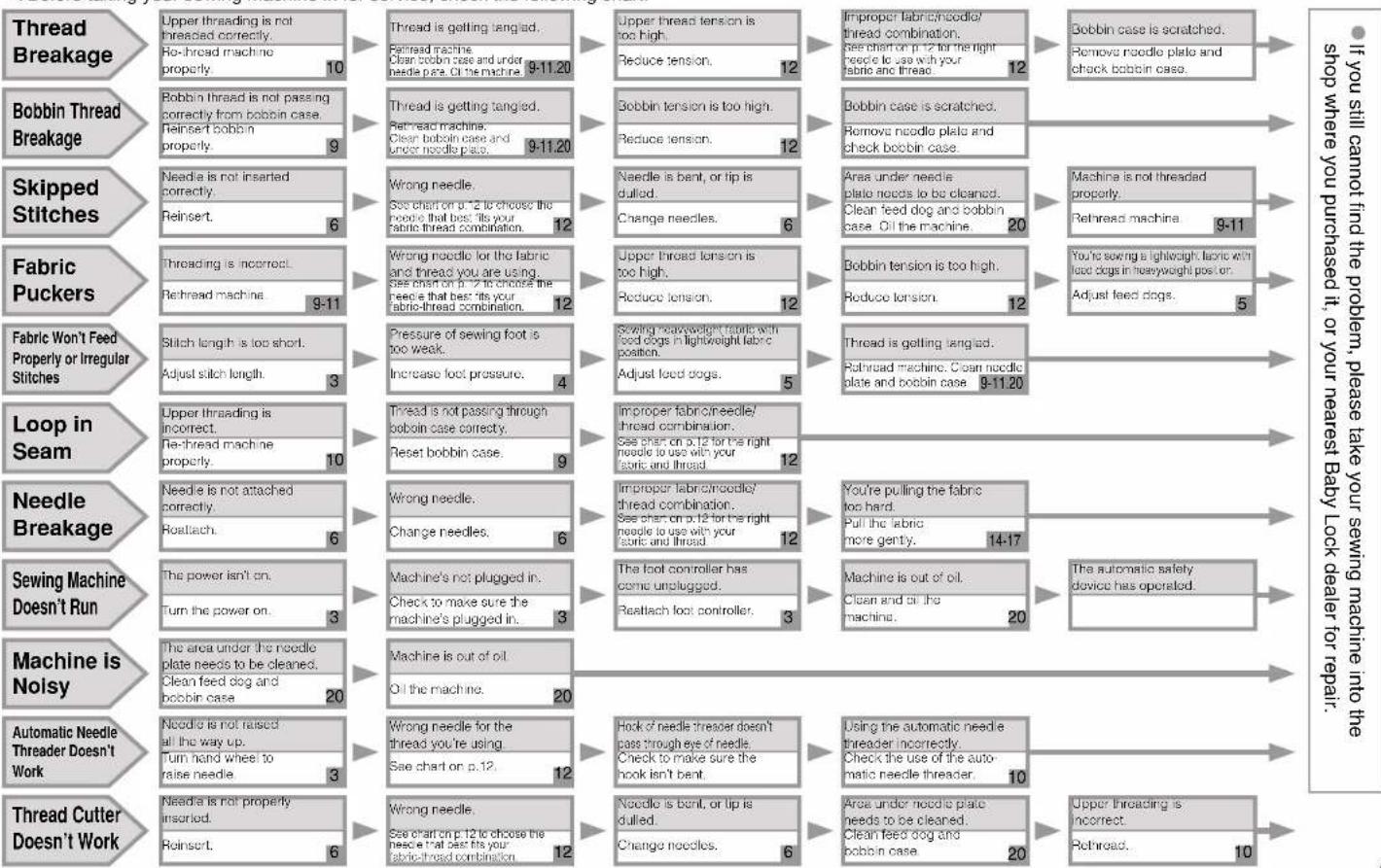
In the event that a malfunction occurs or adjustment is required, first follow the troubleshooting table in the back of the operation manual to inspect and adjust the machine yourself. If the problem persists, please consult your nearest authorized Baby Lock service center.
For additional product information and update, or to find your nearest Baby Lock dealer, visit our website at www.babylock.com
CONTENTS
Accessories ....1
Machine Features 2
Before You Begin 3
Power Cord and Foot Controller ....3
Power Switch 3
Thread Tension Dial....3
Hand Wheel 3
Stitch Length Regulator ....3
Reverse Stitch Lever....3
Presser Foot Lift Lever....4
Knee Lift 4
Presser Foot Pressure Adjustment Dial 4
Fabric Extension Table 4
Thread Cutter Button 5
Needle Stop Position Button 5
Light Switch....5
Feed Dog Adjustment Knob 5
Changing Needles and Light Bulb....6
Changing the Needle 6
Changing the Feed Pin ....6
Changing Light Bulbs 6
Threading 7
Bobbin Winding 7
Bobbin Insertion 9
Upper Threading ....10
Using the Needle Threader ....10
Using the Spool Net 11
Stitch Samples and Needle Chart ....12
Stitch Samples 12
Thread Tension 12
Changing Presser Feet 13
Changing Presser Feet (Zipper Foot) 13
Presser Feet 13
Basic Sewing ....14
Basic Sewing 14
Pin Feeding (for hard-to-handle fabrics) .....14
Rolled Hem Foot 15
Zipper Foot....16
Invisible Zipper Foot....17
1/4" Foot....17
Quilting Foot....18
Walking Foot 18
Seam Guide ....19
Caring for Your Machine ....20
Cleaning the Machine ....20
Lubrication Points ......20
Trouble Shooting 21
Accessories
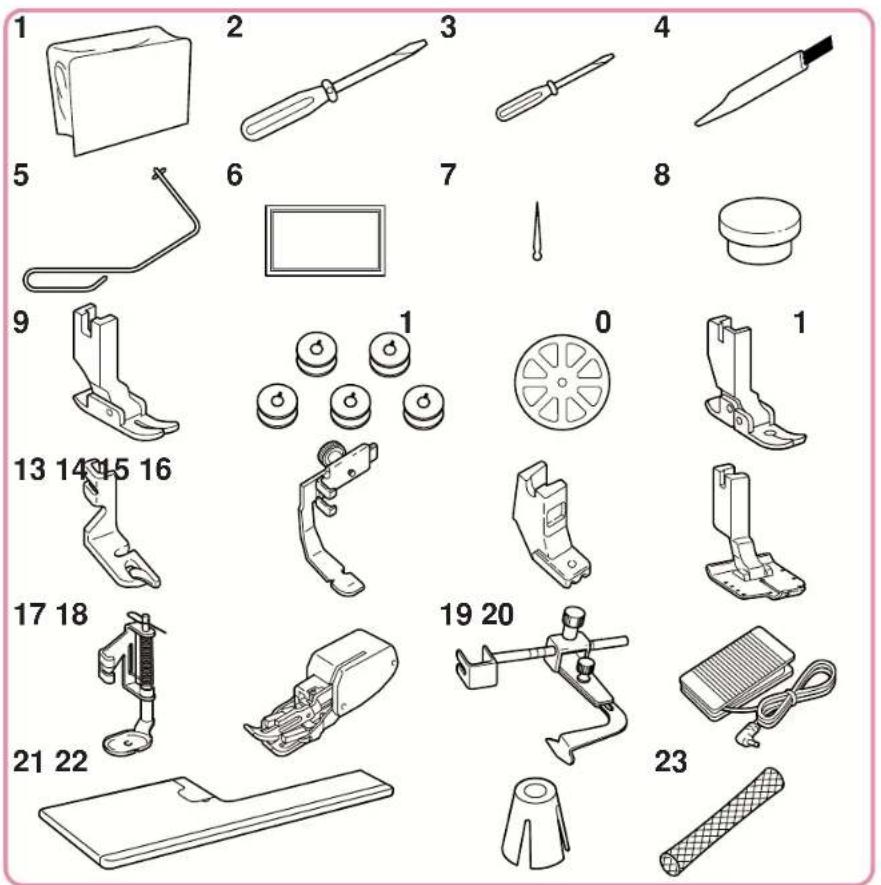
| No. | Part Name Part Code | |
| 1 | Cover XA0917-056 | |
| 2 | Medium Screwdriver XC9541-051 | |
| 3 | Small Screwdriver XC9542-051 | |
| 4 | Cleaning Brush X59476-051 | |
| 5 | Knee Lift XA0830-051 | |
| 6 | Needles and Case 1 Size 9(ORGAN HLX5) 2 Size 111 Size 14 X80805-1511 Size 161 Ballpoint Needle | |
| 7 | Feed Pin 138483-051 | |
| 8 | Feed Pin Changer XC407-051 | |
| 9 | General Purpose Foot | XA1425-001 |
| 10 | Bobbin (5) | 100376-051 |
| 11 | Spool Cap | XA2111-050 |
| 12 | Flex Reaction Foot (on machine) | 136021-001 |
| 13 | Rolled Hem Foot | X57138-101 |
| 14 | Zipper Foot 112797-001 | |
| 15 | Invisible Zipper Foot | 148475-001 |
| 16 | 1/4" Foot | XA7258-001 |
| 17 | Quilting Foot | XA7255-301 |
| 18 | Walking Foot | XA7253-001 |
| 19 | Seam Guide | XA7256-001 |
| 20 | Foot Controller | XC6658-151 |
| 21 | Fabric Extension Table | XC3117-051 |
| 22 | Spool Cone Holder (on machine) | XA0679-050 |
| 23 | Spool Net | XA5523-050 |
Note
(FOR U.S.A only)
Foot controller: Model P
This foot controller is used for sewing machine model BL500A.
Machine Features
text_image
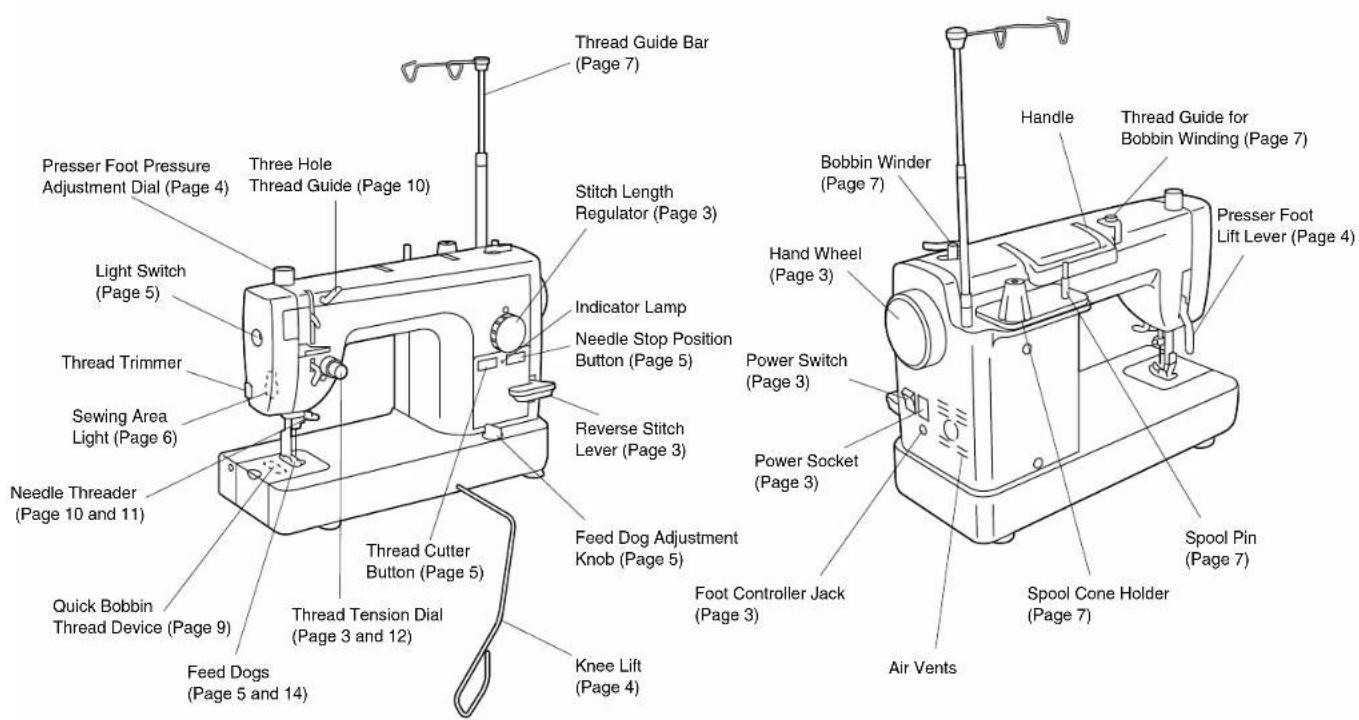
Presser Foot Pressure Adjustment Dial (Page 4) Three Hole Thread Guide (Page 10) Light Switch (Page 5) Thread Trimmer Sewing Area Light (Page 6) Needle Threader (Page 10 and 11) Quick Bobbin Thread Device (Page 9) Feed Dogs (Page 5 and 14) Thread Tension Dial (Page 3 and 12) Thread Cutter Button (Page 5) Feed Dog Adjustment Knob (Page 5) Knee Lift (Page 4) Stitch Length Regulator (Page 3) Indicator Lamp Needle Stop Position Button (Page 5) Reverse Stitch Lever (Page 3) Foot Controller Jack (Page 3) Power Switch (Page 3) Power Socket (Page 3) Handle Bobbin Winder (Page 7) Hand Wheel (Page 3) Power Switch (Page 3) Spool Pin (Page 7) Spool Cone Holder (Page 7) Air Vents Presser Foot Lift Lever (Page 4)Before You Begin (1)
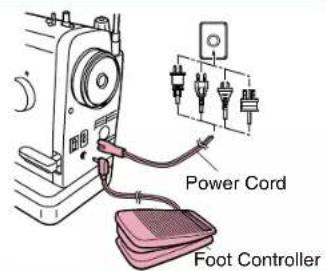
Power Cord and Foot Controller
Note
Please use common household current.
●Plug in cord.
●Plug foot controller into machine.
text_image
Power Cord Foot ControllerPower Switch
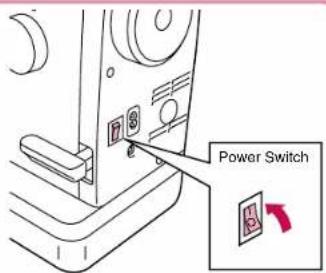
- Flip power switch to "I" position to turn on.
●To switch power off, flip switch to "O" position.
text_image
Power SwitchThread Tension Dial
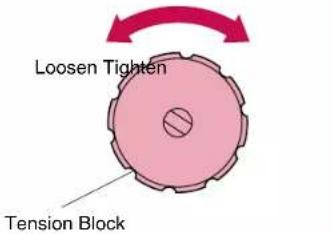
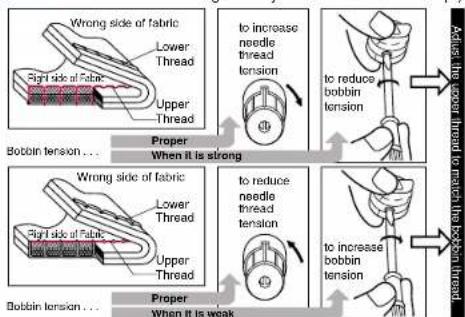
- When tighter thread tension is desired, turn the tension dial to the right. Upper and bobbin threads will meet on right side of the fabric.
- When looser thread tension is desired, turn tension dial to the left. Upper and lower threads will then meet on wrong side of fabric.
Upper Thread Tension
text_image
Loosen Tighten Tension BlockHand Wheel
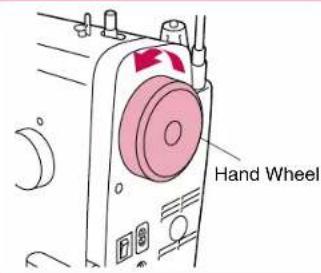
●Position needle using hand wheel.
*Always turn hand wheel towards you.
text_image
Hand WheelStitch Length Regulator
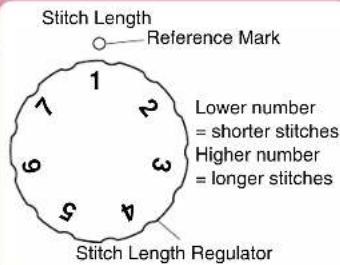
●Adjust desired stitch length using stitch length regulator dial.
text_image
Stitch Length Reference Mark Lower number = shorter stitches Higher number = longer stitches Stitch Length RegulatorReverse Stitch Lever
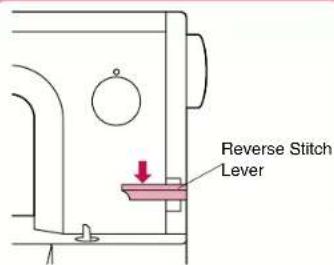
●Sewing in reverse is possible when the reverse stitch lever is in the lowered position.
*Make sure to push the lever all the way down when reverse sewing is desired.
*When the feed adjustment dial is set between 5-7mm, the reverse stitch length is always 5 mm.
text_image
Reverse Stitch LeverPresser Foot Lift Lever
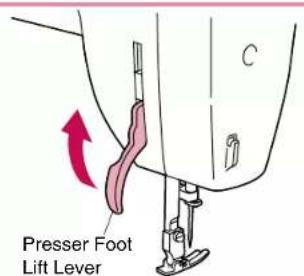
●Lowering the presser foot lift lever lowers the sewing foot down onto the fabric and engages the thread tension function.
*When working with heavy fabrics or other fabrics that don't slide easily under the foot, raise the presser foot lever to position the fabric.
Knee Lift
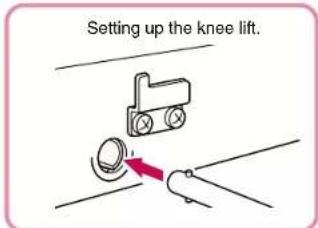
● Using the convenient knee lift to lift and lower the presser foot easily, leaving both your hands free.
text_image
Setting up the knee lift.*Push the knee lift bar all the way into the socket.
*When knee lift is not in use, it can rest at the bottom of the fabric extension table.
text_image
Presser Foot Lift Lever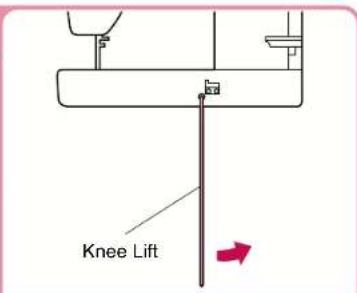
text_image
Knee Lift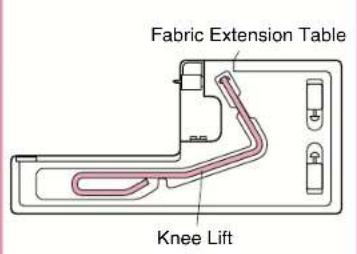
text_image
Fabric Extension Table Knee LiftPresser Foot Pressure Adjustment Dial
●Turning the pressure adjustment dial raises and lowers the pressure indicator needle as the amount of pressure on the presser foot changes.
See also: "Feed Dog Adjustment Knob" on page 5.
* See "Thread Tension" on page 12.
*Coordinate the color coding for proper foot pressure and feed dog settings.
Fabric Extension Table
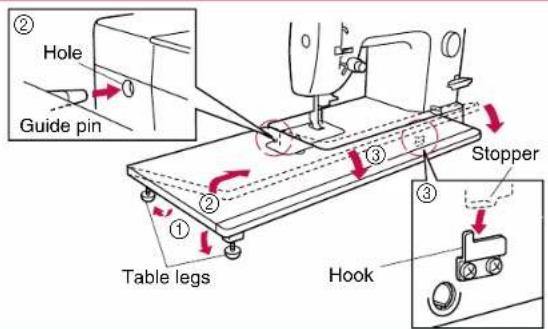
● Lower table feet and attach fabric extension table as shown in the below diagram.
text_image
② Hole Guide pin ③ Stopper ① Table legs HookPresser Foot Pressure Adjustment Dial
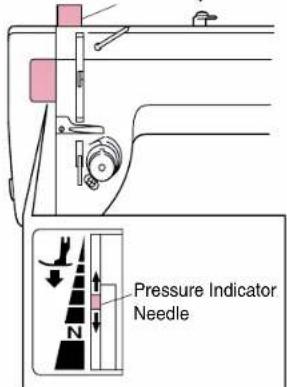
text_image
Pressure Indicator NeedleBefore You Begin (2)
Thread Cutter Button
Note
When the machine stops due to jammed threads and so forth, do not step on the foot controller, turn the power off and move the needle with the hand wheel, check the situation. Otherwise broken needles could result.
● The thread cutter trims upper and bobbin threads at the end of seams.
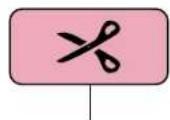
Thread Cutter Button
*Press with the presser lever down.
Needle Stop Position Button
- When indicator lamp is lit up, the machine will stop sewing with the needle lowered through the fabric.
- When indicator lamp is off, the needle position when sewing stops, will be random.
- If the safety mechanism is activated, for example if the thread becomes tangled, the red lamp flashes.
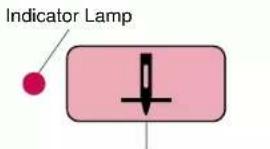
text_image
Indicator LampNeedle Stop Position Button
Light Switch
●Push light switch to turn the light over the sewing area on and off.
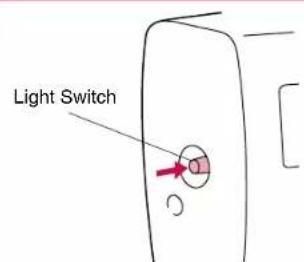
text_image
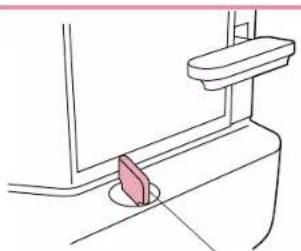
Light SwitchFeed Dog Adjustment Knob
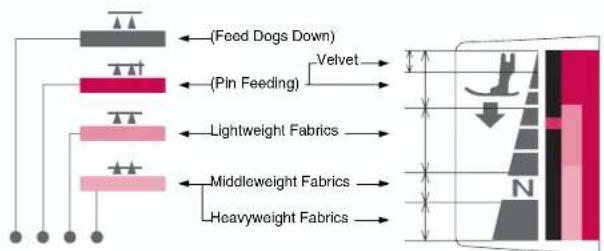
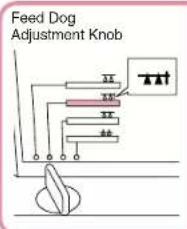
●Height of feed dogs can be adjusted to coincide with fabric weights.
natural_image
Line drawing of a toilet with a pink plastic clip inserted into the cup (no text or symbols)Feed Dog Adjustment Knob
Foot Pressure and Feed Dog Position
text_image
(Feed Dogs Down) (Pin Feeding) Velvet Lightweight Fabrics Middleweight Fabrics Heavyweight FabricsSelect one of four feed dog positions according to your needs.
Note
*If a setting other than 📄 is selected, the pin feed mechanism will not operate. *Coordinate the color coding for proper foot pressure and feed dog settings.
Changing Needles and Light Bulb
Note
Please make sure power is off before carrying out the following operations. There is a chance of injury if the machine accidentally starts running during this operation.
Changing the Needle
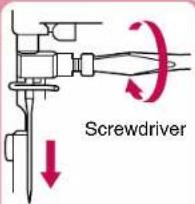
①Turn the sewing machine off. Raise needle to highest position using hand wheel, and lower presser foot.
②Loosen screw with screwdriver, and remove needle.
③Hold the needle with the flat side to the right, and insert the needle as far as it will go. Make sure needle is screwed in tightly.
*If the needle is not adequately inserted or the screw is loose, this may break the needle or cause a breakdown and the needle threader will not work.
*Check needles on a flat surface to make sure they are not bent.
text_image
Screwdriver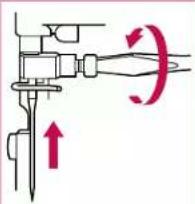
natural_image
Mechanical diagram showing a lever mechanism with motion arrows and an upward arrow (no text or symbols)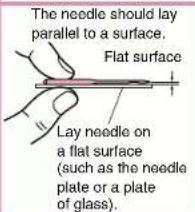
text_image
The needle should lay parallel to a surface. Flat surface Lay needle on a flat surface (such as the needle plate or a plate of glass).Note
HLX5 needles should be used; however, Schmetz 130/705H may also be used under normal circumstances.
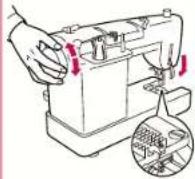
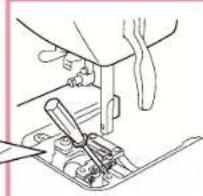
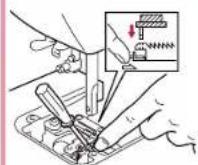
Changing the Feed Pin
① Set the feed dogs to "vel-vet" position. (See page 5.)
② Remove needle, presser foot and needle plate.
③ Lower presser foot and turn hand wheel until feed pin is in its highest position.
④ Insert small screwdriver (included) as shown in diagram.
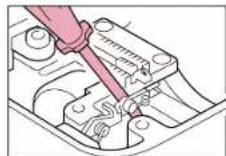
⑤While holding spring with fingertip, lower the feed pin changer onto the needle to pick it up.
⑥ Attach new feed pin to feed pin changer, lower and attach while holding spring with fingertip.
⑦Remove screwdriver.
⑧Re-attach needle plate, needle and presser foot.
natural_image
Line drawing of a mechanical assembly with tool and component (no text or symbols)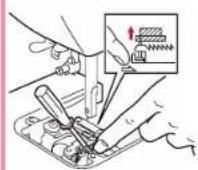
Note
Please make sure power is off before carrying out the following operation. The glass plate over the light bulb will be hot immediately after using the machine, therefore it is advisable to wait until the light bulb has had a chance to cool down before changing bulbs.
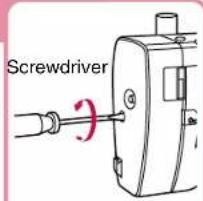
Changing Light Bulbs
①Turn off power
②Remove screw from head.
③Remove bulb housing.
④Unscrew bulb and remove.
⑤Screw in new bulb.
Sewing Light:
See page 20.
⑥Re-attach bulb housing and tighten screw.
text_image
Screwdriver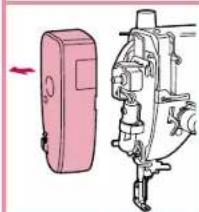
natural_image
Illustration of a pink handheld device next to a mechanical assembly (no text or symbols visible)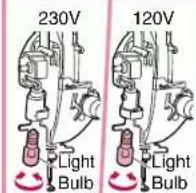
Threading (1)
Bobbin Winding
Note
Do not move bobbin winding clutch while machine is running.
text_image
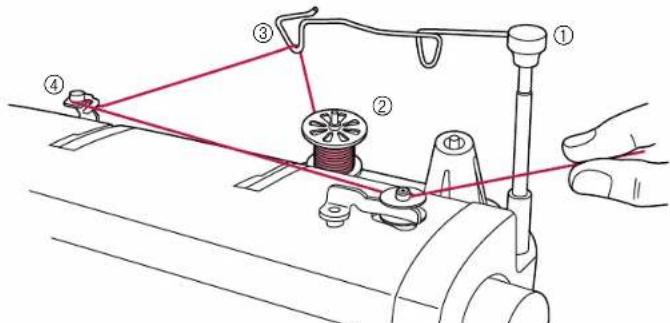
Technical diagram showing a sewing machine with numbered components and red wiring connections⑤ - ⑩: See the following illustrations.
text_image
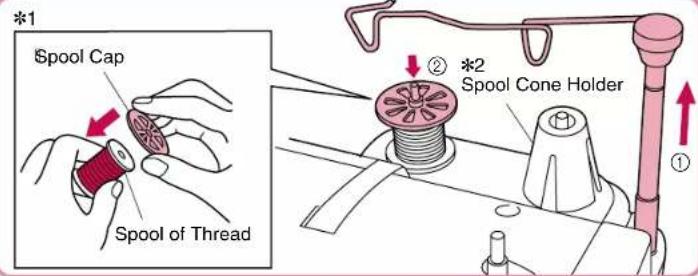
*1 Spool Cap Spool of Thread ② *2 Spool Cone Holder ①①Raise the thread guide bar all the way.
②Mount a spool thread on the spool pin.
*1 Use spool cap when using parallel-wound thread.
*2 Use spool cone holder to stabilize cone shaped spools of thread.
natural_image
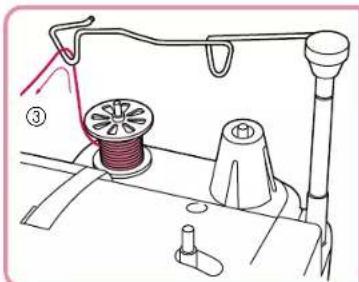
Line drawing of a sewing machine with spool, handle, and base (no text or symbols)③Pass the thread through the triangular hole.
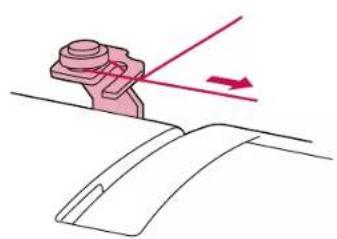
natural_image
Diagram showing a mechanical component with an arrow indicating direction, no text or symbols present④Pass thread through bobbin winding thread guide as shown in drawing.
text_image
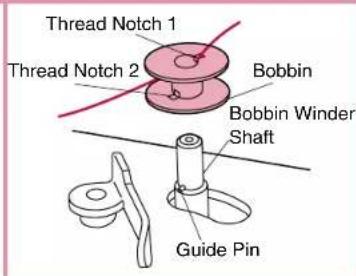
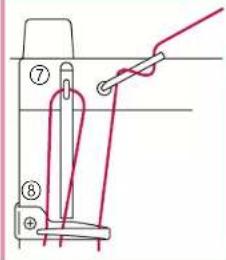
Thread Notch 1 Thread Notch 2 Bobbin Bobbin Winder Shaft Guide Pin⑤Run thread through top thread notch 1, and align bottom thread notch 2 of the bobbin with guide pin on bobbin winder shaft.
text_image
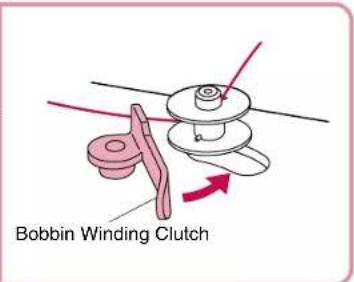
Bobbin Winding Clutch⑥Press bobbin winding clutch up against empty bobbin. If the bobbin stop does not slide easily between the top and bottom of the bobbin, check that the bobbin is seated properly with the guide pin (⑤) inserted into the lower notch.

⑧ Release the foot controller to stop winding process when bobbin is full.
⑨ Manually move bobbin winding clutch back to original position.
⑩Cut thread and remove bobbin.⑦
While holding the end of the thread, step on the foot controller for a few seconds. Once enough thread has wound itself around the bobbin to hold itself in place, release the foot controller and trim the excess thread. Continue to wind the bobbin while pressing down on the foot controller.
Bobbin Insertion
CAUTION – Moving parts –
To reduce risk of injury, switch power off before servicing. Open covers.
text_image
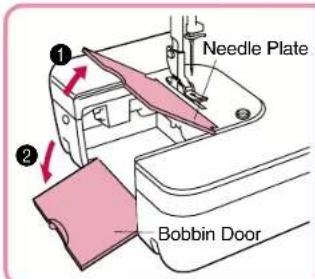
Needle Plate Bobbin Door①Lift needle plate and open bobbin door.
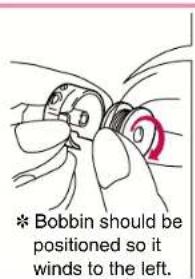
text_image
* Bobbin should be positioned so it winds to the left.②Put bobbin into the bobbin case.
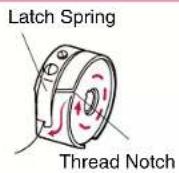
* Run thread through thread notch and under latch spring, so that a length of thread is exposed.
* Always use the bobbin case that was supplied with this machine. A secondary bobbin case can be ordered from your dealer.
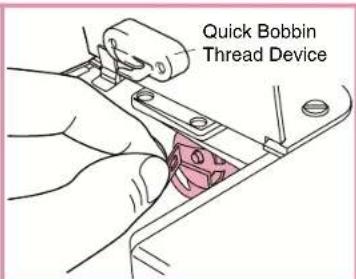
text_image
Quick Bobbin Thread Device③ Pull the latch lever of the bobbin case out and push the bobbin case into the shuttle race and release the latch lever.
* If the latch lever is not set securely on the hook, it may fly off during sewing and cause lower thread breakage. Rotate the hand wheel one full rotation towards you to check that the bobbin case is set securely.
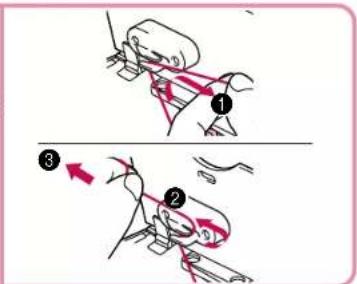
text_image
Diagram illustrating a mechanical or robotic operation with numbered steps and directional arrows indicating motion.④Pass the thread through the quick bobbin thread device in the order ① ②, pull in the direction of the arrow ③, then cut the thread.
★ Quick Bobbin Thread Device
This device cuts the bobbin thread end to an appropriate length after the bobbin has been replaced and holds it at that length, so the operation of pulling out the thread can not be skipped.
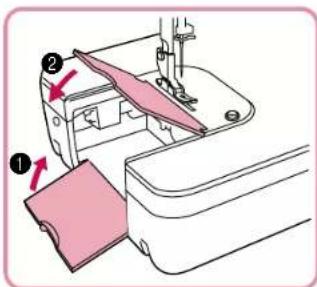
text_image
Diagram of sewing machine steps showing fabric being inserted into a machine, with numbered instructions and red arrows indicating movement.⑤Lower slide plate and close bobbin door, following numbers ① ② above in order.
● When the fabric extension table is set in place
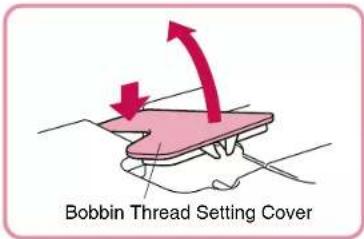
text_image
Bobbin Thread Setting CoverOpen the bobbin thread setting cover beforehand, then set the bobbin thread in place. (You can set the bobbin thread in place without removing the fabric extension table.)
Threading (2)
Note
Please turn off the power before using needle threader. Accidentally stepping on the foot controller during this operation could cause bodily injury or damage to the machine.
Upper Threading
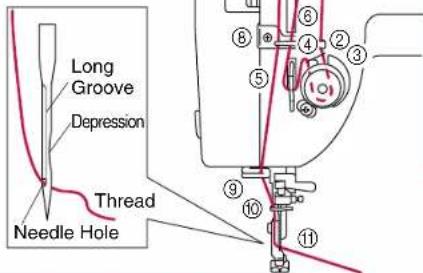
text_image
Long Groove Depression Thread Needle HoleUsing the Needle Threader
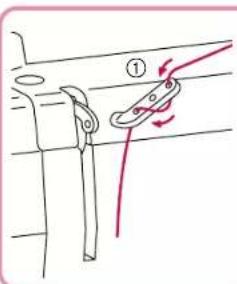
text_image
Diagram showing a rope knot with labeled components and motion arrows, likely illustrating a mechanical or electrical setup.● Make sure thread take-up lever is in highest position and presser foot is up.
* When using polyester thread or thread that tangles or breaks, run the thread through all Three Hole of the thread guide.
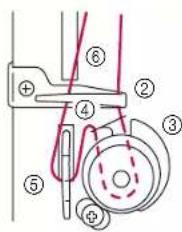
text_image
Technical diagram of a mechanical assembly with numbered components and dashed lines indicating motion or alignment.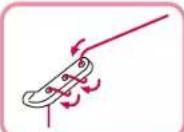
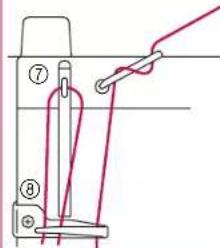
text_image
Diagram showing a sewing machine needle with labeled parts and a red wire being inserted into the handle.*If the thread is still tangles or breaks, run the thread through the holes backwards as shown in diagram.
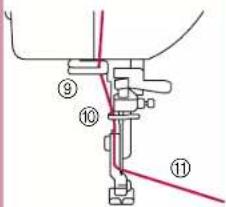
text_image
Technical diagram showing mechanical assembly with numbered components and red trend lines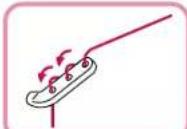
text_image
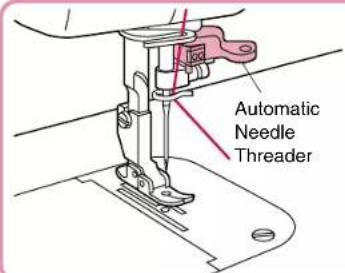
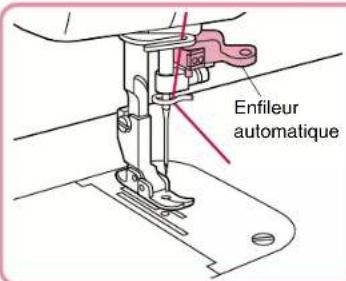
Automatic Needle Threader①Rotate hand wheel towards you until needle is in the highest position, and lower presser foot.
10
②Take thread in your left hand, and gently pull it forward.
text_image
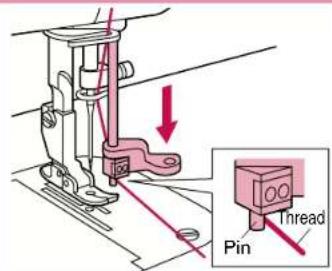
Technical diagram showing sewing machine needle insertion with labeled parts: Pin, Thread, and Arrow indicating direction③Lower needle threader.
* Pull thread along the right side of the pin. * Do not force the needle threader lower than the eye of the needle. Be sure that the needle is in the highest position.
text_image
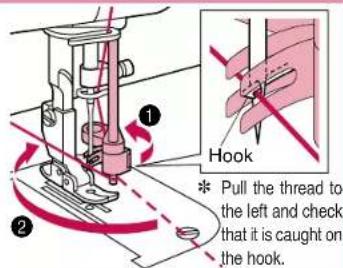
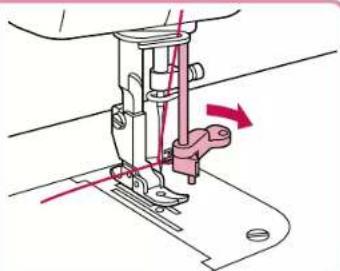
Hook Pull the thread to the left and check that it is caught on the hook.④Turn the needle threader lever all the way in the direction of ① and when the hook extends from the needle hole, pull the thread in the direction of ② to catch it on the hook.
natural_image
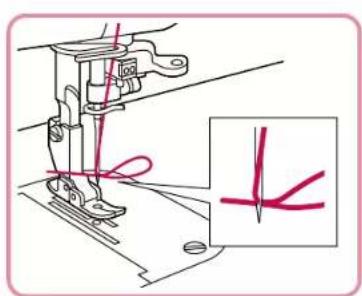
Technical line drawing of a sewing machine needle with a red arrow indicating motion (no text or symbols)⑤ While holding the thread gently, return the needle threader lever to the right. As you do this the hook that has caught the thread will move as well, pulling a loop of thread through the eye of the needle.
text_image
Technical diagram showing sewing machine needle stitching with red annotation lines and a magnified detail view⑥Pull thread loop to the right.
| Needle (HLX5) | Thread |
| #9 | #30 #50 #60#20 |
| #11 | #20 #30 |
| #14 | #20 #30 |
| #16 | #20 |
Using the Spool Net
flowchart
graph TD
    A["① Basket made"] --> B["② Fiber"]
    B --> C["③ Collection of Cotton Fiber"]
    C --> D["④ Product"]
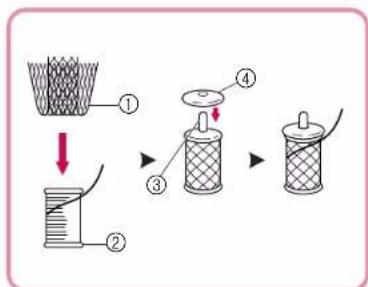
If using transparent nylon thread, metallic thread, or other strong thread, place the included spool net over the spool before using.
If the spool net is too long, fold it once to match it to the spool size before placing it over the spool.
①Spool net
②Thread spool
③Spool pin
④Spool cap
●The needle threader cannot be used with the thread-needle combinations illustrated in the chart to the left. Transparent nylon thread can be used regardless of the chart, providing the needle used is a #14 or #16.
Stitch Samples and Needle Chart
Stitch Samples
① Set stitch length regulator to desired stitch length.
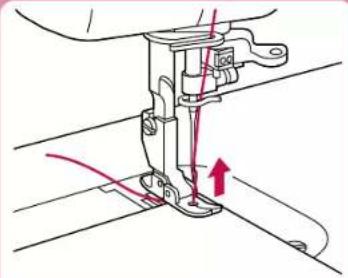
②Make sure approximately 15 cm of upper and bobbin threads are pulled out and laying behind presser foot. While needle is in raised position, insert a test strip from the garment fabric under the foot.
③Lower presser foot.
④Turn the hand wheel forward to lower the needle through the fabric, then step gently on the foot controller to begin.
⑤ Turn the hand wheel towards you to raise the needle and thread take-up lever to their highest positions.
⑥Lift presser foot, remove fabric and then cut thread.
*When using thread cutter:
⑤ Press the thread cutter button while the presser foot lever in the down position.
⑥Lift foot and remove fabric.
natural_image
Technical line drawing of a sewing machine needle with red thread and arrow indicating measurement (no text or symbols)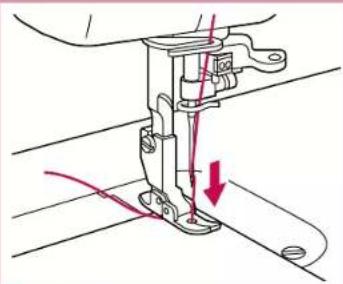
natural_image
Technical line drawing of a sewing machine needle with red measurement arrows indicating thread direction (no text or symbols)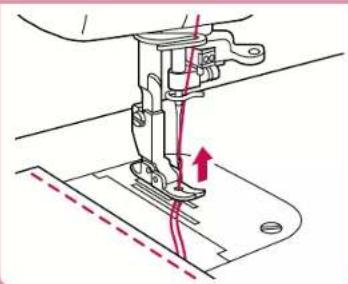
natural_image
Technical line drawing of a sewing machine needle stitching a base plate (no text or symbols)Thread Tension
text_image
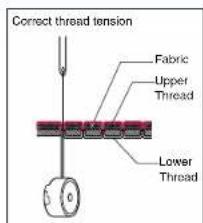
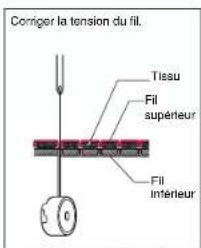
Correct thread tension Fabric Upper Thread Lower ThreadIncorrect thread tension can lead to such undesirable results as messy stitches, puckered seams and thread breakage.
* Bobbin thread should feed smoothly. Adjust bobbin thread to match that of upper thread. (If bobbin thread is too tight it may cause fabric to bunch up.)
text_image
Wrong side of fabric Lower Thread Big side of Fabric Upper Thread to increase needle thread tension to reduce bobbin tension Bobbin tension... Proper When it is strong Wrong side of fabric Lower Thread Big side of Fabric Upper Thread to reduce needle thread tension to increase bobbin tension Bobbin tension... Proper When it is weak Adjust the upper thread to match the bottom thread.- Selecting the proper needle for use with the fabric and thread you are working with * The following chart applies to many different fabric, thread and needle combinations.
| Fabric - Thread - Needles | HLX5 | Schmetz 130/705H | |||
| Cloth | Thread | Needle (HLX5) | |||
| Special fabric | Velvet | Silk, Polyester #30 - #50 | #11 - #14 | #9 | #65 |
| Quilt | Polyester #20 - #50 | #11 - #16 | #11 | #75 | |
| Synthetic Suede | Polyester #20 - #50 | #14 | #90 | ||
| Knit | Polyester #20 - #50 | #16 | #100 | ||
| Coating | Polyester #50 | #11 - #14 | #18 | #110 | |
| Light weight fabrics | Lawn | Cotton #80 | #9 | ||
| Tricot | Polyester #60 | ||||
| Silk Georgette | Silk #50 | ||||
| Wool Georgette | Silk, Polyester #50 | #11 | |||
| Middle weight fabrics | Gingham | Cotton #60 - #80 | #11 - #14 | ||
| Lightweight Jersey | Polyester #60 | #11 | |||
| Gabardine, Flannel | Silk #50 | ||||
| Heavy weight fabrics | Denim | Cotton #20 - #50 | #14 - #18 | ||
| Jersey | Polyester #20 - #50 | #11 - #16 | |||
| Tweed | Silk #20 - #50 | ||||
*HLX5 needles are recommended; however, Schmetz 130/705H needles may also be used under normal sewing conditions.
*Adjust the pressure adjustment dial and the feed dog adjustment knob according to the chart on the sewing machine.
*When sewing on knit fabrics such as jersey or tricot, use a ballpoint needle or a needle designed for use with knit fabrics.
*For best results when using metallic threads, sew with a good quality thread, set upper tension on 2, and use metallic needle.
Changing Presser Feet
▲Note Make sure the power is off before changing presser feet.
Changing Presser Feet (Zipper Foot)
① Raise presser foot, and raise needle to highest position.
②Loosen and remove screw using screwdriver.
③Attach zipper foot and tighten screw.
*Use the same method to attach the other feet that come with your BLQP.
*See page 18 for directions on attaching the "Walking Foot".
*Use the position knob on back of the zipper foot to adjust position of foot in relation to needle.
*Only the zipper foot has a position knob. You can begin sewing with all other presser feet immediately after attaching.
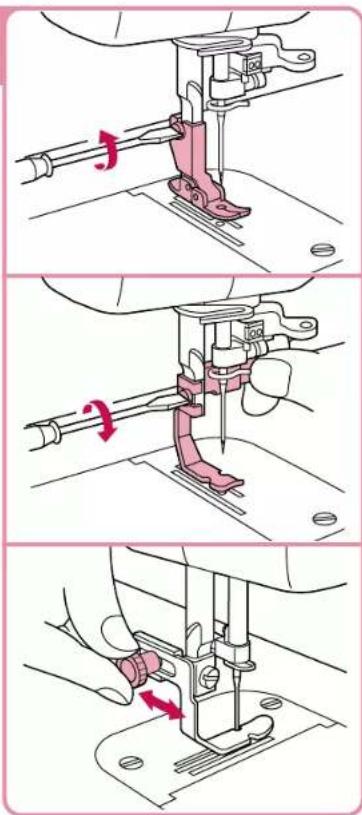
text_image
Technical diagram showing three-step sewing process with red arrows indicating motion directionPresser Feet
● Flex Reaction Foot For perfect stitching on otherwise difficult fabrics like velvet, leather and suede.
●Rolled Hem Foot
Use on the edge of fabric, such as on hems of dress shirts, to fold the edge of the fabric in three while sewing.
●Invisible Zipper Foot
Use to attach concealed fasteners.
●Quilting Foot
Spring action foot for darning, quilting or free-motion embroidery.
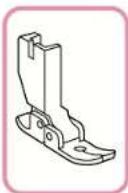
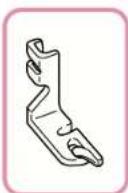
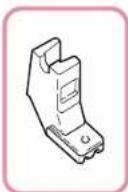
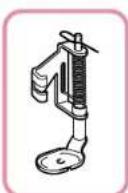
* Use only feet supplied with your BLQP. Each foot is specially designed for this machine and has clearances for the pin at the rear of each foot. Use of other presser feet may damage or break the pin feed mechanism.
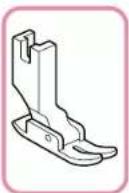
● General purpose Foot
This foot is used for most sewing. (Can also be used for sewing thick fabrics or seams.)
* When sewing thick seams, lightly guide the fabric with your hand on the downward side of the seam.
*Can also be used with pin feeding.
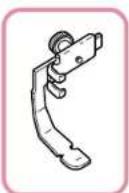
●Zipper Foot
Use to attach fasteners other than concealed fasteners.
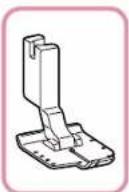
●1/4" Foot
For quilt and patch-work piecing with 1/4" or 1/8" seam allowance.
广力云智慧零售收银系统
● Walking Foot
For sewing or quilting on fabrics which stick or tend to slip Useful for sewing multiple layers as in quilting.
● Walking Foot
For sewing or quilting on fabrics which stick or tend to slip Useful for sewing multiple layers as in quilting.
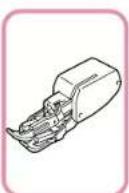
Basic Sewing (1)
Basic Sewing
text_image
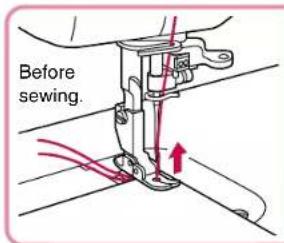
Before sewing.①Lift foot, pull about 15 cm of upper and bobbin thread under and behind foot, and position fabric under foot.
text_image
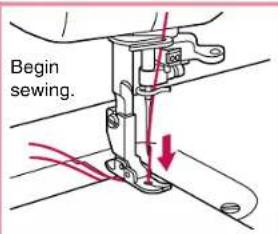
Begin sewing.②Lower presser foot lever to lower foot.
③Turn the hand wheel forward you to lower the needle through the fabric, then step gently on the foot controller to begin.
text_image
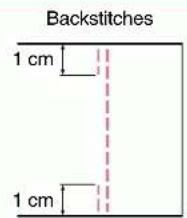
Backstitches 1 cm 1 cm*At the beginning and end of a seam, press down the reverse stitch lever and backstitch about 1 cm.
text_image
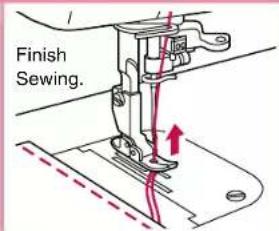
Finish Sewing.④Raise needle to highest position. ⑤ Lift foot, remove fabric and cut thread. ⑥When using thread trimmer: ⑦Push thread trimmer button (this will cause the upper and bobbin threads to be cut automatically and the needle to stop in a raised position). ⑧Lift presser foot and remove fabric.
text_image
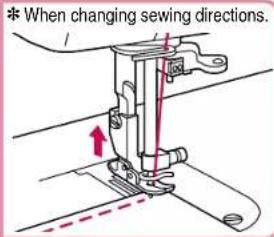
* When changing sewing directions.①Make sure needle is pierced all the way through fabric.
②Lift presser foot, and turn fabric using needle as an axis.
③Lower foot and continue sewing.
Pin Feeding (for hard-to-handle fabrics)
Velvet, quilt fabric, synthetic suede, knits and other fabrics can be joined evenly by activating the pin feed mechanism.
● Machine Set-up for Pin Feeding
text_image
Feed Dog Adjustment Knob①Move feed adjustmen knob to pin feeding position.
Presser Foot
Pressure Adjustment Dial
Indicator Needle
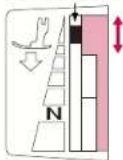
② Adjust pressure adjustment dial until indicator needle is in the right position in the matching color coded area.
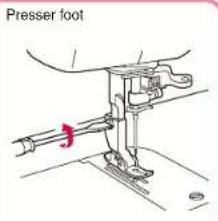
text_image
Presser foot③Attach flex reaction presser foot for perfect stitching on difficult fabrics like velvet, leather and suede.
● Pin Feeding Mechanism
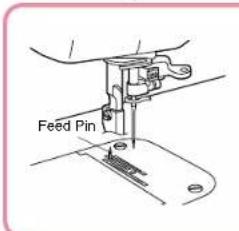
text_image
Feed PinThe feed pin passes up through all layers of fabric moving with the feed dog's motion to feed all layers of the fabric evenly.
*For safety, the feed pin is automatically lowered when presser foot is raised.
●Start to Sew
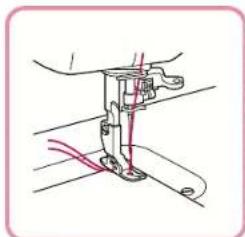
natural_image
Technical line drawing of a sewing machine needle with red and blue thread (no text or symbols)Gently pull thread until feed pin catches fabric and sew.
Basic Sewing (2)
▲Note Make sure power is off before changing feet.
Rolled Hem Foot
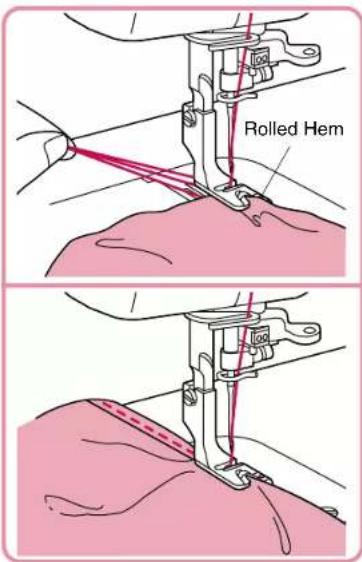
①Attach rolled hem foot.
*Refer to page 13 for instructions on changing sewing feet.
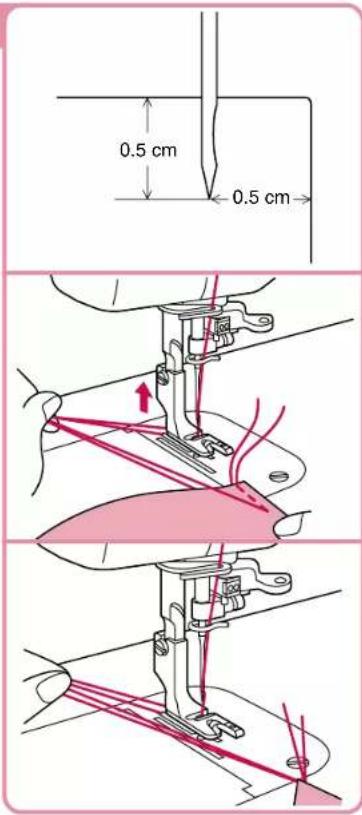
②Insert needle approximately 0.5 cm from the edge of the fabric and sew 2 stitches.
③Turn the hand wheel towards you to raise the needle, raise the presser foot, then pull the fabric forward.
④Hold the 4 threads in your left hand.
text_image
0.5 cm 0.5 cm⑤With your right hand, put the edge of the rolled hem under the presser foot, from the spot where the threads come out. Insert the edge so that it lies directly under the needle. Lower the presser foot.
⑥Pull gently on threads in left hand while sewing the first 3-4 stitches to hold them in place.
⑦Fold hem over about 0.5 cm and continue feeding folded hem under foot while sewing towards the curved guide on the foot.
text_image
Rolled HemBasic Sewing (3)
Note
• Make sure power is off before changing feet.
- When attaching zippers to stretch fabrics, use the pin feed method and adjust foot pressure accordingly.
- The zipper foot can also be used as a guide when attaching piping to fabric.
Zipper Foot
①Attach zipper foot.
* See "Changing Presser Feet (Zipper Foot)" on page 13.
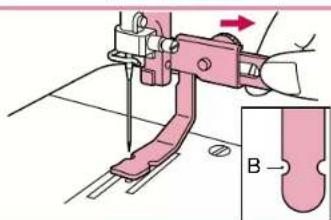
② Tum the hand wheel towards you to lower the needle and adjust the position of the foot relative to the needle using the adjustment screw to slide the foot from left to right.
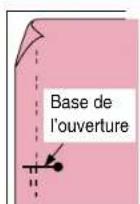
③Line up zipper to the section of fabric it will be attached to, and mark the base of the opening on the fabric. It should be set approximately 0.5 cm below zipper stop. Sew from below the base of the opening.
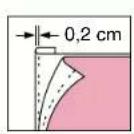
④Divide the seam margin. Fold the seam margin with the overlap of the zipper position facing down 0.2 cm on the outside of the mark.
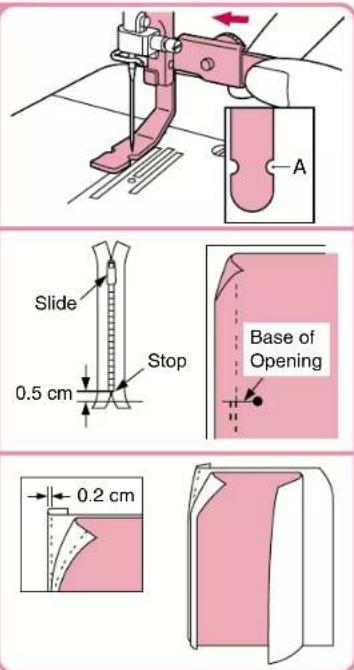
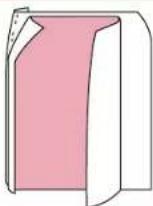
⑤Secure the zipper with basting and sew along the mark.

Make sure the needle does not strike the metal part of the zipper when sewing. The needle may break and cause injury.
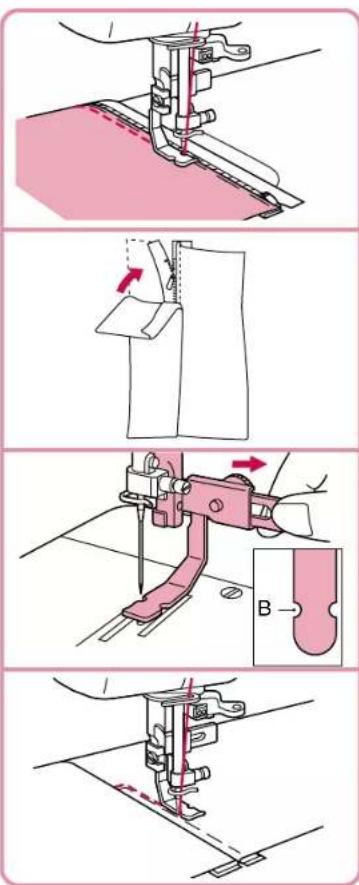
⑥Line up the folded hem on the opposite side with the stitches.
⑦Change position of zipper foot. ⑧Turn the hand wheel to lower the needle and position the presser foot.
⑨With the fabric right side up, baste the zipper onto the fabric, then sew the edge of the basting.
*Reinforce base of opening by sewing over it twice. *If the zipper slide gets in the way, lower the needle all the way through the fabric, lift the foot, and move the slider out of the way.
Invisible Zipper Foot
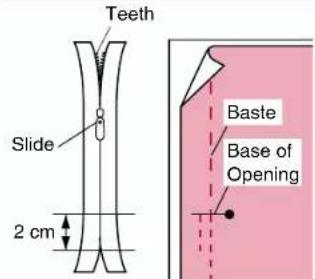
①Attach invisible zipper foot.
②Align zipper with fabric. Mark the base of the opening approximately 2 cm above the end of the zipper.
③Baste the zipper position.
④Separate the seam allowance.
⑤With the zipper mounted, baste just the seam margin on one side of the zipper.
⑥Close the zipper and baste the other side of the zipper.
⑦Remove the basting at the zipper position.
⑧Fit the zipper teeth into the presser foot groove, guide them to prevent them from falling over, and sew to the base of the opening.
*When sewing with the teeth to the right, the left side of the foot should line up with the left teeth of the zipper.
text_image
Teeth Slide 2 cm Baste Base of Opening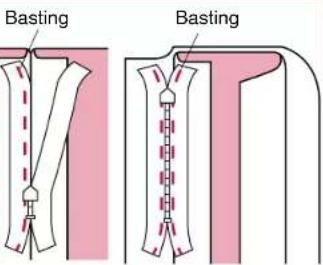
text_image
Basting Basting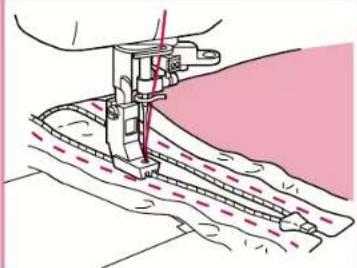
natural_image
Illustration of a sewing machine needle stitching fabric (no text or symbols)1/4" Foot
●Sewing machine settings: Stitch length = 2 - 2.5
- Sew a consistent seam allowance (1/4", 6.4 mm) when piecing together a quilt.
- Use guides (mark) to begin, end, or pivot 1/4" from edge of fabric.
- Accurately top stitch 1/8" from seam.
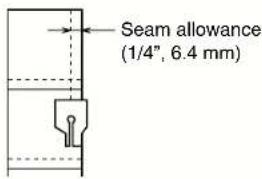
text_image
Seam allowance (1/4", 6.4 mm)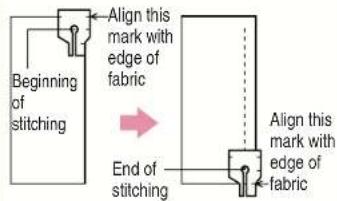
text_image
Beginning of stitching Align this mark with edge of fabric End of stitching Align this mark with edge of fabric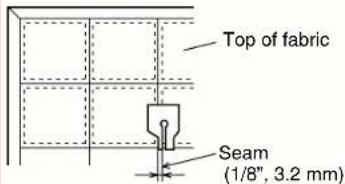
text_image
Top of fabric Seam (1/8", 3.2 mm)Quilting Foot
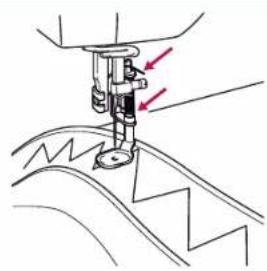
Reduce the foot pressure and turn the dial on the machine lowering the feed dogs for free motion quilting.
Note
- If the foot is frequently used, be sure to apply a small amount of oil about once a month to the area indicated by the arrow. (If too much oil is applied, wipe off the excess with a cloth.)
- For best results when using metallic or monofilament threads for free-motion quilting, sew with a good quality thread, set upper tension 1-2, and use a metallic needle.
natural_image
Line drawing of a sewing machine needle stitching fabric (no text or symbols)Walking Foot
Note
- Do not press the foot controller all the way down.
Try to keep the sewing speed low (500 r.p.m. or less).
• The fabric may not feed if you sew at high speeds.
• The feed dog for feeding the cloth may not move if the foot pressure on the fabric is too strong. Use the presser foot pressure adjustment dial to achieve the desired results. - It is not advisable or necessary to use the Pin Feed mode with the walking foot.
text_image
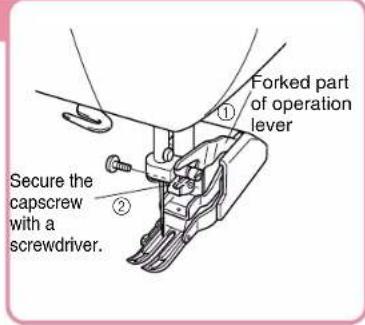
Forked part of operation lever Secure the capscrew with a screwdriver.①Insert the forked part of the operation lever while raised in an upright position onto the screw on the right side of the needle bar, as shown and then insert the capscrew.
② Tighten the screw securely with a screwdriver. Tightening adequately is important as the screw might loosen due to the foot and forked operation lever vibration.
Seam Guide
① Tighten the screw securely with a screwdriver since it might otherwise loosen due to vibration.
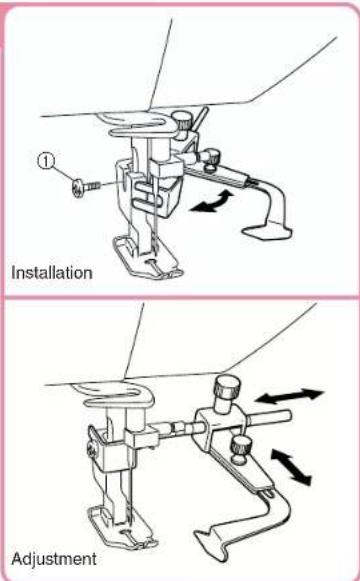
To be able to adjust the position of the foot towards the arrow.
Caring for Your Machine
Cleaning the Machine
Note
Make sure power is off before cleaning sewing machine.
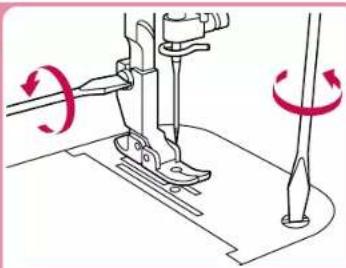
①Turn machine off.
②Remove foot.
③Remove needle plate.
④Clean out dust and thread scraps.
*Thread scraps can be swept out through the bobbin door.
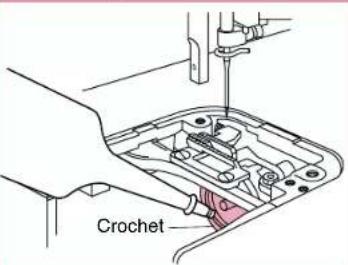
⑤When the area under the needle plate is cleaned out, oil* hook of bobbin case with sewing machine oil.
*Use a cloth to clean the machine of any excess oil.
★Use only fine sewing machine oil.
⑥Attach needle plate and foot.
natural_image
Diagram of a sewing machine needle and foot, showing blade positioning and rotation arrows (no text or symbols)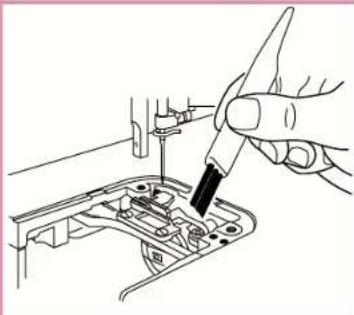
natural_image
Line drawing of a hand using a screwdriver to adjust or install electronic components on a circuit board (no text or symbols)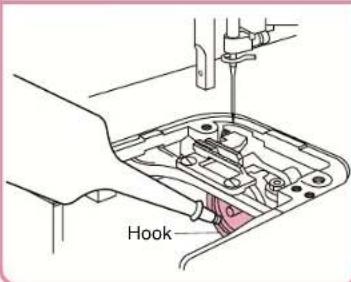
text_image
HookLubrication Points
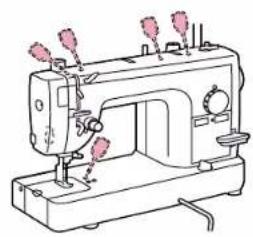
- When using the sewing machine every day, apply a few drops of oil* to each location indicated twice a month.
*Use a cloth to wipe the machine clean of any oil spilled near the lubrication points.
★Use only fine sewing machine oil.
natural_image
Line drawing of a sewing machine with needle and handle (no text or symbols)■Keep Your Sewing Machine Clean
Please use a soft, dry cloth to wipe off light dirt and dust. If sewing machine is very dirty, wipe with a cloth soaked in warm water, or in warm water containing a neutral detergent. Then wipe off any detergent residue, and wipe off water with a dry cloth.
■Precautions
Please keep sewing machine away from heat sources such as irons and space heaters. Do not use chemicals like benzine or thinner to clean your machine. When machine is not in use, please keep machine out of direct sunlight.
| Item | Specification | Item | Specification |
| Sewing Speed (maximum) | 1,500 stitches per minute | Height of feed dog | 0.7 mm 1.1 mm |
| Height of lower needle | 3 mm - 3.5 mm | ||
| Stitch Length (pitch) | 0 - 7 mm | Needles that may be used | HLX5#9 - #18 SCHMETZ 130/705H #65 - #110 |
| Stroke of Needle | 34.1 mm | Bed dimensions | 439 mm × 178 mm |
| Stroke of Thread Take-Up Lever | 64.7 mm | Total weight | 11 kg |
| Sewing Light | 120V model: 120V/15W Parts code: X53061-050 | ||
| Foot Height | Foot Lift One 6 mm Two 9 mm Knee control Over 10 mm | 220-240V model: 240V/15W Parts code: 205336-050 | |
| Sewing area | 595 mm × 285 mm |
Trouble Shooting
*Before taking your sewing machine in for service, check the following chart.
flowchart
graph TD
    A["Thread Breakage"] --> B["Upper threading is not threaded correctly."]
    A --> C["Bobbin Thread Breakage"]
    A --> D["Skipped Stitches"]
    A --> E["Fabric Puckers"]
    A --> F["Fabric Won't Feed Properly or Irregular Stitches"]
    A --> G["Loop in Seam"]
    A --> H["Needle Breakage"]
    A --> I["Sewing Machine Doesn't Run"]
    A --> J["Machine is Noisy"]
    A --> K["Automatic Needle Threader Doesn't Work"]
    A --> L["Thread Cutter Doesn't Work"]

    B --> M["Upper threading is not threaded correctly."]
    B --> N["Bobbin Thread is not passing correctly from bobbin case."]
    B --> O["Reinserf bobbin properly. 9"]

    C --> P["Thread is getting tangled."]
    C --> Q["Thread is getting tangled."]
    C --> R["Reinserf bobbin properly. 9-11.20"]

    D --> S["Wrong needle."]
    D --> T["See chart on p.12 to choose the needle that best its your fabric thread combination. 12"]

    E --> U["Wrong needle for the fabric and thread you are using. See chart on p.7 to choose the needle that best its your fabric thread combination. 12"]

    F --> V["Pressure of sewing foot is too weak."]
    F --> W["Increase foot pressure. 4"]

    G --> X["Upper threading is incorrect."]
    G --> Y["Re-thread machine properly. 10"]

    H --> Z["Needle is not attached correctly."]
    H --> AA["Roallach. 6"]

    I --> AB["The power isn't on."]
    I --> AC["Turn the power on. 3"]

    J --> AD["The area under the noodle plate needs to be cleaned. Clean feed dog and bobbin case 20"]

    K --> AE["Needle is not raised all the way up. Turn hand wheel to raise needle 3"]

    L --> AF["Needle is not properly inserted. Reinserf. 6"]

    M --> AG["Thread is getting tangled."]
    M --> AH["Reinserf bobbin properly. 10-11.20"]

    N --> AI["Thread is getting tangled."]
    N --> AJ["Reinserf bobbin properly. 9-11.20"]

    O --> AK["Thread is getting tangled."]
    O --> AL["Reinserf bobbin properly. 9-11.20"]

    P --> AM["Upper thread tension is too high. Reduce tension. 12"]

    Q --> AN["Needle is bent, or tip is dulled. Change needles. 6"]

    R --> AO["Upper thread tension is too high. Reduce tension. 12"]

    S --> AP["Swing heavyweight fabric with food dogs in lightweight fabric position. Adjust food dogs. 5"]

    T --> AQ["Improper fabric/needle/thread combination. See chart on p.12 for the right needle to use with your fabric and thread 12"]

    U --> AR["Improper fabric/needle/thread combination. See chart on p.12 for the right needle to use with your fabric and thread 12"]

    V --> AS["The tool controller has come unplugged. Reallach tool controller. 3"]

    W --> AT["The tool controller has come unplugged. Reallach tool controller. 3"]

    X --> AU["Using the automatic needle threader incorrectly. Check the use of the automatic needle threader 10"]

    Y --> AV["Area under noodle plate needs to be cleaned. Clean feed dog and bobbin case 20"]

    Z --> AW["Upper threading is incorrect. Roilroad. 10"]

    AA --> AX["Lower thread is not through eye of needle. Check to make sure the hook isn't bent."]
    AB --> AY["Hock of needle threader doesn't pass through eye of needle. Check to make sure the hook isn't bent."]
    AC --> AZ["Noodle is bent, or tip is dulled. Change noodles. 6"]

    AD --> BA["Lower thread is not through eye of needle. Check to make sure the hook isn't bent."]
    AC --> BB["Lower thread is not through eye of needle. Check to make sure the hook isn't bent."]
NOUS VOUS REMERCIONS D'AVOIR CHOISI LA MACHINE A COUDRE ELECTRONIQUE BABY LOCK.
Pied double-entrainment 41
Guide de couture 42
natural_image
Pure technical line drawing of a mechanical or electrical component without any text, numbers, or symbolsnatural_image
Line drawing of a toilet with a pink plastic clip inserted into the seat (no text or symbols)natural_image
Illustration of a pink device with a left-side arrow and a separate mechanical assembly (no text or symbols)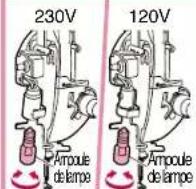
Enfilage (1)
text_image
Technical diagram showing a sewing machine with numbered components and red connecting lines indicating connection points.natural_image
Line drawing of a sewing machine with spool, handle, and base (no text or symbols)natural_image
Diagram showing a mechanical component with an arrow indicating direction, no text or symbols presentnatural_image
Illustration of hands using scissors to cut a mechanical component (no text or symbols)natural_image
Illustration of scissors cutting a red thread next to a spool of thread (no text or symbols)text_image
Illustration showing two-step instructions for a person using a tool, labeled with numbers 1, 2, and 3.text_image
Diagram of a sewing machine with labeled parts and directional arrows indicating movement or assembly.text_image
Diagram showing a rope knot with a pulley and a red-handled angle measurement, labeled with step ①text_image
Technical diagram showing labeled mechanical components with numbered parts and dashed lines indicating connections or motion paths.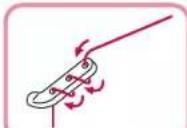
text_image
Technical diagram showing a mechanical assembly with numbered components and a hand holding a tooltext_image
Technical diagram showing mechanical assembly with numbered components and red lines indicating connection paths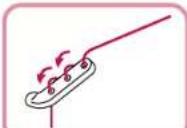
text_image
Technical diagram showing sewing machine needle stitching with labeled parts: fil and Axenatural_image
Technical line drawing of a sewing machine needle with red directional arrow indicating motion (no text or symbols)text_image
Technical diagram showing a sewing machine needle stitching with red handwritten annotations and an inset highlighting the needle detail.flowchart
graph TD
    A["①: Feed with plastic bag"] --> B["②: Cover in cylinder"]
    B --> C["③: Stabilized cylindrical container with lid"]
    C --> D["④: Bag holding lid with handle"]
natural_image
Technical line drawing of a sewing machine needle with red measurement arrows indicating thread direction (no text or symbols)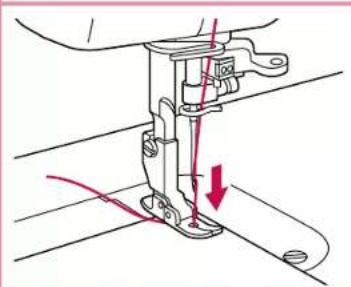
natural_image
Technical line drawing of a sewing machine needle with red measurement arrows indicating thread direction (no text or symbols)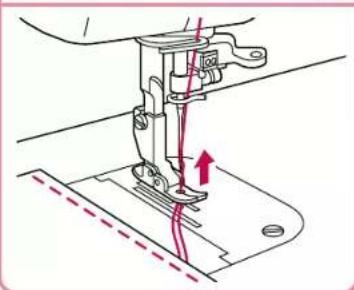
natural_image
Technical line drawing of a sewing machine needle with red motion arrows indicating thread direction (no text or symbols)Tension des fils
natural_image
Technical illustration of a sewing machine needle and foot assembly (no text or symbols)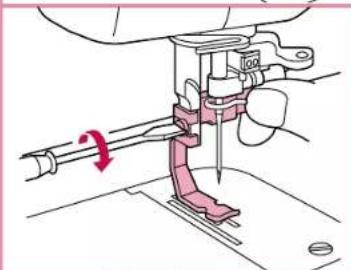
natural_image
Technical diagram of a sewing machine needle and screw mechanism (no text or labels)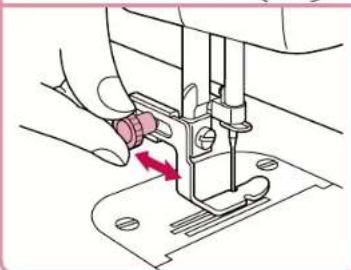
natural_image
Illustration of a sewing machine needle being inserted into a base, with a red arrow indicating the needle direction (no text or symbols present)●Pied double-entrainment
text_image
Technical diagram of a sewing machine with labeled component A, showing mechanical assembly and part view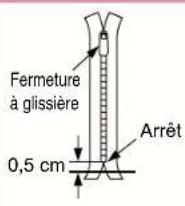
natural_image
Technical line drawing of a sewing machine needle stitching fabric (no text or symbols)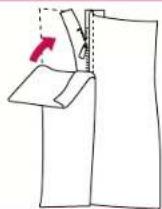
text_image
Technical diagram of a sewing machine with labeled component B and directional arrow indicating motion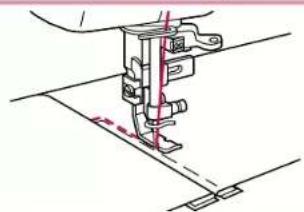
natural_image
Technical line drawing of a sewing machine needle and base (no text or symbols)natural_image
Pure diagram of a garment pattern with dashed seam lines, no text or symbols present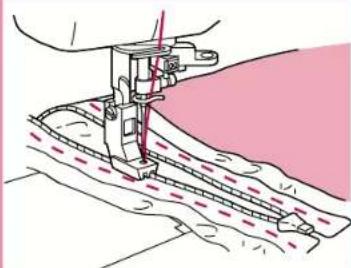
natural_image
Illustration of a sewing machine needle stitching fabric (no text or symbols)Pied 1/4"
natural_image
Line drawing of a sewing machine needle stitching a zigzag fabric edge (no text or symbols)Pied double-entrainment
Remarque
natural_image
Diagram of a sewing machine needle and foot, showing rotation arrows (no text or symbols)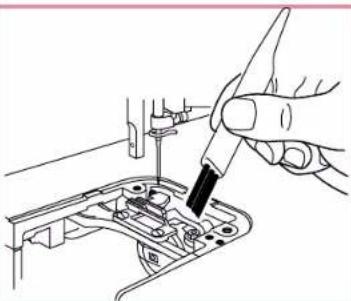
natural_image
Line drawing of a hand using a tool to adjust or install electronic components on a circuit board (no text or symbols visible)