
Kilo - Receiver Hartke - Free user manual and instructions
Find the device manual for free Kilo Hartke in PDF.



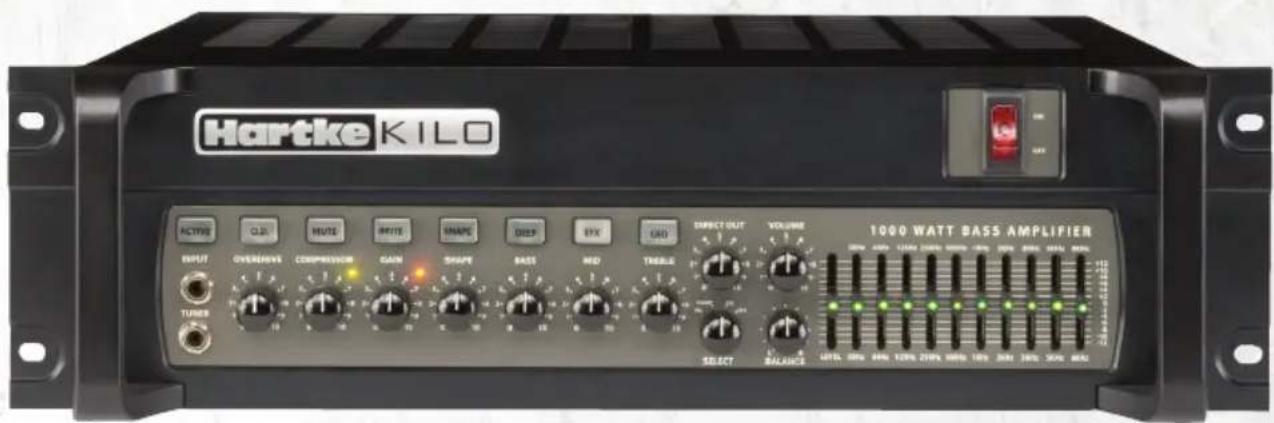
| Product Type | Stereo/Mono Bridge Bass Amplifier |
| Brand | Hartke |
| Model | Kilo |
| Rack Format | 3U |
| Output Power (Stereo) | 2 × 500 W at 2 Ω, 2 × 350 W at 4 Ω |
| Output Power (Mono Bridge) | 1,000 W at 4 Ω, 750 W at 8 Ω |
| Preamplifier Tubes | 3 × 12AX7 in Class A |
| Equalization | Passive Bass, Mid, Treble; Variable Shape; Switchable Brite, Deep; 10-band Graphic EQ (±12 dB) |
| Compressor | Variable rate, adjustable threshold, ratio 10:1 |
| Overdrive | Variable tube circuit with switch or pedal activation |
| Speaker Outputs | 2 × 6.35 mm Jack and 2 × Speakon® (L/R), 1 × Speakon® Mono Bridge |
| Effects Loop | Stereo: Left/Right send/return |
| Direct Outputs | Balanced XLR (selectable pre/post); Tuner Jack Front/Rear |
| Instrument Input | 6.35 mm Jack unbalanced, Active switching (-15 dB) |
| Power Supply | Selectable 115/230 VAC mains; 15 A / 8 A fuse |
| Power Consumption | Approximately 1,200 W max |
| Dimensions (W × H × D) | 483 × 133 × 400 mm (19\" rack 3U) |
| Weight | ~18 kg |
| Maintenance | Clean with a dry cloth; do not block ventilation openings |
| Safety | Disconnect before maintenance; do not expose to liquids; use only supplied fasteners |
| Optional Footswitch | Connects Mute, Overdrive, EQ, Effects (Stereo Jack) |
Frequently Asked Questions - Kilo Hartke
User questions about Kilo Hartke
0 question about this device. Answer the ones you know or ask your own.
Ask a new question about this device
Download the instructions for your Receiver in PDF format for free! Find your manual Kilo - Hartke and take your electronic device back in hand. On this page are published all the documents necessary for the use of your device. Kilo by Hartke.
USER MANUAL Kilo Hartke
1000 WATT BASS AMPLIFIER
Owners Manual
Hartke
Samson Technologies Corp.
45 Gilpin Avenue
Hauppauge, New York 11788-8816
Phone: 1-800-3-SAMSON (1-800-372-6766)
Fax: 631-784-2201
www.samsontech.com
©2012, V2.1
Important Safety Information
AVIS RISQUE DE CHOC ÉLECTRONIQUE - NE PAS OUVRIR
CAUTION: TO REDUCE THE RISK OF ELECTRIC SHOCK, DO NOT REMOVE COVER (OR BACK). NO USER-SERVICEABLE PARTS INSIDE. REFER SERVICING TO QUALIFIED SERVICE PERSONNEL.
This lightning flash with arrowhead symbol within an equilateral triangle is intended to alert the user to the presence of non-insulated "dangerous voltage" within the product's enclosure that may be of sufficient magnitude to constitute a risk of electric shock.

The exclamation point within an equilateral triangle is intended to alert the user to the presence of important operating and maintenance instructions in the literature accompanying the appliance.
If you want to dispose this product, do not mix it with general household waste. There is a separate collection system for used electronic products in accordance with legislation that requires proper treatment, recovery and recycling.
Private household in the 25 member states of the EU, in Switzerland and Norway may return their used electronic products free of charge to designated collection facilities or to a retailer (if you purchase a similar new one).
For Countries not mentioned above, please contact your local authorities for a correct method of disposal.
By doing so you will ensure that your disposed product undergoes the necessary treatment, recovery and recycling and thus prevent potential negative effects on the environment and human health.
Important Safety Information
- Read these instructions.
- Keep these instructions.
- Heed all warnings.
- Follow all instructions.
- This apparatus shall not be exposed to dripping or splashing liquid and no object filled with liquid, such as a vase, should be placed on the apparatus.
- Clean only with a dry cloth.
- Do not block any of the ventilation openings. Install in accordance with the manufacturer's instructions.
- Do not install near any heat sources such as radiators, heat registers, stoves, or other apparatuses (including amplifiers) that produce heat.
- Only use attachments/accessories specified by the manufacturer.
- Unplug this apparatus during lightning storms or when not in use for long periods of time.
- Do not override the intended purpose of the polarized or grounding-type plug. A polarized plug has two blades, with one wider than the other. A grounding-type plug has two blades and a third grounding prong. The wide blade, or third prong, is provided for your safety. If the provided plug does not fit your outlet, consult an electrician to replace the obsolete outlet.
- Protect the power cord from being walked on or pinched, particularly at the prongs, convenience receptacles, the point where they exit from the apparatus.
- Use only with the cart stand, tripod bracket, or table specified by the manufacture, or sold with the ap-
paratus. When a cart is used, utilize caution when moving the cart/ap- paratus combination to avoid injury from tip-over.
- Refer all servicing to qualified service personnel. Servicing is required if the apparatus has been damaged in any way, such as power-supply cord or plug breakage, damage due to liquid or objects falling onto the apparatus, exposure to rain or moisture, or if the apparatus does not operate normally, or has been dropped.
- POWER ON/OFF SWITCH: For products with a power switch, the power switch DOES NOT break the connection from the mains.
- MAINS DISCONNECT: The plug should remain readily operable. For rack-mount or installation where plug is not accessible, an all-pole mains switch with a contact separation of at least 3mm in each pole shall be incorporated into the electrical installation of the rack or building.
- FOR UNITS EQUIPPED WITH EXTER-NALLY ACCESSIBLE FUSE RECEP-TACLE: Replace fuse with same type and rating only.
- MULTIPLE-INPUT VOLTAGE: This equipment may require the use of a different line cord, attachment plug, or both, depending on the available power source at installation. Connect this equipment only to the power source indicated on the equipment rear panel. To reduce the risk of fire or electric shock, refer servicing to qualified service personnel or equivalent.

natural_image
Silhouette of a person climbing a ladder inside a circular frame (no text or symbols)Table of Contents
Introduction....6
Features 7
Front Panel Controls....8
Rear Panel 11
Setting Up and Using the Kilo. 14
Choosing the Correct Speaker Cabinets 16
About Compression....17
About Equalization 18
Suggested Kilo EQ Settings 19
Specifications....20
Block Diagram 21
Notes 22
Introduction
Congratulations on the purchase of your new Hartke Kilo Bass Amplifier! We know you don't like reading owner's manuals, but we suggest you take some time to go through these pages (we'll make it as painless as possible, we promise) to fully understand how we've implemented a number of unique features.
The Hartke Kilo raises the standard for bass amplification. It provides 500 watts at 2 ohms of power per side in stereo mode, and a massive 1,000 watts at 4 ohms in the bridged mono mode. To sculpt your sound, the Kilo has an all-tube class-A preamp, and logically arranged tone controls. The Kilo offers a classic tone stack three-band EQ, with Hartke's variable Shape circuit. For additional tone shaping, there is a 10-band Graphic Equalizer, as well as selectable Deep and Brite EQ curves. To add some "dirt" to your sound, there is a variable tube Overdrive circuit, and to round out the dynamics, there is a fast and articulate Compressor circuit.
To connect your amplifier to speaker cabinets, the Kilo has both 14 " and Speakon ^ output jacks. The Kilo also provides an abundance of connections and signal routing features, including multi-point direct output switching, stereo Effects Loop, front and rear panel tuner outputs, and footswitch jacks to remotely control the Mute, Overdrive, EFX send, and Graphic EQ functions.
You'll find the Kilo to be an ideal choice for every situation—from recording studios, to small clubs, to giant stadiums. In this manual, you'll find a detailed description of the features of your Hartke Kilo bass amplifier, as well as step-by-step instructions for its setup and use, and full specifications.
If your Kilo was purchased in the United States you'll also find a warranty card enclosed. Don't forget to fill it out and mail it! This will enable you to receive online technical support, and allow us to send you updated information about this and other Samson products. With proper care, your Kilo will operate trouble-free for many years. We recommend you record your serial number in the space provided below for future reference.
Serial number: ____
Date of purchase: ____
Should your unit ever require servicing, a Return Authorization (RA) number must be obtained before shipping your unit to Samson. Without this number, the unit will not be accepted. Please call Samson at 1-800-3SAMSON (1-800-372-6766) for an RA number prior to shipping your unit. Please retain the original packing materials and, if possible, return the unit in its original carton. If your Kilo was purchased outside of the United States, contact your local distributor for warranty details and service information. Also, be sure to check out our website (www.samsontech.com) for information about our full product line.
Features
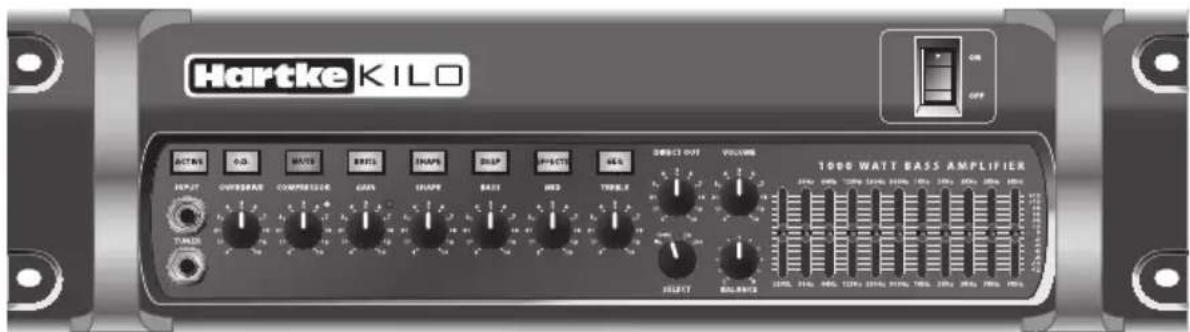
The Hartke Kilo bass amplifier offers classic tone, enhanced flexibility, and an abundance of power along with all the newest concepts in bass amplification design. Here are some of its unique features:
- Stereo power amps offer 500 watts of power per side into a 2 ohm speaker load, and an immense 1000 watts delivered to a 4 ohm speaker system in bridged mono mode.
• Class-A all tube (3 x 12AX7) high-voltage preamp circuit provides excellent tone. - Classic 3-band tone stack equalizer with variable Shape control allows you to create a broad range of tonal colors for your bass instrument.
- Selectable Deep and Brite EQ curves provide further control over shaping your bass sound.
- Variable compressor adds real "punch" to your bass sound, and allows you to smooth out volume differences between notes.
- Ten-band constant-q graphic equalizer allows you to visually shape the tonal colors of your instrument. The independent level control lets you adjust the overall level of the signal. A dedicated front panel switch and a footswitch jack allow you to preset an equalization curve.
- Variable tube overdrive can be set to deliver anything from warmth to your tone to all out fuzz.
- Multi-point direct output with level control allows you to select where in the signal path the audio will be routed to the direct output jack.
- Speakon® and 1/4" parallel output connectors for connecting speaker cabinets.
- Stereo Effect loop send and return jacks that allow you to connect to professional outboard effects processors. A dedicated front panel switch and footswitch jack allow you to send signals to your effects without interruption of your performance.
- Separate left and right channel Preamp Out and Amplifier In jacks for additional signal routing, and to connect supplemental amps to power extra cabinets.
- Rugged three rackspace construction with solid die cast front panel and oversized front panel handles make the Kilo eminently road-worthy.
Front Panel Controls
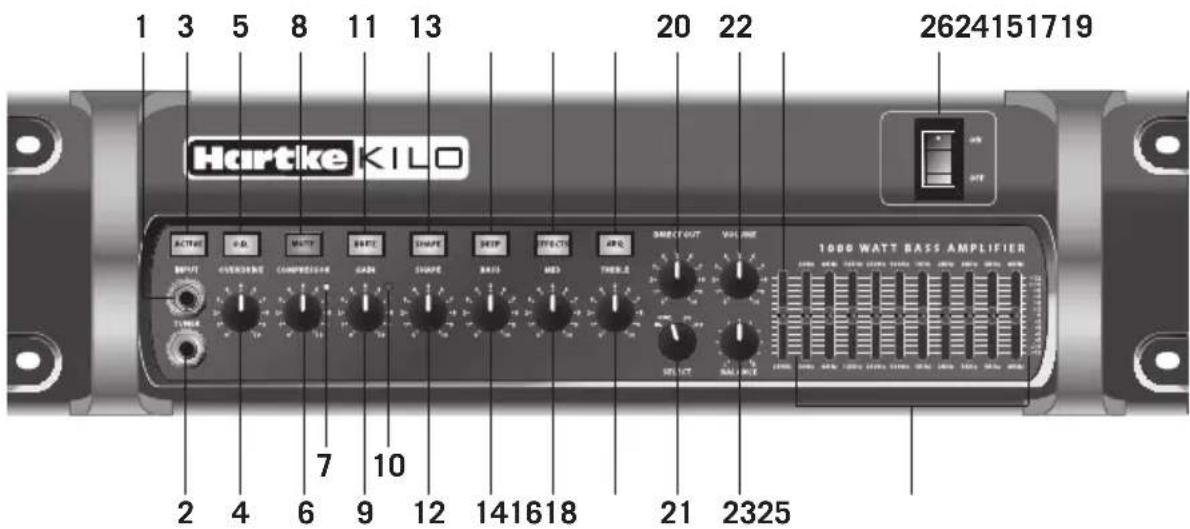
- INPUT – Connect your bass guitar here using a standard 14 " unbalanced instrument cable.
- TUNER Output – Use this jack to connect to an electronic tuner using a 14 " TRS cable. The TUNER output is always active, even when the MUTE switch is engaged, which allows you to tune your instrument silently. This output may also be used as a line level direct output feed.
- ACTIVE Switch – When selected, this green backlit switch reduces the input sensitivity by 15dB to accommodate the higher output signal of basses with built-in active electronics.
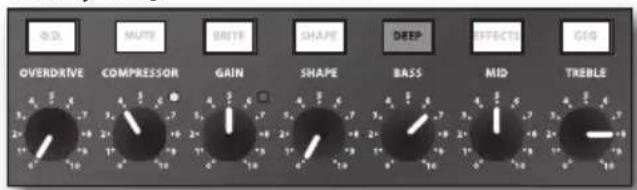
- OVERDRIVE – When the O.D. switch is selected (see #5), this control knob adjusts the amount of harmonic content and overdrive to the input signal. Slowly turning this knob allows you to add a little tube warmth, some edgy dirt, or all-out fuzz.
- O.D. Switch – When selected, this green backlit switch engages the OVERDRIVE control. A footswitch can be connected to the amplifier to switch the OVERDRIVE on and off (the front panel switch is disengaged when the footswitch is plugged in).
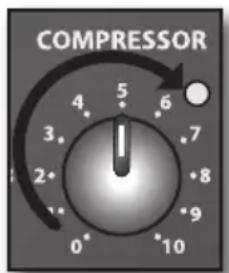
- COMPRESSOR – This knob determines the amount of compression by adjusting the threshold level. The compressor allows you to control the overall dynamic range of your performance by reducing sudden peaks, and increasing the sustain of the instrument. At the fully counterclockwise position, no compression is applied. As the knob is turned clockwise an increasing amount of compression is applied. For more information, see the “About Compression” section on page 17 of this manual.
- Compressor Light – Provides a visual indicator of the status of the compression circuitry. This red LED lights when the input signal crosses the threshold level and activates the compressor circuit.
Front Panel Controls
- MUTE Switch – When engaged, this orange backlit switch mutes all of the outputs except the front and rear panel TUNER outputs. A footswitch can be connected to the amplifier to control muting (the front panel switch is disengaged when the footswitch is plugged in).
- GAIN – This control adjusts the amount of level provided to the tube preamp stage. The Peak light (see #10) will illuminate if the input signal is clipping the preamp stage, which indicates unwanted distortion. Turn the GAIN control down until the Peak light lights only occasionally.
- Peak Light – This red light illuminates when clipping occurs in the preamp signal path. If you notice that the Peak light is continuously lighting, turn the GAIN control down until the Peak light lights only occasionally.
- BRITE Switch – When pressed, this green backlit switch boosts the high frequency output by 6 dB.
- SHAPE – The Shape circuit applies a pre-set equalization curve with a slight lift in the low frequencies, a cut in the mids, or a slight lift in the highs, depending on its setting. The SHAPE control knob is used to set the center cut frequency for the Shape circuit.
- SHAPE Switch – This green backlit switch is used to engage the Shape circuit (see #12). For additional control on stage, the SHAPE switch can be controlled using a footswitch (the front panel switch is disengaged when the footswitch is plugged in).
- BASS – As part of the passive tone stack equalizer, this control is used to adjust the low frequency response.
- DEEP Switch – When engaged, this green backlit switch boosts the low frequency response of the signal.
- MID – As part of the passive tone stack equalizer, this control is used to adjust the mid-range frequency response.
- EFX Switch – When selected, this green backlit switch sends the signal to the rear panel EFFECTS SEND jack, allowing you to globally turn on and off the signal from your outboard effects for added tone control. A footswitch can be connected to control the EFX switch (the front panel switch is disengaged when the footswitch is plugged in).
- TREBLE – As part of the passive tone stack equalizer, this control is used to adjust the high frequency response.
- GEQ Switch – When this green backlit switch is pressed, the graphic equalizer circuitry is operational. When the switch is disengaged, the circuitry is bypassed. This switch allows you to set up a custom equalization curve with the graphic EQ sliders, which can then be activated with the press of a single button. A footswitch can be connected to control the GEQ switch (the front panel switch is disengaged when the footswitch is plugged in).
Front Panel Controls
- DIRECT OUT - Adjusts the level of the signal at the DIRECT OUTPUT jack.
- Direct Out SELECT – This switch allows you to select where in the signal chain the DIRECT OUTPUT signal originates. The signal can be chosen directly from the input, after the compressor, after the graphic EQ, or after the effects return. This enables you to decide what type of signal to send to the front of house.
- VOLUME – This is the overall volume control. For best signal-to-noise ratio, keep the output of your bass at or near maximum, and adjust the amp's volume to the desired level.
- BALANCE – This control knob adjusts the level difference between the left and right amplifiers. If you are using two different cabinets (for example a 115 and 410), you may want to drive one a little harder than the other to balance your sound. In the center (12 o'clock) position, both amplifier channels are at equal power. The BALANCE control has no effect when the Kilo is running in bridge mode.
- Graphic EQ LEVEL – When the GEQ switch (see #19) is selected, this slider controls the output volume control for the Graphic EQ. This can be used to boost the signal for a solo, or compensate for level changes due to tone shaping.
- Graphic EQ – These sliders allow you to "draw" the tonal response of the system by adding or subtracting 12 dB of signal to ten different constant-q frequency areas (30Hz, 64Hz, 125Hz, 250Hz, 500Hz, 1kHz, 2kHz, 3kHz, 5kHz, and 8kHz), affecting the main output signal of the Kilo. When a slider is at its center detent position, the selected frequency area is not boosted nor cut (it is said to be flat). When a slider is moved up, the selected frequency area is boosted, and when it is moved down, the selected frequency area is attenuated.
- POWER Switch – Use this to power the Kilo on or off. The internal power LED lights whenever the Kilo is powered on.
Rear Panel
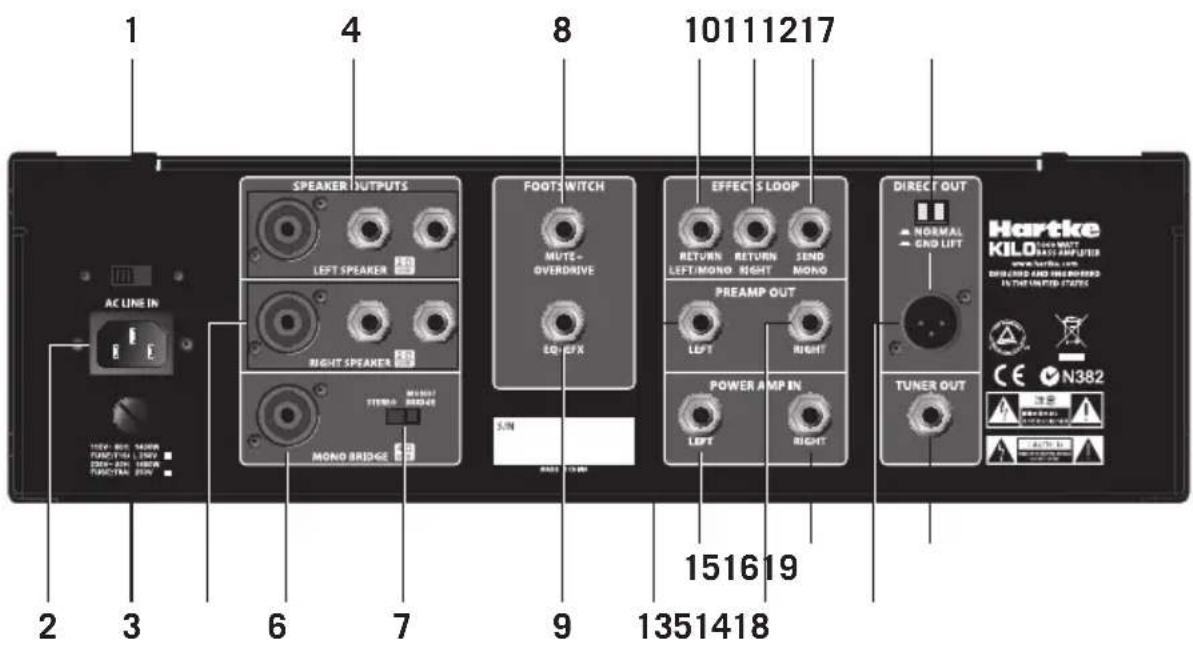
- Voltage Selection Switch – This switch is used to set the Kilo operation voltage. Be sure to check that the switch is set correctly for your country.
- AC Inlet – Connect the supplied standard 3-pin "IEC" plug here. You should never remove the ground pin of the AC plug.
- Fuse – This contains the fuse for your amplifier. Be sure to confirm and install the properly rated fuse when replacing. Fuse ratings are 15 amp for 115 vac and 8 amp for 230 vac.
- LEFT SPEAKER OUTPUTS – Use these outputs to connect speakers to the left amplifier output. The amplifier provides both 14 " and Speakon ^ output connectors, wired in parallel. It is recommended to use the Speakon ^ jack whenever possible. The total impedance of the speakers connected to all of the jacks must not be less than 2 ohms.
- RIGHT SPEAKER OUTPUTS – Use these outputs to connect speakers to the right amplifier output. The amplifier provides both 14 " and Speakon ^ output connectors, wired in parallel. It is recommended to use the Speakon ^ jack whenever possible. The total impedance of the speakers connected to all of the jacks must not be less than 2 ohms.
- MONO BRIDGE OUTPUTS – Connect a Speakon® connector cable here when operating in Bridge mode. The total impedance load of the speakers connected to the output must not be less than 4 ohms.
- STEREO/MONO BRIDGE Switch – This switch is used to set the amplifier to operate in either Stereo or Mono Bridge mode.
- MUTE+OVERDRIVE FOOTSWITCH – Connect a two-button footswitch, terminating to a 14 "TRS connector (Tip = MUTE, Ring = OVERDRIVE) to this jack to control the MUTE and OVERDRIVE select switches. The front panel switch is disengaged when the footswitch is plugged in.
Rear Panel
- EQ+EFX FOOTSWITCH – Connect a two-button footswitch, terminating to a 14 " TRS connector (Tip = EQ, Ring = EFX) to this jack to control the GEQ and EFX select switches. The front panel switch is disengaged when the footswitch is plugged in.
- EFFECTS RETURN LEFT/MONO – Use this 14 " unbalanced jack to return low impedance (600 ohm) signals to the left side amplifier from a professional outboard effects processor. When the amplifier is in Mono Bridge mode, this jack feeds the power amplifier input.
- EFFECTS RETURN RIGHT – Use this 14 " unbalanced jack to return low impedance (600 ohm) signals to the right side amplifier from a professional outboard effects processor. When the amplifier is in Mono Bridge mode, this jack is inactive.
- EFFECTS SEND MONO – Use this 14 " unbalanced jack to send low impedance (100 ohm) signal, to a professional outboard effects processor such as a reverb, echo, chorus, flanger, or harmonizer device. Output level is approximately 0 dB to +4 dB, and is post-EQ and post-compression, but is unaffected by the master VOLUME control. You can also use the EFFECTS SEND jack to route signal to an external mixing console or amplifier with an input sensitivity of +4 dB.
- PREAMP OUT LEFT – This output jack is fed from the left preamp (after the effects return), and may be used with an external power amplifier, to connect to a mixing console, or to any other line level device. Use a standard 14 " instrument cable when connecting to external devices.
- PREAMP OUT RIGHT – This output jack is fed from the right preamp (after the effects return), and may be used with an external power amplifier, to connect to a mixing console, or to any other line level device. Use a standard 14 " instrument cable when connecting to external devices.
- POWER AMP IN LEFT – This line level input connects directly to the left internal power amp, and can be used with external preamps, or to connect a CD/MP3 player. Use a standard 14 " instrument cable when connecting devices to this input. The internal signal path is interrupted when a cable is connected to the POWER AMP IN jack. When the amplifier is in Mono Bridge mode, the POWER AMP IN LEFT and POWER AMP IN RIGHT jacks mix together for a mono feed to the power amplifier input.
- POWER AMP IN RIGHT – This line level input connects directly to the right internal power amp and can be used with external preamps, or to connect a CD/MP3 player. Use a standard 14 " instrument cable when connecting devices to this input. The internal signal path is interrupted when a cable is connected to the POWER AMP IN jack. When the amplifier is in Mono Bridge mode, the POWER AMP IN LEFT and POWER AMP IN RIGHT jacks mix together for a mono feed to the power amplifier input.
- DIRECT OUT GROUND LIFT Switch – When pressed in (the "GND LIFT" position), pin 1 is removed from the chassis. This should be used only when a ground loop hum or buzz is heard. Otherwise, leave it in the out ("NORMAL") position.
Rear Panel
- DIRECT OUT Jack – Use this electronically balanced XLR jack to route signal from the Kilo to a professional mixing console, as a tap to a main PA system via a mic input on the console, or to an external amplifier. The DIRECT OUT knob (on the front panel) controls the signal level at this jack. You can also use the DIRECT OUT jack to route signal to an external amplifier with a -10 dB input sensitivity.
- TUNER OUT Jack – Use this jack to connect to an electronic tuner using a 14 " TRS cable. The TUNER output is always active, even when the MUTE switch is engaged, which allows you to tune your instrument silently. This output may also be used as a line level direct output feed.
Setting Up and Using the Kilo
Setting up your Hartke Kilo Bass Amplifier is a simple procedure, which takes only a few minutes.
- Remove all packing materials (save them in case your unit requires servicing in the future) and decide where the amplifier is to be physically placed. To avoid potential overheating, be sure that the top and side panels are unobstructed and that there is proper ventilation around the entire unit.
- Begin by hooking up your bass cabinet(s) to the Speakon ^ or 1/4" unbalanced speaker output connectors on the rear panel. It is never a good idea to power up any amplifier that is not connected to loudspeakers. Any appropriately rated bass cabinets with a total minimum impedance of 2 ohms (that is, 2 ohms or greater) can be used (per side) in Stereo mode, or a minimum impedance of 4 ohms in Mono Bridge mode. In order to ensure correct phase correlation when using the 1/4" outputs, the tip of the amplifier's speaker jack should be connected to the "+" (hot) input of your loudspeaker, and the sleeve of the amplifier's speaker jack should be connected to the "-" (ground) input of your loudspeaker. When using the Speakon ^ outputs, the +1 output should be connected to the "+" (hot) input of your loudspeaker, and the -1 output should be connected to the "-" (ground) input of your loudspeaker.
- Next, connect the 3-pin AC plug into any grounded AC socket. Don't turn the amplifier on just yet, though.
- Use a standard instrument cable to connect your bass to the Kilo's INPUT jack on the front panel (if your bass has active circuitry, press the ACTIVE switch to ensure that the preamp will not overload). On the front panel of the Kilo, set the VOLUME control to "0" (fully counterclockwise) and set the GAIN knob to "5" (12 o'clock) position. Set the COMPRESSOR knob counterclockwise until it is in the "0" position, and set the BASS, MID, and TREBLE knobs to the "5" position.
- Press the Power switch on the front panel to turn on the amplifier.
- Set the output of your bass to its maximum level. Then, while playing, slowly turn the Kilo's master VOLUME control up until the desired level is reached. If you hear distortion, even at a low master VOLUME setting, lower the GAIN control or back off the output of your bass. If the problem persists, check for a faulty cable.
- When you have settled on a GAIN and master VOLUME level, the next step is to adjust the three band EQ controls to taste. For more information, see the "About Equalization" section on page 18 of this manual.
- Next, experiment with the Kilo's graphic equalizer. Begin by setting each of the ten sliders to their flat ("0") center detent position. Then press in the GEQ switch (the switch will light green) so that the graphic equalizer is activated. Finally, move each slider, in turn, as you play your bass. Again, when you get a graphic equalization setting that complements your instrument and playing style, it's a good idea to write it down for future use.
Setting Up and Using the Kilo
- Now try out the Kilo's compression circuitry. Activate by turning the COMPRESSOR knob clockwise. As you rotate the knob, the input signal from your bass becomes more compressed. You'll hear peak signals (such as string slaps and pulls) begin to sound increasingly "squashed" relative to the lower-level signals produced by standard playing. The result will be a decreased dynamic range, but an overall leveling of signal throughout the full pitch range of your instrument. The Compressor light will light red when compression is being applied.
- If you're using an external signal processor, turn the amplifier off momentarily and connect a standard audio cable from the Kilo's EFFECTS SEND jack to your effects processor input, and a second standard audio cable between the EFFECTS RETURN LEFT/MONO jack and your effects processor output. If you are using a stereo effect, connect the left output of your effects processor to the EFFECTS RETURN LEFT/MONO input, and the right output of the processor to the EFFECTS RETURN RIGHT input. Then turn the amp back on and play your bass while adjusting the controls of your outboard effects processor. For best results, set both the input and output gain of all connected effects processor(s) to 0 dB (unity gain), so that there is no increase or decrease in level whether the effects are switched in or out.
Choosing the Correct Speaker Cabinets
When choosing a speaker cabinet to use with your Hartke Kilo, there are many specifications to consider (impedance, power handling, frequency response, etc). While most specs are pretty straight forward, many people have difficulty understanding impedance. Basically, impedance is the amount of current that will flow through a speaker at a certain voltage. It is measured in Ohms. The actual impedance of a speaker is not constant across all frequencies. So, for convenience we use the term “nominal impedance”, which refers to the impedance that a speaker presents to an amplifier at a reference frequency.
A typical speaker has an impedance rating of 4, 8, or 16 Ohms. Generally, the lower the impedance of a speaker, the more power will be developed by a given amplifier. For example, a 4 Ohm speaker will extract more power from your amplifier than an 8 Ohm speaker. If you connect a speaker with an impedance lower than the rating of the amplifier's output, the amplifier can overheat and damage the power output section. It is important to learn how to connect multiple speaker cabinets safely without damaging the speakers or the amplifier in this way.
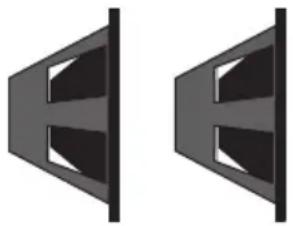
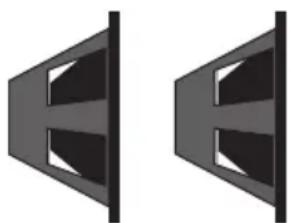
As a general rule, amplifier speaker output jacks and speaker cabinet input jacks are considered "parallel" connections, and will follow the rules described in this section. When speakers are connected in parallel, the impedance is reduced. The formula to calculate the total impedance of your speaker system is:
$$ 1 / R _ {t} = 1 / R _ {1} + 1 / R _ {2} + 1 / R _ {3} + \dots 1 / R _ {n}. \text { Where }" R" \text { is the impedance of a speaker cabinet. } $$
If all speakers have the same impedance, the total impedance will be equal to the impedance of a single speaker divided by the total number of speakers. For example, if you have two 4 Ohm speakers connected in parallel, the total impedance is 4 divided by 2, or 2 Ohms. You must be careful when connecting speakers in parallel to an amplifier. The impedance can quickly fall below safe levels. This is especially true when connecting speakers in parallel to a bridged amplifier.
natural_image
Two identical black geometric shapes resembling a stylized letter 'E' or a bracket, with no text or symbols present.Typical Impedance Calculations
$$ 1 6 \Omega + 1 6 \Omega = 8 \Omega $$
$$ 8 \Omega + 1 6 \Omega = 5. 3 \Omega $$
$$ 8 \Omega + 8 \Omega = 4 \Omega $$
$$ 8 \Omega + 1 6 \Omega + 1 6 \Omega = 4 \Omega $$
$$ 1 6 \Omega + 1 6 \Omega + 1 6 \Omega + 1 6 \Omega = 4 \Omega $$
$$ 4 \Omega + 8 \Omega = 2. 7 \Omega $$
$$ 4 \Omega + 4 \Omega = 2 \Omega $$
natural_image
Two identical abstract geometric shapes resembling stylized letters or panels, with no text or symbols present.The Hartke Kilo has two independent amplifiers capable of 500 watts, to which you can connect speakers with a minimum impedance of 2 Ohms. The amplifiers can be bridged together to deliver 1000 watts of power to a minimum 4 Ohm speaker load. When choosing speakers, make sure that they can match or exceed the output power of the amplifier, or you can damage the speakers.
About Compression
The dynamic range of a sound is the difference between its loudest and softest levels. For example, as you play your bass, you'll probably find that some notes (such as notes played on the upper frets of the lowest string) are considerably louder than others. The function of the compression circuitry in the Kilo Bass Amplifier is to reduce overall dynamic range by automatically reducing the level of the loudest sounds you play so that they are closer in level to softer ones. The end result is a smooth, even sound.
The front-panel COMPRESSOR control determines the amount of compression (peak signal reduction) by adjusting the threshold. Threshold is the limit above which compression is applied. As you turn the COMPRESSOR control clockwise, the threshold level is lowered. The compression ratio is set to around 2:1, which means that any input signal over the threshold level will be halved.
The Kilo compression circuit follows the incoming signal, and will adjust the compression ratio down when you play notes with fast attack to avoid "squashing" your sound. This is useful when playing fast staccato passages, as it will cause all the notes to sound at the same level, even if the signal is above the threshold level.
The Kilo provides a front-panel compression LED indicator that visually indicates when the audio signal crosses the threshold level and activates the compressor circuit. When unlit, no compression is being applied. When the indicator lights red, compression is being applied to the incoming signal.
Compression has three main uses. First, as described above, it “evens” out the notes played by your bass so that they all are at virtually equal levels. Second, it adds “punch” to a sound. Since all levels are nearly the same, you can play with greater force without worrying about the loudest notes distorting. Finally, it serves to protect your loud-speakers from damage as a result of brief (transient) high output levels, which might otherwise be caused by slapping, finger-popping or other performance techniques.
Whether or not you need to use compression with your Kilo will be a matter of personal taste and playing style. Experiment and see if you like the effect. If you usually play at low volume levels, you'll find that even with the COMPRESSOR knob turned up, the compression circuitry may have no audible effect. In general, if you don't need compression, leave it off.
About Equalization
The Hartke Kilo Bass Amplifier gives you enormous control over shaping the sound of your bass, using a process called equalization. To understand how this works, it's important to know that every naturally occurring sound consists of a broad range of pitches (frequencies) combined together in a unique way. This blend is what gives every sound its distinctive tonal color.
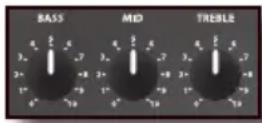
The first section of the Kilo's EQ controls is a three-band tube tone stack equalizer. The tone stack EQ is a fixed bandwidth EQ, with no frequency control. It is a little different than normal boost and cut hi-fi bass and treble controls as there is no theoretical "flat" setting. When the three knobs (labeled BASS, MID, and TREBLE) are at their center (12 o'clock) position, the response is set to a preset equalization curve that has been tailored for the bass guitar. The BASS and MID controls are somewhat interactive, so as you raise and lower the MID knob, the center frequency of the BASS control will shift. The TREBLE control is arranged to be independent from the BASS and MID controls, so that you can raise the high frequencies without affecting the low end. You should experiment with the EQ knobs and your particular bass to dial up the best sound.
In addition to the three EQ controls, the Kilo also includes BRITE and DEEP switches. The BRITE switch adds an overall boost to the high-end frequency response. This button works in conjunction with the GAIN knob (similar to the Loudness button on a stereo).
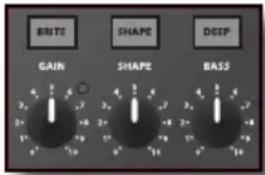
As you raise the GAIN, the overall boost is diminished. When the GAIN is set to "10" (turned fully clockwise), the BRITE switch has no effect on the audio. The DEEP switch shifts the position of the low frequency and mid scoop to enhance the low end ("booty") of the bass guitar. The SHAPE switch and knob apply an adjustable notch (scoop) filter to the specified frequency area, so that you can customize the effect of the EQ curve that best complements your particular bass instrument. Moving the SHAPE control clockwise causes the notch filter to be applied to higher frequencies, while moving the knob counterclockwise causes it to be applied to lower frequencies. The ten-band constant-q graphic equalizer provides ten sliders, each corresponding to a single narrow frequency band. This allows you to "draw" the desired tonal response from your system. When a slider is in its center (detent) position ("0"), it is having no effect. When it is moved above center (towards "+12"), the particular frequency
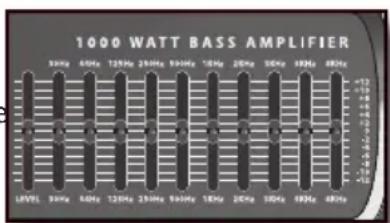
area is being boosted. When it is moved below center (towards "-12"), the frequency area is being attenuated. Normally, you will adjust the three-band EQ controls before "fine-tuning" your EQ with the graphic equalizer.
In many instances, the best way to deal with equalization is to think in terms of which frequency areas you need to attenuate, as opposed to which ones you need to boost. Be aware that boosting a frequency area also have the effect of boosting the overall signal; specifically, too much low frequency EQ boost can actually cause overload distortion, or even harm a connected speaker. In general, if you're going to apply a fair amount of low frequency EQ boost, it's a good idea to keep compression on, if only to protect your speakers from potential damage.
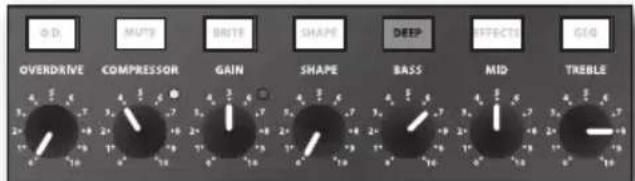
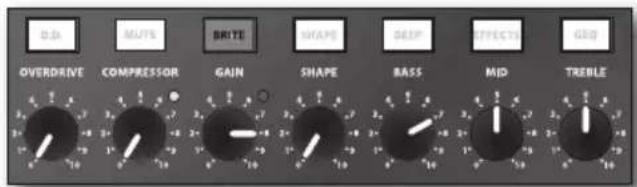
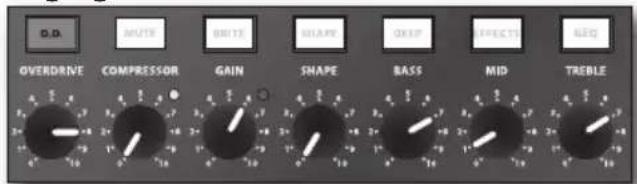
Suggested Kilo EQ Settings
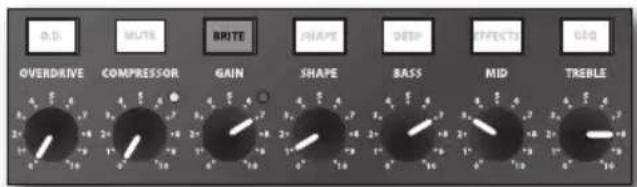
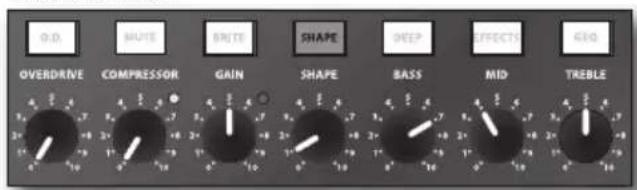
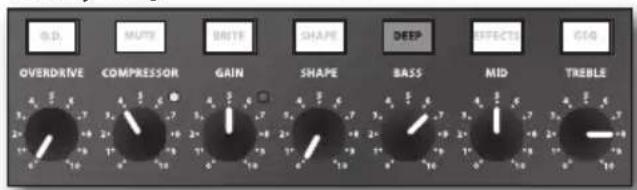
Since the Hartke Kilo provides so many options for fine-tuning your bass sound, you may feel daunted when first plugging in your instrument. Don't be! While there is no right or wrong way to go about shaping your tone, we have provided a few jumping off points to assist in finding the settings that work best for your playing style.
You may find that these settings need some additional tweaking, as each sound is very much dependent upon your particular instrument, type of strings, and playing style. Try using the graphic EQ to additionally adjust for these sonic differences.
Whenever you get a really good EQ setting for a particular instrument or song, write it down (you'd be amazed how easy it is to forget these things)!
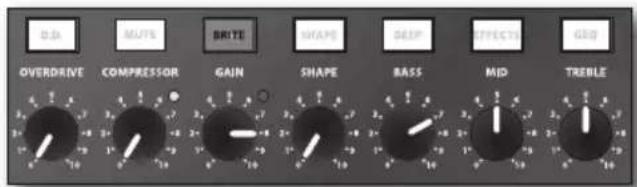
Harmonic Rock
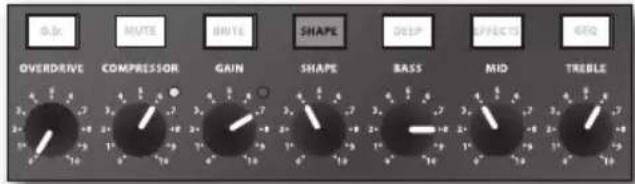
Motown
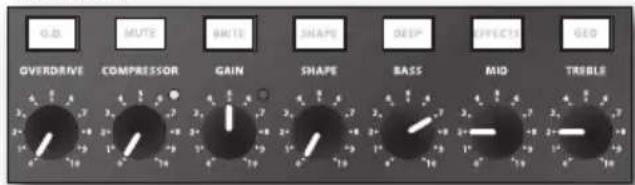
Fretless Growl
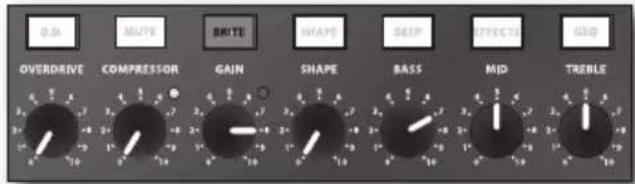
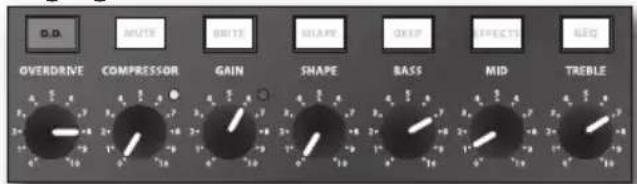
Raging Drive
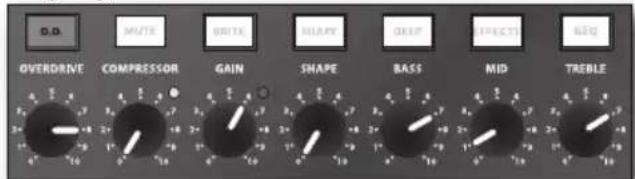
Hardcore
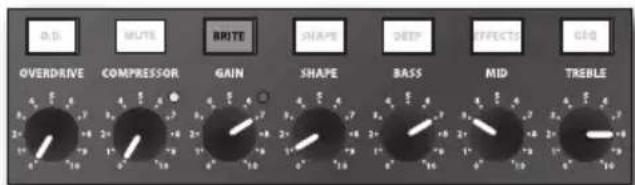
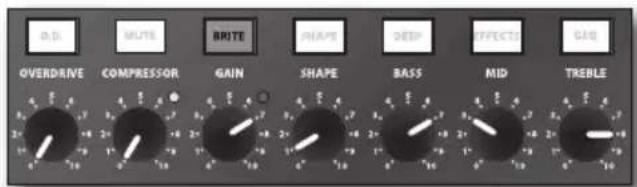
Classic R&B
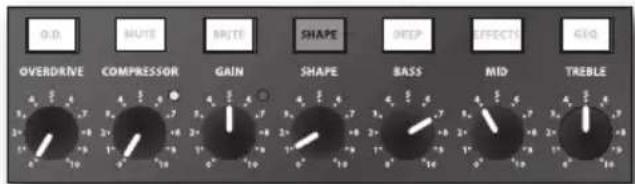
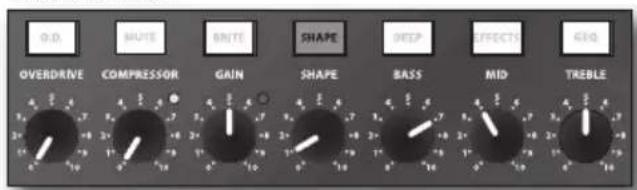
Funky Slap
Specifications
Input Sensitivity 100 k Ohms, 20 mv
Preamp Tubes 3 x 12AX7
Rated Output Power 1000 Watts Mono-Bridged @ 4 Ohms
750 Watts Mono-Bridged @ 8 Ohms
2 x 500 Watts @ 2 Ohms
2 x 350 Watts @ 4 Ohms
2 x 200 Watts @ 8 Ohms
Total Harmonic Distortion less than 0.5%
Signal to Noise Ratio approx. 78 dB
Equalizer
Passive Tone Controls Bass, MID, and TREBLE
Graphic EQ ±12 dB, center detent
@ 30 Hz, 64 Hz, 125 Hz, 250 Hz, 500 Hz, 1 kHz,
2 kHz, 3 kHz, 5 kHz, 8 kHz
Graphic EQ Level ±12 dB, center detent
BASS Switch +2.5 dB @ 50Hz
COMPRESSION RATIO 10:1
FOOTSWITCH Jacks MUTE+OVERDRIVE: Tip = Mute, Ring = EQ
EQ+EFX: Tip = EQ, Ring = EFX
Send Output Level 0 dBm
Return Input Level 0 dBm
Dimensions 19" x 18" x 5.25"
482 mm x 460 mm x 132 mm
Weight 40 lbs
18 kgs
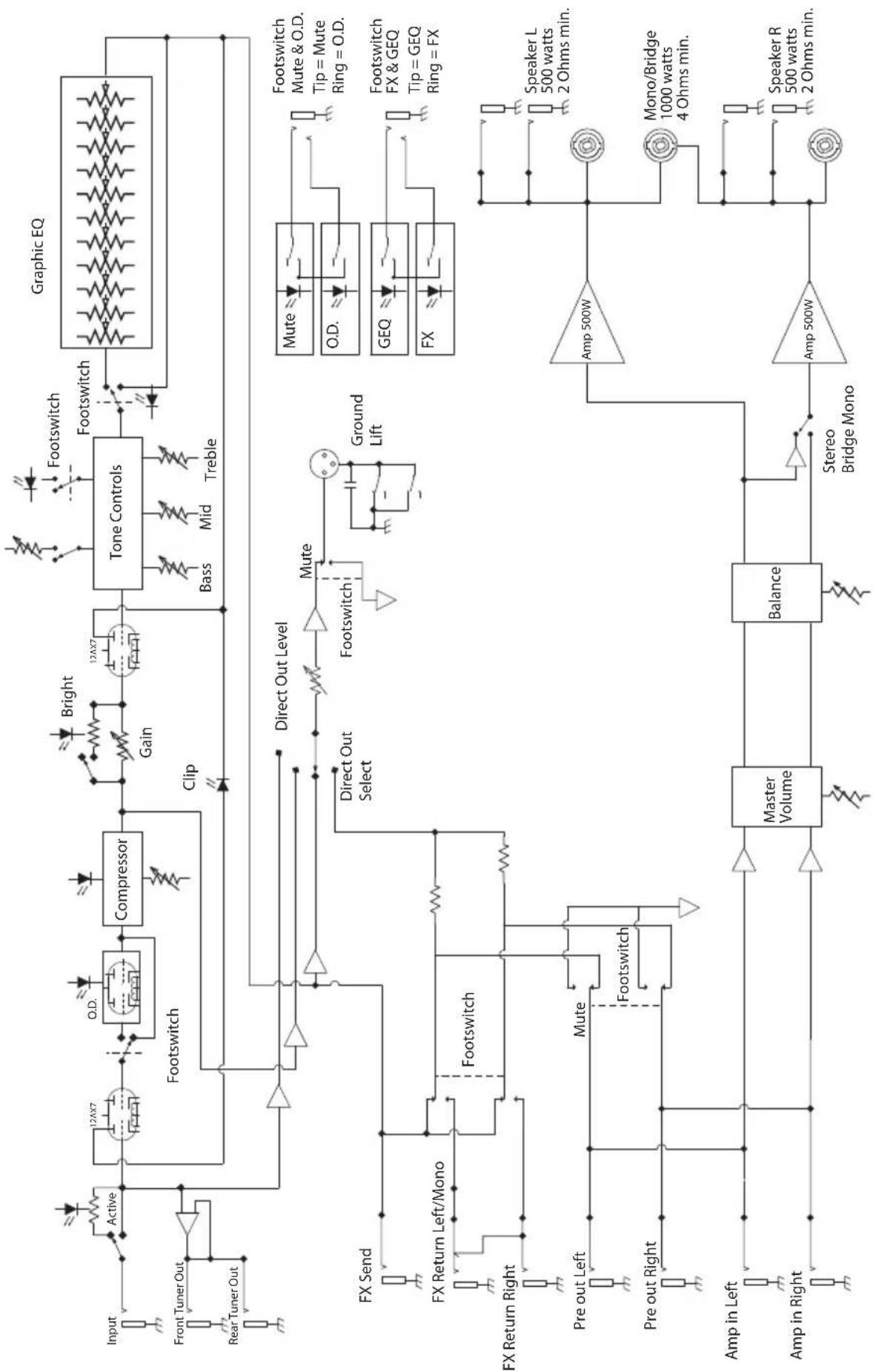
Block Diagram
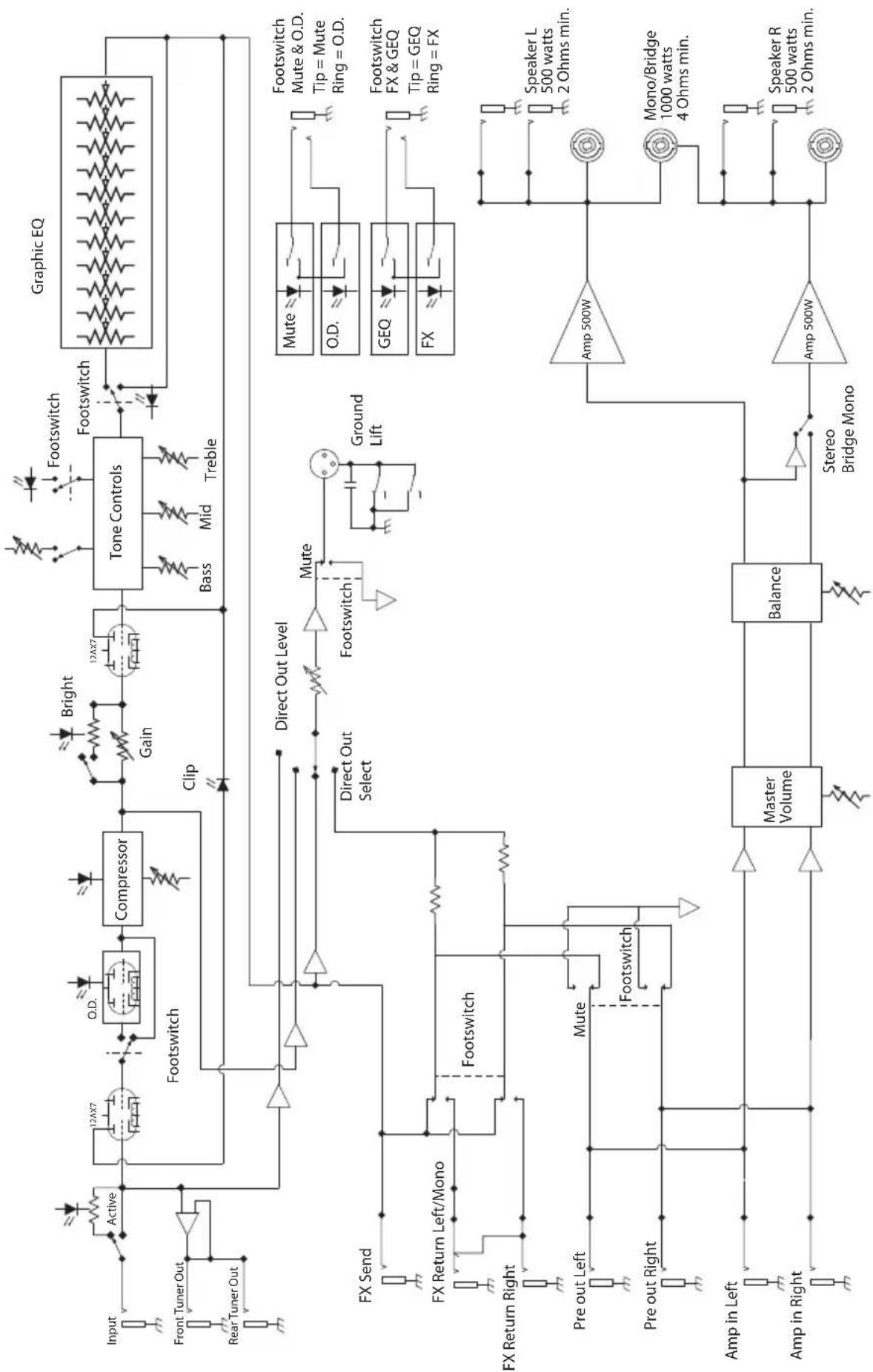
flowchart
graph TD
    A["Input"] --> B["Active"]
    B --> C["12AX7"]
    C --> D["O.D."]
    D --> E["Compressor"]
    E --> F["12AX7"]
    F --> G["Bright"]
    G --> H["Tone Controls"]
    H --> I["Footswitch"]
    I --> J["Graphic EQ"]
    K["Front Tuner Out"] --> L["Antenna"]
    M["Rear Tuner Out"] --> N["Antenna"]
    O["FX Send"] --> P["FX Return Left/Mono"]
    Q["FX Return Right"] --> R["Pre out Left"]
    S["Amp in Left"] --> T["Amp in Right"]
    U["Amp in Right"] --> V["Amp in Left"]
    W["Master Volume"] --> X["Balance"]
    Y["Stereo Bridge Mono"] --> Z["Amp 500W"]
    AA["Mute"] --> AB["Mute"]
    AC["Ground Lift"] --> AD["Mute"]
    AE["Direct Out Select"] --> AF["Direct Out Level"]
    AG["Footswitch"] --> AH["Footswitch"]
    AI["Clip"] --> AJ["Clip"]
    AK["Bass"] --> AL["Bass"]
    AM["Mid"] --> AN["Mid"]
    AO["Treble"] --> AP["Treble"]
    AQ["Mute & O.D. Tip = Mute Ring = O.D."] --> AR["Footswitch Mute & O.D. Tip = Mute Ring = O.D."]
    AS["GEQ Tip = GEQ Ring = FX"] --> AT["Footswitch FX & GEQ Tip = GEQ Ring = FX"]
    AU["Speaker L 500 watts 2 Ohms min."] --> AV["Speaker R 500 watts 2 Ohms min."]
    AW["Mono/Bridge 1000 watts 4 Ohms min."] --> AX["Speaker L 500 watts 2 Ohms min."]
natural_image
Symbolic illustration of a person climbing a ladder inside a circle (no text or symbols)natural_image
Four identical black geometric shapes arranged in a 2x2 grid, no text or symbols present.Fretless Growl
Raging Drive
Hardcore
Classic R&B
Funky Slap
2 kHz, 3 kHz, 5 kHz, 8 kHz
Jacks FOOTSWITCH MUTE+OVERDRIVE : Pointe = Mute, Bague = EQ
EQ+EFX : Pointe = EQ, Bague = EFX
Niveau Send 0 dBm
Niveau Return 0 dBm
Dimensions 483 mm (19 pouces) x 460 mm x 132 mm
Poids 18 kg
Synoptique
flowchart
graph TD
    A["Input"] --> B["Active"]
    B --> C["12AX7"]
    C --> D["O.D."]
    D --> E["Compressor"]
    E --> F["12AX7"]
    F --> G["Bright"]
    G --> H["Tone Controls"]
    H --> I["Bass"]
    H --> J["Mid"]
    H --> K["Treble"]
    L["Front Tuner Out"] --> M["Rear Tuner Out"]
    M --> N["Ground"]
    O["Input"] --> P["Active"]
    P --> Q["12AX7"]
    Q --> R["Footswitch"]
    R --> S["Clip"]
    T["Crossing"] --> U["Compressor"]
    U --> V["Gain"]
    V --> W["Clip"]
    X["Graphic EQ"] --> Y["Footswitch"]
    Y --> Z["Master Volume"]
    Z --> AA["Balance"]
    AA --> AB["Stereo Bridge Mono"]
    AC["FX Send"] --> AD["FX Return Left/Mono"]
    AD --> AE["Footswitch"]
    AE --> AF["Mute"]
    AF --> AG["Direct Out Select"]
    AH["Mute"] --> AI["Ground Lift"]
    AJ["Mute"] --> AK["O.D."]
    AL["FOOTSwitch Mute & O.D. Tip = Mute Ring = O.D."] --> AM["FOOTSwitch FX & GEQ Tip = GEQ Ring = FX"]
    AN["FOOTSwitch FX & GEQ Tip = GEQ Ring = FX"] --> AO["FOOTSwitch Mute & O.D. Tip = Mute Ring = O.D."]
    AP["Pre out Left"] --> AQ["Mute"]
    AR["Pre out Right"] --> AS["Footswitch"]
    AT["Amp in Left"] --> AU["Amp in Right"]
    AV["Amp in Right"] --> AW["Amp in Left"]
    AX["Amp in Left"] --> AY["Amp in Right"]
    AZ["Amp in Left"] --> BA["Amp in Right"]
    BB["Amp in Right"] --> BC["Amp in Left"]
    BD["Amp in Left"] --> BE["Amp in Right"]
    BF["Amp in Left"] --> BG["Amp in Right"]
    BH["Amp in Right"] --> BI["Amp in Left"]
Inhalt
Einleitung 42
Features 43
natural_image
Two identical abstract geometric shapes resembling stylized letters or panels, with no text or symbols present.natural_image
Two identical abstract geometric shapes resembling stylized letters or panels, with no text or symbols present.Fretless Growl
Raging Drive
Hardcore
Classic R&B
Funky Slap
Technische Daten
2 x 350 Watt @ 4 Ohm
2 x 200 Watt @ 8 Ohm
@ 30 Hz, 64 Hz, 125 Hz, 250 Hz, 500 Hz, 1 kHz,
2 kHz, 3 kHz, 5 kHz, 8 kHz
Grafischer EQ Pegel ±12 dB, mittig rastend
BRIGHT-Taste +6 dB @ 2 kHz
BASS-Taste +2,5 dB @ 50 Hz
KOMPRESSIONSVERHÄLTNIS 10:1
FUSSSCHALTER-Buchsen MUTE+OVERDRIVE: Spitze = Mute, Ring = EQ
EQ+EFX: Spitze = EQ, Ring = EFX
@ 30 Hz, 64 Hz, 125 Hz, 250 Hz, 500 Hz, 1 kHz,
2 kHz, 3 kHz, 5 kHz, 8 kHz
Interruptor BASS +2.5 dB @ 50 Hz
natural_image
Two identical abstract geometric shapes resembling a stylized letter 'E' or a trapezoidal frame, with no text or symbols.750 watt Mono-Bridged @ 8 ohm
2 x 500 watt @ 2 ohm
2 x 350 watt @ 4 ohm
2 x 200 watt @ 8 ohm
@ 30 Hz, 64 Hz, 125 Hz, 250 Hz, 500 Hz, 1 kHz,
2 kHz, 3 kHz, 5 kHz, 8 kHz


- WATT BASS AMPLIFIER
- Important Safety Information
- AVIS RISQUE DE CHOC ÉLECTRONIQUE - NE PAS OUVRIR
- Table of Contents
- Introduction
- Features
- Front Panel Controls
- Rear Panel
- Setting Up and Using the Kilo
- Choosing the Correct Speaker Cabinets
- Typical Impedance Calculations
- About Compression
- About Equalization
- Suggested Kilo EQ Settings
- Specifications
- Inhalt
- Technische Daten
Brand : Hartke
Model : Kilo
Category : Receiver