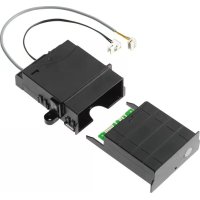
XKM 2000 DA - Cooker MIELE - Free user manual and instructions
Find the device manual for free XKM 2000 DA MIELE in PDF.



| Brand | Miele |
| Model | XKM 2000 DA |
| Product type | Communication module for extractor hood |
| Dimensions (estimated) | Height: 2.5 cm, Width: 8 cm, Depth: 12 cm |
| Weight (estimated) | 0.2 kg |
| Power supply | Via mains electricity (Powerline) |
| Connection | Cable with connector for connection to the hood control unit |
| Compatibility | Miele hobs equipped with XKM 2000 KM module; for KM 549/554: XKM 2000 SV |
| Main function | Automatic control of the hood based on hob status |
| Automatic mode | The hood turns on and adjusts extraction according to the number of zones and power |
| Manual mode | Possibility to control the hood manually during cooking |
| Searing detection | Detected if power goes from max to a lower level within 45-90 seconds; the hood switches to level 3 for 5 minutes |
| Post-cooking timer | Gradual shutdown of the hood and light after turning off cooking zones |
| Extraction levels | 4 levels (1, 2, 3, Intensive) selected based on total hob power |
| Installation | Inside the hood, motor side; must be carried out by a qualified electrician |
| Maintenance | No specific maintenance required |
| Safety | Observe national regulations and electricity distributor recommendations |
| General information | Installation and operating instructions provided |
Frequently Asked Questions - XKM 2000 DA MIELE
User questions about XKM 2000 DA MIELE
0 question about this device. Answer the ones you know or ask your own.
Ask a new question about this device
Download the instructions for your Cooker in PDF format for free! Find your manual XKM 2000 DA - MIELE and take your electronic device back in hand. On this page are published all the documents necessary for the use of your device. XKM 2000 DA by MIELE.
USER MANUAL XKM 2000 DA MIELE
Con@ctivity XKM 2000 DA
de Gebrauchsanweisung
en Operating instructions
fr Mode d'emploi
it Istruzioni d'uso
es Instrucciones de manejo
nl Gebruiksaanwijzing
ru Инструкция по зацinn
DE, BE, CH, ES, FR, GB, IT, RU
Cooking in automatic mode. 11
Frying food 11
Reaction time 1 1
After cooking 12
Manual operation 12
Reverting to automatic mode 12
Assigned power levels. 13
Iocne npiroTOBHeHn 37
Puyhna 3Kcnnyataua 37
Bo3BpaT B aBTOMaTnueckn peXm 37
Ha3haueHHbIe ypoBn MOUHOCTu 38
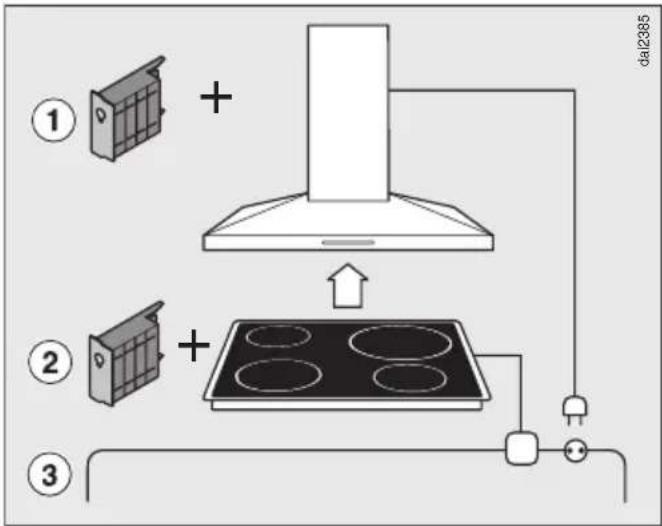
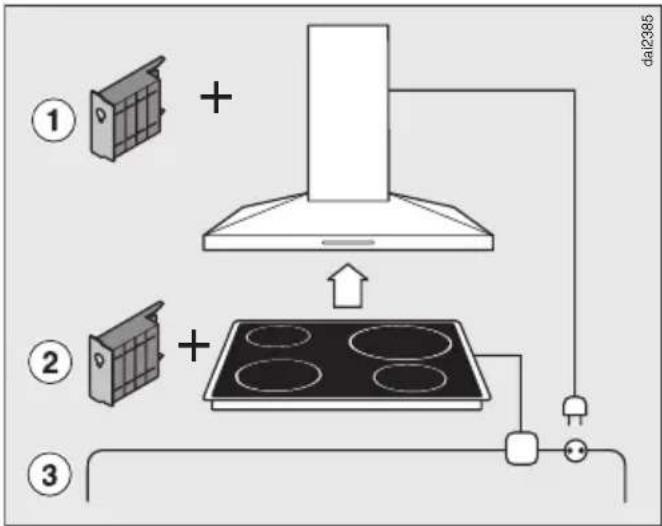
Communication module XKM 2000 DA ① enables the operation of the cooker hood to be automatically controlled by the operating status of a Miele hob.
For communication to take place, the hob must be fitted with communication module XKM 2000 KM ②.
Important: KM 549 and KM 554 must be fitted with communication module XKM 2000 SV.
The hob transmits information about its operating status to the cooker hood via the household power supply (Powerline) ③.
Please refer to the operating instructions supplied with your Miele hob and cooker hood for information on how to use them.
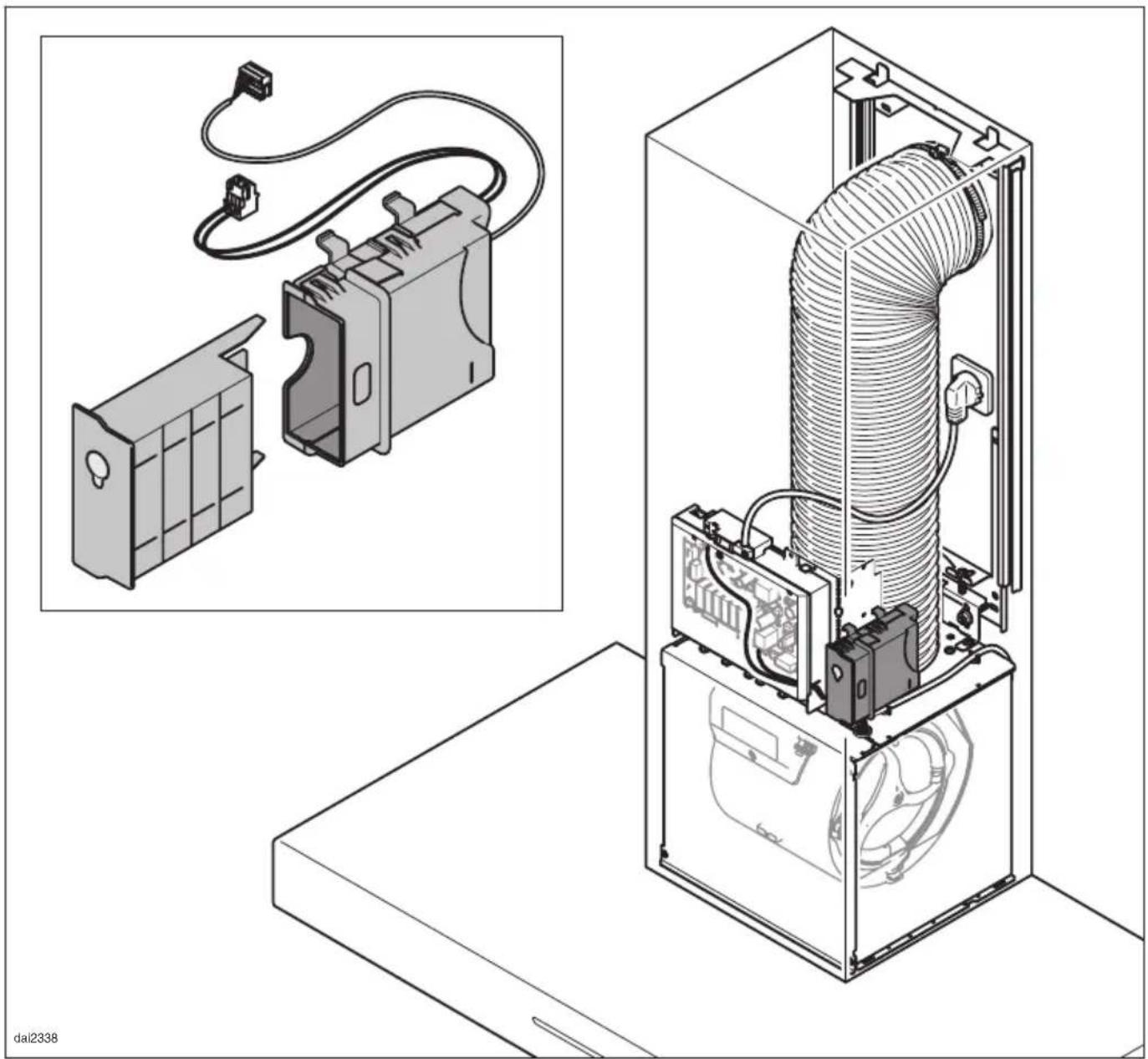
The XKM 2000 DA kit contains the communication module, a shaft to fit the module into and connection cables with connectors for linking the communication module to the cooker hood control unit.
The kit is fitted to the cooker hood in the area near the motor and is connected to the cooker hood controls.
Installation and electrical connection are described in the installation instructions supplied.
The communication module may only be connected by a qualified and competent person in strict accordance with current local and national safety regulations.
Cooking in automatic mode
- Switch on the hob and select a setting.
After a few seconds the cooker hood lighting will come on.
Approx. 1 minute later, the fan will come on, initially at power level "2" for a short while and then at power level "1".
During cooking, the fan power level of the cooker hood is selected automatically depending on the number of hob cooking zones in use and the power levels selected for the cooking zones.
If a higher setting for a hob cooking zone is selected or more cooking zones are switched on, the hood will then operate at a higher fan power level as well.
- Similarly, if a lower setting is selected for a cooking zone or cooking zones are switched off, the fan power level of the cooker hood will be adjusted accordingly.
Adjustment is made according to the total power settings at which the hob is operating (see "Assigned power settings").
Frying food
The cooker hood recognises that food is being fried if a cooking zone is switched on at the highest setting and then is turned down to a lower setting within approx. 45 to 90 seconds (5 minutes).
The times quoted apply to induction hobs. The time in brackets is for HiLight hobs, where the values are different.
The cooker hood will switch on and increase the power levels step by step to power level "3" and will remain at this level for approx. 5 minutes.
After this time, the fan power levels will revert to being determined by the number of cooking zones in use and the power levels selected for the hob.
- You can also manually select another fan power level early if you wish.
Reaction time
The cooker hood may appear to react slowly to changed settings on the hob. This is because altering the power settings on the hob will not necessarily result in an increase or decrease in cooking vapours.
A delay in the time it takes the cooker hood to react can also be because the hob transmits information to the cooker hood at intervals.
The cooker hood can react within seconds or a few minutes.
After cooking
If you switch off all of the cooking zones, the cooker hood will also switch off after a slight time delay. This delay will allow any lingering vapours or odours in the air to be removed.
- If the cooker hood is operating on the "Intensive" setting it will revert to power level "3" immediately.
- If it is operating on power level "3" it will switch to power level "2" after approx. 1 minute.
- From power level "2" it will switch to power level "1" after 2 minutes.
- Then after 2 minutes operating at power level "1", the fan will switch off.
- The lighting will go out 30 seconds later.
Manual operation
If you want to operate the cooker hood manually, switch the cooker hood fan on before switching on the hob.
- You can also come out of automatic mode during cooking, by
- manually selecting a different fan power level.
- manually switching off the cooker hood.
- activating the run-on option "515" on the cooker hood. The fan will then switch off after the run-on time selected. The lighting will remain on.
While the automatic mode is deactivated, you can operate all the cooker hood functions manually.
Reverting to automatic mode
The cooker hood will revert to automatic mode, if -
- after manually selecting a fan power level, you do not operate the cooker hood for approx. 2 minutes.
- the fan power level you have selected manually is the same as the power level which is selected automatically.
- the cooker hood fan and the hob are switched off for at least 20 seconds. Automatic mode will start again the next time the hob is switched on.
Assigned power levels
The four cooker hood fan power levels are selected according to the hob power settings.
The values are for hobs with three, four, five and six cooking zones.
Hobs with cooking zones which have 9 power settings
Fan power level "1":
At least one cooking zone is switched on at a power setting of at least "1".
Fan power level "2":
Total of all power settings selected = at least 4, where power setting "4" has been selected for at least one of the cooking zones.
Fan power level "3":
Total of all power settings selected = at least 15 (17), where power setting "6" has been selected for at least one of the cooking zones.
Intensive setting:
Total of all power settings selected = at least 25, where power setting "9" has been selected for at least one of the cooking zones.
(The values given in brackets refer to HiLight hobs, if these differ)
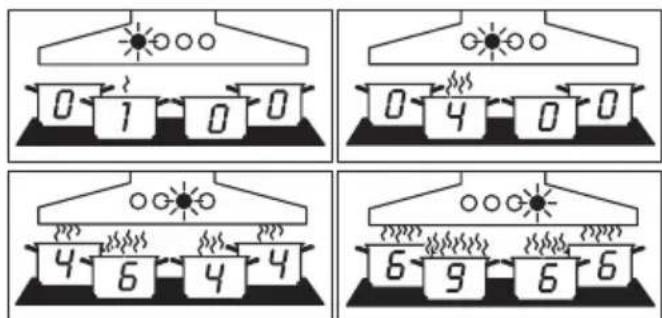
Examples for fan power levels "1" to "4"
Hobs with cooking zones which have 12 power settings
Fan power level "1":
At least one cooking zone is switched on at a power setting of at least "1".
Fan power level "2":
Total of all power settings selected = at least 5, where one of the cooking zones has a power setting of at least "5".
Fan power level "3":
Total of all power settings selected = at least 20 (23), where one of the cooking zones has a power setting of at least "8".
Intensive setting:
Total of all power settings selected = at least 32, where one of the cooking zones has a power setting of at least "12" or the Booster function is selected.
(The values given in brackets refer to HiLight hobs, if these differ)
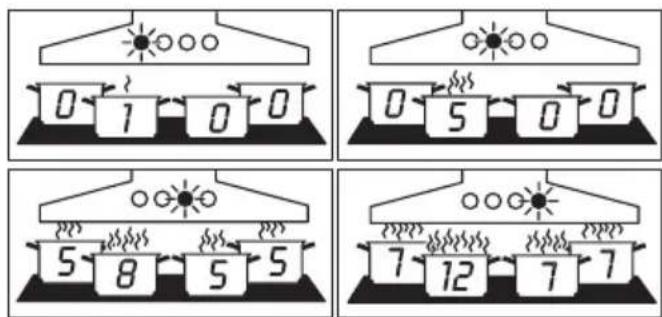
Examples for fan power levels "1" to "4"
The selection of the fan power level will be delayed, see "Reaction time".
Ventilatorstand "2":
KyHd (5 MInHyT), NocIe Yero nepe- KJIHOaete ee Ha 60Jee Hn3Kn ypoBcHb.
IpiBBeHeHbIe 3HaueHnBpeMeHn OTHOCTcK INyKUHOHbIM KOH-ΦopKaM (3HaueHnB CkO6Kax (B clyuae OTInu) - K KOHΦopKaM Highlight).
B NTORE BbITJkKa BKNIOuaeTcI Wa 3a
7aROM Ha CTyneHb "3" N OCTaETcI pa6oTatb Ha 3TOI CTypeHn B TeueHne, npIMepHO, 5 MNHyT.
B 3aKJIIOUeHHe cTypeHb pa6oTbI BeHTINJIATOPa CHOBa yCTaHaBJIINBaETcR B 3aBNCIMOCTn OT YNCSJa IcNoJIb3yEmbIX KOHOpOK N BbIbpaHHbIX ypOBHei MOUHOCTn.
BbIMoKTe TaKKe 3a6laorOBpeMeHHO BbI6paTb BpyHyO dpyIcTy- nHe b pa60Tb BEHTnIaTopa.
Bpempeakun
BbITJkka pearnpyET c 3aIepKoN, TaK KaK n3MeHHe NyeOBnRA MOUHOCTn Ha BApOuHoi NaHeJI Hne npINBOiNT Cpa3y K ChNXeHIO IIn yBeJInuYeHIO O6pa30BAHNIA NCnapeHNI OT pNiROTOBNeHnA.
Tak KaK BapOuHa NaHeIb NocBlaeT INHcOpMaUIO B BbITJxKky C ONpeJeJIeHHbIMN INHTepBaIaMn, 3TO TaKKe MoXe TpINBOIDtB K 3aIepXKe pearnpoBaHna.
PeakunMOKeT NocJeIOBaTbB Ippe-DeJax OT HeCKoJIbKINX CeKyHn I Do HeCKOJIbKINX MNHyT.
Pocne npuroTOBJeHnA
EcnBbIBbIKIOHTe BCE KOHOpKn, TO BbITAAKKa TOKe BbIKIOHTcC ONpeJeHHo 3aIepxKoN NO BpeMeHN. BnaOJaPnA TOMy BO3dYX KyxHN 6yDet OUnSeH OT OCTaBUnXcNOSCNe nprirotOBJIeHn NcnapeHn N 3a- naxOB.
- C nHTeHcNBHO CTypeHn BEHTnJIaTOp cpa3y nepeKJIIOuAeTCa Ha CTyneHb "3".
- Ecni BENTINJATop pa6oTaet Ha CTyneHn "3", To npImepHo uepe3 1 MNHyTu OH nepeKJIHOaETcHa CTypeHb "2".
- Co CTyneHn "2" BeHTnIaTOp Yepe3 2 MNHyTbI NepeKJIIOuAeTCa Ha CTyPeHb "1".
- Pocne 2 MmHyT pa6oTbI Ha CTypeHn "1" BENTINJrTOp BbIKJIIOuHaETcR.
- Eüe uepe3 30 cekyHd BbIKIIOHTcA OcBeueHne.
Pуная экплuyaразия
EcnBbIXOTte ynpabTb BbITAKoB npOecce npnroTOBHeHnBpyHyO,TO BKIOHTe BEHTIaTOp BbITAKN DO BKIOUeHnBaPOuHOHaHEII.
BbIMoKTe BnpOceCepnroTOBJIeHnBbIITN3aBTOMATUeCKOPOeKIma,ecn
- BpyHyIO BbIbepnTe dpyryIO CTypeHb pa60TbI BEHTnIaTopa;
- BpyHyIO BbIKIIOUHTe BbITAKKy;
-akTNBnpyeTe cyHkuHxOJocTOXoJa"515" BbITaXKN.
BentnIaTOp BbIKIOuHaeTcNo npOwecTBn BbIbpaHHoro BpeMeHn XoJoCTOrO XoJa.
OcBeueHne OCTaETCBAKJIIOUeHHbIM.
Korda aBTOMaTnueckn peXm BblKJIIOUeH, ynpaBLeHne BCEMn cyHK- cIyAMN BbITAAKKN OcyIeCTBJIaETcBpyHyIO.
Bo3BpaT b aBTOMaTnueckn peXnM
BbITJkKa BO3BpaaTcra CHOBa Ka pa6ote B aBTOMaTnueckom pexnme, ecnn
- NOCSJe pyuHOrO BbIbOpa CTypeHn pa-bOTbI BeHTnJIaTopa Bbl TeueHne npIMepHo 2 MInHyT He IpoBOdJIH NHKaKnx DeiCTBn No ynpaBJIeHNIO BbITJAKKO;
- BbIbpaHnHa BpyHyIO CTypeHb pa6oTbI BEHTINrTopa CHOba COOTBeTCTByET aBTOMaTHueCKO;
- BeHTnIaTOp BbITaXKn N BapOuHaI NaHeJIb 6blN BblKJIIOUeHbIMNHIMyM Ha 20 ceKyHd. Ppi nocJeDyIOUeM BKJIIOUeHIn BaP OoHoi NaHeJI N CHOBa BKJIIOUaETcA aBTOMaTUnCeCKn peXm.
Ha3haeHHbIe ypoBn MOUHOCTH
YeTbIpe CTyPeHn pa6oTbI BeHTnIaTopa BbITJAKK N BbIbIpaIOTcB COOTBETCTBm CO CNeDyUOIMM MOUHOCTaM, yCTa-HOBJIeHHbIMN Ha BapOCHo NaHeJI. 3HaueHn OTHOCATcK BapOuHbIM NaHeJAM C TpeM, YeTbIPbM, PAtbIO I ShecTbIO KOHcOpKaMn.
BapoHbIe nane c 9-ypOBHeBbIMN KOHΦopKamn
CTyneHb pa6oTbI BeHTnIaTopa "1": BKJIIOUeHa KaK MInHMym OJHa KOHΦOpKa MInHMym Ha yPoBHe MOUHocTN "1".
CTyneHb pa6oTbI BeHTnIaTopa "2": Cymma BCEX BKJIIOHeHHbIX yPOBHei MOUHOCTN = MInHMym 4, INCXOJa N3 3TOrO - OJHa KOHOpka BKJIIOHeHa MINHMym Ha yPOBHe MOUHOCTn "4".
CTyneHb pa6oTbI BeHTnIaTopa "3": Cymma BCEX BKJIIOHeHHbIX yPOBHe MOnHOCTn = MNHMym 15 (17), INCXOJa N3 3TOrO - OJHa KOHOpka BKJIIOHeHa MINHMym Ha yPOBHe MOUHOCTn "6".
IHTeHcBHa CTypeHb pa6oTbI BeHTnJIaTOPa: CymMa BCex BKJIOueHHbIX yPOBHe MoUHOCTn = MNHMym 25, NcxOJa I3 3TOrO - OJHa KOHOpka BKJIOueHa MHNmym Ha yPOBHe MOUHOCTn "9" nII BKJIIOueHa cyHKuia Booster.
IprimepbI dIa cTypeH naBoTbI BeHTnJIaTopa oT "1"do "4"
BbI6op cTypeHei pa6oTbI BeHTnIaTopa npOxCxOdnt C 3aIepKko, cm. "BpeMra peakun".
PpOIN3BOIDNTeIb:
Mnne & L. KΓ, D-33325 Tótepcno
Miele & Cie. KG, D-33325 Guetersloh
I3roTOBneHO Ha 3aBOe:
IImpepaJI-BepKe oXΓ, D-59759 ApHc6epr, EpmaHnA
Fairacres, Marcham Road, Abingdon, Oxon, OX14 1TW
Tel.: (01235) 554455 - Fax.: (01235) 554477
Customer Contact Centre Tel.: (08707) 554466
E-mail: info@miele.co.uk
Internet: www.miele.co.uk
Deutschland:
- Con@ctivity XKM 2000 DA
- Cooking in automatic mode
- Frying food
- Reaction time
- After cooking
- Manual operation
- Reverting to automatic mode
- Assigned power levels
- Hobs with cooking zones which have 9 power settings
- Hobs with cooking zones which have 12 power settings
- Bpempeakun
- Pocne npuroTOBJeHnA
- Pуная экплuyaразия
- Bo3BpaT b aBTOMaTnueckn peXnM
- Ha3haeHHbIe ypoBn MOUHOCTH
- BapoHbIe nane c 9-ypOBHeBbIMN KOHΦopKamn
- Deutschland:
Brand : MIELE
Model : XKM 2000 DA
Category : Cooker