MCD 850 - Cd player/recorder MAGNAT - Free user manual and instructions
Find the device manual for free MCD 850 MAGNAT in PDF.


| Product type | SACD/CD player |
| Brand | Magnat |
| Model | MCD 850 |
| Power supply | 230 VAC / 50 Hz |
| Power consumption (operation) | 25 W |
| Power consumption (standby) | 1.0 W |
| Frequency response (CD) | 5 Hz - 20 kHz (+/-0.5 dB) |
| Frequency response (SACD) | 5 Hz - 40 kHz (+/-0.5 dB) |
| Signal-to-noise ratio | 108 dB (20 Hz - 20 kHz, class A) |
| Channel separation | >105 dB (1 kHz) |
| Output voltage | 1.9 V (10 kOhm) |
| Distortion rate | < 0.0015% |
| Audio outputs | Analog (RCA), optical and coaxial digital |
| Headphone output | 6.3 mm stereo jack |
| Playback functions | Play/Pause, Stop, Forward/Backward search, Repeat, A-B repeat |
| Display | Screen with indicators (WARM UP, disc format, track, time) |
| Remote control | Included (AA batteries supplied) |
| Tube preamplifier | Yes, lifespan 20000-50000 h |
| Safety | Do not open; Class 1 laser radiation |
| Cleaning | Dry cloth only, no solvents |
| Operating temperature | 0°C to 40°C |
| Supplied accessories | Power cord, remote control, batteries, manual |
Frequently Asked Questions - MCD 850 MAGNAT
User questions about MCD 850 MAGNAT
0 question about this device. Answer the ones you know or ask your own.
Ask a new question about this device
Download the instructions for your Cd player/recorder in PDF format for free! Find your manual MCD 850 - MAGNAT and take your electronic device back in hand. On this page are published all the documents necessary for the use of your device. MCD 850 by MAGNAT.
USER MANUAL MCD 850 MAGNAT
Instructions for disposal
8-9 Operational elements and connections
Front panel
Remote control
Rear
10 Initial Operation
10 Tube replacement
10 Service and technical problems
10 Specifications
ACCESSIONS
1) Instruction manual
2 Remote control
3) Batteries for remote control (2x A)
4) Mains cable
BEFORE STARTING
Dear customer,
Thank you for choosing the Magnal MCD B50 SACD player.
Please read the following information carefully before starting to use the MCD 850.
IMPORTANT SAFETY PRECAUTIONS
- Please read the instruction manual carefully before use and keep it in a safe place
This device is only intended for use with 230 V/50 Hz AC voltage - Only operate the device at an ambient/room temperature between 0^ and 40^ .
- Make sure there is sufficient ventilation for the device. There must be a minimum gap of 10cm between objects to the side, to the rear and above the device.
- The ventilation slots should not be covered by any items (e.g. curtains, newspaper, etc.) in order to ensure sufficient ventilation for the device. Please do not position any sources of heat, such as radiators, ovens, naked flames or other devices that generate heat in close proximity to the device.
- The device and the remote control should not be exposed to dripping or splash water or high levels of humidity.
-
No objects filled with liquids, such as vases, shall be places on the unit.
In the event of contact with moisture or liquids remove the mains adapter immediately.
Only clean the device using a dry cloth. -
Do not use any cleaning agents or chemical solvents when cleaning, as these could damage the surface of the device.
- Never open the device.
- The mains cable must always be operational. The device should not continue to be operated if there is visible damage to the mains cable. A damaged cable should not be repaired, but must be replaced.
- Do not connect or remove the mains cable with damp hands.
- Always refer to a qualified specialist for any maintenance or repair work.
- If the device is not going to be used for a prolonged period, switch it off by using the power switch located on the rear of the device (see the section entitled "Rear").
- Please remove the mains plug in the event of thunderstorms.
- Only connect the device using a 3-pin power cable with ground wire (earth). This is part of the original accessories. Only use this original accessory for the power supply or a power cable that has been examined with regards to its safety (e.g. with a TUV or VDE certificate).
- The safety function of the power cable's earthed plug should not be impaired in any way. The earthed plug has two contacts as well as a protective earth contact (i.e. a total of 3 contacts). The protective earth contact is important for operational safety and it must be in contact with the protective earth contact of the wall socket which supplies the device with electricity. If the earthed plug of the supplied power cable is not applicable with the socket (power supply) in your country, please refer to a qualified technician to exchange the cable.

This symbol warns the user that high voltage is used within the device which can result in electric shock.

This symbol makes the user aware that there are important notes in the enclosed instruction manual which must be observed.

Caution
RISK OF ELECTRIC
SHOCK DO NOT OPEN
Warning:
Do not open! Risk of electric shock!
To reduce the risk of fire or electric shock, do not expose this unit to rain or moisture.
This symbol informs the user that there is a class 1 laser operating inside the device which does not pose any hazardous threat outside the device.
INSTRUCTIONS FOR DISPOSAL
In accordance with European Directive 2002/96/EC all electrical and electronic appliances must be disposed of separately via local collection points. Please observe the local regulations and do not dispose of your old appliances with normal household waste.
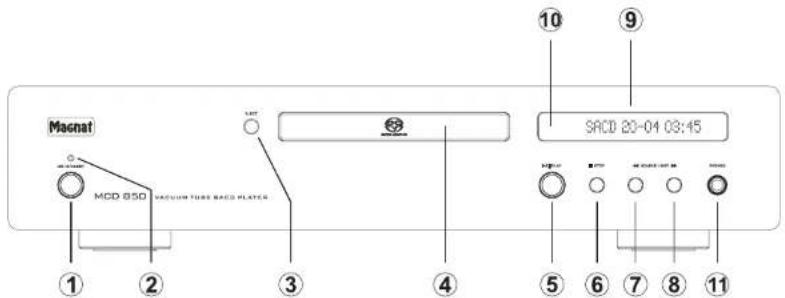
OPERATIONAL ELEMENTS AND CONNECTIONS -FRONT PANEL
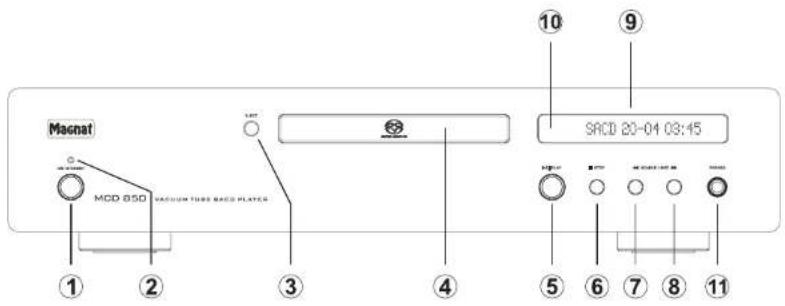
1 Power
Switches the device on when it is in the standby mode. If the LED does not illuminate, actuate the power switch located on the rear of the device. Conversely the device can be switched from power operation to the standby mode.
2 LED status indication
This illuminated display indicates the MCD 850's three possible states:
- LED flashes green/orange Indicates the heating phase of the tubes. This lasts for around 30 seconds after the device has been switched on.
LED is illuminated green: The MCD 850 is switched on. The tubes have reached the correct temperature. The device is ready for use.
LED is illuminated red: The MCD 850 is in the standby mode.
3 Eject
Opens or closes the CD compartment.
4 CD compartment
Insert the CD into the compartment with the label facing upwards.
5 Play/Pause
Starts or pauses the playback from a CD.
6 Stop
Stops a CD that is playing.
7 Search/Skip
Brief press:Playback starts at the beginning of the current track.
Two brief presses: Playback starts at the beginning of the previous track. Press and hold: High-speed rewind. Remains active as long as the button is depressed.
8 Search/Skip
Brief press:Playback starts at the beginning of the next track.
Press and hold: Fast forward. Remains active as long as the button is depressed.
9 Display
The following information is indicated in the display:
Heating phase of the tubes: WARM UP
- Current playback information:
SACD 20-04 03:45
- Disc format being played: CD or SACD
- Number of tracks on the CD - Current track
-Played time of the current track
Interruption of playback by the pause function: SACD PAUSE
The set volume of the headphone jack as soon as the volume control is actuated via the remote control: VOLUME -50
10 Sensor for the remote control
Please aim at this sensor when using the remote control.
11 Headphones
6.3 mm stereo output jack for headphones. The volume can be adjusted via the remote control.
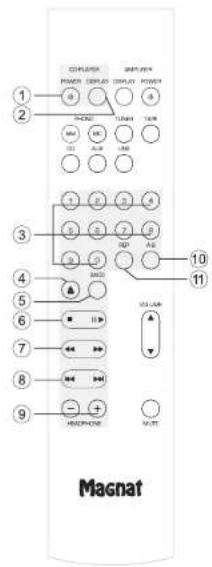
OPERATIONAL ELEMENTS AND CONNECTIONS - REMOTE CONTROL
- Before using the remote control the supplied batteries must be inserted into the battery compartment located at the rear of the remote control.
- If the batteries have run out after prolonged use, please replace them (type AA).
-
To prevent causing damage to the remote control please remove the batteries if the device is not going to be used for a prolonged period.
-
Battery disposal: Old batteries are hazardous waste and must be disposed of in accordance with current regulations.
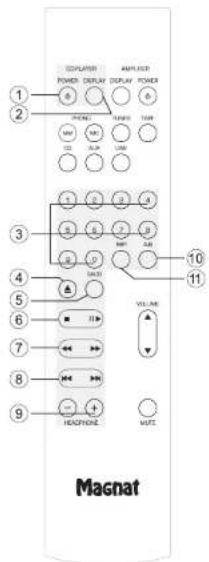
1 Power
Switches the device on when it is in the standby mode. If the LED does not illuminate, actuate the power switch located on the rear of the device. Conversely the device can be switched from power operation to the standby mode.
2 Display
This button can be used to adjust the brightness of the display (3 levels) or switch if off completely.
3 Numerical buttons
Direct selection of a track.
4 Eject
Opens the CD compartment.
5 SACD
Switches between the SACD and CD layer if an SACD has been inserted. (only possible for SACD hybrid discs)
6 Stop-Play/Pause
Right button: Starts or pauses the playback
from a CD.
Left button: Stops a CD that is playing.
7 Search
High-speed rewind and fast forward. Remains active as long as the button is depressed.
8 Skip
Playback starts at the beginning of the current or next track.
Pressing the left button twice starts playback at the beginning of the previous track.
9 Headphone
Increases (+) or reduces (-) the volume of the headache jack between -80dB and 0dB in 1dB steps.
10 A-B
A-B repeat playback:
Press the A-B button at point A, allow the CD to play until it reaches point B and then press the A-B button again.
The sequence between point A and B is now repeated until the Stop button or the A-B button is pressed again.
The following appears in the display:
SACD A-B 03:45
11 Rep
Track/CD repeat playback (repeat function): Press once. The current track is repeated. The following appears in the display:
SACD 20T04 03:45
Press twice: The entire CD is repeated. The following appears in the display:
SACD 20A04 03:45
Press again: The repeat function is deactivated.
The non-numbered buttons are reserved for operating the Magnet amplifiers MA 800 and RV 1 and have no function for the MCD 850.
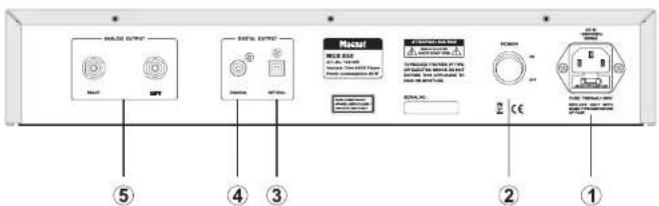
OPERATIONAL ELEMENTS AND CONNECTIONS - REAR
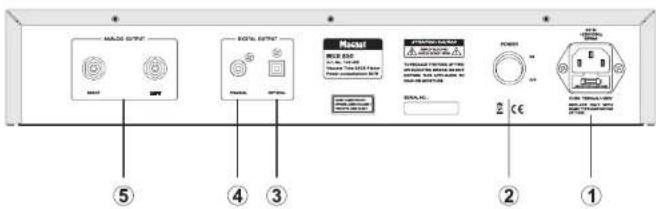
1 Mains connection
For connecting the supplied mains cable.
2 Power switch
Switches the device on and sets it in the standby mode. If the switch is set to the "OFF" position, the device is disconnected from the mains supply.
3/4 Digital audio outputs
For the connection of external devices (e.g. Minidisc recorder) via an optical (3) or coaxial (4) digital output.
5 Analogue Audio Outputs
RCA output jacks for connection to a hi-fi audio amplifier.
INITIAL OPERATION
- Place the MCD 850 on an even surface. Observe the relevant clearance gaps as specified under "Important safety instructions".
IMPORTANT: Do not place any objects on top of the device (magazines, CD/record cases, etc.). The ventilation slots located on top of the device must be unobstructed at all times! - Connect an audio output (analogue or digital) to a suitable amplifier. Also refer to the operating instructions for the device when doing this.
- Connect the supplied mains cable to the rear and then insert the other end into a 230V socket.
- Actuate the on/off switch on the rear side, the device is now in the standby mode.
- Switch on the MA 800 using the ON/STANDBY button on the front panel or the remote control.
- When the tubes have healed up the device is ready for use.
Note: With some SACDs a slight pause may occur between the titles.
TUBE REPLACEMENT
The device has a high quality preamplifier stage which is equipped with two tubes. The tubes have a very long service life when used under normal operating conditions (min. 20,000-50,000 hours). If it is necessary to replace the tubes, please refer to a specialist dealer.
SERVICE AND TECHNICAL PROBLEMS
If you should encounter any technical problems, please contact your specialist dealer on Magnat Audio-Produkte GmbH, Tel: 02234807-0.
SPECIFICATIONS
Frequency response:
CD 5 Hz -20 kHz (+/-0.5 dB)
SACD 5 Hz -40 kHz (+/- 0.5 dB)
Signal to noise ratio : 108 dB (20 Hz - 20 kHz, A-weighted)
Channel separation: > 105 dB (1 kHz)
Output voltage: 1.9 V (10 kOhm)
Harmonic distortion: < 0.0015%
Mains voltage: 230 VAC / 50 Hz
Electricity consumption:
Type 25
Standby
1.0
W
Fitted with: 2 x ECC 88
Playable formats: CD-Audio, SACD, SACD-Hybrid, CD-R, CD-RW
Dimensions (wxhxd):
Main device: 430 × 90 × 330 ~mm
Main device incl. operational
elements/connecting terminals: 430 × 90 × 345 ~mm
Remote Control: 45 × 190 × 23 mm
Weight: 7.5 kg
Subject to technical change.
For further information please visit our website: http://www.magnat.de.
SOMMAIRE
11 Accessoires
14 Service and technical problems
INSTRUCTIONS POUR LA MISE AU REBUT
REEMPLACEMENT DES TUBES
Equipment: 2 x ECC 88
Formats compatibles: CD-Audio, SACD, SACD-Hybrid, CD-R, CD-RW
raccordements inclus:
Telecommande:
430×90×330mm
430× 90× 345mm
45 × 190 × 23 mm
Poids:
7.5kg
3IEMENTbI yNPABNEHnRA PA3bEMbl-NEPEHnRA NAHEB
1 Power
BbKHOAETYCTPOXCTBO,ecnHNOHXAOCTB B paxmme OxMADHNA. EcnH CBeTNOHD He rOHT, H YHKHO BKNIOHTb CETSEBOBKNHOATEB Ha 3aHNHE CTOPHOYCTPOXCTBA. N HABOCPT, YcTOPOCTBO MOHO NEPEKNOHTb H3 PEXIMAPower B pEKMO XQDNHBA.
2CNDHMMHKaHHcoCTOHH
3T0rHIMKATOPnKaBaBaaet 3 COOTOHN, B KOTOpbX MOKET HAXODINbC RKNIOEHNNM MCD850:
CIN MIAEET 3B6HNNOPAHHKBBN HINHUYPTaaypaaorpebaaNam.3Ta4a3a NOCIN BIKHOENHYI CYPOTCRBAIPOJIOFKBCTT B TEEHENE PIMMEPHO 30 SeHKy
CND,ropn39eHbHMzBtOM:MCD850 BKNBOHN. ManNbIpaorFpTb Do HNYHO TMBePATpyb.YcTpoCTBTO rTOBO K cKCNPAUTaINs.
CINDIHTKAPCHIMZBTOM:MCD850 HAXOJDAPEXMHOEOKAHHAH
3_Eject
OTKpbBaetnnnnaakpbBaetnoTOKdNCA
4 Notok dA CD
PANOKHTC DCTOPHOH C HANINCSB BBEXP H3STOTNOTOK.
5 Play/Pause
HaHnAeTcnn octHaHnBaTaCBOpOoBHeBeMe CD.
6 Stop
OctaHABnBaBcBocpOn3BodAunCDA
7 Search/Skip
KpATEK HAXTAE: Bocnpno3BedHeneHHAHNBACTC H AAYI 1E KTOUJIOPDOXIK
BouHoe KpaTko HaxaTHc
BocponaBdEHeNaHuaHaTeC HuaHaTa npDnduJeOpdoK
HaxaTne cydepxkAHmE:
Bbctpae nepeMOTaHa3a. Pa0bTeT do Xpo n, ioka KHONKA ybpKMaBAeTc HAKATOr.
8 Search/Skip
Kpaktoe Hakatne: BocnpnabdeHeknna Hauhinaetc c Hauha nceDyoueOpoxk Haxatae cyepKaHnem BcTpaenpeMOTka bnepe. PaOtoaTe do Tex nop, noka kionka yedkpana Haxatoi.
9 Display
HaJnncnneOToBpaKaTeCnpeNyoUaHnHooPOMAA
Φa3a HarpoeBa NAMn: WARM UP
Teukuaia Hnffopmaa Oocpnno3bOamomD odoKooke: SACD 20-04 03-45
-ФогмгСАБСДОВМИЗДУСКА:CD nana.SACD
- Konnochebro dopoxek Ha CD-dncke - Tekyua dopoxka
Bemy, npoJeee c havaa BocPOn3BcEHeHn TeUeyu DOpOKKn
PnOCTaHOBKa BocPOrBaEeDyepn PnNOMouIaФyKINu naBays: SACD PAUSE
• YCTAHONBENHLY pYPOBHB.38yKA hRA pAbTBeM
DINJ HAYUHKNKOB, KOGI OBUJIH POMKOTK
perYLIMPYETC C npyTA Ta DANTAHUONHO
ynpaBNHIN: VOLUME-50
10 DaTyn DnD DaCTAHUMOHHOro yynpaBnHnA
TcBbIHCN03L0BbT NyNT DHTACHUHNOHORO ynpAaeHHJIeLNeTEK hM B 3Y TOyIK
11 Haywhnn
BixoD nOHTKAtKHOrO WTeKepa 6,3 MM ctepo O HauHmIKOB. POMKcTb 8aKaM MOHO peryPiPoBaTb np NMOUINyIbTa IMCTAHUMHOHO ynpBneHH
3IEMEHbIyNPABJIeHnRAPA3bEMbl-NTbTdy
- ytnnnaa 6atapeek: CtapbE 6atapeknO tOHOCRTK K OCCbIM OTXoAM IN NOJNEXATytnnnaa cornaccho DeckbyoumnpedncaHHM.
1 Power
BKINHAEYCTPOACTBO,ECNHOHOHXAOITBCB PEXKIMO XOKDAHIAE.CCN CBTODNOHE ROPHT HXKHO BKINOHITCBETEOB BKNKHOATENB HA ZADHNI CTPOHNEYCTPOIOTBA.NH60POT, YCTPOCTBO MOKHO NEPKIOHNTB NPEKIMA Power BPEKM OOKDAHIAE.
2 Display
3Ty KHONKY MOXHO NCNON50BaTb DnA perynHOBKN RPKoCTN DmCnner (3 yPOBHa), a TAKOE nDnHOFero OTIKNOHEyH.
3 KhoNKn CnΦpamn
PpAMOBbBOpKOMnOaHnn.
4 Elect
OTKpbBaERNOTOKmC
5 SACD
ECNHa NtKOB HaxOJcTcSACD, nPcI3BDQHTpeKeJIcHcHHe MEKdy cTcMMn SPOCnM (Bo3MOKHO ToIbKO b CNYU c Rb6pHbMbIMIKcKAMSACD.)
6 Stop-Play/Pause
Ppabaa KHONKa
HAnHaTaCmNn octaHbMaTeCA BocPON3BSeDHe C
BnBa KhoNka
OctaHbMaBcT Bocpnoun3Boumucr CD.
7 Search
Btctprn nepeomotKa hanaad nnepean. PaCoaetr To tex nop, noka IHNONKA dyepxmaeaetcraHakatao.
8 Skip
Bocpon3BedeHue HauHaTeC c HauHaTa
TekyuJe nInn CneDyUoJe DopOxKn.
Ptp DaBHOHM HakATm HA neByO KhoNkY
Bocpon3BedeHue HauHaTeC c HauHaTa
PnpDeBuSye DopOxKn.
9 HeadphoneSk
YbHnBaET(+)NINyMEnBHaET(-)rPOMKcTb 8aKaHa paeMeIe nayHauKOB aPepeNaOT -80D60doJ6CinTepeanom16
10.A-B
NOBTOB BOCPOIMeEHEHRAO TOHKM A DO TOKHM B
B TOKHe A HAKATB KHONKY A-B, NOCte 3Toro CD
DIOHNJ DHOINI DO TOKUY B, ZAHTB 3Y TOKUY
NOBTOPHUM KAHATHEM KHONKY A-B.
NOCNoDEBOATEBHOCT MEXDY TOKAMM A N B
6yIDT NOBTOPTbHcD NoTex Nop, NOKA He 6yIDT
HAKATA KHONKA "Slo" mN KHONKA"A-B."
Ha Jcncne neoAnBaTe rCA: SACD A-B 03:45
11 Rep
MIOKoPaeHoeB CnOPONHOeBENHe DApOOKIN/CD (dyNKIIa NOBtora);
Onkphatoe Hatahe: NobTOp Tekyu#e DOROKIK.
Ha dncnnee noaerca: SACD 20T04 03:45
IbKpATHOe HAXATHe: NTOB TPC BcERo CD-JDnCKa HaNcnee noBaAetaC: SACD 20A04 03:45 IbTOPOHrE HAXATHe: OTKIOUeHHe YyHKmI NOBtPA.
HepnoMyepeBaohaiBHeKhoNKeAse3epBpoBaohaiJIyIpyaBaeBnEYcuiMtaTAMMaMagnal MA 800 HRV1 N He 3daeiBCTBaohai Ha nipeep MCD 850
3JEMENTbI YNPABJIENHIN PA3bEMbl-3ADHRACTOPOHA
1NoekoueHneKcetn
JIINIOJIKIHOENBIXBOJOIBIIBOKOMBIKETCABOTOBKBAEBIL.
2 Cetobon BbIKnoyatoenb
BVKHOHCT yCPTOCTBO H NIEPOBDIY E B KEMPH OXJAHDN. ECIN BYKHOHTAEHL HAXODITCB NOONOEXHE "OFF".yCPTOCTBO OTDENEHO TO CTM.
3/4UHΦpOeBbBbXoBb
IINIOIINIIHNEHNBEHHNIXYCTPOCTB(HANP,YCTPOCTBTHI3I3AENMHNHCKOB)OUP3ONOTCKC(3)IIN KOAKCNHLB(4)UKPOBOB BXKOJ.
5AnorobbleaynoBbIXo
BxObHnDhe pabBeMCA rDN aND oNkHOUHcH NByOKOBO yCunNTBb BYKoKO pArzEHHa
BKNIOUOYEHNE
YCTAHOBHTE MC6 850 HA POB HOM MecTe.Co6HIOADte PACCOTHRN.KOTOpHE YKAaHbH B《BAxHHX YKAaHHNHO6E3ONACHOH
OuehBaxho:He pa3MeaIte HNKAKHX npEeMTOB (XyPhaIIOB, Kopo6oK c KomnAkrT-DHcKAMn HIN nactiNkAMm M. n.) CEBEXy Hx yctpoRtBHe. Hn B KOeM ciuyHn HeHb3n IepKpBbAtb DcctYr B02xNxyepeBaTHnUHnHHe OETPcHng, PaonooNHeHHnB E RpnexHxuactY
PojkHnHHTe ayIOHOxO (AnohorobI INN cHPOB) KO NDOxHMeUy CYNHmTeIO. PnIOTOM PEKHEMETYcO3AHOHMTcBc HCNTPKUYINMI KNOCHNYATAYLNCNHOYCMNTOyCMNpHbO6oB.
- PloKnHmTe CteBcB Ka6BeK 3aAHeN CTOpOHe yCTPOECTBa, a 3aTeM BCTaBtE eRb CteBcEyIO posTey ha 230 B.
AINIIEBVEEHNII INP6B0B E P8KIMO XOJILANIIHINIE BEPBDEHTBE BkTNIOHATENb 3NEXTKPONITAHNA HTO TbHbHO CTOPHO BNOIOKHO "BKTI"
3ATEM BKNHOHNTYE YCNHTENB, HABK HOKNY "ON/STANDBY", KOTOPAR HAXOINTCA HA NEpeDHeN PAHENI PYNbTA DCNUTHAONHOHORO ynpBNHEYN.
PocneΦa3bI nporpeBaHHn nnm yctpoCTBO rTOBO KcKnnyatauM.
3AMEHA JAMN
YCTOPDTOO CHAUHNO BILCOKOKAUCHETBEHNHIM NpODBAPHTENbHIM YCINNTENEM, COBPAHBM HAD BYXnAMnax. Pm AKNcyNAATAuMn B HopMaIbHIX YCNOBHX cPCK CNYKbI NAMN OHeN pOdoNKITENEH (MMN 20 000-50 000 YacOB).
EcnHn Heo6xOaMn 3aMeHnTb JAmnY, 6paTHcB CneuaanmnpoBaHHb MaarAHN.
CEPBNC IN TEXHnueCKNE NPOBJIEMbl
EcnH 0B3NHYHT TExnHexMeIe IIObEmei, O6aPntTeCb B CneuaIaMIsPOBaHHbMa3AH HnH aFmMy Magnal Audio-Produke GmbH, Tenz.: 02243807-0.
TEXHNUECKNEXAPAKTEPNCNTKNI
YactotharXapakTePHCTHKA
CD5Γ-20KΓ+0,5B
NotpebnaMa MAOuHocb:
Tun.
PexnM OxndaHna1.0BT
25
BT
KomnneKtaUra: 2xECC88
BocnpohBodnMbIe qopMaTb: CD-Audio, SACD, SACD-Hybrid, CD-R, CD-RW
T6aepnTHbpepa3Mepe (UxBx)
OchOBHoe yCTpoCTBO: 430x90x330 MM
Congralulations! You have made a wise selection in becoming the owner of a MAGNAT HiFi equipment.
The equipment are checked and tested continuously during the entire production process. In case you have problems with your MAGNAT HIFI equipment, kindly observe the following:
-
The warranty period commences with the purchase of the component and is applicable only to the original owner.
-
During the warranty period we will rectify any defects due to faulty material or workmanship by replacing or repairing the defective part at our discretion. Further claims, and in particular those for price reduction, cancellation of sale, compensation for damages or subsequent damages, are excluded. The warranty period is not altered by the fact that we have carried out warranty work.
-
Ondinalized sampling with the equipment will violate one Warranty.
-
Consult your authorized customer first, if warranty service is needed. Should it prove necessary to return the component to the factory, you will be required to complete a repair or replacement order. The condition - the quality control card has been filled out and enclosed with the component - your enclosure your receipt as proof of purchase.
-
Excluded from the warranty are: - Illuminates - Valves - Batteries - Wear parts - Shipping damages, either readily apparent or conceived (claims for such damages must be logged immediately with forwarding agent, the railway express office or post office). - Scratch in cases, metal components, front panels, etc. (You must notify your dealer directly of such defects within three days of purchase.) - Defects caused by incorrect installation or connection, by operation errors (see operating instructions), by overloading or unfastening of the equipment which have been repaired incorrectly or modified or where the case has been opened by persons other than us. - Consequences to other equipments - Reimbursement of costs, without our prior consent, when repairing damages by third parties.
F
Toules nos féciations!
Name and address of the dealer'slamp
Käufer/Customer
Name/Name
StraBe/Street
PLZ,Ort/City
Land/Country