USER MANUAL S2 Plus One Touch KV 8021 SEVERIN
GERMAN QUALITY since 1892
SEVERIN
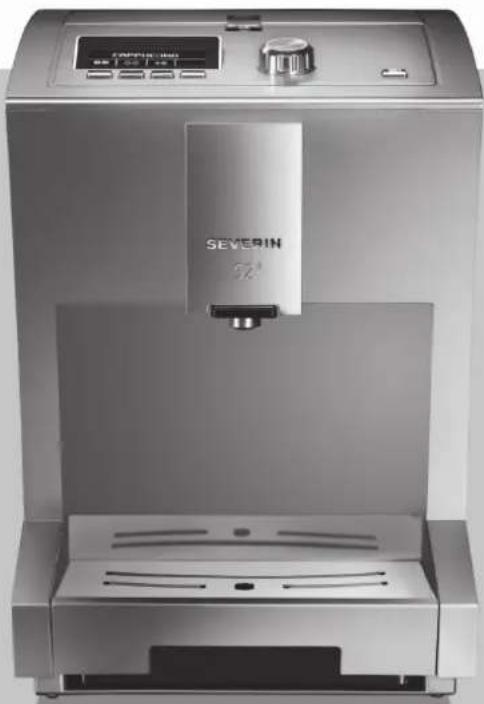
natural_image
Exterior view of a modern stainless steel water dispenser with control panel and digital display (no visible text or symbols on main body)
S2 ^+ One Touch
GB Table of contents 37
FR Sommaire....71
natural_image
Line drawing of a hand using a tool to lift a device into a container (no text or symbols)
natural_image
Line drawing of a hand holding a device with a scroll arrow pointing to the interior (no text or symbols)
Das Display zeigt:
GERÁT SPÜLEN
natural_image
Line drawing of a hand pouring seeds into a tray with scattered beans (no text or symbols)
natural_image
Line drawing of a hand using a coffee machine to press coffee into a cup (no text or symbols present)
natural_image
Line drawing of a medical device with an inset showing a hand inserting a cable into a seat (no text or symbols present)
natural_image
Line drawing of a hand inserting a coin into a clipboard (no text or symbols)
Abb. 7: Pulverdosierwippe umdrehen
natural_image
Line drawing of a hand operating a device with a control panel and buttons (no text or symbols)
natural_image
Line drawing of a hand holding a small mechanical component with a black arrow pointing to it (no text or symbols present)
natural_image
Technical line drawing of a mechanical housing component with an arrow indicating assembly (no text or symbols present)

HINWEIS!
natural_image
Line drawing of a hand using a tool to lift a container, with an arrow indicating the handle (no text or symbols present)
natural_image
Line drawing of a hand using a lever to lift a device into a container (no text or symbols)
This product contains software which is linked to FreeRTOS V6.0.1 - Copyright (C) 2009 Real Time Engineers Ltd. FreeRTOS V6.0.1 is licensed by the modified GNU General Public License (GPL) Version 2 (see the licensing section of http://www.FreeRTOS.org for full details). FreeRTOS V6.0.1 source code can be provided upon request to our Customer Service Center (email address) until October 2014. A charge for performing the request may apply.
AVR-Libc
Portions of avr-libc are Copyright (c) 1999-2010 Werner Boellmann, Dean Camera, Pieter Conradie, Brian Dean, Keith Gudger, Wouter van Gulik, Bjoern Haase, Steinar Haugen, Peter Jansen, Reinhard Jessich, Magnus Johansson, Harald Kipp, Carlos Lamas, Cliff Lawson, Artur Lipowski, Marek Michalkiewicz, Todd C. Miller, Rich Neswold, Colin O'Flynn, Bob Paddock, Andrey Pashchenko, Reiner Patommel, Florin-Viorel Petrov, Alexander Popov, Michael Rickman, Theodore A. Roth, Juergen Schilling, Philip Soeberg, Anatoly Sokolov, Nils Kristian Strom, Michael Stumpf, Stefan Swanepoel, Helmut Wallner, Eric B. Weddington, Joerg Wunsch, Dmitry Xmelkov, Atmel Corporation, egnite Software GmbH, The Regents of the University of California.
All rights reserved.
Redistribution and use in source and binary forms, with or without modification, are permitted provided that the following conditions are met:
* Redistributions of source code must retain the above copyright notice, this list of conditions and the following disclaimer.
* Redistributions in binary form must reproduce the above copyright notice, this list of conditions and the following disclaimer in the documentation and/or other materials provided with the distribution.
* Neither the name of the copyright holders nor the names of contributors may be used to endorse or promote products derived from this software without specific prior written permission.
THIS SOFTWARE IS PROVIDED BY THE COPYRIGHT HOLDERS AND CONTRIBUTORS "AS IS" AND ANY EXPRESS OR IMPLIED WARRANTIES, INCLUDING, BUT NOT LIMITED TO, THE IMPLIED WARRANTIES OF MERCHANTABILITY AND FITNESS FOR A PARTICULAR PURPOSE ARE DISCLAIMED. IN NO EVENT SHALL THE COPYRIGHT OWNER OR CONTRIBUTORS BE LIABLE FOR ANY DIRECT, INDIRECT, INCIDENTAL, SPECIAL, EXEMPLARY, OR CONSEQUENTIAL DAMAGES (INCLUDING, BUT NOT LIMITED TO, PROCUREMENT OF SUBSTITUTE GOODS OR SERVICES; LOSS OF USE, DATA, OR PROFITS; OR BUSINESS INTERRUPTION) HOWEVER CAUSED AND ON ANY THEORY OF LIABILITY, WHETHER IN CONTRACT, STRICT LIABILITY, OR TORT (INCLUDING NEGLIGENCE OR OTHERWISE) ARISING IN ANY WAY OUT OF THE USE OF THIS SOFTWARE, EVEN IF ADVISED OF THE POSSIBILITY OF SUCH DAMAGE.
DE
Table of contents
- General information....38
1.1. Greeting....38
1.2. Notices concerning the operating manual ....38
- For Your Safety 38
2.1. Intended use....38
2.2. Risks 39
-
Technical data 41
-
Overview....41
4.1. Scope of delivery 41
4.2. Accessories 41
4.3.Device....42
-
Switching on for the first time....43
-
Coffee preparation....45
6.1. Switching on/off 45
6.2. Operation 45
6.3. Preparing coffee specialities....46
6.3.1. Preparing coffee or espresso 46
6.3.2. Preparing coffee-milk specialities....47
6.4. Preparing coffee with coffee powder 49
- Individual settings 50
7.1. Setting the grinding fineness 50
7.2. Making individual settings for coffee preparation....51
7.2.1. Storing personal settings 52
7.2.2. Making personal settings quickly (Quick Select) 52
7.3. Changing device settings....52
7.3.1. Language 52
7.3.2. Water hardness....53
7.3.3. Water filter 53
7.3.4. Energy savings options....53
7.3.5. Resetting the device .....54
- Maintenance....55
8.1. Daily cleaning 56
8.2. Cleaning programs 57
8.2.1. Rinsing the device....57
8.2.2. Rinsing the milk system 57
8.2.3. Cleaning the milk system 58
8.2.4. Cleaning program ....58
8.2.5. Descaling 59
8.2.6. Changing the water filter 60
8.3. Cleaning the brewing unit....62
8.4. Cleaning the bean container....63
- Troubleshooting....63
9.1. Display device information....65
-
Disposal....65
-
Tips for perfect coffee enjoyment 66
-
License provisions 67
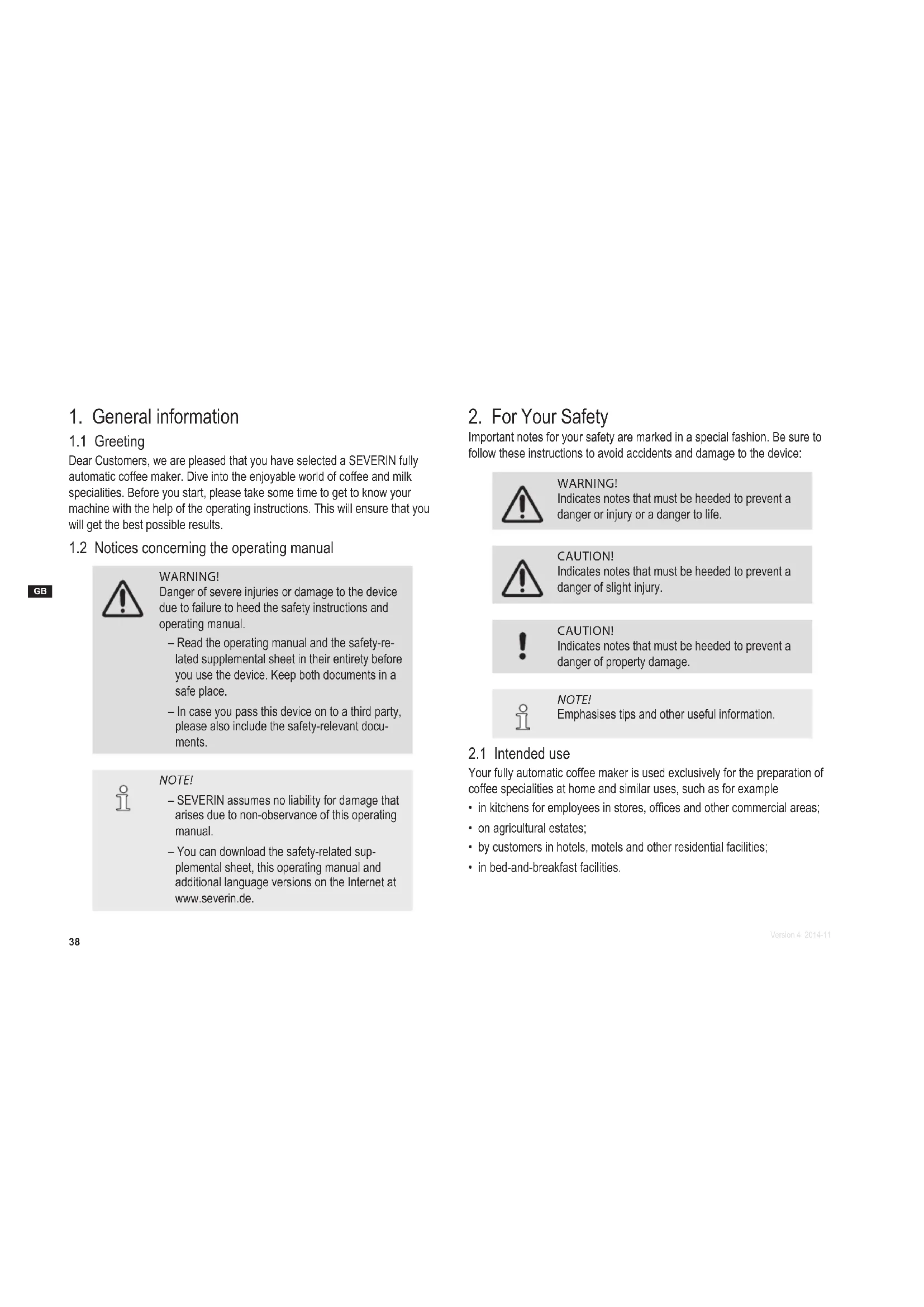
1.1 Greeting
Dear Customers, we are pleased that you have selected a SEVERIN fully automatic coffee maker. Dive into the enjoyable world of coffee and milk specialities. Before you start, please take some time to get to know your machine with the help of the operating instructions. This will ensure that you will get the best possible results.
1.2 Notices concerning the operating manual

WARNING!
Danger of severe injuries or damage to the device due to failure to heed the safety instructions and operating manual.
- Read the operating manual and the safety-related supplemental sheet in their entirety before you use the device. Keep both documents in a safe place.
– In case you pass this device on to a third party, please also include the safety-relevant documents.

NOTE!
– SEVERIN assumes no liability for damage that arises due to non-observance of this operating manual.
- You can download the safety-related supplemental sheet, this operating manual and additional language versions on the Internet at www.severin.de.
2. For Your Safety
Important notes for your safety are marked in a special fashion. Be sure to follow these instructions to avoid accidents and damage to the device:

WARNING!
Indicates notes that must be heeded to prevent a danger or injury or a danger to life.

CAUTION!
Indicates notes that must be heeded to prevent a danger of slight injury.

CAUTION!
Indicates notes that must be heeded to prevent a danger of property damage.

NOTE!
Emphasises tips and other useful information.
2.1 Intended use
Your fully automatic coffee maker is used exclusively for the preparation of coffee specialities at home and similar uses, such as for example
- in kitchens for employees in stores, offices and other commercial areas;
• on agricultural estates;
• by customers in hotels, motels and other residential facilities;
• in bed-and-breakfast facilities.
Fill the water tank of the device only with cold, fresh non carbonated water, never with milk, instant powders, syrups or other flavouring substances and additives. Caramelised coffee beans must not be used. Do not fill any liquids into the coffee bean container.
The device is not suitable for built-in installation or for an installation under the counter.
2.2 Risks
This device may only be used by persons with reduced physical, sensory or mental capacities or a lack of experience and/or knowledge when they are supervised or if they have been instructed about the safe use of the device and have understood the risks resulting from the use of the device.
This device may be used by children age 8 and up when they are supervised and if they have been instructed about the safe use of the device and have understood the resulting risks. Cleaning and user maintenance must not be carried out by children, unless they are 8 years old or older and are supervised. The device and its connecting cable must be kept away from children younger than 8 years.

To prevent electric shock, adhere to the following safety measures under all circumstances:
Only connect the device to a properly installed earthed safety socket.
- Only operate the device if the voltage specified on the model plate matches the voltage in your outlet.
- Make sure that the power cable is not bent or pinched and that the power cable and the device do not come in contact with heat sources (e.g. hot plates, gas flames).
- When you pull the power cable out of the outlet, always pull directly on the plug. Do not hold and carry the device with the power cable.
- Never touch the power plug with wet hands.
- Never immerse the device in water or other fluids, do not clean it under running water, and do not place it in the dishwasher.
- Do not insert any objects into the device openings.
- Even when the device is turned off, it carries voltage on the inside of the device as long as the power cable is plugged into the outlet. After each use, in case of danger or defect, pull the power plug from the outlet immediately. For this reason, make sure that the outlet with the power plug of the device is easily accessible at any time. Pull the power cable out of the outlets before you clean or carry out maintenance work on the device.
- Never remove screws from the device to open it and do not carry out any technical modifications.
Particular groups of people are at an increased risk:
• Children must not play with the device.
- Keep children away from the packaging material. It presents a suffocation risk.
Hot water and hot milk at the coffee milk outlet of the device present a scalding risk.
- The set-up location of the device must be level, solid and feature a sufficient load-bearing capacity.
-
Do not touch the coffee-milk dispenser when the machine is switched on.
-
Only use receptacles that are large enough to receive the fluid volume set on the device. Adhere to the information in the operating manual during the execution of maintenance programs. If in doubt, abort the process prior to completion.
- Never remove the receptacle while the beverage is being prepared.
- Do not transport or move the device while the beverages being prepared.
Pathogens can form in the device due to insufficient hygiene.
- Empty the drip tray and the coffee grounds container on a daily basis.
- Adhere to the specified cleaning intervals.
• Always pour out the water in the water tank that is not going to be used that day.
A defective device can cause property damage and injuries:
- Check the device for damage prior to every use. In the event that you detect damage due to transport, immediately contact the dealer where you have purchased the device or SEVERIN customer service. Never operate a defective device. Never operate a device that has fallen down.
-
When the power cable of the device is damaged, it must be replaced in order to prevent endangerment. The device does not contain any parts that you can repair yourself. Repair work must only be carried out through SEVERIN customer service.
-
Place the device on a water-resistant, dry, non-skid surface.
- Never set up the device on a hot surface or near strong sources of heat.
- Do not set up the device on a surface which could be damaged by water and heat (e.g. untreated wood).
- Do not allow the power cable to dangle.
- Only operate the device in heated interior rooms.
- Place the device on a water-resistant, dry, non-skid surface.
- Never set up the device on a hot surface or near strong sources of heat.
- Do not set up the device on a surface which could be damaged by water and heat (e.g. untreated wood).
- Do not allow the power cable to dangle.
-
Only operate the device in heated interior rooms.
-
Only use the device after the coffee-milk dispenser has been completely assembled and inserted.
- Only use the products recommended in the operating manual for the care of your device.
- Store the device so that it is always protected against frost.
Incorrect handling of the device can cause property damage.
Incorrect handling of the device can cause property damage.
3. Technical data
Voltage 220–240 V\~, 50/60 Hz
Output/power consumption 1500 W
Safety test CE, CB, EMC
Pump pressure (max.) 15 bar
Capacity of water tank 1.5 l
Capacity of bean container 140 g
Capacity of grounds container 12 portions
Dimensions (W x H x D) 240 mm x 350 mm x 330 mm
Weight approx. 9 kg
4. Overview
4.1 Scope of delivery
The device's scope of delivery includes:
- Your fully automatic coffee maker
- Water filter
- Milk tube
- CD-ROM with
- Operating instructions
- Warranty provisions
• Safety-related supplemental sheet
• Water hardness test strips
- Cleaning tablet
4.2 Accessories
The following accessories are available:
- Water filter
- Cleaning tablets
- Descaling tablets
- Milk tube
- Milk system cleaner
- Milk cooler
4.3 Device
Overview
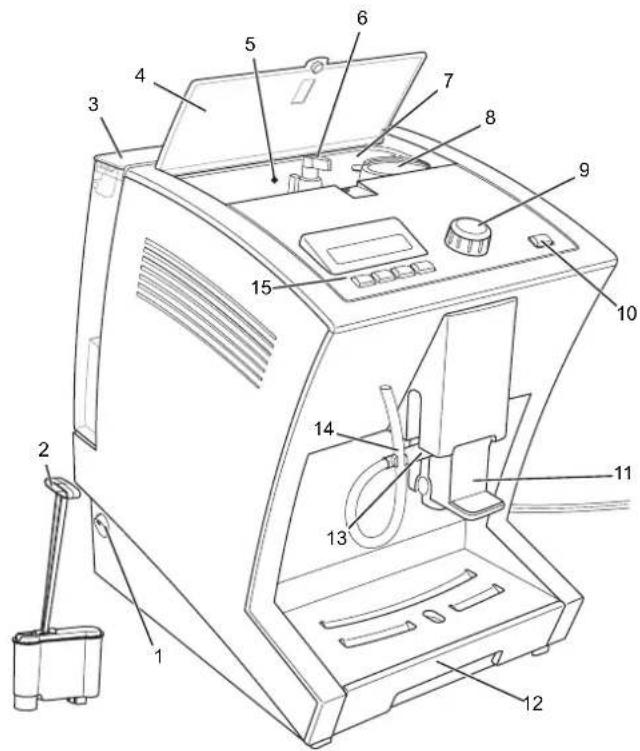
fig. 1: Device overview
| Item Designation Explanations |
| 1 On/off switch | |
| 2 Water filter with insertion aid | To improve the water quality. |
| 3 Water tank For adding drinking water. |
| 4 Bean container cover | |
| 5 Bean container signal lamp | Lights up if the supply of beans is getting too low. |
| 6 Grind regulator For adjusting the grinding of the coffee variety. |
| 7 Bean container For adding unground beans. |
| 8 Powder dosing chamber | For adding a cup portion of coffee powder (e.g.decaffeinated coffee). |
| 9 Rotary selection switch e-Select | For selecting a coffee speciality and for selecting menu options and settings on the menu. |
| 10 Menu button To call up and exit the menu. |
| 11 Coffee-milk dispenser with height adjustment | The coffee-milk dispenser can be adjusted to the height of the container (cup/ glass) below using the handle. |
| 12 Drip tray with cup tray and grounds container | For catching water and coffee grounds. |
| 13 Connection for milk tube | For drawing milk for coffee specialities with milk (e.g. cappuccino). |
| 14 Milk tube with bracket The milk tube can be hung on the bracket. |
Item Designation Explanations
| 15 Display with operating controls | Shows details about beverage preparation and the menu. The buttons have the function shown on the respective display. |
5. Switching on for the first time
When you switch your device on for the first time, it asks you for some basic settings.
- Plug the mains plug into the outlet.
- Switch the device on with the on/off switch.
The display shows the text "SEVERIN" and then:
PLEASE SELECT LANGUAGE
- Turn the e-Select until the desired language is shown and confirm it by pressing the e-Select.
The display shows:
PLEASE SELECT WATER HARDNESS
- Check the water hardness on a tap using the water hardness test strip. To do this, proceed according to the enclosed description of the test strips.
- Use the e-Select to select the water hardness and confirm your entry.
The display shows:
USE WATER FILTER?
- Rinse the water tank thoroughly with water.
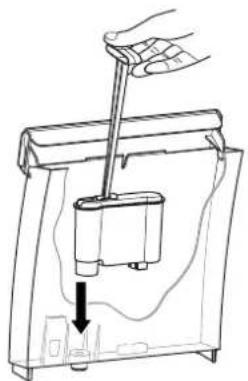
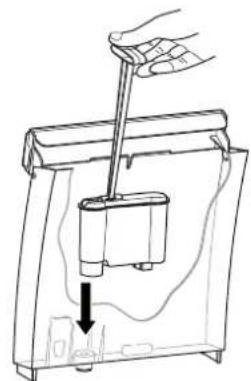
- If desired, use the insertion aid to insert the water filter into the water tank (fig. 2) and remove insertion aid again.
natural_image
Line drawing of a hand using a lever to lift a small container, with a downward arrow indicating motion (no text or symbols)
fig. 2: Inserting the water filter fig. 3: Insert water container

NOTE!
A water filter improves the water quality of the water used by removing contaminants and scale from the water. SEVERIN recommends the use of a water filter for high water quality starting with 10^ .
-
Fill the water tank with cold drinking water up to the "Max" marking and place it on the device (Fig. 3). Here, make sure that the water tank hooks into the top of the device and lies close against the device.
-
Select with the e-Select
• NO, if you do not want to use a water filter or
• YES, if you want to insert a water filter in the water tank.

natural_image
Line drawing of a hand holding a device with a scroll arrow pointing to the interior (no text or symbols)
The display shows:
RINSING
Water runs from the coffee-milk dispenser into the drip tray.
As soon as the rinsing procedure is complete, the display shows the "Beverage selection" view. The device is now ready for operation.
6. Coffee preparation
6.1 Switching on/off
Each time you switch the machine on or off, the device first rinses the brewing unit.
- Switch the device on with the on/off switch.
The display shows the text "SEVERIN" and then: RINSING
The rinsing of the brewing unit is complete as soon as "Beverage selection" appears again.

NOTE!
The device switches off automatically after a programmable switch-off time (default setting:
30 minutes). By pressing the on/off switch, you can switch off the device manually at any time.
6.2 Operation
"Beverage selection" view
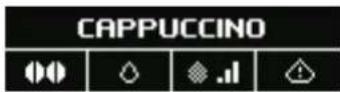
| Symbols Meaning |
| To set the strength of the desired coffee.
weak coffee
normal coffee
strong coffee
individually-set quantity of beans
Preparation with ground coffee |
| To set the quantity of water.
small cup (100 ml)
medium cup (125 ml)
large cup (160 ml)
individually-set cup size |
| To set the milk/milk foam quantity of a milk speciality.
a little milk
an average quantity of milk
a lot of milk
individually-set quantity of milk |
| Indicates an error message |
The device is operated using the e-Select and the control buttons.
- Use e-Select to select a beverage: prepare it by pressing.
- The e-Select lights up steady white if the device is waiting for an input from you.
- The e-Select fl ashes while the device is preparing a beverage.
- The e-Select fl ashes red if an error has occurred (▶ "9. Troubleshooting").
- By pressing the four control buttons below the display, you can adjust your coffee speciality to suit your individual needs.
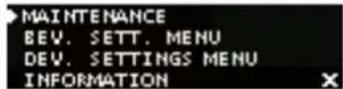
In this menu, you can make settings, perform maintenance programs and display information.
- By pressing the menu button for a longer time (at least 3 seconds), you will reach the menu; you can exit it by pressing again.
- By turning the e-Select, you can select a menu option; confirm it by pressing.
- The e-Select lights up steady white if the device is waiting for an input from you.
- The e-Select fl ashes while the device is cleaning itself.
- Use the button under the display field ✗ to return to the previous menu without changing the setting.
6.3 Preparing coffee specialities
-
Open the cover of the bean container and wipe the bean container out with a dry and lint-free cloth.
-
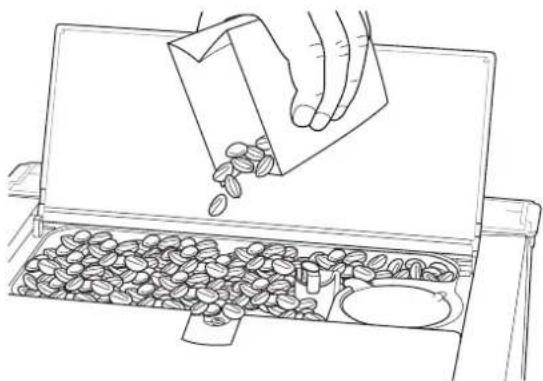
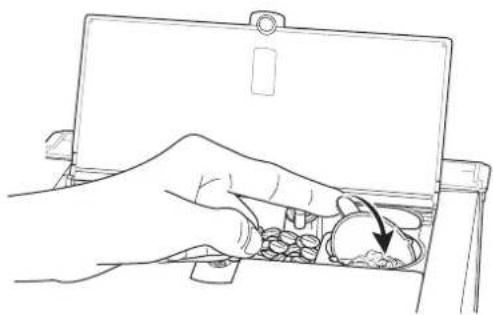
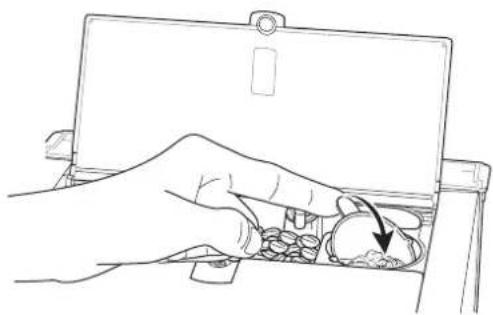
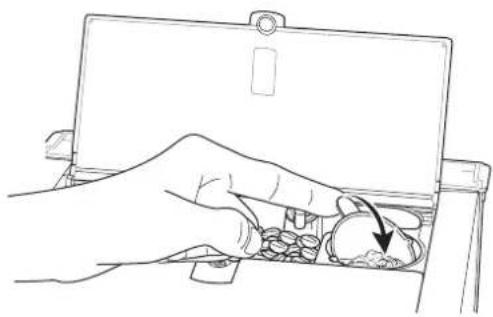
Fill the bean container with coffee beans (Fig. 4).
-
Close the cover of the bean container.
6.3.1 Preparing coffee or espresso
To prepare a coffee or espresso, there must be enough beans in the bean container and enough water in the water tank.
-
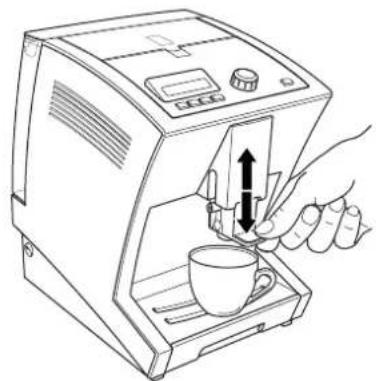
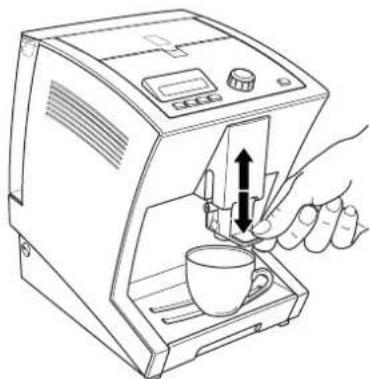
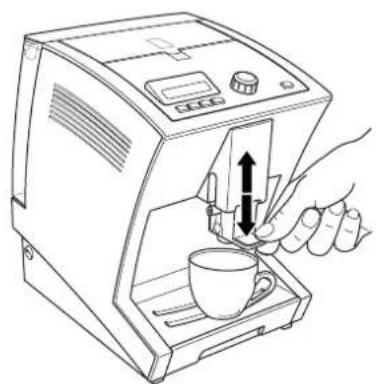
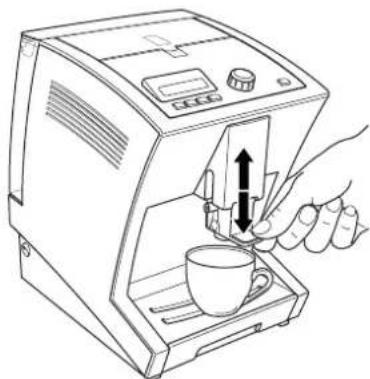
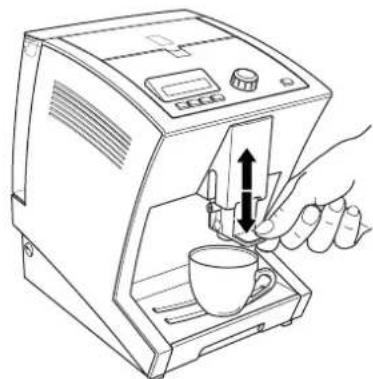
Place a cup on the cup tray below the coffee-milk dispenser of the device and adjust the height of the coffee-milk dispenser to the cup height (Fig. 5).
-
By turning the e-Select, select COFFEE or ESPRESSO.
-
If desired, you can use the button under the display fi eld
• 📋 to change the set coffee strength
• to change the set water quantity.

NOTE!
To prepare the coffee speciality with your own settings, press the respective button until .a displayed after the corresponding symbol (▶ "7.2 Making individual settings for coffee preparation").
- Press the e-Select.
The desired coffee speciality is prepared.
- If you would like to change the coffee quantity during dispensing, turn the e-Select while the coffee is being dispensed.
The display shows a bar with the set quantity in "ml".
The coffee dispensing stops automatically after the selected quantity has been prepared. It can also be stopped early by pressing the e-Select.
natural_image
Line drawing of a hand pouring seeds into a tray with scattered beans (no text or symbols)
fig. 4: Adding beans
6.3.2 Preparing coffee-milk specialities
To prepare a cappuccino, a white coffee or a latte macchiato, there must be enough beans in the bean container and enough water in the water tank. Also place a container filled with milk (e.g. SEVERIN milk cooler) next to the device.

NOTE!
Coffee specialities prepared with milk are best if the milk is chilled to refrigerator temperature.
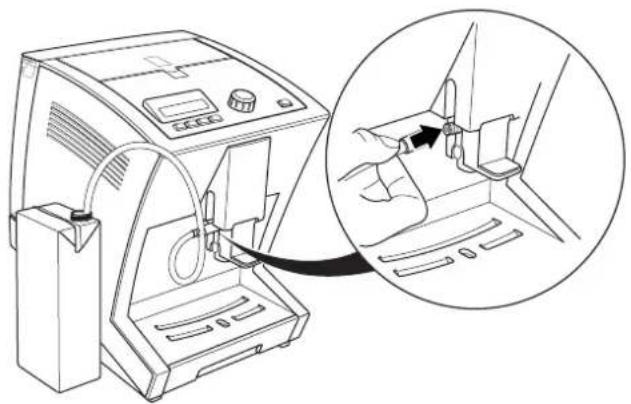
- Plug the milk tube onto the connection on the coffee-milk dispenser and hang the other end of the tube in the milk container (Fig. 6).

NOTE!
Make sure that the tube is submerged in the milk so that the milk can be drawn correctly by the device.
natural_image
Line drawing of a hand using a coffee machine to press coffee into a cup (no text or symbols present)
fig. 5: Placing the cup underneath and adjusting the dispenser height.
- Place a cup on the cup tray below the coffee-milk dispenser of the device and adjust the height of the coffee-milk dispenser to the cup height (Fig. 5).
- By turning the e-Select, select CAPPUCCINO, LATTE MACCHIATO, WHITE COFFEE or MILK.
- If desired, you can use the button under the display fi eld
• to change the set coffee strength
• to change the set water quantity
• to change the milk-milk froth quantity.
natural_image
Line drawing of a medical device with an inset showing a hand inserting a cable into a seat (no text or symbols present)
fig. 6: Connecting the milk tube

NOTE!
To prepare the coffee speciality with your own settings, press the respective button until displayed after the corresponding symbol (▶ "7.2 Making individual settings for coffee preparation").
- Press the e-Select.
The desired coffee speciality is prepared.
- If you would like to change the milk quantity during dispensing, turn the e-Select while the milk is being dispensed.
The display shows a bar with the set milk dispensing time in seconds.
- If you would like to change the coffee quantity during dispensing, turn the e-Select while the coffee is being dispensed.
natural_image
Line drawing of a hand inserting a coin into a laptop case (no text or symbols)
fig. 7: Turning over the powder dosing chamber
The display shows a bar with the set quantity in "ml". The coffee dispensing stops automatically, but can also be stopped by pressing e-Select.
After preparation, the display indicates:
DO YOU WANT TO CLEAN THE MILK SYSTEM?
-
Press
-
the button under the display fi eld √ to perform cleaning (▶ "8.2.2 Cleaning milk system"), or
- the button under the display fi eld ✗ if you want to perform the cleaning later.

NOTE!
It is recommended that you clean the milk system after each preparation.
6.4 Preparing coffee with coffee powder
You can also prepare a coffee speciality with coffee powder. This is especially useful if you want to prepare a decaffeinated coffee, for example.
- Proceed as described in chapters ▶ "6.3.1 Preparing coffee or espresso" and ▶ "6.3.2 Preparing coffee-milk specialities" to select the desired beverage.
- Instead of selecting the strength of the coffee, use the button under the display fi eld to select the symbol
- After you have selected the desired water and milk quantities, press the e-Select.
→ After a short time, the display shows:
- Open the cover of the bean container and fill the powder dosing chamber with coffee powder.

CAUTION!
Incorrect fi lling can damage the device.
- Only add coffee when the device asks you to.
-
Only add coffee made of ground beans (no instant beverage powder, coffee granules, cocoa, etc.).
– Fill the powder dosing chamber just once for a cup portion, not multiple times.
-
Turn the powder dosing chamber over (Fig. 7).
- Turn the powder dosing chamber back to the initial position and close the cover of the bean container.
- Press the e-Select again.
The desired coffee speciality is prepared.
- To make changes to the liquid quantities while drawing, turn the e-Select as described in the sections ▶ "6.3.1 Preparing coffee or espresso" and ▶ "6.3.2 Preparing coffee-milk specialities".
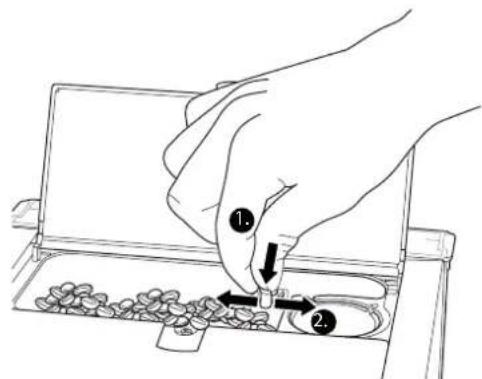
fig. 8: Setting the grinding fineness
7. Individual settings
7.1 Setting the grinding fineness
The grinding fineness affects the taste of the coffee. Select the grinding fineness according to the type of coffee you are using.

NOTE!
For a light roast, you should set a high fineness; for a dark roast a medium fineness is optimal. The roast is normally printed on the coffee package.

CAUTION!
If the fineness setting is moved without grinding coffee beans, the grinder can be damaged.
- Only shift the grinding fineness while the grinder is grinding.
Here's how to set the grinding fineness:
- Place a cup on the cup tray below the coffee-milk dispenser of the device and adjust the height of the coffee-milk dispenser to the cup height.
- Open the cover of the bean container.
- By turning the e-Select, select a beverage.
- Press the e-Select.
The grinder grinds.
- Now set the fineness of the beans on the grinder regulator. To do this, press the grinder regulator down and turn it (Fig. 8).
• to the right in order to set a high fineness.
• to the left in order to set a coarse fineness.
As soon as you release the grinder regulator, it snaps upward automatically.
- Close the cover of the bean container again.
7.2 Making individual settings for coffee preparation
You can adapt the coffee preparation individually to your personal preferences. For each coffee speciality, there are various preparation variants available.
The preparation variants listed below are available.
Preparation variants
| Espresso/coffee |
| Quantity of coffee (espresso) | 20 – 50 ml |
| Quantity of coffee (coffee) | 50 – 250 ml |
| Coffee strength very weak, weak, normal, strong, very strong |
| Temperature coffee very low, low, normal, high, very high |
| Cappuccino/Latte macchiato |
| Quantity Coffee 20 – 250 ml |
| Quantity Milk 10 – 30 seconds |
| Coffee strength very weak, weak, normal, strong, very strong |
| Temperature coffee very low, low, normal, high, very high |
| Pause time (only Latte macchiato) 15, 30, 45 seconds |
| White coffee |
| Quantity Coffee 20 – 250 ml |
| Quantity Milk 10 – 30 seconds |
| Coffee strength very weak, weak, normal, strong, very strong |
| Temperature coffee very low, low, normal, high, very high |
| Milk/milk froth |
| Quantity Milk 10 – 30 seconds |

NOTE!
- The total fi ll quantity of the cup for beverages prepared with milk consists of the coffee quantity plus the milk/milk froth quantity! Take this into account when selecting your cup.
- The pause time influences the layering for a latte macchiato.
7.2.1 Storing personal settings
Here's how to make your own settings for the coffee preparation:
- Press the menu button for at least 3 seconds and use the e-Select to select the
BEV. SETT. MENU.
The display shows a list with the coffee specialities.
- Select the coffee speciality whose settings you would like to change.
The display shows the setting possibilities for the selected coffee speciality (see previous table: "Preparation variants").
- Select the setting that you would like to change.
The display shows a bar with the currently selected setting.
- Turn the e-Select to change the setting and
- confirm the change by pressing the e-Select or
- cancel the change with the button under the display fi eld X.
- Then press the menu button to exit the menu.
The display shows the "Beverage selection" view. The settings are saved. You can apply the settings by selecting the symbol with the respective button (▶ "6.3 Preparing coffee specialities").
7.2.2 Making personal settings quickly (Quick Select)
You can also make the settings temporarily before the preparation:
- In the "Beverage selection" view, press the button
• 📁to change the set coffee strength.
• Oto change the set water quantity.
• to change the set milk/milk foam quantity.
-
Turn the e-Select and select the desired setting.
-
Press the e-Select.
The selected coffee speciality is prepared with the settings you have selected. However the setting is not saved.
7.3 Changing device settings
7.3.1 Language
This is how to select the preferred language for the display.
- Press the menu button for at least 3 seconds and use the e-Select to select the
DEVICE MENU.
- Then select the LANGUAGE menu option.
The display shows the available languages.
-
Turn the e-Select to change the setting and
-
confirm your entry by pressing the e-Select or
- cancel the change with the button under the display fi eld X

NOTE!
If you have accidentally selected the incorrect language, you can reset the device to the factory setting (▶ "7.3.5 Resetting the device in case of incorrect language setting").
7.3.2 Water hardness
Select the water hardness according to the water hardness in your household. Depending on the setting, your device will inform you when it is time to perform a descaling.

NOTE!
In order to operate your device optimally, set the water hardness according to the specifications of your water utility. Use the included water test strip to determine the water hardness.
Here's how to set the water hardness:
-
Press the menu button for at least 3 seconds and use the e-Select to select the
DEVICE MENU.
-
Then select the
WATER HARDNESS
menu option.
The display shows:
HARDNESS 4 PLEASE SELECT WATER HARDNESS.
- Turn the e-Select to change the setting and
- confirm your entry by pressing the e-Select or
- cancel the change with the button under the display field

7.3.3 Water filter
If you want to use a water filter, you must set the device accordingly. The water filter improves the water quality and the device requires less descaling if properly operated.

NOTE!
SEVERIN recommends the use of a SEVERIN water filter for high water quality. The water filters are effective for approx. 4 to 8 weeks before they have to be changed.
This is how to set the device for the use of a water filter:
-
Press the menu button for at least 3 seconds and use the e-Select to select the DEVICE MENU.
-
Then select the
WATER FILTER
menu option.
The display shows:
USE WATER FILTER?
- Select with the e-Select
• YES, if you want to insert a water filter in the water tank or
• NO, if you do not want to use a water filter.
- Follow the steps in section ▶ "8.2.6 Changing water filter.
7.3.4 Energy savings options
The device has an automatic power-off function. You can set the time period individually this way.
Here's how to set the energy savings options:
-
Press the menu button for at least 3 seconds and use the e-Select to select the
DEVICE MENU.
-
Then select the
AUTO POWER-OFF
menu option.
The display shows the currently-set time for the automatic power-off.
-
Turn the e-Select to change the setting and
-
confirm your entry by pressing the e-Select or
- cancel the change with the button under the display field X.
7.3.5 Resetting the device
You can reset the device to the factory settings. All personal settings for coffee preparation are thus lost and the device starts once again with the commissioning (▶ "5. Switching on for the first time").
Here's how to reset the device to the factory settings:
- Press the menu button for at least 3 seconds and use the e-Select to select the
DEVICE MENU.
- Then select the
FACTORY SETTINGS
menu option.
The display shows:
RESET TO DEFAULT
-
Press
-
the button under the display field factory settings or
√ if you want to call up the
- the button under the display field personal settings.
X if you want to keep your
For a short while, the display shows the note:
DEVICE SET TO FACTORY DEFAULTS.
All settings are reset. You must now perform all the basic settings again
(▶ „5. Switching on for the first time").
Resetting the device in case of incorrect language setting
If you have accidentally set an incorrect language and a resetting via the menu is not possible, you can also reset the device to the delivery state as follows:
- Switch the device off.
-
Press the outer two buttons below the display and hold them down.
-
Switch the device on and continue to hold the buttons down until the message
DEVICE SET TO FACTORY DEFAULTS
appears on the display.
All settings are reset. You must now perform all the basic settings again
(▶ „5. Switching on for the first time“).
8. Maintenance
In order to enjoy your device for a long time and indulge in consistently good coffee, you must clean the device regularly. Following is an overview of all necessary cleaning activities. Some parts of the device are dishwasher-safe or must be cleaned by hand, others are handled by the device itself thanks to an appropriate cleaning program.
Overview
| daily |
| Empty and clean water tank, drip tray and grounds container and clean coffee-milk dispenser and milk foamer (► "8.1 Daily cleaning") |
| Rinse milk system(► "8.2.2 Rinsing the milk system") |
| Clean the milk system (► "8.2.3 Cleaning the milk system") |
| when the device indicates |
| Run the cleaning program(► "8.2.4 Cleaning program") |
| Descaling (► "8.2.5 Descaling") |
| Change water filter(► "8.2.6 Changing the water filter") |
| weekly |
| Clean brewing unit(► "8.3 Cleaning the brewing unit") |
| at the latest every 2 months |
| Change water filter(► "8.2.6 Changing the water filter") |
| Dispose of the used milk tube and replace with a new one. |
| when necessary |
| Clean bean container(► "8.4 Cleaning the bean container") |
| Wipe the housing of the device with a damp soft cloth without abrasives. |
Maintenance tips
Your device informs you about important maintenance intervals via a message on the display (see overview). In this case, you can start the cleaning program directly:
- Press the button under the display field √ and perform the steps described in the corresponding chapters of these instructions starting with step 3.
- If you want to run the cleaning program later, press the button under the display field X
natural_image
Line drawing of a hand operating a device with a control panel and buttons (no text or symbols)
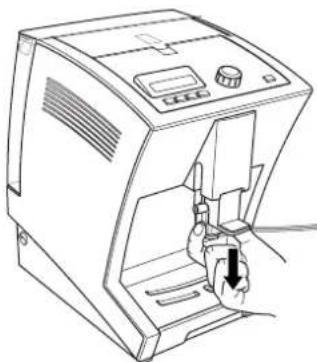
fig. 9: Removing the coffee-milk dispenser
natural_image
Line drawing of a hand holding a small electronic component with a black arrow pointing to it (no text or symbols)
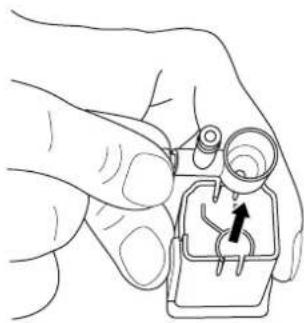
fig. 10: Removing the milk foaming nozzle

CAUTION!
If you do not run the cleaning program right away, a warning symbol appears on the display as a reminder that you must still start a cleaning program. You can continue to use the device without limitation after the display of a maintenance message. However, the message will continue to be displayed in order to remind you about the necessity of maintenance and to prevent damage to the device.
– Clean the machine as soon as you can.
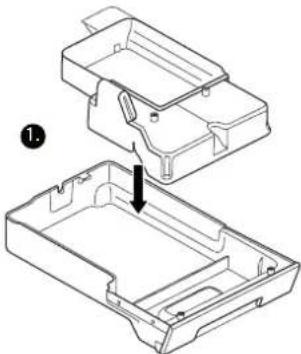
natural_image
Technical line drawing of a mechanical housing component with an arrow indicating assembly (no text or symbols present)
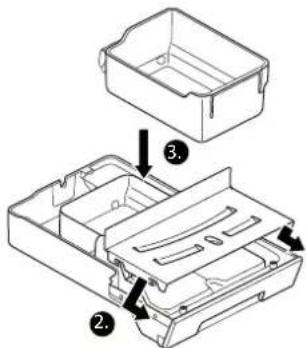
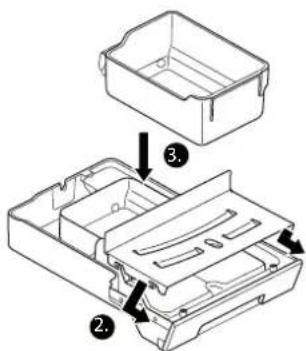
fig. 11: Assembling the drip tray
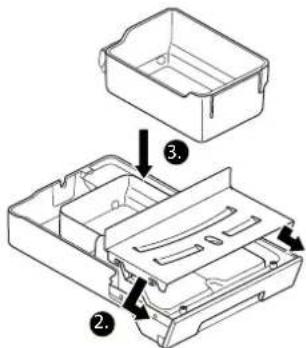

NOTE!
Milk is a food that can spoil. For your health, you should therefore always clean the milk unit as soon as possible.
8.1 Daily cleaning
Clean the water tank, the drip tray, the coffee-milk dispenser and the milk frother every day.
- Switch the device off and disconnect the plug.
- Remove the water tank and remove a water filter if you are using one.
-
Clean the water tank with clear water and a mild detergent and dry it inside and outside with a lint-free cloth.
-
Re-insert the water filter if necessary.
-
Pull the drip tray out of the device.
-
Remove the grounds container and empty the coffee grounds.
- Clean both parts and the cup tray with clear water and a mild detergent.
- Remove the coffee-milk dispenser by pulling the whole part out of the guide towards the bottom using the handles (Fig. 9).
- Pull the milk frother nozzle at the connection for the supply out of the coffee-milk dispenser towards the top (Fig. 10).
- Clean both parts with clear water and mild detergent.
- Put the drip tray (Fig. 11) and the other parts back together and push the drip tray and the coffee-milk dispenser back into the device.

NOTE!
The drip tray including grounds container and the coffee-milk dispenser can be put in the dishwasher.
8.2 Cleaning programs
The device has automatic cleaning programs. These can be started from the menu at any time.
8.2.1 Rinsing the device
The coffee system is rinsed automatically each time it is switched on/off in order to guarantee evenly high quality of the coffee preparation. In addition, you can actively trigger a rinsing.
- Press the menu button for at least 3 seconds and use the e-Select to select the
CLEANING
menu option.
- Then select the
RINSING
menu option.
and press the e-Select.
The display shows:
RINSING
The rinsing is complete as soon as "Beverage selection" appears again.
8.2.2 Rinsing the milk system
For hygienic reasons, as well as to ensure consistently high quality when preparing milk coffee specialities, the milk system must be rinsed.
- Press the menu button for at least 3 seconds and use the e-Select to select the CLEANING menu option.
- Then select the
MILK UNIT
menu option and press the e-Select.
The display shows:
PLEASE PLACE MILK TUBE IN WATER JAR
- Plug the milk tube onto the connection on the coffee-milk dispenser and hang the other end of the tube in a container filled with 200 ml clear, cold water.
- Press the e-Select to confirm.
The display shows:
PLEASE POSITION CONTAINER
- Place a cup with a capacity of at least 200 ml on the cup tray below the coffee-milk dispenser of the device and adjust the height of the coffee-milk dispenser to the cup height.
- Press the e-Select to confirm.
The display shows:
MILK UNIT
The rinsing of the milk system is complete as soon as "Beverage selection" appears again.
8.2.3 Cleaning the milk system
The device has a milk cleaning program that can remove milk residues with the SEVERIN milk system cleaner.

NOTE!
The cleaning process takes approx. 5 minutes.
-
Press the menu button for at least 3 seconds and use the e-Select to select the
CLEARING menu element.
-
Select the
CLEAN MILK SYS.
menu option and press the e-Select.
The display shows:
PLEASE PLACE MILK TUBE IN CLEANING LIQUID
-
Fill a container with 200 ml warm water and 20 ml SEVERIN milk system cleanser. (mixing ratio 1:10)
-
Plug the milk tube onto the connection on the coffee-milk dispenser and hang the other end of the tube in the container filled with cleaning solution.
-
Press the e-Select to confirm.
The display shows:
PLEASE POSITION CONTAINER
-
Place a cup with a capacity of at least 200 ml on the cup tray below the coffee-milk dispenser of the device and adjust the height of the coffee-milk dispenser to the cup height.
-
Press the e-Select to confirm.
The display shows:
CLEAN MILK SYS.
The cleaning of the milk system begins.
-
As soon as the command
PLEASE PLACE MILK TUBE IN WATER JAR
appears on the display, hang the end of the milk tube in a container filled with 200 ml clear, cold water.
-
Press the e-Select to confirm.
The display shows:
PLEASE POSITION CONTAINER
-
Empty the cup underneath and place it underneath the coffee-milk dispenser of the device on the cup tray once again.
-
Press the e-Select to confirm.
The display shows:
RINSING
The rinsing of the milk system is complete as soon as "Beverage selection" appears again.
8.2.4 Cleaning program
The device has a cleaning program with which the coffee system can be rinsed and cleaned intensively with a cleaning tablet.

NOTE!
If you carry out the cleaning program immediately after the display of a cleaning message, steps 1 and 2 can be omitted.
-
Press the menu button for at least 3 seconds and use the e-Select to select the CLEANING menu option.
-
Then select the
CLEANING
menu option and press the e-Select.
The display shows:
PLEASE FILL WATER CONTAINER
- Fill the water tank with water up to the max. marking and place it on the device.
- Press the e-Select to confirm.
The display shows:
- Remove the drip tray and empty it together with the grounds container.
- Re-assemble all parts and push the drip tray back into the device.
- Place a 500 ml container under the coffee-milk dispenser on the cup tray.
- Press the e-Select.
The display shows:
CLEANING
- As soon as the command
PLEASE ADD CLEANING TAB
appears on the display, open the cover of the bean container, place the cleaning tablet into the powder dosing chamber and turn the powder dosing chamber.

NOTE!
The SEVERIN cleaning tablets are optimally attuned to your device and can be purchased from your SEVERIN dealer.
- Turn the powder dosing chamber back to the initial position and close the cover of the bean container.
- Press the e-Select to continue.
The display shows:
CLEANING

NOTE!
The cleaning process can take as long as 15 minutes.
- As soon as the command
PLEASE EMPTY GROUNDS CONTAINER
appears on the display, repeat steps 5 and 6.
The cleaning program is complete as soon as the "Beverage selection" view is displayed again.
8.2.5 Descaling
Depending on the water hardness of the drinking water used and the application of a water filter, the device must be descaled at particular intervals so that no scale builds up in the system.

CAUTION!
Due to unsuitable descaler and if the descaling is not performed regularly, the device can be damaged.
- Use SEVERIN descaler, never vinegar or other acidic substances.
– Descale regularly.

NOTE!
- The descaling process can take as long as 30 minutes.
- No warranty is made for damage that is due to devices which have not been descaled regularly.
- If you descale immediately after the display of a cleaning message, steps 1 and 2 can be omitted.
-
If you use a water filter, remove it before descaling.
-
Press the menu button for at least 3 seconds and use the e-Select to select the
CLEANING
menu option.
- Then select the
DESCALING
menu option and press the e-Select.
The display shows:
PLEASE EMPTY GROUNDS CONTAINER
- Remove the drip tray and empty it together with the grounds container.
- Re-assemble all parts and push the drip tray back into the device.
- Press the e-Select to continue.
The display shows:
PLEASE ADD DESCALING SOLUTION
- Fill the water tank halfway with lukewarm tap water and place the descaling tablets in the water tank.
-
Wait until the descaling tablets are completely dissolved and then place the water tank on the device.
-
Press the e-Select to continue.
The display shows: DESCALING
- As soon as the command
EMPTY DRIP TRAY
appears on the display, empty the drip tray and grounds container again.
Clean the parts with clear tap water and reinsert them into the device.
- Press the e-Select to continue.
The display shows:
RINSE CONTAINER AND FILL WITH WATER
-
Rinse the water tank thoroughly with clear tap water, then fill it to the top and put it back on the device.
-
Press the e-Select to continue.
The display shows:
DESCALING
The descaling is complete as soon as "Beverage selection" appears again..
8.2.6 Changing the water filter
For constant water quality, the water filter must be changed regularly.

NOTE!
If you change the water filter immediately after the display of a cleaning message, steps 1 and 2 can be omitted.
- Press the menu button for at least 3 seconds and use the e-Select to select the
CLEANING
menu option.
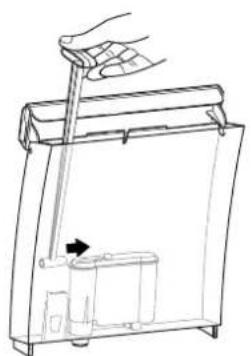
natural_image
Line drawing of a hand using a tool to lift a small container (no text or symbols)
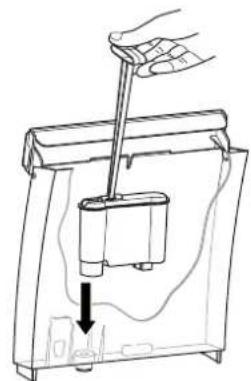
natural_image
Line drawing of a hand using a tool to lift a small cylindrical component into a container, with a downward arrow indicating motion (no text or symbols)
fig. 12: Inserting the insertion aid on water filter fig. 13: Inserting the water filter
- Then select the
WATER FILTER
menu option and press the e-Select.
The display shows:
INSERT NEW WATER FILTER
- Place the insertion aid into the water filter (fig. 12) and remove the water filter.
- Fill the water tank halfway with cold drinking water.
- Use insertion aid to insert a new water filter (fig. 13) and remove insertion aid again.
- Replace the water tank on the device.
- Press the e-Select.
The display shows:
RINSING
The filter change is complete as soon as the "Beverage selection" view is displayed again.

fig. 14: Removing the cover of the brewing unit
8.3 Cleaning the brewing unit
In addition to an integrated cleaning program, the device also offers you the opportunity to clean the brewing unit manually. For this, the brewing unit can be removed as follows:
- Switch the device off and disconnect the plug.
- Remove the water tank and shake out the remaining water.
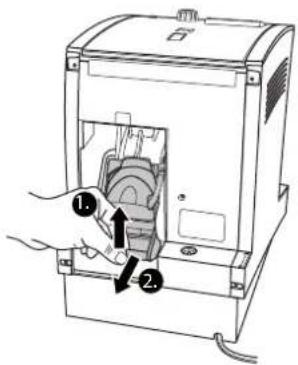
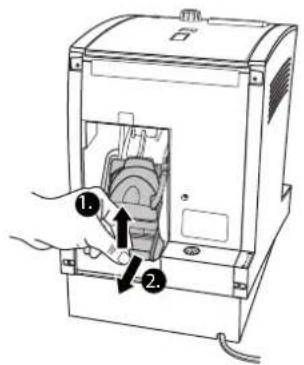
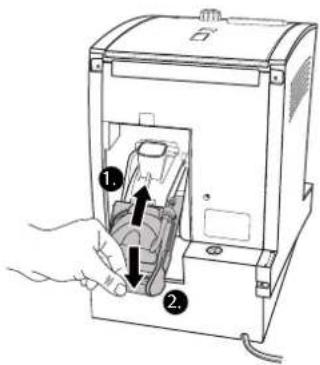
- Open the door of the brewing unit on the back side of the device by pressing down on the tabs with your thumbs and pulling towards you (Fig. 14).
- Remove the brewing unit door completely.
The brewing unit is now visible.
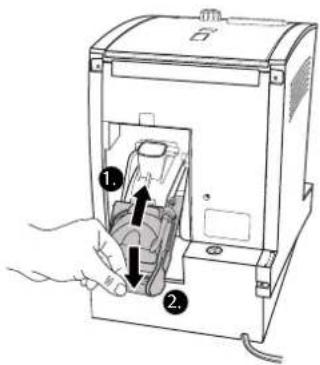
- Pull the red lever of the brewing unit upwards and pull the brewing unit carefully downwards at an angle out of the machine (Fig. 15).
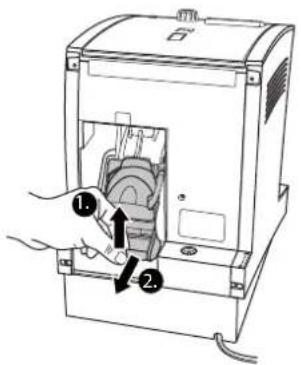
fig. 15: Pulling out the brewing unit
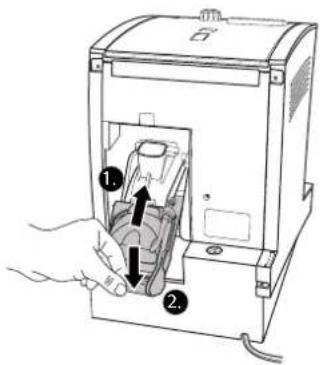
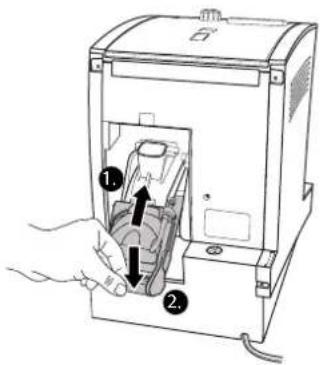
fig. 16: Inserting the brewing unit
- Clean the brewing unit under running water.

CAUTION!
Incorrect handling of the brewing unit can cause damage to the brewing unit.
The brewing unit is now inserted correctly.
- Close the brewing unit again with the door.
8.4 Cleaning the bean container
The bean container must be cleaned regularly to prevent contamination. Ideally this is done when the supply of beans is used up and before new beans are added.

CAUTION!
There is a danger of damage to the device if objects fall into the bean feed.
– Switch the device off before starting cleaning.
- Do not let any objects fall into the bean feed.
Here's how to clean the bean container:
- Switch the device off and disconnect the plug.
- Wipe the bean container with a dry, lint-free cloth.
9. Troubleshooting
In addition to the cleaning messages, the display also shows an appropriate message in case of a technical fault.

WARNING!
When opening a defective unit, there is a danger of injury.
- Never repair a defective device yourself. In case of a technical defect, contact SEVERIN customer service.
| Display Cause Remedy | |
| PLEASE CLEAN BREWING UNIT. | The brewing unit must be cleaned. | Clean the brewing unit (▶ "8.3 Cleaning the brewing unit"). |
| CHECK BREWING UNIT AND INSERT. | The brewing unit is not inserted correctly. | Insert the brewing unit (▶ "8.3 Cleaning the brewing unit"). |
| PLEASE RE-FILL BEANS. | The bean container is full. | Fill the bean container with beans (▶ "Preparing coffee specialities"). |
| BREWING UNIT DOOR OPEN. | The door of the brewing unit is not closed. | Properly close the door of the brewing unit. |
| WATER SUP-PLY ERROR. | There is not enough water in the brewing unit. | Clean the water tank and especially its water discharge on the floor.Fill the water tank halfway with cold drinking water and if necessary, remove the water filter and replace it.If problem persists, also clean the brewing unit (▶ "8.3 Cleaning the brewing unit"). |
| SYSTEM ER-ROR. PLEASE RESTART. | A system error oc-curred. | Switch the device off for sev-eral seconds and then switch it on again. |
| GRINDER BLOCKED. CONTACT SER-VICE. | The grinder is blocked. | Set the grinder regulator on the coarsest fineness (▶ "7.1 Setting the grinding fineness") and prepare another coffee speciality.If this solves the problem, set the desired fineness again for the next beverage.If problem persists, contact customer service. |
| SYSTEM ER-ROR. CONTACT SERVICE. | A system error oc-curred. | Call customer service. |
| Display Cause Remedy | |
| TOO MUCH COFFEE.CANCEL | There is too much coffee in the brewing unit. | Clean the brewing unit (► "8.3 Cleaning the brewing unit").In the future, set a higher fineness (► "7.1 Adjusting the grinding fineness").When you have added ground coffee via the powder dosing chamber, reduce the amount of coffee powder which you are putting in for a cup portion. |
| TOO LITTLE GROUND COFFEE.CANCEL | There is too little coffee in the brewing unit. | Clean the brewing unit (► "8.3 Cleaning the brewing unit").In the future, set a coarser fineness (► "7.1 Adjusting the grinding fineness").When you have added ground coffee via the powder dosing chamber, increase the amount of coffee powder which you are putting in for a cup portion. |
For questions to customer service in case of a fault, you can display various device information on the display.
This is how to display device information:
-
Press the menu button for at least 3 seconds and use the e-Select to select the
INFORMATION
menu option.
-
If you want to have the number of beverages prepared with the device displayed, select the
QUANTITY INFO
menu option.
The display shows the number of coffee specialities prepared since the commissioning of the device.
- If you want to have information about the device type displayed, select the
DEVICE INFO
menu option.
The display shows the serial number of the device, the device version and the software version.
10. Disposal

CAUTION!
Incorrect disposal can cause environmental damage.
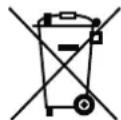
- The device contains electronic components and it therefore must not be disposed of in household rubbish.
- For disposal, heed the local disposal regulations and, in case of doubt, ask the responsible authorities about proper disposal.
- Dispose of packaging materials that are no longer needed according to local regulations.
- Dispose of the water filter in the normal household garbage.
- At the end of its life, hand the device over to a collection point for electrical scrap.
11. Tips for perfect coffee enjoyment
| Situation Tip | |
| What kinds of coffee can I use? All types of coffee that are not treated after roasting (e.g. with sugar). |
| My espresso/coffee does not have any foam. | Use the right beans. |
| The coffee is old. Use fresh coffee beans. |
| Set a higher fineness (► "7.1 Adjusting the grinding fineness"). |
| Increase the quantity of coffee (► "6.3.1 Preparing coffee or espresso"). |
| My espresso tastes bitter. Use a different type of coffee. |
| Reduce the strength of the coffee (► "6.3.1 Preparing coffee or espresso"). |
| Set a higher fineness (► "7.1 Adjusting the grinding fineness"). |
| Set a lower brewing temperature (► "7.2 Making individual settings for coffee preparation"). |
| Situation Tip | |
| My espresso tastes sour. Use a different type of coffee. |
| Reduce the strength of the coffee (► "6.3.1 Preparing coffee or espresso"). |
| Clean the water tank and fill it with fresh water. |
| Set a higher brewing temperature (► "7.2 Making individual settings for coffee preparation"). |
| My espresso tastes bland. Set a coarser fineness (► "7.1 Adjusting the grinding fineness"). |
| Increase the quantity of coffee (► "6.3.1 Preparing coffee or espresso"). |
| The coffee flows very slowly out of the coffee-milk dispenser. | Set a coarser fineness (► "7.1 Adjusting the grinding fineness"). |
| Clean the coffee-milk dispenser (► "8.1 Daily cleaning"). |
| Descale the device (► "8.2.5 Descaling"). |
| What type of milk is best for frothing? | Types of milk with a high protein content. The fat content does not matter. The milk should be slightly cooled. |
| My milk does not foam. Clean the milk system(▶ "8.2.3 Cleaning the milk system"). |
| When should I insert the water filter? | Recommendation: starting at 10 °dH |
12. License provisions
FreeRTOS
This product contains software which is linked to FreeRTOS V6.0.1 - Copyright (C) 2009 Real Time Engineers Ltd. FreeRTOS V6.0.1 is licensed by the modified GNU General Public License (GPL) Version 2 (see the licensing section of http://www.FreeRTOS.org for full details). FreeRTOS V6.0.1 source code can be provided upon request to our Customer Service Center (email address) until October 2014. A charge for performing the request may apply.
AVR-Libc
Portions of avr-libc are Copyright (c) 1999-2010 Werner Boellmann, Dean Camera, Pieter Conradie, Brian Dean, Keith Gudger, Wouter van Gulik, Bjoern Haase, Steinar Haugen, Peter Jansen, Reinhard Jessich, Magnus Johansson, Harald Kipp, Carlos Lamas, Cliff Lawson, Artur Lipowski, Marek Michalkiewicz, Todd C. Miller, Rich Neswold, Colin O'Flynn, Bob Paddock, Andrey Pashchenko, Reiner Patommel, Florin-Viorel Petrov, Alexander Popov, Michael Rickman, Theodore A. Roth, Juergen Schilling, Philip Soeberg, Anatoly Sokolov, Nils Kristian Strom, Michael Stumpf, Stefan Swanepoel, Helmut Wallner, Eric B. Weddington, Joerg Wunsch, Dmitry Xmelkov, Atmel Corporation, egnite Software GmbH, The Regents of the University of California.
All rights reserved.
Redistribution and use in source and binary forms, with or without modification, are permitted provided that the following conditions are met:
* Redistributions of source code must retain the above copyright notice, this list of conditions and the following disclaimer.
* Redistributions in binary form must reproduce the above copyright notice, this list of conditions and the following disclaimer in the documentation and/or other materials provided with the distribution.
* Neither the name of the copyright holders nor the names of contributors may be used to endorse or promote products derived from this software without specific prior written permission.
THIS SOFTWARE IS PROVIDED BY THE COPYRIGHT HOLDERS AND CONTRIBUTORS "AS IS" AND ANY EXPRESS OR IMPLIED WARRANTIES, INCLUDING, BUT NOT LIMITED TO, THE IMPLIED WARRANTIES OF MERCHANTABILITY AND FITNESS FOR A PARTICULAR PURPOSE ARE DISCLAIMED. IN NO EVENT SHALL THE COPYRIGHT OWNER OR CONTRIBUTORS BE LIABLE FOR ANY DIRECT, INDIRECT, INCIDENTAL, SPECIAL, EXEMPLARY, OR CONSEQUENTIAL DAMAGES (INCLUDING, BUT NOT LIMITED TO, PROCUREMENT OF SUBSTITUTE GOODS OR SERVICES; LOSS OF USE, DATA, OR PROFITS; OR BUSINESS INTERRUPTION) HOWEVER CAUSED AND ON ANY THEORY OF LIABILITY, WHETHER IN CONTRACT, STRICT LIABILITY, OR TORT (INCLUDING NEGLIGENCE OR OTHERWISE) ARISING IN ANY WAY OUT OF THE USE OF THIS SOFTWARE, EVEN IF ADVISED OF THE POSSIBILITY OF SUCH DAMAGE.
GB
Sommaire
natural_image
Line drawing of a hand using a tool to lift a device into a container (no text or symbols)
natural_image
Line drawing of a hand holding a device with a downward arrow indicating a component (no text or symbols present)
L'écran affiche :
RINCER L'UNITÉ
natural_image
Line drawing of a hand pouring coins into a tray with scattered beans (no text or symbols)
natural_image
Line drawing of a hand using a coffee machine to open a cup, with no text or symbols present.
natural_image
Line drawing of a medical device with an inset showing a hand inserting a cable into a seat (no text or symbols present)
natural_image
Line drawing of a hand inserting a coin into a laptop case (no text or symbols)
natural_image
Line drawing of a hand operating a device with a control panel and buttons (no text or symbols)
natural_image
Line drawing of a hand holding a small mechanical component with a black arrow pointing to it (no text or symbols)
natural_image
Technical line drawing of a mechanical housing component with an arrow indicating assembly (no text or symbols present)
natural_image
Line drawing of a hand using a tool to lift a container, with an arrow indicating the handle (no text or symbols present)
natural_image
Line drawing of a hand using a lever to lift a device into a container (no text or symbols)
préparation
This product contains software which is linked to FreeRTOS V6.0.1 - Copyright (C) 2009 Real Time Engineers Ltd. FreeRTOS V6.0.1 is licensed by the modified GNU General Public License (GPL) Version 2 (see the licensing section of http://www.FreeRTOS.org for full details). FreeRTOS V6.0.1 source code can be provided upon request to our Customer Service Center (email address) until October 2014. A charge for performing the request may apply.
AVR-Libc
Portions of avr-libc are Copyright (c) 1999-2010 Werner Boellmann, Dean Camera, Pieter Conradie, Brian Dean, Keith Gudger, Wouter van Gulik, Bjoern Haase, Steinar Haugen, Peter Jansen, Reinhard Jessich, Magnus Johansson, Harald Kipp, Carlos Lamas, Cliff Lawson, Artur Lipowski, Marek Michalkiewicz, Todd C. Miller, Rich Neswold, Colin O'Flynn, Bob Paddock, Andrey Pashchenko, Reiner Patommel, Florin-Viorel Petrov, Alexander Popov, Michael Rickman, Theodore A. Roth, Juergen Schilling, Philip Soeberg, Anatoly Sokolov, Nils Kristian Strom, Michael Stumpf, Stefan Swanepoel, Helmut Wallner, Eric B. Weddington, Joerg Wunsch, Dmitry Xmelkov, Atmel Corporation, egnite Software GmbH, The Regents of the University of California.
All rights reserved.
Redistribution and use in source and binary forms, with or without modification, are permitted provided that the following conditions are met:
* Redistributions of source code must retain the above copyright notice, this list of conditions and the following disclaimer.
* Redistributions in binary form must reproduce the above copyright notice, this list of conditions and the following disclaimer in the documentation and/or other materials provided with the distribution.
* Neither the name of the copyright holders nor the names of contributors may be used to endorse or promote products derived from this software without specific prior written permission.
THIS SOFTWARE IS PROVIDED BY THE COPYRIGHT HOLDERS AND CONTRIBUTORS "AS IS" AND ANY EXPRESS OR IMPLIED WARRANTIES, INCLUDING, BUT NOT LIMITED TO, THE IMPLIED WARRANTIES OF MERCHANTABILITY AND FITNESS FOR A PARTICULAR PURPOSE ARE DISCLAIMED. IN NO EVENT SHALL THE COPYRIGHT OWNER OR CONTRIBUTORS BE LIABLE FOR ANY DIRECT, INDIRECT, INCIDENTAL, SPECIAL, EXEMPLARY, OR CONSEQUENTIAL DAMAGES (INCLUDING, BUT NOT LIMITED TO, PROCUREMENT OF SUBSTITUTE GOODS OR SERVICES; LOSS OF USE, DATA, OR PROFITS; OR BUSINESS INTERRUPTION) HOWEVER CAUSED AND ON ANY THEORY OF LIABILITY, WHETHER IN CONTRACT, STRICT LIABILITY, OR TORT (INCLUDING NEGLIGENCE OR OTHERWISE) ARISING IN ANY WAY OUT OF THE USE OF THIS SOFTWARE, EVEN IF ADVISED OF THE POSSIBILITY OF SUCH DAMAGE.
FR
Inhoudsopgave
- Algemeen....106
1.1. Begroeting ....106
natural_image
Line drawing of a hand using a lever to lift a device into a container (no text or symbols)
natural_image
Line drawing of a hand holding a device with a downward arrow indicating a component (no text or symbols present)
natural_image
Line drawing of a hand pouring seeds into a tray with scattered beans (no text or symbols)
natural_image
Line drawing of a hand using a coffee machine to press coffee into a cup (no text or symbols present)
natural_image
Line drawing of a medical device with an inset showing a hand inserting a cable into a seat (no text or symbols present)
natural_image
Line drawing of a hand inserting a coin into a tray with a magnifying glass (no text or symbols)
afb. 8: Maalgraad instellen
7. Individuele instellingen
7.1 Maalgraad instellen
natural_image
Line drawing of a hand operating a device with a control panel and buttons (no text or symbols)
natural_image
Line drawing of a hand holding a small mechanical component with a black arrow pointing to it (no text or symbols)
natural_image
Technical line drawing of a mechanical housing component with an arrow indicating assembly (no text or symbols present)

OPMERKING!
natural_image
Line drawing of a hand using a tool to lift a small container (no text or symbols)
natural_image
Line drawing of a hand using a tool to lift a device into a container (no text or symbols)
This product contains software which is linked to FreeRTOS V6.0.1 - Copyright (C) 2009 Real Time Engineers Ltd. FreeRTOS V6.0.1 is licensed by the modified GNU General Public License (GPL) Version 2 (see the licensing section of http://www.FreeRTOS.org for full details). FreeRTOS V6.0.1 source code can be provided upon request to our Customer Service Center (email address) until October 2014. A charge for performing the request may apply.
AVR-Libc
Portions of avr-libc are Copyright (c) 1999-2010 Werner Boellmann, Dean Camera, Pieter Conradie, Brian Dean, Keith Gudger, Wouter van Gulik, Bjoern Haase, Steinar Haugen, Peter Jansen, Reinhard Jessich, Magnus Johansson, Harald Kipp, Carlos Lamas, Cliff Lawson, Artur Lipowski, Marek Michalkiewicz, Todd C. Miller, Rich Neswold, Colin O'Flynn, Bob Paddock, Andrey Pashchenko, Reiner Patommel, Florin-Viorel Petrov, Alexander Popov, Michael Rickman, Theodore A. Roth, Juergen Schilling, Philip Soeberg, Anatoly Sokolov, Nils Kristian Strom, Michael Stumpf, Stefan Swanepoel, Helmut Wallner, Eric B. Weddington, Joerg Wunsch, Dmitry Xmelkov, Atmel Corporation, egnite Software GmbH, The Regents of the University of California.
All rights reserved.
Redistribution and use in source and binary forms, with or without modification, are permitted provided that the following conditions are met:
* Redistributions of source code must retain the above copyright notice, this list of conditions and the following disclaimer.
* Redistributions in binary form must reproduce the above copyright notice, this list of conditions and the following disclaimer in the documentation and/or other materials provided with the distribution.
* Neither the name of the copyright holders nor the names of contributors may be used to endorse or promote products derived from this software without specific prior written permission.
THIS SOFTWARE IS PROVIDED BY THE COPYRIGHT HOLDERS AND CONTRIBUTORS "AS IS" AND ANY EXPRESS OR IMPLIED WARRANTIES, INCLUDING, BUT NOT LIMITED TO, THE IMPLIED WARRANTIES OF MERCHANTABILITY AND FITNESS FOR A PARTICULAR PURPOSE ARE DISCLAIMED. IN NO EVENT SHALL THE COPYRIGHT OWNER OR CONTRIBUTORS BE LIABLE FOR ANY DIRECT, INDIRECT, INCIDENTAL, SPECIAL, EXEMPLARY, OR CONSEQUENTIAL DAMAGES (INCLUDING, BUT NOT LIMITED TO, PROCUREMENT OF SUBSTITUTE GOODS OR SERVICES; LOSS OF USE, DATA, OR PROFITS; OR BUSINESS INTERRUPTION) HOWEVER CAUSED AND ON ANY THEORY OF LIABILITY, WHETHER IN CONTRACT, STRICT LIABILITY, OR TORT (INCLUDING NEGLIGENCE OR OTHERWISE) ARISING IN ANY WAY OUT OF THE USE OF THIS SOFTWARE, EVEN IF ADVISED OF THE POSSIBILITY OF SUCH DAMAGE.
NL
Índice
fig. 1: Vista general del aparato
natural_image
Line drawing of a hand using a tool to lift a device into a container (no text or symbols)
natural_image
Line drawing of a hand holding a device with a downward arrow indicating a component (no text or symbols present)
natural_image
Line drawing of a hand pouring seeds into a tray with scattered beans (no text or symbols)
natural_image
Line drawing of a hand using a coffee machine to press coffee into a cup (no text or symbols present)
natural_image
Line drawing of a medical device with an inset showing a hand inserting a cable into a seat (no text or symbols present)
fig. 6: Conectar el manguito de leche
natural_image
Line drawing of a hand inserting a coin into a laptop case (no text or symbols)
natural_image
Line drawing of a hand operating a portable electronic device with control panel and buttons (no text or symbols)
natural_image
Line drawing of a hand holding a small mechanical component with a black arrow pointing to it (no text or symbols present)
natural_image
Technical line drawing of a mechanical housing component with an arrow indicating assembly (no text or symbols present)
fig. 11: Montar la bandeja de goteo

iNOTA!
natural_image
Line drawing of a hand using a tool to lift a small container (no text or symbols)
natural_image
Line drawing of a hand using a tool to lift a small cylindrical component into a container, with an arrow indicating downward motion (no text or symbols)
This product contains software which is linked to FreeRTOS V6.0.1 - Copyright (C) 2009 Real Time Engineers Ltd. FreeRTOS V6.0.1 is licensed by the modified GNU General Public License (GPL) Version 2 (see the licensing section of http://www.FreeRTOS.org for full details). FreeRTOS V6.0.1 source code can be provided upon request to our Customer Service Center (email address) until October 2014. A charge for performing the request may apply.
AVR-Libc
Portions of avr-libc are Copyright (c) 1999-2010 Werner Boellmann, Dean Camera, Pieter Conradie, Brian Dean, Keith Gudger, Wouter van Gulik, Bjoern Haase, Steinar Haugen, Peter Jansen, Reinhard Jessich, Magnus Johansson, Harald Kipp, Carlos Lamas, Cliff Lawson, Artur Lipowski, Marek Michalkiewicz, Todd C. Miller, Rich Neswold, Colin O'Flynn, Bob Paddock, Andrey Pashchenko, Reiner Patommel, Florin-Viorel Petrov, Alexander Popov, Michael Rickman, Theodore A. Roth, Juergen Schilling, Philip Soeberg, Anatoly Sokolov, Nils Kristian Strom, Michael Stumpf, Stefan Swanepoel, Helmut Wallner, Eric B. Weddington, Joerg Wunsch, Dmitry Xmelkov, Atmel Corporation, egnite Software GmbH, The Regents of the University of California.
All rights reserved.
Redistribution and use in source and binary forms, with or without modification, are permitted provided that the following conditions are met:
* Redistributions of source code must retain the above copyright notice, this list of conditions and the following disclaimer.
* Redistributions in binary form must reproduce the above copyright notice, this list of conditions and the following disclaimer in the documentation and/or other materials provided with the distribution.
* Neither the name of the copyright holders nor the names of contributors may be used to endorse or promote products derived from this software without specific prior written permission.
THIS SOFTWARE IS PROVIDED BY THE COPYRIGHT HOLDERS AND CONTRIBUTORS "AS IS" AND ANY EXPRESS OR IMPLIED WARRANTIES, INCLUDING, BUT NOT LIMITED TO, THE IMPLIED WARRANTIES OF MERCHANTABILITY AND FITNESS FOR A PARTICULAR PURPOSE ARE DISCLAIMED. IN NO EVENT SHALL THE COPYRIGHT OWNER OR CONTRIBUTORS BE LIABLE FOR ANY DIRECT, INDIRECT, INCIDENTAL, SPECIAL, EXEMPLARY, OR CONSEQUENTIAL DAMAGES (INCLUDING, BUT NOT LIMITED TO, PROCUREMENT OF SUBSTITUTE GOODS OR SERVICES; LOSS OF USE, DATA, OR PROFITS; OR BUSINESS INTERRUPTION) HOWEVER CAUSED AND ON ANY THEORY OF LIABILITY, WHETHER IN CONTRACT, STRICT LIABILITY, OR TORT (INCLUDING NEGLIGENCE OR OTHERWISE) ARISING IN ANY WAY OUT OF THE USE OF THIS SOFTWARE, EVEN IF ADVISED OF THE POSSIBILITY OF SUCH DAMAGE.
ES
Indice
- In generale....174
natural_image
Line drawing of a hand using a lever to lift a device into a container (no text or symbols)
natural_image
Line drawing of a hand holding a device with a scroll arrow pointing to the interior (no text or symbols)
natural_image
Line drawing of a hand pouring seeds into a tray with scattered beans (no text or symbols)
natural_image
Line drawing of a hand using a coffee maker to press coffee into a cup (no text or symbols present)
natural_image
Line drawing of a medical device with an inset showing a hand inserting a cable into a seat (no text or symbols present)
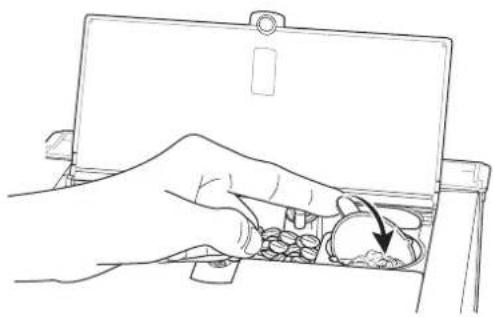
natural_image
Line drawing of a hand inserting a coin into a tray with a magnifying glass (no text or symbols)
natural_image
Line drawing of a hand operating a device with a control panel and buttons (no text or symbols)
natural_image
Line drawing of a hand holding a small mechanical component with a black arrow pointing to it (no text or symbols present)
natural_image
Technical line drawing of a mechanical housing component with an arrow indicating assembly (no text or symbols present)
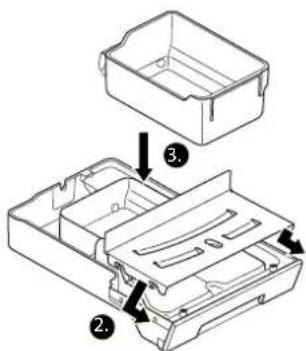
natural_image
Line drawing of a hand using a tool to lift a small container (no text or symbols)
natural_image
Line drawing of a hand using a tool to lift a device into a container (no text or symbols)
preparazione
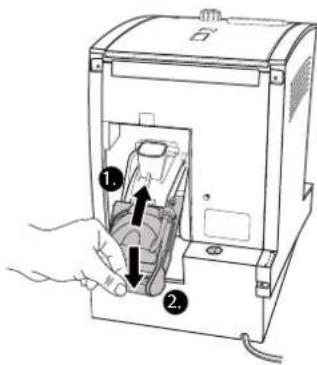
This product contains software which is linked to FreeRTOS V6.0.1 - Copyright (C) 2009 Real Time Engineers Ltd. FreeRTOS V6.0.1 is licensed by the modified GNU General Public License (GPL) Version 2 (see the licensing section of http://www.FreeRTOS.org for full details). FreeRTOS V6.0.1 source code can be provided upon request to our Customer Service Center (email address) until October 2014. A charge for performing the request may apply.
AVR-Libc
Portions of avr-libc are Copyright (c) 1999-2010 Werner Boellmann, Dean Camera, Pieter Conradie, Brian Dean, Keith Gudger, Wouter van Gulik, Bjoern Haase, Steinar Haugen, Peter Jansen, Reinhard Jessich, Magnus Johansson, Harald Kipp, Carlos Lamas, Cliff Lawson, Artur Lipowski, Marek Michalkiewicz, Todd C. Miller, Rich Neswold, Colin O'Flynn, Bob Paddock, Andrey Pashchenko, Reiner Patommel, Florin-Viorel Petrov, Alexander Popov, Michael Rickman, Theodore A. Roth, Juergen Schilling, Philip Soeberg, Anatoly Sokolov, Nils Kristian Strom, Michael Stumpf, Stefan Swanepoel, Helmut Wallner, Eric B. Weddington, Joerg Wunsch, Dmitry Xmelkov, Atmel Corporation, egnite Software GmbH, The Regents of the University of California.
All rights reserved.
Redistribution and use in source and binary forms, with or without modification, are permitted provided that the following conditions are met:
* Redistributions of source code must retain the above copyright notice, this list of conditions and the following disclaimer.
* Redistributions in binary form must reproduce the above copyright notice, this list of conditions and the following disclaimer in the documentation and/or other materials provided with the distribution.
* Neither the name of the copyright holders nor the names of contributors may be used to endorse or promote products derived from this software without specific prior written permission.
THIS SOFTWARE IS PROVIDED BY THE COPYRIGHT HOLDERS AND CONTRIBUTORS "AS IS" AND ANY EXPRESS OR IMPLIED WARRANTIES, INCLUDING, BUT NOT LIMITED TO, THE IMPLIED WARRANTIES OF MERCHANTABILITY AND FITNESS FOR A PARTICULAR PURPOSE ARE DISCLAIMED. IN NO EVENT SHALL THE COPYRIGHT OWNER OR CONTRIBUTORS BE LIABLE FOR ANY DIRECT, INDIRECT, INCIDENTAL, SPECIAL, EXEMPLARY, OR CONSEQUENTIAL DAMAGES (INCLUDING, BUT NOT LIMITED TO, PROCUREMENT OF SUBSTITUTE GOODS OR SERVICES; LOSS OF USE, DATA, OR PROFITS; OR BUSINESS INTERRUPTION) HOWEVER CAUSED AND ON ANY THEORY OF LIABILITY, WHETHER IN CONTRACT, STRICT LIABILITY, OR TORT (INCLUDING NEGLIGENCE OR OTHERWISE) ARISING IN ANY WAY OUT OF THE USE OF THIS SOFTWARE, EVEN IF ADVISED OF THE POSSIBILITY OF SUCH DAMAGE.
IT
Indholdsfortegnelse
- Generelt 208
1.1. Velkommen! 208
natural_image
Line drawing of a hand using a lever to lift a device into a container (no text or symbols)
natural_image
Line drawing of a hand holding a device with a scroll arrow pointing to the interior (no text or symbols)
→ Displayet viser:
SKYL APPARATET.
natural_image
Line drawing of a hand pouring seeds into a tray with scattered beans (no text or symbols)
natural_image
Line drawing of a hand using a coffee machine to press coffee into a cup (no text or symbols present)
natural_image
Line drawing of a medical device with an inset showing a hand inserting a cable into a seat (no text or symbols present)
natural_image
Line drawing of a hand inserting a coin into a tray with a magnifying glass (no text or symbols)
fig. 7: Drej pulverdoseringsvippen
fig. 8: Indstil formalingsgrad
7. Individuelle indstillinger
natural_image
Line drawing of a hand operating a portable electronic device with control panel and buttons (no text or symbols)
natural_image
Line drawing of a hand holding a small electronic component with a black arrow pointing to it (no text or symbols present)
natural_image
Technical line drawing of a mechanical housing component with an arrow indicating assembly (no text or symbols present)
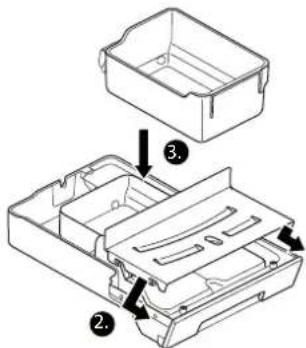
fig. 11: Saml drypbakke
→ Displayet viser: RENG∅R APP.

BEMAERK!
OPLÓS AFKALKNINGSTABLETTEN I VANDTANKEN.
natural_image
Line drawing of a hand using a tool to lift a container into a container (no text or symbols)
natural_image
Line drawing of a hand using a tool to lift a device into a container, with a downward arrow indicating motion (no text or symbols)
- Displayet viser:
AFKALK
Displayet viser: AFKALKNING
This product contains software which is linked to FreeRTOS V6.0.1 - Copyright (C) 2009 Real Time Engineers Ltd. FreeRTOS V6.0.1 is licensed by the modified GNU General Public License (GPL) Version 2 (see the licensing section of http://www.FreeRTOS.org for full details). FreeRTOS V6.0.1 source code can be provided upon request to our Customer Service Center (email address) until October 2014. A charge for performing the request may apply.
AVR-Libc
Portions of avr-libc are Copyright (c) 1999-2010 Werner Boellmann, Dean Camera, Pieter Conradie, Brian Dean, Keith Gudger, Wouter van Gulik, Bjoern Haase, Steinar Haugen, Peter Jansen, Reinhard Jessich, Magnus Johansson, Harald Kipp, Carlos Lamas, Cliff Lawson, Artur Lipowski, Marek Michalkiewicz, Todd C. Miller, Rich Neswold, Colin O'Flynn, Bob Paddock, Andrey Pashchenko, Reiner Patommel, Florin-Viorel Petrov, Alexander Popov, Michael Rickman, Theodore A. Roth, Juergen Schilling, Philip Soeberg, Anatoly Sokolov, Nils Kristian Strom, Michael Stumpf, Stefan Swanepoel, Helmut Wallner, Eric B. Weddington, Joerg Wunsch, Dmitry Xmelkov, Atmel Corporation, egnite Software GmbH, The Regents of the University of California.
All rights reserved.
Redistribution and use in source and binary forms, with or without modification, are permitted provided that the following conditions are met:
* Redistributions of source code must retain the above copyright notice, this list of conditions and the following disclaimer.
* Redistributions in binary form must reproduce the above copyright notice, this list of conditions and the following disclaimer in the documentation and/or other materials provided with the distribution.
* Neither the name of the copyright holders nor the names of contributors may be used to endorse or promote products derived from this software without specific prior written permission.
THIS SOFTWARE IS PROVIDED BY THE COPYRIGHT HOLDERS AND CONTRIBUTORS "AS IS" AND ANY EXPRESS OR IMPLIED WARRANTIES, INCLUDING, BUT NOT LIMITED TO, THE IMPLIED WARRANTIES OF MERCHANTABILITY AND FITNESS FOR A PARTICULAR PURPOSE ARE DISCLAIMED. IN NO EVENT SHALL THE COPYRIGHT OWNER OR CONTRIBUTORS BE LIABLE FOR ANY DIRECT, INDIRECT, INCIDENTAL, SPECIAL, EXEMPLARY, OR CONSEQUENTIAL DAMAGES (INCLUDING, BUT NOT LIMITED TO, PROCUREMENT OF SUBSTITUTE GOODS OR SERVICES; LOSS OF USE, DATA, OR PROFITS; OR BUSINESS INTERRUPTION) HOWEVER CAUSED AND ON ANY THEORY OF LIABILITY, WHETHER IN CONTRACT, STRICT LIABILITY, OR TORT (INCLUDING NEGLIGENCE OR OTHERWISE) ARISING IN ANY WAY OUT OF THE USE OF THIS SOFTWARE, EVEN IF ADVISED OF THE POSSIBILITY OF SUCH DAMAGE.
natural_image
Line drawing of a hand using a lever to lift a device into a container (no text or symbols)
natural_image
Line drawing of a hand holding a device with a scroll arrow pointing to the interior (no text or symbols)
→ Displayen visar:
natural_image
Line drawing of a hand pouring coins into a tray with scattered beans (no text or symbols)
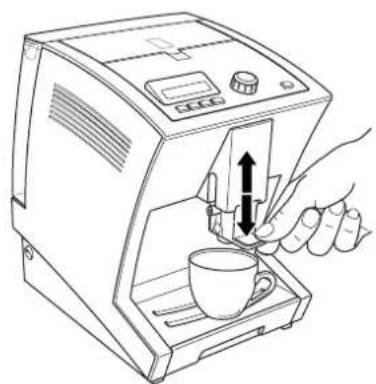
natural_image
Line drawing of a hand using a coffee maker to open a cup, with no text or symbols present.
natural_image
Line drawing of a medical device with an inset showing a hand inserting a cable into a seat (no text or symbols present)
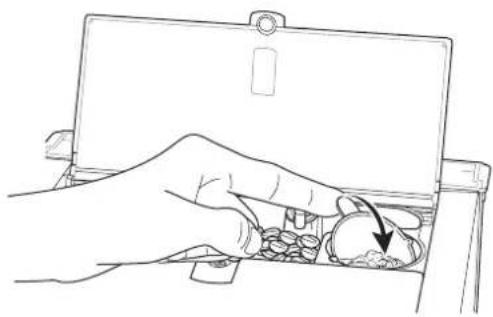
natural_image
Line drawing of a hand inserting a coin into a tray with a magnifying glass (no text or symbols)
natural_image
Line drawing showing a hand inserting a plug into a device, with no text or symbols present.
natural_image
Technical line drawing of a mechanical housing component with an arrow indicating assembly (no text or symbols present)
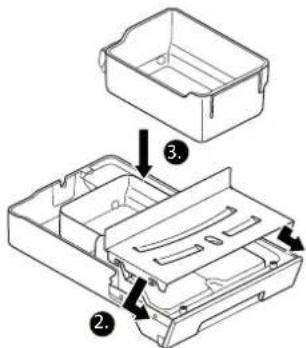
natural_image
Line drawing of a hand using a tool to lift a container, with an arrow indicating the handle (no text or symbols present)
natural_image
Line drawing of a hand using a tool to lift a component into a device (no text or symbols)
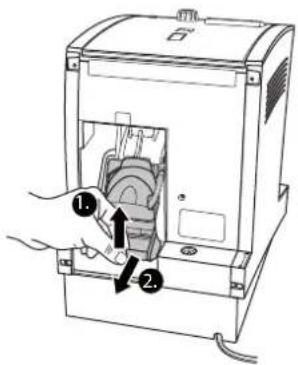
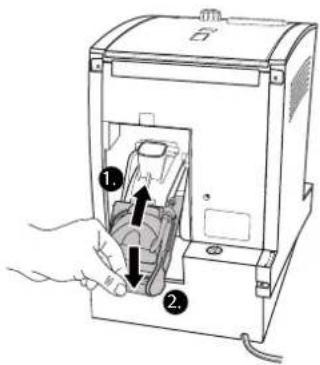
This product contains software which is linked to FreeRTOS V6.0.1 - Copyright (C) 2009 Real Time Engineers Ltd. FreeRTOS V6.0.1 is licensed by the modified GNU General Public License (GPL) Version 2 (see the licensing section of http://www.FreeRTOS.org for full details). FreeRTOS V6.0.1 source code can be provided upon request to our Customer Service Center (email address) until October 2014. A charge for performing the request may apply.
AVR-Libc
Portions of avr-libc are Copyright (c) 1999-2010 Werner Boellmann, Dean Camera, Pieter Conradie, Brian Dean, Keith Gudger, Wouter van Gulik, Bjoern Haase, Steinar Haugen, Peter Jansen, Reinhard Jessich, Magnus Johansson, Harald Kipp, Carlos Lamas, Cliff Lawson, Artur Lipowski, Marek Michalkiewicz, Todd C. Miller, Rich Neswold, Colin O'Flynn, Bob Paddock, Andrey Pashchenko, Reiner Patommel, Florin-Viorel Petrov, Alexander Popov, Michael Rickman, Theodore A. Roth, Juergen Schilling, Philip Soeberg, Anatoly Sokolov, Nils Kristian Strom, Michael Stumpf, Stefan Swanepoel, Helmut Wallner, Eric B. Weddington, Joerg Wunsch, Dmitry Xmelkov, Atmel Corporation, egnite Software GmbH, The Regents of the University of California.
All rights reserved.
Redistribution and use in source and binary forms, with or without modification, are permitted provided that the following conditions are met:
* Redistributions of source code must retain the above copyright notice, this list of conditions and the following disclaimer.
* Redistributions in binary form must reproduce the above copyright notice, this list of conditions and the following disclaimer in the documentation and/or other materials provided with the distribution.
* Neither the name of the copyright holders nor the names of contributors may be used to endorse or promote products derived from this software without specific prior written permission.
THIS SOFTWARE IS PROVIDED BY THE COPYRIGHT HOLDERS AND CONTRIBUTORS "AS IS" AND ANY EXPRESS OR IMPLIED WARRANTIES, INCLUDING, BUT NOT LIMITED TO, THE IMPLIED WARRANTIES OF MERCHANTABILITY AND FITNESS FOR A PARTICULAR PURPOSE ARE DISCLAIMED. IN NO EVENT SHALL THE COPYRIGHT OWNER OR CONTRIBUTORS BE LIABLE FOR ANY DIRECT, INDIRECT, INCIDENTAL, SPECIAL, EXEMPLARY, OR CONSEQUENTIAL DAMAGES (INCLUDING, BUT NOT LIMITED TO, PROCUREMENT OF SUBSTITUTE GOODS OR SERVICES; LOSS OF USE, DATA, OR PROFITS; OR BUSINESS INTERRUPTION) HOWEVER CAUSED AND ON ANY THEORY OF LIABILITY, WHETHER IN CONTRACT, STRICT LIABILITY, OR TORT (INCLUDING NEGLIGENCE OR OTHERWISE) ARISING IN ANY WAY OUT OF THE USE OF THIS SOFTWARE, EVEN IF ADVISED OF THE POSSIBILITY OF SUCH DAMAGE.
Sisällysluettelo
- Yleistä 272
1.1. Tervehdys 272
natural_image
Line drawing of a hand using a tool to lift a device into a container (no text or symbols)
natural_image
Line drawing of a hand pouring seeds into a tray with scattered beans (no text or symbols)
natural_image
Line drawing of a hand using a coffee maker to press coffee into a cup (no text or symbols present)
natural_image
Line drawing of a medical device with an inset showing a hand inserting a cable into a seat (no text or symbols present)
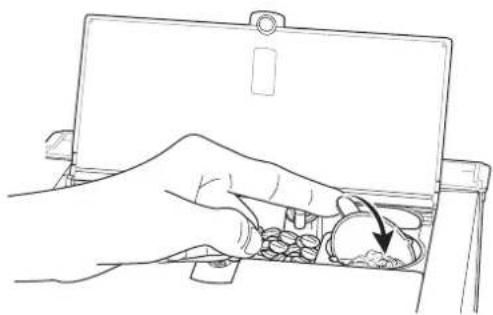
natural_image
Line drawing of a hand inserting a coin into a device (no text or symbols)
natural_image
Line drawing of a hand operating a portable electronic device with control panel and buttons (no text or symbols)
natural_image
Line drawing of a hand holding a small mechanical component with a black arrow pointing to it (no text or symbols present)
natural_image
Technical line drawing of a mechanical housing component with an arrow indicating assembly (no text or symbols present)
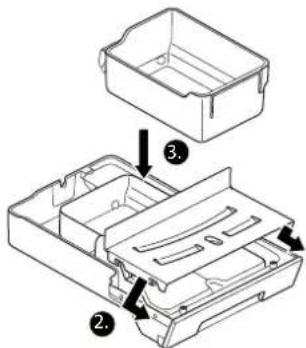
natural_image
Line drawing of a hand using a tool to lift a small container (no text or symbols)
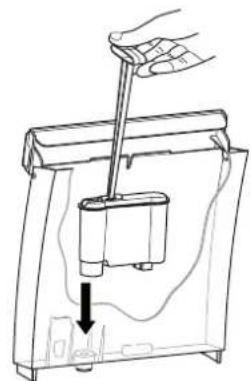
natural_image
Line drawing of a hand using a tool to press or install a device into a container, with no visible text or symbols.
ulos
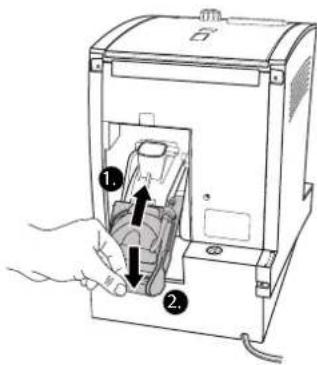
This product contains software which is linked to FreeRTOS V6.0.1 - Copyright (C) 2009 Real Time Engineers Ltd. FreeRTOS V6.0.1 is licensed by the modified GNU General Public License (GPL) Version 2 (see the licensing section of http://www.FreeRTOS.org for full details). FreeRTOS V6.0.1 source code can be provided upon request to our Customer Service Center (email address) until October 2014. A charge for performing the request may apply.
AVR-Libc
Portions of avr-libc are Copyright (c) 1999-2010 Werner Boellmann, Dean Camera, Pieter Conradie, Brian Dean, Keith Gudger, Wouter van Gulik, Bjoern Haase, Steinar Haugen, Peter Jansen, Reinhard Jessich, Magnus Johansson, Harald Kipp, Carlos Lamas, Cliff Lawson, Artur Lipowski, Marek Michalkiewicz, Todd C. Miller, Rich Neswold, Colin O'Flynn, Bob Paddock, Andrey Pashchenko, Reiner Patommel, Florin-Viorel Petrov, Alexander Popov, Michael Rickman, Theodore A. Roth, Juergen Schilling, Philip Soeberg, Anatoly Sokolov, Nils Kristian Strom, Michael Stumpf, Stefan Swanepoel, Helmut Wallner, Eric B. Weddington, Joerg Wunsch, Dmitry Xmelkov, Atmel Corporation, egnite Software GmbH, The Regents of the University of California.
All rights reserved.
Redistribution and use in source and binary forms, with or without modification, are permitted provided that the following conditions are met:
* Redistributions of source code must retain the above copyright notice, this list of conditions and the following disclaimer.
* Redistributions in binary form must reproduce the above copyright notice, this list of conditions and the following disclaimer in the documentation and/or other materials provided with the distribution.
* Neither the name of the copyright holders nor the names of contributors may be used to endorse or promote products derived from this software without specific prior written permission.
THIS SOFTWARE IS PROVIDED BY THE COPYRIGHT HOLDERS AND CONTRIBUTORS "AS IS" AND ANY EXPRESS OR IMPLIED WARRANTIES, INCLUDING, BUT NOT LIMITED TO, THE IMPLIED WARRANTIES OF MERCHANTABILITY AND FITNESS FOR A PARTICULAR PURPOSE ARE DISCLAIMED. IN NO EVENT SHALL THE COPYRIGHT OWNER OR CONTRIBUTORS BE LIABLE FOR ANY DIRECT, INDIRECT, INCIDENTAL, SPECIAL, EXEMPLARY, OR CONSEQUENTIAL DAMAGES (INCLUDING, BUT NOT LIMITED TO, PROCUREMENT OF SUBSTITUTE GOODS OR SERVICES; LOSS OF USE, DATA, OR PROFITS; OR BUSINESS INTERRUPTION) HOWEVER CAUSED AND ON ANY THEORY OF LIABILITY, WHETHER IN CONTRACT, STRICT LIABILITY, OR TORT (INCLUDING NEGLIGENCE OR OTHERWISE) ARISING IN ANY WAY OUT OF THE USE OF THIS SOFTWARE, EVEN IF ADVISED OF THE POSSIBILITY OF SUCH DAMAGE.
FI
Spis treści
natural_image
Line drawing of a hand using a tool to lift a device into a container (no text or symbols)
natural_image
Line drawing of a hand holding a device with a scroll arrow pointing to the interior (no text or symbols)
natural_image
Line drawing of a hand pouring seeds into a tray with scattered beans (no text or symbols)
natural_image
Line drawing of a hand using a coffee machine to press coffee into a cup (no text or symbols present)
natural_image
Line drawing of a medical device with an inset showing a hand inserting a cable into a seat (no text or symbols present)
natural_image
Line drawing of a hand inserting a coin into a clipboard (no text or symbols)
natural_image
Line drawing of a hand operating a portable electronic device with control panel and buttons (no text or symbols)
natural_image
Line drawing of a hand holding a small mechanical component with a black arrow pointing to it (no text or symbols present)
natural_image
Technical line drawing of a mechanical housing component with an arrow indicating assembly (no text or symbols present)

WSKAZÓWKA!
natural_image
Line drawing of a hand using a tool to lift a small container (no text or symbols)
natural_image
Line drawing of a hand using a lever to lift a device into a container (no text or symbols)
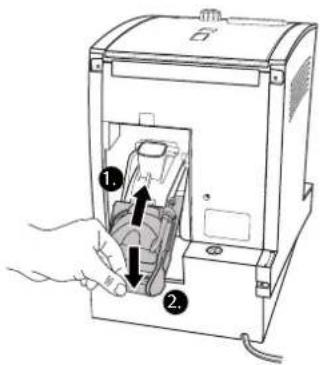
This product contains software which is linked to FreeRTOS V6.0.1 - Copyright (C) 2009 Real Time Engineers Ltd. FreeRTOS V6.0.1 is licensed by the modified GNU General Public License (GPL) Version 2 (see the licensing section of http://www.FreeRTOS.org for full details). FreeRTOS V6.0.1 source code can be provided upon request to our Customer Service Center (email address) until October 2014. A charge for performing the request may apply.
AVR-Libc
Portions of avr-libc are Copyright (c) 1999-2010 Werner Boellmann, Dean Camera, Pieter Conradie, Brian Dean, Keith Gudger, Wouter van Gulik, Bjoern Haase, Steinar Haugen, Peter Jansen, Reinhard Jessich, Magnus Johansson, Harald Kipp, Carlos Lamas, Cliff Lawson, Artur Lipowski, Marek Michalkiewicz, Todd C. Miller, Rich Neswold, Colin O'Flynn, Bob Paddock, Andrey Pashchenko, Reiner Patommel, Florin-Viorel Petrov, Alexander Popov, Michael Rickman, Theodore A. Roth, Juergen Schilling, Philip Soeberg, Anatoly Sokolov, Nils Kristian Strom, Michael Stumpf, Stefan Swanepoel, Helmut Wallner, Eric B. Weddington, Joerg Wunsch, Dmitry Xmelkov, Atmel Corporation, egnite Software GmbH, The Regents of the University of California.
All rights reserved.
Redistribution and use in source and binary forms, with or without modification, are permitted provided that the following conditions are met:
* Redistributions of source code must retain the above copyright notice, this list of conditions and the following disclaimer.
* Redistributions in binary form must reproduce the above copyright notice, this list of conditions and the following disclaimer in the documentation and/or other materials provided with the distribution.
* Neither the name of the copyright holders nor the names of contributors may be used to endorse or promote products derived from this software without specific prior written permission.
THIS SOFTWARE IS PROVIDED BY THE COPYRIGHT HOLDERS AND CONTRIBUTORS "AS IS" AND ANY EXPRESS OR IMPLIED WARRANTIES, INCLUDING, BUT NOT LIMITED TO, THE IMPLIED WARRANTIES OF MERCHANTABILITY AND FITNESS FOR A PARTICULAR PURPOSE ARE DISCLAIMED. IN NO EVENT SHALL THE COPYRIGHT OWNER OR CONTRIBUTORS BE LIABLE FOR ANY DIRECT, INDIRECT, INCIDENTAL, SPECIAL, EXEMPLARY, OR CONSEQUENTIAL DAMAGES (INCLUDING, BUT NOT LIMITED TO, PROCUREMENT OF SUBSTITUTE GOODS OR SERVICES; LOSS OF USE, DATA, OR PROFITS; OR BUSINESS INTERRUPTION) HOWEVER CAUSED AND ON ANY THEORY OF LIABILITY, WHETHER IN CONTRACT, STRICT LIABILITY, OR TORT (INCLUDING NEGLIGENCE OR OTHERWISE) ARISING IN ANY WAY OUT OF THE USE OF THIS SOFTWARE, EVEN IF ADVISED OF THE POSSIBILITY OF SUCH DAMAGE.
PL
natural_image
Line drawing of a hand using a tool to lift a device into a container (no text or symbols)
natural_image
Line drawing of a hand holding a device with a downward arrow indicating a component (no text or symbols present)
natural_image
Line drawing of a hand pouring seeds into a tray with scattered beans (no text or symbols)
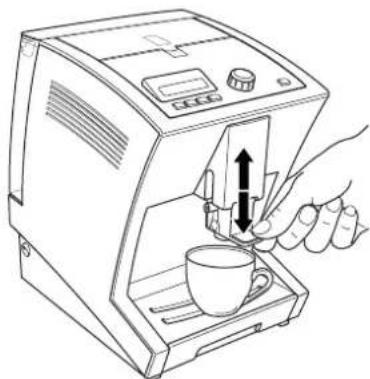
natural_image
Line drawing of a hand using a coffee machine to press coffee into a cup (no text or symbols present)
natural_image
Line drawing of a medical device with an inset showing a hand inserting a cable into a seat (no text or symbols present)
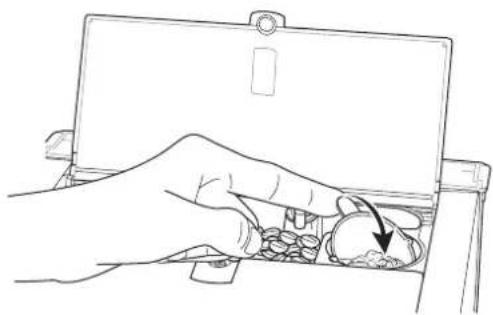
natural_image
Line drawing of a hand inserting a coin into a device (no text or symbols)
natural_image
Line drawing of a hand operating a device with a control panel and buttons (no text or symbols)
natural_image
Line drawing of a hand holding a small mechanical component with a black arrow pointing to it (no text or symbols)
natural_image
Technical line drawing of a mechanical housing component with an arrow indicating assembly (no text or symbols present)
i
ΥΠΟΔΕΙΞΗ!
CLEANING (Καθαρισμός)
CLEANING (Καθαρισμός)

ΥΠΟΔΕΙΞΗ!
natural_image
Line drawing of a hand using a tool to lift a small container (no text or symbols)
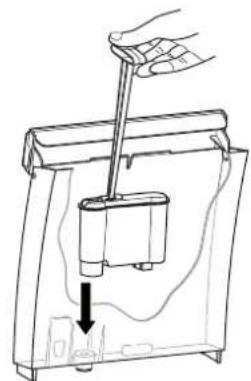
natural_image
Line drawing of a hand using a tool to lift a small cylindrical component into a container, with a downward arrow indicating motion (no text or symbols)
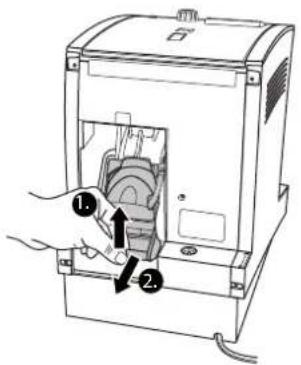
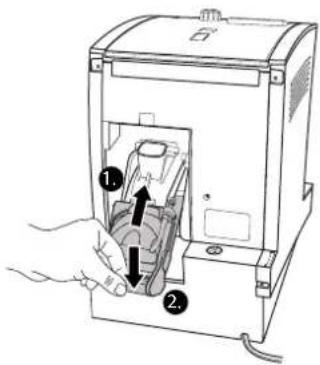
This product contains software which is linked to FreeRTOS V6.0.1 - Copyright (C) 2009 Real Time Engineers Ltd. FreeRTOS V6.0.1 is licensed by the modified GNU General Public License (GPL) Version 2 (see the licensing section of http://www.FreeRTOS.org for full details). FreeRTOS V6.0.1 source code can be provided upon request to our Customer Service Center (email address) until October 2014. A charge for performing the request may apply.
AVR-Libc
Portions of avr-libc are Copyright (c) 1999-2010 Werner Boellmann, Dean Camera, Pieter Conradie, Brian Dean, Keith Gudger, Wouter van Gulik, Bjoern Haase, Steinar Haugen, Peter Jansen, Reinhard Jessich, Magnus Johansson, Harald Kipp, Carlos Lamas, Cliff Lawson, Artur Lipowski, Marek Michalkiewicz, Todd C. Miller, Rich Neswold, Colin O'Flynn, Bob Paddock, Andrey Pashchenko, Reiner Patommel, Florin-Viorel Petrov, Alexander Popov, Michael Rickman, Theodore A. Roth, Juergen Schilling, Philip Soeberg, Anatoly Sokolov, Nils Kristian Strom, Michael Stumpf, Stefan Swanepoel, Helmut Wallner, Eric B. Weddington, Joerg Wunsch, Dmitry Xmelkov, Atmel Corporation, egnite Software GmbH, The Regents of the University of California.
All rights reserved.
Redistribution and use in source and binary forms, with or without modification, are permitted provided that the following conditions are met:
* Redistributions of source code must retain the above copyright notice, this list of conditions and the following disclaimer.
* Redistributions in binary form must reproduce the above copyright notice, this list of conditions and the following disclaimer in the documentation and/or other materials provided with the distribution.
* Neither the name of the copyright holders nor the names of contributors may be used to endorse or promote products derived from this software without specific prior written permission.
THIS SOFTWARE IS PROVIDED BY THE COPYRIGHT HOLDERS AND CONTRIBUTORS "AS IS" AND ANY EXPRESS OR IMPLIED WARRANTIES, INCLUDING, BUT NOT LIMITED TO, THE IMPLIED WARRANTIES OF MERCHANTABILITY AND FITNESS FOR A PARTICULAR PURPOSE ARE DISCLAIMED. IN NO EVENT SHALL THE COPYRIGHT OWNER OR CONTRIBUTORS BE LIABLE FOR ANY DIRECT, INDIRECT, INCIDENTAL, SPECIAL, EXEMPLARY, OR CONSEQUENTIAL DAMAGES (INCLUDING, BUT NOT LIMITED TO, PROCUREMENT OF SUBSTITUTE GOODS OR SERVICES; LOSS OF USE, DATA, OR PROFITS; OR BUSINESS INTERRUPTION) HOWEVER CAUSED AND ON ANY THEORY OF LIABILITY, WHETHER IN CONTRACT, STRICT LIABILITY, OR TORT (INCLUDING NEGLIGENCE OR OTHERWISE) ARISING IN ANY WAY OUT OF THE USE OF THIS SOFTWARE, EVEN IF ADVISED OF THE POSSIBILITY OF SUCH DAMAGE.
Оглавление
natural_image
Line drawing of a hand using a tool to lift a device into a container (no text or symbols)
natural_image
Line drawing of a hand holding a device with a scroll arrow pointing to the interior (no text or symbols)
natural_image
Line drawing of a hand pouring seeds into a tray with scattered beans (no text or symbols)
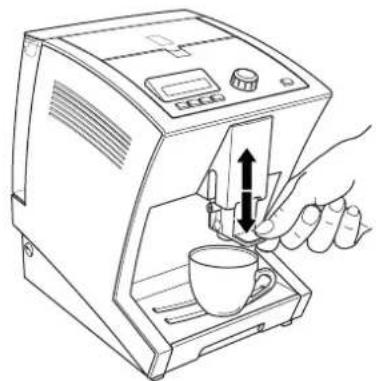
natural_image
Line drawing of a hand using a coffee machine to press coffee into a cup (no text or symbols present)
natural_image
Line drawing of a medical device with an inset showing a hand inserting a cable into a seat (no text or symbols present)
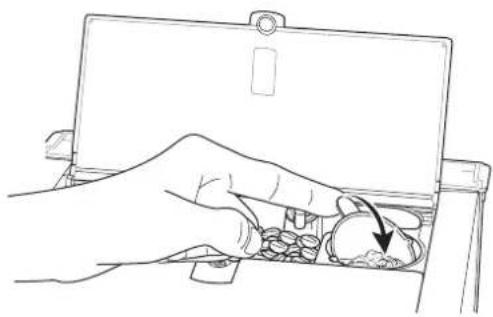
natural_image
Line drawing of a hand inserting a coin into a tray with a magnifying glass (no text or symbols)
natural_image
Line drawing of a portable electronic device with a hand inserting a plug into the front panel (no text or symbols)
natural_image
Hand holding a small electrical component with a black arrow indicating rotation (no text or symbols)
natural_image
Technical line drawing of a mechanical housing component with an arrow indicating assembly (no text or symbols present)
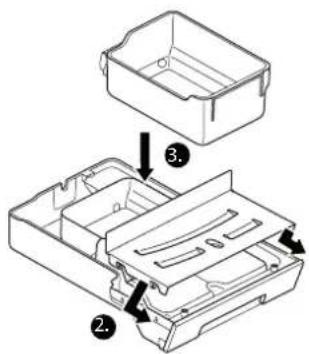
natural_image
Line drawing of a hand using a tool to lift a container into a container (no text or symbols)
natural_image
Line drawing of a hand using a tool to press or install a device into a container, with no visible text or symbols.
блока
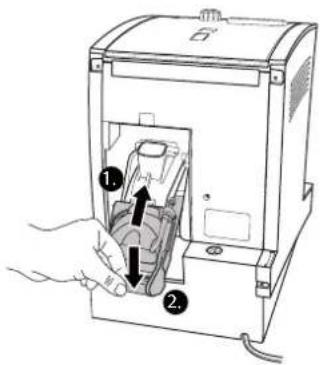
This product contains software which is linked to FreeRTOS V6.0.1 - Copyright (C) 2009 Real Time Engineers Ltd. FreeRTOS V6.0.1 is licensed by the modified GNU General Public License (GPL) Version 2 (see the licensing section of http://www.FreeRTOS.org for full details). FreeRTOS V6.0.1 source code can be provided upon request to our Customer Service Center (email address) until October 2014. A charge for performing the request may apply.
AVR-Libc
Portions of avr-libc are Copyright (c) 1999-2010 Werner Boellmann, Dean Camera, Pieter Conradie, Brian Dean, Keith Gudger, Wouter van Gulik, Bjoern Haase, Steinar Haugen, Peter Jansen, Reinhard Jessich, Magnus Johansson, Harald Kipp, Carlos Lamas, Cliff Lawson, Artur Lipowski, Marek Michalkiewicz, Todd C. Miller, Rich Neswold, Colin O'Flynn, Bob Paddock, Andrey Pashchenko, Reiner Patommel, Florin-Viorel Petrov, Alexander Popov, Michael Rickman, Theodore A. Roth, Juergen Schilling, Philip Soeberg, Anatoly Sokolov, Nils Kristian Strom, Michael Stumpf, Stefan Swanepoel, Helmut Wallner, Eric B. Weddington, Joerg Wunsch, Dmitry Xmelkov, Atmel Corporation, egnite Software GmbH, The Regents of the University of California.
All rights reserved.
Redistribution and use in source and binary forms, with or without modification, are permitted provided that the following conditions are met:
* Redistributions of source code must retain the above copyright notice, this list of conditions and the following disclaimer.
* Redistributions in binary form must reproduce the above copyright notice, this list of conditions and the following disclaimer in the documentation and/or other materials provided with the distribution.
* Neither the name of the copyright holders nor the names of contributors may be used to endorse or promote products derived from this software without specific prior written permission.
THIS SOFTWARE IS PROVIDED BY THE COPYRIGHT HOLDERS AND CONTRIBUTORS "AS IS" AND ANY EXPRESS OR IMPLIED WARRANTIES, INCLUDING, BUT NOT LIMITED TO, THE IMPLIED WARRANTIES OF MERCHANTABILITY AND FITNESS FOR A PARTICULAR PURPOSE ARE DISCLAIMED. IN NO EVENT SHALL THE COPYRIGHT OWNER OR CONTRIBUTORS BE LIABLE FOR ANY DIRECT, INDIRECT, INCIDENTAL, SPECIAL, EXEMPLARY, OR CONSEQUENTIAL DAMAGES (INCLUDING, BUT NOT LIMITED TO, PROCUREMENT OF SUBSTITUTE GOODS OR SERVICES; LOSS OF USE, DATA, OR PROFITS; OR BUSINESS INTERRUPTION) HOWEVER CAUSED AND ON ANY THEORY OF LIABILITY, WHETHER IN CONTRACT, STRICT LIABILITY, OR TORT (INCLUDING NEGLIGENCE OR OTHERWISE) ARISING IN ANY WAY OUT OF THE USE OF THIS SOFTWARE, EVEN IF ADVISED OF THE POSSIBILITY OF SUCH DAMAGE.
RU
Índice
natural_image
Line drawing of a hand using a tool to lift a device into a container (no text or symbols)
natural_image
Line drawing of a hand holding a device with a scroll arrow pointing to the interior (no text or symbols)
→ O visor mostra:
LAVAR UNIDADE
Sai água da saída de café/leite para a bandeja de gotas.
natural_image
Line drawing of a hand pouring seeds into a tray with scattered beans (no text or symbols)
natural_image
Line drawing of a hand using a coffee machine to press coffee into a cup (no text or symbols present)
natural_image
Line drawing of a medical device with an inset showing a hand inserting a cable into a seat (no text or symbols present)
fig. 6: Ligar o tubo de leite
natural_image
Line drawing of a hand inserting a coin into a clipboard (no text or symbols)
fig. 7: Virar o doseador basculante
- Prima o e-Select.
natural_image
Line drawing of a hand operating a device with a control panel and buttons (no text or symbols)
fig. 9: Retirar a saída de café/leite
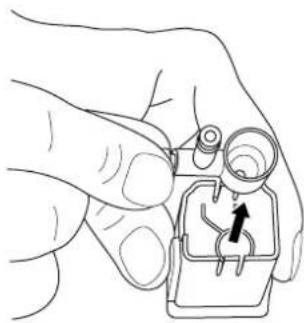
natural_image
Line drawing of a hand holding a small mechanical component with a black arrow pointing to it (no text or symbols)
natural_image
Technical line drawing of a mechanical housing component with an arrow indicating assembly (no text or symbols present)
fig. 11: Montar a bandeja de gotas
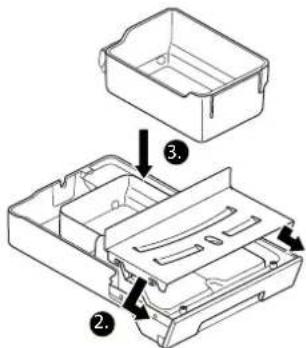

NOTA!
natural_image
Line drawing of a hand using a tool to lift a small container (no text or symbols)
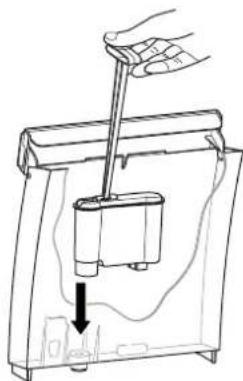
natural_image
Line drawing of a hand using a tool to lift a device into a container (no text or symbols)
This product contains software which is linked to FreeRTOS V6.0.1 - Copyright (C) 2009 Real Time Engineers Ltd. FreeRTOS V6.0.1 is licensed by the modified GNU General Public License (GPL) Version 2 (see the licensing section of http://www.FreeRTOS.org for full details). FreeRTOS V6.0.1 source code can be provided upon request to our Customer Service Center (email address) until October 2014. A charge for performing the request may apply.
AVR-Libc
Portions of avr-libc are Copyright (c) 1999-2010 Werner Boellmann, Dean Camera, Pieter Conradie, Brian Dean, Keith Gudger, Wouter van Gulik, Bjoern Haase, Steinar Haugen, Peter Jansen, Reinhard Jessich, Magnus Johansson, Harald Kipp, Carlos Lamas, Cliff Lawson, Artur Lipowski, Marek Michalkiewicz, Todd C. Miller, Rich Neswold, Colin O'Flynn, Bob Paddock, Andrey Pashchenko, Reiner Patommel, Florin-Viorel Petrov, Alexander Popov, Michael Rickman, Theodore A. Roth, Juergen Schilling, Philip Soeberg, Anatoly Sokolov, Nils Kristian Strom, Michael Stumpf, Stefan Swanepoel, Helmut Wallner, Eric B. Weddington, Joerg Wunsch, Dmitry Xmelkov, Atmel Corporation, egnite Software GmbH, The Regents of the University of California.
All rights reserved.
Redistribution and use in source and binary forms, with or without modification, are permitted provided that the following conditions are met:
* Redistributions of source code must retain the above copyright notice, this list of conditions and the following disclaimer.
* Redistributions in binary form must reproduce the above copyright notice, this list of conditions and the following disclaimer in the documentation and/or other materials provided with the distribution.
* Neither the name of the copyright holders nor the names of contributors may be used to endorse or promote products derived from this software without specific prior written permission.
THIS SOFTWARE IS PROVIDED BY THE COPYRIGHT HOLDERS AND CONTRIBUTORS "AS IS" AND ANY EXPRESS OR IMPLIED WARRANTIES, INCLUDING, BUT NOT LIMITED TO, THE IMPLIED WARRANTIES OF MERCHANTABILITY AND FITNESS FOR A PARTICULAR PURPOSE ARE DISCLAIMED. IN NO EVENT SHALL THE COPYRIGHT OWNER OR CONTRIBUTORS BE LIABLE FOR ANY DIRECT, INDIRECT, INCIDENTAL, SPECIAL, EXEMPLARY, OR CONSEQUENTIAL DAMAGES (INCLUDING, BUT NOT LIMITED TO, PROCUREMENT OF SUBSTITUTE GOODS OR SERVICES; LOSS OF USE, DATA, OR PROFITS; OR BUSINESS INTERRUPTION) HOWEVER CAUSED AND ON ANY THEORY OF LIABILITY, WHETHER IN CONTRACT, STRICT LIABILITY, OR TORT (INCLUDING NEGLIGENCE OR OTHERWISE) ARISING IN ANY WAY OUT OF THE USE OF THIS SOFTWARE, EVEN IF ADVISED OF THE POSSIBILITY OF SUCH DAMAGE.
RUP
목차
- 일반 사항 444
1.1 인사말 444
1.2사용 설명서 관련 지침 444
2.안전 관련 사항 444
2.1규정에 따른 사용 444
2.2 위험 445
3.기술데이터 447
4.개요 447
4.1 공급사양 447
4.2 액세서리 447
4.3 장치 448
- 최초 작동 449
6.커피 만들기 451
6.1 켜기/丑기 451
6.2 조작 451
6.3 커피 만들기 452
그림 1: 장치 보기
natural_image
Line drawing of a hand using a tool to lift a device into a container (no text or symbols)
natural_image
Line drawing of a hand holding a device with a scroll arrow pointing to the interior (no text or symbols)
디스플레이에 다음이 표시됩니다.
RINSING(세척)
natural_image
Line drawing of a hand pouring seeds into a tray with scattered beans (no text or symbols)
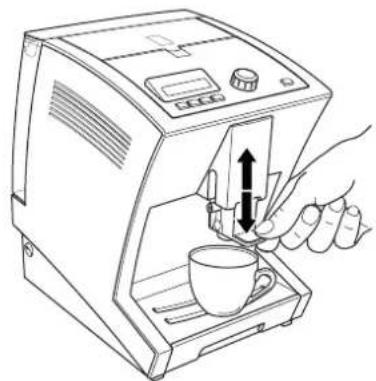
natural_image
Line drawing of a hand using a coffee machine to press coffee into a cup (no text or symbols present)
natural_image
Line drawing of a medical device with an inset showing a hand inserting a cable into a seat (no text or symbols present)
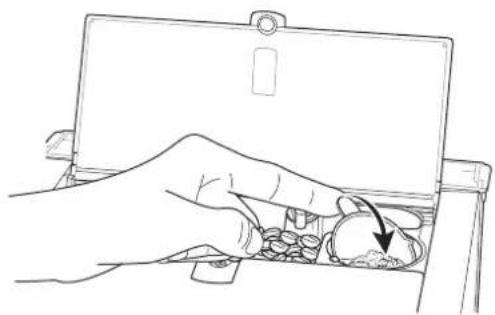
natural_image
Line drawing of a hand inserting a coin into a tray with an arrow indicating the direction (no text or symbols)
그림 8: 분쇄 밀도 설정
7. 개별 설정
7.1 분쇄 밀도 설정
natural_image
Line drawing of a portable electronic device with a hand operating the button (no text or symbols)
그림 9: 커피/우유 추출구
꺼내기
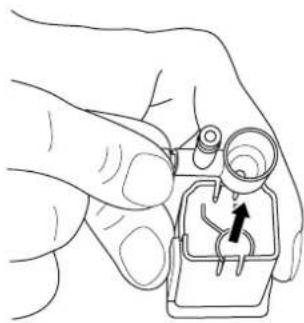
natural_image
Line drawing of a hand holding a small electronic component with a black arrow pointing to it (no text or symbols)
그림 10:우유 거품기 노즐
꺼내기

지침!
natural_image
Technical line drawing of a mechanical housing component with an arrow indicating assembly (no text or symbols present)
그림 11:드립 트레이 조립
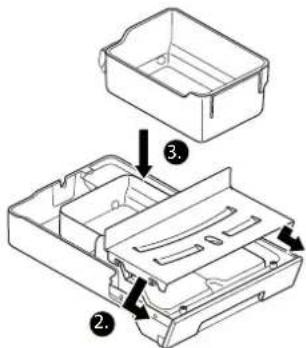
natural_image
Line drawing of a hand using a tool to lift a small container (no text or symbols)
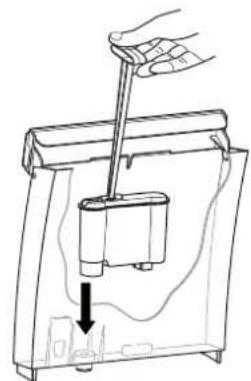
natural_image
Line drawing of a hand using a tool to lift a small cylindrical component into a container, with an arrow indicating downward motion (no text or symbols)
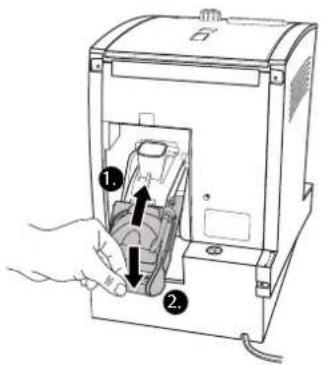
This product contains software which is linked to FreeRTOS V6.0.1 - Copyright (C) 2009 Real Time Engineers Ltd. FreeRTOS V6.0.1 is licensed by the modified GNU General Public License (GPL) Version 2 (see the licensing section of http://www.FreeRTOS.org for full details). FreeRTOS V6.0.1 source code can be provided upon request to our Customer Service Center (email address) until October 2014. A charge for performing the request may apply.
AVR-Libc
Portions of avr-libc are Copyright (c) 1999-2010 Werner Boellmann, Dean Camera, Pieter Conradie, Brian Dean, Keith Gudger, Wouter van Gulik, Bjoern Haase, Steinar Haugen, Peter Jansen, Reinhard Jessich, Magnus Johansson, Harald Kipp, Carlos Lamas, Cliff Lawson, Artur Lipowski, Marek Michalkiewicz, Todd C. Miller, Rich Neswold, Colin O'Flynn, Bob Paddock, Andrey Pashchenko, Reiner Patommel, Florin-Viorel Petrov, Alexander Popov, Michael Rickman, Theodore A. Roth, Juergen Schilling, Philip Soeberg, Anatoly Sokolov, Nils Kristian Strom, Michael Stumpf, Stefan Swanepoel, Helmut Wallner, Eric B. Weddington, Joerg Wunsch, Dmitry Xmelkov, Atmel Corporation, egnite Software GmbH, The Regents of the University of California.
All rights reserved.
Redistribution and use in source and binary forms, with or without modification, are permitted provided that the following conditions are met:
* Redistributions of source code must retain the above copyright notice, this list of conditions and the following disclaimer.
* Redistributions in binary form must reproduce the above copyright notice, this list of conditions and the following disclaimer in the documentation and/or other materials provided with the distribution.
* Neither the name of the copyright holders nor the names of contributors may be used to endorse or promote products derived from this software without specific prior written permission.
THIS SOFTWARE IS PROVIDED BY THE COPYRIGHT HOLDERS AND CONTRIBUTORS "AS IS" AND ANY EXPRESS OR IMPLIED WARRANTIES, INCLUDING, BUT NOT LIMITED TO, THE IMPLIED WARRANTIES OF MERCHANTABILITY AND FITNESS FOR A PARTICULAR PURPOSE ARE DISCLAIMED. IN NO EVENT SHALL THE COPYRIGHT OWNER OR CONTRIBUTORS BE LIABLE FOR ANY DIRECT, INDIRECT, INCIDENTAL, SPECIAL, EXEMPLARY, OR CONSEQUENTIAL DAMAGES (INCLUDING, BUT NOT LIMITED TO, PROCUREMENT OF SUBSTITUTE GOODS OR SERVICES; LOSS OF USE, DATA, OR PROFITS; OR BUSINESS INTERRUPTION) HOWEVER CAUSED AND ON ANY THEORY OF LIABILITY, WHETHER IN CONTRACT, STRICT LIABILITY, OR TORT (INCLUDING NEGLIGENCE OR OTHERWISE) ARISING IN ANY WAY OUT OF THE USE OF THIS SOFTWARE, EVEN IF ADVISED OF THE POSSIBILITY OF SUCH DAMAGE.
KR
فهرست المحتويات
natural_image
Line drawing of a hand holding a device with a scroll arrow pointing to the handle (no text or symbols present)
natural_image
Line drawing of a hand using a tool to press or install a device into a container (no text or symbols present)
natural_image
Line drawing of a hand using a coffee machine to press coffee into a cup (no text or symbols present)

natural_image
Line drawing of a hand pouring seeds into a tray with scattered beans (no text or symbols)
SA
natural_image
Line drawing of a hand inserting a coin into a clipboard (no text or symbols)
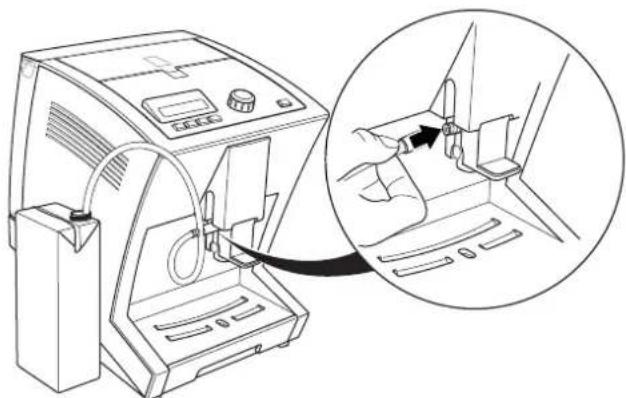
natural_image
Line drawing of a medical device with an inset showing a hand inserting a cable into a seat (no text or symbols present)
natural_image
Line drawing of a hand using a tool to lift a device into a container (no text or symbols)
natural_image
Line drawing of a hand using a tool to lift a container into a plastic tank (no text or symbols)
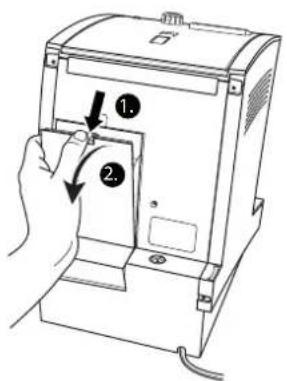
SA
This product contains software which is linked to FreeRTOS V6.0.1 - Copyright (C) 2009 Real Time Engineers Ltd. FreeRTOS V6.0.1 is licensed by the modified GNU General Public License (GPL) Version 2 (see the licensing section of http://www.FreeRTOS.org for full details). FreeRTOS V6.0.1 source code can be provided upon request to our Customer Service Center (email address) until October 2014. A charge for performing the request may apply.
AVR-Libc
Portions of avr-libc are Copyright (c) 1999-2010 Werner Boellmann, Dean Camera, Pieter Conradie, Brian Dean, Keith Gudger, Wouter van Gulik, Bjoem Haase, Steinar Haugen, Peter Jansen, Reinhard Jessich, Magnus Johansson, Harald Kipp, Carlos Lamas, Cliff Lawson, Artur Lipowski, Marek Michalkiewicz, Todd C. Miller, Rich Neswold, Colin O'Flynn, Bob Paddock, Andrey Pashchenko, Reiner Patommel, Florin-Viorel Petrov, Alexander Popov, Michael Rickman, Theodore A. Roth, Juergen Schilling, Philip Soeberg, Anatoly Sokolov, Nils Kristian Strom, Michael Stumpf, Stefan Swanepoel, Helmut Wallner, Eric B. Weddington, Joerg Wunsch, Dmitry Xmelkov, Atmel Corporation, egnite Software GmbH, The Regents of the University of California.
All rights reserved.
Redistribution and use in source and binary forms, with or without modification, are permitted provided that the following conditions are met:
* Redistributions of source code must retain the above copyright notice, this list of conditions and the following disclaimer.
* Redistributions in binary form must reproduce the above copyright notice, this list of conditions and the following disclaimer in the documentation and/or other materials provided with the distribution.
* Neither the name of the copyright holders nor the names of contributors may be used to endorse or promote products derived from this software without specific prior written permission. THIS SOFTWARE IS PROVIDED BY THE COPYRIGHT HOLDERS AND CONTRIBUTORS "AS IS" AND ANY EXPRESS OR IMPLIED WARRANTIES, INCLUDING, BUT NOT LIMITED TO, THE IMPLIED WARRANTIES OF MERCHANTABILITY AND FITNESS FOR A PARTICULAR PURPOSE ARE DISCLAIMED. IN NO EVENT SHALL THE COPYRIGHT OWNER OR CONTRIBUTORS BE LIABLE FOR ANY DIRECT, INDIRECT, INCIDENTAL, SPECIAL, EXEMPLARY, OR CONSEQUENTIAL DAMAGES (INCLUDING, BUT NOT LIMITED TO, PROCUREMENT OF SUBSTITUTE GOODS OR SERVICES; LOSS OF USE, DATA, OR PROFITS, OR BUSINESS INTERRUPTION) HOWEVER CAUSED AND ON ANY THEORY OF
SEVERIN
www.severin.de