One Foundation BT EMDA001 - Hi-fi system HOUSE OF MARLEY - Free user manual and instructions
Find the device manual for free One Foundation BT EMDA001 HOUSE OF MARLEY in PDF.
Download the instructions for your Hi-fi system in PDF format for free! Find your manual One Foundation BT EMDA001 - HOUSE OF MARLEY and take your electronic device back in hand. On this page are published all the documents necessary for the use of your device. One Foundation BT EMDA001 by HOUSE OF MARLEY.
USER MANUAL One Foundation BT EMDA001 HOUSE OF MARLEY
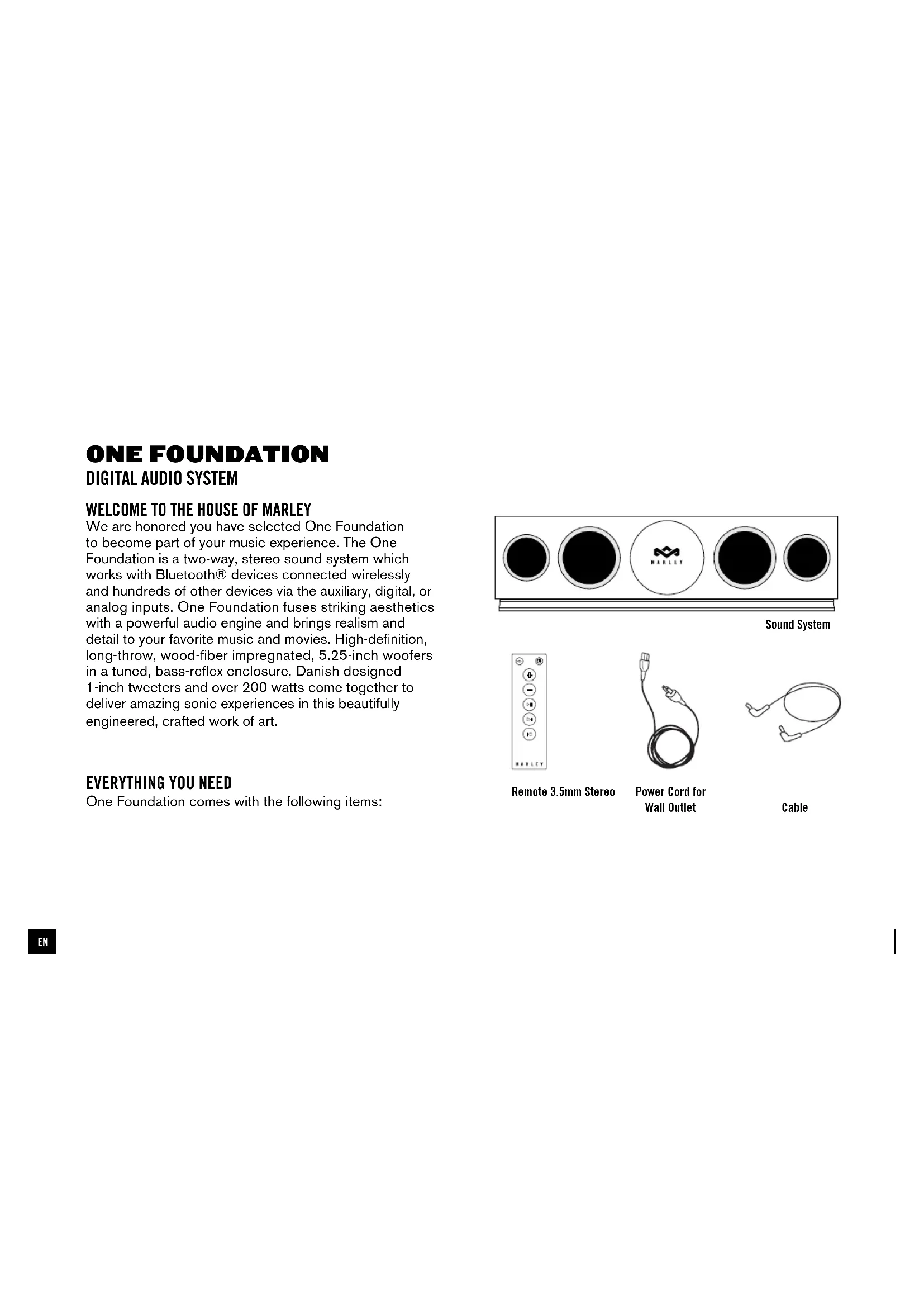
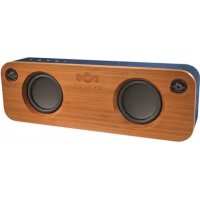
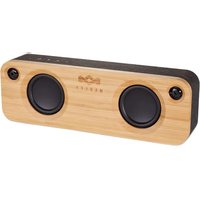
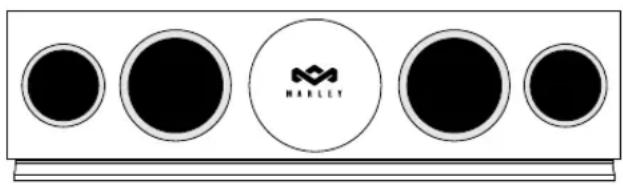
We are honored you have selected One Foundation to become part of your music experience. The One Foundation is a two-way, stereo sound system which works with Bluetooth® devices connected wirelessly and hundreds of other devices via the auxiliary, digital, or analog inputs. One Foundation fuses striking aesthetics with a powerful audio engine and brings realism and detail to your favorite music and movies. High-definition, long-throw, wood-fiber impregnated, 5.25-inch woofers in a tuned, bass-reflex enclosure, Danish designed 1-inch tweeters and over 200 watts come together to deliver amazing sonic experiences in this beautifully engineered, crafted work of art.
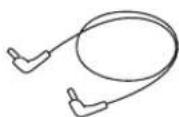
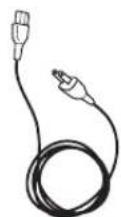
One Foundation comes with the following items: Sound System Remote 3.5mm Stereo Cable Power Cord for Wall Outlet
ENPOWERING ONE FOUNDATION
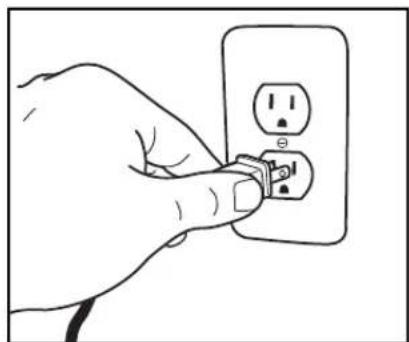
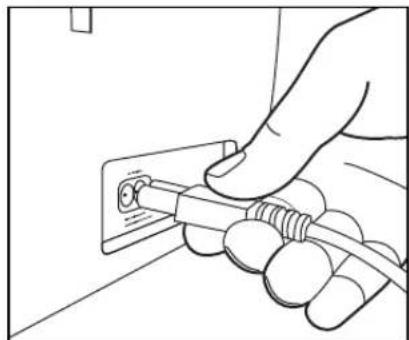
Your One Foundation uses a built-in power supply and is powered by a standard wall outlet.
1. Insert the AC power cord into One Foundation.
2. Insert the wall plug into an appropriate wall outlet.
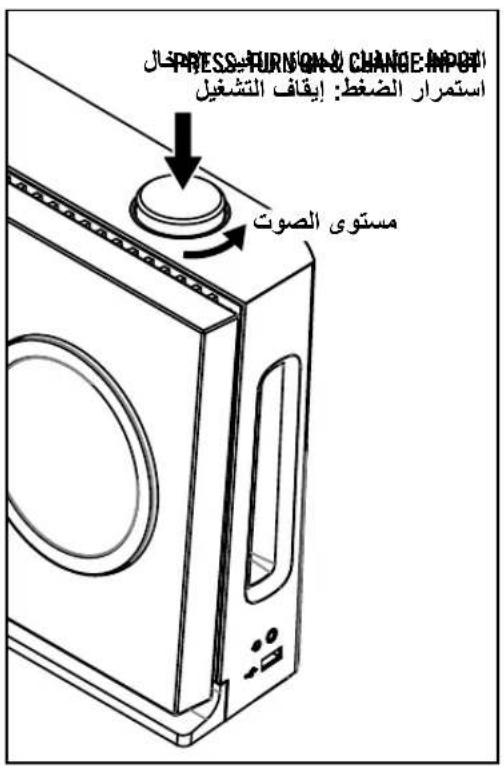
One Foundation uses one convenient control dial to operate power, volume, and input selection. - Press the control dial once to turn One Foundation on - Press the control dial again while One Foundation is on to cycle through active inputs - Turn the control dial to adjust volume - Press and hold control dial to turn One Foundation off HOLD: OFF
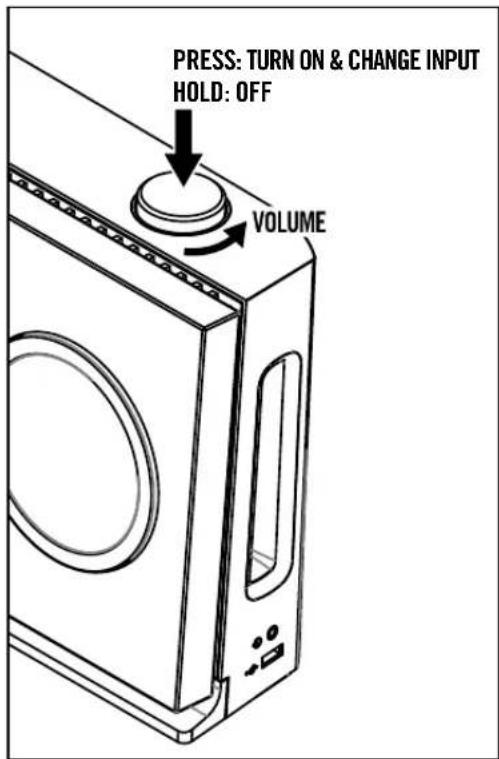
PRESS: TURN ON & CHANGE INPUTREMOTE
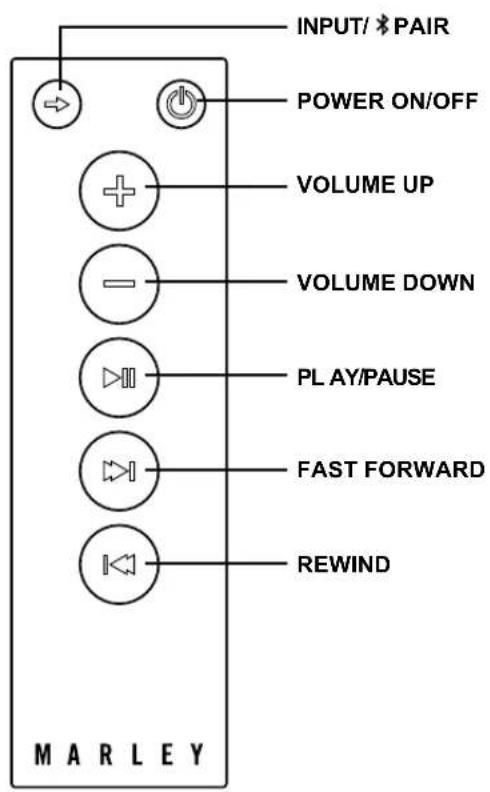
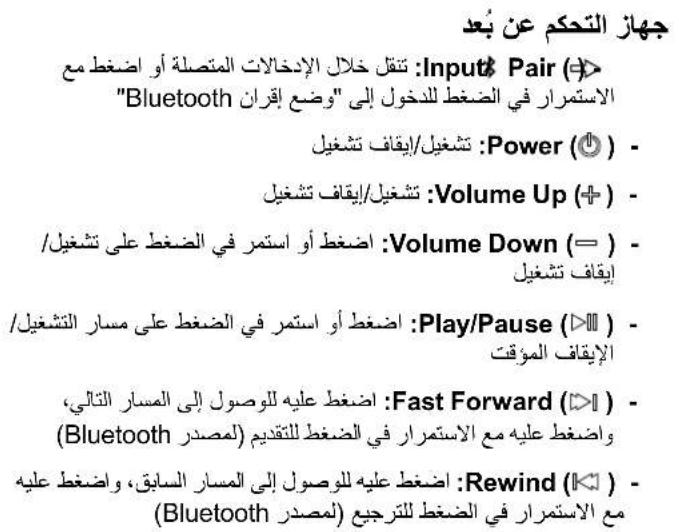
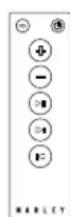
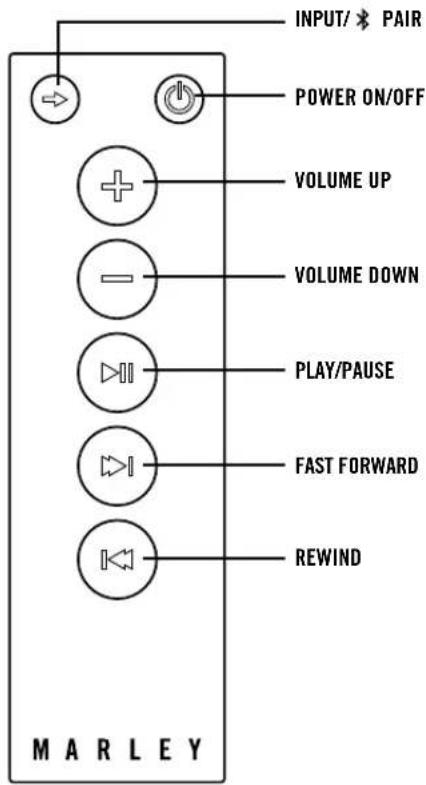
- Input/ Pair ( ): Cycle through connected inputs or press and hold to engage Bluetooth Pairing Mode - Power ( ): On/Off - Volume Up ( ): On/Off - Volume Down ( ): Press or hold On/Off - Play/Pause ( ): Press or hold Play/Pause track - Fast Forward ( ): Press for next track, press and hold for fast forward (for Bluetooth source) - Rewind ( ): Press for previous track, press and hold for rewind (for Bluetooth source)
PAIRING MODE (BLINKING BLUE LED) One Foundation automatically goes into Bluetooth Reconnect Mode for 10 seconds as soon as you turn it on (fast flashing BLUE led). It then switches to Pairing Mode (slow flashing BLUE led). You can pair a new device to One Foundation when in Pairing Mode. NOTE: Holding the on the One Foundation remote for 3 seconds will disconnect the device currently connected and put One Foundation into Pairing Mode. Pairing mode can also be engaged by disconnecting a connected device or by pressing the Pair on the back of One Foundation. CONNECTED MODE (SOLID BLUE LED) Use your Bluetooth-enabled device to pair to One Foundation. One Foundation does not require a pairing password. Once paired, the LED will glow solid blue. NOTE: One Foundation will automatically pair with the last device connected to it when turned ON (when the device is available).
CONNECTING OTHER DEVICES
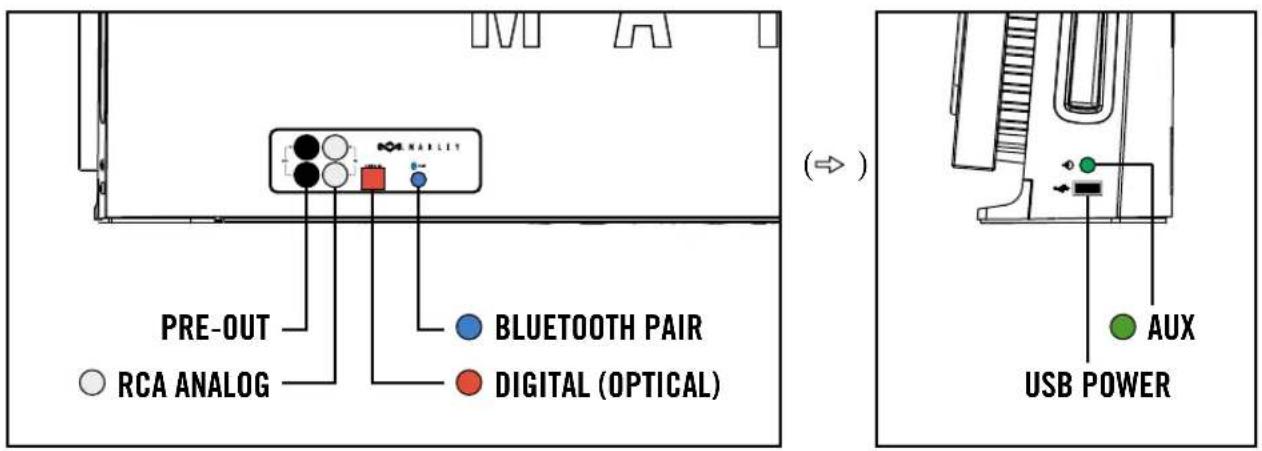
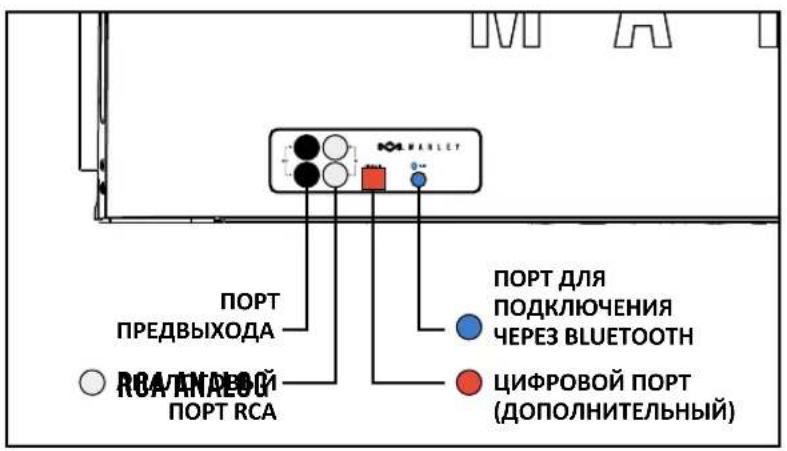
The various inputs on the back and right side of One Foundation allow you to connect other devices to the system.
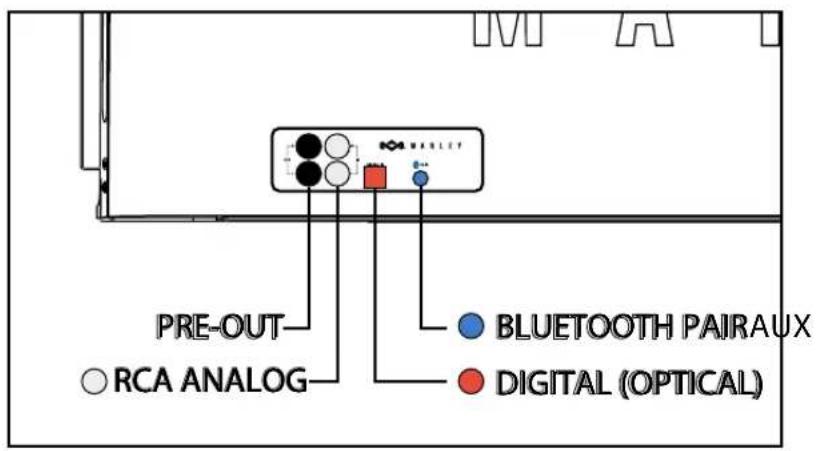
- For connecting analog devices, use the RCA input on the back or the auxiliary input on the side.
- For connecting digital devices we recommend using the digital audio (optical) input for the highest sound quality.
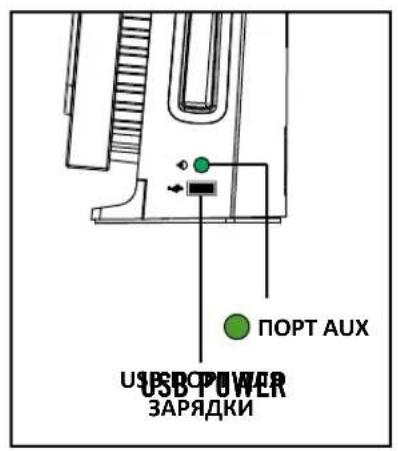
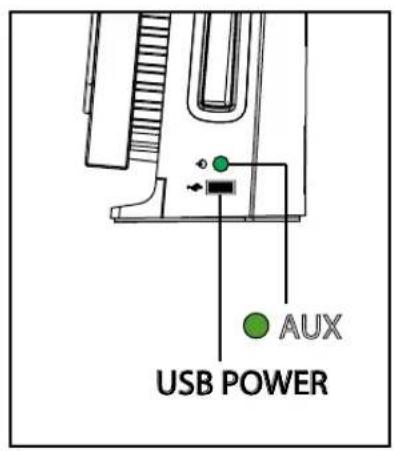
Use this port for charging up your iPod®, smartphone, or tablet. The port is always active when One Foundation is plugged into a wall outlet.LABEL: PANTONE BLACK 7C
PRE-OUT RCA ANALOG RCA ANALOG For use with analog sources PRE-OUT Recommended for use with active subwoofer (not included). DIGITAL (OPTICAL) BLUETOOTH PAIR AUX USB POWER Port for charging devices (including most tablets)USB POWER Recommended for use with digital peripherals. Peripheral must be connected and turned on in order to cycle to this input.DIGITAL (OPTICAL) This mode can also be initiated by pressing and holding the [INPUT] button on the remote. BLUETOOTH PAIR This input will be triggered automatically when a 3.5mm auxiliary cable (included) is plugged into One Foundation. AUX
PRE-OUT RCA ANALOG RCA ANALOG For use with analog sources PRE-OUT Recommended for use with active subwoofer (not included). DIGITAL (OPTICAL) BLUETOOTH PAIRAUX USB POWER Port for charging devices (including most tablets)USB POWER Recommended for use with digital peripherals. Peripheral must be connected and turned on in order to cycle to this input.DIGITAL (OPTICAL) This mode can also be initiated by pressing and holding the [INPUT] button on the remote. BLUETOOTH PAIR This input will be triggered automatically when a 3.5mm auxiliary cable (included) is plugged into One Foundation. AUX
( )IMPORTANT SAFETY INSTRUCTIONS
1. Follow and keep these instructions.
2. Heed all warnings.
3. Do not use this apparatus near water.
4. Clean only with a dry cloth.
5. Do not block any ventilation openings. Install in
accordance with the manufacturer’s instructions.
6. Do not install near any heat sources such as radiators,
heat registers, stoves, or other apparatus (including amplifiers) that produce heat.
7. Protect the power cord from being walked on or
pinched particularly at plug, convenience receptacles, and the point where they exit from the apparatus.
8. Only use attachments/accessories specified by the
9. Unplug this apparatus during lightning storms or when
unused for long periods of time.
10. Refer all servicing to qualified service personnel
Servicing is required when the apparatus has been damaged in any way, such as power-supply cord or plug is damaged, liquid has been spilled or objects have fallen into the apparatus, the apparatus has been exposed to rain or moisture, does not operate normally, or has been dropped.
11. To reduce the risk of fire or electric shock, do not
expose this apparatus to rain or moisture. WEEE EXPLANATION This marking indicates that this product should not be disposed with other household wastes throughout the EU. To prevent possible harm to the environment or human health from uncontrolled waste disposal, recycle it responsibly to promote the sustainable reuse of material resources. To return your used device, please use the return and collection systems or contact the retailer where the product was purchased. They can take this product for environmental safe recycling. BATTERY DIRECTIVE This symbol indicates that batteries must not be disposed of in the domestic waste as they contain substances which can be damaging to the environment and health. Please dispose of batteries in designated collection points. WARNING DO NOT INGEST BATTERY, CHEMICAL BURN HAZARD. This product contains a coin/button cell battery. If the coin/ button cell battery is swallowed, it can cause severe internal burns in just 2 hours and can lead to death. Keep new and used batteries away from children. If the battery compartment does not close securely, stop using the product and keep it away from children. If you think batteries might have been swallowed or placed inside any part of the body, seek immediate medical attention.FCC STATEMENT This equipment has been tested and found to comply with the limits for a Class B digital device, pursuant to part 15 of the FCC Rules. These limits are designed to provide reasonable protection against harmful interference in a residential installation. This equipment generates uses and can radiate radio frequency energy and, if not installed and used in accordance with the instructions, may cause harmful interference to radio communications. However, there is no guarantee that interference will not occur in a particular installation. If this equipment does cause harmful interference to radio or television reception, which can be determined by turning the equipment off and on, the user is encouraged to try to correct the interference by one or more of the following measures: —Reorient or relocate the receiving antenna. —Increase the separation between the equipment and receiver. —Connect the equipment into an outlet on a circuit different from that to which the receiver is connected. —Consult the dealer or an experienced radio/TV technician for help.

FCC RADIATION EXPOSURE STATEMENT
This device complies with FCC radiation exposure limits set forth for an uncontrolled environment. This device complies with Part 15 of the FCC Rules. Operation is subject to the following two conditions: (1) This device may not cause harmful interference, and (2) This device must accept any interference received, including interference that may cause undesired operation. CAUTION Any changes or modifications not expressly approved by the party responsible for compliance could void the user’s authority to operate the equipment. CANADA STATEMENT This device complies with Industry Canada licence-exempt RSS standard(s). Operation is subject to the following two conditions: (1) this device may not cause interference, and (2) this device must accept any interference, including interference that may cause undesired operation of the device.ONE FOUNDATION
PRE-OUT RCA ANALOG RCA ANALOG For use with analog sources PRE-OUT Recommended for use with active subwoofer (not included). DIGITAL (OPTICAL) BLUETOOTH PAIR AUX USB POWER Port for charging devices (including most tablets)USB POWER Recommended for use with digital peripherals. Peripheral must be connected and turned on in order to cycle to this input.DIGITAL (OPTICAL) This mode can also be initiated by pressing and holding the [INPUT] button on the remote. BLUETOOTH PAIR This input will be triggered automatically when a 3.5mm auxiliary cable (included) is plugged into One Foundation. AUX
PRE-OUT RCA ANALOG RCA ANALOG For use with analog sources PRE-OUT Recommended for use with active subwoofer (not included). DIGITAL (OPTICAL) BLUETOOTH PAIRAUX USB POWER Port for charging devices (including most tablets)USB POWER Recommended for use with digital peripherals. Peripheral must be connected and turned on in order to cycle to this input. DIGITAL (OPTICAL) This mode can also be initiated by pressing and holding the [INPUT] button on the remote. BLUETOOTH PAIR This input will be triggered automatically when a 3.5mm auxiliary cable (included) is plugged into One Foundation. AUX
PRE-OUT RCA ANALOG RCA ANALOG For use with analog sources PRE-OUT Recommended for use with active subwoofer (not included). DIGITAL (OPTICAL) BLUETOOTH PAIR AUX USB POWER Port for charging devices (including most tablets)USB POWER Recommended for use with digital peripherals. Peripheral must be connected and turned on in order to cycle to this input.DIGITAL (OPTICAL) This mode can also be initiated by pressing and holding the [INPUT] button on the remote. BLUETOOTH PAIR This input will be triggered automatically when a 3.5mm auxiliary cable (included) is plugged into One Foundation. AUX
PRE-OUT RCA ANALOG RCA ANALOG For use with analog sources PRE-OUT Recommended for use with active subwoofer (not included). DIGITAL (OPTICAL) BLUETOOTH PAIR AUX USB POWER Port for charging devices (including most tablets)USB POWER Recommended for use with digital peripherals. Peripheral must be connected and turned on in order to cycle to this input.DIGITAL (OPTICAL) This mode can also be initiated by pressing and holding the [INPUT] button on the remote. BLUETOOTH PAIR This input will be triggered automatically when a 3.5mm auxiliary cable (included) is plugged into One Foundation. AUX RCA ANALOG BLUETOOTH PAIRPRE-OUT DIGITAL (OPTICAL)
PRE-OUT RCA ANALOG RCA ANALOG For use with analog sources PRE-OUT Recommended for use with active subwoofer (not included). DIGITAL (OPTICAL) BLUETOOTH PAIRAUX USB POWER Port for charging devices (including most tablets)USB POWER Recommended for use with digital peripherals. Peripheral must be connected and turned on in order to cycle to this input.DIGITAL (OPTICAL) This mode can also be initiated by pressing and holding the [INPUT] button on the remote. BLUETOOTH PAIR This input will be triggered automatically when a 3.5mm auxiliary cable (included) is plugged into One Foundation. AUX
PRE-OUT RCA ANALOG RCA ANALOG For use with analog sources PRE-OUT Recommended for use with active subwoofer (not included). DIGITAL (OPTICAL) BLUETOOTH PAIR AUX USB POWER Port for charging devices (including most tablets)USB POWER Recommended for use with digital peripherals. Peripheral must be connected and turned on in order to cycle to this input.DIGITAL (OPTICAL) This mode can also be initiated by pressing and holding the [INPUT] button on the remote. BLUETOOTH PAIR This input will be triggered automatically when a 3.5mm auxiliary cable (included) is plugged into One Foundation. AUX
PRE-OUT RCA ANALOG RCA ANALOG For use with analog sources PRE-OUT Recommended for use with active subwoofer (not included). DIGITAL (OPTICAL) BLUETOOTH PAIR AUX USB POWER Port for charging devices (including most tablets)USB POWER Recommended for use with digital peripherals. Peripheral must be connected and turned on in order to cycle to this input.DIGITAL (OPTICAL) This mode can also be initiated by pressing and holding the [INPUT] button on the remote. BLUETOOTH PAIR This input will be triggered automatically when a 3.5mm auxiliary cable (included) is plugged into One Foundation. AUX RCA ANALOG BLUETOOTH-PAARPRE-OUT DIGITAL (OPTISCH)
PRE-OUT RCA ANALOG RCA ANALOG For use with analog sources PRE-OUT Recommended for use with active subwoofer (not included). DIGITAL (OPTICAL) BLUETOOTH PAIR AUX USB POWER Port for charging devices (including most tablets)USB POWER Recommended for use with digital peripherals. Peripheral must be connected and turned on in order to cycle to this input.DIGITAL (OPTICAL) This mode can also be initiated by pressing and holding the [INPUT] button on the remote. BLUETOOTH PAIR This input will be triggered automatically when a 3.5mm auxiliary cable (included) is plugged into One Foundation. AUX
PRE-OUT RCA ANALOG RCA ANALOG For use with analog sources PRE-OUT Recommended for use with active subwoofer (not included). DIGITAL (OPTICAL) BLUETOOTH PAIR AUX USB POWER Port for charging devices (including most tablets)USB POWER Recommended for use with digital peripherals. Peripheral must be connected and turned on in order to cycle to this input.DIGITAL (OPTICAL) This mode can also be initiated by pressing and holding the [INPUT] button on the remote. BLUETOOTH PAIR This input will be triggered automatically when a 3.5mm auxiliary cable (included) is plugged into One Foundation. AUX RCA ANALOGICO ACCOPPIAMENTO BLUETOOTH PORTA DI RICARICA USB PRE-OUT AUX DIGITALE (OTTICO)
PRE-OUT RCA ANALOG RCA ANALOG For use with analog sources PRE-OUT Recommended for use with active subwoofer (not included). DIGITAL (OPTICAL) BLUETOOTH PAIR AUX USB POWER Port for charging devices (including most tablets)USB POWER Recommended for use with digital peripherals. Peripheral must be connected and turned on in order to cycle to this input.DIGITAL (OPTICAL) This mode can also be initiated by pressing and holding the [INPUT] button on the remote. BLUETOOTH PAIR This input will be triggered automatically when a 3.5mm auxiliary cable (included) is plugged into One Foundation. AUX
PRE-OUT RCA ANALOG RCA ANALOG For use with analog sources PRE-OUT Recommended for use with active subwoofer (not included). DIGITAL (OPTICAL) BLUETOOTH PAIR AUX USB POWER Port for charging devices (including most tablets)USB POWER Recommended for use with digital peripherals. Peripheral must be connected and turned on in order to cycle to this input.DIGITAL (OPTICAL) This mode can also be initiated by pressing and holding the [INPUT] button on the remote. BLUETOOTH PAIR This input will be triggered automatically when a 3.5mm auxiliary cable (included) is plugged into One Foundation. AUX RCA ANALOG BLUETOOTH PAIR USB- OPLADERPORT PRE-OUT AUX DIGITAL (OPTISK)
PRE-OUT RCA ANALOG RCA ANALOG For use with analog sources PRE-OUT Recommended for use with active subwoofer (not included). DIGITAL (OPTICAL) BLUETOOTH PAIR AUX USB POWER Port for charging devices (including most tablets)USB POWER Recommended for use with digital peripherals. Peripheral must be connected and turned on in order to cycle to this input.DIGITAL (OPTICAL) This mode can also be initiated by pressing and holding the [INPUT] button on the remote. BLUETOOTH PAIR This input will be triggered automatically when a 3.5mm auxiliary cable (included) is plugged into One Foundation. AUX
PRE-OUT RCA ANALOG RCA ANALOG For use with analog sources PRE-OUT Recommended for use with active subwoofer (not included). DIGITAL (OPTICAL) BLUETOOTH PAIR AUX USB POWER Port for charging devices (including most tablets)USB POWER Recommended for use with digital peripherals. Peripheral must be connected and turned on in order to cycle to this input.DIGITAL (OPTICAL) This mode can also be initiated by pressing and holding the [INPUT] button on the remote. BLUETOOTH PAIR This input will be triggered automatically when a 3.5mm auxiliary cable (included) is plugged into One Foundation. AUX RCA ANALOG
PRE-OUT RCA ANALOG RCA ANALOG For use with analog sources PRE-OUT Recommended for use with active subwoofer (not included). DIGITAL (OPTICAL) BLUETOOTH PAIR AUX USB POWER Port for charging devices (including most tablets)USB POWER Recommended for use with digital peripherals. Peripheral must be connected and turned on in order to cycle to this input.DIGITAL (OPTICAL) This mode can also be initiated by pressing and holding the [INPUT] button on the remote. BLUETOOTH PAIR This input will be triggered automatically when a 3.5mm auxiliary cable (included) is plugged into One Foundation. AUX
PRE-OUT RCA ANALOG RCA ANALOG For use with analog sources PRE-OUT Recommended for use with active subwoofer (not included). DIGITAL (OPTICAL) BLUETOOTH PAIR AUX USB POWER Port for charging devices (including most tablets)USB POWER Recommended for use with digital peripherals. Peripheral must be connected and turned on in order to cycle to this input.DIGITAL (OPTICAL) This mode can also be initiated by pressing and holding the [INPUT] button on the remote. BLUETOOTH PAIR This input will be triggered automatically when a 3.5mm auxiliary cable (included) is plugged into One Foundation. AUX ANALOGOWE
PRE-OUT RCA ANALOG RCA ANALOG For use with analog sources PRE-OUT Recommended for use with active subwoofer (not included). DIGITAL (OPTICAL) BLUETOOTH PAIR AUX USB POWER Port for charging devices (including most tablets)USB POWER Recommended for use with digital peripherals. Peripheral must be connected and turned on in order to cycle to this input.DIGITAL (OPTICAL) This mode can also be initiated by pressing and holding the [INPUT] button on the remote. BLUETOOTH PAIR This input will be triggered automatically when a 3.5mm auxiliary cable (included) is plugged into One Foundation. AUX
PRE-OUT RCA ANALOG RCA ANALOG For use with analog sources PRE-OUT Recommended for use with active subwoofer (not included). DIGITAL (OPTICAL) BLUETOOTH PAIR AUX USB POWER Port for charging devices (including most tablets)USB POWER Recommended for use with digital peripherals. Peripheral must be connected and turned on in order to cycle to this input.DIGITAL (OPTICAL) This mode can also be initiated by pressing and holding the [INPUT] button on the remote. BLUETOOTH PAIR This input will be triggered automatically when a 3.5mm auxiliary cable (included) is plugged into One Foundation. AUX ANALÓGOVÝ VSTUP RCA VÝSTUP PRE-OUT PÁROVANIE BLUETOOTH NAPÁJANIE USB POMOCNÝ VSTUP DIGITÁLNY (OPTICKÝ) VSTUP
PRE-OUT RCA ANALOG RCA ANALOG For use with analog sources PRE-OUT Recommended for use with active subwoofer (not included). DIGITAL (OPTICAL) BLUETOOTH PAIRAUX USB POWER Port for charging devices (including most tablets)USB POWER Recommended for use with digital peripherals. Peripheral must be connected and turned on in order to cycle to this input.DIGITAL (OPTICAL) This mode can also be initiated by pressing and holding the [INPUT] button on the remote. BLUETOOTH PAIR This input will be triggered automatically when a 3.5mm auxiliary cable (included) is plugged into One Foundation. AUX
PRE-OUT RCA ANALOG RCA ANALOG For use with analog sources PRE-OUT Recommended for use with active subwoofer (not included). DIGITAL (OPTICAL) BLUETOOTH PAIR AUX USB POWER Port for charging devices (including most tablets)USB POWER Recommended for use with digital peripherals. Peripheral must be connected and turned on in order to cycle to this input.DIGITAL (OPTICAL) This mode can also be initiated by pressing and holding the [INPUT] button on the remote. BLUETOOTH PAIR This input will be triggered automatically when a 3.5mm auxiliary cable (included) is plugged into One Foundation. AUX
PRE-OUT RCA ANALOG RCA ANALOG For use with analog sources PRE-OUT Recommended for use with active subwoofer (not included). DIGITAL (OPTICAL) BLUETOOTH PAIRAUX USB POWER Port for charging devices (including most tablets)USB POWER Recommended for use with digital peripherals. Peripheral must be connected and turned on in order to cycle to this input.DIGITAL (OPTICAL) This mode can also be initiated by pressing and holding the [INPUT] button on the remote. BLUETOOTH PAIR This input will be triggered automatically when a 3.5mm auxiliary cable (included) is plugged into One Foundation. AUX
PRE-OUT RCA ANALOG RCA ANALOG For use with analog sources PRE-OUT Recommended for use with active subwoofer (not included). DIGITAL (OPTICAL) BLUETOOTH PAIR AUX USB POWER Port for charging devices (including most tablets)USB POWER Recommended for use with digital peripherals. Peripheral must be connected and turned on in order to cycle to this input.DIGITAL (OPTICAL) This mode can also be initiated by pressing and holding the [INPUT] button on the remote. BLUETOOTH PAIR This input will be triggered automatically when a 3.5mm auxiliary cable (included) is plugged into One Foundation. AUX
PRE-OUT RCA ANALOG RCA ANALOG For use with analog sources PRE-OUT Recommended for use with active subwoofer (not included). DIGITAL (OPTICAL) BLUETOOTH PAIR AUX USB POWER Port for charging devices (including most tablets)USB POWER Recommended for use with digital peripherals. Peripheral must be connected and turned on in order to cycle to this input.DIGITAL (OPTICAL) This mode can also be initiated by pressing and holding the [INPUT] button on the remote. BLUETOOTH PAIR This input will be triggered automatically when a 3.5mm auxiliary cable (included) is plugged into One Foundation. AUX RCA ANALOOG PRE-OUT BLUETOOTH-KOPPELING USB-VOEDING AUX DIGITAAL (OPTISCH)
ONE FOUNDATION DIGITALT LYDSYSTEM
PRE-OUT RCA ANALOG RCA ANALOG For use with analog sources PRE-OUT Recommended for use with active subwoofer (not included). DIGITAL (OPTICAL) BLUETOOTH PAIR AUX USB POWER Port for charging devices (including most tablets)USB POWER Recommended for use with digital peripherals. Peripheral must be connected and turned on in order to cycle to this input.DIGITAL (OPTICAL) This mode can also be initiated by pressing and holding the [INPUT] button on the remote. BLUETOOTH PAIR This input will be triggered automatically when a 3.5mm auxiliary cable (included) is plugged into One Foundation. AUX
PRE-OUT RCA ANALOG RCA ANALOG For use with analog sources PRE-OUT Recommended for use with active subwoofer (not included). DIGITAL (OPTICAL) BLUETOOTH PAIR AUX USB POWER Port for charging devices (including most tablets)USB POWER Recommended for use with digital peripherals. Peripheral must be connected and turned on in order to cycle to this input.DIGITAL (OPTICAL) This mode can also be initiated by pressing and holding the [INPUT] button on the remote. BLUETOOTH PAIR This input will be triggered automatically when a 3.5mm auxiliary cable (included) is plugged into One Foundation. AUX RCA ANALOG PRE-OUT BLUETOOTHPARING USB POWER AUX DIGITAL (OPTISK)
PRE-OUT RCA ANALOG RCA ANALOG For use with analog sources PRE-OUT Recommended for use with active subwoofer (not included). DIGITAL (OPTICAL) BLUETOOTH PAIR AUX USB POWER Port for charging devices (including most tablets)USB POWER Recommended for use with digital peripherals. Peripheral must be connected and turned on in order to cycle to this input.DIGITAL (OPTICAL) This mode can also be initiated by pressing and holding the [INPUT] button on the remote. BLUETOOTH PAIR This input will be triggered automatically when a 3.5mm auxiliary cable (included) is plugged into One Foundation. AUX
PRE-OUT RCA ANALOG RCA ANALOG For use with analog sources PRE-OUT Recommended for use with active subwoofer (not included). DIGITAL (OPTICAL) BLUETOOTH PAIR AUX USB POWER Port for charging devices (including most tablets)USB POWER Recommended for use with digital peripherals. Peripheral must be connected and turned on in order to cycle to this input.DIGITAL (OPTICAL) This mode can also be initiated by pressing and holding the [INPUT] button on the remote. BLUETOOTH PAIR This input will be triggered automatically when a 3.5mm auxiliary cable (included) is plugged into One Foundation. AUX RCA ANALOG PRE-OUT BLUETOOTH PAIR USB POWER AUX DIGITAL (OPTICAL)
PRE-OUT RCA ANALOG RCA ANALOG For use with analog sources PRE-OUT Recommended for use with active subwoofer (not included). DIGITAL (OPTICAL) BLUETOOTH PAIRAUX USB POWER Port for charging devices (including most tablets)USB POWER Recommended for use with digital peripherals. Peripheral must be connected and turned on in order to cycle to this input.DIGITAL (OPTICAL) This mode can also be initiated by pressing and holding the [INPUT] button on the remote. BLUETOOTH PAIR This input will be triggered automatically when a 3.5mm auxiliary cable (included) is plugged into One Foundation. AUX
PRE-OUT RCA ANALOG RCA ANALOG For use with analog sources PRE-OUT Recommended for use with active subwoofer (not included). DIGITAL (OPTICAL) BLUETOOTH PAIR AUX USB POWER Port for charging devices (including most tablets)USB POWER Recommended for use with digital peripherals. Peripheral must be connected and turned on in order to cycle to this input.DIGITAL (OPTICAL) This mode can also be initiated by pressing and holding the [INPUT] button on the remote. BLUETOOTH PAIR This input will be triggered automatically when a 3.5mm auxiliary cable (included) is plugged into One Foundation. AUX
PRE-OUT RCA ANALOG RCA ANALOG For use with analog sources PRE-OUT Recommended for use with active subwoofer (not included). DIGITAL (OPTICAL) BLUETOOTH PAIR AUX USB POWER Port for charging devices (including most tablets)USB POWER Recommended for use with digital peripherals. Peripheral must be connected and turned on in order to cycle to this input.DIGITAL (OPTICAL) This mode can also be initiated by pressing and holding the [INPUT] button on the remote. BLUETOOTH PAIR This input will be triggered automatically when a 3.5mm auxiliary cable (included) is plugged into One Foundation. AUX RCA ANALOG FÖR-UT BLUETOOTH PARNING USB-UTTAG EXTRA DIGITAL (OPTISK)
PRE-OUT RCA ANALOG RCA ANALOG For use with analog sources PRE-OUT Recommended for use with active subwoofer (not included). DIGITAL (OPTICAL) BLUETOOTH PAIRAUX USB POWER Port for charging devices (including most tablets)USB POWER Recommended for use with digital peripherals. Peripheral must be connected and turned on in order to cycle to this input.DIGITAL (OPTICAL) This mode can also be initiated by pressing and holding the [INPUT] button on the remote. BLUETOOTH PAIR This input will be triggered automatically when a 3.5mm auxiliary cable (included) is plugged into One Foundation. AUX
PRE-OUT RCA ANALOG RCA ANALOG For use with analog sources PRE-OUT Recommended for use with active subwoofer (not included). DIGITAL (OPTICAL) BLUETOOTH PAIR AUX USB POWER Port for charging devices (including most tablets)USB POWER Recommended for use with digital peripherals. Peripheral must be connected and turned on in order to cycle to this input.DIGITAL (OPTICAL) This mode can also be initiated by pressing and holding the [INPUT] button on the remote. BLUETOOTH PAIR This input will be triggered automatically when a 3.5mm auxiliary cable (included) is plugged into One Foundation. AUX
PRE-OUT RCA ANALOG RCA ANALOG For use with analog sources PRE-OUT Recommended for use with active subwoofer (not included). DIGITAL (OPTICAL) BLUETOOTH PAIR AUX USB POWER Port for charging devices (including most tablets)USB POWER Recommended for use with digital peripherals. Peripheral must be connected and turned on in order to cycle to this input.DIGITAL (OPTICAL) This mode can also be initiated by pressing and holding the [INPUT] button on the remote. BLUETOOTH PAIR This input will be triggered automatically when a 3.5mm auxiliary cable (included) is plugged into One Foundation. AUX ΑΝΑΛΟΓΙΚΗ RCA ΠΡΟΕΝΙΣΧΥΜΕΝΗ ΣΥΖΕΥΞΗ BLUETOOTH ΤΡΟΦΟΔΟΣΙΑ USB AUX ΨΗΦΙΑΚΗ (ΟΠΤΙΚΗ)
PRE-OUT RCA ANALOG RCA ANALOG For use with analog sources PRE-OUT Recommended for use with active subwoofer (not included). DIGITAL (OPTICAL) BLUETOOTH PAIRAUX USB POWER Port for charging devices (including most tablets)USB POWER Recommended for use with digital peripherals. Peripheral must be connected and turned on in order to cycle to this input.DIGITAL (OPTICAL) This mode can also be initiated by pressing and holding the [INPUT] button on the remote. BLUETOOTH PAIR This input will be triggered automatically when a 3.5mm auxiliary cable (included) is plugged into One Foundation. AUX
PRE-OUT RCA ANALOG RCA ANALOG For use with analog sources PRE-OUT Recommended for use with active subwoofer (not included). DIGITAL (OPTICAL) BLUETOOTH PAIR AUX USB POWER Port for charging devices (including most tablets)USB POWER Recommended for use with digital peripherals. Peripheral must be connected and turned on in order to cycle to this input.DIGITAL (OPTICAL) This mode can also be initiated by pressing and holding the [INPUT] button on the remote. BLUETOOTH PAIR This input will be triggered automatically when a 3.5mm auxiliary cable (included) is plugged into One Foundation. AUX
PRE-OUT RCA ANALOG RCA ANALOG For use with analog sources PRE-OUT Recommended for use with active subwoofer (not included). DIGITAL (OPTICAL) BLUETOOTH PAIR AUX USB POWER Port for charging devices (including most tablets)USB POWER Recommended for use with digital peripherals. Peripheral must be connected and turned on in order to cycle to this input.DIGITAL (OPTICAL) This mode can also be initiated by pressing and holding the [INPUT] button on the remote. BLUETOOTH PAIR This input will be triggered automatically when a 3.5mm auxiliary cable (included) is plugged into One Foundation. AUX RCA ANALOG PRE-OUT BLUETOOTH PAIR USB POWER AUX DIGITAL (ÓPTICA)
PRE-OUT RCA ANALOG RCA ANALOG For use with analog sources PRE-OUT Recommended for use with active subwoofer (not included). DIGITAL (OPTICAL) BLUETOOTH PAIRAUX USB POWER Port for charging devices (including most tablets)USB POWER Recommended for use with digital peripherals. Peripheral must be connected and turned on in order to cycle to this input.DIGITAL (OPTICAL) This mode can also be initiated by pressing and holding the [INPUT] button on the remote. BLUETOOTH PAIR This input will be triggered automatically when a 3.5mm auxiliary cable (included) is plugged into One Foundation. AUX
PRE-OUT RCA ANALOG RCA ANALOG For use with analog sources PRE-OUT Recommended for use with active subwoofer (not included). DIGITAL (OPTICAL) BLUETOOTH PAIR AUX USB POWER Port for charging devices (including most tablets)USB POWER Recommended for use with digital peripherals. Peripheral must be connected and turned on in order to cycle to this input.DIGITAL (OPTICAL) This mode can also be initiated by pressing and holding the [INPUT] button on the remote. BLUETOOTH PAIR This input will be triggered automatically when a 3.5mm auxiliary cable (included) is plugged into One Foundation. AUX
PRE-OUT RCA ANALOG RCA ANALOG For use with analog sources PRE-OUT Recommended for use with active subwoofer (not included). DIGITAL (OPTICAL) BLUETOOTH PAIR AUX USB POWER Port for charging devices (including most tablets)USB POWER Recommended for use with digital peripherals. Peripheral must be connected and turned on in order to cycle to this input.DIGITAL (OPTICAL) This mode can also be initiated by pressing and holding the [INPUT] button on the remote. BLUETOOTH PAIR This input will be triggered automatically when a 3.5mm auxiliary cable (included) is plugged into One Foundation. AUX RCA ANALOG ÖN ÇIKIŞ
ManualGo.com