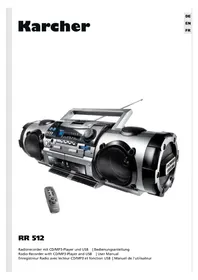
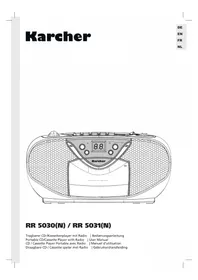
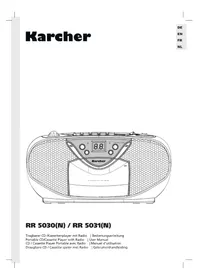
RR 512 - Cd player/recorder Karcher Audio - Free user manual and instructions
Find the device manual for free RR 512 Karcher Audio in PDF.



| Product Type | CD player/recorder with radio, dual cassette deck and USB function |
| Brand | Karcher Audio |
| Model | RR 512 |
| Dimensions (W x H x D) | Approx. 660 x 216 x 200 mm |
| Weight | Approx. 5.7 kg |
| Main Power Supply | AC 230 V ~ 50 Hz |
| Backup Power Supply | 12 V DC (8 UM-1/D batteries, 1.5 V each) |
| Main Functions | CD/MP3/WMA player, dual cassette tape recorder, FM/SW/LW/MW radio, USB port, karaoke with microphone input, preset equalizer (FLAT, JAZZ, POP, ROCK) |
| Radio Bands | FM 88-108 MHz, MW 540-1600 kHz, LW 160-270 kHz, SW 6-18 MHz |
| Antenna | FM/SW: telescopic; MW/LW: built-in ferrite |
| CD Playback | CD, CD-R, CD-RW, MP3, WMA; 1-bit D/A conversion with 8x oversampling |
| Tape Recorder | 4 tracks, 2 stereo channels; speed 4.76 cm/s |
| Headphone Output | 3.5 mm jack socket, impedance 32 Ω |
| Speakers | Impedance 4 Ω |
| CD Functions | Play/Pause, stop, skip/search, program (20 tracks), repeat (1 track/all), random play, intro (10 s) |
| Cassette Functions | Play, record (deck A), stop, fast forward/rewind, pause, dubbing A→B (normal or high speed) |
| Microphone Input | 3.5 mm jack socket for dynamic microphone (600-3000 Ω) |
| Remote Control | Yes, with MUTE, volume, CD and program functions |
| Safety | Class 1 laser product; precautions against moisture, condensation, overload; disconnect during thunderstorms |
| Maintenance and Cleaning | Clean cassette heads (play/record/erase) and capstan with a cotton swab and alcohol; demagnetize if necessary |
| Spare Parts and Repairability | No user-replaceable parts; any repair must be done by qualified personnel |
| Operating Temperature | +5 °C to +35 °C |
| Power Consumption | 30 W |
Frequently Asked Questions - RR 512 Karcher Audio
User questions about RR 512 Karcher Audio
0 question about this device. Answer the ones you know or ask your own.
Ask a new question about this device
Download the instructions for your Cd player/recorder in PDF format for free! Find your manual RR 512 - Karcher Audio and take your electronic device back in hand. On this page are published all the documents necessary for the use of your device. RR 512 by Karcher Audio.
USER MANUAL RR 512 Karcher Audio
natural_image
Black and silver portable radio with two speakers, a control panel, and a remote control unit (no visible text or symbols)RR 512
Radio Recorder with CD/MP3-Player and USB | User Manual
natural_image
Two 3D cassette tapes with a curved arrow indicating transformation (no text or symbols)- Read Instructions - All the safety and operating instructions should be read before the appliance is operated.
- Retain Instructions - The safety and operating instructions should be retained for future reference.
- Heed Warnings - All warnings on the appliance and in the operating instructions should be adhered to.
- Water and Moisture – Do not use the apparatus near water (e.g. bath tub, sink, swimming pool) or in wet places or tropical climates. Do not place objects filled with liquids, such as vases, on top of the apparatus. Do not expose the apparatus to dripping or splashing.
- Setup – The apparatus should only be placed on a stable, flat surface. Do not let the apparatus fall down or expose it to shock.
- Wall or Ceiling Mounting - The appliance should be mounted to a wall or ceiling only as recommended by the manufacturer.
- Ventilation - The appliance should be situated so that its location or position does not interfere with its proper ventilation. For example, the appliance should not be situated on a bed, sofa, rug, or similar surface that may block the ventilation openings; or, placed in a built-in installation, such as a bookcase or cabinet that may impede the flow of air through the ventilation openings. Ensure a minimum distance of 5 cm around the apparatus for sufficient ventilation. Ensure that the ventilation is not impeded by covering the ventilation openings with items such as newspapers, table-cloths, curtains, etc.
- Heat - The appliance should be situated away from heat sources such as radiators, heat registers, stoves, or other appliances (including amplifiers) that produce heat.
- Power Sources - The appliance should be connected to a power supply only of the type described in the operating instructions or as marked on the appliance.
- Cables and Plugs – The mains plug shall remain readily operable. All cables should be routed so that they are not likely to be walked on or pinched by items placed upon or against them, paying particular attention to cords at plugs, convenience receptacles, and the point where they exit from the appliance.
- Cleaning - The appliance should be cleaned only as recommended by the manufacturer. Clean by wiping with a dry and clean cloth. Do not use chemical cleaners or detergents. Always pull the mains plug before cleaning the unit.
- Non-use Periods - The power cord of the appliance should be unplugged from the outlet when left unused for a long period of time.
- Object and Liquid Entry - Care should be taken so that objects do not fall and liquids are not spilled into the enclosure through openings.
- Damage Requiring Service - The appliance should be serviced by qualified service personnel when:
a) The power-supply cord or the plug has been damaged; or
b) Objects have fallen, or liquid has been spilled into the appliance; or
c) The appliance has been exposed to rain; or
d) The appliance does not appear to operate normally or exhibits a marked change in performance; or
e) The appliance has been dropped, or the enclosure damaged. - Servicing - The user should not attempt to service the appliance beyond that described in the operating instructions. All other servicing should be referred to qualified service personnel.
- Open Fire – Keep the apparatus away from open fires. Do not place naked flame sources, such as lighted candles on the apparatus.
- Thunderstorms – During a thunderstorm the mains plug should be unplugged.
- Safety Check – After servicing the technician should conduct a safety check in order to ensure that the apparatus is working properly and safely.
-
Batteries – Always place batteries in the correct polarization into electrical components. Danger of explosion if battery is incorrectly replaced. Replace only with the same or equivalent type. Do not mix old and new batteries. Take attention to the environmental aspects of battery disposal. Batteries shall not be exposed to excessive heat such as sunshine, fire or the like. Remove batteries before disposing of the product.
-
Headphones – Excessive sound pressure from earphones and headphones can cause hearing loss.
EN
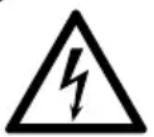
CAUTION
RISK OF ELECTRO SHOCK
DO NOT OPEN

WARNING: To reduce the risk of fire or electric shock, do not expose this appliance to dripping or splashing.
WARNING: To reduce the risk of electric shock, do not remove cover (or back). No user serviceable parts inside. Refer servicing to qualified service personnel.

The lightning flash with arrowhead symbol within an equilateral triangle is intended to alert the user to the presence of uninsulated dangerous voltage within the product's enclosure that may be of sufficient magnitude to constitute a risk of electric shock to persons.

The exclamation point within an equilateral triangle is intended to alert the user to the presence of important operating and maintenance (servicing) instructions in the literature accompanying the appliance.

DO NOT STARE INTO BEAM – INVISIBLE LASER RADIATION
Batteries
Batteries may not be disposed of in regular house hold trash. Every consumer has the obligation to return batteries to special disposal locations.

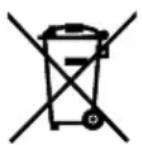
Disposal of Used Electrical & Electronic Equipment
The meaning of the symbol on the product, its accessory or packaging indicates that this product shall not be treated as household waste. Please, dispose of this equipment at your applicable collection point for the recycling of electrical & electronic equipments waste. By ensuring the correct disposal of this product, you will help prevent potential hazards to the environment and to human health, which could otherwise be caused by unsuitable waste handling of this product. The recycling of materials will help conserve natural resources. For more detailed information about recycling of this product, please contact your local city office, your household waste disposal service or the shop where you purchased the product.
- Handling discs
• Always keep the CD compartment shut to prevent dust or dirt from getting into the CD mechanism.
- Do not touch the recorded surface.
- Do not stick paper or write on either side of the CD.
- Do not bend the CD.
- Only handle a disc on its outer edges.
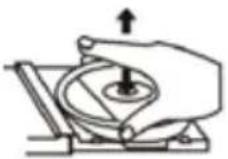
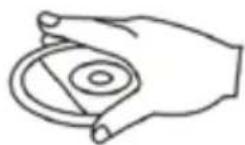
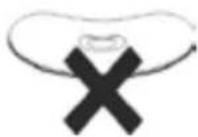
- Storing discs
• To avoid scratches/damages always put CDs back into their cases after use.
- Do not expose CDs to direct sunlight, dust, dirt, high temperatures, high humidity or water.
-
Cleaning discs
-
Use a soft cloth to wipe fingerprints and dust from the disc surface.
- Carefully move the cloth from the center of the disc to its edge:
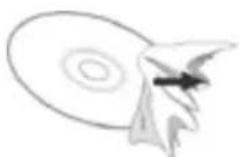

Correct False
- Never use benzene, thinners, record cleaner fluid or antistatic spray to clean CDs.
- Compatibility
- Due to the numerous compression methods, some discs may not play.
CONDENSATION
Condensation may occur when moving the device from a cold to a warm environment. If there is moisture inside the player, it may not operate properly.
Please turn on the power supply and wait about one hour for the moisture to evaporate.
Protect the device from rain and moisture, sand, dust and extreme heat (e.g. in a parked vehicle in summer) and from direct sunlight.
Front View

- Tweeters (L & R)
- POWER ON / OFF
- MIC MIXING MIC In
- POWER indicator
- FM STEREO indicator
- PHONES jack
- FUNCTION selector CD / MP3 / TAPE (HI) / TAPE (NOR) / RADIO
- REMOTE SENSOR
- USB port
- Handle
- Dial scale
- Dial frequency indicator
- EQ preset FLAT, JAZZ, POP, ROCK
- Band selector BAND FM, SW, LW, MW
-
TUNING control
-
VOLUME control
- MIC built-in microphone
- Speakers (L&R)
- Cassette deck A
- REC cassette deck A
- PLAY ▶ cassette deck A
- REW cassette deck A
- F.FWD cassette deck A
- STOP/EJ. cassette deck A
- PAUSE cassette deck A
- PLAY ▶ cassette deck B
- REW cassette deck B
- F.FWD cassette deck B
- STOP/EJ. cassette deck B
- PAUSE cassette deck B
- Cassette deck B
- CD/USB button
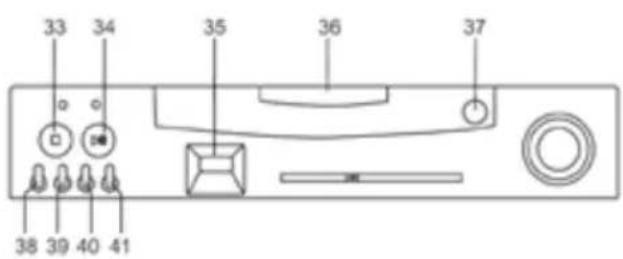
Front View (Enlarged Detail)
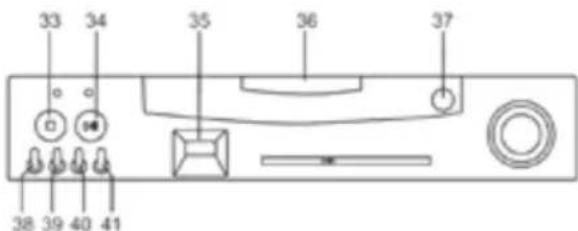
- CD Stop
- CD Play / Pause
- LCD display
- CD door
-
PUSH OPEN to open CD door
-
CD Skip - and Search back
- CD Skip - and Search forward
- MODE
- PROG Program
Rear View
- Battery compartment
- Telescopic antenna
- Mains power supply

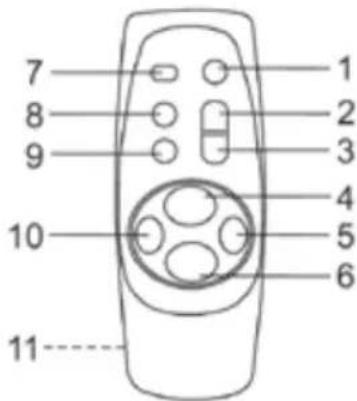
Remote Control
- MUTE
- VOLUME UP ▲
- VOLUME DN ▼
- CD PLAY / PAUSE
- CD SKIP / SEARCH forward
- CD STOP
- +10 button
- PROGRAM
- MODE
- CD SKIP / SEARCH back
- Battery compartment (rear)
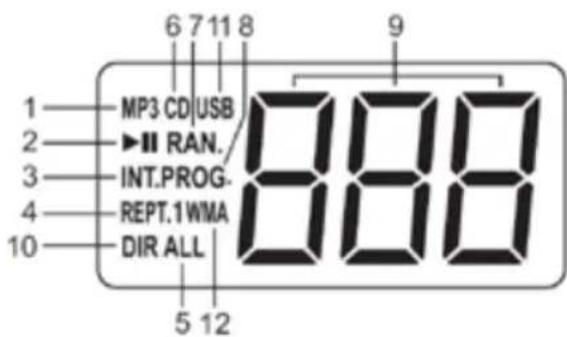
Display
- MP3 display when playing MP3 discs
- ▶|| display in play and pause modes
- INT. display in intro playback mode
- REPT.1 display when repeating one track only
- REPT. ALL display when repeating disc
- CD display when playing a CD
- RAN. display in random playback mode
- PROG. display in program playback mode
- Display current track number
- DIR display when repeating album
- USB display when playing USB
- WMA display when playing WMA discs
CONNECTIONS AND INSTALLATION
MAINS OPERATION
The unit is designed for mains power supply 230V\~50Hz but may also be operated with 8 x UM-1/D batteries. Do not connect the unit to any other power supply to avoid damage that is not covered by your warranty.
Connect the smaller plug to the jack at the rear of the unit and the mains plug to the wall outlet.
Disconnect from mains power supply to completely turn the unit off.
BATTERY OPERATION
Open the battery compartment, insert 8 UM-1/D batteries and close the battery compartment again.
To avoid damage, which may result from leaking batteries, remove the batteries when they become exhausted or when the unit is not to be used for a longer period of time.
Battery operation is automatically suspended when connecting the mains power cable.
Battery Safety Precautions
Follow the battery manufacturer's safety, usage and disposal instructions.
Only use batteries of the same type and size.
Insert the batteries observing the polarity (+/-). Failure to properly align the battery polarity can cause personal injury and/or property damage.
Do not mix battery types (e.g. alkaline, zinc/carbon, rechargeable batteries) or exhausted and new batteries.
Remove exhausted batteries from the device. Remove the batteries when the device will not be used for extended periods of time to prevent damage due to rusted or corroded batteries.
To avoid fire and explosion do not recharge normal batteries. Keep batteries away from children and pets.
PRIVATE LISTENING WITH EARPHONES
Use earphones for private listening (not supplied). Connect 3.5 mm jack to PHONE jack (6). If your earphones come with a different jack, please purchase an appropriate adaptor. Connecting the earphones automatically mutes the speakers.
HEARING PROTECTION
To protect your hearing when wearing headphones please follow these simple suggestions:
Reduce the volume before connecting your earphones. Adjust volume slowly when wearing the earphones.
Do not set the earphones volume too loud. Longer listening at higher volumes may cause permanent hearing damage.
After adjusting the volume do not increase it. Your hearing adapts to the higher volume, which may cause hearing damage.
OPERATING INSTRUCTIONS
RADIO
- Set the function selector (7) to RADIO position.
- Set the BAND selector (14) to the desired frequency band.
- Select your favorite radio station with the TUNING control (15); the frequency is displayed on the dial scale (11).
- Adjust the volume with the VOLUME control (16).
- Set the function selector (7) to TAPE position to turn the radio off.
FM STEREO
While listening to FM stereo broadcast the FM STEREO indicator (5) will light up.
ANTENNA
FM/SW : For best reception fully extend and rotate the telescopic antenna (43).
MW/LW : The MW/LW antenna is built-in; adjust the unit for best reception. HEARING PROTECTION
CASSETTE OPERATION
INSERT CASSETTE
- Set the function selector (7) to TAPE (NOR) position.
- Press STOP/EJ. (24) to open the cassette deck.
- Insert a tape and close the deck manually.
PLAYBACK
- Set the function selector (7) to TAPE (NOR) position.
- Insert a tape as described above.
natural_image
Two isometric images of a cassette tape being converted to a blank sheet, with no text or symbols present.- Press PLAY ▶ (21) to start playback of deck A or press PLAY ▶ (26) for deck B. Playback stops automatically at the end of the tape.
- Press STOP/EJ. (24) or (29) to stop playback prior to the end of the tape.
FAST FORWARD/REWIND
- Press REW ◀◀ (22) to activate rewind for deck A or press REW (27) for deck B.
- Press F.FWD ▶▶ (23) to activate fast forward for deck A or press F.FWD (23) for deck B.
- Press STOP/EJ. ■ (24) or (29) to stop fast forward/rewind.
RECORD (DECK A ONLY)
Press REC ● (20) to simultaneously activate PLAY ▶ (21). If the inserted tape is write-protected both buttons will not lock in place and no recording is possible.
RECORDING FROM DISC OR USB (DECK A ONLY)
- Set the function selector (7) to CD/MP3 position.
- Insert a CD or a USB as the manual.
- Select the track to be recorded with (38) or (39).
- Press ▶ || (34).
- Press STOP/EJ. ■ (24) to open deck A.
- Insert a blank cassette.
- Ensure the write protection is not removed.
- Close the cassette deck.
- Press REC • (20).
- Press ▶|| (34) to start CD playback.
- To pause your recording press PAUSE || (25).
- To resume the recording press PAUSE || (25) again.
- Press STOP/EJ. ■ (24) to stop the recording.
RECORDING FROM RADIO (DECK A ONLY)
- Set the function selector (7) to RADIO position.
- Select frequency band and radio station.
- Insert a blank cassette.
- Press REC • (20).
- To pause your recording press PAUSE || (25).
- To resume the recording press PAUSE || (25) again.
- Press STOP/EJ. ■ (24) to stop the recording.
RECORDING FROM BUILT-IN MICROPHONE (DECK A ONLY)
- Set the function selector (7) to TAPE (NOR) position.
- Insert a blank cassette.
- Press REC ● (20) and talk into the built-in microphone MIC (17).
- Press STOP/EJ. ■ (24) to stop the recording.
ERASE A TAPE
- Set the function selector (7) to TAPE (NOR) position.
- Press REC ● (20) to erase the existing recordings. Ensure only little background noise, as the built-in microphone MIC (17) is turned on.
DUBBING FROM DECK B TO DECK A
The 2 decks of the unit allow dubbing from tape to tape. Recording is only possible with deck A; deck B serves only playback purposes. You can dub with normal speed or high speed.
- Insert the recorded tape in deck B.
- Insert the tape to be recorded in deck A.
- Set the function selector (7) to TAPE (HI) or TAPE (NOR) position. TAPE (HI) is used for high-speed dubbing and TAPE (NOR) for dubbing with normal speed.
-
Press PAUSE || (25) and (30) for decks A and B.
-
Press REC • (20) for deck A.
- Press PLAY ▶ (26) for deck B and PAUSE (25) for deck A (to start the recording).
EN
AUTO STOP
At the end of the tape the unit turns automatically off.
This unit is equipped with the latest Automatic Level Control (ALC); therefore, it is not necessary to adjust the volume control during recording.
KARAOKE VIA MIC MIXING INPUT
Connect any dynamic microphone with 600 to 3000Ω impedance with 3.5mm jack.
Notes on tapes
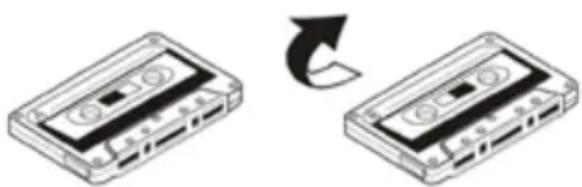
- Loose tapes may cause trouble. With a pencil etc. gently tighten the tape as shown in Figure 1.
- To prevent recordings from being accidentally erased, remove the tabs with a screwdriver (see Figure 2). If you want to record a tape whose tabs have been broken out, stick some cello tape over the holes (see Figure 3).

- Storage of tapes:
Do not store tapes in places which are subject to direct sunlight or near equipment that generates heat; keep cassette tapes away from magnetic fields.
- 120-minute tapes:
Since 120-minute tapes are very thin, the tape could adhere to the pinch rollers or be easily cut.
- Endless tape:
Do not use endless tapes, as this could damage the mechanism of the unit.
- Cleaning tape heads:
For maintaining the best condition of the deck and for a longer lifespan always keep the head (recording/playback/erase), capstan and pinch rollers clean.
Clean as follows:
- Open the cassette compartment.
-
Use a cotton swab dipped in alcohol to clean the head (recording/playback/erase), capstan and pinch roller carefully.
-
Demagnetizing the head:
When the recording/playback head is magnetized, noise may increase during playback. In this case demagnetize the head using a commercially available demagnetizer (head eraser).
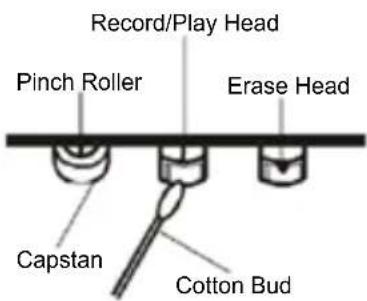
Note: When cleaning, pay special attention not to damage any components.
ANTI-SHOCK PROTECTION
A special circuitry inside the player guarantees that there will be no sound skipping when the player is subject to shock and shaking in music playback.
The laser scans the CD/MP3 disc and saves data for up to 40/100 seconds ahead of where the playback is on the disc.
If there is too much vicious vibration or shaking exerted on the player, the player may malfunction and sound skipping is caused.
When this happens, place the player on a level table where no vibration will be brought. Normal sound will resume immediately.
CD PLAYBACK
INSERT DISC
- Set the function selector (7) to CD/MP3 position.
- Press PUSH OPEN (37) to open the CD door.
- Insert a CD with the label facing up.
- Close the CD door manually.
EJECT CD
- Make sure the unit is in stop mode.
- Press PUSH OPEN (37) to open the CD door.
- Remove the CD carefully to the top without touching the surface.
- Close the CD door manually.
- Store the removed CD in its cover.
CD/MP3/WMA DISC PLAYBACK
After inserting the CD the CD player reads the contents and displays the total number of tracks and corresponding icon (CD/MP3/WMA).
- Press CD ▶|| (34) to play the first track, the display shows the track number (001) and .
- Press CD ▶|| (34) to pause playback, the current track number flash.
- Press CD ▶|| (34) to resume playback.
- Press CD ■ (33) to finally stop playback.
- Adjust the volume with VOLUME control (16).
- Select EQ preset (13) by pressing FLAT, JAZZ, POP or ROCK.
- Set the function selector (7) to TAPE position to turn the CD player off.
SELECT DIFFERENT TRACK (SKIP) DURING PLAYBACK
- Press |◀◀ (38) or ▶▶| (39) until the desired track number is displayed.
- The track will be played automatically.
- Press |◀◀ (38) once to return to the previous track.
- Press ▶▶| (39) to skip to the next track.
- Press +10 (7 remote control) to skip 10 tracks ahead.
SELECT A CERTAIN PASSAGE (SEARCH) DURING PLAYBACK
Press and hold |◀◀ (38) or ▶▶| (39) to search for a desired passage within all tracks on the disc.
Normal playback continues when you release the button. In search mode the volume is muted.
PROGRAM PLAYBACK
Up to 20 tracks can be programmed in any desired sequence for CD, and 99 tracks for MP3/WMA/USB.
- In stop mode press PROG. (41) to access program mode. P01 is flashing first. Then the track number will flash on the screen with PROG.
- Select the desired track number with |◀◀ (38) or ▶▶| (39).
- Press PROG. to confirm and enter the next track.
- Up to 20 tracks can be programmed in the desired sequence for CD, and 99 tracks for MP3/WMA/USB.
- Press CD ■ (33) twice to delete the programmed tracks.
- Opening the CD door or turning the unit off also deletes the program.
- Press CD ▶|| (34) to start playback of your program, the display shows the corresponding track number, PROG. and .
- After playing all tracks the CD player stops.
- Press CD ■ (33) once to stop program playback.
REPEAT DIRECTORY (MP3/WMA/USB)
- In play/pause mode press MODE (40) button thrice.
- DIR is displayed. Now press CD ▶|| (34) to the repeat a certain album.
INTRO PLAYBACK
- In play/pause mode press MODE (40) four times for CD, five times for MP3/WMA/USB.
- The display shows INT. Now press CD ▶|| (34) to play the first 10 seconds of each track, starting with track 1.
RANDOM PLAYBACK
- In play/pause mode press MODE (40) three times for CD, four times for MP3/WMA/USB.
- The display shows RAN. Now press CD ▶|| (34) to play all tracks on the CD in random order.
REPEAT ONE TRACK
- In play/pause mode press MODE (40) once.
- REPT.1 is displayed. Now press CD ▶|| (34) for playback or |◀◀ (38) or ▶▶| (39) to select a track. The selected track is now constantly repeated.
REPEAT ALL TRACKS
- In play/pause mode press MODE (40) twice.
- REPT. ALL is displayed. Now press CD ▶|| (34) for playback. The CD is now constantly repeated.
EXTERNAL MEMORY MEDIA OPERATION (USB)
Make sure the power is connected; slide the FUNCTION switch to CD/MP3 position. Insert a USB data traveller into the USB port, an icon of “---” shows in the LCD and after the USB is successfully detected and read. A total number of tracks shows on the screen.
Notes:
- During disc play, press CD/USB button to toggle between USB and disc modes.
- A USB device must always be connected directly to the USB port of this product. The use of a USB extension cord is not supported by this product. The USB port of this product cannot communicate with a computer directly.
MUTE: During playback, press MUTE button to shut the speakers off, press it again resumes normal play.
VOLUME UP▲/DN▼: Press VOLUME UP ▲ to increase the volume, press VOLUME DN ▼ to decrease the volume.
PLAY/PAUSE: Corresponds with (34) on the front panel for CD playback and pause.
STOP: Corresponds with (33) on the front panel for CD Stop.
SKIP/SEARCH: Corresponds with (38) and (39) on the front panel for Skip+/- and Search.
+10: Press +10 to skip 10 tracks ahead.
PROGRAM: Corresponds with PROG. (41) on the front panel for programming your own sequence (up to 20 tracks for CD and 99 for MP3/WMA/USB).
MODE: Press repeatedly to cycle through the playback modes: Repeat one track (REPT.1) -> Repeat disc (REPT. ALL) -> Repeat album (REPT. DIR) -> Intro playback 10 seconds (INT.).
TROUBLESHOOTING
If a fault occurs, first check the points listed below before taking the unit for repair. If you are unable to solve a problem by following these tips, consult your dealer or authorized service center.
WARNING: Under no circumstances should you try to repair the unit yourself.
| PROBLEM POSSIBLE CAUSE $OLUTION | ||
| GENERALNo sound | Volume is set too low.Earphones are connected.Batteries exhausted.Batteries inserted incorrectly.Mains cable not connected. | Adjust the volume.Disconnect the earphones.Change the batteries.Observe polarity.Connect mains cable correctly. |
| No key function Electrostatic discharge. Disconnect mains cable for some seconds und reconnect. | ||
| RADIOPoor reception | Weak signal.Interferences by other appliances(TV sets, VCRs, computers, etc.). | Adjust antenna:FM/SW: telescopic antenna.MW/LW: adjust unit.Keep distance to other appliances. |
| TAPE RECORDERPoor sound quality | Head, capstan or pinch rollers dirty. | Clean head, capstan and pinch rollers. |
| Recording does not work | Tab in cassette broken out. Cover with cello tape. | |
| CD/MP3CD skips | CD/MP3 dirty or damaged. Replace or clean the disc. | |
TECHNICAL SPECIFICATIONS
General
Power supply AC 230V\~50Hz
Battery operation 12V (8 x UM-1/D batteries, 1.5V)
Remote control 3V (2 x UM-4/AAA batteries, 1.5V)
Power consumption 30 Watts
Dimensions approx. 660 x 216 x 200 mm
Weight approx. 5,7 kg
Operating temperature +5°C to +35°C
Radio
Frequency band FM: 88MHz-108MHz
MW: 540kHz-1600kHz
LW: 160kHz-270kHz
SW: 6MHz-18MHz
Antenna FM/SW: Telescopic antenna
MW/LW: built-in ferrite antenna
CD-Player
Playback system Compact Disc Digital Audio System
DAC 1 Bit D/A converter with 8-times over sampling and digital filter
Cassette deck
Recording system 4 tracks, 2-channel stereo
Erase system Magnetic erase, DC Bias
Frequency range 125Hz-6300Hz
Tape speed 4.76 cm/s
Wow and flutter 0.35% WRMS (JIS)
EN
Audio
Speaker impedance 4Ω
Earphones impedance 32Ω
Technical specifications and design may change without notice.
Façade (agrandissement)
CONNECTIONS ET INSTALLATION
FONCTIONNEMENT AVEC L'ALIMENTATION PRINCIPALE
natural_image
Two isometric images of a cassette tape being converted to a blank film, with no text or symbols present.FR
LECTURE
- RR 512
- CAUTION
- Batteries
- Disposal of Used Electrical & Electronic Equipment
- CONDENSATION
- Front View
- Front View (Enlarged Detail)
- Rear View
- Remote Control
- Display
- CONNECTIONS AND INSTALLATION
- MAINS OPERATION
- BATTERY OPERATION
- Battery Safety Precautions
- PRIVATE LISTENING WITH EARPHONES
- HEARING PROTECTION
- OPERATING INSTRUCTIONS
- RADIO
- FM STEREO
- ANTENNA
- CASSETTE OPERATION
- INSERT CASSETTE
- PLAYBACK
- FAST FORWARD/REWIND
- RECORD (DECK A ONLY)
- RECORDING FROM DISC OR USB (DECK A ONLY)
- RECORDING FROM RADIO (DECK A ONLY)
- RECORDING FROM BUILT-IN MICROPHONE (DECK A ONLY)
- ERASE A TAPE
- DUBBING FROM DECK B TO DECK A
- AUTO STOP
- KARAOKE VIA MIC MIXING INPUT
- Notes on tapes
- ANTI-SHOCK PROTECTION
- CD PLAYBACK
- INSERT DISC
- EJECT CD
- CD/MP3/WMA DISC PLAYBACK
- SELECT DIFFERENT TRACK (SKIP) DURING PLAYBACK
- SELECT A CERTAIN PASSAGE (SEARCH) DURING PLAYBACK
- PROGRAM PLAYBACK
- REPEAT DIRECTORY (MP3/WMA/USB)
- INTRO PLAYBACK
- RANDOM PLAYBACK
- REPEAT ONE TRACK
- REPEAT ALL TRACKS
- EXTERNAL MEMORY MEDIA OPERATION (USB)
- Notes:
- TROUBLESHOOTING
- TECHNICAL SPECIFICATIONS
- General
- CD-Player
- Cassette deck
- Audio
- Façade (agrandissement)
- CONNECTIONS ET INSTALLATION
- FONCTIONNEMENT AVEC L'ALIMENTATION PRINCIPALE
- LECTURE
Brand : Karcher Audio
Model : RR 512
Category : Cd player/recorder