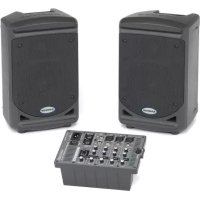
Expedition XP150 - Mixer SAMSON - Free user manual and instructions
Find the device manual for free Expedition XP150 SAMSON in PDF.



| Product type | Portable powered mixer |
| Brand | Samson |
| Model | Expedition XP150 |
| Total power | 150 W (2 × 75 W at 8 Ω) |
| Frequency response | 40 Hz - 20 kHz |
| Number of input channels | 5 (3 Mic/Line channels + 1 stereo line channel) |
| Input connectors | 3 × XLR combo, 2 × 6.35 mm stereo jack, 1 × 3.5 mm stereo jack |
| Speaker outputs | 2 × 6.35 mm jack |
| Phantom power | Fixed +15 VDC |
| Per-channel EQ | HF: 10 kHz ±15 dB, LF: 100 Hz ±15 dB |
| Effects processor | Built-in digital reverb with per-channel switch |
| Speech/Music filter | Yes (emphasizes mids or extremes) |
| Power supply | 100 - 240 V ~ 50/60 Hz, 180 W |
| Dimensions (W × D × H) | 395 × 218 × 354 mm |
| Weight | 10.8 kg |
| Housing material | High-resistance ABS |
| Speakers | Woofer 152 mm, Tweeter 25 mm with 60° × 90° horn |
| Amplification type | Class D |
| Storage and transport | Slide and Lock system, removable mixer, accessory compartment |
| Cleaning | Dry cloth, do not use liquids |
| Safety instructions | Do not open, disconnect during storms, use only identical parts |
Frequently Asked Questions - Expedition XP150 SAMSON
User questions about Expedition XP150 SAMSON
0 question about this device. Answer the ones you know or ask your own.
Ask a new question about this device
Download the instructions for your Mixer in PDF format for free! Find your manual Expedition XP150 - SAMSON and take your electronic device back in hand. On this page are published all the documents necessary for the use of your device. Expedition XP150 by SAMSON.
USER MANUAL Expedition XP150 SAMSON
This lightning flash with arrowhead symbol within an equilateral triangle is intended to alert the user to the presence of non-insulated "dangerous voltage" within the product's enclosure that may be of sufficient magnitude to constitute a risk of electric shock.

The exclamation point within an equilateral triangle is intended to alert the user to the presence of important operating and maintenance instructions in the literature accompanying the appliance.
THIS DEVICE COMPLIES WITH PART 15 OF THE FCC RULES CLASS B. OPERATION IS SUBJECT TO THE FOLLOWING TWO CONDITIONS: (1) THIS DEVICE MUST NOT CAUSE HARMFUL INTERFERENCE, AND (2) THIS DEVICE MUST ACCEPT ANY INTERFERENCE RECEIVED INCLUDING INTERFERENCE THAT MAY CAUSE UNDESIRED OPERATION. SUITABLE FOR HOME OR OFFICE USE.
If you want to dispose this product, do not mix it with general household waste. There is a separate collection system for used electronic products in accordance with legislation that requires proper treatment, recovery and recycling.
Private household in the 25 member states of the EU, in Switzerland and Norway may return their used electronic products free of charge to designated collection facilities or to a retailer (if you purchase a similar new one).
For Countries not mentioned above, please contact your local authorities for a correct method of disposal.
By doing so you will ensure that your disposed product undergoes the necessary treatment, recovery and recycling and thus prevent potential negative effects on the environment and human health.
Important Safety Information
- Read these instructions.
- Keep these instructions.
- Heed all warnings.
- Follow all instructions.
- This apparatus shall not be exposed to dripping or splashing liquid and no object filled with liquid, such as a vase, should be placed on the apparatus.
- Clean only with a dry cloth.
- Do not block any of the ventilation openings. Install in accordance with the manufacturer's instructions.
- Do not install near any heat sources such as radiators, heat registers, stoves, or other apparatuses (including amplifiers) that produce heat.
- Only use attachments/accessories specified by the manufacturer.
- Unplug this apparatus during lightning storms or when not in use for long periods of time.
- Do not override the intended purpose of the polarized or grounding-type plug. A polarized plug has two blades, with one wider than the other. A grounding-type plug has two blades and a third grounding prong. The wide blade, or third prong, is provided for your safety. If the provided plug does not fit your outlet, consult an electrician to replace the obsolete outlet.
- Protect the power cord from being walked on or pinched, particularly at the prongs, convenience receptacles, the point where they exit from the apparatus.
- Use only with the cart stand, tripod bracket, or table specified by the manufacture, or sold with the ap

paratus. When a cart is used, utilize caution when moving the cart/apparatus combination to avoid injury from tip-over.
- Refer all servicing to qualified service personnel. Servicing is required if the apparatus has been damaged in any way, such as power-supply cord or plug breakage, damage due to liquid or objects falling onto the apparatus, exposure to rain or moisture, or if the apparatus does not operate normally, or has been dropped.
- POWER ON/OFF SWITCH: For products with a power switch, the power switch DOES NOT break the connection from the mains.
- MAINS DISCONNECT: The plug should remain readily operable. For rack-mount or installation where plug is not accessible, an all-pole mains switch with a contact separation of at least 3mm in each pole shall be incorporated into the electrical installation of the rack or building.
- FOR UNITS EQUIPPED WITH EXTERNALLY ACCESSIBLE FUSE RECEPTACLE: Replace fuse with same type and rating only.
- MULTIPLE-INPUT VOLTAGE: This equipment may require the use of a different line cord, attachment plug, or both, depending on the available power source at installation. Connect this equipment only to the power source indicated on the equipment rear panel. To reduce the risk of fire or electric shock, refer servicing to qualified service personnel or equivalent.
Table of Contents
Introduction. 5
Features 6
Setting Up the XP150. 7
XP150 Quick Start 9
Configuring the XP150 for Transport 11
XP150 Mixer Layout 12
XP150 Connections 14
XP150 Wiring Guide 15
Specifications 16
Block Diagram 17
Introduction
Thank you for purchasing the Expedition XP150 Portable PA System from Samson! The XP150 features a compact, 5-channel mixer with 150 watts of onboard power and dual 2-way speakers, making it an ideal solution for a variety of small- to medium-sized PA applications. The XP150 is also extremely portable, thanks to its lightweight and unique "Slide and Lock" design.
The 5-channel mixer can be removed from the speaker for tabletop use. It features three inputs for connecting microphones, plus one channel for connecting a stereo signal from an MP3 player, or other electronic device. There's also a built-in digital effects processor to add reverb to your voice or instrument. The mixer provides a robust output, with 150 watts total power from the lightweight, Class D amplifier section. The XP150 employs a matched speaker system with dual 2-way enclosures that have proprietary 6-inch woofers and 1-inch high frequency drivers. To help project sound to a larger audience, the XP150 speakers can be mounted on standard speaker stands, thanks to the integral pole mount receptacles. The XP150 is constructed using durable ABS high impact plastic, making it super road tough and, at the same time, lightweight.
In this manual, you'll find a detailed description of the features of the XP150 PA system, as well as a description of its front and rear panels, step-by-step instructions for its setup and use, and full specifications. You'll also find a warranty card enclosed—please don't forget to fill it out and mail it in so that you can receive online technical support, and so we can send you updated information about these and other Samson products in the future. Also, be sure to check out our website (www.samsontech.com) for complete information about our full product line.
With proper care and adequate air circulation, your XP150 will operate trouble free for many years. We recommend you record your serial number in the space provided below for future reference.
Serial number:
Date of purchase:
Should your unit ever require servicing, a Return Authorization (RA) number must be obtained before shipping your unit to Samson. Without this number, the unit will not be accepted. Please call Samson at 1-800-3SAMSON (1-800-372-6766) for an RA number prior to shipping your unit. Please retain the original packing materials and, if possible, return the unit in the original carton and packing materials. If you purchased your Samson product outside the United States, please contact your local distributor for warranty information and service.
Features
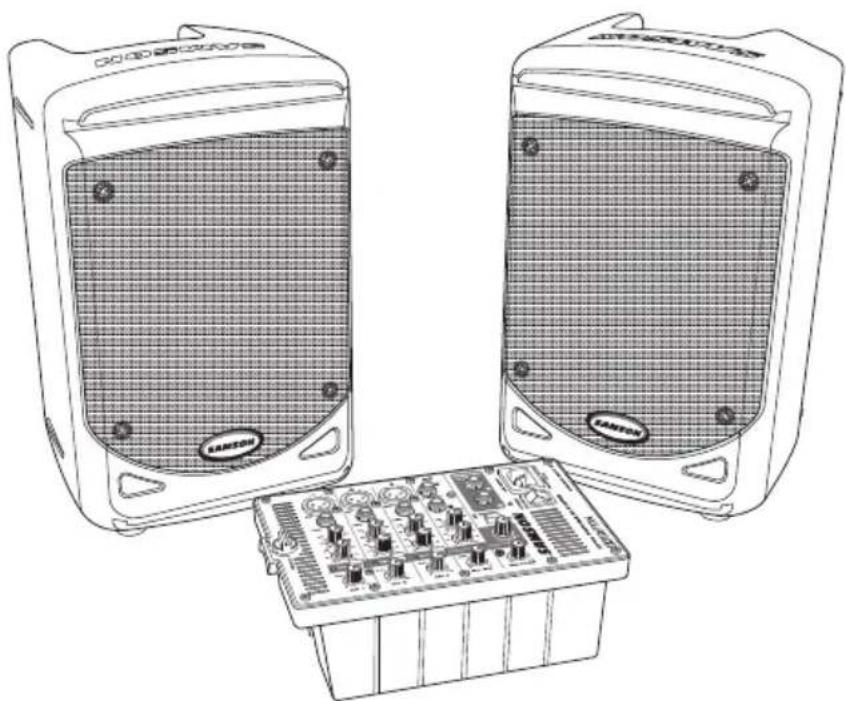
- The XP150 is a compact PA system with dual 2-way speakers, onboard mixer, and 150 watt power amplifier.
- The XP150 is the ultimate in portability. The lightweight, clever design allows you to slide and lock the two speakers together to carry all components together in a single, easy to move case. The mixer is stored in one of the speaker cabinets. The second cabinet has a compartment for storing the speaker cables, microphones, and other accessories.
- The speakers are 2-way vented enclosures with 6-inch woofers. Each is complemented by a 1-inch high frequency driver, and set in a custom horn with a 60 × 90 degree coverage pattern producing a clean, clear sound.
- The XP150 speaker cabinets feature a tilt back monitor position for use without speaker stands or as a performance monitor.
- The internal 2 × 75 watt lightweight Class D power amplifier produces a powerful stereo sound.
The XP150's mixer can be removed from the speaker for tabletop use. - The 5-channel mixer features three Mic/Line inputs allowing you to connect microphones or line signals. In addition, one stereo input channel allows you to connect line level signals from keyboards, drum machines and MP3 or CD players. You can engage the Phantom Power switch if you are using condenser microphones.
- On each of the mixer's channel inputs there is a Bass and Treble control allowing you to equalize the tone of the individual inputs.
- To create a lush sound on any of the microphone channels, you can use the internal effects processor to add Digital Reverb.
Setting Up the XP150
- Unpack all the system components from the shipping carton and save all packing materials in the event your unit ever needs to be returned for service.
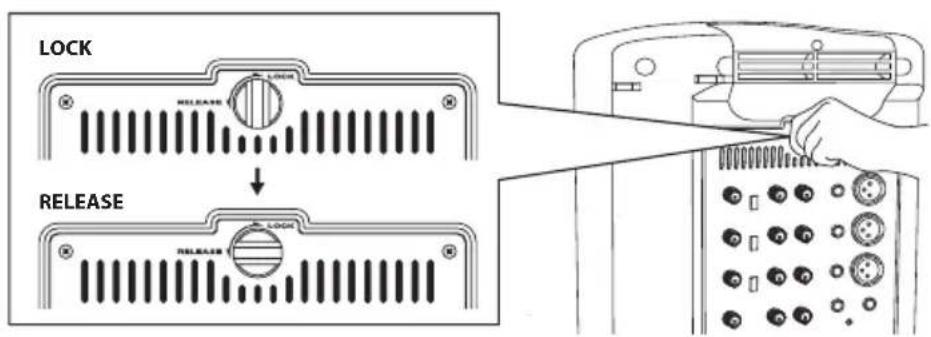
- Remove the mixer by turning the quarter turn screw counterclockwise towards the RELEASE position.
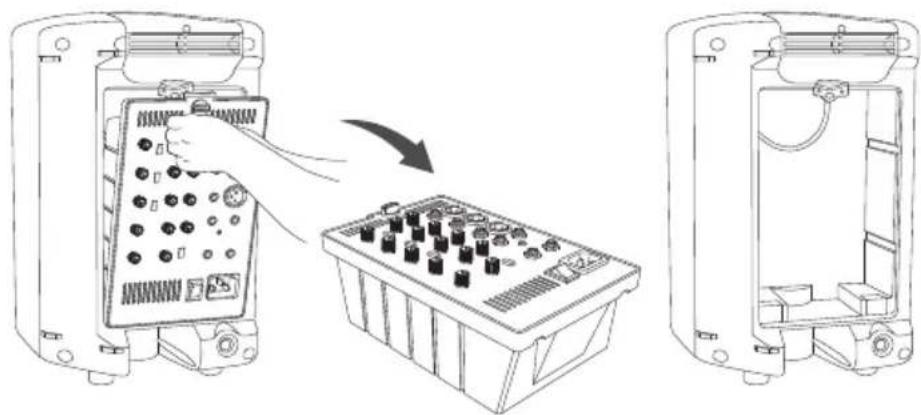
- Carefully hold the mixer to remove it from the speaker.
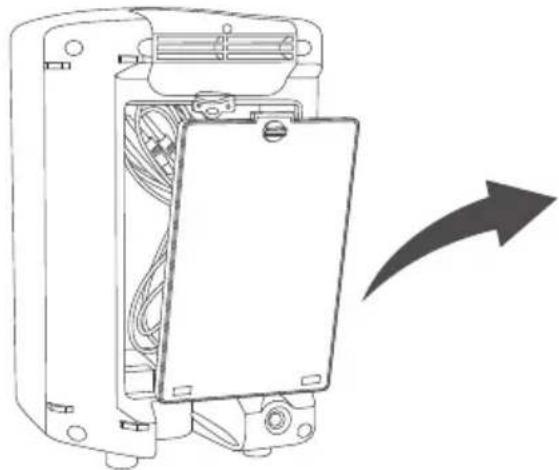
- Remove the accessory compartment cover by turning the quarter turn screw counterclockwise towards the RELEASE position, and remove the included speaker cables.
Setting Up the XP150
- Replace the accessory panel by aligning the bottom of the panel with the slots. Make sure the quarter turn screw is in the RELEASE position; then close the panel and turn the quarter turn screw clockwise to LOCK.
- Position the speakers on the floor or on stands.
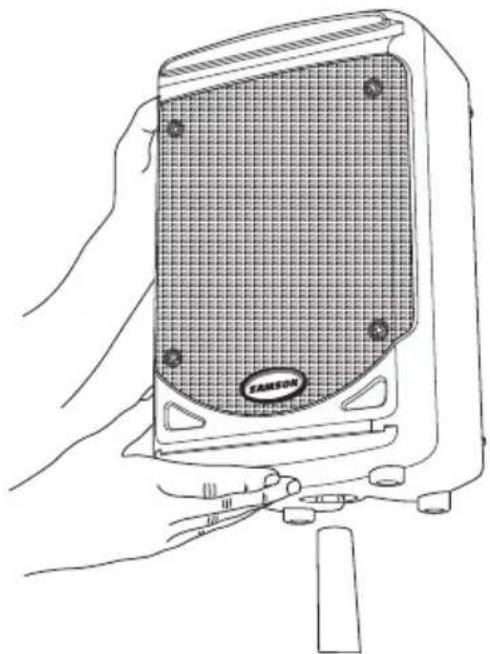
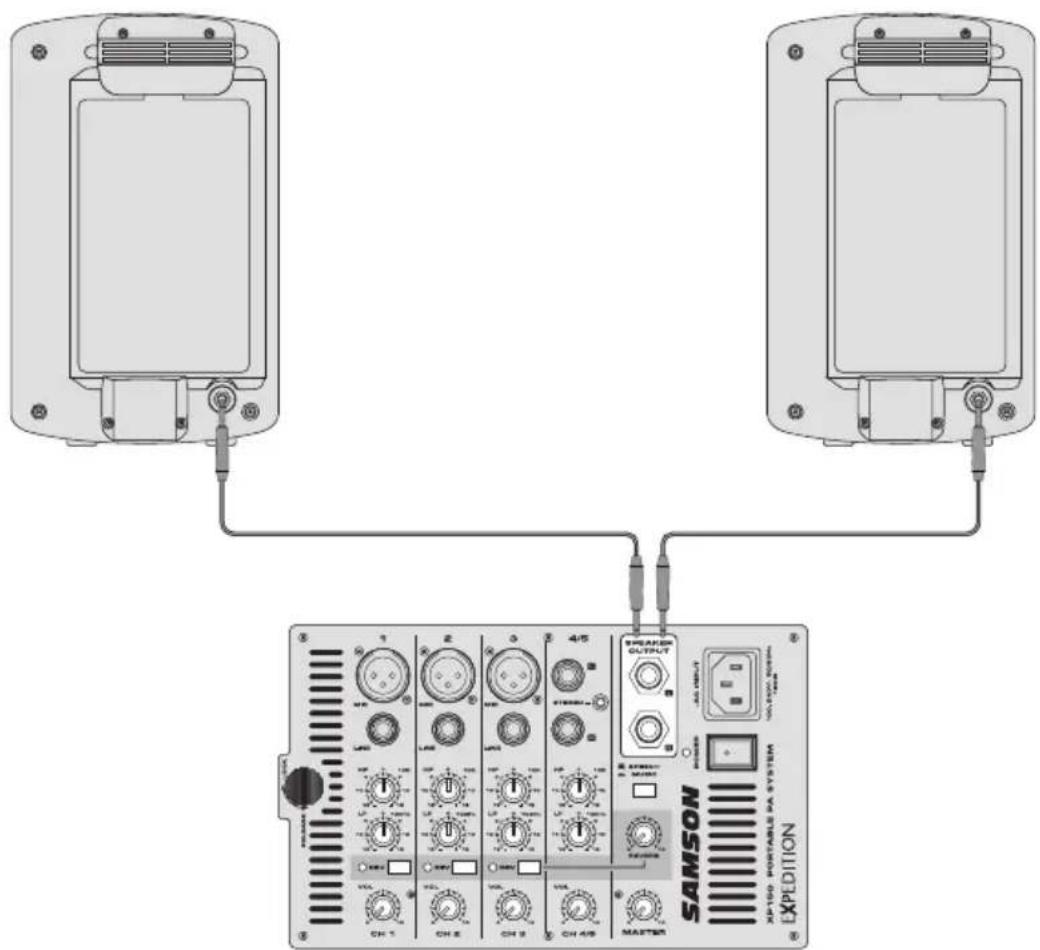
- Using one of the included speaker cables, connect the mixer's LEFT SPEAKER OUT to the left speaker's input connector. Next, use the second included speaker cable to connect the RIGHT SPEAKER OUT to the right speaker's input connector.
XP150 Quick Start
- Be sure that the XP150's POWER switch is set to the OFF position.
- If the speakers are not connected, connect the speaker wires as described in the previous section.
- Turn each of the channel volume (VOL) and MASTER volume controls fully counterclockwise, to the "0" position.
- Next, connect one side of the included power cable to the XP150 mixer's power inlet and the other to a grounded AC power outlet.
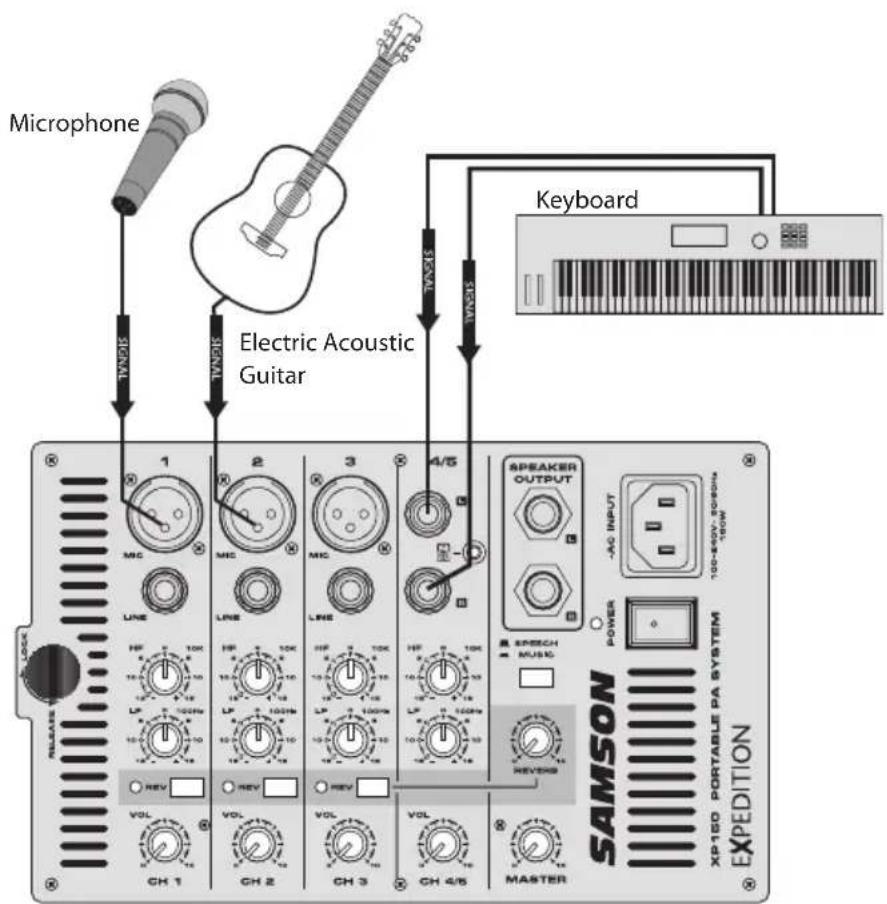
- Connect your microphones using standard XLR cables, instruments using 14 " phone cables, and MP3 player using 3.5mm cable, into the appropriate jacks on the mixer.
- Switch on all equipment connected to the XP150, then switch the XP150's POWER switch to the ON position.
- Turn the MASTER level control up halfway, to the "5" position.

XP150 Quick Start
-
Start talking or playing into channel 1 while slowly adjusting the VOL control until you have reached the desired level. Do the same for each channel you are using.
-
If you notice that the POWER/PEAK indicator is lighting constantly, turn the MASTER volume down so that the indicator only lights occasionally.
-
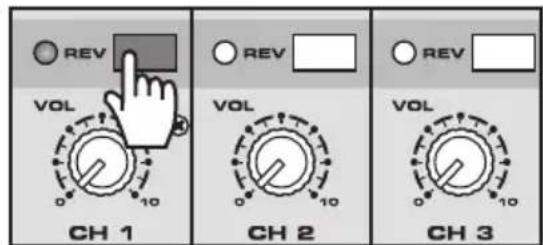
To add depth to the mix or smooth out the vocals, you can apply reverb to channel 1-3. To do this, press the REV button on the channel(s) to which you would like to add the effect.
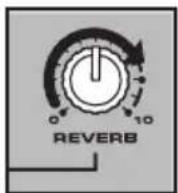
- Slowly turn up the REVERB knob until the desired sound is reached.
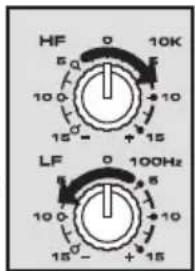
- To alter the tonal characteristic of the signal, you can adjust the LF (bass) and HF (treble) controls. If you find the audio too muddy, you may want to reduce the LF control. If you find that the audio sounds dull, you can increase the HF control. There is no right or wrong way to EQ a sound. You should listen to how the mix sounds in the room and fine-tune to your liking.
Configuring the XP150 for Transport
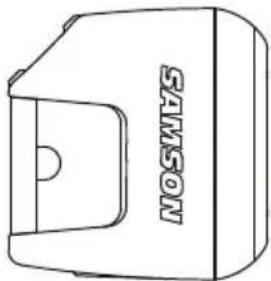
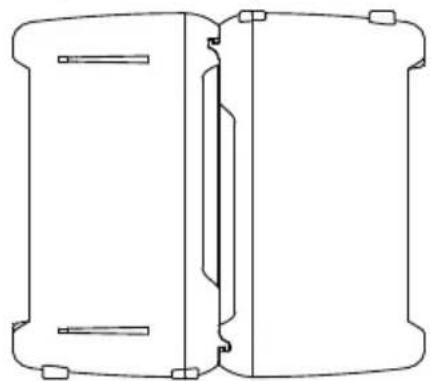
You can easily carry your sound system using the XP150's "Slide and Lock" feature. The "Slide and Lock" speaker enclosures allow you to connect both speakers together into a single, easy to carry unit. Follow these steps to configure the XP150 for easy transport.
- Place one speaker on the floor and set it on its side.
- Position the second speaker above the first speaker and line up the "Slide and Lock" tracks and grooves so that they are parallel to the speaker on the floor.
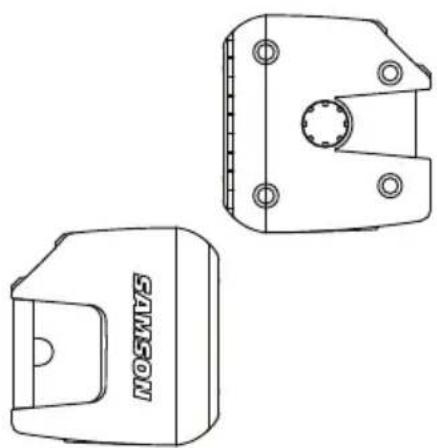
Speaker cabinets must be reversed with respect to top and bottom.
- Slide the second speaker into the speaker on the floor making certain that the two speakers stay parallel to each other.
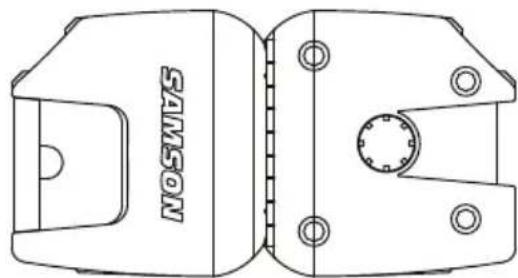
- You will feel a slight click when the two speakers are in place.
XP150 Mixer Layout
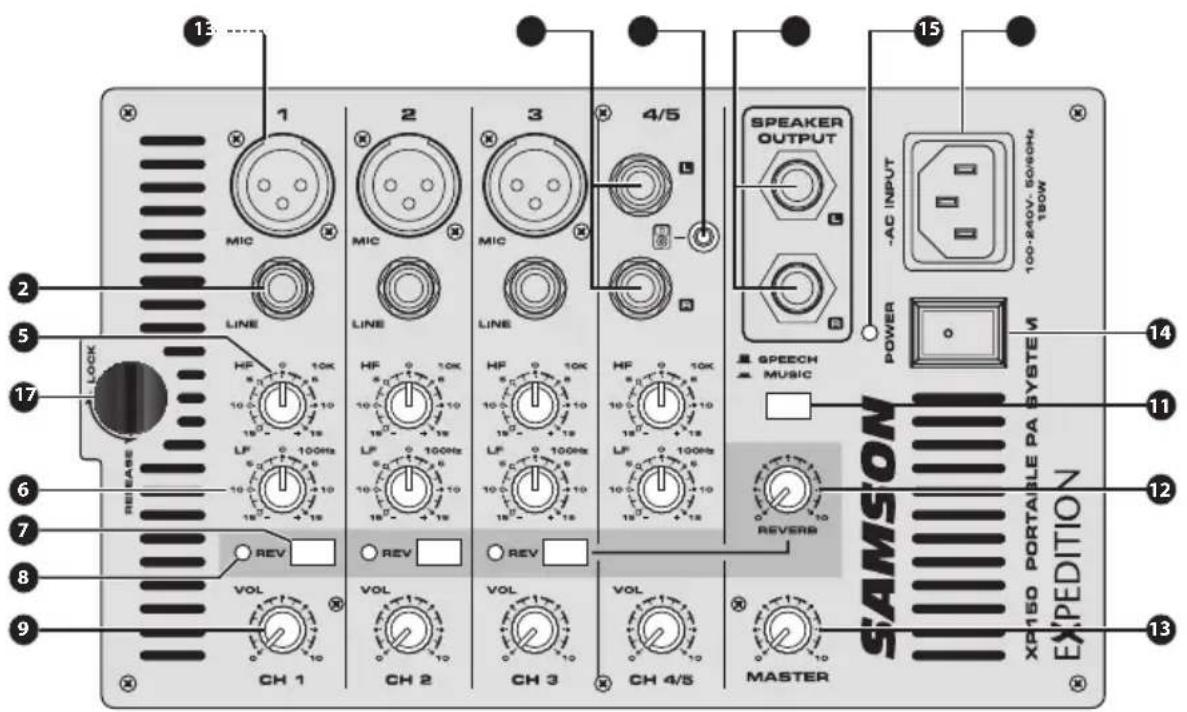
- XLR Mic Input Connectors (channels 1-3) - Use these XLR jacks to connect low impedance microphones to the XP150's built-in mic preamps.
- 14 -inch Line Input Connectors (channels 1-3) – Use these 14 '' jacks to connect instrument or audio sources with line level signals to the XP150. You can connect the outputs from acoustic guitar pickups, keyboards, drum machines, CD/MP3 players and other units with line level outputs here.
- Stereo 14 -inch Input Connectors (channels 4/5) – For stereo devices, use the channel 4/5 L and R inputs to connect to the left and right channel outputs of the device. Use these inputs to connect high impedance microphones, synthesizers, drum machines, MP3, CD, tape players or any other line level device.
- Stereo 3.5mm Input Connector (channels 4/5) - Use this input to connect a stereo line level device, such as an an MP3, CD, or tape player.
- High Frequency (HF) - The HF knob controls the amount of treble applied to each channel. The channel's HIGH frequency response is flat when the knob is in the "0" position. Rotating the knob to the right will boost the channel's high frequency response above 10kHz by 15 dB, and rotating it towards the left will cut the high frequency response by 15 dB.
- Low Frequency (LF) - The LF knob controls the amount of bass applied to each channel. The channel's LOW frequency response is flat when the knob is in the "0" position. Rotating the knob to the right will boost the channel's low frequency response below 100Hz by 15 dB, and rotating it towards the left will cut the low frequency response by 15 dB.
XP150 Mixer Layout
- REVERB Switch - Use the REVERB switch to add an effect to a Mic or Line input on any of the inputs 1-3. The REVERB LED indicator lights GREEN when the REVERB is ON.
- REVERB Indicator –The REVERB LED will illuminate when the REVERB switch is pressed down, indicating the channel is set to add reverb (see #7 above).
- VOLUME Control Knob - This knob sets the overall level for each channel's Mic or Line input. NOTE: To reduce noise, set the VOLUME controls on any unused channels to the minimum setting.
- SPEAKER OUT Jacks - The XP150 has two ¼-inch phone connectors, which are powered outputs used to connect your left and right speakers. Use the included speaker cables to connect the speakers.
CAUTION: The total impedance load for each side of the amplifier must not be less than 8 Ohms. Do not connect additional speakers to the XP150 mixer. - SPEECH/MUSIC Switch - The SPEECH/MUSIC switch is used to change the overall frequency response, or tone contour, for the XP150 sound system. If your application is mainly for music, press the switch down to select the MUSIC response curve. If your application is mainly for speech, leave the switch up to select the SPEECH response curve.
- REVERB Control Knob - The REVERB control knob is used to adjust the total amount of reverb added to all channels with their REVERB switch (see #7 above) pressed down.
- MASTER Volume Knob - The MASTER volume knob controls the overall output level. Signals from all five channels are routed here just before being routed to the built-in power amplifiers and Left and Right output jacks (see #10 above).
- POWER Switch - Use the POWER switch to turn power to the XP150 on or off.
- Power/Peak Indicator - This LED will illuminate GREEN when the MAIN power switch is turned on, and light RED when the when the amp is near the clipping point. If the Peak indicator lights frequently, turn down the MASTER volume control or turn down the input channel VOL controls, until the indicator does not light anymore, or lights only occasionally with signal peaks.
- IEC Inlet - Connect the supplied heavy-gauge 3-pin "IEC" power cable here.
- Mixer Lock - Turn this quarter turn lock counterclockwise, to the RELEASE position, to remove the mixer from the rear of the speaker cabinet. When transporting the XP150, make sure the lock is in the LOCK position.
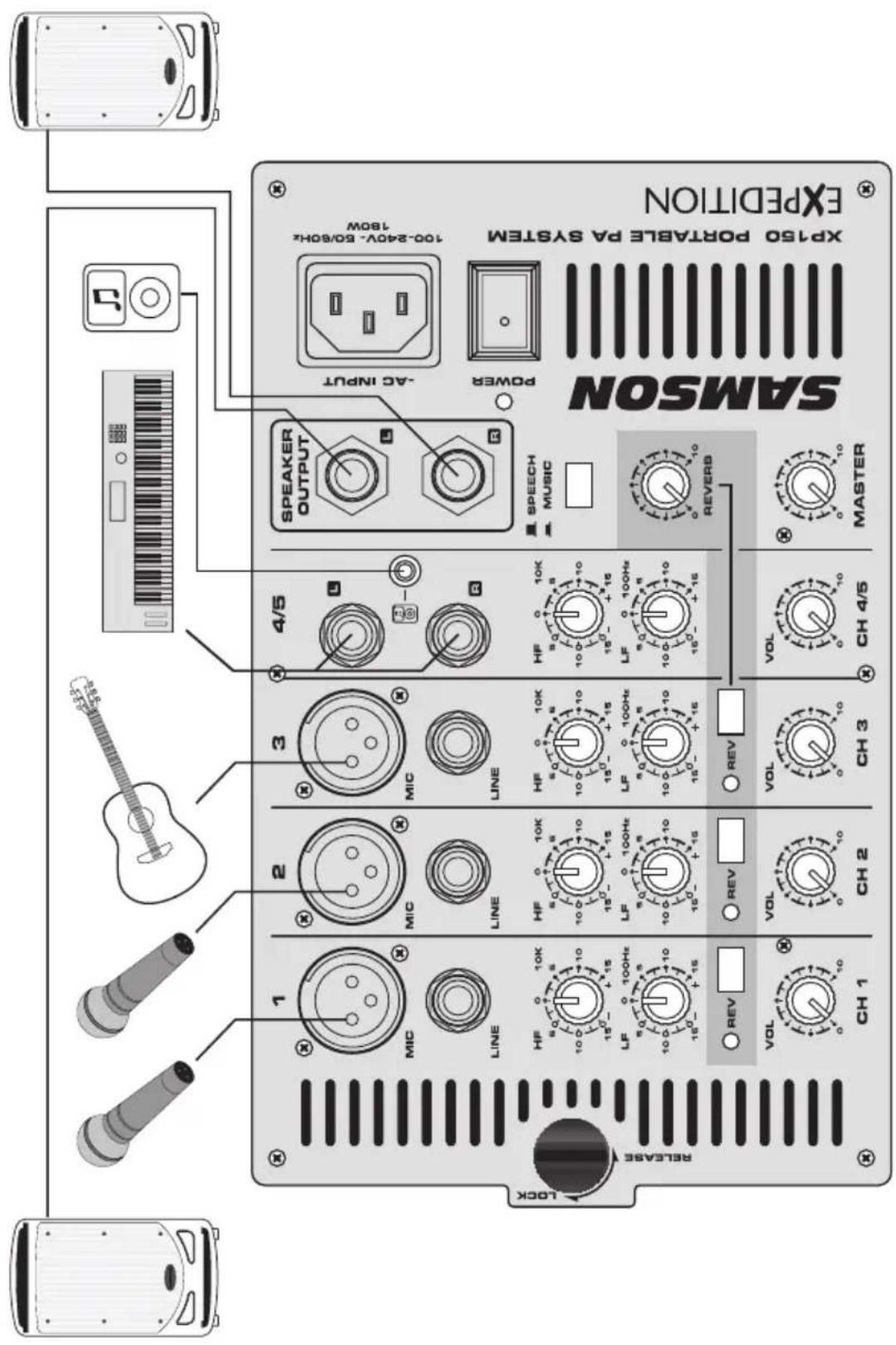
This example shows a typical PA system for a cocktail band using the XP150 with two microphones, acoustic guitar, and keyboards, and an MP3 player connected for background music.
XP150 Wiring Guide
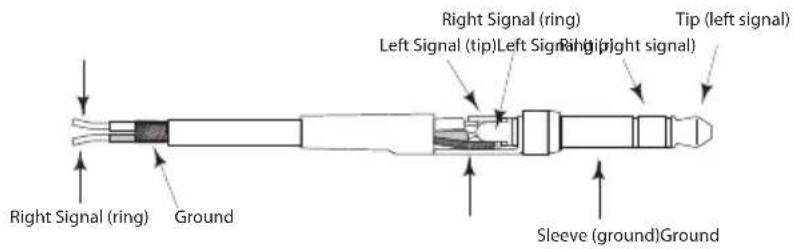
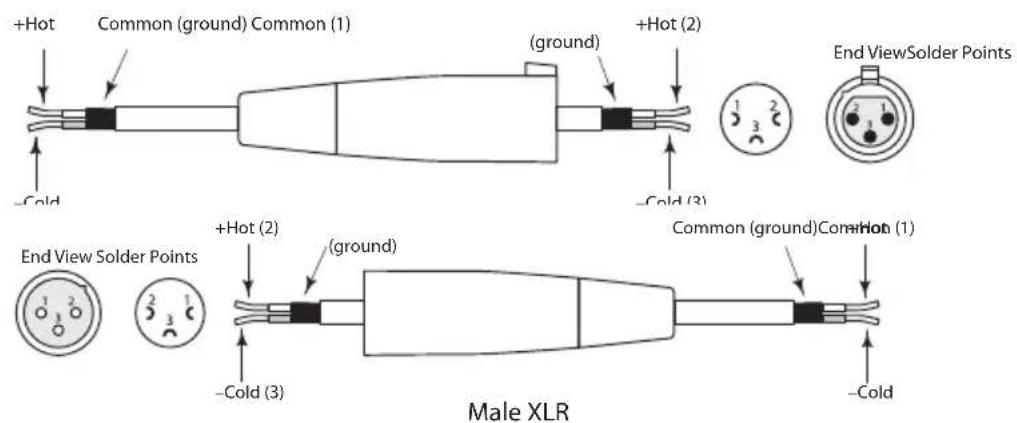
There are several ways to interface the XP150 to support a variety of applications. The XP150 features balanced inputs, so connecting balanced and unbalanced signals is possible.
Unbalanced 14 Connector
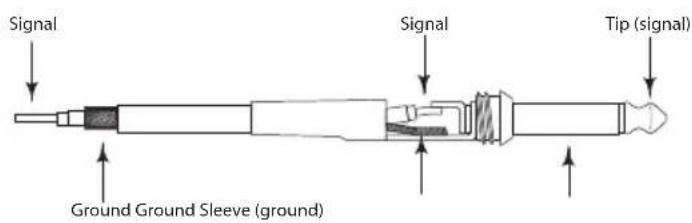
Stereo TRS 3.5mm Connector
XLR Balanced Wiring Guide
Specifications
| Amplifier | ||
| RMS Power 150 W @ 8Ω (75 W per c) | channel) | |
| Frequency Response 40 Hz - 20 kHz | ||
| Power Consumption AC Input 100V | ~240V 50/60Hz 180W | |
| Speakers | ||
| Low Frequency 6" bass transducer | ||
| High Frequency 1" tweeter | ||
| Mixer | ||
| Inputs XLR, ¼" balanced, 3.5 mm stereo | ||
| Outputs ¼" Speaker output | ||
| Phantom Power +15V DC, Fixed Phantom Voltage | ||
| Input Channel EQ | High 10kHz Shelving ±15 dB | |
| Low 100Hz Shelving ±15 dB | ||
| Speech/Music Switch | 150Hz, 18dB/Octave | |
| Indicators | Two Color LED - Power/Peak | |
| Dimensions and Weight | ||
| Dimensions | Length 15.6"/3 | 95 mm |
| Width 8.6"/218 | mm | |
| Height 13.9"/354 mm | ||
| Weight | 24 lbs/10.8 kgs | |
Specifications are subject to change without notice.
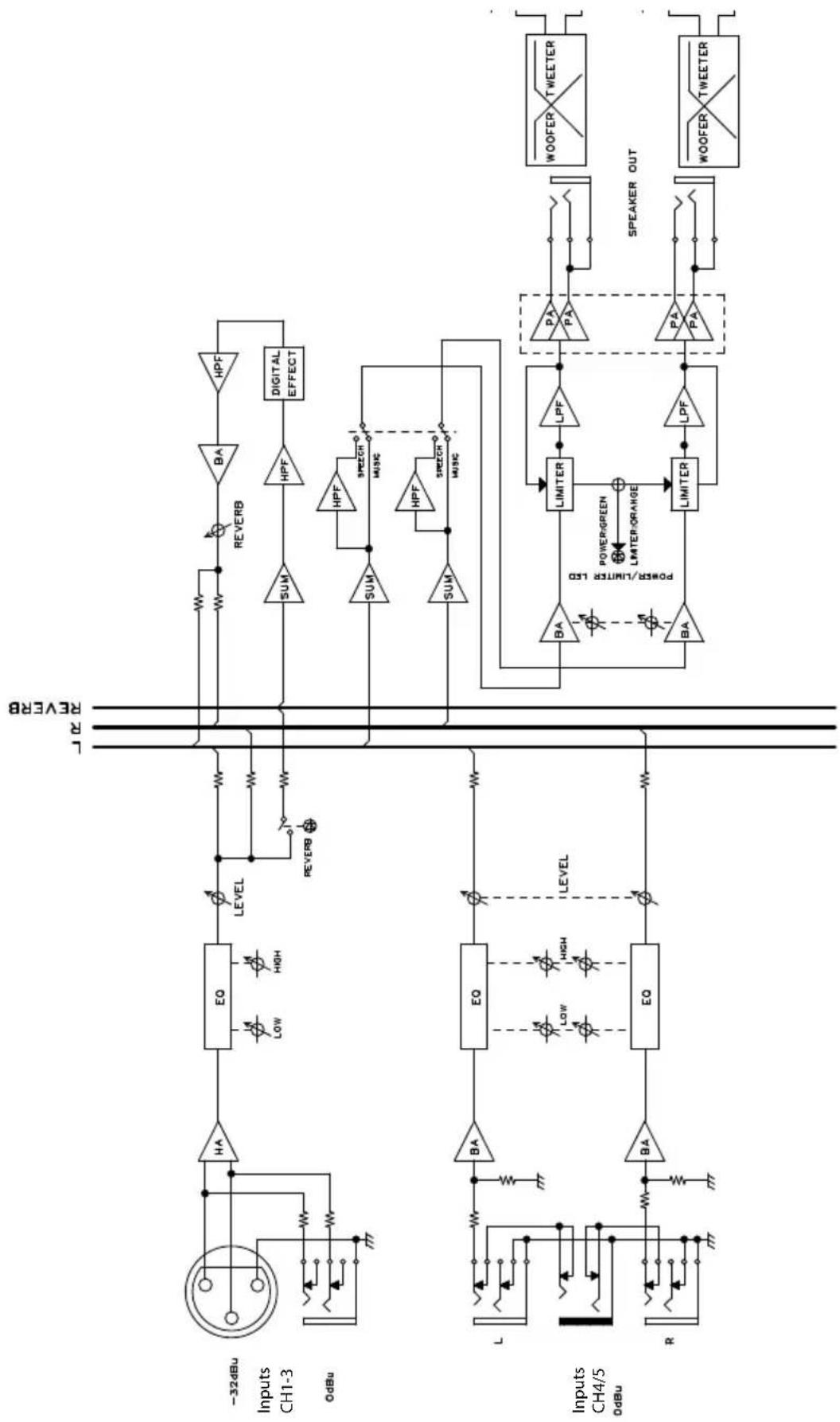
Block Diagram
- Read these instructions.
- Keep these instructions.
- Heed all warnings.
- Follow all instructions.
- This apparatus shall not be exposed to dripping or splashing liquid and no object filled with liquid, such as a vase, should be placed on the apparatus.
- Clean only with a dry cloth.
- Do not block any of the ventilation openings. Install in accordance with the manufacturer's instructions.
- Do not install near any heat sources such as radiators, heat registers, stoves, or other apparatuses (including amplifiers) that produce heat.
- Only use attachments/accessories specified by the manufacturer.
- Unplug this apparatus during lightning storms or when not in use for long periods of time.
- Do not override the intended purpose of the polarized or grounding-type plug. A polarized plug has two blades, with one wider than the other. A grounding-type plug has two blades and a third grounding prong. The wide blade, or third prong, is provided for your safety. If the provided plug does not fit your outlet, consult an electrician to replace the obsolete outlet.
- Protect the power cord from being walked on or pinched, particularly at the prongs, convenience receptacles, the point where they exit from the apparatus.
- Use only with the cart stand, tripod bracket, or table specified by the manufacture, or sold with the ap

paratus. When a cart is used, utilize caution when moving the cart/apparatus combination to avoid injury from tip-over.
- Refer all servicing to qualified service personnel. Servicing is required if the apparatus has been damaged in any way, such as power-supply cord or plug breakage, damage due to liquid or objects falling onto the apparatus, exposure to rain or moisture, or if the apparatus does not operate normally, or has been dropped.
- POWER ON/OFF SWITCH: For products with a power switch, the power switch DOES NOT break the connection from the mains.
- MAINS DISCONNECT: The plug should remain readily operable. For rack-mount or installation where plug is not accessible, an all-pole mains switch with a contact separation of at least 3mm in each pole shall be incorporated into the electrical installation of the rack or building.
- FOR UNITS EQUIPPED WITH EXTERNALLY ACCESSIBLE FUSE RECEPTACLE: Replace fuse with same type and rating only.
- MULTIPLE-INPUT VOLTAGE: This equipment may require the use of a different line cord, attachment plug, or both, depending on the available power source at installation. Connect this equipment only to the power source indicated on the equipment rear panel. To reduce the risk of fire or electric shock, refer servicing to qualified service personnel or equivalent.
#

Brand : SAMSON
Model : Expedition XP150
Category : Mixer