DVP7748DUO GC - Portable DVD Player SALORA - Free user manual and instructions
Find the device manual for free DVP7748DUO GC SALORA in PDF.


| Product Type | Portable dual-screen DVD player |
| Brand | Salora |
| Model | DVP7748DUO GC |
| Dimensions (main unit) | 212.5 × 167 × 39.8 mm |
| Weight (main unit) | 0.7 kg |
| Screen | 7 inch LCD (17.8 cm) |
| Compatible disc formats | DVD, VCD, CD, MP3, MPEG4, JPEG, SVCD, HDCD |
| TV systems | PAL and NTSC |
| External power supply | DC 9-12 V (mains adapter or car lighter) |
| Internal battery | Rechargeable lithium-polymer, 2 h battery life, 3 h charge |
| Power consumption | 10 W |
| Video output | 1 Vp-p / 75 ohms |
| Audio output | 1.4 Vrms / 10 kOhms |
| Signal/noise ratio | > 80 dB |
| Dynamic range | > 85 dB |
| Main functions | Play, pause, fast forward/rewind, zoom, repeat, angle, subtitles, multi-language OSD, A-B function, USB/SD playback, slideshow mode |
| Connectivity | AV input/output, headphone, USB, SD/MMC card |
| Car mounting | Headrest mounting with included mounting kit |
| Package contents | 2 DVD players, 2 remote controls, 2 AV cables, 2 AC/DC adapters, 1 car lighter adapter, 2 headphones, mounting kit, carrying bag, manual |
| Maintenance and cleaning | Disconnect the device, clean with a slightly damp cloth. Do not use detergents or aerosols. |
| Safety | Do not expose to water or humidity. Do not open: risk of electric shock. Use only recommended accessories. |
| Spare parts and repairability | Contact after-sales service in case of damage. Do not attempt to repair yourself. |
Frequently Asked Questions - DVP7748DUO GC SALORA
User questions about DVP7748DUO GC SALORA
0 question about this device. Answer the ones you know or ask your own.
Ask a new question about this device
Download the instructions for your Portable DVD Player in PDF format for free! Find your manual DVP7748DUO GC - SALORA and take your electronic device back in hand. On this page are published all the documents necessary for the use of your device. DVP7748DUO GC by SALORA.
USER MANUAL DVP7748DUO GC SALORA
Safety Precaution 1
Package 2
Main Features 2
Overview of Unit A/B Controls 3
In Car Installation 4
System Connection 6
The Remote Control 9
Basic operation 12
System Setup 20
Specification 24
Troubleshooting 25
Safety Precaution
Thank you for choosing our portable DVD player. It includes two DVD players. The unit applies the latest state of art electronics and is designed for use at home, in hotels and in offices etc for relaxation. The compact size makes carrying easier as well as installation. Please read the manual carefully prior to use and keep it well for future reference.

CAUTION
Hi-voltage, Don't Open It


Remind user to be careful to avoid electric shock

Warning: To reduce the risk of fire or electric shock, do not expose this apparatus to rain or moisture.
1) Please read the instruction manual carefully and follow all the requirements of safe operation to operate the device.
2) Do not use this unit near water. Do not place the unit over any container with liquid inside.
3) Do not install near any heat sources such as radiators,heat registers,stoves,or other apparatus(including amplifiers)that produce heat.
4) Unplug this unit during lightning storms or when unused for long time.
5) About Cleaning:Unplug the system,use only wet cloth to clean.Do not use liquid detergent or aerosol.
6) Only use accessories specified by the manufacturer.
7) Refer all servicing to qualified service personnel, servicing is required when the unit has been damaged in any way. Such as power supply cord or plug damaged, liquid spilled or objects falling into the unit, exposed to moisture, not operating normally. Don't try to repair the machine by yourself because of the danger of high voltage and electric shock.
8) Do not use irregular shaped discs such as heart or star-shaped discs as they may cause to the unit malfunction.
This item incorporates copyright protection technology that is protected by U.S. patents and other intellectual property rights of Rovi Corporation. Reverse engineering and disassembly are prohibited.
Package
| 7'' DVD Players | 2 |
| Remote Control with battery | 2 |
| AV Cable(DVD to DVD) | 1 |
| AC/DC Power Adapter | 2 |
| Cigarette Lighter Adapter | 1 |
| User Manual | 1 |
| Earphone | 2 |
| AV Cable (DVD to TV) | 2 |
| Carry bag | 1 |
| Bracket | 2 |
Main Features
High brightness color 7" LCD screen
Compatible with disc of DVD,VCD,MP3,MPEG4,CD,JPEG,etc
Built-in stereo speaker
Built-in rechargeable Lithium polymer battery
Support PAL or NTSC system
Support Multi-language OSD, speed forward/backward, repeat function
- Zoom in/out function
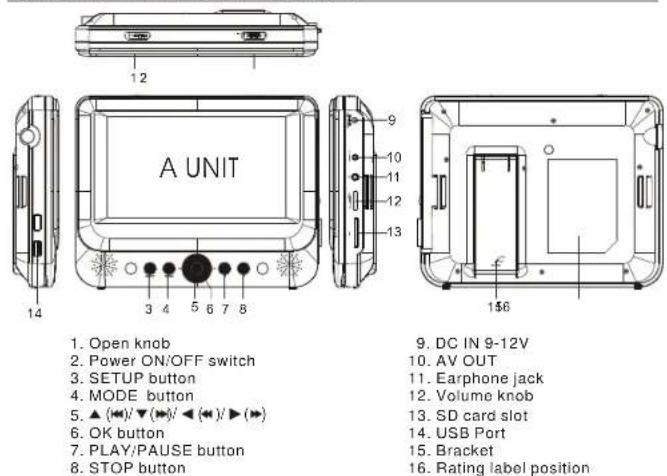
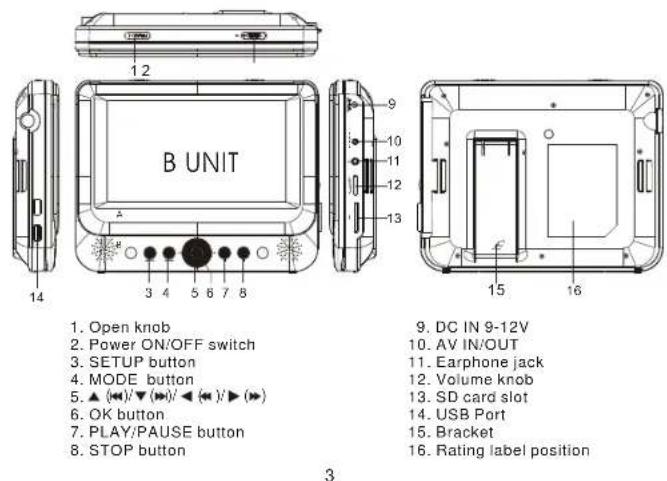
Overview of Unit A/B Controls
In Car Installation
Preparation
- Remove the mounting kit and the DVD player from the seat when the DVD players are not in use. 2. Take out all accessories including car mount kit from the car when the units are not in use.
To use the player in a car, attach the main unit and the second screen to the back of the front seat headrests.
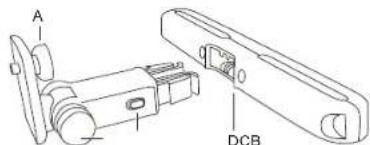
A. DVD player fastening screw node B. Viewing angle adjustment node C. Buckle release button D. Headrest mount bracket
1.Fix the headrest mount bracket on to the front seat headrest
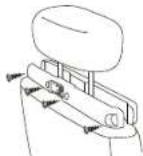
A:Position the bracket on the bars of the headrest.
B:Fasten the screw to fix the bracket firmly on the cars.
Note: There are 4 short screws for fixing thebracket 11mm metal bars, other 4 longer screws for 14mm metal bars.
2.Fix the DVD mount bracket to the portable DVD player.
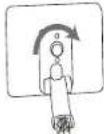
Note: there are three holes on thebracket. Use any one as you like.
3.Aim the sc wrf the b packet to the screw nut on the back of the DV D player. S c r w tight the bracket onto the DVD player.
4.Install the DVD player to the headrest.

Buckle DVD bracket into the headrest mount bracket.
- Adjust the viewing angle
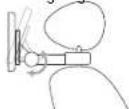
Release the node.
② Adjust the viewing angle as desired.
③ Fasten the node.
- Press the release button to release the DVD player from headrest.
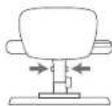
To attach the second screen, repeat the above steps.
System Connection
Powering and installation
Plug one end of the AC/DC power adaptor into the DC IN 9-12V jack on the right of the unit, then plug the other end into the AC power receptacle. Please refer to the following illustration.
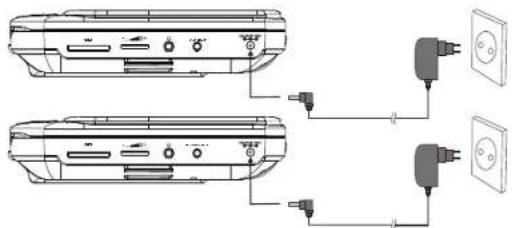
If using car cigarette lighter adaptor to connect to the power:
Plug one end of the cigarette lighter adaptor into the DC IN 9-12V jack on the unit, plug the other end into the car cigarette lighter socket. See illustration below.
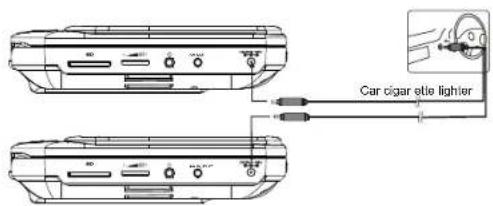
Note:
- Car cigarette lighter adaptor is not recommended to recharge the battery. 2. Car cigarette light adaptor can only be used when the car power supply is
- Car cigarette light adaptor can only be used when the car power supply is 9-12V. 3 The mains plug is used as the disconnect device, the disconnect device should remain
- The main plug is used as the disassembled device; the disassembled device should remain readily operable.
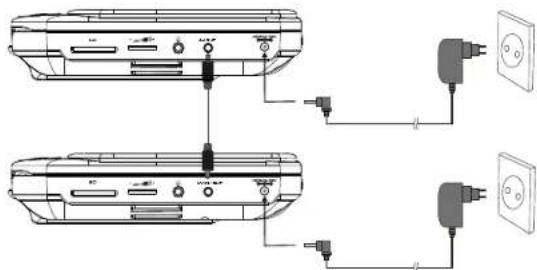
Connecting to Unit A/B
-
Connect unit A and unit B with AV cable.
-
Connect the unit to power by AC/DC adapter or cigarette light adapter
-
Turn on these two units, insert a disc into the disc compartment of the main unit A, press the IN/OUT key on remote control B to change Unit B to AV IN mode, then you can see the same image on both units.
Please refer to the illustration below.
Connecting to TV
You can connect unit A or unit B with TV to enjoy high quality picture and stereo sound. Please refer to the following illustration:
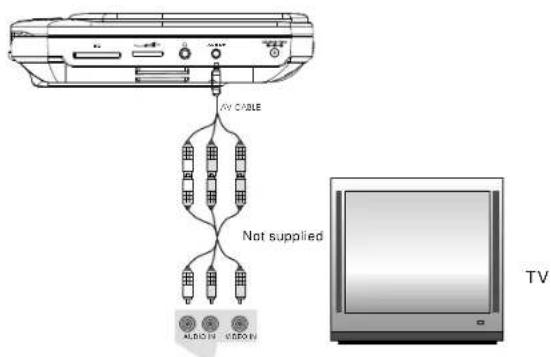
Please use AV cable to connect the machine and the TV. Make sure it is connected correctly.
Connecting with external speaker
Both unit A and unit B can be connected with external speaker. Please see the following illustration.
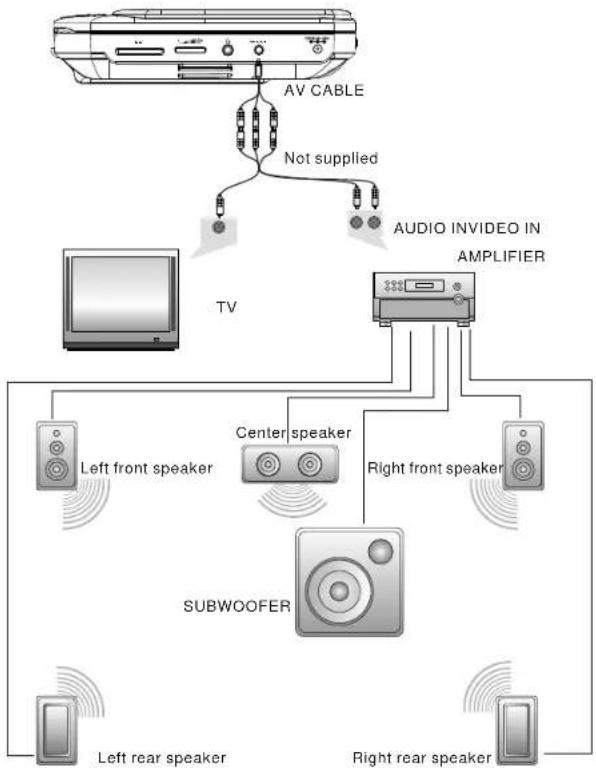
Note:
There is no 5.1 channel in the unit, however, after connecting to APM it is available to output audio in 5.1 channel.
The Remote Control of Unit A
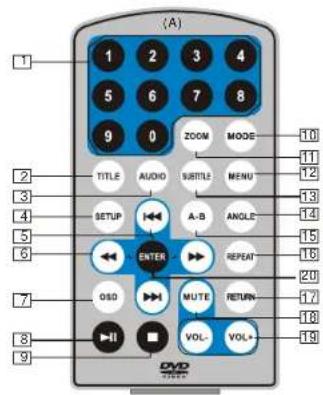
- Number button
- TITLE(To display title information)
- AUDIO(To select audio language)
- SETUP(To go to or exit setup menu)
- Previous/Next button(To go to previous/next chapter or scene during playing)
6 Fast forward/backward button (To scan forward/backward at 2,4,8,16 or 32 times) - OSD(To display disc information during playing such as elapsed and remaining time)
- PLAY/PAUSE
- STOP(press once to stop playback, then press to resume playback from the point where you stopped; press stop button twice to stop playback completely)
-
MODE(To select the source)
-
ZOOM(To zoom in/out the image during the playback)
- MENU(To enter or exit root menu)
- SUBTITLE(To select sublitle language when playing DVD disc)
- ANGLE(To change viewing angle when playing disc with multi-angle)
- A-B(Repeat a specific portion from point A to B, press it again to cancel repeat playing)
- REPEAT(To repeat playing title, chapter or track)
- RETURN(To return to the main menu)
- MUTE(To turn to mute)
- VOL +/- (To adjust the volume)
- ENTER(To confirm)
The Remote Control of Unit B
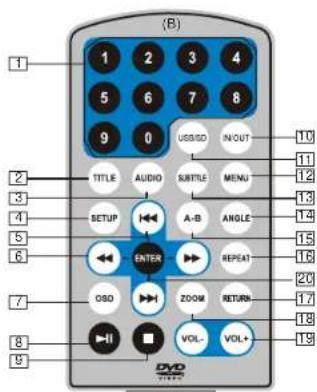
1.Number button
2. TITLE(To display title information)
3. AUDIO(To select audio language)
4. SETUP(To go to or exit setup menu)
5. Previous/Next button (To go to previous/next chapter or scene during playing)
6. Fast forward/backward button (To scan forward/backward at 2,4,8,16,or 32 times)
7. OSD(To display disc information during playing such as elapsed and remaining time)
8. PLAY/PAUSE
9. STOP (press once to stop playback, then press to resume playback from the point where you stopped; press stop button twice to stop playback completely)
10.IN/OUT(To input or output signal)
11.USB/SD(To select the source)
12.MENU(To enter or exit root menu)
13.SUBTITLE(To select subtitle language when playing DVD disc)
14. ANGLE(To change viewing angle when playing disc with multi-angle)
15.A-B(Repeat a specific portion from point A to B, press it again to cancel repeat playing)
16.REPEAT(To repeat playing title, chapter or track)
17. RETURN(To return to the main menu)
18.ZOOM(To zoom in/out the image during the playback)
19.VOL+/-(To adjust the volume)
20.ENTERTo confirm
The Use of Remote Control
Please put the battery into the remote control as per illustration below ,
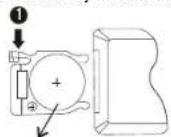
CR2025CR2025
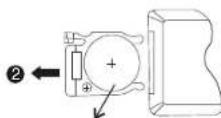
When using remote control, make sure the Infrared window is pointed to Infrared receiving window of the unit. The distance between the unit and remote control must be within 3 metres. Please refer to the following illustration.
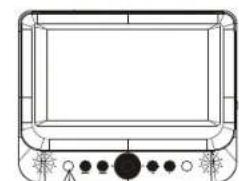
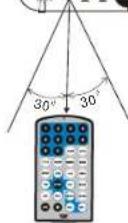
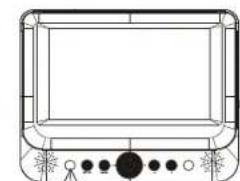
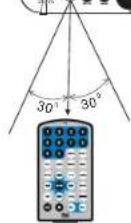
Unit BUnit A
Note:
- To avoid falling off or place near damp environment.
- To avoid infrared receiving window of the unit being under direct sunlight.
- Please use a new battery to replace old one if the remote control doesn't work.
- Remote control A can only operate unit A, Remote control B can only operate unit B.
Basic Operation

Playing disc of DVD, MPEG4, SVCD, VCD, CD, MP3.
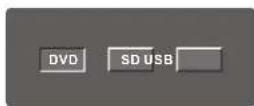
- In the Source Mode, you can press select and ENTER key to enter the source you want.
- Open the disc door and insert a disc into the door with the label slide facing up.
- Close the disc door. The unit will load the disc and start playing.
- Press "once to stop playback; press" to resume playback from the point where you stopped; press "twice to stop playback completely."
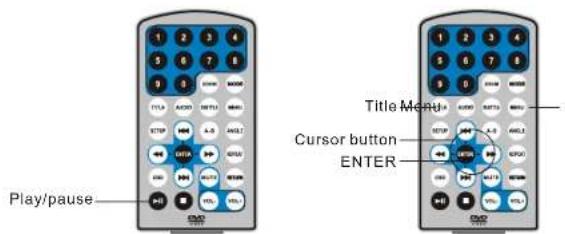
- During playback, press to pause; press it again to resume playback.
- When the playing is finished, please turn off the power by sliding ON/OFF switch to OFF.
- For some DVD disc with Title or Chapter menu, press 'MENU' button to enter menu page, and use ↔ "to select. Press ENTER to confirm.
Note: Please do not disconnect USB devices or plug out SD/MMC cards while they are working with the unit.Functional failure may occur in case of wrong operations.
Fast forward and fast backward

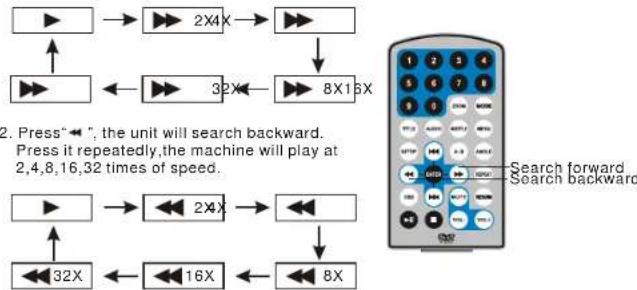
When playing disc of DVD,MPEG4,SVCD,VCD,CD,the machine can search forward or backward.
- Press "→", the unit will search forward. Press it repeatedly, the machine will play at 2, 4, 8, 16, 32 times of speed.
Repeat playing

When playing disc of DVD, MPEG4, SVCD, VCD, CD, MP3, user can repeat playing one chapter, title or the whole disc.
For DVD disc, press "repeat" button, user can repeat playing one Chapter:press it again to repeat playing Title:press It the third time to repeat playing the whole disc.

For MP3 disc, press "repeat" button to repeat playing present file; press it again to repeat playing the folder; press it the third time to cancel repeat function.

For CD/VCD disc, press "repeat" button repeatedly to repeat the track and the whole disc.

Repeat playing of favorite scene

When playing disc of DVD,MPEG4,SVCD,VCD,CD,MP3,user can repeatedly play a specific section.
During playback, press"A-B" button at a point A, then press this button again in point B, the unit will automatically repeat playing the part between"A-B".
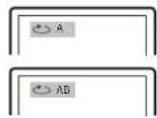
Press it the third time, the unit will return to normal playback.
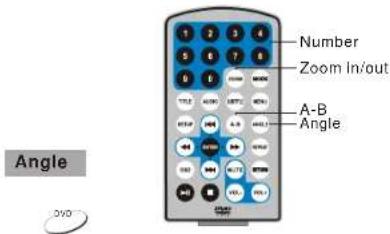
During playing DVD disc with multi-angle, press "Angle" button to change the display angle. Note:
The function is available only for discs with multi-angle.

When playing disc of DVD, MPEG4, SVCD, VCD, user can zoom in or zoom out the image.
During playback, press"Zoom" button, the image will be enlarged; press it again the image will be enlarged again; press it fourth time, the image will zoom out, press it repeatedly and the image will return to normal status.
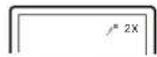
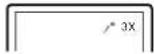
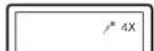
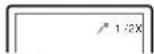
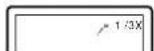
When the image is enlarged, user canpress " → / → / → "to move the image.
Playing JPEG file in date disc
- Place a JPEG disc into the tray, the unit will start reading and play.
- Press "to select a JPEG file and press ENTER" button to confirm
- To rotate the picture counter-clockwise, press :Press to rotate the picture clockwise.
- Press OSD button when viewing pictures, you can select different refresh mode as follows:
from top to bottom
2 from bottom to top
3from left side to right side
4from right side to left side
5 from left to right bottom - from right top to left bottom
7from left bottom to right top - from right bottom to left top
9 from horizontal center to both sides
from vertical center to both sides
from top and bottom to center - from right and left to center
- from four window's top side to bottom side
- from four window's left side to right side
-
from 4 edges to center
-
During viewing files, "0" may appear when pressing "Angle" or "Subtitle" or "Audio" or "A-B" or "Title" etc; in this situation these options are unavailable to operate.
- When viewing JPEG files, press " .pictures will be displayed in thumbnail mode, press " 一 → 一 → 一 → 一 → " or "ENTER" button to select one picture to view.
Playing MP3 files in date disc
- Place MP3 disc into the disc door. Press "Enter" or "ENTER" button to choose an MP3 file; Press "Enter" or "ENTER" button to play the file selected.
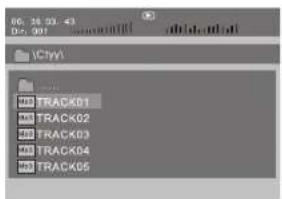
SD/MMC/USB main menu
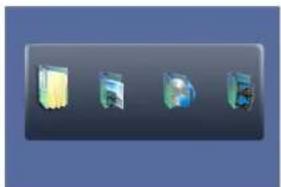
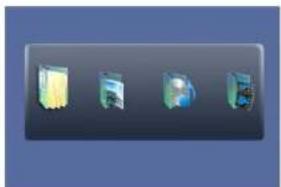
After entering the SD/MMC or USB, the system will show Main Menu which includes 4 Function ICONS. You can select them by press key to confirm. "ENTER"
Browser Mode
Please refer to P17 for detail explanation
Photo Mode
Please refer to P17-18 for detail explanation
Music Mode
Please refer to P18 for detail explanation.
Movie Mode
Please refer to P19 for detail explanation.
Note:Media cards formatted in exFAT file system are not supported.
Browser mode
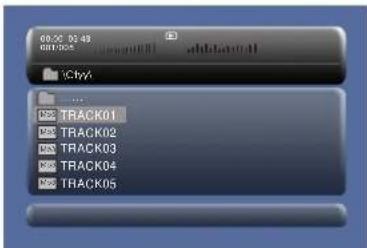
In the Browser Mode, the system will show the list of file and folder.
"ReyENoBhd play
Enter the folder
"Qut the folder
Note:
If you want to return to the Main Menu, please make sure the system is in list of file or folder status, then press RETURN KEY.
Photo mode
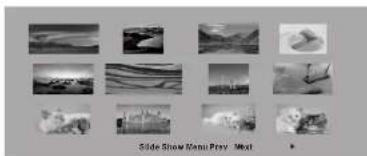
In the Photo Mode, the System will show the thumbnail Mode first.
"111111111111111111111111111111
Slide Show:play the JPEG
Menu:Enter the Help Menu
Prev:Page Up
Next:Page Down.
When playing JPEG:
- To rotate the picture counter-clockwise, press "←"; Press "→" to rotate the picture clockwise
- Press OSD button when viewing pictures. you can select different refresh mode as follows:
from top to bottom
2 from bottom to top
3 from left side to right side
4from right side to left side
[5] from left top to right bottom
[6]from right top to left bottom
7 from left to right.
from right bottom to right top
9 from horizontal center to both sides
from vertical center to both sides
11 from top and bottom to center
12 from right and left to center
13 from four window's top side to bottom side
14from four window's left side to right side
14 from four window's left side to right side
[15]from 4 edges to center
- During viewing files, " " may appear when pressing"Angle"or"Subtitle"or"Audio" or"A-B"or"Title"etc.: in this situation these options are unavailable to operate.
- When viewing JPEG files, press "■" and "RETURN" key, pictures will be displayed in thumbail mode, press "▶▶▶▶▶" or "ENTER" button to select one picture to view.
Note :
If you want to return the Main Menu, please press"RETURN"key in the thumbnail mode.
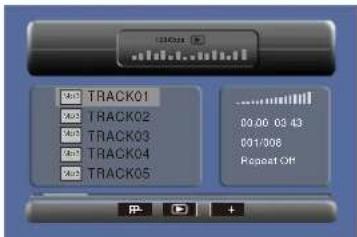
Music mode
In the Music Mode, the system will show the list of music file, like MP3 and so on.
Press*
Press forward /backward MP3 during playing.
Press to select the function button when in stop status.
Page-Page Up.
play
Page+:Page Down
Note:Press'ReturnKeytoReturnto the Main Menu.
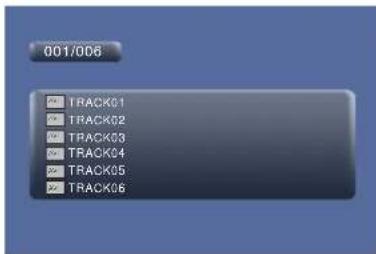
Movie mode
In the Movie mode, the system will show the list of Movie file, like AVI and so on.
When playing movie you can press MENU' and Return Key to back to the list of movie file status. And if you want to Return to the Main Menu, Please Press's Return key in list of Movie file status.
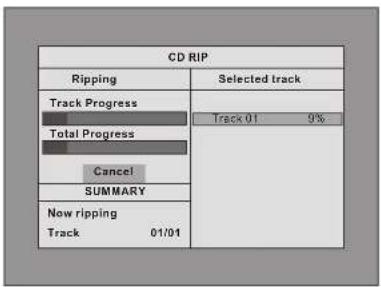
During playing the CD/HDCD disc, you can enter CD Ripping function. By pressing subtitle button, DVD player will be able to change the CD format into MP3 format, and then store it in the USB or SD card.
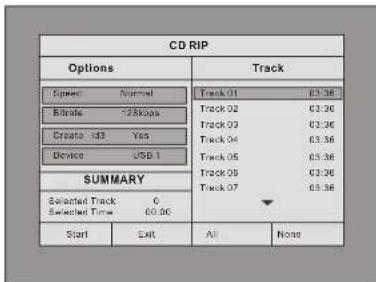
CD RIPPING
Speed: In this item, you can set the rip speed: Normal or Fast.
Bitrate: In this item, you can set the bitrate. It has 6 choices, 128Kbps, 192Kbps, 256Kbps, 320Kbps, 96Kbps and 112Kbps.
Create ID3:In this item, you can create ID3 when playing CD text.
Device: This item indicates whether USB or SD CARD is connected with DVD player.
Exit: Exit to the previous menu.
All: Select all the files in the disc for conversion and storage.
None: Cancel the selection.
Start: Move the cursor to the item and press ENTER" button, the conversion begins.
During the converting, you can select "CANCEL" to stop it.
System Setup
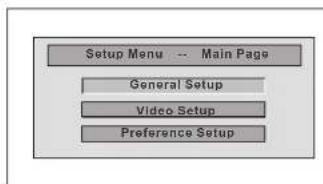
Press"Setup"button, the main menu will be
displayed on the screen
In the main Page,Press to
highlight the item
Press ENTER button to access.
Press Setup button to exit.
General Setup Page
| General Setup | ||
| TV Display Wide Normal/PS Angle Mark ON Normal/LB Screen Saver ENG Wide The default is "Wide" Note: ▲ The function depends on the display ratio with which the DVD disc is recorded. ▲ Please choose "Wide(16:9) When using a 16:9 wide screen TV set. | ||
| General Setup | ||
| TV Display Wide Angle Mark ON On Screen Saver ENG Off The default is:ON | ||
| General Setup | ||
| TV Display Wide Angle Mark ON English Screen Saver ENG English German Dutch The default: Dutch | ||
| General Setup | ||
| TV Display Wide Anglo Mark ON Screen Saver ENG On Off The default is ON. |
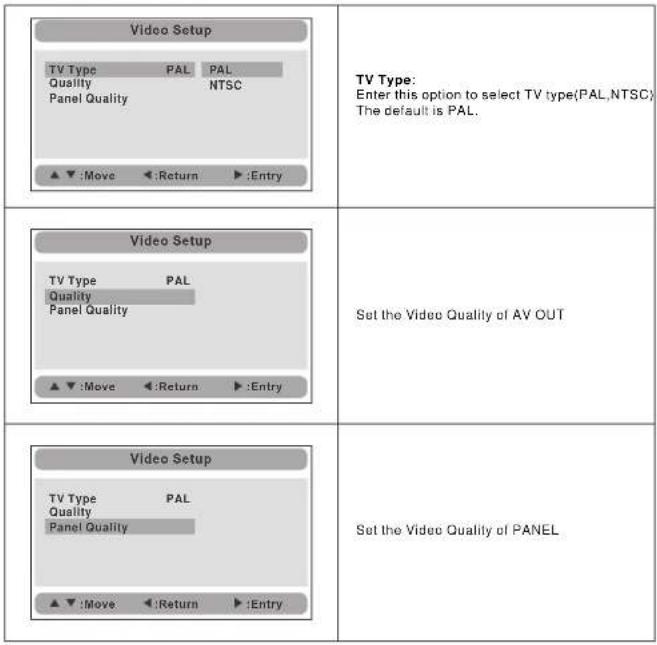
Video Setup Page
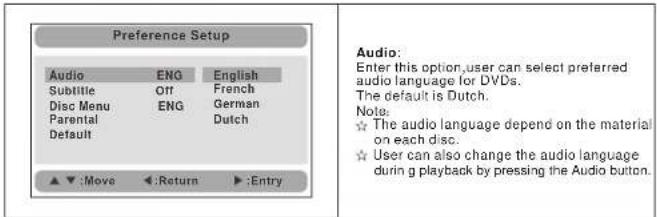
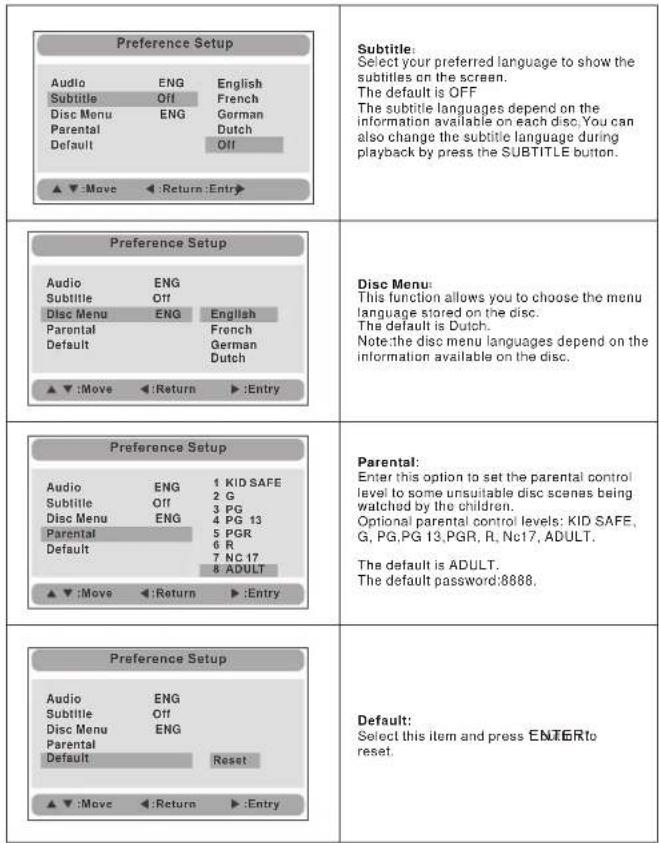
Preference Page
Specification
Compatible disc: DVD/VCD/CD/MP3/MPEG4
Signal system: PAL/NTSC
Panel size: 7 inch
Frequency response: 20 Hz to 20 kHz
Video output: 1 Vp-p/75Ohm, unbalanced
Audio output: 1.4Vrms/10kOhm
Audio S/N: Better than 80dB
Dynamic range: Better than 85dB
Laser: Semiconductor Laser, Wave Length: 650nm/795nm
Power source: DC 9-12V
Power consumption: 10 W
Operating temperature: 0 40ircC
Weight(2DvDPlaykg
Dimensions (2 DVD Player)(W x D x H): 212.5x167x39.8/212.5x167x39.8 mm
Battery Type: Li Polymer
Note:
-
The quality and speed for reading JPEG photos depend on the resolution and compression ratio of the photos. Some JPEG photo may not be played due to the disc quality and the formats.
-
Some DVD+R/RW, DVD-R/RW, CD-R/RW disc may not be played due to the quality on burning conditions.
Rechargeable battery use
The machine utilizes long-life Li polymer battery for portable power supply. The battery has no 'Memory Effect' and thus can be recharged safely regardless of whether the battery is fully or partially discharged. It's enough to recharge no longer than 3H each time, fully recharged battery can last about 2 hours with earphone.
Precautions related to Battery Recharge
The battery can be only recharged when turning power to OFF state, and keep continuous power supply, the red light will be on, and the light will turn yellow when it's fully charged.
Using and Maintaining Rechargeable Battery
- The normal working temperature is:0C-40;
- Always unplug AC/DC power supply for the unit when not in use;
- Heat will create during playing, it's normal, while avoid long time playing and unattendance:
- Avoid having the unit collide with any objects, and place away from all possible heat sources or damp areas.
Caution: Danger of explosion If battery is incorrectly replaced. Replace only with the same or equivalent type.
Troubleshooting
| PROBLEM | SOLUTION |
| No sound or distorted sound | Make sure the machine is connected properly. Make sure all cables are securely inserted into the appropriate jacks. |
| Can't advance through a movie | You can't advance through the opening credits and warning information that appears at the beginning of movies because the disc is programmed to prohibit that action. |
| The icon② appears on screen | The feature or action cannot be completed at this time because:1. The disc's software restricts it.2. The disc's software doesn't support the feature (e.g., angles)3. The feature is not available at the moment.4. You've requested a title or chapter number that is out of range. |
| Picture is distorted | The disc might be damaged. Try another disc; it is normal for some distortion to appear during forward or reverse scan. |
| No forward or reverse scan | Some discs have sections that prohibit rapid scanning or chapter skip.If you try to skip through the warning information and credits at the beginning of a movie, you won't be able to. This part of the movie is often programmed to prohibit skipping through it. |
If at any time in the future you should need to dispose of this product please note that waste electrical products should not be disposed of with household waste. Please recycle where facilities exist. Check with your Local Authority or retailer for recycling advice. (Waste Electrical and Electronic equipment Directive)
Owing to continuous improvement, no prior notice will be given regarding changes on above feature and spec.
Sommaire
Lecture documents Mp3
Menu principal SD/MMC/USB
None:annuler la selection


- Safety Precaution
- CAUTION
- Remind user to be careful to avoid electric shock
- Main Features
- In Car Installation
- Preparation
- 1.Fix the headrest mount bracket on to the front seat headrest
- 2.Fix the DVD mount bracket to the portable DVD player.
- System Connection
- Powering and installation
- Connecting to Unit A/B
- Connecting to TV
- Connecting with external speaker
- Note:
- The Remote Control of Unit A
- The Remote Control of Unit B
- The Use of Remote Control
- Basic Operation
- Fast forward and fast backward
- Repeat playing
- Repeat playing of favorite scene
- Playing JPEG file in date disc
- Playing MP3 files in date disc
- SD/MMC/USB main menu
- Browser mode
- Photo mode
- System Setup
- General Setup Page
- Specification
- Rechargeable battery use
- Precautions related to Battery Recharge
- Using and Maintaining Rechargeable Battery
- Sommaire
- Lecture documents Mp3
- Menu principal SD/MMC/USB
Brand : SALORA
Model : DVP7748DUO GC
Category : Portable DVD Player