
AR203E - Printer SHARP - Free user manual and instructions
Find the device manual for free AR203E SHARP in PDF.
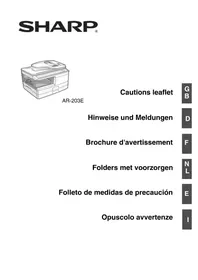



| Product type | Multifunction digital desktop laser printer (copier, printer, scanner) |
| Power supply | Local voltage ±10% (see rating label), power consumption 1000 W |
| Operating conditions | Temperature: 10°C to 30°C, humidity: 20% to 85% |
| Noise level (copy mode) | Acoustic pressure LpA (operator position): 52 dB(A) |
| Noise level (standby mode) | Acoustic pressure LpA: 17 dB(A) |
| Main functions | Copy, print, scan (USB only) |
| Included software | MFP driver, print driver, TWAIN/WIA scanner driver, Sharpdesk, Button Manager |
| Supported operating systems | Windows 98, Me, 2000 Professional, XP, Vista (not Macintosh) |
| Connectivity | USB 2.0 (USB 2.0 compatible cable required) |
| Laser type | Class 1 (IEC 60825-1), wavelength 780 nm, max. output power 0.2 mW |
| Supplies | Separate drum cartridge and toner/developer cartridge |
| Energy consumption | ENERGY STAR® certified |
| Installation precautions | Stable and level surface, avoid humidity, dust, direct sunlight |
| Maintenance | Do not touch the drum cartridge surface (green part); turn off before servicing |
| Documentation | User manual on CD-ROM (PDF format); paper version available on request |
Frequently Asked Questions - AR203E SHARP
User questions about AR203E SHARP
0 question about this device. Answer the ones you know or ask your own.
Ask a new question about this device
Download the instructions for your Printer in PDF format for free! Find your manual AR203E - SHARP and take your electronic device back in hand. On this page are published all the documents necessary for the use of your device. AR203E by SHARP.
USER MANUAL AR203E SHARP
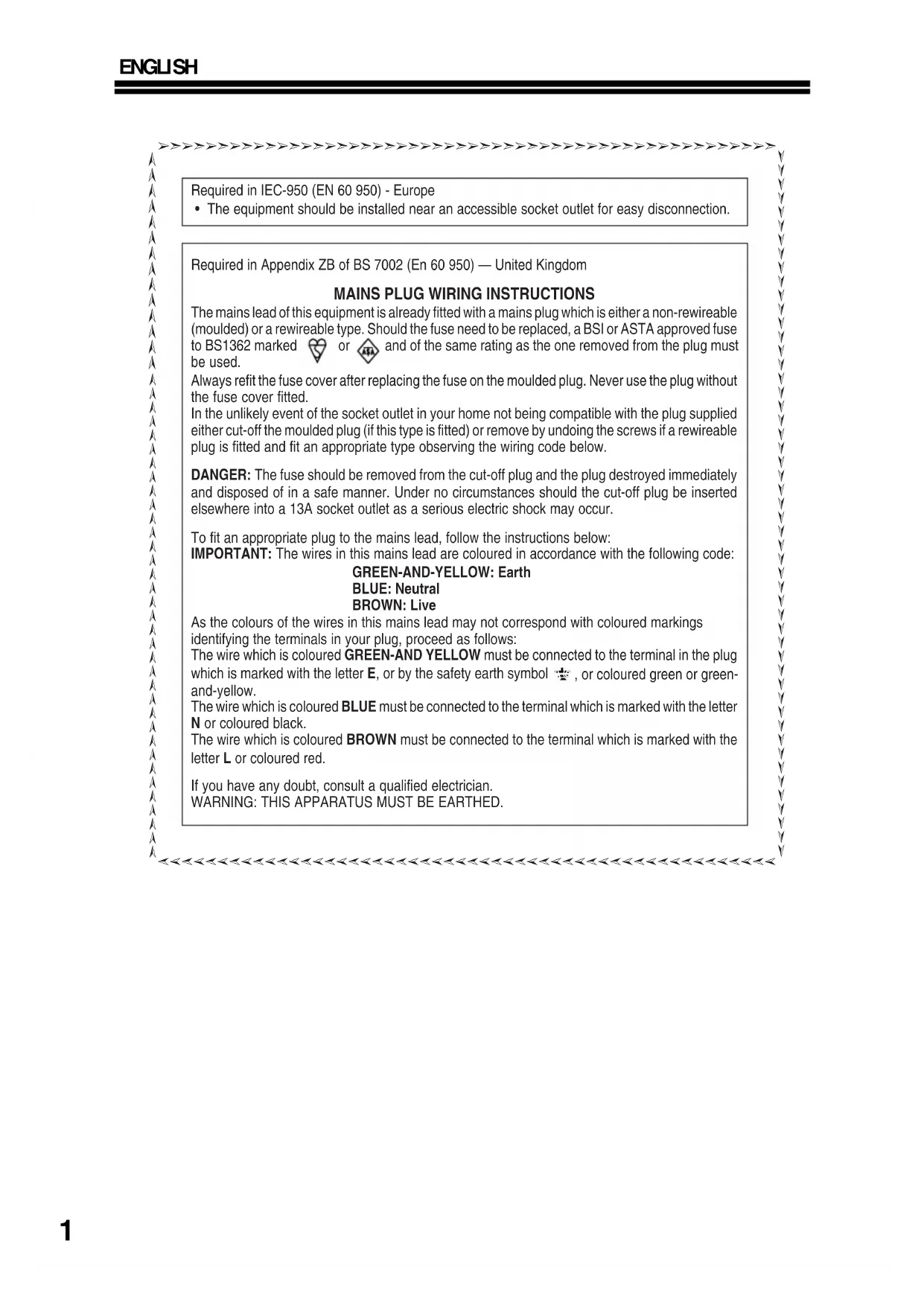
Required in IEC-950 (EN 60 950) - Europe
- The equipment should be installed near an accessible socket outlet for easy disconnection.
Required in Appendix ZB of BS 7002 (EN 60 950) — United Kingdom
MAINS PLUG WIRING INSTRUCTIONS
The mains lead of this equipment is already fitted with a mains plug which is either a non-rewireable (moulded) or a rewireable type. Should the fuse need to be replaced, a BSI or ASTA approved fuse to BS1362 marked or and of the same rating as the one removed from the plug must be used.
Always refit the fuse cover after replacing the fuse on the moulded plug. Never use the plug without the fuse cover fitted.
In the unlikely event of the socket outlet in your home not being compatible with the plug supplied either cut-off the moulded plug (if this type is fitted) or remove by undoing the screws if a rewireable plug is fitted and fit an appropriate type observing the wiring code below.
DANGER: The fuse should be removed from the cut-off plug and the plug destroyed immediately and disposed of in a safe manner. Under no circumstances should the cut-off plug be inserted elsewhere into a 13A socket outlet as a serious electric shock may occur.
To fit an appropriate plug to the mains lead, follow the instructions below:
IMPORTANT: The wires in this mains lead are coloured in accordance with the following code:
GREEN-AND-YELLOW: Earth
BLUE: Neutral
BROWN: Live
As the colours of the wires in this mains lead may not correspond with coloured markings identifying the terminals in your plug, proceed as follows:
The wire which is coloured GREEN-AND-YELLOW must be connected to the terminal in the plug which is marked with the letter E, or by the safety earth symbol, or coloured green or green-and-yellow.
The wire which is coloured BLUE must be connected to the terminal which is marked with the letter N or coloured black.
The wire which is coloured BROWN must be connected to the terminal which is marked with the letter L or coloured red.
If you have any doubt, consult a qualified electrician.
WARNING: THIS APPARATUS MUST BE EARTHED.
CONNECTING THE INTERFACE CABLE
Interface cable: Please purchase the appropriate cable for your computer.
USB interface cable: Shielded USB cable that supports USB 2.0.
Trademark acknowledgements
- Microsoft operating system is a trademark or copyright of Microsoft Corporation in the U.S.A. and other countries.
- Windows® 98, Windows® Me, Windows® 2000, Windows® XP and Windows® Vista are trademarks or copyrights of Microsoft Corporation in the U.S.A. and other countries.
- IBM and PC/AT are trademarks of International Business Machines Corporation.
- All other trademarks and copyrights are the property of their respective owners.
SET UP THE SOFTWARE
The CD-ROM that accompanies the machine contains the user documentation and the following software:
MFP driver
Printer driver
The printer driver enables you to use the printer function of the machine.
Scanner driver (USB only)
The scanner driver allows you to use the scanning function of the machine with
TWAIN-compliant and WIA-compliant applications.
Sharpdesk (USB only)
Sharpdesk is an integrated software environment that makes it easy to manage documents and image files, and launch applications.
Button Manager (USB only)
Button Manager allows you to use the scanner menus on the machine to scan a document.
Hardware and software requirements
Check the following hardware and software requirements in order to install the software.
| Computer type IBM | PC/AT or compatible computer equipped with a USB2.0*1 |
| Operating system*2 *3 | Windows 98, Windows Me, Windows 2000 Professional*, Windows XP*, Windows Vista*4 |
| Display 800 x 600 dots | (SVGA) display with 256 colors (or better) |
| Hard disk free space 15 | 0MB or more |
| Other hardware requirements | An environment on which any of the operating systems listed above can fully operate |
1. Compatible with Windows 98, Windows Me, Windows 2000 Professional, Windows XP or Windows Vista preinstalled model standardly equipped with a USB port. 2. Printing is not available in MS-DOS mode. 3. The machine does not support printing from a Macintosh environment. 4. Administrator's rights are required to install the software using the installer.
HOW TO USE THE ONLINE MANUAL

Before using your machine and before installing the software, please read carefully the user manual included in the CD-ROM.
The "User Documentation" CD-ROM that accompanies the machine contains the user documentation and the software. To open a manual, open the top page as explained below and click the button of the desired manual.
Windows
1. Insert the "User Documentation" CD-ROM into your computer's CD-ROM drive. 2. Click the "Start" button, click "My Computer" ( ), and then double-click the CD-ROM icon ( ). In Windows 98/Me/2000, double-click "My Computer" and then double-click the CD-ROM icon. 3. Double-click the "Manual" folder, double-click on your selected folder, and then double-click the "PDF" file.
Macintosh
1. Insert the "User Documentation" CD-ROM into your computer's CD-ROM drive. 2. Double-click the CD-ROM icon ( ) on the desktop and double-click the "User Documentation" folder. 3. Double-click the "Manual" folder, double-click on your selected folder, and then double-click the "PDF" file.
A paper form operation manual can be obtained from your authorized SHARP dealer or upon request by contacting SHARP.
SHARP Manufacturing France - Customer Documentation Department
Route de Bollwiller
68360 SOULTZ - FRANCE
or by fax (+33) 3.89.74.87.78
Please inform the model name, the serial number of the machine and the language needed. Do not forget to add your name and your address.
CAUTIONS
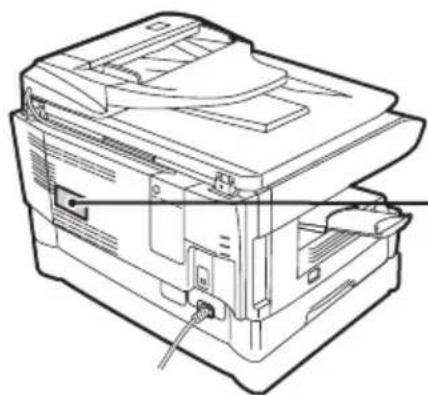
Caution label on the machine
The label ( ) in the fusing area of the machine indicates the following:
: Caution, risk of danger
: Caution, hot surface
Cautions on using the machine
Warning:
- The fusing area is hot. Exercise care in this area when removing misfed paper.
- Do not look directly at the light source. Doing so may damage your eyes.
- Do not switch the machine rapidly on and off. After turning the machine off, wait 10 to 15 seconds before turning it back on.
- Machine power must be turned off before installing any supplies.
Caution:
- Place the machine on a firm, level surface.
- Do not install the machine in a humid or dusty location.
- When the machine is not used for a long time, for example for consecutive holidays, turn the power switch off and remove the power cord from the outlet.
- When moving the machine, be sure to turn the power switch off and remove the power cord from the outlet.
- Do not cover the machine with a dust cover, cloth or plastic film while the power is on. Doing so may prevent heat radiation, damaging the machine.
- Use of controls or adjustments or performance of procedures other than those specified herein may result in hazardous radiation exposure.
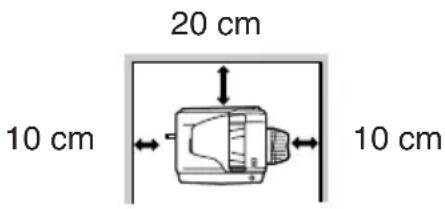
Important points when selecting an installation site
Do not install your machine in areas that are:
- damp, humid, or very dusty exposed to direct sunlight poorly ventilated
- subject to extreme temperature or humidity changes, e.g., near an air conditioner or heater.
Be sure to allow the required space around the machine for servicing and proper ventilation.
Cautions on handling the machine
Do not drop the machine, subject it to shock or strike it against any object.
Do not expose the drum cartridge to direct sunlight.
- Doing so may damage the surface (green portion) of the drum cartridge, causing smudges on copies.
Store spare supplies such as drum cartridges and TD cartridges in a dark place without removing from the package before use.
- If they are exposed to direct sunlight, smudges on copies may result.
Do not touch the surface (green portion) of the drum cartridge.
- Doing so will damage the surface of the cartridge, causing smudges on copies.
ENERGY STAR
Products that have earned the ENERGY STAR® are designed to protect the environment through superior energy efficiency.
A small amount of ozone is produced within the unit during operation. The emission level is insufficient to cause any health hazard.
Note:
The present recommended long-term exposure limit for ozone is 0.1 ppm (0.2 mg/m³) calculated as an 8-hour time-weighted average concentration.
However, since the small amount that is emitted may have an objectionable odor, it is advisable to place the unit in a ventilated area.
Connections
In some areas, the "POWER" switch positions are marked "I" and "O" on the copier instead of "ON" and "OFF".
The symbol "O" denotes that the copier is not completely de-energized but is in a stand-by condition at this "POWER" switch position.
Please read "I" for "ON" and "O" for "OFF".
Caution!
For a complete electrical disconnection, pull out the main plug.
The socket-outlet shall be installed near the equipment and shall be easily accessible.
SHARP Manufacturing France - Customer Documentation Department
Route de Bollwiller
68360 SOULTZ - FRANCE
Sharpdesk (USB uniqueness)
Button Manager (USB uniqueness)
SHARP Manufacturing France - Customer Documentation Department
Route de Bollwiller
SOULTZ - FRANCE
Attention, surface chaude
SHARP Manufacturing France - Customer Documentation Department Route de Bollwiller
Sharpdesk (solo USB)
SHARP Manufacturing France - Customer Documentation Department Route de Bollwiller
68360 SOULTZ - FRANCE
CLASS 1 LASER PRODUCT
LASER KLASSE 1
LUOKAN 1 LASERLAITE
KCLASS 1 LASERAPPARAT
CLASS 1 LASER PRODUCT LASER KLASSE 1
STATUS INDICATORS / STATUSANZEIGEN / TEMOINS D'ETAT / STATUS INDICATIES / INDICadores DE ESTADO / INDICATORI DI STATO
| Indication | Anzeige | Indication | Indicatie | Indicación | Indicazione | P. / S. | |||||||
| Developer replacement required indicator | Steadily lit | Anzeige Auswechseln der Entwicklungsinhalt erforderlich | Ständiges Leuchten | Témoin de remplacement du développement | Allumé | Ontwikelaar verwangen vereist indicative | Brandt continu | Indicator de sustituation necessaria del 'revelador | Permanent enluminado | Indicatore Richiesta sastuzione sviluppatore | Acceso in continuazione | 56 | |
| Toner cartridge replacement required indicator | Steadily lit | Anzeige Auswachsein der Tonerkassete erforderlich | Ständiges Leuchten | Témoin de toner usage | Allumé | Tonopatron verwangen vereist indicative | Brandt continu | Indicator de sustituation necessaria del cartucho de tõner | Permanente llluminado | Indicatore Richiesta sastuzione della cartucca TD | Acceso in continuazione | 45 | |
| Blinking | Blinken | Clignotant | Knippert | Intermitente | Intermittente 4$ | ||||||||
| 8V | Misfeed indicator | Blinking | Papierstau-anzeige | Blinken | Témoin de blocage du papier | Clignotant | Papierstoring indicative | Knippert | Indicator de alacos | Intermitente | Indicatore di incipeamento | Intermittente 52 / 55 | |
| Maintenance indicator | Steadily lit | Wartungs-anzeige | Ständiges Leuchten | Témoin de maintenance | Allumé | Onderhouds-indicatie | Brandt continu | Indicator de mantenimiento | Permanentemente llluminado | Indicatore di manutenzione | Accoso in continuazione | 56 | |
| SPF misfeed indicator | Blinking | SPF-Papierstau-anzeige | Blinken | Témoin de blocage de papier dans le SPF | Clignotant | SPF papierstoring indicative | Knippert | Indicator de Atascos SPF | Intermitente | Indicatore di incipeamento nell'SPF | Intermittente 55 | ||
| Power save indicator is steadily lit. | Energiesparanzeige leuchtet ständig. | Le témoin d'économie d'énergie resté allumé. | De stroomspaarindicatie brandt continu. | El indicador de ahorro de energia está permanentemente encendido. | L'indicatore del risparmio di energia è continuamente acceso. | 42 | |||||||
| The paper tray indicator is blinking. | Die Papierfachanzeige blinkt. | Le témoin du magasin papier clignote. | De papierlade indicative knippert. | El indicador de la bandeja de papel está parpadeando. | L'indicatore del vassoio della carta sta lampegggiando | - | |||||||
| "CH" is blinking in the display. | CH blinkt auf der Anzeige. | CH clignote à l'écran. | CH knippert in het display. | CH parpadea en el visor. | CH sta lampeggliando sul display. | - | |||||||
| "CH" is steadily lit in the display. | CH leuchtet ständig auf der Anzeige. | CH reste allumé à l'écran. | CH brandt continu in het display. | CH está permanentemente encendido en el visor. | CH è sempre acceso sul display. | - | |||||||
| "OP" is blinking in the display. | OP blinkt auf der Anzeige. | OP clignote à l'écran. | OP knippert in het display. | OP parpadea en la pantalla. | OP lampeggia sul display. | - | |||||||
| "P" is blinking in the display. | P blinkt auf der Anzeige. | P clignote à l'écran. | P knippert in het display. | P parpadea en el visor. | P emette una luce intermittente sul display. | 8/10/52 | |||||||
| A letter and a number appear alternately. | Ein Buchstabe und eine Zahl erschienen im Wechsel. | Une litter et un chiffre s'affichent alternativement. | Er verschijn awissend een letter en een cijfer. | Una letra y un número aparecen de forma alterna. | Unalettera e un numero vengono visualizzati in sequenza alternata | 57 | |||||||
| A letter and a number appear alternately. | Ein Buchstabe und eine Zahl erschieren im Wechsel. | Une litter et un chiffre s'affichent alternativement. | Er verschijn awissend een letter en een cijfer. | Una letra y un número aparecen de forma alterna. | Unalettera e un numero vengono visualizzati in sequenza alternata | - | |||||||
| A letter and a number appear alternately. | Ein Buchstabe und eine Zahl erschieren im Wechsel. | Une litter et un chiffre s'affichent alternativement. | Er verschijn awissend een letter en een cijfer. | Una letra y un númeroaporecen de forma alterna. | Unalettera e un numero vengono visualizzati in sequenza alternata | - | |||||||
SHARP®
SHARP Manufacturing France S.A. Route de Bollwiler 68360 SOULTZ FRANCE
Printed in France TINSX1836TSZZ
- MAINS PLUG WIRING INSTRUCTIONS
- GREEN-AND-YELLOW: EARTH
- CONNECTING THE INTERFACE CABLE
- TRADEMARK ACKNOWLEDGEMENTS
- SET UP THE SOFTWARE
- MFP DRIVER
- SCANNER DRIVER (USB ONLY)
- SHARPDESK (USB ONLY)
- BUTTON MANAGER (USB ONLY)
- HARDWARE AND SOFTWARE REQUIREMENTS
- HOW TO USE THE ONLINE MANUAL
- WINDOWS
- MACINTOSH
- CAUTIONS
- CAUTION LABEL ON THE MACHINE
- CAUTIONS ON USING THE MACHINE
- WARNING
- CAUTION
- IMPORTANT POINTS WHEN SELECTING AN INSTALLATION SITE
- CAUTIONS ON HANDLING THE MACHINE
- NOTE
- CONNECTIONS
- SHARPDESK (USB UNIQUENESS)
- BUTTON MANAGER (USB UNIQUENESS)
- SHARPDESK (SOLO USB)
- SHARP®
Brand : SHARP
Model : AR203E
Category : Printer