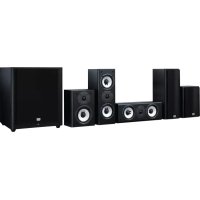
SKSHT978THX - Pregnant ONKYO - Free user manual and instructions
Find the device manual for free SKSHT978THX ONKYO in PDF.



| Product Type | 7.1 Channel Home Theater Speaker Package (7.1 or 5.1 configuration) |
| Model | Onkyo SKSHT978THX |
| Front Speakers (Left/Right) | SKF-980, 2-way, 2 x 12 cm woofers + 2.5 cm tweeter, impedance 8 Ω, max power 130 W, frequency response 50 Hz - 45 kHz |
| Center Speaker | SKC-980, 2-way, 2 x 12 cm woofers + 2.5 cm tweeter, impedance 8 Ω, max power 130 W, frequency response 50 Hz - 45 kHz |
| Surround and Surround Back Speakers | SKR-980 / SKB-980, 2-way, 13 cm woofer + 2.5 cm tweeter, impedance 8 Ω, max power 130 W, frequency response 50 Hz - 45 kHz |
| Subwoofer | SKW-980 (North American/Asian models) or SKW-938 (European), active, 125 W RMS amplifier (IEC/FTC), 30 cm (12\") woofer, frequency response 20-100 Hz |
| Subwoofer Power Supply | SKW-980: AC 120 V, 60 Hz (NA) / AC 220-230 V, 50/60 Hz (Asia); SKW-938: AC 230 V, 50 Hz |
| Front Speaker Dimensions (W x H x D) | 158 mm x 433 mm x 199 mm |
| Front Speaker Weight | 5.3 kg |
| Center Speaker Dimensions (W x H x D) | 433 mm x 158 mm x 199 mm |
| Center Speaker Weight | 5.3 kg |
| Surround Speaker Dimensions (W x H x D) | 200 mm x 275 mm x 169 mm |
| Surround Speaker Weight | 3.5 kg |
| Subwoofer Dimensions (W x H x D) | 444 mm x 429 mm x 429 mm |
| Subwoofer Weight | 15.5 kg |
| Main Features | Wall-mountable, removable grilles, cork plugs for stability, magnetic shielding on front and center speakers |
| Care and Cleaning | Wipe with a soft, dry cloth. Do not use chemical products. |
| Safety | Do not force the grilles off, observe polarity, do not short-circuit, use appropriate screws for wall mounting |
| Spare Parts and Repairability | Contact an authorized Onkyo dealer for any repairs or replacement parts |
| General Information | THX certified, compatible with 7.1 or 5.1 home theater package, speaker cables included |
Frequently Asked Questions - SKSHT978THX ONKYO
User questions about SKSHT978THX ONKYO
0 question about this device. Answer the ones you know or ask your own.
Ask a new question about this device
Download the instructions for your Pregnant in PDF format for free! Find your manual SKSHT978THX - ONKYO and take your electronic device back in hand. On this page are published all the documents necessary for the use of your device. SKSHT978THX by ONKYO.
USER MANUAL SKSHT978THX ONKYO
Supplied Accessories
Make sure you have the following accessories.
Front Speakers (SKF-980)
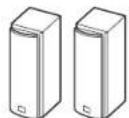
Front speakers
(While) (Red)
Speaker cables 3.5 m (11 ft.)
Center Speaker (SKC-980)
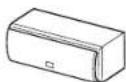
Center speaker Speaker cable
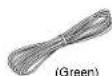
3.0 m (10 ft.)

12 cork stoppers*1
*1 For use of front speakers and center speaker.
Surround Speakers (SKR-980) Surround Back Speakers (SKB-980)


Surround speakers


Speaker cables 8.0 m (26 ft.)


Speaker cables 8.0 m (26 FL)
Powered Subwoofer (SKW-980/SKW-938)
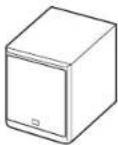
Subwoofer
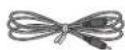
RCA cable 3.0 m (10 ft.)
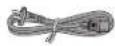
Power cord (Aslan models)
■Front
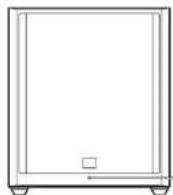
Standby/On indicator
Red: Subwoofer in standby mode
Blue: Subwoofer on
The status indicator lights blue when
low frequency sound is being passed
through the speaker.
The indicator does not light in the
normal dialog or high frequency sound.
Rear
SKW-980 (North American models)
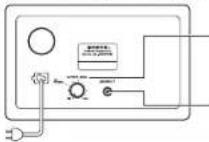
To AC pellet
OUTPUT LEVEL control
This control is used to adjust the
volume of the subwoofer.
LINE INPUT
This RCA input should be connected to the device as follows:
the subwoofer pre - on your AV - sounder with supplied PGA - chips
SKW-980 (Asian models)
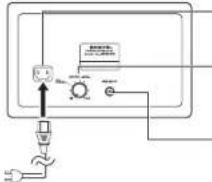
To AC quile!
AC INLET
Connects the supplied power cord.
OUTPUT LEVEL control
This control is used to adjust the volume of the subwoofer.
LINE INPUT
This RCA input should be connected to
the subwoofer pre out on your AV receiver with supplied RCA cable.
SKW-938 (European models)
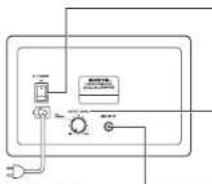
To AC outlet
POWER switch
Press this switch to the ON position to
turn on the power. Press it to the OFF
position to turn off the power.
Caution
- With other audio-video components, connect the subwoofer's LINE INPUT to the subwoofer pre out jack of your equipment.
Never plug any kind of musical instrument to the subwoofer.
Note
- The Auto Standby function turns the subwoofer on when the input signal exceeds a certain level. If the Auto Standby function does not work reliably, try slightly increasing or decreasing the subwoofer output level on your receiver. When there's no input signal for a while, the SKW-980/SKW-938 automatically enters Standby mode.
- If the Standby/On indicator lights (both red and blue LEDs) several seconds or minutes after the sound output stopped, this means that the amp protection circuit has been activated. In this case, set the OUTPUT LEVEL control to the center position, and disconnect the power cord from the AC outlet. Wait at least 10 minutes, and then reconnect the power cord. If that doesn't solve the issue, contact your Onkyo dealer.
Before Using the Home Theater Speaker Package
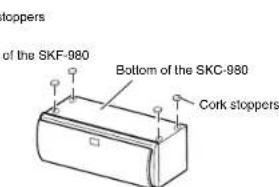
Using the Cork Stoppers for a More Stable Platform
We recommend using the supplied cork stoppers to achieve the best possible sound from your speakers. The cork stoppers prevent the speakers from moving, providing a more stable platform.
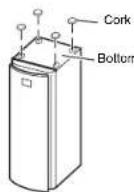
Cork stoppers
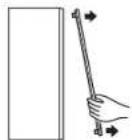
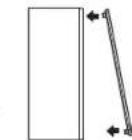
■Attaching and detaching the speaker grilles
The front, center, surround and surround back speakers have detachable grilles.
See the illustrations to attach or detach them.
Removal
Replacement

THX 2010
OUTPUT LEVEL
Setting the Subwoofer Level
Make sure the SKW-980/SKW-938
subwoofer's output level control is set at
the "THX POSITION"
You can then adjust the level as needed.
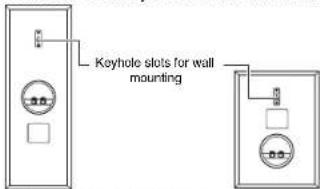
Wall Mounting
To mount the front/surround/surround back speakers vertically, use the keyhole slot shown to hang each speaker on a screw that's securely screwed into the wall.
SKF-980 SKR-980/SKB-980 (HTP)
993THX/SKS-HT993THX
only)
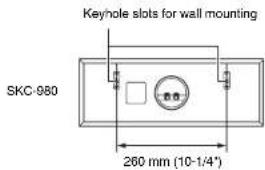
To mount the center speaker horizontally, use the two keyhole slots shown to hang each speaker on two screws that are securely screwed into the wall.
Caution
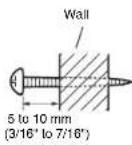
- A mounting screw's ability to support a speaker depends on how well it's anchored to the wall. If you have hollow walls, screw each mounting screw into a stud. If there are no studs, or the walls are solid, use suitable wall anchors. Use screws with a head diameter of 9mm (5/16^ ) or less and a shank diameter of 4mm (1/8^ ) or less. With hollow walls, use a cable/pipe detector to check for an water pipes before making any holes.
- Leave a gap of between 5mm (3/16") and 10mm (7/16") between the wall and the base of the screw head, as shown. (We recommend that you consult a home installation professional.)
Enjoying Home Theater
The Home Theater means that you can enjoy surround sound with a real sense of movement in your own home just like being in a movie theater or concert hall.
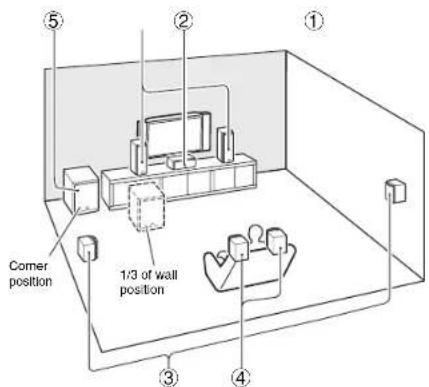
① Front left and right speakers (SKF-980)
They should be positioned facing the listener at about ear level, and equally spaced from the TV. Angle them inward slightly so as to create a triangle, with the listener at the apex.
Center speaker (SKC-980)
Position it close to your TV facing forward at about ear level, or at the same height as the front left and right speakers.
③ Surround left and right speakers (SKR-980)
Position them at the sides of the listener, or slightly behind, about 60 to 100cm (2 to 3 feet) above ear level. Ideally they should be equally spaced from the listener.
④ Surround back left and right speakers (SKB-980: HTP-993THX/SKS-HT993THX only)
These speakers further enhance the realism of surround sound and improve sound localization behind the listener. Position them behind the listener about 60 to 100 cm (2 to 3 feet) above ear level.
Subwoofer (SKW-980: North American and Aslan models/SKW-938: European models)
The subwoofer handles the bass sounds of the LFE (Low-Frequency Effects) channel and bass from the satellite speakers when a crossover is specified. The volume and quality of the bass output from your subwoofer will depend on its position, the shape of your listening room, and your listening position. In general, a good bass sound can be obtained by installing the subwoofer in a front corner, or at one-third the way along the front wall, as shown.
Connecting the Speakers
Speaker Connection Precautions
Read the following before connecting your speakers: - Turn off your receiver before making any connection
- Pay close attention to speaker wiring polarity. Connect positive (+) terminals to only positive (+) terminals, and negative (-) terminals to only negative (-) terminals. If the speakers are wired incorrectly, the sound will be out of phase and will sound unnatural.
- Be careful not to short the positive and negative wires. Doing so may damage your amp.
Note
- When you connect the front high left and right speakers, prepare for it separately, or use the surround back left and right speakers.
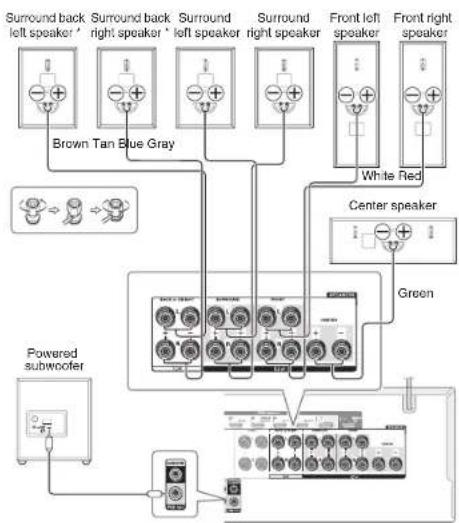
*HTP-993THX/SKS-HT993THX only
Specifications
■Powered Subwoofer (SKW-980: North American and Asian models/SKW-938: European models)
Type Acoustic suspension
Rated output power (FTC) 125 watts minimum continuous power, 6 ohms, driven at 100Hz with a maximum total harmonic distortion of 1% (SKW-880)
Rated output Power (IEC) 125 watts minimum continuous power, 6 ohm at a power of 100Hz with a maximum total harmonic distortion of 1% (SKW-938)
Input sensitivity/impedance 280 mV/20 k Ω Frequency response 20 Hz to 100 Hz
Cabinet capacity 49 L (1.73 cubic feet) Dimensions (W× H× D) 380 mm x 444 mm × 429 mm 14-15/16* × 17-1/2* × 16-7/8* (incl. grille and projection)
Weight 15.5 kg (34.2 lbs.)
Drivers unit 30 cm (12') Cone Woofer
Power supply AC 120 V, 60 Hz (SKW-980: North American) AC 220 V-230 V, 50/60 Hz (3 Asian) AC 230 V, 50 Hz (SKW-938)
Power consumption 140 W (SKW-98) 13
Grille Fixed
Other Auto Standby function Non-magnetic shielding
■Front Speakers (SKF-980)
Type 2 Way Acoustic suspension
Impedance
Maximum input power
Sensitivity
Frequency response 50 Hz to 45 kHz
Crossover I
Cabinet capacity 7.5 L (0.265 cubic feet)
Dimensions (W× H× D) 158 mm × 433 mm × 199 mm 6-1/2 × 17/16 = 7-13/16 (incl. grille and projection)
Weight 5.3 kg (11.7 lbs.)
Drivers unit 12 cm (5") A-OMF Cone Woofer × 2 2.5 cm (1") Soft Dome Tweeter x 1 Terminal Binding post (Banana type supported Other Magnetic shielding
Center Speaker (SKC-980)
Type 2 Way Acoustic suspension Impedance Maximum input power Sensitivity
Frequency response 50 Hz to 45 kHz
Crossover Frequency 2 kH
Cabinet capacity 7.5 L (0.265 cubic feet)
Dimensions (W× H× D) 433 mm × 158 mm × 199 mm 17/16/166/147×13/16*16 (incl. grille and projection)
Weight 5.3 kg (11.7 lbs)
Drivers unit 12 cm (5") A-OMF Cone Washer... ×2
2.5 cm [1] Soft Dome Iweeter×1
Terminal Binding post (Banana type supported)
Other Magnetic shielding
Surround Speakers (SKR-980)/
Surround Back Speakers (SKB-980:HT-993THX/SKSHT993THX only)
Type 2 Way Acoustic suspension Impedance 8Ω Maximum input power 130 W Sensitivity 81 dBW/m Frequency response 50Hz to 45kHz Crossover frequency 2 kHz
Cabinet capacity 4.6 L (0.163 cubic feet) Dimensions (W× H× D)200mm× 275mm× 169mm
7-7/8' x 10-13/6' x 6-5/8' (incl. grille and projection)
Weight 3.5 kg (7.7 lbs.)
Drivers unit 13 cm (5-1/8') A-OMF Cone Woolfer x 2.5 cm (1') Soft Dome Tweeter x 1
Terminal Binding post (Banana type supported)
Other Non-magnetic shielding
Specifications and appearance are subject to change without prior
THX and the THX logo are trademarks of THX Ltd. which may be registered in some jurisdictions. All rights reserved.
Use with a TV set
In general, Braun tubes used for color television sets, etc. are extremely sensitive and can be affected even by the magnetism of the earth. If a speaker system is used near them, therefore, discoloring or distortion of pictures will occur.
For magnetic shielded speakers (Front speakers, Center speaker):
The speakers are shielded to prevent discoloration. In some situations, however, discoloration may still be an issue, in which case you should turn off your TV or monitor, wait 15 to 30 minutes, and then turn it back on again. This normally activates the degaussing function, which neutralizes the magnetic field, thereby removing any discoloration effects. If discoloration problems persist, try moving the speakers away from your TV or monitor.
For non-magnetic shielded speakers (Powered subwoofer, Surround speakers, Surround back speakers):
Try moving the speakers away from your TV or monitor. If discoloration should occur, turn off your TV or monitor, wait 15 to 30 minutes, and then turn it back on again. This normally activates the degaussing function, which neutralizes the magnetic field, thereby removing any discoloration effects.
ONKYO
HTP-993THX/SKS-HT993THX
Cable RCA 3.0 m (10 ft.)
Fr-1
(xcomprisgrilleetprojection)
Polds 5,3 kg (11,7 lbs.)
Poster glutaric (type baranic plus on charge)
Enceinte centrale (SKC-980)
HT993THX unquipment)
7-7/8"×10-13/16"×6-5/8"
Cable RCA 3,0 m (10 pies)
Peso 5.3 kg (11.7 lbs)
Onkyo Ching PRC (Mainland)
1301,555Tower,No.555WestNanjingRoad
Jing'an District, Shanghai, China 200041
Tel:86-21-52131366Fax:86-21-52130968http:/www.cnp.com/
http://www.cnstock.com
Asla, Oceania, Middle East, Africa
Please contact an Onkyo distributor referring to Onkyo
SUPPORTSITE: http://www.qlippon.com
1
The above-mentioned information is subject to change
without prior notice.
Visit the Onko web site for the latest update.
18 Park Way, Upper Saddle River, N.J. 07458, U.S.A.
For Dealer, Service, Order and all other Business Inquiries: Tel: 201-735-2600, Fax: 201-785-3650.
http://www.cs.com.cn
http://www.eseukey.com/ For Product Support Team Only
1-800-229-1687
Europe
Onkyo Europe Electronics GmbH
Liegnlzerstrasse 6,82194 Groebenzoll,GERMANY
Tel:49-8142-4401-0 Fax:49-8142-4206-213
http://www.cnkyo.com
Onkyo Europe Electronics GmbH (UK Branch)
Munich, Germany 30-71012
Meridian House, Ground Floor, B9-71 Clarendon Road
Ward Street, Wardsley Street, M167 1PP, UK
Tel: +44 (0)8713-09-12 9:56, Fax: +44 (0)8713-09-19 9:56
China
Onkyo China Limited (Hong Kong)
Unit 1033, 10F, Star House, No 3, Salisbury Road.
Tsim Sha Tsui Kowloon, Hong Kong
Tel:852-2429-3118 Fax:852-2426-9039
http://www.hk.onkyo.com
D1410-0

29401879*
(C) Copyright 2014 Onkyo Corporation Japan. All rights reserved.

- Supplied Accessories
- Front Speakers (SKF-980)
- Center Speaker (SKC-980)
- Surround Speakers (SKR-980) Surround Back Speakers (SKB-980)
- Powered Subwoofer (SKW-980/SKW-938)
- ■Front
- Rear
- SKW-980 (North American models)
- OUTPUT LEVEL control
- LINE INPUT
- SKW-980 (Asian models)
- AC INLET
- SKW-938 (European models)
- POWER switch
- Caution
- Note
- Before Using the Home Theater Speaker Package
- Using the Cork Stoppers for a More Stable Platform
- ■Attaching and detaching the speaker grilles
- Removal
- Setting the Subwoofer Level
- Wall Mounting
- Enjoying Home Theater
- Connecting the Speakers
- Speaker Connection Precautions
- Specifications
- ■Powered Subwoofer (SKW-980: North American and Asian models/SKW-938: European models)
- ■Front Speakers (SKF-980)
- Surround Speakers (SKR-980)/
- Surround Back Speakers (SKB-980:HT-993THX/SKSHT993THX only)
- Use with a TV set
- For magnetic shielded speakers (Front speakers, Center speaker):
- For non-magnetic shielded speakers (Powered subwoofer, Surround speakers, Surround back speakers):
- ONKYO
- HTP-993THX/SKS-HT993THX
- Enceinte centrale (SKC-980)
Brand : ONKYO
Model : SKSHT978THX
Category : Pregnant