
SKS-L500 - Loudspeaker ONKYO - Free user manual and instructions
Find the device manual for free SKS-L500 ONKYO in PDF.


| Product Type | Passive Bookshelf Speaker |
| Brand | Onkyo |
| Model | SKS-L500 |
| Dimensions (W x H x D) | Approx. 200 x 300 x 250 mm |
| Weight | Approx. 5 kg per speaker |
| Impedance | 8 ohms |
| Frequency Response | 50 Hz - 20 kHz |
| Power Handling (RMS) | 100 W |
| Sensitivity | 88 dB |
| Driver Configuration | 1 x Tweeter, 1 x Woofer |
| Enclosure Type | Bass Reflex |
| Connectivity | Speaker wire terminals |
| Placement | Bookshelf or stand mount |
| Recommended Amplifier Power | 20 - 150 W per channel |
| Grille | Detachable magnetic grille |
| Finishes | Black or wood grain vinyl |
| Supplied Accessories | User manual, warranty card |
| Care Instructions | Wipe with a soft dry cloth; avoid liquids |
| Safety Warnings | Do not expose to moisture or extreme temperatures |
| Spare Parts Availability | Contact Onkyo support for drivers and crossovers |
Frequently Asked Questions - SKS-L500 ONKYO
User questions about SKS-L500 ONKYO
0 question about this device. Answer the ones you know or ask your own.
Ask a new question about this device
Download the instructions for your Loudspeaker in PDF format for free! Find your manual SKS-L500 - ONKYO and take your electronic device back in hand. On this page are published all the documents necessary for the use of your device. SKS-L500 by ONKYO.
USER MANUAL SKS-L500 ONKYO
SKC-L500C Center Speaker System SKM-L500S Surround Speaker System
Getting Started
Package Contents ...... 2
Placement 2
Instruction Manual
Installing & Using
Using Cork Spacers with the Speakers.... 2
Center Speaker Base 2
Wall Mounting...... 2
Connecting the Speakers...... 3
Using Speaker Mounts/Brackets ... 3
Thank you for purchasing an Onkyo speaker system. Please read this manual thoroughly before using your new speakers. Following the instructions in this manual will enable you to obtain optimum performance and listening enjoyment from your speaker system. Please retain this manual for future reference.
Appendix
Operating Precautions ...... 3
Speaker care.... 4
Use with a TV set or computer...... 4
Specifications...... 4
Package Contents
- SKC-L500C: Center speaker × 1
- SKM-L500S: Surround speaker × 2
- Speaker cable (green: 3 m, blue, gray: 9 m)
- Cork spacers, 12pcs.
- Bass for horizontal mounting × 1
Placement

SKC-L500C: Center speaker
This speaker enhances the front left and right speakers, making sound movements distinct and providing a full sound image. In movies it's used mainly for dialog. Position it close to your TV facing forward at about ear level, or at the same height as the front left and right speakers.
SKM-L500S: Surround left and right speakers
These speakers are used for precise sound positioning and to add realistic ambience. Position them at the sides of the listener, or slightly behind, about 2–3 feet (60–100 cm) above ear level. Ideally they should be equally spaced from the listener.
- The speaker cabinets are sensitive to extreme temperatures and humidity, do not put them in locations subject to direct sunlight or in humid places, such as near an air conditioner, humidifier, bathroom, or kitchen.
- Do not put water or other liquids close to the speakers. If liquid is spilled over the speakers, the drive units may be damaged.
- As explained in this manual, mount the speakers on a wall, or on the optional stands/brackets, otherwise, they may fall, causing personal injury or damage to the speakers.
Using Cork Spacers with the Speakers
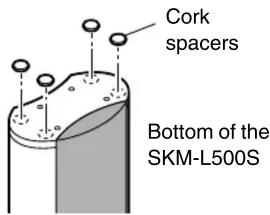
We recommend using the supplied cork spacers to achieve the best possible sound from your speakers. The cork spacers prevent the speakers from moving, providing a more stable setup.
Center Speaker Base
Use the center speaker base to mount the center speaker horizontally. If you place the speaker and its base on top of a TV or an entertainment center, adjust the angle of the speaker so that it faces toward the listening position. The center speaker should be installed on the base securely. If the speaker is loose, try adjusting the position so that it sits securely on the base. The bottom of the center speaker and the top rear surface of the base feature each two stoppers to prevent the speaker from moving. Therefore, you can tilt the speaker toward the front by up to 15 degrees.

■ Using the included cork spacers
We recommend using the supplied cork spacers to achieve the best possible sound from your speakers. The cork spacers prevent the speakers from moving, providing a more stable setup.

Wall Mounting
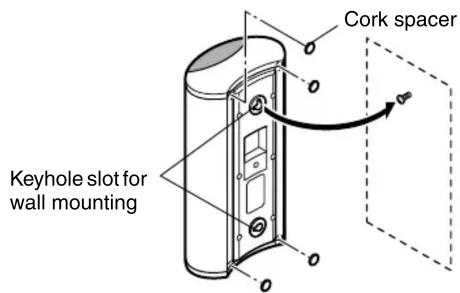
The speakers can easily be wall mounted by using the keyhole slots. To prevent the speaker from vibrating against the wall, attach four of the supplied cork spacers to the rear of each speaker.
■ Mounting vertically
To mount the speakers vertically, use the two keyhole slots shown to hang each speaker on two screws that are securely screwed into the wall.
■ Mounting horizontally
To mount the speakers horizontally, use the two keyhole slots shown to hang each speaker on two screws that are securely screwed into the wall.

The plaque of each speaker rotates so that you can position the speakers upside down.
Caution:
A mounting screw's ability to support a speaker depends on how well it's anchored to the wall. If you have hollow walls, screw each mounting screw into a stud. If there are no studs, or the walls are solid, use suitable wall anchors.
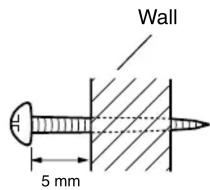
Use screws with a head diameter of 9.5 mm or less and a shank diameter of 4 mm or less. With hollow walls, use a cable/pipe detector to check for any power cables or water pipes before making any holes.
Leave a gap of 5 mm between the wall and the base of the screw head, as shown.
(We recommend that you consult a home installation professional.)
Connecting the Speakers
Read the following before connecting your speakers:
- T urn off your amp before making any connections.
- The nominal impedance of these speakers is 6 Ω . Use only an amp that supports this impedance.
- Pay close attention to speaker wiring polarity. Connect positive (+) terminals to only positive (+) terminals, and negative (−) terminals to only negative (−) terminals. If the speakers are wired incorrectly, the sound will be out of phase and will sound unnatural.
- Be careful not to short the positive and negative wires. Doing so may damage your amp.

■ Connecting the Speaker Cables
1
Strip the insulation from the ends of the speaker cables, and twist the bare wires tightly.

2
Use the cables to connect each speaker's input terminals to the corresponding speaker output terminals on your amp.
To make a connection, while pressing the terminal lever, insert the wire into the hole, and then release the lever.

Make sure that the terminals are gripping the bare wires, not the insulation.

Using Speaker Mounts/Brackets
Threaded inserts for 5 mm machine screws are provided for wall-mounting with commercially available speaker mounts and brackets (SKC-L500C: rear, SKM-L500S: rear and bottom). Refer to the manual supplied with your mounts or brackets for installation details.
Note:
The portion of the screw that goes into the speaker's threaded insert should be between 5 mm and 9 mm long.

Operating Precautions
The speakers can handle the specified input power when used for normal music reproduction. If any of the following signals are fed to them, even if the input power is within the specified rating, excessive current may flow in the speaker coils, causing burning or wire breakage:
- Interstation noise from an untuned FM radio.
- Sound from fast-forwarding a cassette tape.
-
High-pitched sounds generated by an oscillator, electronic musical instrument, and so on.
-
Amplifier oscillation.
-
Special test tones from audio test CDs and so on.
-
Thumps and clicks caused by connecting or disconnecting audio cables (Always turn off your amplifier before connecting or disconnecting cables.)
-
Microphone feedback.
- The speakers contain strong magnets, so do not put magnetic or iron objects such as screwdrivers close to them. If you do, the object may be attached to the magnets, causing personal injury or damage to the diaphragm.
Speaker care
Wipe the cabinet occasionally with a dry silica or soft cloth. For heavier dirt, after dampening a soft cloth in a weak solution of mild detergent and water and wringing it out dry, wipe off the dirt. Then, dry immediately with a clean cloth. Do not use rough material, thinners, alcohol or other chemical solvents or cloths since these could damage the finish, remove the panel lettering, or cause discoloration. If you are using a chemical cloth, always follow the instructions that come with the cloth. For dust accumulated on grilles, use a vacuum cleaner or brush it off.
Use with a TV set or computer
TVs and computer monitors are magnetically sensitive devices and as such are likely to suffer discoloration or picture distortion when conventional speakers are placed nearby. To prevent this, the SKC-L500C speaker features internal magnetic shielding. In some situations, however, discoloration may still be an issue, in which case you should turn off your TV or monitor, wait 15 to 30 minutes, and then turn it back on again. This normally activates the degaussing function, which neutralizes the magnetic field, thereby removing any discoloration effects. If discoloration problems persist, try moving the speakers away from your TV or monitor. Note that discoloration can also be caused by a magnet or demagnetizing tool that's too close to your TV or monitor.
Specifications
SKS-L500
SKC-L500C
Type: 2-way bass reflex
Impedance: 6 Ω
Maximum input power: 150 W
Output sound pressure level: 82 dB/W/m
Frequency response: 60 Hz - 100 kHz
Crossover frequency: 8 kHz
Cabinet capacity: 2.8 L
Speaker (woofer): 8 cm A-OMF diaphragm ×2
Speaker (tweeter): 2.5 cm balanced dome
Terminal: Spring type color-coded
Dimensions: 378 (W) × 161 (H) × 93 (D) mm
(Overall dimensions)
| Weight: | 1.6 | kg |
| Others: | Magnetic | shielding |
SKM-L500S
Type: 2-way bass reflex
Impedance: 6 Ω
Maximum input power: 130 W
Output sound pressure level: 80 dB/W/m
Frequency response: 60 Hz - 35 kHz
Crossover frequency: 8 kHz
Cabinet capacity: 2.1 L
Speaker (woofer): 8 cm cone
Speaker (tweeter): 2.5 cm balanced dome
Terminal: Spring type color-coded
Dimensions: 161 (W) × 288 (H) × 93 (D) mm
(Overall dimensions)
Weight: 1.1 kg
Specifications and appearance are subject to change for improvement without prior notice.
In catalogs and on packaging, the letter added to the end of the product name indicates the color of the SKS-
L500. Specifications and operation are the same regardless of color.
ONKYO CORPORATION
Sales & Product Planning Div. : 2-1, Nisshin-cho, Neyagawa-shi, OSAKA 572-8540, JAPAN
Tel: 072-831-8023 Fax: 072-831-8124
18 Park Way, Upper Saddle River, N.J. 07458, U.S.A.
Tel: 201-785-2600 Fax: 201-785-2650 http://www.us.onkyo.com/
ONKYO EUROPE ELECTRONICS GmbH
Liegnitzerstrasse 6, 82194 Groebenzell, GERMANY
Tel: +49-8142-4401-0 Fax: +49-8142-4401-555 http://www.eu.onkyo.com/
ONKYO EUROPE UK Office
Suite 1, Gregories Court, Gregories Road, Beaconsfield, Buckinghamshire, HP9 1HQ
UNITED KINGDOM Tel: +44-(0)1494-681515 Fax: +44(0)-1494-680452
ONKYO CHINA LIMITED
Units 2102-2107, Metroplaza Tower I, 223 Hing Fong Road, Kwai Chung,
N.T., HONG KONG Tel: 852-2429-3118 Fax: 852-2428-9039
http://www.ch.onkyo.com/

I0508-1

- SKC-L500C Center Speaker System SKM-L500S Surround Speaker System
- Getting Started
- Instruction Manual
- Installing & Using
- Appendix
- Package Contents
- SKC-L500C: Center speaker
- SKM-L500S: Surround left and right speakers
- Using Cork Spacers with the Speakers
- Center Speaker Base
- ■ Using the included cork spacers
- Wall Mounting
- ■ Mounting vertically
- ■ Mounting horizontally
- Caution:
- Connecting the Speakers
- ■ Connecting the Speaker Cables
- 1
- 2
- Using Speaker Mounts/Brackets
- Note:
- Operating Precautions
- Speaker care
- Use with a TV set or computer
- Specifications
- SKS-L500
- SKC-L500C
- SKM-L500S
- ONKYO CORPORATION
- ONKYO EUROPE ELECTRONICS GmbH
- ONKYO EUROPE UK Office
- ONKYO CHINA LIMITED
Brand : ONKYO
Model : SKS-L500
Category : Loudspeaker