GZUA 4135DX - Car radio Ground Zero - Free user manual and instructions
Find the device manual for free GZUA 4135DX Ground Zero in PDF.


| Product type | 4-channel audio amplifier |
| Brand | Ground Zero |
| Model | GZUA 4135DX |
| Dimensions (W x H x D) | 265 x 53 x 170 mm |
| Weight | Approx. 2 kg |
| Power supply | +12 V DC, fuse 2 x 25 A |
| RMS power @ 2 Ω (1% THD) | 4 x 190 W |
| RMS power @ 4 Ω (1% THD) | 4 x 135 W |
| Bridged RMS power @ 4 Ω (1% THD) | 2 x 380 W |
| Signal-to-noise ratio | > 90 dB |
| Damping factor | > 60 |
| Minimum impedance | 2 Ω stereo, 4 Ω bridged |
| Adjustable high-pass filter | 10 Hz - 500 Hz |
| Adjustable low-pass filter | 50 Hz - 500 Hz |
| Frequency response | 10 Hz - 30 kHz (±1 dB) |
| Total harmonic distortion (THD) | < 0.1% |
| Input sensitivity | 200 mV - 10 V |
| Channel separation | > 75 dB |
| Built-in protections | Overvoltage, overheating, short circuit |
| Audio inputs | 4 pairs of RCA (low-level inputs) |
| Speaker outputs | 4 channels, screw terminals |
| Additional features | MOS-FET PWM power supply, Full/LPF/HPF mode (depending on model), subwoofer level remote control (depending on model) |
| Maintenance and cleaning | Clean with a soft dry cloth. Avoid moisture and solvents. |
| Safety | Disconnect the battery before installation. Use appropriate cable gauge (min. 20 mm²). Install a fuse near the battery. |
| Spare parts and repairability | Fuses are replaceable. For repairs, contact a qualified technician or Ground Zero customer service. |
| General information | Designed for vehicle installation. Legal warranty according to applicable rights. |
Frequently Asked Questions - GZUA 4135DX Ground Zero
User questions about GZUA 4135DX Ground Zero
0 question about this device. Answer the ones you know or ask your own.
Ask a new question about this device
Download the instructions for your Car radio in PDF format for free! Find your manual GZUA 4135DX - Ground Zero and take your electronic device back in hand. On this page are published all the documents necessary for the use of your device. GZUA 4135DX by Ground Zero.
USER MANUAL GZUA 4135DX Ground Zero
Limited warranty - defective products must be returned in original packaging - please add a copy of the original purchasing invoice showing the purchasing date and a detailed description of the failure. Failure caused by overload, misuse or by using the product for competition purpose are not covered by the warranty.
We reserve the right to make needed change or improvement to the product without informing customer about this in advance.
Please read before Installation
Thank you for selecting a GROUND ZERO amplifier. We are providing a helpful hints
list which should keep you from experiencing unnecessary shut down.
Features
Efficiency 80% (4 Ohm at 1KHz) - Ultra small sized heatsink - 2 Ohm stable stereo (bridged 4 Ohm) MOS-FET PWM power supply - Adjustable lowpass filter 18 dB/ Octave crossover slope - Multi way protection circuitry
(Thermal / over current / speaker short / Speaker DC protection)
Adjustable highpass filter (GZUA 2250DX / 4135DX) Adjustable phase shift (GZUA 2250DX / 5600DX) Adjustable subsonic filter (GZUA 2250DX / 5600DX) Adjustable bass boost (GZUA 2250DX) RCA Cinch output (mono) for other subwoofer amplifiers (GZUA 2250DX) Adjustable crossover frequency FULL/LPF/HPF switch (GZUA 5600DX) Input mode switch (GZUA 5600DX) Bass remote control (GZUA 5600DX)
Introduction
Amplifiers provide high-performance sound reinforcement for your mobile audio equipment. It's versatility enables compatibility with optional Equalizer, Frequency Dividing Network Crossovers and other audio processors in a customized system.
The Multi-Mode bridging capabilities allow flexibility in hosting several different speaker configurations.
To achieve optimum performance, it is highly recommend that you read this Owners manual before the installation.
Tools and materials you need
- Screwdriver Electric drill, 3mm
- Mounting screws Power wire min. 20mm² Ground wire min 20mm²
- Speaker wire min. 2 × 1.5 mm²
Attention
- As a precaution it is advisable to disconnect the vehicle's battery before making connection to the +12 Volts supply wiring (see owner's manual of your car for further information!)
- Do not drill holes into the tank, the brake pipe, wires or other important parts of the vehicle.
- Never pass wires over sharp angles. It is recommended to buffer the power supply of the amplifier with a capacitor min. 1 Farad.
WARNING
High powered audio systems in a vehicle are capable of generating "Live Concert" high levels of sound pressure. Continued exposure to excessively high volume sound levels may cause hearing loss or damage. Also, operation of a motor vehicle while listening to audio equipment at high volume levels may impair your ability to hear external sound such as horns, warning signals, or emergency vehicles, thus constituting a potential traffic hazard. In the interest of safety, Consumer Electronics recommends listening at lower volume levels while driving.
Planning your System
Before beginning the installation, consider the following:
a. If you plan to expand your system by adding other components sometime in the future, ensure adequate space is left, and cooling requirements are met. b. If your radio source is equipped with Pre-Amp outputs, it is recommended to utilize them to drive the amplifier. c. Are your components matched? The peak power rating of your speakers must be greater than the Amplifiers. They also must be 2-8 ohms impedance (This information is normally printed on the speaker magnet.) d. Consider both the length of your leads, and routing when choosing the mounting location. Pre-Amp input jacks require a length of high quality shielded male to male RCA patch cord.
Mounting your amplifier
a) Select a suitable location that is convenient for mounting, accessible for wiring and has enough room for air circulation and cooling. b) Use the amplifier as a template to mark the mounting holes, remove the amplifier and drill 4 holes, use extreme caution. Inspect underneath surface before drilling.
Warning
Investigate the layout of your automobile thoroughly before drilling or cutting any holes. Take care when you work near the tanks, lines, or hydraulic lines, and electrical wiring. Don't mount this system so that wire connections are unprotected or are subject to pinching or damage from nearby objects.
The +12 Volt DC power wire must be fused at the battery positive terminal connection. Before making or breaking power connections at this system's power terminals, disconnect the +12 Volt wire at the battery end.
Confirm your radio/cassette player and/or other equipment is turned off while connecting the input jacks and speaker terminals.
If you need to replace the power fuse, replace it only with a fuse identical to that supplied with the system. Using a fuse of a different type or rating may result in damage to this system which isn't covered by the warranty.
Wiring connection
Attention! - min. 20 mm² wires are necessary for power connection!
(1) Ground: Ground connection should be passed directly to the car body as short as possible (max. 1m). (2) +12 Volt: Power connection should be passed directly to the battery. Please pay attention to a correct fuse protection of the installation with an inline device with a max. wire length to the battery of 30 cm. (3) Remote turn on: This connection is connected with the remote control line of the radio. It is used for turning on and off the amplifier.
Power connection
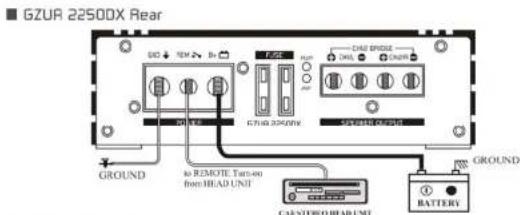
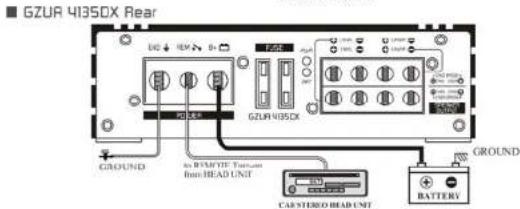
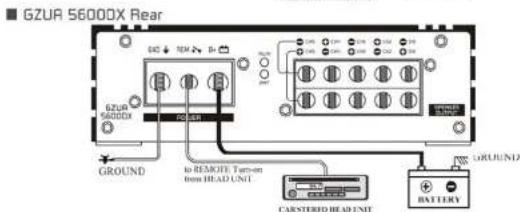
RCA connection
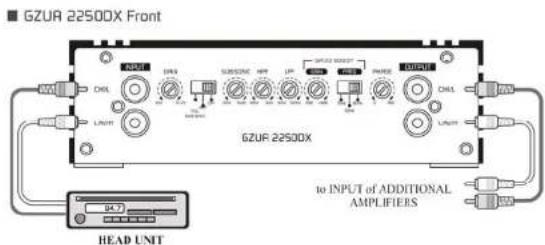
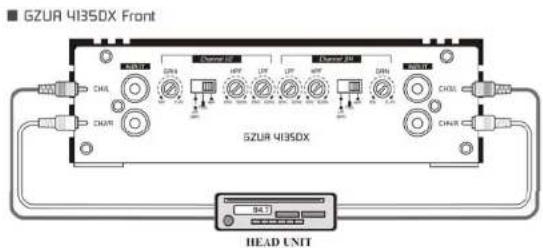
This amplifier has a signal input terminal of RCA connector type for low level inputs. Adjustment of input levels is accomplished by the gain control of both channels. Adjusting this control allows the amplifier gain to be controlled to match and balance both channels. The RCA input connector should be used when connecting the radio/cassette line out and this connection is usually made using RCA-RCA connector wires.
RCA connection
This amplifier has a signal input terminal of RCA connector type for low level inputs. Adjustment of input levels is accomplished by the gain control of both channels. Adjusting this control allows the amplifier gain to be controlled to match and balance both channels. The RCA input connector should be used when connecting the radio/cassette line out and this connection is usually made using RCA-RCA connector wires.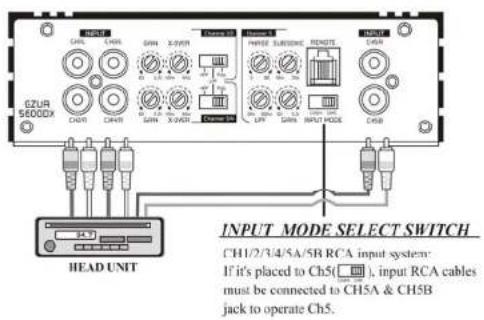
Speaker connection
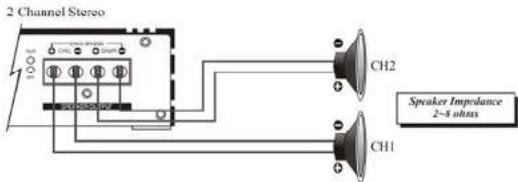
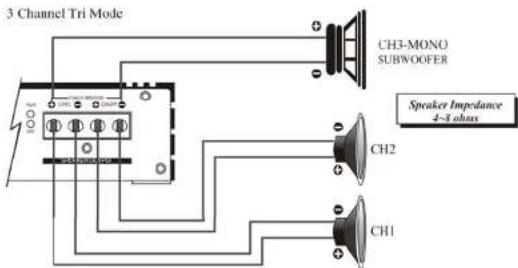
Speaker connection
GZUR41350X Rear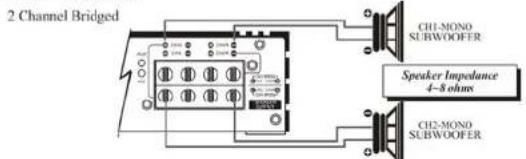
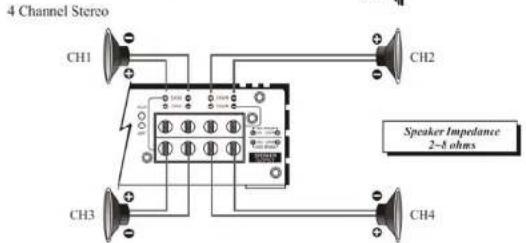
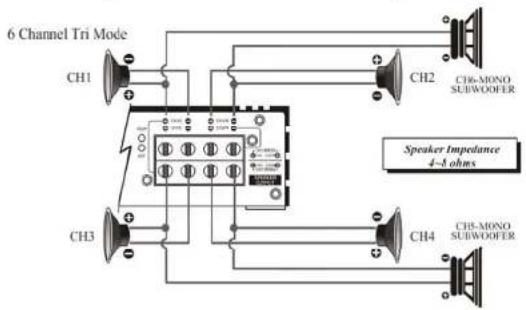
Speaker connection
GZUR5600DX Rear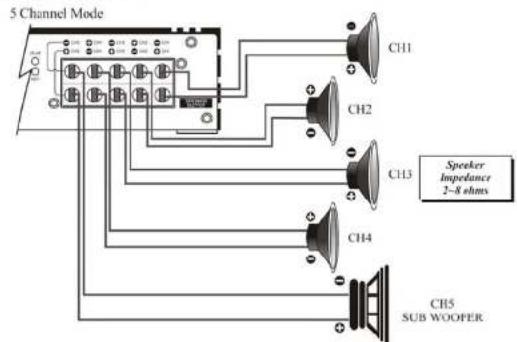
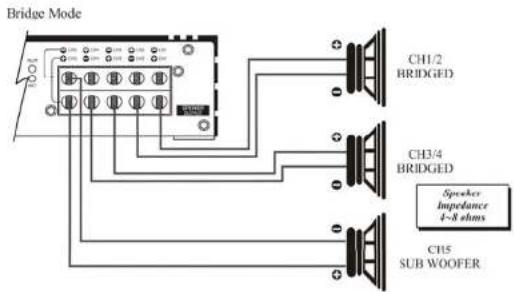
Speaker connection
GZUR5600DX Rear
Dual Tri Mode
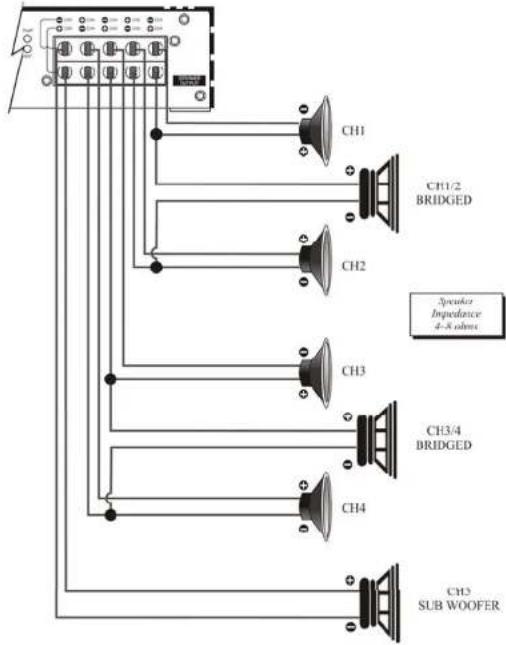
Adjusting the audio level
For the best performance, you must set LEVEL (MIN:MAX) on the side of the amplifier to adjust the level of the audio signals.
Use a screwdriver to turn LEVEL(MIN/MAX) fully to MIN. 2. Turn the auto sound system's volume control to about two-thirds of its full range. 3. Adjust LEVEL(MIN/MAX) to a comfortable listening level. 4. Turn up the auto sound system's volume control until the sound begins to distort. Then immediately turn the volume down to a point just before where the distortion began. Caution: Never turn up the auto sound system's volume control more than needed to adjust the audio level, more than two thirds of its maximum volume. 5. Adjust LEVEL (MIN/MAX) until the sound is at the maximum level you want the amplifier to produce. 6. Adjust the auto sound system's volume control to a comfortable listening level.
Troubleshooting
This power amplifier has protection features to prevent any damages from misuse or faulty conditions. If the unit senses excessive heat, short circuited speakers or overload, the protection indicators will light, and the system will be turned off. In order to check the occupied problems, you should turn all levels down and all power off and turn off the lights. The system will then turn on and turn off the lights. When the power switch down due to excessive heat, the protection indicators will not light; simply allow time for the unit to start.
Before removing your amplifier, refer to the list below and follow the suggested procedures.
A
| Problem Check points | |
| Amplifier is not powered up | Check that there is battery power on the +12V terminal. Check that remote terminal has at least +12V DC remote connection. Check a good ground connection. Check all fuses. Check the protection LED is not lit. |
| Protection LED illuminates when amplifier is powered up | Check shorts on speaker wires. Remove speaker wires and reset the amplifier. If the protection LED still comes on, then the amplifier is faulty. |
| Fuse blowing | Check that the minimum speaker impedance is correct. Check short on power cable and vehicle chassis. |
| Overheating | Check that the minimum speaker impedance is correct. Check speaker shorts. Check that there is a good airflow around the amplifier. |
| Sound too low / Distorted sound | Check that the input level control is set to match the cutout level of the unit. Check the head unit volume. Check speaker shorts. Check that crossover frequencies have been properly set. |
| High hiss / engine noise in speakers | Check a good ground and for speaker shorts. Disconnect all RCA inputs from the amplifier. If hiss/voice disappears, check it with a good RCA interconnect. Then check the component driving the amplifier. |
Specifications
| Model GZUA 2250DX GZUA 4.135DX GZUA 5600DX | |||
| RMS power @ 2 Ω, 1% THD CEA Standard CEA-2006-A | 2 x 450W 4 x 190W | 4 x 150W + 1 x 330W | |
| RMS power @ 4 Ω, 1% THD CEA Standard CEA-2006-A | 2 x 290W 4 x 135W | 4 x 90W + 1 x 250W | |
| RMS power @ 4Ω Bridged 14,6 V, 1% THD | 1 x 900W 2 x 380W | 2 x 240W + 1 x 250W | |
| Damping factor | > 60 > 60 > 60 | ||
| Signal to noise ratio | > 90 dB > 90 dB > 90 dB | ||
| Lowpass crossover | 30 Hz - 500 Hz 30 Hz - 500 Hz | 30 Hz - 300 Hz [CH 5] | |
| Highpass crossover | 40 Hz - 3 kHz 10 Hz - 500 Hz --- | ||
| X-over crossover | --- | --- | 40 Hz - 3 kHz [CH 1-4] |
| Subsonic Filter | 10 Hz - 160 Hz --- | 10 Hz - 70 Hz [CH 5] | |
| Bass boost | 0 - +9 dB --- --- | ||
| Bass boost Frequency | 35 / 50 / 80 Hz --- --- | ||
| Phase shift | 0 - 180° --- 0 - 180° (CH 5) | ||
| Frequency response | 10 Hz - 30 KHz (- 1 dB) | 10 Hz - 30 KHz (+ 1 dB) | 10 Hz - 30 KHz (+ 1 dB) |
| Efficiency @ 4 Ω | 80 % 80 % 80 % | ||
| Input sensitivity | 200 mV - 10 V (± 5%) | 200 mV - 10 V (± 5%) | 200 mV - 10 V (± 5%) |
| Channel separation | 75 dB 75 dB 75 dB | ||
| THD | 0.10 % | 0.10 % | 0.10 % |
| Fuse | 2 x 25A | 2 x 25A | 2 x 25A (Built-in fuse) |
| Dimensions W x H x L mm | 170 x 53 x 265 | 170 x 53 x 265 | 170 x 53 x 275 |
| Dimensions W x H x L inch | 6.09 x 2.09 x 10.43° | 6.09 x 2.09 x 10.43° | 6.09 x 2.09 x 10.83° |
Limited warranty - defective products must be returned in original packaging - please add a copy of the original purchasing invoice showing the purchasing date and a detailed description of the failure. Failure caused by overload, misuse or by using the product for competition purpose are not covered by the warranty.
www.ground-zero-audio.com
We reserve the right to make needed change or improvement to the product without informing customer about this in advance.
Limited warranty - defective products must be returned in original packaging - please add a copy of the original purchasing invoice showing the purchasing date and a detailed description of the failure. Failure caused by overload, misuse or by using the product for competition purpose are not covered by the warranty.
www.ground-zero-audio.com
We reserve the right to make needed change or improvement to the product without informing customer about this in advance.


- PLEASE READ BEFORE INSTALLATION
- FEATURES
- INTRODUCTION
- TOOLS AND MATERIALS YOU NEED
- ATTENTION
- WARNING
- PLANNING YOUR SYSTEM
- BEFORE BEGINNING THE INSTALLATION, CONSIDER THE FOLLOWING
- MOUNTING YOUR AMPLIFIER
- WIRING CONNECTION
- ATTENTION! - MIN. 20 MM² WIRES ARE NECESSARY FOR POWER CONNECTION
- POWER CONNECTION
- RCA CONNECTION
- SPEAKER CONNECTION
- ADJUSTING THE AUDIO LEVEL
- TROUBLESHOOTING
- WWW.GROUND-ZERO-AUDIO.COM
Brand : Ground Zero
Model : GZUA 4135DX
Category : Car radio