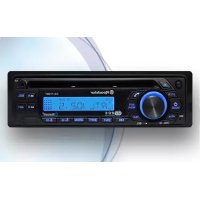
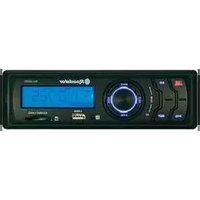
CD770BT - Car radio ROADSTAR - Free user manual and instructions
Find the device manual for free CD770BT ROADSTAR in PDF.



| Brand | Roadstar |
| Model | CD770BT |
| Type | FM/AM car radio, CD/MP3 player, USB, Bluetooth |
| Power Supply | 13.8 V DC (10.8 - 15.6 V), negative ground |
| Output Power | 7 W RMS x 4 channels (4 or 8 ohms) |
| FM Range | 87.5 - 108 MHz |
| FM Tuner | Digital PLL, 18 preset stations (6 FM1, 6 FM2, 6 FM3) |
| RDS | PI, PS, AF, TA, TP, PTY, EON |
| CD Player | CD, CD-R, CD-RW, MP3 (ID3 Tag) |
| USB Port | Front, MP3 compatible |
| Auxiliary Input | 3.5 mm AUX jack on front panel |
| Bluetooth | Hands-free, A2DP audio streaming |
| Preamp Output | RCA (rear), 350 mV max, 10 kOhm |
| Faceplate | Detachable, anti-theft |
| Audio Functions | Volume, bass, treble, balance, fader, loudness, DSP (Rock/Pop/Classic/Off) |
| ISO Connectors | Connector A: +12V permanent, +12V ignition switched, ground, antenna, etc. |
| Fuse | Use a fuse of specified amperage (not stated) |
Frequently Asked Questions - CD770BT ROADSTAR
User questions about CD770BT ROADSTAR
0 question about this device. Answer the ones you know or ask your own.
Ask a new question about this device
Download the instructions for your Car radio in PDF format for free! Find your manual CD770BT - ROADSTAR and take your electronic device back in hand. On this page are published all the documents necessary for the use of your device. CD770BT by ROADSTAR.
USER MANUAL CD770BT ROADSTAR
This product meets the essential requirements laid down by EEC Directive 89/336 and has been built in accordance with European standards EN50013, EN50020.
Car Stereo CD-MP3 Player with PLL / RDS FM Stereo Radio, USB-Port, 4 x 7 WRMS and Bluetooth with A2DP.
CD-770BT
Instruction manual
Bedienungsanleitung
Roadstar is a registered Trademark of Roadstar S.A. - Switzerland All rights reserved
INDEX
English Page 1
Deutsch Seite 15
Français Page 29
Italiano Pagina 4 3
Espanol Párgina 57
Portugues Pagina 71
-
Your new unit was manufactured and assembled under strict ROADSTAR quality control. Thank-you for purchasing our product for your music enjoyment. Before operating the unit, please read this instruction manual carefully. Keep it also handy for further future references.
-
Ihr neue Gerät wurde unter Bechlung der strengen ROADSTAR-Qualitätsvorschriften gefertigt.
The exclamation point within the triangle is a warning sign alerting the user of important Instructions accompanying the text.
The lightening flash with arrowhead symbol within the triangle is a warning sign alerting the user of "dangerous voltage" inside the unit.
To reduce the risk of electric shock, do not remove the cover. No user serviceable parts inside the unit. Refer all servicing to qualified personnel.
Invisible laser radiation when the unit is opened or interlocks defealed. Avoid exposure to laser beam. Use of controls, adjustments or procedures other than those specified herein may result in hazardous radiation exposure.
This unit must not be exposed to moisture or rain.
This unit should be positioned so that it is properly ventilated.
Do not expose this unit to direct sunlight or heat radiating sources.
m = 311
EnglishEn
CD-770BT
Car Stereo CD-MP3 Player with PLL FM Stereo Radio RDS with PTY and USB. Detachable Front Panel System and Bluetooth function.
INSTRUCTION MANUAL
Please read this instruction manual carefully and familiarize yourself with your new Radio before using it for the first time. Please retain this manual for future reference.
TABLE OF CONTENTS
- Location of Controls
Features
Installation - Precautions and Maintenance
-Operating Instructions - Specifications
LOCATIONS OF CONTROLS
- POWER ON/OFF
- FUNCTION SELECT BUTTON: BASS/TREBLE/BALANCE/FADER /TA SEEK /PI / LOUDNESS /AUDIO/DSR/LOC-DX/STEREO "ENTER" INMP3 MODE
- VOL UP/VOL DOWN FOR BASS/TREBLE/BALANCE/FADER
4.PRESETSTATIONS(1.2.3.4.5.6) - 'AF' function (ALTERNATIVE FREQUENCIES) + # for Bluetooth
- 'TA' function (TRAFFIC ANNOUNCEMENT)+ 0 for Bluetooth
- 'PTY' function (PROGRAM TYPE) + ' for Bluetooth
- +10BOTTION(CDTMP3)
- MODE BUTTON (MODE)
10.BAND BUTTON (FM1/FM2/FM3) + CLEAR for Bluetooth
11.AUTOMATICORMANUALTUNING(FREQUP>>ORFREQDOWN<<A
CD-USB (MP3) TRACK SKIP BUTTON + 8 for Bluetooth
- -10 BUTTON (CD / MP3)
13LCDDISPLAY
14.PANEL RELEASE BUTTON
15.USBPORT
16.CD.SLOT-IN
17.PAUSE BUTTON - INTRO BUTTON (CD SCAN)
19.REPEAT BUTTON(REPEAT) - RANDOMBUTTON (SHI)
- RESET BUTTON (on ms)
22.CDFJECTBUTTON - AUX-IN-Jack
- AS (Autosloge) + 7 for BluefinB
- MUTE/PEDAL
FEATURES
The unit features a detachable front control panel, AM/FM stereo RDS, CD - USB:
Electronic Volume, Bass, Treble, Fader and Balance control.
- Bluetooth Handfree with A2DP
CD Player with antishock protection
- Precision electronic tuning with phase-lock loop (P.L.L.) circuitry.
Programmable 18 preset memory tuning
Loudness control
- Manual / Auto (Seek) / up and down tuning control
Band selector for FM1/ FM2 / FM3
-FrontAUX-IN
-
Clock Function in RDS
-
MP3 Repeat Function
-
Preamplified Line-out
-
Detachable front panel protects against theft
-
Lighting system
RDS Function: PI (Program Identification) TA (Traffic Announcement)
PS (Program Service Name) PTY (Program Type)
AF (List of Alternative Frequencies)
TP (Traffic Program)
INSTALLATION
PRECAUTIONS
-
Choose the mounting location carefully so that the unit will not interfere with the normal driving functions of the driver.
-
Avoid installing the unit where it would be subject to high temperatures, such as from direct sunlight or hot air from the heater, or where it would be subject to dust, dirt or excessive vibration.
-
Use only the supplied mounting hardware for a safe and secure installation.
-
Be sure to remove the front panel before installing the unit.
Mounting angle adjustment
Adjust the mounting angle to less than 20irc .
4
EnglishEng
MOUNTING EXAMPLE
Installation in the dashboard
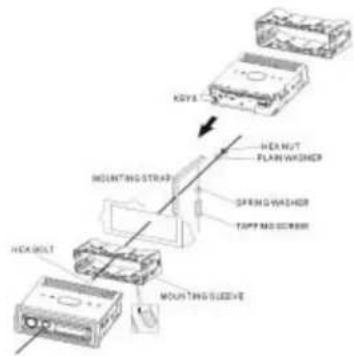
Note: Keep the release key in the safe place as you may need it in future to remove the unit from the car.
Detaching and attaching the front panel
The front panel of this unit can be detached in order to prevent the unit from being stolen.
DETACHING THE FRONT PANEL
Before detaching the front panel (14), be sure to press the PWR button (1) To OFF first.
Pull out the panel towards you in order to detach completely the panel from the main unit.
Refer to below instruction.
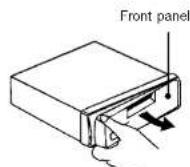
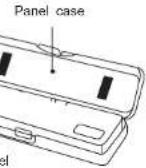
ATTACHING THE FRONT PANEL
Make sure the front panel is the right way up when attaching it to the unit as it cannot be attached upside down. Bring side B of panel to side A of main unit.
Insert the panel in and push until it clicks.
Panel is attached
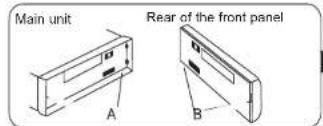
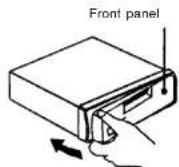
Notes:
- Do not press the front panel hard against the unit when attaching it. It can be easily attached by pressing it lightly against the unit.
- When you carry the front panel with you, put it in the supplied front panel case.
- Do not press hard or give excessive pressure to the display window of the front panel when attaching it to the unit.
6
EnglishEng
BUILT-IN ISO CONNECTOR
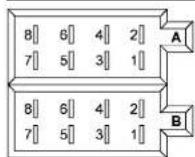
RCA Jack Line Out (Rear) -
Gray: Red (right)
:White(left)
CONNECTOR A
-
2.
-
MEMORY +12V
5.AUTOANTENNAOUTPUT
6.
7.12V(TO IGNITION KEY)
8. GROUND
Note: 12 V wire (connector A no. 7) must be connected by car ignition key in order to avoid that car battery becomes weak when the car will be not used for long period.
CONNECTORB
1.REAR RIGHT SPEAKER (+)
2.REAR RIGHT SPEAKER(-)
3. FRONT RIGHT SPEAKER (+)
4. FRONT RIGHT SPEAKER (-)
5. FRONT LEFT SPEAKER (+)
6. FRONT LEFT SPEAKER (-)
7. REAR LEFT SPEAKER (+)
8. REAR LEFT SPEAKER(-)
Maintenance
FUSE REPLACEMENT
If the fuse blows, check the power connector and replace the fuse. If the fuse blows again after the replacement, there may be an internal malfunction. In this case, consult your nearest repairing centre.
Warning
Use the specified amperage fuse for each lead. Use of a higher amperage fuse may cause serious damage.
OPERATINGINSTRUCTIONS
POWERON/OFF1PWR
Insert the front panel in the unit and push Power button in order to switch on the unit. Push PWR button newly in order to switch off the unit and push REL button (14) to release the front panel.
Note: Never release the front panel when the unit is on. Power remains on even when car radio is off.
SELECT (2) VOLUME UP/DOWN (3)
Rotate the VOLUME Knob (3) to control the VOLUME. To select other functions, press the SELECT (2) button shortly until the desired functions is shown on the display. Figure 1 shows how control functions are selected using the SELECT button.
-
VOLUME (rotate knob)
-
SELECT (push down)
3.BASS
4.TREBLE
5.BALANCE
Rotate the VOLUME knob to increase or decrease the volume. This knob can be used to adjust the BASS, TREBLE, BALANCE and FADER.
This knob also selects the possible options in RDS function.
TA SEEK/TA ALARM(2)
When press the SEL button for more than 2 seconds, it is activated as selecting mode of these function. Turn the volume knob to select:
TA SEEK Mode or TAALAR mode.
8
EnglishEng
- TA SEEK mode:
When newly turned station does not receive TP information for 5 sec., the radio retunes to next station which has not the same station (PI) as the last station, but has the TP information.
In TA seek mode, the current station can be changed to the completely different station because the unit searches TP station when the field strength of the current station is very weak, or the current station has no TP signal.
-TA ALARM mode:
Any automatic retune mode is not activated, just can be heard Beep sound.
PI SOUND/PI MUTE
PI SOUND
When a car cruises some special area which has different PT code with same AF, PI sound (DIP) is heard once in a while, the DIP's sound will be heard for less than 1 second.
PI MUTE
Under the above same situation, a mute sound will be heard for less than 1 sec.
RETUNE L/RETUNES
The initial time of automatic TA search or PI search mode is selected. When PI information is not caught for return time, the radio start to return to next same PI station. When same PI station does not catch 1 cyclic search, the radio goes to last station and waits for 4-5 minute until PI code is received.
4.PRESET STATIONS (1,2,3,4,5,6)
(A) RADIO MODE:
When pressed short, these keys select a preset station directly. When pressed longer than 1 sec., current station is stored in preset memory bank. When PTY mode is selected, the PTY switch is shared as follows:
PTY music group --- PTY speech group --- OFF
USING THE RDS FUNCTION
What is RDS?
The RDS (Radio Data System) is a digital information system developed by the EBU (European Broadcast Union). Piggy-backed on normal FM broadcasts, RDS offers a variety of information services and automatic returning functions for RDS-compatible car stereos. In 1988, RDS became available in the United Kingdom, France, West Germany, Ireland and Sweden. Test transmissions are being conducted in many other European countries. It is expected that RDS will be available in most western European countries in the near future.
5. 'AF/REG' function (ALTERNATIVE FREQUENCIES)
When pressed, AFIREG switchig mode is selected.
When AF/REG switching mode is selected, the radio checks the signal strength of the AF.
all the time. When pressed long, it is activated as regional mode ON/OFF.
Regional mode ON:
AF switching or PI SEEK is implemented to the station which have all PI codes same as current station. REG segment is turned on, in LCD display.
Regional mode OFF
The regional code in the format of PI code is ignored when AF switching or PI SEEK is implemented.
6. 'TA' function (TRAFFIC ANNOCENCEMENT)
When pressed short, it is activated as TA mode on or off
When TA mode is on and traffic announcement is transmitted
- When the unit is it CD/MP3 mode, it will switch to radiomode temporarily.
If the volume level was under the threshold point, it will be raised to the threshold point.
- When TP station is received, TP segment is turned on in LCD display.
7. 'PTY' function (PROGRAM TYPE)
PTY MUSIC --- PTY SPEECH --- PTY OFF
While selecting PTY type, its selection is implemented by preset buttons as described in preset key. When PTY is selected, the radio starts to search corresponding PTY information, and stops if the corresponding PTY information, is detected.
8. +10 BUTTON (CD/USB MP3)
Press this button to skip 10 tracks each time up of CD / USB MP3
10
EnglishEng
9.MODE BUTTON (MODE)
By pressing this key, user can select.
RADIO/USB/AUX-IN/PHONE/CDmode
Each band is toggled cyclically by pressing this key FM1--FM2--FM3.
In CD / USB (MP3) mode, when this key is pressed it is operated as the conversion of each display mode as follows:
TITLE - SONG - ARTIST - DIRECTORY
11.AUTOMATIC OR MANUAL TUNING (FREQUP>>OR FREQDOWN<<
(A) RADIO MODE
When pressed short, these keys are operated as MANUAL tuning mode.
When pressed longer than 1 sec., they are operated as SEEK tuning mode.
When pressed short, they are operated as TRACK UP or TRACK DOWN mode.
12. -10 BUTTON (CD/USB MP3)
Press this button to skip 10 tracks each time back of CD / USB MP3
15. USB PORT
17.PAUSE BUTTON
During "PLAY", press (17) 'PAUSE' button to "PAUSE". Press it again to resume play.
18.INTRO BUTTON (MP3 SCAN)
When this button is pressed, 'SCN' indication is displayed and the first several seconds
of each track of the disc are played. Press again to stop intro and listen to track.
19. REPEAT BUTTON 'REPEAT'
When this button is pressed, 'RPT' indication is displayed and play of the selected track will be continually repeated until the Track repeat mode is cancelled by pressing 'RPT' button again.
20. RANDOM BUTTON 'SHUFFLE'
When this button is pressed, 'SHF' indication is displayed and each track of the disc are played in random instead of normal progression. To cancel RANDOM mode, press 'SHF' button (20) again.
21. RESET BUTTON
Reset button (25) is placed on the housing.
The reset button is to be activated for the following reason: Initial installation of the unit, which will be completed
- Initial installation of the unit when all wiring is completed.
All the function butons do not operate properly.
ID3 Tag
Press BAND button repeatedly to Display ID3 TAG information.
If the MP3 file is available with ID3 TAG, pressing the display button repeatedly will show
Information in the following sequence:
SONG TITLE >ARTIST >ALBUM TITLE >YEAR>COMMENTS If any of the IP3-TAG information is not available, please contact the BAND by letter or
peakedly will show information in the following sequence:
UNKNOWN SONGNAME> UNKNOWN ARTIST> NO ALBUM TITLE > UNKNOWN
YEAR>NO COMMENTS
If the MP3 file is without ID3 TAG, pressing the BAND button, "NO ID3 TAG" will be
displayed
The file name & track number of the MP3 file will scroll repeatedly through the display
during the playing of the MP3 file.
HOW TO SELECT MP3 FILES
A. Searching Track directly
Keep pressed the BAND Button (10) once, the displays show "TRK SCH": select the MP3 track by rotate the Volume knob (3) to scroll through the numbers. Then press ENTER (VOLUME) to confirm.
B. Searching by Directory or File name
Keep pressed the BAND twice, the displays shows "FILE SCH". Enter the character directly. The unit searches files and directories which have the same character which is inputted by the user. The unit shows these sorted files and directories by VOLUME UP / DOWN (1) Knob. If the selected name is directory, the user can go into the selected directory by press MP3 ENTER BUTTON and continue to search the directory or file name in the directory by VOLUME UP / DOWN knob. The selected file can be played by pressing MP3 Enter Button.
Rotate the Volume knob (3) in both directions to scroll through the characters
(alphanumeric). Then press ENTER (VOLUME) to confirm.
C. Searching from Directory
SEARCH DIRECTORY BY USING VOLUME UP /DOWN KNOB
Under MP3 play mode, keep pressed BAND three times. Then the first Directory name
is shown (DIR SCH). Move VOLUME UP/DOWN to navigate through the directory list,
press MP3 ENTER BUTTON to select the desired directory. Select the tracks under the
12
EnglishEng
selected directory, press MP3 ENTER KNOB knob again to confirm when desired track is found. Rotate the Volume knob (1) in both directions to scroll through the characters (alphanumeric). Then press MP3 ENTER BUTTON (3) to confirm.
*IMPORTANT INFORMATION:BECAUSE OF THE GREAT VARIETY OF PRODUCTS WITH
USB AND THEIR SOMETIMES QUITE MANUFACTURER-SPECIFIC FUNCTIONS WE CAN NOT BE SATTERED.
ANNEENONANENTTATALLDEVOISWILDEFERONIZEDNONTHAT
- Aux In Port Convenient easy to use front 'AUX IN' input jack, allows easy connection of Portable Media and other digital MP3 Players.
24.ATOOSEEKSEARCHTUNING(AMS)
By pressing shortly, the radio searches for each preset station. When field strength level is bigger than the threshold level of stop level, the radio is holding at that preset number for 5 sec, with releasing mute, and then searches again. By pressing longer than 1 sec, and then 6 strongest stations are preset to the corresponding preset number.
When AS operation is finished, the radio executes the preset scan.
HOW TO USE BLUETOOTH IN YOUR CAR AUDIO
How to Perform Pairing:
Before you can dial out from the car stereo, you must first perform PAIRING. Pairing is a procedure used to connect 2 Bluetooth devices together.
- This unit's Bluetooth function is always on, perform the pairing starting from your cellular phone. Refer to your cellular manual on proper pairing.
- Perform the search for available Bluetooth devices, "CAR-BT" will show. Enter '0000' when asking for code.
- After successful pairing (BT-ON appear in the display), connect to the head unit if it is not automatically connected.
How to make / receive calls using front panel
To make calls using call history:
- Press "REDIAL" then or to display history of last 5 numbers.
- Press " → " to dial out.
- Press the MODE button until "PHONE" is displayed then dial the phone number using the 1-9 butons to dial the desired number.
During conversation, press "BD/CL" button to end call. - When there is incoming call, press " " button to receive call.
- Press "BD/CL" button to reject incoming call.
Audio Streaming (A2DP)
- If your phone is 'A2DP' format compatible, you can play music in your mobile and the music will be transferred to car audio unit.
- Make sure your mobile and the car radio unit is paired and connected.
- Play the music in your mobile according to your mobile operating method.
- You can press >> or << on head unit for previous or next tracks.
14
EnglishEng
SPECIFICATIONS
CD/MP3 PLAYER SECTION
Channel Separation = 0dB (1kHz) Frequency Response 20Hz - 20kHz
TUNER
Sensitivity 2 dBμ
Stereo separation 35 dB
Signal to noise ratio 53 dB
M Frequency Range 87.3-100MHz Channel step EM:50 kHz24
Intermediate frequency 10.7 MHz
LINE-OUT
Output 350mV max.
Impedance 10kOhm
GENERAL
Power Supply 13.8V
Speaker impedance 4 or 8 ohm
Output power
DC
(10.8-15.6V allowable)
Note: Specifications and the design are subject to possible modification without notice due to improvement.
Correct Disposal of This Product (Waste Electrical & Electronic

This marking shown on the product or its literature, indicates that it should not be disposed with other household wastes at the end of its working life. To prevent possible harm to the environment or human health from uncontrolled waste disposal, please separate this from other types of wastes and recycle it responsibly to promote the sustainable reuse of material resources.
Household users should contact either the retailer where they purchased this product, or their local government office, for details of where and how they can take this item for environmentally safe recycling. Business users should contact their supplier and check the terms and conditions of the purchase contract. This product should not be mixed with other commercial wastes for disposal.
SICHERHEITSHINWEISE

UNKNOWN SONGNAME> UNKNOWN ARTIST> NO ALBUM TITLE > UNKNOWN
YEAR>NO COMMENTS
Correct Disposal of This Product (Waste Electrical & Electronic Equipment)
This marking shown on the product or its literature, indicates that it should not be disposed with other household wastes at the end of its working life. To prevent possible harm to the environment or human health from uncontrolled waste disposal, please separate this from other types of wastes and recycle it responsibly to promote the sustainable reuse of material resources.
Household users should contact either the retailer where they purchased this product, or their local government office, for details of where and how they can take this item for environmentally safe recycling. Business users should contact their supplier and check the terms and conditions of the purchase contract. This product should not be mixed with other commercial wastes for disposal.
FrançaisFr
CD-770BT
- +12V (ALACLEFDIGNITION)
8.MASSE
N.B.:
CONNECTEURB
- HAUT-PARLEUR ARRRIERE DROIT (+)
- HAUT-PARLEUR ARRRIERE DROIT (-)
- HAUT-PARLEUR AVANT DROIT (+)
- HAUT-PARLEURAVANTRDROIT(-)
5.HAUT-PARLEURAVANTGAUCHE (+)
6.HAUT-PARLEUR AVANT GAUCHE(-) - HAUT-PARLEUR ARRIERE GAUCHE (+)
- HAUT-PARLEUR ARRIERE GAUCHE (-)
REEMPLACEMENTDESFUSIBLES
In TA seek mode, the current station can be changed to the completely different station because the unit searches TP station when the field strength of the current station is very weak, or the current station has no TP signal.
-Mode ALARMETA:
UNKNOWN SONGNAME> UNKNOWN ARTIST> NO ALBUM TITLE > UNKNOWN YEAR >NO COMMENTS
ACCENSION/EPEGNIMENTO(1)
LA FUNZIONE RDS. COS'E'IL SISTEMA RDS?
C. Ricerca per album (Directory)
RESINTONIZATION L/RESINTONIZATION S
LA FUNCION RDS.EL SISTEMA RDS
19. TECLA REPEAT 'REPEAT'
UNKNOWN SONGNAME> UNKNOWN ARTIST> NO ALBUM TITLE > UNKNOWN YEAR > NO COMMENTS
-
LOUDNESS
-
DSP (ROCK/POP/CLASS/DSP OFF)
9.DX/LOC
10.STEREOMONO
Modo TASEEK/TAALARM(2)
PTY music group -PTY speech group- OFF MUSICA DISCOURSE
1.POPM,ROCKM1.NOTICIAS,AFFAIRS,INFORMACAO
Portugués
79
2.EASYM.LIGHTM2.DESPORTO.EDUCACAO.DRAMA
3.CLASSICO,OUTROS M3.CULTURA,CIENCA,VARIO
4.JAZZ, COUNTRY 4.METEOROLOGIA, FINANÇAS, CRIANÇAS
5.NATIONM,OLDIES 5.SOCIAL,RELIGIAO,PHONE IN
6.FOLKM6.VIAJAR,TEMPOSLIVRES,DOCUMENTA
(B)LEITORDECD/MP3:
1.PAUSE 2.SCAN 3.REPEAT4.SHUFFLE
RDS

- CD-770BT
- INDEX
- EnglishEn
- INSTRUCTION MANUAL
- TABLE OF CONTENTS
- LOCATIONS OF CONTROLS
- FEATURES
- INSTALLATION
- PRECAUTIONS
- Mounting angle adjustment
- MOUNTING EXAMPLE
- Detaching and attaching the front panel
- DETACHING THE FRONT PANEL
- ATTACHING THE FRONT PANEL
- Notes:
- BUILT-IN ISO CONNECTOR
- CONNECTOR A
- CONNECTORB
- Maintenance
- FUSE REPLACEMENT
- Warning
- OPERATINGINSTRUCTIONS
- POWERON/OFF1PWR
- SELECT (2) VOLUME UP/DOWN (3)
- TA SEEK/TA ALARM(2)
- EnglishEng
- - TA SEEK mode:
- -TA ALARM mode:
- PI SOUND/PI MUTE
- PI SOUND
- PI MUTE
- RETUNE L/RETUNES
- 4.PRESET STATIONS (1,2,3,4,5,6)
- RADIO MODE:
- USING THE RDS FUNCTION
- What is RDS?
- 'AF/REG' function (ALTERNATIVE FREQUENCIES)
- 'TA' function (TRAFFIC ANNOCENCEMENT)
- 'PTY' function (PROGRAM TYPE)
- +10 BUTTON (CD/USB MP3)
- 10
- 9.MODE BUTTON (MODE)
- 11.AUTOMATIC OR MANUAL TUNING (FREQUP>>OR FREQDOWN<<
- RADIO MODE
- -10 BUTTON (CD/USB MP3)
- USB PORT
- 17.PAUSE BUTTON
- 18.INTRO BUTTON (MP3 SCAN)
- REPEAT BUTTON 'REPEAT'
- RANDOM BUTTON 'SHUFFLE'
- RESET BUTTON
- ID3 Tag
- HOW TO SELECT MP3 FILES
- Searching Track directly
- Searching by Directory or File name
- Searching from Directory
- 12
- 24.ATOOSEEKSEARCHTUNING(AMS)
- HOW TO USE BLUETOOTH IN YOUR CAR AUDIO
- How to Perform Pairing:
- How to make / receive calls using front panel
- Audio Streaming (A2DP)
- SPECIFICATIONS
- CD/MP3 PLAYER SECTION
- TUNER
- LINE-OUT
- GENERAL
- Correct Disposal of This Product (Waste Electrical & Electronic
- SICHERHEITSHINWEISE
- Correct Disposal of This Product (Waste Electrical & Electronic Equipment)
- FrançaisFr
- CONNECTEURB
- REEMPLACEMENTDESFUSIBLES
- -Mode ALARMETA:
- ACCENSION/EPEGNIMENTO(1)
- LA FUNZIONE RDS. COS'E'IL SISTEMA RDS?
- Ricerca per album (Directory)
- RESINTONIZATION L/RESINTONIZATION S
- LA FUNCION RDS.EL SISTEMA RDS
- TECLA REPEAT 'REPEAT'
- Modo TASEEK/TAALARM(2)
- PTY music group -PTY speech group- OFF MUSICA DISCOURSE
- Portugués
- 79
- (B)LEITORDECD/MP3:
- RDS
Brand : ROADSTAR
Model : CD770BT
Category : Car radio