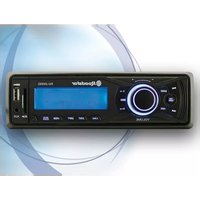
RU-285RD - Car radio ROADSTAR - Free user manual and instructions
Find the device manual for free RU-285RD ROADSTAR in PDF.


| Product type | FM stereo digital PLL car radio with USB / SD / MMC / MP3 player |
| Brand | Roadstar |
| Model | RU-285RD |
| Power supply | 13.8 V DC (10.8 - 15.6 V), negative ground |
| Output power | 7.5 W RMS x 4 channels |
| Speaker impedance | 4 or 8 Ohms |
| FM frequency range | 87.5 - 108 MHz |
| FM channel step | 50 kHz |
| FM intermediate frequency | 10.7 MHz |
| FM sensitivity | 2 dBμ |
| FM stereo separation | 35 dB |
| FM signal-to-noise ratio | 55 dB |
| Preamp output | 350 mV max, impedance 10 kOhm |
| Preset stations | 18 (6 FM1 + 6 FM2 + 6 FM3) |
| RDS functions | PI, PS, PTY, AF, TA, TP, EON |
| Audio functions | Volume, Bass, Treble, Balance, Fader, Loudness, DSP (Rock/Pop/Class/Off) |
| MP3 player | USB, SD/MMC, MP3 up to 10 characters ID3 Tag |
| Auxiliary input | AUX-IN jack (3.5 mm) |
| Front panel | Detachable, anti-theft |
| Fuse | Use a fuse of the specified amperage (not specified, standard type) |
| Operating temperature | Avoid high temperatures, direct sunlight, heat sources |
| Maintenance and cleaning | Clean with a soft dry cloth, do not use chemicals |
| Safety | Do not open the case, risk of invisible laser radiation, avoid exposure to moisture |
| Spare parts and repairability | No user-serviceable parts, contact dealer for repair |
Frequently Asked Questions - RU-285RD ROADSTAR
User questions about RU-285RD ROADSTAR
0 question about this device. Answer the ones you know or ask your own.
Ask a new question about this device
Download the instructions for your Car radio in PDF format for free! Find your manual RU-285RD - ROADSTAR and take your electronic device back in hand. On this page are published all the documents necessary for the use of your device. RU-285RD by ROADSTAR.
USER MANUAL RU-285RD ROADSTAR
C ∈
This product meets the essential requirements laid down by EEC Directive 89/336 and has been built in accordance with European standards EN50013, EN50020.
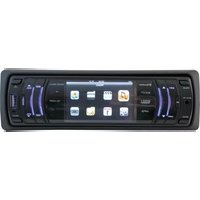
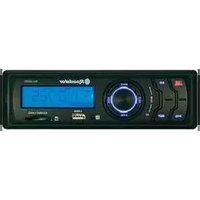
Car Stereo MP3 Player with PLL / RDS FM Stereo Radio, U SB-Port, MMC/SD Card Reader. 4 x 15 W.
RU-285RD
Instruction manual
Bedienungsanleitung
Roadstar is a registered Trademark of Roadstar S.A. - Switzerland All rights reserved
Roadstar Management SA, via Passeggiata 7, 6883 Novazzano (Switzerland)


INDEX
English Page 1
Deutsch Seite 13
Français Page 25
Italiano Pagina 37
Español Página 49
Portuguès Pagina 61
- Your new unit was manufactured and assembled under strict ROADSTAR quality control. Thank-you for purchasing our product for your music enjoyment. Before operating the unit, please read this instruction manual carefully. Keep it also handy for further future references.
The exclamation point within the triangle is a warning sign alerting the user of important instructions accompanying the product.

The lightening flash with arrowhead symbol within the triangle is a warning sign alerting the user of "dangerous voltage" inside the unit.

To reduce the risk of electric shock, do not remove the cover. No user serviceable parts inside the unit. Refer all servicing to qualified personnel.

Invisible laser radiation when the unit is opened or interlocks defeated. Avoid exposure to laser beam. Use of controls, adjustments or procedures other than those specified herein may result in hazardous radiation exposure.

This unit must not be exposed to moisture or rain.

This unit should be positioned so that it is properly ventilated.

Do not expose this unit to direct sunlight or heat radiating sources.

Correct Disposal of This Product (Waste Electrical & Electronic Equipment)
This marking shown on the product or its literature, indicates that it should not be disposed with other household wastes at the end of its working life. To prevent possible harm to the environment or human health from uncontrolled waste disposal, please separate this from other types of wastes and recycle it responsibly to promote the sustainable reuse of material resources.
Household users should contact either the retailer where they purchased this product, or their local government office, for details of where and how they can take this item for environmentally safe recycling. Business users should contact their supplier and check the terms and conditions of the purchase contract. This product should not be mixed with other commercial wastes for disposal.
2
EnglishEn
RU-285RD
Car Stereo USB / SD MP3 Player with PLL FM Stereo Radio RDS with PTY.
Detachable Front Panel System
INSTRUCTION MANUAL
Please read this instruction manual carefully and familiarize yourself with your new Radio before using it for the first time. Please retain this manual for future reference.
TABLE OF CONTENTS
- Location of Controls
- Features
- Installation
• Precautions and Maintenance
- Operating Instructions
- Specifications
LOCATIONS OF CONTROLS
-
POWER ON/OFF + FUNCTION SELECTOR (USB/SD/RADIO/AUX-IN)
-
FUNCTION SELECT BUTTON: BASS/TREBLE/BALANCE/FADER / TA SEEK / PI / LOUDNESS/BEEP/AUDIO DSP/LOC-DX (STEREO
-
VOL UP/VOL DOWN
-
PRESET STATIONS (1,2,3,4,5,6)
-
- 10 MP3 SKIP
-
PLAY / PAUSE BUTTON
-
INTRO BUTTON
-
REPEAT BUTTON (REPEAT)
-
RANDOM BUTTON (SHUFFLE)
-
BAND BUTTON
-
AUTOMATIC OR MANUAL TUNING (FREQ UP >> OR FREQ DOWN << / USB / SD / MMC (MP3) TRACK SKIP BUTTON
-
MUTE / CLOCK FUNCTION
-
LCD DISPLAY
-
PANEL RELEASE BUTTON
-
USB PORT
-
SD CARD SLOT
-
AUX AUDIO-IN
-
-10 MP3 SKIP

3
FEATURES
The unit features a detachable front control panel, FM/FM stereo RDS, USB / SD:
• Electronic Volume, Bass, Treble, Fader and Balance control.
- Precision electronic tuning with phase-lock loop (P.L.L.) circuitry.
- Programmable 18 preset memory tuning (6 each for FM1/ FM2 / FM3)
- Loudness control
- Manual / Auto (Seek) / up and down tuning control
• Band selector for FM1/ FM2 / FM3
- Display control (Frequency, Station Name, Program Type, Clock)
- Clock Function in RDS
- MP3 Repeat Function
- Preamplified Line-out
- Detachable front panel protects against theft
- Lighting system
• RDS Function: PI (Program Identification) TA (Traffic Announcement)
PS (Program Service Name) PTY (Program Type)
AF (List of Alternative Frequencies)
TP (Traffic Program)
INSTALLATION
PRECAUTIONS
- Choose the mounting location carefully so that the unit will not interfere with the normal driving functions of the driver.
- Avoid installing the unit where it would be subject to high temperatures, such as from direct sunlight or hot air from the heater, or where it would be subject to dust, dirt or excessive vibration.
- Use only the supplied mounting hardware for a safe and secure installation.
- Be sure to remove the front panel before installing the unit.
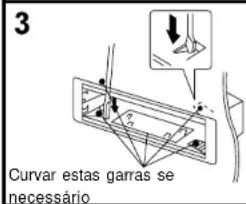
Mounting angle adjustment
Adjust the mounting angle to less than 20° .

EnglishEng
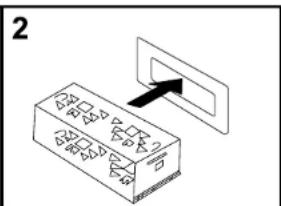
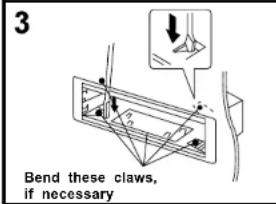
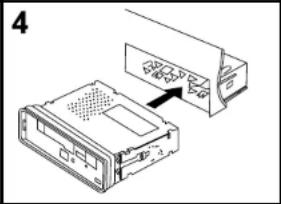
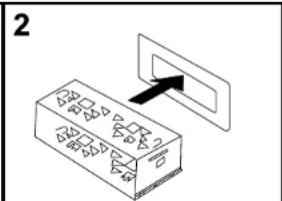
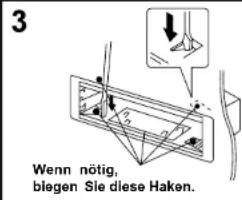
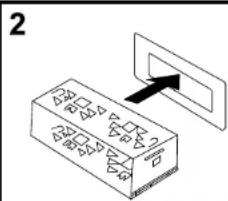
MOUNTING EXAMPLE
Installation in the dashboard

natural_image
Diagram of an electronic device showing a connector with ports and a cable, no text or symbols presentNote: Keep the release key in the safe place as you may need it in future to remove the unit from the car.
Detaching and attaching the front panel
The front panel of this unit can be detached in order to prevent the unit from being stolen.
DETACHING THE FRONT PANEL
Before detaching the front panel, be sure to press the PWR button (1) to OFF first.
Detach the panel by pressing the Panel Release button (14) and pulling it towards you as illustrated.
Pull out the panel towards you in order to detach completely the panel from the main unit. Detachable panel can be removed as direction 2.
Refer to below instruction.

5
ATTACHING THE FRONT PANEL
IMPORTANT: make sure the black metallic panel is closed.
Make sure the front panel is the right way up when attaching it to the unit as it cannot be attached upside down. Bring side B of panel to side A of main unit. Insert the panel in and push until it clicks.
Panel is attached.

flowchart
graph TD
    A["Base Component"] --> B["Component 1"]
    B --> C["Component 2"]
    C --> D["Component 3"]
    D --> E["Final Product"]
Notes:
- Do not press the front panel hard against the unit when attaching it. It can be easily attached by pressing it lightly against the unit.
- When you carry the front panel with you, put it in the supplied front panel case.
- Do not press hard or give excessive pressure to the display window of the front panel when attaching it to the unit.
BUILT-IN ISO CONNECTOR

RCA Jack Line Out (Rear) -
Gray : Red (right)
White: (left)
CONNECTORA
- MEMORY +12V
- AUTO ANTENNA OUTPUT
6.
6
EnglishEng
- +12V (TO IGNITION KEY)
- GROUND
Note: 12 V wire (connector A no. 7) must be connected by car ignition key in order to avoid that car battery becomes weak when the car will be not used for long period.
CONNECTOR B
- REAR RIGHT SPEAKER (+)
- REAR RIGHT SPEAKER (-)
- FRONT RIGHT SPEAKER (+)
- FRONT RIGHT SPEAKER (-)
- FRONT LEFT SPEAKER (+)
- FRONT LEFT SPEAKER (-)
- REAR LEFT SPEAKER (+)
- REAR LEFT SPEAKER (-)
Maintenance
FUSE REPLACEMENT
If the fuse blows, check the power connection and replace the fuse. If the fuse blows again after the replacement, there may be an internal malfunction. In this case, consult your nearest repairing centre.
Warning
Use the specified amperage fuse for each lead. Use of a higher amperage fuse may cause serious damage.
OPERATING INSTRUCTIONS
POWER ON/OFF (1) (PWR)
Insert the front panel in the unit and push Power button in order to switch on the unit. Push PWR button newly in order to switch off the unit and push REL button (14) to release the front panel.
Note: Never release the front panel when the unit is on. Power remains on even when car radio is off.
SELECT (2) / VOLUME UP/DOWN (3)
Rotate the VOLUME Knob (3) to control the VOLUME. To select other functions, press the

7
SELECT (2) button shortly until the desired functions is shown on the display. Figure 1 shows how control functions are selected using the SELECT button.
- VOLUME (rotate knob)
- SELECT (push down)
- BASS
- TREBLE
- BALANCE
- FADER
- LOUDNESS ON/OFF
- DSP (ROCK - POP - CLASS - SDP OFF)
- TA Volume
- REGIONAL ON / OFF
- DX/LOC
- STEREO/MONO
3. VOLUME CONTROL
Rotate the VOLUME knob to increase or decrease the volume. This knob can be used to adjust the BASS, TREBLE, BALANCE and FADER.
This knob also selects the possible options in RDS function.
When press the SEL button for more than 2 seconds, it is activated as selecting mode of these function. Turn the volume knob to select:
AF ON/OFF
To switch the AF (Alternative Frequency) ON or OFF.
TA ON/OFF
To switch the TA (Trafic Alarm) ON or OFF.
TA SEEK/TA ALARM (2)
TA SEEK Mode or TA ALARM mode.
- TA SEEK mode:
When newly turned station does not receive TP information for 5 sec., the radio returns to next station which has not the same station (PI) as the last station, but has the TP information.
In TA seek mode, the current station can be changed to the completely different station because the unit searches TP station when the field strength of the current station is
8
EnglishEng
very weak, or the current station has no TP signal.
- TA ALARM mode:
Any automatic return mode is not activated, just can be heard Beep sound.
PI SOUND / PI MUTE
- PI SOUND
When a car cruises some special area which has different PT code with same AF. PI sound (DIP) is heard once in a while, the DIP's sound will be heard for less than 1 second.
- PI MUTE
Under the above same situation, a mute sound will be heard for less than 1 sec.
RETUNE L / RETUNE S
The initial time of automatic TA search or PI search mode is selected.
When PI information is not caught for return time, the radio start to return to next same PI station. When same PI station does not catch 1 cyclic search, the radio goes to last station and waits for 4-5 minute until PI code is received.
BEEP MODE (2)
When press the SEL button for more than 2 seconds, it is activated as selecting mode of these function. Turn the volume knob to select:
BEEP ON: BEEP sound can be heard from speaker when any buttons are pressed.
BEEP OFF: to disable the BEEP option.
4. PRESET STATIONS (1,2,3,4,5,6)
(A) RADIO MODE:
When pressed short, these keys select a preset station directly. When pressed longer than 1 sec., current station is stored in preset memory bank. When PTY mode is selected, the PTY switch is shared as follows:
PTY music group ---- PTY speech group ---- OFF
MUSIC SPEECH
- POP M, ROCK M 1. NEWS, AFFAIRS, INFO
- M.O.R. M, LIGHT M 2. SPORT, EDUCATE, DRAMA
- CLASSICS, OTHER M 3. CULTURE, SCIENCE, VARIED
- JAZZ, COUNTRY 4. WEATHER, FINANCE, CHILDREN
- NATION M, OLDIES 5. SOCIAL, RELIGION, PHONE IN
- FOLK 6. TRAVEL, HOBBIES, DOCUMENT
USING THE RDS FUNCTION
What is RDS?
The RDS (Radio Data System) is a digital information system developed by the EBU (Euro-
pean Broadcast Union). Piggy-backed on normal FM broadcasts, RDS offers a variety of information services and automatic retuning functions for RDS-compatible car stereos. In 1988, RDS became available in the United Kingdom, France, West Germany, Ireland and Sweden. Test transmissions are being conducted in many other european countries. It is expected that RDS will be available in most western european countries in the near future.
- 'AF/REG' function (ALTERNATIVE FREQUENCIES)
When pressed, AF/REG switchig mode is selected.
When AF/REG switching mode is selected, the radio checks the signal strength of the AF all the time. When pressed long, it is activated as regional mode ON/OFF.
- Regional mode ON:
AF switching or PI SEEK is implemented to the station which have all PI codes same as current station. REG segment is turned on, in LCD display.
- Regional mode OFF
The regional code in the format of PI code is ignored when AF switching or PI SEEK is implemented.
- 'TA' function (TRAFFIC ANNOUNCEMENT)
When pressed short, it is activated as TA mode on or off
When TA mode is on and traffic announcement is transmitted
- When the unit is it CD/MP3 mode, it will switch to radiomode temporarily.
- If the volume level was under the threshold point, it will be raised to the threshold point.
- When TP station is received, TP segment is turned on in LCD display.
- 'PTY' function (PROGRAM TYPE)
PTY MUSIC --- PTY SPEECH --- PTY OFF
While selecting PTY type, its selection is implemented by preset buttons as described in preset key. When PTY is selected, the radio starts to search corresponding PTY information, and stops if the corresponding PTY information, is detected.
-MODE BUTTON (MODE) (1)
By pressing this key, user can select.
RADIO mode or USB-SD/AUX-IN mode.
- BAND BUTTON (BAND) (10)
Each band is toggled cyclically by pressing this key FM1—FM2---FM3.
-AUTOMATIC OR MANUAL TUNING (FREQ UP >> OR FREQ DOWN <<) (11)
(A) RADIO MODE
When pressed short, these keys are operated as MANUAL tuning mode.
When pressed longer than 1 sec., they are operated as SEEK tuning mode.
EnglishEng
When pressed short, they are operated as TRACK UP or TRACK DOWN mode.
- LCD DISPLAY (13)
The Liquid Crystal Display will display the current state of the unit.
USB / SD CONTROL LOCATION OF PARTS
- USB PORT (15)
- SD / MMC SLOT-IN (16)
- Press (14) button to open the front panel.
- Insert the SD/MMC card into the card slot.
- Attach front panel back to the head unit. Playback starts automatically.
- PAUSE BUTTON (6)
During "PLAY", press (17) 'PAUSE' button to "PAUSE". Press it again to resume play.
- INTRO BUTTON (MP3 SCAN) (7)
When this button is pressed, 'SCN' indication is displayed and the first several seconds of each track of the disc are played. Press again to stop intro and listen to track.
- REPEAT BUTTON 'REPEAT' (8)
When this button is pressed, 'RPT' indication is displayed and play of the selected track will be continually repeated until the Track repeat mode is cancelled by pressing 'RPT' button again.
- RANDOM BUTTON 'SHUFFLE' (9)
When this button is pressed, 'SHF' indication is displayed and each track of the disc are played in random instead of normal progression. To cancel RANDOM mode, press 'SHF' button (20) again.
- AUX IN (17
Aux In Port Convenient easy to use front "AUX IN" input jack, allows easy connection of Portable Media and other digital MP3 Players.
ID3 Tag
If the MP3 file is available with ID3 TAG, will show information in the following sequence: SONG TITLE > ARTIST > ALBUM TITLE > YEAR > COMMENTS
The file name & track number of the MP3 file will scroll repeatedly through the display during the playing of the MP3 file.
SPECIFICATIONS
TUNER
Sensitivity 2 dBμ
Stereo separation 35 dB
Signal to noise radio 55 dB
Frequency range 87.5-108 MHz
Channel step 50 kHz
Intermediate frequency 10.7 MHz
LINE-OUT
Output 350mV max.
Impedance 10kOhm
GENERAL
Power Supply 13.8V DC
(10.8-15.6V allowable)
Speaker impedance 4 or 8 ohm
7,5 W RMS x 4CH
Output power
Note: Specifications and the design are subject to possible modification without notice due
to improvement.
SICHERHEITSHINWEISE


natural_image
Diagram showing a device with an internal component and a separate housing (no text or symbols visible)-REPEAT TASTE, REPEAT
Correct Disposal of This Product (Waste Electrical & Electronic Equipment)
This marking shown on the product or its literature, indicates that it should not be disposed with other household wastes at the end of its working life. To prevent possible harm to the environment or human health from uncontrolled waste disposal, please separate this from other types of wastes and recycle it responsibly to promote the sustainable reuse of material resources.
Household users should contact either the retailer where they purchased this product, or their local government office, for details of where and how they can take this item for environmentally safe recycling. Business users should contact their supplier and check the terms and conditions of the purchase contract. This product should not be mixed with other commercial wastes for disposal.
FrançaisFr
RU-285RD
natural_image
Diagram of a device showing an internal component being inserted into a housing (no text or symbols visible)REPLACEMENT DESFUSIBLES
In TA seek mode, the current station can be changed to the completely different station because the unit searches TP station when the field strength of the current station is very weak, or the current station has no TP signal.
-Mode ALARME TA:
-PRESELECTIONS (1,2,3,4,5,6)
(A) MODALITE RADIO:
natural_image
Diagram of an electronic device showing a connector with ports and a cable, no text or symbols presentLA FUNZIONE RDS. COS'E'IL SISTEMA RDS?
natural_image
Diagram of an electronic device showing a ports and a cable connector (no text or symbols)TECLA REPEAT 'REPEAT'
MANUAL DE INSTRUÇÕES
natural_image
Diagram of a device with an open panel and a close-up view showing internal components (no text or symbols)PTY music group ---- PTY speech group ---- OFF
MUSICA DISCURSO

- C ∈
- RU-285RD
- INDEX
- Correct Disposal of This Product (Waste Electrical & Electronic Equipment)
- EnglishEn
- INSTRUCTION MANUAL
- TABLE OF CONTENTS
- LOCATIONS OF CONTROLS
- FEATURES
- INSTALLATION
- PRECAUTIONS
- Mounting angle adjustment
- MOUNTING EXAMPLE
- Detaching and attaching the front panel
- DETACHING THE FRONT PANEL
- ATTACHING THE FRONT PANEL
- Notes:
- BUILT-IN ISO CONNECTOR
- CONNECTORA
- CONNECTOR B
- Maintenance
- FUSE REPLACEMENT
- Warning
- OPERATING INSTRUCTIONS
- POWER ON/OFF (1) (PWR)
- SELECT (2) / VOLUME UP/DOWN (3)
- VOLUME CONTROL
- AF ON/OFF
- TA ON/OFF
- TA SEEK/TA ALARM (2)
- PI SOUND / PI MUTE
- RETUNE L / RETUNE S
- BEEP MODE (2)
- PRESET STATIONS (1,2,3,4,5,6)
- MUSIC SPEECH
- USING THE RDS FUNCTION
- What is RDS?
- - 'AF/REG' function (ALTERNATIVE FREQUENCIES)
- - Regional mode ON:
- - Regional mode OFF
- - 'TA' function (TRAFFIC ANNOUNCEMENT)
- - 'PTY' function (PROGRAM TYPE)
- -MODE BUTTON (MODE) (1)
- - BAND BUTTON (BAND) (10)
- -AUTOMATIC OR MANUAL TUNING (FREQ UP >> OR FREQ DOWN <<) (11)
- RADIO MODE
- EnglishEng
- - LCD DISPLAY (13)
- USB / SD CONTROL LOCATION OF PARTS
- - USB PORT (15)
- - SD / MMC SLOT-IN (16)
- - PAUSE BUTTON (6)
- - INTRO BUTTON (MP3 SCAN) (7)
- - REPEAT BUTTON 'REPEAT' (8)
- - RANDOM BUTTON 'SHUFFLE' (9)
- - AUX IN (17
- ID3 Tag
- SPECIFICATIONS
- TUNER
- LINE-OUT
- GENERAL
- SICHERHEITSHINWEISE
- -REPEAT TASTE, REPEAT
- FrançaisFr
- REPLACEMENT DESFUSIBLES
- -Mode ALARME TA:
- -PRESELECTIONS (1,2,3,4,5,6)
- MODALITE RADIO:
- LA FUNZIONE RDS. COS'E'IL SISTEMA RDS?
- TECLA REPEAT 'REPEAT'
- MANUAL DE INSTRUÇÕES
- MUSICA DISCURSO
Brand : ROADSTAR
Model : RU-285RD
Category : Car radio