
dB1500a - Loudspeaker SAMSON - Free user manual and instructions
Find the device manual for free dB1500a SAMSON in PDF.

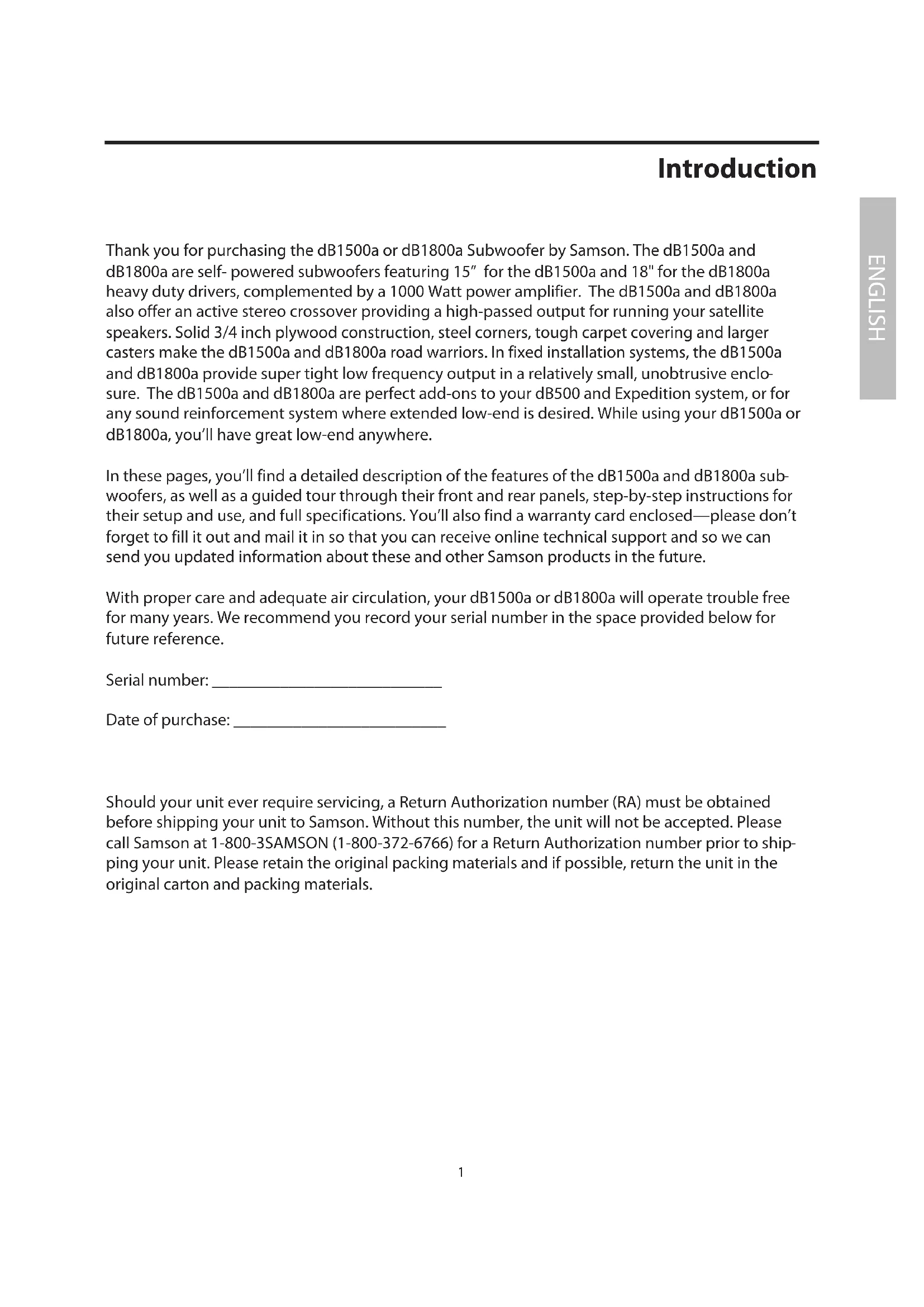


| Product Type | Active Subwoofer |
| Brand | Samson |
| Model | dB1500a |
| Transducer | 38 cm (15 in), 2.5 in voice coil, aluminum center |
| Power Handling | 500 W RMS, 1000 W peak |
| Frequency Response | 30 Hz - 300 Hz (±3 dB) |
| Sensitivity | 94 dB SPL at 1 W/1 m |
| Inputs | 2x XLR female balanced (left and right) |
| Outputs | 2x XLR male balanced (high-pass, left and right) |
| Active Crossover | Linkwitz-Riley 12 dB/octave, variable crossover frequency from 30 Hz to 200 Hz |
| Controls | Level, Sweep (crossover frequency), Stereo/Mono selector |
| Indicator | Peak LED (clipping) |
| Power Supply | 115 VAC 60 Hz or 230 VAC 50 Hz (depending on version) |
| Power Consumption | Not specified |
| Dimensions (H x W x D) | 508 mm x 606 mm x 573 mm |
| Weight | 32.25 kg |
| Construction | 19 mm plywood with black carpet covering, steel corners |
| Casters | 4 heavy-duty 7.6 cm casters (including mounting plates) |
| Satellite Mounting | 35 mm pole mount cup |
| Included Accessories | Power cord, casters, user manual |
| Warranty | 3 years (depending on country) |
| Maintenance | Clean with a damp cloth only. Do not use abrasive products. |
| Safety | Do not expose to rain or moisture. Disconnect during storms. Do not open the enclosure. |
| Repairability | No user-serviceable parts. Refer all servicing to qualified personnel. |
Frequently Asked Questions - dB1500a SAMSON
User questions about dB1500a SAMSON
0 question about this device. Answer the ones you know or ask your own.
Ask a new question about this device
Download the instructions for your Loudspeaker in PDF format for free! Find your manual dB1500a - SAMSON and take your electronic device back in hand. On this page are published all the documents necessary for the use of your device. dB1500a by SAMSON.
USER MANUAL dB1500a SAMSON
natural_image
Technical line drawing of a speaker with two circular buttons and a textured base (no text or symbols)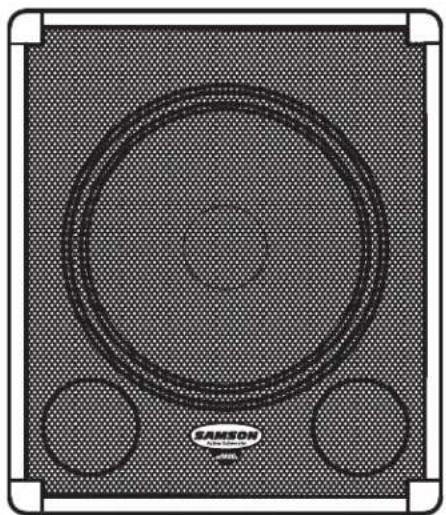
natural_image
Top-down view of a SAMSON audio amplifier with two circular buttons and textured background (no text or symbols)1000 WATT POWERED SUBWOOFER
Owners Manual
Safety Instructions/Consignes de sécurité/Sicherheitsvorkehrungen
WARNING
DO NOT EXPOSE THIS EQUIPMENT
TO RAIN OR MOISTURE
AVIS
RISQUE DE CHOC ELECTRONIQUE
NE PAS OUVRIR
CAUTION
FOR CONTINUED PROTECTION AGAINST RISK
OF FIRE, REPLACE ONLY WITH SAME TYPE FUSE
ATTENTION
UTILISER UN FUSIBLE DE
RECHANGE DE MÊME TYPE

CAUTION
RISK OF ELECTRIC SHOCK
DO NOT OPEN

WARNING: To reduce the risk of fire or electric shock, do not expose this unit to rain or moisture. To reduce the hazard of electrical shock, do not remove cover or back. No user serviceable parts inside. Please refer all servicing to qualified personnel. The lightning flash with an arrowhead symbol within an equilateral triangle, is intended to alert the user to the presence of uninsulated "dangerous voltage" within the products enclosure that may be of sufficient magnitude to constitute a risk of electric shock to persons. The exclamation point within an equilateral triangle is intended to alert the user to the presence of important operating and maintenance (servicing) instructions in the literature accompanying the product.
Important Safety Instructions
- Please read all instructions before operating the unit.
- Keep these instructions for future reference.
- Please heed all safety warnings.
- Follow manufacturers instructions.
- Do not use this unit near water or moisture.
- Clean only with a damp cloth.
- Do not block any of the ventilation openings. Install in accordance with the manufacturers instructions.
- Do not install near any heat sources such as radiators, heat registers, stoves, or other apparatus (including amplifiers) that produce heat.
- Do not defeat the safety purpose of the polarized or grounding-type plug. A polarized plug has two blades with one wider than the other. A grounding type plug has two blades and a third grounding prong. The wide blade or third prong is provided for your safety. When the provided plug does not fit your outlet, consult an electrician for replacement of the obsolete outlet.
- Protect the power cord from being walked on and pinched particularly at plugs, convenience receptacles and at the point at which they exit from the unit.
- Unplug this unit during lightning storms or when unused for long periods of time.
- Refer all servicing to qualified personnel. Servicing is required when the unit has been damaged in any way, such as power supply cord or plug damage, or if liquid has been spilled or objects have fallen into the unit, the unit has been exposed to rain or moisture, does not operate normally, or has been dropped.
Printed April, 2006 v5.3
Samson Technologies Corp.
45 Gilpin Avenue
Hauppauge, New York 11788-8816
Phone: 1-800-3-SAMSON (1-800-372-6766)
Fax: 631-784-2201
www.samsontech.com
^A K-TEAM
PRODUCTION
Table Of Contents
English
Introduction....1
dB1500a And dB1800a Features 2
Controls And Functions .... 3
Front Panel Layout 3
Rear Panel Layout 4
Configuring Your Speaker System .... 5
Operating The dB1500a And dB1800a .....6
dB1500a And dB1800a Control Panel 6
dB1500a And dB1800a Connections ..... 11
Caster Installation....11
Specifications 56
Français
Introduction....12
Thank you for purchasing the dB1500a or dB1800a Subwoofer by Samson. The dB1500a and dB1800a are self-powered subwoofers featuring 15" for the dB1500a and 18" for the dB1800a heavy duty drivers, complemented by a 1000 Watt power amplifier. The dB1500a and dB1800a also offer an active stereo crossover providing a high-passed output for running your satellite speakers. Solid 3/4 inch plywood construction, steel corners, tough carpet covering and larger casters make the dB1500a and dB1800a road warriors. In fixed installation systems, the dB1500a and dB1800a provide super tight low frequency output in a relatively small, unobtrusive enclosure. The dB1500a and dB1800a are perfect add-ons to your dB500 and Expedition system, or for any sound reinforcement system where extended low-end is desired. While using your dB1500a or dB1800a, you'll have great low-end anywhere.
In these pages, you'll find a detailed description of the features of the dB1500a and dB1800a sub-woofers, as well as a guided tour through their front and rear panels, step-by-step instructions for their setup and use, and full specifications. You'll also find a warranty card enclosed—please don't forget to fill it out and mail it in so that you can receive online technical support and so we can send you updated information about these and other Samson products in the future.
With proper care and adequate air circulation, your dB1500a or dB1800a will operate trouble free for many years. We recommend you record your serial number in the space provided below for future reference.
Serial number: ____
Date of purchase: ____
Should your unit ever require servicing, a Return Authorization number (RA) must be obtained before shipping your unit to Samson. Without this number, the unit will not be accepted. Please call Samson at 1-800-3SAMSON (1-800-372-6766) for a Return Authorization number prior to shipping your unit. Please retain the original packing materials and if possible, return the unit in the original carton and packing materials.
dB1500a and dB1800a Features
natural_image
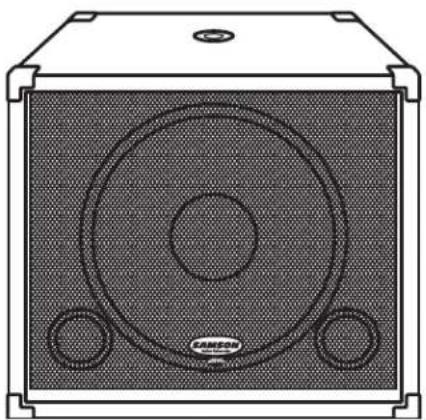
Technical line drawing of a speaker chamber with two circular speakers and a base plate (no text or symbols)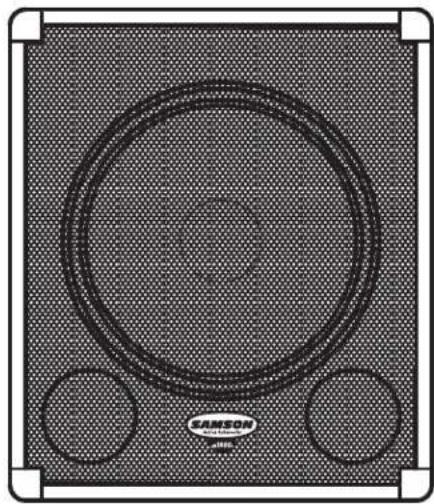
natural_image
Top-down view of a Siemens audio amplifier with two circular buttons and textured background (no text or symbols)The Samson dB1500a and dB1800a Powered Subwoofers utilize the latest technology in loudspeaker and power amplifier design. Here are some of their main features:
- Heavy-duty, 15" for the dB1500a and 18" for the dB1800a Low Frequency Transducer With Butyl Rubber Surround
• Built-in 1000 Watt Power Amplifier
• Balanced High Pass Outputs for Satellite Speakers
• Variable Crossover 30 - 200 Hz
• Stereo / Mono Operation Switch
• Volume Control
• Heavy-Duty, Rear Mounted Casters
• Extra Large Grab Handles
• 35mm Pole Mount Receptacle
• Heavy-Duty, Steel Grill - 3/4" Plywood Construction, internally braced and covered in tough carpet
• Three-year extended warranty
Controls and Functions
Front Panel Layout
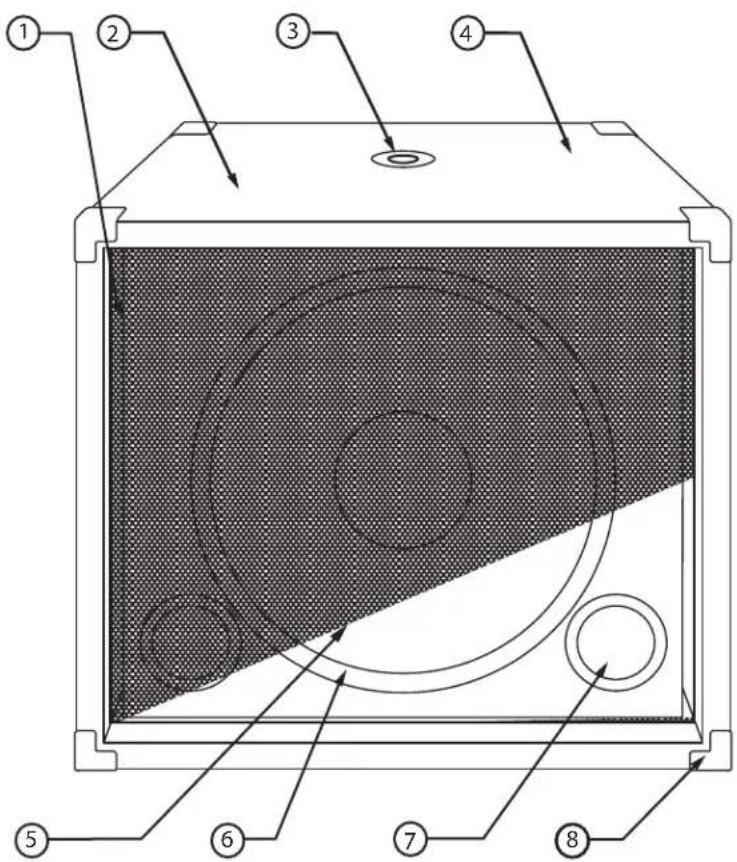
1 GRILL SCREEN - Tough steel construction provides durable and stylish protection for speaker.
2 ENCLOSURE - Rigid 3/4" Plywood Construction.
3 POLE MOUNT - 1 3/8 inch (35mm) standard speaker stand receptacle.
4 FINISH - Tough road-proof carpet.
5 TRANSDUCER - Heavy Duty 15" extended range low frequency driver.
6 BUTYL RUBBER SURROUND - Assures maximum excursion while maintaining tight bass response.
7 TUNED PORTS - Quiet port design offering linear extended low frequency response.
8 CORNERS - Heavy Duty Steel corners.
Controls and Functions
Rear Panel Layout
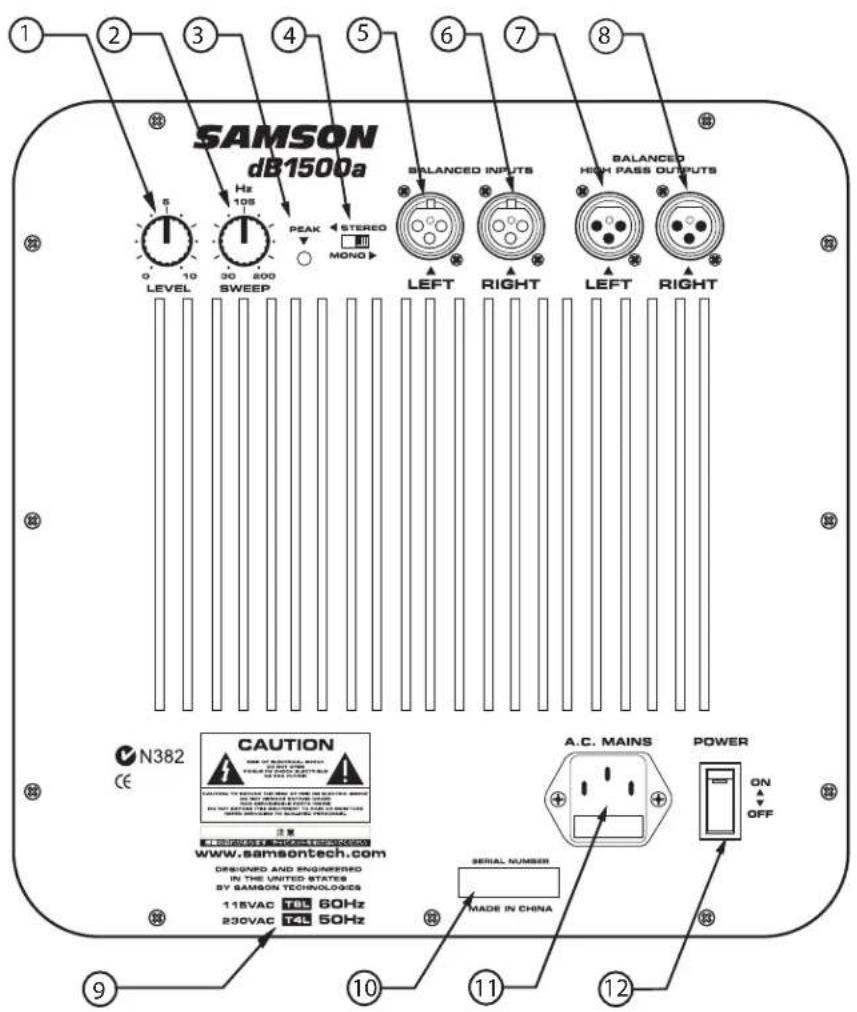
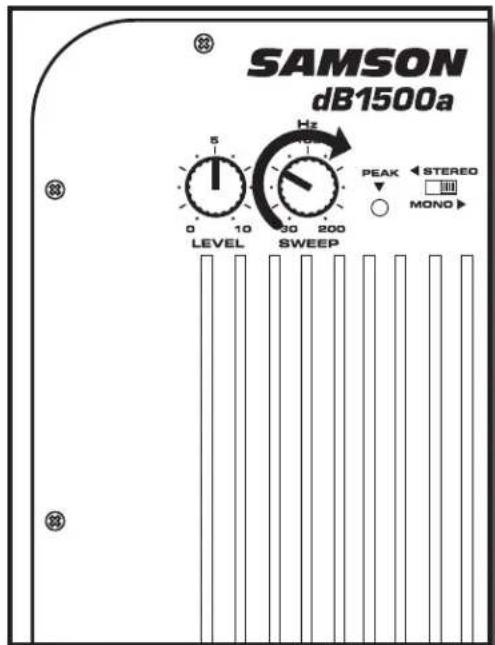
1 LEVEL - Controls the amount of output volume.
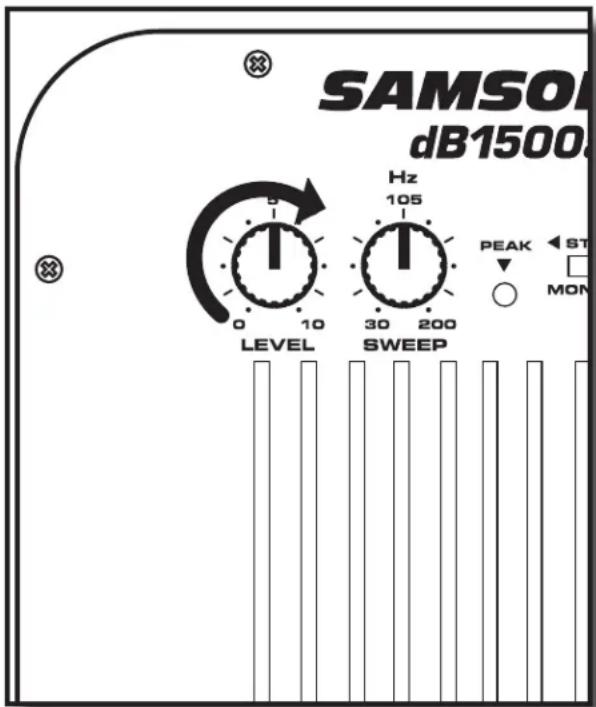
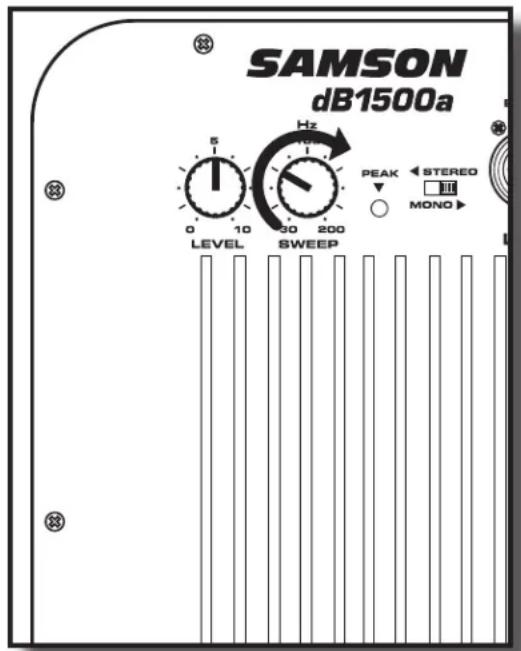
2 SWEEP - Adjusts the low frequency end range of the High-Pass outputs.
3 PEAK LED - Illuminates when the input signal is overloading the power amplifier.
4 STEREO/MONO SWITCH - Selects stereo or mono operation.
5 LEFT INPUT - Balanced XLR Input.
6 RIGHT INPUT - Balanced XLR Input.
7 LEFT OUTPUT - Balanced XLR Output.
8 RIGHT OUTPUT - Balanced XLR Output.
9 VOLTAGE INDICATION - Designates AC input voltage.
10 SERIAL NUMBER - Unit serial number is located here.
11 AC INLET - Accepts Standard Power Cord.
12 MAINS POWER SWITCH - Activates the dB1500a power amplifier.
Configuring Your Speaker System
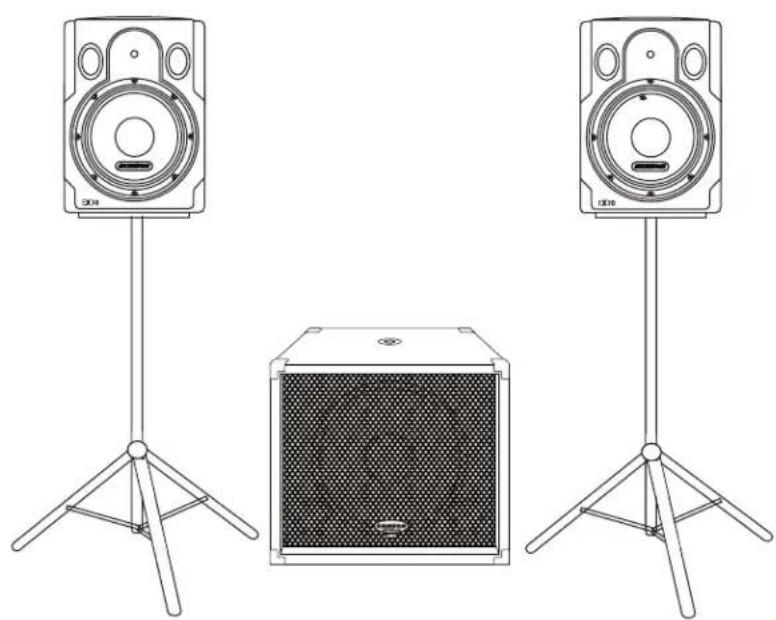
Before you start plugging in cables, you should take a minute to decide how you want to interface your new subwoofer. There are several ways you can interface the dB1500a and dB1800a, however most systems set-ups fall into two categories, Stereo or Mono (Common) sub operation.
Common Sub Operation
In most cases a common sub, or mono bass operation is desired. This is true for several reasons, but mostly because low frequencies produced by a subwoofer tend to be non-directional. Since low frequency waves take so much space to actually develop, you can't tell if the sub bass is coming from the left or right side, unless of course you're in a very large room. Because of this phenomena, just about all sub bass material is mixed in mono.
natural_image
Line drawing of two speakers standing upright with a box, no text or symbols presentStereo Sub Operation
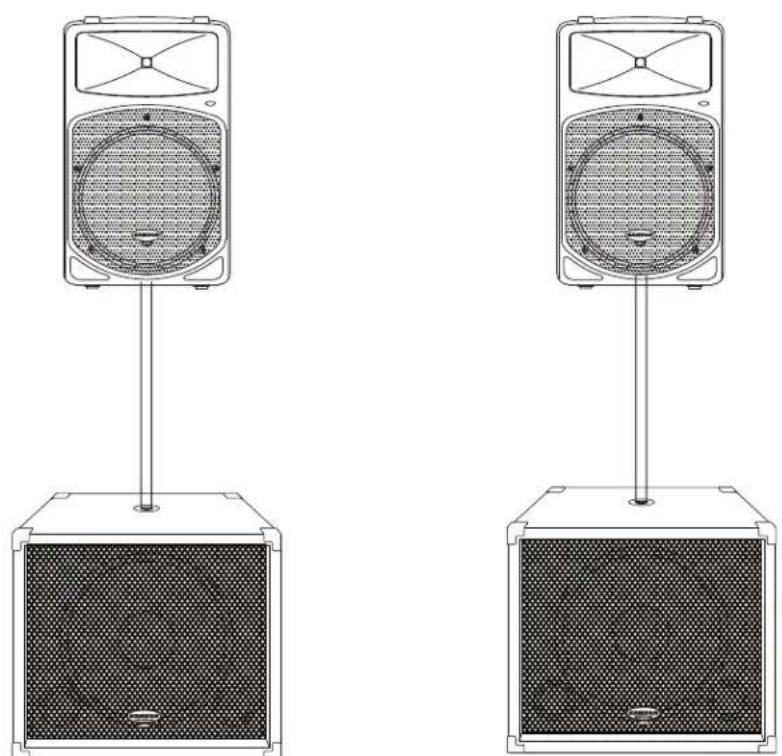
In larger rooms, as well as in theatres and theme park installations (for low frequency special audio effects), two dB1500a and dB1800a's can be used in stereo.
natural_image
Two identical line drawings of a speaker-mounted device with mesh backouts, no text or symbols present.Operating the dB1500a and dB1800a
dB1500a and dB1800a CONTROL PANEL
The dB1500a and dB1800a's control panels provide the connections and user interface to the dB1500a and dB1800a's internal electronic crossover and power amplifier section. The internal amplifier is a 1000 Watt amplifier capable of producing incredible bass output while running super cool. The dB1500a and dB1800a employ an electronic crossover that adjusts the high frequency cutoff point for the subwoofer, and also, a high passed output for your satellite speakers. You will achieve a tremendous benefit in sound quality by running your satellite speakers from the dB1500a and dB1800a's High-Pass outputs. The reason for this is that when your satellite speaker receives the filtered output from the dB1500a and dB1800a, it will no longer be looking at the frequencies below the crossover point. Let's say your satellite speaker has a natural frequency roll-off at 70 Hz, and you are sending full range signal (as low as 20Hz) to the satellite amplifier and speaker. Even though the speaker can only reproduce 70Hz and up, the amplifier is still outputting 20-70Hz, which is wasted power and essentially turns into heat. By using the dB1500a and dB1800a's High-Pass output, the satellite amplifier and speaker never see the frequencies lower than what's set by the Sweep frequency. This means you'll have more power dedicated to the frequencies you want the satellites to deliver, resulting in a much cleaner sound with more headroom.
Level Control
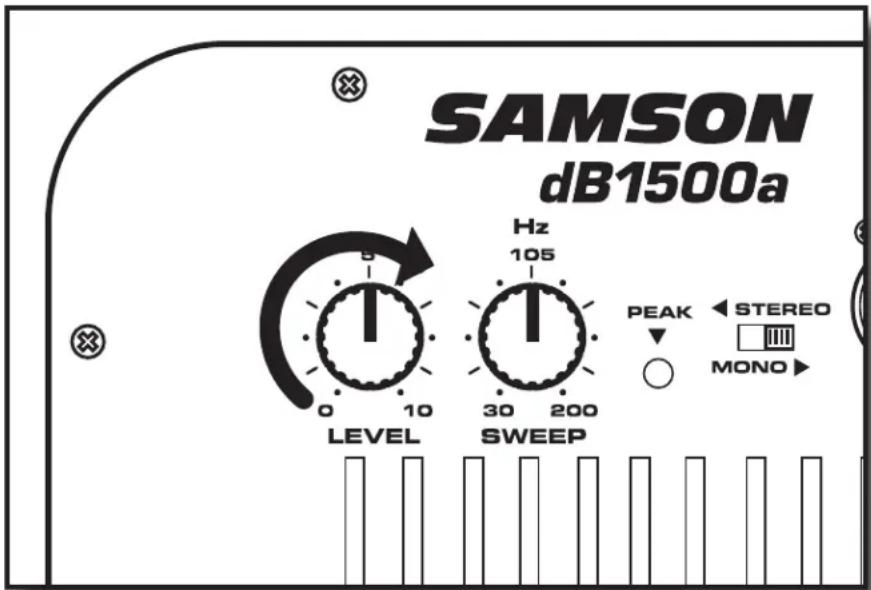
The level control is used to adjust the amount of volume from the dB1500a or dB1800a subwoofer. In addition, the Level control will also control the output volume of the high-passed outputs. Therefore, if you are using the dB1500a or dB1800a without using the high-passed outputs (for example, when the dB1500a or dB1800a are connected to an external crossover) the Level control adjusts the low frequency output of the dB1500a or dB1800a. If you are using the dB1500a or dB1800a's internal electronic crossover to run satellite speakers, then the Level control will adjust the overall system volume.
Sweep
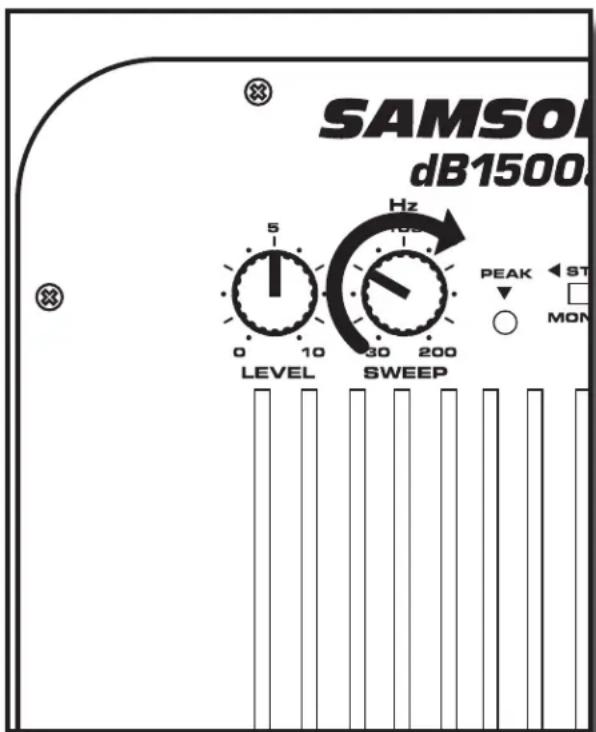
The Sweep control selects the upper range cutoff frequency of the dB1500a and dB1800a's internal electronic crossover. The dB1500a and dB1800a's crossover provides a 12dB per octave Linkwisz-Riley filter curve. The Sweep limits the high frequency that the dB1500a and dB1800a will reproduce, and at the same time, the high-passed output tracks the selected crossover frequency as the lower limit frequency.
Stereo / Mono Switch
The Stereo/ Mono switch selects either stereo or mono bass operation. When set to MONO, the dB1500a and dB1800a will combine, or sum, the left and right signals and send a mono signal to the amplifier of the dB1500a and dB1800a. In this mode, the original stereo signal is passed through the left and right outputs only now the stereo signal is filtered at the frequency set by the Sweep control. In Stereo mode, the low frequency signal is not summed, and you can choose either the left or right input accordingly for each side of the system.
The In and The Outs
The dB1500a and dB1800a features electronically balanced inputs and outputs so that any possible HUM problems are greatly reduced when interfacing to other equipment. XLR connectors with industry standard pin-outs are used for easy interface from mixer and other professional audio gear. A detailed wiring diagram can be found in the section "dB1500a and dB1800a Connections" on page 11 of this manual.
Operating the dB1500a and dB1800a
dB1500a and dB1800a MONO SUB WITH POWERED SATELLITES
The dB1500a or dB1800a is a perfect addition to any pair of powered full range enclosures like the Samson dB500a, XP200 and XP300. Below is a typical system set-up using the dB1500a and dB1800a with a mixer and a pair of powered satellite loudspeakers. The dB1500a and dB1800a's input and outputs utilize industry standard XLR connectors. For a detailed wiring diagram, see the section "dB1500a and dB1800a Connections" on page 11. Follow the steps below the diagram to set up your system.
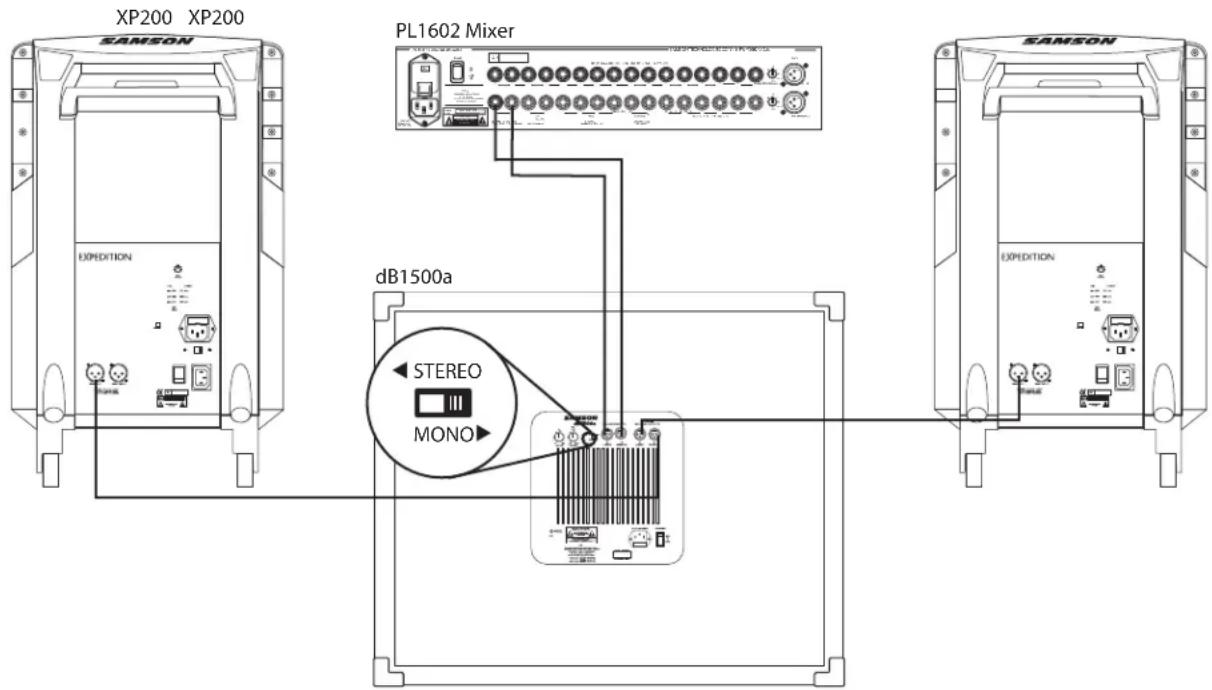
- Connect the mixer's left output to the dB1500a and dB1800a's left input and the mixer's right output to the dB1500a and dB1800a's right input. Now connect the dB1500a and dB1800a's left output to the input of the left side powered satellite, and the dB1500a and dB1800a's right output to the input of the right side satellite. Switch the Stereo/Mono selector switch to the MONO position.
- Now adjust the crossover SWEEP to the desired frequency. For the db500a select 60-80Hz and for the Expedition XP200 & XP300 select 80-100Hz. If you are using another brand of powered speaker as satellites with the dB1500a and dB1800a, consult their respective owners manuals for the recommended crossover point.
- Lower your mixer's master outputs to all the way off. Now set the level of your powered satellites up to the normal operating level. Run an audio signal (like some music from a CD) through your mixer and raise the level to a comfortable listening volume. Next, slowly raise the dB1500a or dB1800a Level control and listen to the low frequency output. Adjust the dB1500a or dB1800a to the level of low frequency output that you like. Now, when you raise and lower your mixer's output, the dB1500a or dB1800a and satellites will track at the same relative volume.
Operating the dB1500a and dB1800a
dB1500a and dB1800a STEREO SUB WITH POWERED SATELLITES
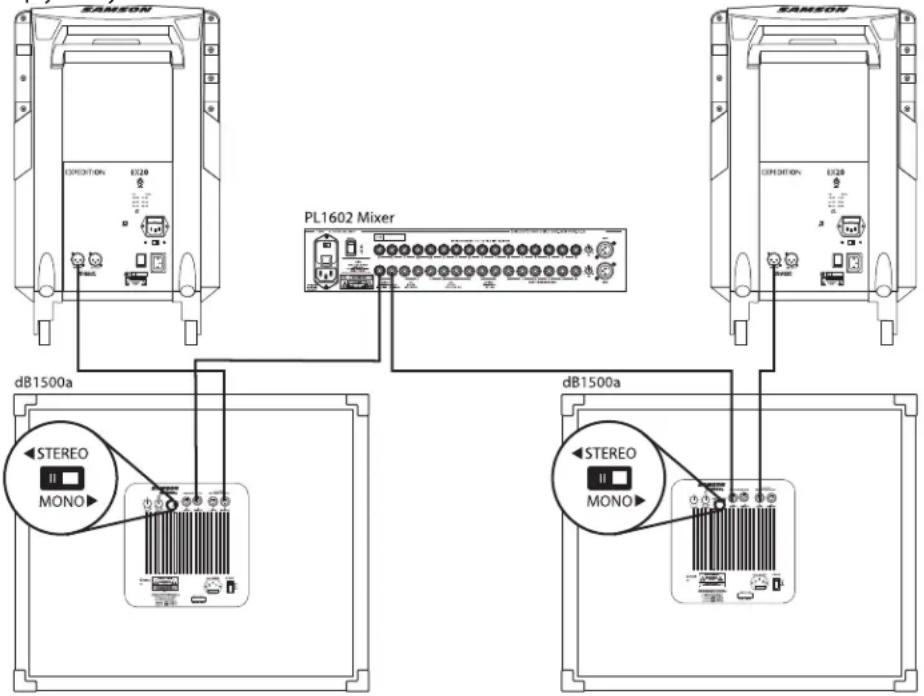
Two dB1500a or dB1800a's can be used with any pair of powered full range enclosures like the Samson dB500a, XP200 and XP300. Below is a typical system set-up using two dB1500a and dB1800a's with a mixer and a pair of powered satellite loudspeakers. The dB1500a and dB1800a's inputs and outputs utilize industry standard XLR connectors. For a detailed wiring diagram, see the section "dB1500a and dB1800a Connections" on page 11. Follow the steps below the diagram to set up your system.
flowchart
graph TD
    A["RAMON"] -->|dB1500a| B["PL1602 Mixer"]
    B -->|dB1500a| C["dBi 1500a"]
    C -->|dB1500a| D["PL1602 Mixer"]
    D -->|dB1500a| E["Monosink"]
    style A fill:#f9f,stroke:#333
    style B fill:#ccf,stroke:#333
    style C fill:#cfc,stroke:#333
    style D fill:#fcc,stroke:#333
    style E fill:#ffc,stroke:#333
- Connect the mixer's left output to the left-side dB1500a and dB1800a's left input and the mixer's right output to the right-side dB1500a and dB1800a's right input. Now connect the left-side dB1500a and dB1800a's left output to the input of the left powered satellite, and right-side dB1500a and dB1800a's right output to the input of the right satellite. Switch both the Stereo/Mono selector switches to the Stereo position.
- Now adjust the crossover SWEEP to the desired frequency. For the db500a select 60-80Hz and for the Expedition XP200 & XP300 select 80-100Hz. If you are using another brand of powered speaker as satellites with the dB1500a and dB1800a, consult their respective owners manuals for the recommended crossover point.
- Lower your mixer's master outputs to all the way off. Now set the level of your powered satellites up to the normal operating level. Run an audio signal (like some music from a CD) through your mixer and raise the level to a comfortable listening volume. Now slowly raise the dB1500a and dB1800a Level control and listen to the low frequency output. Adjust the dB1500a and dB1800a to the level to low frequency output that you like. Now when you raise and lower your mixer's output, the dB1500a and dB1800a and satellites will track at the same relative volume.
Operating the dB1500a and dB1800a
dB1500a and dB1800a MONO SUB WITH PASSIVE SATELLITES
If your system uses a standard stereo power amp and passive full range enclosures, like the Samson dB500 and XP100, the dB1500a or dB1800a is easily interfaced for extended bass. Below is a typical system set-up using the dB1500a and dB1800a with a mixer, stereo power amp and a pair of passive satellite loudspeakers. The dB1500a and dB1800a's inputs and outputs utilize industry standard XLR connectors. For a detailed wiring diagram, see the section "dB1500a and dB1800a Connections" on page 1. Follow the steps below the diagram to set up your system.
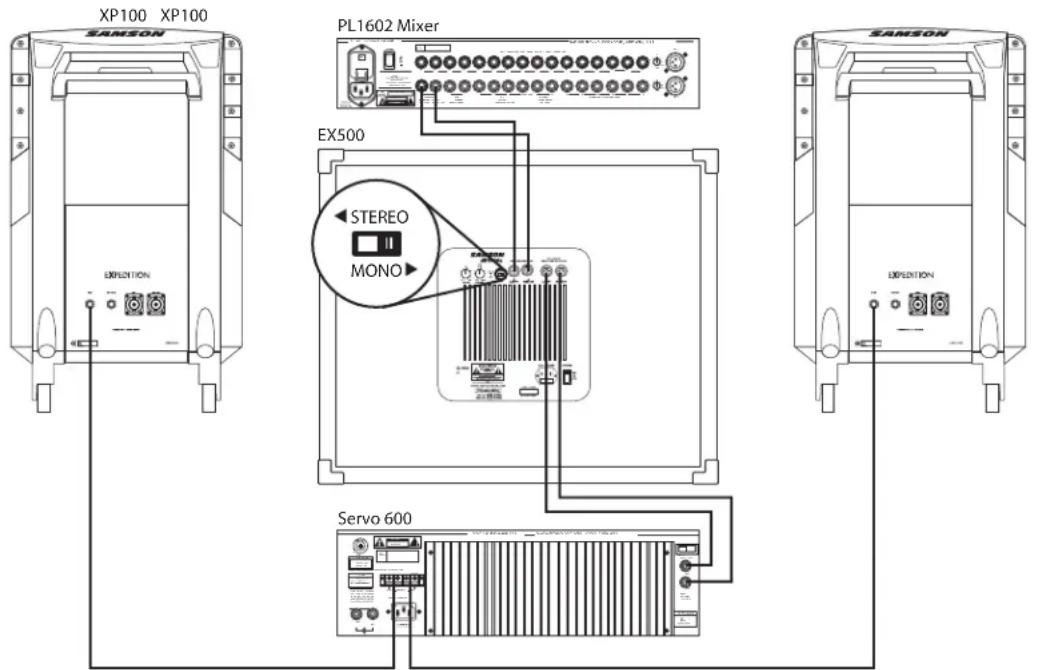
- Lower your mixer's master outputs to all the way off.
- Connect the mixer's left output to the dB1500a and dB1800a's left input and the mixer's right output to the dB1500a and dB1800a's right input. Now connect the dB1500a and dB1800a's left outputs to the left side input of your power amp, and dB1500a and dB1800a's right output to the right side input of your power amp. Run your speaker cables from the power amp's outputs to the left and right satellite speakers. Switch the Stereo/Mono selector switch to the MONO position.
- Now adjust the crossover SWEEP to the desired frequency. For the db500a select 60-80Hz and for the Expedition XP200 & XP300 select 80-100Hz. If you are using another brand of powered speaker as satellites with the dB1500a and dB1800a, consult their respective owners manuals for the recommended crossover point.
- Set the level of your power amplifiers to the normal operating level. Run an audio signal (like some music from a CD) through your mixer and raise the level to a comfortable listening volume. Now, slowly raise the dB1500a and dB1800a Level control and listen to the low frequency output. Adjust the dB1500a and dB1800a to the level of low frequency output that you like. Now when you raise and lower your mixer's output, the dB1500a and dB1800a and satellites will track at the same relative volume.
Operating the dB1500a and dB1800a
dB1500a and dB1800a STEREO SUB WITH PASSIVE SATELLITES
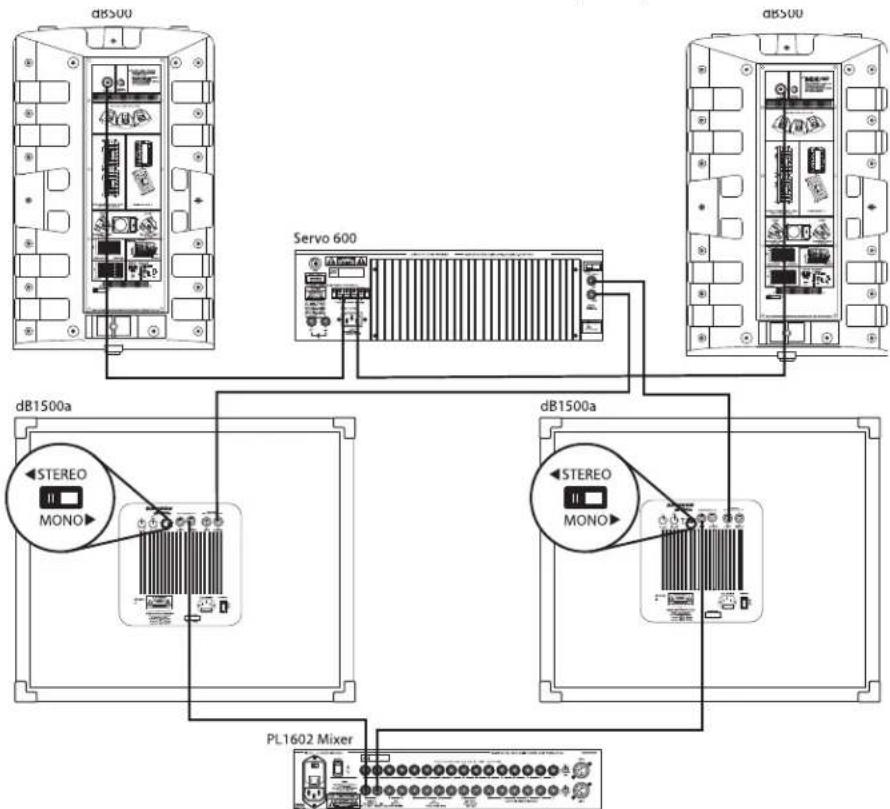
If your system uses a standard stereo power amp and passive full range enclosures, like the Samson dB500 and XP100, the dB1500a and dB1800a is easily interfaced for extended bass. Below is a typical system set-up using the dB1500a and dB1800a with a mixer, stereo power amp and a pair of passive satellite loudspeakers. The dB1500a and dB1800a's inputs and outputs utilize industry standard XLR connectors. For a detailed wiring diagram, see the section "dB1500a and dB1800a Connections" on . Follow the steps below the diagram to set up your system.
flowchart
graph TD
    A["d8500"] --> B["Servo 600"]
    C["dB1500a"] --> D["PL1602 Mixer"]
    E["dB1500a"] --> F["PL1602 Mixer"]
    B --> G["Servo 600"]
    F --> H["PL1602 Mixer"]
- Lower your mixer's master outputs to all the way off.
- Connect the mixer's left output to the left-side dB1500a and dB1800a's left input and the mixer's right output to the right-side dB1500a and dB1800a's right input. Now connect the left-side dB1500a and dB1800a's left output to the left input of the power amplifier and the dB1500a and dB1800a's right output to the power amp's right input. Run your speaker cables from the power amp's outputs to the left and right satellite speakers. Switch both the Stereo/Mono selector switches to the Stereo position.
- Now adjust the crossover SWEEP to the desired frequency. For the db500a select 60-80Hz and for the Expedition XP100 select 80-100Hz. If you are using another brand of speakers as satellites with the dB1500a and dB1800a, consult their respective owners manuals for the recommended crossover point.
- Set the level of your power amplifiers to the normal operating level. Run an audio signal (like some music from a CD) through your mixer and raise the level to a comfortable listening level. Now slowly raise the dB1500a and dB1800a Level control and listen to the low frequency output. Adjust the dB1500a and dB1800a to the level of low frequency output that you like. Now when you raise and lower your
mixer's output, the dB1500a and dB1800a and satellites will track at the same relative volume.
db1500a and dB1800a Connections
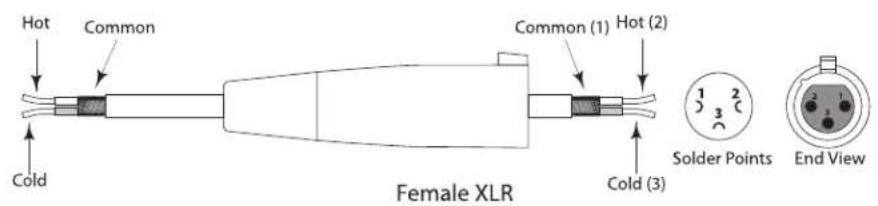
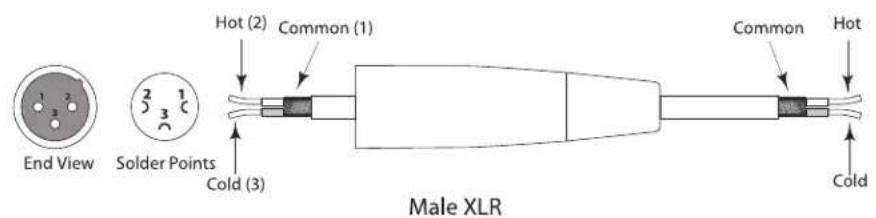
dB1500a and dB1800a XLR WIRING DIAGRAM
The dB1500a and dB1800a's input and outputs utilize industry standard XLR connectors. Below is a detailed wiring diagram for the dB1500a and dB1800a XLR connectors.
XLR Balanced Wiring Guide
CASTER INSTALLATION
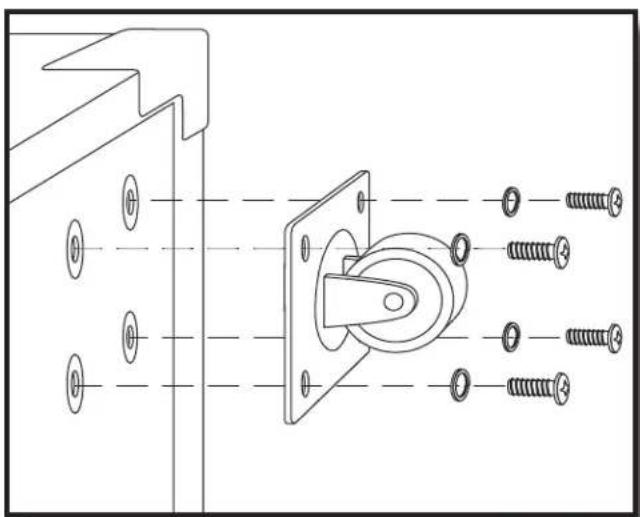
- Locate one caster and four each of the supplied screws and lock washers.
- Hold the caster in place and hand start the screws. Be careful to ensure that the screws are on the proper thread chase. DO NOT PUSH TEE NUT INTO ENCLOSURE.
- Use a screw driver to tighten the four screws. Be careful not to over tighten the screws.
- Repeat the steps above for the remaining three casters.
natural_image
Technical line drawing of a mechanical assembly with screws and mounting bracket (no text or symbols)Introduction
natural_image
Technical line drawing of a speaker with two speakers and a front-mounted unit (no text or symbols)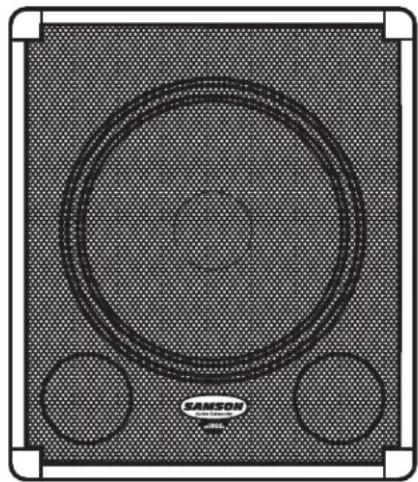
natural_image
Top-down view of a black-and-white sound speaker with two circular buttons and a brand logo (no text or symbols on the speaker itself)natural_image
Line drawing of two speakers standing upright with a box, no text or symbols presentnatural_image
Technical line drawing of two speakers with mesh backouts, no text or symbols presentnatural_image
Technical line drawing of a mechanical assembly with screws and mounting bracket (no text or symbols)Einleitung
natural_image
Line drawing of a speaker with two circular buttons and a textured base (no text or symbols)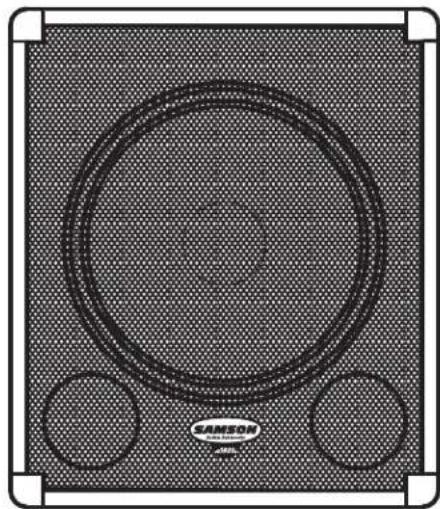
natural_image
Top-down view of a Siemens audio amplifier with two circular components and textured background (no text or symbols)natural_image
Line drawing of two speakers standing upright with a box, no text or symbols presentStereo Sub-Betrieb
natural_image
Two identical line drawings of a speaker-mounted device with mesh screen and antenna (no text or symbols)natural_image
Technical line drawing of a mechanical assembly with bolts and mounting bracket (no text or symbols)Introducción
natural_image
Technical line drawing of a speaker chamber with two speakers and a top panel (no text or symbols)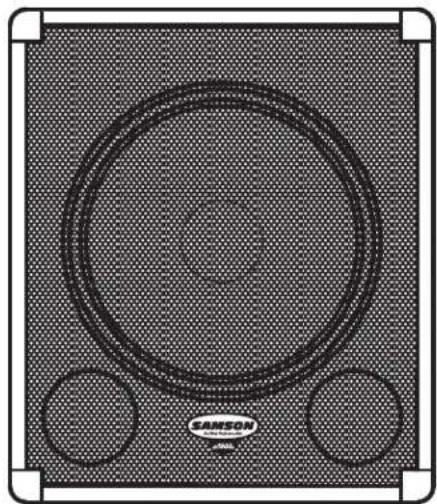
natural_image
Top-down view of a sound speaker with concentric circles and two side buttons, no visible text or symbols on the speaker itself.natural_image
Line drawing of two speakers standing upright with a box, no text or symbols presentnatural_image
Two identical speaker-mounted devices with mesh screens, shown from different angles (no text or symbols visible)Utilizar del dB1500a y dB1500a
PANEL DE CONTROL DEL dB1500a
flowchart
graph TD
    subgraph dB500
        A["dB500"]
        B["Servo 600"]
        C["dB500"]
    end
    subgraph Servo 600
        D["dB500"]
    end
    subgraph dB1500a
        E["STEREO MONO"]
        F["dB1500a"]
    end
    subgraph dB1500a
        G["STEREO MONO"]
        H["PL1602 Mixer"]
    end
natural_image
Technical line drawing of a mechanical assembly with screws and mounting bracket (no text or symbols)Introduzione
natural_image
Line drawing of a speaker chamber with two speakers and a top panel (no text or symbols)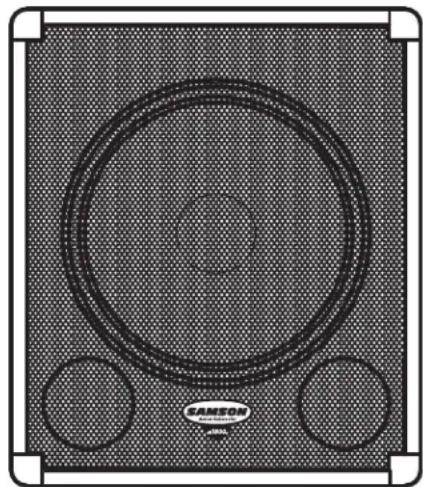
natural_image
Top-down view of a black-and-white photo of a SAMSON audio amplifier speaker with two circular buttons (no text or symbols on the speaker itself)natural_image
Line drawing of two speakers standing upright with a box, no text or symbols presentII Sub in Stereo
natural_image
Technical line drawing of two identical speaker-mounted devices with mesh backouts and ventilation grilles (no text or symbols)L'Uso del dB1500a e dB1800a
IL PANNELLO DI CONTROLLO DEL dB1500a
natural_image
Technical line drawing of a mechanical assembly with screws and mounting bracket (no text or symbols)dB1500a 15", Heavy Duty Driver, 2.5 inch voice coil, aluminum former
dB1800a 18", Heavy Duty Driver, 3 inch voice coil, aluminum former
Power Rating: 1000 Watts Program, 500 Watts RMS
Frequency response
dB1500a 30Hz-300Hz+/-3 dB
dB1800a 20Hz-240Hz+/-3 dB
Sensitivity:
dB1500a 94dB SPL @ 1 W/1m
dB1800a 95dB SPL @ 1 W/1m
Input Balanced
Connector: XLR - FEMALE
Output Balanced, high-passed tracking low frequency crossover point
Connector: XLR - MALE
Crossover Frequency: Variable 30Hz – 200Hz
Switch Functions
Stereo /Mono: Selects stereo or mono low frequency operation
Enclosure
Construction: 3/4" plywood, carpet covered
Finish: Black carpet
Corners: Steel
Casters: Three Inch Heavy Duty
Mounting: Integral 1 3/8" (35mm) Pole Mount Receptacle,
Dimensions:
| dB1500a | 20" (508mm) H x 24" (606 mm) W x 22.5" (573mm) D |
| dB1800a | 21.5" (545mm) H x 27" (681 mm) W x 23.25" (589mm) D |
Weight:
dB1500a 71 lbs.(32.25K)
dB1800a 80 lbs.(36.29K)
Specifications are subject to change without notice.
dB1500a 94 dB SPL @ 1 W/1m
dB1800a 95 dB SPL @ 1 W/1m
Eingang symmetrisch
dB1500a 94 dB SPL @ 1 W/1m
dB1800a 95 dB SPL @ 1 W/1m
Entrada Balanceada
Conector: XLR - HEMBRA
Conector: XLR - MACHO
Frecuencia crossover: Variable 30 Hz – 200 Hz
dB1800a 80 libras (36.29 Kg
)
dB1500a 94dB SPL @ 1W/1m
dB1800a 95dB SPL @ 1W/1m
Ingresso Bilanciato

- Safety Instructions/Consignes de sécurité/Sicherheitsvorkehrungen
- WARNING
- AVIS
- CAUTION
- ATTENTION
- Important Safety Instructions
- Table Of Contents
- English
- Français
- dB1500a and dB1800a Features
- Controls and Functions
- Front Panel Layout
- Configuring Your Speaker System
- Common Sub Operation
- Stereo Sub Operation
- Operating the dB1500a and dB1800a
- dB1500a and dB1800a CONTROL PANEL
- Level Control
- Sweep
- Stereo / Mono Switch
- The In and The Outs
- dB1500a and dB1800a MONO SUB WITH POWERED SATELLITES
- dB1500a and dB1800a STEREO SUB WITH POWERED SATELLITES
- dB1500a and dB1800a MONO SUB WITH PASSIVE SATELLITES
- dB1500a and dB1800a STEREO SUB WITH PASSIVE SATELLITES
- db1500a and dB1800a Connections
- dB1500a and dB1800a XLR WIRING DIAGRAM
- CASTER INSTALLATION
- Introduction
- Einleitung
- Stereo Sub-Betrieb
- Introducción
- Utilizar del dB1500a y dB1500a
- PANEL DE CONTROL DEL dB1500a
- Introduzione
- II Sub in Stereo
- L'Uso del dB1500a e dB1800a
- IL PANNELLO DI CONTROLLO DEL dB1500a
Brand : SAMSON
Model : dB1500a
Category : Loudspeaker