Mondo DAB - Radio REVO - Free user manual and instructions
Find the device manual for free Mondo DAB REVO in PDF.



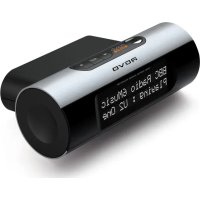
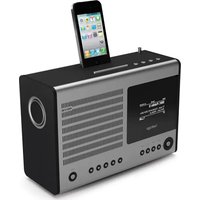
| Product type | DAB/DAB+ radio adapter with FM reception |
| Brand | REVO |
| Model | Mondo DAB |
| Dimensions (H x W x D) | 48 mm x 130 mm x 79 mm |
| Power supply | 9V 720 mA via included mains adapter |
| Frequency bands | DAB Band III (174–240 MHz), FM (87.5–108 MHz) |
| Display | High resolution negative LCD, 2 x 16 characters |
| Audio outputs | Stereo line output RCA (phono), 3.5mm headphone jack |
| Antenna | Flexible antenna |
| Remote control | Infrared included |
| Number of presets | 10 for DAB, 10 for FM |
| Alarm functions | Dual alarm, snooze (5/10/15/30 min), sleep (15–90 min) |
| DAB display modes | 9 modes: scrolling text, signal strength, program type, etc. |
| DAB station order | Alphanumeric, Validator (available at top), Ensemble |
| DRC (Dynamic Range Control) | High, Low, Off |
| FM audio setting | Stereo or Mono |
| FM search | Strong stations or all stations |
| Warranty | 1 year (from date of purchase) |
| Spare parts available | Remote control, power supply, RCA cables |
| Maintenance and cleaning | Clean with a soft, dry cloth. Do not use abrasive products. |
| Safety | Do not expose to water. Do not open the casing. Use only the supplied adapter. |
Frequently Asked Questions - Mondo DAB REVO
User questions about Mondo DAB REVO
0 question about this device. Answer the ones you know or ask your own.
Ask a new question about this device
Download the instructions for your Radio in PDF format for free! Find your manual Mondo DAB - REVO and take your electronic device back in hand. On this page are published all the documents necessary for the use of your device. Mondo DAB by REVO.
USER MANUAL Mondo DAB REVO
D A B D I G I T A L R A D I O
Digital Audio Broadcasting
mondoDAB+
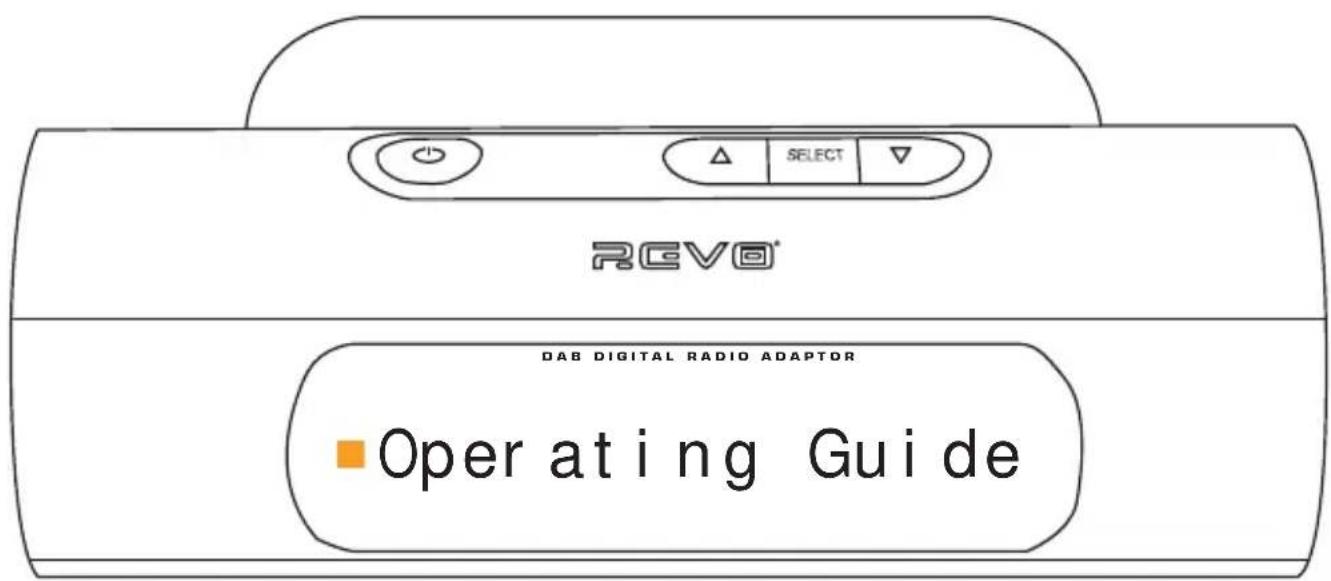
Guide de Fonctionnement Bedienungsanleitung Guida Operativa
Preface
Copyright and Acknowledgements
Copyright © 2009 Revo Technologies Ltd. All rights reserved.
Revo Technologies Ltd
The Inox Building
Caldwellside
Lanark
Scotland
United Kingdom
ML11 7SR
Tel. 01555 666 161
Fax. 01555 66 33 44
Email. enquiries@revo.co.uk
Website: www.revo.co.uk
The information in this guide is believed to be correct at the time of publication. However, our policy is one of continuous development and so the information is subject to change without notice.
Revo® and Mondo™ are trademarks or registered trademarks of Revo Technologies Limited.
SafetyWarnings
Do not operate this radio near water.
Avoid small objects and liquids from getting into this product.
Do not remove screws or casing parts.
Use only the power supply unit supplied.
EEC: This product has been designed and type-tested to comply with EU requirements and carries a CE mark.


Technical Support
Should you encounter any difficulties with the operation of your Revo product, or should you suspect that it may be faulty in some way, please call our technical support department on the number below:
01555 666 161
Alternatively, email support@revo.co.uk or visit the troubleshooting section of our website at: www.revo.co.uk/support
Welcome to Revo 4
Benefits of DAB radio 4
Mondo overview and key features 4
Warranty 4
Warranty registration 4
Controls and Connections 5
Powering Mondo 5
DAB Operation 6
Change display mode 7
Finding and adding new stations 7
Saving station presets 7
Recalling station presets 7
DAB Menu Options 8
To change station order 8
Full Scan 8
Removing unavailable stations 8
Set DRC 9
Manual tuning 9
FM Operation 10
Saving station presets 10
Recalling station presets 10
FM Menu Options 11
Change FM scan strength 11
Audio Setting 11
Alarm Options 12+13
System Menu 14+15
Trouble-Shooting 16
Technician 17
Accessories and Spares 18
Welcome to Revo DAB
Thank you for buying our Mondo Digital Radio Adaptor, we feel sure that it will provide you with years of enjoyment and reliable service.
This guide has been designed to quickly get you up-and-running and listening to DAB digital radio, offer guidance on the more complex features of this product and provide information on safety, warranty and registration.
Benefits of DAB Radio
Clear, interference free digital sound
Many more stations, much more choice
No frequencies, select by station name
No re-tuning
Text information via LCD screen
Mondo Overview
Mondo is the simplest and most cost effective way to upgrade your hi-fi or home entertainment system to receive DAB and DAB+ Digital Radio broadcasts.
The Mondo adaptor easily connects to any device that has stereo RCA connectors, using the connection leads supplied.
Mondo also adds FM radio reception and alarm clock functionality to your set-up.
Warranty
Revo Technologies Ltd warrants to the purchaser that this product will be free
from parts and manufacturing defects in the course of normal use for a period of one year from the date of purchase. This warranty does not apply in cases of accidental damage, where the case has been removed, wear and tear, negligence, modification or inappropriate use.
Should you encounter problems with this product, please contact your supplier or alternatively see page 2 of this guide for technical support contact details.
Warranty Registration
It is a warranty condition that you register your purchase by either completing the warranty card enclosed with your radio or alternatively registering online at www.revo.co.uk/register
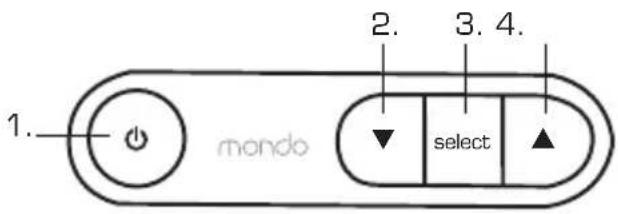
Controls and Connectors
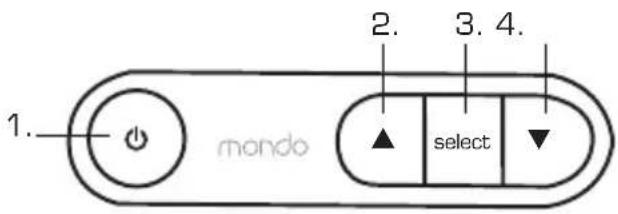
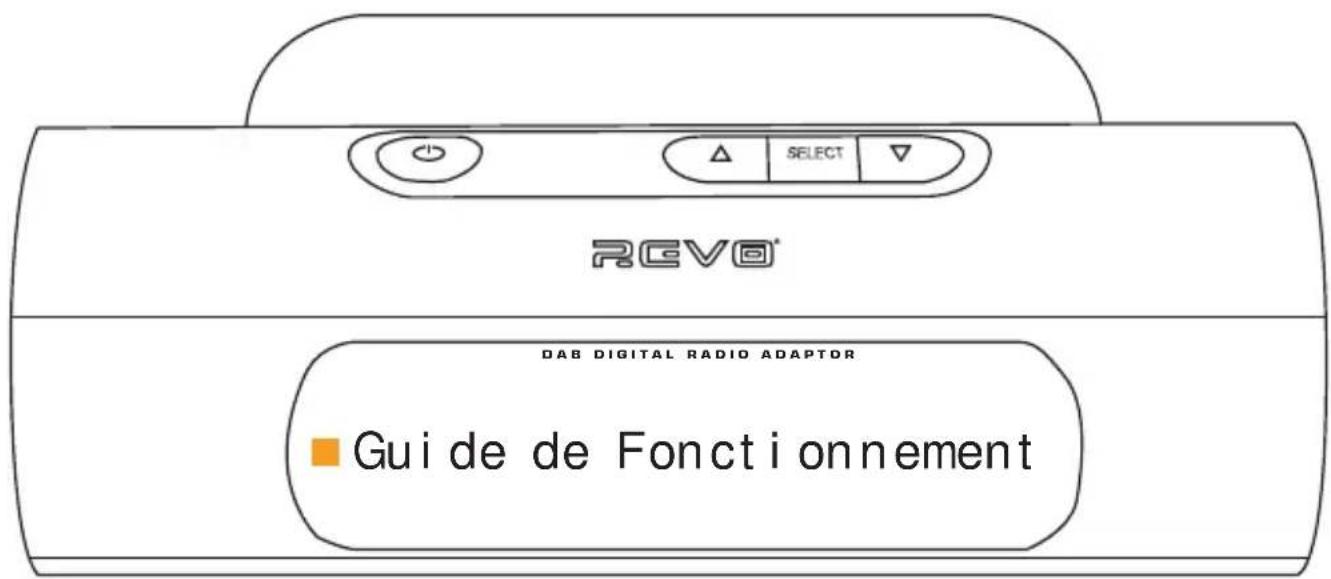
- Power
2.Scroll Down - Select
- Scroll Up
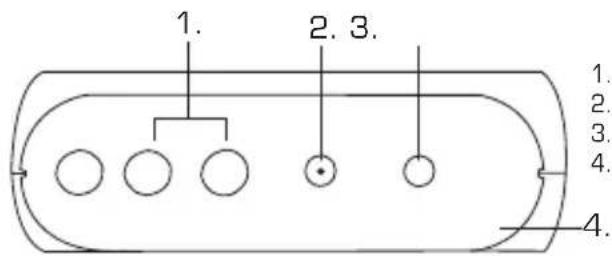
- Stereo RCA Line-Out
- DC Power Socket
- Headphone Socket
- Pig-Tail Antenna
Powering Mondo
Your Mondo DAB adaptor is powered from the mains using the power adaptor supplied.
Insert the power adaptor plug into the DC power socket on the rear of Mondo. Pressing the button will switch Mondo on.
IMPORTANT: Only use the power adaptor supplied. Replacements are available, see page 15 for further details.
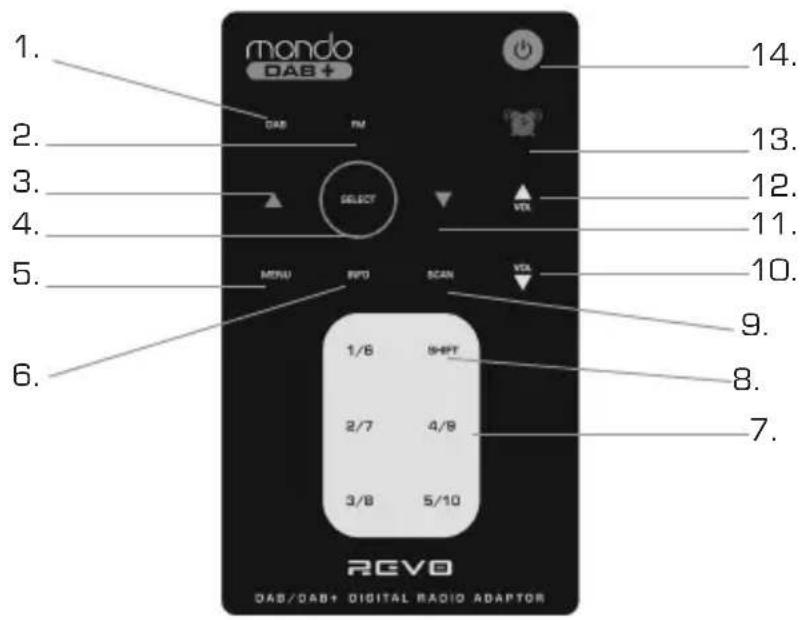
- DAB
- FM
3.Scroll Left - Select
- Menu
- Info
- Presets
- Shift
- Scan
- Volume Down
11.Scroll Right - Volume Up
- Alarm On/Off
- Standby
DAB Operation
Unravel Mondo's 'pig-tail' antenna and plug-in the power adaptor.
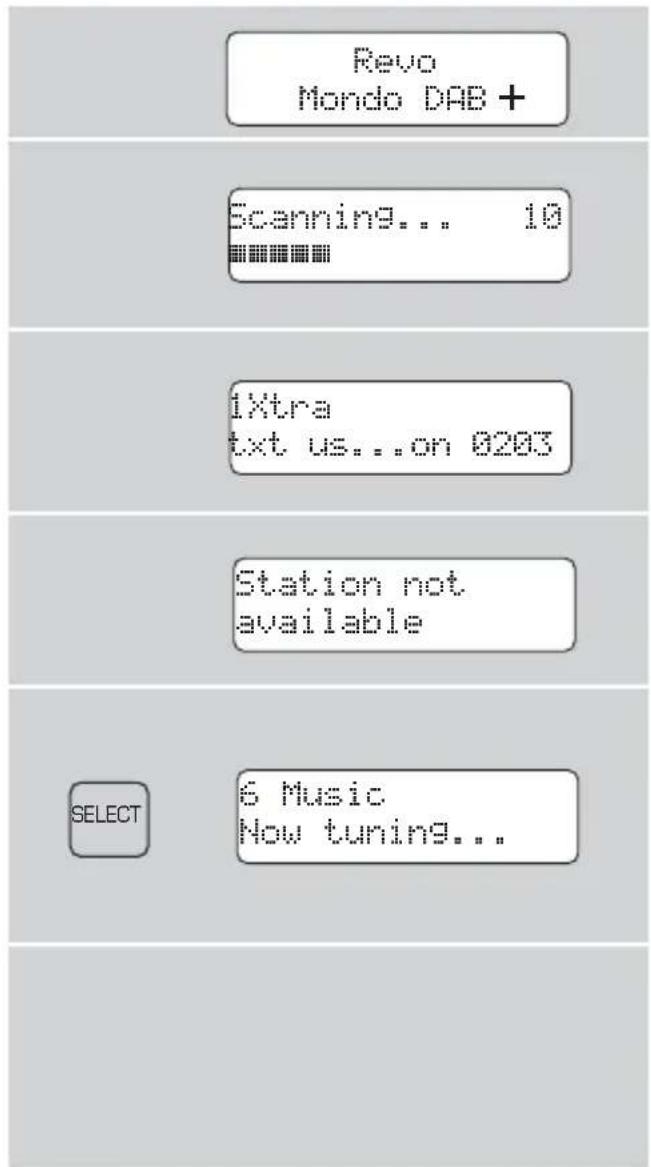
If this is the first time Mondo has been used, it will automatically scan for DAB stations in your area and store them. Pressing SCAN on the remote will manually initiate a station scan.
- When the station scan has been completed, stations will be displayed in numeric then alphabetic order. The first station in the list will be selected.
If no DAB signal is found, it may be necessary for you to relocate your radio. Or to check that DAB coverage is available in your area.
The top line of Mondo's LCD screen shows the name of the station currently selected. Press the and buttons on Mondo's top panel or remote control to scroll through the available stations. Press SELECT to select the chosen station.
To Change the Display Mode
Mondo has nine different display modes.
Press the INFO button on the remote to cycle through each mode.
These display modes are explained in the table below:
Display option Example
| Normal display with scrolling text | BBC Radio 1 calls cost max |
| Signal strength bar | t1kSPORT |
| Type of broadcast | BBC Radio 1 Pop Music |
| Broadcaster | BBC Radio 1 BBC National DAB |
| Station name and frequency | BBC Radio 1 12B 225.64MHz |
| Signal strength | Signal error 98 |
| Data rate and audio type | BBC Radio 1 128kbps / MP2 |
| Time | BBC Radio 1 10:32:59 |
| Date | BBC Radio 1 4-10-2009 |
Finding and Adding New Stations
As time passes, new stations will become available in your area. To find them and add them to your station list, simply press the SCAN button on your remote.
Saving Station Presets
Mondo has 10 preset locations for storing your favourite DAB stations.
To store a preset, press and hold the corresponding number on the remote control (white buttons).
To store a preset in locations 6 - 10, press shift and then press and hold the relevant preset button.
Recalling Station Presets
To recall a preset, press the corresponding button on the remote control.
To recall a preset from locations 6 - 10, press shift and then press the relevant preset button.
DAB Menu Options
Mondo has a number of functions that are accessed through the MENU button while in DAB Mode.
To change station order
Press MENU, then press or until the name of the option is displayed:
DAB #Station order
Press SELECT to select your choice.
To specify the order in which stations are displayed
Select the Station order option.
Press or to step between the station order options:
Press SELECT to select the current option.
Station Order #Alphanumeric
The following table describes the options available under the 'Station Order' menu:
Station order Description
| Alphanumeric Displays all stations in alphanumeric order. | |
| Valid | Rearranges station list so that all unavailable stations are moved to the bottom of the list. |
| Ensemble | Ensembles are groups of stations owned and broadcast by the same operator. |
Full Scan
You may wish to perform a full scan if you move Mondo to a different location. This will clear the current station list and write a new list of all the stations available in the new location.
To perform a Full Scan, press the MENU button then use the and buttons to scroll to Full scan and press SELECT.
Removing 'Unavailable' Stations
To remove 'unavailable' stations from Mondo's station list, ie. those that display a ? before the station name, you can use the 'Prune' option.
Press the MENU button then use the and buttons to scroll to Prune and press SELECT.
To set the dynamic range control
Mondo includes a dynamic range control that automatically boosts the volume of quieter sounds for listening in noisy environments.
To set the DRC level press the MENU button then use the and buttons to scroll to DRC and press SELECT.
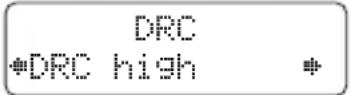
The display shows the current DRC level and allows you to adjust it as follows:
DRC Description
Off Dynamic Range Control is switched off
Low Dynamic Range Control is set to half normal level.
High Dynamic Range Control is switched on; the default setting recommended for noisy environments.
Use the and buttons to select your desired DRC level and press SELECT to confirm.
To use manual tuning
To select the Manual tune option, press the MENU button then use the and buttons to scroll to Manual tune and press SELECT.
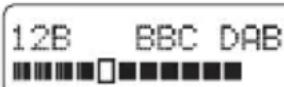
The display shows the current station number and frequency:
Manual Tune #12B 225.64Hz
Press or to step between the stations and press SELECT to select the current station.
If there is a station corresponding to this station number and frequency the display will show the station name, and a tuning meter showing the signal strength.
FM Operation
To listen to FM radio stations press the FM button on your remote control.
If this is the first time Mondo has been in FM mode, it will start at the beginning of the FM frequency range. Otherwise, the last FM station you were listening to will be selected.
To scan through the FM frequency range press the or buttons on your remote control or on Mondo itself.
To 'SEEK' the next active station, press the SELECT button on Mondo or the SCAN button on your remote control.
Saving Station Presets
Mondo has 10 preset locations for storing your favourite FM stations.
To set a preset, press and hold the corresponding number on the remote control (white buttons).
To store a preset in locations 6 - 10, press shift and then press and hold the relevant preset button.

Recalling Station Presets
To recall a preset, press the corresponding button on the remote control.
To recall a preset from locations 6 - 10, press shift and then press the relevant preset button.
FM Menu Options
Mondo has a number of functions that are accessed through the MENU button while in FM Mode.
To change the FM scan strength
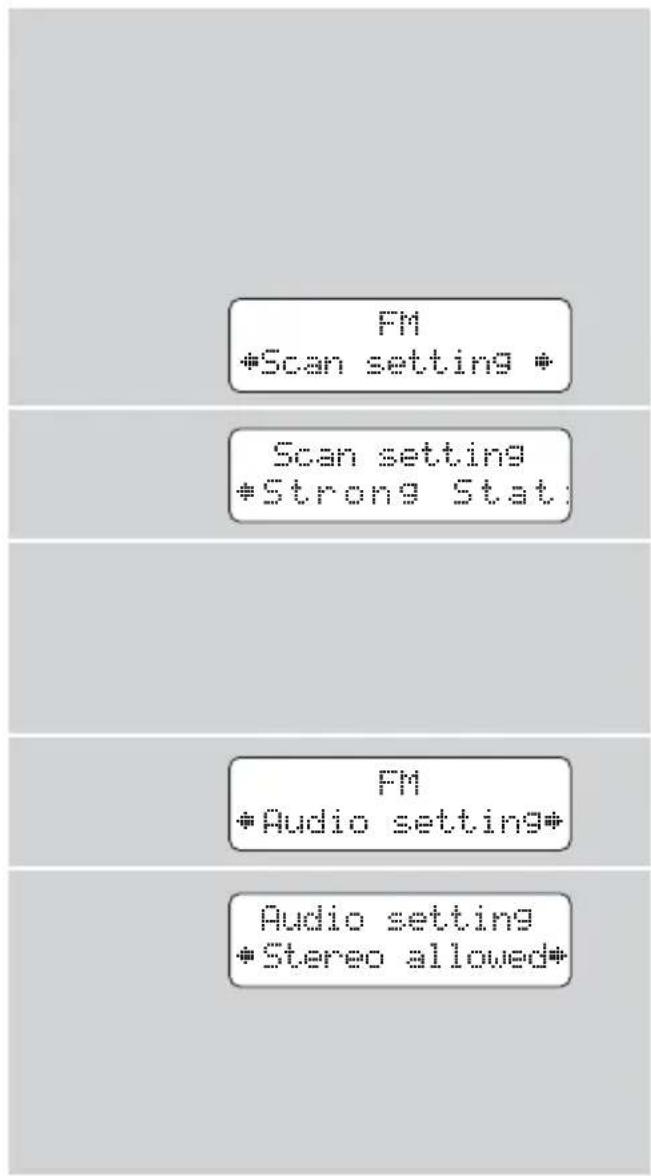
Mondo offers two different scan types in FM mode. This makes finding FM stations easier. You can scan for 'Strong stations' (stations with a strong signal) or 'All Stations' (regardless of signal strength).
Press the MENU button then use the and buttons to scroll to Scan setting and press SELECT.
Use the and buttons to make your selection and press SELECT to confirm choice.
Audio Setting
Depending on the type of audio equipment that you connect Mondo to, you may have to choose between stereo or mono output.
Press the MENU button then use the and buttons to scroll to Audio setting and press SELECT.
Use the and buttons to make your selection and press SELECT to confirm choice.
Alarm Options
To access the alarm clock functions, press the button on your remote. Pressing once will display Alarm 1 and pressing twice will display Alarm 2. To confirm the Alarm you wish to set press SELECT.
Once you have selected an alarm, Mondo will automatically take you through the alarm adjustment wizard.
Firstly you will be asked to set the alarm to On or Off. Use the on your remote and SELECT to confirm choice.
Next, you will be asked to set the alarm On Time. Use the on your remote to set the hour and SELECT to confirm choice. Now set the minutes, again using the on your remote and SELECT to confirm choice.
You will now be prompted to set the alarm Duration, this is the period that the alarm will sound for. Use the on your remote to choose the Duration and SELECT to confirm choice.
Next, you will be asked to choose the source that the alarm will use. Your options are Buzzer, FM or DAB. Use the on your remote to choose the Source and SELECT to confirm choice.
If you have selected FM or DAB as the alarm source, you will be given the choice of Last listened station or a preset, for the alarm will activate with. Use the on your remote to choose and SELECT to confirm choice.
Alarm 1 Setup
Alarm 1 Wizard Alarm On
Alarm 1 Wizard On time 12:52
Alarm 1 Wizard Duration 60 Mins
Alarm 1 Wizard Source DAB
Alarm 1 Wizard Last Listened
You will now be prompted to choose the alarm type. There are three options - Daily, Weekdays, Weekends. Use the on your remote to choose and SELECT to confirm choice.
Finally, you will be given the option to set the alarm volume level. Use the on your remote to adjust the level and SELECT to confirm choice.
Mondo will now save the alarm settings automatically.
When the alarm sounds, pressing the button will stop the alarm.
Snoopze Mode
During an alarm activation, pressing SELECT will take Mondo into Snooze mode. The default snooze duration is 5 minutes, this can be increased to 10, 15 or 30 minutes by repeated presses of SELECT.
Alarm 1 Wizard Daily
Alarm 1 Wizard
Alarm Saved
Shoots 5 minutes
System Menu
Setting Mondo's Clock
To set Mondo's clock manually, press the MENU button on the remote then use the and buttons to scroll to System and press SELECT.
Next, using the and buttons, scroll to Time and press SELECT to confirm choice.
■ Again using the and buttons, scroll to Set Time/Date and press SELECT to confirm choice.
Mondo will now ask you to set the hour. Use the and buttons to change the hour then press SELECT to confirm. Now set the minutes, again using the and buttons and press SELECT to confirm choice.
Mondo will now ask you to set the date. Use the and buttons to select the day and press SELECT to confirm choice. Now set the month and year, again using the buttons and SELECT to confirm choice.
Change Between 12/24hr Clock
To change between 12/24 clock, press the MENU button on the remote then use the and buttons to scroll to System and press SELECT.
Next, using the and buttons, scroll to Time and press SELECT to confirm choice.
Again using the and buttons, scroll to Set 12/24 hour and press SELECT to confirm choice.
Use the and buttons to make your selection and press SELECT to confirm choice.
DAB
System

Time
Set Time/Date
Set time
20:51
Time
Set 12/24 hour
Set 12/24 hour
Set 12 hour
Set Date Format
To set the date format, press the MENU button on the remote then use the and buttons to scroll to System and press SELECT.
Next, using the and buttons, scroll to Time and press SELECT to confirm choice.
- Again using the and buttons, scroll to Set date format and press SELECT to confirm choice.
Use the and buttons to make your selection and press SELECT to confirm choice.
Sleep Mode
Sleep mode allows you to set Mondo to turn itself off after a pre-determined period of time (between 15 - 90 minutes).
To set the SLEEP time period, press the MENU button, then use the buttons on the remote control to scroll through to System, then press SELECT.
Now use the buttons to scroll through to Sleep then press SELECT.
Using the buttons, increase or decrease the sleep duration and press SELECT to confirm your choice.
To adjust backlight
Press MENU, then press or until System is displayed and press SELECT to confirm your choice.
Next, press or until Backlight is displayed and press SELECT.
There are two Backlight settings that can be adjusted - On level & Standby level.
Press or to choose which level you wish to adjust and press SELECT to confirm the choice.
There are three brightness level options: Low, Medium and High. Press or until the desired level is displayed and press SELECT to confirm your choice.
To display the software version
Press the MENU button then use the and buttons to scroll to System. Now select SW Version from this menu. The software version number is displayed on the lower line of the display. You should specify this when speaking to Revo Technical Support.
To perform a factory reset
Press the MENU button then use the and buttons to scroll to System.
Now use the and buttons to scroll to Factory Reset? and press select. Confirm that you would like to proceed with the factory reset by selecting Yes and press SELECT to confirm.
Trouble-Shooting
C. I hear a 'burbling' noise on some stations.
A. If the signal strength is too low, a breakup in reception can occur. This sound is the result. Make sure that Mondo's wire ("Pig-Tail") antenna has been unraveled and is straight. If the problem persists, try moving Mondo to another location or check that you have DAB coverage in your locality.
Q. I get a ? before some stations in my station list, and don't seem to be able to select them.
A. '?' before a station name means that it is either inactive or unavailable. This can be because they are not currently broadcasting, you are outside their broadcast area or you have simply lost reception. To remove inactive or unavailable stations, simply perform a Full Scan.
I get a 'clock not set' message.
A. Mondo needs to be able to receive a DAB signal in order to automatically set its clock, since this information is actually taken from the DAB signal. Try turning Mondo on and pressing the SCAN button on your remote control. If Mondo is able to find a DAB station, it will be able to set the time and date.
Technical Specification
General: Stereo DAB/DAB+ receiver with full Band III reception.
Frequency Ranges: DAB Band III [174 - 240 MHz]
DAB+ coverage
FM (87.5 - 108 MHz)
Antenna: "Pig-Tail" antenna
■ Input Connectors: DC power adaptor socket (230V adapter supplied)
■ Output Connectors: Stereo RCA Line Out 3.5mm headphone socket
LCD Display: High resolution 2 x 16 character negative display
Alarm Clock: Alarm clock with 'Sleep' function
Controls: Power, up, down and select
Remote Control: Infra-red remote control
Mains Power Supply: 9V 720mA
■ Approvals: CE marked and RoHS compliant.
Dimensions: 48mm (H) x 130mm (W) x 79mm (D)
Accessories and Spares
The following optional accessories and spare parts are available for Mondo. Please contact your local retailer or alternatively call us on 01555 666 161. Accessories and spare parts can also be purchased online at www.revo.co.uk
Remote Control:
Replacement Mondo remote control.
Mains Power Supply Unit:
Replacement power supply for Mondo.
Stereo RCA Leads:
Replacement leads to connect Mondo to a hi-fi system or similar.

D A B D I G I T A L R A D I O
Digital Audio Broadcasting
mondo DAB+
Preface
Revo Technologies Ltd The Inox Building
Caldwellside
Lanark
Scotland
United Kingdom
ML11 7SR
Tel. 01555 666 161
Fax. 01555 66 33 44
Email. enquiries@revo.co.uk Site Web: www.revo.co.uk
Alarm 1 Wizard Last Listened
Specifications Techniques
D A B D I G I T A L R A D I O
Digital Audio Broadcasting
mondoDAB+
Preface
Copyright and Acknowledgements
Copyright © 2009 Revo Technologies Ltd. All rights reserved.
Revo Technologies Ltd
The Inox Building
Caldwellside
Lanark
Scotland
United Kingdom
ML11 7SR
Tel. 01555 666 161
Fax. 01555 66 33 44
Email. enquiries@revo.co.uk
Website: www.revo.co.uk
Station Order #Alphanumeric
Alarm 1 Wizard Last Listened
The following optional accessories and spare parts are available for Mondo. Please contact your local retailer or alternatively call us on 00 44 1555 666 161. Accessories and spare parts can also be purchased online at www.revo.co.uk
Fernbedienung:
D A B D I G I T A L R A D I O
Digital Audio Broadcasting
mondo DAB+
Preface
Revo Technologies Ltd
The Inox Building
Caldwellside
Lanark
Scotland
United Kingdom
ML11 7SR
Tel. 01555 666 161
Fax. 01555 66 33 44
Email. enquiries@revo.co.uk
Sito web: www.revo.co.uk
Controls and Connectors
Alarm 1 Wizard Last Listened
Radio is our Religion
Revo Technologies Ltd The Inox Building Caldwellside Lanark Scotland United Kingdom ML11 7SR
Telephone Support 01555666161
Online Support www.revo.co.uk/support support@revo.co.uk


- mondoDAB+
- Preface
- Copyright and Acknowledgements
- SafetyWarnings
- Technical Support
- 666 161
- Welcome to Revo 4
- Controls and Connections 5
- DAB Operation 6
- DAB Menu Options 8
- Set DRC 9
- FM Operation 10
- FM Menu Options 11
- Alarm Options 12+13
- System Menu 14+15
- Trouble-Shooting 16
- Technician 17
- Accessories and Spares 18
- Welcome to Revo DAB
- Benefits of DAB Radio
- Mondo Overview
- Warranty
- Warranty Registration
- Controls and Connectors
- Powering Mondo
- DAB Operation
- To Change the Display Mode
- Finding and Adding New Stations
- Saving Station Presets
- Recalling Station Presets
- DAB Menu Options
- To change station order
- To specify the order in which stations are displayed
- Full Scan
- Removing 'Unavailable' Stations
- To set the dynamic range control
- DRC Description
- To use manual tuning
- FM Operation
- FM Menu Options
- To change the FM scan strength
- Audio Setting
- Alarm Options
- Snoopze Mode
- System Menu
- Setting Mondo's Clock
- Change Between 12/24hr Clock
- Set Date Format
- Sleep Mode
- To adjust backlight
- To display the software version
- To perform a factory reset
- Trouble-Shooting
- Technical Specification
- Accessories and Spares
- Remote Control:
- Mains Power Supply Unit:
- Stereo RCA Leads:
- mondo DAB+
- Specifications Techniques
- Fernbedienung:
- Radio is our Religion
Brand : REVO
Model : Mondo DAB
Category : Radio